
TEAM & REMOTE TEAM MANAGEMENT

Manage Your Entire Team in One Place

Bring your in-house team and remote members into one workspace. Assign roles and permissions, control what each person can access, organize responsibilities, and keep everyone connected to the work they’re responsible for.
Add team and remote members
Assign roles and permissions
Control access by responsibility
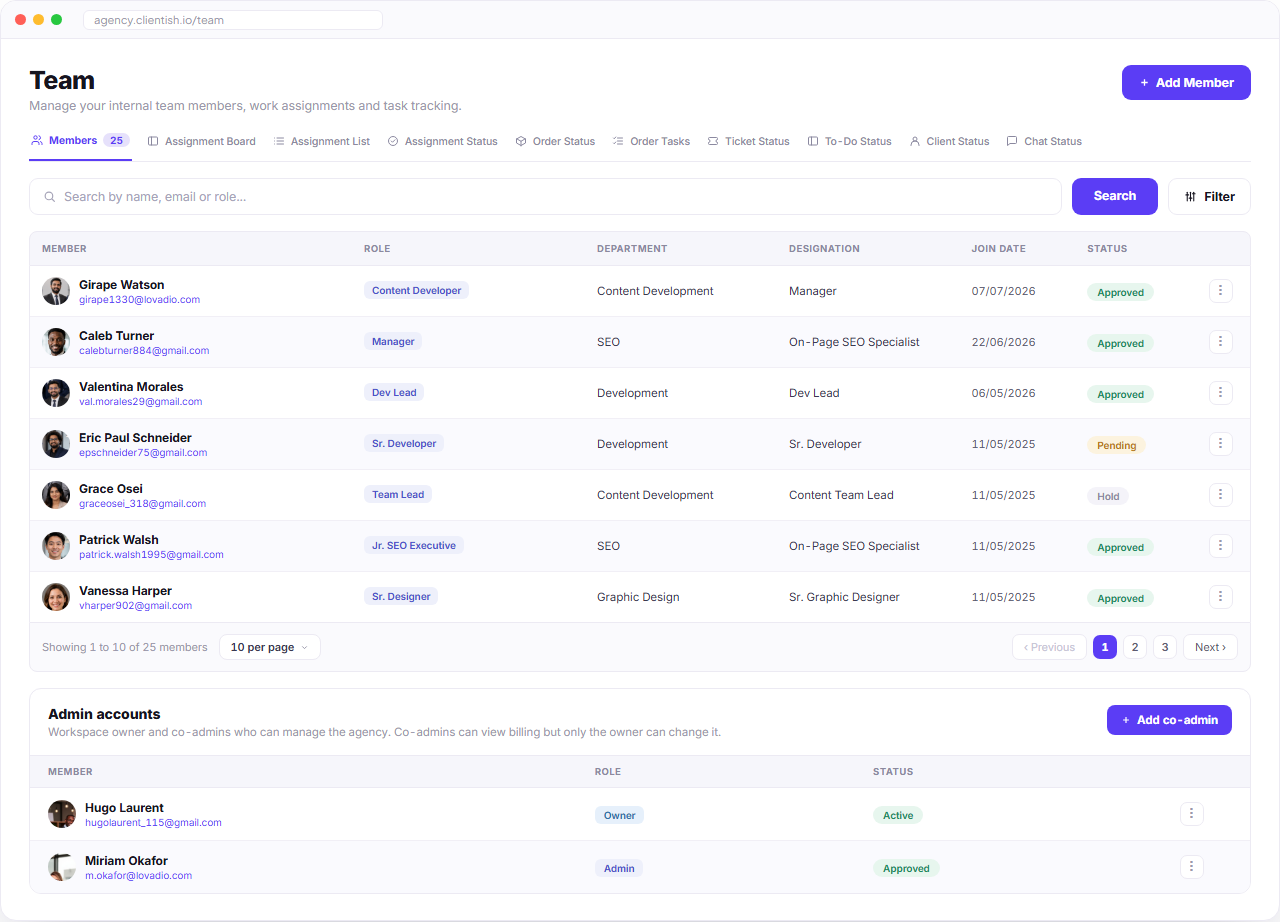
Team dashboard with members table, role filters, search, status badges and admin accounts
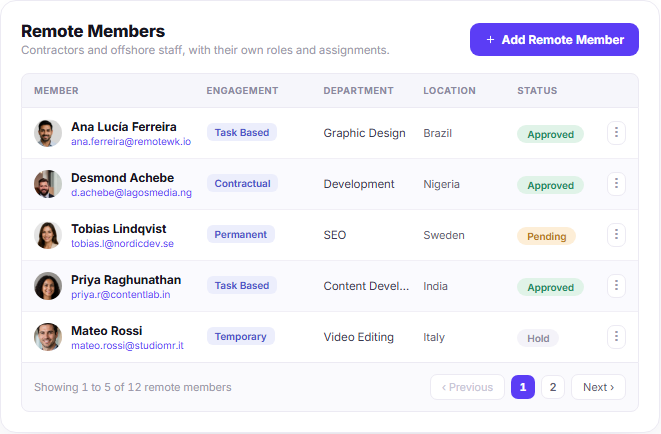
Remote members table with engagement type, department, location, status and pagination

REMOTE MEMBERS

Manage Remote Members Without Mixing Team Access

Keep remote members separate from your in-house team while still connecting them to the work they need to deliver. Give each member the right role, permissions, and assignments without exposing client details, pricing, or other parts of the workspace they don’t need.

Separate Remote Roster

Add, organize, and group remote members separately from your in-house team, with their own engagement type, department, location, and status.

Scoped Permissions

Control what remote members can access, including sensitive client details and order pricing, while keeping their assigned work available.

Their Own Work Dashboard

Remote members get a focused dashboard for their assigned work, files, and deadlines—without access to the rest of your agency workspace.

TEAM MANAGEMENT

Manage Roles, Departments, and Access in One Dashboard

Track every team member, organize by department, and control access — without switching between spreadsheets and tools. Everything you need is already here.
Centralized Team Directory

Keep every team member, role, designation, and department organized in one searchable place.

Organize Teams by Department

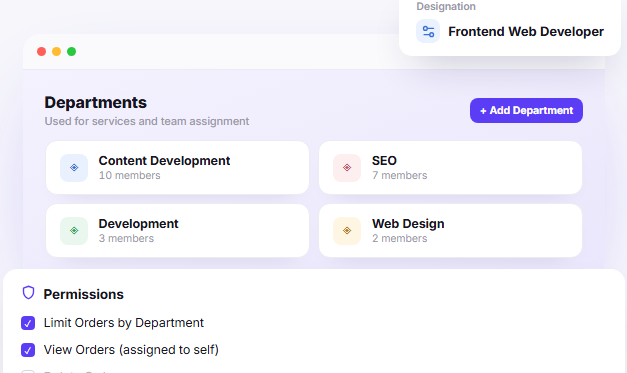
Group members into departments so responsibilities and work stay structured as your team grows.

Control Access by Role

Set permissions around what each member can view or manage, based on their responsibilities.

Limit Work by Department

Keep orders and assignments scoped to the relevant department when needed.

See Member Status at a Glance

Quickly see who is approved, pending, or on hold without opening individual profiles.

Departments and permissions dashboard showing team assignment groups and role permissions

Team Intelligence

Know What’s Happening Across Your Team

See how work is distributed across your team, who is responsible for what, and where attention is needed. Clientish brings assignments, activity, workload, and team structure together so managers can make better decisions without chasing updates.

See Who’s Working on What

View assigned orders and tasks across team members without checking each project separately.

Understand Team Workload

See who has work in progress and who has room before assigning the next order or task.

Follow Team Activity

Keep important team actions and work updates visible as they happen.

Keep Responsibility Clear

Know who owns each piece of work, which department they belong to, and where responsibilities sit.

Workload visibility
Assignment tracking
Team activity
Clear ownership

Onboard New Team Members With the Right Access From Day One

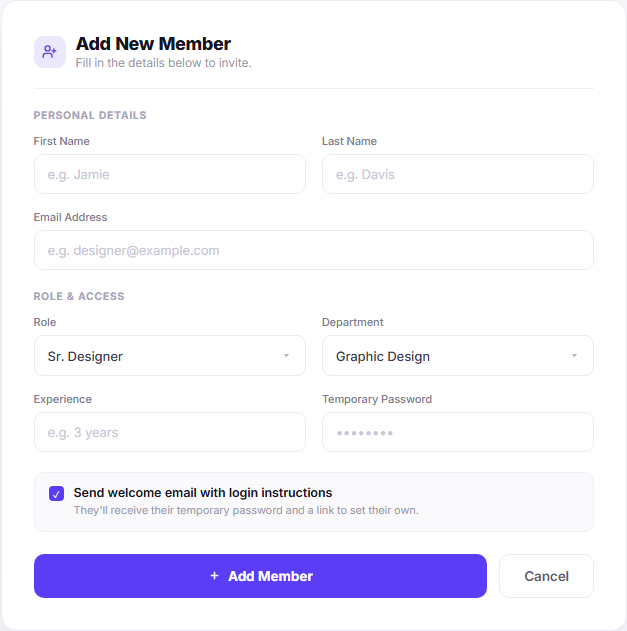
Add a new team member, place them in the right department, assign their role, and set up access from one form. Once added, they receive the login details they need to get started.
Add New Team Members

Create a member profile with their basic details and email address.

Assign Roles and Access

Choose the right role so each member gets access based on their responsibilities.

Place Them in the Right Department

Add members to the department they work with and keep your team structure organized.

Send Login Instructions Automatically

Send a welcome email with login instructions as soon as the member is added.

Add new member form with personal details, role access, welcome email and action buttons

Grow Your Team Without Adding More Admin

As your team grows, keep roles, departments, access, and responsibilities organized without rebuilding how you work. Add people when you need them while keeping the same structure and control across the workspace.

Keep Roles Consistent

Use defined roles and permissions as new members join, instead of deciding access from scratch every time.

Expand Departments

Add members to the right departments as different parts of your team grow.

Keep Access Under Control

Give each person only the workspace access their responsibilities require.

Scale Without Losing Structure

Grow your in-house and remote teams while keeping ownership, access, and organization clear.

ACCESS MANAGEMENT

Control Each Team Member’s Access From One Profile

Open any team member profile to update their details, role, department, designation, and access settings from one place. You can also manage account security without moving between separate settings.
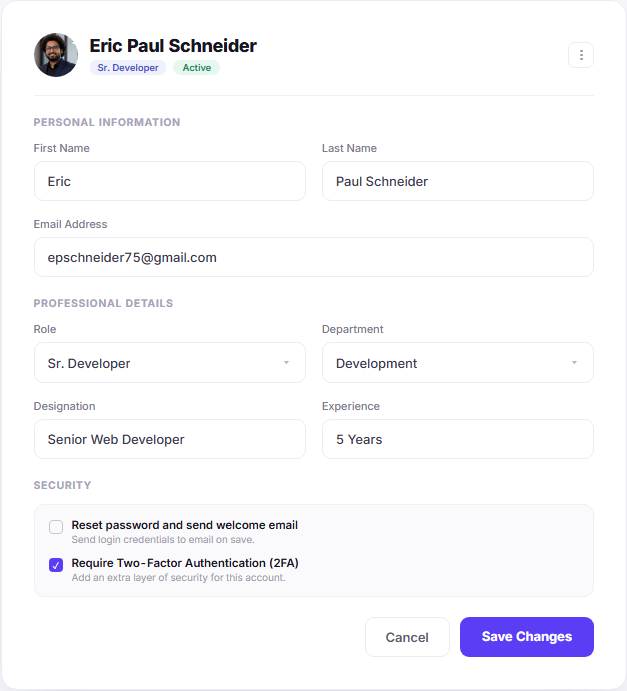
Update Member Details

Keep personal and professional information current as a team member’s role changes.

Change Roles and Departments

Move members between roles or departments while keeping their profile and work connected.

Control Individual Access

Set what each member can access based on their role and responsibilities.

Manage Account Security

Require two-factor authentication, reset credentials, and send new login instructions when needed.

Edit team member profile form with personal information, professional details and security settings

Keep Access Clear as Your Team Grows

Give each team member the access their role requires, then adjust it as responsibilities change. Roles and permissions keep sensitive information limited while letting everyone reach the tools and work they need.

Role-Based Control

Define what each role can view, manage, or update across the workspace.

Easy Permission Changes

Adjust access when responsibilities change without rebuilding the member’s profile.

Protected Client Data

Limit access to sensitive client, order, and pricing information based on responsibility.

Flexible Roles

Create roles around how your agency actually works instead of giving everyone the same level of access.

See Every Team Member’s Workload and Activity

Open any team member profile to see what they’re responsible for, what’s currently moving, and what they’ve completed. Assigned clients, orders, tasks, tickets, work status, and activity history stay together in one member view.
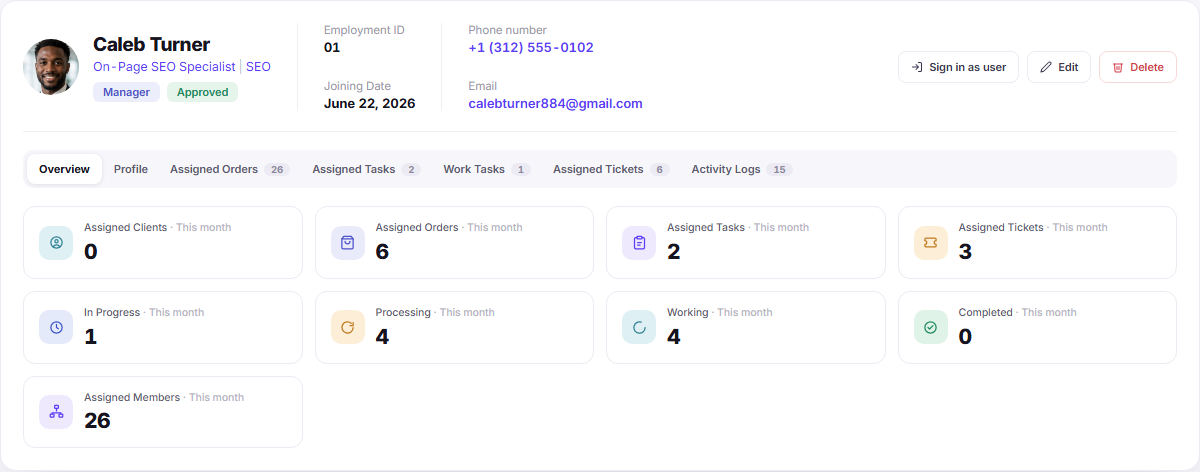
Workload at a Glance

See assigned clients, orders, tasks, and tickets without checking each module separately.

See What’s Moving and What’s Done

Track work across in-progress, processing, working, and completed statuses from the member profile.

Full activity history

Review logins, assignments, and recorded actions to understand each member’s recent activity and work history.

Team member activity dashboard with workload counts, status tabs and assigned monthly metrics

2min

Average Onboarding Time

100%

Role-Based Access Coverage

5k+

Team Members Managed

99.9%

Uptime Reliability

Start Growing Your Team Today

Join thousands of companies that use Clientish to manage their teams, assign roles, and scale without friction.

No credit card required · 7-day free trial · Cancel anytime

Scroll to Top