
Introducing Order Management 2.0

Manage Orders, Tasks, and Client
Communication from One Dashboard

Centralize order tracking, task management, and client communication in one place — with real-time visibility for your entire team.
No credit card required
14-day free trial
Cancel anytime
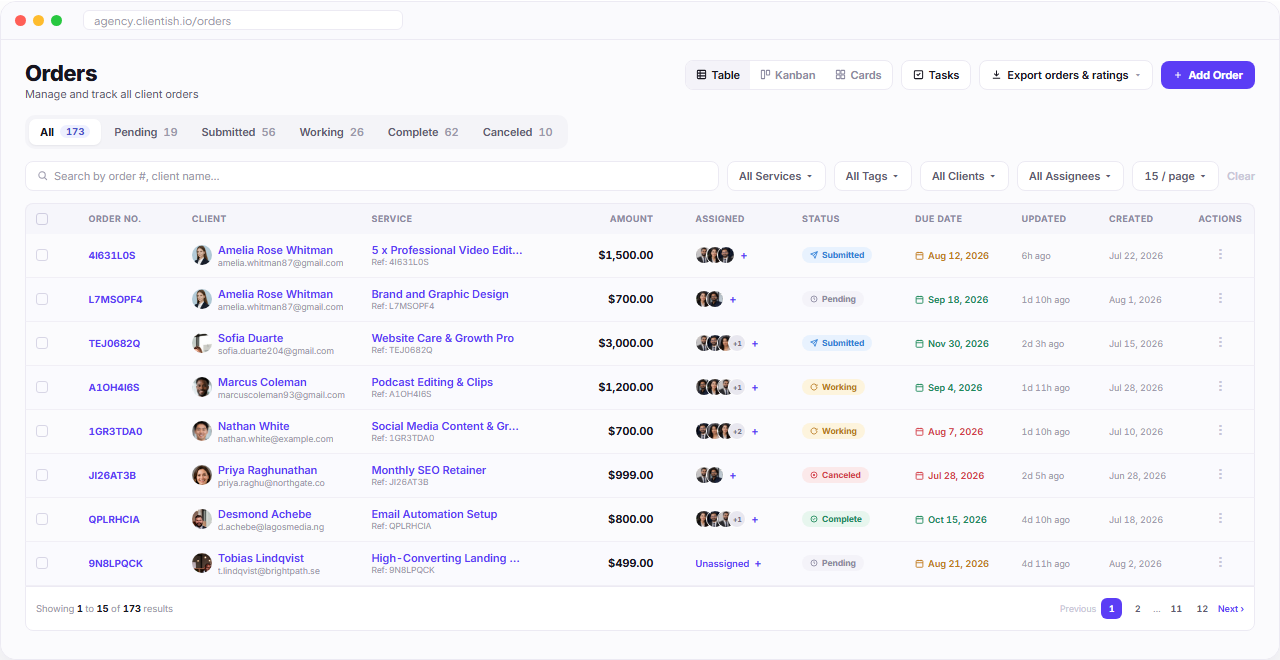
Clientish orders dashboard table with filters status tabs assignments and order rows

Order Management

Manage All Orders from One Smart Dashboard

Track client orders, assign team members, monitor progress, and manage workflows from a centralized system built for clarity and control.
Every order in one searchable table

Filter by status, service, client, or assignee — no more digging through spreadsheets.

Live status tracking

Pending, Submitted, Working, Complete, Canceled — always know exactly where an order stands.

Table, Kanban, or Card views

Switch between layouts instantly to match how your team likes to work.

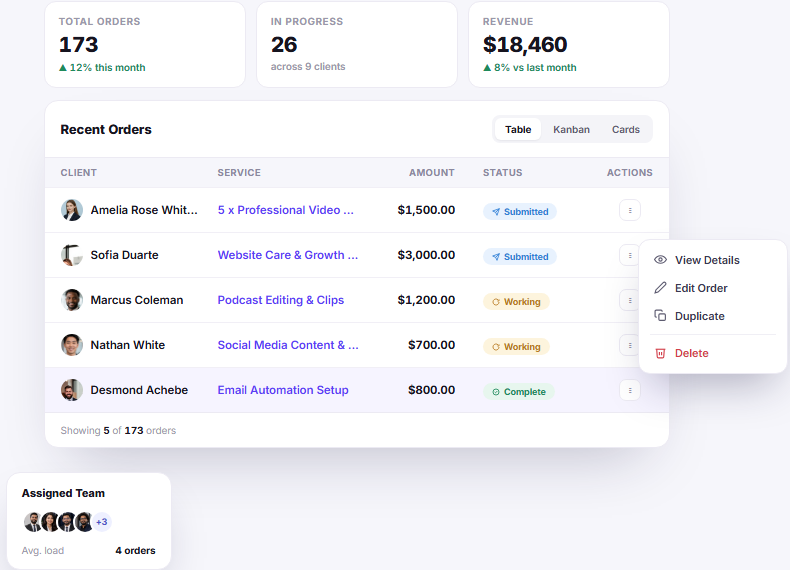
Order management dashboard summary with total orders progress revenue recent orders and action menu

Everything the Orders Dashboard Gives Your Team

Every view, filter, and action in the table above, built to keep every order moving.

Table, Kanban, or Cards

Switch between three layouts instantly to match how your team likes to work.

Live status pipeline

Pending, Submitted, Working, Complete, Canceled — with live counts on every tab.

Multi-assignee teams

See every teammate on an order at a glance with stacked avatars.

Smart filters

Filter by service, tags, client, or assignee to zero in on what matters.

Due-date urgency

Color-coded dates flag overdue work before it becomes a problem.

One-click bulk export

Export any filtered view of orders for reporting or invoicing in seconds.

Quick row actions

View, edit, or manage any order right from the table with a single click.

Ready to see it live?

Explore the full orders dashboard in an interactive demo.

Flexible Views

Work the Way Your Team Actually Thinks

Switch instantly between a Table for detail, a Kanban board for pipeline flow, or Cards for a visual overview — the same orders, three ways to see them.
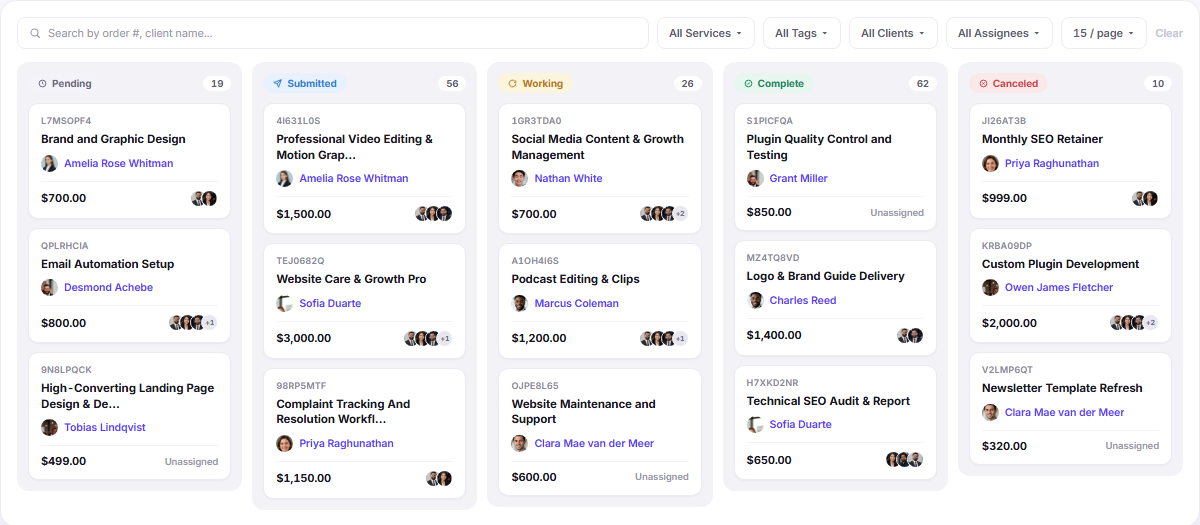
Drag to move work along

Pull an order into the next column and its status updates everywhere.

Live counts on every column

See where work is piling up before it becomes a missed deadline.

Remembered per member

Each person keeps the view they prefer, without resetting on every visit.

Order management kanban board with pending submitted working complete and cancelled columns

Instant Access

Access Every Client and Order Detail in One Place

Open an order and everything is already there — who the client is, who’s working on it, what was agreed, how to reach them, and where to bill. No tab-switching, no hunting.
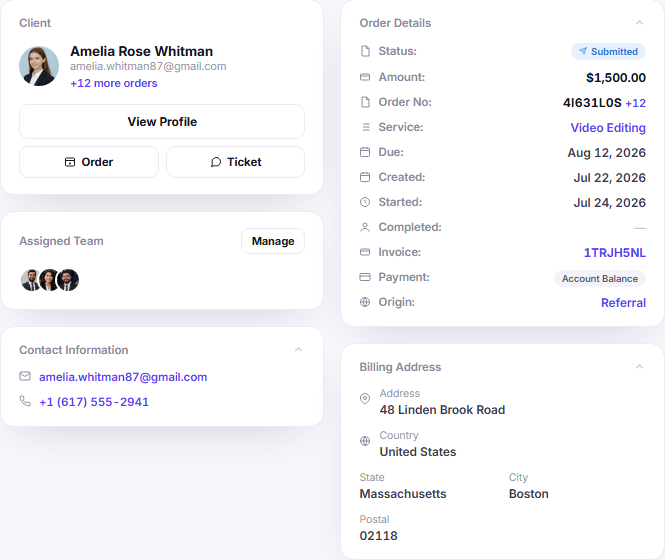
Complete client and order overview
Quick access to contact details
Billing and location information
One-click order, ticket, and invoice actions
Client and order detail dashboard with contact billing and quick order actions

Full Visibility

Manage Every Order with Full Project Visibility

Every order opens into a single command center — status, notes, assigned team, tasks, messages, and structured project data, all one click away.

Follow, edit, and change status from the header
Expandable project notes with full context
Tabs for tasks, messages, notes, data, and tags
Structured project data with one-click PDF export
Order project visibility dashboard with status notes tasks messages project data and tags

Order Conversations

Every Client Message, On the Order Itself

Feedback, revisions, and approvals live on the order they belong to — not buried in email. Reply to the client or switch to a private team thread without leaving the page.
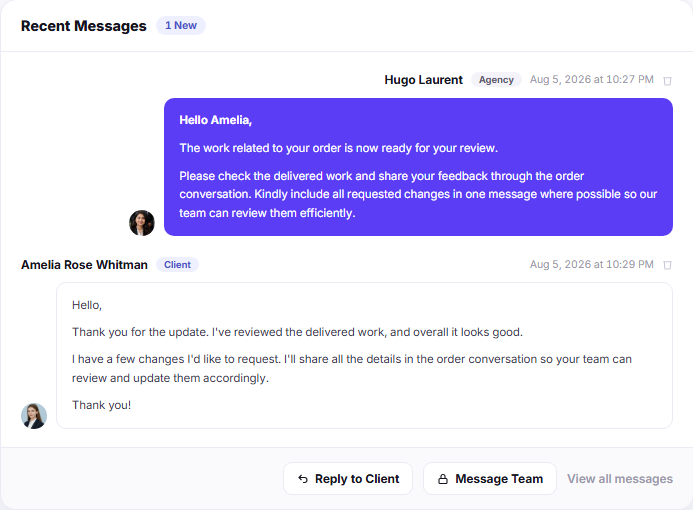
Client and internal team threads kept separate
Unread badge so nothing waits unanswered
Attach files and use saved replies inline
Full history stays with the order forever
Order conversation panel with client messages team notes attachments and saved replies

Real-Time Task Management

Break Every Order Into Shared, Trackable Tasks

Break down complex orders into manageable tasks. Assign teams, set deadlines, and track progress with our intuitive task interface.
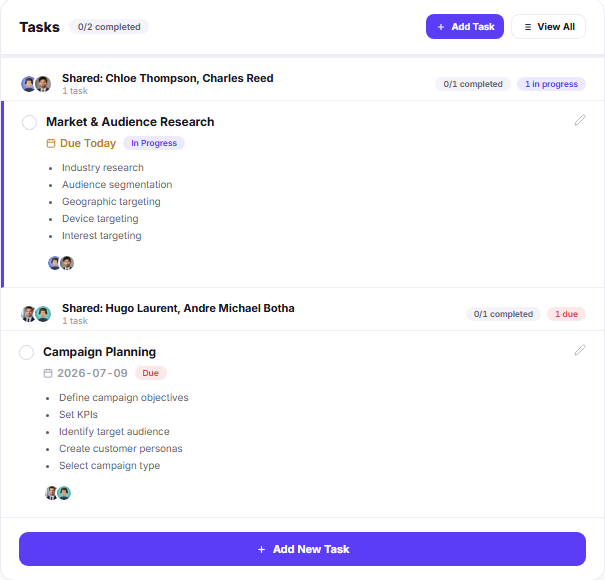
Order task management panel showing assigned tasks priorities subtasks and completion progress

Smart Assignment

Assign tasks to team members with a couple of clicks. Everyone knows exactly what they need to do next.

Visual Progress Tracking

Track task completion status against every order. Identify bottlenecks before they slip by.

Priority Control

Flag critical tasks to ensure they get immediate attention. Custom priority tags keep your team focused.

Shared Task Ownership

Share a single task across multiple teammates so accountability never falls on just one person.

Subtask Checklists

Break every task into smaller trackable steps, so nothing on a big order gets missed.

Communication

Keep Communication and History in One Place

Stay connected with your team and clients through real-time messaging, with a complete history of every action, update, and transaction.
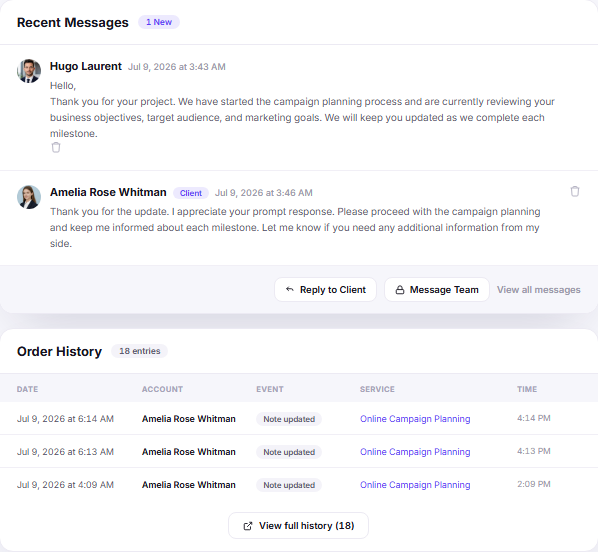
Centralized team and client communication
Real-time message updates
Full activity and audit history
Order communication and history dashboard with recent messages and activity timeline

Full Transparency Across Every Project

“You can’t just manage work… You track every conversation and action.”
No Lost Comms

Every message logged

Clear Tracking

Timestamped activity always

Team Coordination

Everyone stays in sync

Fast Resolution

Issues resolved quickly

Client Trust

Full transparency builds trust

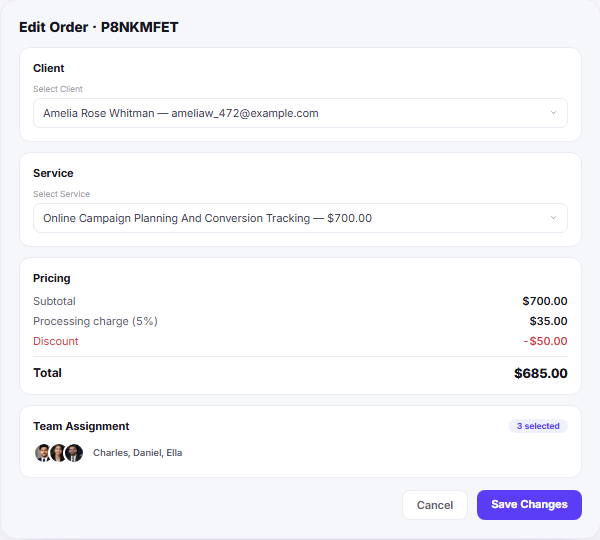
Edit order form for changing client service pricing discounts and team assignment

Order Management

Update Orders, Assign Teams, and Control Pricing Instantly

Re-link a client or service, adjust pricing, and reassign the team — all from one focused form. Changes save instantly and sync across the order.
Re-link an order to a different client or service
Adjust pricing and discounts with auto-calculated totals
Assign or reassign multiple team members in one click
See exactly who’s working on what, at a glance
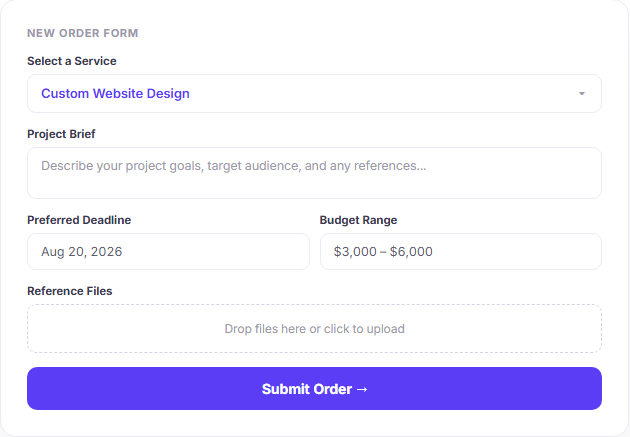
New order intake form with service selection project brief deadline budget and file upload

From Request to Pipeline

Collect a Complete Brief Before Work Even Starts

Every service can carry its own intake form. Clients fill it in once, and it lands as structured Project Data on the order — no more chasing details over email.

Custom fields per service, with conditional logic
File uploads attached straight to the order
Submissions arrive already organized as Project Data

Sell Every Package Right From Your Own Site

Every service gets its own payment link. Drop it into your website, a proposal, or a DM — the client pays, fills the intake form, and the order lands in your pipeline automatically.

Retainers That Renew Themselves

Mark any order as recurring and choose what happens on renewal — reopen it, spawn a fresh one, or just bill. Retainer clients keep flowing without manual re-entry.

★★★★★

“The unified order update interface completely changed how our agency operates. We’ve cut down admin time by 40% because we no longer have to jump between our CRM, billing software, and project management tools.”

ER

Ella Robinson

Operations Director, Vensa Digital

3x

Faster Order Processing

0%

Billing Discrepancies

10k+

Orders Tracked

99.9%

Uptime Reliability

Simplify Your Order Management Workflow

Join thousands of modern teams who have streamlined their operations, from order to delivery, without friction.

No credit card required · 14-day free trial · Cancel anytime

Scroll to Top