
Four Forms. One Workflow.

Take orders, capture enquiries, collect project details, and onboard new clients — every submission lands in your dashboard as a real record, not an email.
No credit card required
14-day free trial
Cancel anytime
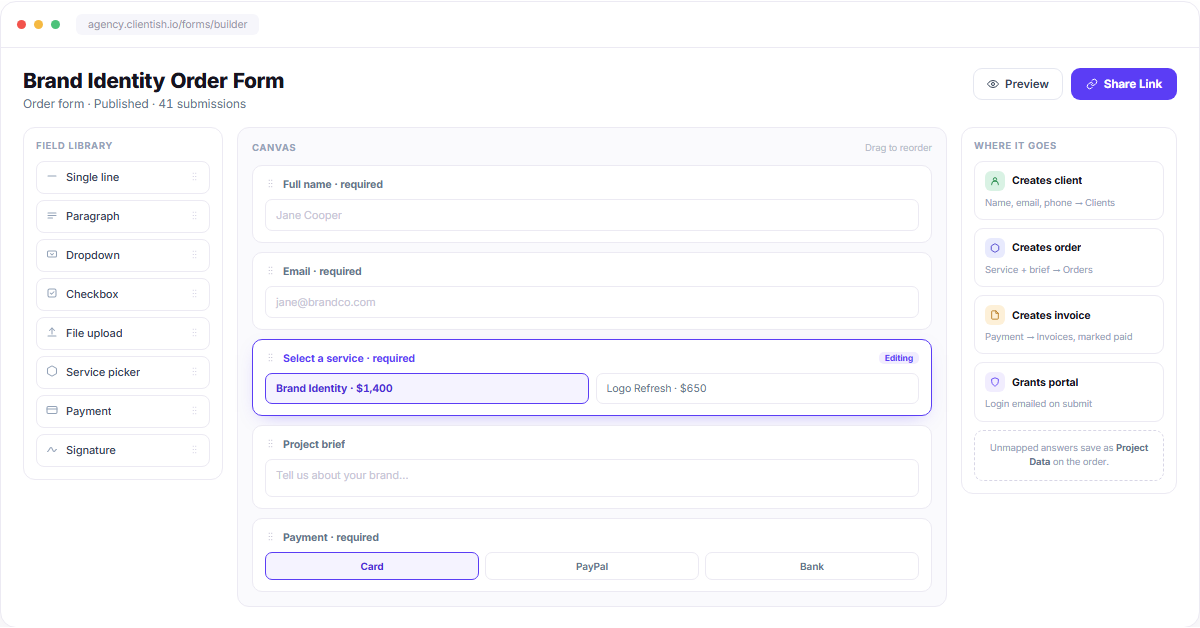
Form builder dashboard with field library canvas and destination mapping

Four Types

Every Form Knows Where Its Data Belongs

Pick a type and the fields map themselves — client records, orders, project data, or leads. No exports, no copy-paste.
Order Form

Sell a service and take payment on the spot.

Client + Order
Invoice paid
Portal access

Contact Form

Capture enquiries from your site or a shared link.

Lead record
Status: Contact
Secure reply thread

Intake Form

Collect the brief after an order is placed.

Project Data
Files and links
Per-service questions

Onboarding Form

Everything you need before work begins.

Lead record
Status: Lead
Convert in one click
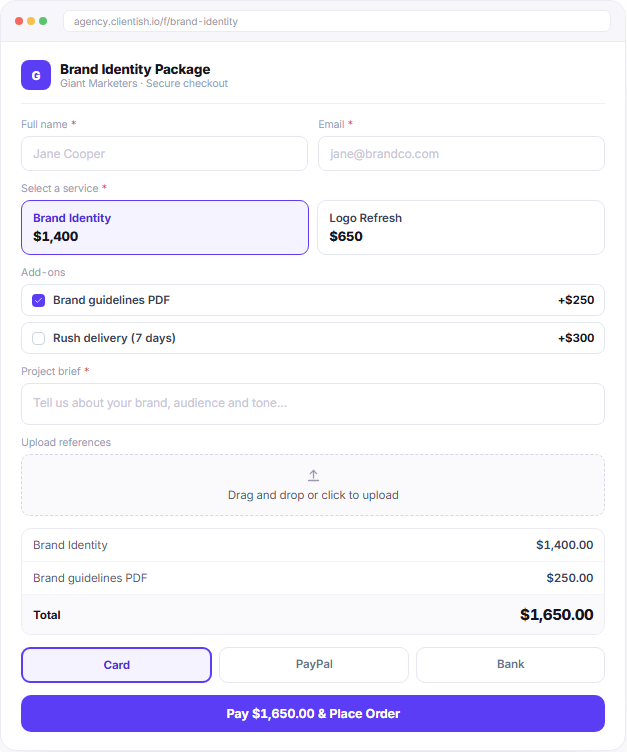
Published order form checkout with service selection payment and brief fields

Order Form

Share a Link, Get Paid

The client picks a service, fills the brief, and pays — all on one page. The moment payment clears, the client, order, invoice and portal login exist in your dashboard.

Services, add-ons and variants priced inline
Stripe, PayPal, Paddle and manual transfer
Coupons, tax rules and multi-currency
Client, order, invoice and portal created instantly

Contact & Onboarding

Enquiries Become Leads, Not Emails

Contact and onboarding submissions open a lead record with an owner, a status, and a follow-up date. Reply from inside the app and convert with one click when they are ready.
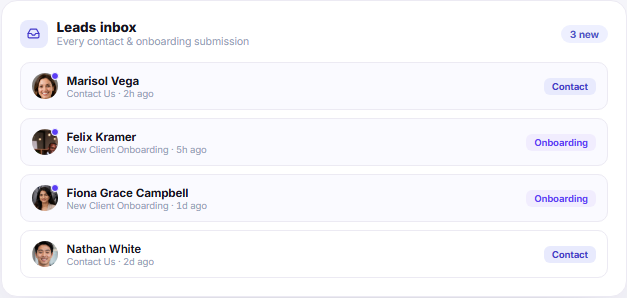
Contact form → lead with status Contact
Onboarding form → lead with status Lead
Reply by email without leaving the record
Convert to client, answers and all
Leads inbox showing contact and onboarding form submissions
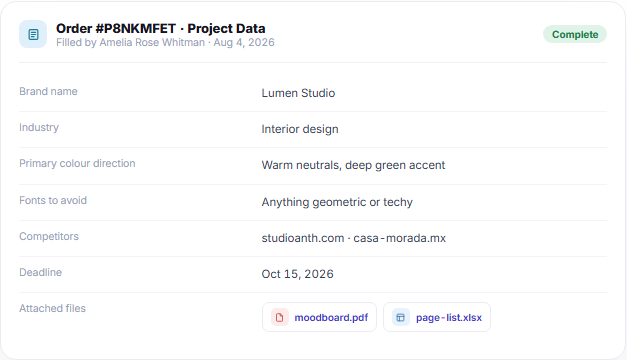
Order intake project data panel with uploaded brief files

Intake Form

Every Brief Attached to Its Order

Send an intake form after the order is placed and the answers land as Project Data on that order — so the team opens one screen and sees the full brief, files included.

Answers save straight onto the order
Files, spreadsheets and links in one place
Chase incomplete briefs automatically
Different intake per service

Everything You Need on the Canvas

Drag fields in, set what’s required, add conditional rules, and publish — no developer, no plugin.

Drag & drop builder

Reorder any field by dragging — the live form updates instantly.

Conditional logic

Show or hide fields based on what the client picked.

File & spreadsheet

Collect references, briefs and deliverable lists in one go.

Payment fields

Card, PayPal, Paddle, Aamarpay, SSLCommerz or bank transfer.

Signature & agreement

Type, draw or upload a signature before submitting.

Coupons & tax

Discounts and country tax rules applied at checkout.

Spam protection

Captcha and required-field rules keep junk out of your inbox.

Export responses

Download any form’s submissions as CSV or Excel.

We replaced a Typeform, a Google Sheet and a payment link with one order form. The client fills it, pays, and the whole job is already set up before anyone on my team opens a laptop.

Marisol Vega

Marisol Vega

Founder, Lumen Studio

One Link Is All Your Intake Stack Needs.

Orders, enquiries, briefs and onboarding — collected once, filed correctly, every time.

Scroll to Top