

“Client management” means something completely different depending on who you ask. A solo copywriter tracking three retainer clients has almost nothing in common with a 15-person digital agency juggling dozens of active projects, onboarding new accounts, and keeping a support queue under control. Lumping both into the same category and pointing them at the same tool rarely ends well for either of them.
That’s the honest starting point for this article. Clientish is built for businesses that do client work — but “client work” covers a wide range of people, team sizes, and day-to-day realities. A freelance designer, a boutique SEO consultancy, a growing creative agency, and a small IT firm all run on client relationships, yet the friction each one feels is different.
Quick answer: Clientish fits agencies, freelancers, consultants, and service businesses that manage ongoing client relationships, deliver defined services, and need one place to handle leads, orders, invoices, and client communication. If your work is project- or retainer-based and you regularly deal with the overhead of keeping clients informed and organized, there’s a strong chance it fits your situation.
What follows walks through each of these audiences in turn — starting with the specific pain points they typically run into, then looking at how Clientish addresses them. The goal is straightforward: by the end, you should have a clear sense of whether Clientish is built for someone like you, or whether your situation calls for something different.
Who Is Clientish Designed For? (The Short Answer)
Clientish is built for anyone who does client work — meaning you sell a service, deliver it, and invoice someone for it. That covers more ground than you might expect.
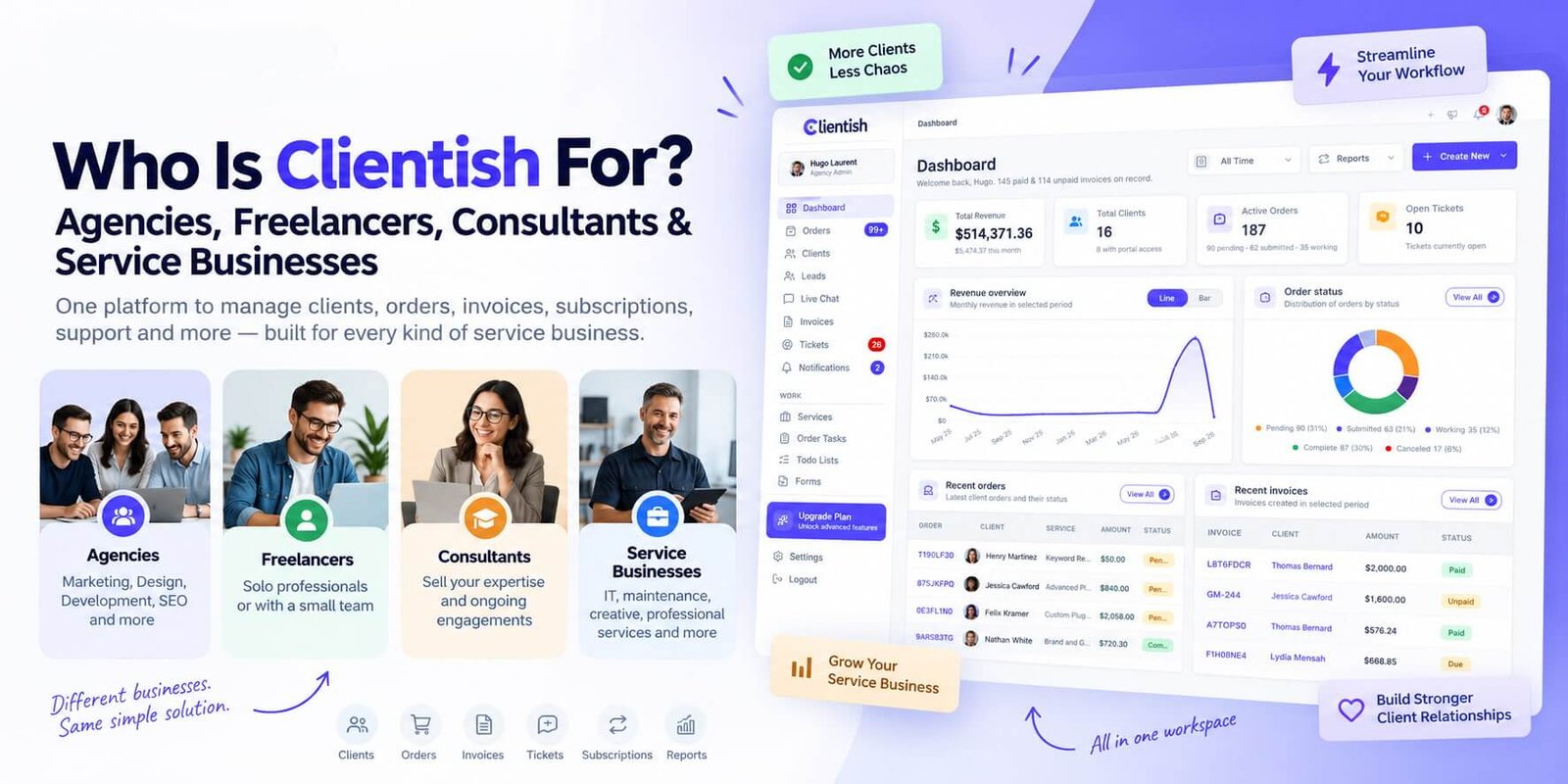
The core audiences are agencies, freelancers, consultants, and service businesses of various sizes. Each of those groups uses client management differently, and the sections below break down exactly how Clientish fits each one. If you’re somewhere in between — a small team that started as freelancers, or a consultant who’s growing into an agency — you’ll likely see yourself in more than one place.
What ties all of these people together is the same underlying problem: client work generates a lot of moving pieces across a lot of different tools, and at some point that stops working. Clientish is one workspace that holds clients, orders, invoices, tasks, support tickets, and a branded client portal together, so nothing gets lost between them.
The audiences this article covers:
- Agencies (marketing, design, development, SEO, and similar)
- Freelancers running solo or with occasional help
- Consultants selling expertise and ongoing engagements
- Service businesses and professional teams
Each section that follows leads with the specific friction that audience deals with, then explains how Clientish fits — or where it might not quite match.
Why Agencies Turn to Clientish
Running client work across multiple accounts is where things fall apart fastest. A project manager is chasing a client’s approval in email, an invoice is sitting in a separate billing tool, a support question came through on Slack, and nobody has a complete picture of where that client actually stands. That scattered context is the core problem agencies face — not any single missing feature, but the fact that client information lives in too many places at once.
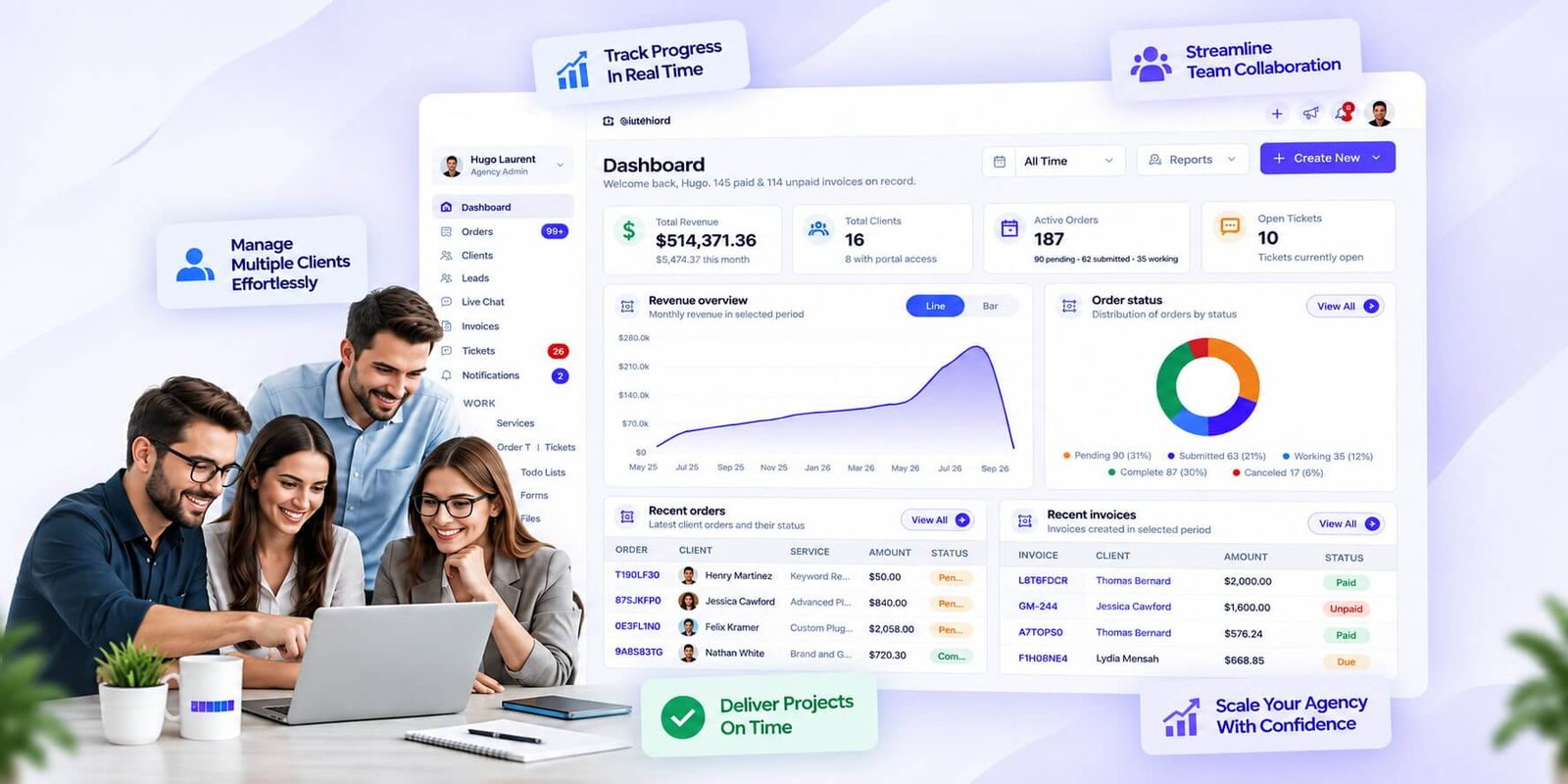
Clientish pulls clients, orders, invoices, tasks, and support tickets into one workspace. Instead of jumping between tools to reconstruct a client’s history before a call, you open one client record and it’s all there: what they’ve ordered, what they owe, what’s in progress, and what they’ve raised as issues.
SEO & Digital Marketing Agencies
Retainer clients and recurring deliverables are the norm in SEO and digital marketing work. Clientish supports both one-time and recurring pricing on services, so monthly retainers sit alongside project-based work in the same catalog. You can also build per-service intake forms with conditional logic — useful when onboarding a new SEO client who needs to answer different questions depending on which package they’ve bought.
Web Development Agencies
Dev projects tend to run through distinct stages — scoping, build, review, launch, handoff — and generic status labels don’t map to that cleanly. Clientish lets you create custom order statuses that match your actual delivery workflow, so team members and clients both see terminology that reflects the work rather than placeholder labels.
Design & Creative Agencies
Creative projects often involve external contractors: a copywriter brought in for one campaign, a photographer on a single brief. Clientish handles this with separate contractor access, distinct from both team members and clients. Contractors get their own login and see only what they’re assigned to — keeping internal pricing and other client records out of view.
One View of Every Client
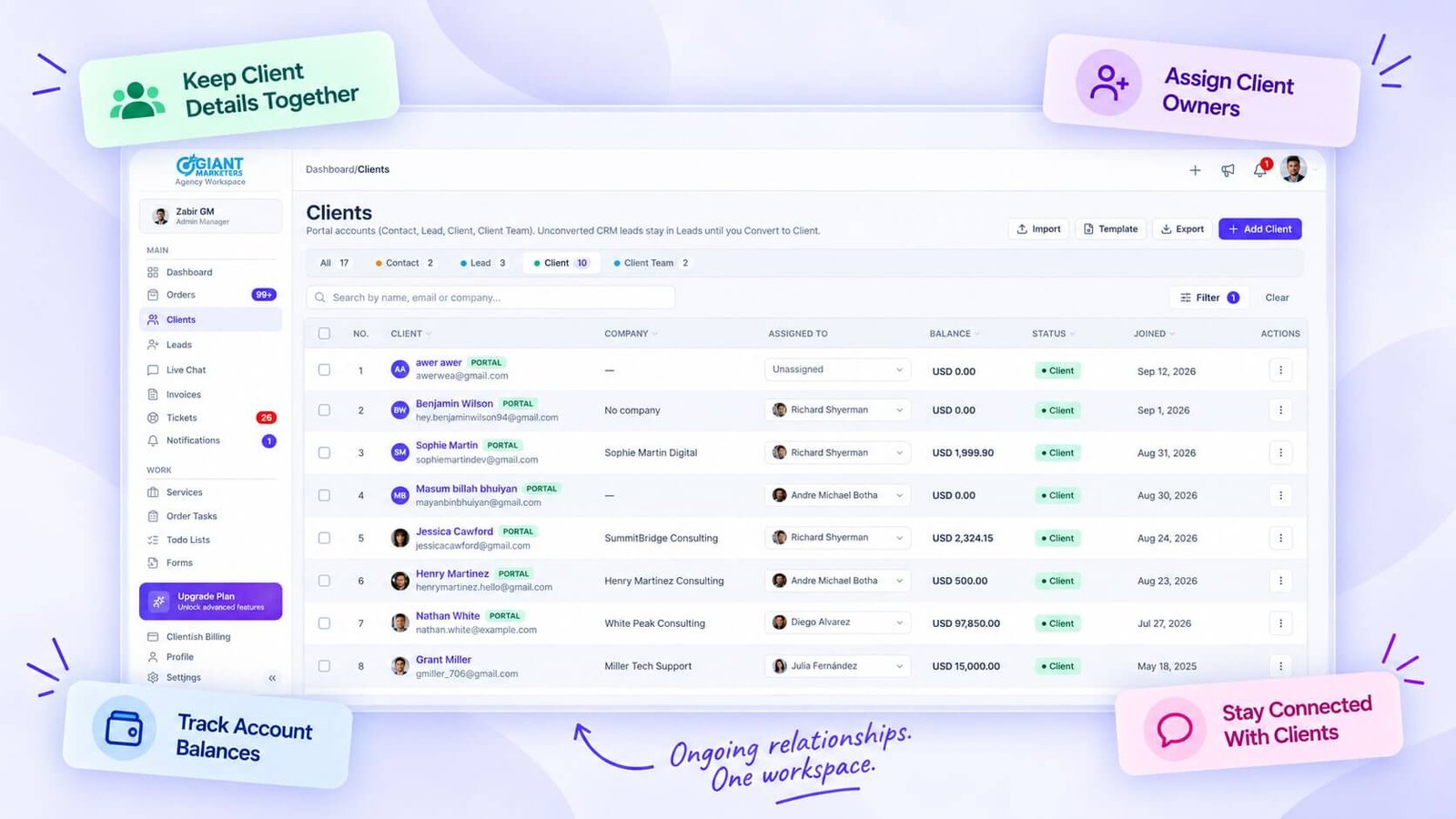
Each client in Clientish has a profile with contact details, billing address, account balance, total spent, and dedicated tabs for their orders, invoices, support tickets, and full activity log. That last point matters more than it sounds: when a client emails asking about an invoice from three months ago, you don’t need to dig — it’s on the same screen as everything else.
- Orders, invoices, and tickets are all visible from within a single client record
- Activity log tracks what’s happened across the account over time
- Client notes let you record anything that doesn’t belong in a formal record
A Branded Portal Clients Actually Use
Agencies often end up as the invisible layer behind a client’s experience — the work is good, but the delivery mechanism is a mix of email attachments and Google Drive links. Clientish gives clients a portal where they can log in and see their own orders, invoices, and tickets without involving the agency team every time they want a status update.
The portal is branded with your agency’s colors, logo, and favicon, and it runs on your own subdomain — so from the client’s perspective, it looks like a purpose-built client area, not a third-party tool.
Merge Duplicate Client Records
Agencies that have been operating for a few years often end up with messy client data — the same company entered twice, different email addresses for the same contact, spreadsheet imports that created duplicates. Clientish includes a merge function that collapses duplicate client records into one, so you’re not managing the same account in two places.
Separate Logins for Team, Clients, and Contractors
One login pool doesn’t work for an agency. Your team needs access to internal billing and task assignment. Clients should see their own stuff and nothing else. Contractors need a narrow slice based on what they’ve been brought in to do. Clientish keeps these three groups separate by design, with per-member permissions configurable in a grid and role-based defaults you can adjust per person.
How Freelancers Use Clientish Solo
Most freelancers aren’t drowning in complexity — they’re drowning in scattered tools, unpaid invoices, and clients who email at 11pm with “just a quick question.” Clientish works without a team behind it. You set it up for one person and run your whole client operation from there.
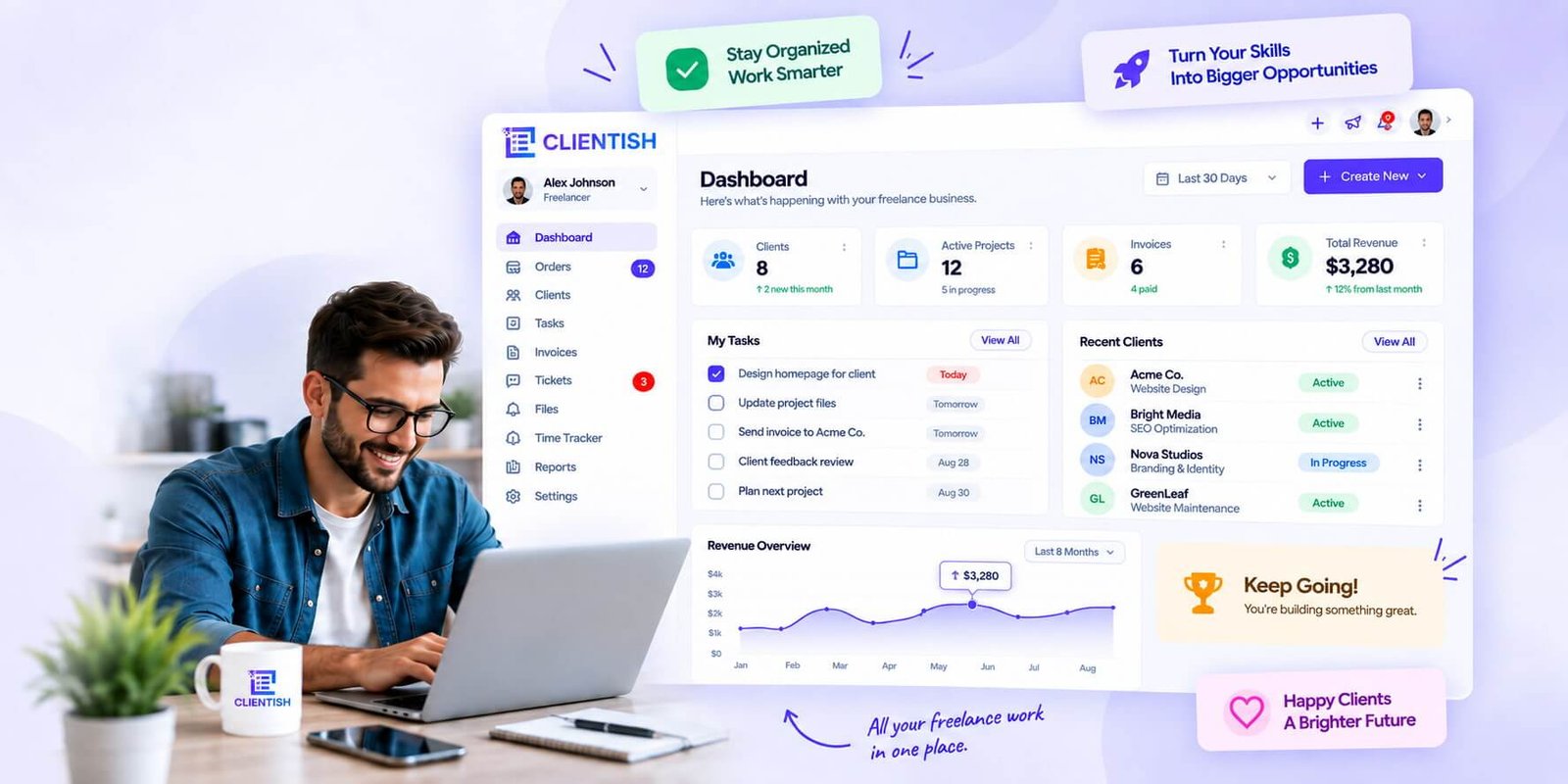
Look Professional Without a Team
Clients who hire a freelancer still expect a polished experience. Clientish gives you a branded client portal where clients log in, view their orders, download invoices, and submit support tickets — without you cc’ing anyone or forwarding anything manually.
That kind of client-facing setup usually signals “agency.” You get it as a solo operator from day one.
Keep Every Client in One Place
Each client has a profile that holds their contact details, billing address, notes, and a full activity log. Every order, invoice, and ticket sits under that profile.
No more hunting through your inbox to remember where a client’s project stands. You open their record and it’s all there.
Take Orders and Briefs Cleanly
Clientish’s intake forms sit inside each service you offer. A client places an order, fills in the brief right there, and you get everything you need before work starts — no follow-up email asking for the details they forgot to send.
Forms support conditional logic, so if a client selects a certain option, follow-up fields appear automatically. You can also download a client’s intake answers as a PDF to keep on file or reference offline.
Stop Chasing Invoices
Invoices in Clientish tie directly to orders. When a client pays, their status moves forward automatically — you don’t update it by hand.
For clients who’ve paid before or carry a balance, the account balance means payment can happen without them re-entering card details every time. Less friction usually means faster payment.
Share a Payment Link Without a Checkout Flow
If you want to send a client a link to pay for a specific service — without building a checkout page or sending them to a form — Clientish generates a shareable payment link per service. You paste it into an email or message and they pay directly.
Accepted payment methods include Stripe, PayPal, Paddle, SSLCommerz, and manual bank transfer, so you’re covered whether your clients are local or international.
Offer Add-Ons and Packages
Your services catalog can include add-ons alongside a base service — a freelance designer might list “rush delivery” or “extra revision round” as options a client selects at order time.
- Add-ons attach to individual services, not the whole catalog
- Pricing can be one-time or recurring
- You can set per-service currencies if you work across markets
Collect Feedback on Completed Work
Once work is done, clients can rate it and leave feedback directly through the portal. For a freelancer building a client base, that’s a lightweight way to track satisfaction without running a separate survey tool.
Start Small, Grow Later
You don’t configure team permissions or set up staff workflows to use Clientish as a solo operator. The team features are there if you eventually bring on a contractor or hire your first employee — but nothing about the solo setup requires them, and nothing breaks when you add someone later.
The Client Portal Experience: What Your Clients Actually See
The Client Portal is your agency’s branded, self-service hub where clients log in and handle their own end of the relationship — without emailing you to ask for a copy of an invoice or a status update. It lives on a subdomain, carries your logo and colours, and gives each client a view limited to their own account.
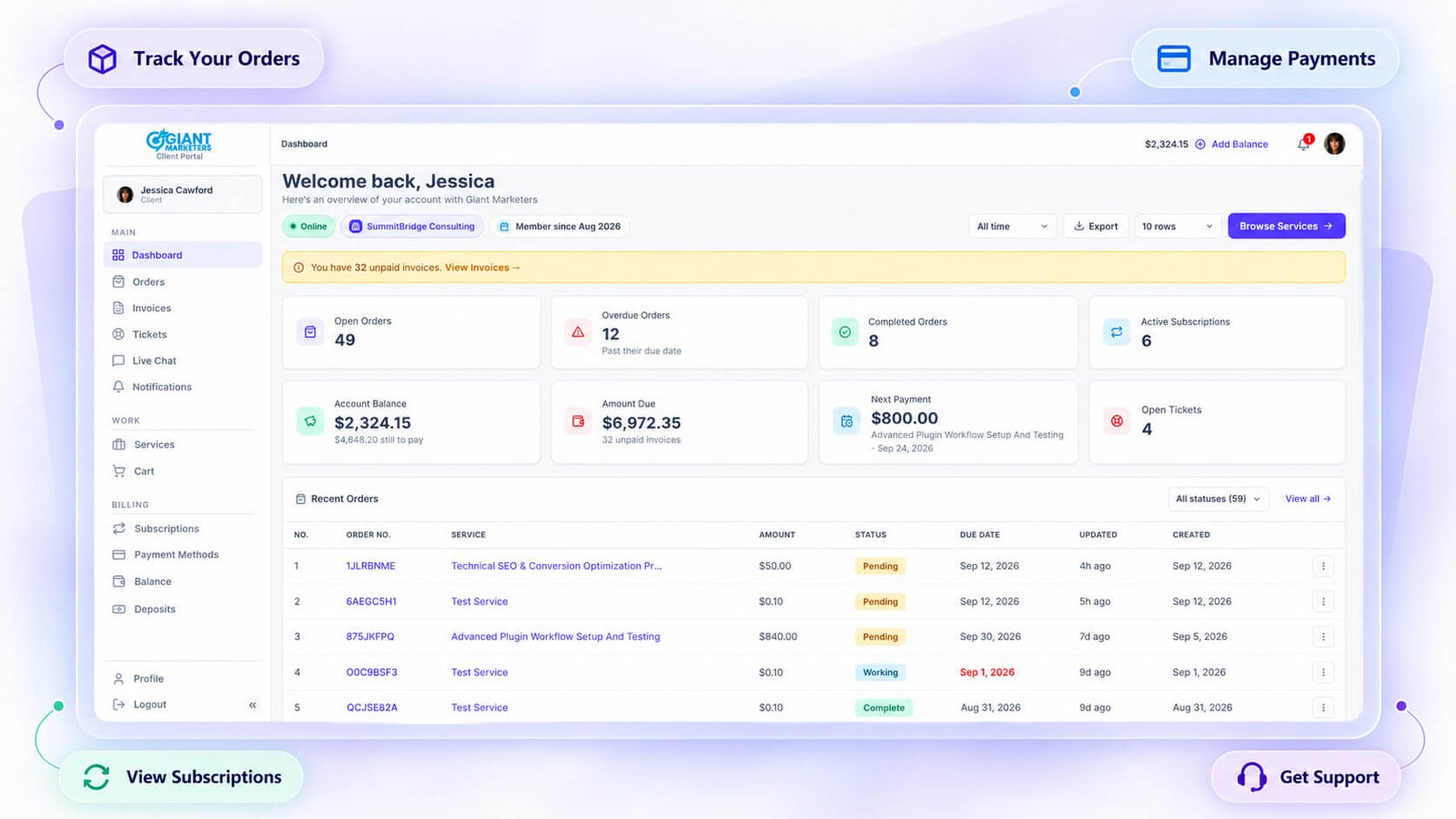
Most agencies underestimate how much that single self-service layer reduces noise. When clients can find what they need themselves, you spend less time responding to “can you resend that invoice?” messages.
Browse Services and Check Out With a Coupon Code
Clients don’t just see their existing work in the portal. They can also browse your live service catalogue, add services to a cart, adjust quantities, and check out directly — including applying a coupon code during checkout.
This matters for agencies that sell additional services to existing clients, because the client never has to leave the portal to place a new order. No back-and-forth to agree on scope and price, no manually creating an invoice — they buy, you get notified, and the order appears in your workspace.
Pay an Invoice Without Creating an Account
Clients who haven’t yet registered can still pay an invoice. Clientish supports guest invoice payment, so you can send an invoice link and the recipient pays online — by card, through a connected gateway, or via manual bank transfer with a reference number — without needing to create a portal account first.
For new clients receiving their first invoice, this removes the friction of forcing account creation before you’ve even delivered anything. Payment gateways available include Stripe, PayPal, Paddle, SSLCommerz, and Manual Bank Transfer.
- Pay by card through a connected gateway
- Pay via manual bank transfer using a reference number
- Download a PDF copy of the invoice
- No account creation required for guest payment
Open a Support Ticket or Start a Live Chat
Inside the portal, clients have two ways to reach you: a formal support ticket or a live chat thread.
Tickets are the better fit for issues that need a record — billing disputes, deliverable problems, anything where you want a traceable conversation with a resolution rating at the end. Live chat works for quicker back-and-forth; it supports attachments, message reactions, editing, and typing indicators. If a client sends a message when no one’s online, Clientish falls back to email so the message still gets through.
Both channels sit inside the same portal the client is already using for orders and invoices, so there’s no jumping to a separate helpdesk URL.
View and Cancel Their Own Subscriptions
Clients on recurring service plans can see their active subscriptions in the portal and cancel them without contacting your team. For agencies running retainer-based services, this is a practical courtesy — some clients will cancel regardless, and letting them do it themselves is less friction than a back-and-forth over email.
The subscription view shows what’s active, and the cancellation is self-serve. Your team can see the change on the agency side, so nothing falls through the gap.
Top Up Their Balance and Review Payment History
Clients have a balance in Clientish. They can deposit funds into it directly from the portal and use that balance to pay for orders or invoices rather than entering card details every time.
The payment history view shows them exactly what’s come in and gone out against their account. If they’ve saved a payment method, they can set a default or remove an old card from the same screen.
- Top up the account balance (deposit funds)
- Use the balance to pay invoices and orders
- View full payment history
- Manage saved payment methods: set a default, remove a card
Track Order Status and Message the Agency
Every order the client has placed appears in the portal with its current status. Clients can open an order and see the intake form answers they submitted, which is useful if they need to reference what they originally requested.
Each order has a built-in message thread where clients can reply, attach files, and request a revision. When the work is done, they can formally mark it as started from their end and rate it. This keeps all order-related communication in one place instead of scattered across email.
Manage Their Profile and Notification Preferences
Clients can update their own avatar, change their password, and request an email address change — which goes through a confirmation from the current address before taking effect. That confirmation step protects against accidental or unauthorised email changes.
It’s a small detail, but clients managing their own profile reduces the number of “can you update my email?” requests landing in your inbox.
Consultants: Managing Retainer Clients
Consultants typically work with a small number of high-value clients over long periods. The relationships matter, the billing repeats, and the deliverables — reports, strategy decks, audits, revised briefs — need to move back and forth without getting lost in email threads. The organizational challenge isn’t volume; it’s keeping each client’s work, billing, and communication tidy across months or years.
Handle Retainers With Recurring Billing
Most consultants bill on a regular cycle — monthly, quarterly, or on a custom interval. Clientish handles this through its Subscriptions feature, where you tie a recurring-priced service to a client and set the billing interval. The subscription runs on its own; you’re not manually recreating invoices each cycle.
You can create, edit, cancel, or reactivate subscriptions at any point, which matters when a client pauses an engagement or changes scope mid-retainer.
Exchange Documents and Deliverables
Client-facing file exchange in consulting tends to happen in three different places at once — email, a shared drive, and whatever the client happened to bookmark. Clientish brings this into the order record, so deliverables tied to a specific engagement stay in one place that both you and the client can access through their portal.
Each order has its own context, so a Q2 brand audit and an ongoing SEO retainer don’t bleed into each other.
Collect Project Details With Intake Forms
Before work begins, consultants often need specific information — goals, existing assets, key contacts, brand guidelines. You can build an intake form directly into a service in Clientish, with fields for text, file uploads, dates, dropdowns, and conditional logic that shows or hides questions based on earlier answers.
The form is attached to the service itself, so every new client who orders that service sees the same structured brief — no separate survey tool, no chasing responses over email.
- Field types: Text, Textarea, Select, Checkbox, Radio, File, Date
- Conditional show/hide rules based on prior answers
- Form tied to the service, completed at the point of order
Track Billable Work With Task Checklists
Long retainers involve recurring deliverables that are easy to let slide — monthly reports, check-in calls, revised materials. Clientish lets you attach tasks to orders, so the work tied to a specific client engagement is visible and tracked rather than living in a personal to-do list that the client never sees.
Task checklists keep you and the client aligned on what’s been done and what’s next within a given order.
View a Full Per-Client Activity Log
With retainer clients you need to be able to reconstruct the history — what was invoiced, what was discussed, when scope changed. Each client profile in Clientish includes a dedicated activity log tab that records actions across orders, invoices, and tickets for that client.
That history is accessible in one place, which is a lot more reliable than scrolling back through months of email when a billing question comes up.
Keep Follow-Ups From Slipping
Before a lead becomes a signed retainer client, there’s usually a back-and-forth that takes weeks. Clientish’s Leads feature includes follow-ups, so you can schedule a reminder to circle back at a specific time rather than relying on memory or a sticky note.
You can also email the lead directly from within the record — with scheduling, open tracking, and inbound reply routing — so the pre-client conversation stays attached to the record, not scattered across your inbox.
A Professional Client Portal
Your retainer clients are often senior decision-makers. Handing them a disorganized billing process or making them email you for a copy of last month’s invoice isn’t a great look. Clientish gives each client login access to a branded portal where they can view their orders, pull invoices, submit support tickets, and pay outstanding balances without involving you.
For consultants who bill by bank transfer, Clientish supports manual bank transfer payments with a reference number, so the client gets clear payment instructions rather than an ambiguous invoice with no guidance.
Issue Refunds When Scope Changes
Consulting engagements shift. A project gets cut short, a deliverable gets descoped, a client prepays for a quarter and then things change. Clientish supports issuing refunds against paid invoices, which keeps the financial record clean without needing a separate accounting conversation.
Apply Coupons and Early-Payment Discounts
If you offer a discount for annual prepayment or run a promotional rate for a new retainer, you can apply coupons at the order level. This is a minor but practical detail — it keeps discounts tied to a specific transaction rather than handled informally and forgotten.
Stay Organized Across Clients
Even a small consulting practice with five or six active retainer clients can get messy when each one is at a different stage. Client profiles in Clientish carry lifecycle stages that move forward automatically as payments are made, so you can filter your client list by status and see at a glance who’s active, who’s new, and who’s lapsed.
You can also assign notes to a client record and assign a team member where relevant — useful if you work with a junior consultant or a VA who handles specific accounts.
Service Businesses: Selling and Serving Clients
Service businesses — think virtual assistants, social media managers, accountants, coaches, or any team taking client orders regularly — tend to run across a pile of disconnected tools. A form here, an invoice in a separate app, client emails in a shared inbox, and repeat customers you’re manually tracking in a spreadsheet. Clientish pulls this into one place.
Publish a Service Catalog With Payment Links
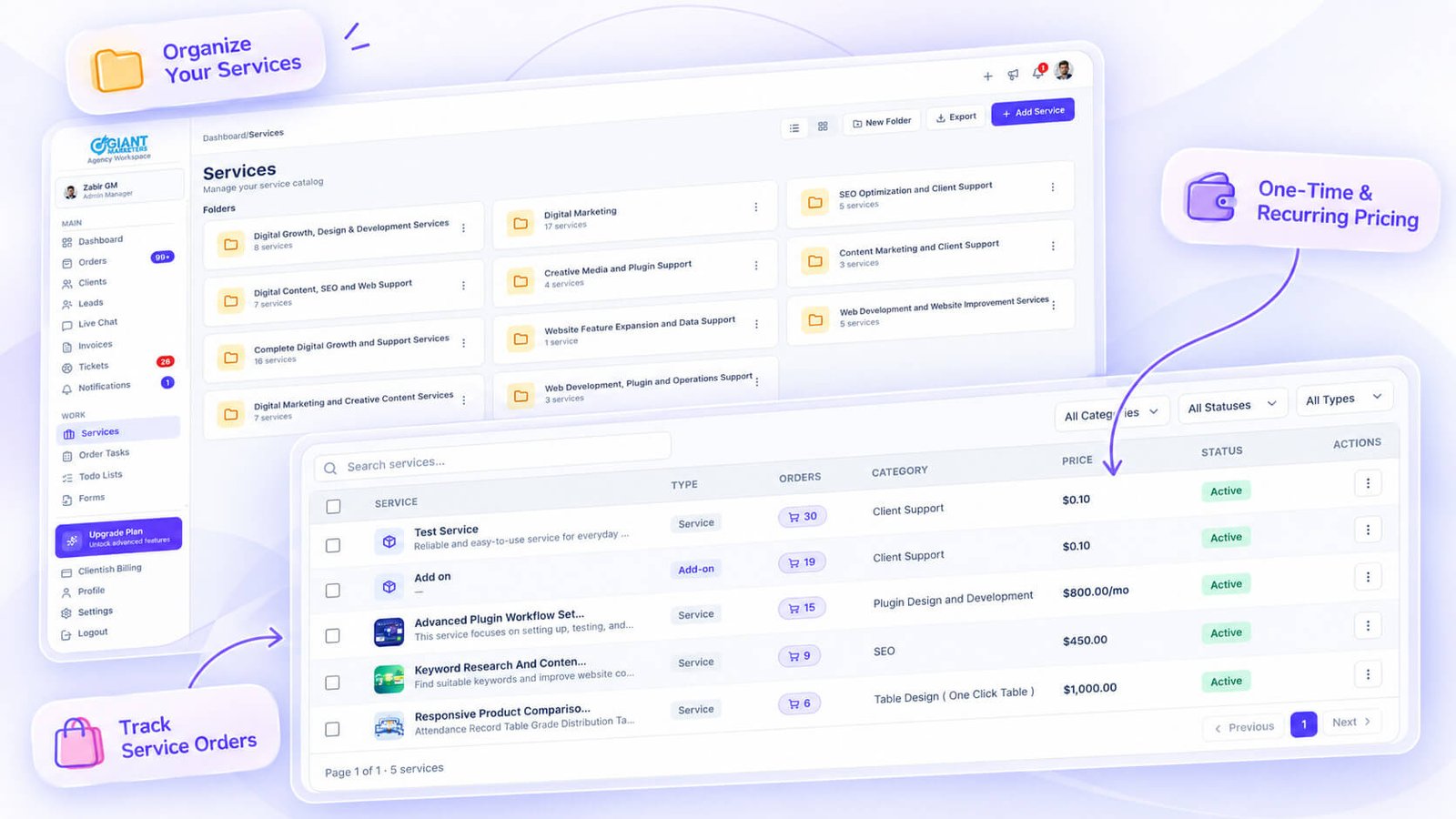
Your services live in a catalog with folders and categories, each with its own pricing, intake form, and shareable payment link. Send a client the link and they purchase directly — no back-and-forth quoting required for straightforward, fixed-price work.
Each service can carry add-ons and group quantities for situations where clients are buying more than one unit of the same thing.
Collect Payments Without Extra Tooling
Clientish connects to Stripe, PayPal, Paddle, SSLCommerz, and manual bank transfer. Clients pay through the portal, or you send a standalone invoice link they can settle without logging in at all.
Guest invoice payment is particularly useful for one-off clients who aren’t regular portal users but still need a quick way to pay.
Handle Orders and Delivery in One Record
Every purchase becomes an order record. Tasks, files, and updates sit inside it, so the work and the client relationship stay connected rather than scattered across project boards and email chains.
Manage Repeat Customers
Regular clients build up a full history — orders, invoices, tickets, and an activity log all visible from their profile. You can also enable an account balance so clients top up credit and draw it down against future orders.
Apply Coupons, Discounts, and Taxes
Pricing isn’t always flat-rate. Clientish lets you apply discounts and taxes to services, which covers the practical reality of promotional pricing, regional tax requirements, or client-specific rates.
Capture Leads With a Public Form
Before someone becomes a paying client, they’re a lead. Clientish’s website lead capture API connects a form on your own site to the Leads feature, creating a record and returning a private chat link automatically.
That chat link lets you talk to the prospect directly — no account needed on their side — before you convert them to a client in one step.
Import Existing Clients From a Spreadsheet
If you’re migrating from another tool or a spreadsheet, Clientish provides a downloadable import template. Uploads de-duplicate by email address, and imported clients are created inactive by default so you can review before activating.
Duplicate Services to Build Your Catalog Faster
When your catalog has a lot of similar services at different tiers or price points, the duplicate function saves setup time. Copy an existing service, adjust the pricing or intake form, and publish — rather than rebuilding the same structure from scratch each time.
Support Clients in One Place
Client questions come in through tickets, which sit alongside their orders and invoices in the same profile. No switching to a separate helpdesk. Your team sees the full context of a client’s history when they’re handling a support request, which makes responses faster and more accurate.
Managing Subscriptions and Recurring Revenue
Recurring billing is where a lot of service businesses quietly lose money. The work continues, the renewal date arrives, and someone still has to remember to send the invoice. Clientish handles this through its Subscriptions feature, which ties recurring billing directly to clients and services rather than running it as a separate process you have to reconcile later.
Enable the Subscription Billing Toggle First
Before you can create any subscription or set a recurring price on a service, you need to turn on the subscription billing toggle in your workspace settings. It’s a master switch, and recurring pricing stays locked behind it. This is a deliberate step — it means you’ve consciously enabled that billing mode rather than having recurring options surface accidentally on services that aren’t built for them.
Once it’s on, services can carry a recurring price with a billing interval, and subscriptions can be created and managed from the Subscriptions area.
Set Up Recurring Services With Flexible Intervals
A service in Clientish can be priced as one-time or recurring. For recurring services, you set the price and the billing interval — how often the client is billed. That configuration lives on the service record itself, so if you offer monthly SEO retainers and quarterly strategy reviews, each service carries its own billing cadence.
When you create a subscription for a client, you connect it to a specific service and its recurring price. The subscription then sits on the client’s record alongside their orders and invoices, so the billing relationship and the delivery relationship aren’t in two separate tools.
- Service price and interval are configured on the service record
- Subscriptions link a client to a specific recurring-priced service
- Each subscription stores the client, service, price, and interval in one place
- The subscription detail view includes a history of that billing relationship
Track Subscription Status Across All Clients
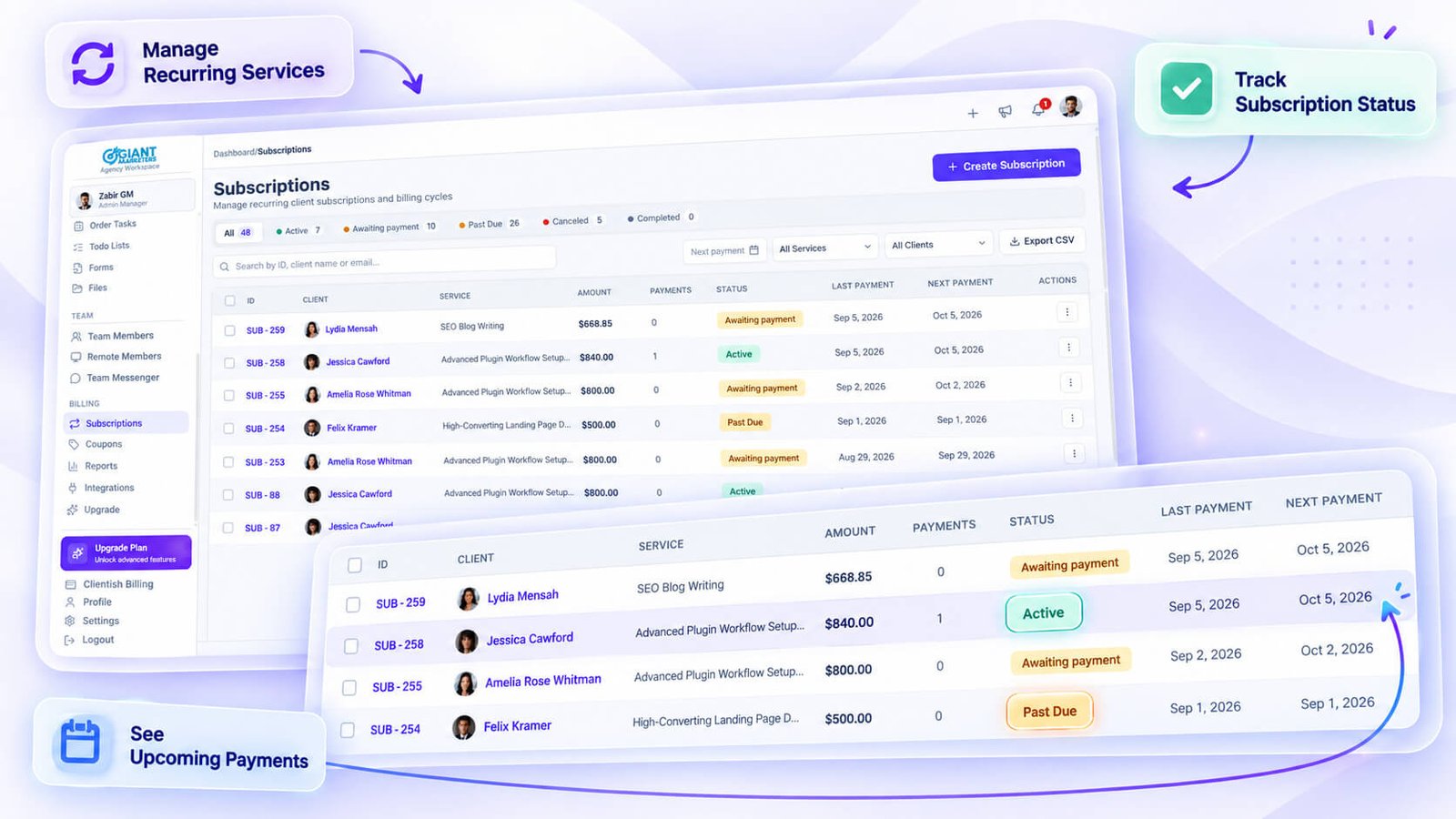
The Subscriptions area gives you a list view of all subscriptions across every client, with status counts at the top. At a glance you can see how many are active, how many have been cancelled, and where anything needs attention without clicking into individual client profiles.
This matters more than it sounds when you have twenty or thirty recurring clients. Knowing that three subscriptions are in a non-active state is the kind of thing that gets missed when billing is managed per-client rather than from a central list.
Cancel or Reactivate a Subscription at Any Time
Client circumstances change. A client pauses their retainer for a quarter, then comes back. Clientish lets you cancel or reactivate a subscription from the subscription record, so the history stays intact and you’re not creating a new record from scratch every time a client restarts.
The subscription detail view shows the history of that record — so when a client comes back after a gap, you can see what the original arrangement was without hunting through old emails.
Let Clients View and Cancel Their Own Subscriptions
From the Client Portal, clients can see their own active subscriptions. They can also cancel a subscription themselves if that option is available to them, which removes the back-and-forth of a client emailing to ask to stop a plan.
This is less about reducing admin and more about not creating friction at the moment a client decides to pause. If the cancellation is easy to handle through the portal, the conversation stays professional rather than awkward.
- Clients see their subscriptions in their portal login
- Self-service cancellation is available through the client-facing view
- Removes the need for the client to email or call to cancel a recurring plan
What Happens on the Agency Side When a Client Cancels
When a subscription is cancelled — whether you do it from the agency side or the client does it from the portal — the status updates in the Subscriptions list. You can reactivate it later from the same record if the client returns. The subscription history keeps a log of what happened, so there’s no ambiguity about when something changed or who changed it.
This also means your subscription status counts stay accurate. If three clients pause in the same week, that shows up in the list rather than being hidden inside individual client profiles.
Teams and Remote Staff Working Together
Client work rarely happens in isolation. Most agencies have an in-house team — account managers, designers, developers — plus a layer of contractors or offshore staff handling specific deliverables. Keeping those two groups coordinated without confusion, or without one person seeing something they shouldn’t, is where a lot of setups quietly break down.
Clientish handles both groups, but it keeps them separate by design.
Assign Work Clearly
Every in-house team member has a dedicated record in Clientish where you can assign orders, tasks, tickets, and client accounts directly to them. When work lands in their queue, it’s attached to a specific client and order — not floating in a shared inbox with no owner.
For anyone who’s ever spent Monday morning redistributing half-finished work because nobody knew who owned it, that clarity alone saves real time.
Control Who Sees What
Team permissions in Clientish are set per member, not just per role. You can restrict what each person can view or edit across every major area — clients, orders, invoices, tickets — using a permission grid. If someone exceeds their defaults, you can restore role defaults in one action.
Co-admins get elevated access without needing full admin credentials, which is useful when you have a senior operations lead who needs visibility across the workspace without touching billing or settings.
Work With Remote Contractors
Remote members are managed entirely separately from your in-house team. They get their own login shell (a /remote dashboard), see only their assigned work, and can’t wander into client data they have no reason to touch.
You add them to a remote roster, assign statuses that reflect how they actually work — Task Based, Permanent, Contractual, or Temporary — and manage their files and work items through the work board.
- Task Based, Permanent, Contractual, and Temporary remote statuses
- Per-member permissions with restore-to-defaults
- Own login environment separate from the agency portal
Scope Access by Department
Because roles in Clientish are created and edited per workspace, you can set up distinct permission sets that reflect how your team is actually structured — one for account managers, another for billing staff, another for support. A billing admin doesn’t need to see task boards; a project coordinator doesn’t need to touch invoice settings.
This isn’t a rigid preset system. You define the roles, set the permissions, and assign accordingly.
Track All Work in One Task Board
Clientish has workspace-wide status boards for orders, tasks, tickets, clients, todos, and chats — all exportable. Instead of asking three people for a status update in a stand-up, you open the board and see where everything sits.
That visibility matters most when work is split across in-house staff and contractors, because both groups’ assigned items surface in the same boards.
Monitor Team Activity and Order Progress
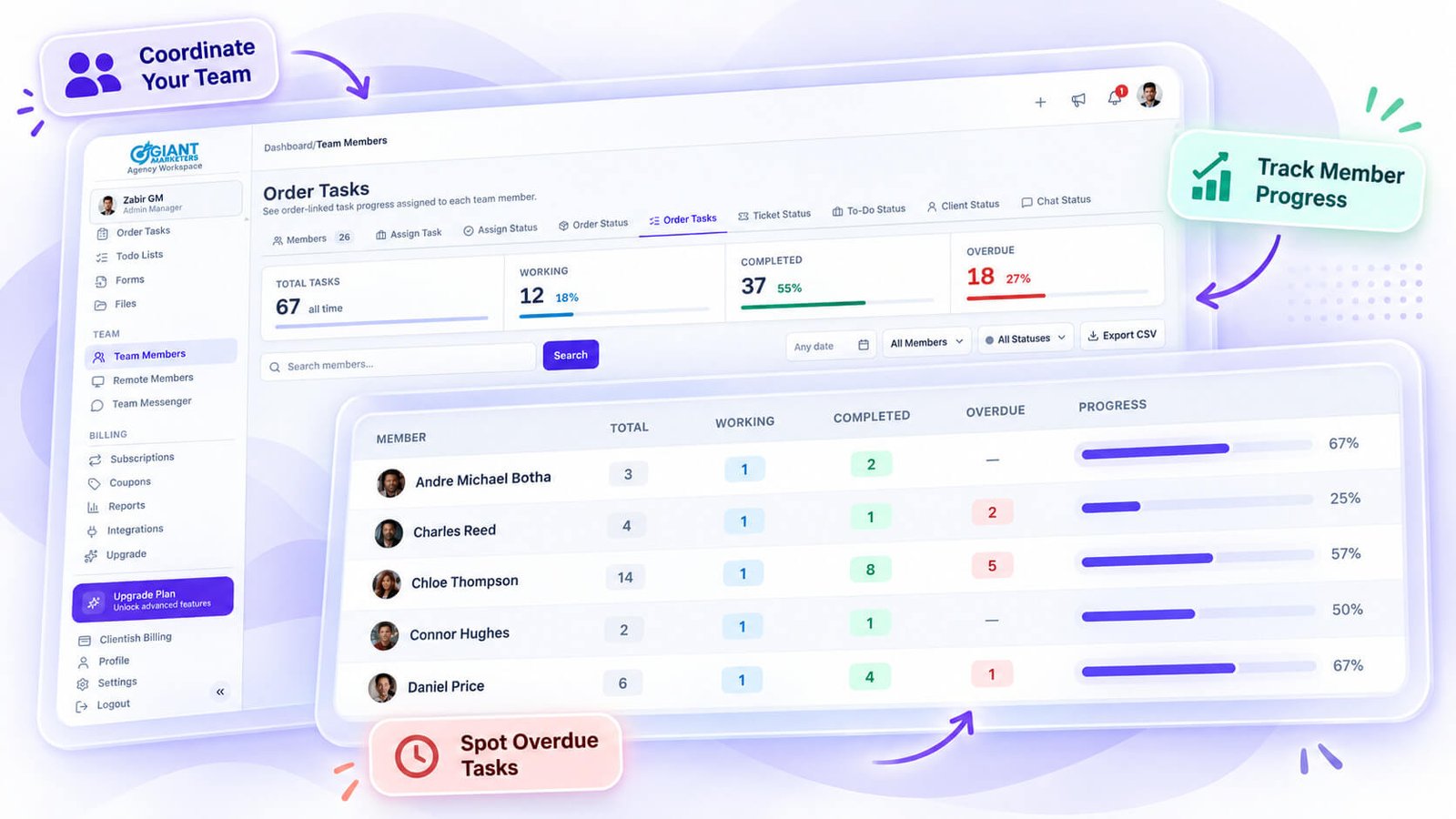
Each team member’s record shows their assigned orders, tasks, tickets, and an activity log. You can see what they’ve been working on without asking them directly, which is practical when managing people across time zones.
For remote members, the work board tracks assignment status, files, and progress — giving you a single place to review contractor deliverables rather than chasing updates over email.
Sign In as Any User to Check Their View
If something looks wrong from a client’s perspective, or a team member reports that they can’t see what they should, you can sign in as that user directly from their record. This applies to both in-house members and remote contractors.
It removes the back-and-forth of “can you describe what you’re seeing?” entirely.
Group Remote Members Into Teams
When your contractor roster grows, Clientish lets you group remote members into teams. If you have a content team, a development bench, and a paid ads group all working as contractors, you manage them as distinct groups rather than one undifferentiated list.
That separation keeps assignment and oversight clean as the contractor side of your operation scales.
Built-In Client Support: Tickets and Live Chat
Client relationships don’t end when an order is delivered. Questions come in, revisions get requested, and something always needs clarifying. How you handle that communication — or fail to — is often what clients actually remember about working with you.
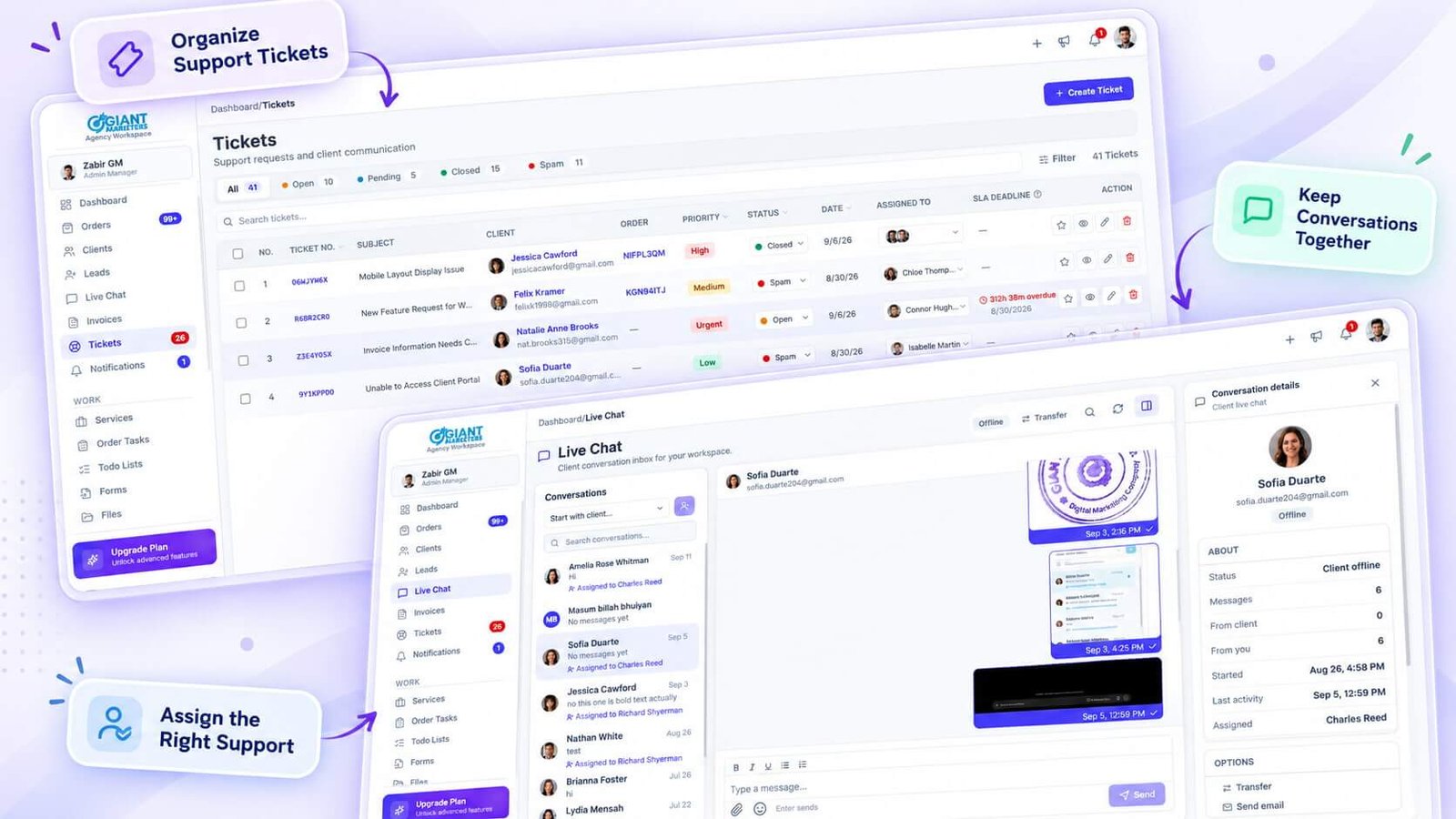
Clientish covers this through two separate but connected features: a support ticket desk and a live chat system, both accessible from the client portal.
Let Clients Raise and Track Their Own Tickets
When a client has a question or an issue, they can open a ticket directly from their portal. They don’t need to dig through email threads or track down a phone number. The ticket goes straight into your support desk, where your team can see it, assign it, and respond.
From your side, every ticket sits inside a pipeline with configurable statuses — Open, Pending, Closed, and Spam by default, with the option to add custom statuses to match how your team actually works. You can set priorities, apply tags, and assign one or more team members to handle the response.
Each ticket also shows the client’s related orders in the sidebar, which saves the back-and-forth of figuring out what the issue actually relates to.
- Clients can attach files to their messages; your team can do the same in replies
- Replies are editable and deletable after sending
- Saved replies let you respond to common questions without retyping from scratch
- Each team member can set their own message signature
- You can CC people who only need to follow the thread, without making them responsible for responding
Chat in Real Time With Email Fallback
Tickets suit formal, tracked requests. For faster back-and-forth, Clientish’s live chat handles direct conversation between your team and a specific client — one conversation per client, started by either side.
The experience is close to what your team already uses for internal messaging. You can see when the client is online, watch typing indicators, send reactions, and attach files or paste screenshots directly into the thread. Messages can be edited or deleted after sending, and you can search inside a conversation when you need to find something from three weeks ago.
If the client isn’t online, you can email them directly from inside the chat without switching to a different tool. There’s also an out-of-hours auto-reply so clients aren’t left with silence when your team isn’t available.
When the person who normally handles a client is away or stretched, conversations can be transferred to another team member. You can also pin important conversations so they don’t get buried.
Internal Notes Without the Client Seeing
Before responding to a ticket, your team sometimes needs to work out the answer. Internal team messages sit on the ticket but stay invisible to the client — useful when you need to check with a colleague or flag something before committing to a response.
This keeps the client-facing communication clean while still giving your team room to coordinate. Nothing gets accidentally sent to the client when someone’s still mid-thought.
Rate the Resolution and Close the Loop
After a ticket is resolved, the client can rate it. That feedback is attached to the ticket record, logged in a per-ticket history, and exportable if you want to review satisfaction across a period.
For agencies managing a volume of support across multiple clients, this creates an honest signal about which types of issues keep recurring and whether clients feel they’re being heard. It’s a small feature, but it gives you something concrete to look at instead of guessing whether your support quality is holding up.
Security and Access Control Across Your Workspace
Client data, billing details, and internal communications sit inside one workspace. That concentration of sensitive information makes access control a serious consideration, and Clientish approaches it with a fairly granular set of tools that cover both how users get in and what they can do once they’re there.
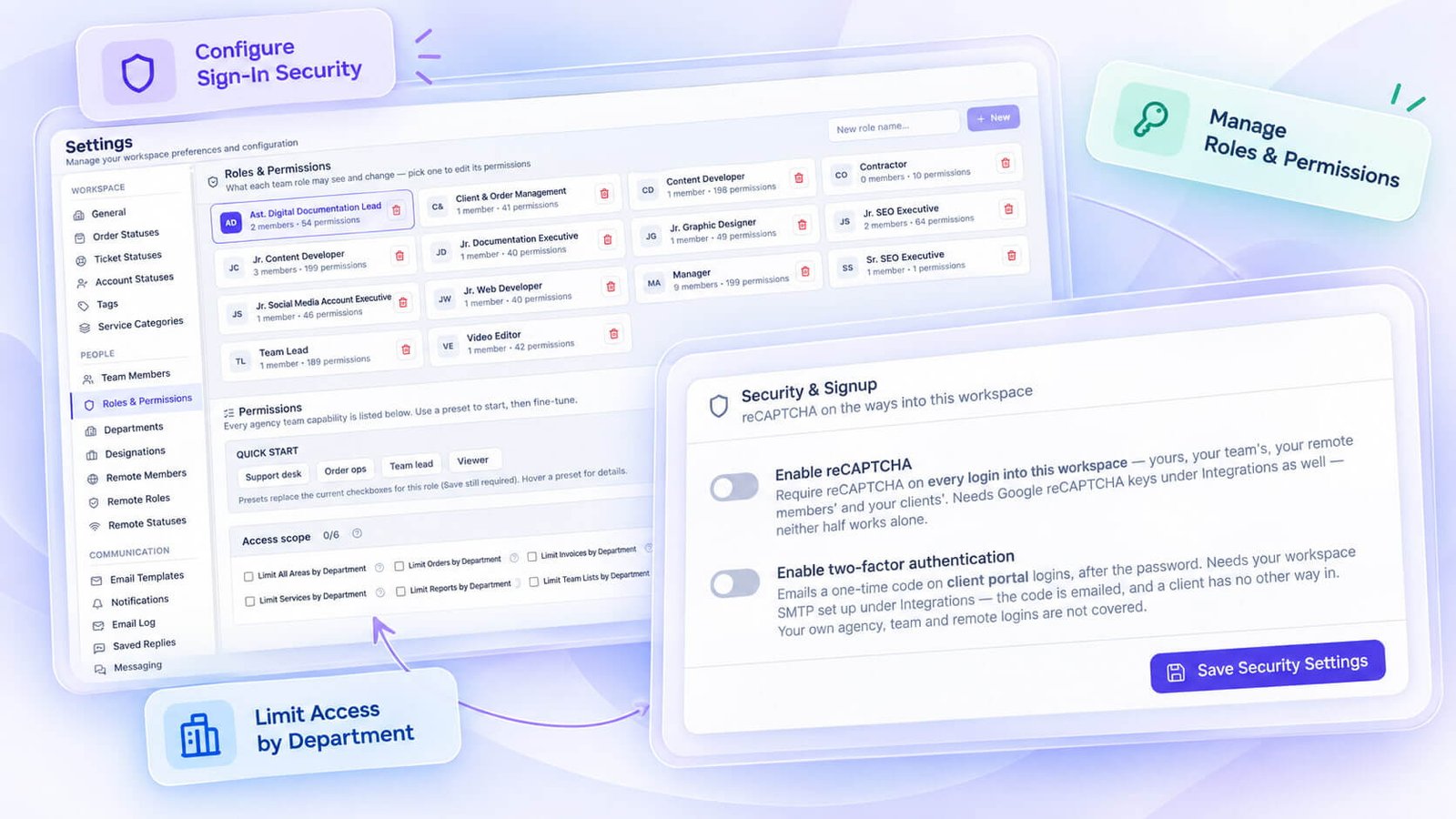
Two-Factor Authentication and Sign-In Options
Clientish gives you more than one way to handle authentication. Users can sign in with an email and password. On top of that, two-factor authentication is available via an emailed code or an authenticator app using TOTP — so team members who want the stronger option aren’t locked out of it.
There’s also a failed-attempt lockout and Google reCAPTCHA, which stops automated login attempts without requiring you to configure anything extra.
- Email/password or
- Two-factor authentication: emailed code or authenticator app (TOTP)
- Failed-attempt lockout after repeated bad logins
- Google reCAPTCHA on sign-in
See and Revoke Active Sessions
If a team member leaves a device logged in somewhere — a shared office machine, an old laptop — you can see those active sessions and sign them all out from inside Clientish. That’s a basic capability that many platforms quietly skip.
Password changes trigger this automatically. When a user changes their password, every other device is signed out immediately. No manual cleanup needed.
Role-Based Permissions for Every User Type
Clientish runs two completely separate role systems: one for in-house team members and one for remote members. Each is its own permission grid, covering areas like orders, tickets, clients, leads, invoices, coupons, services, forms, team management, and live chat.
You create, edit, and clone roles per workspace. If you need a new role that’s close to an existing one, you clone it and adjust rather than building from scratch.
Per-member overrides are available too. If one person on the team needs a slightly different permission set from the rest of their role group, you can adjust their individual permissions and restore to role defaults at any point.
Lock Sensitive Data Behind Permission Toggles
Beyond the broad feature permissions, Clientish has specific toggles for genuinely sensitive data points. These are separate controls, not bundled in with general access.
- See the order amount
- See the client’s email address
- Manage a client’s account balance
- Refund invoices
- Sign in as another user (impersonation)
A junior account manager who handles task updates has no reason to see what a client is paying. You can give them full access to the order workflow while keeping billing figures out of their view entirely.
Permissions are enforced at the API and route level, not just hidden in the UI. A user can’t bypass them by hitting a URL directly.
Restrict a Member to Their Own Department
For larger teams, there’s a department-scoped access setting. When you enable this for a member, they only see orders, invoices, services, reports, and team activity that belongs to their own department. Other departments become invisible to them.
This is practical for agencies that run distinct service lines — a development team and a design team, for example — where cross-department visibility creates confusion or data hygiene problems.
Force Sign-Out Across All Devices on Password Change
This ties back to the sessions feature, but it’s worth separating out because it applies to any user, not just admins. When any account in the workspace changes its password — whether it’s a team member, a remote member, or a client — every active session for that account ends immediately.
For offboarding, that’s a meaningful default. If you reset a departing team member’s password as part of their exit, their existing sessions are gone before you’ve finished the process.
Sign In As Any User
Admins can impersonate a client, team member, or remote member from within Clientish. When you do, a banner appears at the top of the screen to indicate you’re in impersonation mode, and a single click exits back to your own session.
This is primarily useful for troubleshooting — if a client reports they can’t see an invoice, you can check their exact view in seconds rather than walking them through a screen-share.
Per-Field Client Visibility Controls
On the client record specifically, permissions go down to individual fields. You can control which roles can see a client’s email address, account balance, activity log, total spend, billing address, orders, invoices, and tickets — independently.
So a support team member can see tickets and orders without ever seeing what the client has spent in total or what their account balance holds.
Reporting and Data Exports Across Your Workspace
Running a service business means you constantly need answers to questions like: which services are actually making money, which clients are overdue on invoices, and how much work did a particular team member carry last month. Clientish has a dedicated Reports area with seven separate tabs, each covering a different slice of your business, all filterable by date range and each protected by its own permission setting so you control who sees what.
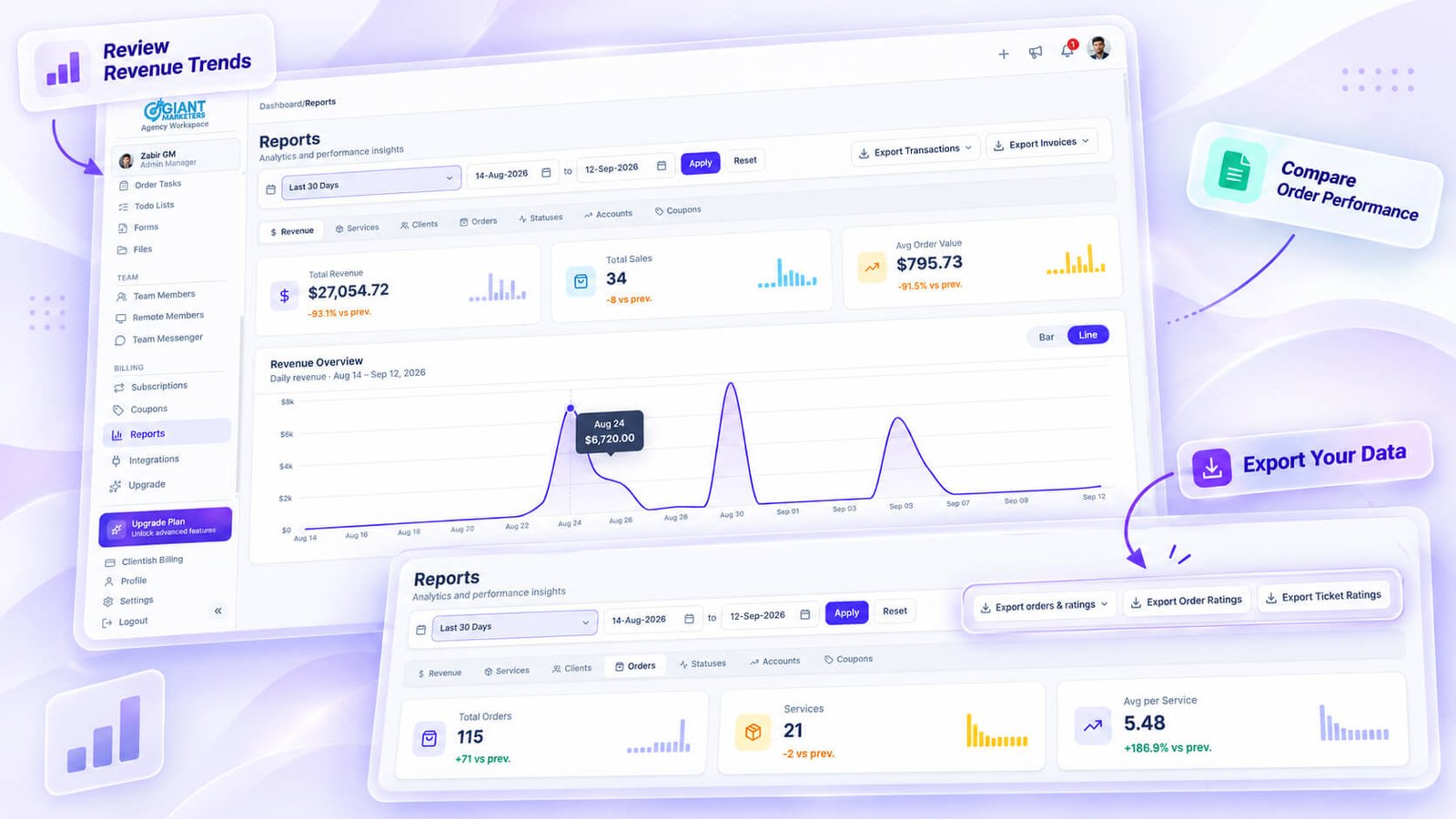
Revenue, Services, Orders, and Clients Reports
The Revenue tab shows income over time with totals and trends — useful when you need to tell at a glance whether a quarter was actually stronger than the one before it, rather than guessing from a pile of invoices. The Services tab breaks performance down per service, so if you run five different offering types, you can see which ones are generating volume and which are sitting quiet. Orders and Clients each get their own tabs too, with order volume broken down by status and a client acquisition and activity view that shows you where your roster actually stands.
The Statuses tab gives you a distribution view across order statuses, which is helpful when you want to see whether too many orders are piling up in a particular stage. The Accounts tab covers account balances across your client base.
Every tab has a date-range filter, and every one can be exported.
Export Orders, Invoices, and Client Data
The exports Clientish delivers go well beyond what the on-screen reports show. You can export accounts, orders, invoices, services, transactions, form data, order ratings, and ticket ratings — all delivered to you by email rather than sitting behind a download button you have to babysit.
That email-delivery approach matters in practice. If you kick off a large export while you’re in the middle of client calls, it arrives in your inbox when it’s ready rather than requiring you to stay on the page. For audits, handovers, or pulling data into a spreadsheet for a quarterly review, having the raw records in a flat file is a lot more flexible than screenshotting report charts.
Within specific areas of the platform, you can also export directly:
- Client records (from the Clients area)
- Service catalog entries
- Task status boards
- Order and ticket ratings separately
Pull a Coupon Usage Report by Service
The Coupons tab inside Reports is one of the more specific ones and worth calling out on its own. It doesn’t just tell you how many times a coupon was used — it gives you a per-coupon breakdown by service, so you can see exactly which services each discount code is being redeemed against.
If you’re running a promotional offer tied to a specific service and want to know whether clients are using the code for that service or applying it across unintended ones, this is where you’d look. It’s also useful if you manage multiple services at different price points and want to understand whether discounting one is cannibalizing another.
Export Team and Remote Member Work Boards
Clientish separates in-house team members from remote members, and the reporting side reflects that. Each team member has a record that captures their assigned orders, tasks, tickets, todos, and activity — all of which you can view per-member.
There are also workspace-wide status boards covering orders, tasks, tickets, clients, todos, and chats, and those boards carry their own export. This means if you need a full snapshot of where every open piece of work sits across your team on a given day — who owns what, what status it’s in — you can pull that into a file rather than rebuilding it manually.
For agencies with remote staff carrying client work, being able to export the work board means you have a paper trail that isn’t dependent on memory or messaging threads.
Form Data Exports
One that’s easy to overlook: Clientish lets you export intake form data. If you’ve built per-service intake forms with fields like project scope, file uploads, or client preferences, that submitted data is exportable. For agencies that reference form responses during delivery or need to pass client-supplied information to a third party, having all submitted form data in a flat export file saves a lot of copy-pasting from individual order records.
Permission Gating on Reports
Access to each report tab is controlled separately by role permissions. This means you can give a project manager access to the Orders and Statuses tabs without opening up Revenue or Accounts to them. For smaller agencies where everyone wears multiple hats, that distinction might not matter much — but for any team where financial data needs to stay with specific people, the per-tab gating is a practical control rather than an all-or-nothing toggle.
Who Might NOT Need Clientish
Clientish is purpose-built for service businesses that have ongoing client relationships, recurring work, and a need to invoice and communicate inside one place. If that’s not your situation, it may be more than you need.
If you take on one-off gigs through a marketplace and never deal with the same client twice, most of what Clientish offers — portals, subscriptions, client profiles, support tickets — simply won’t apply. There’s no real fit there.
A few other honest mismatches:
- Deep accounting: Clientish handles invoicing and payments well, but it’s not accounting software. If you need payroll, tax filings, or a full general ledger, you’ll still want a dedicated accounting tool alongside it.
- Website building: Clientish has no page builder or public-facing site features. It’s a back-office workspace, not a front-end tool.
- Physical inventory or product sales: It’s built around services, not SKUs. If you’re shipping physical goods and tracking stock, Clientish isn’t the right fit.
- Standalone project management at scale: Clientish has tasks and order management, but if your entire workflow depends on Gantt charts, complex dependency mapping, or a dedicated PM platform, it won’t replace that. It works alongside those tools rather than replacing them.
None of this is a flaw — it reflects a deliberate focus. Clientish does one thing well: managing the full lifecycle of client work for service businesses. If your needs fall squarely outside that, a different category of tool will serve you better.
How to Tell If Clientish Is Right for You
Most tools become obvious fits once you see who they’re actually built around. Clientish is for service businesses with ongoing client relationships — where the work repeats, clients come back, and billing needs to happen reliably.
You’ll probably find Clientish fits well if:
- You have repeat clients and recurring work. Orders, invoices, tasks, and support tickets all tie to the same client record, so nothing gets lost between engagements.
- You want clients to feel the professionalism. The branded client portal gives clients a place to log in, view their orders, download invoices, and raise tickets — without you forwarding files over email.
- You’re solo now but expect to grow. Clientish handles team assignment, role-based permissions, and co-admin access, so adding staff later doesn’t mean migrating to a different tool.
- You’re managing leads alongside active clients. The built-in CRM captures leads, tracks their status, and converts them to clients in one step.
- Recurring billing is part of your model. Subscriptions tie directly to client records so renewal billing doesn’t rely on someone remembering to send an invoice.
It may be more than you need if:
- Your work is entirely one-off with no returning clients
- You don’t invoice clients directly or manage any client-facing deliverables
- You need deep accounting — Clientish handles invoicing well, but it’s not a replacement for dedicated accounting software
If most of the first list fits how you work, Clientish is worth exploring. There’s a 7-day free trial, so whatever your business type, you can try the full workflow with your own clients before committingre access, so you can set up a real client, run through the portal, and see whether it fits before committing.
Getting Started (Whatever Your Business Type)
Clientish walks you through initial setup with a multi-step onboarding wizard that saves your progress at each step, so you can stop and come back without starting over. You’ll set your agency name, upload a logo, pick a brand colour, choose your currency, and define your service categories — the basics that shape how the workspace looks and behaves.
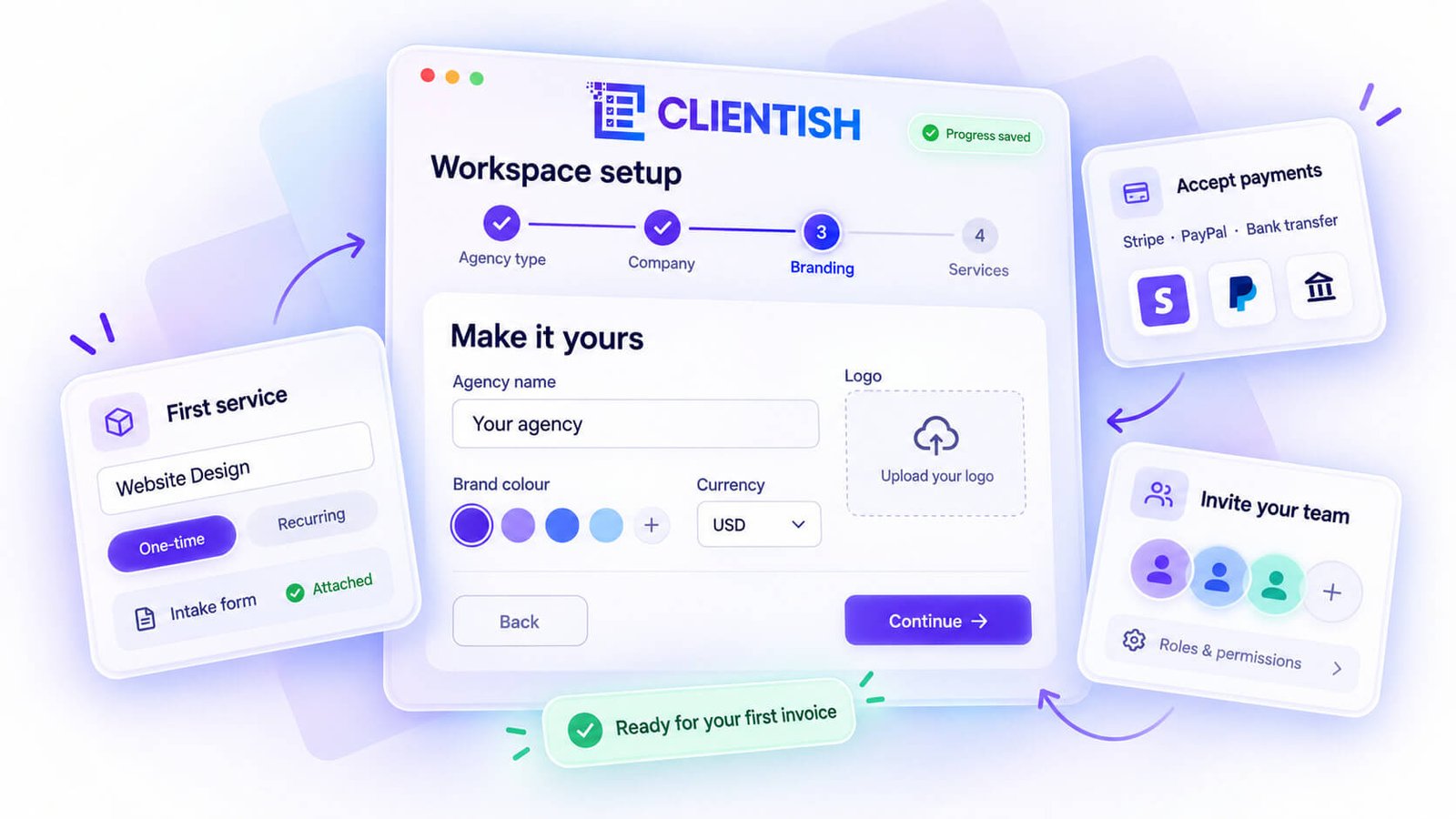
Complete the Setup Wizard Step by Step
The wizard is structured so you’re never guessing what to do next. Each step builds on the last: agency type, company details, branding, then services. If you get interrupted, your progress is saved exactly where you left it.
Add Your First Service and Intake Form
Before you bring in any clients, set up at least one service. Give it a name, a price (one-time or recurring), and attach an intake form if you need information from the client upfront — things like project brief, login credentials, or file uploads. The form builder supports conditional logic, so you can show or hide fields depending on what the client selects.
Set Up Your Payment Gateway and Tax Rules
Connect whichever payment method fits your clients — Stripe, PayPal, Paddle, SSLCommerz, or manual bank transfer. Do this before you send anything billable, so the first invoice is already wired to collect payment correctly.
Invite Your Team During Onboarding
If you’re running a team, the wizard includes a step to invite members by email and assign roles. You can also do this after setup. Roles carry their own permission sets, and you can adjust individual permissions on top of that if someone’s responsibilities don’t quite fit a standard role.
Solo users can skip this entirely and move straight to adding clients and orders.
Secure Your Workspace From Day One
Access control is worth configuring early. Clientish lets you set per-role permissions across the whole workspace, so team members only see what their role needs. Review the defaults for each role before work starts.
Send Your First Invoice or Payment Link
Once a service exists and a payment gateway is connected, you can create an order, generate an invoice, and send it — or share the service’s direct payment link without creating a full order first. Either way, the client can pay online immediately.
A 7-day free trial gives you full access to explore all of this before committing, and the demo data option lets you preview a populated workspace so nothing looks blank on day one.
Frequently Asked Questions
A few questions come up whenever someone is weighing whether Clientish fits their kind of business. Here are the short answers.
Is Clientish only for agencies?
No. Agencies are one audience, but Clientish is built for any business that sells and delivers services to clients. Freelancers, consultants, virtual assistants, accountants, and similar service businesses all fit the model.
Is Clientish good for solo freelancers?
Yes. You don’t need a team to get value from it. A solo freelancer can use Clientish to hold client profiles, send invoices, accept payments, and give clients a branded portal to log into — without stitching together three separate tools.
Is Clientish suitable for consultants?
It works well for consultants, particularly those with long-running retainer relationships. The subscriptions feature ties recurring billing to a client and keeps deliverables inside a single order record, which matters when an engagement runs for months.
Can a service business take orders and payments with Clientish?
Yes. Services are listed in a catalog with pricing, and clients can order and pay directly through a shareable payment link. Supported gateways include Stripe, PayPal, Paddle, SSLCommerz, and manual bank transfer.
Does Clientish work for a distributed or remote team?
It does. Team members are invited by email, assigned roles with per-member permissions, and can be allocated orders, tasks, and tickets regardless of where they’re located. There’s no requirement to be in the same office or even the same timezone.
Who should NOT use Clientish?
If your work is entirely transactional — one-off gigs through a marketplace, no repeat clients, no ongoing relationships — most of what Clientish offers won’t apply. It’s also not an accounting replacement; the invoicing covers service billing, but it won’t handle payroll, tax filings, or multi-entity bookkeeping.
Is Clientish a CRM?
Partly. It includes a Leads feature where you can track leads with statuses, notes, follow-ups, and a private chat link before they become clients. Once a lead converts, they move into the full client record. It covers the client-side of relationship tracking well, but it’s not a general-purpose sales CRM for pipeline-heavy sales teams.
Can clients self-serve, or do they always need to contact the agency?
Clients get their own branded portal where they can view orders, download invoices, open support tickets, and submit intake forms — without emailing the agency for every update. That self-service layer is one of the main reasons service businesses find it reduces back-and-forth.
Does Clientish offer a free trial?
Yes — a 7-day free trial gives full access to try it for your business typere access. There’s no free plan, so after the trial you’d move to a paid subscription. Current pricing is on the Clientish site.
Final Thoughts
If you do client work and you’re tired of managing half your business in email and the other half across tools that don’t talk to each other, Clientish is worth a serious look. It covers the full cycle — from capturing a lead to delivering work, billing the client, and handling follow-up support — and it does that whether you’re a solo freelancer with a handful of retainer clients or a team of twenty running dozens of concurrent accounts.
It’s not the right fit for every business. If your work is purely transactional and you never see the same client twice, most of what Clientish offers won’t apply to you. But for anyone with ongoing client relationships, the case for having everything in one place is pretty straightforward.
You can test it yourself with a 7-day free trial that gives you full access to the platform — which is a reasonable way to see whether it actually fits your workflow before committing.

