
PPC Client Onboarding Checklist Template
The costliest mistake in a new PPC engagement happens before you spend a dollar: launching campaigns while conversion tracking is broken. Smart Bidding then learns on faulty data, and the errors compound for months while the client watches their budget disappear into nothing you can prove worked.
Free to download and edit · No watermark · Add your own branding
PPC onboarding is the window where you prevent that, by verifying tracking, securing the account the right way, and settling who pays for what, all before a single ad serves.
This page gives you a free, editable PPC Client Onboarding Checklist template for agencies running Google Ads and paid social, built around the things paid media specifically needs: manager-account access, conversion-tracking verification, billing ownership, and a baseline you can measure against. It runs on a timeline from signed contract through the first 30 days. Download it, add your branding, assign owners, and run it for every new PPC client.
What Is PPC Client Onboarding?
Everything between a signed paid-media contract and the moment campaigns go live is onboarding.
What makes PPC onboarding distinct is that it has to resolve two separate money relationships before any work begins: the management fee the client pays your agency, and the ad spend the client pays the platforms directly. Confirming who holds billing on that ad account removes one of the most common sources of paid-media disputes.
Layered on top is a hard technical dependency. Unlike services where delivery can begin before measurement is refined, PPC hands control to an automated bidding algorithm from day one, so broken conversion tracking does not just produce bad reports; it actively misdirects spend in ways that compound over time.
How to Structure PPC Onboarding: Three Phases
PPC onboarding works best as a timeline, because the order protects the ad budget. These three phases put the launch-blocking work, access, billing, and tracking, before anything goes live.
Before you start
First 48 hoursInternal handoff, welcome message, workspace setup, and team assignment, so the client never hits silence after signing.
The first week
Manager-account access, billing ownership, the PPC questionnaire, the existing-campaign audit, conversion-tracking verification, and the baseline snapshot. Nothing here can wait until after launch.
The first 30 days
Campaign build and approval, launch with a QA sign-off, the first report against baseline, and a 30-day review.
Operator note: The most common failure in practice is collapsing Phase 1 and Phase 2 into a single kickoff call. It feels efficient, but it specifically breaks the billing-ownership step — clients are still processing the commercial relationship during Phase 1, and asking them to hand over Google Ads billing access in the same breath as the welcome pleasantries means it either gets deprioritised, delegated to the wrong person, or skipped entirely. Agencies then reach campaign-build week with no access and a launch date that can't move. Keep the phases separate: Phase 1 closes the gap between signing and starting, Phase 2 is where the operational asks live.
Why Your Agency Needs a PPC Onboarding Checklist
A repeatable PPC onboarding checklist closes the gaps that specifically burn money in paid media.
It stops you launching on broken tracking
A verification step that confirms the tag fires, conversions are categorised correctly, and lead quality is real is what keeps Smart Bidding from training on garbage. Without it, a common outcome is a "page view" event sitting as a primary conversion action — Google's algorithm optimises toward clicks that never intended to buy anything, and you spend weeks wondering why CPAs look artificially low before the client notices.
It gets account access the right way
Linking through a manager account (MCC) rather than taking passwords, with the account owned by the client, protects both sides and preserves the campaign history and quality scores that a brand-new account would throw away.
It settles who pays the ad spend before launch
Confirming the client's own billing is attached — their card, their payment method — separate from your management fee, prevents the scenario where a client overshoots their budget mid-month and the agency's card on file gets charged for the overspend, turning a scope conversation into a billing dispute.
It establishes a baseline you can be measured against
Recording current CPA, ROAS, and spend before you touch anything is what lets you prove your impact rather than argue about it.
The Risks of Skipping Structured PPC Onboarding
In paid media the gaps cost real budget, fast. Here is what each one looks like when the setup is rushed, and the step that would have caught it.
Campaigns go live before anyone confirmed the conversion tag fires, so the account records half the real conversions. Smart Bidding optimizes toward that wrong signal for weeks, the cost per lead looks terrible, and the client blames the agency for a setup problem a ten-minute check would have caught.
The agency builds the client's Google Ads account under its own manager property instead of the client's. At exit, the client either loses the account and its history or fights to extract it, and the quality score built over months is gone. Manager-account access to a client-owned account removes the problem.
Nobody confirmed whose card pays the ad spend, so either the agency fronts budget it never agreed to, or spend stalls at launch because no payment method is attached. A billing-ownership step settles it before go-live.
Three months in, the client asks what improved, and the agency has current numbers but nothing from the start. The work was good; with no recorded CPA or ROAS baseline, it is unprovable.
No one audited the existing campaigns or account history, so the new strategy repeats mistakes the account already made, or discards converting campaigns nobody reviewed. An audit step would have surfaced what to keep and what to kill.
These failures rarely sit in isolation; they chain. Skip the audit and the new keyword structure inherits the account's old problems, which feeds Smart Bidding bad conversions attached to bad keywords. The corrupted signal compounds week over week, and because no baseline was recorded, there is no clean reference point to separate the original problem from the new one. By the time the client raises concerns, the damage is layered enough that any single cause is hard to diagnose. The checklist below exists to break that chain before it starts.
The PPC Onboarding Checklist, Phase by Phase
The template holds this full checklist as checkboxes with owner and due-date columns, plus the access list, a conversion-tracking verification checklist, a billing-setup step, the baseline table, and the questionnaire. Here is what each phase covers.
Before You Start
Brief the PPC team on what was sold, the goals, the promised budget, and anything committed during the sale.
Confirm the client is in, name their main contact, and set the expectation that it typically takes a couple of weeks to go live and a few months to reach full performance.
A single home for access, tracking notes, campaign plans, reporting, and communication.
The day-to-day contact, the PPC lead, and who the client escalates to.
The First Week
Link to the client's own ad accounts (Google Ads, Meta Business Manager) through your manager account, never by taking passwords and never by housing the account in agency-owned property. If migrating an existing account, use the "change who pays" process to preserve history and quality scores.
Confirm the client's own payment method is attached to their ad account for the ad spend, kept separate from your management fee. Record who pays what.
Goals, target cost per lead or ROAS, geography, budget, offer and value proposition, competitors, and what has and has not worked before.
Review current and past campaigns, spend, conversions, and quality scores to establish what to keep, what to fix, and what to retire.
Confirm the Google tag or GTM is installed and firing, primary and secondary conversions are categorized correctly, enhanced conversions are enabled where relevant, and that recorded conversions reflect real lead quality, not just form fills. This is the step that keeps the bidding algorithm honest.
Record, with the date, current CPA, ROAS, conversion rate, cost per click, spend, and search impression share, so progress is measurable.
The First 30 Days
Develop the campaign structure, targeting, and creative from the audit and questionnaire, and get the client's sign-off before launch.
Run a pre-launch quality check (budgets, targeting, tracking, negative keywords, creative) and record a formal go-live sign-off, so no budget mistake serves live.
A visible early result, such as the completed audit with fixes, a tracking repair that restores accurate data, or the first campaign live and spending efficiently.
Show early performance against the starting CPA and ROAS, confirm the next 30 to 60 days, surface blockers, and collect feedback while there is time to adjust.
The step most PPC templates skip
Most PPC onboarding templates mention tracking in a single line. The step they leave out is a real conversion-tracking verification checklist, tag firing, primary versus secondary conversions, enhanced conversions, and lead-quality alignment, done before launch. It is the cheapest insurance in paid media, because launching on broken tracking means every optimization afterward is built on a wrong number. The free template makes it a dedicated Phase 2 step.
Tips and Best Practices for PPC Onboarding That Retains Clients
Having the steps in order is only part of it. What turns a clean PPC onboarding into a renewal is how you handle the conversations, objections, and communication rhythms that the checklist phases don't cover.
Frame the 30-day review as a progress conversation, not a results verdict
The biggest retention risk isn't poor performance — it's a client who expected results before the account has had time to learn. Go into the 30-day review with three things: the baseline you recorded at onboarding, a clear explanation of what has been tested and why, and a forward-looking view of what the next 30 days are optimising toward. Clients who understand the direction stay. Clients who only see a number without context cancel.
Handle "why isn't this working yet?" before the client asks it
This objection almost always surfaces around weeks three to five, and it's almost always a sign the timeline wasn't made visceral enough at onboarding. The fix is proactive, not reactive: send a short mid-month update before the client has a chance to grow anxious. One paragraph — what's running, what you've learned, what you're adjusting. It resets the clock on their patience and signals that someone is actively managing the account, not just checking in at billing time.
Match your communication cadence to the client's risk tolerance, not your workflow
Some clients want weekly Slack updates; others want a clean monthly report and no noise in between. Ask explicitly during onboarding: "How do you prefer to hear from us, and how often?" Then honour it. Churn rarely comes from underperformance alone — it usually comes from underperformance combined with silence, where the client fills the gap with doubt.
Set the renewal conversation during onboarding, not at the end of the contract
At the kick-off call, briefly name what success looks like at the three-month and six-month marks. When those milestones arrive, you're not pitching renewal — you're reviewing progress against a shared definition of success that the client agreed to at the start. That reframe changes the dynamic entirely.
How to Use the Free PPC Onboarding Checklist Template
Putting the checklist to work takes four quick steps.
Copy it first
Download the Word (.docx) file, or upload it to Google Docs, and work on your copy, not the original.
Put names and dates on it
Fill the owner and due-date column so access, billing, and the tracking verification are each owned by someone, not left floating.
Brand it
Add your logo and colours so the checklist reads as part of your agency's system.
Run it per client
Duplicate it for each new PPC client and work through the phases in order, keeping the tracking-verification step as a hard gate before launch.
Running PPC Onboarding Inside a Client Portal
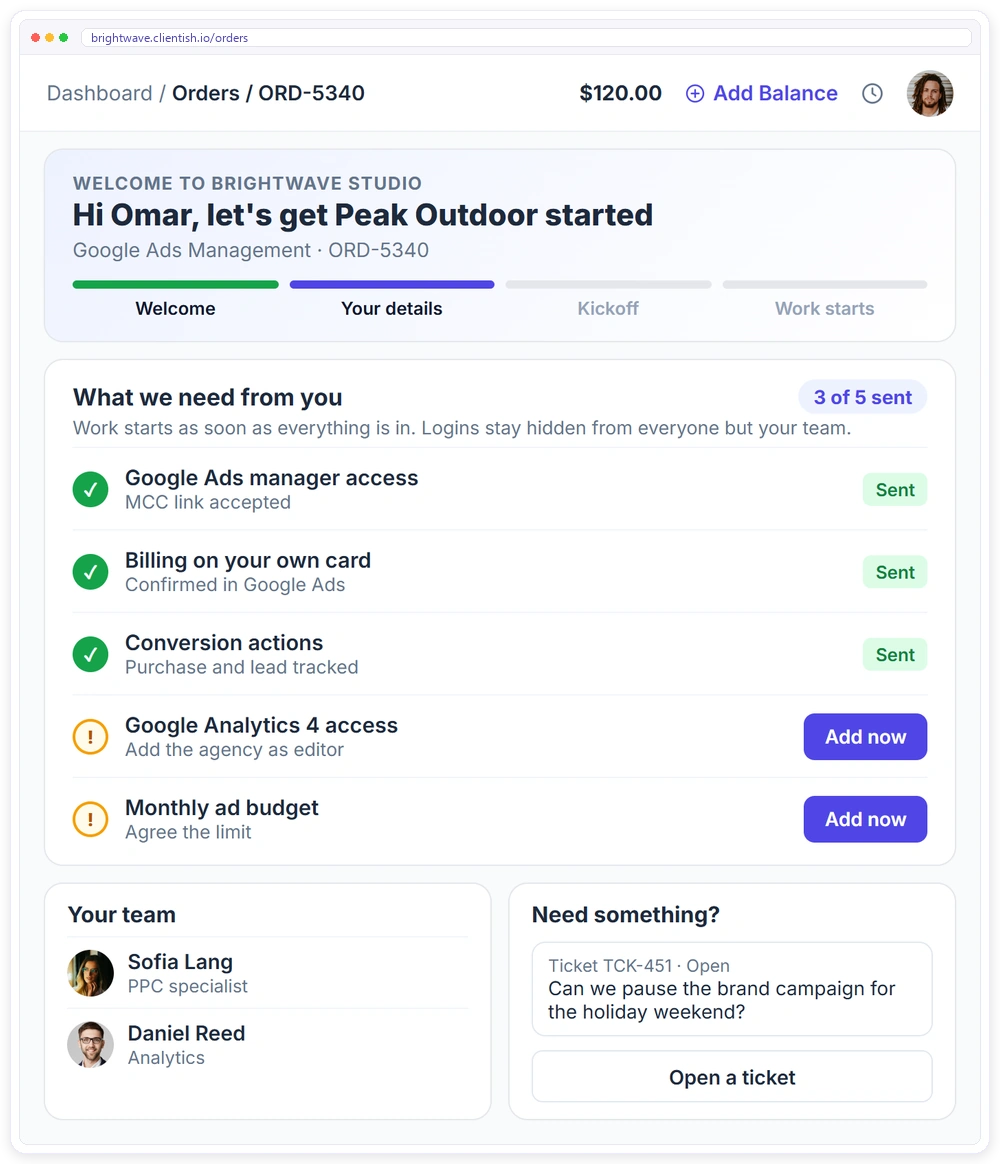
Your side of PPC onboarding runs on the checklist. The client's side, the welcome, the access requests, the budget approvals, and the first report, is what a client portal is there to carry.
- ✓A branded client portal on your own subdomain from day one, with orders, invoices and subscriptions
- ✓An onboarding form attached to the service, so the order waits until the client sends what you need
- ✓Logins collected in hidden fields that only your team sees
- ✓Clients open a support ticket with SLA response times instead of chasing you by email
- ✓A task template creates the onboarding tasks with owners and due dates for every new client
Download the free PPC client onboarding checklist template
The editable Word checklist with 23 tasks across three phases, plus access checklist, conversion tracking verification checklist, billing ownership. Add your branding and run it for every new client.
Frequently asked questions
What if the client doesn't have a Google Ads account yet?
Create a new account under your MCC so it's linked from day one, then transfer ownership to the client's Google account before or shortly after launch. Never leave the account sitting inside agency-owned property long-term — the client should own the account, the data, and the billing relationship regardless of who built it.
What happens if conversion tracking can't be fixed before the planned launch date?
Delay the launch, because launching on broken tracking lets Smart Bidding train on bad data and the damage compounds for weeks. Agree a tracking sign-off gate at kickoff so the client understands launch is conditional, not calendar-fixed, and document a revised go-live date in writing if a third party is the blocker.
How do we handle onboarding when taking over from another agency?
Audit the existing account before touching any settings, and request access via your MCC rather than having credentials transferred. Check whether tracking was set up under the previous agency's GTM container or GA4 property, and if so migrate it to client-owned assets before the handover is complete. Treat historical data as context, not gospel, since performance under a different management style may not reflect what the account can do.
What if the client is reluctant to give us admin access to their accounts?
Explain exactly what access is needed and why: Google Ads via MCC link needs no password sharing, and GA4 and Tag Manager need editor access to verify tracking. If the client still will not grant it, record it as an unresolved dependency and hold launch, since running campaigns without proper access creates accountability gaps for both sides.
Can we start onboarding multiple clients at the same time using one template?
Yes — duplicate the template for each client and rename it with their account name and start date. The value of a single master template is that your process stays consistent while each copy becomes a client-specific record. If you're managing several onboardings simultaneously, a client portal tool can help you run each one as a separate project with its own task list, file sharing, and sign-off trail rather than tracking progress across disconnected documents.
Related Templates
If you onboard PPC clients alongside other services, these free templates pair well with this one: More free, editable templates from the Agency Templates Library.
Client Onboarding Checklist
The 3-phase onboarding checklist for any agency.
CHECKLISTSEO Client Onboarding Checklist
Access, baseline and Search Console set up in week one.
CHECKLISTSocial Media Onboarding Checklist
Voice, content pillars and the approval workflow.
RETAINERPPC Retainer Agreement
Ad management scope, spend handling and reporting.
CONTRACTStatement of Work (SOW)
Scope, deliverables, acceptance and milestones per project.
ONBOARDINGProject Intake Questionnaire
The discovery questions to ask before you scope.
CHECKLISTSocial Media Onboarding Checklist
Voice, content pillars and the approval workflow.
CHECKLISTWeb Design Onboarding Checklist
Content owners, assets, brief and sitemap.
CHECKLISTCreative Agency Onboarding Checklist
The full brand kit before the first concept.