
Web Design Client Onboarding Checklist Template
A web design project stalls on one thing more than any other: waiting for the client's content. The design is ready to start, the timeline is agreed, and then two weeks disappear while you chase a high-resolution logo, the page copy nobody was assigned to write, and photos that never arrive.
Free to download and edit · No watermark · Add your own branding
A structured onboarding checklist is how you stop that, by collecting every asset, locking the brief, and agreeing the revision rules before design work begins, not halfway through it.
This page gives you a free, editable Web Design Client Onboarding Checklist template for agencies and freelance designers, built around the things a build specifically needs: the content and asset collection, the creative brief, the sitemap sign-off, and clear revision limits. It runs across the project from signed contract to kickoff of design. Download it, add your branding, assign owners, and run it for every new web project.
What Is Web Design Client Onboarding?
Web design client onboarding is the structured setup a designer or agency runs between a signed project contract and the start of design production.
It covers collecting the content and brand assets, agreeing the creative direction in a brief, signing off the sitemap and scope, gaining the hosting and CMS access, and setting the revision rules and milestones, so that when design starts, nothing is missing and everyone expects the same thing.
Unlike a retainer engagement, web design onboarding is finite: it typically runs one to two weeks and ends with a defined set of signed-off outputs — an approved creative brief, a locked page list, confirmed CMS credentials, and capped revision rounds — so that the build phase can start on a fixed scope and a fixed clock.
What the checklist covers besides the phases
The single biggest risk is content. Designers consistently find that the slowest part of a web project is not the design, it is waiting on the client's copy and images. A good onboarding checklist treats asset collection as a named, dated task with an owner for every piece, which is what turns a project that slips into one that ships.
How to Structure Web Design Onboarding: Three Phases
Web onboarding works as a short timeline that ends where design begins. These three phases put the project-blocking work, assets, brief, and scope, before any design is produced, and Phase 2 is a gate rather than a guideline: design does not begin until every deliverable from discovery and collection is received and approved, because starting without them is what causes mid-project stalls and scope disputes.
On a typical six-to-ten-week web project, Phase 1 fills days one and two, Phase 2 runs through roughly the first two weeks, and Phase 3 closes out around week two or three, leaving the rest of the schedule for design, build, and review. Compress that front-end work and you do not save time; you borrow trouble that surfaces later, where it costs more to fix.
Before you start
First 48 hoursInternal handoff, welcome message, project workspace, and team assignment, so the client never hits silence after signing.
Discovery and collection
The first one to two weeksThe discovery call, the onboarding questionnaire, the content-and-asset collection, the creative brief, the sitemap and scope sign-off, and access. This is the heaviest phase, and the one that decides whether design starts on time.
Ready to design
KickoffConfirm everything is in, agree the revision rounds and feedback deadlines, lock the milestones and payment schedule, and run the design kickoff.
Each phase guards a different failure: skip Phase 1 and the client feels dropped after paying a deposit; skip Phase 2's asset collection and the project stalls waiting on content; skip Phase 3's revision rules and the build drowns in unlimited rounds.
Why Your Agency Needs a Web Design Onboarding Checklist
A repeatable web onboarding checklist closes the gaps that specifically derail a build.
It collects the content before it becomes the bottleneck
Agencies commonly report a two-to-three week stall between kickoff and design start because a client hasn't located brand files — on a fixed-price project, those are weeks of overhead you absorb with no corresponding invoice milestone hit.
It aligns everyone on the brief before design starts
A signed creative brief covering goals, audience, style, and references is what prevents the specific scenario where a founder and a marketing director each briefed you separately, you delivered a concept matching one, and the other demanded a full rethink from a blank canvas.
It locks the scope with a sitemap and revision limits
Without a page count and a capped revision round written into the agreement, a twelve-page brochure site routinely expands mid-build as clients "just add" a resources section, a careers page, and a partner directory — none of which were in the original quote.
It sets the timeline and milestones honestly
Agreed phases tied to payment milestones mean that when a client delays content sign-off by three weeks, you have a documented basis to push the launch date rather than absorbing the crunch yourself to protect a deadline they caused you to miss.
The Risks of Skipping Structured Web Design Onboarding
Each gap in web onboarding has a predictable way of blowing a project's timeline or margin.
Design is ready to begin, but the client's copy and images never arrive, so the project sits idle — commonly two to four weeks — and the deadline slips through no fault of yours. That idle time also means your team is either bench-sitting or context-switching to other work, compressing the hours available when assets finally land.
Work starts without a signed creative brief, the first concept misreads what the client imagined, and you rebuild from scratch, unpaid. A full redesign round at this stage can consume 20–30% of a project's budgeted hours before billable progress resumes.
No agreed sitemap or page count, so "just add a blog, and a booking page, and a shop" turns a five-page site into fifteen at the same price. Every unquoted addition directly erodes margin, and the cumulative effect on a mid-range project can push a profitable job into break-even territory.
Revision rounds were never capped, so the homepage goes through nine versions as the client changes their mind, and the margin vanishes. Late-stage revision loops are also a common trigger for deadline penalties and strained client relationships.
Launch day arrives and nobody gathered hosting, domain, or CMS access, so go-live stalls while credentials are hunted down. A delay here can push a launch past a client's marketing window — a missed product release or campaign date that is difficult to recover.
Each of these maps to a step in the checklist below.
The Web Design Onboarding Checklist, Phase by Phase
The template holds this full checklist as checkboxes with owner and due-date columns, plus the asset-collection checklist, a creative-brief worksheet, the sitemap and scope, the revision rules, and the access list. Here is what each phase covers.
Before You Start
Brief the design team on what was sold, the goals, the page scope, and anything promised.
Confirm the client is in, name their main contact, and preview the first steps and what you will need from them.
A single home for the brief, assets, sitemap, revisions, and communication.
The project lead, the designer, and who the client escalates to.
Discovery and Collection
Understand the goals, audience, must-have pages and features, and what the client likes and dislikes in other sites.
Goals, audience, competitors, functionality needed, brand assets available, and content responsibility (who writes the copy).
The step that makes or breaks the timeline. Request, as a dated checklist with an owner per item: high-resolution logo, brand guidelines, fonts, photography, and the page copy, and confirm explicitly who is writing each page's text.
Capture goals, audience, tone, style direction, colours, and reference sites, and get stakeholder approval before any design begins.
Confirm the page list and functionality in writing, so additions become quoted changes rather than assumptions.
Hosting, domain registrar, CMS, and any existing site logins, gathered now so launch is not held up later.
Ready to Design
Check off assets, copy, brief sign-off, scope, and access before design starts, so nothing stalls mid-project.
State the number of revision rounds included, what counts as a round, the hourly rate beyond it, and the client's feedback deadline (such as five business days) so the project keeps moving.
Confirm the project phases (concepts, revisions, build, launch) and the payment milestones tied to them.
Recap the brief, the scope, the timeline, and the feedback process, then begin design on a clean, agreed foundation.
The step most web design templates skip
Most web onboarding templates list "collect assets" as one line. The step they leave out is a content-responsibility split, naming, for every page, who writes the copy, the client or the agency, with a due date. Missing copy is the number-one reason web projects stall, and it stalls precisely because everyone assumed someone else was writing it. The free template makes content ownership explicit, page by page.
Tips and Best Practices for Web Design Onboarding That Keeps Projects on Track
The checklist gives you the sequence. These habits keep a build on time and on budget.
Make asset collection a dated checklist, not a request
A list with an owner and a due date per item, including who writes each page's copy, is what stops the project from sitting idle waiting on the client. If a client misses an asset deadline, send one automated reminder 48 hours before it's due, then notify them in writing that the project timeline will shift by the number of days the asset arrives late — and mean it. Absorbing that delay silently is what teaches clients the deadline wasn't real.
Get the brief signed before you design
A documented, approved brief turns "that's not what we pictured" into a conversation you had before the work, not after it. Include a line such as: "Design direction will proceed based on the approved brief dated [date]. Changes to direction after approval are treated as a scope amendment." That one sentence gives you a contractual reference point instead of a disputed memory.
Agree the sitemap in writing
A fixed page count is what keeps a five-page project from becoming fifteen at the same price. Attach the sitemap as a numbered exhibit to the contract, and include language along the lines of: "Pages not listed in Exhibit A are outside scope and subject to a change order."
Cap revision rounds and set feedback deadlines
Written limits and a response window are what keep a build from looping through endless rounds as the client reconsiders. A workable clause reads: "Each design phase includes two rounds of consolidated feedback. Additional rounds are billed at [rate] per round." For the response window, five business days is realistic for most clients — short enough to maintain momentum, long enough that they can gather internal sign-off without rushing.
Tie payment to milestones
A deposit up front, a payment at concept approval, and the balance at launch keep cash flow moving with the project rather than landing in one lump at the end. A common split is something like 50% / 25% / 25%, adjusted to your own risk.
Make the feedback consequence specific
The revision rule already caps the rounds; make the deadline bite by naming what happens when it is missed, that the project is rescheduled to the next production slot rather than the designer absorbing the delay. A concrete consequence makes clients treat the window as real.
How to Use the Free Web Design Onboarding Checklist Template
The template is ready to run in four steps.
Make your own copy
Download the Word (.docx) file, or upload it to Google Docs, and work on your copy, not the original.
Assign an owner and date to every asset
Especially the content rows: name who writes each page's copy and when it is due.
Add your branding
Replace the placeholder header with your studio name and logo, and add a cover page that includes the client's project name and start date so the document feels like a bespoke deliverable from the moment you share it.
Run it for every project
Duplicate it per build and work through the phases, treating the asset collection and brief sign-off as gates before design starts.
Running Web Design Onboarding Inside a Client Portal
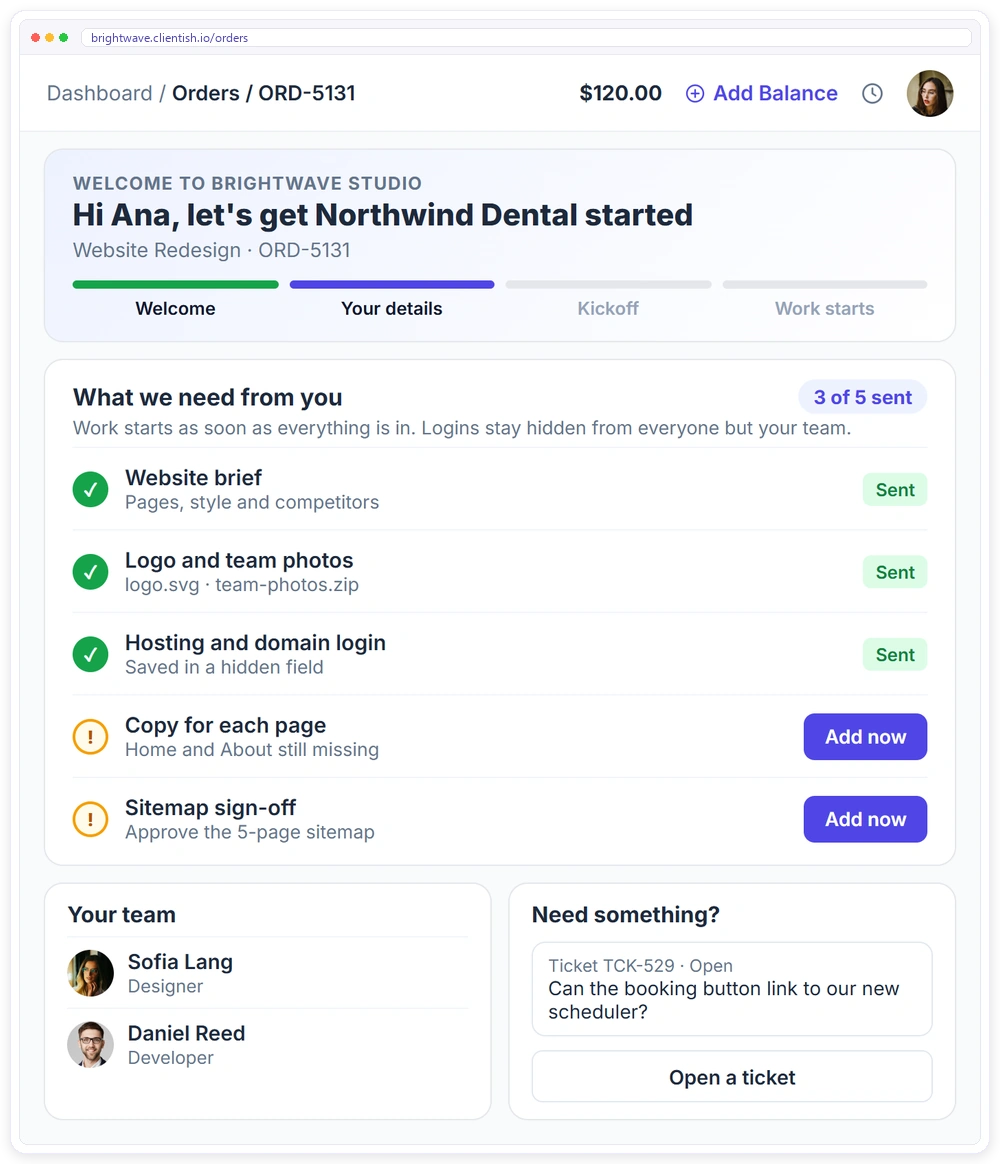
A checklist keeps your team organised. What the client experiences, though, is the welcome, the asset requests, the approvals, and the invoices, and that experience is what a client portal carries.
- ✓A branded client portal on your own subdomain from day one, with orders, invoices and subscriptions
- ✓An onboarding form attached to the service, so the order waits until the client sends what you need
- ✓Logins collected in hidden fields that only your team sees
- ✓Clients open a support ticket with SLA response times instead of chasing you by email
- ✓A task template creates the onboarding tasks with owners and due dates for every new client
Download the free web design client onboarding checklist template
The editable Word checklist with 19 tasks across three phases, plus asset checklist, content responsibility (per page), creative brief worksheet. Add your branding and run it for every new client.
Frequently asked questions
Is this web design onboarding checklist template free to use?
Yes. There is no watermark and no cost. Open it in Google Docs, Google Sheets, or Word, add your branding, and run it for every web project you take on.
What assets do I need to collect when onboarding a web design client?
A high-resolution logo, brand guidelines and fonts, photography or image sources, and the written copy for every page, plus hosting, domain, and CMS access. The template lists these as a dated checklist with an owner per item, and it specifically names who writes each page's copy, because missing content is the top cause of stalled projects.
Who is responsible for writing the website copy?
Whoever you agree at onboarding, and the key is to agree it explicitly, page by page. Many projects stall because both sides assumed the other was writing the copy. The template includes a content-responsibility split so each page's text has a named owner and a due date.
How many revision rounds should a web design project include?
A practical starting point is two rounds per major deliverable, with a defined feedback deadline and an hourly rate beyond the included rounds. What matters more than the number is writing it down at onboarding, so the project does not loop through unlimited revisions.
How long does web design onboarding take?
The discovery, asset collection, and brief usually run across the first one to two weeks, and design starts once everything is confirmed. The template is organised to front-load all of it before production begins, since that is what keeps the build on schedule.
Related Templates
If you onboard web design clients alongside other services, these free templates pair well with this one: More free, editable templates from the Agency Templates Library.
Client Onboarding Checklist
The 3-phase onboarding checklist for any agency.
CHECKLISTSEO Client Onboarding Checklist
Access, baseline and Search Console set up in week one.
RETAINERWeb Development Retainer
Maintenance and build hours with change-request terms.
CONTRACTStatement of Work (SOW)
Scope, deliverables, acceptance and milestones per project.
ONBOARDINGProject Intake Questionnaire
The discovery questions to ask before you scope.
Website Maintenance Checklist
A free, editable agency template.
Coming soonSocial Media Onboarding Checklist
Voice, content pillars and the approval workflow.
CHECKLISTPPC Client Onboarding Checklist
Conversion tracking, MCC access and billing ownership.
CHECKLISTCreative Agency Onboarding Checklist
The full brand kit before the first concept.