
Client Management Portal for Web Design Agencies, Without the Feedback Chaos
Clientish is a white-label client portal for web design agencies that puts website briefs, design feedback, approvals, care plans and invoices in one place, from $9.99 a month, alongside Figma, Google Drive and the tools you already use. Website projects rarely run late because of the design. They run late waiting for the client’s content, feedback and approval. Clientish collects the brief before you start, keeps every comment on the project, gets approvals on time and turns each launch into a monthly care plan.
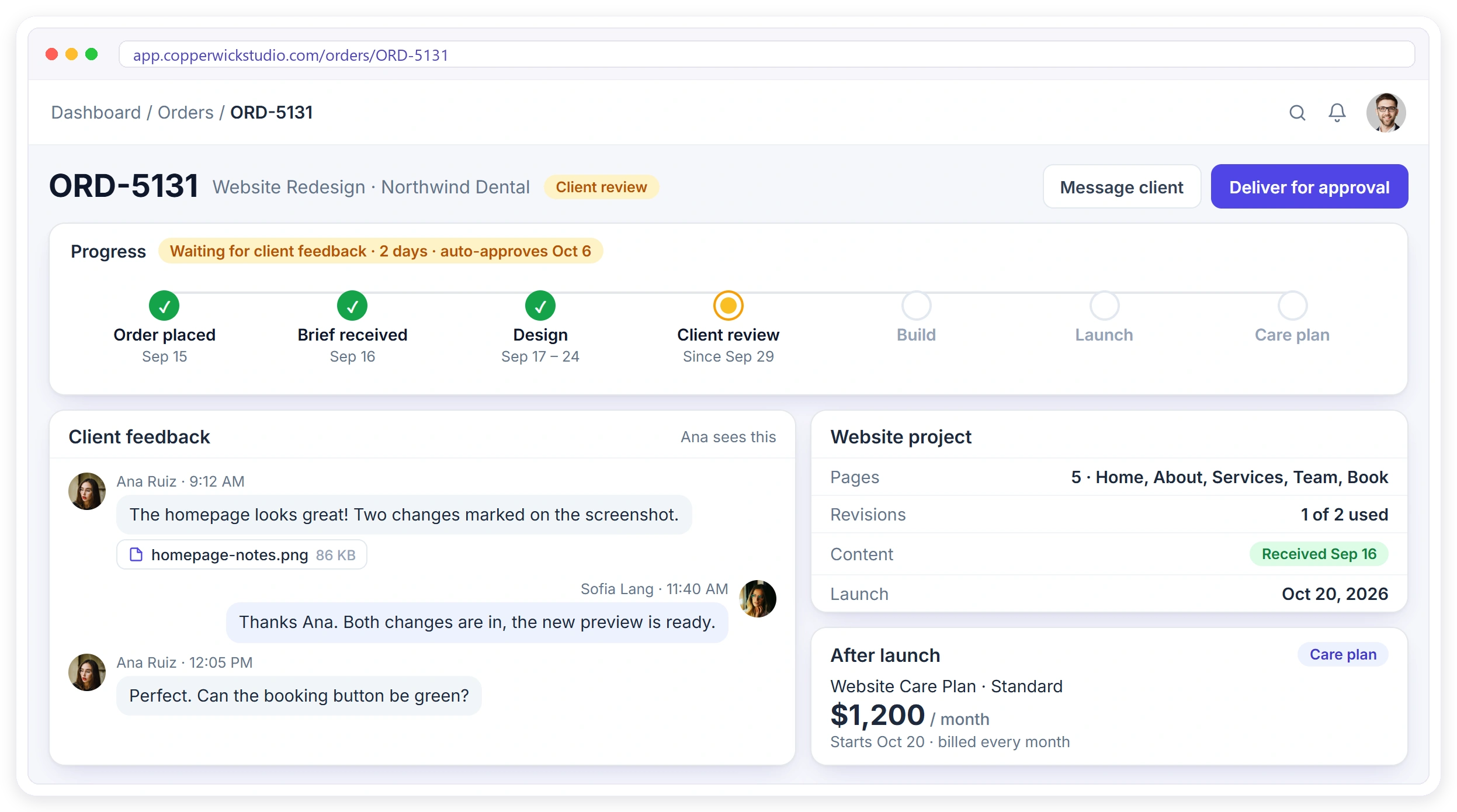
Sound Familiar?
Four things website clients say that stall a project, and how the client portal answers each one before the launch date slips. Each answer keeps content, feedback and payments moving toward launch.
“We’re still waiting for their content.”
The client fills out the brief, pages, logins and files from their portal. Work starts only when it’s complete.
“They haven’t replied in a week.”
Deliver for approval. The client approves or asks for a revision, and it’s approved automatically after the days you set.
“Just one more small change…”
Fixed packages with a set number of revisions, and extras such as more pages sold as paid add-ons.
“Which email had the feedback?”
Every comment and screenshot sits on the project, with a separate chat for your team.
From Order to Care Plan
Every stage of a website project, from the content brief and design feedback to approval, launch and the monthly care plan that follows, in one client portal.
Order
Package picked and paid
Brief
Pages, copy, logins, files
Design
Tasks for your team
Review
Feedback on the order
Launch
Approved and delivered
Care Plan
Billed every month
Get the Content Before You Start Designing
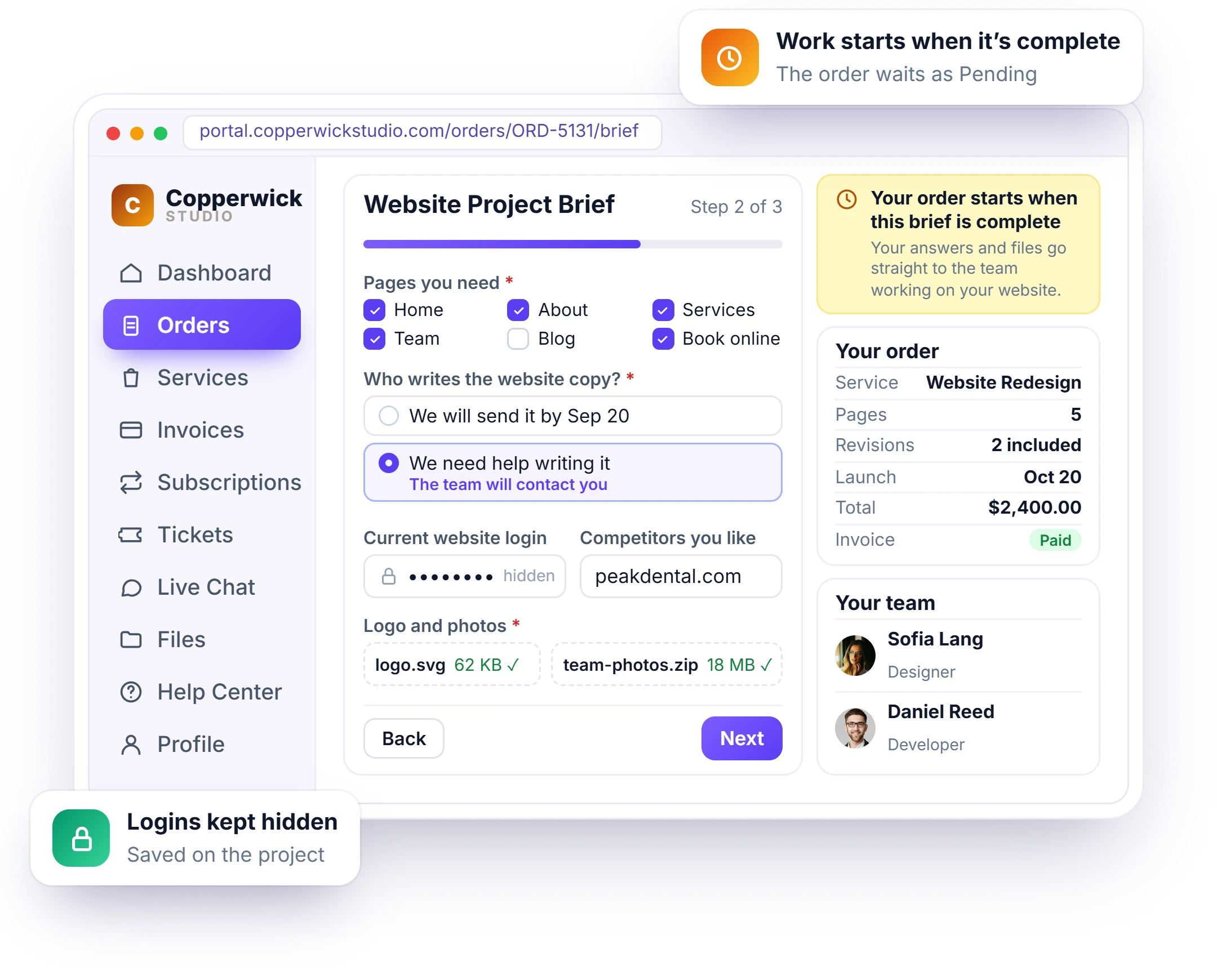
Late copy and missing logins are the main reason website projects run over. Attach a website brief to each package with the intake form: the pages they need, who writes the copy, logins and brand files. The order waits as Pending until the brief is complete, and you can see exactly how long you’ve been waiting.
- A website brief attached to each package
- Pages, copy, competitors and brand files in one form
- Logins kept in hidden fields
- The project waits until the brief is complete
- See how long you’ve been waiting for the client
- Every answer and file saved on the project
Get Sign-Off Without Chasing
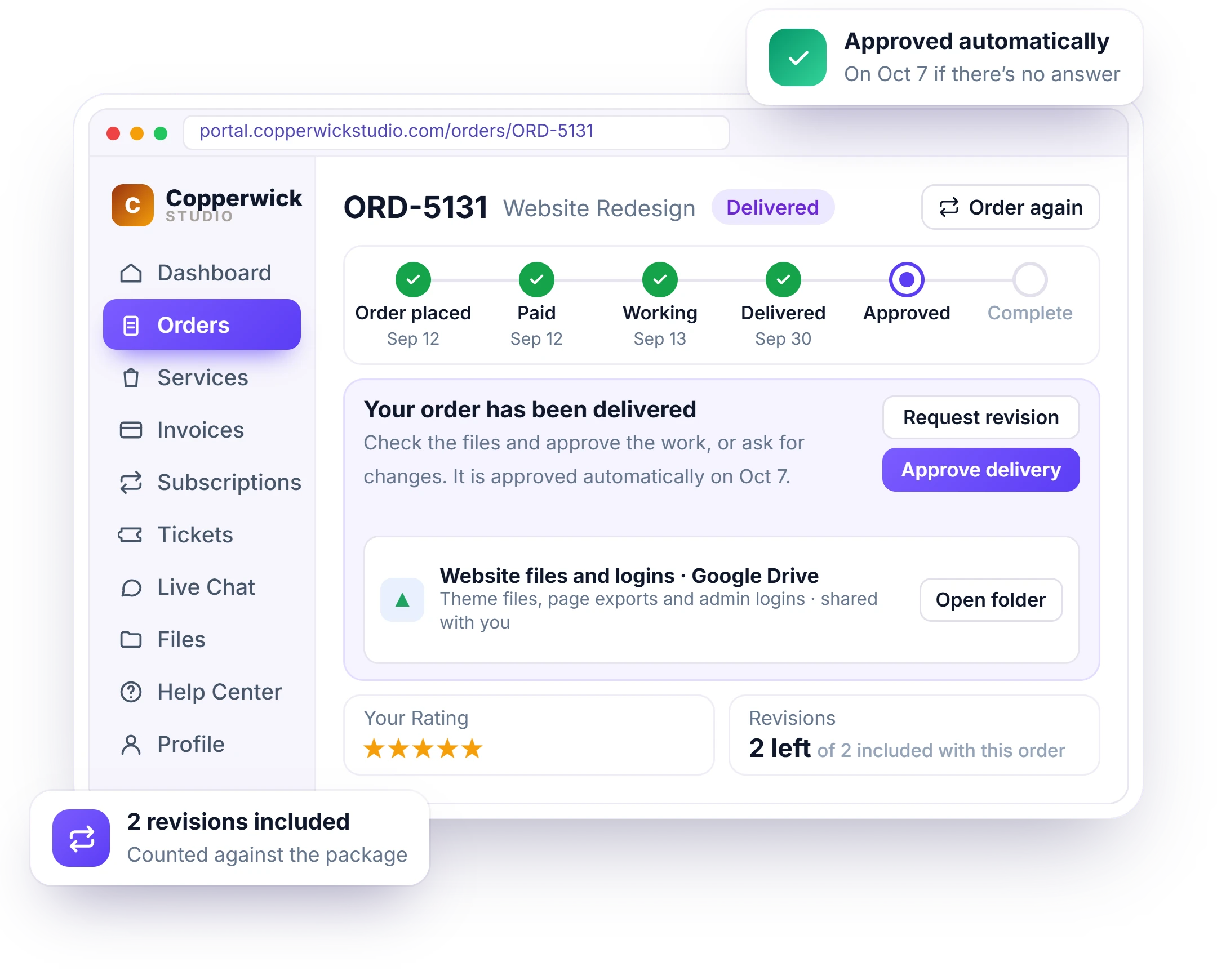
A week of silence after you send a design adds a week to the launch. Deliver for approval and the client checks the work in their client portal, then approves it or asks for a revision. If they don’t answer, it’s approved automatically after the days you choose.
- Deliver the design or build for approval
- Approve or request a revision in one click
- Automatic approval after the days you set
- Revisions counted against the package
- A progress timeline the client can follow
- Status emails so clients don’t have to log in to know
Stop Scope Creep Before It Starts
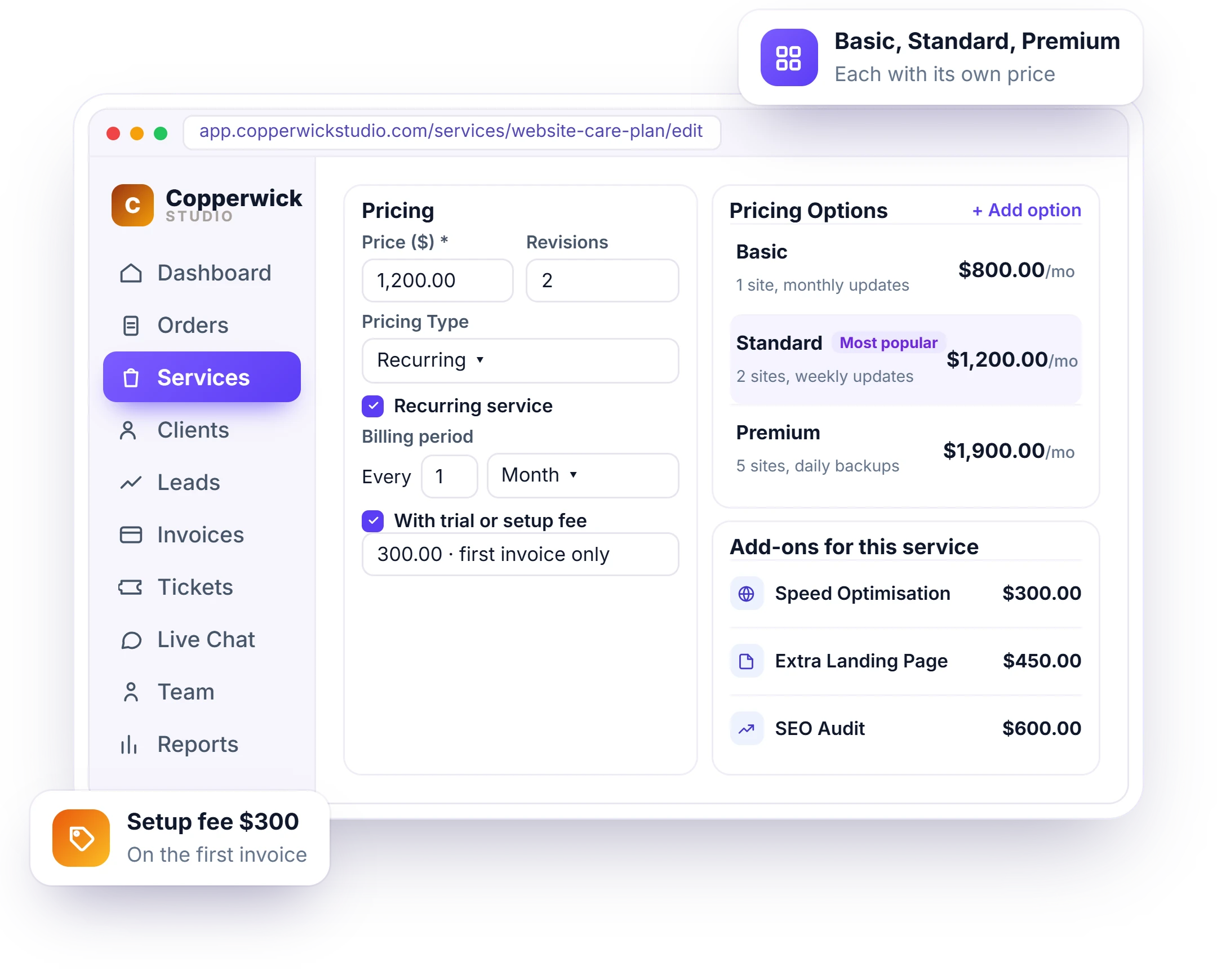
Endless small changes eat the profit on a fixed-price website. Sell clear packages from your service catalog with the number of revisions included, offer Basic, Standard and Premium options, and turn extras like more pages or speed work into paid add-ons.
- Website packages with a clear scope
- Revisions included in each package
- Basic, Standard and Premium options
- Extra pages and speed work as paid add-ons
- Clients pick and pay before work starts
- Every change request tracked as a revision
All the Feedback on the Project
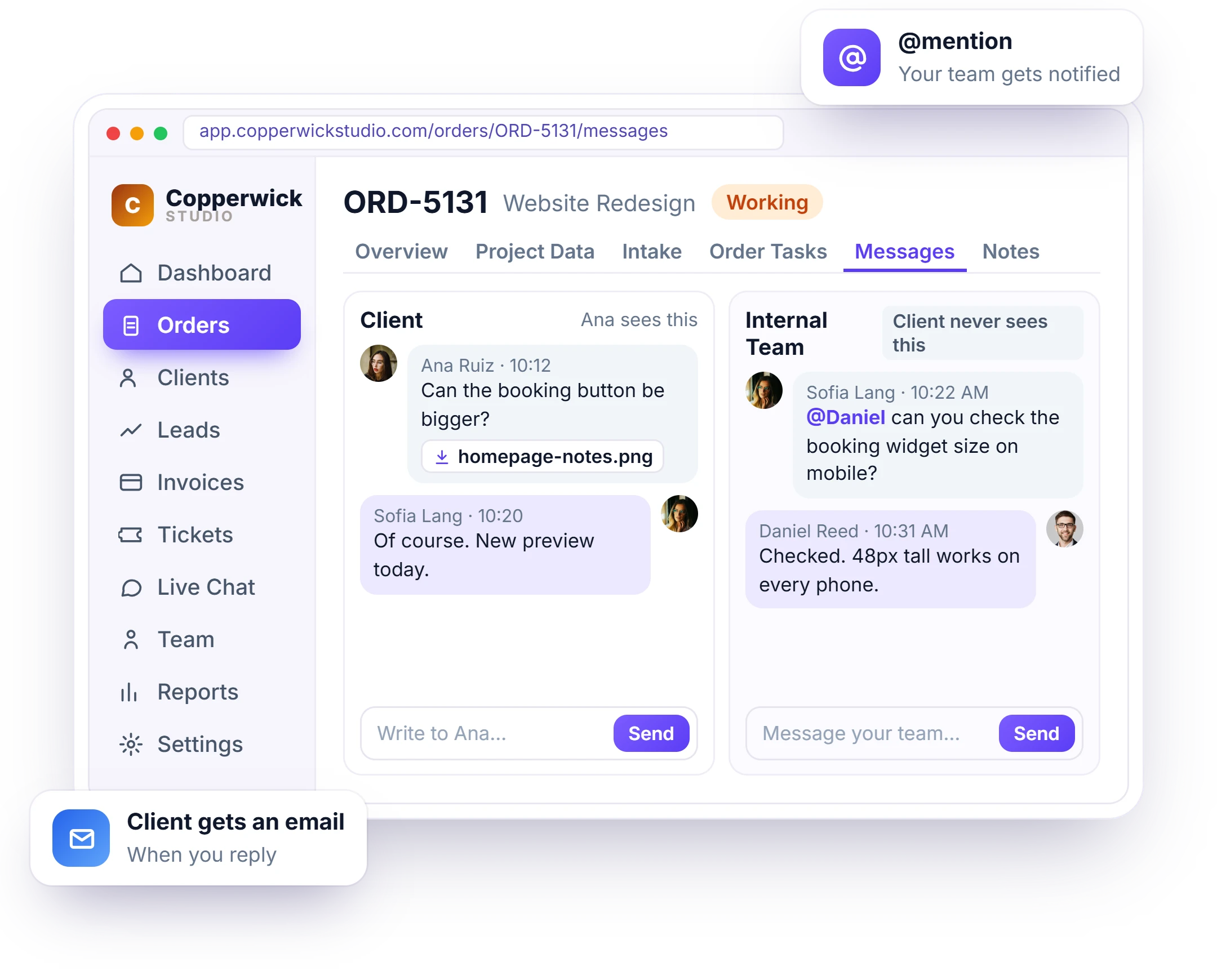
Feedback spread across email, WhatsApp and Slack gets missed. Each website order has a client conversation where clients send notes and screenshots, and a separate team conversation they never see, so designers and developers talk without leaving the project. A Figma link shared in the conversation opens right there as the live design.
- Client feedback, screenshots and Figma previews
- A private chat for your designers and developers
- @mentions and saved replies
- Clients get an email when you reply
- Every file kept with the project
- The full history of the project in one place
Run Every Website the Same Way
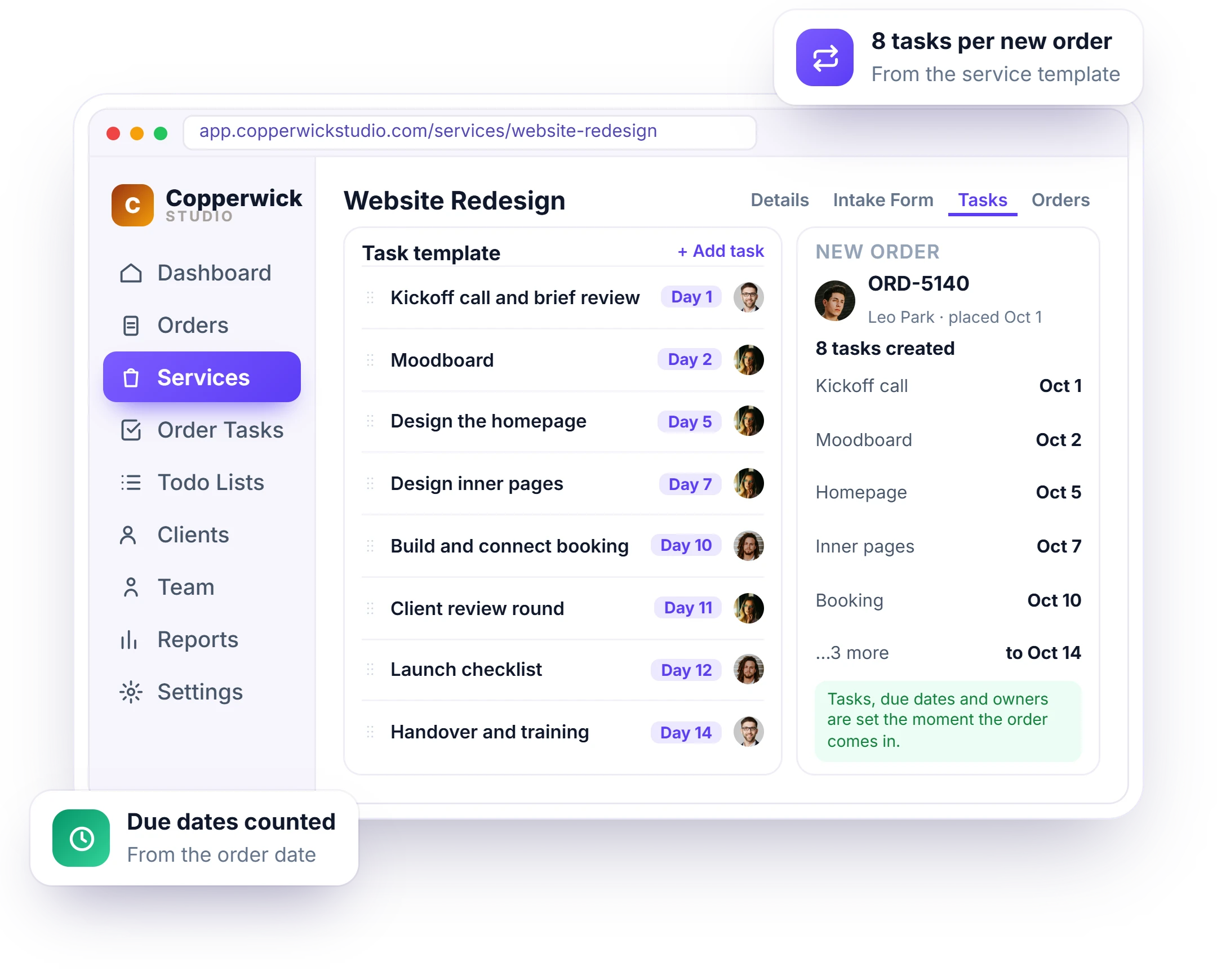
Setting up kickoff, design, build and launch tasks manually for every project means steps get missed. Save a task template on each package, and every new website order gets its tasks, due dates and owners automatically.
- Kickoff, design, build and launch tasks
- Due dates counted from the order date
- Designers and developers assigned automatically
- A progress bar for each website
- Reminders before tasks are due
- The same process for every client
Turn Every Launch Into Monthly Revenue
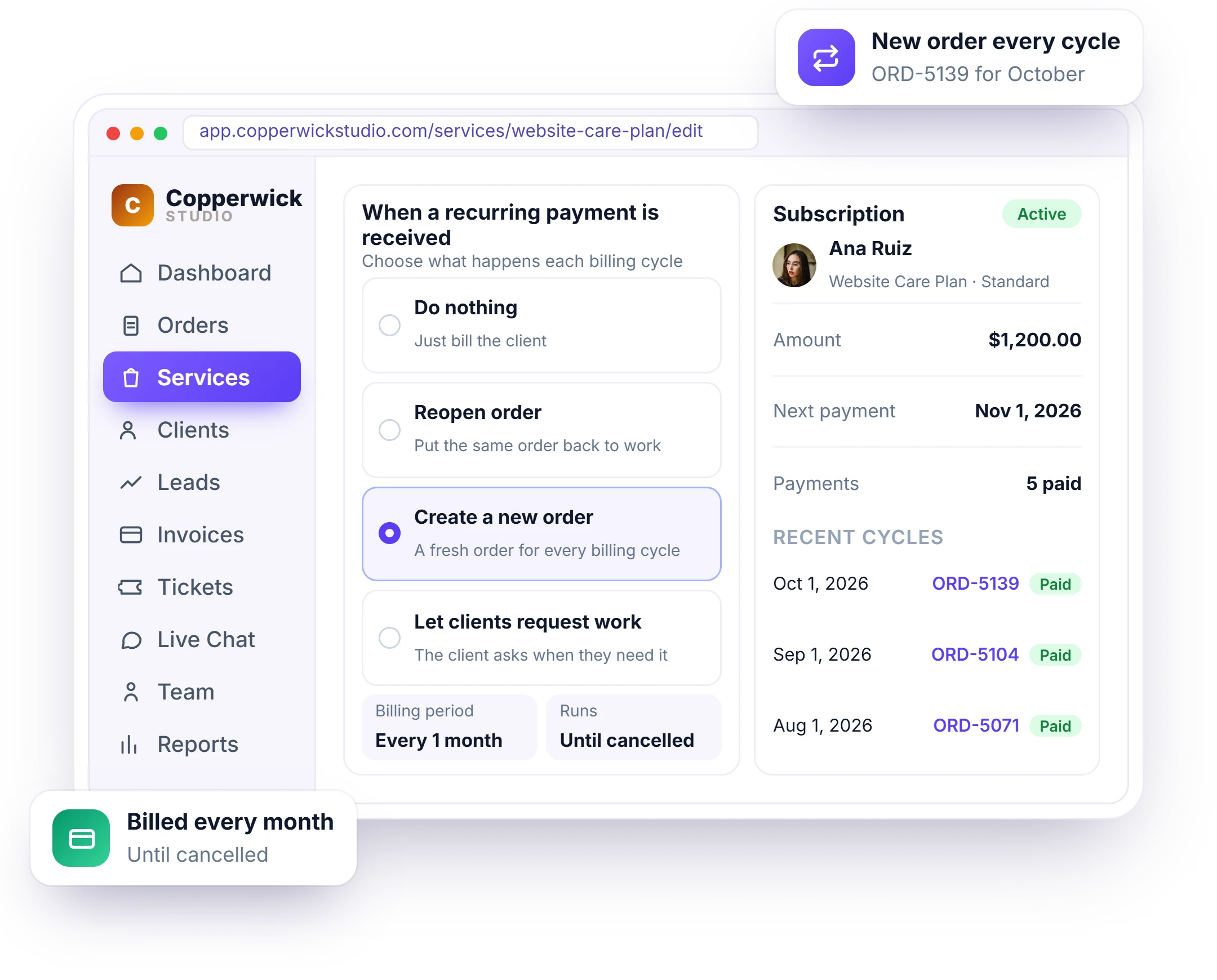
Most website income stops at launch. Offer a Website Care Plan as a recurring service with recurring billing: the client is billed every month, gets an upcoming payment notice and receipts, and can see the subscription in their portal.
- Monthly care plans as recurring services
- Basic, Standard and Premium care plans
- A setup fee on the first invoice
- Upcoming payment notices and receipts
- Invoice reminders until paid
- Clients see their subscription in the portal
Packages Web Design Agencies Sell With Clientish
How website redesigns, landing pages, care plans and speed add-ons are packaged, priced and ordered by clients from your portal. Clients choose a package and order it themselves instead of waiting for a custom quote.
Website Redesign
A fixed-price package with a website brief, design and build tasks and two revisions.
Landing Page
A one-page build with a short brief and a 5-day delivery time.
Website Care Plan
A monthly plan with Basic, Standard and Premium options and a setup fee.
Speed Optimization
A paid add-on clients can add to any website package.
Set It Up in 4 Steps
Add your website packages, brief and task template once. Most web design agencies are ready to take orders the same afternoon. After that, every website project starts with the same brief and the same task list.
Add Your Packages
Create your website packages with prices, revisions and add-ons.
Attach the Brief
Add a website brief and a task template to each package.
Share Your Order Form
Clients pick a package, pay and fill out the brief.
Deliver and Sign Off
Work, get feedback, deliver for approval and start the care plan.
How Clientish Compares for Web Design Agencies
Entry-plan prices and features of the six client portals web design agencies compare most, side by side. Figures come from each vendor’s own pricing page, so the comparison stays fair and checkable.
 Clientish |  Wayfront |  ManyRequests |  Assembly |  SuiteDash |  Clientjoy | |
|---|---|---|---|---|---|---|
| Entry plan | $9.99/moSolo; Starter $29/mo with 5 users | $129/mo$99 yearly | $59/mo$39 yearly | $49/mo$29 yearly | $19/mo$180 yearly | $49/mo$44 yearly |
| Team users | 1 on Solo, 5 on Starter | 5 | 1, then $20 each | 1 | Unlimited staff | 5 |
| Own domain | Yes | Yes | Yes | From Professional$139/mo | Not listed | From Premium$99/mo |
| Workflow automations | From Growth$49/mo | Not listed | Zapier only | From Professional | From Pinnacle$99/mo | From Premium |
| Client reports in portal | 13 sources | Not listed | From Pro$99/mo | Not listed | Not listed | From Premium |
| Client invoicing | 12 gateways | Yes | Yes | Not listed | Not listed | Yes |
You sell mostly productized, subscription-style services.
You bill clients by the hour or with prepaid credits.
You want a free plan for your first five clients.
You want unlimited staff on the cheapest plan.
Proposals, contracts and a sales pipeline matter more to you than the portal, which starts on its Premium plan.
Entry-plan facts from each vendor’s own pricing page on October 7, 2026 (Assembly re-checked October 19, 2026). “Not listed” means their pricing page doesn’t mention it. Check their pages for the latest.
Web Design Agency FAQ
Straight answers on website content, design approval, Figma reviews, scope creep, care plans and your own domain.
What is a client portal for web design agencies?
The place a website client goes instead of your inbox. They send the brief, pages and logins there, review each design, approve the build and later pay the care plan. Clientish runs that portal under your brand, with packages, tasks and invoicing, from $9.99 a month.
Can clients review Figma designs in the portal?
Yes. Share the Figma link in the project conversation and it opens right there as the live design, so the client sees it without hunting for the file and replies in the same thread. The link needs Figma’s “anyone with the link can view” setting.
Will my website clients log in to the portal?
They do when the next step is theirs: a design to approve, content still missing from the brief or an invoice due. Each of those reaches them by email with a way back in, so the project doesn’t stall in their inbox.
How do I get website content from clients on time?
Put a website brief on every package that asks for each page’s copy, images, domain and hosting logins up front. The project shows as waiting on the client until the brief is complete, so the missing About page is their delay on record, not yours.
How do I get clients to approve designs faster?
Send the homepage design, then the inner pages, as deliveries for approval. The client approves or asks for changes from the portal, and if a stage sits untouched for the days you set, it’s approved so the build can move on.
How do I stop scope creep on website projects?
Sell fixed packages with a set number of revisions, and turn extras such as more pages into paid add-ons. Every revision is counted against the package.
Can clients send feedback with screenshots?
Yes. Clients send notes and files in the project’s conversation, and your team has its own private chat on the same project.
Can I sell website care plans?
Yes. Create a care plan as a recurring service, bill it monthly with a setup fee, and clients see the subscription in their portal.
Can I keep client logins safe?
Yes. Hosting, domain and CMS logins go into hidden fields on the website brief, and only your designers and developers can see them on the project.
Is the portal branded as my agency?
Yes, end to end. A client who opens projects.youragency.com meets your logo and colors on the sign-in, on every design delivery and on the care plan invoice. Solo and Starter keep a small Powered by Clientish line, which Growth, Pro and Enterprise remove.
Do I need a separate project management tool?
No. Tasks, due dates, owners and reminders live inside each website order, next to the brief, the feedback and the invoice.
Launch websites without the chaos
Collect the content first, review designs from Figma links in the conversation, get sign-off on time and turn every launch into a monthly care plan. Try it with example data first.
- A website brief for pages, copy and logins
- Figma designs that open in the conversation
- Approve or ask for changes in one click
- Revisions counted against the package
- A care plan billed every month after launch
- Your own domain and branding
Every feature unlocked in the trial. Pick a plan only when you’re ready.