
AI CONNECTIONS (MCP) · UPDATED OCTOBER 2026
Claude and ChatGPT Connector for Agencies
A Claude or ChatGPT connector lets the AI you already use read your agency’s real data and, if you allow it, update it. AI Connections links Claude, ChatGPT, Cursor, Codex or any MCP tool to your workspace, on every plan from $29 a month. Ask questions in plain language and get answers from your real data. A new connection only reads; you decide if it may also update orders, tickets, leads, clients or invoices.
Why Agencies Connect Their AI
Your team already asks Claude and ChatGPT for help every day, but the AI cannot see your agency, so it guesses or waits for pasted data. Connected, it works from your real numbers. See also automations for work that should run on its own.
ASK IN PLAIN LANGUAGE
Your Numbers, Without Opening a Report
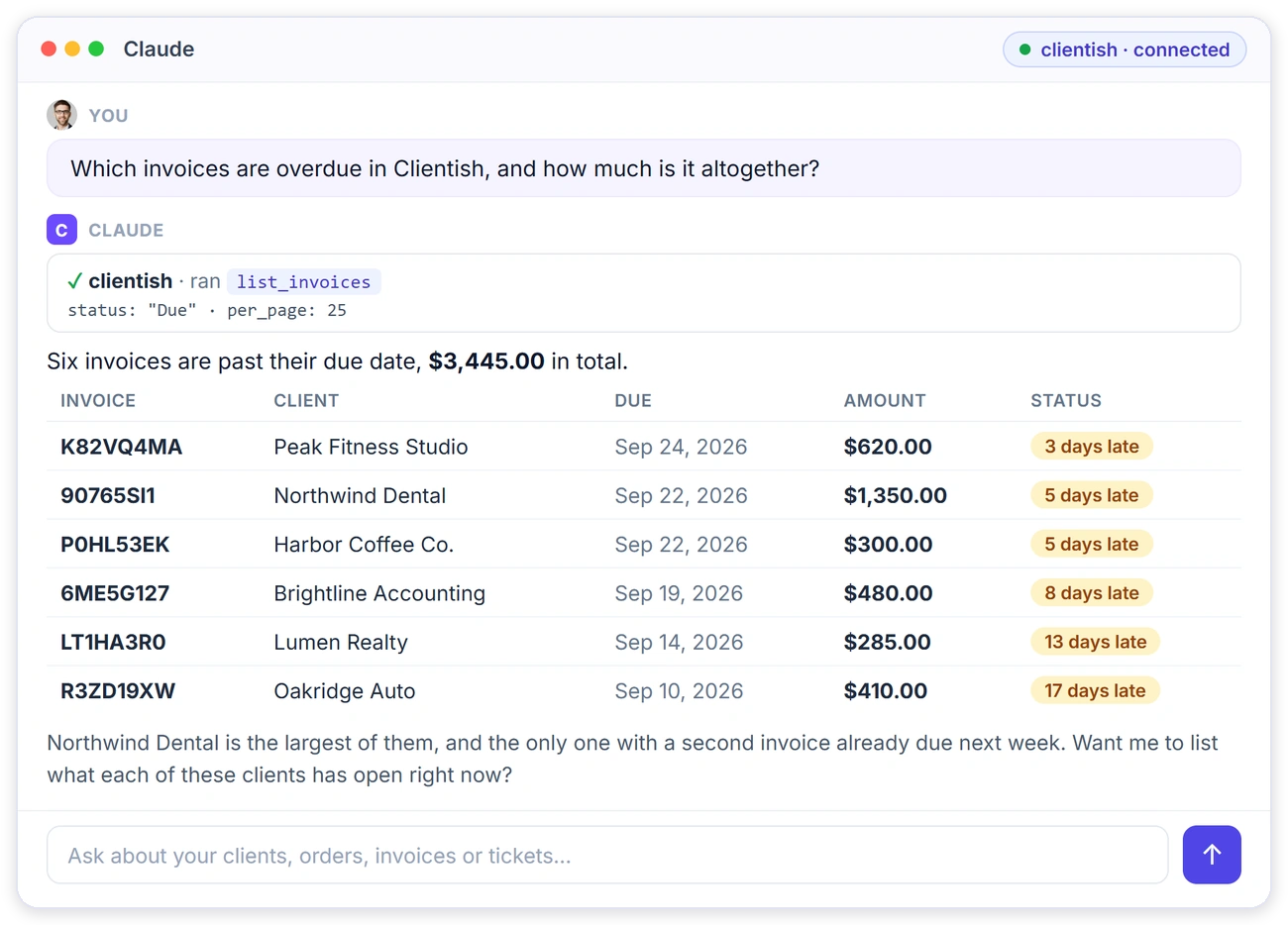
Ask a question in Claude and it runs the right Clientish lookup for you, then answers with the actual invoices, clients and totals, so nobody has to export a list first.
What It Can Read and Change
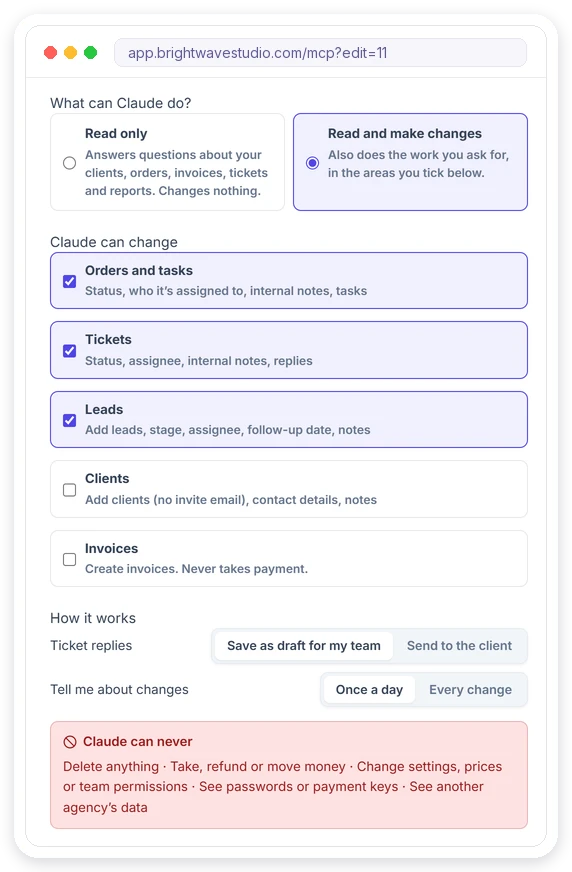
Each connection has its own permissions, so you tick only the areas that tool needs and the AI cannot wander into the rest of your workspace. Every change goes through the same checks as in the app and lands in the connection’s history.
Connect Clientish MCP in Four Steps
Only the workspace owner can create a connection, and it takes a few minutes: no code, no developer and no separate account with us, just the AI tool you already pay for.
WORKS WITH YOUR TOOLS
Works With Claude, ChatGPT, Cursor and Codex
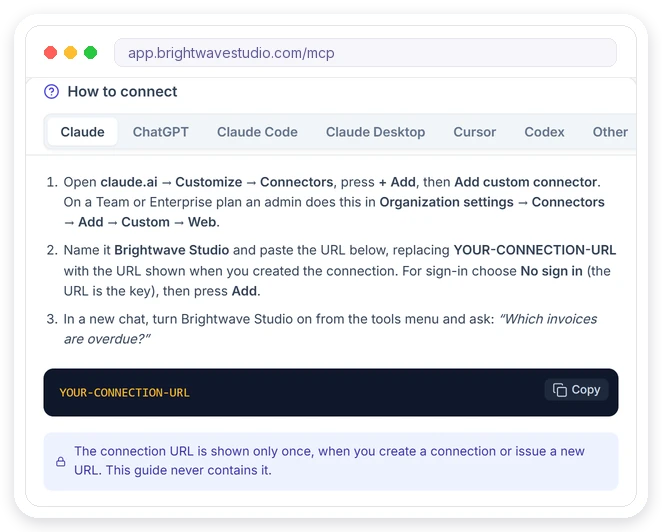
The AI Connections page gives you step-by-step setup for each tool, with the exact snippet to paste. Any AI client that supports MCP over HTTP can connect the same way.
CONNECTIONS
Every Connection Has Its Own Rules
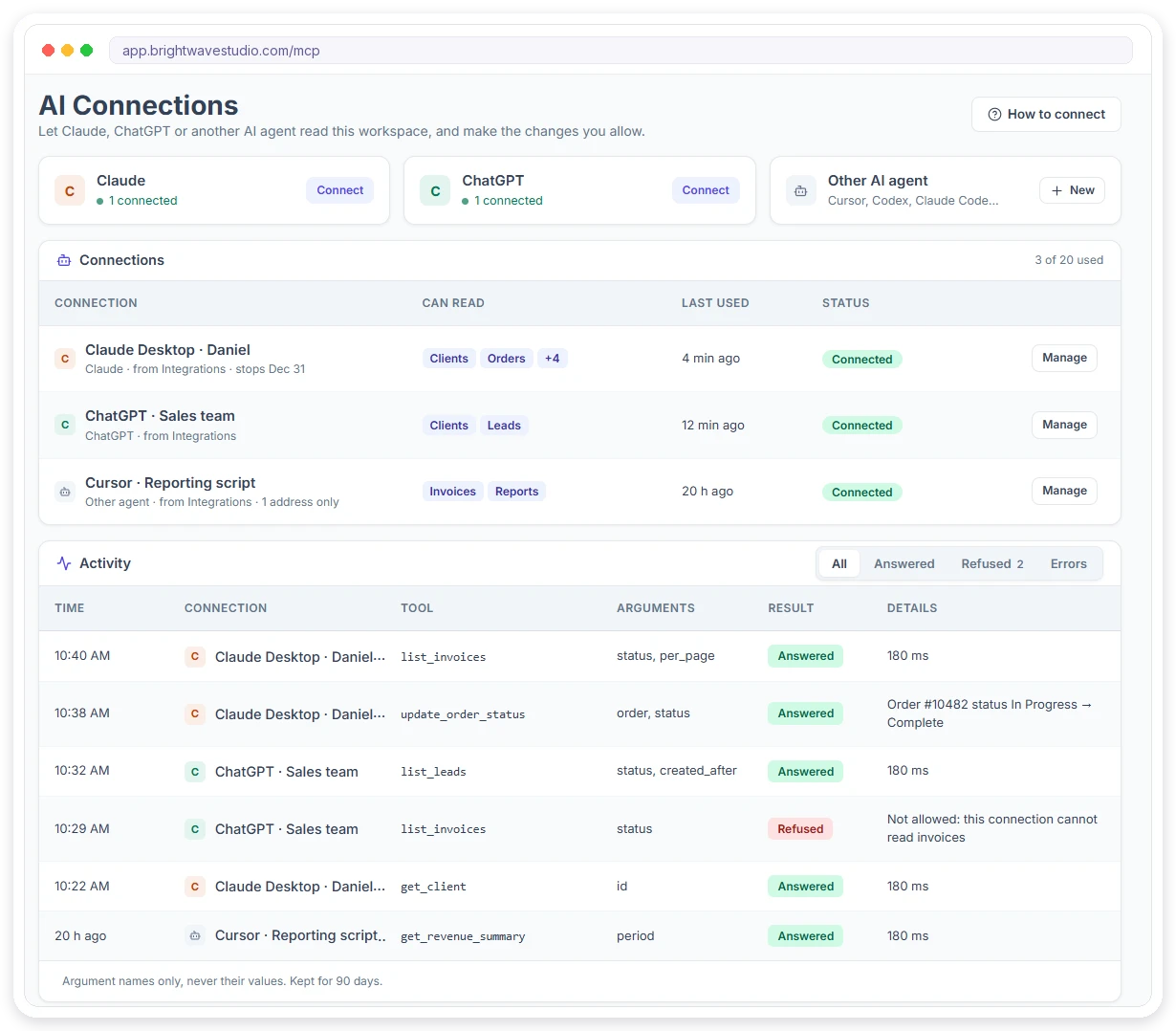
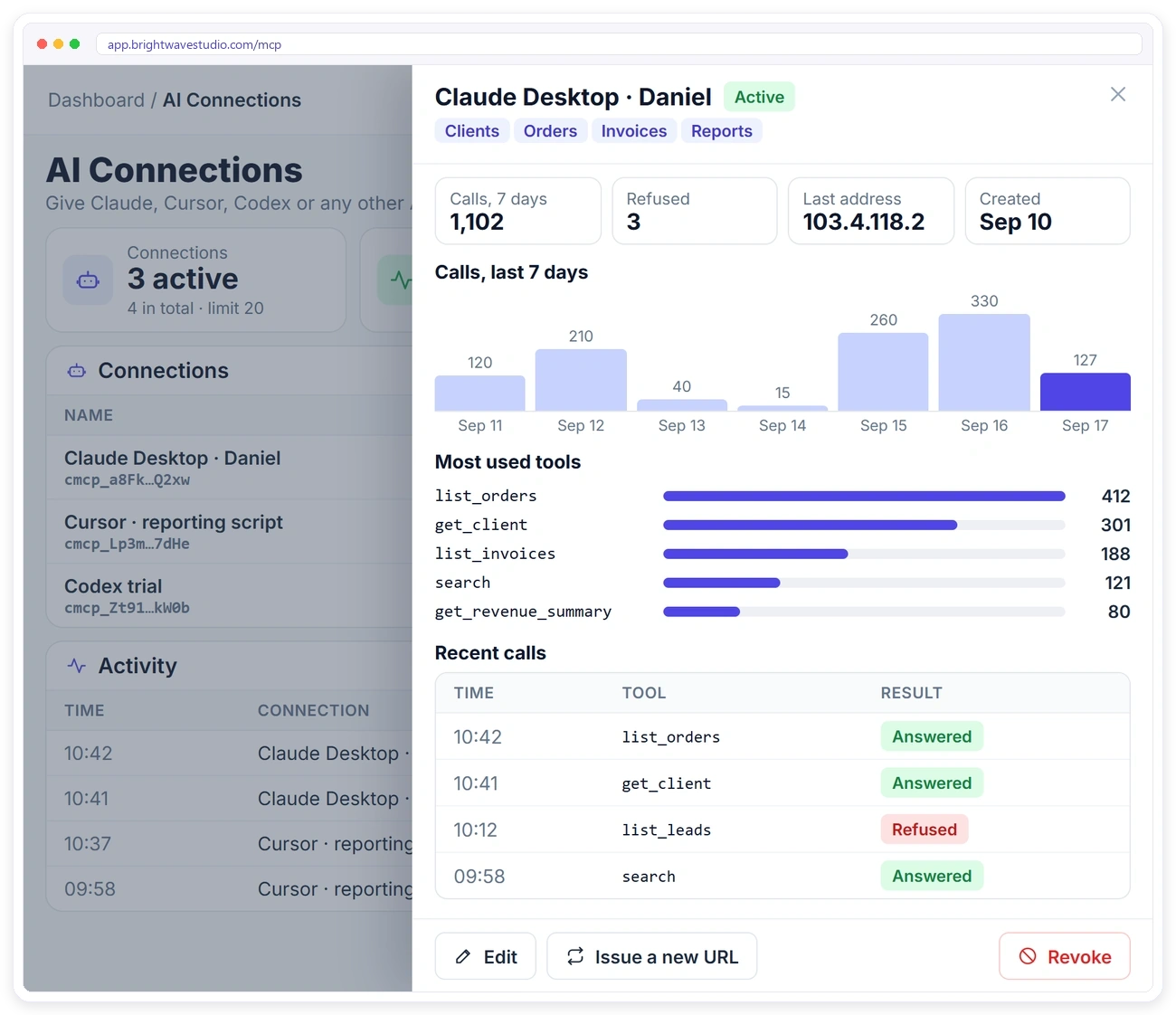
Give each person or machine a separate connection, so you can see, limit and switch off each one on its own without touching the others when someone leaves.
ACTIVITY
See Exactly What Was Asked
Every connection keeps an activity list: which lookup ran, when, from where, and whether it was answered or refused, so you always know what the AI looked at.
MAKE CHANGES
Let the AI Make Changes, Safely
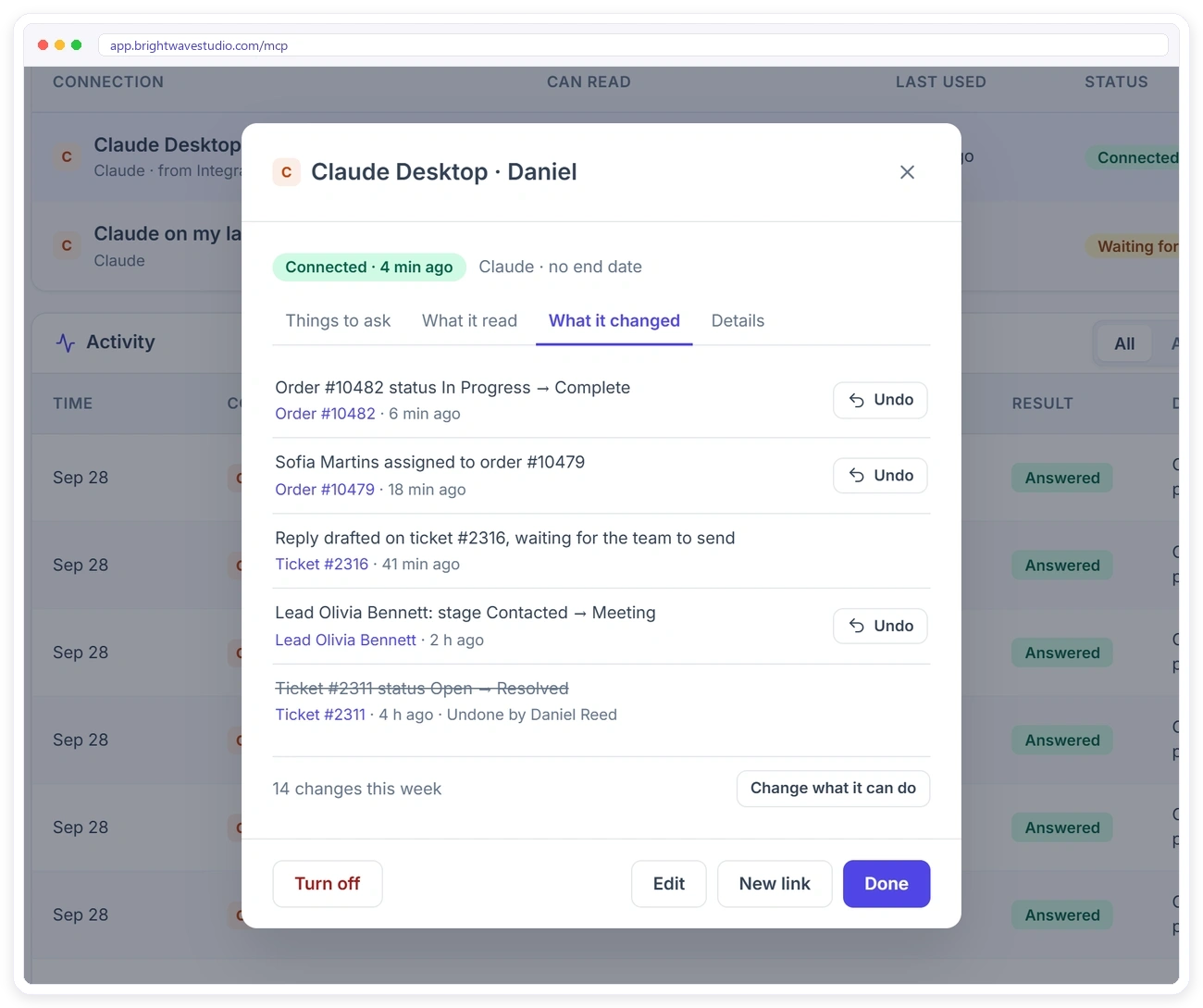
Switch a connection to Read and make changes and tick the areas it may work in. When you ask, it updates the order, ticket or lead for you, and every change lands in the connection’s What it changed list.
Safe By Design
Read only until you allow more, limited to your own workspace, and switched off the moment you revoke it, so trying a connector never puts your client data at risk.
Plain Questions Agencies Ask
Ask the way you’d ask a colleague. Owners, account managers and finance get answers from live data in seconds across orders, invoices, leads and support tickets, with real names, numbers and dates instead of a guess.
Claude and ChatGPT Connector FAQ
Straight answers about the Claude and ChatGPT connector for agencies: MCP, setup, changes, undo, safety and what it costs.
What is MCP?
MCP (Model Context Protocol) is a standard way for AI tools to connect to other apps. Clientish runs an MCP server for your workspace, so an AI tool you connect can look up your clients, orders, invoices and more when you ask it a question, and make the changes you allow.
Which AI tools can I connect?
Claude (on the web, Desktop or Code), ChatGPT, Cursor, Codex and any other AI client that supports MCP over streamable HTTP.
Does it work with ChatGPT?
Yes. In ChatGPT, turn on Developer mode under Settings, Apps & Connectors, Advanced settings. Then create an app with your connection URL and choose No authentication. The AI Connections page walks you through it.
Can Claude update my orders and tickets in Clientish?
Yes, if you allow it. In the connection’s settings choose Read and make changes, then tick Orders and tasks or Tickets. Claude can then change a status, assign a team member, add an internal note or create a task when you ask. A new connection only reads.
Can I undo a change my AI agent made?
Yes, for 7 days. Open the connection, go to What it changed and press Undo on a status change, an assignment, a finished task or a lead’s stage or assignee. If someone has changed that record since, Clientish leaves it as it is. Notes, replies and new records are listed too, but can’t be undone there.
Will the AI email my clients or send invoices on its own?
Not unless you allow it. By default a ticket reply waits as a draft until someone on your team sends it, and an invoice waits until your team approves it. You can switch either one to send, per connection. A status change tells the client the same way it does when a person makes it.
Can the AI delete records or take payments?
No. Deleting records, payments, refunds and changes to your settings, prices or team permissions are off limits for every connection, whatever you tick.
Who can create a connection?
Only the workspace owner. Co-admins and team members can’t.
What if the connection URL leaks?
Rotate it to get a new URL with the same settings, or revoke it. It stops working immediately.
Can I limit what one connection can see?
Yes. Each connection has its own permissions, and you can add an expiry date, allowed IP addresses and a request limit.
How much does the connector cost?
AI Connections come with every Clientish plan, from $29 a month, with no fee per question. You need your own Claude or ChatGPT plan that supports connectors, which you pay to that provider.
Put your agency data one question away.
Create a connection, paste it into Claude or ChatGPT and ask about your orders, invoices and clients. Read only until you allow changes, and every change can be undone for 7 days. Try it with example data first.
- Its own read and change rights
- An activity list
- Undo for 7 days
- Expiry date and allowed IPs
- No deletes, no payments
- Off the moment you revoke it