
CLIENT PORTAL FOR VIDEO EDITING AGENCIES · UPDATED OCTOBER 2026
Client Management Portal for Video Editing Agencies, From Footage to Final Cut
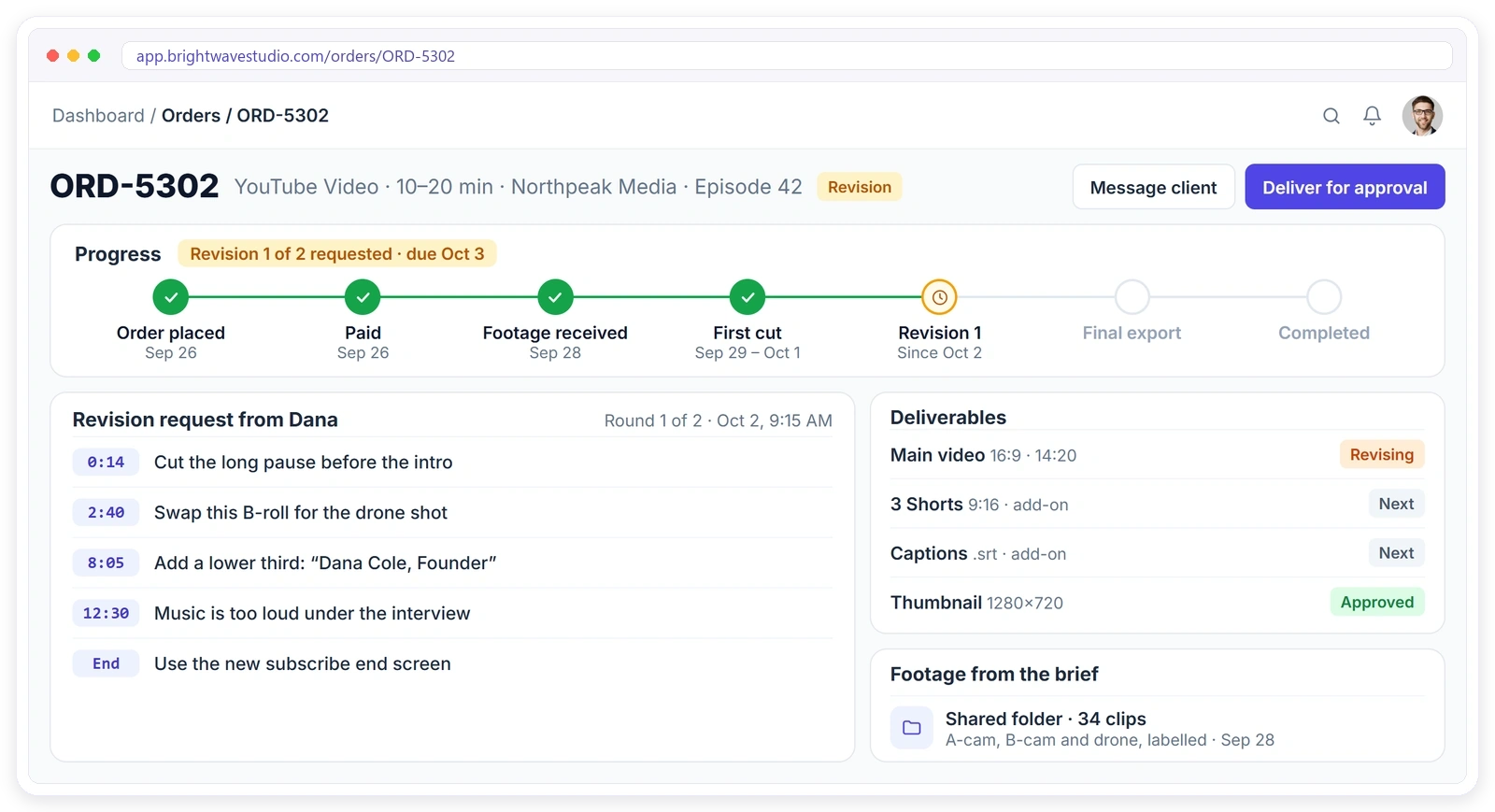
Clientish is a white-label client portal for video editing agencies that puts briefs, footage links, timestamped revisions, sign-off and invoices in one place, from $29 a month, alongside Google Drive, Frame.io and the tools you already use. Video projects rarely run late in the edit. They run late waiting for footage, decoding feedback like “make it pop” and going round after round of changes. Clientish collects the footage and brief first, gets revisions with timestamps, counts the rounds and gets sign-off on the final cut.
Sound Familiar?
Four things video clients say on almost every project, and how the client portal answers each one before it costs you a round.
From Raw Footage to Final Cut
Every stage of a video project, from the brief and footage link to the first cut, timestamped revisions, sign-off and the next video, in one client portal.
- 01
Footage
Link, length, formats
- 02
First Cut
Editor assigned
- 03
Revisions
Notes with timestamps
- 04
Approve
Client signs off
- 05
Final Files
Shared as a link
- 06
Next Video
Requested from the plan
FOOTAGE & BRIEF
Get Organised Footage Before You Edit
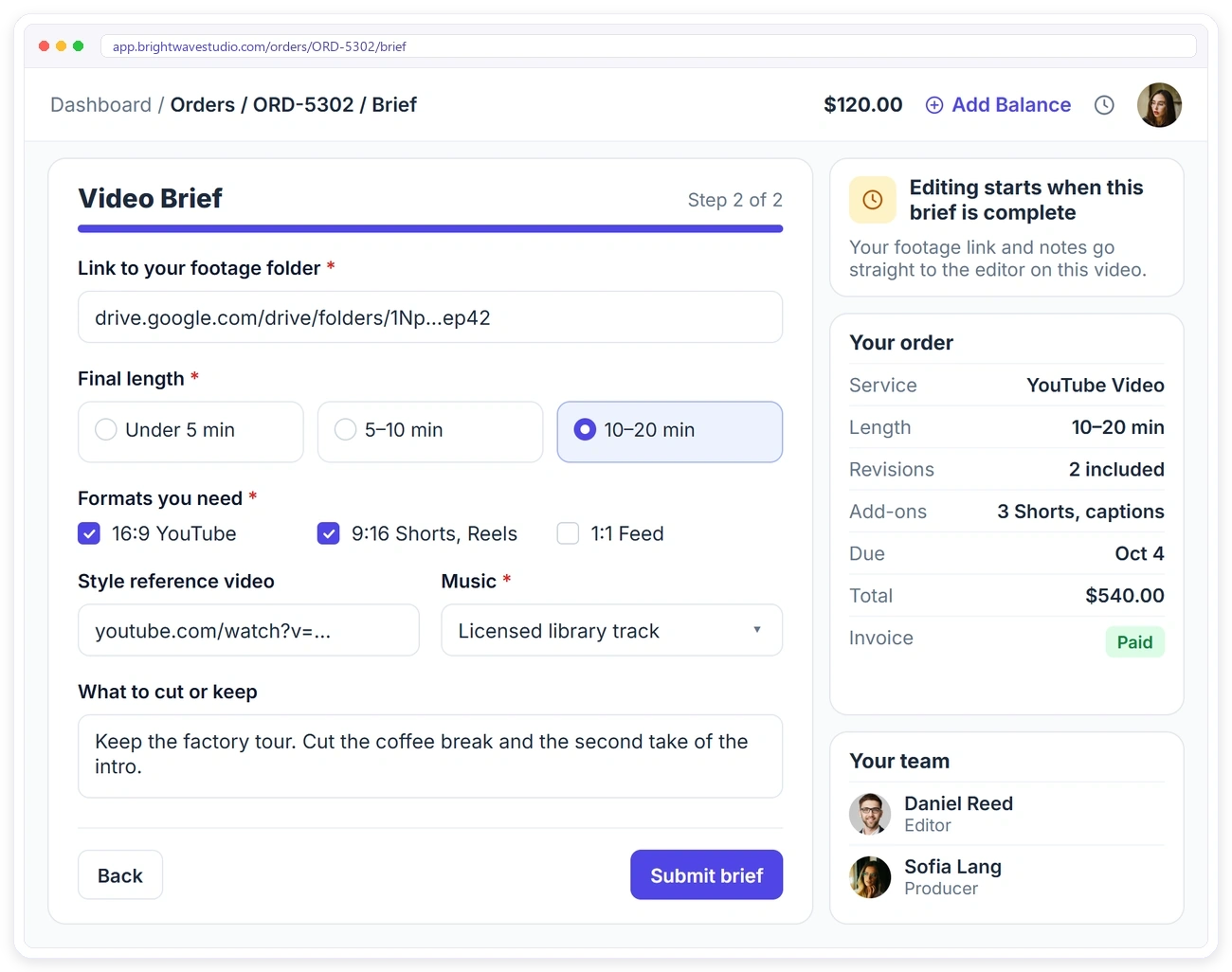
Unlabelled footage is the most common reason edits run late. Attach a video brief to each package with the intake form: the link to the footage folder, the final length, the formats needed, a style reference, the music and what to cut or keep. Editing starts when the brief is complete. A Google Drive folder can be linked to the order, and Frame.io or Loom links in the conversation open as previews.
REVISIONS & SIGN-OFF
Revisions With Timestamps, Then Sign-Off
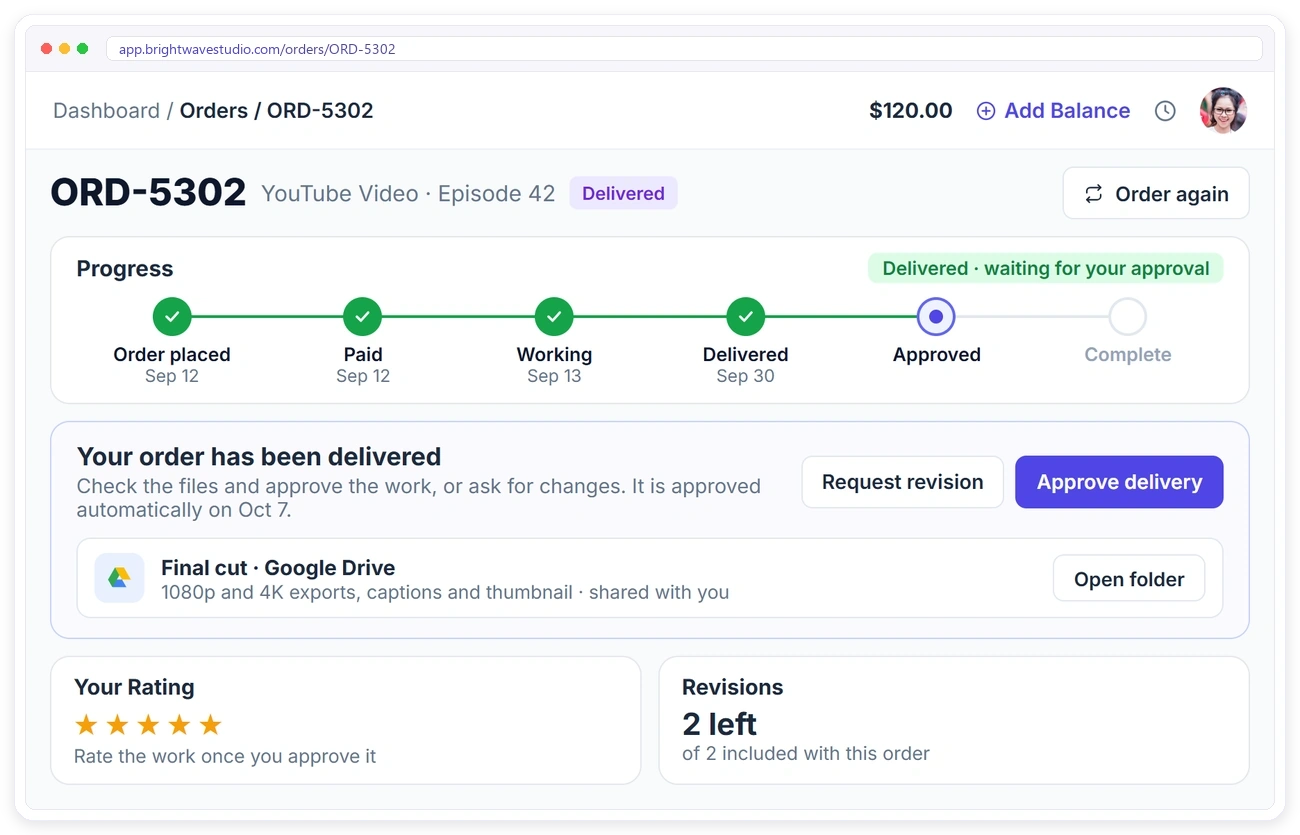
Feedback like “make it pop” costs a whole round. Deliver each cut for approval in the client portal. The client approves it or requests a revision on the order, listing each change with its timestamp, sees how many rounds are left and gets the final files when they approve. If they don’t answer, it is approved automatically after the days you set.
PRICED BY LENGTH
Price Videos by Length, With Add-Ons
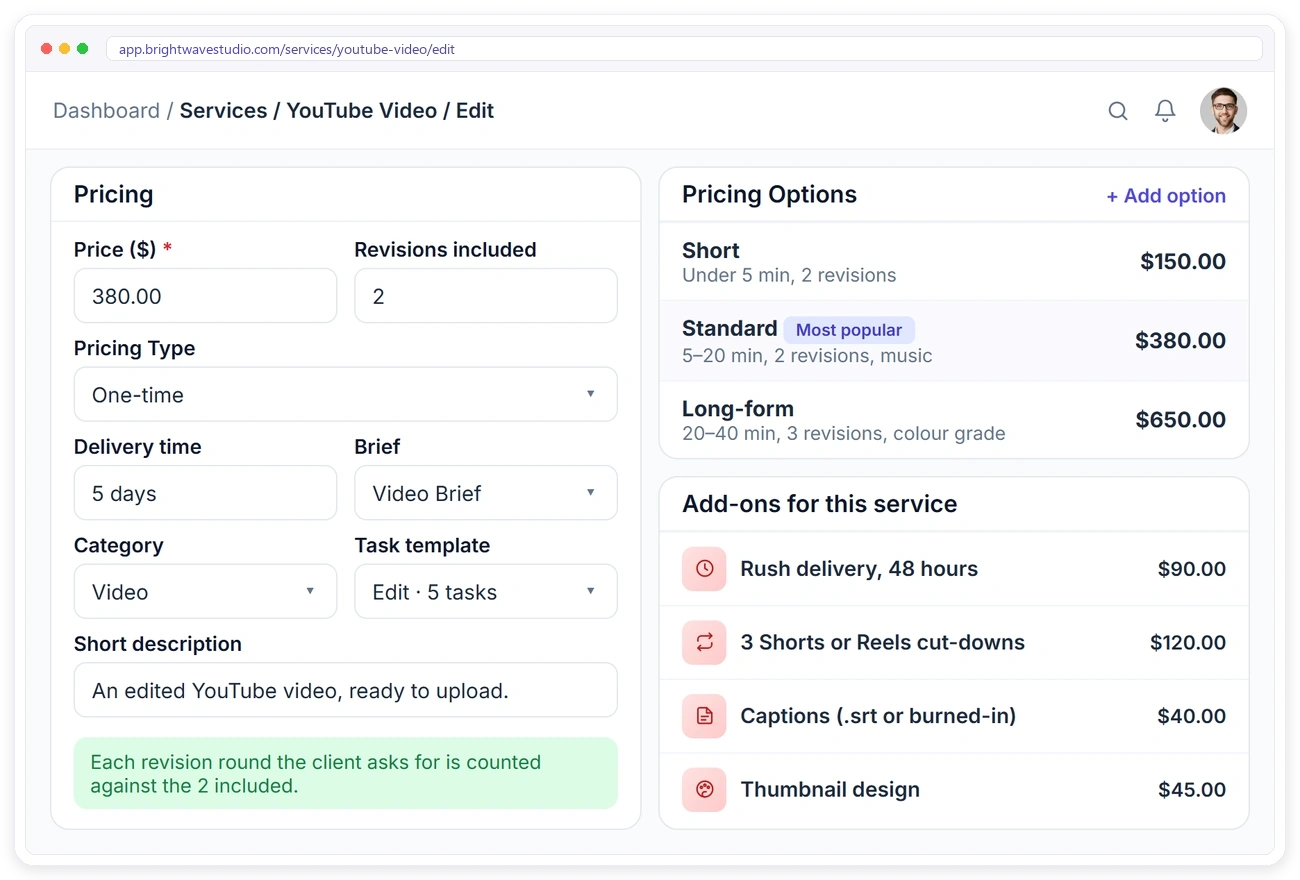
A 40-minute edit sold at the 10-minute price is where profit disappears. Set up your videos in your service catalog with Short, Standard and Long-form options and the revisions included, and sell Shorts or Reels cut-downs, captions, thumbnails and rush delivery as paid add-ons.
NO SILENT DEADLINES
Never Let a Client Wonder Where Their Video Is
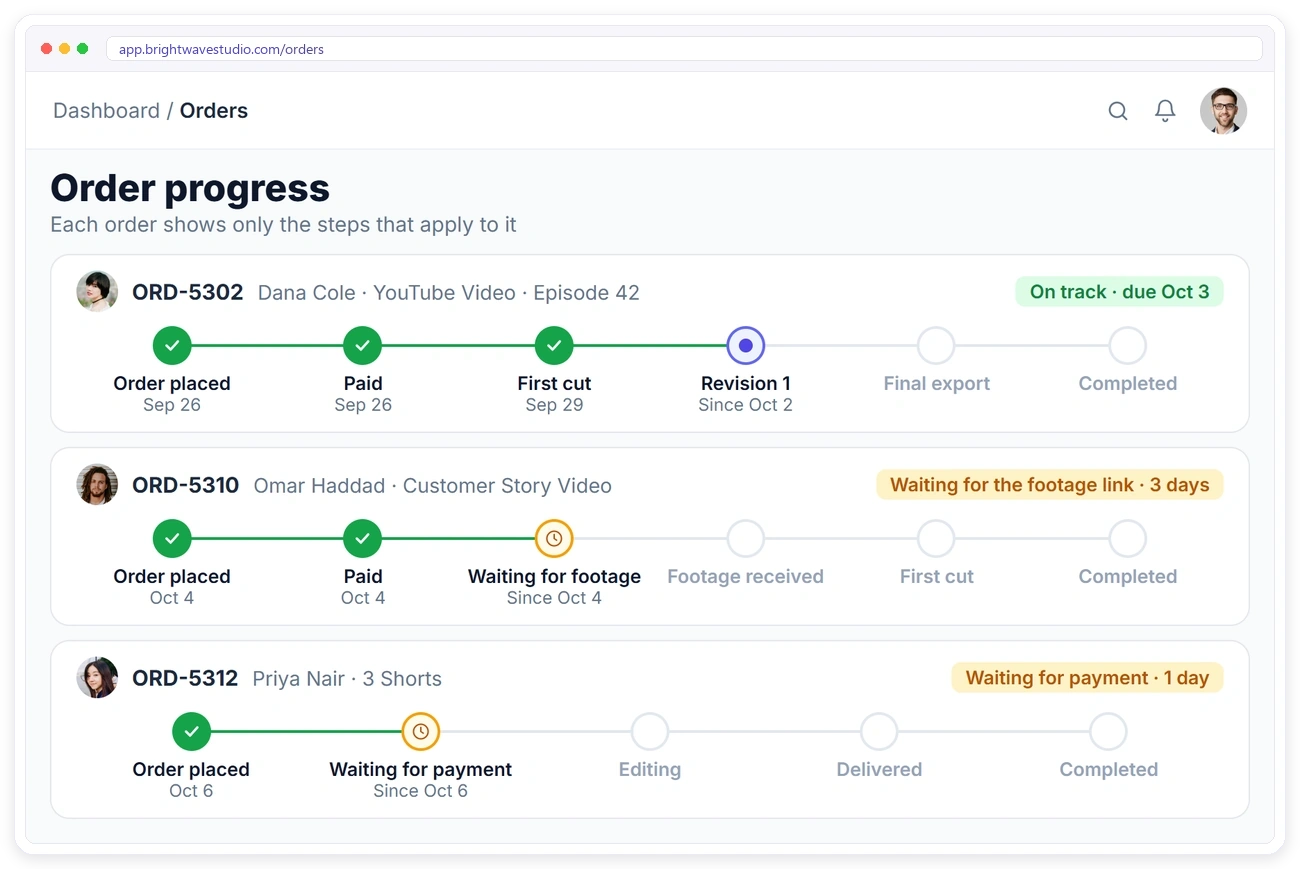
Clients forgive a delay they hear about. They leave over one they discover. Every order has a progress timeline, from footage received to first cut, revision and final export, in your dashboard and in the client’s portal, and the client gets an email each time it moves.
MONTHLY EDITING PLANS
Run a Monthly Editing Plan for Creators
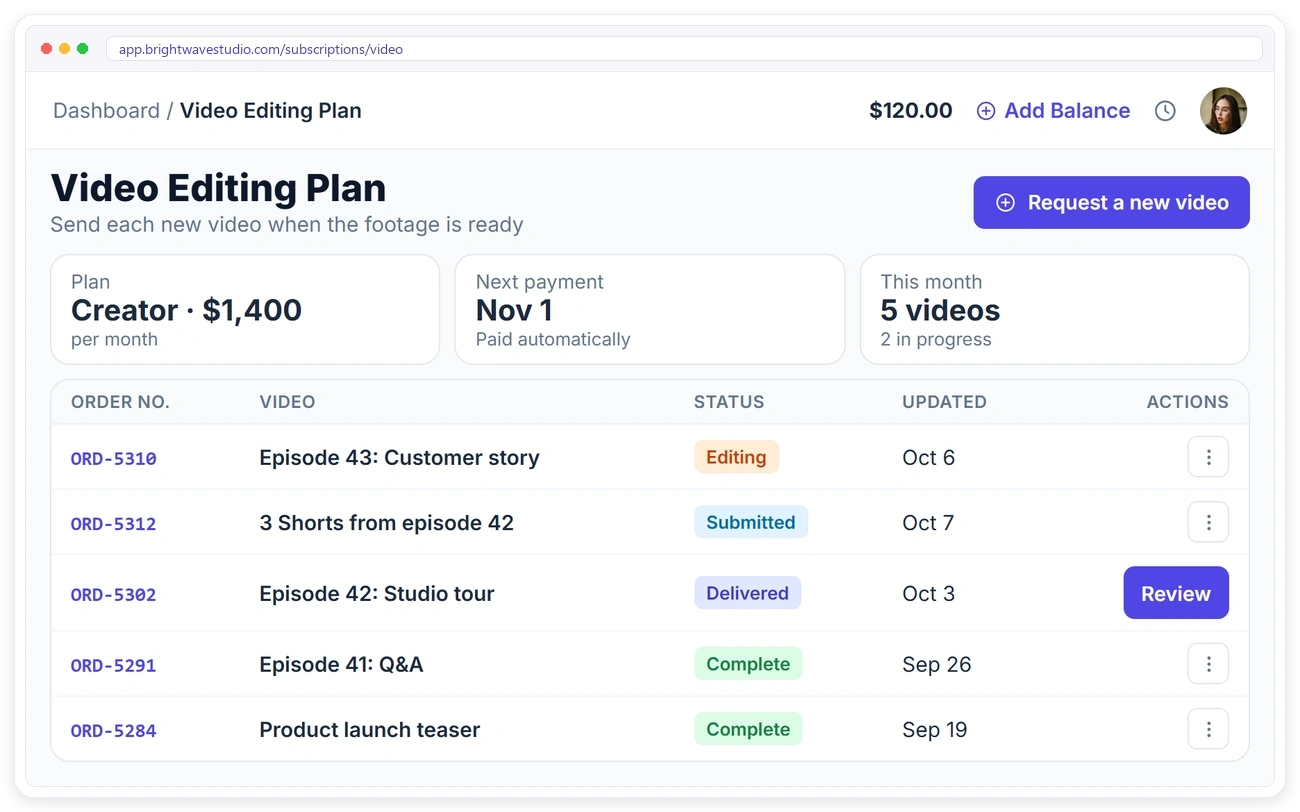
Creators and brands now buy editing by the month. Create a recurring service that lets clients request each new video when the footage is ready. Every request becomes its own order with its own brief and status, and the plan is paid automatically every month.
SAME WORKFLOW, SAME BRAND
Every Video Cut the Same Way
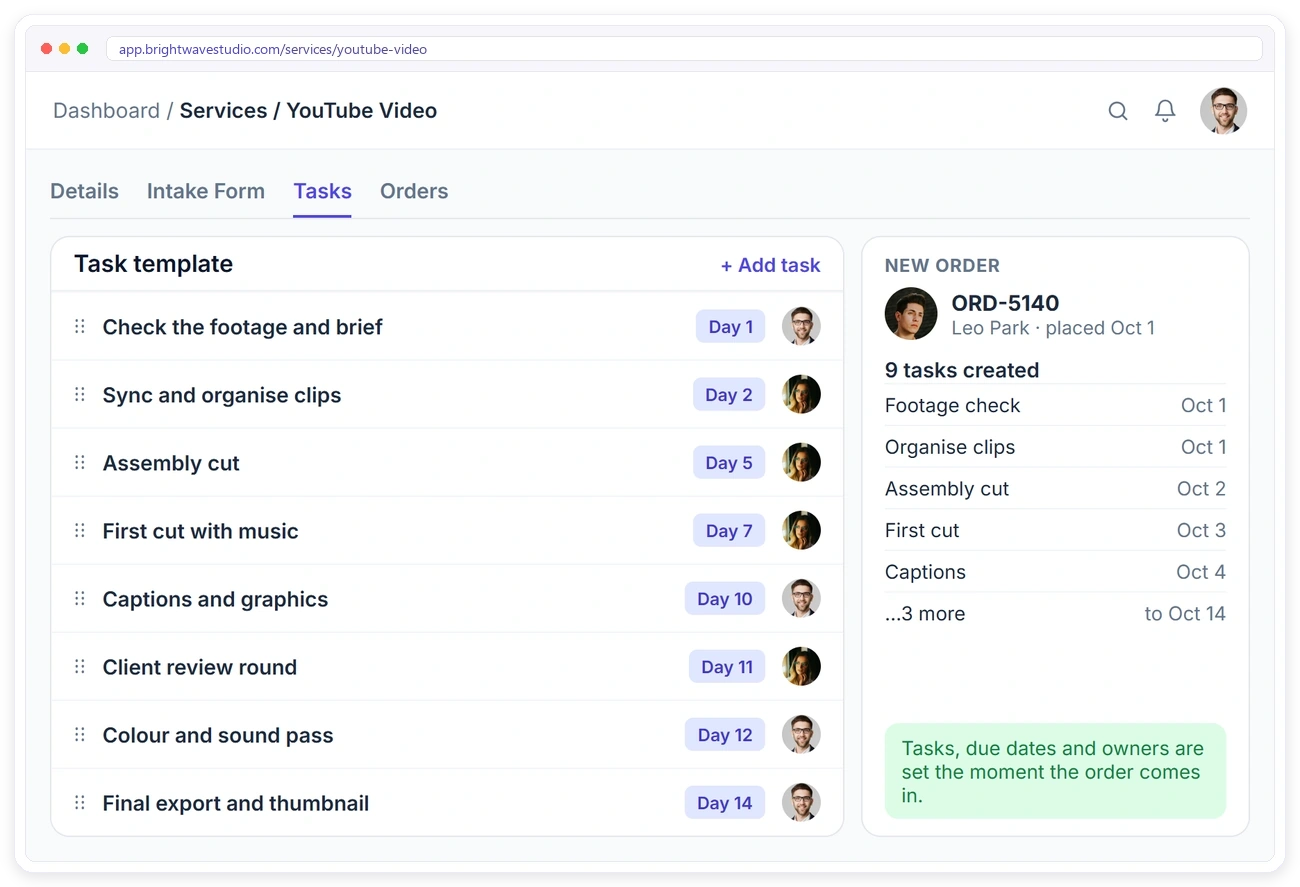
A channel looks inconsistent when every video gets different fonts, titles and end screens. Collect the client’s brand kit once at onboarding, and save a task template on each video service, so every new video gets the same assembly, first cut, revision and export tasks with the right editor.
Services Video Agencies Sell With Clientish
How YouTube videos, monthly editing plans, Shorts and Reels, captions and thumbnails are packaged, priced and ordered by clients from your portal.
Set It Up in 4 Steps
Add your video packages, brief and editing task template once. Most video agencies are ready to take orders the same afternoon.
How Clientish Compares for Video Agencies
Entry-plan prices and features of the six client portals video editing agencies compare most, side by side.
| CClientish | WWayfront | MManyRequests | AAssembly | SSuiteDash | CClientjoy | |
|---|---|---|---|---|---|---|
| Entry plan | $29/moevery feature included | $129/mo$99 yearly | $59/mo$39 yearly | $49/mo$20 yearly | $19/mo$180 yearly | $49/mo$44 yearly |
| Team users | 5 | 5 | 1, then $20 each | 1 | Unlimited staff | 5 |
| Own domain | Yes | Yes | Yes | From Professional$149/mo | Not listed | From Premium$99/mo |
| Workflow automations | Yes | Not listed | Zapier only | From Professional | From Pinnacle$99/mo | From Premium |
| Client reports in portal | 13 sources | Not listed | From Pro$99/mo | Not listed | Not listed | From Premium |
| Client invoicing | 12 gateways | Yes | Yes | Not listed | Not listed | Yes |
You sell mostly productized, subscription-style services.
You bill clients by the hour or with prepaid credits.
You want a free plan for your first five clients.
You want unlimited staff on the cheapest plan.
Proposals, contracts and a sales pipeline matter more to you than the portal, which starts on its Premium plan.
Entry-plan facts from each vendor’s own pricing page on 7 October 2026. “Not listed” means their pricing page does not mention it. Check their pages for the latest.
Video Editing Agency FAQ
Straight answers on footage, timestamped revisions, revision limits, pricing by length, your own domain and client logins.
What is a client portal for video editing agencies?
It replaces the trail of transfer links, email threads and “which version is final?” messages. Each client gets one login where the brief and footage link go in, every cut comes back for approval and the invoice gets paid. Clientish starts at $29 a month with packages, task templates and invoicing included.
Will my video clients log in to the portal?
They do, because the cut is waiting for them there. Approving or asking for changes happens in the portal, so opening it is the only way to move the video forward. Clientish emails them each time a new cut arrives, and they can review from their phone.
Does Clientish work with Google Drive and Frame.io?
Yes, through links. Link the client’s Google Drive folder to the order, and Frame.io or Loom links shared in the order conversation open as previews. Clientish does not store the footage or replace your review tool.
How do I get organised footage from clients?
Attach your video brief to each of your packages. The client adds the footage folder link, length, formats, style reference and music from their portal, and editing starts only when the brief is complete.
How do clients give feedback with timestamps?
When the client requests a revision on the order, they list each change with its timestamp, such as 0:14 or 2:40, so every note points to the exact moment.
How do I limit revision rounds?
Set the number of revisions included in your video service. Every round the client asks for is counted, and extra rounds can be sold as a paid add-on.
Can I price videos by length?
Yes. Add pricing options such as Short, Standard and Long-form to your video service, each with its own price and what is included.
Can I sell a monthly editing plan to creators?
Yes. Create a recurring service that lets clients request new videos as they need them. Each video becomes its own order, and the plan is billed every month.
Can clients upload raw footage to Clientish?
No, and you won’t need to. Footage is shared as a link to the client’s own folder in the brief, so large files stay where they are. Final files are delivered the same way.
How do I stop chasing payment for edits?
Clients pay when they order or through a monthly plan that is paid automatically, and invoice reminders go out on their own for anything unpaid.
Is the portal branded as my agency?
Yes. Clients review every cut under your studio’s name, logo and colours, at an address on your own domain. Pro and Enterprise also remove the small Powered by Clientish line.
Spend your hours editing, not chasing
Collect the footage link and brief, get revisions with timestamps, count the rounds and get sign-off from one branded portal. Try it with example data before you decide.
- A video brief with the footage folder link
- Each cut delivered for approval
- Revisions listed with timestamps
- Rounds left shown on every order
- Monthly editing plans billed automatically
- Your own domain and branding