
Client Management Portal for Bookkeeping Firms, Close the Month Without Chasing
Clientish is a white-label client portal for bookkeeping firms that puts month-end documents, transaction questions, fixed monthly fees and invoices in one place, from $9.99 a month, or $29 with five users, and sends your invoices to QuickBooks Online or Xero. Month-end rarely runs late because of the bookkeeping. It runs late waiting for a bank statement, a pile of receipts on someone’s phone and an answer about a transfer. Clientish collects every document in the client’s portal, shows which closes are waiting on whom, and bills your fixed monthly fee automatically.
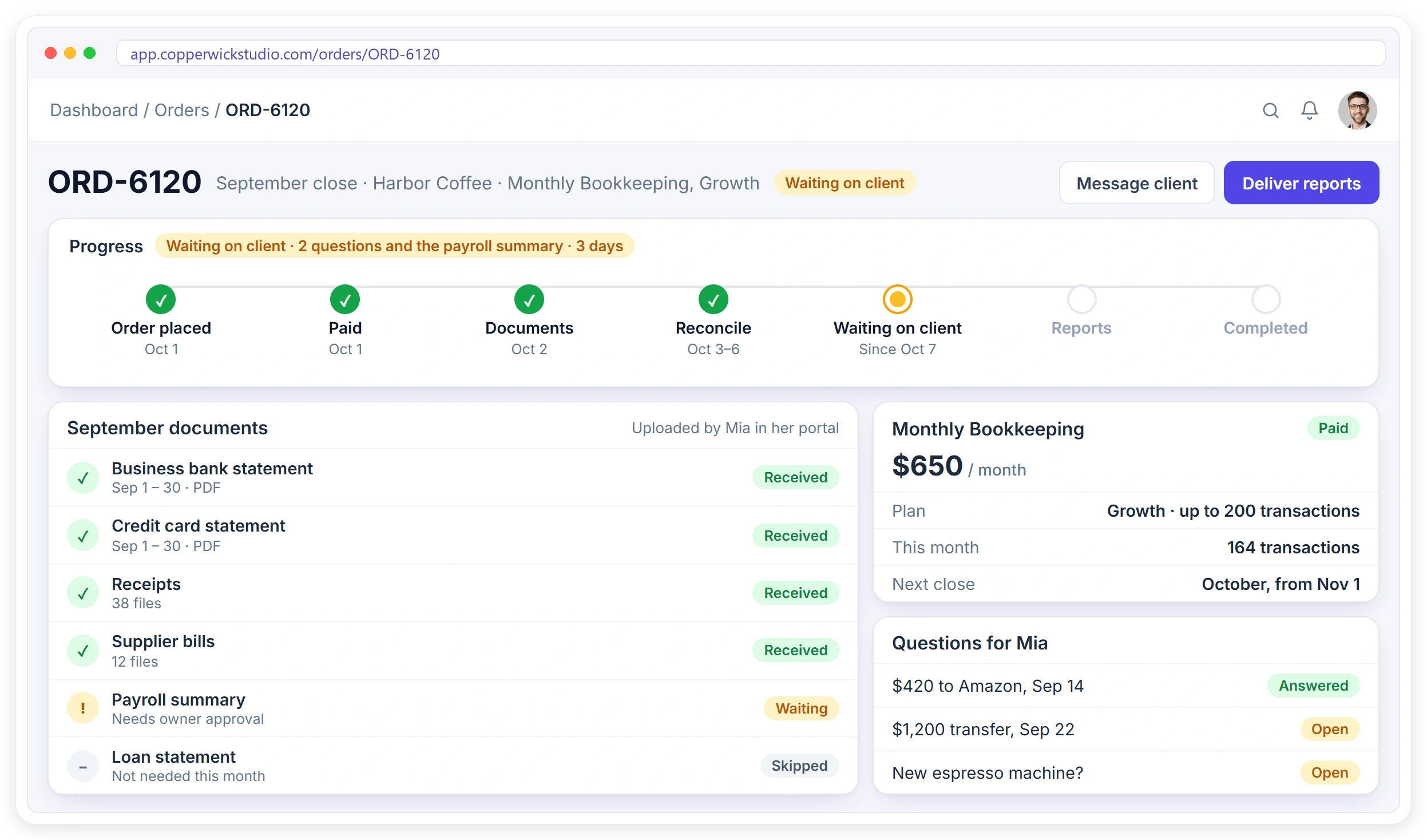
Sound Familiar?
Four things bookkeeping clients say at month-end, and how the client portal answers each one before the close slips. Each answer keeps documents, questions and approvals in one place instead of scattered emails.
“I’ll send the statement this weekend.”
Clients upload statements, receipts and bills to a month-end form in their portal, not by email.
“Which email had the receipts again?”
Every month is one order, with its documents, questions and answers in one place.
“What was that $1,200 transfer?”
Ask about transactions on the order. The client answers there, with the receipt attached.
“Can you also look at payroll?”
Plans list what each month includes, and payroll or catch-up work is a paid add-on.
From Documents to Closed Books
Every stage of a monthly close, from statements and receipts to reconciling, transaction questions, reports and the next month, in one client portal for every client.
Documents
Uploaded in the portal
Reconcile
Bank and card
Questions
Answered on the order
Reports
P&L and balance sheet
Close
Month delivered
Next Month
Billed and started again
Every Document in One Place
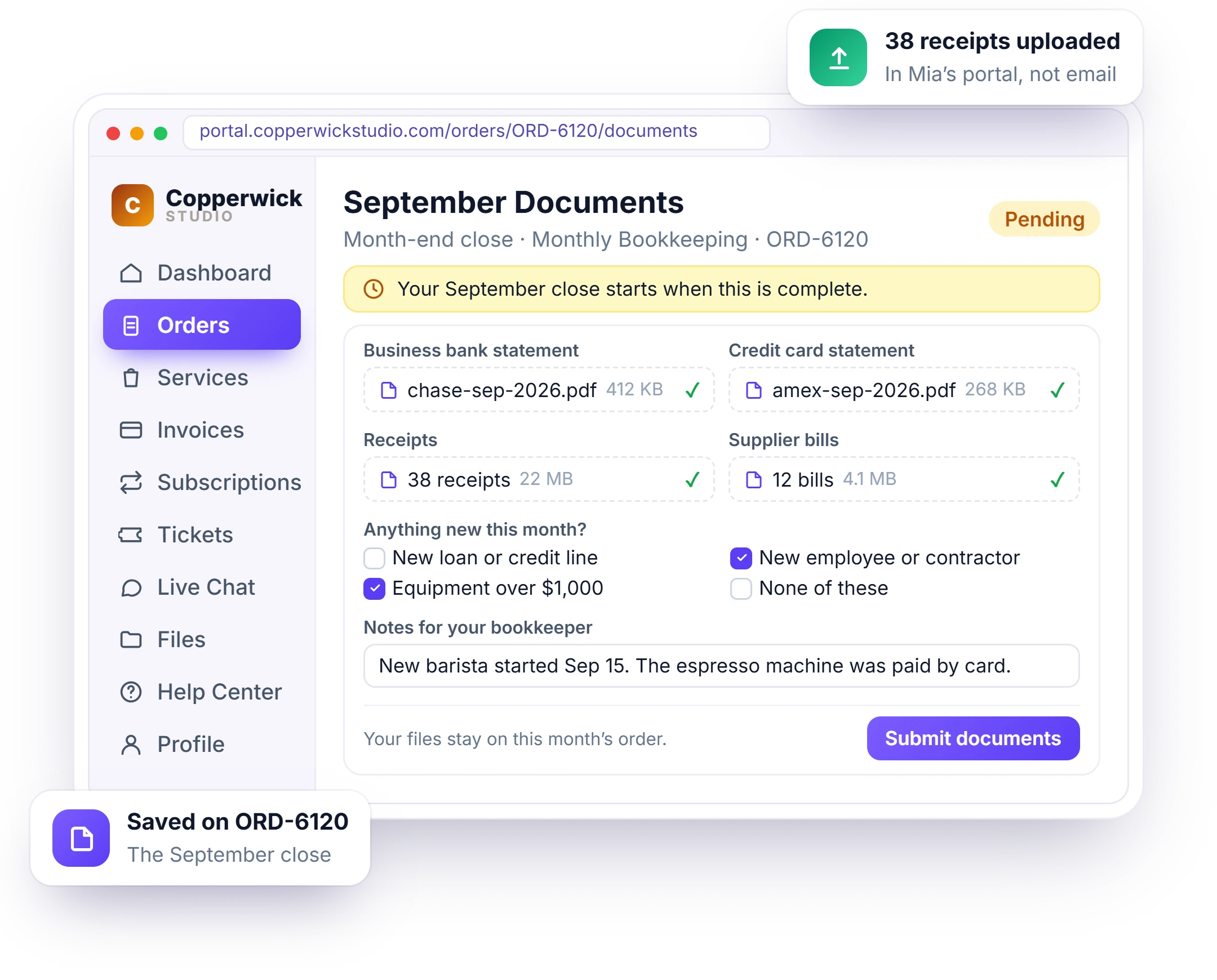
Receipts in phone photos, statements in email and bills in a supplier portal make document collection the hardest part of the job. Attach a month-end documents form to your bookkeeping service with the intake form: the bank statement, card statement, receipts, supplier bills and anything new this month. The client uploads from their portal, and the files stay on that month’s order.
- Bank and card statements uploaded
- Receipts and supplier bills in one place
- “Anything new this month?” questions
- Notes from the client for the bookkeeper
- Files saved on the month’s order
- No more digging through email threads
See Which Closes Are Waiting, and on Whom
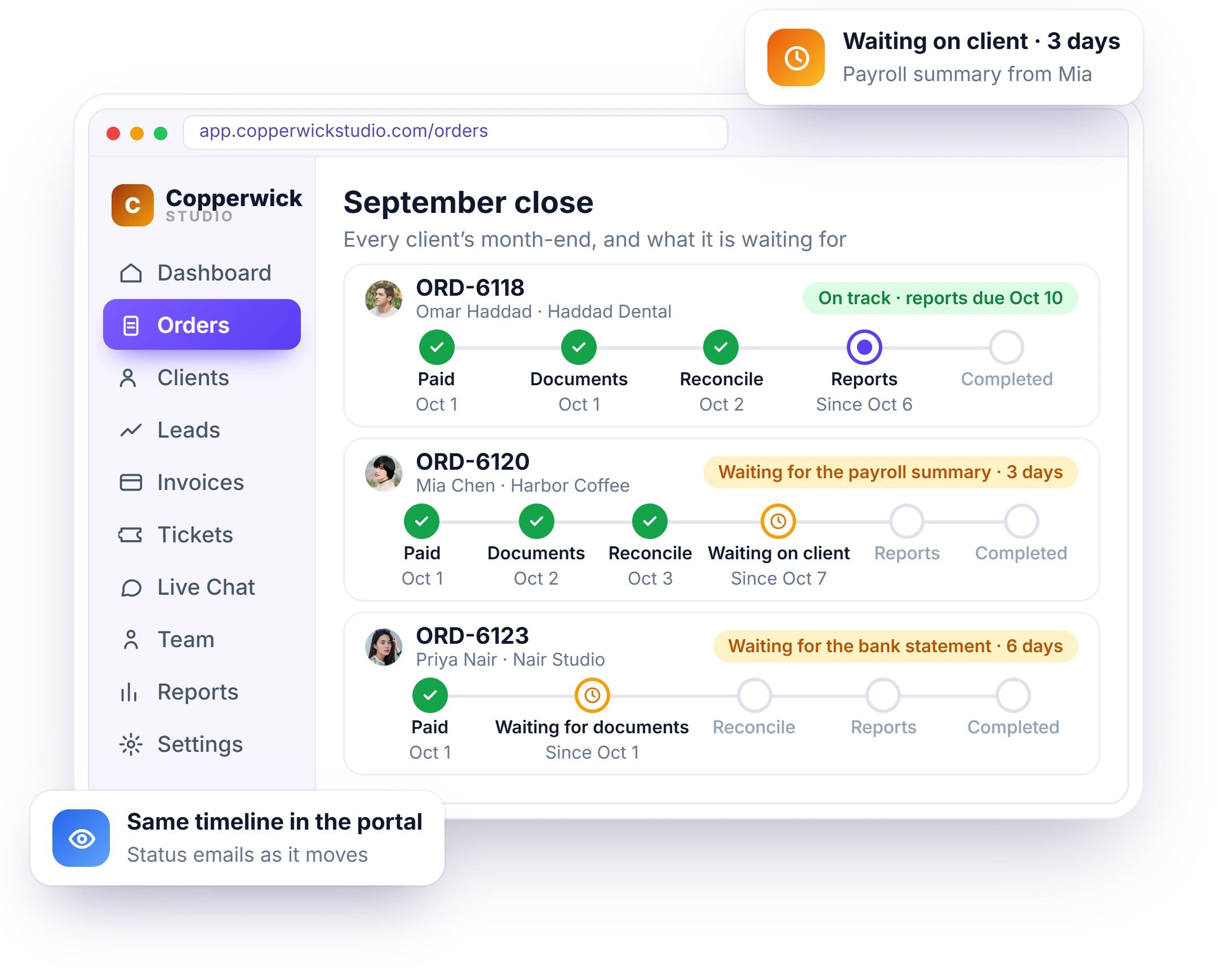
A close stalls on one missing statement or an owner who hasn’t approved payroll. Add your own steps, such as Documents, Reconcile and Waiting on client, and every client’s month-end shows where it is and how long it’s been waiting, in your dashboard and in the client’s portal.
- Every client’s close in one list
- Your own steps for month-end
- How long a close has been waiting
- The same timeline in the client’s portal
- Status emails when the close moves
- Spot the stuck closes before the deadline
Ask About Transactions Where the Books Are
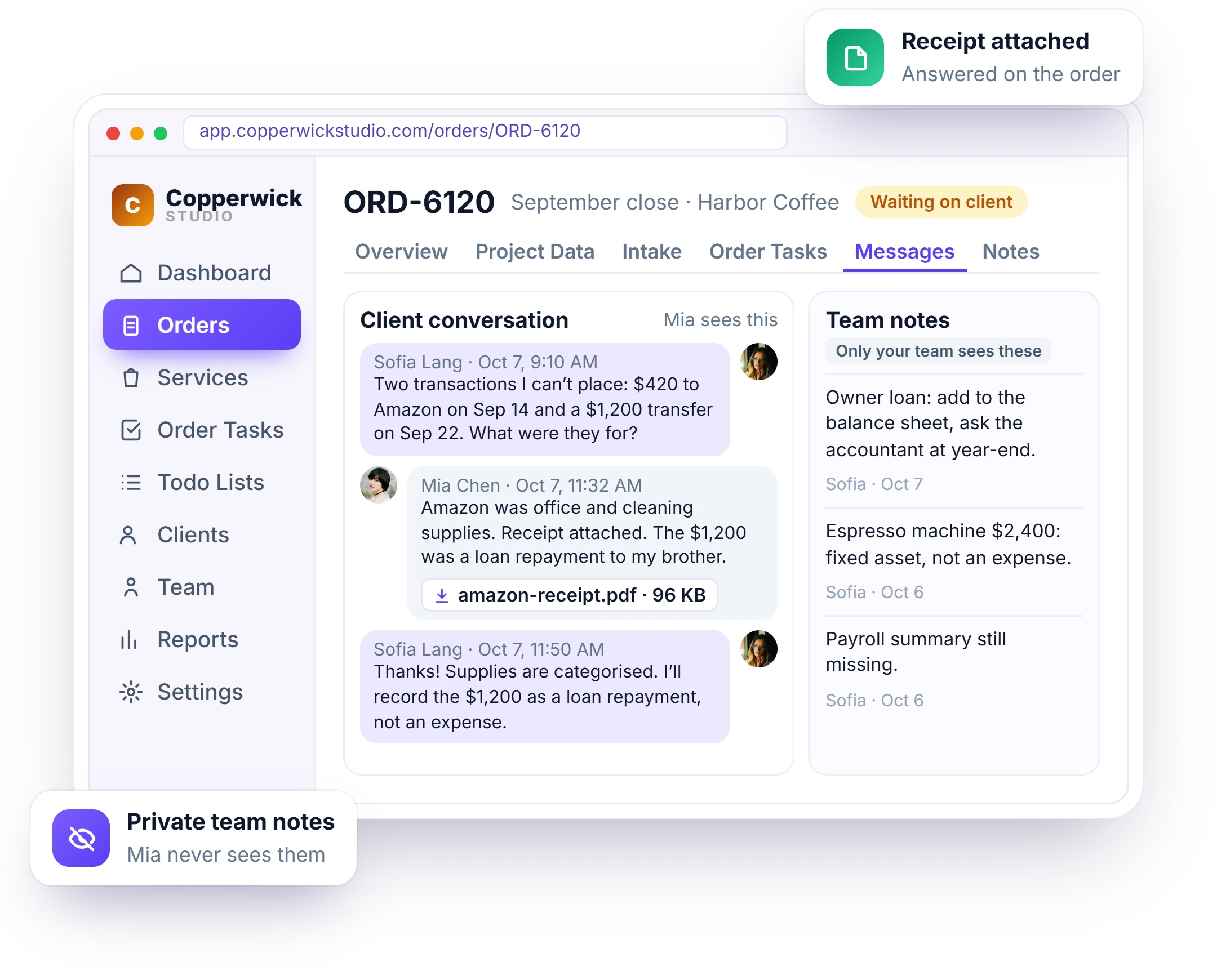
Questions about uncategorized transactions get lost in long email threads. Ask them on the month’s order: the client answers in their client portal with the receipt attached, and your team keeps private notes the client never sees.
- Questions about transactions on the order
- Clients answer with receipts attached
- Private team notes the client never sees
- Clients get an email when you ask
- Every answer kept with that month
- A clear record for year-end
Price by Volume, Not by Favor
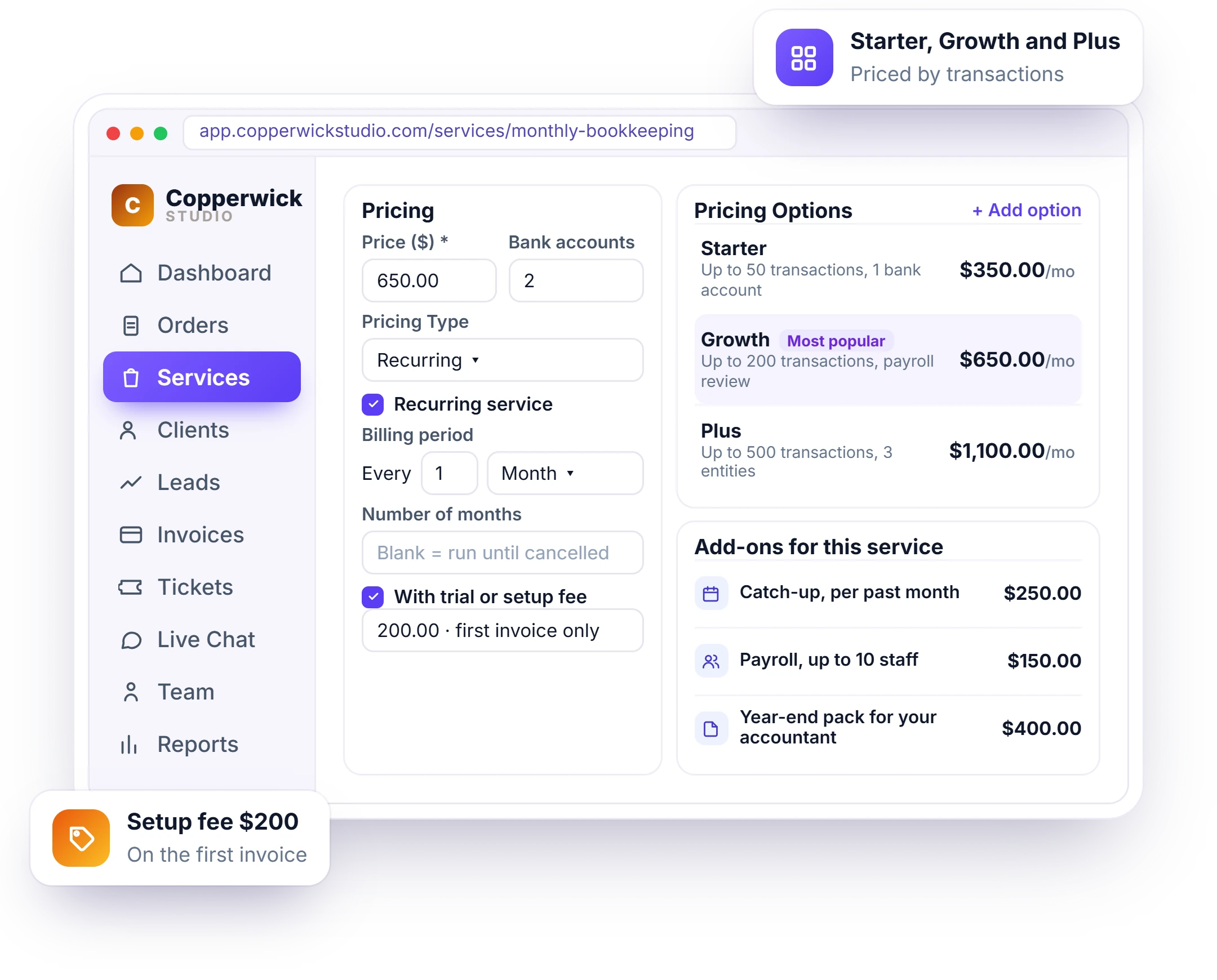
Bookkeeping grows one small favor at a time while the fee stays the same. Sell monthly plans from your service catalog by transaction volume, such as Starter, Growth and Plus, and price catch-up months, payroll and a year-end pack as add-ons.
- Starter, Growth and Plus plans
- Transaction limits written into each plan
- Catch-up months as a paid add-on
- Payroll and year-end work priced separately
- A setup fee on the first invoice
- Clients pick and pay before you start
Every Month Starts on Its Own
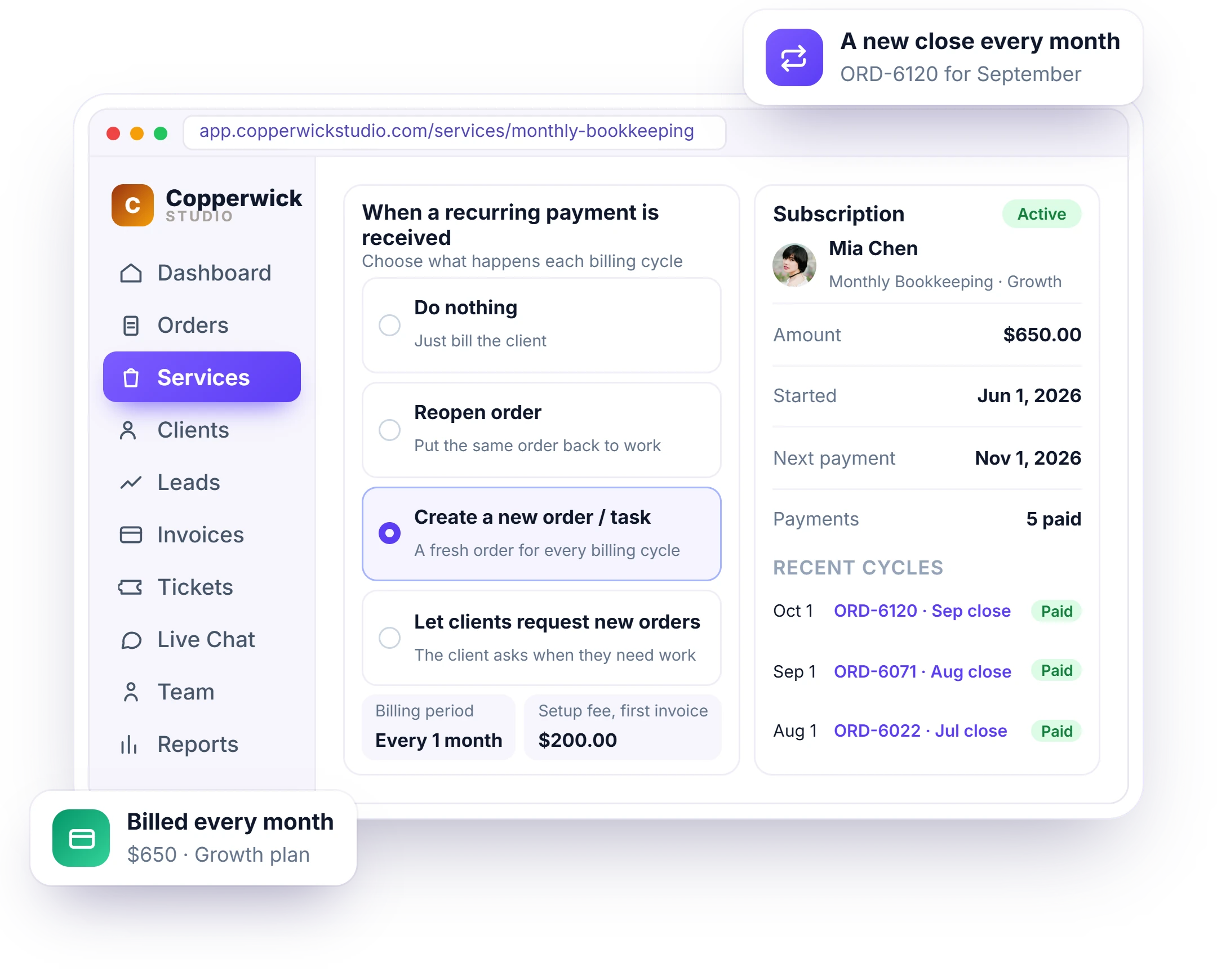
Bookkeeping is the same job every month. Make it a recurring service that bills the client and creates a new order for every paid month, so each month-end close has its own documents, questions, tasks and reports.
- Billed automatically every month
- A new order for every paid month
- Each close kept separate in the history
- Upcoming payment notices and receipts
- Invoice reminders until paid
- Clients see their plan in the portal
The Same Checklist for Every Close
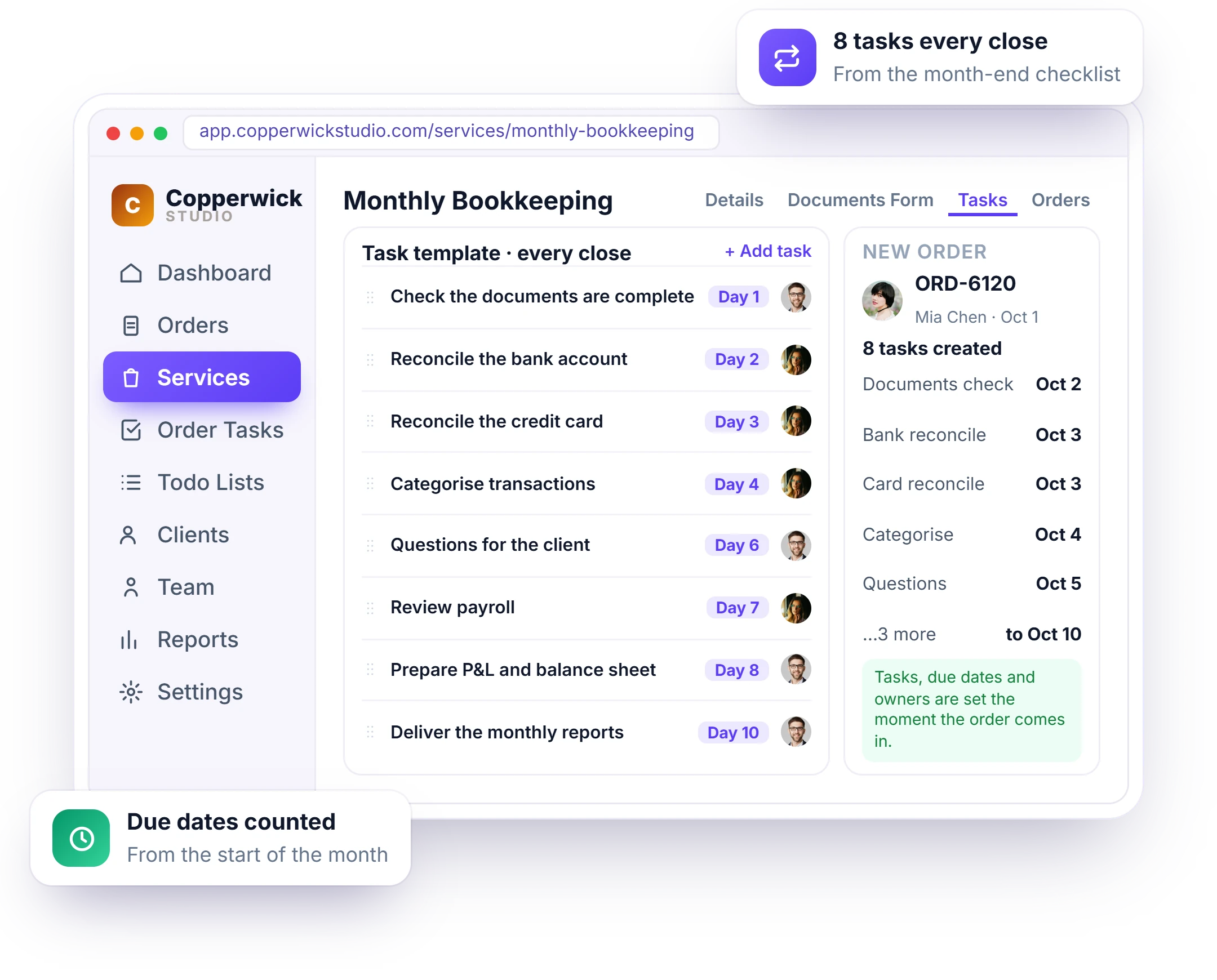
Reconciling, categorizing, payroll review and reports happen every month, and a step skipped once shows up at year-end. Save your month-end checklist as a task template, and every new close gets its tasks, due dates and bookkeeper automatically.
- Bank and card reconciliation tasks
- Categorizing and client questions
- Payroll review when it applies
- P&L and balance sheet before delivery
- Due dates counted from the start of the month
- The right bookkeeper assigned automatically
Never Ask for Passwords by Email
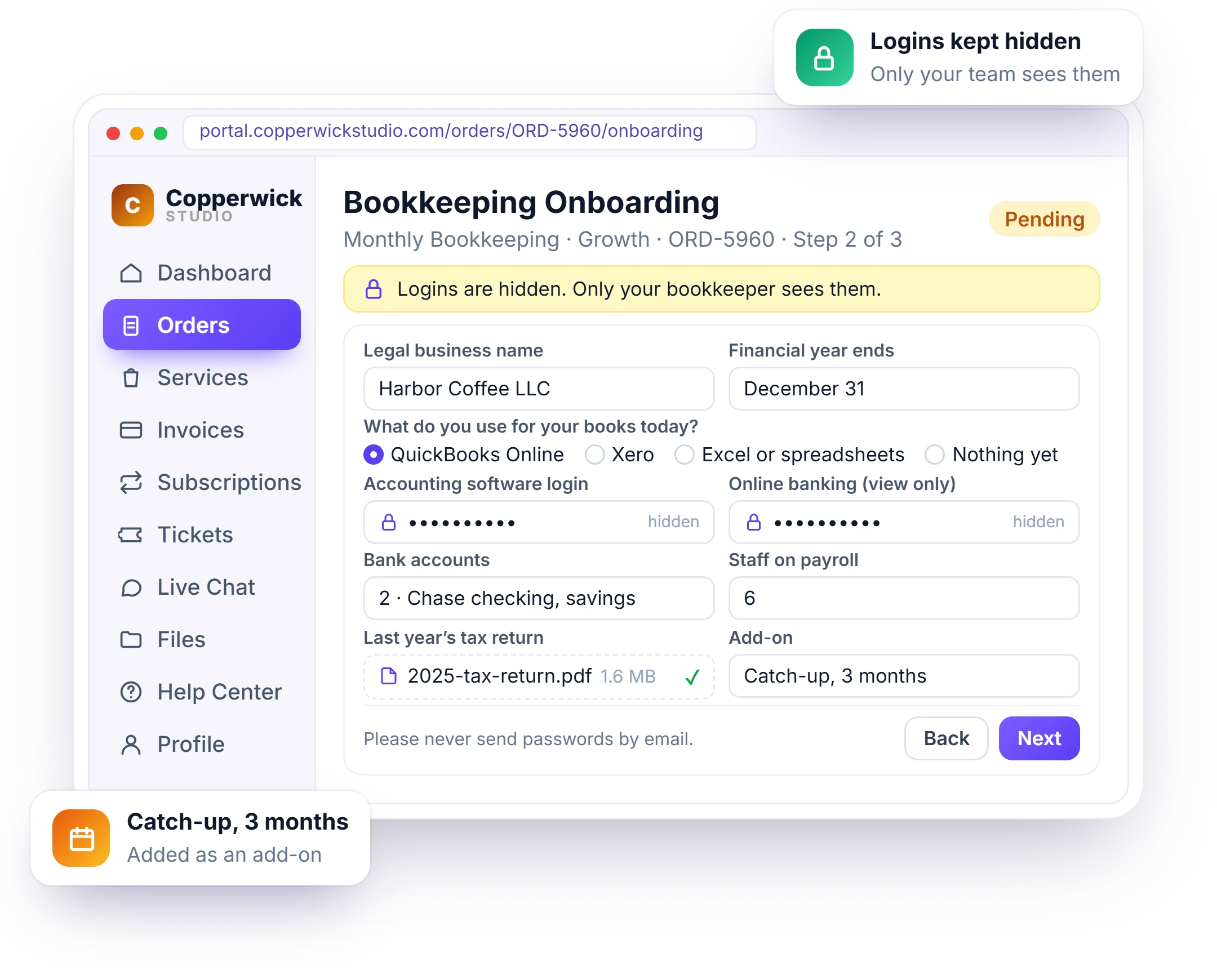
Logins and statements sent as email attachments are easy to leak. New clients fill out an onboarding form in their portal with business details, what they use for their books and their logins in hidden fields that only your team sees.
- Onboarding form in the client’s portal
- Logins kept in hidden fields
- Business details and fiscal year
- Bank accounts and staff on payroll
- Last year’s return uploaded
- Catch-up work added as an add-on
Services Bookkeeping Firms Sell With Clientish
How monthly bookkeeping, catch-up work, payroll and year-end packs are priced by volume and ordered by clients from your portal. Clients order the plan that fits their volume, so pricing talks stay short.
Monthly Bookkeeping
Starter, Growth and Plus plans by transaction volume, billed every month.
Catch-Up Bookkeeping
A one-off service priced per past month, often sold with the first plan.
Payroll
An add-on priced by the number of staff.
Year-End Pack
Reports and schedules for the client’s accountant, sold once a year.
Set It Up in 4 Steps
Add your monthly plans, onboarding form and month-end checklist once. Most bookkeeping firms are ready to invite clients the same afternoon. From then on, every month-end follows the same checklist for every client.
Add Your Plans
Monthly plans by volume, with catch-up, payroll and year-end add-ons.
Attach the Forms
An onboarding form, a month-end documents form and your checklist.
Invite Your Clients
They sign up, pay and upload their documents in the portal.
Close Every Month
Work the checklist, ask questions on the order and deliver the reports.
How Clientish Compares for Bookkeeping Firms
Cheapest-plan prices and features of TaxDome, Karbon, Canopy, SuiteDash and Clientjoy next to Clientish, side by side. These are the tools bookkeeping firms weigh most, with prices from each vendor’s own page.
 Clientish |  TaxDome |  Karbon |  Canopy |  SuiteDash |  Clientjoy | |
|---|---|---|---|---|---|---|
| Entry plan | $9.99/moSolo; Starter $29/mo with 5 users | $800/yrper seat, solo only | $59/user/mobilled yearly | $74/user/mobilled yearly | $19/mo$180 yearly | $49/mo$44 yearly |
| Users | 1 on Solo, 5 on Starter | 1 on Essentials | Paid per user | Paid per user | Unlimited staff | 5 |
| Own domain | Yes | From Pro$1,000/yr per seat | Not listed | Not listed | Not listed | From Premium$99/mo |
| Engagement letters with e-signature | Yes | Yes | Yes | Yes | From Thrive$49/mo | Yes |
| Client invoicing | Yes, QuickBooks & Xero | Yes | Yes | Yes | Not listed | Yes |
| Workflow automations | From Growth$49/mo | Yes | Yes | Yes | From Pinnacle$99/mo | From Premium |
You also prepare tax returns and want IRS transcripts and ledger connections from the Pro plan.
You run a team of four or more and want work templates and scheduled jobs at the center of the firm.
You want tax workflow or tax resolution add-ons sold next to the portal.
You want unlimited staff on the cheapest plan.
Proposals, contracts and a sales pipeline matter more to you than the portal, which starts on its Premium plan.
Cheapest-plan facts from each vendor’s own pricing page on October 8, 2026. “Not listed” means their pricing page doesn’t mention it. Check their pages for the latest.
Bookkeeping Firm FAQ
Straight answers on month-end documents, transaction questions, fixed fees, per-user pricing, QuickBooks and Xero, and client logins.
What is a client portal for bookkeeping firms?
A secure place each client logs in to at month-end instead of emailing statements and photos of receipts. They upload documents, answer your questions about transactions and pay your fee in one spot, and you see which closes are stuck. Clientish runs that portal for your firm from $9.99 a month.
Is Clientish priced per user?
No. The $29 plan already includes five users, so a small firm pays the same whether one or five people work the closes. Practice tools built for accountants usually charge each seat separately.
Is there a mobile app for my clients?
The portal installs on a client’s phone straight from the browser, so they can photograph a receipt and upload it to the month’s order without a separate app store download.
How do clients send bank statements and receipts?
They upload them to a documents form in their client portal, and the files stay on that month’s order instead of in your inbox.
How do I see which clients are holding up month-end?
Add steps such as Documents and Waiting on client. Every client’s close shows its step and how long it’s been waiting.
Where do I ask clients about transactions?
On that month’s order, one question per line item: what the $1,200 transfer was, which card the Amazon charge belongs to. The client replies from the portal with the receipt attached, while your bookkeepers keep their own notes on the same order out of the client’s view.
Can I charge a fixed monthly fee?
Yes. Set up monthly bookkeeping as a recurring service with whatever fee you choose. An invoice goes out each month, charged to the client’s card automatically once they turn on Auto-pay. Every paid month opens its own close, so March’s documents never mix with April’s.
Can I sell catch-up bookkeeping and payroll?
Yes. Catch-up work can be its own service priced per month behind, and payroll an add-on priced by headcount. A new client who is six months behind buys the catch-up with their first plan, so the backlog is paid for before you open it.
How do clients share logins safely?
The onboarding form asks for bank, payroll and accounting-software logins in hidden fields. Only your bookkeepers can see them, instead of them sitting in an email thread anyone can forward.
Does Clientish connect to QuickBooks or Xero?
Yes, for your own billing. Connect QuickBooks Online or Xero and the invoices your firm sends clients are posted there, so your fees match your books. Your clients’ own ledgers stay in their accounting software; Clientish doesn’t read bank feeds or categorize their transactions.
Is the portal branded as my firm?
It’s your firm’s portal, not ours. Clients reach it at an address you own, such as clients.yourfirm.com, and meet your name and colors on every month-end request and fee invoice. The one trace of us is a small Powered by Clientish line on Solo and Starter; Growth, Pro and Enterprise remove it.
Close every month without the chase
Collect statements and receipts in the portal, ask about transactions on the month’s order, bill a fixed fee and send your invoices to QuickBooks or Xero. Try it with example data first.
- A month-end form for statements and receipts
- Your questions about transactions in one thread
- A fixed monthly fee billed automatically
- Logins shared in hidden fields, not email
- The portal on their phone for receipt photos
- Your firm’s name on every page
Every feature unlocked in the trial. Pick a plan only when you’re ready.