
Client Meeting Tracker and Notes for Agencies & Freelancers
Stop tracking client meetings in a spreadsheet. Your agency’s own client meeting tracker lives inside your CRM: every call with a lead or client sits on their record, booked, held or missed, with meeting notes on what you talked about, what you decided and who does what next. Your AI writes the notes from the call transcript, and one tick shares them in the client’s portal.
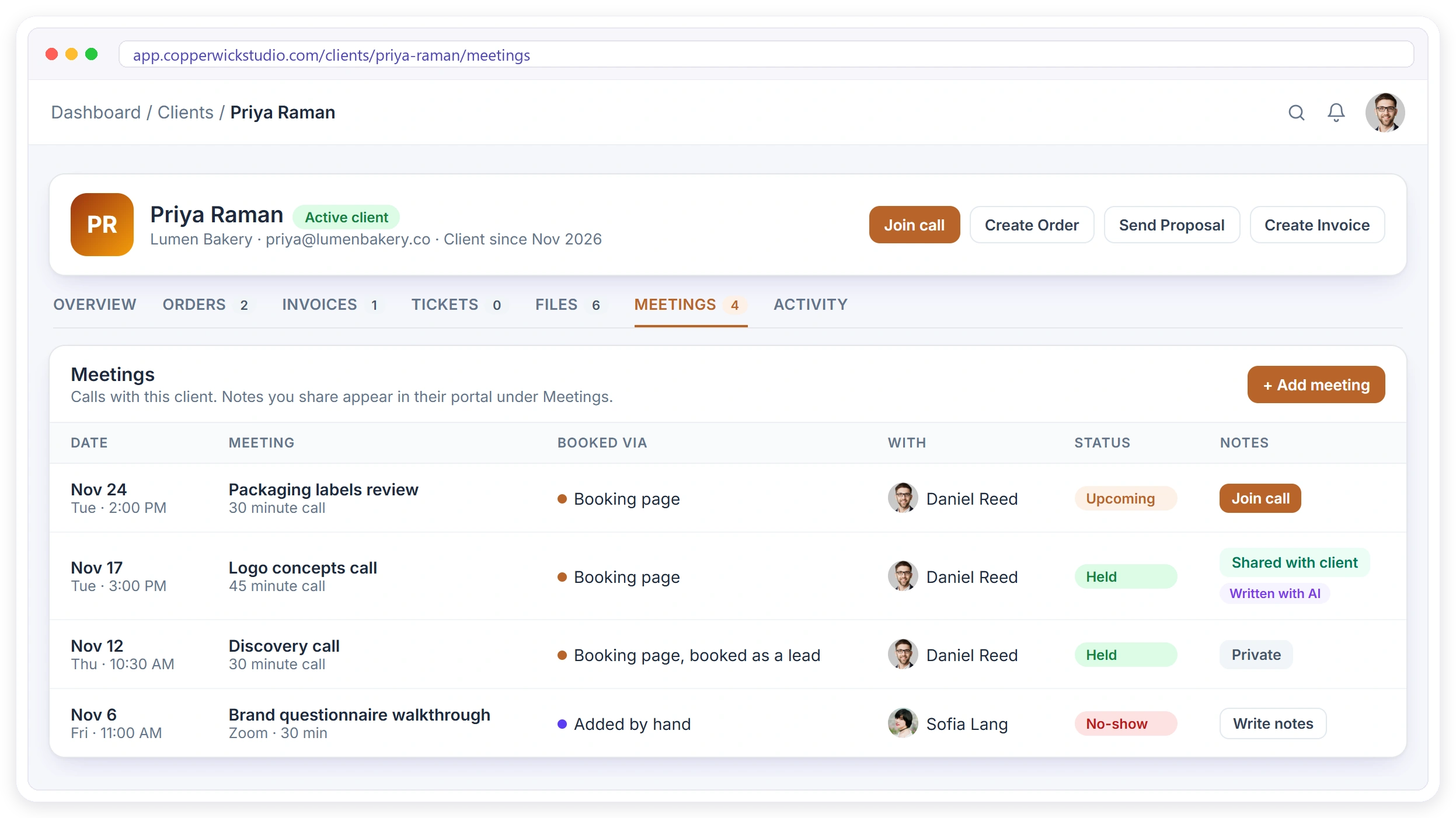
Why Client Meetings Get Lost in Spreadsheets and Inboxes
Many agencies track client meetings in a spreadsheet, a notes app or a calendar, and none of them is the CRM where the client lives. The call goes well, everyone agrees on next steps, and a week later nobody remembers who promised what, because the notes sit in one person’s notebook and the recording in someone’s Zoom.
Notes Live in Someone’s Head
What was agreed sits in a notebook or a doc nobody else can find when the client asks.
Calls Are Spread Across Tools
One call was in Calendly, one in Zoom, one added to a calendar by hand. There is no single history.
Writing Notes Takes Time
Turning a 45-minute call into clear next steps is the part that always gets pushed to tomorrow.
Meeting Notes With Decisions and Next Steps
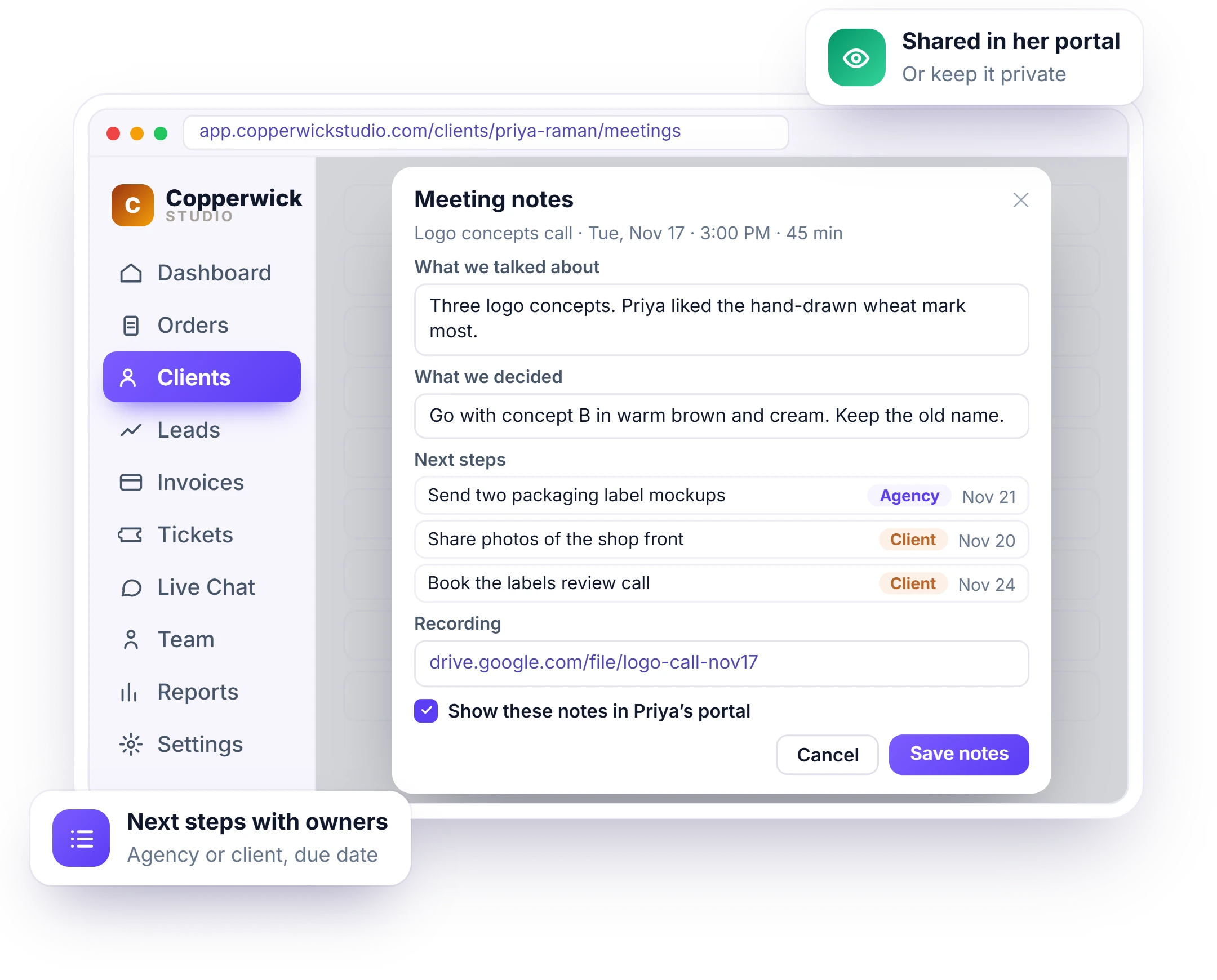
Loose call notes say what was discussed but not who does what, so tasks slip between your team and the client. In Clientish, the meeting notes sit on the call itself, on the lead or client record: what you talked about, what you decided, and each next step with who does it, you or the client, and by when. Paste the recording link too; the video stays in your own Drive or Zoom.
- What we talked about and what we decided
- Next steps with an owner and a due date
- A link to the recording
- Private, or shown in the client’s portal
What a Client Meeting Tracker Changes for Your Agency
With the tracker inside your CRM, a client call is no longer something that happened and was forgotten. Every call lands in one list per client, whether it was booked on your booking page, through Calendly or Cal.com, or added by hand as a Meet, Zoom, Teams, phone or in-person meeting, and the notes, next steps and recording stay with it for your whole team to follow.
One History per Client
Every call with a client in one list, whether booked or added by hand.
Notes Nobody Loses
What was agreed sits on the record, not in a notebook.
Notes in Seconds
Drop the transcript, let AI draft the notes, check them and save.
Clients See the Plan
Share the notes in their portal so they know their own next steps.
Clear Next Steps
Each step has an owner, the agency or the client, and a due date.
Calls That Move Deals
After a lead call, send a proposal or mark the lead qualified in one click.
No-Shows Followed Up
Mark They didn’t show and email them a link to book again.
History Follows the Client
When a lead becomes a client, every call and note moves along.
AI Meeting Notes From Your Call Transcript
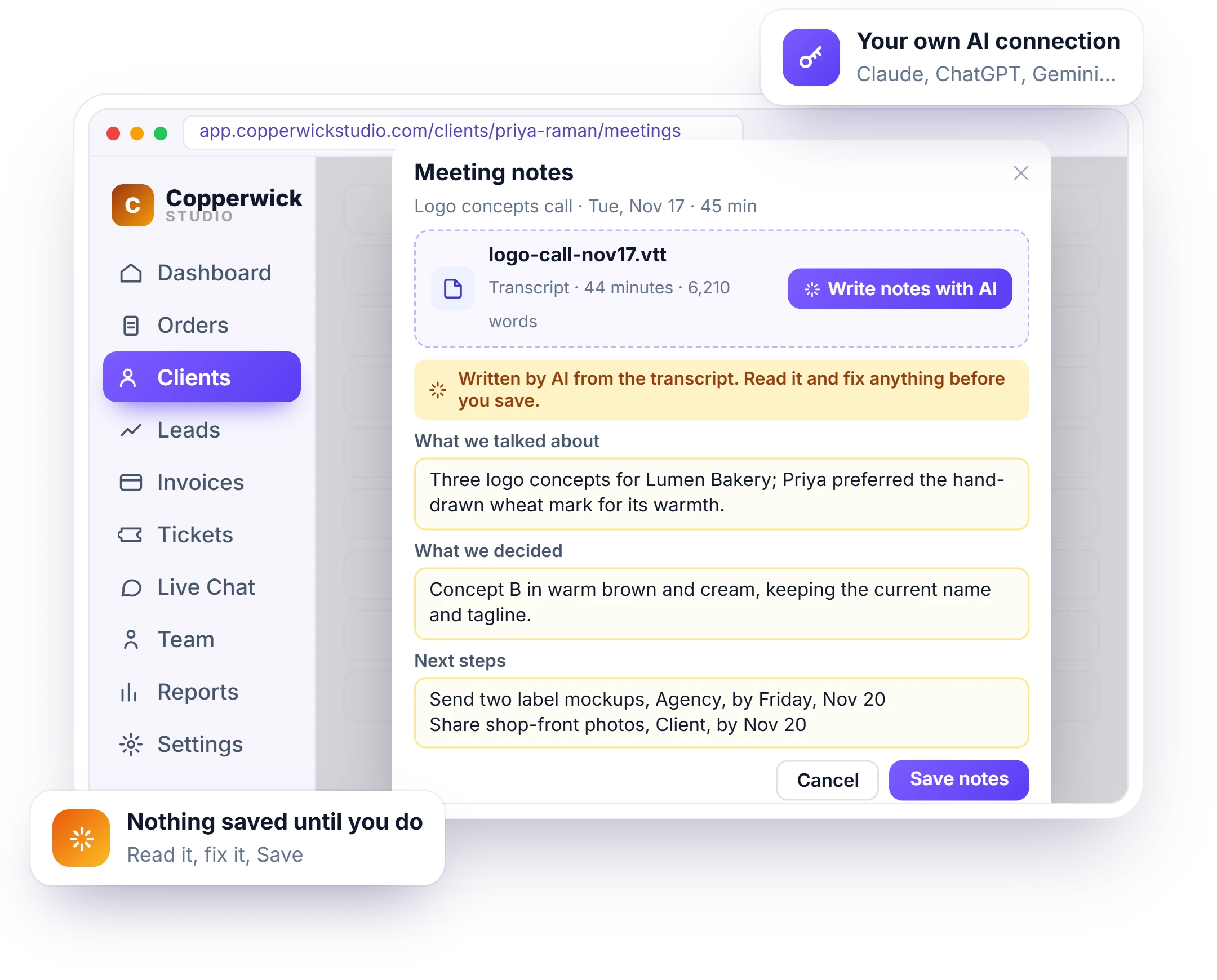
Turning a 45-minute call into clear notes is the job that always gets pushed to tomorrow. Drop the transcript from Google Meet, Zoom or Microsoft Teams into the notes window, a .vtt, .srt, .txt or .docx file up to 5 MB, and your own connected AI writes what you talked about, what you decided and the next steps, turning words like “Friday” into a date. Clientish does not record the call, and you check the draft before it becomes part of the client record.
- Runs on your own AI connection, 8 providers
- The transcript is read once and not stored
- A yellow note asks you to check before saving
- Saved notes are marked Written with AI
Track Discovery Calls and Next Steps on Every Lead
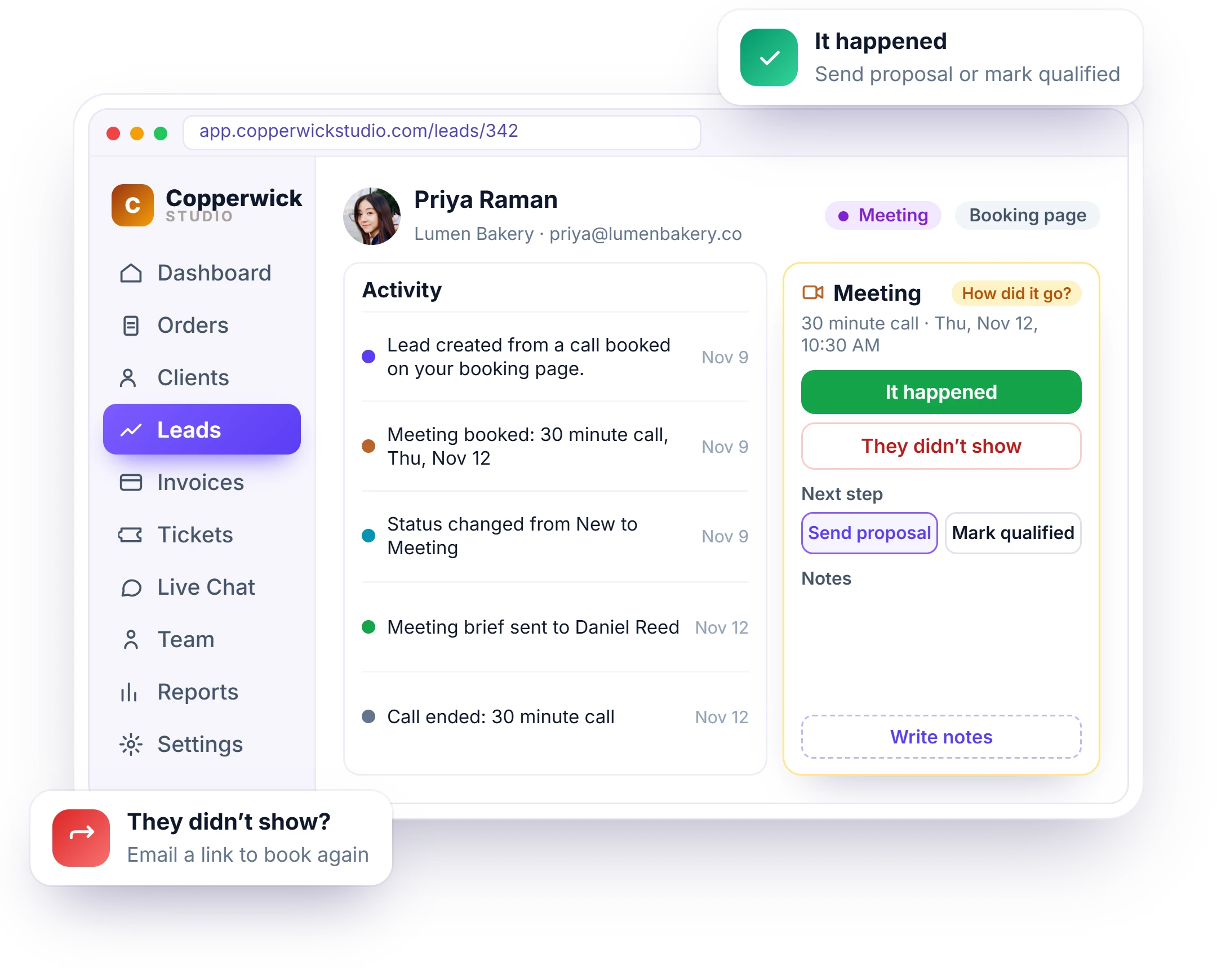
A discovery call that ends without a next step is a lead you will probably lose. On a lead, the Meeting card shows the call, who takes it and the join link, and a short brief arrives about an hour before. Afterwards it asks How did it go? Mark It happened and send a proposal or mark the lead qualified, or mark They didn’t show and send a link to book again. See lead management.
- A brief in your bell and team chat before the call
- Join call from the lead
- It happened: Send proposal or Mark qualified
- They didn’t show: email a link to book again
Your Client Call Log Moves From Lead to Client
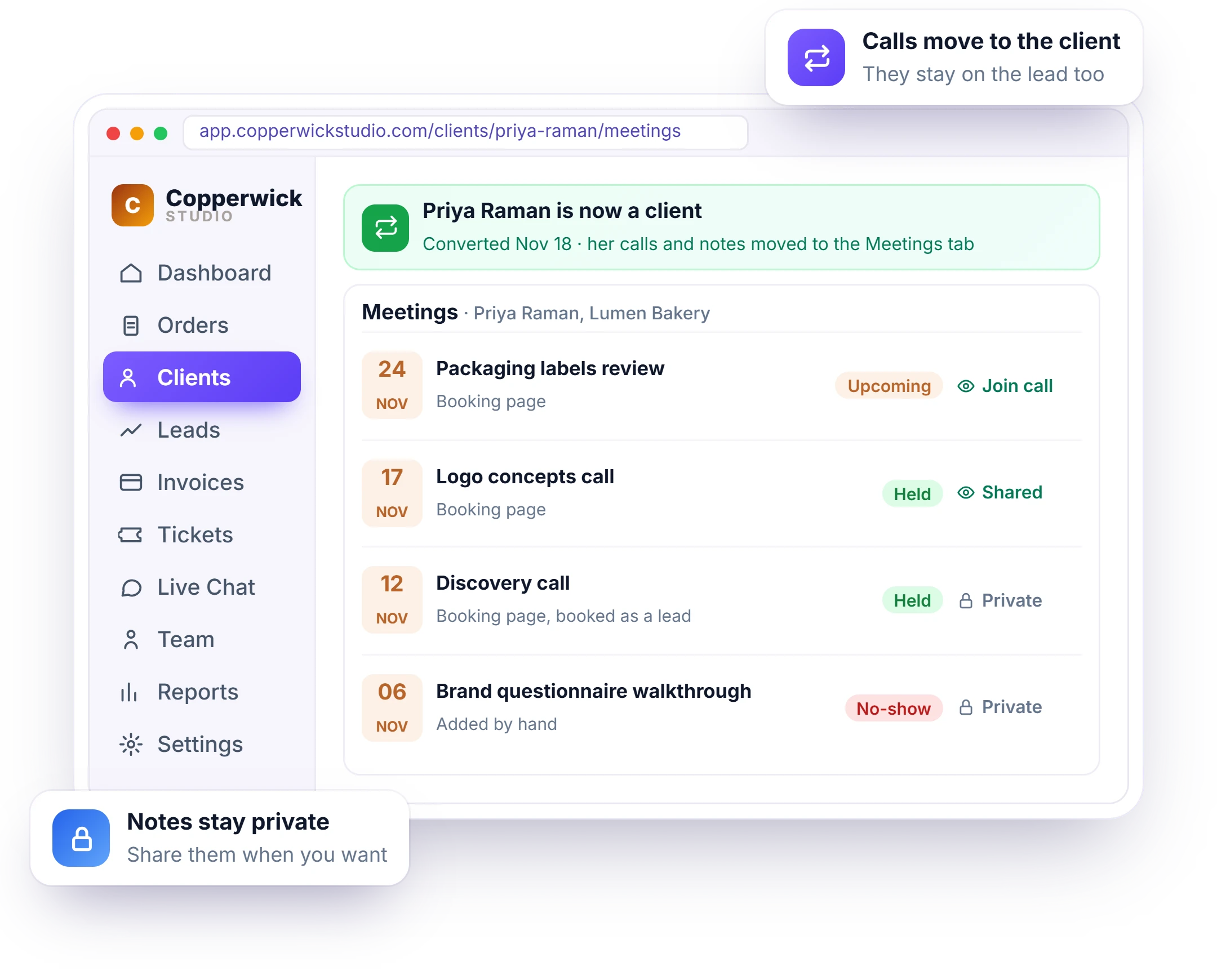
When a lead turns into a client, the sales calls usually stay behind in another tool and the account team starts from zero. In Clientish, when a lead becomes a client, on Convert or when they accept a proposal, all their calls and notes move to the new client’s Meetings tab, marked booked as a lead. They stay on the lead page too, and the notes stay private until you choose to share them.
- Calls from the lead move to the client
- Marked booked as a lead
- Still visible on the lead page
- Notes stay private until you share them
Share Meeting Notes With Clients in Their Portal
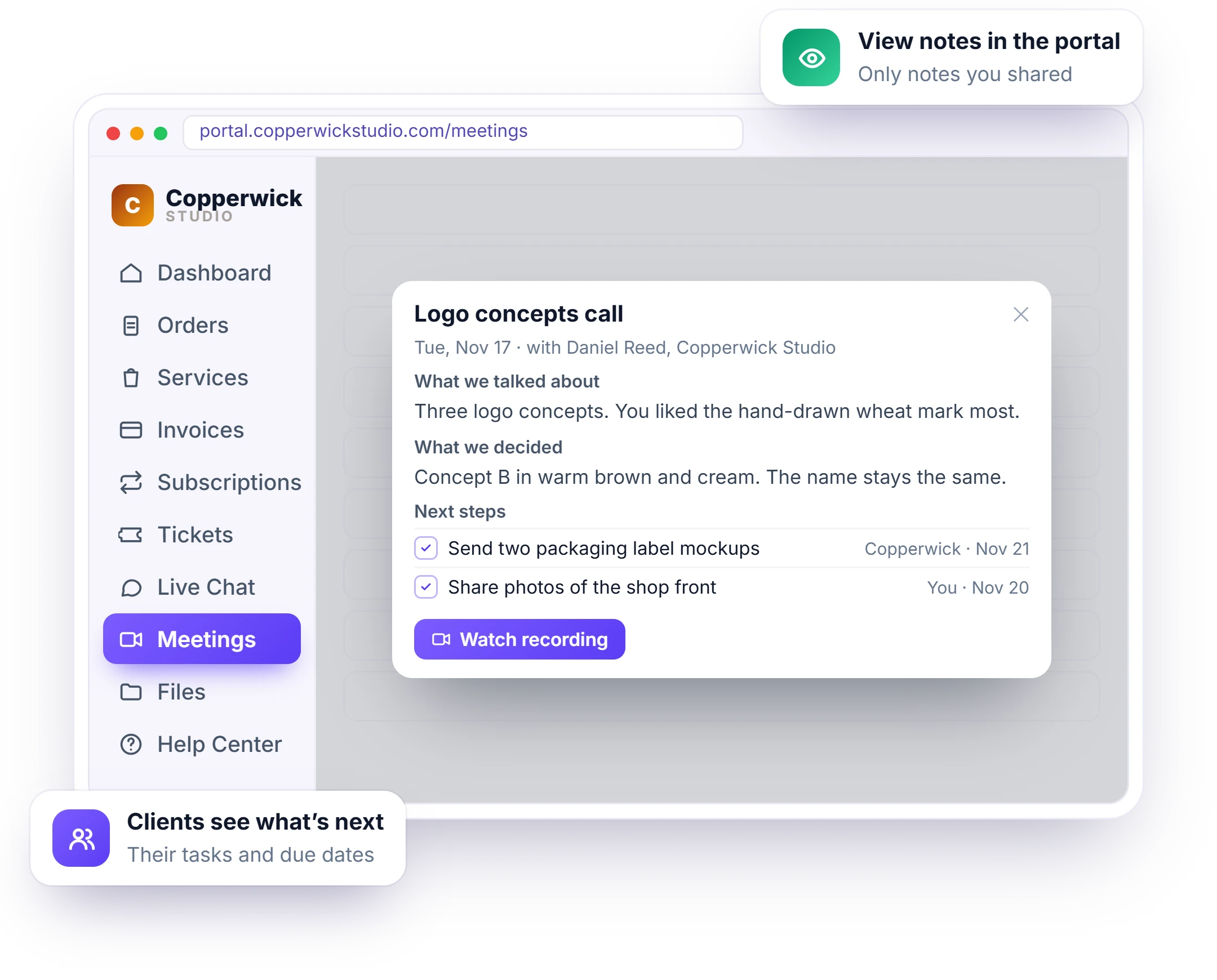
When only your agency has the notes, clients forget their own to-dos and you end up arguing about what was agreed. In the portal, clients open Meetings to see their upcoming calls with Join call and their past calls. View notes shows what you talked about, what you decided, the next steps and the recording, for every call where you ticked Show these notes in the portal. See the client portal.
- Upcoming calls with Join call
- Past calls with View notes
- Only the notes you chose to share
- Book a call from the same page
CRM Meeting Notes or a Spreadsheet Plus a Notetaker
Many agencies track client meetings in a spreadsheet, keep notes in a shared doc and use a separate AI notetaker, joined by Zapier or copy and paste. Each line compares one job, from logging the call to sharing next steps with the client. On the left, the work is split across those tools; on the right, a client meeting tracker built into your Clientish CRM keeps the call, the notes, the next steps and the client portal on one record.
How Agencies and Freelancers Track Client Meetings
A client meeting tracker helps any agency that runs regular calls: concept reviews, monthly reports, kick-offs, strategy sessions and month-end check-ins. A design studio logs what the client chose in a concept review, an SEO agency shares next steps after each monthly report, and a freelancer simply stops forgetting who said what. The examples below show where the notes, decisions and next steps help most.
Design Studios
Concept review calls with the decision and next round of changes written down.
SEO Agencies
Monthly report calls with next steps shared in the client’s portal.
Web Design Agencies
Kick-off and launch calls with who sends what, and by when.
Marketing Agencies
Strategy calls with AI notes from the Meet transcript.
Bookkeeping Firms
Month-end calls with the client’s to-dos listed under Next steps.
Freelancers
Every call with each client in one list, nothing to remember.
How to Start Tracking Client Meetings in Clientish
You do not need to set anything up first: every call booked on your booking page, through Calendly or Cal.com, or added by hand already lands on the client or lead record. After the call, write the notes or let your AI draft them from the transcript, check them, and tick one box to share them in the client’s portal.
Hold the Call
Booked on your booking page, Calendly or Cal.com, or added by hand.
Write or Drop the Transcript
Type the notes, or let AI draft them from the transcript file.
Check and Save
Read the notes, fix anything, set the next steps and save.
Share With the Client
Tick Show these notes in the portal, and they see it under Meetings.
Client Meeting Tracker FAQ
Straight answers for agencies and freelancers about tracking client meetings in Clientish: meeting notes, AI notes from transcripts, sharing notes with clients and plans.
How do I track client meetings without a spreadsheet?
Use the Meetings tab on each client in Clientish. Every call booked on your booking page, through Calendly or Cal.com, or added by hand appears there, with its notes, next steps and recording link, so your client meeting tracker is the client record itself.
How do I keep track of what was agreed on client calls?
Write the meeting notes on the client’s record in Clientish: what you talked about, what you decided and the next steps with who does them and by when. The notes sit next to the call, so anyone on your team can find them later.
Can AI write my meeting notes?
Yes. Drop the transcript file from Google Meet, Zoom or Microsoft Teams into the notes window and press Write notes with AI. It runs on your own AI connection, and nothing is saved until you check it and press Save.
Which transcript files work?
A .vtt, .srt, .txt or .docx file up to 5 MB and 50,000 words. The notes window shows where to find the transcript in Google Meet, Zoom and Teams.
Does Clientish record my calls?
No. You add a link to the recording, and the video stays in your own Google Drive or Zoom account.
Can my clients see the notes?
Only when you choose. Tick Show these notes in the client’s portal and they see them under Meetings. Notes on a lead are always private.
Which calls show up in Meetings?
Calls booked on your booking page, through Calendly or Cal.com, and calls you add by hand with Add meeting.
What happens to the calls when a lead becomes a client?
All the lead’s calls and notes move to the new client’s Meetings tab, marked booked as a lead, and they stay on the lead page too.
Is the client meeting tracker on every plan?
Yes, from Solo at $9.99 a month. AI notes use your own AI account, so your AI provider bills you directly.
Never lose what was agreed on a client call.
Every call on the client record, notes in minutes with AI, and next steps your client can see in their portal. Try it with example data first.
- A place on the client or lead record
- Talked about, decided, next steps
- AI notes from the transcript
- A link to the recording
- Shared in the portal, or private
- History kept when a lead converts
Every feature unlocked in the trial. Pick a plan only when you are ready.