
WHITE LABEL CLIENT PORTAL · UPDATED OCTOBER 2026
White Label Client Portal for Agencies, on Your Own Domain
A white label client portal is client software your clients see under your agency’s name, not the vendor’s. Clientish gives your agency one on your own domain, such as app.youragency.com, with your logo and colours, automatic SSL and every email sent from your own SMTP server, from $29 a month. On Pro and Enterprise, the Powered by Clientish line can be switched off too.
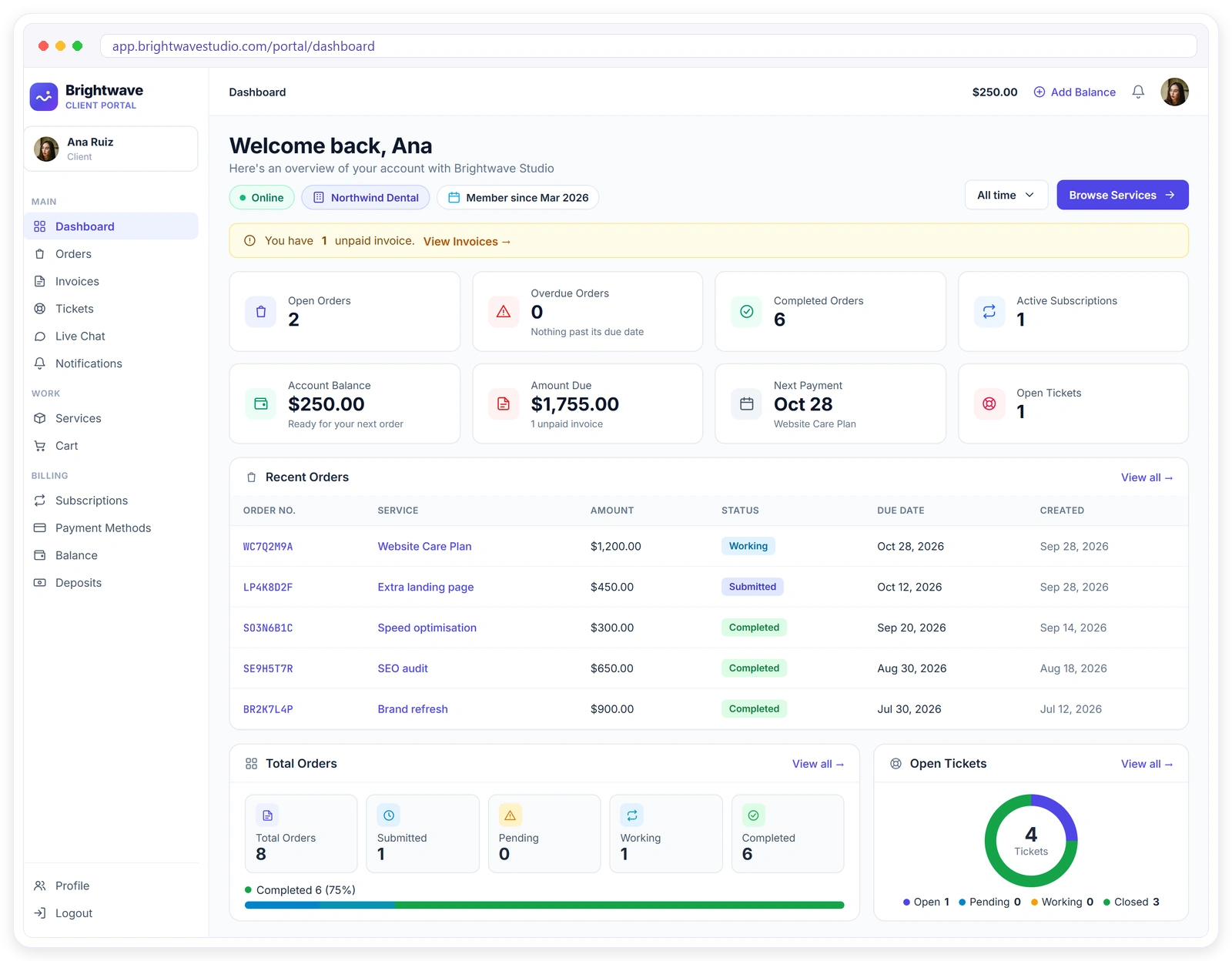
Why Agencies White Label
Clients judge your agency by everything they touch, not just the work you deliver. A portal, email or invoice link that carries another company’s name makes a solid agency look like a reseller.
Everything Clients See Carries Your Brand
Branding is set once in Settings and applied to your dashboard, every portal and every email. Clients get one consistent look from the login page to the invoice, so nothing reminds them they are inside someone else’s tool.
Brand Your Portal in Four Steps
Set it up once in Settings: logo, domain, mail server and email wording. Every portal and every email picks it up straight away, so there is nothing to repeat for each new client or team member.
CUSTOM DOMAIN
Your Portal on Your Own Domain
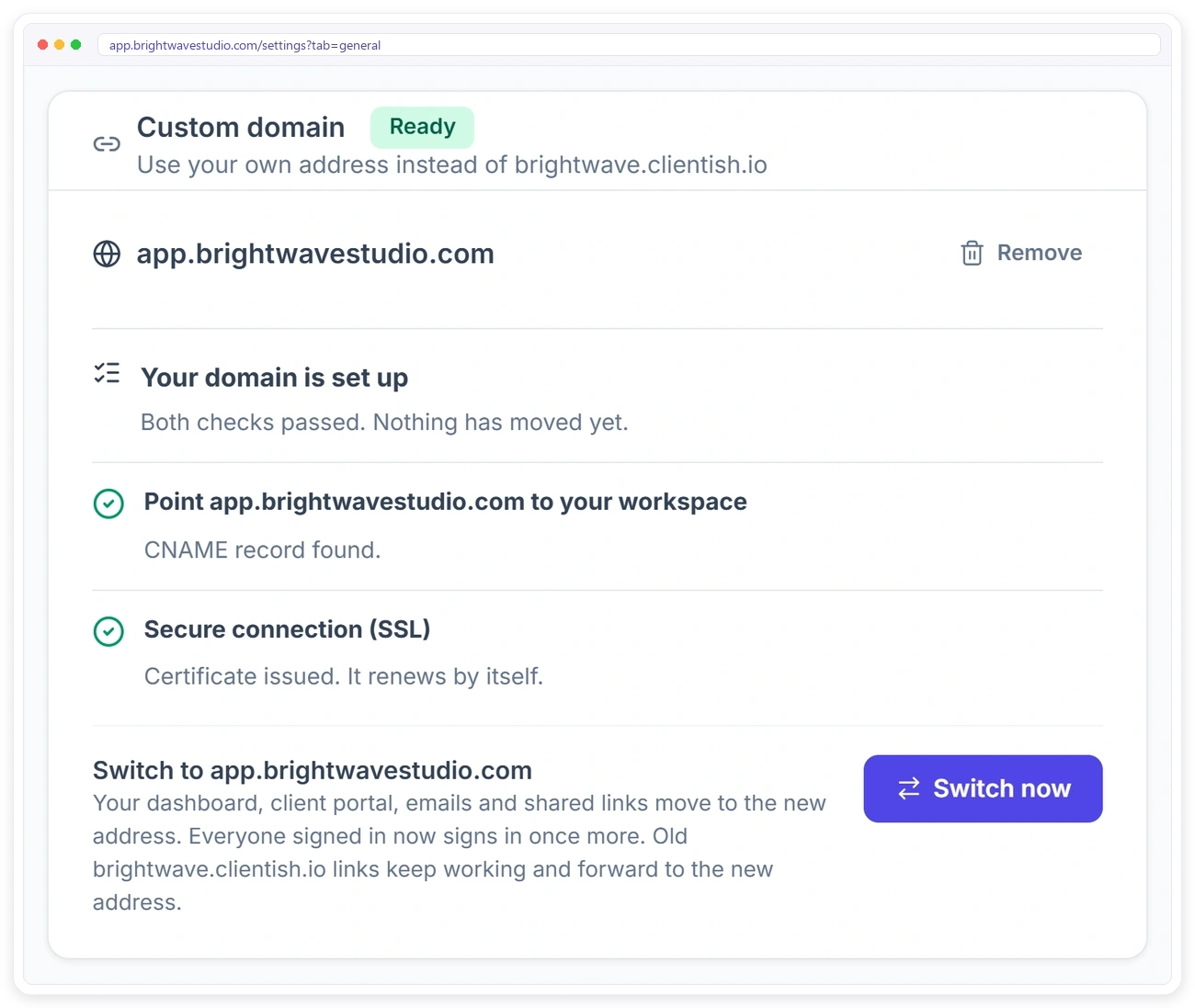
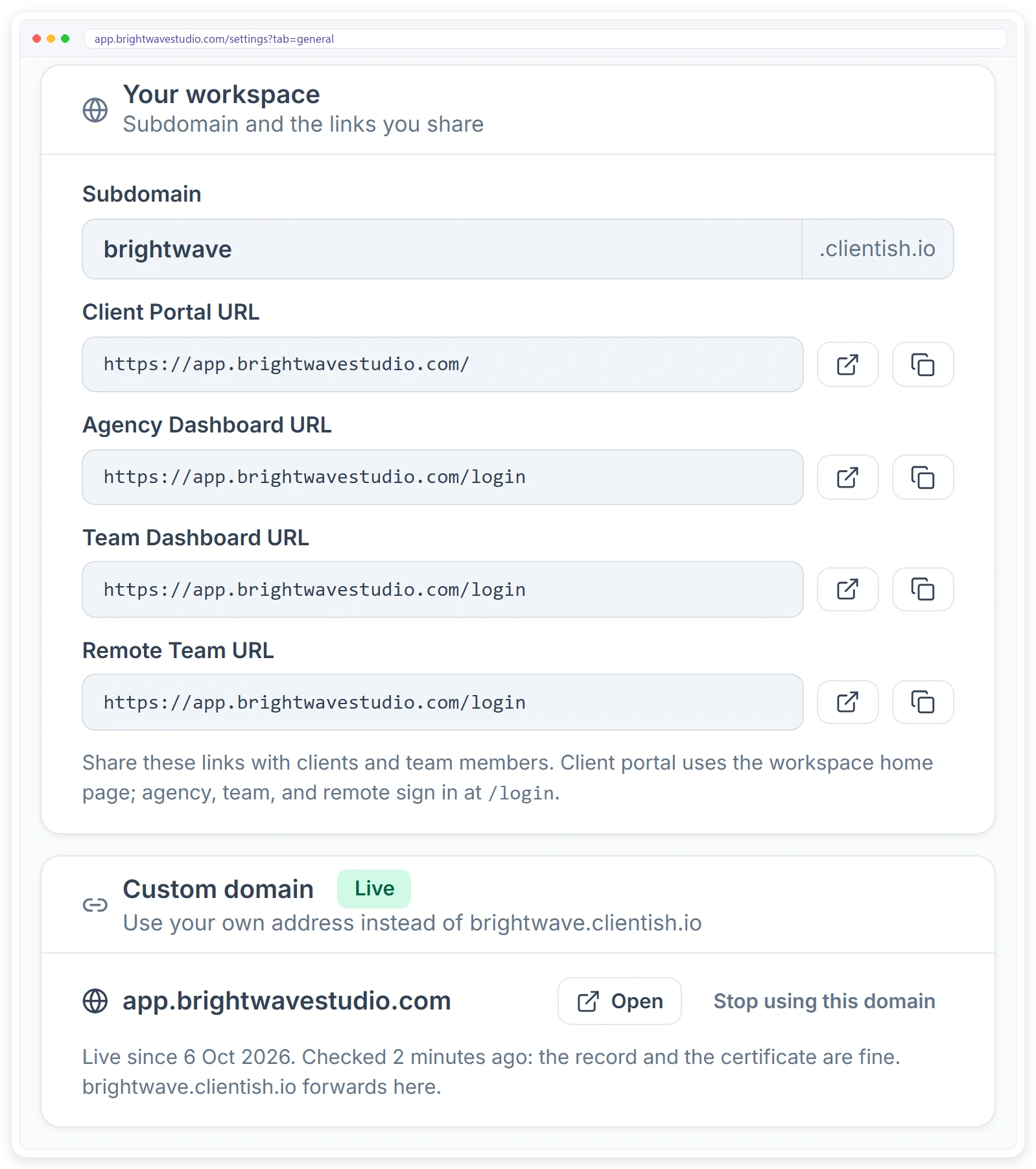
Open Settings, enter a subdomain you own, such as app.youragency.com, and the Custom domain card shows the one CNAME record to add where you manage your domain. Once the record is found, the SSL certificate is issued by itself. Nothing moves until you press Switch now.
What Moves to Your Domain
Press Switch now and the whole workspace runs on your address: dashboard, client portal, emails and payment links. Your original address stays as a safety net, so older links keep opening.
What Changes for Your Agency
White label is not decoration. It changes how clients see you and how they act. See the client portal your clients use and the portal app they can install.
LOGO & COLOURS
It Looks Like Your Software
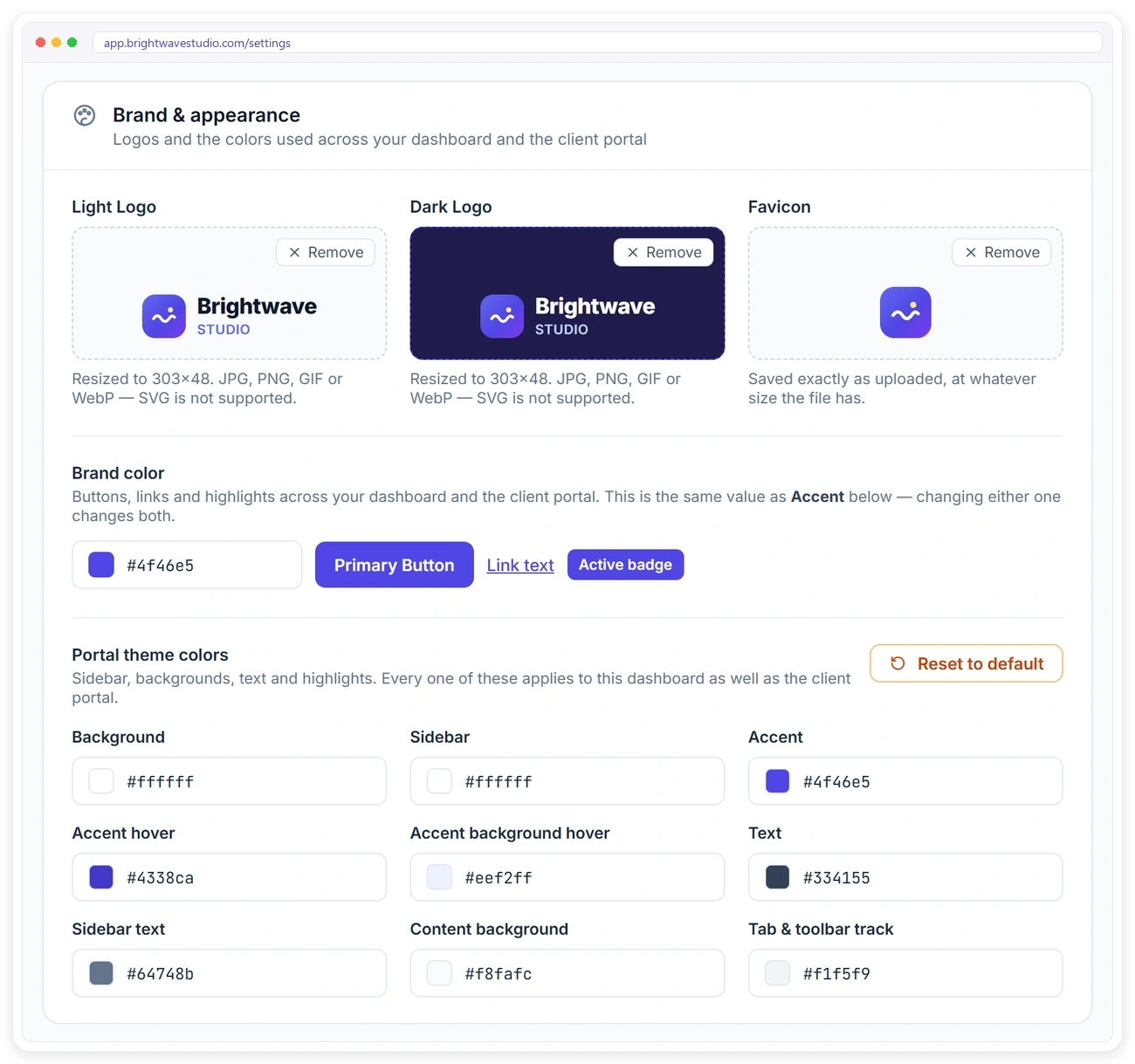
Upload your logos and favicon and set your colours once. Your brand colour drives buttons, links and highlights, and nine theme colours cover the sidebar, text and backgrounds of your dashboard and the client portal.
CLIENT LOGIN
Clients Sign In to Your Portal
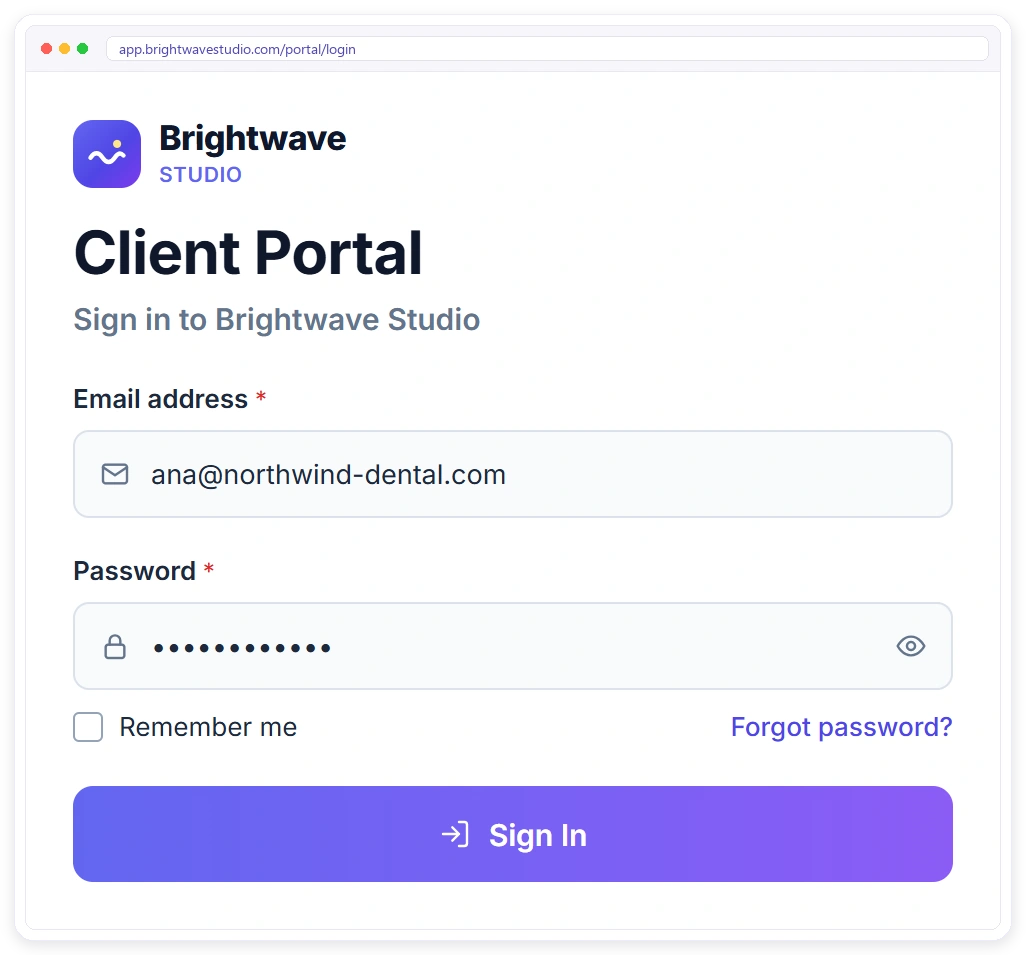
Clients open your portal on your own domain, or on your original Clientish address if you have not added one. They see your logo on the login page and sign in with their own email and password to check orders, pay invoices and open tickets.
Every Email Comes From You
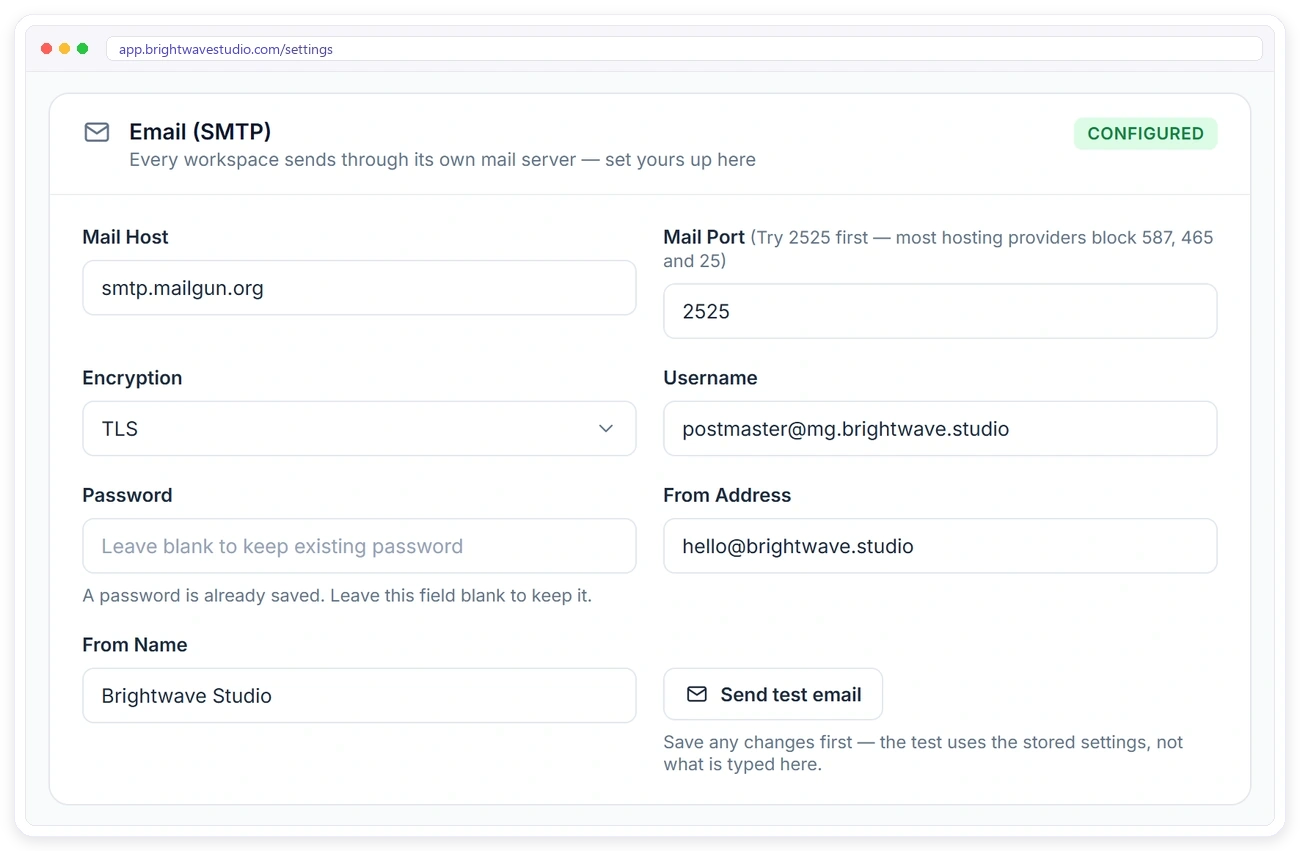
Every workspace sends through its own mail server. Add your SMTP details, set your from address and sender name, and send a test email to check it works. Clientish never emails your clients directly.
TEMPLATES
Say It in Your Own Words
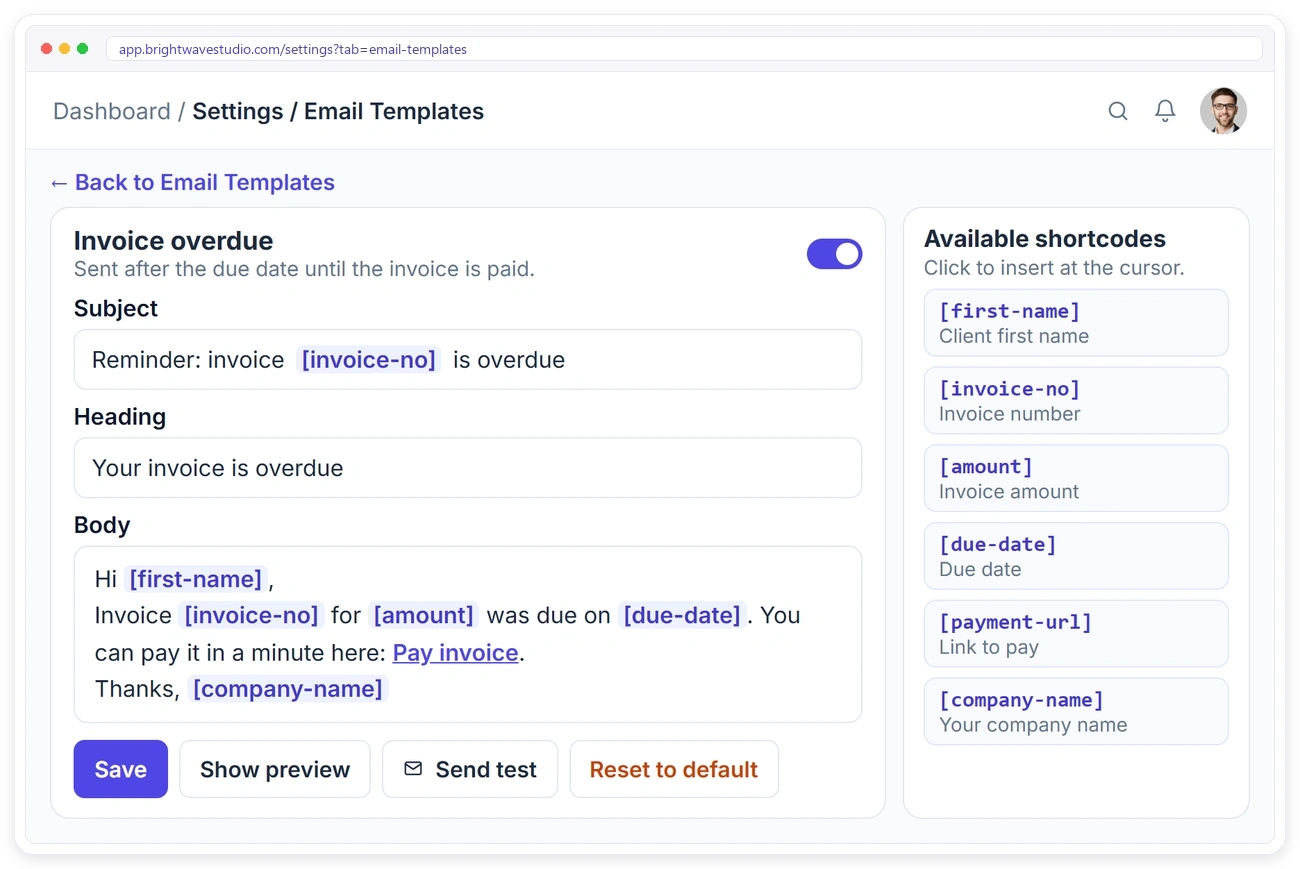
Every automated email is a template you can edit, from the client welcome email to invoice, payment, subscription and lead emails. Change the subject, heading and body, and use shortcodes like the client’s first name and your company name.
FOUR PORTALS
One Brand Across Every Portal
Your agency dashboard, team dashboard, remote team portal and client portal all carry the same branding, and all four move to your own domain when you switch. Copy each link from Settings and share it with the right people.
Everything Clients Do, Under Your Brand
Your branded portal is where clients order, pay and get help without ever leaving your brand. Each of these used to be an email to your team; now clients do it themselves on your domain.
White Label on Every Plan
Your logo, colours, own domain and own email come with every plan. Pro and Enterprise also let you switch off the Powered by Clientish line.
White Label Portals Compared
Many client portals keep your own domain or full branding for their higher plans. Here is where six portals agencies shortlist put it, next to the entry price and the number of team users.
| CClientish | WWayfront | MManyRequests | AAssembly | SSuiteDash | CClientjoy | |
|---|---|---|---|---|---|---|
| Entry plan | $29/moevery feature included | $129/mo$99 yearly | $59/mo$39 yearly | $49/mo$20 yearly | $19/mo$180 yearly | $49/mo$44 yearly |
| Team users | 5 | 5 | 1, then $20 each | 1 | Unlimited staff | 5 |
| Own domain | Yes | Yes | Yes | From Professional$149/mo | Not listed | From Premium$99/mo |
| Workflow automations | Yes | Not listed | Zapier only | From Professional | From Pinnacle$99/mo | From Premium |
| Client reports in portal | 13 sources | Not listed | From Pro$99/mo | Not listed | Not listed | From Premium |
| Client invoicing | 12 gateways | Yes | Yes | Not listed | Not listed | Yes |
You sell mostly productized, subscription-style services.
You bill clients by the hour or with prepaid credits.
You want a free plan for your first five clients.
You want unlimited staff on the cheapest plan.
Proposals, contracts and a sales pipeline matter more to you than the portal, which starts on its Premium plan.
Entry-plan facts from each vendor’s own pricing page on 7 October 2026. “Not listed” means their pricing page does not mention it. Check their pages for the latest.
★★★★★
“We used to spend an hour a day answering ‘where are we at?’ emails. Clients open the portal now and see it themselves — support volume dropped by about half in a month.”

Nathan White
Operations Lead, White Peak Consulting
White Label FAQ
Straight answers about white label client portals: your own domain, SSL, emails, the Powered by line and what changes for your clients.
What is a white label client portal?
It is a client portal built by a software company that you run under your own name: your domain in the address bar, your logo on the login page and your sender name on every email. Your clients deal with your agency, not with the vendor behind it.
How much does a white label client portal cost?
Several portal tools keep your own domain for a higher plan; in the comparison on this page that means $99 or $149 a month. Clientish includes your own domain, logo, colours and SMTP from $29 a month; switching off the Powered by Clientish line comes with Pro and Enterprise.
Is white labelling a client portal worth it?
It pays off when clients log in often, for orders, invoices and support, because every visit shows your name instead of a vendor’s. If clients would only log in once a year, a branded email and invoice may be all you need.
How do I make my agency look bigger to clients without building software?
Put your client portal under your own brand: your logo and colours, a domain such as portal.youragency.com and every email from your own address. Clients then order, pay and message you in what looks like your own software.
How do I put my client portal on my own domain?
Open Settings, then General, and find the Custom domain card. Enter a subdomain such as portal.youragency.com, then add the one CNAME record the card shows where you manage your domain. When both checks pass, press Switch now.
Can I use my main domain, like youragency.com?
No. Use a subdomain such as app. or portal. Your main domain is usually your website, so it cannot point to Clientish.
Do I need to buy an SSL certificate for my domain?
No. The certificate is issued by itself once the CNAME record is found, usually within a few minutes, and it renews by itself.
Will old portal and invoice links break after I switch?
No. Your original address keeps working and forwards to your new domain, so links in older emails still open. Anyone signed in at the time is asked to sign in again on your domain.
What happens if my domain’s DNS record stops working?
The Custom domain card shows the problem and you get an email. Until it is fixed, new emails and links use your original address, so nobody gets stuck. Add the record back and it switches back by itself.
Can I go back to my original address later?
Yes. Press Stop using this domain and everything goes back to your original address. The domain stays set up, so you can switch back later.
Which Clientish plans include a custom domain?
Every plan. Your own domain, logo, colours and SMTP come with Starter, Growth, Pro and Enterprise.
Will my clients see the Clientish name?
Your screens and emails carry your brand. On Starter and Growth, a small Powered by Clientish line shows in the client portal footer and on its login page. On Pro and Enterprise, you can switch it off.
Can client emails come from my own email address?
Yes. Every email is sent through your SMTP server with your from address and sender name, on every plan. Clientish never emails your clients directly.
Can I change the wording of the emails?
Yes. There are more than 20 email templates, and you can edit the subject, heading and body of every one of them.
Which portals carry my branding?
All four: the agency dashboard, team dashboard, remote team portal and client portal.
Put your brand in front of every client
Add your logo and colours, point a subdomain such as portal.youragency.com at your portal and send every email from your own address. Try it with example data first.
- Your own domain with automatic SSL
- Light and dark logo, favicon and colours
- Every email from your own SMTP
- 20+ email templates in your words
- Agency, team, remote and client portals
- Powered by line off on Pro and Enterprise