
CLIENT PORTAL FOR SEO AGENCIES · UPDATED OCTOBER 2026
Client Management Portal for SEO Agencies, Built for the Months Before Results
Clientish is a white-label client portal for SEO agencies that puts onboarding, monthly retainers, client reports and invoices in one place, from $29 a month, alongside the SEO tools you already use. SEO clients rarely leave because the work was wrong. They leave in month three because nobody set the expectations, the access never came and they couldn’t see the work. Clientish puts the scope in a signed proposal, collects access before you start, runs the same monthly work every cycle and shows clients what is waiting on them.
Sound Familiar?
Four things SEO clients say in the first months of a retainer, and how the client portal answers each one before it costs you the account.
From the First Audit to Every Monthly Cycle
Every stage of an SEO retainer, from the audit and signed proposal to site access, monthly deliverables and client approvals, in one client portal.
- 01
Audit
The first, easy sale
- 02
Proposal
Scope and term signed
- 03
Onboarding
Logins and access
- 04
Monthly Work
Tasks from a template
- 05
Approve
Articles signed off
- 06
Next Cycle
New order, billed again
YOUR SEO TOOLS STAY
Keep Your SEO Tools, Give Clients One Place
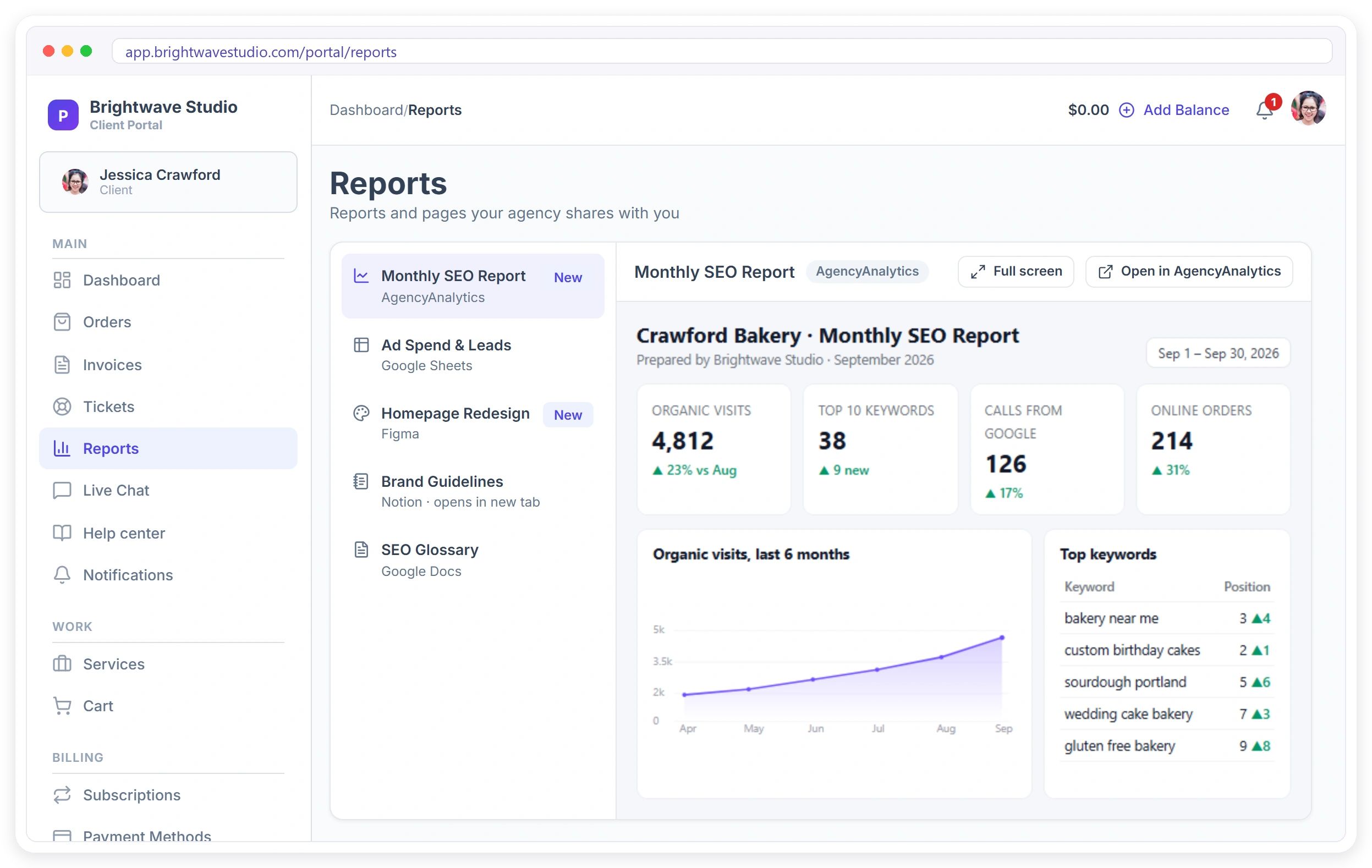
Clientish does not replace your rank tracker or your reporting tool. Keep building reports in AgencyAnalytics, DashThis, Looker Studio or a Google Sheet, then add the share link once. The report sits in the client’s portal under Reports, next to their orders and invoices, and the client is told when a new one arrives. See client reporting.
EXPECTATIONS
Set Expectations Before They Sign
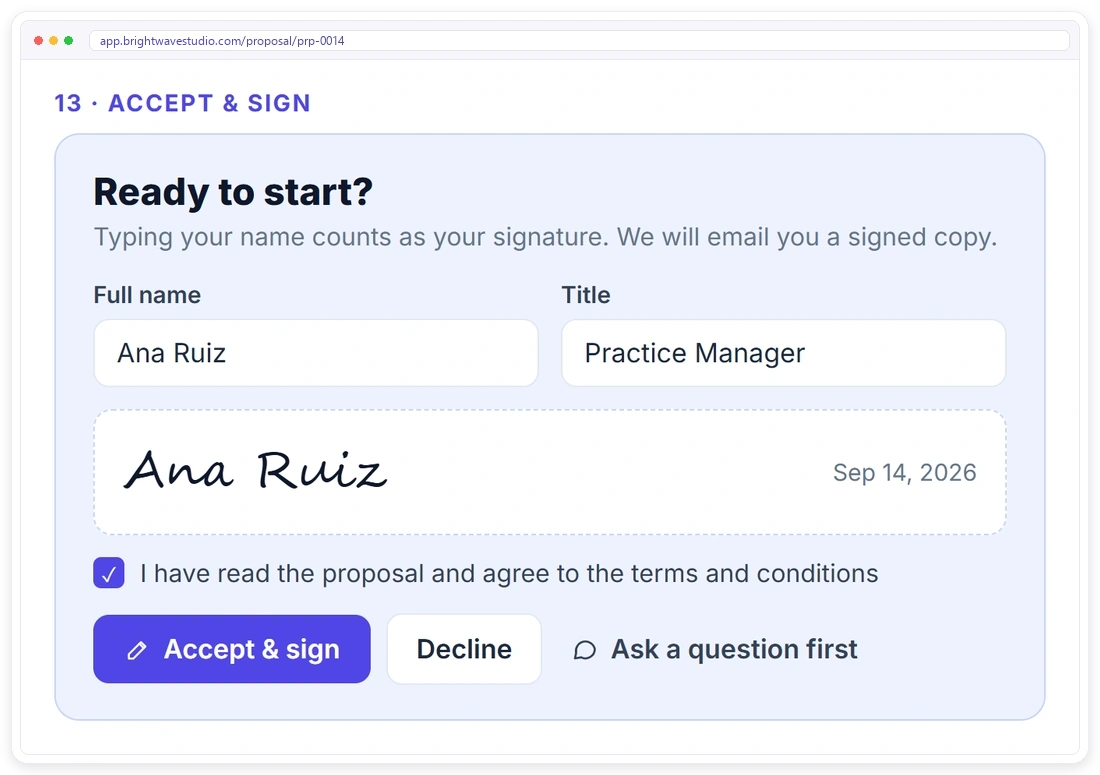
Most SEO clients who leave early were promised results the work couldn’t deliver that fast. Send a proposal that lists the monthly work, the length of the engagement and when to expect movement. The client reads it, picks a package and signs online, and accepting creates the client, the invoice and the order.
AUDIT FIRST
Sell the Audit, Then the Retainer
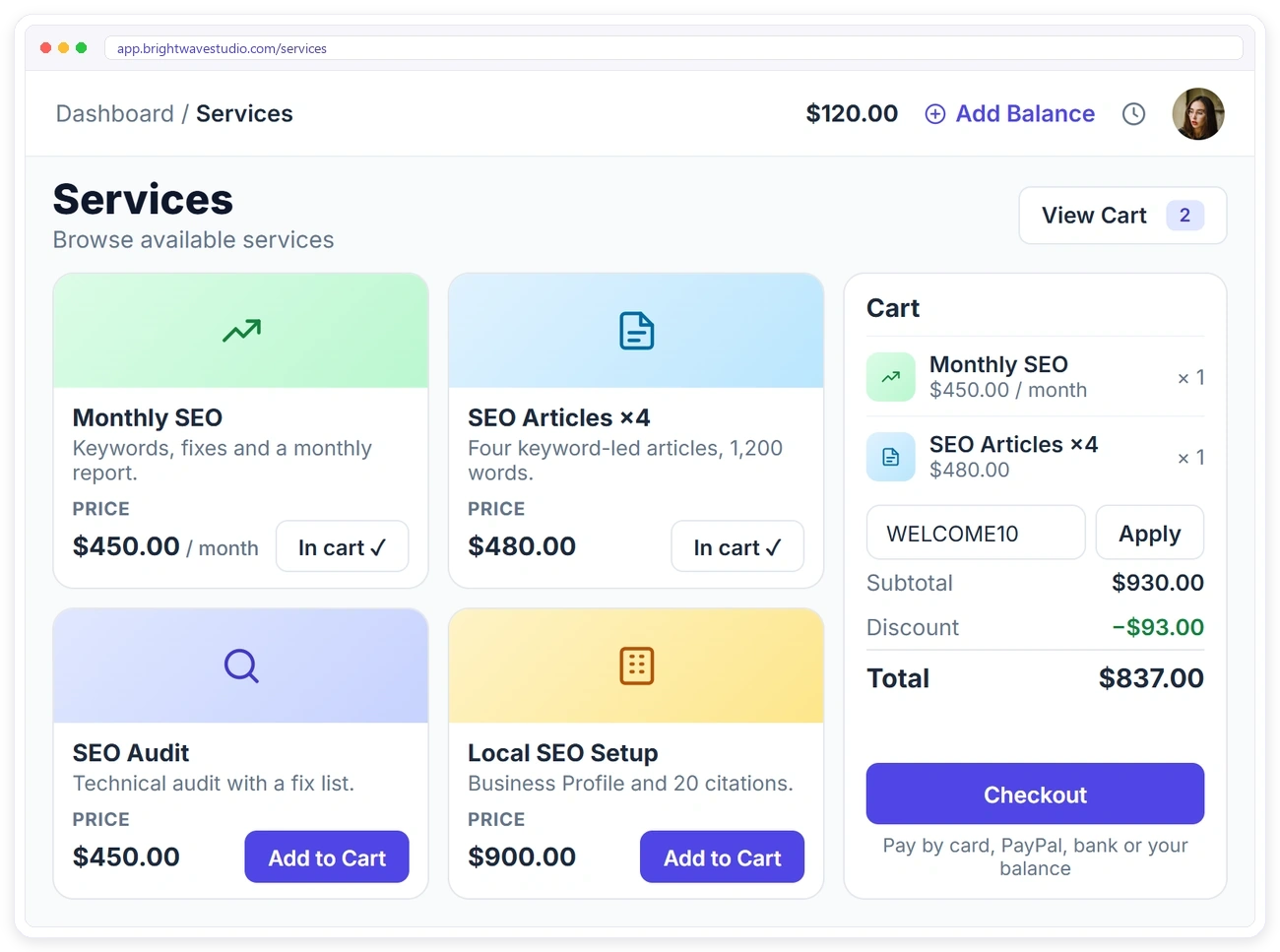
An SEO audit is the easiest first sale, and the findings make the case for monthly work. List the audit, the monthly retainer and extra content in your service catalog. After the audit, the client orders the retainer or more articles from their portal, adds them to the cart and pays.
ACCESS
Get Every Login Before Month One
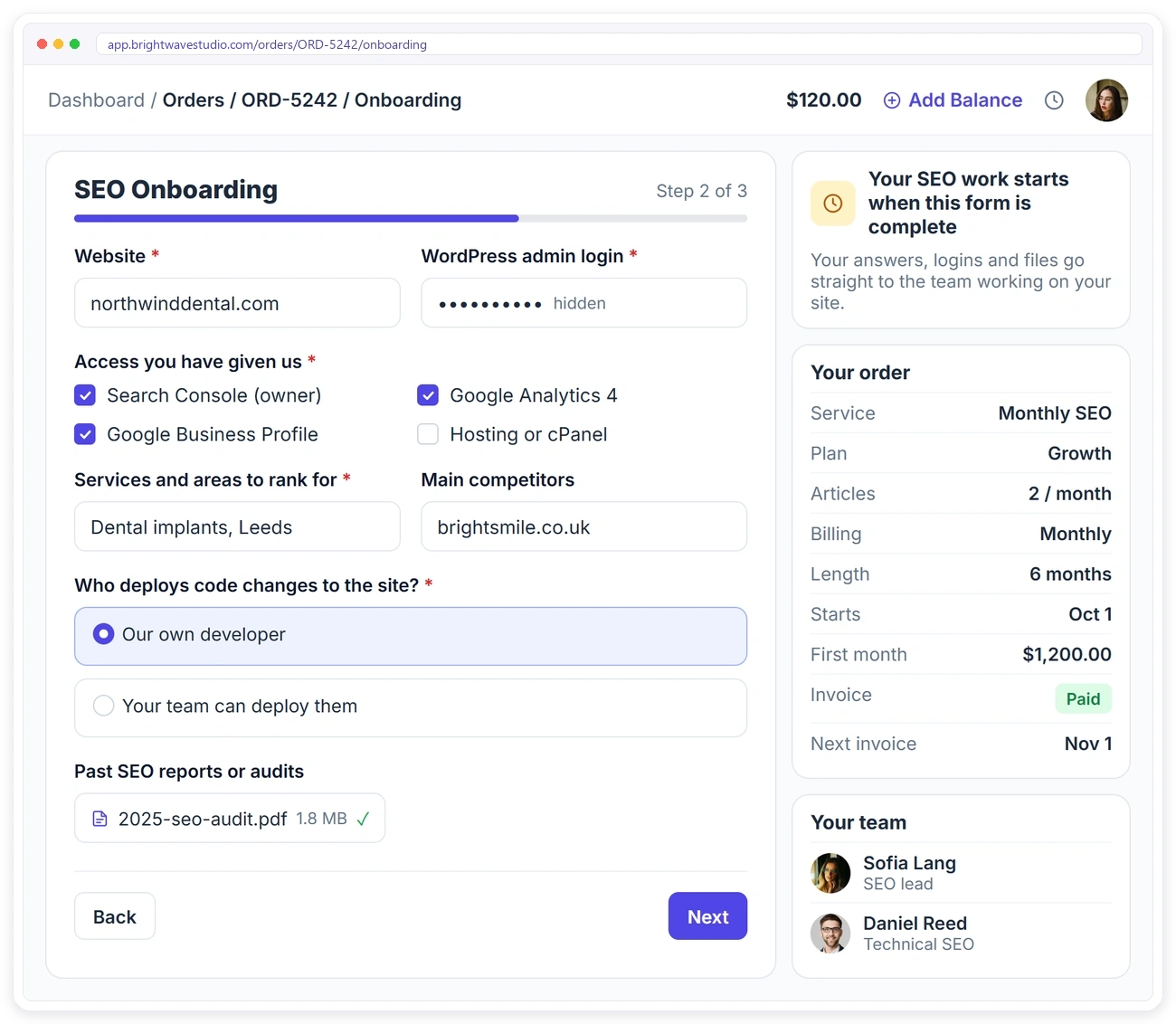
Weeks spent waiting for Search Console and CMS access are weeks the client still pays for. Attach an SEO onboarding form to the retainer with the intake form: the website, the CMS login, Search Console and Analytics access, the services and areas to rank for, and who deploys code changes. The order waits until it is complete.
THE MONTHLY WORK
Run Every Month Without Rebuilding It
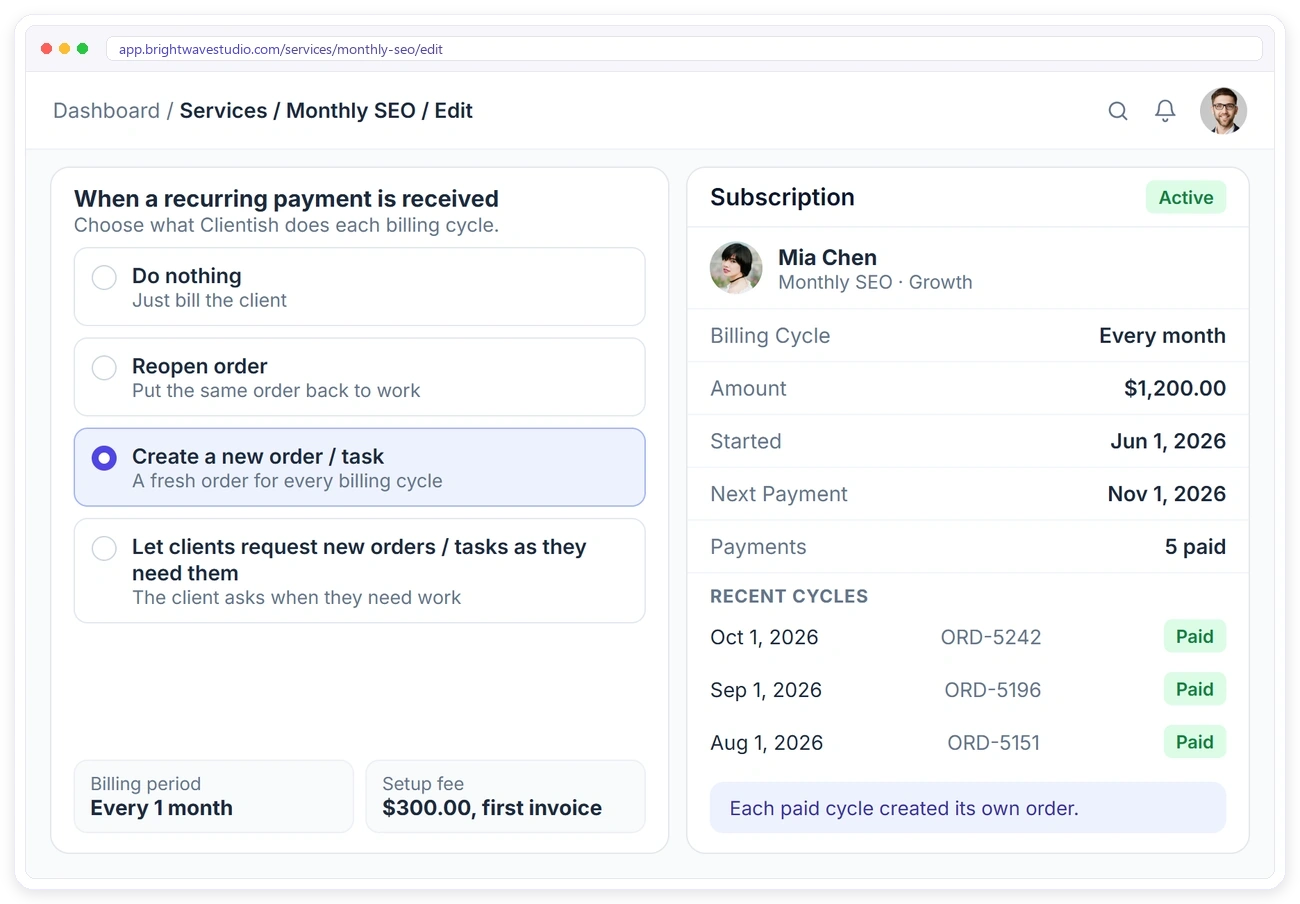
An SEO retainer is the same checklist every month: technical fixes, articles, links and a report. Make the retainer a recurring service that creates a new order for every paid cycle, and attach a task template, so each month starts with its tasks, owners and due dates already in place.
WAITING ON THE CLIENT
Show What’s Waiting on the Client
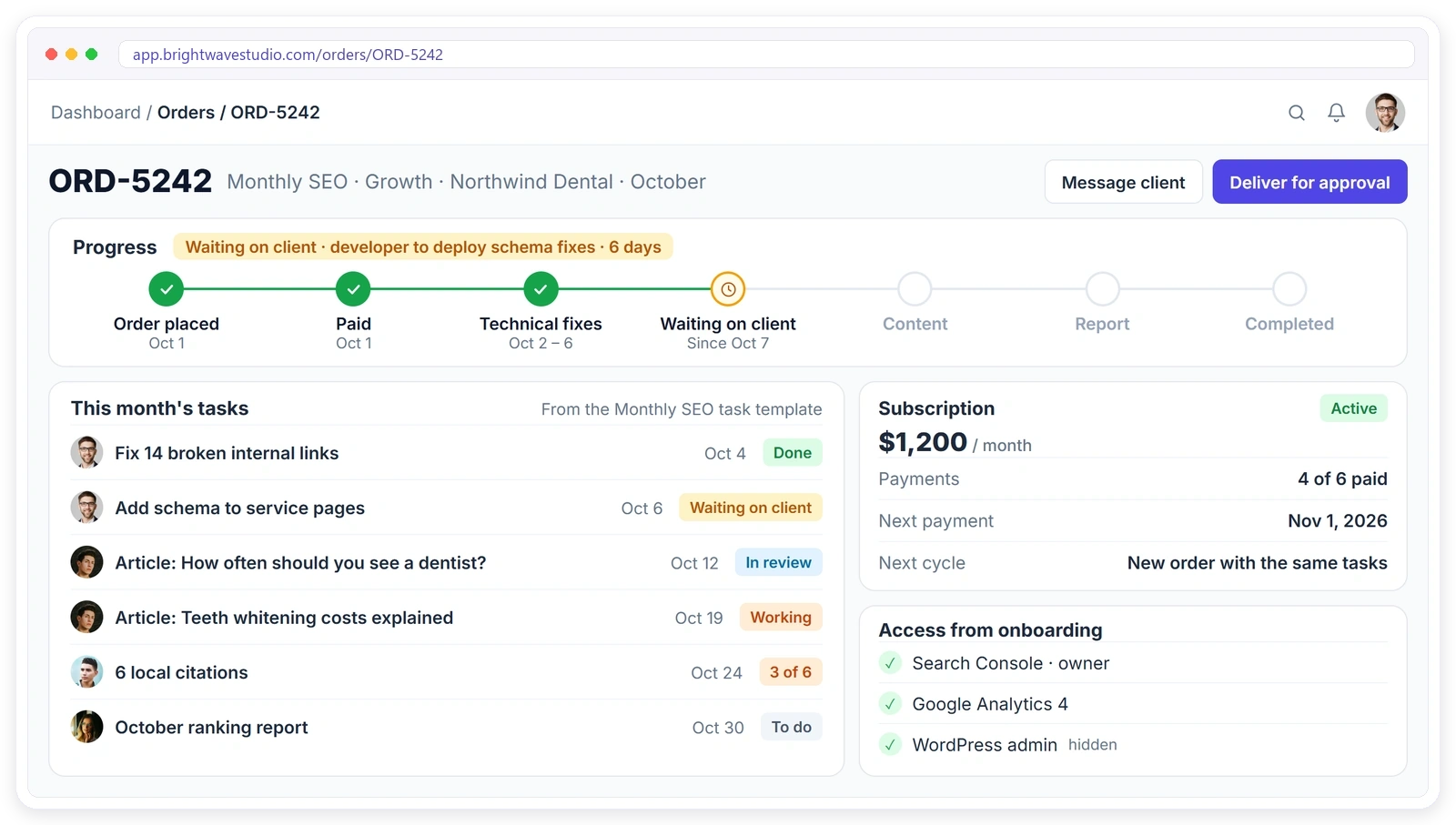
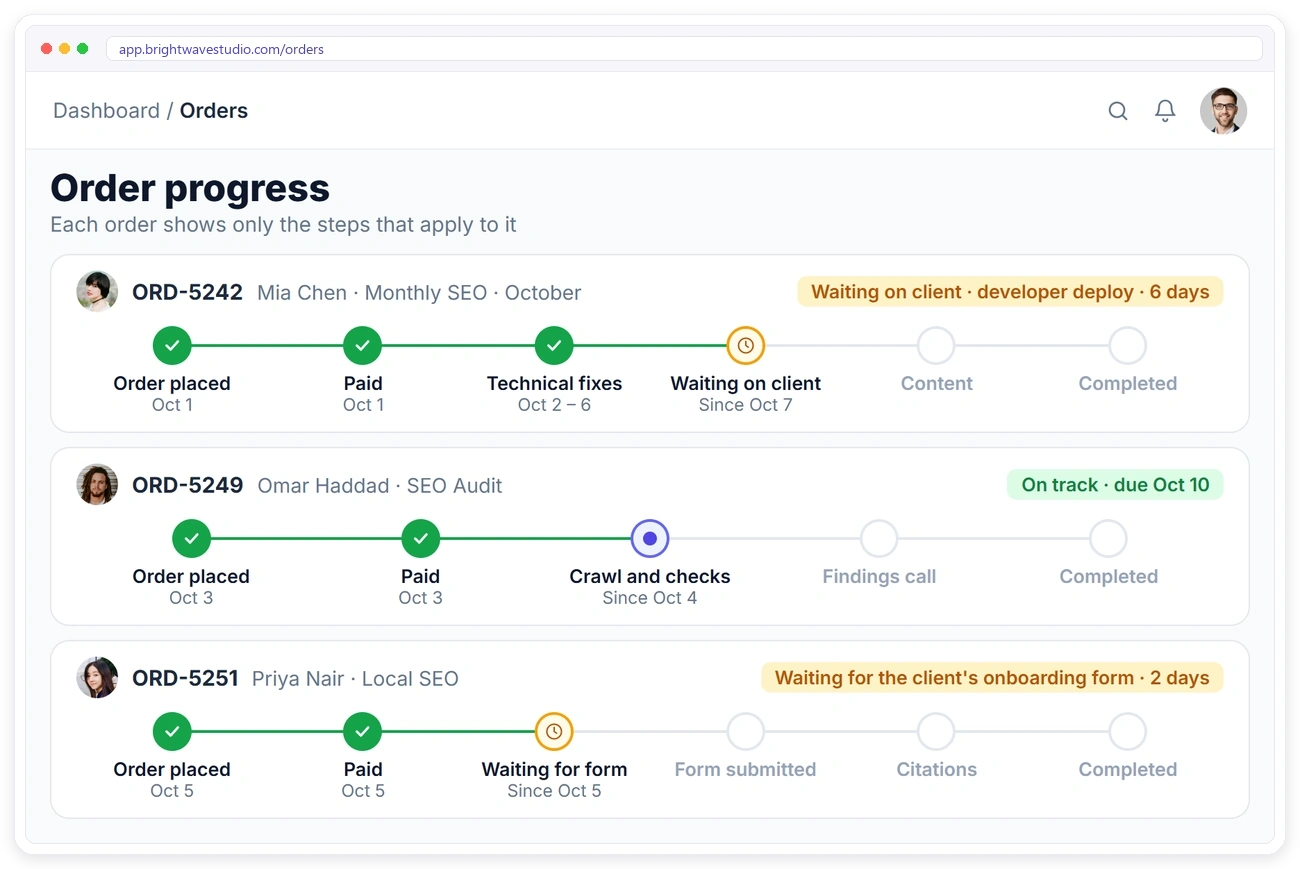
SEO work often stalls on the client’s side: a developer who hasn’t deployed the fixes, an article nobody approved. Add your own order statuses such as Waiting on client, and the order’s progress timeline shows where it is stuck and for how long, in your dashboard and in the client’s portal.
CONTENT APPROVALS
Get Articles Approved on Time
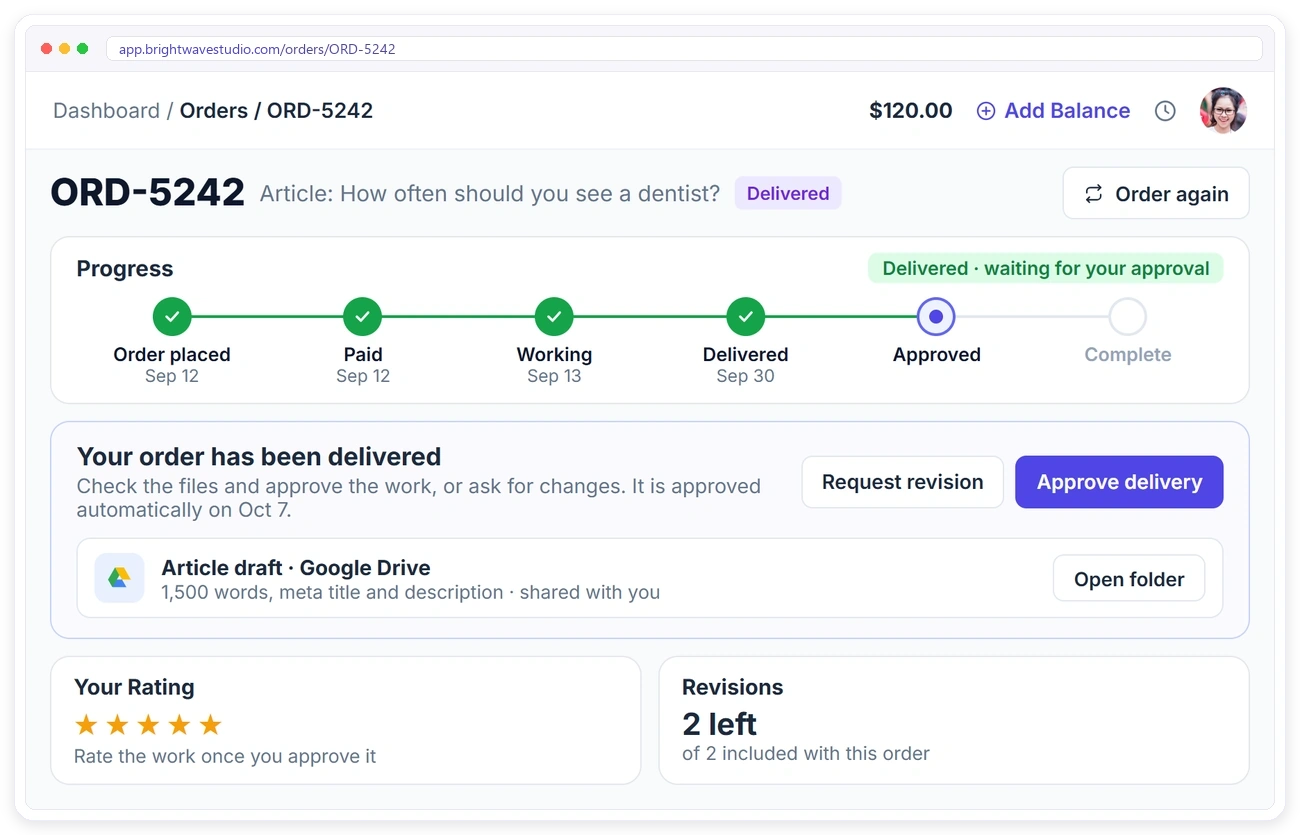
Briefs, drafts and approvals scattered across chat threads slow every content plan. Deliver each article for approval. The client reads it in their client portal, approves it or asks for a revision, and if they don’t answer, it is approved automatically after the days you set.
Services SEO Agencies Sell With Clientish
How SEO audits, monthly retainers, local SEO and extra articles are packaged, priced and ordered by clients from your portal.
Set It Up in 4 Steps
Add your SEO services, onboarding form and monthly task template once. Most agencies send their first proposal the same afternoon.
How Clientish Compares for SEO Agencies
Entry-plan prices and features of the six client portals SEO agencies compare most, side by side.
| CClientish | WWayfront | MManyRequests | AAssembly | SSuiteDash | CClientjoy | |
|---|---|---|---|---|---|---|
| Entry plan | $29/moevery feature included | $129/mo$99 yearly | $59/mo$39 yearly | $49/mo$20 yearly | $19/mo$180 yearly | $49/mo$44 yearly |
| Team users | 5 | 5 | 1, then $20 each | 1 | Unlimited staff | 5 |
| Own domain | Yes | Yes | Yes | From Professional$149/mo | Not listed | From Premium$99/mo |
| Workflow automations | Yes | Not listed | Zapier only | From Professional | From Pinnacle$99/mo | From Premium |
| Client reports in portal | 13 sources | Not listed | From Pro$99/mo | Not listed | Not listed | From Premium |
| Client invoicing | 12 gateways | Yes | Yes | Not listed | Not listed | Yes |
You sell mostly productized, subscription-style services.
You bill clients by the hour or with prepaid credits.
You want a free plan for your first five clients.
You want unlimited staff on the cheapest plan.
Proposals, contracts and a sales pipeline matter more to you than the portal, which starts on its Premium plan.
Entry-plan facts from each vendor’s own pricing page on 7 October 2026. “Not listed” means their pricing page does not mention it. Check their pages for the latest.
SEO Agency FAQ
Straight answers on site access, approvals, client reports, your own domain and client logins for SEO agencies.
What is a client portal for SEO agencies?
A private, branded place where each SEO client signs in to see their orders, monthly work, reports, approvals and invoices instead of chasing emails. Clientish gives you that portal together with proposals, onboarding forms, tasks and invoicing, from $29 a month.
Will my SEO clients log in to the portal?
Clientish gives them a reason to: their monthly report, the articles waiting for approval and their invoices sit in one place, and an email tells them when something new arrives. The portal also installs on their phone like an app.
Can I use my own domain for the client portal?
Yes. Add a subdomain you own, such as portal.youragency.com, add one DNS record and the portal runs there with SSL, on every plan.
Is the portal branded as my agency?
Yes. Clients see your logo, your colours and your own domain, not Clientish. On Pro and Enterprise you can also switch off the Powered by Clientish line.
Can clients see my AgencyAnalytics report in the portal?
Yes, through Client reports. Add the report’s share link once and it shows in the client’s portal under Reports. DashThis, Databox, Whatagraph, Google Sheets and Looker Studio links work the same way.
Does Clientish track rankings or build SEO reports?
No. Keep your SEO tool for rankings and reports. Add its share link to Client reports and it shows inside the client’s portal, next to their orders and invoices.
How do I set realistic expectations with SEO clients?
Send your proposal with the monthly work, the term and what to expect. The client signs it online, and the invoice and order are created from it, so what was agreed is on record from day one.
How do I get Search Console and CMS access faster?
Attach an onboarding form to your SEO service. The client fills in the website, Search Console and CMS logins from their portal, and the order waits until the form is complete.
How do I run the same SEO tasks every month?
Set the retainer up as a recurring service and attach a task template. Every paid cycle creates a new order with the same tasks, owners and due dates.
How do I show the client that work is waiting on them?
Each of your orders has a progress timeline. Set the status to Waiting on client and it shows how long it has been waiting, in your dashboard and in the client’s portal.
How do clients approve articles?
Deliver the article on the order. The client approves it or asks for a revision from their portal, and if they don’t answer, it is approved automatically after the days you set (7 by default).
Can I sell an SEO audit first and the retainer later?
Yes. Add the audit and the retainer as two services. When the audit is done, the client orders the retainer from their portal and pays online.
Keep SEO clients past month three
Agree the scope in a signed proposal, collect site access before you start, run the same monthly work every cycle and let clients see the report in their portal. Try it with example data first.
- A signed proposal with the monthly scope
- One form for site and Search Console access
- Monthly work they can follow on the order
- Your AgencyAnalytics or Looker report in the portal
- Articles approved or revised in one click
- Your own domain and branding