
Client Management Portal for Design Agencies, Without Endless Revision Rounds
Clientish is a white-label client portal for design agencies that puts brand briefs, concept rounds, revision limits, sign-off and invoices in one place, from $9.99 a month, alongside Figma, Canva and the tools you already use. Design projects go over budget in the feedback, not the design. A vague brief, comments from three people and no revision limit turn one logo into ten rounds. Clientish collects the brief first, keeps every concept and comment on the order, counts the revisions and gets sign-off with the final files.
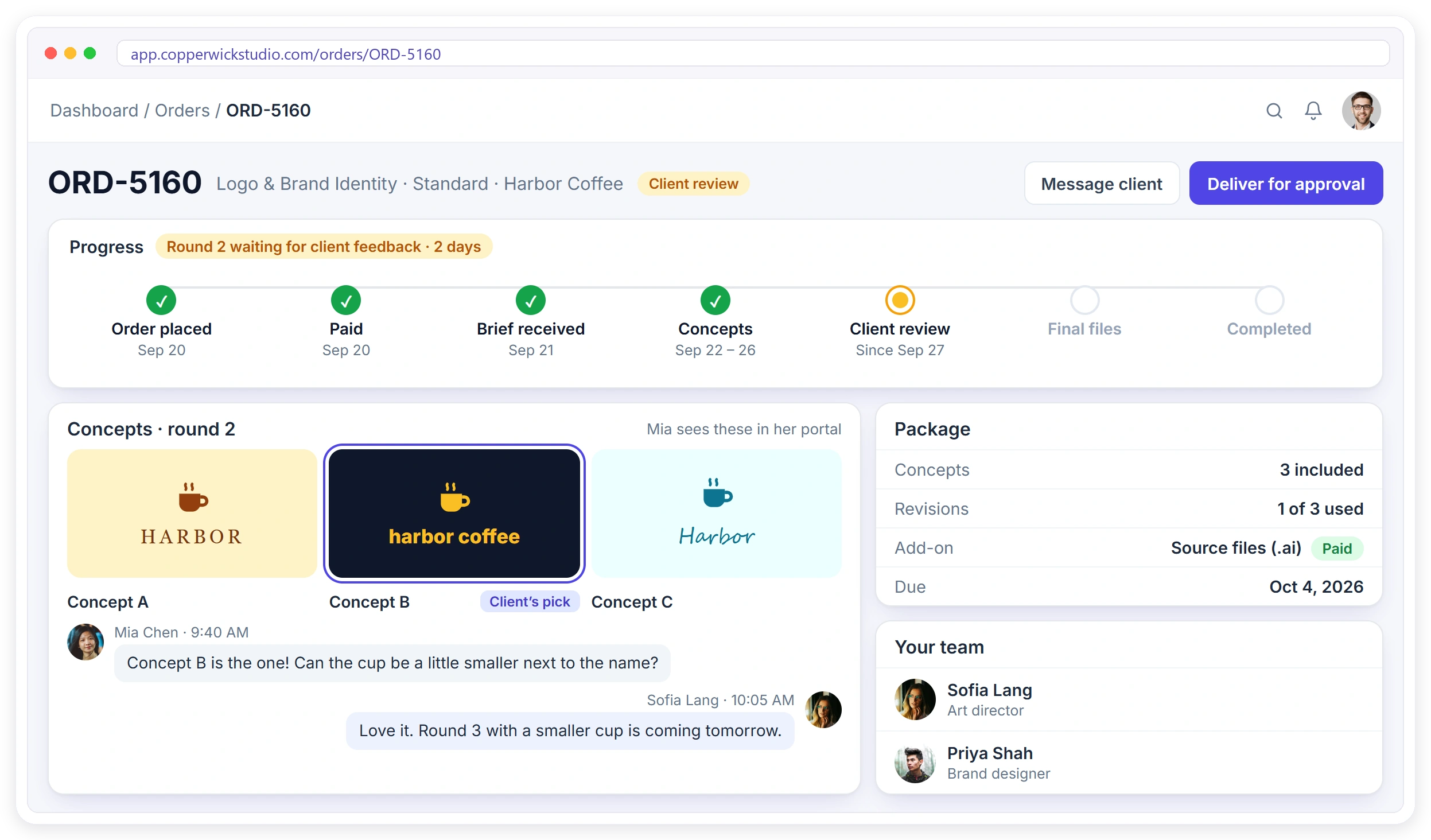
Sound Familiar?
Four things design clients say that add rounds to a project, and how the client portal answers each one before the budget is gone. Catch them early and you keep both the schedule and the margin.
“We’ll know it when we see it.”
A brand brief collects where the logo is used, the style, colors and references before the first sketch.
“Just one more small tweak…”
Each package includes a set number of revisions, every request is counted, and extra rounds are a paid add-on.
“My partner prefers the other one.”
The brief names who gives final approval, and every concept and comment stays on the order.
“Can you send us the source files?”
Source files are an add-on with its own price, so ownership is agreed before the work starts.
From Brief to Final Files
Every stage of a design project, from the brand brief and concept rounds to feedback, sign-off and final files, in one client portal for every client.
Brief
Style, colors, references
Concepts
Round one delivered
Feedback
Comments on the order
Sign-Off
Approved in the portal
Final Files
Logos, guide, source files
Subscription
More work every month
Start Every Project With a Real Brief
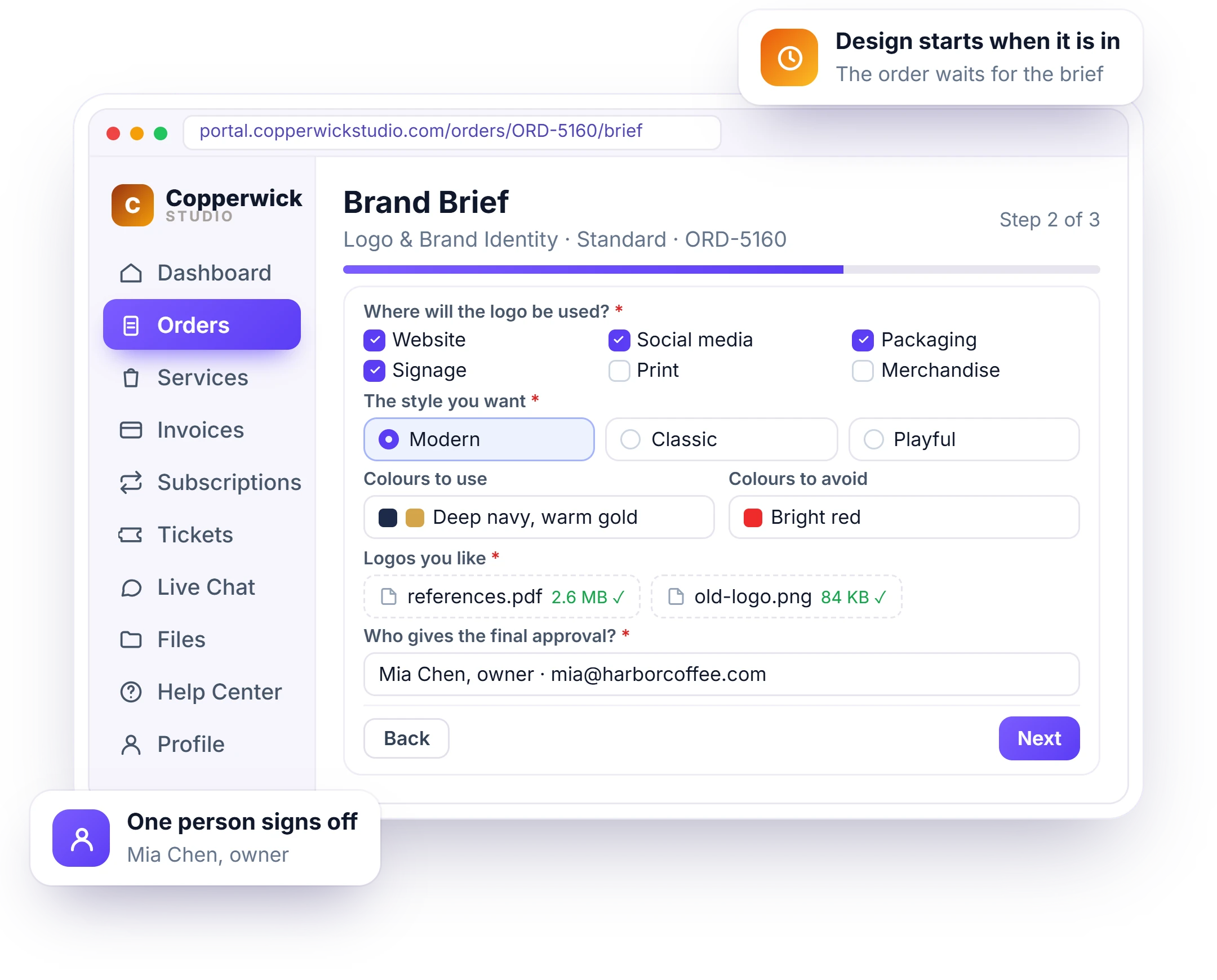
Verbal briefs from a discovery call are where endless revisions begin. Attach a brand brief to each package with the intake form: where the logo will be used, the style the client wants, colors to use and avoid, logos they like and who gives the final approval. The order waits until the brief is complete.
- A brand brief attached to each package
- Where the design will be used
- Style, colors to use and colors to avoid
- Reference logos and old files uploaded
- One named person for final approval
- Design starts only when the brief is complete
Put a Number on Revisions
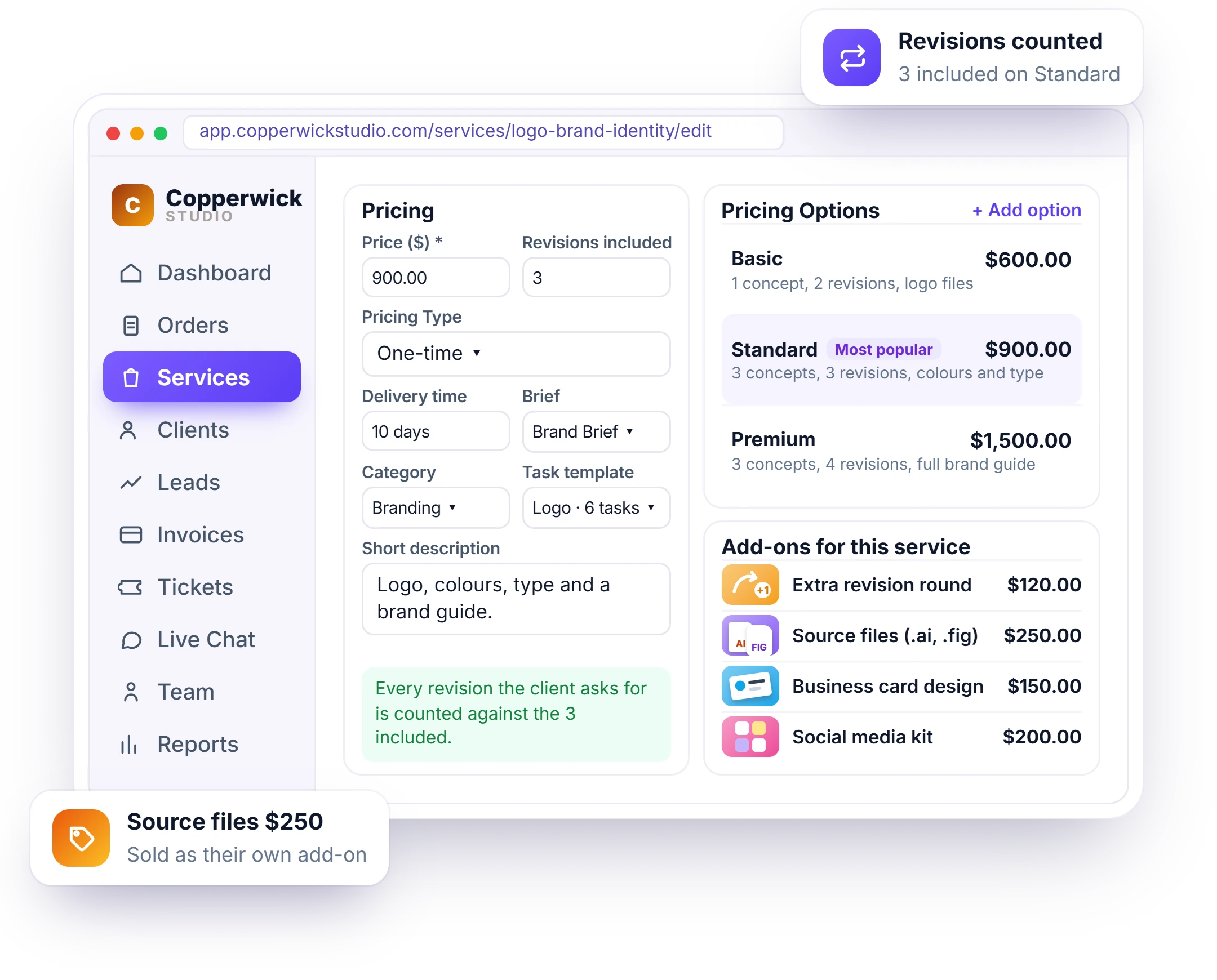
If the revision limit isn’t written down, clients assume there isn’t one. Set the revisions included on each design service in your service catalog, sell Basic, Standard and Premium packages, and offer extra revision rounds, source files and extra pieces as paid add-ons.
- Revisions included on every service
- Every revision request counted
- Basic, Standard and Premium packages
- Extra revision rounds as a paid add-on
- Source files sold as their own add-on
- Business cards or social kits as extras
Get Sign-Off, Then Hand Over the Files
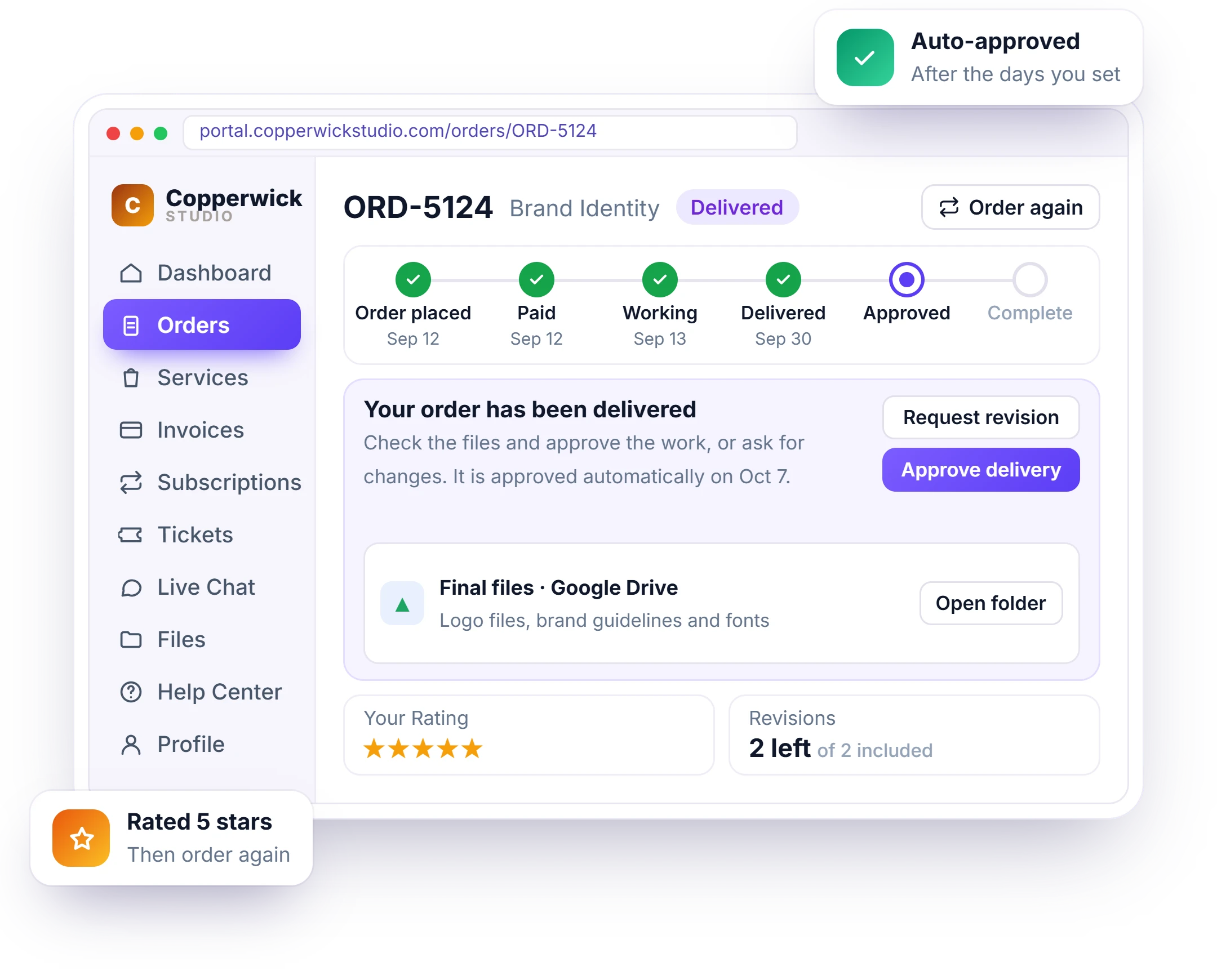
Concepts sent by email get feedback from whoever reads it first. Deliver each round for approval in the client portal. The client approves it or asks for a revision, sees how many revisions are left, and gets the final logo files and brand guide with the approved order. If they don’t answer, it’s approved automatically after the number of days you set. Share a concept as a Figma link and it opens inside the conversation, so nobody downloads the wrong version.
- Deliver each concept round for approval
- Approve or request a revision in one click
- Revisions left shown to the client
- Final files delivered with the order
- Automatic approval after the days you set
- A progress timeline the client can follow
Run a Design Subscription Clients Can Use
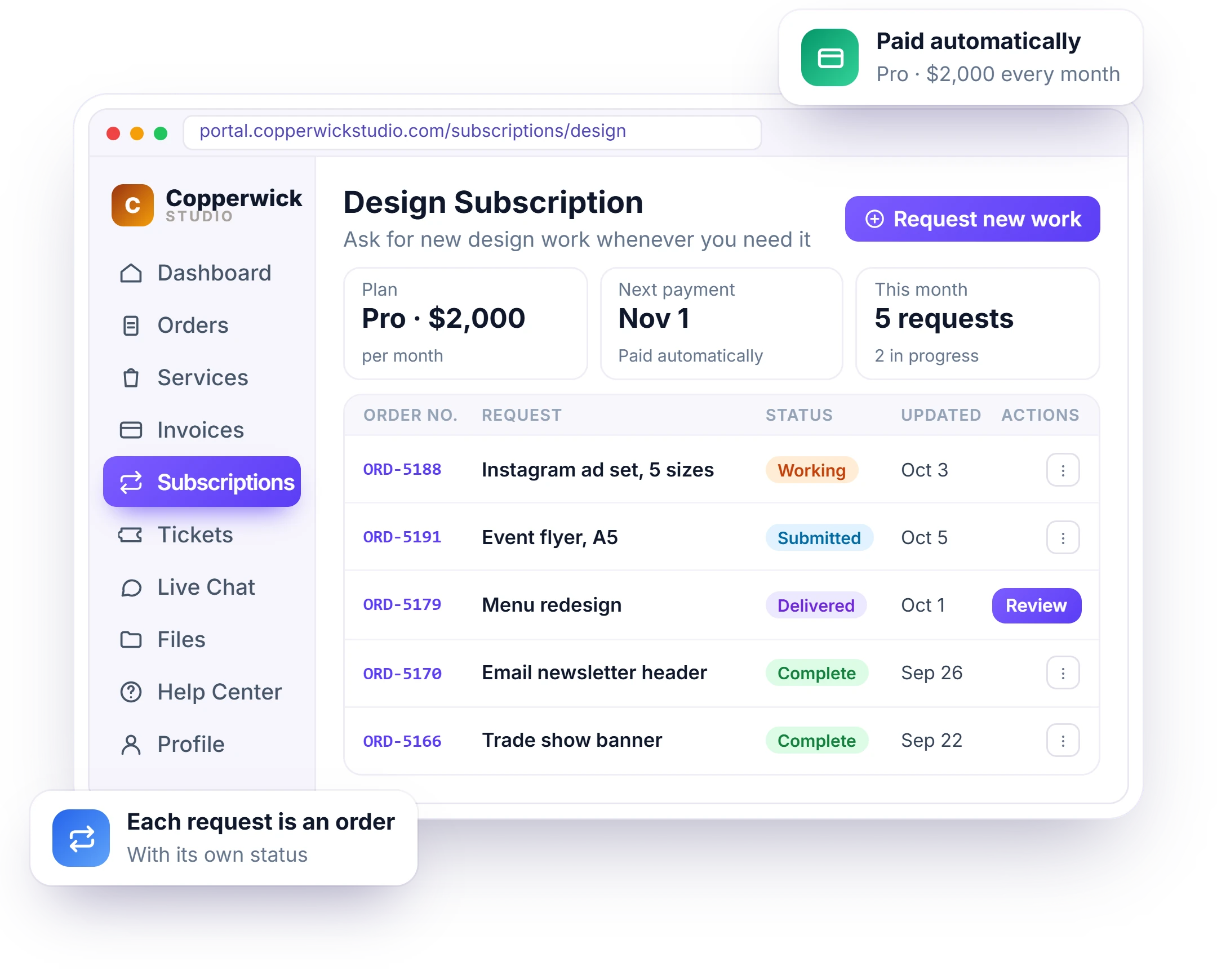
Many studios now sell design as a monthly plan instead of one project at a time. Create a recurring service that lets clients request new work whenever they need it. Each request becomes its own order with its own status, and the subscription is paid automatically every month.
- A monthly design plan as a recurring service
- Clients request new work from their portal
- Each request is its own order
- Status for every request in one list
- Deliver for approval, request by request
- Paid automatically every month
Run Every Logo Project the Same Way
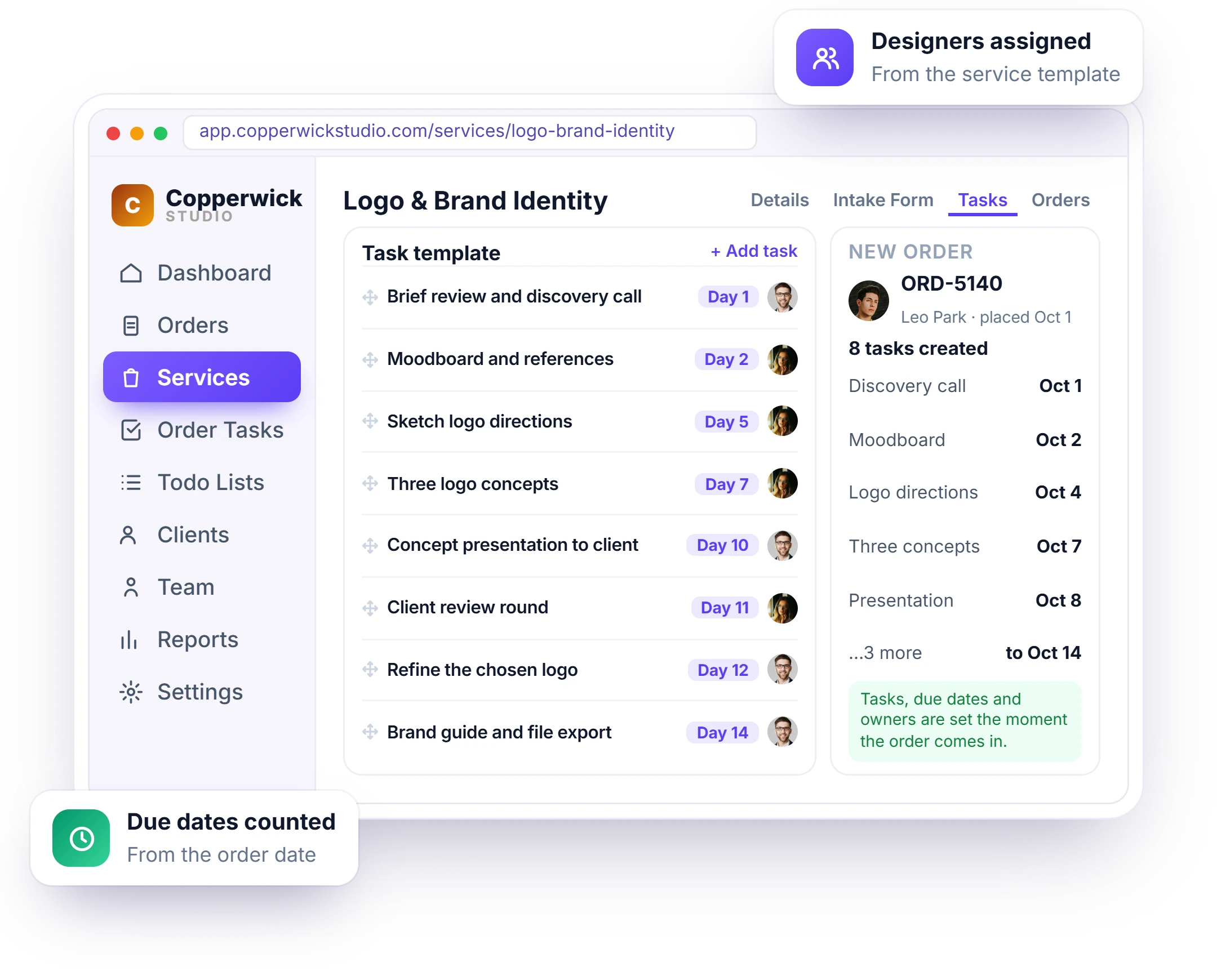
Setting up discovery, concepts, refinement and handover tasks manually means steps get missed. Save a task template on each design service, and every new order gets its tasks, due dates and designers automatically.
- Discovery, concepts, refinement and handover tasks
- Due dates counted from the order date
- Designers assigned automatically
- A private team chat on every order
- Reminders before tasks are due
- The same process for every client
Services Design Agencies Sell With Clientish
How logo and brand identity projects, design subscriptions, social media kits and source files are packaged, priced and ordered by clients from your portal. Clients see the price before they order.
Logo & Brand Identity
Basic, Standard and Premium packages with a brand brief and a set number of revisions.
Design Subscription
A monthly plan where clients request new work from their portal as they need it.
Social Media Kit
A fixed package of templates, sold on its own or as an add-on to a brand project.
Source Files
An add-on with its own price, so the working files are agreed up front.
Set It Up in 4 Steps
Add your design packages, brand brief and task template once. Most studios are ready to take orders the same afternoon. Then every new client starts with a full brief instead of a vague email.
Add Your Packages
Create your design services with prices, revisions and add-ons.
Attach the Brief
Add a brand brief and a task template to each package.
Share Your Order Form
Clients pick a package, pay and fill out the brief.
Deliver and Sign Off
Deliver each round for approval and hand over the final files.
How Clientish Compares for Design Agencies
Entry-plan prices and features of the six client portals design studios compare most, side by side. Each price and plan limit is taken from the vendor’s own pricing page.
 Clientish |  Wayfront |  ManyRequests |  Assembly |  SuiteDash |  Clientjoy | |
|---|---|---|---|---|---|---|
| Entry plan | $9.99/moSolo; Starter $29/mo with 5 users | $129/mo$99 yearly | $59/mo$39 yearly | $49/mo$29 yearly | $19/mo$180 yearly | $49/mo$44 yearly |
| Team users | 1 on Solo, 5 on Starter | 5 | 1, then $20 each | 1 | Unlimited staff | 5 |
| Own domain | Yes | Yes | Yes | From Professional$139/mo | Not listed | From Premium$99/mo |
| Workflow automations | From Growth$49/mo | Not listed | Zapier only | From Professional | From Pinnacle$99/mo | From Premium |
| Client reports in portal | 13 sources | Not listed | From Pro$99/mo | Not listed | Not listed | From Premium |
| Client invoicing | 12 gateways | Yes | Yes | Not listed | Not listed | Yes |
You sell mostly productized, subscription-style services.
You bill clients by the hour or with prepaid credits.
You want a free plan for your first five clients.
You want unlimited staff on the cheapest plan.
Proposals, contracts and a sales pipeline matter more to you than the portal, which starts on its Premium plan.
Entry-plan facts from each vendor’s own pricing page on October 7, 2026 (Assembly re-checked October 19, 2026). “Not listed” means their pricing page doesn’t mention it. Check their pages for the latest.
Design Agency FAQ
Straight answers on briefs, revision limits, concept approval, Figma reviews, source files and design subscriptions.
What is a client portal for design agencies?
A studio’s front desk that never loses a comment. The client fills out the brand brief, sees each concept round, picks a direction, asks for changes and collects the final files in one branded place. Clientish runs that portal with packages, revision counts and invoicing, from $9.99 a month.
Can clients see Figma concepts without downloading files?
Yes. Paste the Figma link for the concept round into the order conversation and it opens there as the live file, next to the client’s notes. Set the Figma link to “anyone with the link can view” so it loads for them.
Will my design clients log in to the portal?
The concept round is the reason. Each new round arrives by email with a link back, and choosing a direction or asking for a tweak only takes a click once they’re in, so studios stop collecting verdicts from forwarded emails.
How do I get a clear design brief from clients?
Give every package a brand brief that asks where the logo will live, three brands they admire, colors to avoid and who signs off. “We’ll know it when we see it” turns into answers you can design from, and the first sketch waits until they’re in.
How do I limit revisions on a logo project?
Write the number into the package: say two concept directions and three refinement rounds. The client sees how many are left on the order, and a fourth round of tweaks is something they buy as an add-on, not something you absorb.
How do clients approve design concepts?
Each concept round goes out as a delivery. The client picks a direction or asks for a change from the portal, and the decision is recorded against that round, so a partner’s late opinion meets an approved concept, not an open question.
How do I handle source file requests?
Offer source files as an add-on with its own price, so the client agrees to it, and pays for it, before the work starts.
Can I run a design subscription?
Yes, and it’s how many studios smooth out quiet months. The client pays a flat monthly fee and asks for designs from the portal as needs come up: a banner on Monday, a menu card on Thursday. Every request arrives as its own order, with its own brief and sign-off.
Where does client feedback go?
Every comment and file stays on the order in the client conversation, and your designers have a separate team chat the client never sees.
Can I sell Basic, Standard and Premium packages?
Yes. A logo service can carry three tiers, for example one concept, three concepts, or three concepts plus a brand guide, each with its own price and what’s included. The client compares them and picks before paying.
Is the portal branded as my studio?
Yes. The brief, every concept round and the invoice open at your studio’s own address, such as studio.yourname.com, in your logo and colors. A small Powered by Clientish line remains on Solo and Starter; Growth, Pro and Enterprise drop it.
Design more, revise less
Start every project from a real brief, count each revision round, get sign-off in the portal and hand over the files with the approved order. Try it with example data first.
- A brand brief before the first sketch
- Concept rounds shown in the conversation
- Revisions left shown on every order
- Sign-off in one click
- Final files delivered with the approved order
- A design subscription they can request from
Every feature unlocked in the trial. Pick a plan only when you’re ready.