
CLIENT WORKFLOW AUTOMATION · UPDATED OCTOBER 2026
Client Workflow Automation for Agencies
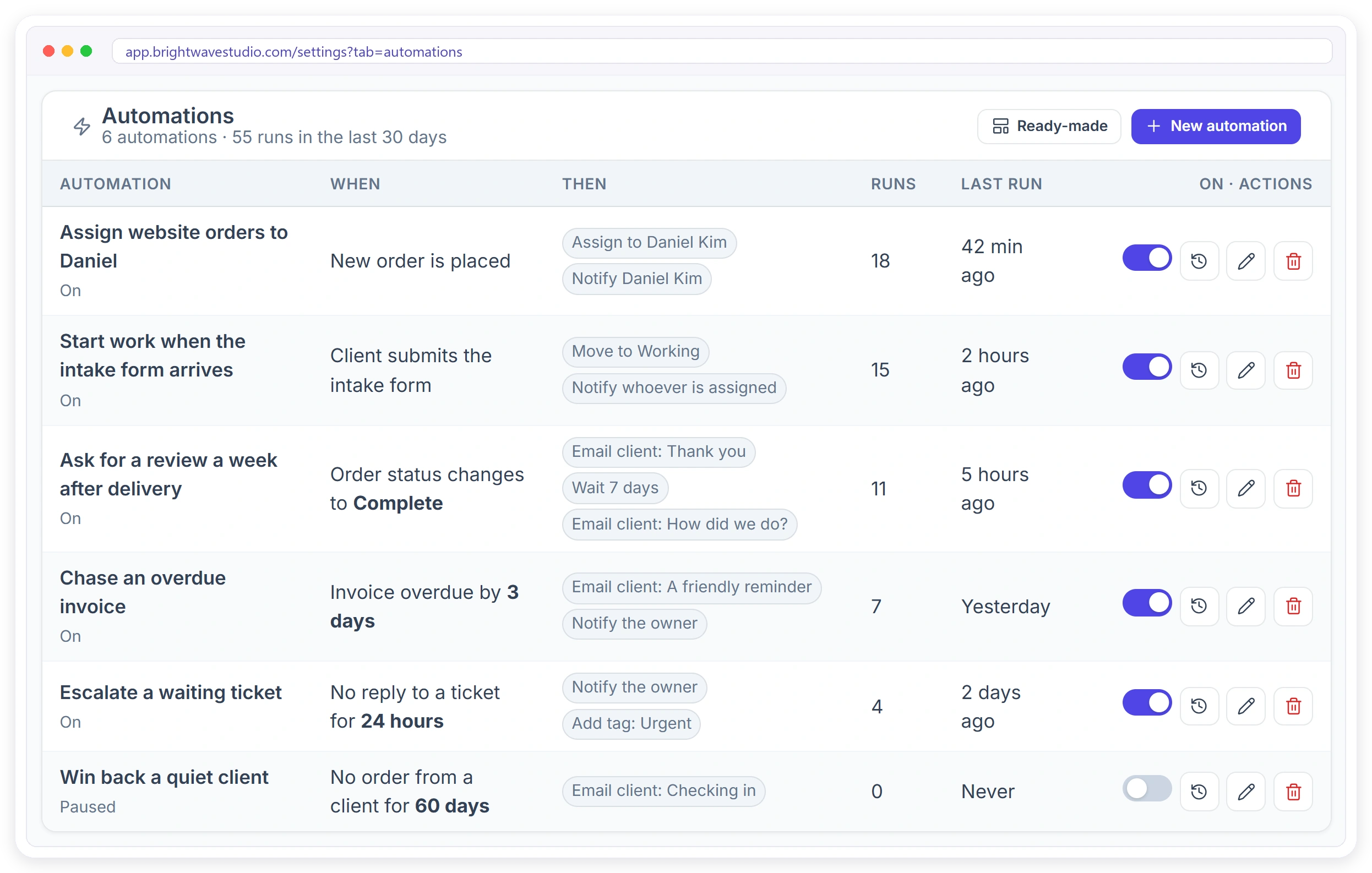
Client workflow automation means the routine follow-ups around your clients happen by themselves: when something happens, only if it fits, then do these steps. Pick one of 39 triggers, add checks and up to 8 steps such as assigning the order, messaging the client or waiting up to 90 days, and test it before it runs. On every plan, from $29 a month.
Why Agencies Automate
Most of the follow-up work in an agency is the same small task, done by hand, on time, every time, until someone is busy, away or simply forgets, and a client notices before your team does.
39 Triggers Across Your Whole Agency
An automation starts when something happens to an order, invoice, ticket, client, lead, proposal or subscription, when a WhatsApp, SMS or Telegram message comes in, or on a schedule you set.
Build an Automation in Four Steps
Everything is set in Settings, then Automations, with no code and no outside tool, so whoever runs your operations can build, test and change a rule in a few minutes.
WHEN, ONLY IF, THEN
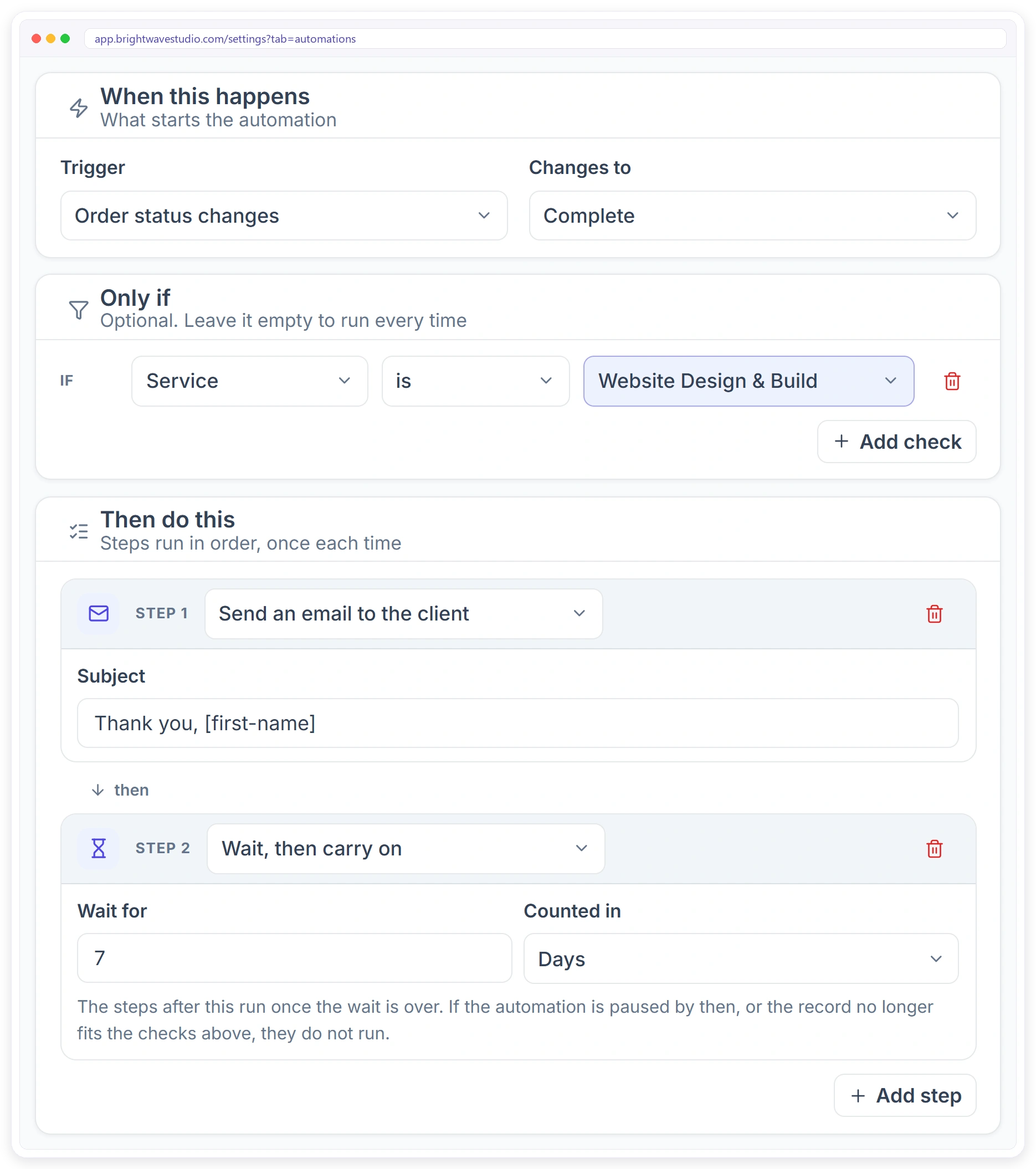
One Screen From Trigger to Last Step
Each automation reads like a sentence: when this happens, only if these checks pass, then do these steps. Add a wait between steps, and the later steps run only when the record still fits.
What an Automation Can Do for You
Eighteen kinds of steps cover the follow-ups your team does by hand today, from emails and portal notifications to webhooks. For the ready-made client letters, see automated emails to clients.
What Changes for Your Agency
Automations take the routine out of your team’s day without changing how your clients work with you: they still order, pay and talk to you in the same portal, only faster.
READY-MADE
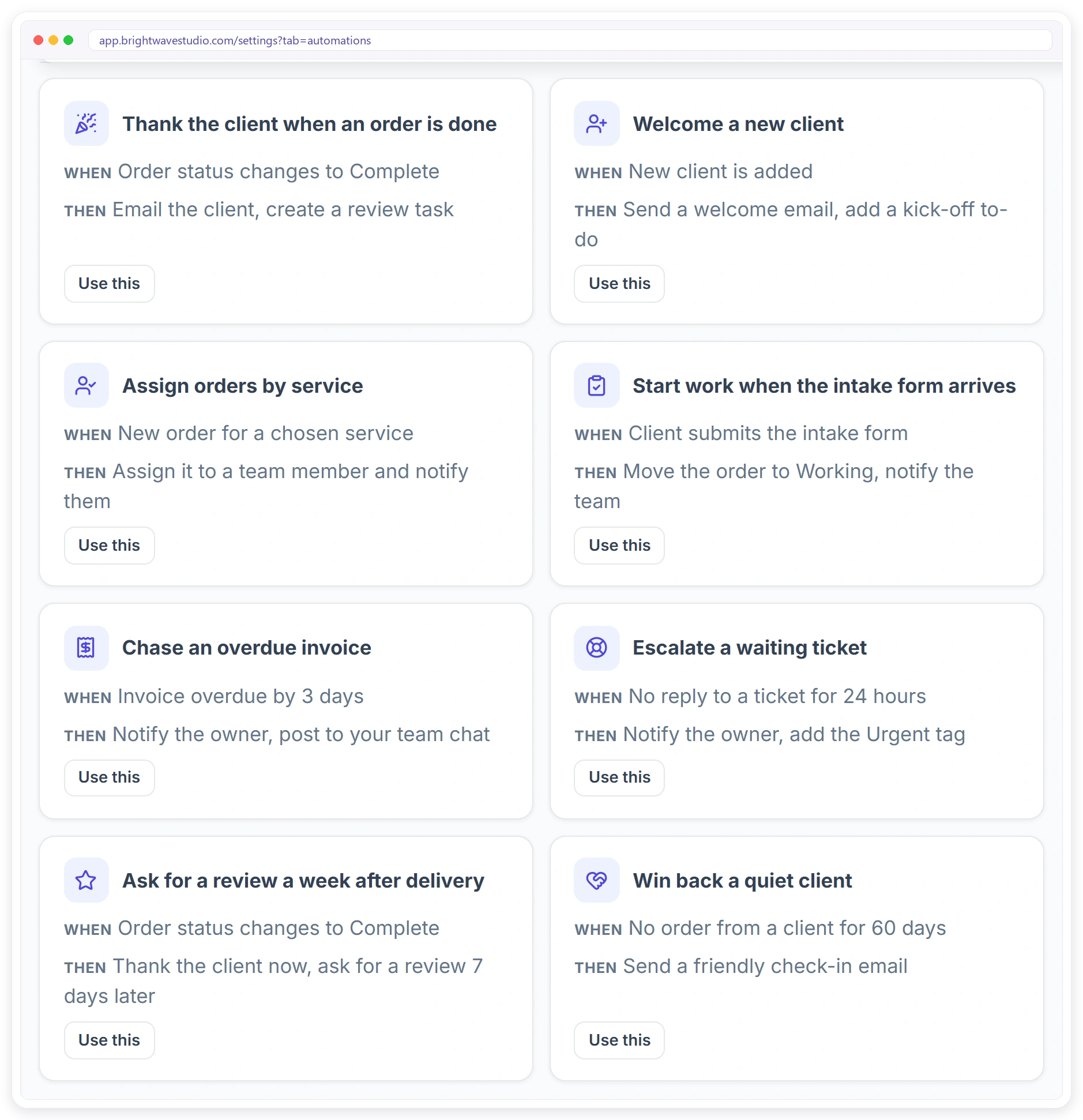
Start From 18 Ready-Made Automations
Open Ready-made, pick the one closest to what you need and change anything before you turn it on. They cover the follow-ups most agencies forget, from thanking a client to chasing an invoice.
RUN HISTORY
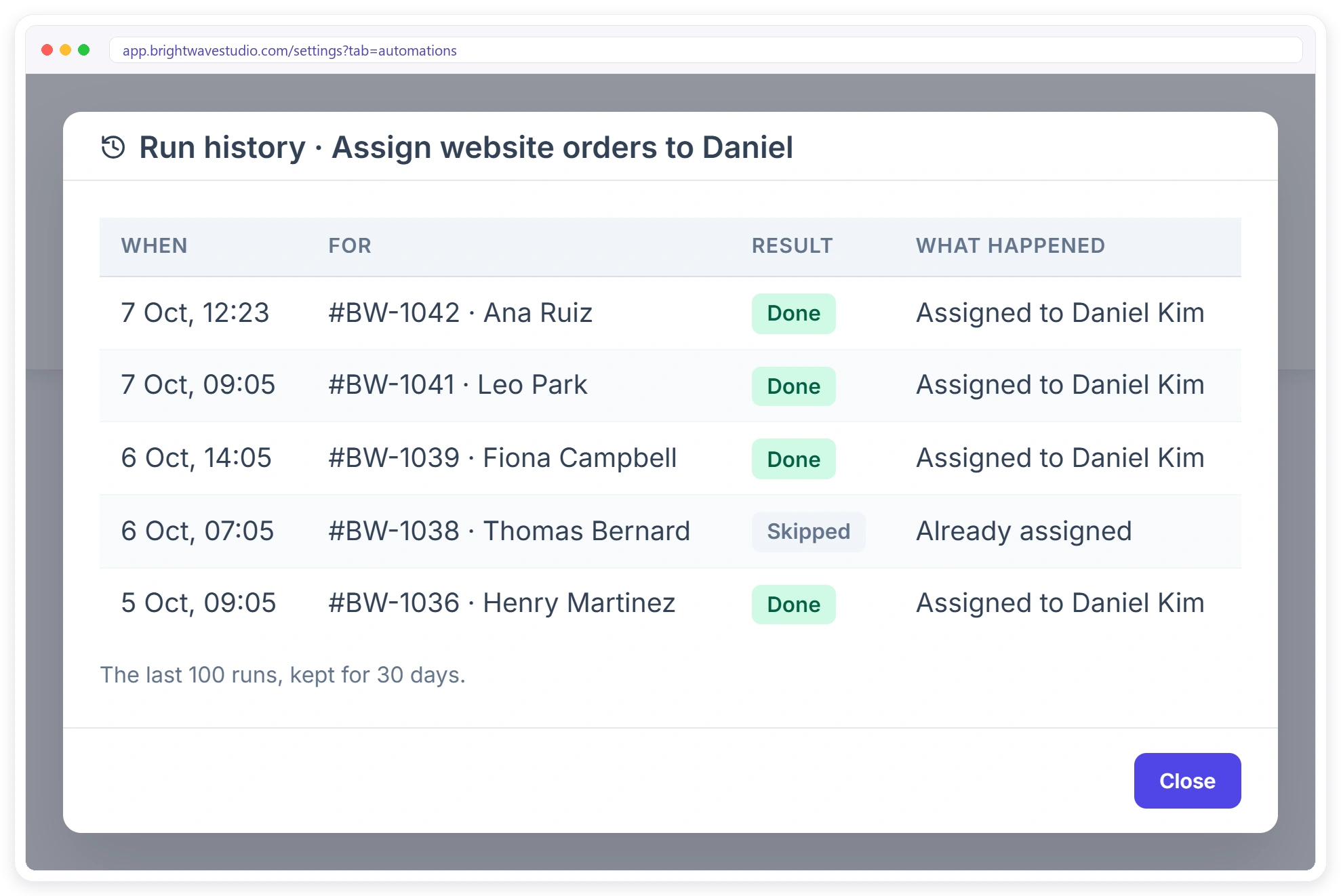
See Exactly What Ran
Every automation keeps a run history: when it ran, for which order, invoice or client, the result and what each step did. Pause any automation with one switch and it stops at once.
Safe by Design
Automations do routine work without surprising your clients or your team: you can test a rule first, see every run afterwards and stop any of them with one switch.
Built-In Automations or Zapier
Zapier and Make are great for connecting many apps. For the routine work inside your client portal, built-in automations are simpler. See also webhooks and the API for the cases where you do want Zapier.
Automations for Your Kind of Agency
A few starting points. Each one is a single automation with a trigger, a check and two or three steps. Pair them with order management and your team only touches the work itself.
Client Workflow Automation FAQ
Straight answers about client workflow automation for agencies: triggers, waits, testing, Zapier, AI and cost.
What is client workflow automation?
It is the rules that carry out an agency’s routine client work by themselves: when an order is paid, assign it; when an invoice is three days late, remind the client; when a ticket waits, tell the owner. You set each rule once and it runs for every client.
Can I test an automation before it runs?
Yes. Save it paused, then use Test run on a recent order, invoice or ticket. It shows what each step would do to that record, without sending or changing anything.
Can AI do this work instead?
For one-off jobs, ask the AI Assistant to assign an order, reply to a ticket or draft an invoice, and confirm it. For work that should happen the same way every time, an automation is the reliable choice. The AI does not build automations for you.
How do I stop forgetting client follow-ups at my agency?
Turn each follow-up into an automation: an overdue invoice, a finished order, a ticket waiting for a reply or a client who has gone quiet. Clientish runs it on time and keeps a history, so nothing depends on someone remembering.
How do I automatically assign new orders to the right team member?
Create an automation with the New order is placed trigger, add a check for the service, and add an Assign to a team member step. Each new order for that service is assigned and the person can be notified straight away.
Can I email a client automatically when their order status changes?
Yes. Use the Order status changes trigger, pick the status, such as Complete, and add a Send an email to the client step. Shortcodes fill in the client’s name, order number and a link to the order.
How do I remind a client about an unpaid invoice?
Use the Invoice is overdue trigger and set how many days late, such as 3 days. Add an email to the client, and a notification to the owner if you want to follow up yourself.
Can an automation wait a few days before the next step?
Yes. Add a Wait step in hours or days, up to 90 days. The steps after it only run if the automation is still on and the record still fits your checks.
Can I run an automation only for some services or clients?
Yes. Add up to 5 checks on the service, order status, amount, client, ticket priority or lead source. Leave them empty and it runs every time.
How do I see what an automation did?
Open its run history from the list. Each run shows when it ran, which record it was for, whether it was done, part failed, failed or skipped, and what each step did.
Do I need Zapier to automate my agency’s client work?
No. Triggers, checks and steps run inside Clientish. If you also use other tools, Clientish has webhooks and an API as well.
Can an automation post to Slack or send WhatsApp messages?
Yes. Steps can post to Slack, Microsoft Teams, Discord or Telegram, and send an SMS or WhatsApp to the client, once that channel is connected in Integrations.
Which Clientish plans include automations?
Every plan, from Starter at $29 a month to Enterprise, with up to 200 automations per workspace and nothing charged per run. WhatsApp, SMS and team-chat steps need that channel connected first.
Will an automation email my clients from Clientish?
No. An email step sends through the mail server you connected, so the client sees your agency’s address and name, and the reply comes back to your own inbox.
Let the routine work run by itself.
Pick a ready-made automation, change what you need, test it on a real order and turn it on. Follow-ups, assignments and reminders then happen on time, every time. Try it with example data first.
- Checks and If / otherwise
- Waits of up to 90 days
- A Test run before it goes live
- A history of every run
- No charge per task
- One switch to pause it