
Client Portal Software for Agencies, Give Every Client a Login Instead of an Inbox
A client portal is a secure login where clients follow their work, pay and ask for help without emailing you. Clientish gives every client of your agency one, with live order progress, invoices, tickets, chat and files on your own domain, from $9.99 a month (client chat from Starter at $29). Branded as you, updated in real time, with no “any update?” emails.
Things Clients Do Without Emailing You
A client portal should save you work, not just show a status. Here clients approve deliveries, pay, raise tickets and order again on their own, so fewer emails land in your inbox.
Approve or Request a Revision
Approve the delivered order or ask for changes on it. If unanswered, it can approve itself after the days you set.
Rate the Work
Order and ticket ratings that feed your CSAT report.
Pay an Invoice
Card, PayPal or bank transfer, from a link, no login needed.
Manage a Subscription
Cancel, resume, or change the saved card themselves.
Raise a Ticket
One thread per issue, linked to the right order.
Chat With Your Team
Live chat inside the portal, with the whole history kept.
Top Up a Wallet
Deposit a balance and spend it on future orders.
Order a Service
Browse your catalog, add to cart, apply a coupon and check out.
Everything a Client Needs, on One Screen
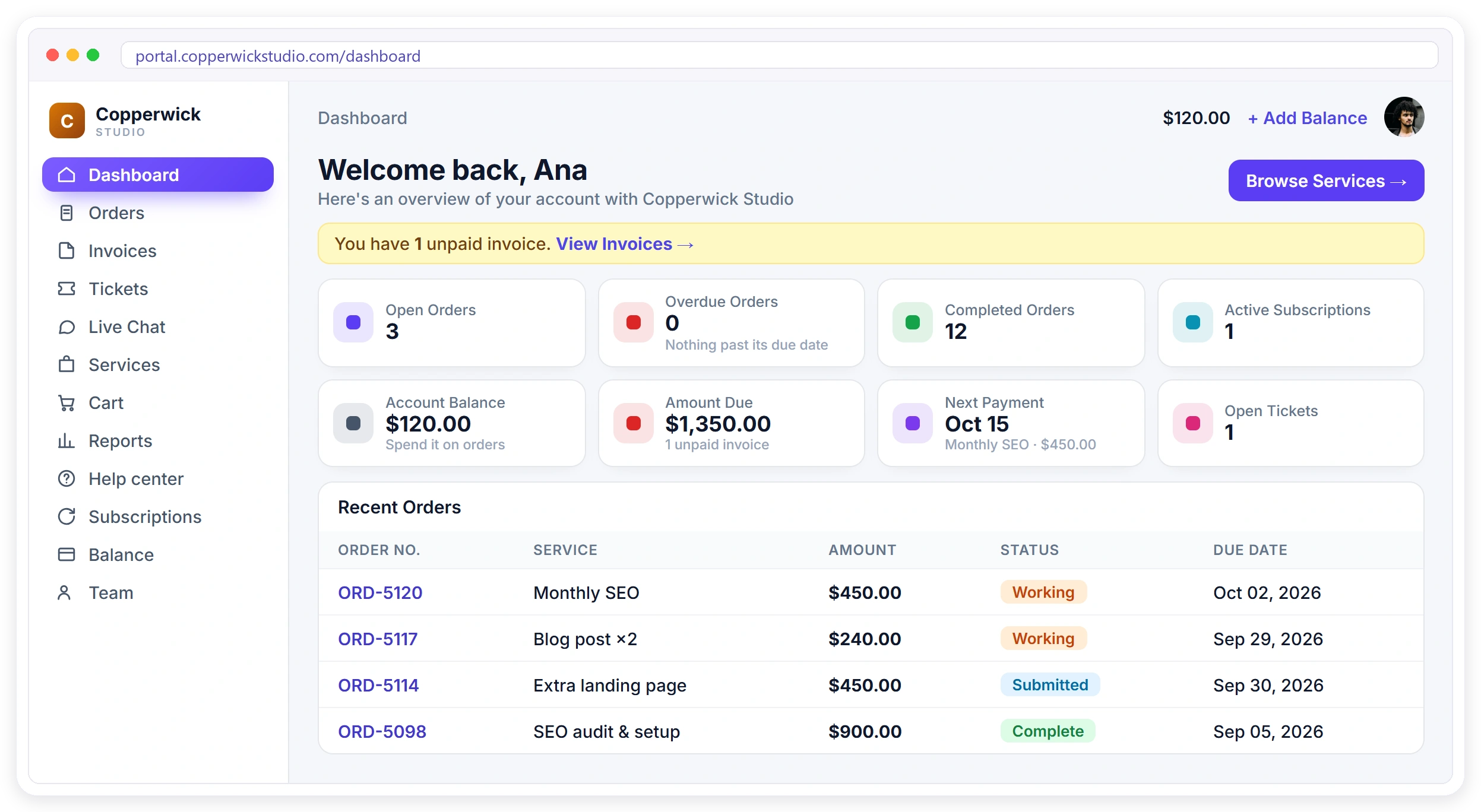
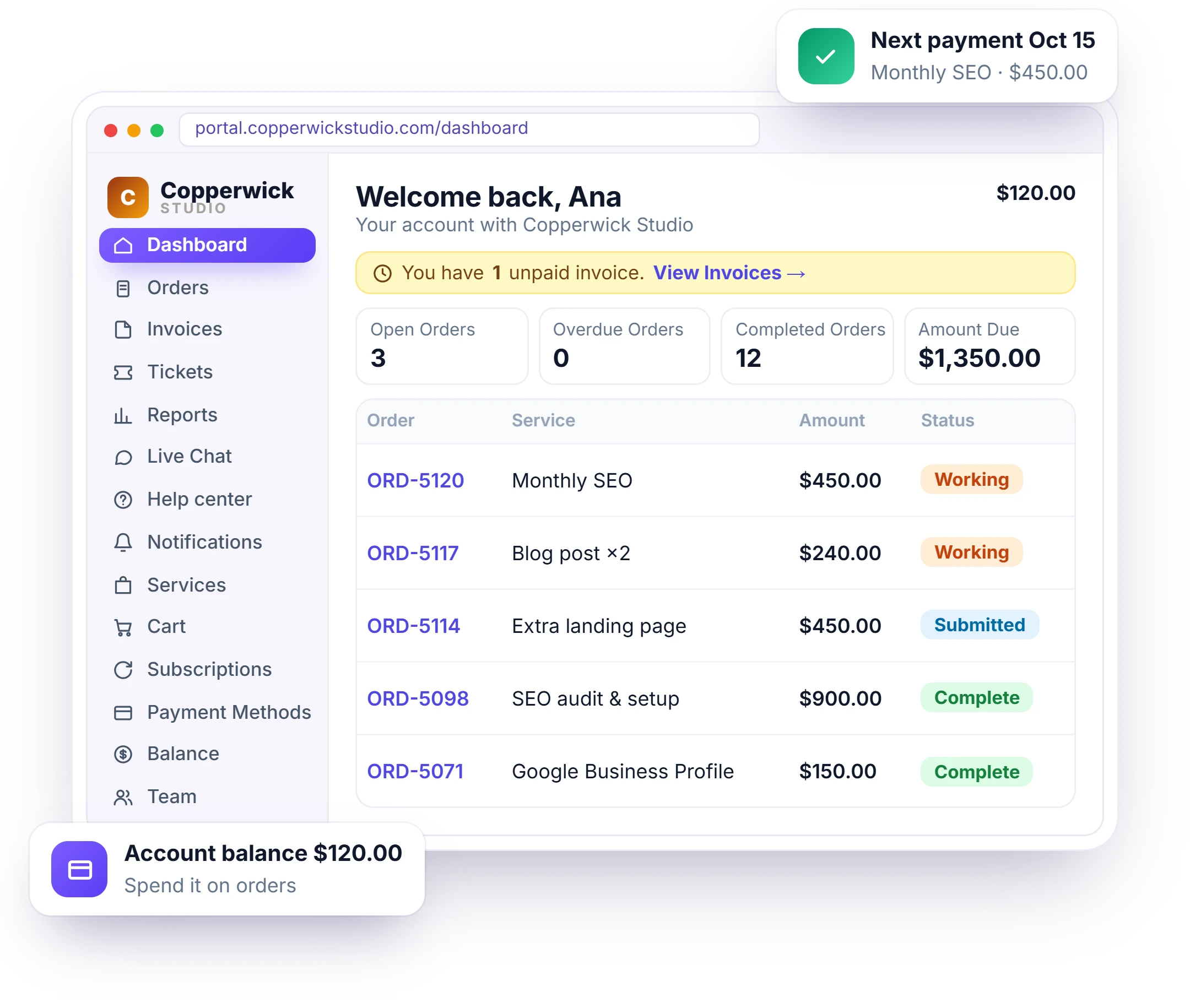
Clients log in to one dashboard with their open, overdue and finished orders, what they owe and their next payment. Unpaid invoices sit at the top, so the most urgent thing is the first thing they see.
- Open, overdue and completed orders at a glance
- Amount due, account balance and next payment
- Recent orders with live status
- Open tickets and active subscriptions
How the Portal Works
Set the portal up once in Settings with your logo, colors and domain. After that every client gets a login the moment they place an order, with no extra setup per client.
Turn It On
Add your logo, colors and your own domain once in Settings.
Clients Get a Login
Every client gets access the moment they place an order.
They Help Themselves
Track work, pay, raise tickets, chat and order more, in one place.
You Stay in the Loop
Everything they do shows up in your agency dashboard.
Every Order, Live and Self-Serve
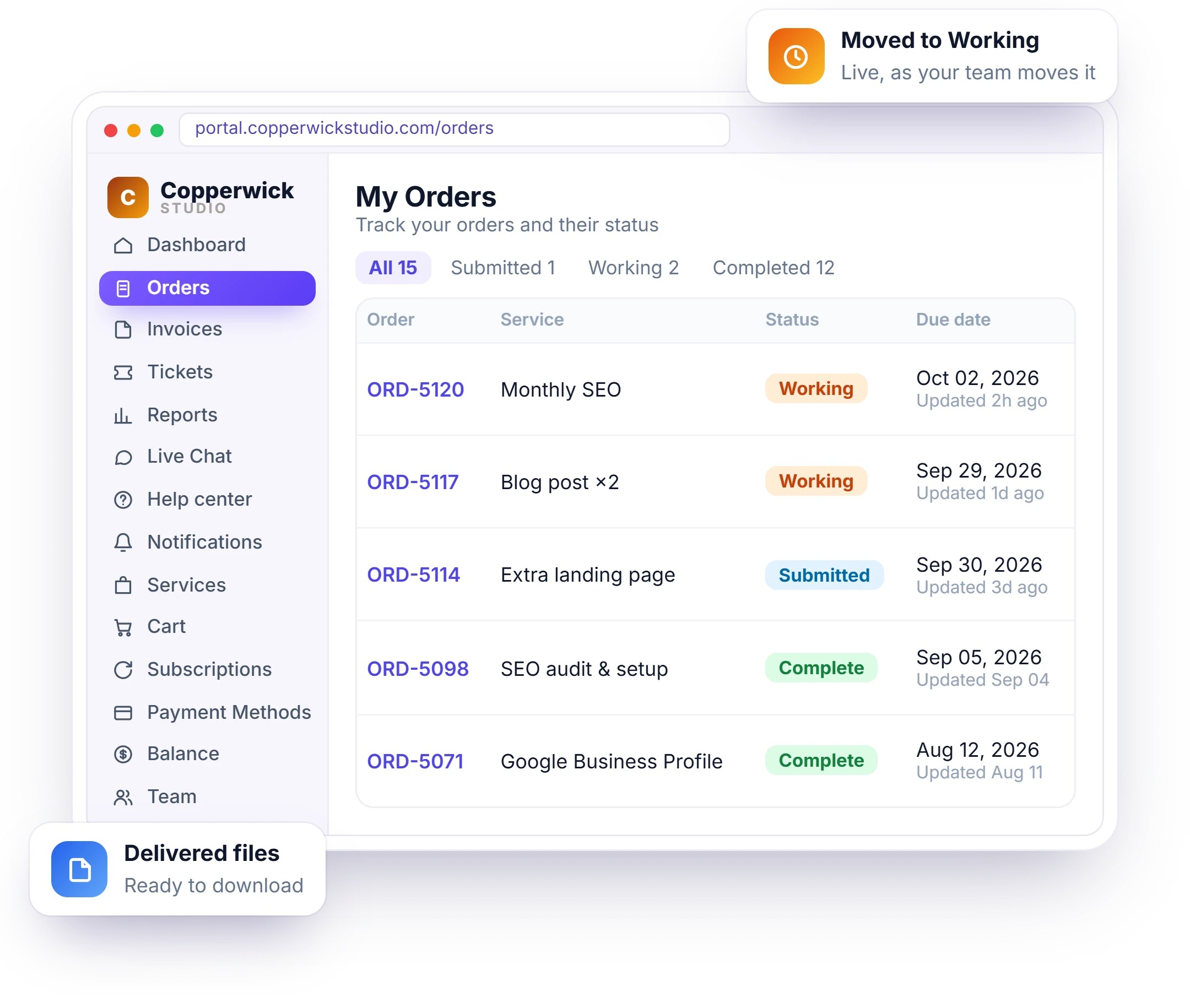
Status changes the moment your team moves the card. Clients open an order to read the brief they submitted, download delivered files and request a revision, no ticket needed.
- Live status and a progress timeline with a date on every step
- The brief they submitted, attached to the order
- Delivered files ready to download
- Revision requests raised on the order itself
Clients Approve Files Right on the Work
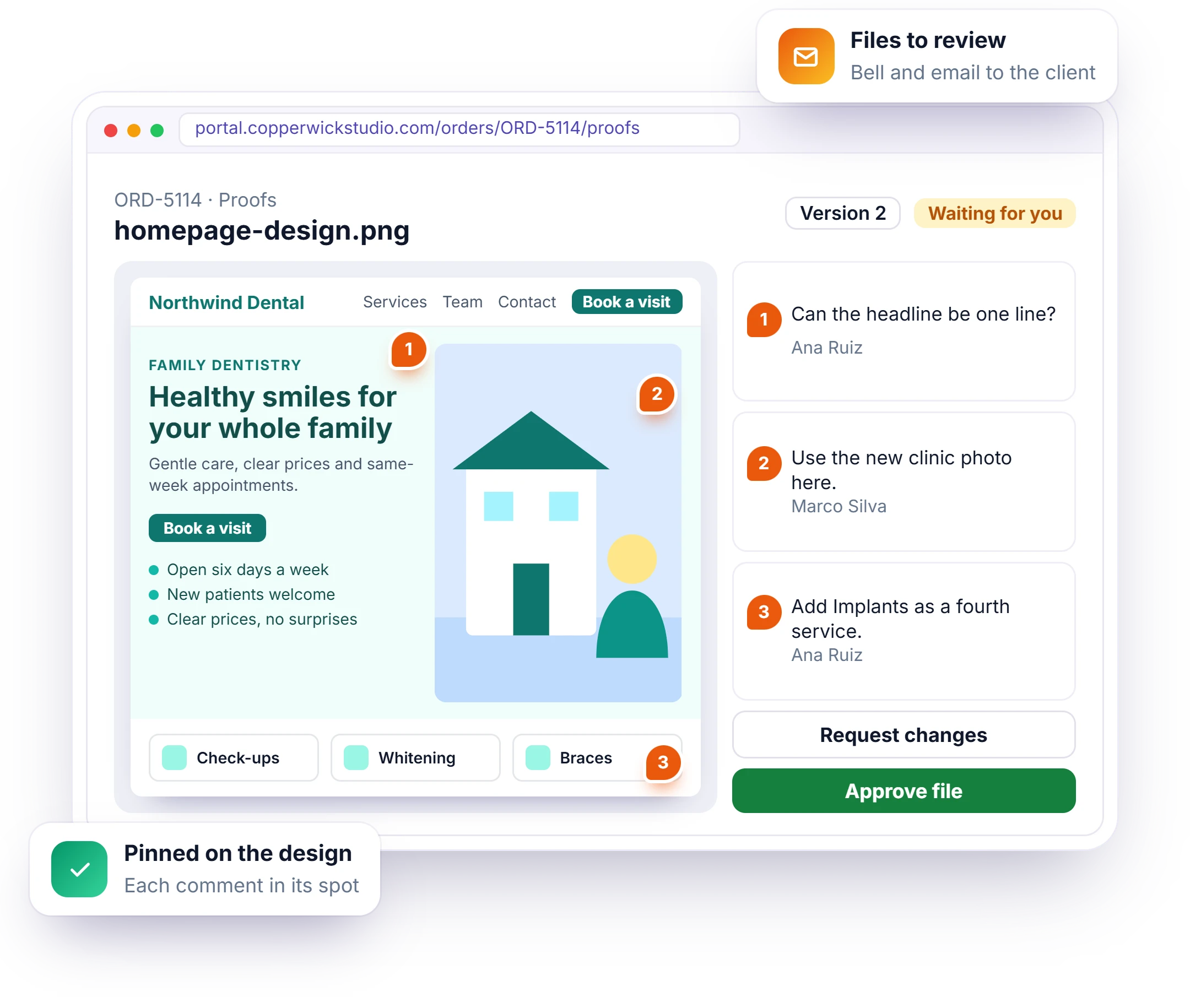
Send files for review on an order. Clients drop a pin on an image, leave a comment, then request changes or approve each file. You answer and send a new version on the same order, not in a long email thread.
- Pinned comments on images
- Comments and approval on PDFs, Figma, Canva and web pages
- Request changes or approve, file by file
- A bell and an email when files are waiting
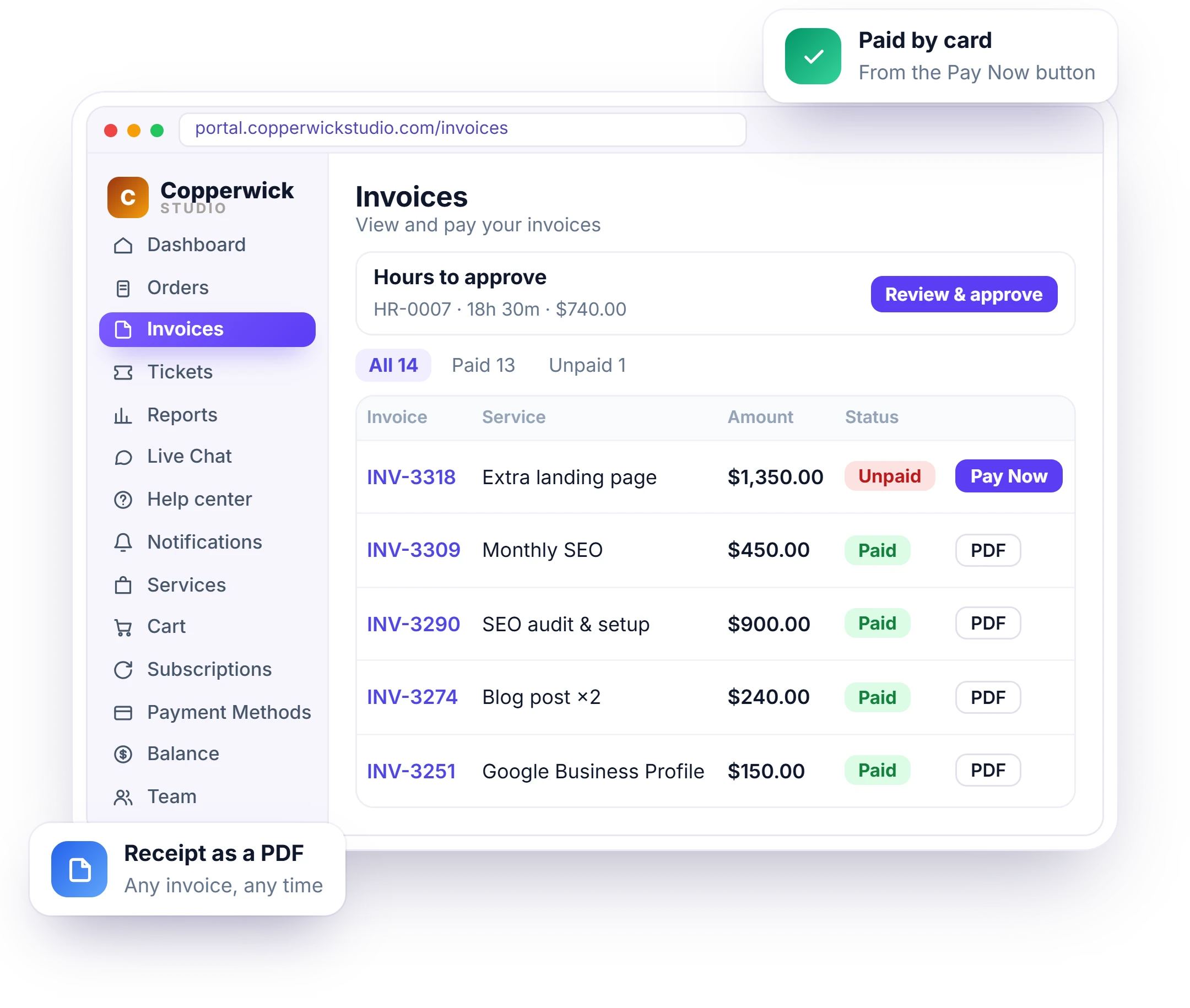
They Pay Without Being Chased
Unpaid invoices sit at the top of the client’s dashboard with a Pay Now button, so payment takes one click instead of a reminder email. Clients pay by card, PayPal or bank transfer and download any invoice or receipt as a PDF.
- Pay Now on unpaid and due invoices
- Pay from a link, no login required
- Download any invoice or receipt
- Hours to approve appear here when a report is waiting
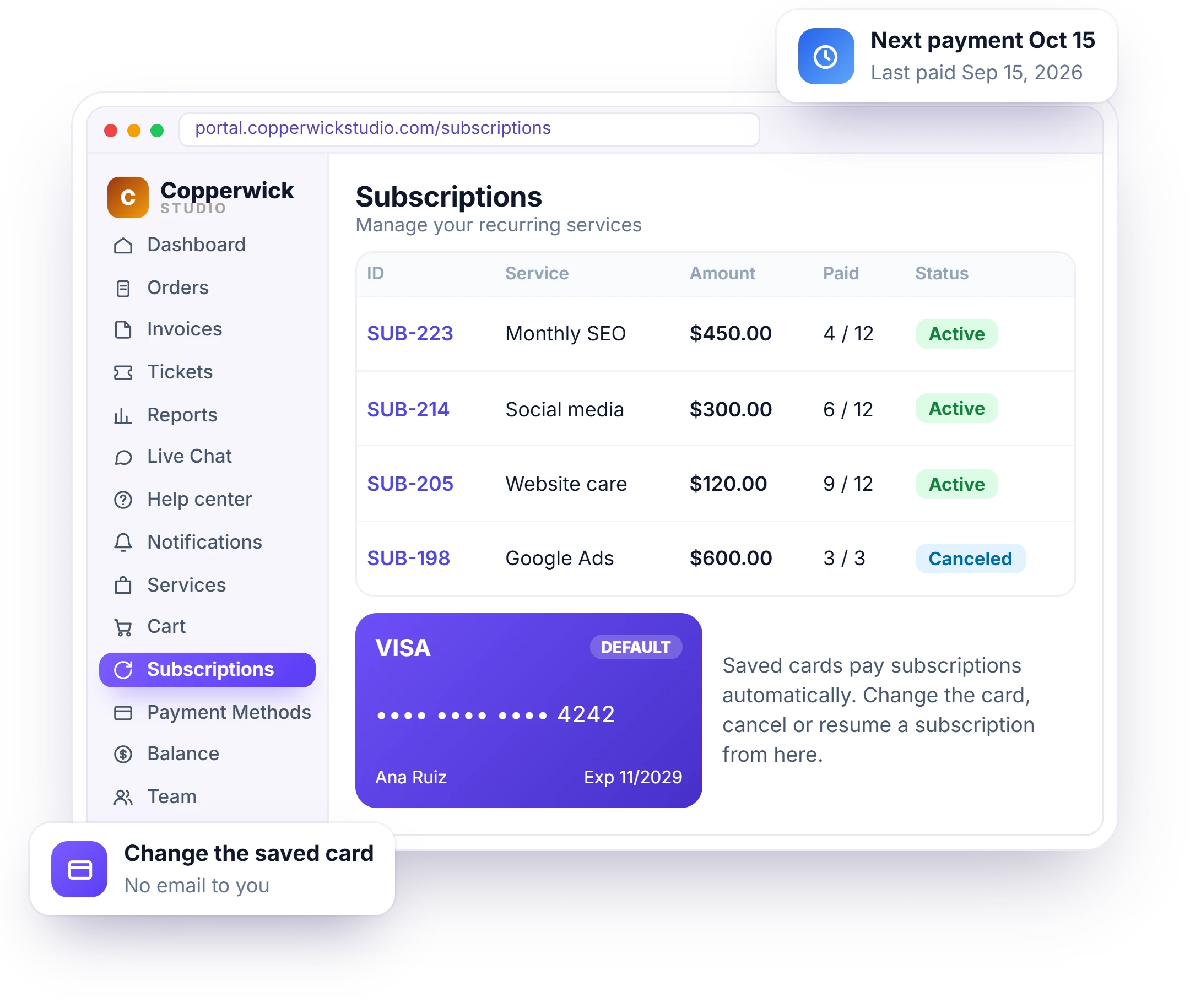
Clients Manage Their Own Subscriptions
Every recurring service shows what has been paid, the last and next payment date and the card that pays it. Clients cancel, resume or swap the card themselves, so a billing change never needs an email to you.
- Active, past due and canceled at a glance
- Payments made out of the total
- Cancel, resume or change the saved card
- Saved cards for orders and invoices
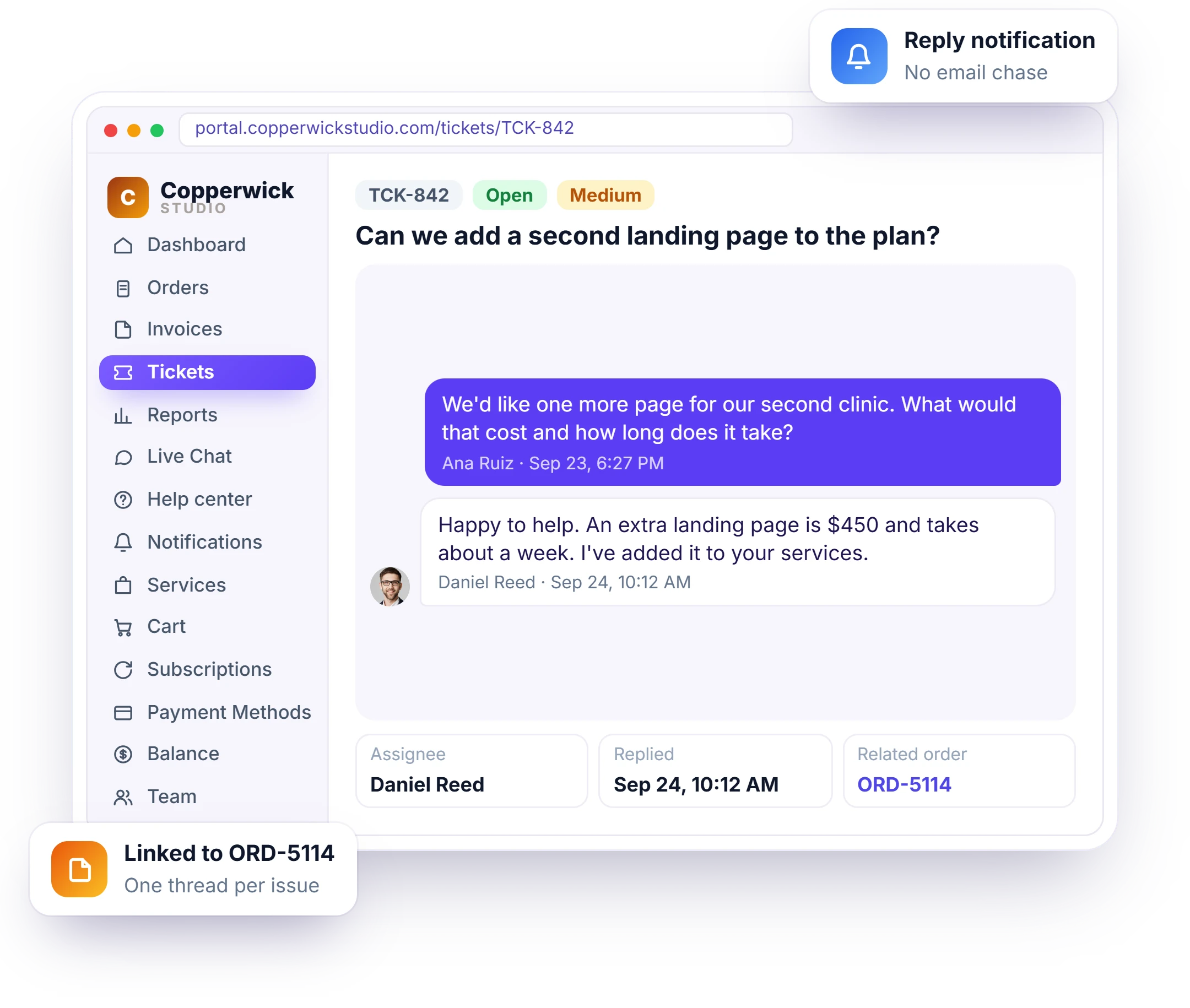
One Thread Per Issue, Not a Reply Chain
Clients raise a ticket against the right order, see priority and status, and get a notification when you reply. Every issue keeps its own thread, so nothing gets lost in a long email chain.
- Tickets linked to the right order
- Priority and status visible to the client
- Ratings on resolved tickets
- Notification instead of an email chase
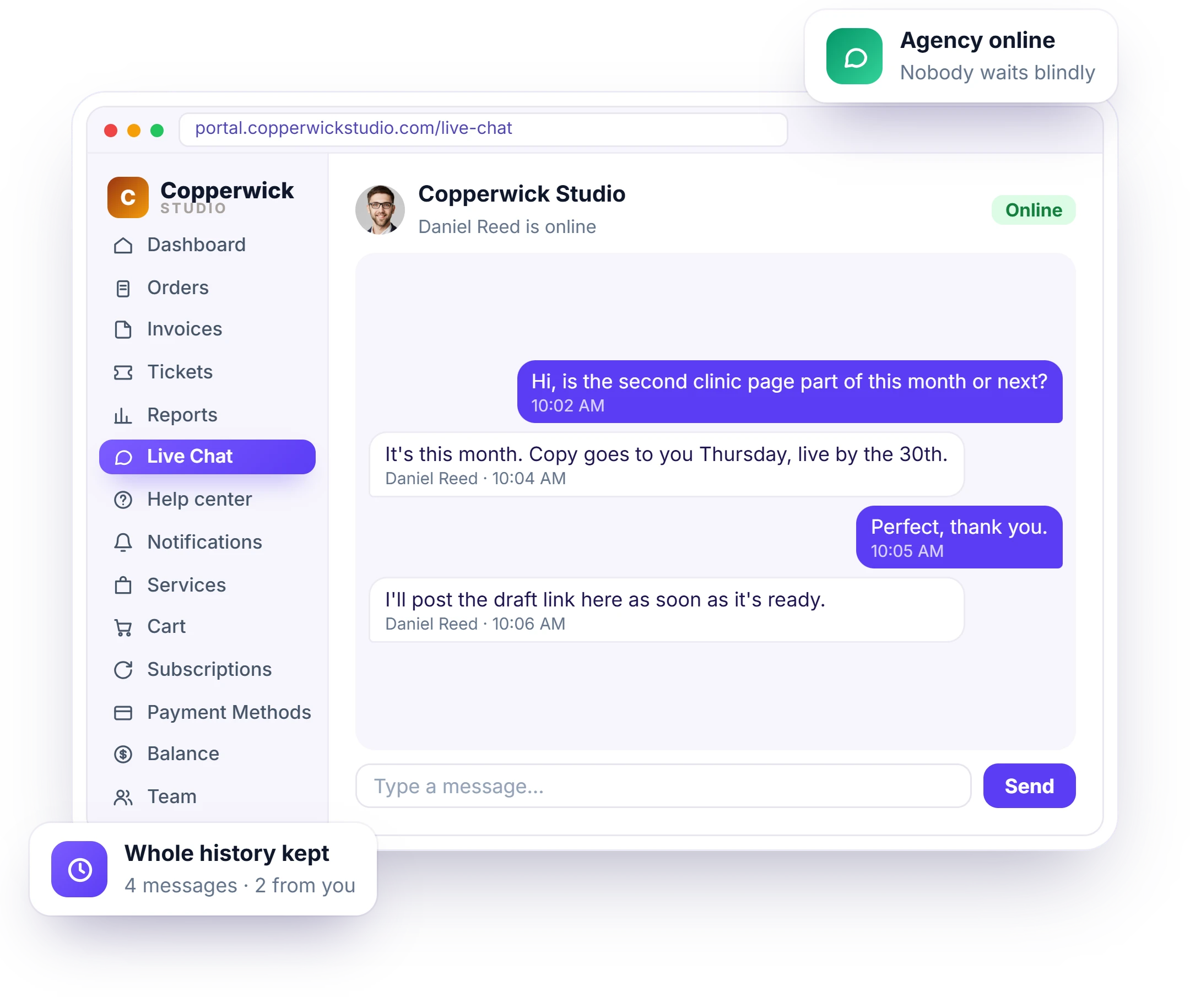
Chat With Your Team Right Inside the Portal
No widget, no third-party tool. Clients message your team from the portal, see whether you’re online, and get an honest auto-reply outside your business hours, with the whole history kept.
- Online and offline status, so nobody waits blindly
- Out-of-hours auto-reply in your own words
- Full conversation history kept per client
- Message counts and last activity in the side panel
It Looks Like Your Software
Your logo, your colors, your own domain and emails from your own address, so clients feel they’re using your agency’s software, not a third-party tool. On Growth, Pro and Enterprise, the Powered by Clientish line is removed too.
Your Own Domain
portal.youragency.com with one CNAME record. SSL turns on automatically.
Your Logo and Colors
Set once in Settings, applied across every screen.
Emails From You
Your SMTP, your sender name, your signature.
Scoped Access
Clients see only their own orders, invoices and files, and you can require an emailed sign-in code (2FA).
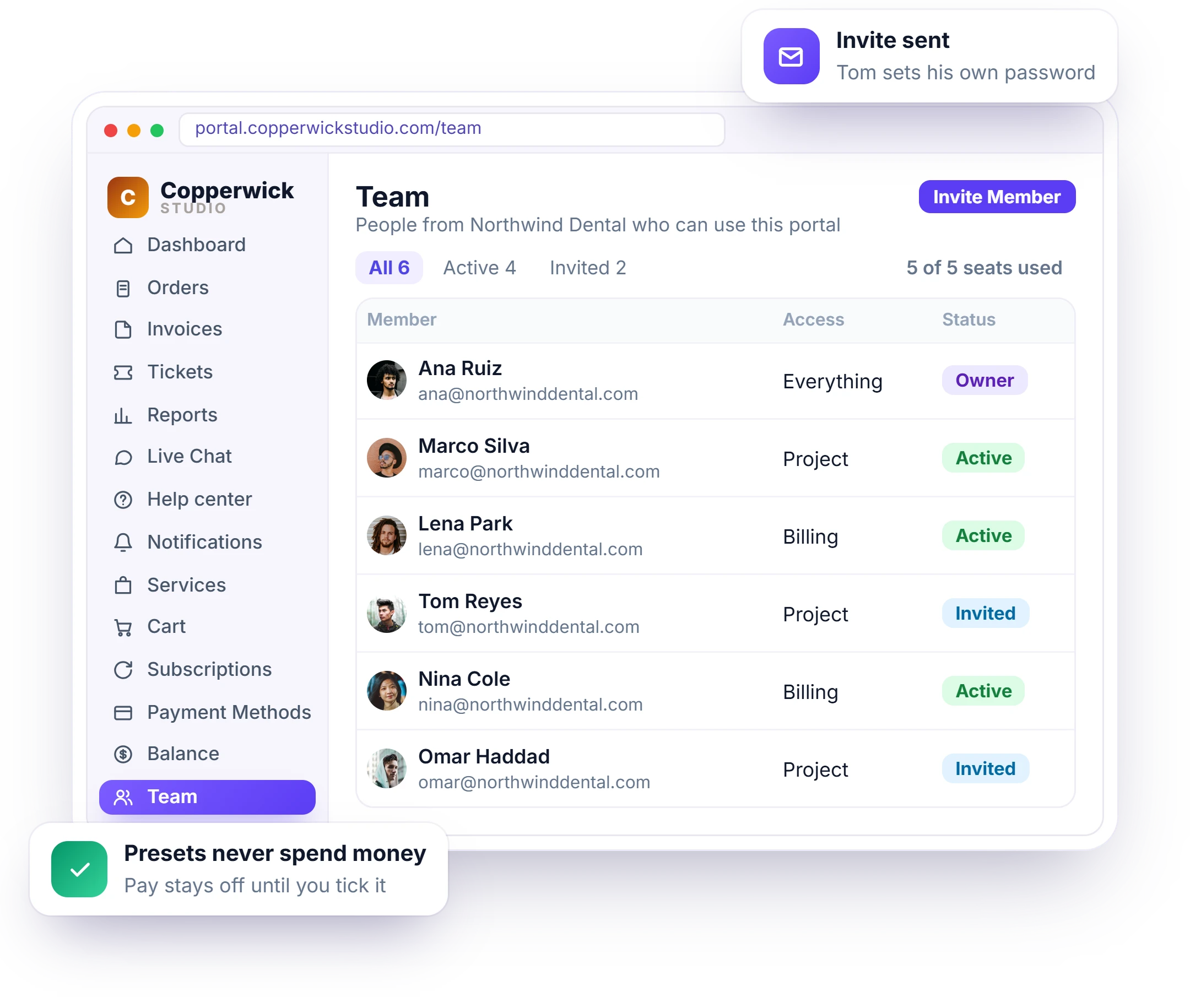
Their Whole Team, Each With Their Own Login
Clients invite their own colleagues to the portal with a photo, job title, phone and status, and choose what each person can see and do. Finance pays the invoices, the marketing lead follows the orders, and nobody shares a password.
- 24 permissions across orders, invoices, payments and more
- Quick start with Billing, Project or Everything
- Presets never check anything that spends money
- Seats per client: Solo 1, Starter 3, Growth 5, Pro 10, Enterprise unlimited
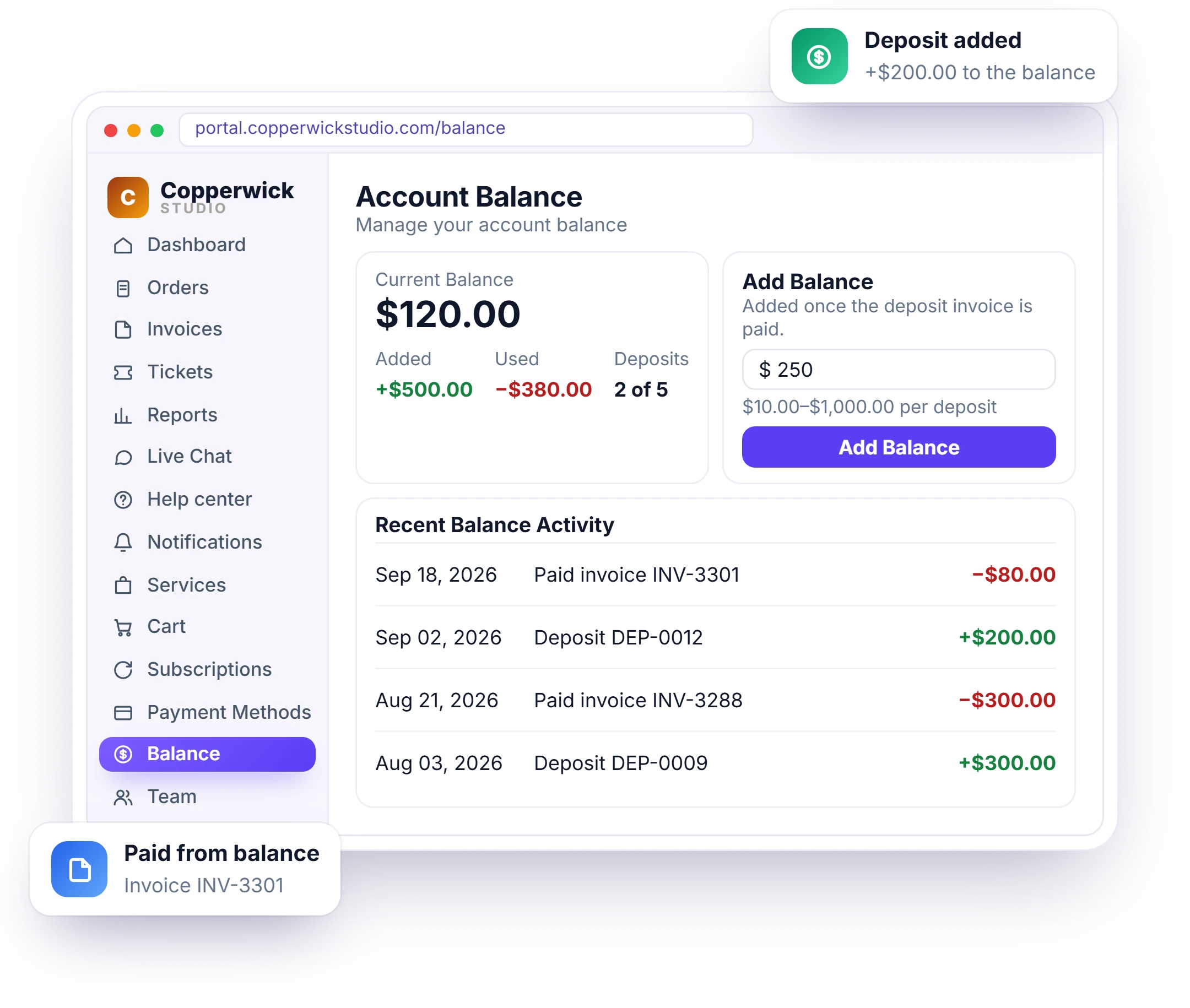
A Wallet Balance for Future Orders
Clients top up a balance once and spend it on later orders and invoices, with every deposit and payment listed. Repeat buyers don’t have to pay order by order.
- Top up with a deposit invoice
- Spend the balance on orders and invoices
- Deposits and payments listed as activity
- Deposit limits you control

Your Own Storefront, Inside the Portal
Existing clients browse your service catalog, pick a pricing tier, add to cart and check out: a repeat order without a single email or a new quote.
- Services with images, descriptions and prices
- Pricing tiers picked from a dropdown per service
- One-time and recurring services side by side
- Search across your whole catalog
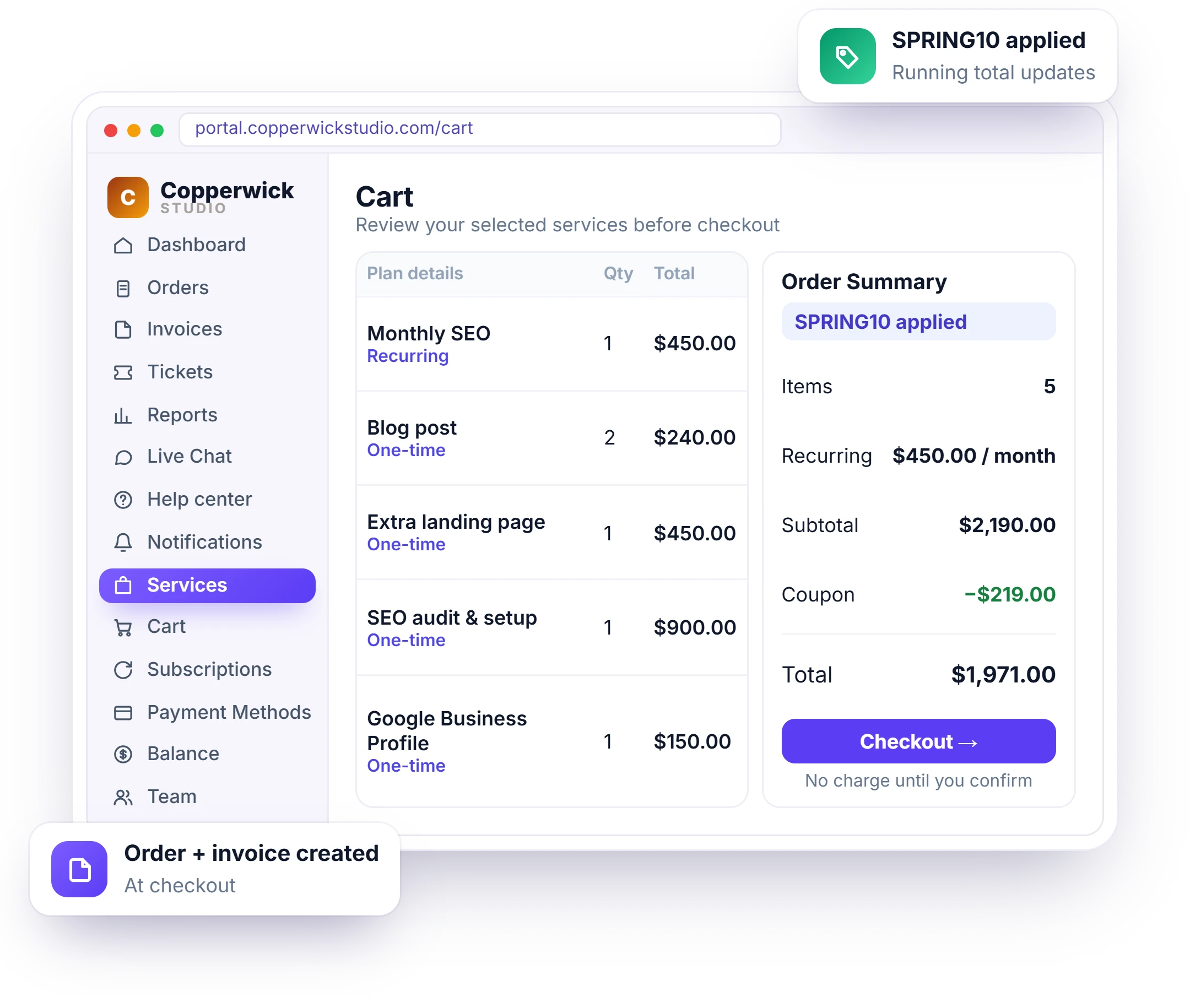
A Client Portal With Order Forms and Checkout
Clients review what they picked, apply a coupon and check out in one go. The order and its invoice are created together, so your team can start without retyping anything.
- Recurring and one-time items in the same cart
- Coupon codes with a running total
- Checkout creates the order and the invoice
- No charge until the client confirms
More Inside Your Client Portal
The portal keeps growing. These are the parts agencies ask about most after orders, invoices and support.
Client Reports
Share reports from AgencyAnalytics, Looker Studio, Google Analytics and 12 more sources. A New badge shows what the client hasn’t opened yet.
A Help Center of Your Own
Clients search your articles before they open a ticket. You start with 25 ready-made articles and edit them in your own words.
A Dashboard for Each Group
Show SEO clients one set of blocks and new clients another: a welcome, an announcement, unpaid invoices, work in progress or the latest report.
An App on Their Phone
Clients install your portal from the browser on iPhone, Android or a computer, and messages and updates arrive as notifications.
Auto-Pay for Subscriptions
Clients can choose to have renewals charged to their saved card automatically, so a monthly invoice never waits on them.
Authenticator Sign-In
Clients can link Google Authenticator from their profile for a safer sign-in. It’s optional, and the email code still works if they lose their phone.
How This Client Portal Compares
Six client portals agencies shortlist, side by side: entry price, team users, own domain, automations, client reports and invoicing. Each price comes from the vendor’s own pricing page.
 Clientish |  Wayfront |  ManyRequests |  Assembly |  SuiteDash |  Clientjoy | |
|---|---|---|---|---|---|---|
| Entry plan | $9.99/moSolo; Starter $29/mo with 5 users | $129/mo$99 yearly | $59/mo$39 yearly | $49/mo$29 yearly | $19/mo$180 yearly | $49/mo$44 yearly |
| Team users | 1 on Solo, 5 on Starter | 5 | 1, then $20 each | 1 | Unlimited staff | 5 |
| Own domain | Yes | Yes | Yes | From Professional$139/mo | Not listed | From Premium$99/mo |
| Workflow automations | From Growth$49/mo | Not listed | Zapier only | From Professional | From Pinnacle$99/mo | From Premium |
| Client reports in portal | 15 sources | Not listed | From Pro$99/mo | Not listed | Not listed | From Premium |
| Client invoicing | 12 gateways | Yes | Yes | Not listed | Not listed | Yes |
You sell mostly productized, subscription-style services.
You bill clients by the hour or with prepaid credits.
You want a free plan for your first five clients.
You want unlimited staff on the cheapest plan.
Proposals, contracts and a sales pipeline matter more to you than the portal, which starts on its Premium plan.
Entry-plan facts from each vendor’s own pricing page on October 7, 2026 (Assembly re-checked October 19, 2026). “Not listed” means their pricing page doesn't mention it. Check their pages for the latest.
“Clients shouldn’t have to email you to ask where things stand. So they log in, see the status, pay the invoice and raise a ticket if something’s off.”

Founder & CEO, Clientish
Client Portal FAQ
Straight answers about client portal software: what it is, what it costs, how secure it is and what your clients can do in it.
What is client portal software?
It’s a private, logged-in space your clients use instead of email: they check where their work stands, open files, pay invoices and send requests. Your team works from the agency side and sees everything clients do there.
How much does a client portal cost?
Rented portal tools range from under $10 to several hundred dollars a month, and a custom build runs into tens of thousands. Clientish starts at $9.99 a month with the client portal included on every plan.
Is there a free plan?
No. Clientish has a 14-day free trial with every feature unlocked and no credit card, so you can set the portal up and invite a real client before you pay.
What is the difference between a client portal and a CRM?
A CRM is for your team: leads, deals and notes your clients never see. A client portal is the side your clients log in to. Clientish includes both, so you don’t need a separate tool for each.
Can clients approve delivered work in the portal?
Yes. When you mark an order delivered, the client approves it or asks for a revision from the order page. You choose how many days pass before an unanswered delivery approves itself, or switch that off.
Is the client portal secure?
Each client signs in with their own password and sees only their own orders, invoices and files. You can also require a one-time sign-in code sent by email before a client gets in.
How do I set up a client portal for my agency?
Add your logo and colors in Settings, then open Settings, General, Custom domain, add the one CNAME record it shows and click Switch now once SSL is on. From then on every client who places an order gets a login, and you can turn on an emailed sign-in code for extra safety.
When does a client get a portal login?
The moment they place an order, every client gets a login to your portal.
Can the portal use my own branding?
Yes. Clients log in at an address on your domain, see your logo and colors on every screen, and get emails from your sender name. Removing the small Powered by Clientish line is part of Growth, Pro and Enterprise.
Can clients pay without logging in?
Yes. Every invoice has a payment link, so clients can pay by card, PayPal or bank transfer without logging in.
Can clients order new services from the portal?
Yes. They browse your service catalog, add to cart, apply a coupon and check out. The order and the invoice are created at once.
Can clients see other clients’ data?
No. Access is scoped, so each client only sees their own orders, invoices and files.
Can clients talk to my team in the portal?
Yes. They can raise tickets linked to an order, or use live chat, which shows whether your team is online.
Give every client a portal of their own
Turn the portal on, put it on your own domain and let clients follow their orders, approve deliveries and pay without a single “any update?” email. Try it with example data first.
- Live order progress with dates
- Approve a delivery or ask for a revision
- Invoices they can pay by card, PayPal or bank
- Tickets and live chat with your team
- Their own files and nothing else
- Your logo, colors and domain