
CLIENT REPORTING PORTAL FOR AGENCIES

Client Reporting Portal for Agencies

Clientish puts your clients’ reports inside your branded client portal. Paste the share link from AgencyAnalytics, DashThis, Databox, Whatagraph, Google Sheets, Figma, Loom or any page, choose who sees it, and the client gets a notification and opens it next to their orders and invoices.
Included in every plan
14-day free trial
No credit card required
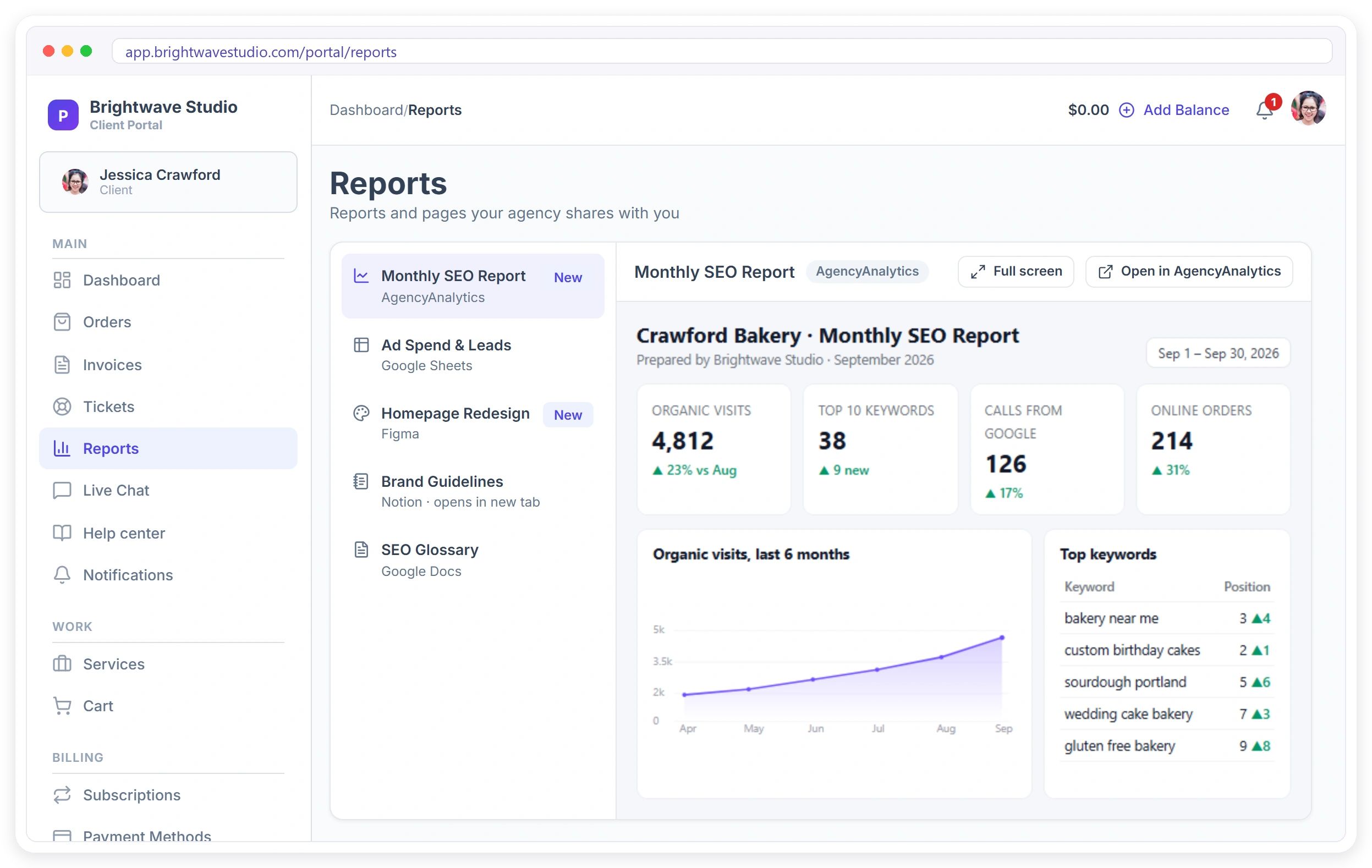
A client's portal Reports page showing their monthly SEO report inside the agency's branded portal, with other reports, designs and docs listed beside it
13Report Sources Ready to Link
3Ways to Choose Who Sees It
1Place Clients Find Every Report
0Report Links Lost in Email

Why Agencies Move Reports Into the Portal

The report is only worth the work if the client opens it.

Links Lost in the Inbox

A report emailed last month is buried under fifty other messages. Clients ask for the link again, or never look.

Every Tool Has Its Own Login

SEO in one tool, ads in a sheet, designs in Figma. Clients should not need five logins to see your work.

No Idea If They Read It

You spend hours on a report and never know if the client saw it before the call.

Reports You Can Add to the Portal

Thirteen sources are ready, each with a hint that shows where to copy the share link. Most are shown inside the portal; the rest open in a new tab.

Marketing reports 4

The client reporting tools agencies already pay for.

AGAgencyAnalyticsA client’s live marketing report.
DADashThisA DashThis dashboard.
DADataboxA Databox databoard.
WHWhatagraphA Whatagraph live report.

Docs, sheets & data 4

Plans, calendars and numbers you keep in shared documents.

GSGoogle SheetsKeyword lists, content calendars, any shared sheet.
GDGoogle DocsBriefs, strategies and plans.
AIAirtableA shared Airtable view.
NONotionNew tabA shared Notion page, opened in a new tab.

Design & video 4

Work in progress the client can look at, always the latest version.

FIFigmaDesigns the client can view and zoom.
MIMiroA board the client can look around.
FIFrame.ioVideo reviews inside the portal.
LOLoomWalk-through videos inside the portal.

Anything else 1

Any page you can share with a link.

ALAny linkShown inside the portal when the site allows it, otherwise in a new tab.
A client's portal Reports page showing their monthly SEO report inside the agency's branded portal, with other reports, designs and docs listed beside it

CLIENT PORTAL

Every Report, in One Branded Place

Clients open Reports in your portal and see everything you share with them: the monthly report, the ad sheet, the latest design, the walkthrough video. Reports that can be shown inside the portal open right there, in your colours and on your own domain, with a Full screen button.

One Reports menu item, next to orders and invoices
New reports marked New, with a count in the menu
Shown inside the portal, or opened in a new tab
Full screen and Open in the original tool

What Changes for Your Agency

Reporting stops being an email you hope they read and becomes part of the service they log in to. Pair it with automations to remind clients when a new month is in.

Clients Open Them

A notification and a portal page, instead of a link in an email thread.

You See Who Read It

Each report shows when the client opened it, or Not yet.

Better Monthly Calls

Check the client has seen the numbers before you get on the call.

Your Brand, Not Theirs

Reports sit inside your portal, on your domain, in your colours.

Keep the Tools You Use

AgencyAnalytics, DashThis, Sheets or Figma stay where they are.

One Link for Many Clients

Share a guide with every client, or with clients of one service.

Value Is Visible

Every login shows the client the work you do for them.

Less Chasing

No more re-sending last month’s link when the client cannot find it.

ADD A REPORT

Paste the Link, Pick Who Sees It

Choose where the report comes from and paste its share link. Clientish checks the link and tells you if it can be shown inside the portal. Give it the name the client sees, pick an icon, and choose one client, every client, or clients with an order for certain services.
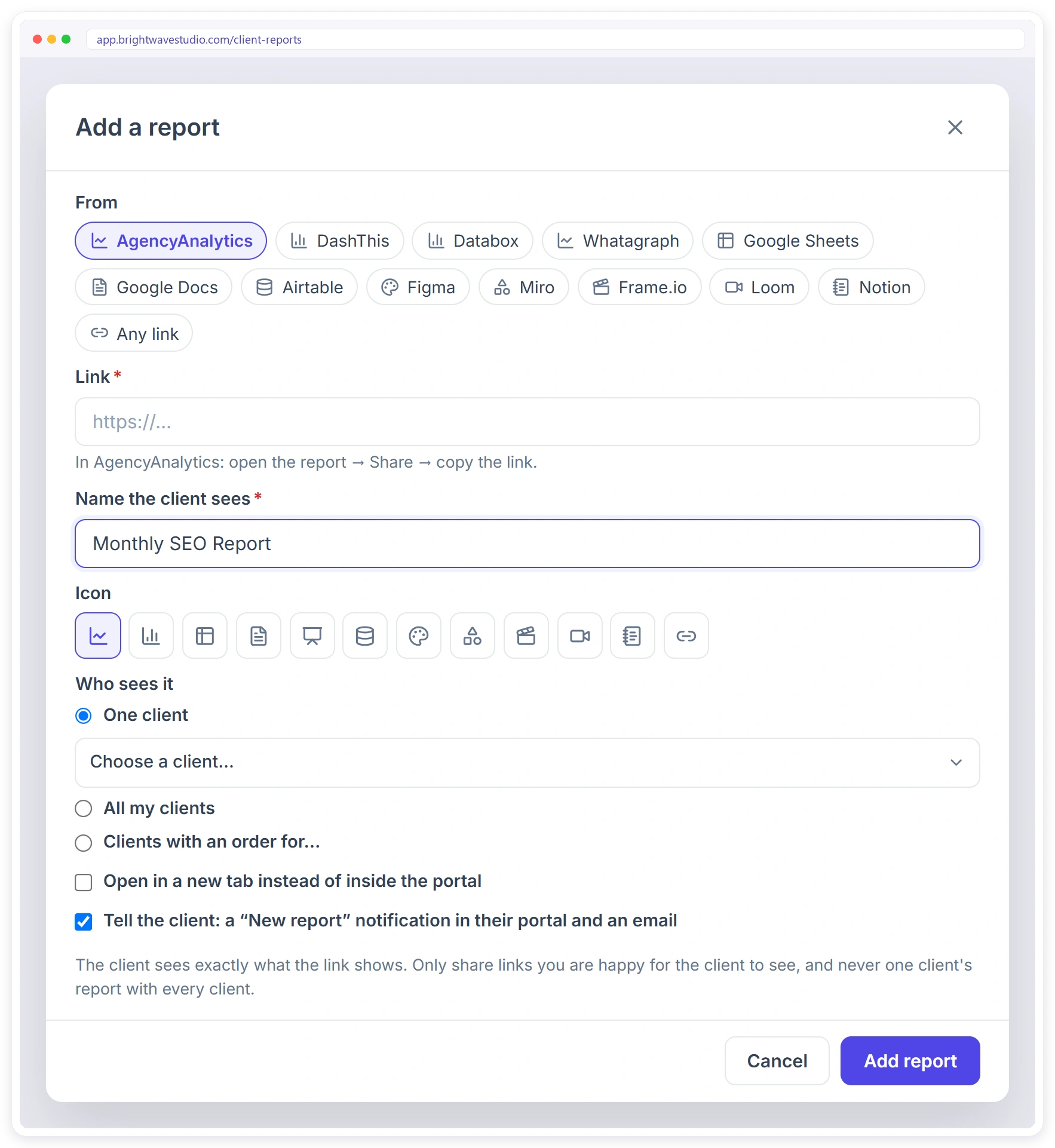
AgencyAnalytics, DashThis, Databox and Whatagraph
Google Sheets and Docs, Airtable, Notion
Figma, Miro, Frame.io and Loom, or any link
Tell the client with a portal notification and an email
Add a report from AgencyAnalytics, DashThis, Databox, Whatagraph, Google Sheets, Figma, Loom, Notion or any link, and choose which clients see it

What Agencies Share in the Portal

Anything with a share link can sit in the portal. A few ideas by agency type. See also the client portal and white label.
SEO Agencies

The monthly AgencyAnalytics or Whatagraph report, plus a keyword tracking sheet.

PPC and Social

A DashThis or Databox dashboard of spend, leads and cost per lead.

Design Studios

The live Figma file or Miro board, so feedback happens on the latest version.

Video Teams

Frame.io review links and Loom walkthroughs of each cut.

Content Agencies

The content calendar in Google Sheets or Airtable, and drafts in Google Docs.

Every Agency

Brand guidelines, onboarding guides or a Notion page for all clients.

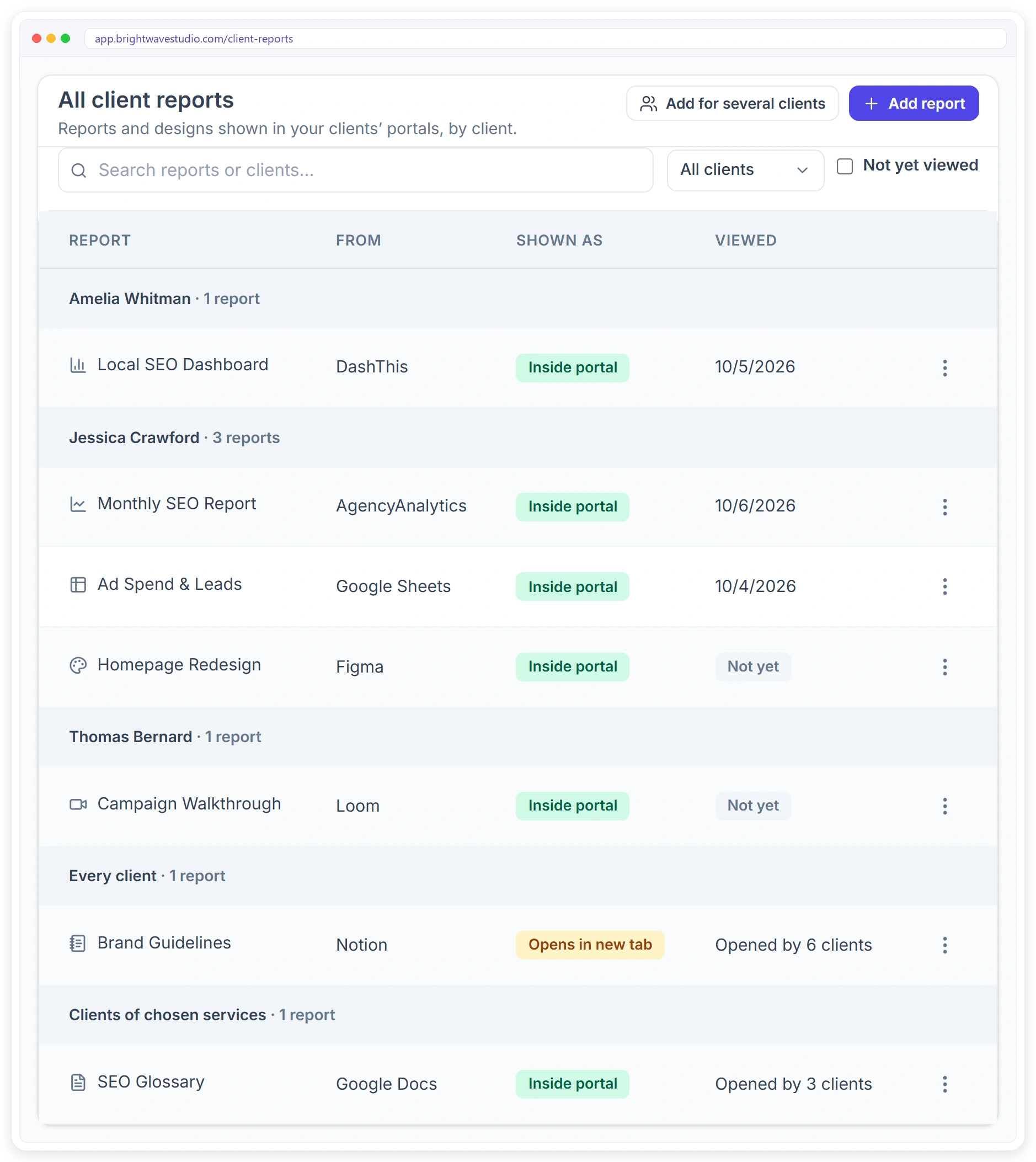
All client reports grouped by client, with where each report comes from, whether it shows inside the portal and when the client opened it

BY CLIENT

See Who Opened What

All client reports lists every report, grouped by client, with where it comes from and how it is shown. The Viewed column tells you when each client last opened theirs, so you know who to nudge before the monthly call.

Grouped by client, every client and service groups
Viewed date, Not yet, or how many clients opened it
Filter by client, or show only reports not yet viewed
Hide, reorder or remove a report without touching the source

Report Links in Email or a Reporting Portal

Most agencies email a link each month. Here is what changes when reports live in the portal your clients already use.

Sharing reports with clients
Emailing Report LinksA new email every month
Built inClientish Reporting PortalAlways in the client’s portal
Every report in one place for the client
—
✓
Shown inside your branded portal
—
✓
Know when the client opened it
—
✓
Notification when a new report arrives
Only the email
✓
Share with all clients or one service
One by one
✓
Works with your current reporting tools
✓
✓
Links lost in old email threads
Often
Never

Set It Up in Four Steps

Nothing to install. Use the report links you already have.

Copy the Share Link

In your reporting tool, open the report and copy its share link.

Add the Report

Open Settings, then Client reports, and press Add report.

Choose Who Sees It

One client, every client, or clients of chosen services.

Tell the Client

Leave the notification on and the client gets a portal alert and an email.

Client Reporting FAQ

Quick answers about sharing reports with clients in Clientish.

How do I share AgencyAnalytics or DashThis reports with my clients in one place?

Copy the report’s share link, open Settings, then Client reports in Clientish, and add it for that client. It appears under Reports in the client’s portal, and the client gets a notification and an email.

Can clients see their reports inside my client portal?

Yes. Reports from tools that allow it are shown inside your branded portal. The few that do not allow it open in a new tab from the same Reports page.

Which reporting tools can I add?

AgencyAnalytics, DashThis, Databox, Whatagraph, Google Sheets, Google Docs, Airtable, Figma, Miro, Frame.io, Loom, Notion, or any page you can share with a link.

Does Clientish build the reports for me?

No. You keep building reports in the tool you use today. Clientish puts them in front of the client, in your portal, and shows you when they were opened.

Can I see if a client opened their report?

Yes. The Viewed column shows when each client opened their report, or Not yet. Shared reports show how many clients opened them.

Can I share one report with all my clients?

Yes. Choose All my clients, or Clients with an order for and pick the services, such as a guide only for SEO clients.

Will the client be told about a new report?

If you leave Tell the client ticked, they get a New report notification in their portal and an email.

If I delete a report, is it gone from my reporting tool?

No. It only leaves the client’s portal. The report itself stays where it is.

Can I share a Figma design or a Loom video the same way?

Yes. Designs, boards, review links and videos work like reports, so clients find everything you share in one place.

Put Every Report Where Clients Look

Start your free trial and add your first client report in a minute.

Scroll to Top