
Invoice Template
The invoice is the one document in the whole engagement that directly decides whether you get paid, and it is the one most often thrown together.
Free to download and edit · No watermark · Add your own branding
A vague line reading "Marketing services — $4,000" lands on a finance team's desk, someone there cannot tell what it covers, they set it aside to ask a question, and three weeks evaporate while a perfectly good invoice sits unpaid for want of a sentence of detail.
The invoices that get paid quickly are not the prettiest. They are the clearest: itemised so no one has to ask what they are for, and stamped with a real due date rather than a payment term someone has to work out.
This page gives you a free, editable invoice template for agencies and freelancers — the document you send to request payment, built to clear a client's approval process without friction. It has the fields that get invoices paid: a unique number, itemised line items anyone can understand, an explicit due date, and clear payment instructions. Download it, add your branding, and send invoices that get approved on the first pass instead of parked for questions.
What Is an Invoice?
An invoice is a document a business sends to a client to request payment for work delivered, listing what was done, what it costs, and how and when to pay.
It is both a payment request and a record of money owed and, once paid, money received. That record serves the client's accounts as much as your own.
It is worth distinguishing from the quote or estimate that may have come before it. A quote is an offer of what work will cost, sent before the work, to help the client decide. An invoice is a demand for payment, sent after the work (or a milestone) is delivered, for an amount that is now owed. The quote proposes; the invoice collects. Confusing the two — or sending something that reads like an estimate when you mean to be paid — is a quiet way to delay payment.
How it differs from the documents around it
An invoice also sits at the end of the document chain the rest of these templates build. A proposal wins the work, a Statement of Work scopes it, the work gets done, and the invoice is how the value of that work actually becomes money in your account. However good everything upstream is, an unclear invoice is where payment stalls.
Why a Clear Invoice Matters
An invoice is not just administration; it is the step where delivered work turns into paid work. The difference between a clear invoice and a vague one is usually the difference between a fast approval and a week of silence.
It clears the approval process
Line items that each say what they cover, such as "Brand strategy, March retainer, 20 hrs × £95," give an approver who does not know your work a complete picture. No query, no delay.
An explicit due date gets acted on
"Due by 14 March" is a date people pay by. A calculated deadline buried in terms is a date people miss.
Itemisation removes the reason to pause
A single lump sum invites the question "what is this for?" — and that question is a delay. Line items remove it.
Clear terms set expectations
Stated payment terms, late fees, and accepted methods leave no ambiguity for a late payment to hide behind.
A unique number keeps it trackable
Numbered invoices let both sides reference a specific payment without confusion and let you see exactly what is outstanding.
Consider a concrete case: you send a retainer invoice to an agency client whose payment runs through a six-person finance team. The person who commissioned your work is not the person who approves the payment. That approver has never spoken to you, does not know the project, and will make their decision based entirely on what the document in front of them says. A clear invoice answers every question they might have before they can ask it. A vague one goes into a query pile.
The risks of getting these details wrong are covered in the next section. Disputed amounts, stalled approvals, and late fees you cannot enforce are all preventable with the right foundations.
The Risks of a Vague or Sloppy Invoice
A weak invoice does not announce itself — it just sits unpaid longer than it should. Here is how the common faults cost you time and money.
"Services rendered — $5,000" reaches a finance team who cannot approve what they cannot understand, so they ask a question, and the clock stops while they wait for your reply. The work was fine; the invoice created the delay.
The invoice says "Net 30" and no actual date. The client reads it, does no arithmetic, files it, and forgets it, because nothing on the page told them a specific day to pay.
With no stated consequence for paying late, there is no reason to pay on time, and a late payment becomes a cost-free option for a client managing their own cash flow.
Without unique numbers, an invoice gets confused with another or lost in a thread, and chasing it becomes a muddle of "which one do you mean?".
The client is willing to pay but the invoice does not say how, so payment waits on a back-and-forth that a line of instructions would have avoided.
The Key Fields of an Invoice
The template holds each of these as a fillable field. Here is what each one is and how to use it so the invoice gets paid.
Your Business Details
Your name or agency name, address, email, and logo. This is both professional presentation and the information the client needs to record who they are paying. A branded invoice showing your agency name, logo, and contact details is also less likely to be flagged as suspicious or held up by a corporate finance team that does not recognise the sender.
Client Details
Who the invoice is addressed to: the business name, the contact, and, where relevant, the specific person or department that approves payment. Addressing it to the right place is part of getting it approved without detours.
Invoice Number and Dates
A unique invoice number, the issue date, and an explicit due date written as an actual date (the field that matters most for speed). The number makes it trackable; the dates, and especially a real due date, are what get it paid on time.
Line Items
The itemised breakdown: a description of each piece of work, the quantity or hours, the rate, and the amount. This is the heart of a fast-paying invoice. Each line should say clearly enough what it covers that an approver who was not involved in the work can understand it without asking. Specificity here is what clears the approval process.
Subtotal, Tax, and Total
The sum of the line items, any applicable tax, any discount, and the final total due. Showing the maths plainly means the client can reconcile the total against the lines, which is one less reason to query it.
Payment Terms
When payment is due and what happens if it is late. State an explicit due date, the net terms, and any late fee as a clear amount or percentage. If you take a deposit or bill in milestones, this is where the terms of that are stated. Clear terms are what make an invoice enforceable rather than hopeful.
Payment Methods
Exactly how to pay: bank transfer details, the card or gateway link, or whichever methods you accept. A willing payer stalled by not knowing how to pay is a self-inflicted delay, and a line of instructions removes it.
Notes
A short, optional space for a thank-you, a reference to the project or PO number, or a note on next steps. A reference number here often helps the invoice move through the client's own system faster.
Tips to Get Invoices Paid Faster
The template gives you a clear invoice. A few habits are what turn clear into paid-on-time.
Write an actual due date, not just a term
"Due by 14 March" beats "Net 30" every time, because it needs no calculation and reads as a deadline. Put the date on the invoice, prominently.
Itemise everything
Break the work into lines an approver can understand without calling you. The invoice that answers its own questions is the invoice that gets paid on the first pass.
Structure milestone billing for discovery and build engagements
Rather than one lump invoice at the end, split a larger project into three: a deposit before kick-off (typically 30–50%), a second payment at the end of discovery or a defined mid-point deliverable, and the final balance on completion. Each invoice is smaller, easier to approve, and ties payment to something tangible the client has already received.
State a late fee, and mean it
A clear late-payment charge gives on-time payment a reason to happen. A due date with no consequence is a suggestion.
Send on a Tuesday morning, not a Friday afternoon
Invoices sent early in the working week land when approvers are clearing their inboxes and budgets are front of mind. Friday sends routinely sit unread over the weekend and slip into the following week's pile.
Phrase overdue nudges as a helpful check-in, not a demand
When an invoice passes its due date, a short message works better than a formal notice: "Hi [Name], just checking this reached the right person — happy to resend or swap the payment method if that helps." It removes friction, assumes good faith, and prompts action without damaging the relationship.
How to Use the Free Invoice Template
Putting the template to work takes four steps.
Start from a copy
Download the Word (.docx) file, or upload it to Google Docs, and work on your copy, not the original.
Brand it and set your details
Add your logo and business details once to the master, so every invoice looks like yours.
Itemise and date each invoice
Fill in clear line items and a real due date, not just a net term, before sending.
Number, send, and track
Give each invoice a unique number — a format like `CLIENTCODE-YYYY-001` (e.g. `ACME-2025-001`) keeps files sortable and makes it immediately clear which client and year an invoice belongs to.
If your clients span multiple tax jurisdictions, maintain a separate master per region with the correct tax rate, label, and registration number already filled in — swapping these details per invoice is a common source of errors.
If a client requests a purchase order number mid-engagement, add a "PO Number" field to that client's next invoice and reference it on all subsequent invoices for that project; do not retroactively reissue earlier invoices unless the client explicitly requires it for their accounts-payable process. Keep a running list of what is outstanding so nothing slips past its due date.
Sending and Collecting Invoices Inside a Portal
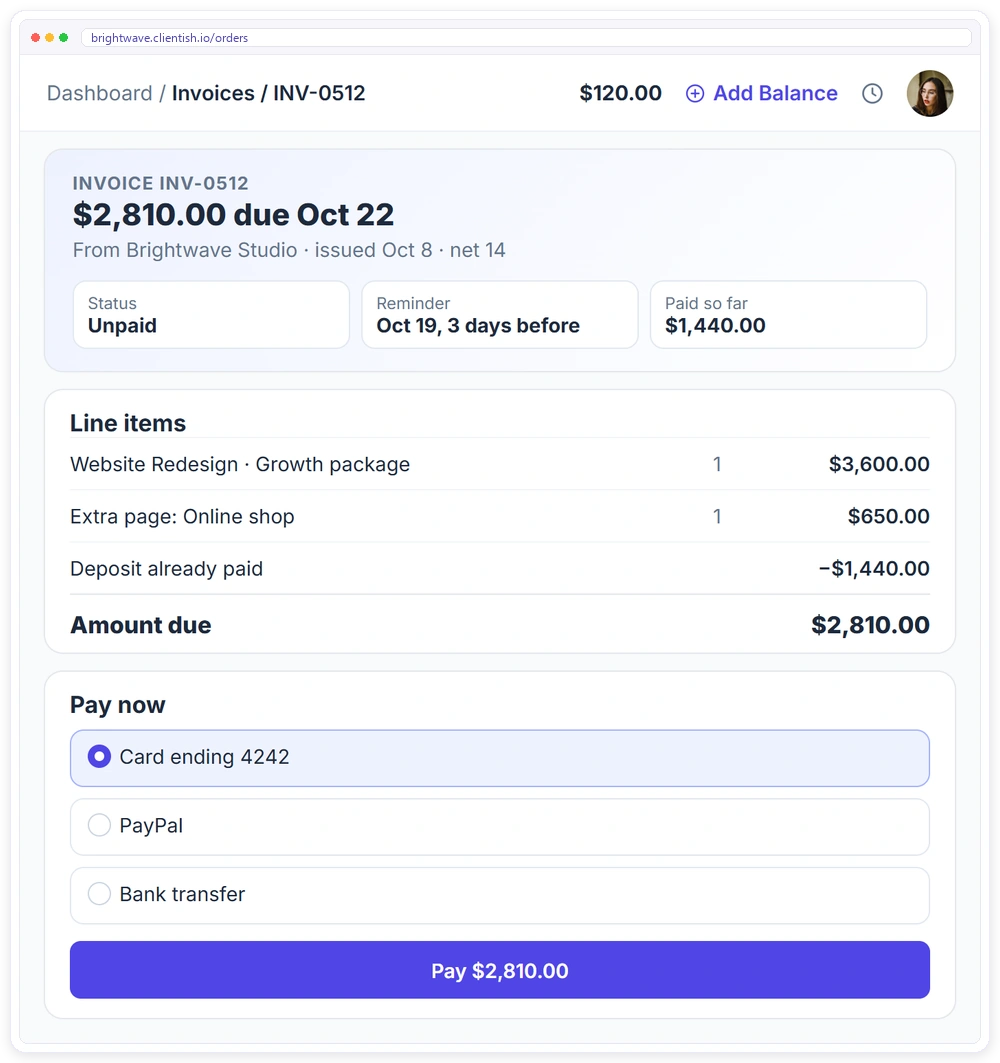
A template gives you a clean invoice to send. Collecting it — having the client see it, pay it, and keep a record — is where a client portal replaces the invoice-as-email-attachment with something the client can act on in one place.
- ✓Itemised invoices with your logo, tax and due date
- ✓Clients pay online by card, PayPal, bank transfer or their balance
- ✓Automatic reminders before, on and after the due date
- ✓Deposits and recurring invoices handled for you
- ✓Every invoice and receipt in the client’s portal
Download the free invoice template
The editable Word file with all 8 sections. Replace the brackets, add your branding and use it with every client.
Frequently asked questions
Is this invoice template free to use?
Yes. There is no watermark and no cost. Open it in Google Docs, Sheets, or Word, add your branding, and use it for every invoice you send.
What should every invoice include to get paid on time?
A unique invoice number, clear itemised line items, and an explicit due date written as an actual date rather than just a net term. Itemisation lets an approver understand the charge without asking, and a real due date prompts action, which together are the biggest levers on getting paid quickly. Add clear payment methods and a late-fee policy to complete it.
What is the difference between an invoice and a quote?
A quote is an offer of what work will cost, sent before the work to help the client decide. An invoice is a request for payment of an amount now owed, sent after the work or a milestone is delivered. The quote proposes a price; the invoice collects it, and it is worth keeping both, since the quote or proposal records what was agreed while the invoice records what is owed.
Should I ask for a deposit?
For larger projects, yes. A deposit of commonly 30 to 50 percent before work begins protects your cash flow and confirms the client is committed. For ongoing work, milestone or recurring invoicing does a similar job of keeping payment matched to delivery.
How do I get clients to pay faster?
Make the invoice impossible to pause over and easy to act on: itemise clearly so finance has no questions, put a real due date on the page, state a late fee, and offer a frictionless payment method. Then track what is outstanding and send a polite nudge when something is overdue, since invoices stall on both sides when no one is watching them.
Related Templates
If you bill clients for your work, these free templates pair well with the Invoice: More free, editable templates from the Agency Templates Library.
Client Proposal
Client problem first, value before price, tiered.
CONTRACTStatement of Work (SOW)
Scope, deliverables, acceptance and milestones per project.
RETAINERAgency Retainer Agreement
The core retainer contract, ready to brand.
CONTRACTClient Service Agreement (MSA)
The legal terms you sign once with every client.
PROJECTChange Request Form
Turn scope creep into a priced, approved decision.
CONTRACTService Level Agreement (SLA)
Response times, uptime and service credits.