
Change Request Form Template
Every agency knows the sentence. It arrives mid-project, usually casually, usually starting with "can you just" — can you just add a page, just change the layout, just tweak the campaign. On its own each one is small.
Free to download and edit · No watermark · Add your own branding
Added up across a project, those small asks are the difference between a profitable job and one worked at a loss, and because none of them were ever written down, there is nothing to bill against. A change request form is the small piece of process that intercepts that sentence: it turns "can you just" into a documented request with a price and a timeline attached, approved before the work happens rather than argued about after.
This page gives you a free, editable change request form template for agencies and freelancers — the one-page form you use whenever a client asks for something beyond the agreed scope. It captures what the change is, why it is wanted, and what it costs in money and time, and it routes that to a written approval before any work starts. Download it, pair it with the change-control clause in your contract, and make it the standard answer to every out-of-scope request.
What Is a Change Request Form?
A change request form is a short document that records a requested change to a project's agreed scope, assesses its impact on cost and timeline, and captures the client's written approval before the change is carried out.
It is the operational tool that puts a contract's change-control clause into practice: where the contract says "changes require a written, approved request," this form is that request.
Its purpose is to make a change a deliberate, priced decision rather than an informal favor. A request comes in; the agency documents it, estimates what it adds to the fee and the schedule, and sends it back for approval. Only once the client approves does the work begin. That single sequence — capture, price, approve, then do — is what separates a change you are paid for from scope creep you absorb.
How it differs from the documents around it
It sits alongside two things you may already have. A Statement of Work defines the original scope; the change request form handles anything that falls outside it. A retainer or service agreement sets your revision limits; the form is how a revision beyond those limits gets quoted and agreed. The form does not replace either document — it is the mechanism that keeps both enforceable in the moment a request actually arrives.
Why Your Agency Needs a Change Request Process
The absence of a change process is rarely felt until the end of a project, when the hours spent and the hours billed no longer match. A simple form, used consistently, closes that gap.
It turns scope creep into billable work
The whole point: a request handled through the form comes with a price the client agreed to, so the extra work is paid rather than absorbed. Without the form, the same work is a favor that quietly erodes the margin.
It stops the verbal change
The most expensive changes are the ones agreed on a call and never written down, because they are impossible to bill and easy to dispute. Routing every request through the form makes "we talked about it" into a signed record.
It makes the impact visible before the decision
A client who sees that a "small tweak" adds a week and a fee often decides it is not worth it. Stating cost and time up front turns a reflexive request into an informed choice, and protects the timeline either way.
It keeps the original scope honest
Each logged change is a documented departure from the agreed scope, so the project baseline stays clear and nobody loses track of what was originally promised versus what was added.
It gives revision limits teeth
When a retainer or SOW includes a set number of revision rounds, the form is how a request beyond that number gets quoted rather than quietly done for free. Without it, a three-round revision limit written into the SOW becomes meaningless by week four when the fifth round has already started and there is nothing in writing to point back to.
The Risks of Handling Changes Without a Form
Absorbing changes informally feels like good service until the pattern adds up. Here is how the gaps surface.
No single "can you just" was worth the friction of a form, so each was absorbed. By the end of the project the accumulated unbilled hours have erased the profit, and there is no record to invoice against.
A change was agreed on a call, the work was done, and when the invoice reflects it the client does not remember agreeing to a cost. With nothing in writing, the agency either eats it or damages the relationship arguing.
Changes were added without anyone adjusting the deadline, so the project is late — and because the additions were never logged against the schedule, the agency looks responsible for a slip the client's requests caused.
Without a form to count against the included rounds, "one more small change" repeats indefinitely, and there is no agreed point at which further changes become billable.
After a dozen informal changes, nobody can say what the project was originally scoped to be, so there is no clean reference for what is included and what is extra.
Each of these is prevented by the fields in the template below.
The Fields of a Change Request Form
The template holds each of these as a fillable field. Here is what each one captures and why it matters.
Request Details
A reference number, the date, the project, and who is requesting the change. Small but essential: a numbered, dated record is what makes the change trackable and gives you something unambiguous to point to later.
Description of the Change
A clear statement of what is being requested, specifically enough that someone who was not in the conversation could understand it. Vague descriptions are where disputes start, so this field is written to pin down exactly what will and will not be done. For example: "Add a contact form to the About page; does not include CRM integration" — not "update the About page."
Reason for the Change
Why the change is being requested. This matters for the decision: a change that serves the original project goal is different from one that introduces a new goal. It also keeps a record of the justification alongside the request.
Impact on Scope
What the change adds to or removes from the agreed scope. This is where the change is connected back to the Statement of Work, so the baseline stays clear and the departure is documented.
Impact on Cost
The additional fee the change involves, or a note that it is covered within an included revision round. This field is the one agencies most often skip and the one that makes the change billable. A change request with no cost stated is the same as no change request at all, so fill it with a real figure rather than leaving it blank or marking it to be decided later.
Impact on Timeline
How the change affects the schedule, including the days or weeks it adds and any milestone that shifts as a result. Stating this protects the agency from being blamed for a delay the client's own request caused.
Priority and Type
Whether the change is urgent or can wait, and whether it is minor, major, or an emergency. This helps both sides decide how to handle it and in what order, especially when several requests are open at once.
Approval and Sign-off
The decision (approved, rejected, or deferred) with the approver's name and date, and a note that work begins only once approval is recorded. This is the gate: no approval, no work. It is what makes the whole form worth filling in. For example: "Approved — Sarah Mitchell, 14 June 2025" — not "approved verbally" or a signature with no date.
Tips for a Change Request Process That Sticks
Having the form is half of it. Making it the habit, for you and the client, is the other half.
Acknowledge, then redirect — don't fight
If a client says "just do it, I'll sign off later," reply with: "Absolutely, I'll get that moving — I just need to send you a quick change request first so we're both covered. Takes thirty seconds to approve." Framing it as protecting them, not slowing them down, removes the resistance.
If they still won't submit it, you submit it and send it for signature
Pre-fill every field yourself and send the client a link to review and approve. Most portals and e-signature tools let you do this. The form gets completed; the client doesn't have to feel like they're doing admin.
Stay warm, not procedural
On a call, "Love that idea — let me get a change request across to you so we can nail down the timeline and cost" lands far better than "I'll need a formal change request for that." The first keeps the energy; the second sounds like a policy recital.
Follow up within the hour
The goodwill from the call is highest immediately after. A change request that arrives two days later feels like a surprise invoice; one that arrives while they're still at their desk feels like efficient service.
Log it once, then split the billing
Create a single change request so there is one clear approval on record, then reference that request number across each invoice line it affects. This keeps the audit trail clean without forcing the client to approve the same change twice.
Note which deliverable and which billing period each portion falls into
A change that touches both the current sprint and next month's retainer needs a line in each invoice that traces back to the approved request, so neither payment looks unexplained when it arrives.
How to Use the Free Change Request Form Template
Putting the form to work takes four steps.
Start from a copy
Download the Word (.docx) file, or upload it to Google Docs, and work on your copy, not the original.
Fill it in when a request arrives
Capture the change, the reason, and your assessment of the cost and timeline impact before sending it back.
Send it for written approval
The client approves, rejects, or defers in writing.
Log it and update the project
Record the approved change in your running log, adjust the scope, schedule, and invoice, and proceed.
Work starts only on an approval.
Tracking Changes and Approvals Inside a Portal
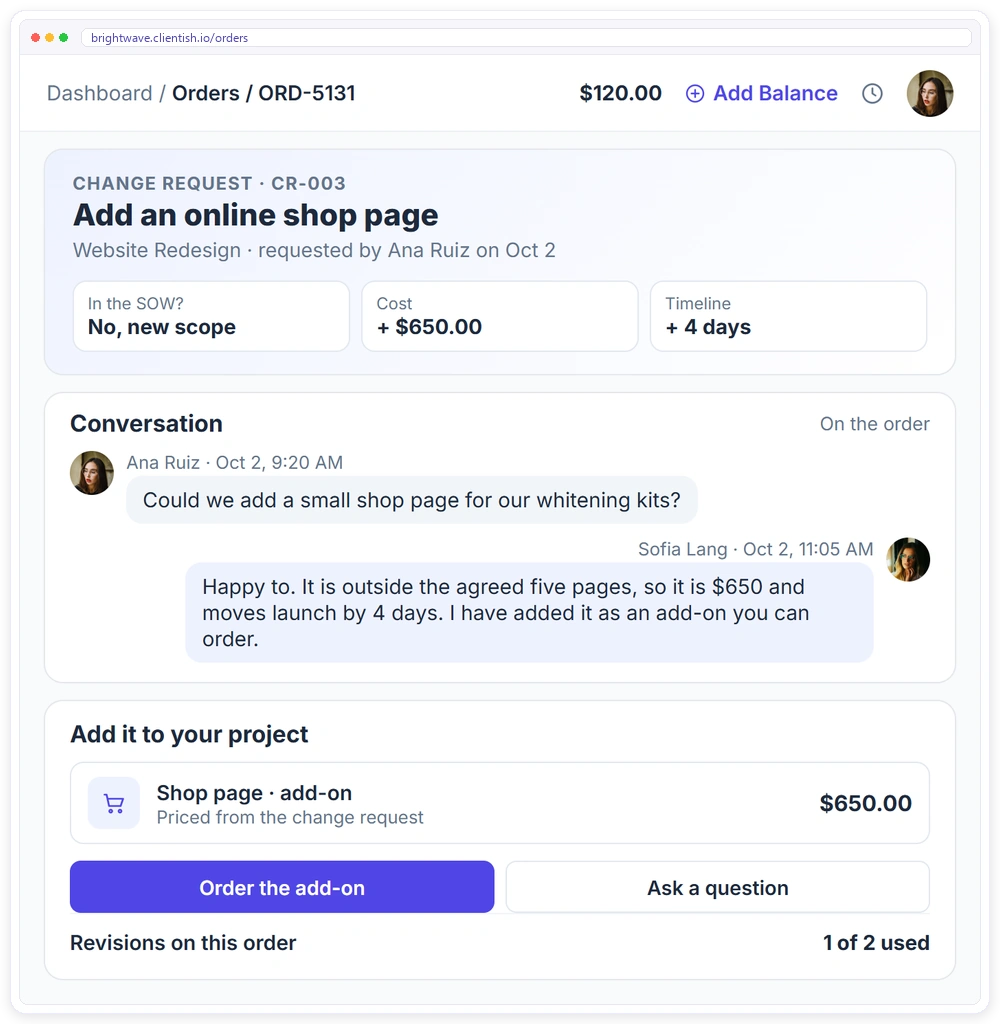
A change request form captures the decision. The client's side of it — seeing the request, approving it, and having the extra cost appear on an invoice — is what a client portal carries, keeping the whole exchange in one place instead of scattered across email.
- ✓Each change discussed on the order, where the client and your team both see it
- ✓Extra work sold as a priced add-on the client can order
- ✓Revisions counted against what the package includes
- ✓The extra cost on an invoice the client pays online
- ✓A full history of every request on the project
Download the free change request form template
The editable Word file with all 5 sections. Replace the brackets, add your branding and use it with every client.
Frequently asked questions
Is this change request form template free to use?
Yes. There is no watermark and no cost. Open it in Google Docs or Word, adapt the fields to your process, and use it for every out-of-scope request.
What is the difference between a change request and a revision?
A revision is a round of changes already included in your scope — the two or three rounds a SOW or retainer allows. A change request covers anything beyond that: a new deliverable, an expanded scope, or a revision past the included number. The form is how that extra work gets priced and approved; included revisions do not need one, though logging them keeps the count accurate.
How does a change request form stop scope creep?
It makes every out-of-scope request a visible, priced decision instead of a quiet addition. When a client sees that a change adds a fee and a few days, they choose whether it is worth it, and the agency gets paid when the answer is yes. Scope creep is simply changes that were never priced; the form prices them.
What if a client refuses to approve the change in writing?
Do not begin the work. Explain that your process requires written approval before any out-of-scope work starts, which protects both sides, and offer to walk them through it on a call with an emailed confirmation as the minimum. Starting work without approval removes your footing to bill or defend it, so the form is not optional.
Do small changes really need a form?
Yes, and for two reasons. Consistency is what keeps the process working — the moment small changes skip the form, the habit breaks. And logging even a small change, including one covered by an included revision round, keeps your record accurate and shows the client the value of what their scope already includes.
When should the client approve the change?
Before the work begins. The entire protection the form provides depends on approval coming first: a change approved in writing before work starts is billable and undisputed, while one done first and billed later is exactly the situation the form exists to prevent.
Related Templates
If you manage client projects, these free templates pair well with the Change Request Form: More free, editable templates from the Agency Templates Library.
Statement of Work (SOW)
Scope, deliverables, acceptance and milestones per project.
RETAINERAgency Retainer Agreement
The core retainer contract, ready to brand.
CONTRACTClient Service Agreement (MSA)
The legal terms you sign once with every client.
ONBOARDINGProject Intake Questionnaire
The discovery questions to ask before you scope.
CHECKLISTClient Onboarding Checklist
The 3-phase onboarding checklist for any agency.
CONTRACTService Level Agreement (SLA)
Response times, uptime and service credits.