
COUPON CODE MANAGEMENT · UPDATED OCTOBER 2026
Coupon Code Management for Agencies
Coupon code management means creating discount codes, deciding where and how often they work, and seeing what each one earned. Clientish gives your agency coupons clients enter themselves when they order or pay, from $9.99 a month: a percentage or fixed discount, a different rate per service, and limits so a code never runs away from you.
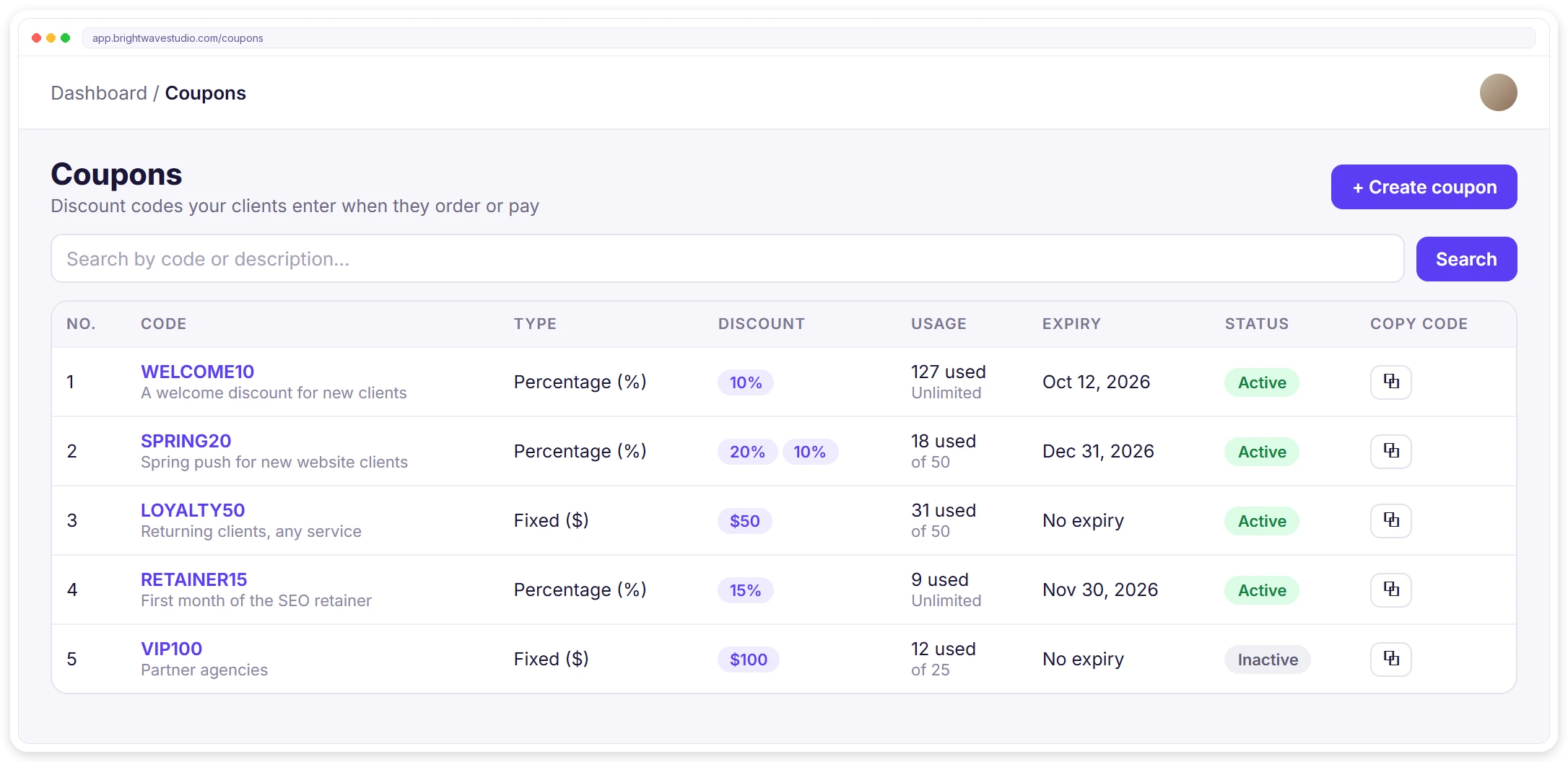
Coupons Built for How Agencies Sell
Agencies sell services, packages and retainers rather than products, so a coupon has to know which service it discounts and how often a client may use it. These are the pieces that make that work without anyone editing invoices by hand.
CREATE
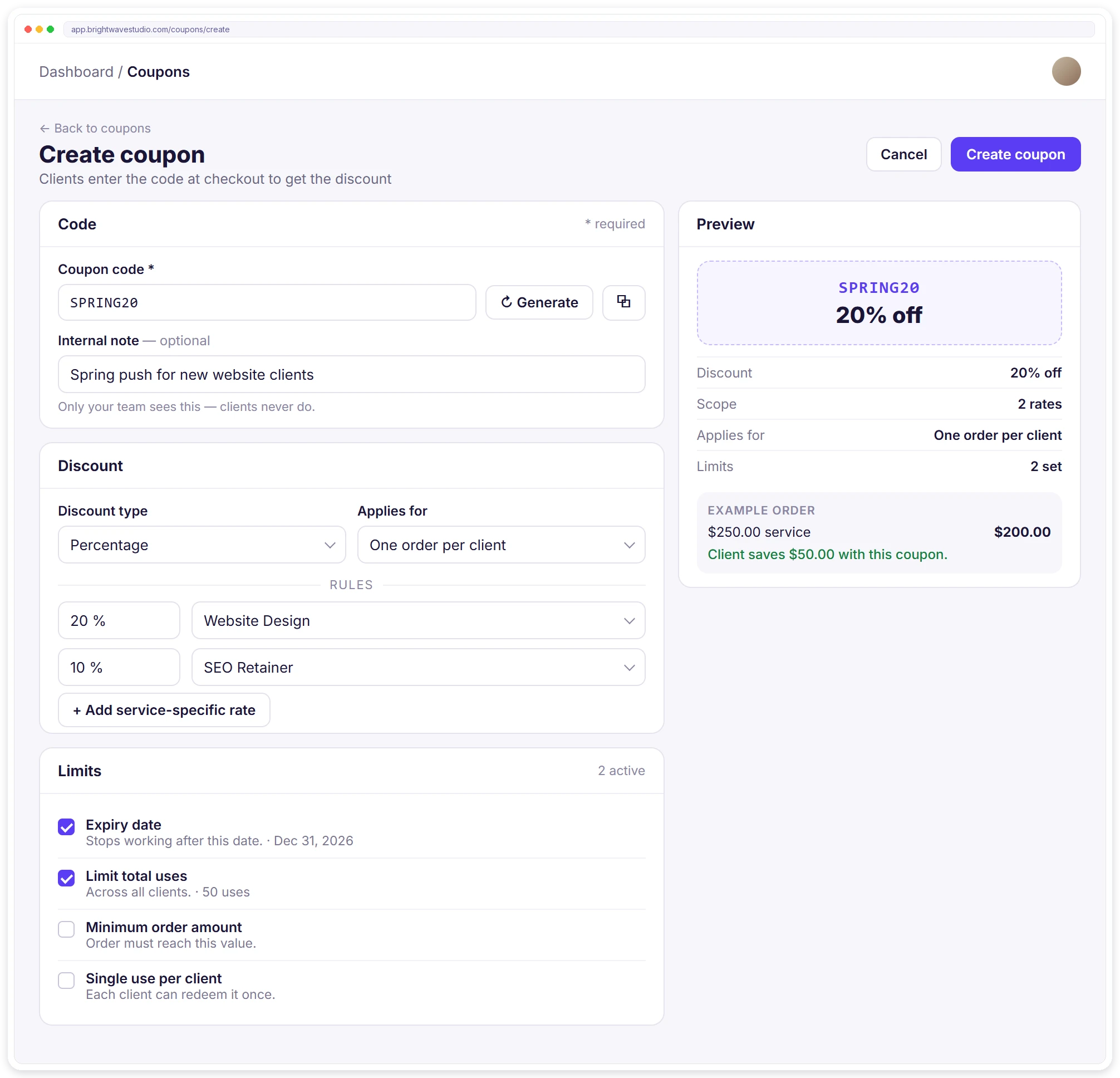
Create a Coupon With a Live Preview
Type a code or press Generate, pick a percentage or a fixed amount, and choose whether it applies forever or to one order per client. A preview beside the form shows the code and what a client saves on an example order before you save it.
WHERE CLIENTS USE IT
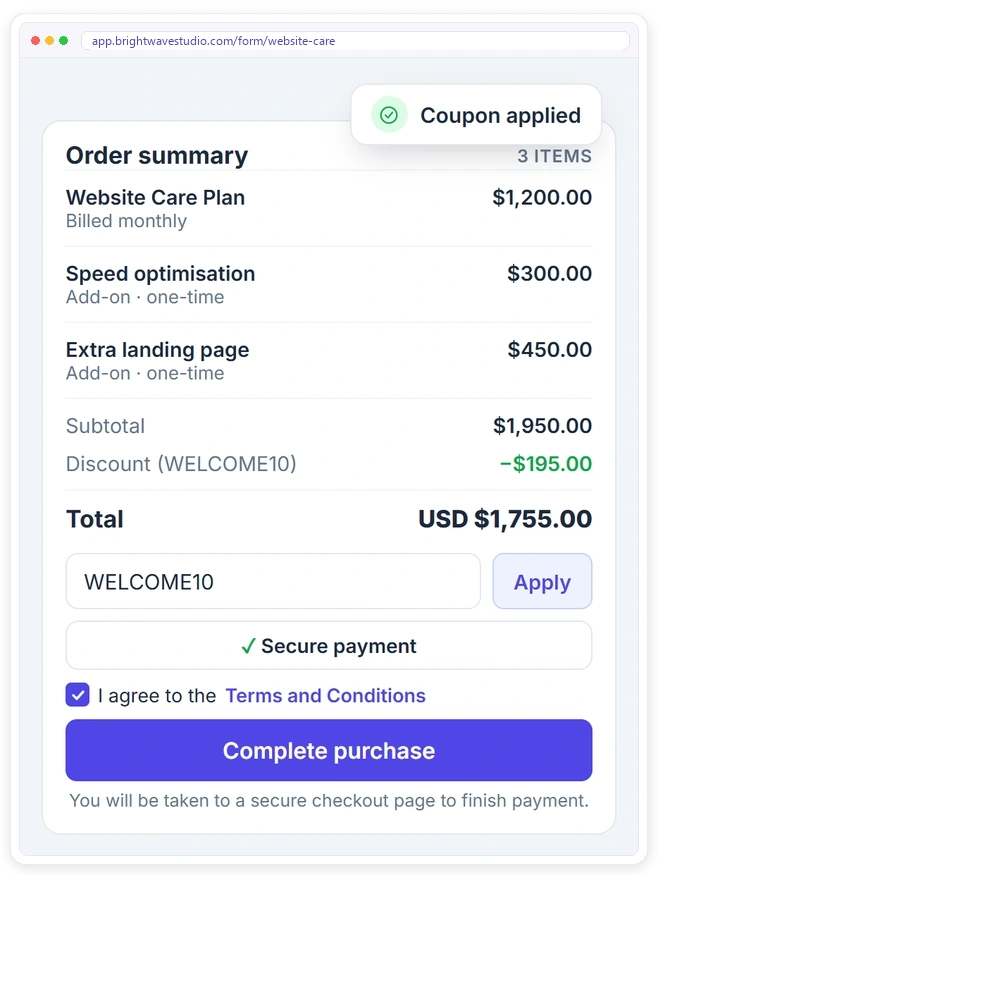
Clients Apply It When They Order
Clients enter the code in the client portal cart or on any order form, and the order summary shows the discount before they pay. If a code cannot be used, they read why in plain words instead of a vague error.
USAGE
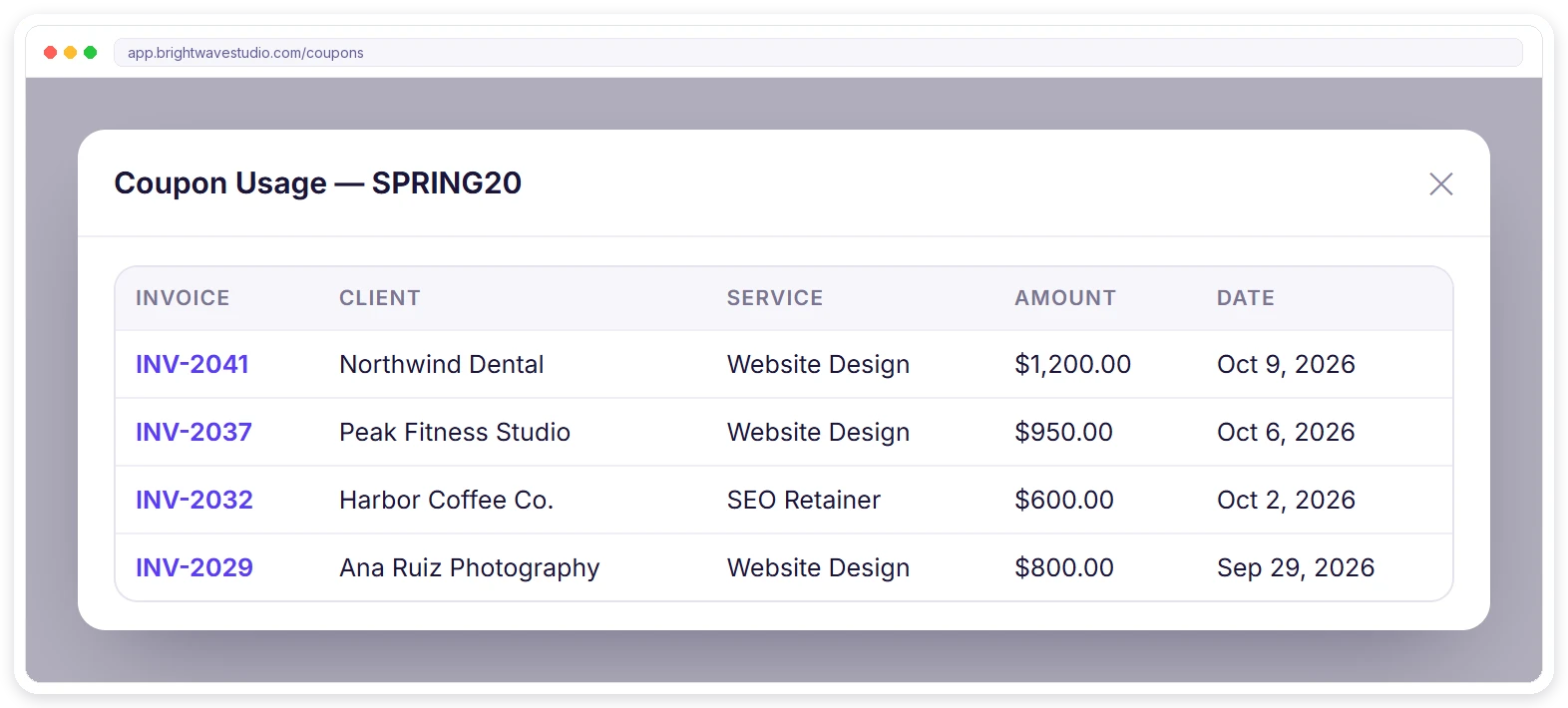
See Who Used Each Code
Open any coupon to see the paid invoices it was used on, with the client, the service, the amount and the date. It answers “did the spring offer work?” without exporting anything or asking your bookkeeper.
REPORTS
Know What Each Coupon Earned
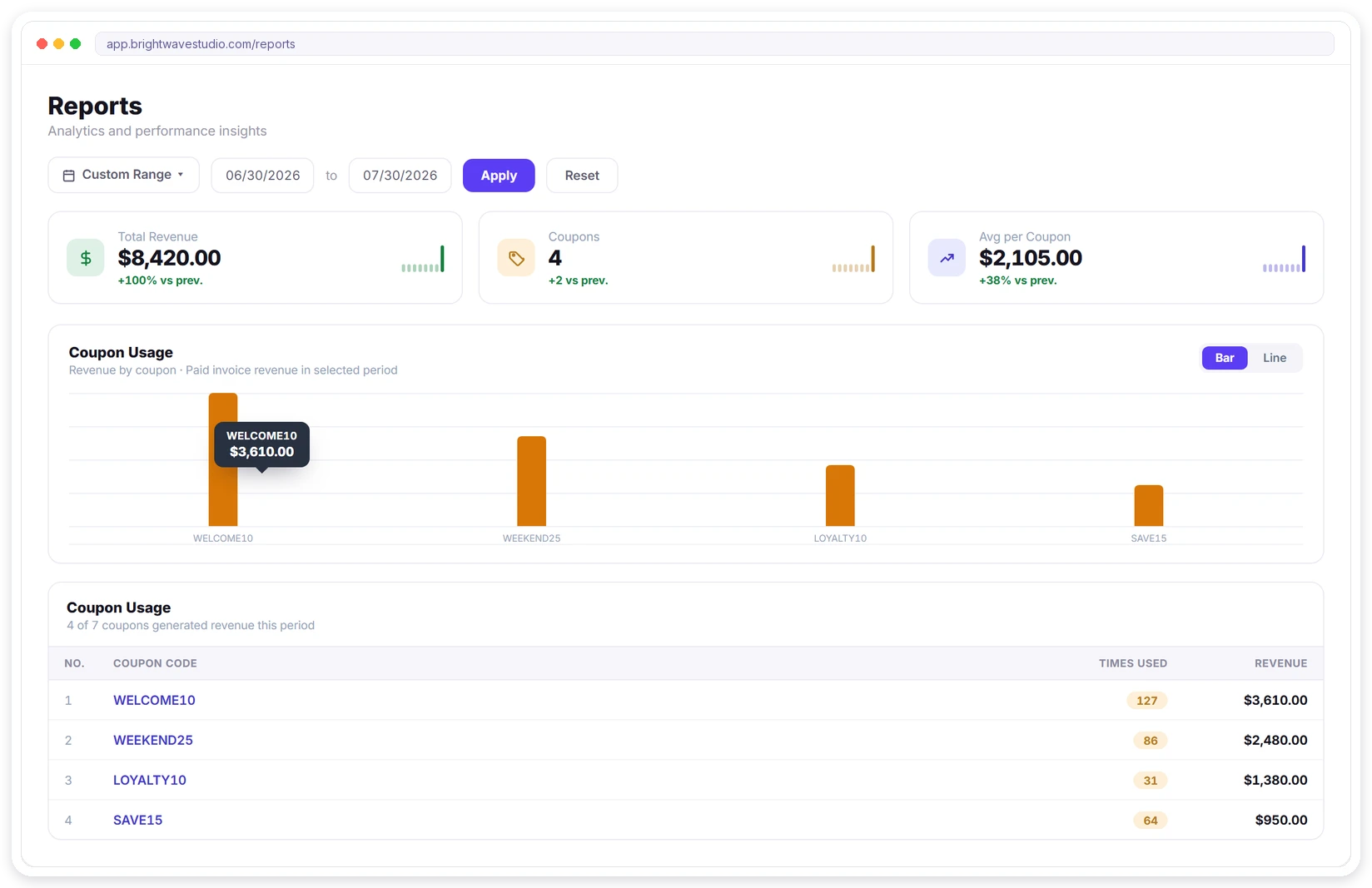
The Coupon usage report ranks your codes by the paid revenue they brought in during the dates you pick, with how many times each one was used. Keep the codes that win new clients and switch off the ones that only cut your price.
Launch a Coupon in Four Steps
From the first idea to the first client using it takes a few minutes, and the preview shows the discount on a real order before anything goes out, so you never have to fix a wrong price on an invoice afterwards.
When Agencies Use Coupon Codes
A coupon works best as a deliberate offer with an end date, not a standing discount that trains clients to wait. These are the uses agencies get the most from, each one set up with the limits above so the offer stays under control.
Coupon Code Management FAQ
Straight answers about coupon codes for agencies: discount types, per-service rates, limits, where clients enter them, reports, your team and what it costs.
What is coupon code management?
It is creating discount codes, deciding which services they cover and how often they can be used, and tracking what they bring in. Doing it inside the portal clients order from means the discount reaches the invoice by itself instead of being typed in by hand.
Can one coupon give different discounts on different services?
Yes. Add a service-specific rate for each service, such as 20% on website design and 10% on an SEO retainer. Services you leave out are not discounted by that code.
Can I limit a coupon to one use per client?
Yes, in two ways: set Applies for to One order per client, or tick Single use per client under Limits. Either way each client gets the discount once, while the code keeps working for new clients.
Can a coupon expire or run out?
Yes. Set an expiry date and the code stops working after that day, or set a total use limit across all clients. You can also turn a code off at any time and turn it back on later.
Where do clients enter the coupon code?
In the cart of your client portal and on your order forms, before they pay. The order summary shows the discount, and a code that cannot be used explains why, for example that it has expired or needs a larger order.
Can I see which clients used a coupon and what it earned?
Open the coupon to see each paid invoice it was used on, with the client, service, amount and date. The Coupon usage report adds up the revenue each code brought in over the dates you choose.
Is there protection against people guessing codes?
Yes. When ten wrong codes are tried from one address within 15 minutes, further tries are blocked for a while, so a short code cannot be found by guessing.
Can my team manage coupons?
Team members can create and edit coupons when their role includes the coupons permission. Others do not see the coupons area at all.
Should an agency offer coupon codes?
Use them for a reason and with an end date: launching a package, winning a first order, rewarding a returning client or tracking a partner. Standing public discounts teach clients to wait, so pair each code with an expiry or a use limit.
How do I generate coupon codes?
On Create coupon, press Generate for a random code in the COUP- format, or type one that is easy to remember, like SPRING20. Codes are unique inside your workspace, and the copy button beside each code in the list puts it on your clipboard to share.
How much does it cost?
Coupons come with every Clientish plan, from $9.99 a month, with no limit on how many codes you create and no fee per use. You can try them on example data during the 14-day free trial.
Make a coupon your clients can use today.
Create a code, set a rate per service and a limit, and share it. Clients apply it in the portal or on an order form, and the usage report shows what it earned. Try it with example data first.
- Percentage or fixed discount
- A rate per service
- Once per client or forever
- Expiry date and use limits
- Clients apply it at checkout
- Usage and revenue report