
Time Tracking for Agencies, Bill Approved Hours
Agency time tracking records the hours your team spends on each client, so people are paid fairly and clients are billed correctly. You track your own time on every plan; team and remote members log time with a timer and are paid from approved timesheets, and a client is invoiced only for the hours they approve in your portal. Clientish starts at $9.99 a month.
Time Tracking for You and Your Team
Track your own hours on any plan, and turn it on for the team and remote members who need it. Each hour is logged against a client or as internal work with a short description, so you always know what was worked, for whom, and what can be billed.
One-Click Timer
Start a timer for a client or internal work and stop it when you’re done.
Add Time Manually
Type in an entry with a start and end, up to 24 hours, with no overlaps.
Client or Internal
Log time for a client, or as internal work that’s never billed.
Assigned Clients
You choose which clients each member can log time for.
Timesheets
Members submit timesheets. You approve, send back or mark them paid.
Pay Rates
Set each member’s pay rate, with the date it starts.
Client Approval
Clients approve an hours report in their portal before it’s invoiced.
Time Report
Hours, billing, pay and margin, by member, client and week.
How Time Tracking Works
Two separate tracks run side by side: getting your members paid for the hours they worked, and getting your clients billed for the hours they agreed to, so neither one ever waits on the other.
Turn It On
Turn on tracking for a member and assign the clients they work for.
Track the Time
The member starts a timer or adds time manually from their own sidebar.
Pay the Member
They submit a timesheet. You approve it, then mark it paid.
Bill the Client
Send an hours report. The invoice is created when the client approves.
A Simple Timer in Their Own Sidebar
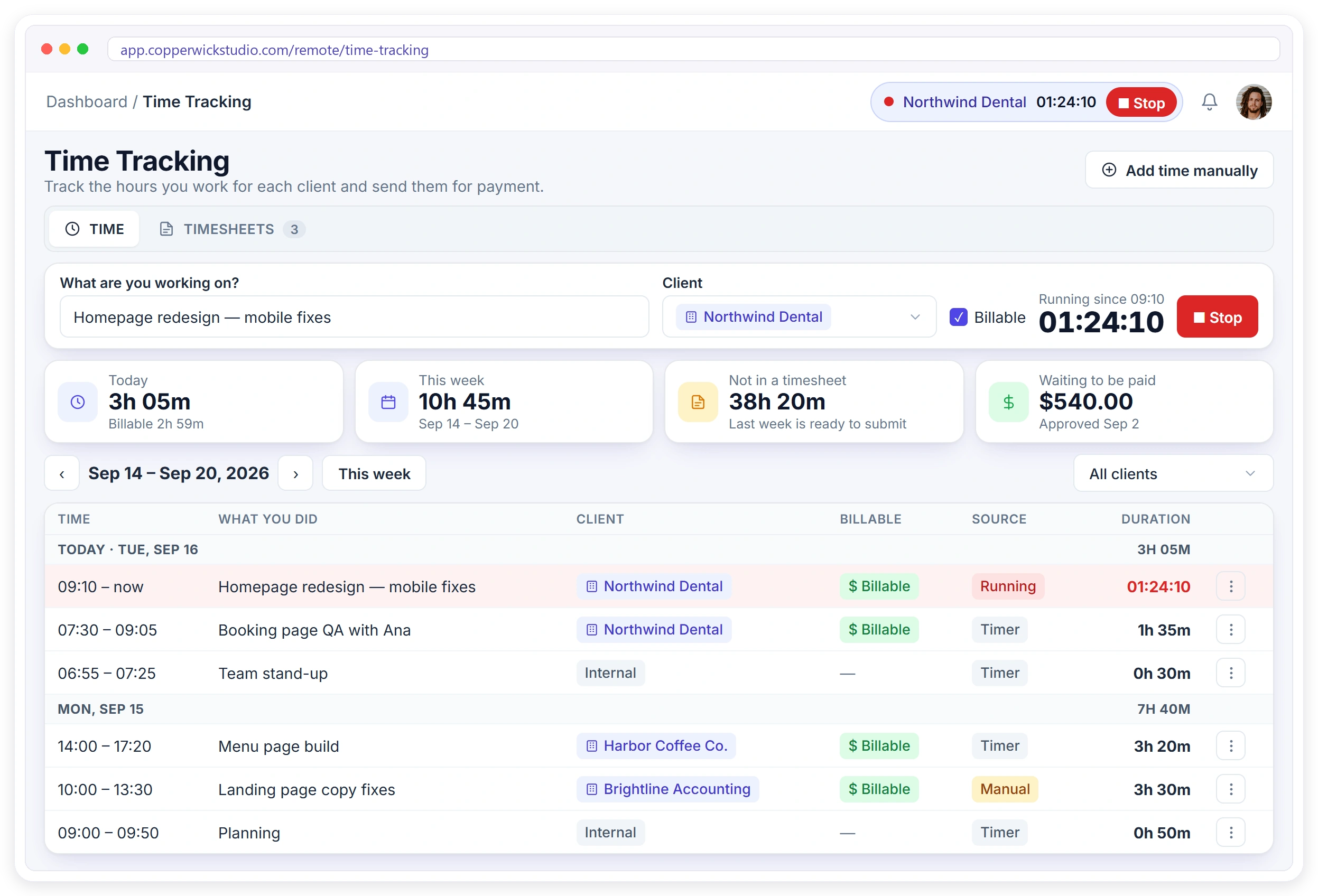
You and the members you enable get a Time Tracking item in the sidebar; members also get a Timesheets tab for pay. Nothing else in the dashboard changes, so tracking hours takes a few seconds and never gets in the way of the work.
- Today, this week, billable and this month at a glance
- The running timer shows in the top bar
- Every entry shows the client, whether it’s billable, and its source
- Entries can be edited until they’re submitted

Clients Approve Hours Before You Invoice
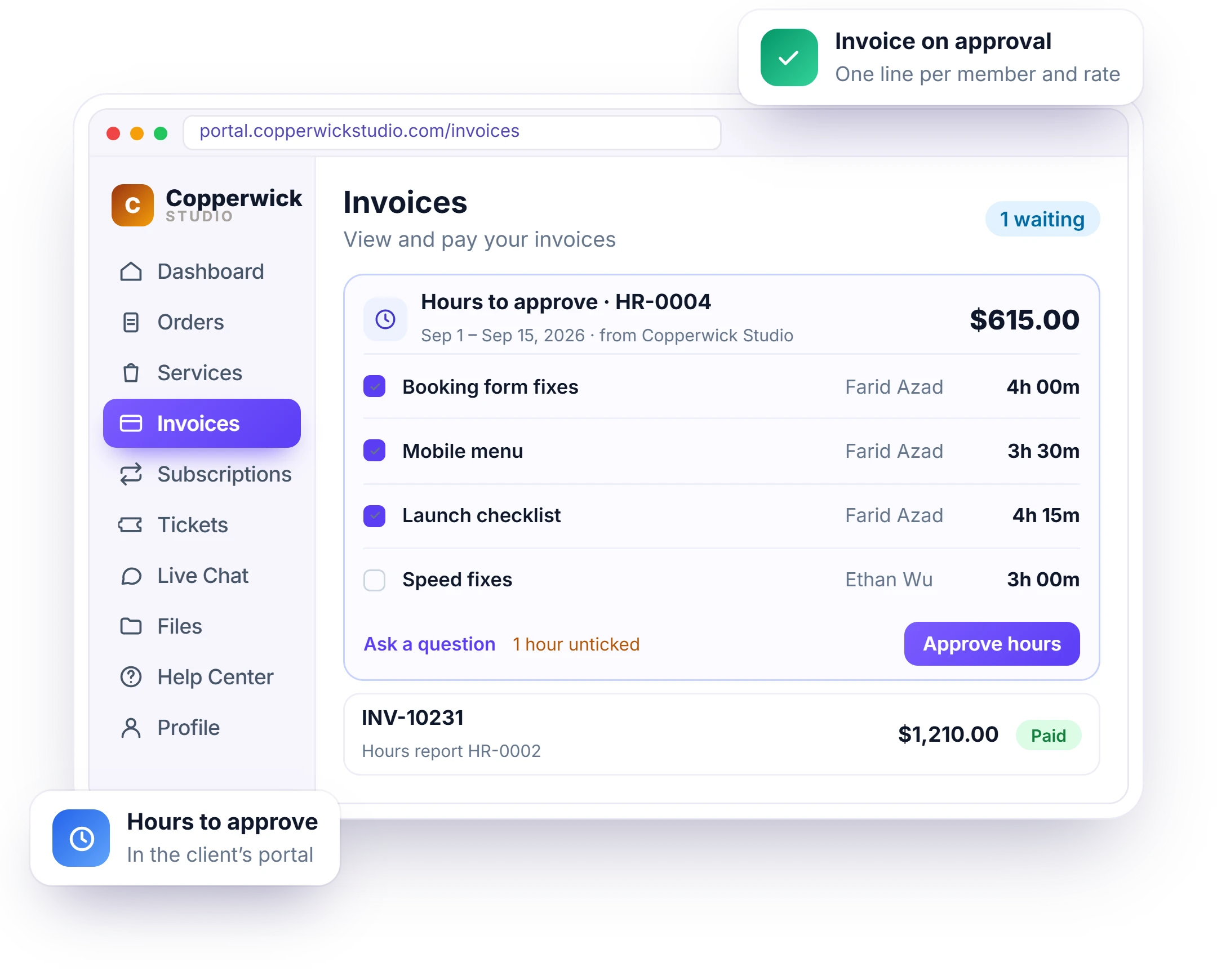
Send an hours report from the client’s profile. The client reviews it in their portal, then approves it, asks a question or unchecks hours. The invoice is created only when they approve.
- Clients see an “Hours to approve” box on their Invoices page
- One invoice line per member and rate
- Paid the normal way, like any other invoice
- Internal time is never billed
Pay Members From Approved Timesheets
Members submit their logged time as a timesheet. You approve it, send it back, or the member withdraws it while it’s waiting. Once approved, you mark it paid.
- Approval is blocked while any hour has no pay rate
- A sent-back timesheet unlocks, and the history stays
- Approved timesheets freeze their totals
- Members only see pay if you allow “See own pay”


Separate Rates for Billing and Pay
Give each client an hourly rate, override it for a particular member if you need to, and set each member’s own pay rate. Every rate has a start date.
- Hourly rate per client
- Optional per-member rate for that client
- The member’s own pay rate
- Locked entries keep the rates they had
See Hours, Billing and Margin Together
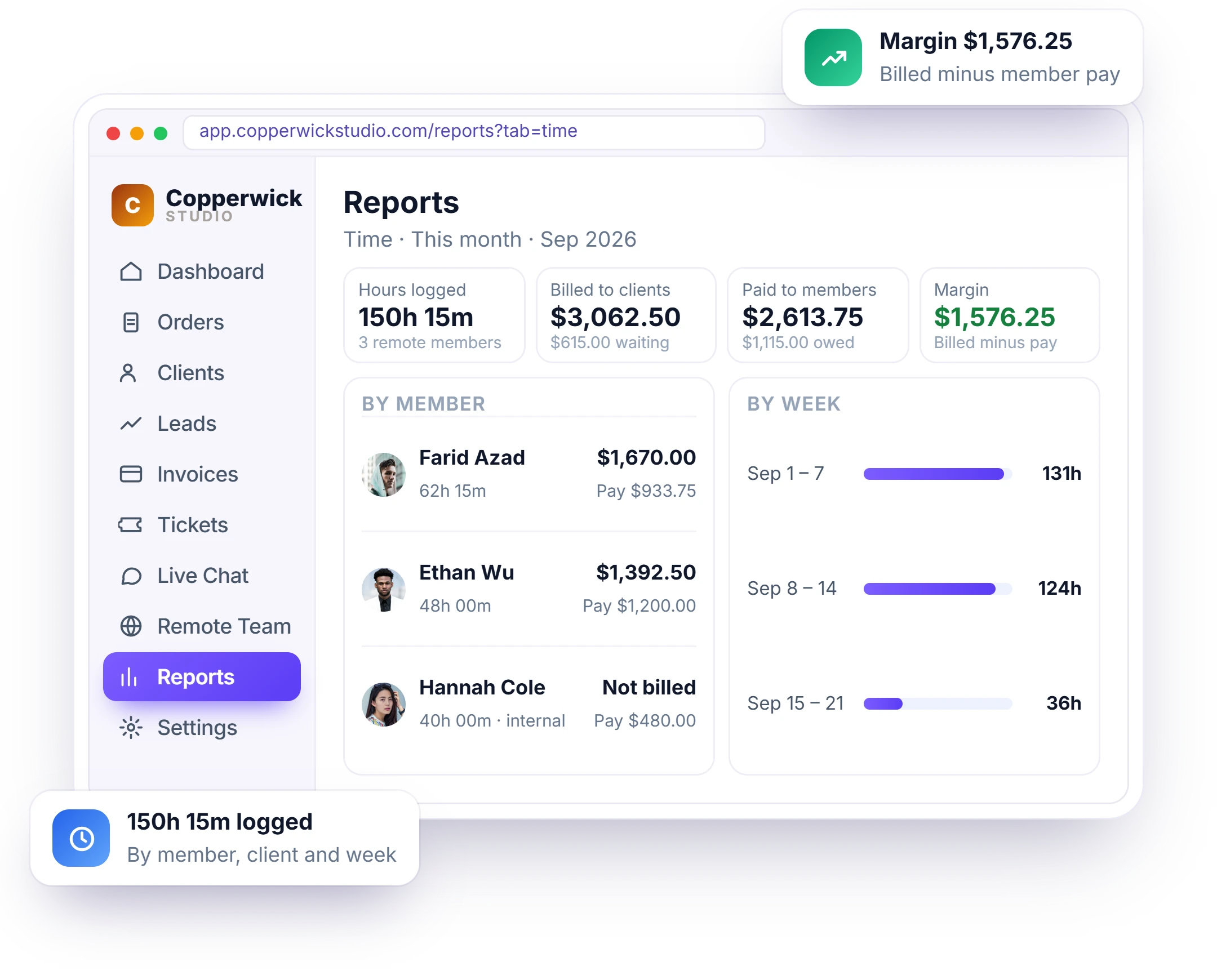
The Time report shows hours logged, what was billed to clients, what was paid to members, and the margin between them, so you can see which clients and which members make the hourly work worth doing.
- Breakdowns by member, by client and by week
- An Hours tab on every client profile
- Everyone’s week on the Time Tracking Team tab
- Members never see client billing rates
Rules That Keep Timesheets Accurate
Simple rules are built in so the hours you bill and the hours you pay are the hours that were really worked, without you checking every entry manually or chasing members about a forgotten timer.
One Timer at a Time
Starting a new timer stops the one that’s already running.
Auto-Stop at 8 Hours
A timer left running stops itself after 8 hours and is marked.
Locked When Submitted
Entries lock once sent for approval, so totals can’t change.
Manual Entries Marked
Hand-typed time is labeled, so you can see what wasn’t timed.
Time Tracking for Agencies FAQ
Straight answers about agency time tracking: who can use the timer, billable and non-billable hours, how clients approve hours before an invoice, paying team members, and what it costs on each plan.
What is agency time tracking?
It’s recording the hours your team spends on each client, so you can pay people fairly and bill clients for the hours they owe. Here it covers you, your co-admins, your team and your remote members, with pay and client billing kept separate.
What is the difference between billable and non-billable hours?
Billable hours are client work you can charge for. Non-billable hours are everything else: planning, admin, internal meetings. Members log the second kind as Internal work, which is paid but never sent to a client.
How do clients approve hours before they are invoiced?
You send an hours report from the client’s profile. The client sees it under Hours to approve in their portal, then approves it, asks a question or unchecks hours. The invoice is created only once they approve, which heads off billing disputes.
Who can use the timer?
You, on every plan including Solo, and your co-admins. Team members can use it from Starter and remote members from Growth, once you turn it on for them, and each gets a Time Tracking item in their sidebar.
Is time tracked against orders or tasks?
No. Each entry is logged against a client or as internal work, with a short description of what was done, so hours roll up by client for billing and pay rather than by order or task.
Can members add time manually?
Yes. A manual entry can be up to 24 hours, can’t overlap another entry, and is marked as manual so you can see it wasn’t timed.
What if someone forgets to stop the timer?
The timer stops itself after 8 hours and the entry is marked as auto-stopped, so a timer left running overnight never turns into a full day on a client’s hours report.
When is the client invoiced?
Only after the client approves the hours report in their portal. The invoice is then created with one line per member and rate, and the client pays it like any other invoice.
Can members see what clients are billed?
No. Members never see client billing rates, and without the “See own pay” permission they don’t see their own pay amounts either, so rates stay between you and the client.
Does it take screenshots or watch members’ screens?
No. There are no screenshots, activity levels or location tracking. Hand-typed entries are labeled, timers stop themselves after 8 hours, and you review every timesheet before it’s approved.
How much does time tracking cost?
Your own time tracking is included on every plan, from Solo at $9.99 a month. Team members can track time from Starter at $29, and remote members from Growth at $49. Pricing is per agency, not per tracked user, and the trial includes it.
Bill the hours your clients approve.
Track your own hours, turn the timer on for your team, pay members from approved timesheets and send each client an hours report to approve in your portal before it becomes an invoice. Try it with example data first.
- A client or Internal label
- A billing rate and a pay rate
- A place on a timesheet
- Client approval before the invoice
- A line on the Time report
- No screenshots, ever
Every feature unlocked in the trial. Pick a plan only when you’re ready.