
Form Builder With Conditional Logic for Agencies
A form builder with conditional logic shows each person only the questions that apply to them, based on what they already answered. Build order, contact, intake and onboarding forms that work this way, and every submission is filed as an order, a lead or a project brief instead of another email. From $9.99 a month.
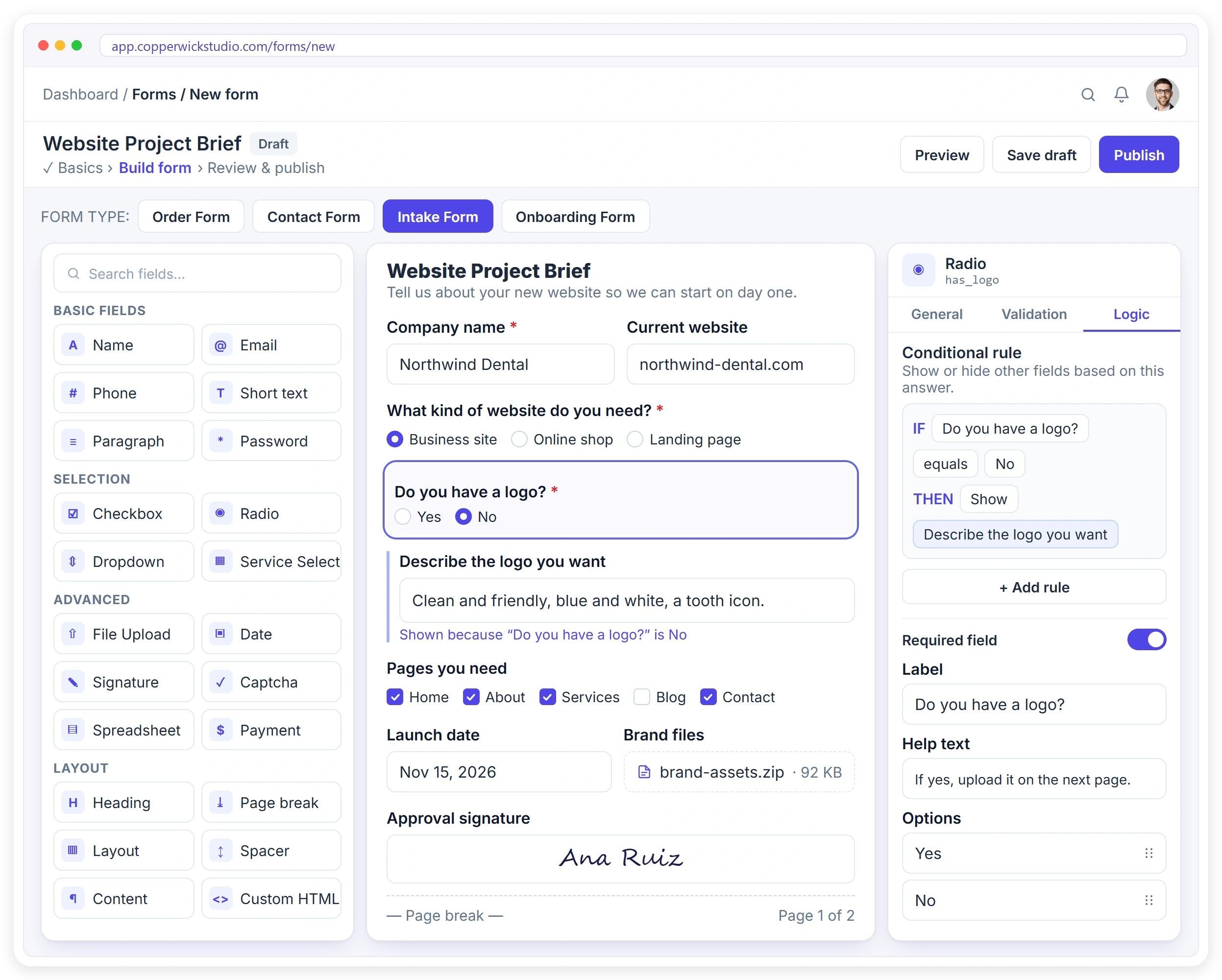
Every Form Knows Where Its Data Belongs
Pick the form type and each submission goes straight to the right place in your workspace, so nobody copies answers from an inbox into another tool or loses a brief along the way.
Order Form
Sell a service and take payment. Each order creates the client, the order, the invoice and their portal login.
Contact Form
Turn website inquiries into leads with a follow-up date, a private chat link and, from Starter, an owner on your team.
Intake Form
Collect the project brief before work starts. The answers are saved on the order for your team.
Onboarding Form
Gather logins, brand files and kickoff details from new clients before work starts.
Replace Your Form Stack
Forms, payment links, inboxes and spreadsheets that never talk to each other, swapped for one builder where every answer lands in the right place.
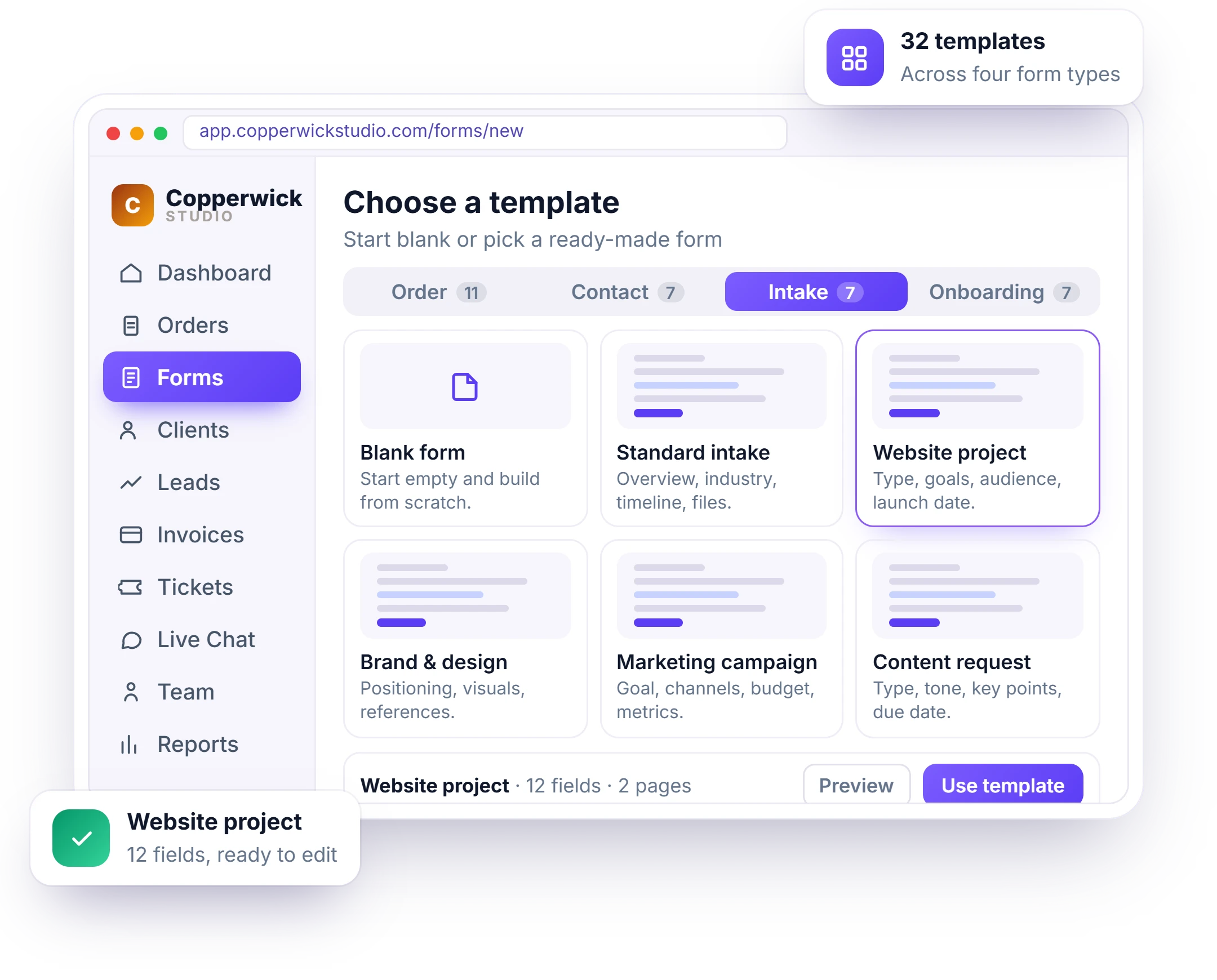
Start From 32 Ready-Made Forms
Every form type comes with templates you can use as they are or change field by field: 11 order forms, 7 contact forms, 7 intake forms and 7 onboarding forms.
- Order: quick checkout, subscription, booking, retainer
- Contact: request a quote, book a call, feedback, job application
- Intake: website, brand, marketing campaign, software project
- Onboarding: client kickoff, SEO, website launch, content program
Show Your Services the Way You Want
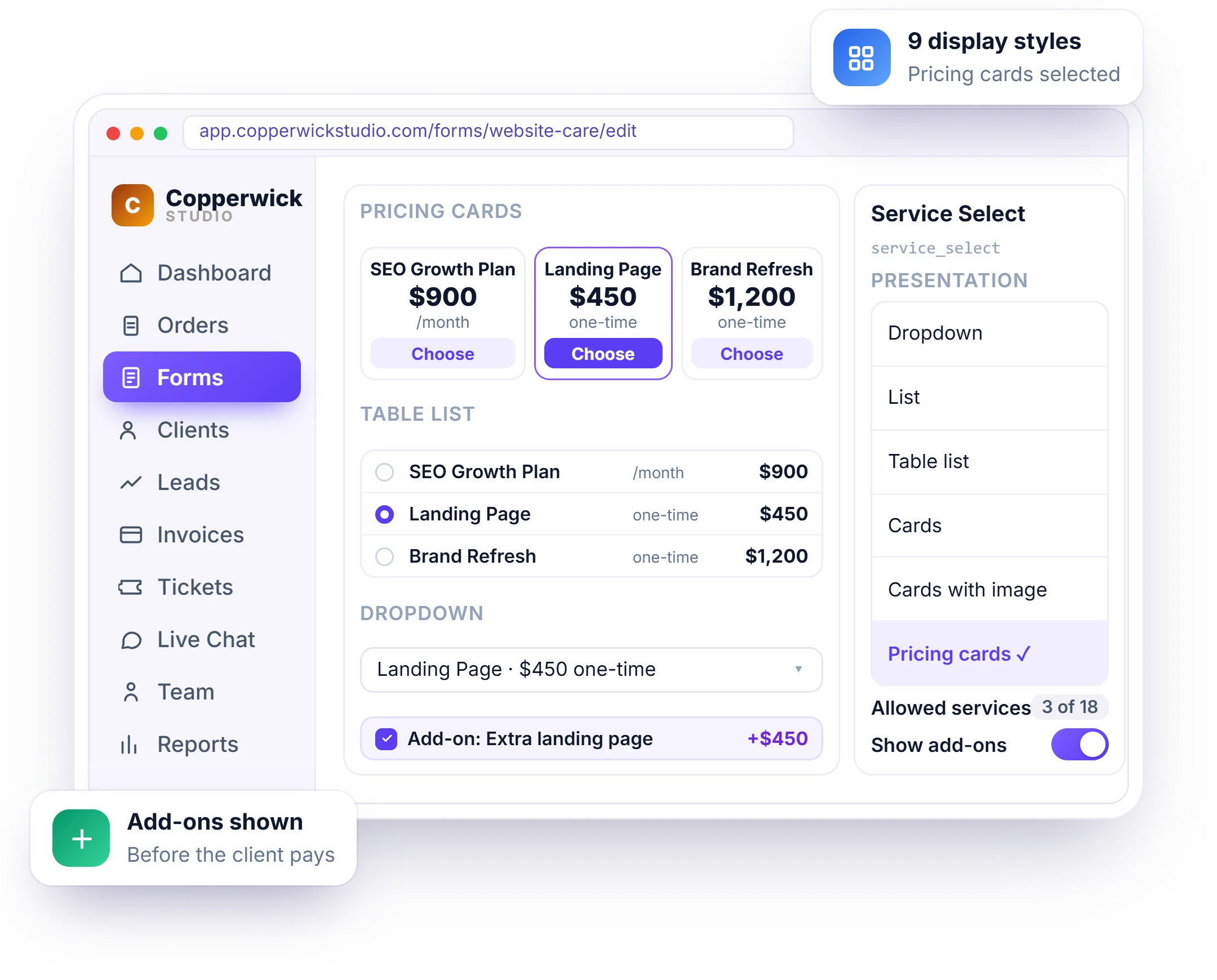
Pick which services each form sells and how clients see them: a simple dropdown, a table, cards with images or pricing cards. Turn add-ons on and clients can add extras before they pay.
- 9 styles: dropdown, list, table, cards, icons, images, pricing cards
- Choose exactly which services each form offers
- Optional add-ons shown with each service
- Monthly and one-time prices shown clearly
Show the Right Questions, Get Complete Answers
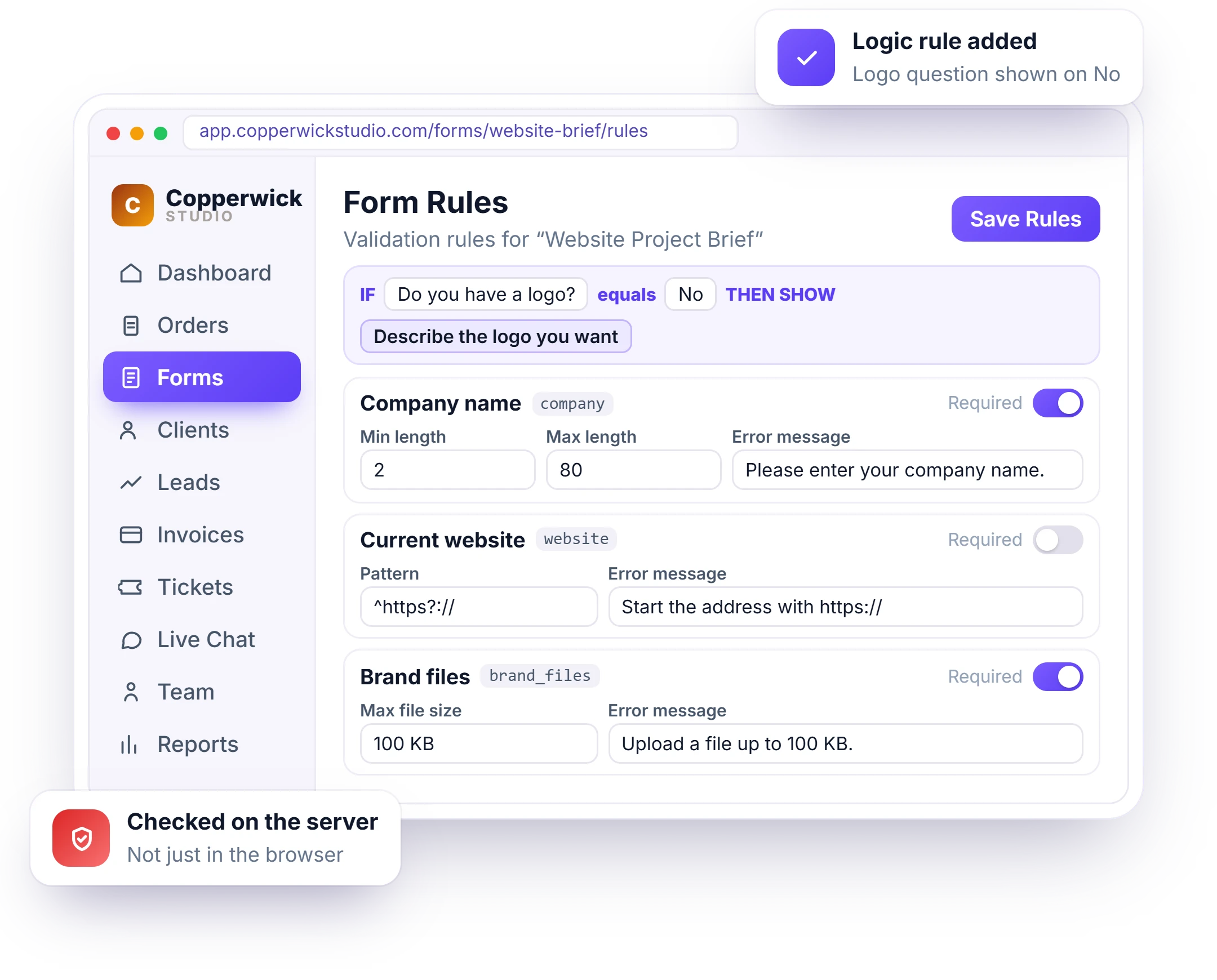
Conditional logic shows or hides a question based on an earlier answer, so a website brief never asks about ads and a short inquiry stays short. Set the rules for every field on one page too: required or optional, length limits, patterns and your own error messages, checked again when the form is sent.
- Show or hide fields based on earlier answers
- Page breaks for long forms, one step at a time
- Required fields, length limits and patterns
- File size limits up to 100 KB a file
- Error messages written in your own words
- Rules checked again on the server, not just the page

Inquiries Become Leads, Not Emails
When someone fills out your contact form, a lead is created with their answers. You get an email and an in-app alert, they get a confirmation, and a private chat opens so the conversation continues in one place.
- Lead created with every answer attached
- You’re alerted by email and in the app
- The sender gets a confirmation email
- A private chat link keeps the conversation going
Every Brief Attached to Its Order
Attach an intake or onboarding form to a service. The client fills it out from their portal, the order stays Pending until they do, and every answer and file is saved on the order for your team.
- One intake or onboarding form per service
- Order waits in Pending until the form is complete
- Answers and files saved on the order
- Clients can update their answers while the order is Pending

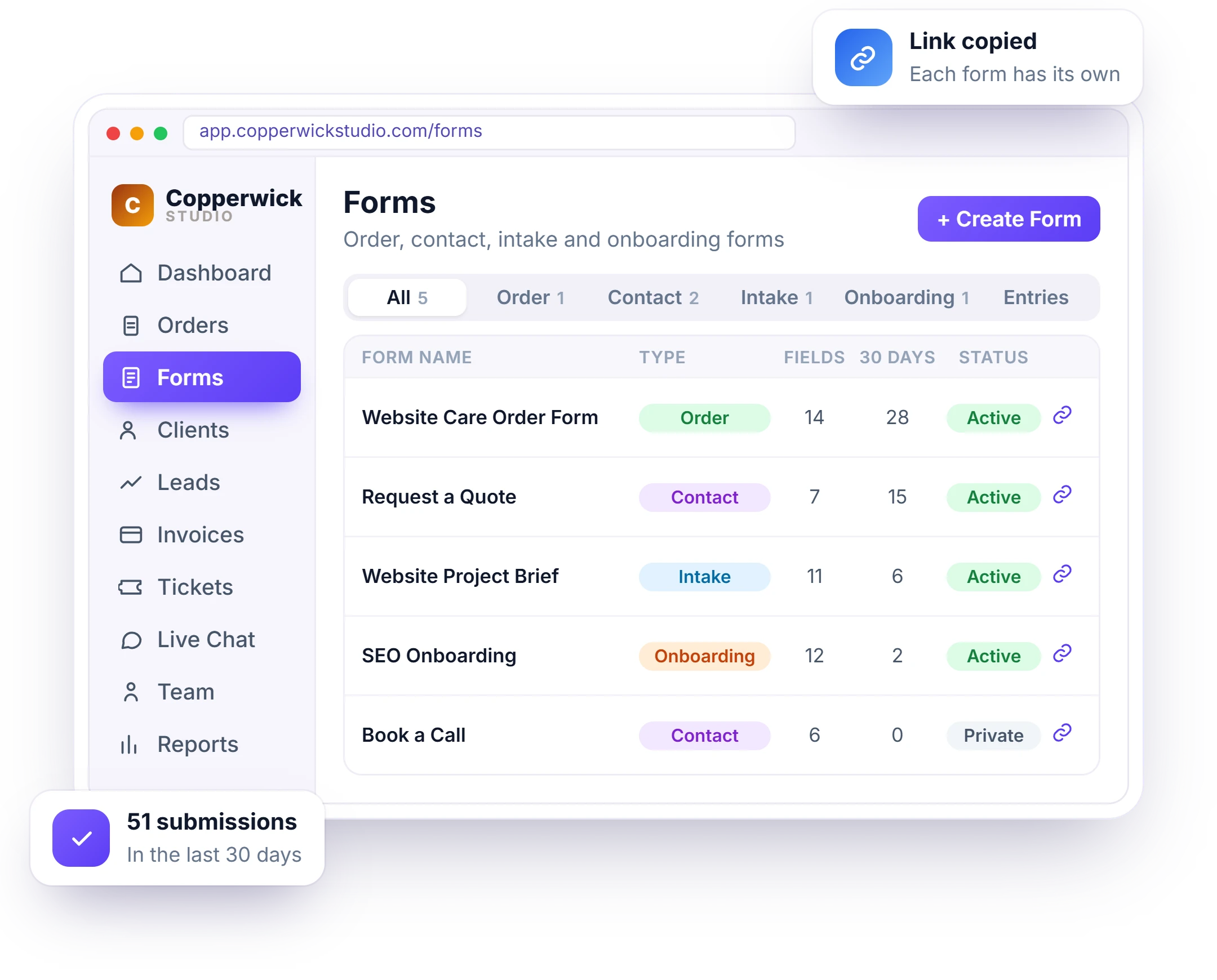
Every Form in One Place
See every order, contact, intake and onboarding form with its status, link and number of fields. Share a link, duplicate a form, make it private or change its rules in a click.
- Tabs for each form type
- Share, duplicate, edit or make private
- Each form on its own public link
- Submissions in the last 30 days at a glance
Every Submission Linked to Its Record
The Entries tab lists every submission from every form: who sent it, which form they used and the order or lead it created, one click away.
- Order entries linked to the order
- Contact entries linked to the lead
- Filter by form type and search
- Search every submission in one list

Built Around Real Client Work
The details that make forms useful for an agency and not just a survey tool: signatures, payments, coupons, spam protection and fields that keep logins out of sight.
Signature & Agreement
Show your terms and let clients draw or upload a signature before submitting.
File & Spreadsheet Uploads
Collect briefs, reference files and table-style data with the submission.
Payment Fields
Let clients pay through your payment methods, including bank transfer.
Coupons
Show a coupon row on order forms and apply your discount codes at checkout.
Spam Protection
Add a captcha to contact, intake and onboarding forms to stop automated spam.
Multi-Page Forms
Split long forms into pages with page breaks so clients answer step by step.
Your Thank-You Message
Show your own title and message after someone submits a form.
Conditional Logic
Show or hide questions based on earlier answers, and split long forms into pages.
Book a Call
Add a Calendly field so people can pick a meeting time inside the form.
Order From the Portal
Existing clients can use the same form from inside their client portal.
Hidden & Secret Fields
Pass hidden values with each submission, or collect passwords and logins safely out of view.
Email Opt-In
Ask for newsletter consent with a checkbox that’s saved with the answers.
“The answers you need shouldn’t arrive across five emails. So a form shows each client only what applies, and every answer is saved on the order for your team.”

Founder & CEO, Clientish
Form Builder With Conditional Logic FAQ
Straight answers about conditional logic, form types, where answers go, files, spam and what the form builder costs.
What is conditional logic in a form?
It’s a rule that shows or hides a question depending on an earlier answer. Pick Website in a project type field and the website questions appear; pick Branding and they stay hidden, so every client answers a shorter, cleaner form.
What are the four form types?
Order forms sell a service and take payment. Contact forms turn inquiries into leads. Intake forms collect a project brief before work starts, and onboarding forms gather what you need from a new client.
Where do submissions go?
Order forms create the client, order and invoice. Contact forms create a lead. Intake and onboarding answers are saved on the client’s order. Every submission is also listed under Entries.
How do I share a form?
Each form has its own public link. Put it behind a button on your website, in an email, a social post or a chat.
Can I start from a template?
Yes. There are 32 ready-made templates across the four form types, plus a blank form for each.
Can clients upload files in a form?
Yes, through file fields, up to 100 KB a file, which suits logos, short briefs and documents. For bigger files, ask for a Google Drive or Dropbox link in a text field instead.
How does the form stop spam?
Turn on a captcha for contact, intake and onboarding forms, and the field rules are checked again on the server, so a bot that skips the page still can’t send an empty or broken form.
Is there a limit on how many forms I can create?
No. Every plan includes unlimited forms, so you can build a separate order, contact, intake or onboarding form for each service, campaign or client type.
How much does the form builder cost?
The form builder, conditional logic and all four form types come with every Clientish plan, from $9.99 a month; contact forms create leads on every plan too. Try it free for 14 days.
Ask the right questions, file every answer.
Start from one of 32 templates, add conditional logic so each client sees only what applies, and share one link. Answers arrive as orders, leads or briefs. Try it with example data first.
- Conditional logic and page breaks
- Rules checked on the server
- Signature and agreement fields
- Captcha against spam
- A public link to share
- Answers filed where they belong
Every feature unlocked in the trial. Pick a plan only when you’re ready.