
Agency Invoicing & Billing Software, Send Invoices and Get Paid Faster
Invoicing software creates, sends and tracks the bills you send clients and collects the payment. Clientish gives your agency invoices built from your orders and services, payment links for Stripe, PayPal, Razorpay, Mollie and more, reminders before the due date, deposits and refunds, from $9.99 a month.
Billing That Runs Itself
From the first invoice to the final payment, every step is tracked and every client knows exactly where they stand. Fewer “did you get my invoice?” emails, and fewer invoices that quietly go unpaid.
One-Click Invoices
Turn any order into an invoice with line items, tax and discounts pre-filled.
Payment Links
Share a secure link; clients pay through Stripe, PayPal, Razorpay, Mollie and other gateways, or by bank transfer.
Status at a Glance
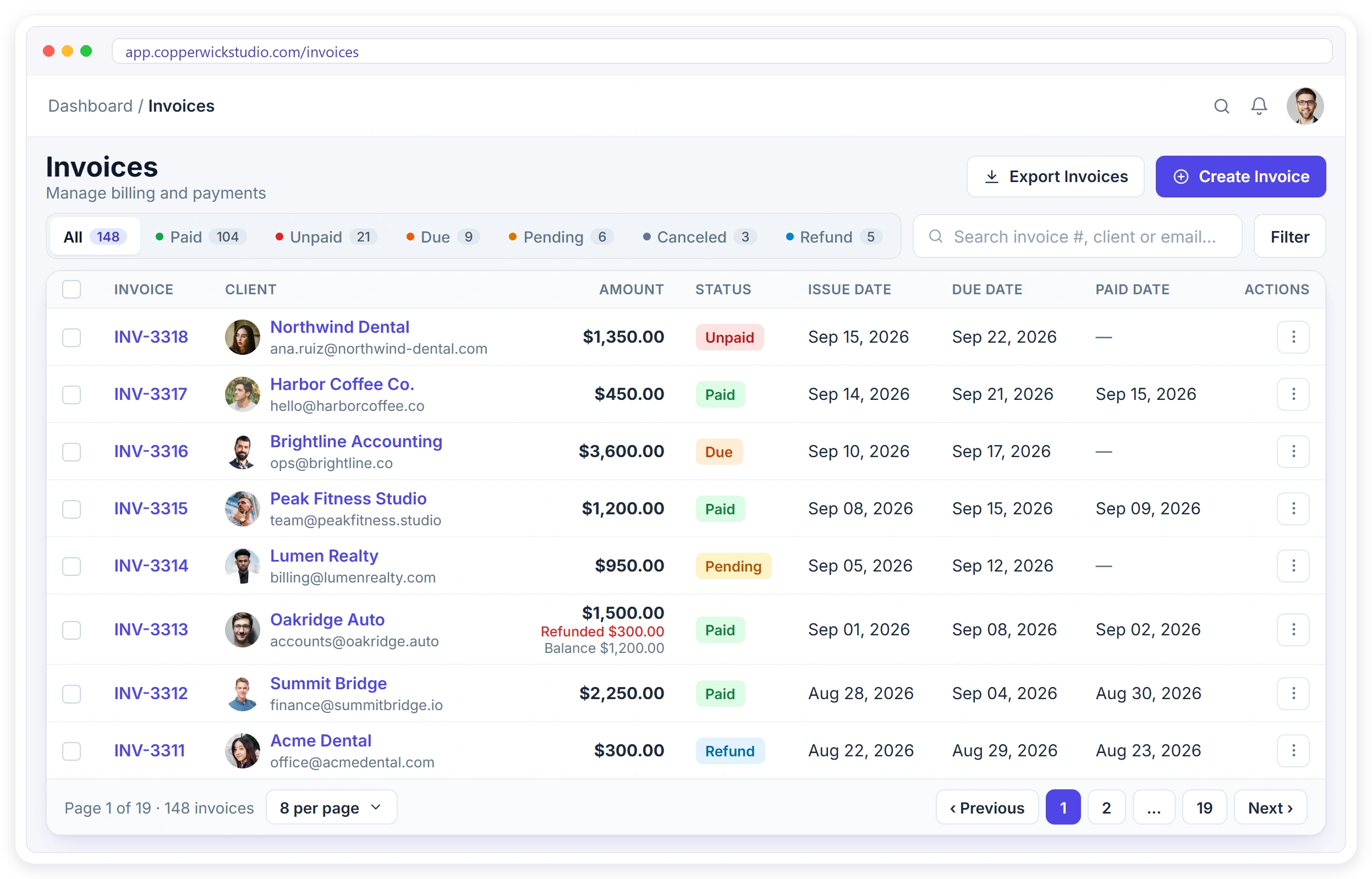
Tabs for paid, unpaid, due, pending, canceled and refunded, with counts.
Refunds Handled
Full or partial refunds, with the reason kept on the invoice.
Search and Filters
Find any invoice by number, client, email, date, currency or amount.
Bulk Actions
Select many invoices to mark paid or unpaid, email them or delete them.
PDF and Email
Download a branded PDF or send the invoice straight to the client.
Full History
Every edit, payment and refund on an invoice is recorded with who did it.
From Order to Paid
The whole billing loop in one place: create the invoice, send it with a payment link, let the client pay online and track what’s still due, without a spreadsheet or a second tool on the side.
Create the Invoice
Pick a client, add items from your services or type them, set the due date.
Send It
Email it with a payment link, or copy the link and share it yourself. A reminder can go out before it’s due.
Client Pays
The client pays online, and the invoice is marked paid automatically.
Track and Refund
See what’s due or overdue, and refund in full or in part when needed.
Create an Invoice in One Page
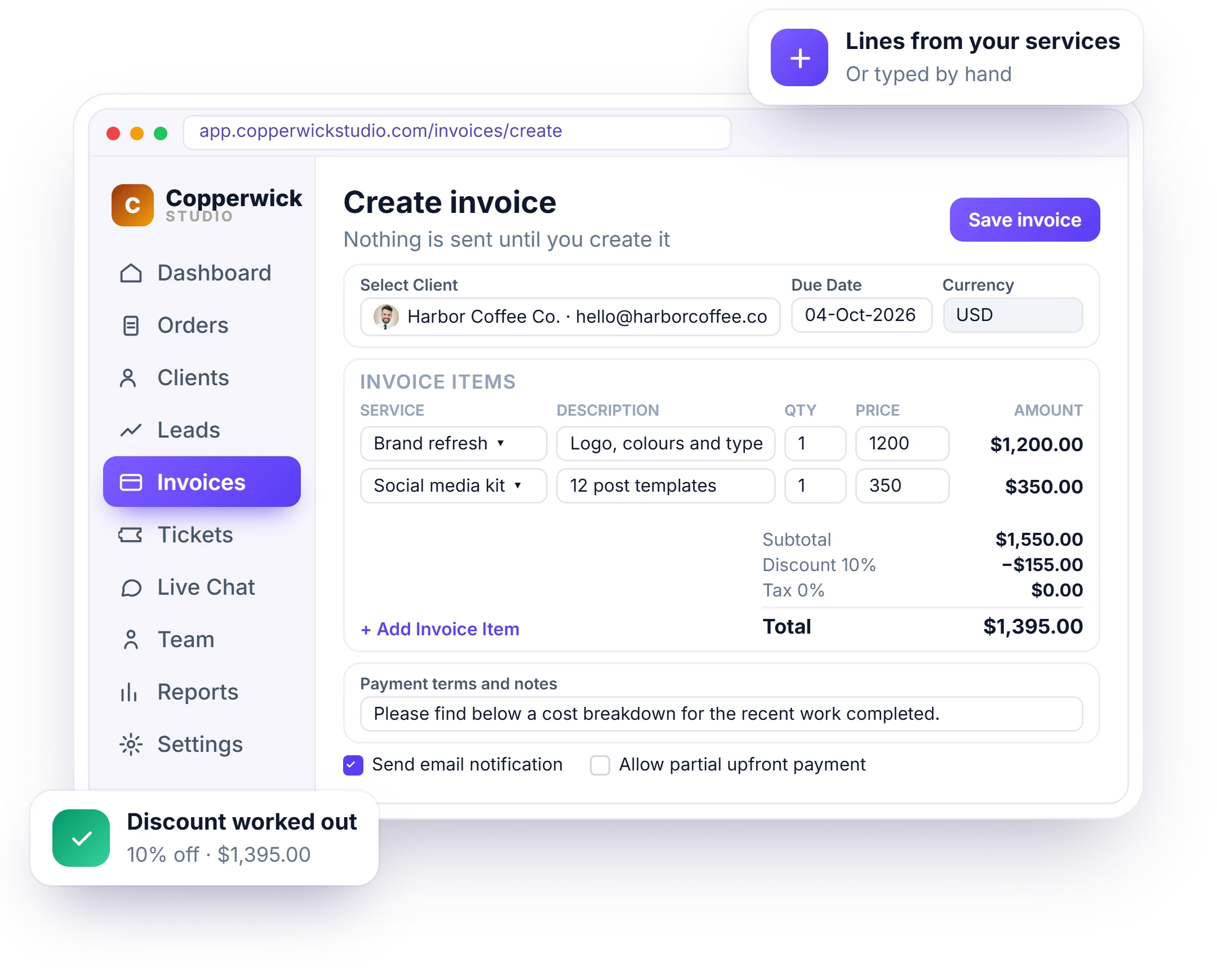
Pick the client, set the due date, and add lines from your service catalog or type them in. Discounts and tax are calculated for you.
- Line items from your services or free text
- Quantity and price per line
- Discount, tax and payment terms
- Send it to the client the moment you save
Update Many Invoices at Once
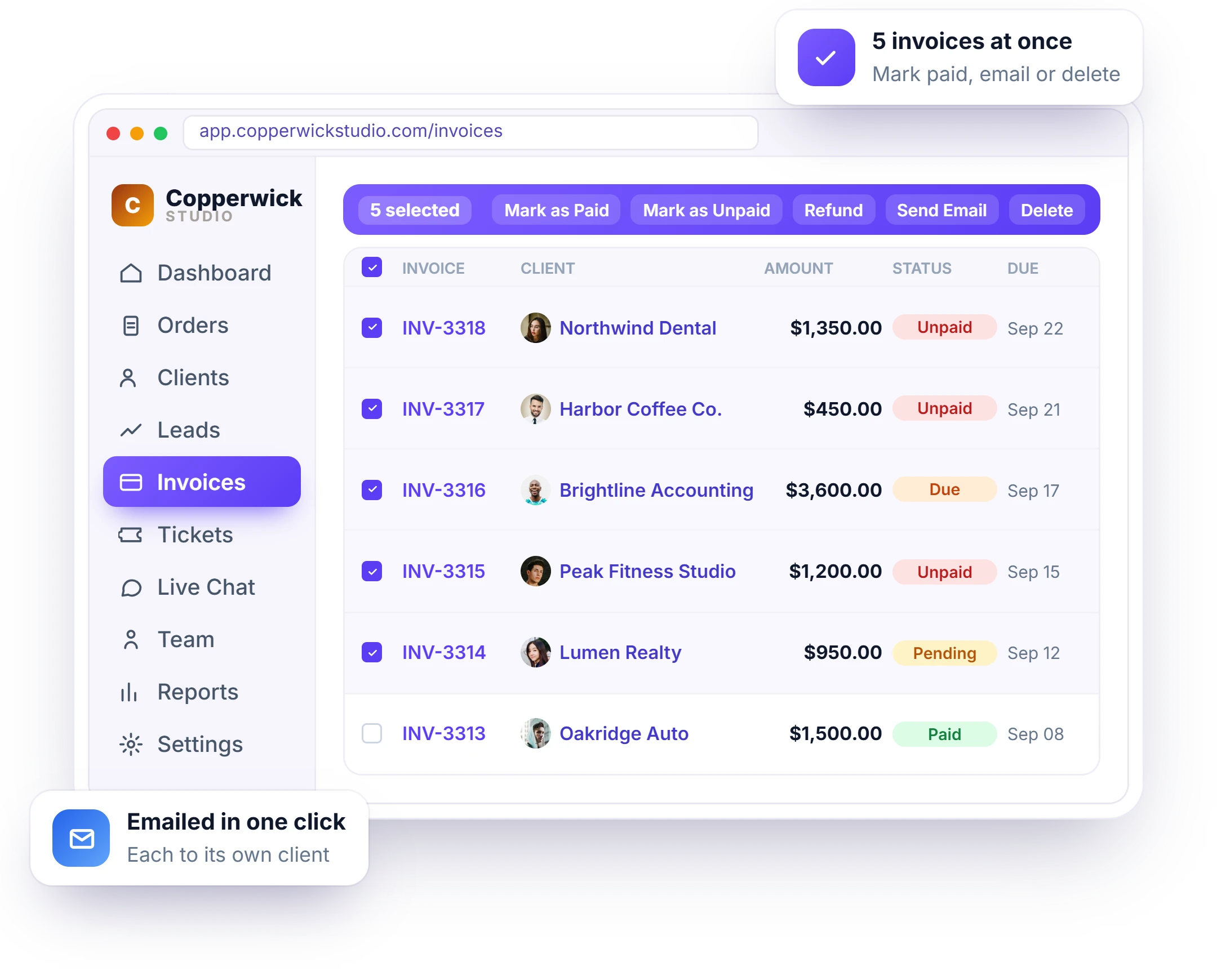
Select the invoices you need and act on all of them at once, instead of opening each one. End-of-month cleanup that used to take an afternoon now takes a few clicks.
- Mark as paid, unpaid or refunded
- Email every selected invoice to its client
- Delete in bulk, with a confirmation first
- Works with the status tabs and filters
Every Line Item and Payment, On One Page
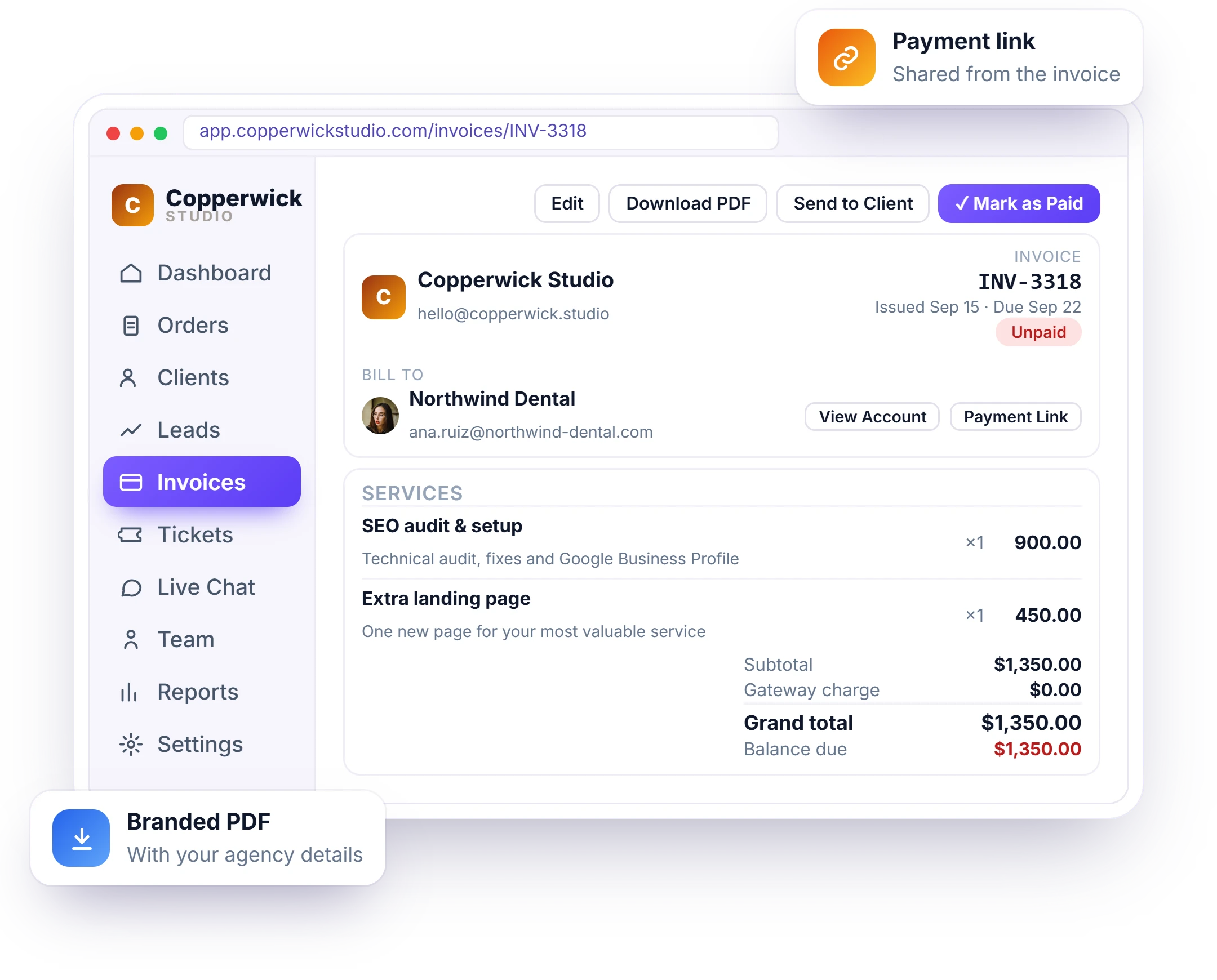
Open an invoice and see the full picture: your agency details, who’s billed, itemized charges, totals, the linked order and the activity trail. When a client asks about a charge, the answer is already on the screen.
- Branded header with your agency details
- Itemized charges, gateway fees and balance due
- Jump straight to the client account or payment link
- Related orders and the invoice’s own history
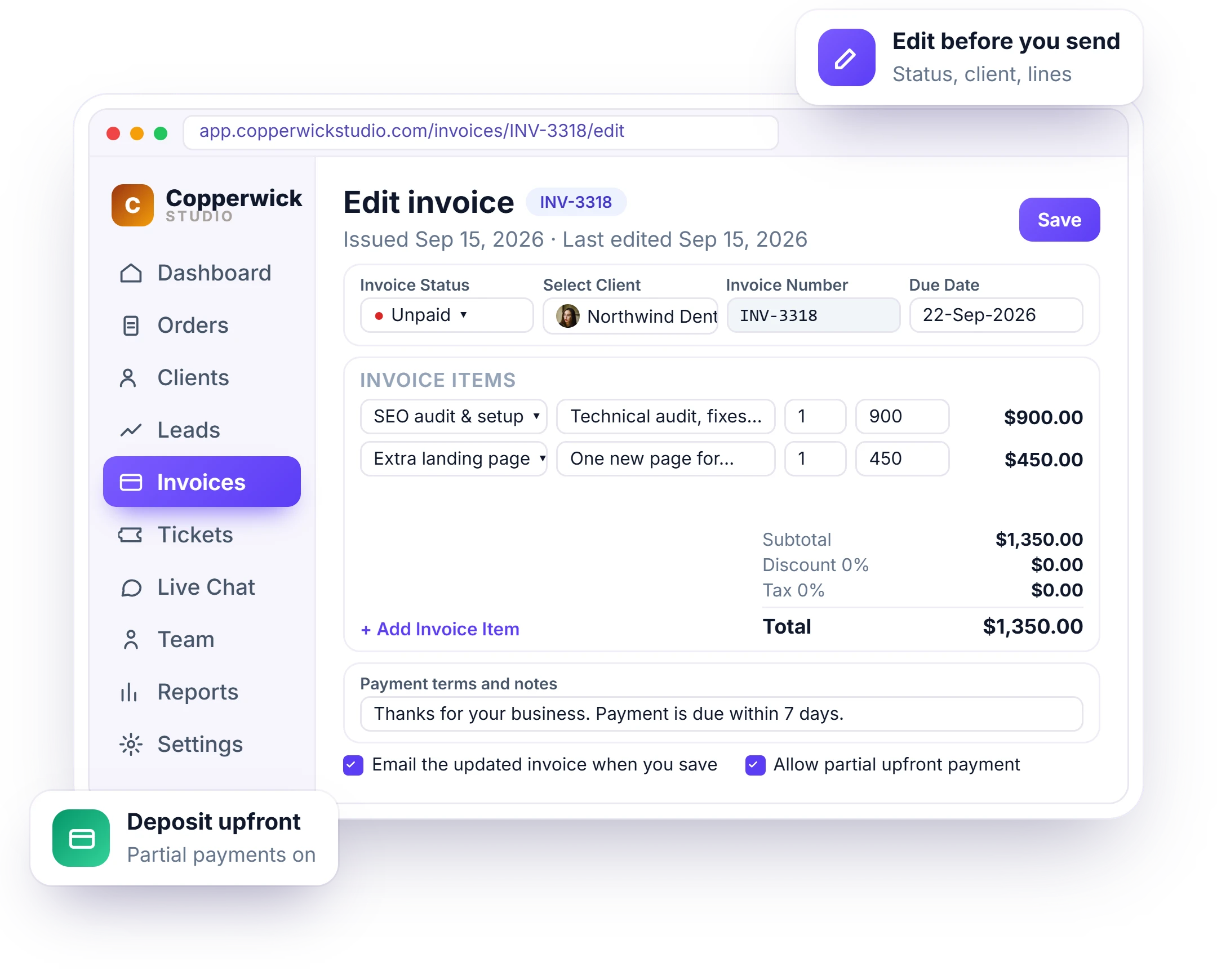
Adjust Any Invoice Before You Send
Change the status, swap the client, edit line items, apply a discount or tax and add payment terms, then notify the client automatically when you save.
- Add line items from your service catalog
- Percentage discounts and tax calculated for you
- Collect a deposit upfront with partial payments
- Email the updated invoice the moment you save
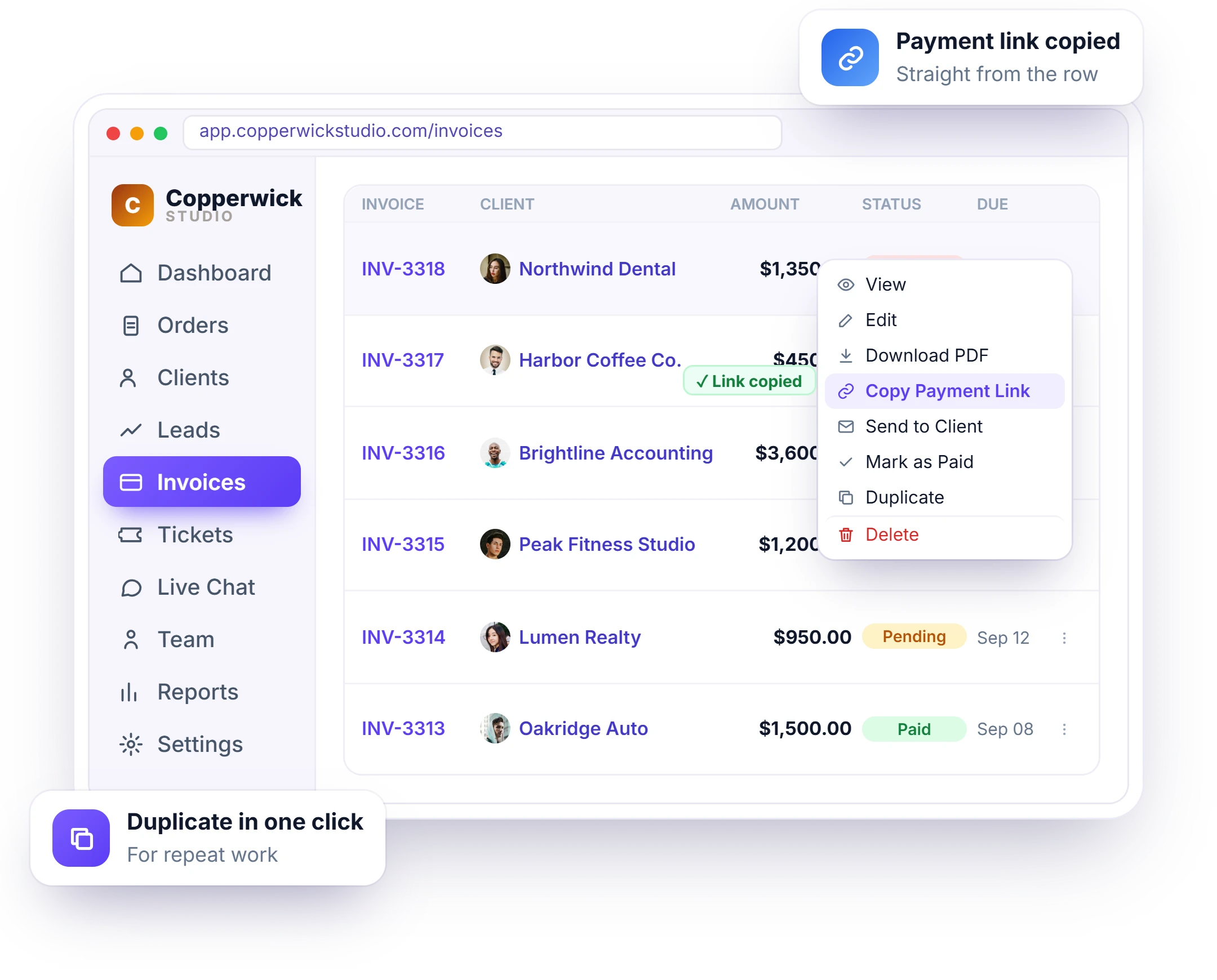
Everything an Invoice Needs, One Click Away
No digging through menus. View, edit, download, copy a payment link, email the client, mark it paid, duplicate it or delete it, straight from the row.
- View, edit or download the PDF
- Copy the payment link or send it to the client
- Mark as paid or duplicate in one click
- Refund appears only where there’s something to refund
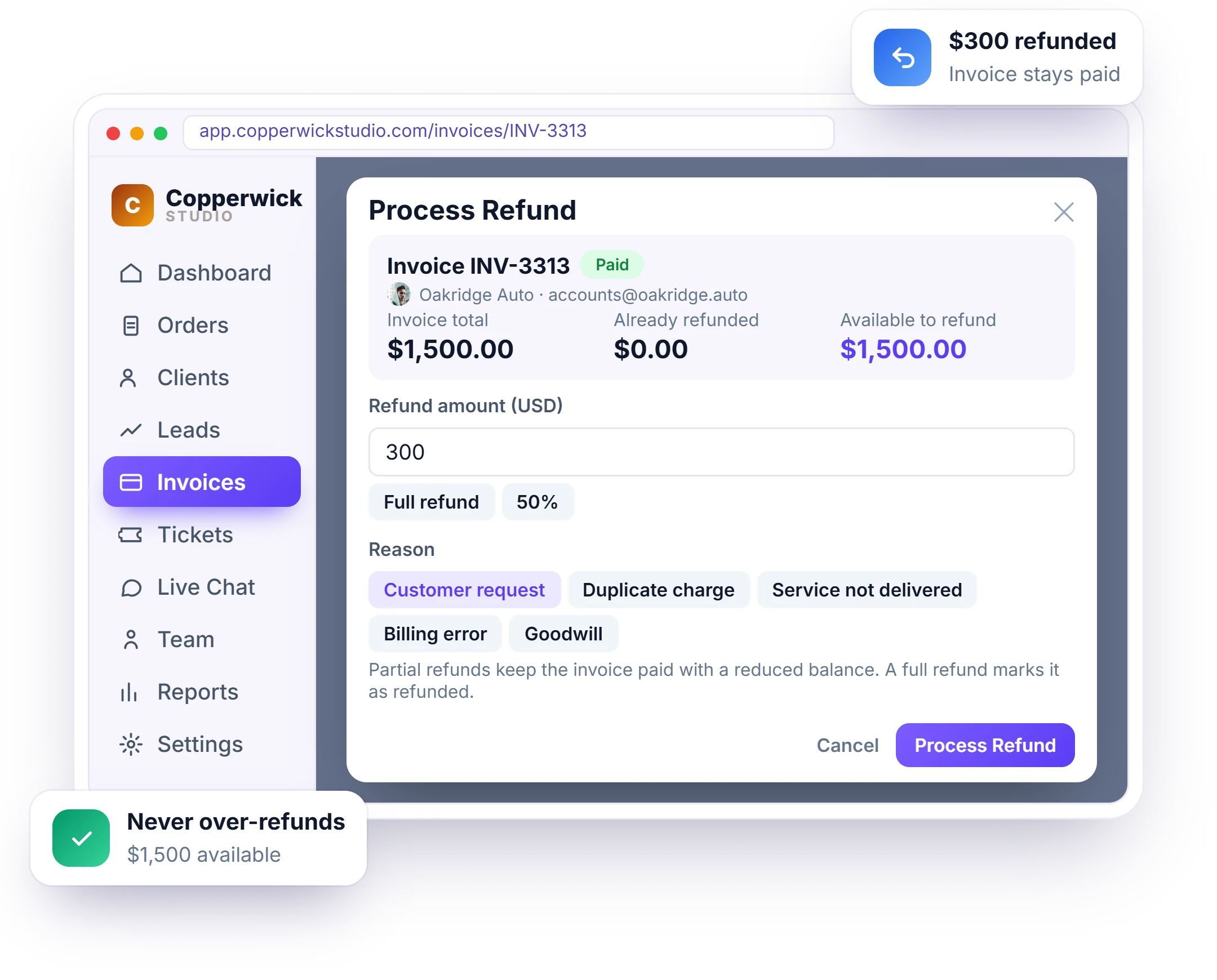
Refund in Full or in Part, With the Math Done
The refund dialog shows the invoice total, what’s already been refunded and what’s still available, then takes an amount and a reason. No calculator, and no refund that accidentally exceeds what was paid.
- Full refund or 50% in one click, or any amount
- Pick a reason or write your own
- A partial refund keeps the invoice paid with a smaller balance
- A full refund marks the invoice as refunded
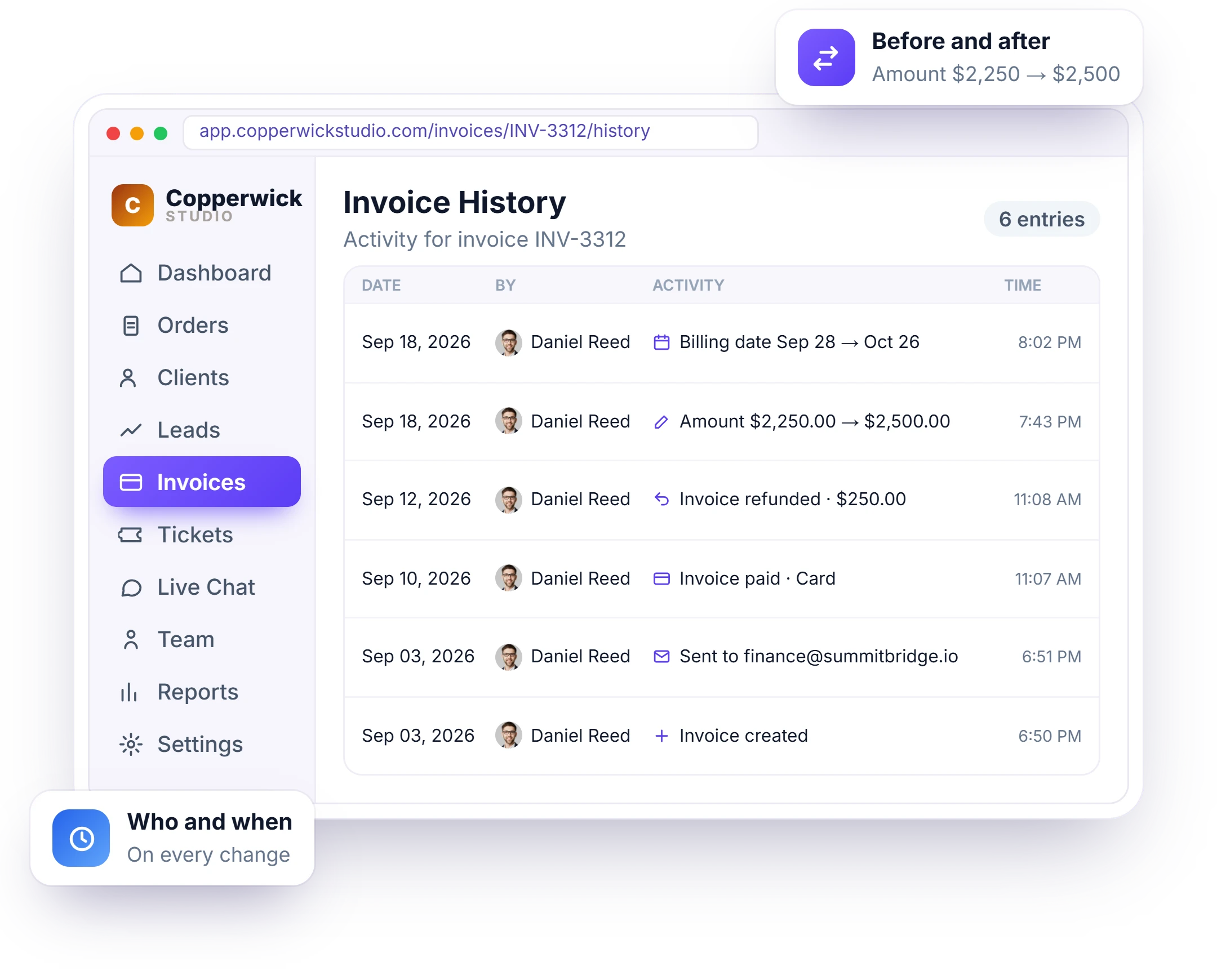
Every Change on an Invoice, Recorded
Each invoice keeps its own history: edits, payments, refunds and sends, with who did it and when. If a client or your accountant asks what happened, you can show them.
- Amount and billing-date changes shown as before and after
- Payments and refunds with their reference
- Who made each change, the agency or the client
- Open any entry for the full details
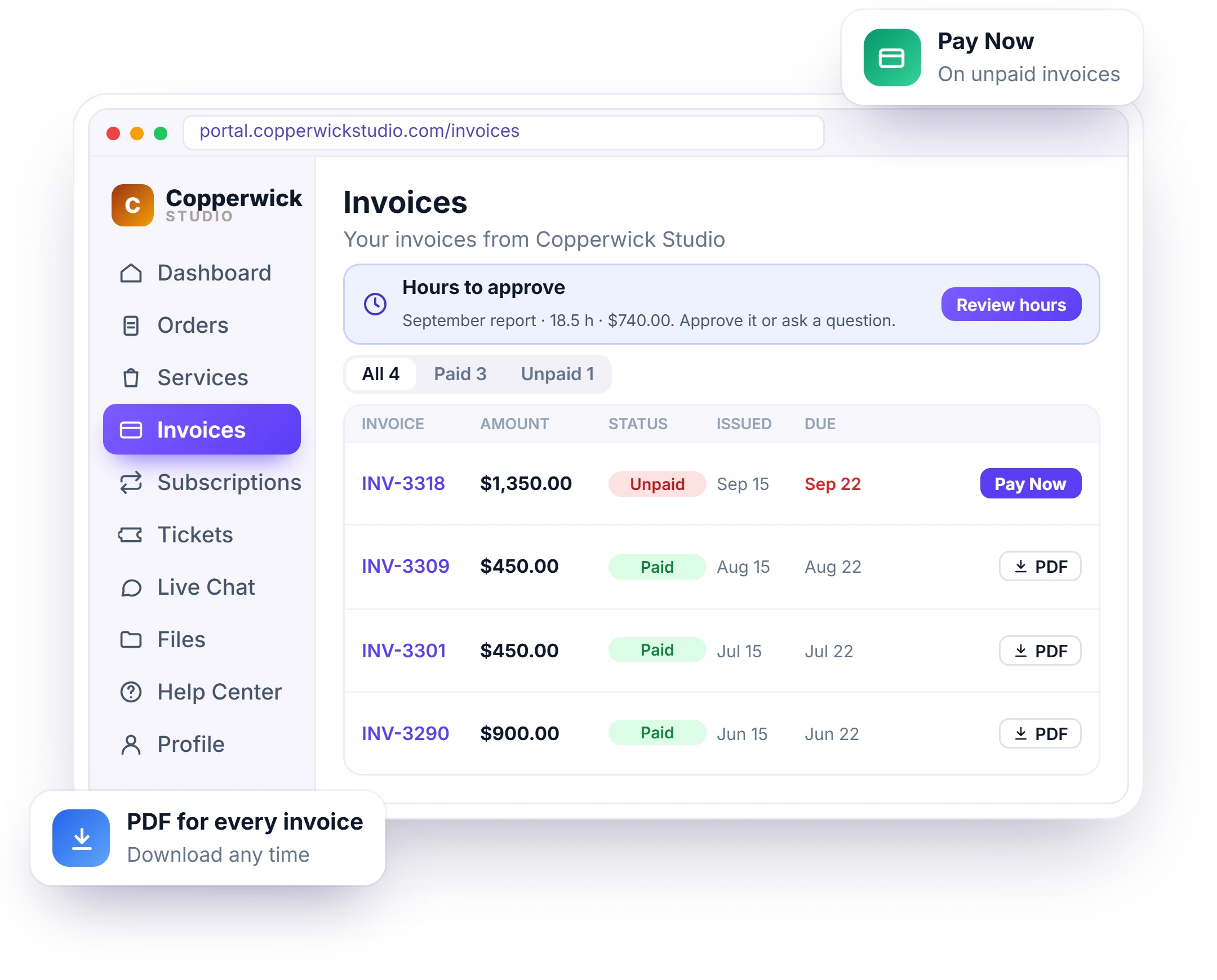
Clients See Their Invoices and Pay Online
In the client portal, clients get the same status tabs and figures, a Pay Now button on open invoices and a PDF for every invoice.
- Pay Now on unpaid and due invoices
- Download any invoice as a PDF
- Search and filter their own invoices
- Hours to approve shows here when a report is waiting
“You shouldn’t have to chase payments over email. So every invoice can go out with a payment link, a reminder can go out before it’s due, and you can see what’s due or overdue.”

Founder & CEO, Clientish
Invoicing FAQ
Straight answers about agency invoicing and billing: what it costs, how clients pay, reminders, deposits, refunds and accounting tools.
What is invoicing software?
It’s the tool that turns finished or ordered work into a bill: it adds up the lines, tax and discounts, sends the invoice to the client, takes the payment online and keeps a record of what’s paid, due or refunded.
How much does agency invoicing software cost?
Standalone invoicing apps range from free plans to paid monthly tiers, and agency suites often charge for every team member. Clientish starts at $9.99 a month and includes invoicing alongside orders and the client portal, and team plans start at $29 with 5 team members on Starter.
Is there a free version?
No. You get 14 days free with every feature, no credit card required, which is enough to send real invoices to real clients and watch the payments arrive before you choose a plan.
Does Clientish send payment reminders?
Yes. It can email the client before an invoice is due, and you choose how many days ahead, from 1 to 30. The reminder carries the same payment link as the invoice.
Does it connect to QuickBooks or Xero?
Yes. Both can be connected from the Integrations page on every plan, so your bookkeeping tool sits next to your invoicing instead of being retyped manually.
What about recurring invoices and retainers?
Monthly retainers and subscriptions have their own billing flow with their own schedule. See recurring client billing for how renewals and saved cards work.
Can clients pay an invoice online?
Yes. Open the invoice, copy its payment link or let it go out by email, and the client pays it online through the gateway you connected. As soon as the money arrives the invoice moves to the Paid tab, so nobody has to update it manually.
Can I take a deposit instead of the full amount?
Yes. Turn on partial upfront payment and the client can pay part of the invoice first.
Can I refund part of an invoice?
Yes. Refund any amount up to what’s available. A partial refund keeps the invoice paid with a reduced balance; a full refund marks it refunded.
Can I update many invoices at once?
Yes. Select invoices in the list to mark them paid or unpaid, email them or delete them all at once.
Can I see what changed on an invoice?
Yes. Each invoice has a history of edits, payments and refunds, with who made each change and when.
Where do clients see their invoices?
In their client portal, with the same status tabs, a Pay Now button on open invoices and a PDF download.
Stop chasing payments. Start getting paid.
Send your next invoice with a payment link, let a reminder go out before it’s due and see who’s paid, who’s due and who needs a nudge. Try it with example data first.
- Invoices from your orders and services
- Payment links for Stripe, PayPal and more
- Reminders before the due date
- Deposits, partial payments and refunds
- A history of every change
- QuickBooks or Xero connected
Every feature unlocked in the trial. Pick a plan only when you’re ready.