
Support Ticket System for Client Requests, Resolved Faster and Smarter
A support ticket system turns each client request into a tracked ticket with an owner, a priority and a deadline. Clientish gives your agency one inside the client portal: clients open tickets against the right order, your team replies in one thread with internal notes and SLA timers, and clients rate the result, from $9.99 a month.
Support That Scales With You
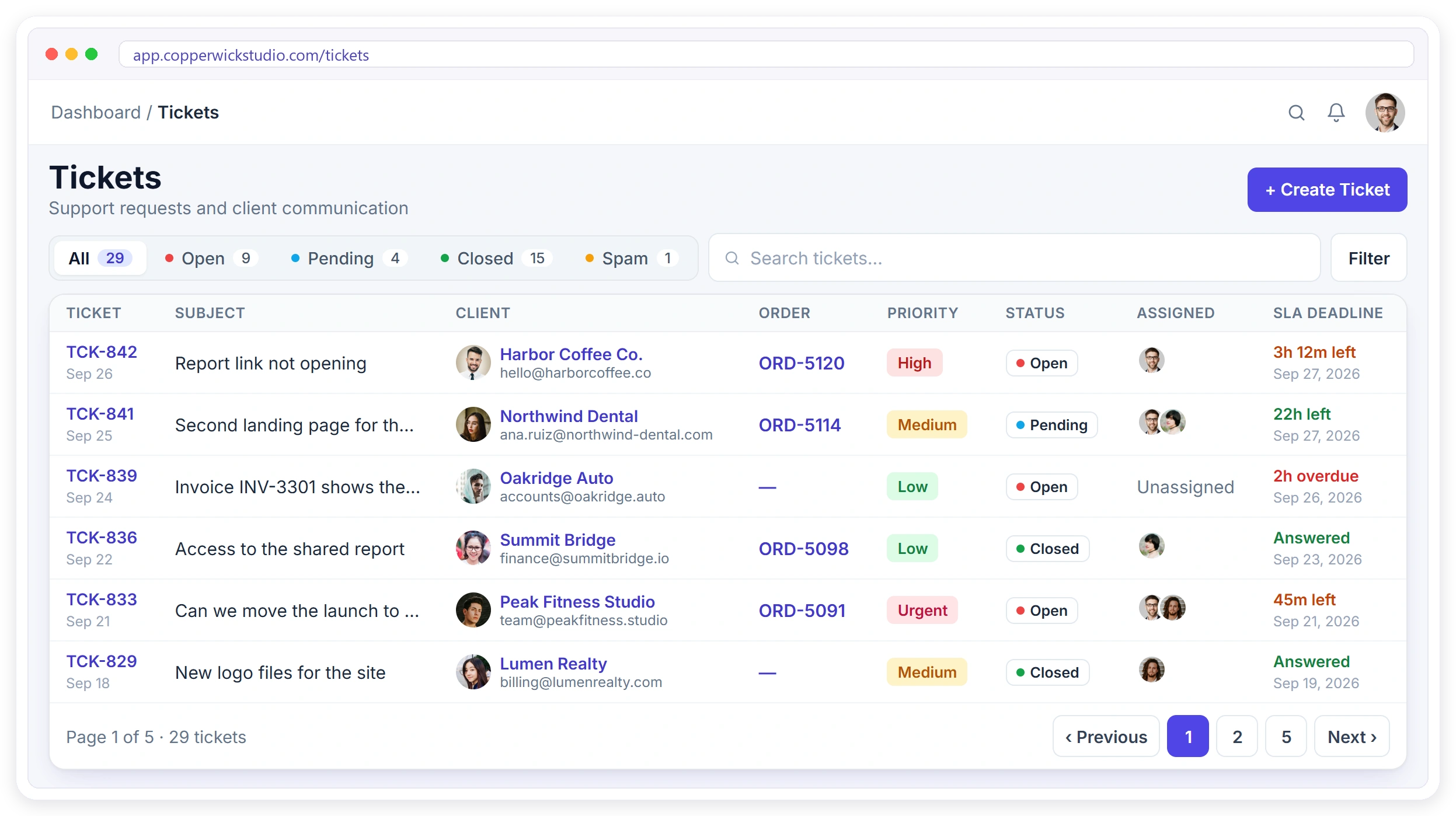
Every request in one queue, sorted by what matters most, and findable in seconds. Nobody has to dig through an inbox to find out who asked for what, or which request is already late.
Centralized Management
All client queries in one place, regardless of the channel they came from.
Priority-Based Handling
Sort issues by urgency so critical problems get addressed first.
Advanced Filtering
Find any ticket with search, status filters and priority tags.
SLA Health Monitoring
Spot at-risk and overdue tickets before clients notice.
Linked to Orders
Every ticket can point to the order it’s about.
Ownership at a Glance
Assign and CC team members, and see who owns each ticket.
Internal Notes
Talk privately with your team, separate from client replies.
Client Ticket Dashboard
Clients open, follow, reply to and rate their own tickets.
How a Ticket Moves
From the client’s first message to a rated resolution. Each step is visible to your team and the client, so nobody has to ask where a request stands or who is handling it.
Client Opens a Ticket
From their portal, linked to the right order, or you create it for them.
You Assign the Team
Pick who works it and who’s CC’d. The SLA clock starts.
Reply in One Thread
Answer with saved replies, and keep internal notes to yourselves.
Close and Get Rated
The client is notified at every step and rates the resolution.
Effortless Ticket Creation with Full Context
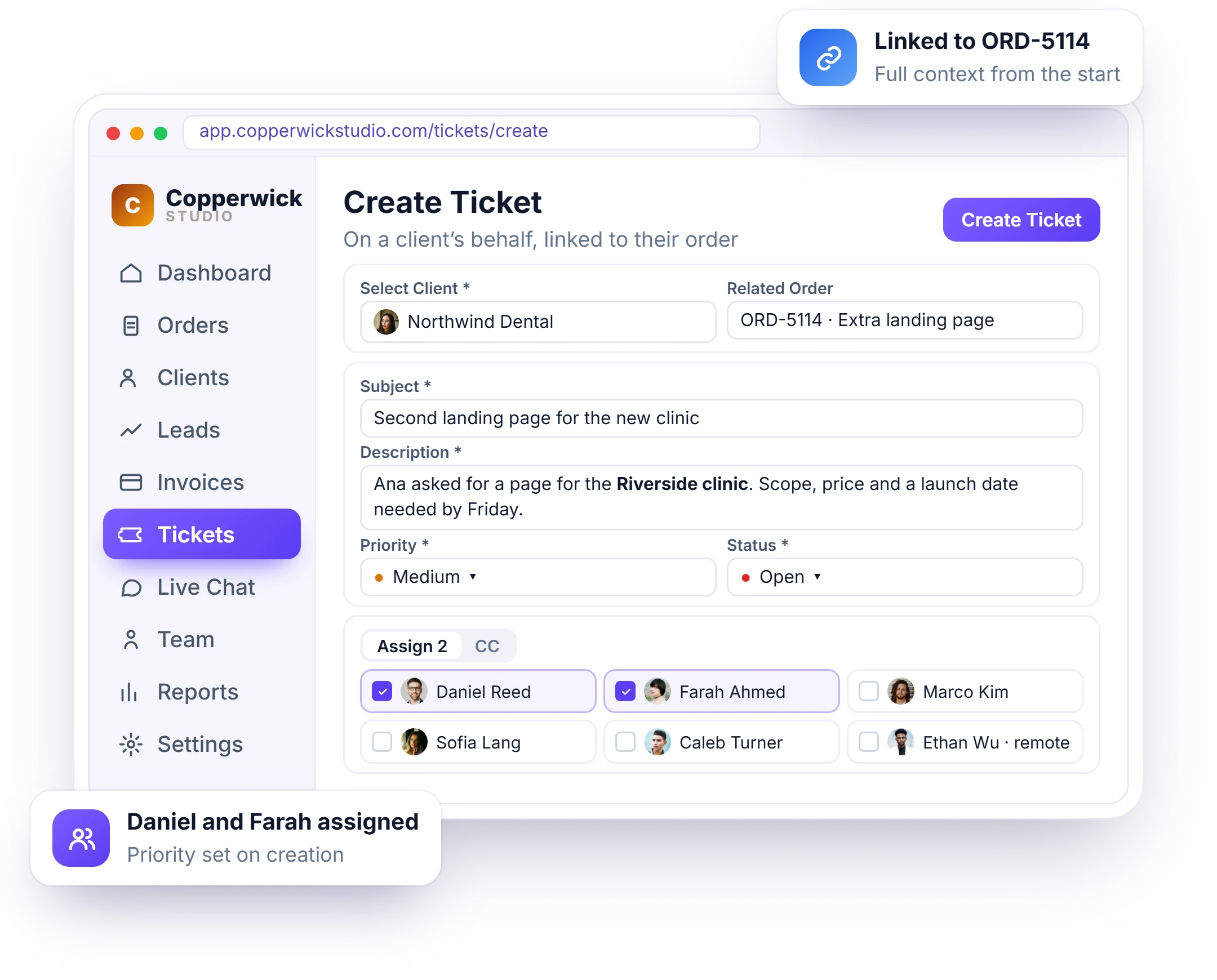
Capture every detail upfront: client, subject, description, priority and status, so tickets are routed correctly from the start. Your team begins with the full picture instead of a back-and-forth about what the client meant.
- Multi-user collaboration with CC team members
- Link tickets directly to a related order for context
- Rich text description editor with formatting
- Set priority and status right from creation
One Thread for Every Ticket Conversation
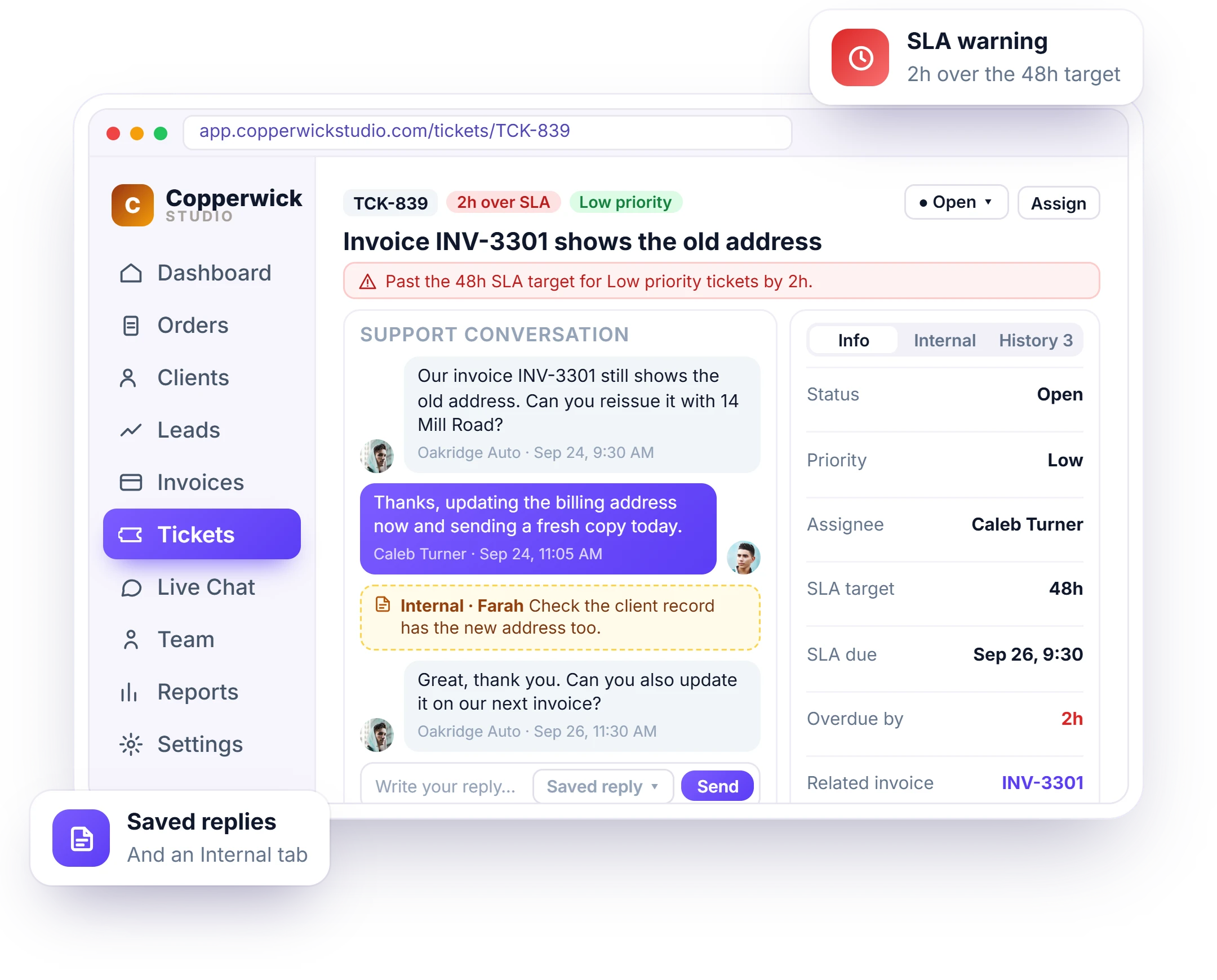
Keep all ticket-related communication in one place. No more lost emails or fragmented chat histories across channels. Anyone who joins later reads one history instead of piecing it together.
- Full ticket info, client and assignee at a glance
- Internal notes tab, separate from client replies
- Saved replies for faster, consistent responses
- SLA target, due time and overdue warning on the ticket
The Right People on Every Ticket
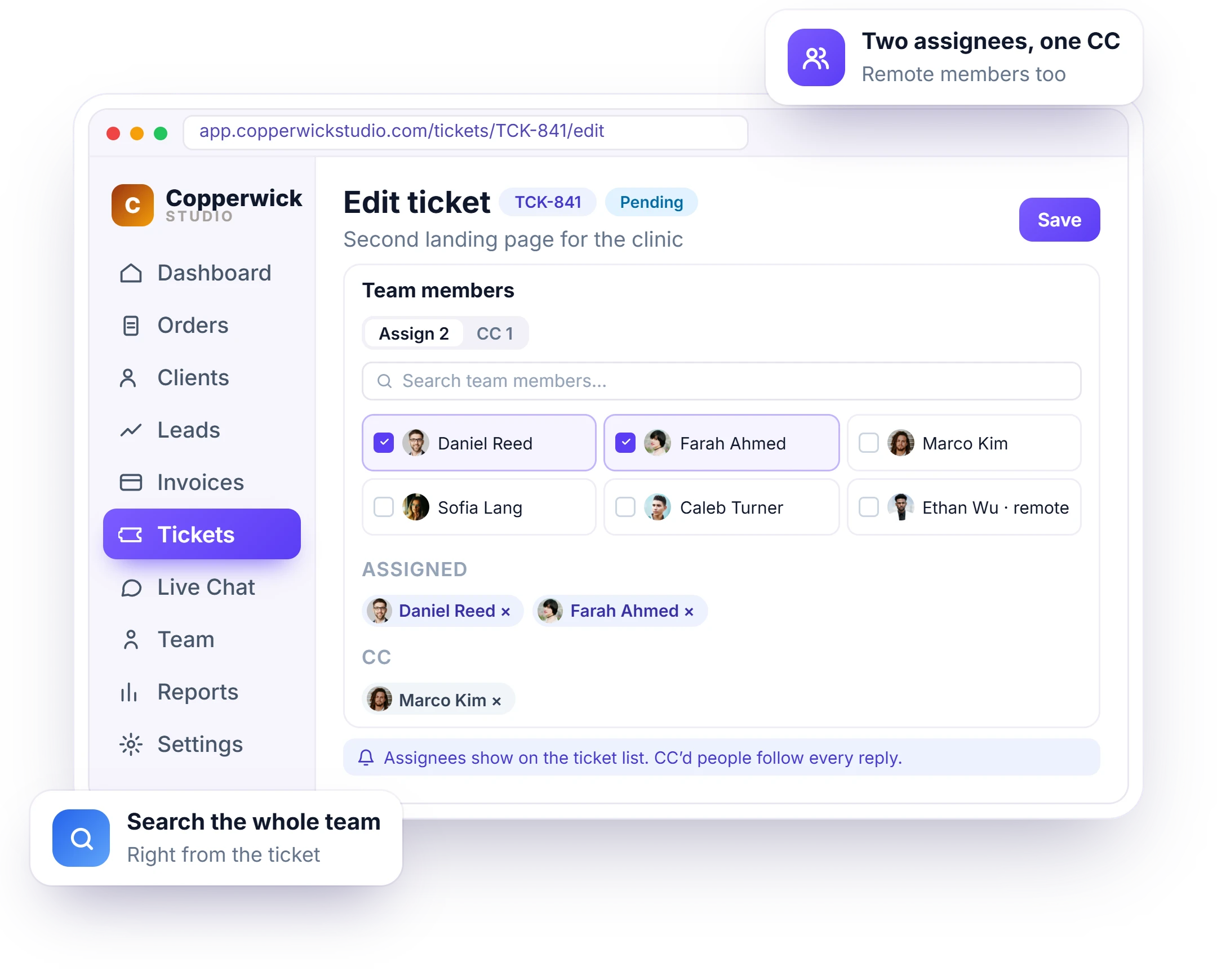
Assign the team members responsible for a ticket and CC anyone who needs to follow along. Remote members can be assigned too. Nothing waits on one person’s inbox while they’re away.
- Assign one or more team members
- CC teammates who only need to follow
- Search your whole team from the ticket
- Assignees show on the ticket list
Internal Notes and Full Activity History
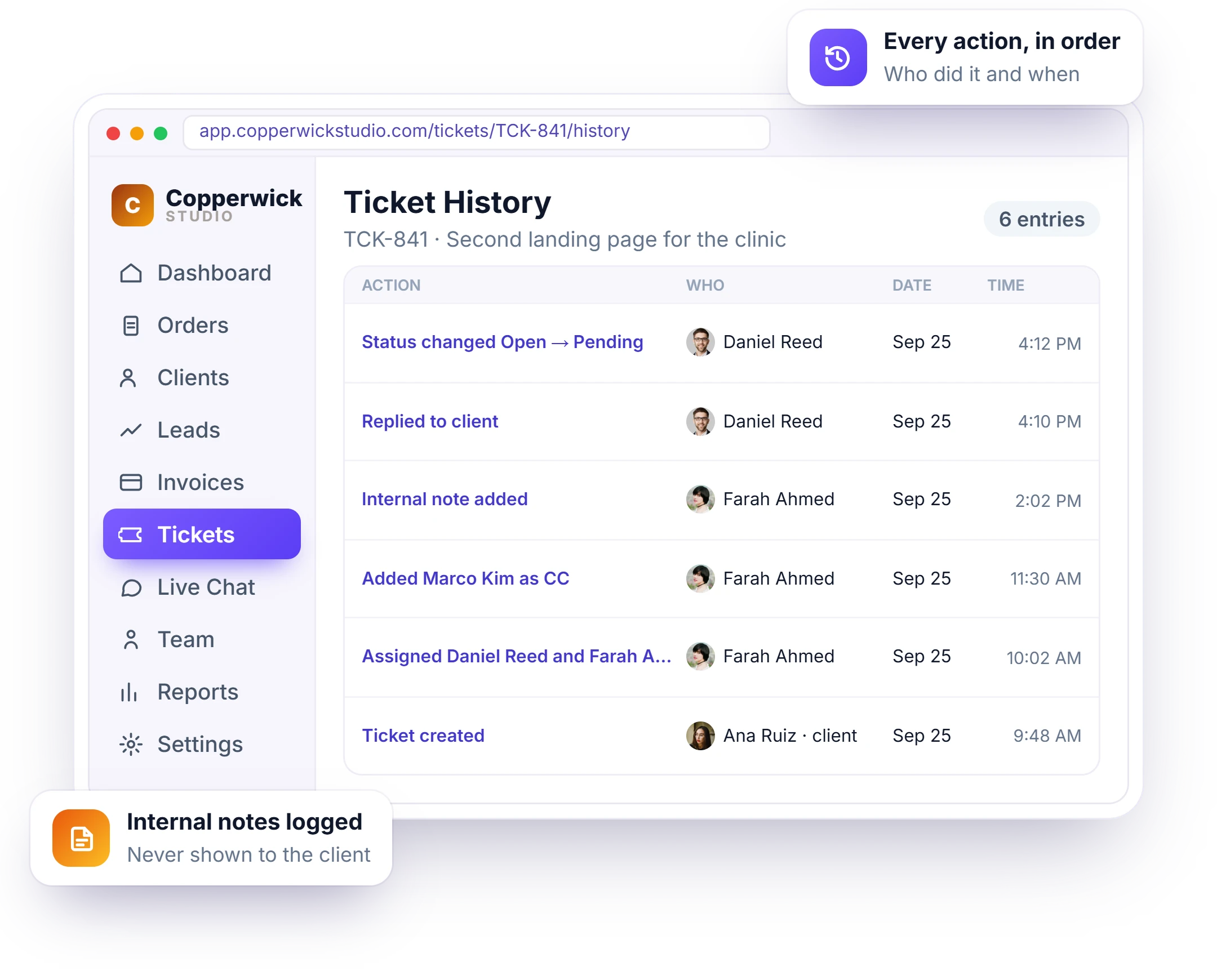
Coordinate privately with your team, and see every action taken on a ticket, status changes, updates and messages, in one timeline. When a client asks what happened, the answer is already written down.
- Every status change and reply, in order
- Who did it, and when
- Assignments recorded as they happen
- Internal notes never shown to the client
Keep Clients Informed, Automatically
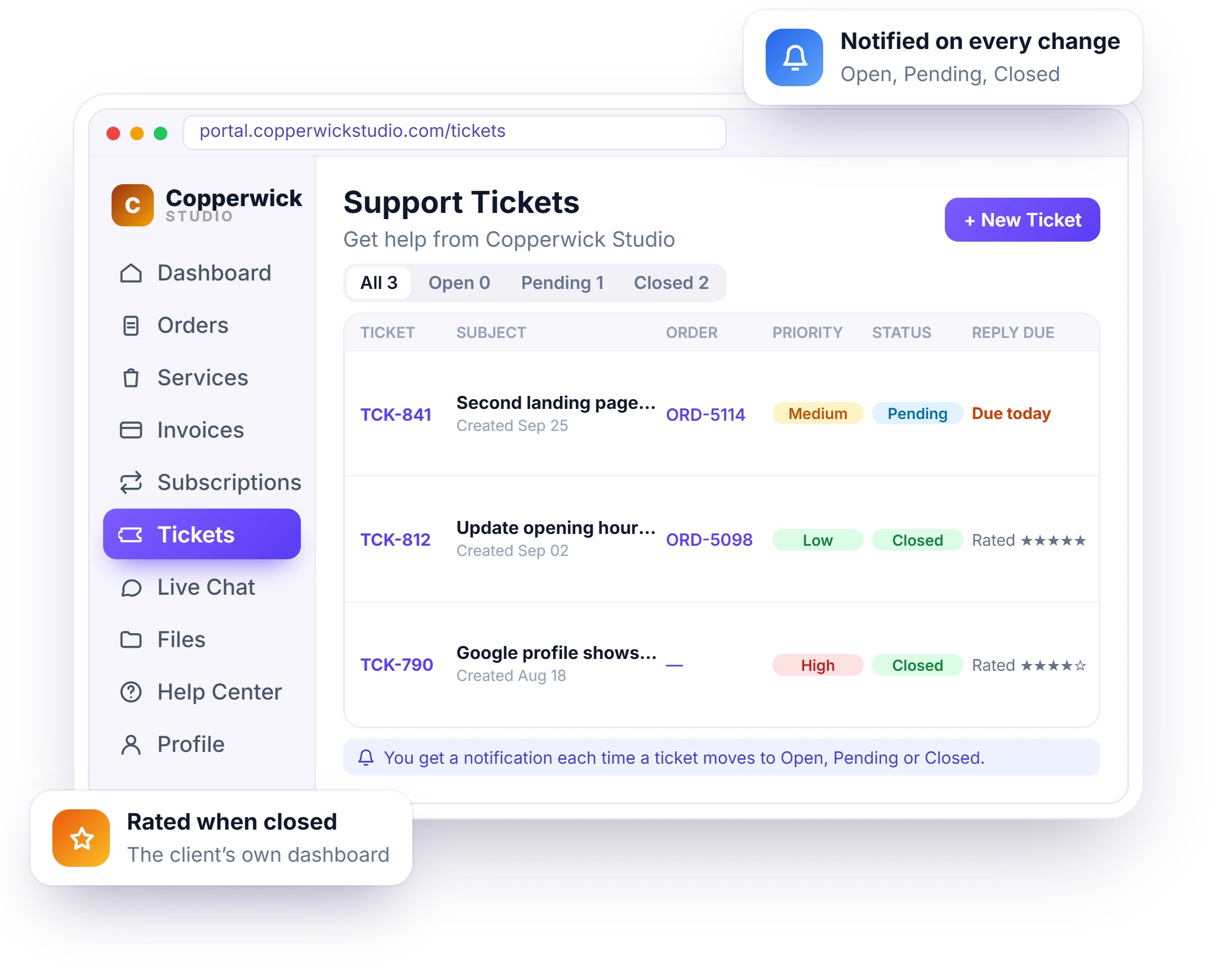
Every status change fires an instant notification to the client, and each client has their own dashboard to follow, reply to and rate their tickets, no phone calls or email chasing required.
- Instant alerts when a ticket moves to Open, Pending or Closed
- A dedicated client ticket dashboard
- Status, priority and reply due date for every ticket
- Search and filter their own tickets
Clients Open Tickets Against the Right Order
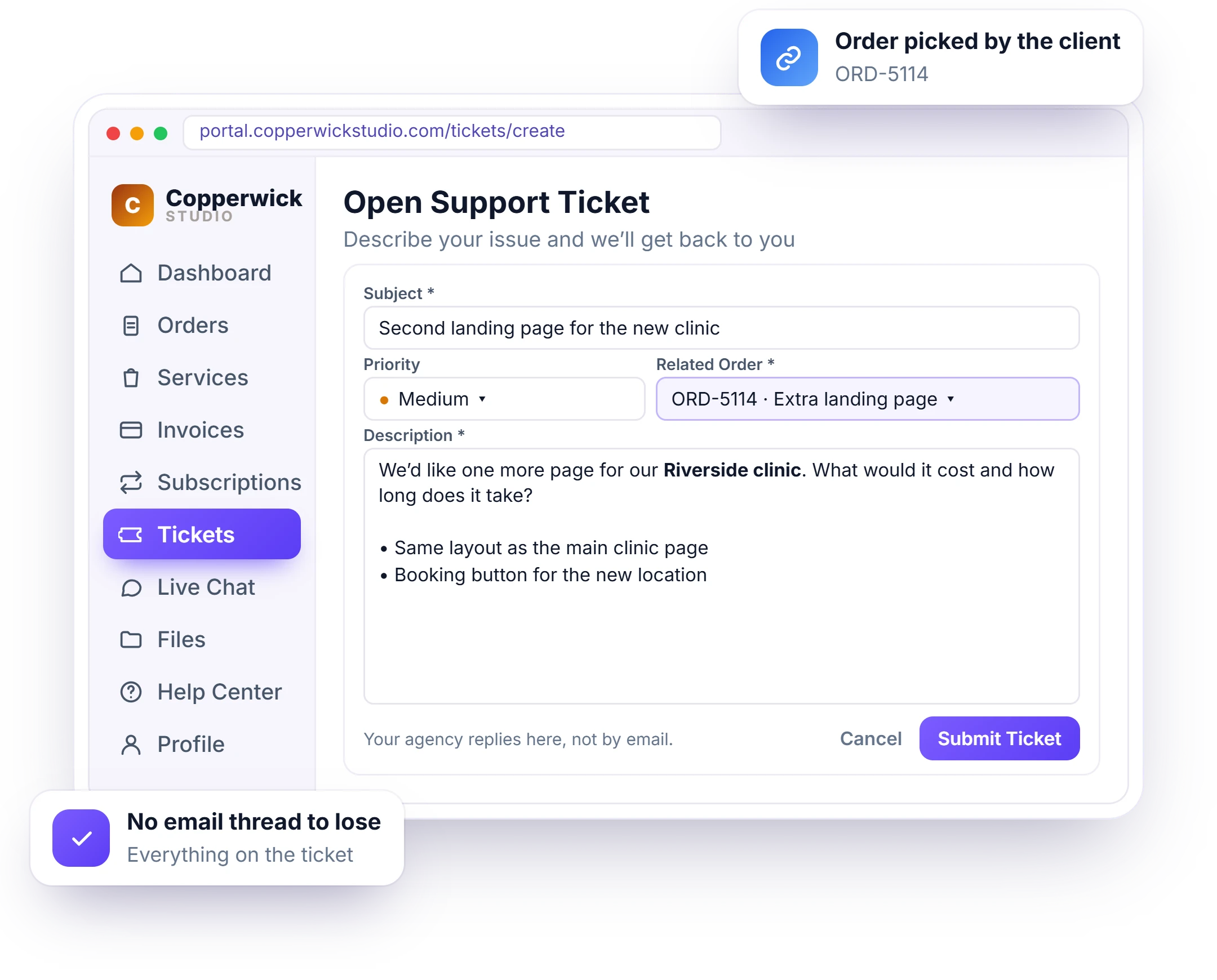
From their portal, clients describe the issue, set a priority and pick the order it’s about, so your team starts with full context and nobody guesses which project the problem belongs to.
- Subject, priority and description
- Related order chosen by the client
- Rich text for clear, detailed requests
- No email thread to lose
Reply and Rate Right on the Thread
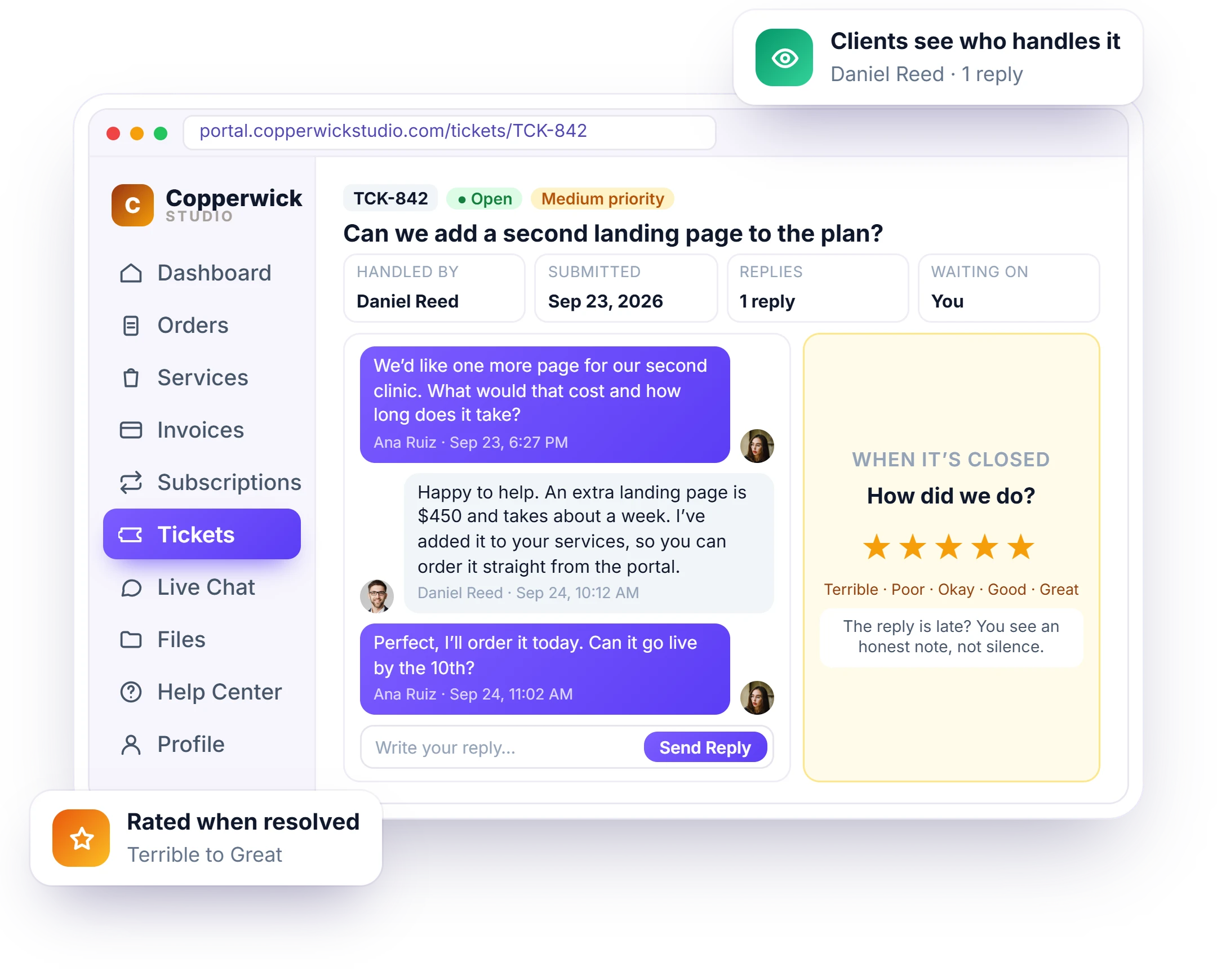
Clients see who’s handling their ticket, reply directly on the thread, and rate how their issue was handled once it’s resolved. The ratings show you which kinds of tickets your team handles well.
- Handled by, submitted date and reply count
- Honest message when a reply is running late
- Reply directly on the ticket
- Rate the resolution when it’s closed
“A request shouldn’t arrive without its context. So clients raise a ticket against the right order, and your team works from one thread.”

Founder & CEO, Clientish
Support Tickets FAQ
Straight answers about running a support ticket system for client requests: what it is, what it costs, SLAs, private notes and what your clients see.
What is a support ticket system?
It’s a shared queue where every client request becomes a ticket with an owner, a priority, a status and a deadline, so requests are tracked to a close instead of getting lost in someone’s inbox.
How much does a support ticket system cost?
Most help desks charge for every agent each month. Here there’s no separate ticketing bill: tickets come with the plan; team plans start at $29 a month and already have 5 team members who can answer them.
Is this a Zendesk alternative for agencies?
For client support that belongs to your projects, yes: tickets live next to the client’s orders and invoices, and clients use the same portal they already log in to. If you run a large multi-channel call center, a dedicated help desk will suit you better.
Can clients open tickets themselves?
Yes. Clients open tickets from their portal, choose a priority and link the order it’s about. You can also create a ticket on a client’s behalf.
How do SLA deadlines work?
Each priority has an SLA target. Tickets show the time left or how far overdue they are, so you can act before a client has to chase.
Can my team talk privately on a ticket?
Yes. Internal notes sit in their own tab and are never shown to the client.
Can I assign more than one person?
Yes. Assign several team members and CC anyone who only needs to follow along, including remote members.
Are clients told when something changes?
Yes. Clients get a notification every time a ticket’s status changes, and they can reply on the thread.
Can I see everything that happened on a ticket?
Yes. Open the ticket’s history to see when its status moved, who was assigned or CC’d and every reply, each stamped with the person and the time, so a handoff never loses context.
Deliver better support, resolve issues faster.
Give clients one place to raise a request against the right order, give your team one thread and a clock, and see how every ticket was rated. Try it with example data first.
- The client and the order it’s about
- A priority with an SLA timer
- Assignees and CCs, remote members too
- Internal notes the client never sees
- Saved replies for common answers
- A rating when it’s resolved
Every feature unlocked in the trial. Pick a plan only when you’re ready.