
Recurring Billing & Subscriptions for Agencies, Bill Once. Get Paid on Repeat.
Recurring billing means a client is invoiced on a fixed schedule, such as every month, for an ongoing service. Clientish gives your agency subscriptions that create and email the invoice at every billing cycle, with reminders, a pay link and the client’s own portal to manage it, from $9.99 a month.
Everything You Need to Run Client Billing
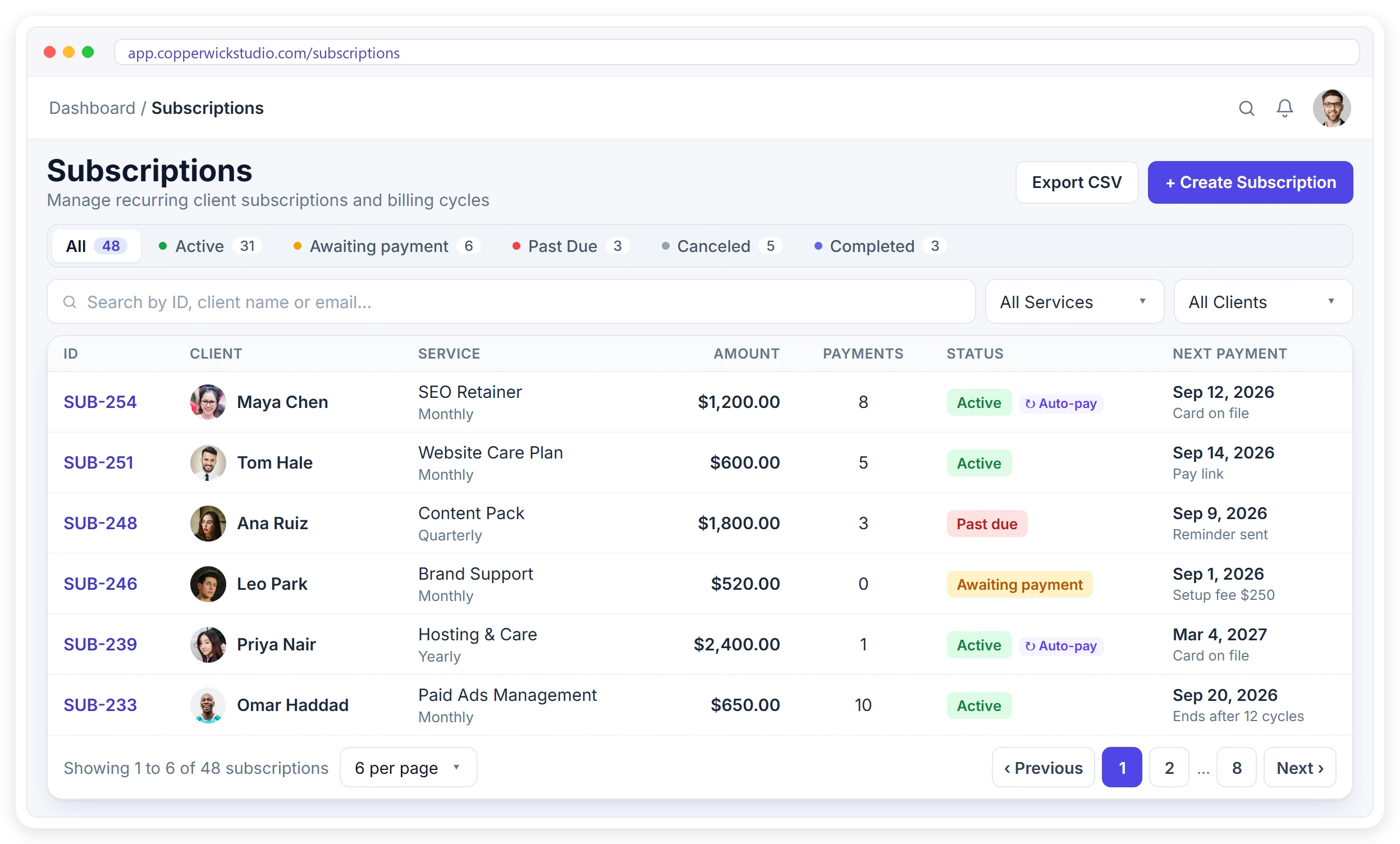
Subscriptions, payment options, taxes, currencies, and reminders work together in one billing flow, without piecing together separate tools. Every retainer runs on the same rules, so end-of-month billing stops being a task someone has to remember.
Subscription Billing
Set recurring subscriptions to bill on schedule, automatically create invoices, and send them to clients by email at every billing cycle.
Multiple Payment Gateways
Give clients multiple ways to pay through Stripe, PayPal, Paddle, SSLCommerz, and bank transfer.
Tax & Multi-Currency
Apply tax rules based on the client’s country and handle billing in the currency they expect.
Automatic Reminders
Automatically send reminders before, on and after the due date so your team doesn’t have to follow up manually.
Retainers That Invoice Themselves
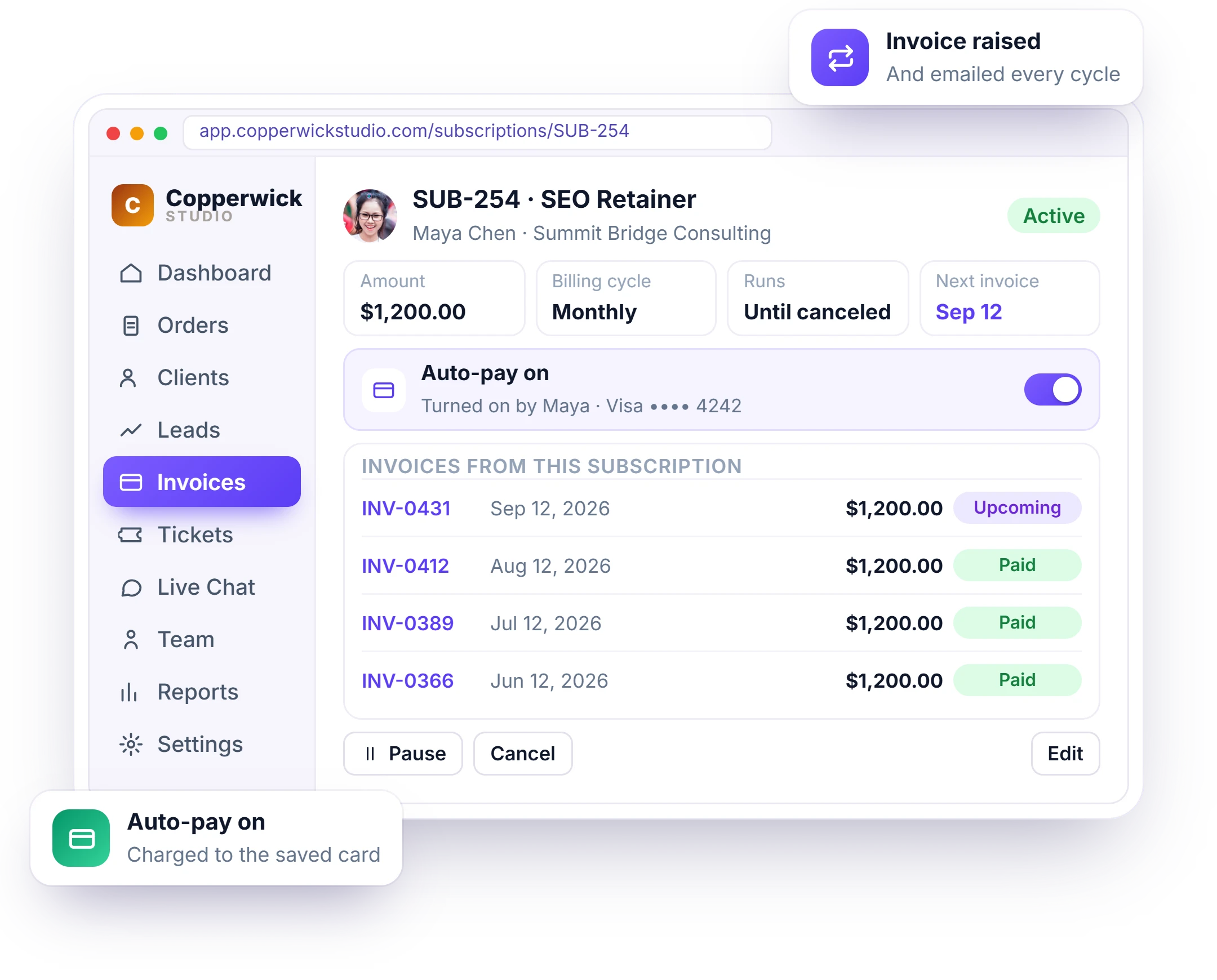
Set the service, amount, and billing cycle once. At every cycle, a new invoice is created automatically and sent to the client by email, while the subscription and payment status stay updated in their portal.
- Weekly, monthly, quarterly, and yearly billing cycles
- Auto-pay to a saved card when the client turns it on, or a payment link
- Pause, resume, or cancel without losing subscription history
- Payment links and reminders before, on and after the due date
- Keep invoices and subscription status updated in the client portal
Let Clients Pay the Way That Works for Them
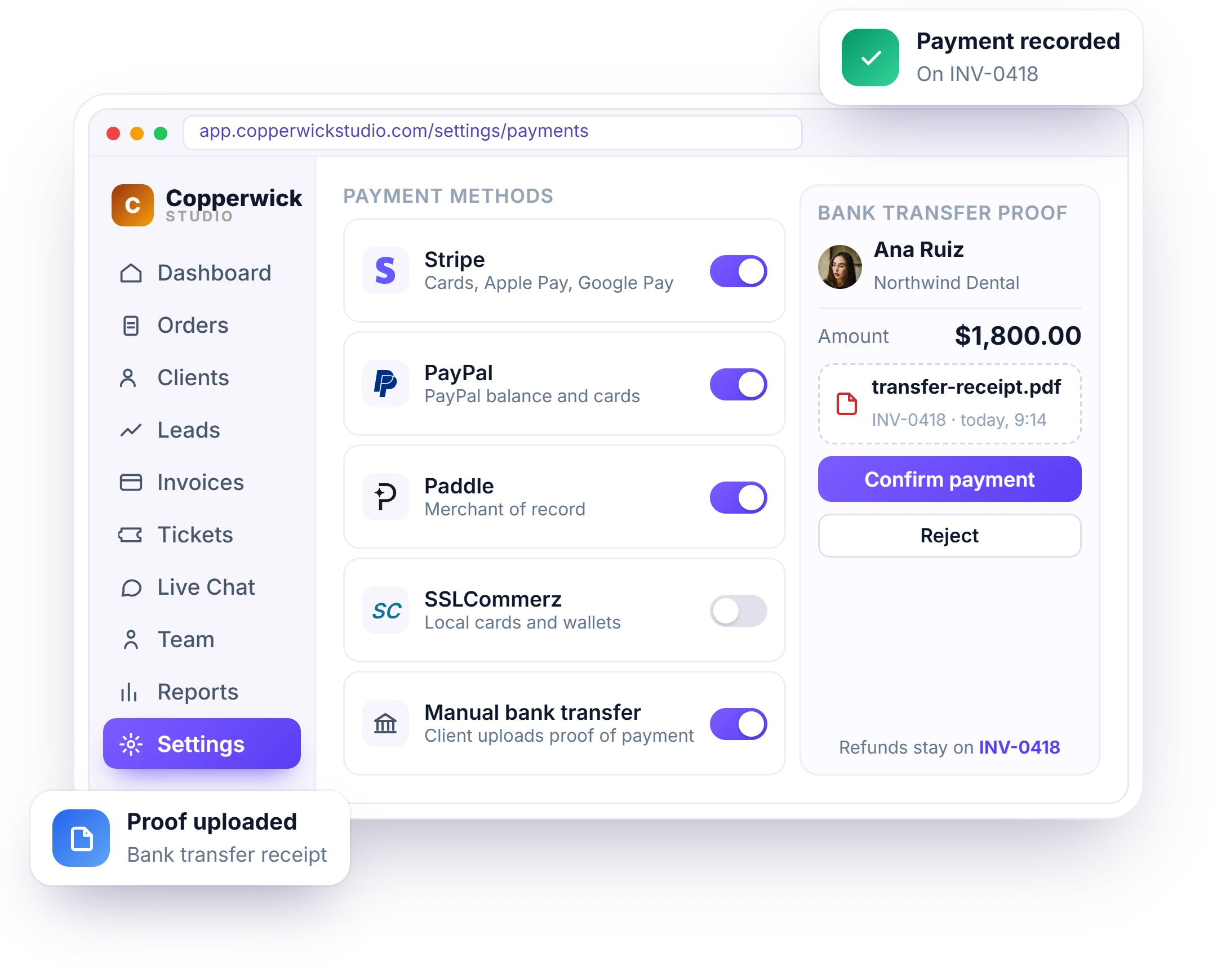
Offer multiple payment options and choose which ones are available for your workspace or invoice. Accept online payments from local and international clients, while manual bank transfers can be confirmed with payment proof.
- Stripe, PayPal, Paddle, SSLCommerz
- Manual bank transfer with payment proof upload
- Choose available payment methods for your invoices
- Record payments against the correct invoice
- Keep refunds connected to the original invoice
Set the Rules Once. Use Them Across Billing
Configure the billing rules your agency uses every day, from tax and currencies to invoice numbering, discounts, refunds, and reporting. Keep them consistent across invoices without setting everything up again for each client.
Country-Based Tax Rules
Set VAT, GST, sales tax, or no tax based on the client’s country.
Multi-Currency Billing
Invoice clients in supported currencies while keeping reporting in your base currency.
Custom Invoice Numbering
Use your own invoice prefix and numbering sequence across the workspace.
Coupons & Discounts
Create percentage or fixed discounts, set usage limits, and use them for one-off or recurring billing.
Refunds & Credit
Keep full or partial refunds connected to the original invoice.
Revenue Reports
Track paid, outstanding, and recurring revenue by client, service, or date.
Billing Emails That Send Themselves
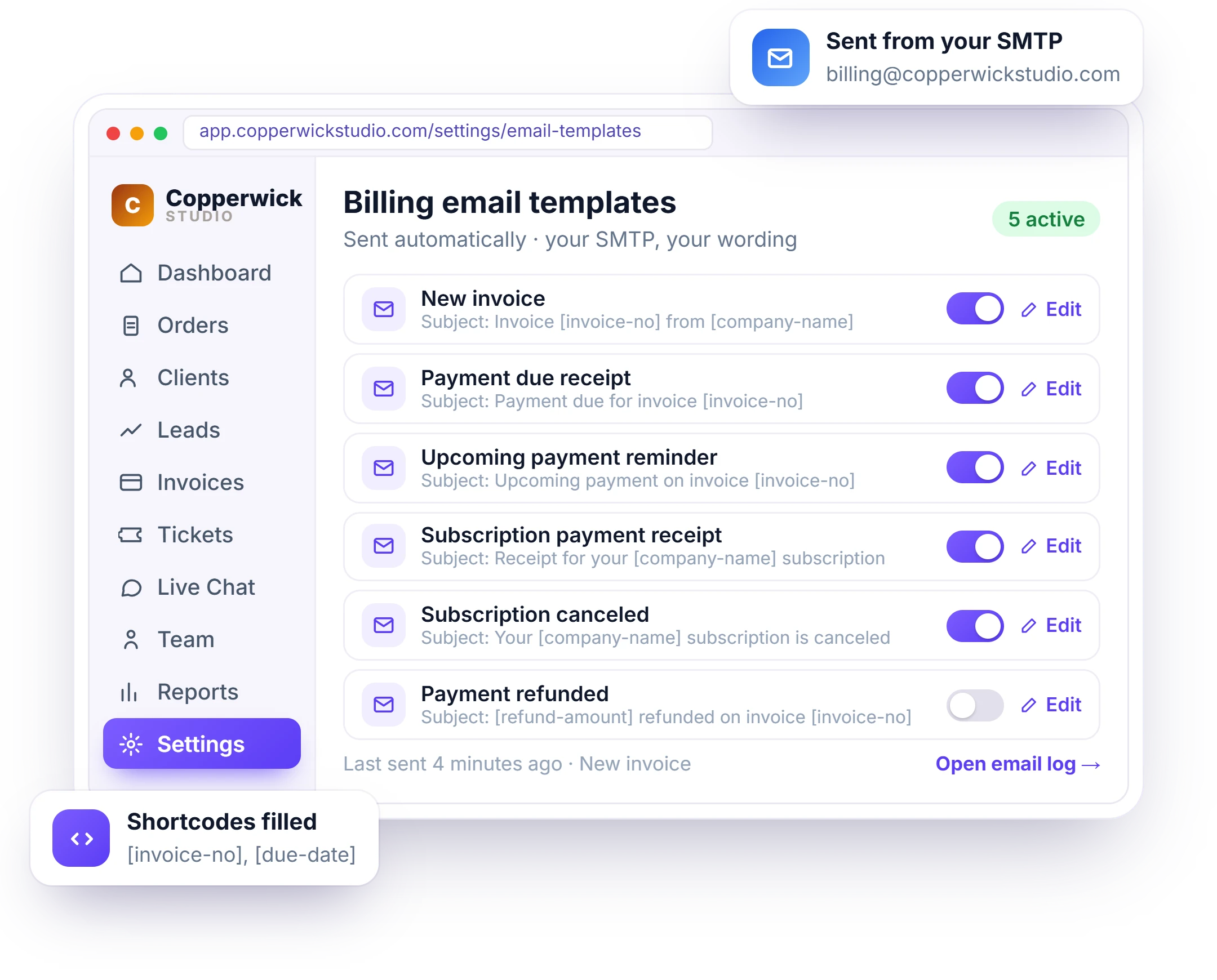
Invoice, payment, subscription, and refund emails go out automatically when the right billing event happens. Customize the wording once, send through your own SMTP, and turn individual emails on or off whenever you need.
- Edit the subject, heading, and body of every email
- Fill client, invoice, amount, and due-date details with shortcodes
- Send every billing email through your own SMTP and business email
- Enable or disable individual billing emails anytime
- Keep a send log so your team can see what went out and when
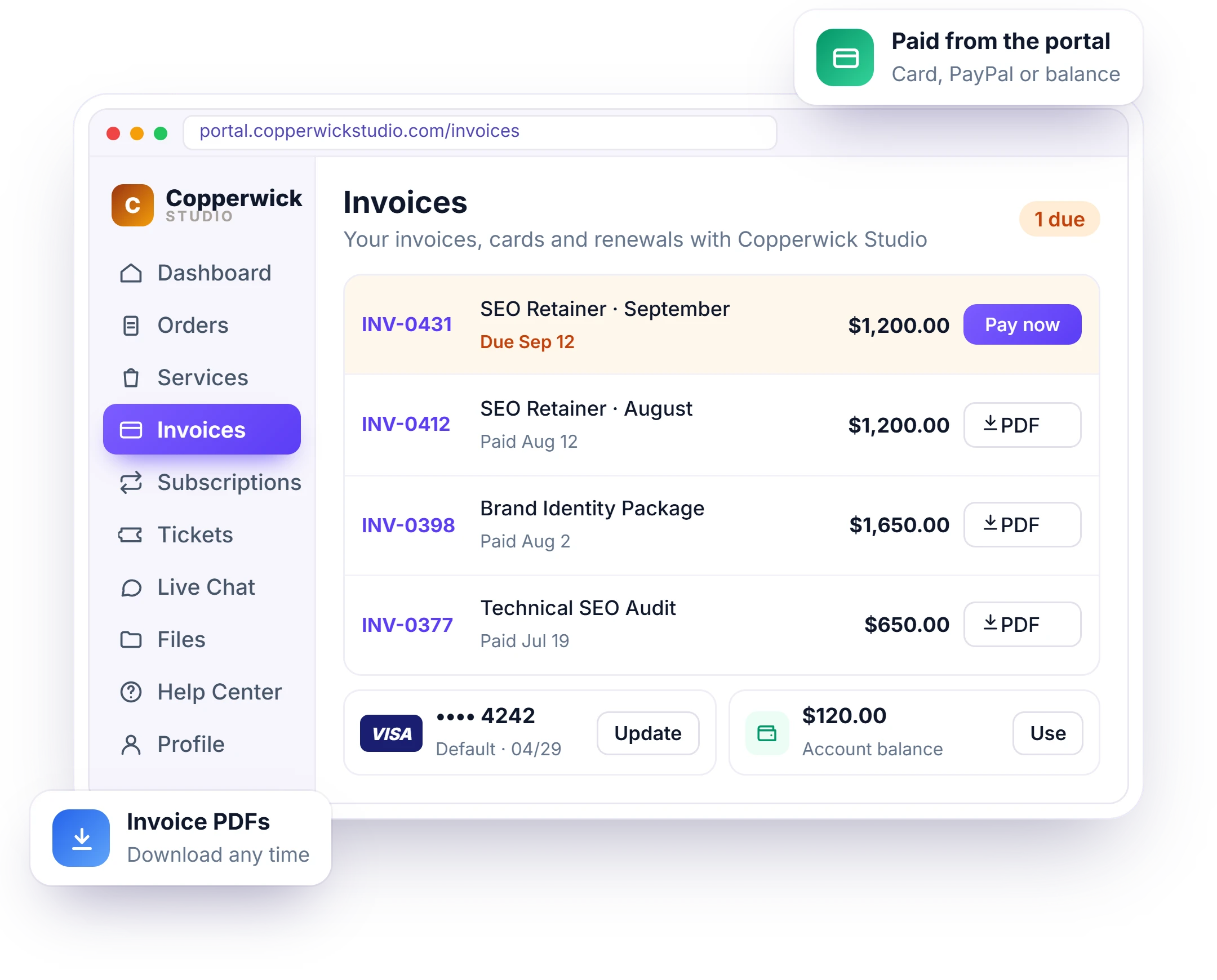
Clients Pay Directly From Their Portal
Clients can see unpaid and paid invoices, make payments, download invoice PDFs, and manage saved payment methods directly from their portal. Payment history and account balance stay available in the same place, so routine billing questions don’t need another email.
- Pay unpaid invoices directly from the client portal
- View and manage saved payment methods
- Use available wallet balance and deposits toward orders
- Download invoice PDFs whenever needed
- See paid, unpaid, and previous invoices in one place
“Retainers shouldn’t depend on a reminder in your calendar. So each cycle is billed on its date, and clients can turn on Auto-pay from their portal.”

Founder & CEO, Clientish
Recurring Billing FAQ
Straight answers about recurring billing and client subscriptions: what they are, cost, card charges, cancellations and what each payment triggers.
What is recurring billing?
Billing the same client on a fixed schedule for ongoing work, for example a monthly retainer or a yearly care plan. Instead of writing a new invoice each time, the subscription creates it for every cycle and sends it to the client.
What is the difference between recurring billing and a subscription?
The subscription is the agreement: which service, what price and how often. Recurring billing is what it produces, one invoice per cycle until the plan ends or is canceled.
Can the client’s card be charged automatically?
Yes, when the client turns on Auto-pay for that subscription in their portal; it stays off until they do. Each renewal is then charged to their default card through your Stripe account and the invoice is marked paid. If the card is declined, nothing is retried in the background: like every client without Auto-pay, they get the invoice by email with a link to pay by card, PayPal, bank transfer or their account balance, with reminders before, on and after the due date.
Can clients cancel or update their own subscription?
Yes, if you allow it in Payment Settings. From the portal they can cancel, resume or change the saved card, and you see every change in your dashboard.
What happens each time a client pays?
You decide per service: just record the payment, reopen the same order, open a new order for the new cycle, or let the client request work when they need it.
Can I add a setup fee or a fixed number of cycles?
Yes. Add a one-time setup fee to the first invoice, and either let the plan run until it’s canceled or stop it after the number of cycles you set.
How much does recurring billing cost?
Subscriptions are included in every Clientish plan from $9.99 a month, alongside one-off invoices, the client portal and, from $29, your team. Your payment gateway charges its own processing fees.
Stop writing invoices by hand.
Set each retainer up once and let every cycle create its own invoice, send it with a pay link and chase it with reminders. Try it with example data first.
- An invoice every billing cycle
- Auto-pay, if the client turns it on
- Reminders before and after the due date
- Setup fees and fixed cycles
- Client self-service in the portal
- Country-based tax rules
Every feature unlocked in the trial. Pick a plan only when you’re ready.