
Client Management Portal for Digital Marketing Agencies, Where Clients See the Work
Clientish is a white-label client portal for digital marketing agencies that puts onboarding, monthly retainers, approvals, client reports and invoices in one place, from $9.99 a month, alongside the ad and analytics tools you already use. Marketing clients rarely leave because the campaigns failed. They leave because they couldn’t see what you did for the fee. Clientish collects access and assets before you start, shows every deliverable in the client’s portal, gets posts and ads approved on time and bills the retainer every month.

Sound Familiar?
Four things marketing clients say in the middle of a retainer, and how the client portal answers each one before it costs you the account.
“We’re still waiting for ad account access.”
The client fills in account IDs, budgets, logins and brand files from their portal. The retainer starts when the form is complete.
“What are we actually paying you for?”
Every report, post and campaign is delivered to the client’s portal, with a progress timeline they can follow.
“The posts were ready a week ago.”
Deliver for approval. The client approves or asks for a revision, and it’s approved automatically after the days you set.
“Can you just add TikTok too?”
Packages list what each month includes, and extra channels or campaigns are sold as paid add-ons.
From Onboarding to Every Monthly Report
Every stage of a marketing retainer, from ad account access and onboarding to monthly deliverables, approvals, reports and invoices, in one client portal.
Order
Retainer picked and paid
Onboarding
Access, IDs, brand files
Setup
Tasks for your team
Approve
Posts and ads signed off
Report
Delivered in the portal
Renew
Billed every month

Get Access Before the Retainer Starts
Agencies lose the first weeks of a retainer chasing Google Ads access, Meta Business Manager IDs and brand files by email. Attach an onboarding form to each service with the intake form: the accounts you’ll manage, IDs, ad budget, who approves content and the brand guide. The order waits as Pending until it’s complete, so you can see exactly what’s missing.
- An onboarding form attached to each service
- Ad account IDs, budgets and the approver in one form
- Logins kept in hidden fields
- Brand guides and logos uploaded with the form
- The order waits until the form is complete
- Every answer and file saved on the client’s order
Let Clients See What They Pay For
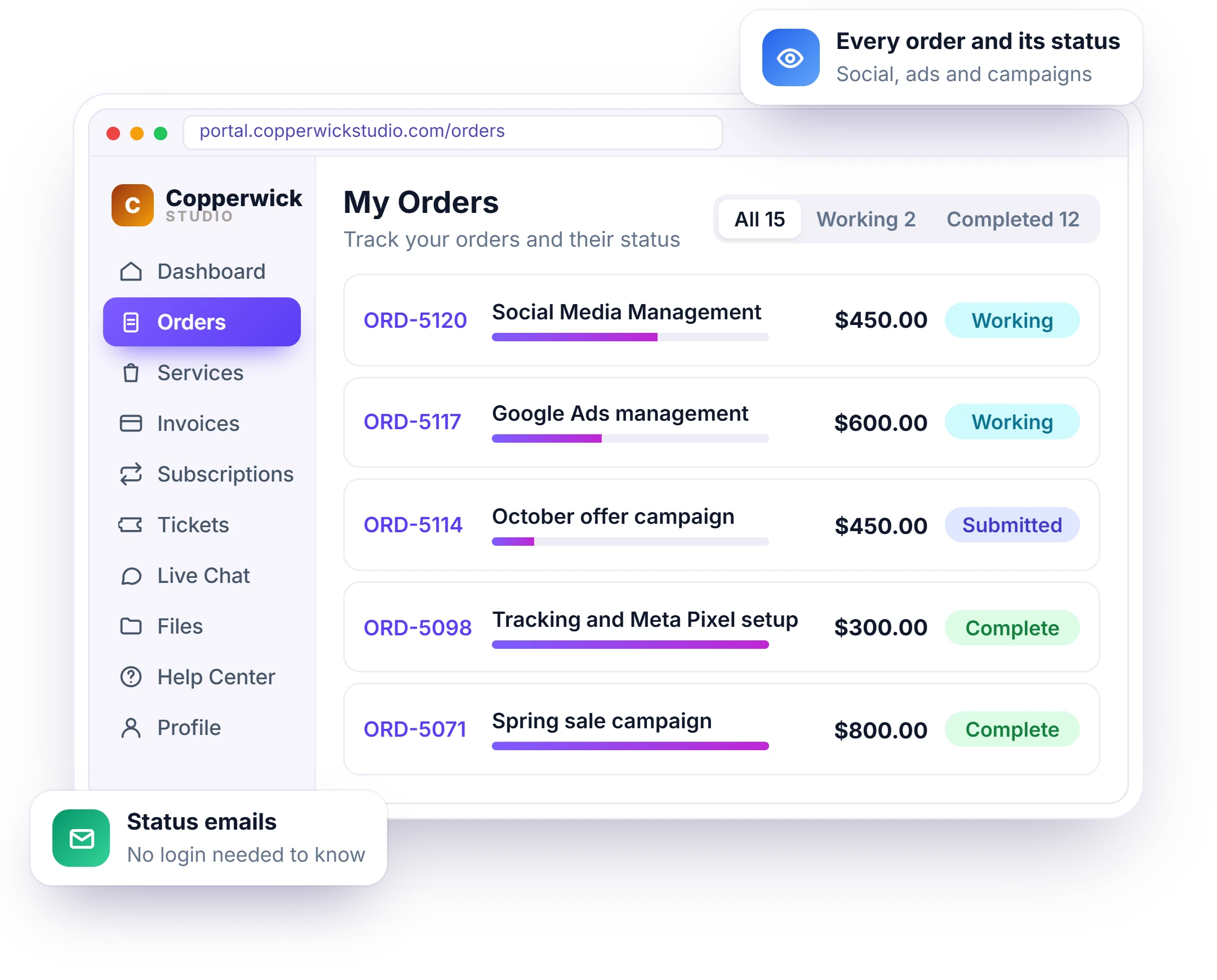
When the work happens in ad accounts and spreadsheets, the client only sees the invoice. In the client portal clients see each order with its progress timeline, every report, post and campaign plan you delivered, and what is waiting for their approval, so the value of the retainer is visible every month. Reports you already build in Looker Studio, AgencyAnalytics, DashThis or Google Sheets show under Reports with client reporting.
- Every order and its status in the client’s portal
- A progress timeline the client can follow
- Looker Studio and other reports shown in the portal
- Approved and waiting items clearly marked
- Status emails so clients don’t have to log in to know
- Your logo and colors, not Clientish

Get Posts and Ads Approved on Time
A post that takes two hours to make can wait days for sign-off, and campaigns miss their launch date. Deliver the content calendar, ad creatives or report for approval. The client approves it or asks for a revision in one click, and if they don’t answer, it’s approved automatically after the number of days you choose.
- Deliver posts, ads and reports for approval
- Approve or request a revision in one click
- Automatic approval after the days you set
- Revisions counted against the package
- Feedback kept on the order, not in email
- A clear record of who approved what and when
Stop Scope Creep on Flat Retainers
On a flat monthly fee, every “quick extra” comes out of your margin. Sell retainers from your service catalog that list what each month includes, offer Basic, Standard and Premium options, and turn extra channels, campaigns or landing pages into paid add-ons.
- Retainers that list what each month includes
- Basic, Standard and Premium options
- Extra channels and campaigns as paid add-ons
- Clients pick and pay before work starts
- One-off campaigns sold as separate services
- Every change request tracked as a revision

Every Request in One Queue
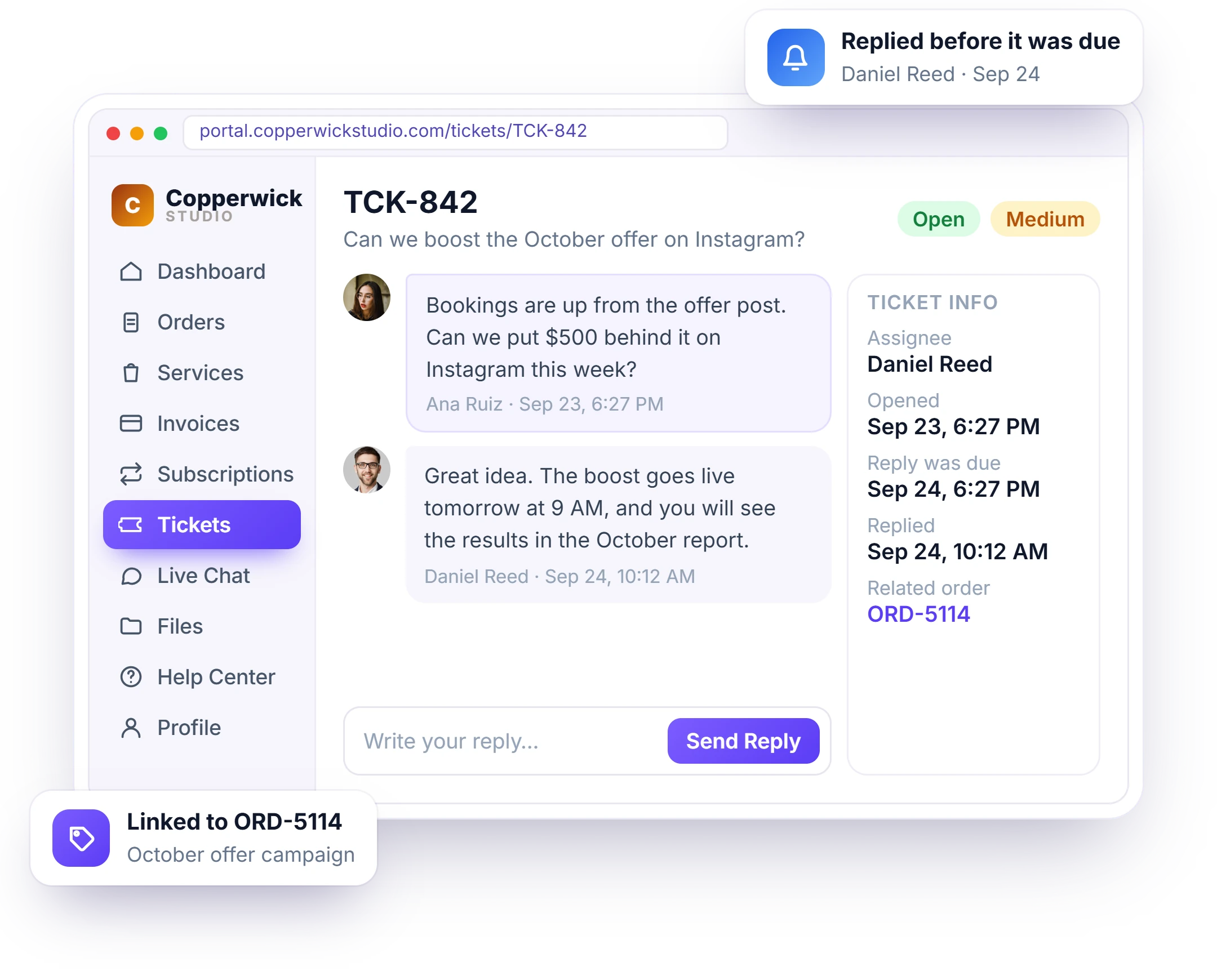
Requests arrive by email, WhatsApp and calls, and some get missed. Clients open a support ticket from their portal instead. Each ticket is assigned to the right person on your team, with response times you set, and the whole conversation stays in one thread.
- Clients open tickets from their portal
- Tickets assigned to the right team member
- Response times you set for each priority
- Files and screenshots in the ticket thread
- Clients get an email when you reply
- The full history of every request
Bill the Retainer Every Month Automatically
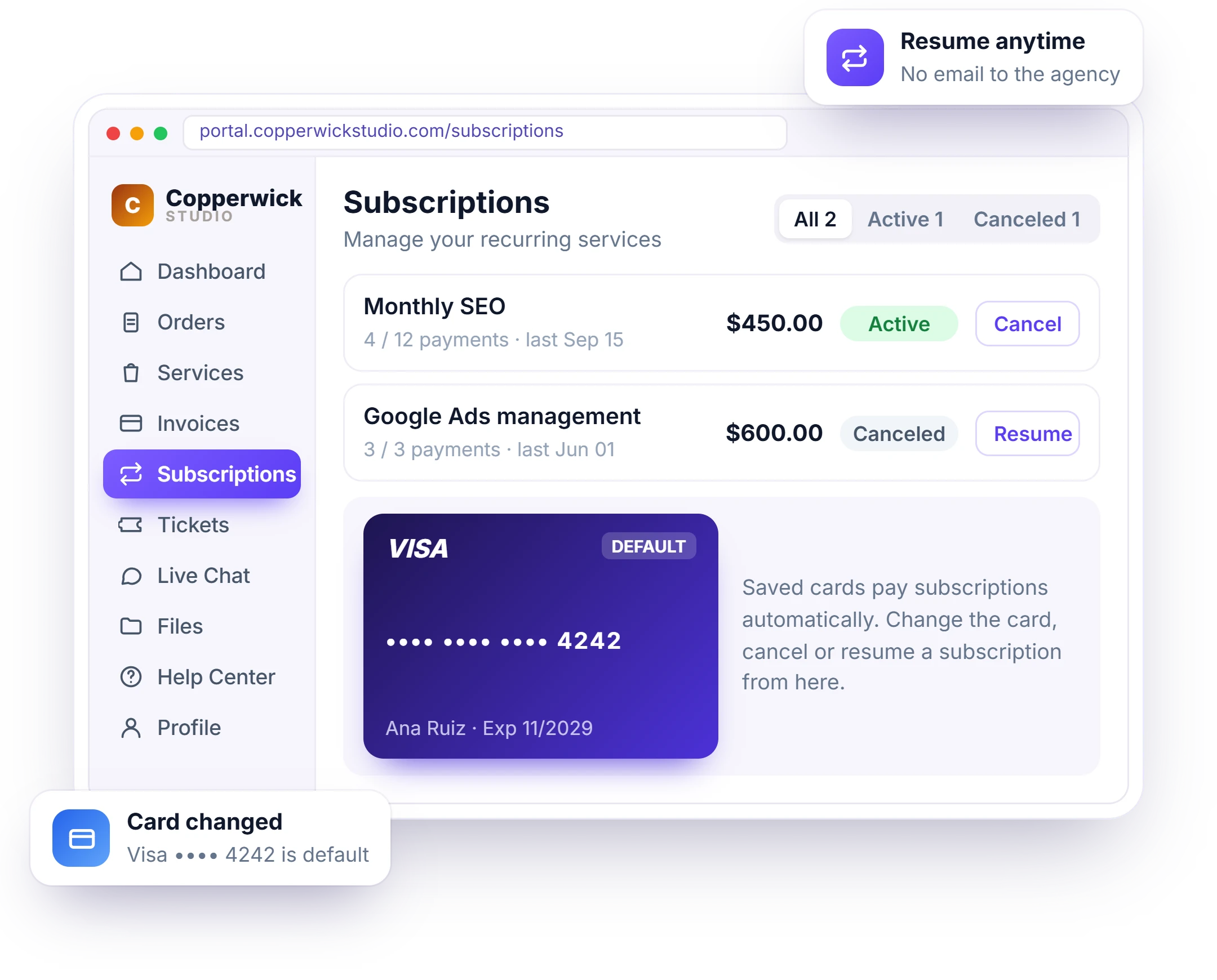
Chasing retainer payments and mixing them with one-off work causes most billing disputes. Set up the retainer as a recurring service with recurring billing: the invoice is created every cycle, the client gets an upcoming payment notice, and one-off campaigns are invoiced separately with their own line items.
- Monthly retainers billed automatically
- One-off campaigns invoiced separately
- Upcoming payment notices and receipts
- Invoice reminders until paid
- Clients can top up a balance and pay from it
- Clients see their subscription in the portal
Services Digital Marketing Agencies Sell With Clientish
How SEO retainers, PPC management, social media plans and campaign launches are packaged, priced and ordered by clients from your portal. Each one has a fixed price and scope, so clients buy without waiting for a quote.
SEO Retainer
A monthly service with an onboarding form for site access and a monthly report delivered for approval.
PPC Management
A monthly retainer with Basic, Standard and Premium options and ad account IDs collected at onboarding.
Social Media Management
A monthly plan with a set number of posts, each month’s calendar delivered for approval.
Campaign Launch
A one-off service with its own brief, tasks and invoice, sold alongside any retainer.
Set It Up in 4 Steps
Add your retainers, onboarding forms and task templates once. Most marketing agencies are ready to take orders the same afternoon. New clients then onboard the same way every time, whoever on your team takes the order.
Add Your Services
Create your retainers and one-off campaigns with prices and add-ons.
Attach Onboarding
Add an onboarding form and a task template to each service.
Share Your Order Form
Clients pick a service, pay and fill out the onboarding form.
Deliver Every Month
Deliver for approval in the portal while the retainer bills itself.
How Clientish Compares for Marketing Agencies
Entry-plan prices and features of the six client portals marketing agencies compare most, side by side. Every figure is taken from the vendor’s own pricing page and dated, so nothing is guesswork.
 Clientish |  Wayfront |  ManyRequests |  Assembly |  SuiteDash |  Clientjoy | |
|---|---|---|---|---|---|---|
| Entry plan | $9.99/moSolo; Starter $29/mo with 5 users | $129/mo$99 yearly | $59/mo$39 yearly | $49/mo$29 yearly | $19/mo$180 yearly | $49/mo$44 yearly |
| Team users | 1 on Solo, 5 on Starter | 5 | 1, then $20 each | 1 | Unlimited staff | 5 |
| Own domain | Yes | Yes | Yes | From Professional$139/mo | Not listed | From Premium$99/mo |
| Workflow automations | From Growth$49/mo | Not listed | Zapier only | From Professional | From Pinnacle$99/mo | From Premium |
| Client reports in portal | 13 sources | Not listed | From Pro$99/mo | Not listed | Not listed | From Premium |
| Client invoicing | 12 gateways | Yes | Yes | Not listed | Not listed | Yes |
You sell mostly productized, subscription-style services.
You bill clients by the hour or with prepaid credits.
You want a free plan for your first five clients.
You want unlimited staff on the cheapest plan.
Proposals, contracts and a sales pipeline matter more to you than the portal, which starts on its Premium plan.
Entry-plan facts from each vendor’s own pricing page on October 7, 2026 (Assembly re-checked October 19, 2026). “Not listed” means their pricing page doesn’t mention it. Check their pages for the latest.
Digital Marketing Agency FAQ
Straight answers on ad account access, approvals, client reports, scope creep, your own domain and client logins.
What is a client portal for digital marketing agencies?
It’s where a marketing retainer becomes visible. Instead of a monthly invoice and silence, the client sees the posts, campaigns and reports you delivered, what’s waiting for their approval and what they’ve paid. Clientish runs that portal with onboarding forms, retainers, tickets and invoicing, from $9.99 a month.
Will my marketing clients log in to the portal?
They log in when something needs them: posts to approve, a new report or an invoice. Clientish sends an email for each one, and the portal installs on their phone, so approving a post takes a minute between meetings.
Can clients see my Looker Studio or GA4 dashboard in the portal?
Yes, through Client reports. Add the share link of your Looker Studio report, including one built on GA4 data, and it shows in the client’s portal under Reports. AgencyAnalytics, DashThis, Databox, Whatagraph and Google Sheets links work the same way.
Why not just give clients guest access to our project tool?
A guest view shows your task board, not the business side. In your portal, each client gets one place under your brand to order, fill out onboarding, approve deliveries, open tickets, see reports and pay invoices, all under your own domain.
How do I get ad account access from clients faster?
Attach your onboarding form to each of your services. The client fills in the accounts you’ll manage, their IDs, budget, approver and brand files from their portal, and the order waits until the form is complete.
How do I show clients what we did this month?
Deliver each content calendar and campaign plan on the client’s order, and show your monthly report with Client reports. The client sees every delivery and its status in their portal, with a progress timeline for the order.
How do I get social posts and ads approved faster?
Deliver them for approval on the order. The client approves or asks for a revision in their portal, and if they don’t answer, they are approved automatically after the number of days you set (7 by default).
How do I stop scope creep on a monthly retainer?
Sell retainers that list what each month includes, offer Basic, Standard and Premium options, and turn extra channels or campaigns into paid add-ons.
Can I bill a retainer and one-off campaigns separately?
Yes. The retainer is a recurring service billed every cycle, and one-off campaigns are separate services with their own invoices.
Can clients send requests without email?
Yes. Clients open support tickets with you from their portal, and each ticket is assigned to your team with response times you set.
Can I keep client logins safe?
Yes. Collect logins in hidden fields of your onboarding form that only your team sees.
Is the portal branded as my agency?
Yes. Your agency’s logo and colors, on a portal address under your own domain such as clients.youragency.com. On Growth, Pro and Enterprise the Powered by Clientish line can be turned off too.
Run every retainer where clients see the value
Collect access, deliver for approval, show the monthly report and bill the retainer from one branded portal. Try it with example data before you decide.
- Onboarding forms for ad account access
- Posts and ads approved in the portal
- Looker Studio and other reports in the portal
- Retainers billed every month
- Tickets for every client request
- Your own domain and branding
Every feature unlocked in the trial. Pick a plan only when you’re ready.