

Dubsado and Clientish both promise to get client work out of your inbox, but they start from opposite ends. Dubsado helps a small business automate how a new client is signed, onboarded and invoiced. Clientish gives an agency one branded place where clients order, pay, follow the work and ask for help, month after month, while the whole team works behind it.
Quick answer: Dubsado suits a small service business that wants to design its own automated sequence of forms, contracts, emails and invoices, and is willing to build it first. Clientish suits agencies with a team and ongoing clients: a branded client portal for orders, invoices, subscriptions and support tickets, ready without a build project and cheaper than Dubsado on both monthly and annual billing.
Below, we compare the two on price after Dubsado’s December 2025 increase, setup time, the client portal, team access, automation, billing and support, then show which kind of agency each one fits.
Key Takeaways
If you read nothing else, these six points cover the differences that change the decision: what you pay, how long setup takes, what your clients see, and how many people can work in the tool.
- Pricing: since 1 December 2025, Dubsado costs $35/mo or $335/yr (Starter) and $55/mo or $525/yr (Premier). Clientish starts at $29/mo or $23/mo billed yearly, with a 14-day free trial.
- Setup: in Dubsado you build your forms, email templates and Flows before the system runs on its own. Clientish gives you a portal structure (services, orders, invoices, tickets) on day one.
- Branding: Dubsado can run its pages on your own domain. Clientish runs your portal on your own subdomain with your logo, colours and favicon on every plan, and sends every email through your own SMTP.
- Client portal: Dubsado’s portal holds a project’s forms, contracts and invoices. Clientish’s adds orders, revision requests, support tickets, subscriptions and a service catalogue clients can buy from.
- Team: Dubsado includes 3 extra users and charges from the 4th. Clientish includes 5 to 50 team members depending on the plan, with custom roles and remote members for freelancers.
- Pick Dubsado if you want to design every automated step yourself and you’ll pay for Premier to get Flows and the scheduler. Pick Clientish if you run an agency where clients order, pay, and ask for help in one branded place.
Dubsado vs Clientish at a Glance
If you only have a minute, this table covers the points agencies ask about most, from price and trial to portal, team seats and payments. The shaded column is Clientish, and each Dubsado entry was checked on Dubsado’s pricing and help pages in October 2026.
| Dimension | Dubsado | Clientish |
| Starting price | $35/mo, or $335/yr (Starter) | $29/mo, or $23/mo billed yearly (Starter) |
| Free trial | 21 days with Premier features, no card | 14 days |
| Client portal | Forms, contracts, invoices, appointments and files | Orders, revisions, invoices, subscriptions, tickets, services and cart |
| Branding | Your logo and colours; own domain through a CNAME | Your logo, colours and favicon on your subdomain, every plan |
| Platform name removed | No Dubsado branding on forms, invoices and schedulers | “Powered by Clientish” removed on Pro and Enterprise |
| Team members | Owner + 3 users included; users 4–10 add $25/mo | 5 / 15 / 30 / 50 included by plan |
| Workflow automation | Flows you design yourself (Premier) | Built into every order: checkout, invoice, assigned team, intake form |
| Built-in scheduler | Yes (Premier) | No; add your Calendly link to a form |
| Payments | Dubsado Payments (Stripe), Square or PayPal | Stripe, PayPal, Paddle, SSLCommerz or bank transfer |
| Recurring billing | Recurring invoices with autopay | Subscriptions the client sees and manages in the portal |
| Support tickets for clients | Not offered | Yes, with a first-reply SLA per priority |
| Mobile app | iOS and Android companion app | No app; works in a phone browser |
| Best for | Service-based small businesses that design their own client journey | Agencies managing ongoing clients with a team |
Look down the table and a pattern shows: Dubsado’s strongest features (Flows, the scheduler, its own-domain setup) sit on Premier or need building first, while Clientish’s (the client portal, tickets, subscriptions and team seats) come with every plan.
Who This Comparison Is For
This article is written for a service-based agency owner deciding whether to run client operations on Dubsado or Clientish. You probably manage several clients with a small team, sell a defined set of services, and are tired of stitching tools together to get a client from signed proposal to paid invoice.
The decision isn’t only about which tool has more features. It’s whether you want a flexible workflow engine that takes real time to configure, or a client workspace your team can put in front of paying clients quickly. Both serve service businesses, but they make different assumptions about your team size and how long you can wait before clients log in.
If you’re a solo photographer or designer who wants every touchpoint automated your way, that points one direction. If you run a four-to-ten-person agency where several people touch the same client account, and clients need a branded place to track orders and pay invoices, that points the other.
Why agencies look for a Dubsado alternative
Most people comparing these two already use Dubsado or have tried it. The same reasons for looking elsewhere come up in Capterra reviews and on Dubsado’s own pricing page:
- Setup takes too long. Forms, email templates and Flows all have to be built before anything runs without you.
- The price went up. New subscribers have paid $35 a month for Starter since December 2025, up from $20.
- Automation sits on the higher plan. Flows and the scheduler come only with Premier, at $55 a month.
- Every extra person costs more. Past the three included users, the next tier adds $25 a month.
- Clients still email to ask where things stand. The portal holds paperwork, not ongoing orders, tickets or repeat purchases. One Capterra reviewer moved project work into a separate tool.
- Help can be slow. Getting a problem solved can take a while, according to some Capterra reviews.
Each section below starts from one of these problems and shows how both tools deal with it.
Meet Dubsado: Built for Service-Based Small Businesses
Dubsado describes its customers as service-based small business owners, and it was founded in 2015 by Jake and Becca Berg. It handles forms, proposals, contracts, invoices and scheduling, tied together by automations. In late 2025 Dubsado released version 3.0, which renamed Workflows to Flows, added a node-based builder, Kanban and table views, a time tracker and a shared inbox.
Key features:
- Flows (Premier): trigger-based sequences that send proposals, contracts, forms, emails and invoices without manual steps.
- Forms and proposals: lead capture forms, questionnaires, proposals with packages, and contracts with e-signature.
- Scheduler (Premier): clients book calls from a link synced to your calendar.
- Invoices and payment plans: recurring invoices with autopay, and payment plans with reminders, on both plans.
- Client portal: clients see their forms, contracts, invoices, appointments and shared files.
- Mobile app: an iOS and Android companion app for projects, inbox and Tap to Pay.
| Plan | Price | What it adds |
| Starter | $35/mo or $335/yr | Unlimited clients and projects, one lead capture form, invoices, recurring invoices, payment plans, client portal, up to 3 extra users |
| Premier | $55/mo or $525/yr | Flows, scheduler, unlimited lead capture forms, public proposals, QuickBooks, Xero and Zapier |
| Add-ons | From $10/mo | Users 4–10: $25/mo; 11–20: $45/mo; 21–30: $60/mo. Extra brand: $10/mo each |
Prices checked on dubsado.com, October 4, 2026. Users who subscribed before 1 December 2025 keep their old prices ($20 and $40 a month), which is why many review sites still show those numbers.
Meet Clientish: Best for Agencies That Want a Client-Ready Portal Without a Build Project
Clientish is a client management platform for service agencies (marketing, design, development, SEO) that need a client-facing workspace running from day one. Every client relationship follows the same path: the client orders, pays, gets the work, asks for revisions or support, and orders again. Each step lives on the same client record.
Where Dubsado asks you to design your own system, Clientish ships with that structure in place. You set up your services and branding; the order path already exists.
Key features: here’s what an agency gets in Clientish, and where it goes further than Dubsado.
- Branded client portal on every plan: your logo, colours and favicon on your own subdomain from Starter, and every email sent through your own SMTP. Clients see your agency, not a software brand.
- Orders clients can follow: each order has its own message thread, files, delivery and revision requests, so clients check progress themselves instead of emailing you. Dubsado’s portal doesn’t track repeat orders.
- Service catalogue with cart and coupons: clients buy extra work from your catalogue and pay at checkout, with coupons on every plan. In Dubsado, picking packages happens inside public proposals on Premier.
- Order and intake forms: drag-and-drop forms with conditional logic, and an intake form on each service, so every client gets the right questions without you sending them.
- Invoices, subscriptions and client balance: retainers run as subscriptions clients see in the portal, with the next payment date. Clients can also top up a balance and pay from it; we found no prepaid balance in Dubsado’s help center.
- Support tickets with a reply SLA: clients open, follow and rate tickets in the portal, and you set a first-reply time for each priority. There are no client tickets in Dubsado.
- Client Live Chat (Growth and up): clients chat with your team inside the portal, with an automatic reply outside business hours. We found no client live chat in Dubsado’s help center.
- Leads and proposals: track leads in a pipeline. When a client accepts a proposal, the client record, the invoice and the order are created in one step, with the signer’s name and IP recorded.
- Team seats included: 5 to 50 team members by plan, custom roles with per-member overrides, co-admins, and remote members for freelancers. You don’t pay per person inside the plan’s limit, unlike Dubsado’s $25–$60 user tiers.
- Team Messenger: channels and direct messages for your team, kept apart from client conversations.
- Time tracking with client approval: remote members log hours per client, and the client approves the hours report before you bill it.
- Reports and integrations: revenue, order, client, time and coupon reports; webhooks for Zapier or Make, a read-only API, and QuickBooks and Xero connections.
| Plan | Monthly | Billed yearly | Team members |
| Starter | $29 | $23/mo | 5 |
| Growth | $49 | $39/mo | 15, plus Live Chat, Leads and 5 remote members |
| Pro | $99 | $79/mo | 30, no “Powered by Clientish” line |
| Enterprise | $149 | $119/mo | 50, unlimited new clients, dedicated support |
Plans also set monthly allowances: Starter covers 10 new clients and 30 orders a month, Growth 50 and 100, Pro 100 and 200, and Enterprise is unlimited. Full details are on the Clientish pricing page.
How We Compared
We looked at both tools the way an agency owner evaluates software: through the features that matter when you’re running client work every day, and the problems Dubsado users raise most often in reviews.
- Pricing: the sticker price and the 12-month cost at a realistic team size
- Setup: how long before your first client is logged in and doing something useful
- Client portal and branding: what clients see and whose name is on it
- Team access: how many people can work in it, and what each can see
- Automation: what runs on its own and what you still do by hand
- Invoicing and recurring billing: how ongoing clients get billed and pay
- Support: how you get help when something breaks
Dubsado facts come from Dubsado’s pricing page, help center and blog, listed under Sources at the end. Clientish facts come from the product itself. Where one tool wins a category, we say so, including where that’s Dubsado. Where the gap is small, or both tools handle something well, we say that too.
Pricing: Which Costs Less as Your Agency Grows?
Winner: Clientish. Its entry plan costs less than Dubsado’s on monthly and on yearly billing, and team members are included in the plan instead of charged per tier.
Price is often the first reason a Dubsado user starts looking around. Dubsado raised prices for new subscribers on 1 December 2025: Starter went from $20 to $35 a month and Premier from $40 to $55. Because Flows and the scheduler sit on Premier, most agencies end up comparing Premier with Clientish, not Starter.
Sticker Prices Side by Side
Here are both price lists as of October 2026, monthly and yearly. Dubsado’s add-ons for extra users are included, because they change the bill as soon as a fourth person joins.
| Dubsado | Clientish | |
| Entry plan (monthly) | $35/mo (Starter) | $29/mo (Starter) |
| Entry plan (yearly) | $335/yr (about $27.92/mo) | $276/yr ($23/mo) |
| Beyond the included team | Premier: $55/mo or $525/yr | Growth: $49/mo or $39/mo yearly |
| Upper plans | None; more users cost extra | Pro $99/mo, Enterprise $149/mo |
| Team members included | Owner + 3 users | 5, 15, 30 or 50 |
| Extra users | $25/mo (users 4–10), $45/mo (11–20), $60/mo (21–30) | Next plan up, or buy extra seats |
| Platform cut of your payments | None (processor fees apply) | None (your gateway’s fees apply) |
The 12-Month Cost Picture for a Growing Agency
Take a nine-person content agency: the owner, two account managers and six people who deliver the work. On Dubsado, the agency needs Premier for Flows and the scheduler ($525/yr), plus the 4–10 user tier for the five people beyond the three included users ($25/mo, or $300/yr). That’s about $825 a year.
On Clientish, nine people fit in Growth, which includes 15 team members, Live Chat and Leads for $468 a year billed yearly. If the agency wants the “Powered by Clientish” line removed, Pro costs $948 a year.
| Scenario | Dubsado (yearly) | Clientish (yearly) | Notes |
| Solo freelancer | $335 (Starter) | $276 (Starter) | Dubsado Starter has no Flows or scheduler |
| 4-person studio | $525 (Premier) | $276 (Starter) or $468 (Growth) | Dubsado Premier for Flows; Clientish Starter fits 5 people |
| 9-person agency | About $825 (Premier + users 4–10) | $468 (Growth) or $948 (Pro) | Pro removes the “Powered by” line |
Dubsado’s bill grows with headcount; Clientish’s grows with the plan you pick. Once a team passes four people, that difference decides the cost more than the sticker price does. To see what your own team would pay, start a 14-day free trial and add your team members.
Prices checked October 4, 2026. Clientish prices are on the pricing page.
What the Price Buys
The trials work differently. Dubsado gives 21 days with every Premier feature, no card, and doesn’t charge you when it ends. Clientish gives 14 days, enough to set up a service, invite a test client and run an order through the portal.
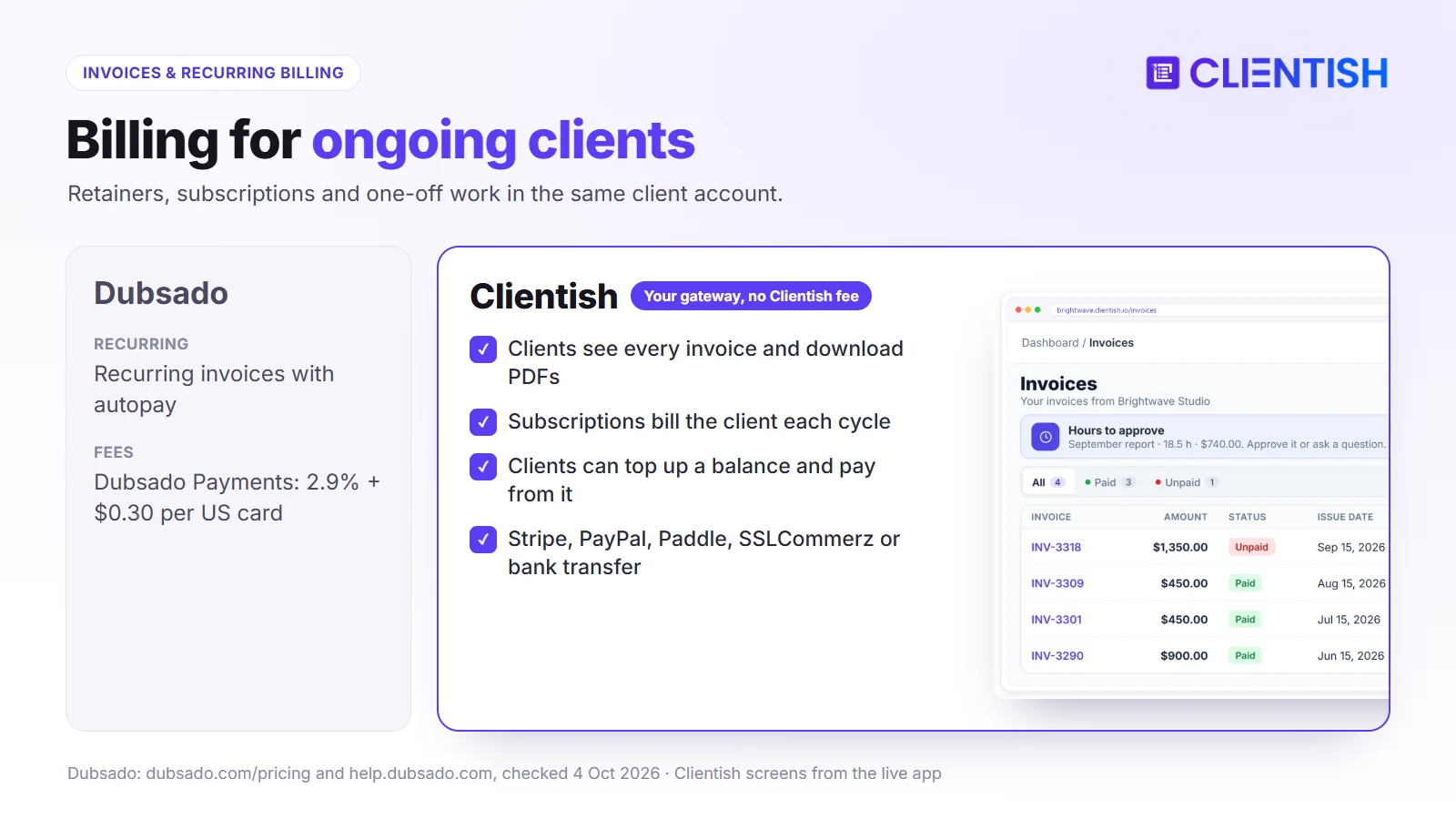
Neither platform takes a percentage of what your clients pay you. In Dubsado, card payments go through Dubsado Payments (powered by Stripe) at 2.9% + $0.30 per US card and 4.4% + $0.30 per international card, or through Square or PayPal. In Clientish, payments go through your own Stripe, PayPal, Paddle, SSLCommerz or bank account, at that provider’s rates.
Setup and Learning Curve: How Long Before Your First Client Logs In?
Winner: Clientish for agencies that need to be running quickly. Dubsado gets there too, but only after a configuration project.
Setup time is the complaint that shows up most often in Dubsado reviews. The gap here isn’t cosmetic: it’s about how much work you do before a single client sees your portal.
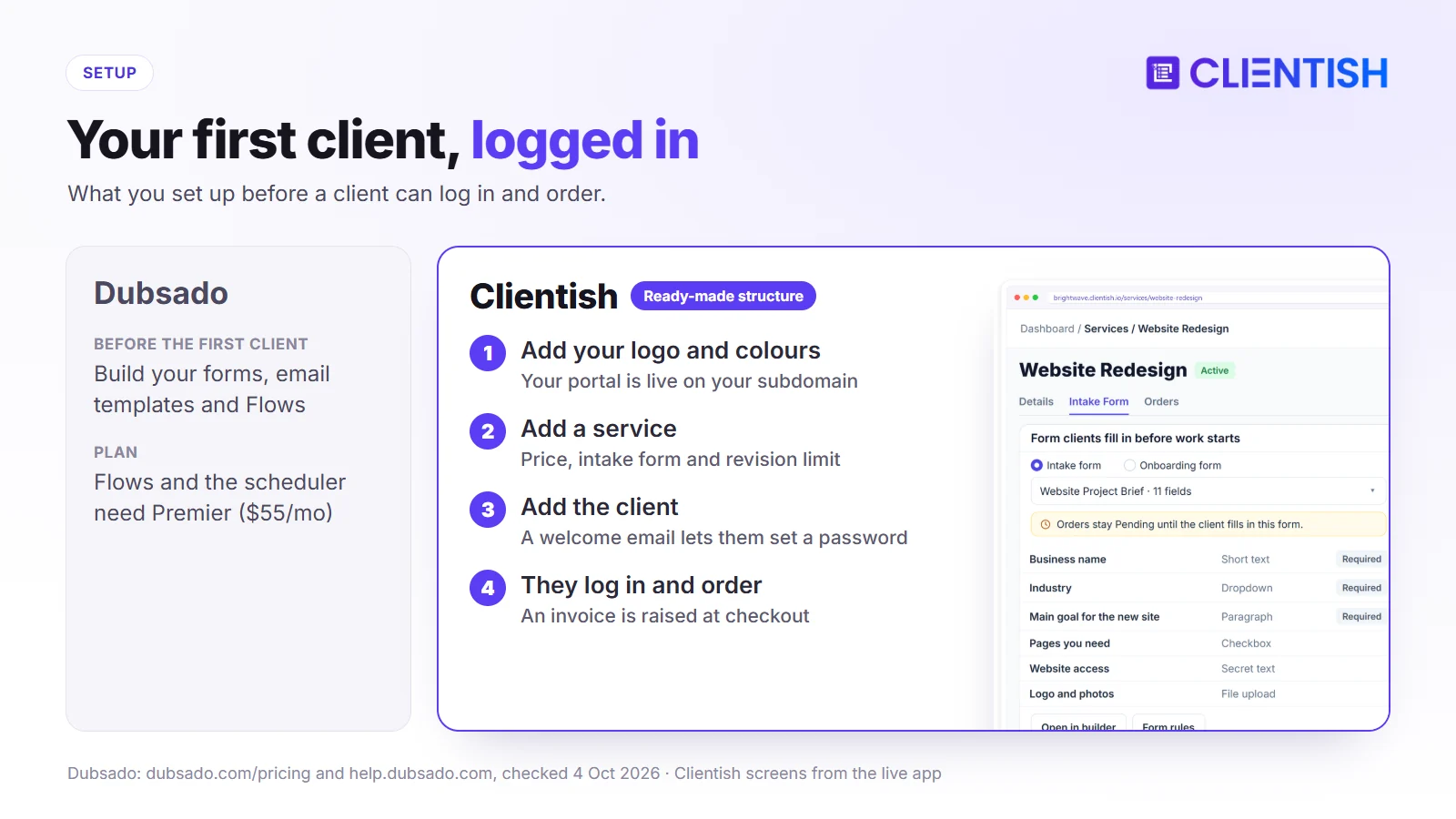
Dubsado: You Build It First
Dubsado gives you a blank canvas. Every form, email template, proposal and Flow is built to match your process. Capterra reviewers rate its ease of use 3.7 out of 5, and recent reviews say setup “demands considerable effort” and that learning to automate your workflows “takes quite a bit of time”.
Flows ask you to map the whole client journey in advance: what triggers what, which email goes when, what happens if a client doesn’t respond. If your agency hasn’t written those steps down yet, you end up designing your process and your software at the same time. Some owners hire a Certified Dubsado Specialist to do the build for them.
None of this is a flaw in Dubsado’s design. It’s the price of its flexibility. But an agency owner who expected to be onboarding clients by the end of the week usually finds it takes longer than planned.
Clientish: Configured Around an Agency’s Shape
Clientish assumes you already have clients and need somewhere to run them. Services, orders, invoices, tickets and client messages all have a home before you change a setting. Getting the first client in takes four steps:
- Add your logo and colours. Your portal is live on your subdomain.
- Add a service with its price, intake form and revision limit.
- Add the client. A welcome email lets them set a password.
- The client logs in and orders. Checkout raises the invoice.
Intake forms, subscriptions, tickets and team assignments come in as you use them, not before you can start.
| Setup dimension | Dubsado | Clientish |
| Before the first client | Build forms, templates and Flows | Add branding and one service |
| Process written down first | Needed for Flows to work | Not needed; the order path is built in |
| How far you can customize | Very far | Within the order structure |
If your process is already written down and you’re willing to spend time in the builder, Dubsado pays that time back. If you’re running a multi-client agency and need a client-ready workspace now, Clientish doesn’t ask you to build it first.
White Label and Client Portal: Whose Brand Do Clients See?
Winner: Clientish on what clients can do inside the portal: orders, tickets and a cart-style catalogue, which Dubsado’s portal doesn’t offer. Dubsado’s one edge is the address, since it can run on your own domain while Clientish uses your subdomain.
A common reason agencies leave Dubsado is that clients keep emailing to ask where their work stands. The portal a client logs into every week is part of your service, so what they can do there matters as much as whose logo sits at the top.
What Dubsado’s client portal does
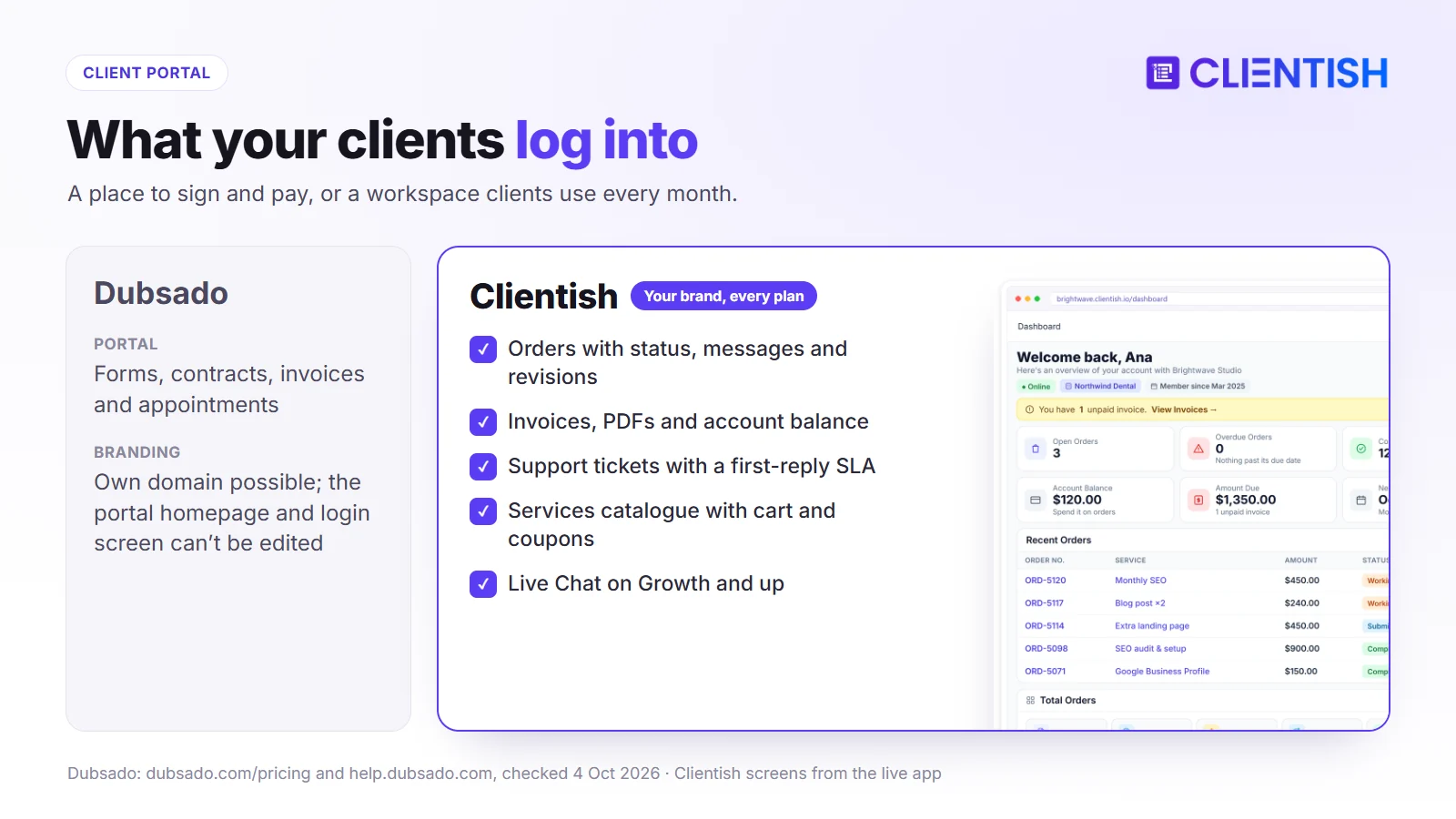
Clients log in to see their forms, proposals, contracts, unpaid and paid invoices, appointments, emails and shared files. You can add a portal logo, banner, colours and a welcome message. With a CNAME record, your forms, invoices, scheduler and portal can run on an address like portal.yourdomain.com, and Dubsado says clients see no Dubsado branding on forms, invoices or schedulers.
The limits sit in the portal itself: you can’t edit the portal homepage or the login screen, and custom code isn’t allowed. The portal covers the paperwork of a project. It has no support tickets, no service catalogue with a cart, and no order status for repeat work.
What Clientish’s client portal does
The Clientish client portal lives at an address like youragency.clientish.io and carries your branding from the Starter plan. Inside it, clients can:
- Check order status and message your team on the order thread
- Fill in the intake form for their order
- Request revisions after delivery, up to the limit set on the service
- Pay invoices through your gateway or from their balance, and download PDFs
- Open support tickets, reply, and rate the answer
- Browse your services, add them to a cart and check out with a coupon
- See their subscriptions with the next payment date, and cancel if you allow it
A client who can check status, pay and raise a ticket without emailing you is a client who doesn’t start a 30-message thread asking where things stand. Live Chat in the portal is on Growth and up.
At a glance: portal comparison
The table puts the two portals side by side: what clients can do once they log in, and whose name and address they see.
| Capability | Dubsado | Clientish |
| Your logo and colours | Yes | Yes, plus favicon, every plan |
| Address | Your own domain via CNAME | Your subdomain on clientish.io |
| Emails from your own SMTP | Sends through your connected Gmail or Outlook | Yes, every plan |
| Order status and revisions | Projects and public task boards | Yes, per order |
| Support tickets | Not offered | Yes |
| Service catalogue with cart | Public proposals with packages (Premier) | Yes, with coupons |
| Live chat with the client | None found in its help center | Growth and up |
In short, a Dubsado client visits the portal to sign, fill in a form or pay. A Clientish client comes back every month to order, follow the work, pay and get help, all under your brand.
Team and Permissions: Built for One Person or a Whole Agency?
Winner: Clientish for agencies with more than four people. Each plan includes 5 to 50 team members, and you control access down to the single permission.
Per-user pricing is one of the main reasons growing agencies outgrow Dubsado. The two tools also assume different things about who does the work: Dubsado gives one owner a few helpers, while Clientish expects an account manager, a designer and a support rep to work on the same client at the same time.
How Dubsado handles team access
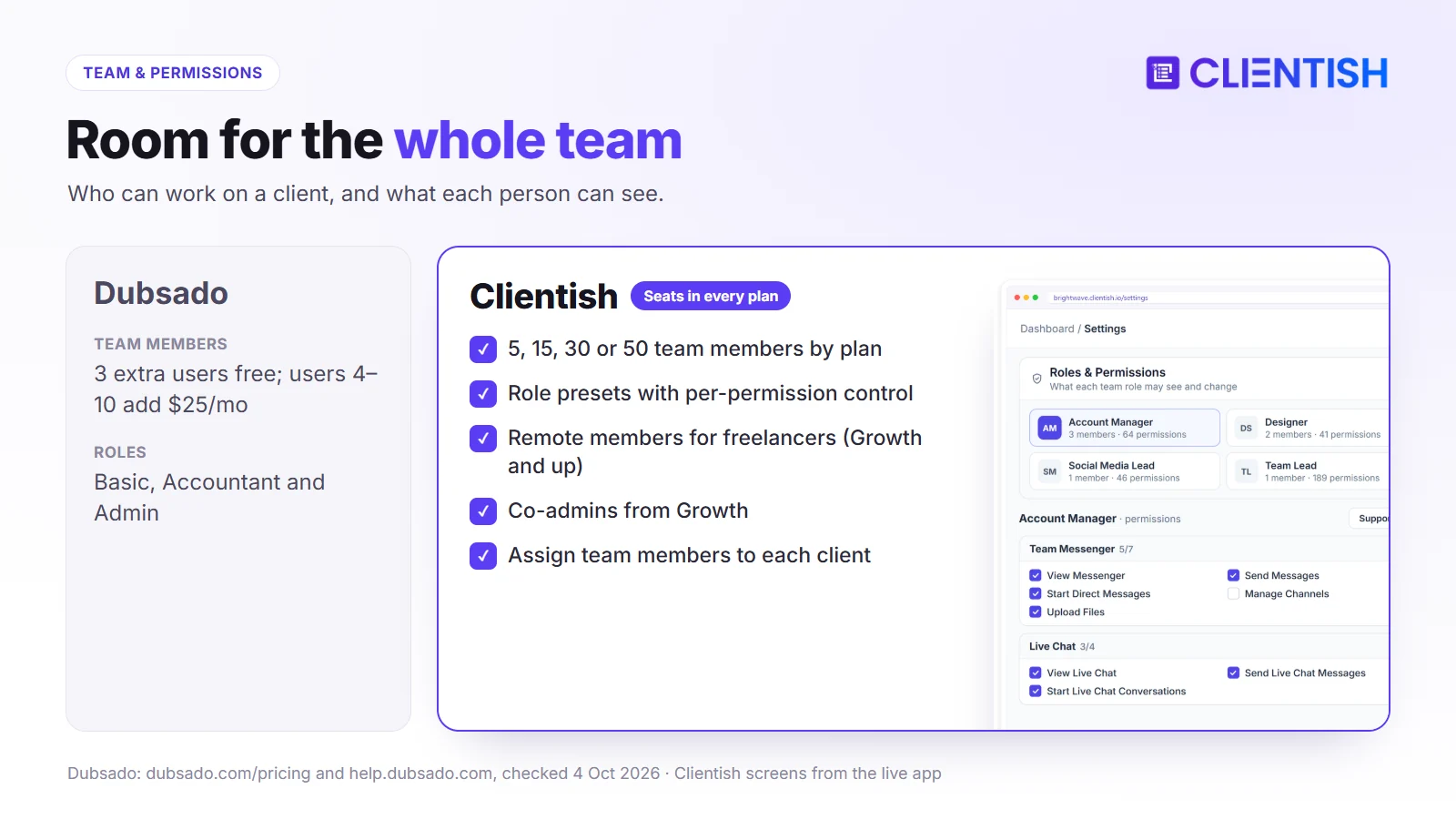
Both Dubsado plans include up to three extra users. Each gets one of three roles:
- Basic: sees only the projects and tasks assigned to them, with optional access to contracts, invoices or templates
- Accountant: view-only access to financial areas
- Admin: access to almost everything except billing
From the fourth user, Dubsado charges $25 a month (users 4–10), $45 (11–20) or $60 (21–30). Each brand has one connected email account, and the scheduler uses only the owner’s calendar. There are no custom roles.
How Clientish handles team access
Clientish includes 5, 15, 30 or 50 team members depending on the plan. Its roles and permissions are built for a service team:
- Your own roles, started from presets (Support desk, Order ops, Team lead, Viewer) and adjusted permission by permission
- Per-member overrides, so one person can get an exception without changing the whole role
- Departments and designations that match how your team is organised
- Co-admins (1 on Growth, 3 on Pro, 5 on Enterprise) for people who need near-owner access
- “Sign in as” permissions, so you decide who can view the portal as a client or team member
- Member status (Approved, Pending, Hold) to pause someone’s access without deleting the account
A support rep sees tickets and replies; they don’t see invoices. Someone running delivery manages orders and tasks; they don’t touch billing.
| Dimension | Dubsado | Clientish |
| Included team members | Owner + 3 | 5 / 15 / 30 / 50 |
| Roles | Basic, Accountant, Admin | Custom roles from presets |
| Per-person exceptions | Optional permissions on Basic | Override any permission per member |
| Departments and designations | Not in its team-roles guide | Yes |
| Freelancers and contractors | Basic role, counts as a user | Remote members (Growth and up) |
Remote members
For freelancers and contractors, Clientish uses a separate member type: 5 remote members on Growth, 15 on Pro and 30 on Enterprise. They see only what their role allows, log hours per client, and those hours go into a report the client approves. In Dubsado, a contractor is a Basic user limited to assigned projects, and counts toward your paid user tiers.
For most agencies the team layer isn’t an extra. It’s the difference between a tool one person uses to serve clients and a tool the whole team works in.
Workflows and Automation: Custom-Built or Ready to Run
Winner: Dubsado if you want to design your own automated client pipeline and you’re on Premier. Clientish wins for teams that want the same order path for every client from day one.
Dubsado Starter has no Flows at all, so users who want automation face a plan upgrade first. Beyond price, the two tools bet on different ideas of automation: Dubsado treats it as something you design, Clientish builds it into the order itself.
How Dubsado’s Workflow Engine Works
Dubsado’s Flows, on Premier only, chain steps together: send a proposal, wait for the signature, send a welcome email, assign a form, schedule a payment reminder. Flows start from triggers such as a form submission, a signed contract, a paid invoice, or a manual start. Version 3.0 added a node-based builder for designing them.
Every step has to be defined, and the email templates written, before the first Flow runs. For a business that runs the same client journey again and again, that work pays off. For an agency adding service lines or moving people between client types, keeping Flows up to date becomes its own job.
How Clientish Structures Automation
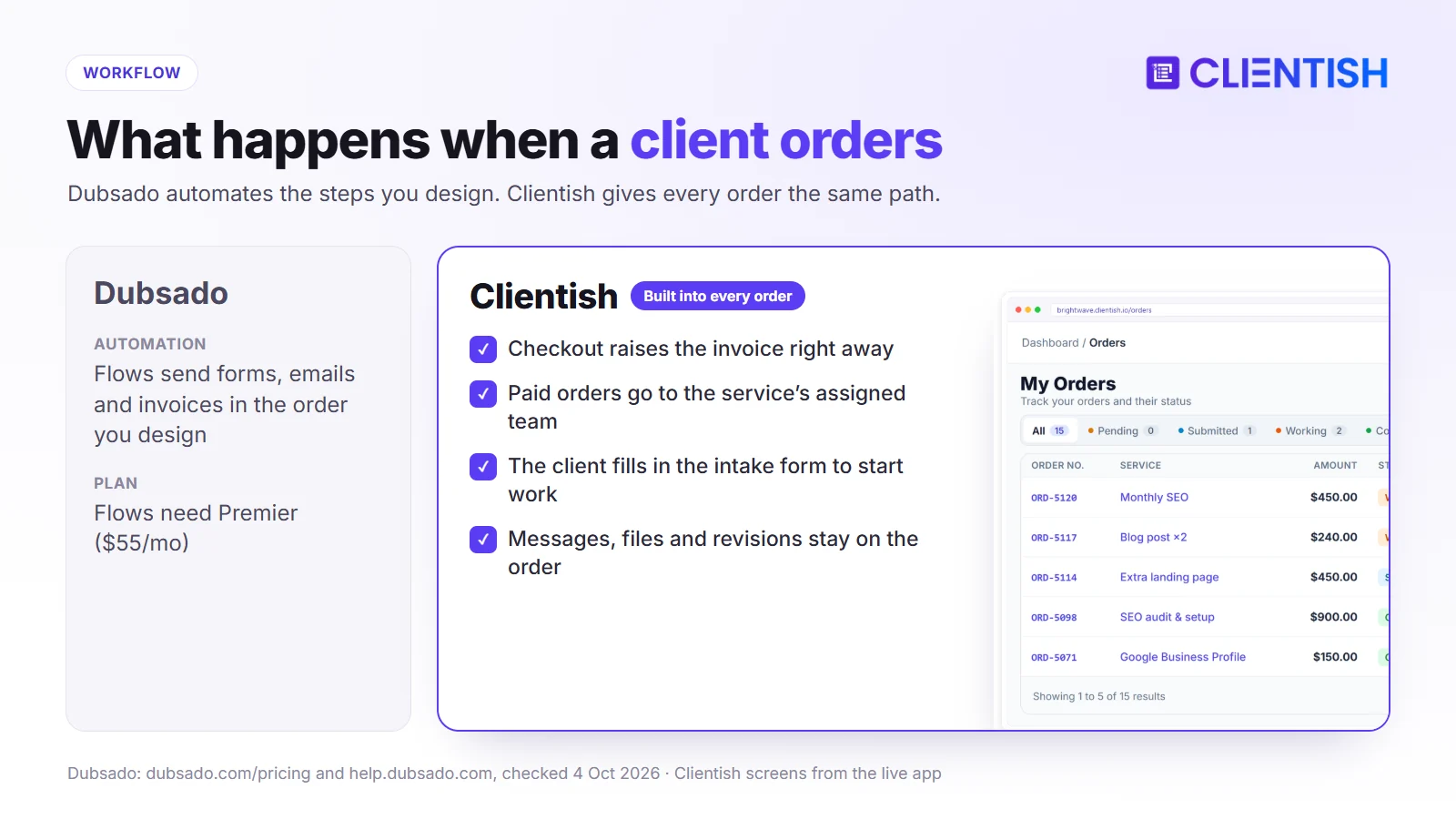
In Clientish you don’t build a workflow; you set up a service. When a client checks out in the portal, an invoice is raised. Once it’s paid, the order is created, assigned to the team members set on that service, and the client is asked to fill in the service’s intake form to start the work. Messages, files, delivery and revisions stay on that order.
What runs without setup work:
- Auto-assignment: each new order goes to the team set on its service, and they’re notified
- Intake forms: the client gets the right form for the service they ordered
- Proposals: once a client accepts, the work starts as an order without retyping anything
- Live Chat auto-reply: a message for clients who write outside your business hours (Growth and up)
- Webhooks: ten events (new order, status change, invoice paid, new ticket and more) can trigger actions in Zapier, Make or your own tools
The Real Difference
Dubsado gives you the tools and leaves the design to you. Clientish gives you a fixed path and asks you to fill it with your services. In an agency, the fixed path means a new team member can follow any active order without first learning a Flow someone built eighteen months ago. Dubsado’s approach suits a solo creative with one repeatable client journey and the time to build it properly.
Invoicing and Recurring Billing: Which Fits Ongoing Clients?
Winner: Clientish for agencies running retainers. Subscriptions are their own record in the client’s portal, and clients can pay from a prepaid balance.
Both tools send invoices and collect payments. The difference shows when a client pays you month after month: can they see what they owe and what’s coming next, and pay without emailing you to ask?
How Dubsado Handles Invoicing
Payment plans split a fee into scheduled parts with reminders. Recurring invoices repeat on an interval you choose, and autopay can be off, optional or required; clients can update their card from the invoice link. Paid and unpaid invoices show in the client portal, and discount codes work on proposals and invoices.
Payments run through Dubsado Payments (Stripe), Square or PayPal; you can connect Dubsado Payments or Square, not both. Dubsado Payments works only if your business is based in one of the countries on its list.
How Clientish Handles Invoicing and Recurring Billing
Invoices and subscriptions are separate features, and both show in the client portal. Clients see every invoice (open, paid or overdue), pay through your connected gateway, and download PDFs for their finance team.
Subscriptions have their own page in the portal:
- Clients see each subscription, its next payment date and how many payments have been made
- You decide whether clients can cancel from the portal
- You see active, past-due and cancelled subscriptions across all clients in one list
- Clients can top up a balance and choose to pay an invoice from it, which suits prepaid retainers
The Comparison in a Table
Here’s how billing works in each tool, from the moment an invoice is created to the ways a client can pay it.
| Dimension | Dubsado | Clientish |
| When the invoice is created | By a Flow or by hand | At checkout, or when you create the order |
| Invoices in the client portal | Paid and unpaid | All, with PDF download |
| Recurring billing | Recurring invoices with autopay | Subscriptions with their own portal page |
| Prepaid client balance | None found in its help center | Yes |
| Payment options | Dubsado Payments (Stripe) or Square, plus PayPal | Stripe, PayPal, Paddle, SSLCommerz, bank transfer |
| Discounts | Discount codes on proposals and invoices | Coupons at checkout, every plan |
Where Each Billing Model Fits
Dubsado’s billing fits a project that starts with a proposal and a contract: the client signs, pays the deposit, and the payment plan handles the rest. Clientish’s billing fits a client who stays: monthly SEO, content retainers, ad management. The client sees what they pay for, when the next payment is due, and can buy extra work from your catalogue in the same place.
Support and Reliability
Winner: Clientish for agencies that need a problem tracked until it’s solved. Both offer live chat on every plan. Clientish adds support tickets you can follow from start to finish, and dedicated support on Enterprise.
Both are cloud-hosted, browser-based platforms. Clientish publishes uptime targets by plan in its service level agreement (99.5% on Starter and Growth, 99.9% on Pro, 99.95% on Enterprise). Beyond that, what matters is how fast you reach a person when something breaks on a client deadline.
Dubsado’s Support Model
Dubsado mixes live help with a lot of self-service material. Live chat has set hours, and much of the setup help comes from guides, webinars or paid specialists:
- Live chat and email on both plans, Monday to Friday 6am–7pm and weekends 9am–5pm Pacific time
- Help center with written guides for most setup tasks
- Webinars and a YouTube channel with setup help
- Certified Dubsado Specialists, paid experts you can hire to set up your account
Some Capterra reviewers say it can take a long time to get help with a problem, which matters more when a blocked Flow is holding up a client delivery.
Clientish’s Support Model
Clientish customers chat with the Clientish team and open support tickets from their Clientish account, on every plan. Enterprise adds dedicated support. The documentation covers setup from services to team permissions to portal checkout, and because the product follows one order structure, most setup questions have one answer.
Dubsado lists no phone support.
Where Dubsado and Clientish Are Similar
These two tools sit in different lanes, but they share a common base. Both are built for service businesses selling work to clients, not project management tools with invoicing added later. Both give you:
- A client portal where clients log in instead of digging through email
- Proposals that turn into billable work without switching tools
- Invoicing and online payments, with no platform cut of what your clients pay
- Intake forms that collect client details at the start
- Automated emails at key moments, so fewer follow-ups depend on memory
- QuickBooks and Xero connections (Premier in Dubsado)
- Cloud hosting: both run in a browser, with nothing to install or maintain
You’re not choosing between a capable tool and a weak one. You’re choosing between two tools built around different ideas of who’s using them.
Where Both Fall Short
Neither covers every gap a growing agency runs into. Knowing where both stop helps you decide whether either is enough on its own, or whether you’ll need another tool alongside it.
- Reporting. Dubsado’s finance reports show earnings, money owed, net profit, conversion rate and revenue trends for any period. Clientish reports cover revenue, services, clients, orders, assigned orders, coupons and time. Clientish shows revenue per client and per service, not profit, which a 15-person agency needs to see which work makes money.
- Light project management. Both handle tasks and boards, but neither has Gantt charts or task dependencies for complex multi-phase work.
- Mobile. Dubsado has a companion app, but Dubsado says the full product runs on desktop. Clientish runs in a phone browser, without an app.
- Booking. Dubsado’s scheduler needs Premier. Clientish has no built-in scheduler; you add your Calendly link to a form.
Both tools are built around the client relationship and the billing cycle, not agency-wide business intelligence. For most agencies under 15 people that’s fine: the numbers you can’t get from either are usually ones you weren’t tracking anyway. Past that size, plan for a reporting tool next to whichever platform you choose.
A Real Example: Which Fits a 7-Person Agency?
A 7-person content agency runs SEO, social and copywriting retainers for 18–25 clients: an account manager, three writers, a strategist, an editor and an operations lead. They’ve been using Google Docs, Stripe and email, and want one system.
Their problems are specific: clients can’t see what’s being worked on, the ops lead spends Monday mornings chasing invoice statuses, and there’s no clean record of which client approved what. They need a client portal, recurring billing and team task visibility this month.
Why Dubsado Is the Wrong Fit Here
Dubsado’s Flows guide one client through a defined pipeline: inquiry, proposal, contract, deposit. That suits a photographer booking weddings. This agency’s work doesn’t have a clean start and end. It repeats every month, overlaps, and different people own different parts of it.
The numbers work against it too. Seven people means the owner, three included users and three more on the $25/mo tier, on top of Premier for Flows: about $825 a year. Clients still have no tickets, no order status for repeat work and no catalogue to buy extra work from. And someone has to build and maintain the Flows before any of it runs.
Why Clientish Fits Better
Each of the agency’s three problems (client visibility, chasing invoices, and no record of approvals) has a direct answer in Clientish, and none of it needs a build project first.
- Branded portal: clients log in on the agency’s subdomain and check status themselves, so the account manager fields fewer “where are we?” emails.
- Orders: each monthly batch is an order with its team, messages, files and delivery in one place.
- Subscriptions: the ops lead sets up each retainer once; the client sees the next payment date and pays through Stripe or PayPal.
- Roles: writers and the editor see their assigned orders, not client billing.
- Tickets: questions come in as tickets with a reply deadline and revision requests go on the order, not DMs to whoever the client knows.
- Cost: seven people fit in Growth at $468 a year, with Live Chat included.
The account manager can have the first client in the portal the same week.
The One Area Dubsado Would Win
If this agency sold a high-touch onboarding where every new client signs a custom proposal, completes a long questionnaire and goes through a multi-step email sequence before work starts, and the ops lead had time to build it, Dubsado’s Flows would automate the front of the funnel further than Clientish does.
For this team, the bottleneck is what comes after: status, recurring billing and accountability across 20 ongoing accounts. That’s the part Clientish is built for.
Pros and Cons
This is the short version of everything above: what each tool does well and where it holds you back. Use it as a checklist against the things your agency can’t work without.
Dubsado
Dubsado’s strength is how far you can shape the client journey. The cost is the time it takes to build that journey and keep it up to date.
| Pros | Cons |
| Flows you can design step by step (Premier) | Setup takes real time before anything runs on its own |
| Proposal, contract and invoice in one sequence | Flows and the scheduler need Premier ($55/mo) |
| Pages on your own domain | Users beyond 3 cost $25–$60/mo extra |
| Unlimited clients and projects on both plans | No client support tickets or service catalogue |
| Mobile companion app | Portal homepage and login screen can’t be edited |
Clientish
Clientish’s strength is how quickly an agency goes from signup to a client-ready portal. Its limits are mostly plan allowances and the subdomain.
| Pros | Cons |
| Branded client portal on your subdomain, every plan | No custom domain; the portal runs on clientish.io |
| Orders, invoices, subscriptions and tickets on one client record | Live Chat, Leads and remote members start on Growth |
| 5 to 50 team members included, with custom roles | Starter allows 10 new clients and 30 orders a month |
| Clients order, pay, open tickets and request revisions themselves | No mobile app and no built-in scheduler |
| Your own gateway and SMTP, no platform cut | English interface only; read-only API |
Good For / Avoid If
The right choice depends on your team size, your clients and how much setup you can take on. Find your situation in the lists below; if most of your “avoid if” points land on one tool, you have your answer.
Dubsado
Good for:
- Solo photographers, designers, coaches and copywriters who want proposals, contracts and invoices in one sequence
- Businesses that have already written their process down and want to turn it into Flows
- Freelancers whose clients expect a branded proposal-to-contract sequence but don’t need a portal after signing
- A small client list (around 5–15 active clients) where each client’s onboarding matters more than team coordination
Avoid if:
- More than four people need to work in it and you don’t want to pay for each extra user
- Your clients expect to order, track work and raise support tickets in the portal
- You don’t have the time, or a specialist, to build the Flows
- Your process isn’t written down yet; you’ll likely rebuild your Flows more than once before they settle
Clientish
Good for:
- Agencies with retainer clients who need orders, invoices, tickets and messages on one record
- Teams where account managers, delivery staff and freelancers each need their own level of access
- Productized services that follow the same order, delivery and invoice pattern
- Owners who want clients to log in to a branded portal instead of a third-party interface
Avoid if:
- You work alone, without a team or recurring clients to manage
- You need the portal on your own domain rather than a subdomain
- You need an interface in a language other than English
- You want long, conditional email sequences triggered by specific client actions; Clientish automates the order path but has no sequence builder like Flows
- You want a free-forever plan; Clientish has a 14-day trial, then paid plans
Migrating from Dubsado to Clientish
Switching tools sounds bigger than it is. Your client list comes across with one import; the real work is setting up your services, forms and active retainers once. The steps below follow the order that keeps clients from noticing the change.
What moves over easily
Your client list is the part that moves in one go:
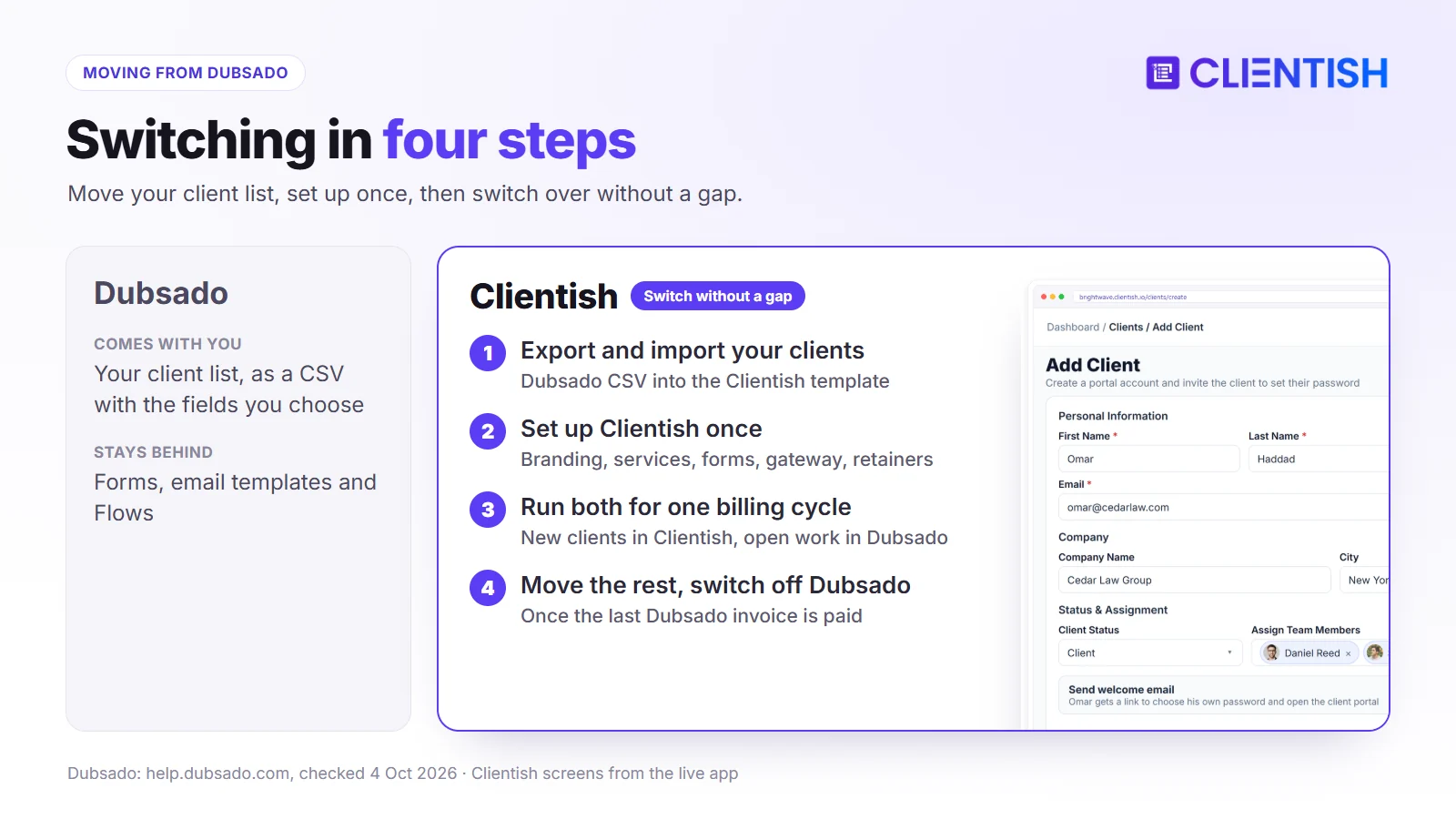
- Export from Dubsado. Export your contacts as a CSV and choose the fields you want to keep, such as name, email, company and phone. Dubsado can also export projects and clients filtered by project status.
- Fill in the Clientish template. In Clientish, open Clients, click Import and download the CSV/XLS template. Copy your Dubsado columns into it.
- Upload the file. Each row becomes a client record that you can assign to team members.
Past invoices and signed contracts don’t import as live records. Download them as PDFs from Dubsado and keep them in your own files.
What you’ll need to rebuild
Forms, email templates and Flows stay in Dubsado. Set these up once in Clientish, in this order, before you move your first active client:
- Brand your portal: logo, colours and favicon, plus your own SMTP so client emails come from your domain.
- Recreate your services: price, intake form and revision limit for each one. This replaces most of what your Flows did, because every order follows the setup of its service.
- Rebuild your forms in the drag-and-drop builder and attach each intake form to its service.
- Rebuild your proposal templates in Clientish Proposals.
- Connect your payment gateway: Stripe, PayPal, Paddle, SSLCommerz or bank transfer. If you used Dubsado Payments, connect your own Stripe account.
- Set up each active retainer as a subscription, and pick a cutover date so nobody is billed twice.
One practical step before you switch
Run both tools for one billing cycle. Keep Dubsado for clients who are mid-project or have an open invoice, and invite new clients into Clientish; the welcome email lets them set their own password. When the last Dubsado project closes and its invoices are paid, move the remaining clients over and cancel your Dubsado plan.
Frequently Asked Questions
These are the questions agency owners ask most when comparing Dubsado and Clientish, from pricing and trials to branding, payments and switching. Each answer stands on its own, so you can jump to the one you need.
How much does Dubsado cost in 2026?
Starter is $35 a month or $335 a year, and Premier is $55 a month or $525 a year. The fourth to tenth users add $25 a month, and each extra brand adds $10 a month (October 2026).
Why do people switch from Dubsado?
The reasons repeat across reviews: the time it takes to build forms, templates and Flows; the December 2025 price rise; automation and scheduling locked to Premier; paying per user once a team grows; and a portal that doesn’t cover ongoing orders or support.
How long does Dubsado take to set up?
It depends on how many forms, templates and Flows you build, but expect days rather than hours. Its ease-of-use score on Capterra is 3.7/5, and some owners pay a Certified Dubsado Specialist to do the setup for them.
Does Dubsado have a scheduler?
Yes, on Premier only. Clientish doesn’t include one; agencies add their Calendly link to a form instead.
Did Dubsado raise its prices?
Yes. On 1 December 2025, new subscriptions went from $20 to $35 a month (Starter) and from $40 to $55 (Premier). People who were already paying keep their old price.
How long is the Dubsado free trial?
21 days with every Premier feature and no card. Dubsado doesn’t charge you when it ends. The Clientish trial is 14 days.
Is Dubsado good for agencies?
It works for small teams. Three extra users are included, the Basic role limits someone to their assigned projects, and Admin gives near-full access. From the fourth user it costs $25 a month or more, there are no custom roles, and clients have no support tickets or order tracking in the portal. Agencies with ongoing clients and more than four people usually outgrow it.
Will my clients see Dubsado branding?
Not on forms, invoices or schedulers. The Dubsado name can appear in web addresses, browser tabs and link previews until you set up your own domain and page settings. The portal homepage and login screen can’t be customized.
Can Clientish remove its branding from the client portal?
Your logo, colours and favicon are on the portal from the Starter plan, and emails go out through your own SMTP. The small “Powered by Clientish” line is removed on Pro and Enterprise. Clientish runs on your subdomain; it doesn’t support a custom domain.
Does Dubsado have a mobile app?
Yes. Dubsado says the app is a companion and the full product runs on desktop. Clientish has no app and works in a phone browser.
Does Dubsado charge transaction fees?
Dubsado adds no fee of its own. Dubsado Payments charges 2.9% + $0.30 per US card, 4.4% + $0.30 per international card, and 0.8% for ACH, capped at $5. Clientish adds no fee either; you pay your own gateway’s rates.
Which tool is better for an agency running retainer clients?
Clientish. Each retainer is a subscription the client sees in their portal with the next payment date, next to their orders, invoices and tickets. Dubsado’s recurring invoices with autopay handle the billing, but not the ongoing work around it.
Which tool is cheaper?
Clientish, at most team sizes. Its Starter plan is $29 a month against Dubsado’s $35. A nine-person team pays about $825 a year on Dubsado (Premier plus extra users) and $468 a year on Clientish Growth.
Can I migrate my Dubsado client data to Clientish?
Yes. Export your contacts from Dubsado as a CSV and import them with the Clientish CSV/XLS template. Flows, forms and email templates don’t transfer; you set up services and forms in Clientish instead.
What payment gateways does Clientish support?
Stripe, PayPal, Paddle, SSLCommerz and manual bank transfer. Clientish takes no cut; payments go through your own account.
The Verdict: Which Should Your Agency Pick?
Dubsado is built for the start of a client relationship. If you’re a solo creative or a very small team with one well-defined project journey, and you’ll pay for Premier and build your Flows, it automates that journey further than Clientish does.
The catch is that Dubsado was built for that person, not for a five- or ten-person agency running retainers for twenty clients at once.
Clientish is built for what comes after: clients who log into your branded workspace, order again, see their invoices and subscriptions, and open a ticket instead of emailing. Your team gets seats and roles in the plan, payments go through your own gateway, and the order path works without a build project. For any team of up to 15 people, it also costs less than Dubsado.
- Pick Dubsado if you’re a solo creative or a team of up to four with a single, well-defined client journey, and you want to control every automated step.
- Pick Clientish if you run an agency with a team and ongoing clients who need one branded place to order, pay and get support.
Start your 14-day free trial and set up your first service and client.
Sources
Clientish publishes this comparison. Last updated October 4, 2026; Dubsado facts were checked that day on Dubsado’s own pages: pricing, plan guide, free trial, branding, client portal, team roles, payments, support, Dubsado 3.0 and Capterra reviews.
Dubsado is a trademark of its owner. Clientish is not affiliated with, endorsed by or sponsored by Dubsado. Prices and features change; if you spot something out of date, let us know and we’ll correct it.

