

The best client portal for a digital marketing agency is the one that keeps the whole client relationship in one branded place: onboarding, approvals, reports, requests and invoices. Clientish does all of that from $9.99 a month; SuiteDash, Assembly, ManyRequests and Wayfront are the strongest alternatives, and ClickUp or monday.com suit agencies that only share tasks.
Below are 15 client portals that digital marketing agencies often compare in 2026, with prices taken from each vendor’s own pricing page on 19 October 2026, what each one does well, where it falls short for SEO, PPC, social and content work, and which type of agency it suits. Clientish publishes this list and puts its own portal first; the criteria and the facts behind every entry are shown, so you can judge for yourself.
Key takeaways
- A full client portal handles orders, approvals, reports, requests and billing; project tools with guest access only show tasks.
- Check which plan unlocks your own domain and removes the vendor’s name before you compare prices.
- Seat-based and per-client pricing grows fast: price your tool for your real team and client count.
- Clientish, SuiteDash, Wayfront and ManyRequests include client invoicing; Clinked, Moxo and FuseBase do not list it on their pricing pages.
Best Client Portals for Digital Marketing Agencies Compared
The quickest way to compare client portals for a marketing agency is by four facts: what each one is best for, the entry price, the plan that puts the portal on your own domain, and whether clients can pay invoices inside it. This table sets all 15 side by side, with prices from each vendor’s own page on 19 October 2026.
Prices change often, so treat the figures as a starting point and check the vendor’s page before you buy. “Not listed” means the vendor’s pricing page does not mention the feature:
| Tool | Best for | Starts at (monthly) | Own domain | Client invoicing |
| Clientish | One portal for orders, approvals, reports, invoices and tickets | $9.99 ($8 yearly) | Every plan | Yes |
| SuiteDash | Many tools for one flat fee | $19 ($15 yearly) | White labeling on every plan | Yes |
| Assembly | A polished portal on a free start | Free; $49 ($29 yearly) | From Professional | Yes |
| ManyRequests | Productized agencies using request boards | $59 ($39 yearly), 1 seat | Every plan | Yes |
| Wayfront | Productized SEO and content packages | $129 ($99 yearly) | Every plan | Yes |
| Clientjoy | Sales first: proposals and pipeline | $49 ($44 yearly) | Premium | Yes |
| Clinked | Secure file sharing for large clients | $11 per user ($8.80 yearly) | From Standard | Not listed |
| Moxo | Multi-step approvals with many stakeholders | No public price | Not listed | Not listed |
| ClickUp | Agencies already running tasks in ClickUp | Free; paid per user | Enterprise branding | No |
| monday.com | Agencies already on monday boards | Free (2 seats); guests from Standard | Not listed | No |
| Basecamp | Simple shared projects with clients | Free (1 project); $25 | Not listed | No |
| FuseBase | Portals built like a client wiki | Free; $39 ($32 yearly) | From Advanced | Not listed |
| HoneyBook | Solo marketers selling by proposal | $36 ($29 yearly) | Custom subdomain | Yes |
| Plutio | Freelancers on a small budget | $19 ($15.83 yearly), solo | $9 add-on; included on Max | Yes |
| Accelo | Larger teams that need full PSA software | No public price | Not listed | Yes |
Which client portals for marketing agencies include invoicing?
Clientish, SuiteDash, Assembly, ManyRequests, Wayfront, Clientjoy, HoneyBook, Plutio and Accelo all list client invoicing, so you can bill clients from the same tool (Accelo’s pages do not say which online payments it takes, and Clientjoy’s portal is on Premium). Invoicing is missing from the pricing pages of Clinked, Moxo and FuseBase, and the three project tools, ClickUp, monday.com and Basecamp, have no client billing.
If clients pay retainers every month, check that the tool handles recurring invoices too, not only one-off bills; Clientish, SuiteDash, Wayfront, Clientjoy and HoneyBook list recurring billing.
Which client portals have a free plan?
Assembly, FuseBase, ClickUp, monday.com and Basecamp have free plans, each with tight limits: 5 active contacts on Assembly, one portal on FuseBase, 2 seats on monday.com and one project on Basecamp. Most of the rest, including Clientish, offer free trials instead, from 7 days on Plutio to 30 days on HoneyBook and most Basecamp plans (45 days on Basecamp Unlimited).
A free plan is useful for trying the client experience; for real client work, the paid plan that fits your team is the number to compare.
What Is a Client Portal for a Digital Marketing Agency?
For a digital marketing agency, a client portal is a private, branded website where each client logs in to see their campaigns, approve content, open monthly reports, raise requests and pay invoices, instead of hunting through email threads, shared drives and chat apps for the latest version of everything.
The difference from a project tool matters. A project tool shows the client your task board; a portal shows the client their account with you: what they bought, what is waiting for their approval, what they owe and what was delivered. Our guide on what a client portal is covers the basics in more depth.
How Were These Client Portals Chosen and Checked?
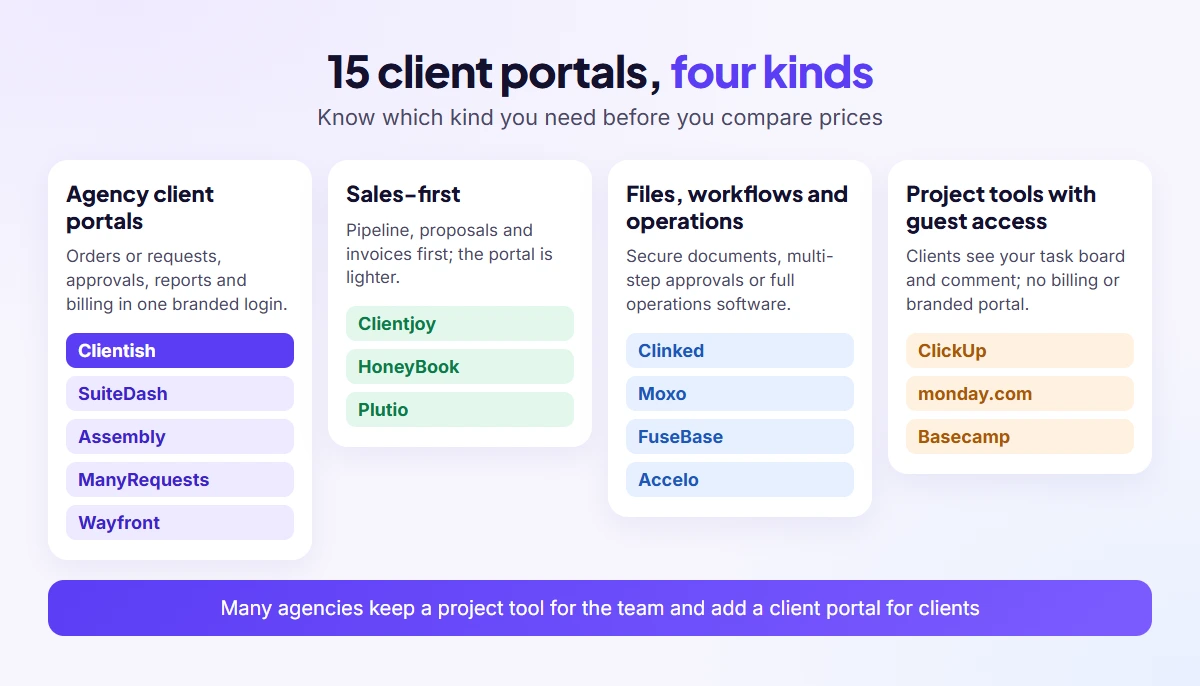
We started from the client portals that keep coming up in Google’s top-ranking lists, Reddit threads from agency owners and ChatGPT answers about marketing agency portals in October 2026, added the portals we already compare Clientish with (Wayfront and Clientjoy) and the project tools many agencies already pay for, then compared all 15 on what marketing agencies need.
We compared each tool on seven points that come up again and again in agency work:
- Approvals and delivery: can clients approve or ask for changes on the work itself?
- Client reports in the portal: can monthly reports live where the client logs in?
- White label depth: own domain, own emails, and which plan removes the vendor’s name.
- Billing and payments: invoices, retainers and online payment inside the portal.
- Cost for 5 people and 15 clients: the real monthly bill, not the headline price.
- Client requests and support: a place for requests that is not your inbox.
- Client ease: login, phone use and notifications that clients will tolerate.
Prices, plan limits and listed features come from each vendor’s own pricing and feature pages, checked on 19 October 2026; where a page says nothing, we write “not listed”. Two drawbacks, ClickUp’s notifications and SuiteDash’s setup time, come from agency owners on Reddit and from other published comparisons. We did not run paid trials of every tool, and Clientish is ranked first on these criteria by the team that builds it.
The 15 Best Client Portals for Digital Marketing Agencies
The 15 client portals below run from full agency portals with billing and approvals, through sales-first and file-first portals, to the project tools many agencies already use. Each entry follows the same pattern: what it is best for, what marketing agencies get, where it falls short, the price on 19 October 2026, and when to pick it.
1. Clientish
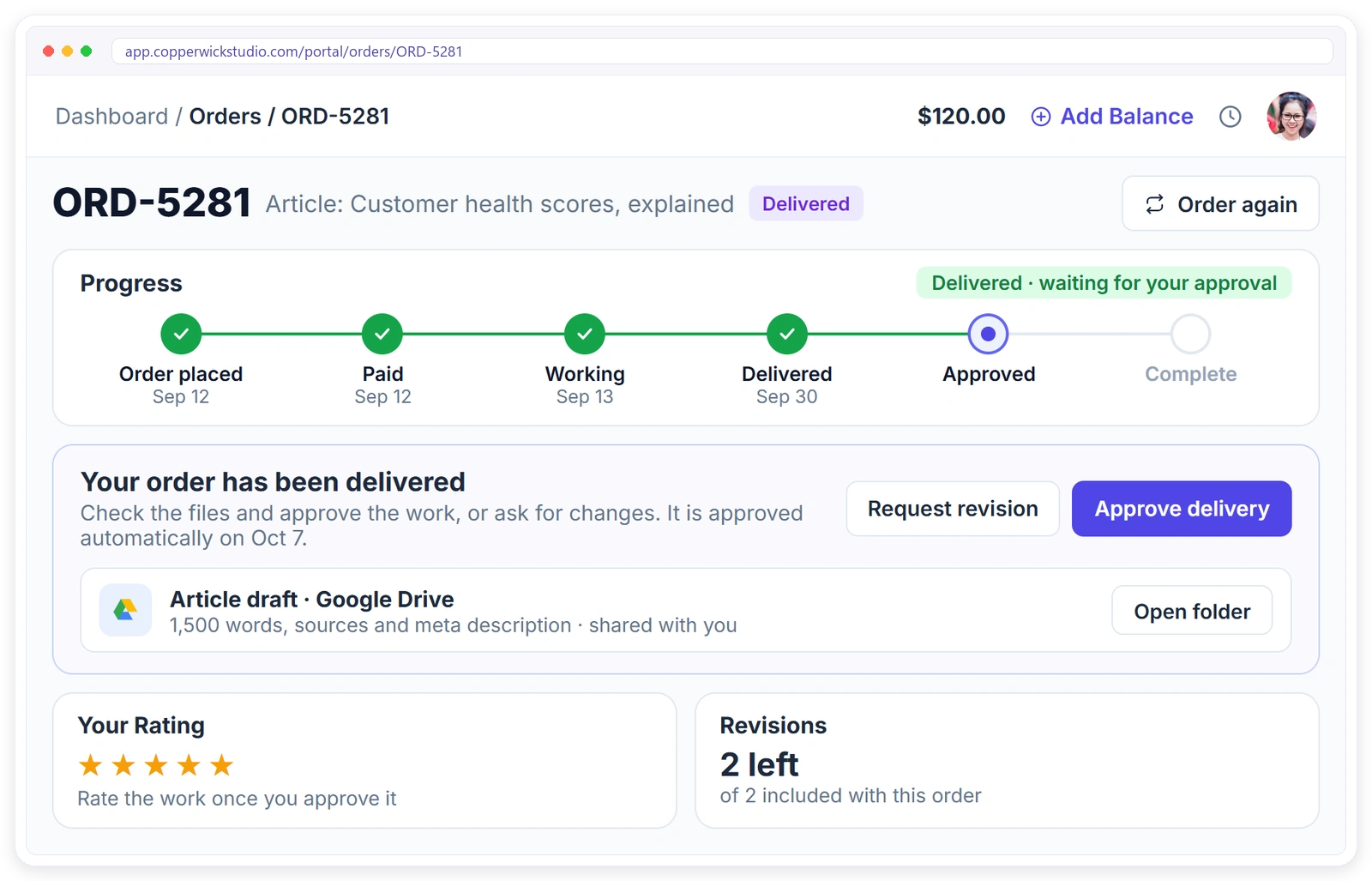
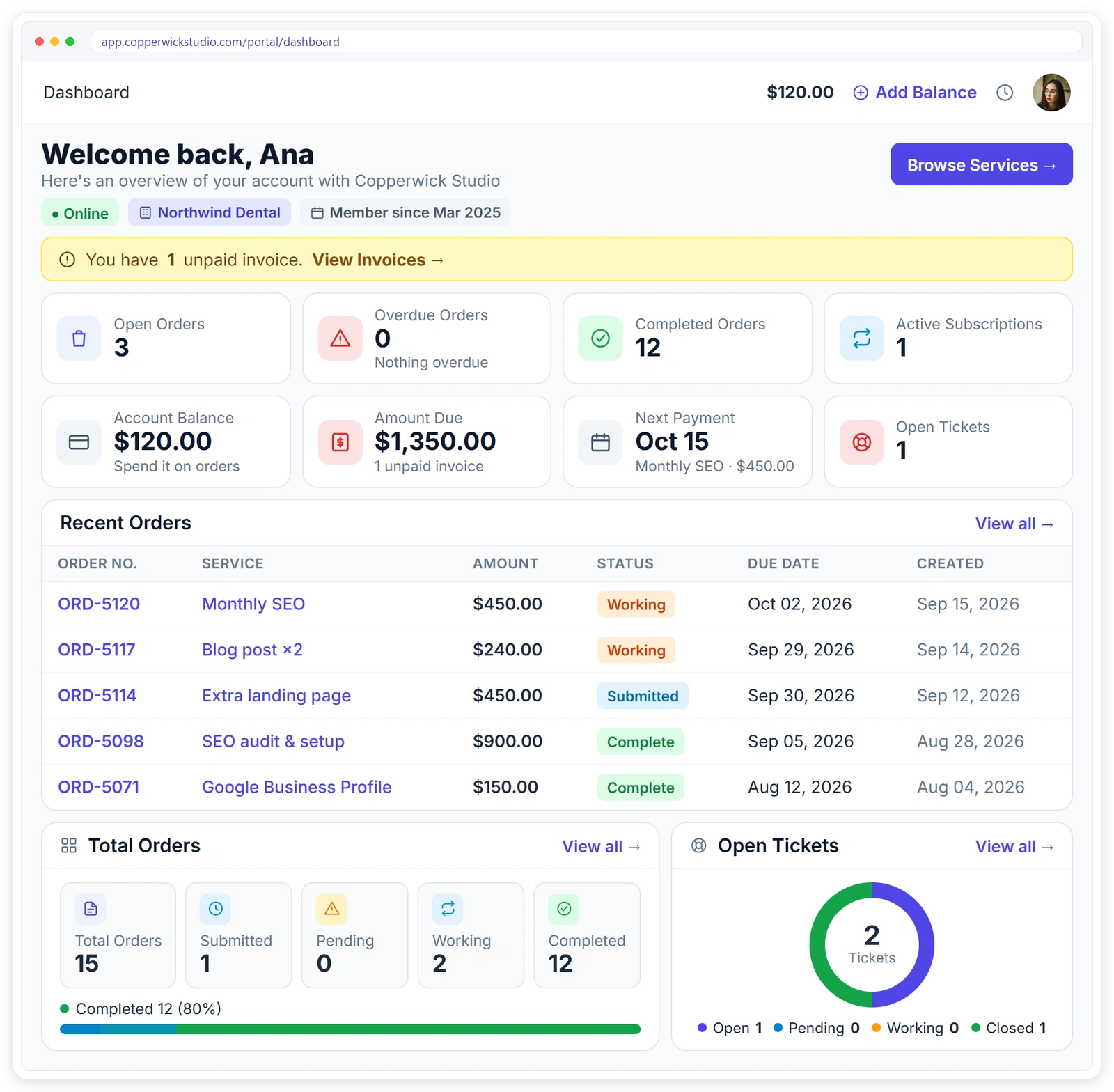
Clientish is an all-in-one client management portal for agencies, freelancers, consultants and service-based businesses: leads, proposals, a branded client portal, orders, invoices and subscriptions, support tickets and live chat in one place. A marketing client can approve this month’s posts, open the SEO report and pay the retainer from the same login.
Best for
Retainer agencies (SEO, PPC, social, content) whose clients should buy, sign off, see results and pay invoices in one branded portal.
| Feature | What Clientish offers |
| Approvals | Approve or request changes in one click, revision count per service, file proofing, auto-approve after 7 days by default |
| Client reports | Report links from Looker Studio, DashThis, Databox, Whatagraph, Google Sheets or any link, with “Viewed” or “Not yet” per client |
| White label | Your domain and email server on every plan; “Powered by Clientish” removable on Pro and Enterprise |
| Billing | Invoices and subscriptions, Stripe, PayPal and other gateways, no Clientish fee |
| Requests | Support tickets with reply targets; live chat from Starter; WhatsApp, Telegram and SMS inbox |
Pros
- The whole client relationship in one login, from proposal to paid invoice
- Your domain on every plan
- Team-based plans with no per-client fees
Cons
- No native GA4, Google Ads or Meta connectors; reports are shared links
- No separate client file library, and thread files are capped at 100 KB
- Leads and live chat start on Starter
Price on 19 October 2026
From $9.99 a month on Solo ($8 yearly), or $29 a month for 5 team members on Starter ($23 a month on yearly billing); Growth, Pro and Enterprise cost $49, $99 and $149 a month ($39, $79 and $119 yearly). The free trial lasts 14 days.
Pick it if
You want one branded login for the whole client relationship, from proposal to paid invoice, and a plan priced for your team (5 team members on Starter) rather than per-client fees.
2. SuiteDash
SuiteDash is an all-in-one business platform that bundles a CRM, client portal, projects, invoicing, proposals, support tickets, courses and email marketing, and it sells all of it on flat plans with unlimited clients and staff rather than charging for each seat or each client account.
Best for
Agencies that want many tools for one flat fee and have time to configure them.
| Feature | What SuiteDash offers |
| Approvals | Contracts and e-signatures, file exchange; deliverable approvals not listed |
| Client reports | Portal pages and dashboards; no marketing data connectors listed |
| White label | White labeling and a custom branded mobile app from the entry plan |
| Billing | Invoicing, packages, payments and subscriptions |
| Requests | Support tickets on Pinnacle |
Pros
- Unlimited clients and staff on every plan
- The lowest price in this list for unlimited clients and staff
- CRM, projects, invoicing and courses in one system
Cons
- Automations and support tickets only on Pinnacle
- Other published comparisons describe setup as slow because of the number of modules
- No marketing data connectors listed
Price on 19 October 2026
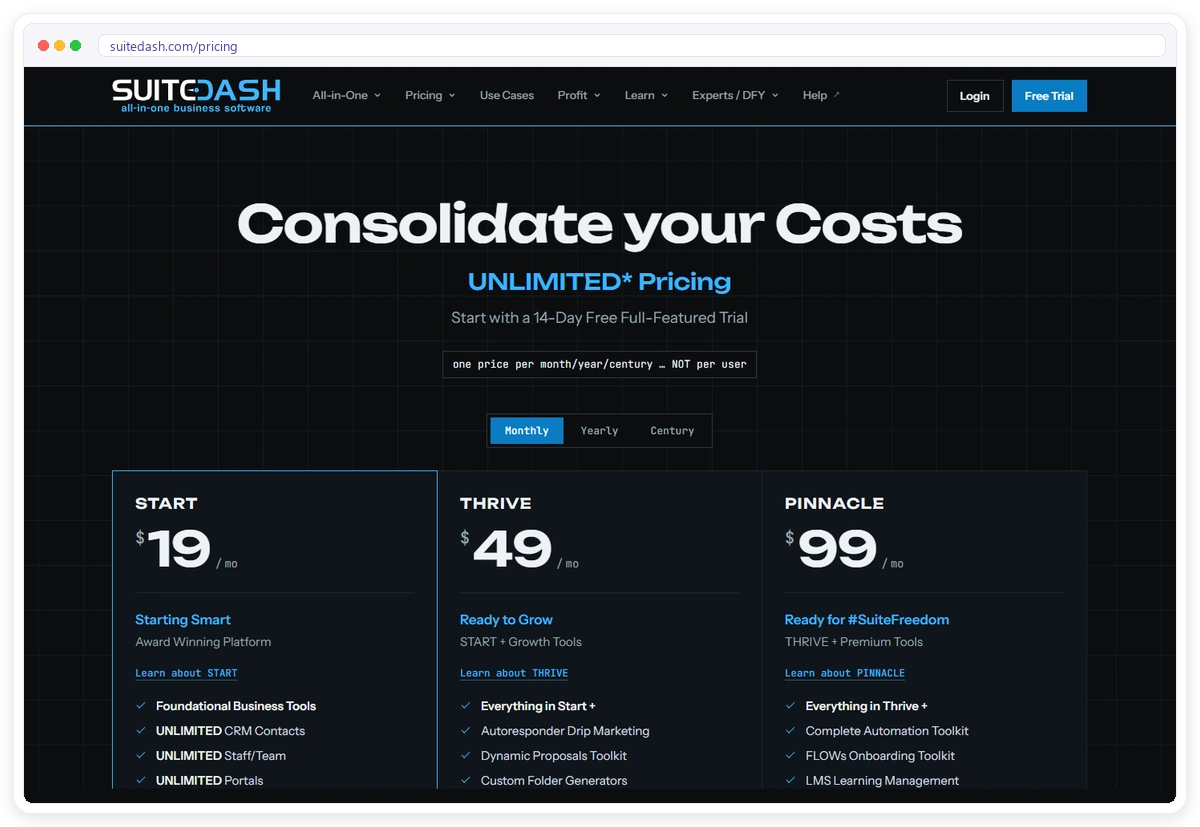
Start, Thrive and Pinnacle cost $19, $49 and $99 a month ($180, $480 and $960 when paid yearly); every plan allows unlimited clients and staff, and the 14-day trial unlocks Pinnacle features.
Pick it if
You want the lowest flat price for unlimited clients and staff and do not mind configuring a large system.
3. Assembly
Assembly, formerly Copilot, is a client portal built on a CRM, with ready-made apps for messages, files, forms, contracts and billing and an AI app builder, so each client can get a space of their own; the free plan covers up to 5 active contacts.
Best for
Solo owners and tiny teams who want a sleek client space today and will upgrade as they hire.
| Feature | What Assembly offers |
| Approvals | Tasks, forms and contracts |
| Client reports | Embedded dashboards through apps |
| White label | Custom domain and badge removal from Professional |
| Billing | Billing from the free plan; payment processing fees apply |
| Requests | Messaging and a team inbox |

Pros
- No cost to try it with real clients
- Ready-made apps and an AI app builder
- Billing included from Free
Cons
- 1 internal user on Free and Starter, 3 on Professional, 5 on Advanced
- Own domain needs Professional
- Contact limits of 50 on Starter and 500 on Professional
Price on 19 October 2026
A free plan for 5 active contacts and 1 user, then $49, $139 and $599 a month for Starter, Professional and Advanced ($29, $99 and $499 on yearly billing); Enterprise starts at $2,000.
Pick it if
You are a very small team that wants a sleek portal now and can move up plans as staff grows.
4. ManyRequests
ManyRequests is a client portal and request board for productized and creative agencies: clients pick a service, submit a request, review the design or video right in the portal and pay there too, which suits fixed packages such as monthly social posts or blog bundles.
Best for
Productized creative and content agencies that sell fixed packages.
| Feature | What ManyRequests offers |
| Approvals | Design and video proofing on every plan |
| Client reports | Reporting listed on every plan; client-facing reports not specified |
| White label | Custom domain on every plan; “Powered by” removed on Pro |
| Billing | Billing and a CRM on every plan |
| Requests | A request board for every client |
Pros
- Your own domain from the first plan
- Proofing built in
- Unlimited clients, client sign-up pages and client-side teams
Cons
- One seat included; extra seats cost $20 (Core) or $30 (Pro) a month
- Removing “Powered by” needs Pro
- Fits fixed packages better than custom retainers
Price on 19 October 2026
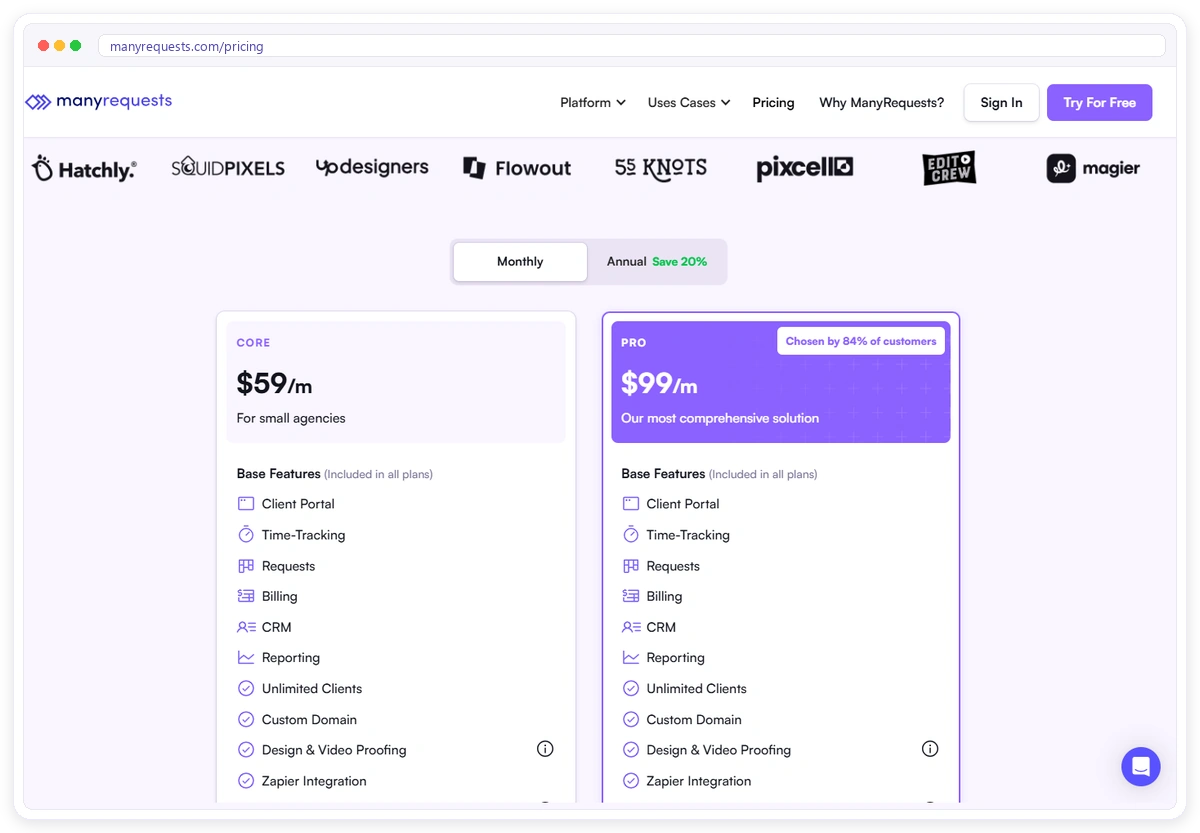
Core $59 a month or $39 billed yearly; Pro $99 or $79 yearly; Enterprise from $1,000. 14-day free trial.
Pick it if
Your clients buy defined packages and you want a request queue with proofing built in.
5. Wayfront
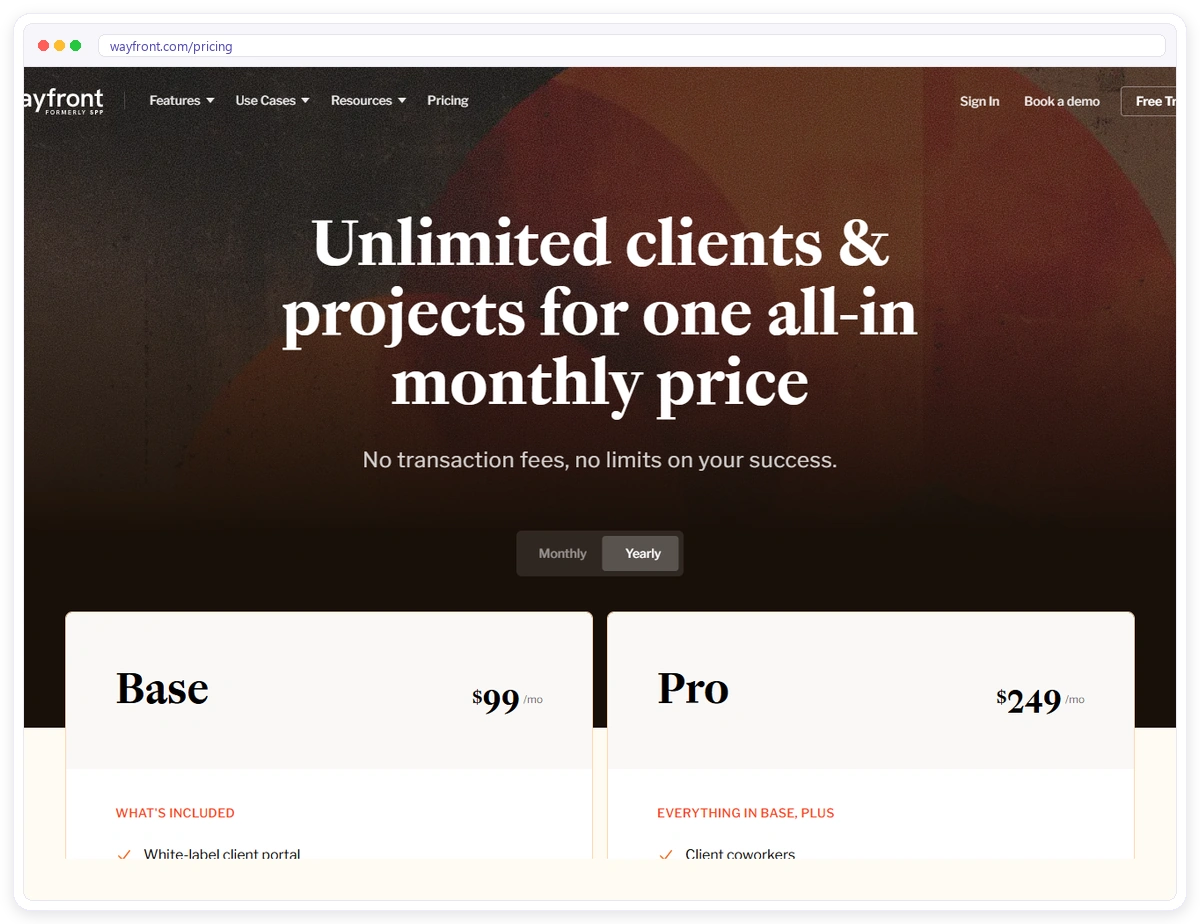
Wayfront, formerly Service Provider Pro, is a white-label client portal with order forms, a CRM, task pipelines, a help desk and invoicing, built around selling packages: a new SEO or content client fills in the order form, pays, and the work lands in your pipeline.
Best for
SEO and content shops selling fixed monthly packages, where every new client starts from an order form.
| Feature | What Wayfront offers |
| Approvals | Clients can view, comment on and approve work by role, with approval reminders, according to its SEO page |
| Client reports | SEO reporting on Pro |
| White label | Full white label with your own domain and emails on both plans |
| Billing | Invoicing in several currencies, payments to your own Stripe |
| Requests | A help desk inbox; a CRM with sales pipelines |
Pros
- White label from day one
- Order forms built for packages and retainers
- No transaction fees
Cons
- The entry plan is $99 to $129 a month
- SEO reporting and more than one person per client account need Pro
- The API is a $240-a-month add-on
Price on 19 October 2026
Base $129 a month or $99 billed yearly (5 seats); Pro $299 or $249 yearly (10 seats). 14-day free trial, no free plan.
Pick it if
You run a productized SEO or content agency and want order forms and white label from day one.
6. Clientjoy
Clientjoy is an agency CRM and sales tool with lead pipelines, web forms, email sequences, proposals and contracts with e-signature and invoicing, plus a client portal on its higher plan, so its strength is the path from first enquiry to signed and paid, more than day-to-day delivery.
Best for
Teams that need help winning and billing clients more than help delivering the work.
| Feature | What Clientjoy offers |
| Approvals | Proposals and contracts with e-signature; deliverable approvals not listed |
| Client reports | On Premium, share work reports, files and Google reporting dashboards in the portal |
| White label | Portal on your domain, plus white label, on Premium |
| Billing | One-time, recurring and milestone invoices with reminders and many gateways |
| Requests | Not listed; client chat on Premium |

Pros
- A sales pipeline with web forms and email sequences on both plans
- Invoicing on both plans
- Many payment gateways
Cons
- The portal, own domain and automations are Premium only
- Starter caps 25 client accounts
- Tickets are not listed
Price on 19 October 2026
Starter $49 a month or $44 billed yearly (up to 5 team members); Premium $99 or $89 yearly (up to 10 team members). Free trial, no card required.
Pick it if
Winning and billing clients is your main problem and a light portal on Premium is enough.
7. Clinked
Clinked is a secure client portal and extranet for file sharing, document collaboration and data rooms, where every file keeps its versions, annotations and an audit trail, which matters when a large client’s legal or IT team asks how campaign assets are stored and shared.
Best for
Agencies with large or regulated clients that judge them on secure file handling.
| Feature | What Clinked offers |
| Approvals | Annotations, version control, Adobe Acrobat Sign and DocuSign integrations |
| Client reports | Not listed |
| White label | Custom URL from Standard; white-label emails on Premium |
| Billing | Not listed |
| Requests | Discussions, group and one-to-one chat, tasks |
Pros
- Document watermarking, version control and an audit trail
- Data rooms for sensitive files
- Per-user Start Up plan for small teams
Cons
- No invoicing or campaign reporting listed
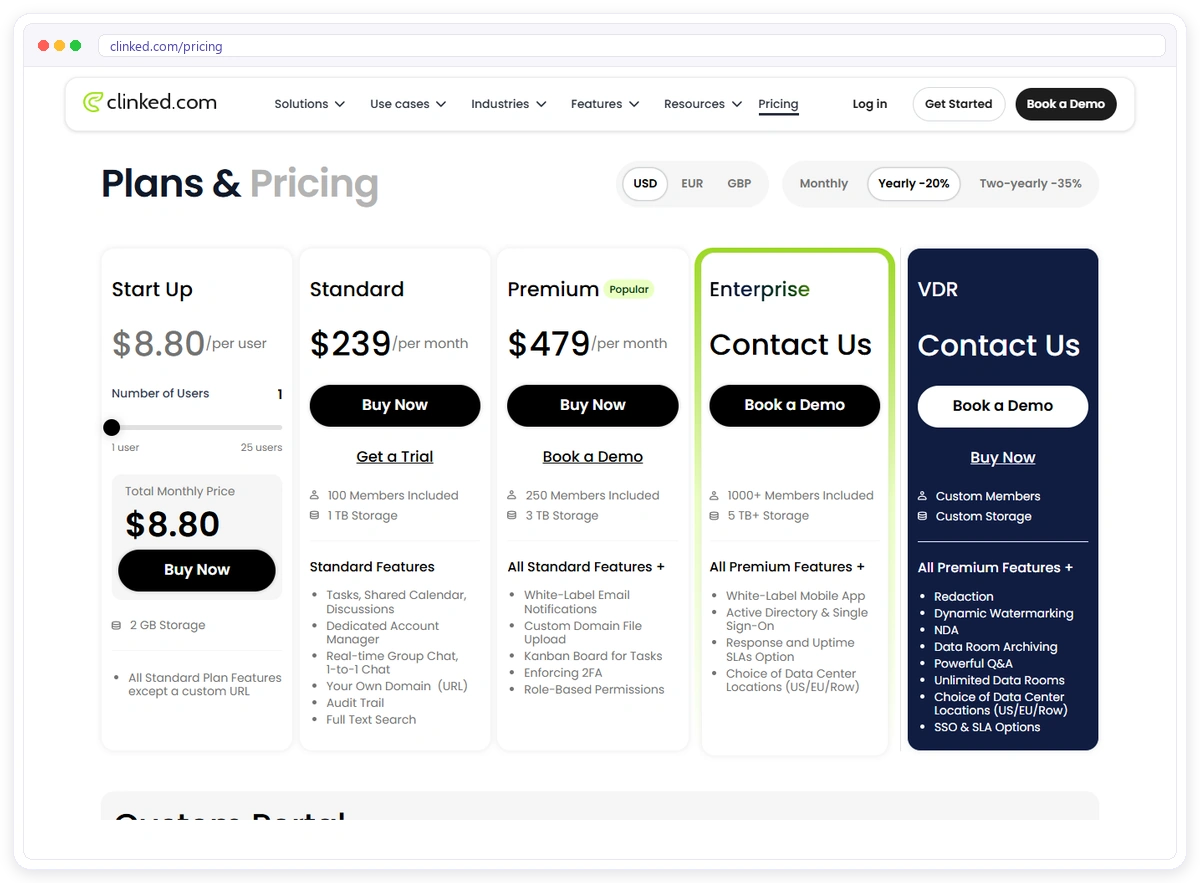
- A custom URL starts at $239 a month
- Built around documents rather than campaigns
Price on 19 October 2026
Start Up $11 per user a month or $8.80 billed yearly (1 to 25 users, no custom URL); Standard $299 or $239 yearly (100 members); Premium $599 or $479 yearly (250 members); Enterprise on request.
Pick it if
Your clients are large companies that judge you on secure file handling.
8. Moxo
Moxo is a workflow platform with client portals and AI agents for multi-step processes, where a campaign brief can move through the client’s marketing lead, legal and finance in a set order, with each step assigned to a person and escalations when a step stalls.
Best for
Larger agencies with multi-step approval chains and several people on each side.
| Feature | What Moxo offers |
| Approvals | Workflows with branches and escalations |
| Client reports | Not listed |
| White label | Not listed |
| Billing | Not shown |
| Requests | Portals for clients, vendors and teams; AI agents |

Pros
- Handles complex approval chains
- SOC 2 Type II, GDPR and single sign-on, as stated on its site
- AI agents listed on its site
Cons
- No public price
- The process has to be designed before setup
- Invoicing and campaign reporting are not shown
Price on 19 October 2026
Not published; the pricing page offers a free trial request and a demo instead.
Pick it if
Your approvals involve many steps and stakeholders and you have budget for a sales-led tool.

9. ClickUp
ClickUp is an all-in-one work management tool where agencies invite clients as guests with set permissions, so a client can open the campaign list, see which tasks are done and leave a comment, all inside the same workspace your team already uses every day.
Best for
Teams that live in ClickUp and just want clients to see where work stands.
| Feature | What ClickUp offers |
| Approvals | Comments on tasks |
| Client reports | No client reporting listed; guests see task progress |
| White label | Custom branding on Enterprise |
| Billing | None |
| Requests | Guests with set permissions |
Pros
- Free to start
- Clients and team in the tool you already use
- Tasks and docs in one place
Cons
- Custom branding only on Enterprise
- No client ordering, invoicing or branded portal
- Agency owners on Reddit report clients getting flooded with notifications
Price on 19 October 2026
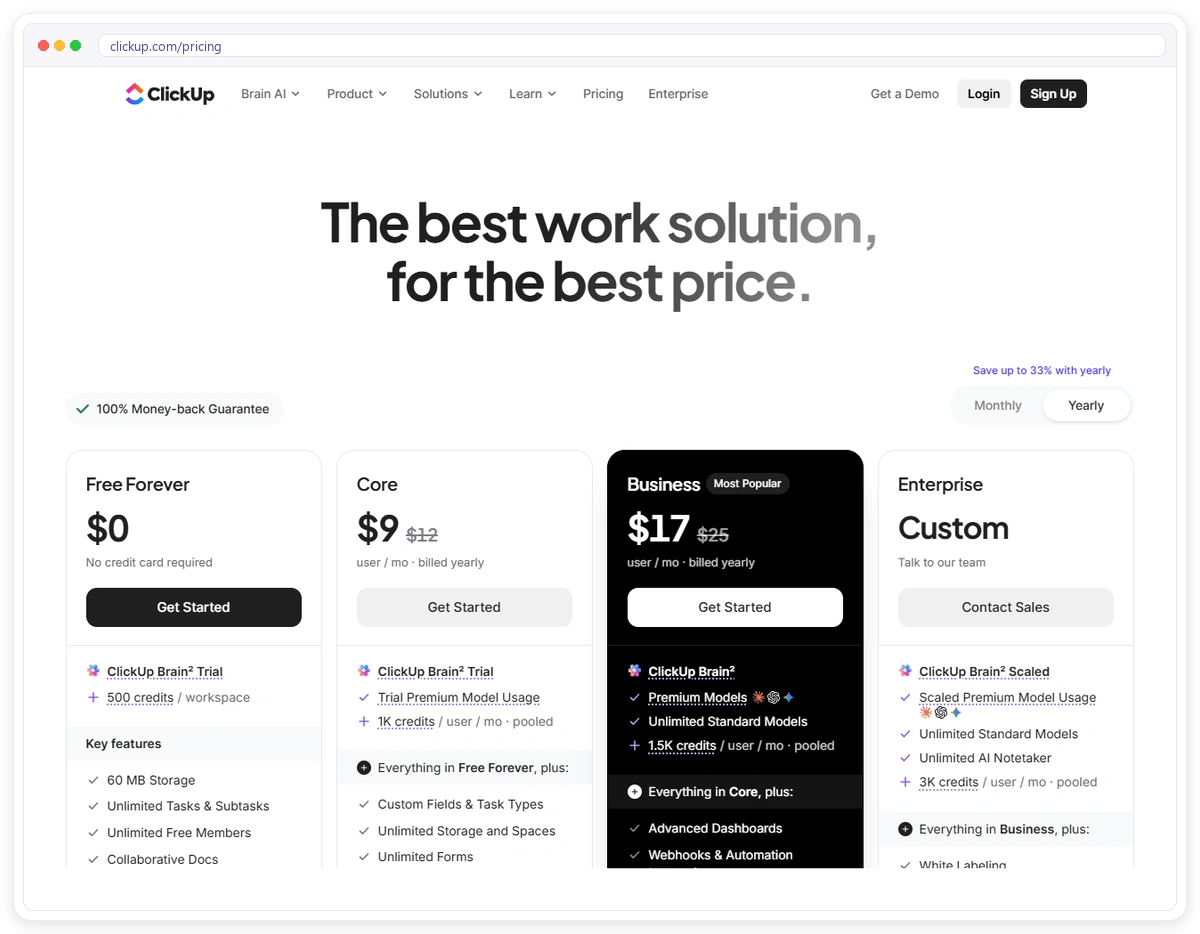
Free plan; paid plans are priced per user, and the pricing page showed two different price sets on 19 October 2026, so check the current figures before you buy.
Pick it if
Your team lives in ClickUp and clients only need to follow the work.
10. monday.com
monday.com is a work management platform where agencies share boards with clients as guests, so a client can follow a content calendar or launch timeline on the same board your team updates, without you building a separate space or sending status emails every week.
Best for
Agencies already running projects on monday.com boards.
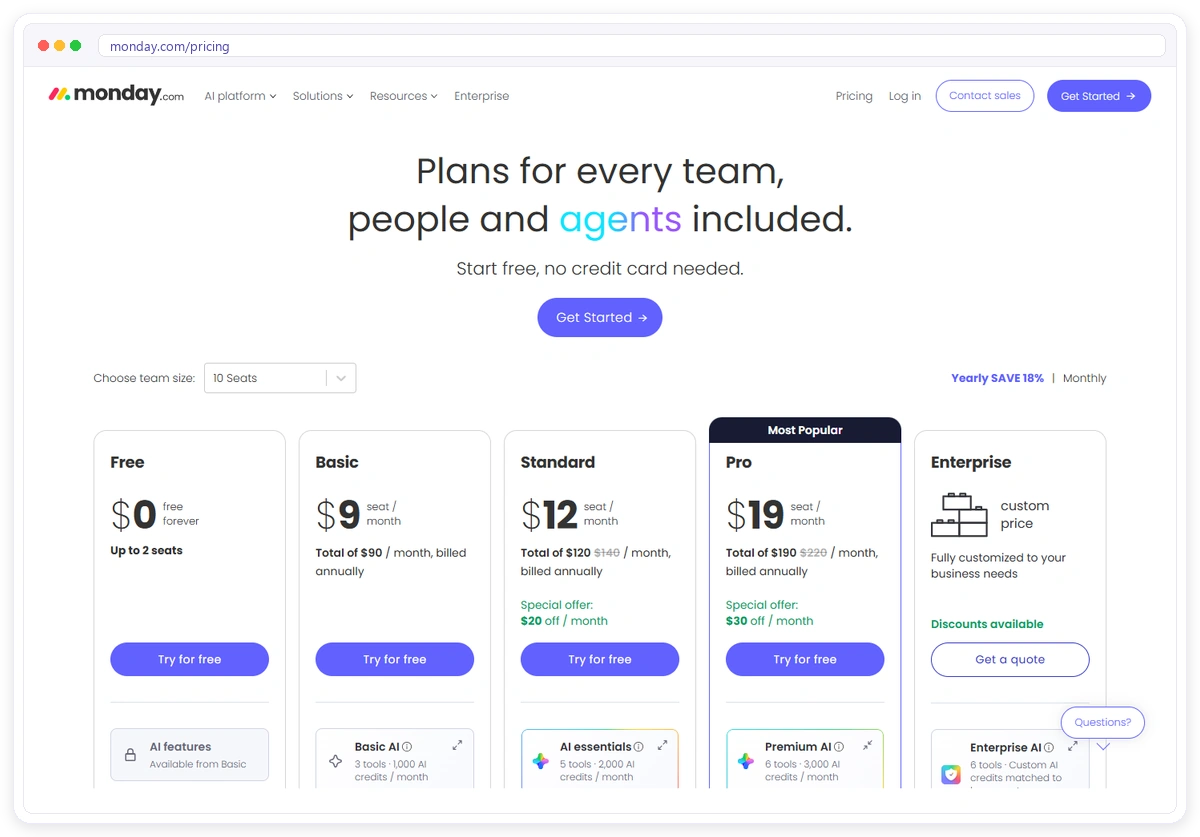
| Feature | What monday.com offers |
| Approvals | Not listed; clients follow your board as guests |
| Client reports | No client reporting listed; timeline and calendar views from Standard |
| White label | Not listed |
| Billing | None |
| Requests | Guest access from Standard |
Pros
- Free for up to 2 seats
- Unlimited free viewers from Basic
- Automations and integrations from Standard
Cons
- Guest access starts on Standard
- No client invoicing or ordering
- Clients see your board, not a portal of their own
Price on 19 October 2026
Free (up to 2 seats); Basic $12 per seat a month or $9 yearly; Standard $14 or $12 yearly; Pro $24 or $19 yearly; the smallest paid seat group shown was 3 seats.
Pick it if
Your projects already run on monday.com and you only need to share them.
11. Basecamp
Basecamp is simple project management with message boards, to-dos, documents, files and chat, where clients are invited into a project and see the conversation and the files in one calm place, with pricing set by the number of projects instead of the number of people.
Best for
Small teams that want simple shared projects and one predictable bill.
| Feature | What Basecamp offers |
| Approvals | Message boards and comments |
| Client reports | Not listed |
| White label | Not listed |
| Billing | None |
| Requests | Messages and to-dos in each project |
Pros
- Very simple for clients
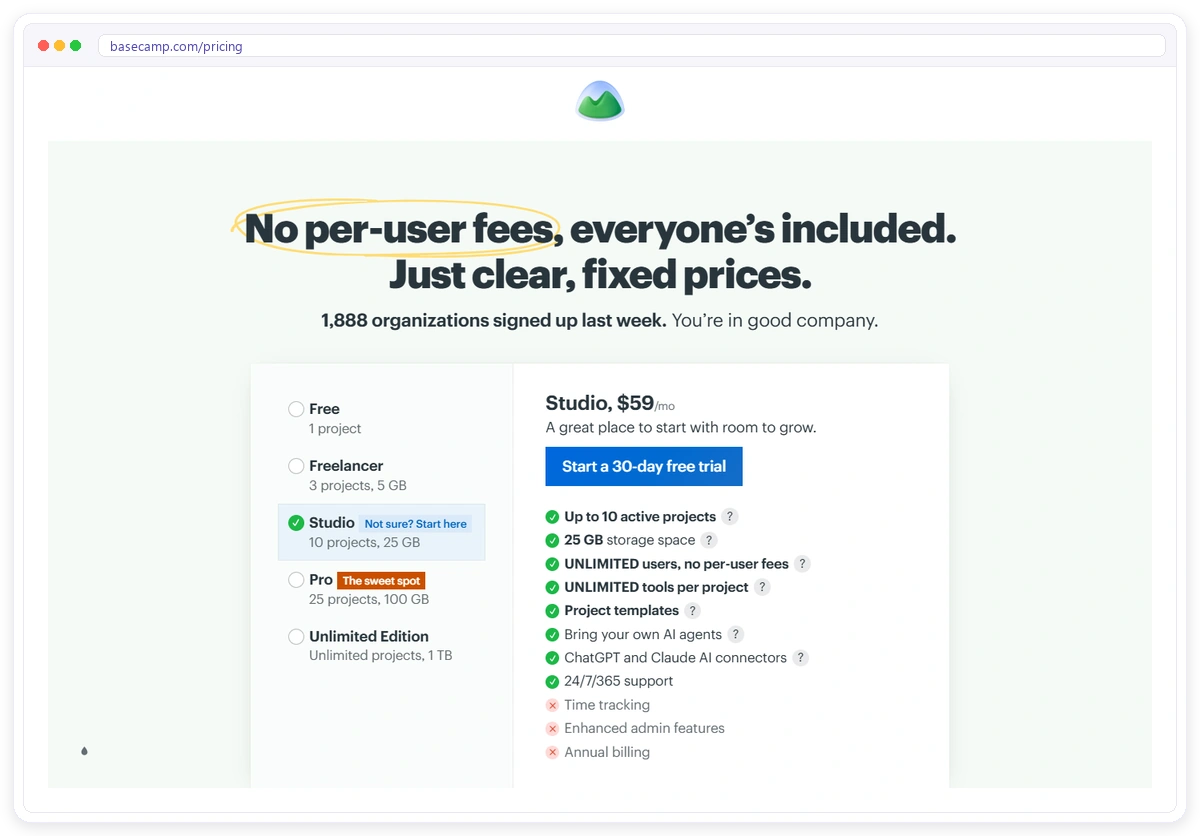
- Unlimited users, priced by projects
- Free for one project
Cons
- One project per client means 15 clients need Pro at $99
- No invoicing or ordering
- No branded portal listed
Price on 19 October 2026
Free (1 project); Freelancer $25 a month (3 projects); Studio $59 (10 projects); Pro $99 (25 projects); Unlimited $299 billed yearly. 30-day free trial.
Pick it if
You want the simplest shared space and do not need billing or branding.
12. FuseBase
FuseBase is an AI workspace with client portals, a knowledge base, tasks, documents and automations, where each client portal can look like a small branded website holding their brand guidelines, reports, onboarding docs and embedded files, all behind a secure magic link.
Best for
Agencies that share docs, files and resources with clients and bill elsewhere.
| Feature | What FuseBase offers |
| Approvals | Not listed |
| Client reports | Dashboards; no marketing data connectors listed |
| White label | White label and own domain on Advanced |
| Billing | Not listed |
| Requests | Chat, mentions and comments |
Pros
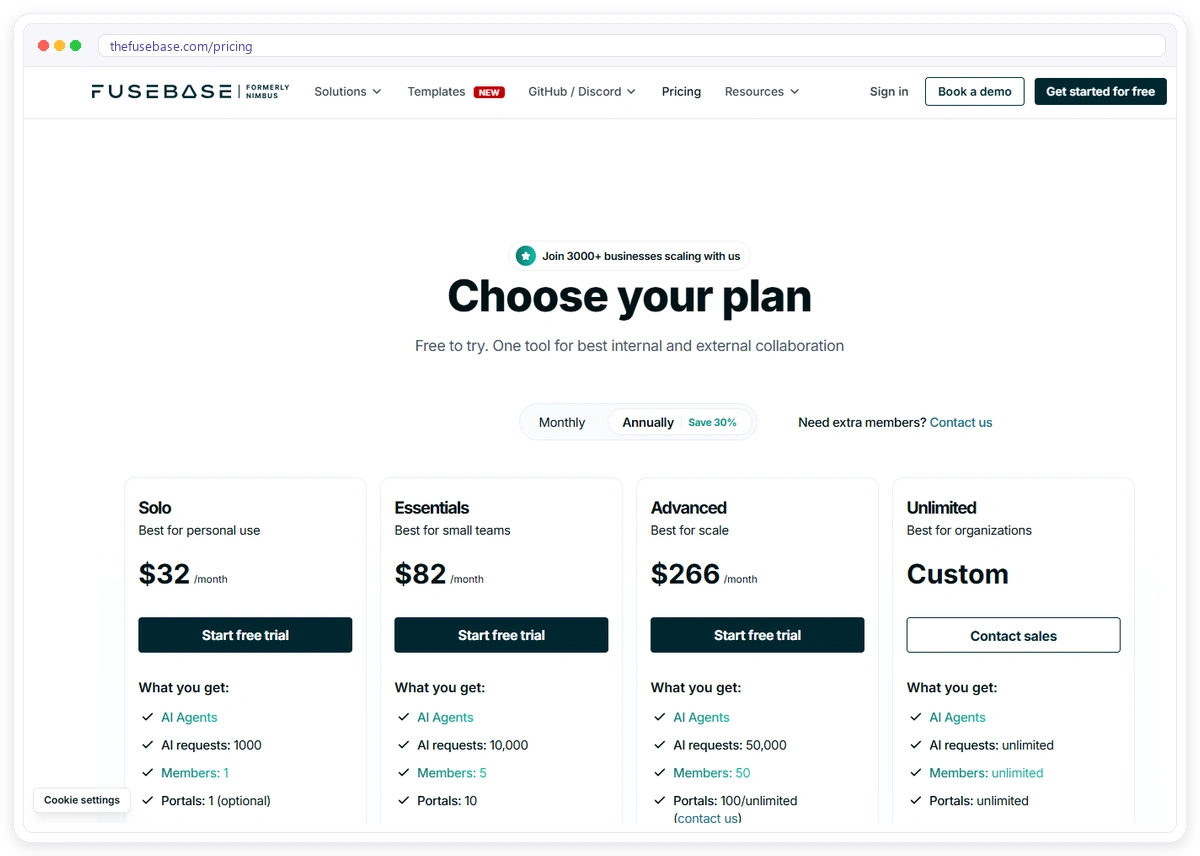
- One portal free
- Portals built like a small branded website
- AI agents and automations
Cons
- White label costs $266 to $399 a month
- Essentials allows 10 portals and charges $20 for each extra
- Invoicing, approvals and tickets are not listed
Price on 19 October 2026
Free plan; Solo $39 a month or $32 yearly; Essentials $99 or $82 yearly; Advanced $399 or $266 yearly; Unlimited on request. 14-day trial.
Pick it if
You mainly share knowledge, files and resources with clients and handle billing elsewhere.
13. HoneyBook
HoneyBook is a client relationship tool for independent businesses with a pipeline, lead forms, proposals, contracts, invoices, payments, scheduling and a client portal, built so a client can read a proposal, sign it and pay the deposit in one sitting without any back-and-forth emails.
Best for
One- or two-person studios that win work through proposals and want payments handled.
| Feature | What HoneyBook offers |
| Approvals | Proposals and contracts with e-signatures; deliverable approvals not listed |
| Client reports | Business reports only |
| White label | Custom subdomain URLs on every plan; “Powered by” removed from Essentials |
| Billing | Invoices, recurring billing, autopay, payment plans and reminders |
| Requests | None listed |
Pros
- Clients can book, sign and pay from one file
- Autopay, payment plans and Apple/Google Pay on every plan
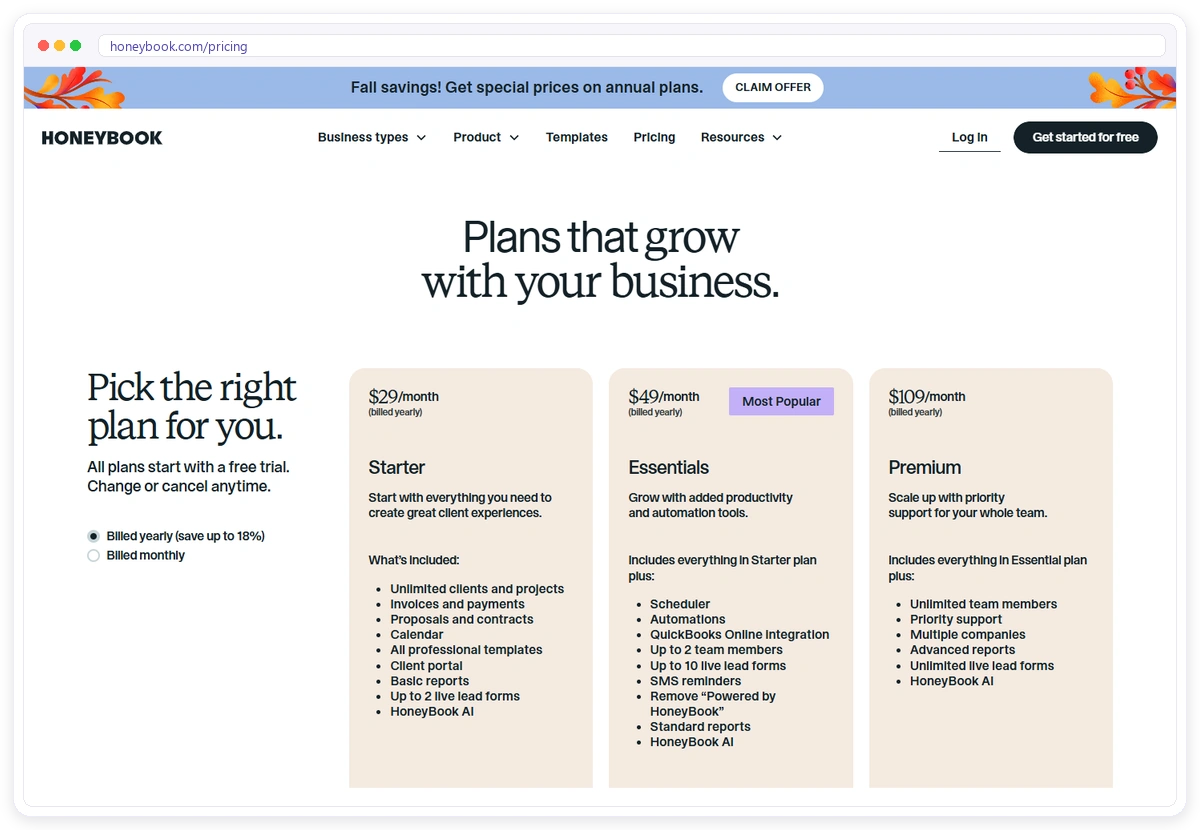
- A 30-day free trial
Cons
- Essentials allows up to 2 team members and the Starter limit is not stated; unlimited team members need Premium
- No client requests, tickets or marketing reports listed
- Payments run through HoneyBook with its fees
Price on 19 October 2026
Starter $36 a month or $29 billed yearly; Essentials $59 or $49 yearly; Premium $129 or $109 yearly (yearly prices shown under a seasonal offer). 30-day free trial.
Pick it if
You are a one- or two-person studio that sells each project with a proposal.
14. Plutio
Plutio is an all-in-one workspace with projects, tasks, invoices, proposals, contracts, forms, time tracking and a client portal, priced low enough for a freelancer, with white label available as a small monthly add-on rather than a reason to move up to a much bigger plan.
Best for
Freelance marketers and tiny teams that want a low monthly price.
| Feature | What Plutio offers |
| Approvals | Proposals and contracts with e-signature |
| Client reports | Not listed |
| White label | A $9 add-on on Core and Pro, included on Max |
| Billing | Unlimited invoices with Stripe, PayPal or Square, no Plutio fee |
| Requests | A message thread in the portal; tickets not listed |
Pros
- A low price
- No Plutio payment fee
- No client account needed to open the portal
Cons
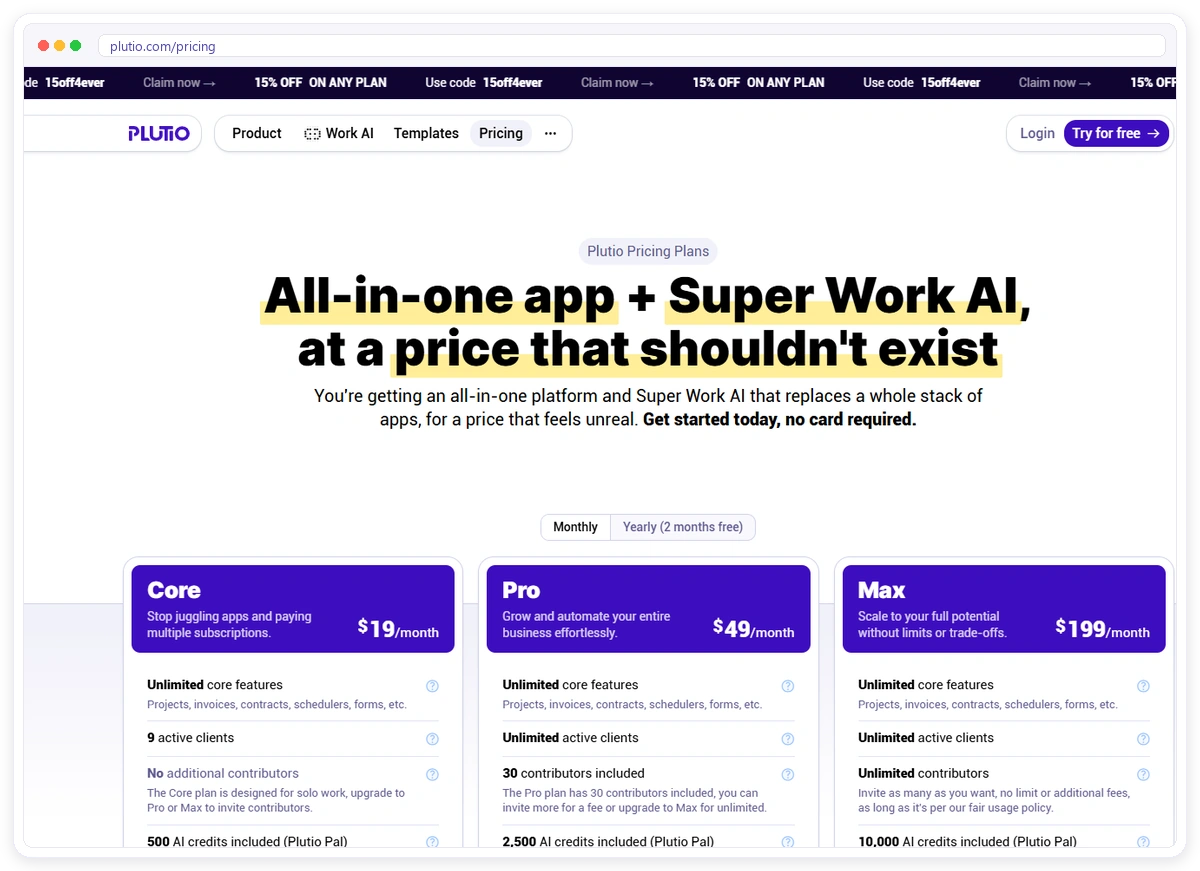
- Core is solo only and capped at 9 active clients
- Tickets and marketing reports are not listed
- The trial lasts 7 days
Price on 19 October 2026
Core $19 a month or $15.83 yearly; Pro $49 or $40.83 yearly; Max $199 or $165.83 yearly. White label $9 a month on Core and Pro.
Pick it if
You are a freelancer or tiny team that wants a low monthly price.
15. Accelo
Accelo is professional services automation software that covers sales, quotes, projects, retainers, tickets, time tracking, invoicing and reporting, with a client portal on top, so it suits teams that want profitability and utilization reporting, not only a way to share work with clients.
Best for
Bigger operations that track time, margins and staff use alongside client work.
| Feature | What Accelo offers |
| Approvals | Client sign-offs and comments on attachments; quote acceptance |
| Client reports | Internal profitability and utilization reporting |
| White label | Portal branding can be customized; own domain not clear |
| Billing | Invoices from logged time and retainers |
| Requests | Client requests into a ticket queue |
Pros
- Full professional services automation
- Tickets, retainers and time in one system
- Company and contact permissions
Cons
- No public price
- Setup takes weeks, according to its own FAQ
- Own-domain support is not clear from its pages
Price on 19 October 2026
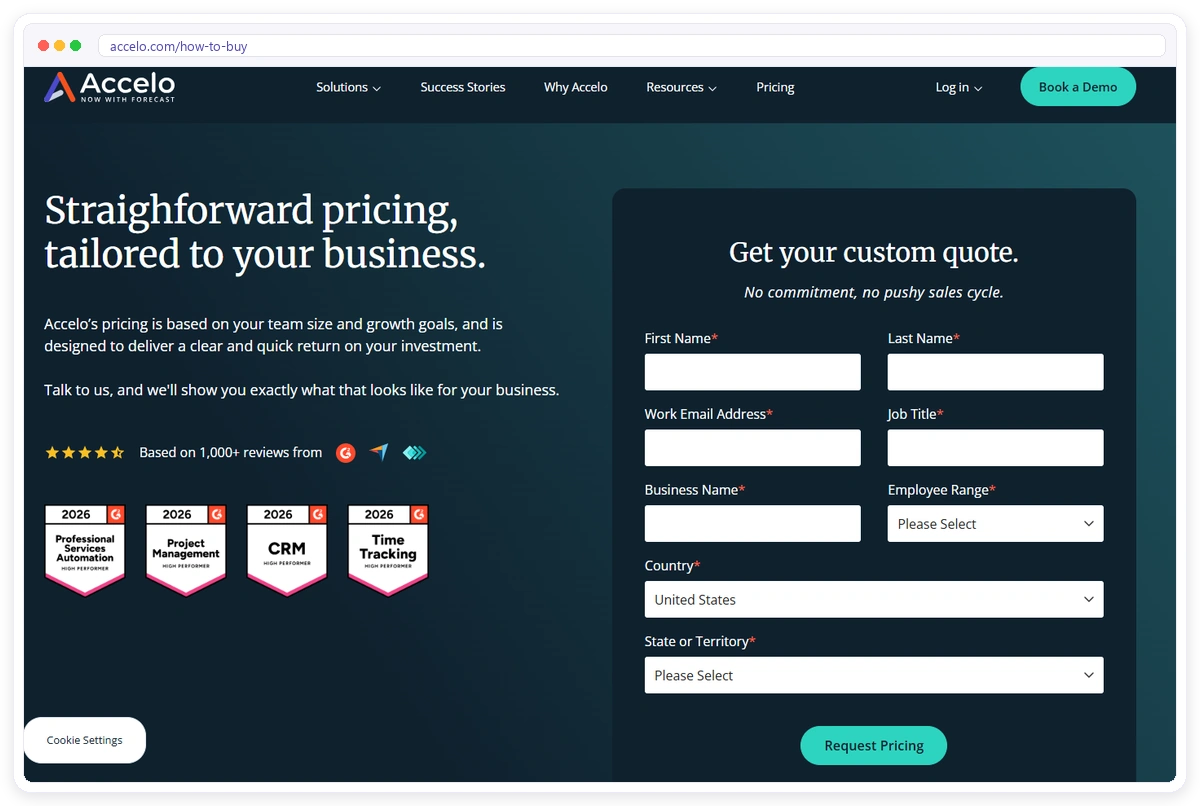
Quote only, based on team size, after you fill in a request form.
Pick it if
You run a larger operation and want one system for time, profitability and client work.
Also considered: Notion, Bonsai, Softr, Kitchen and Dock come up in some lists, but they are either general workspaces you build a portal from or narrower tools, so they did not make the 15.
Is a Project Management Tool With Guest Access Enough for Clients?
A project management tool with guest access is enough when clients only need to see tasks and leave comments, but it falls short once you want clients to order work, approve deliverables in one click, find their reports and pay invoices in a branded space that does not look like your internal task board.
That is why many agencies keep ClickUp, monday.com or Basecamp for the team and add a portal for clients. Clientish can import your data from ClickUp, Asana, Monday.com, Trello and Notion, which saves retyping client work when you move it across; the switching guide shows the steps.
How Much Does a Client Portal Cost for a Marketing Agency?
A client portal for a marketing agency costs anywhere from free to several hundred dollars a month, and the headline price rarely tells you the real bill: seat limits, per-client fees and which plan includes branding decide what a five-person agency with fifteen clients pays.
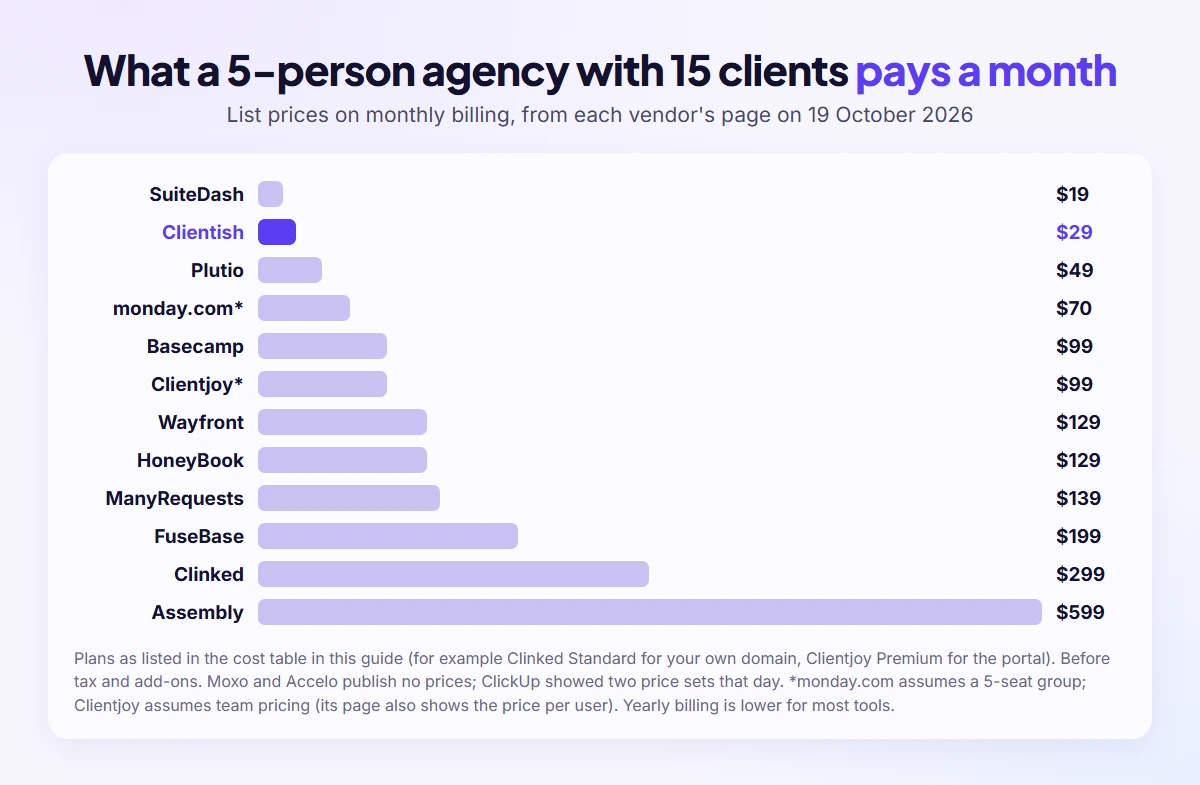
This table prices each tool for that agency, using list prices from each vendor’s page on 19 October 2026, before tax and without add-ons. Moxo and Accelo publish no prices, and ClickUp showed two price sets that day, so they are left out. Clientjoy’s page shows its price both per user and per team, and monday.com’s 5-seat group was not confirmed:
| Tool | Plan that fits | Monthly billing | Yearly billing (per month) |
| Clientish | Starter (5 team members) | $29 | $23 |
| SuiteDash | Start (unlimited staff and clients) | $19 | $15 |
| Assembly | Advanced (5 internal users) | $599 | $499 |
| ManyRequests | Core, 1 seat plus 4 extra | $139 | Not shown for extra seats |
| Wayfront | Base (5 seats) | $129 | $99 |
| Clientjoy | Premium for the portal and own domain (if priced per team) | $99 | $89 |
| Clinked | Standard for your own domain | $299 | $239 |
| monday.com | Standard, 5 seats (if a 5-seat group is offered) | $70 | $60 |
| Basecamp | Pro (25 projects) | $99 | Not shown |
| FuseBase | Essentials (5 members, 10 portals) plus 5 portals | $199 | $182 |
| HoneyBook | Premium for unlimited team members | $129 | $109 |
| Plutio | Pro (unlimited active clients) | $49 | $40.83 |
Clientish Starter allows 25 new clients a month and includes leads and live chat at $29 ($23 yearly). The full plan comparison is on the Clientish pricing page.
Which client portal is cheapest for a small marketing agency?
For five people and fifteen clients on monthly billing, SuiteDash Start at $19 and Clientish Starter at $29 are the lowest list prices in the cost table above, followed by Plutio Pro at $49 and monday.com Standard at about $70 (ClickUp, Moxo and Accelo are left out of the table). Assembly Advanced at $599 is the highest, because five internal users need its Advanced plan.
The cheapest plan is not always the one you will stay on: check whether it includes your own domain, removes the vendor’s name and allows the number of clients you add each month.
Why do seats and client limits matter more than the starting price?
Seats and client limits decide the bill because most portals charge for people or clients rather than features: ManyRequests adds $20 or $30 per extra seat, FuseBase charges $20 for each portal beyond ten, Assembly caps internal users per plan, and Clientjoy caps client accounts on Starter.
Write down your team size and client count for the next twelve months, then price each shortlisted tool for that number rather than for today.
Which Client Portal Is Best for Your Type of Marketing Agency?
The best client portal depends on what your clients need most from you: SEO and PPC clients want reports and results, social and content clients want quick approvals, creative clients want file proofing, and productized agencies want a clean request queue, so match the tool to the thing your clients ask about every week.
Here is the short version by agency type, followed by a few words on each:
| Agency type | What clients need most | Strong fits |
| SEO and PPC | Monthly reports and results in one place | Clientish, Wayfront (SEO reporting on Pro) |
| Social media | Fast approvals on posts and calendars | Clientish, ManyRequests |
| Content marketing | Draft reviews and revision limits | Clientish, ManyRequests |
| Creative and web | File proofing and secure files | ManyRequests, Clinked, Clientish |
| Small teams and freelancers | A low price and little setup | Clientish Starter, Plutio, SuiteDash |
Best client portal for SEO and PPC agencies
SEO and PPC agencies need a portal where monthly reports, results and new requests sit together, so clients stop asking for numbers by email. Clientish puts your Looker Studio, DashThis or Databox report links inside each client’s portal and shows whether the client opened them; Wayfront adds SEO reporting on its Pro plan.
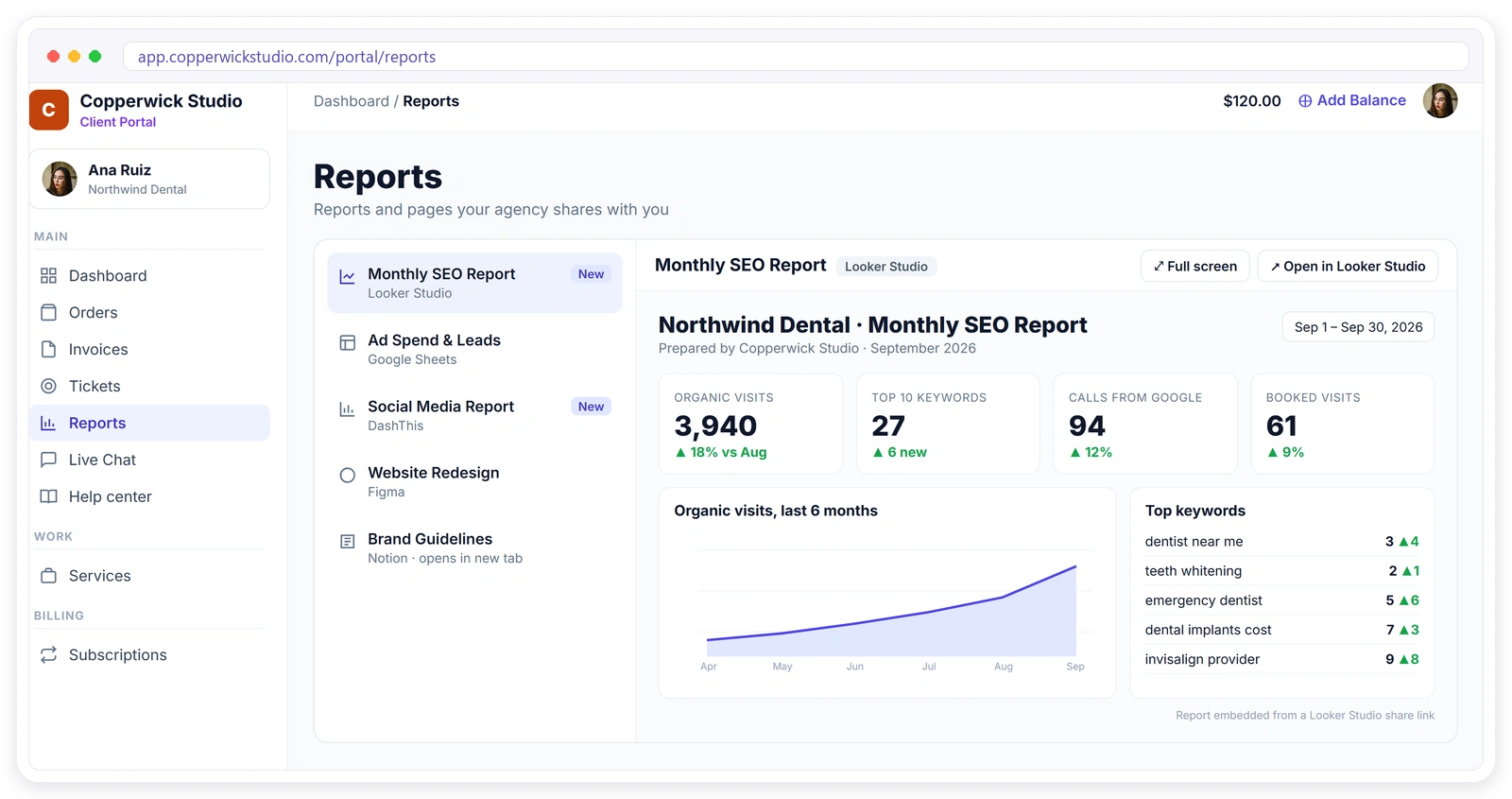
Our page on the client portal for SEO agencies shows how monthly retainers, audits and reports fit together in one login.
Best client portal for social media and content agencies
For social media and content agencies, the portal has to make approval a one-tap job for the client, cap the number of revision rounds and keep a dated record of every approval. Clientish gives each delivery an approve or request-changes step with a revision count per service, and ManyRequests offers design and video proofing on every plan.
When a client goes quiet on a draft, automatic approval after a set number of days stops the content calendar from stalling; Clientish does this after 7 days by default, and you can change it.
Best client portal for small marketing agencies and freelancers
Small marketing agencies and freelancers need a portal with a low monthly price, little setup and room to grow without paying per client. Clientish Starter includes 5 team members for $29 a month; Plutio Core is $19 for one person with 9 active clients; SuiteDash Start is $19 with unlimited clients and staff.
Check the limits as well as the price: active-client caps, seat counts and the plan that unlocks your own domain matter more than the first number on the page.
What Is the Best White Label Client Portal for Marketing Agencies?
For marketing agencies, the best white label client portal puts the portal on your own domain from the first plan, sends emails from your address and hides the vendor’s name: Wayfront offers complete white labeling, including your domain and sending email, on its entry plan, SuiteDash lists “Extreme White Labeling” on its lowest plan, and Clientish gives your own domain and email server on every plan, removing its name on Pro and Enterprise.
White label means clients never see the vendor: the portal sits on your domain, emails come from your address, the vendor’s name is gone, and ideally your portal installs on their phone. The real test is which plan each of those starts on.
This table shows where each portal’s branding options begin, from each vendor’s own page; ClickUp, monday.com, Basecamp, Moxo and Accelo are left out because their pages do not list a white-label client portal:
| Tool | Own domain | Remove vendor branding | Notes |
| Clientish | Every plan | Pro and Enterprise | Own email server on every plan; installable portal app with push |
| SuiteDash | White labeling on every plan | Every plan | Branded mobile app listed on the lowest plan |
| Assembly | Professional | Professional | Professional is $139 ($99 yearly) |
| ManyRequests | Every plan | Pro | Branded mobile app on Enterprise |
| Wayfront | Every plan | Every plan | Sends from your own email; custom CSS templates on Pro |
| Clientjoy | Premium | Premium | Portal itself is Premium only |
| Clinked | Standard | Premium (emails) | White-label mobile app on Enterprise |
| FuseBase | Advanced | Advanced | Advanced is $399 ($266 yearly) |
| HoneyBook | Custom subdomain | Essentials | A full own-domain portal is not listed |
| Plutio | $9 add-on, included on Max | With the add-on | Clients open the portal from a private link |
Which client portals put the portal on your own domain on every plan?
Clientish, ManyRequests and Wayfront include your own domain on every plan, so clients log in at an address like portal.youragency.com from day one. SuiteDash lists white labeling on every plan as well, while Assembly, Clinked, Clientjoy and FuseBase keep the own domain for a higher plan.
Setting up your own domain usually means adding one DNS record; in Clientish it is a single CNAME, and the security certificate is created automatically.
Which plan removes the vendor’s name from the portal?
Removing the vendor’s name often costs more than the own domain: Clientish removes “Powered by Clientish” on Pro and Enterprise, ManyRequests on Pro, Assembly on Professional and HoneyBook from Essentials, while SuiteDash and Wayfront list white labeling on every plan. Check this line before you compare prices.
If clients never see the vendor’s name, the portal feels like part of your agency, which matters most when you resell the portal as part of a premium service.
For more on what full white label covers and how to set it up, see our white label client portal page.
How Should a Marketing Agency Choose a Client Portal?
Choose a client portal by listing what your clients do with you each month, such as ordering, approving, reading reports, asking for changes and paying, then picking the tool that covers most of it in one login, on your domain, at a price that fits your real team and client count.
Five questions narrow the field quickly:
- Where do approvals happen today? If the answer is email, you need approvals on the work itself.
- Where do reports live? Pick a portal that can show your reporting tool’s links or dashboards.
- How do clients pay? A portal with invoices and saved payment methods ends the chase.
- What will five people and fifteen clients cost? Price the real plan, not the starting one.
- Which plan puts it on your domain? Branding is often the hidden upgrade.
If you need one client portal where clients see reports, approve work and pay invoices, Clientish lists all three on every plan; Wayfront has invoicing on both plans, approvals according to its SEO page and SEO reporting on the Pro plan.
Run one real client through a free trial before you commit; a week of genuine use shows more than any feature list.
How Do You Get Marketing Clients to Use a Client Portal?
Clients use a portal when it saves them effort: one login, a notice only when something needs them, approvals that take a minute on a phone, and no reason to go back to email. Set it up so the first thing they see is useful, such as this month’s report or a draft waiting for approval.
Introduce it at onboarding, not halfway through a project, and stop answering requests by email once the portal is live, politely pointing back to it. In Clientish, clients get an email when something needs them, such as a new message, a new invoice or a ticket reply, can install your portal on their phone with push notifications, and can add their own team members.
Frequently Asked Questions
These are the questions marketing agency owners ask once they start comparing client portals side by side, from free options and Google Drive to security, domains and retainers.
Is there a free client portal for marketing agencies?
Yes, a few tools have free plans with limits: Assembly Free allows 5 active contacts and 1 user, monday.com Free allows 2 seats, ClickUp and FuseBase have free plans, and Basecamp is free for one project. Clientish does not have a free plan; you can try it free for 14 days instead.
Can Google Drive and Google Sheets work as a client portal?
Google Drive and Sheets can share files and reports, but they cannot take orders, collect approvals with a record, handle requests or bill clients. Many agencies start there and move to a portal once they have more than a handful of clients, keeping Drive links inside the portal.
Do clients need their own paid account to use a portal?
In most portals, clients log in for free under your plan. In Clientish, clients join your portal at no cost to them, and your plan sets how many new clients you can add each month. Project tools such as monday.com and ClickUp count clients as guests under their own rules.
Can a client portal show GA4, Google Ads and Meta reports?
Yes, usually through your reporting tool. In Clientish you add the share link from Looker Studio or another reporting tool, such as DashThis or Databox, to the client’s portal, and the portal shows whether they opened it. Some portals, such as Wayfront on Pro, include their own SEO reporting.
Is it safe to collect ad account logins through a client portal?
It is safer than email, but the best practice is to avoid passwords altogether: ask clients to grant your agency partner or manager access in Google Ads, Meta and Analytics. Use the portal’s intake form for account IDs and keep two-factor sign-in on for your team.
What is the best CRM for a marketing agency that also needs a client portal?
An all-in-one tool avoids two logins. Clientish includes proposals on every plan and adds a lead pipeline from Starter, and an accepted proposal creates the client, invoice and order. SuiteDash and Assembly also combine a CRM with a portal, and Clientjoy is CRM-first with a portal on Premium.
Can I put my client portal on my own domain?
Usually, but the plan matters. Clientish, Wayfront and ManyRequests include your own domain on every plan; Assembly needs Professional, Clinked needs Standard, Clientjoy needs Premium and FuseBase needs Advanced. Plutio charges a $9 monthly add-on below its Max plan, so check the plan before you compare prices.
Can a client portal bill monthly retainers automatically?
Yes, if it supports subscriptions. In Clientish, each retainer cycle reopens the same invoice, and a client can switch on auto-pay with a card saved through Stripe or simply pay each renewal from the portal. SuiteDash, Wayfront, Clientjoy and HoneyBook also handle recurring invoices.
Final Thoughts
Start with the work your clients do with you every month, shortlist the two or three portals that cover most of it, and price each one for your real team and client count before you look at anything else. Then put one real client through a trial and watch whether the email threads stop.
If you want orders, approvals, reports, invoices and requests in one branded portal from $9.99 a month, Signup & Try Demo and set it up with your next client. Our client management portal for digital marketing agencies page shows the full setup.
Sources
Clientish publishes this comparison and ranks its own portal first. Every price and plan limit was taken from the vendor’s own website on 19 October 2026. The tools were shortlisted from lists that rank on Google, agency discussions on Reddit (r/agency, r/marketing) and ChatGPT answers, all reviewed in October 2026, plus the portals we already compare Clientish with. Its author, Masum Billah Bhuiyan, founded Giant Marketers and has worked with clients for 15 years. The Clientish entries describe the product as of October 2026.

