

Many people comparing Harvest and Clientish have just opened a renewal notice. Harvest is the time tracking and invoicing tool owned by Bending Spoons since 2025. It now bills a usage charge for active projects, clients, tasks and invoicing on top of its per-seat price, and some long-time customers have seen their bill multiply. Clientish is an all-in-one client management portal and CRM for agencies, freelancers and consultants: leads, proposals, a branded client portal, orders, invoices, time tracking, support tickets and live chat in one place, on a fixed monthly plan.
Quick answer: Keep Harvest if your team needs desktop and phone timers and task-level budgets. Look at Clientish if your clients need a place to order, approve and pay, and you would rather pay one known price each month than a seat fee plus usage. A team of five tracking time costs $276 a year on Clientish Starter, against $540 a year in Harvest Teams seats before any usage is added.
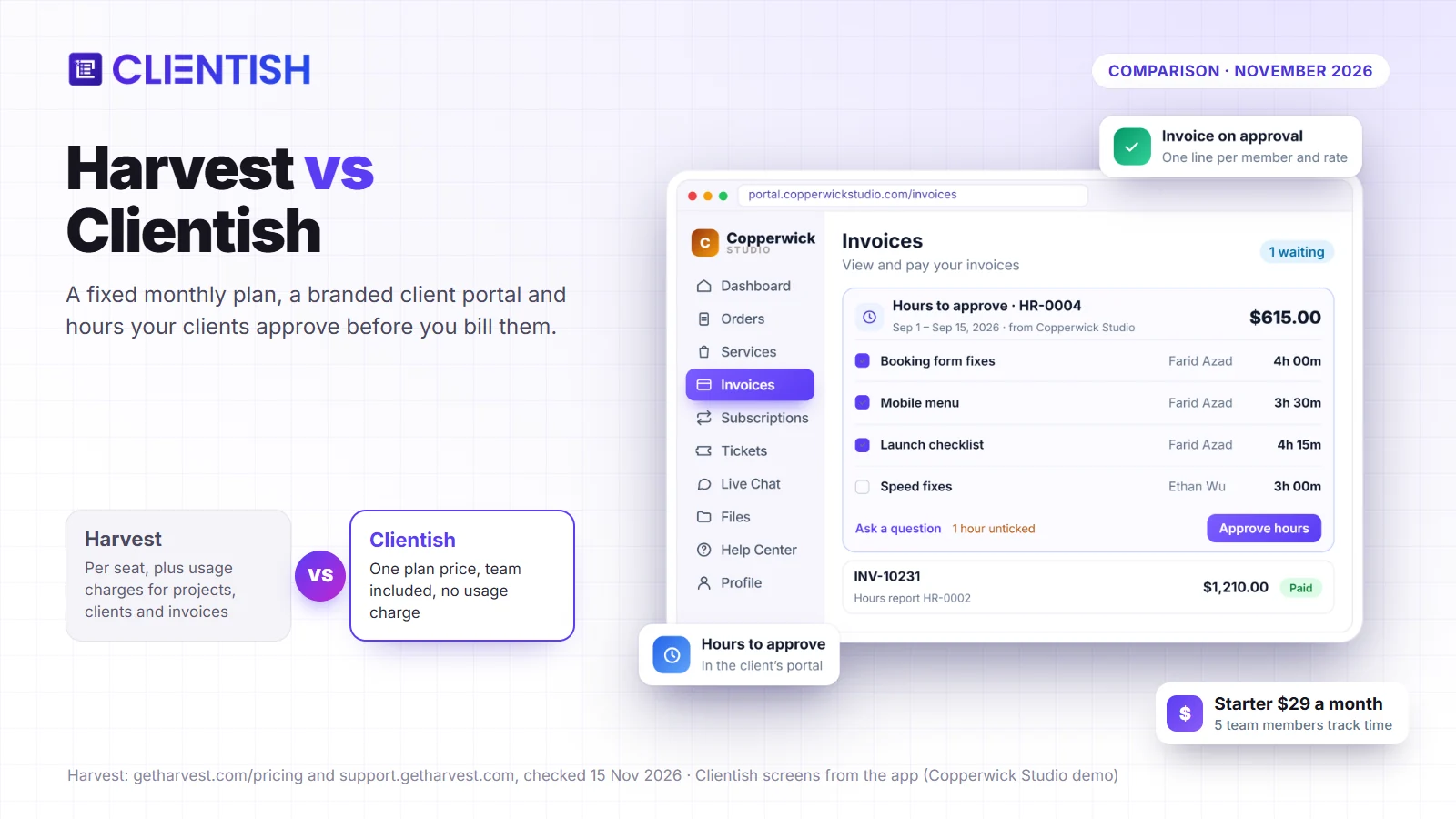
Harvest’s prices and features below come from its own pricing page and help center, checked on November 15, 2026.
Key Takeaways
Harvest began as a time tracker and added invoicing around the timer. Clientish began with the client relationship, so time tracking sits next to orders, approvals and payments that the client sees.
- Price model: Harvest charges $9 per seat a month on Teams and $14 on Enterprise (billed yearly), plus usage charges once the free allowance runs out. Clientish plans are a fixed price per workspace, from $9.99 a month.
- Time tracking: Harvest gives every seat a timer, with desktop, mobile and browser apps. In Clientish you track your own time on every plan, Solo included; your in-house team joins from Starter ($29 a month with 5 team members) and remote members from Growth, and the client approves the hours before anything is billed.
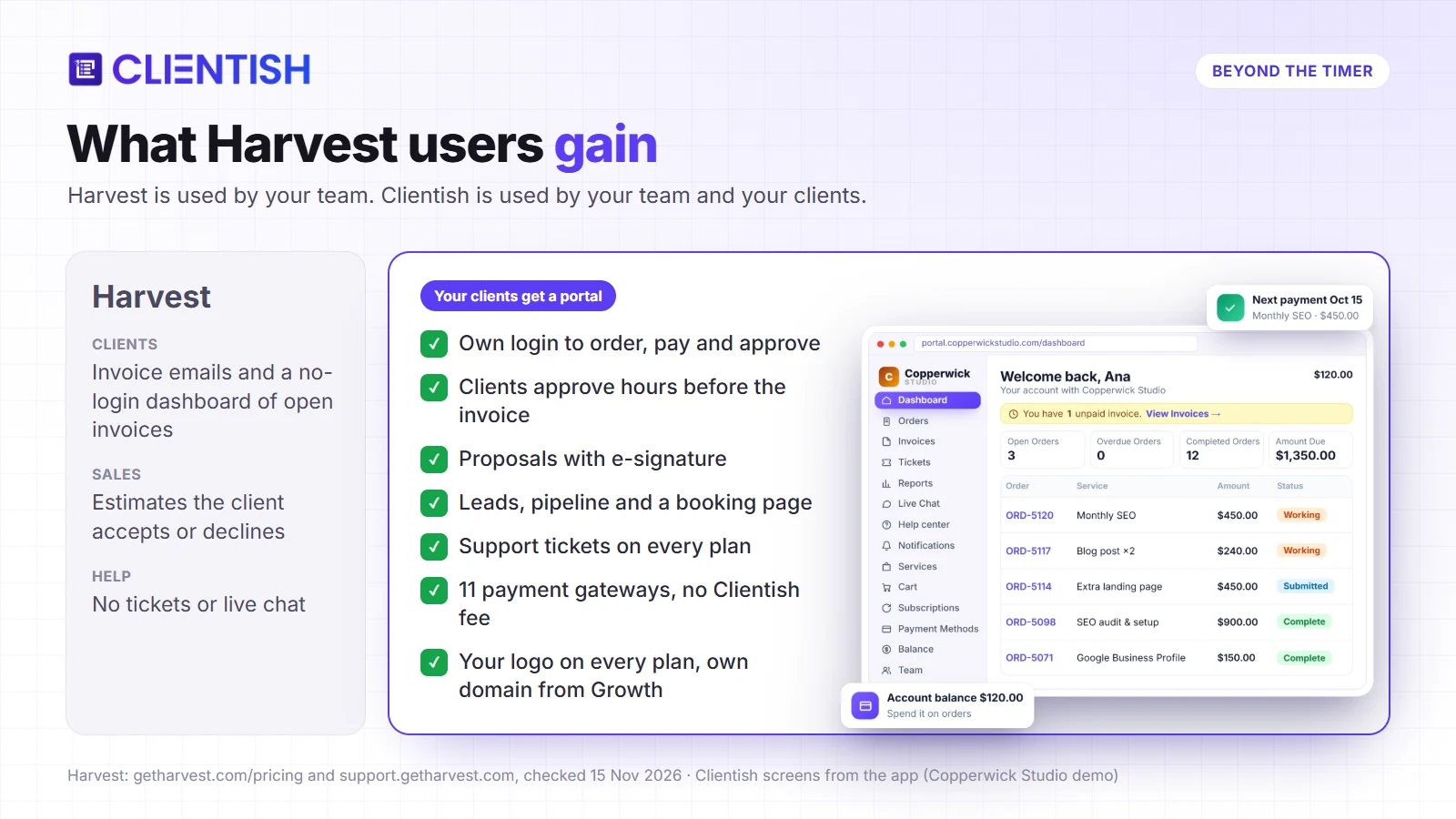
- Clients: Harvest clients get invoice emails and a no-login dashboard of open invoices. Clientish clients sign in to your branded portal to order, pay, approve hours, request revisions and open tickets.
- Payments: Harvest connects Stripe or PayPal and adds its own small fee on plans without Unlimited usage billing. Clientish works with 11 online gateways, and the processor’s fee is the only fee.
- Your brand: Harvest’s white label covers invoice styling and is still rolling out; it has no own-domain option. Clientish brands every plan with your logo and colors, and moves to your own domain from Growth.
- Harvest’s strengths: native desktop and phone timers, project budgets, expense tracking and a long list of integrations.
Harvest vs Clientish at a Glance
Harvest’s column comes from getharvest.com and the Harvest help center, checked November 15, 2026; Clientish’s column comes from our pricing page.
| Question | Harvest | Clientish |
| How the price works | Per seat: Teams $11/mo ($9 billed yearly), Enterprise $17.50/mo ($14 billed yearly), plus usage or a fixed usage fee | Per plan: Solo $9.99/mo, Starter $29/mo with 5 team members, Growth $49/mo with 15 team members and 5 remote members |
| Does the bill grow with projects or clients? | Yes on Flex billing: active projects, clients, tasks and invoicing above a free allowance | No usage charge; plans include a monthly allowance of new clients and orders |
| Free trial | 30 days | 14 days, no credit card |
| Time tracking | Every seat: timer, timesheets, desktop, mobile and browser apps | Owner on every plan; team members from Starter, remote members from Growth: timer, manual entries, timesheets and pay rates for members |
| Client approval of hours | Not offered; timesheet approval is internal, on Enterprise | Clients approve an hours report in their portal before it becomes an invoice |
| Client login | No; a client dashboard link shows open invoices and payments | Yes; a branded client portal on every plan |
| Online payments | Stripe or PayPal, plus a Harvest fee on non-Unlimited plans | 11 online gateways plus bank transfer, with no Clientish fee |
| Budgets and profitability | Hour or fee budgets with alerts; profitability reports on Enterprise | Time report with hours, billed, paid and margin; no project budgets |
| Tasks and deliverables | Time is tracked against project tasks; no task boards in its features list; connects to Asana, Trello and ClickUp | Orders with tasks and checklists, in Table, Kanban or Cards views |
| Team capacity | Forecast add-on, $5 per person a month billed yearly | Workload tab for team and remote members, included |
| Retainers and prepayment | Recurring and retainer invoices | Recurring services and subscriptions, proposal deposits and a prepaid client balance |
| Proposals and e-signature | Estimates the client can accept or decline | Proposals with typed e-signature that create the client, invoice and order |
| Leads and pipeline | Not offered | On every plan, with a booking page |
| Support tickets and live chat | Not offered | Tickets on every plan; client live chat from Starter |
| Own domain | “Not currently” | From Growth, with free SSL |
| Best for | Teams that bill by the hour and live in timesheets | Agencies whose clients order, approve and pay in one branded place |
Harvest is ahead on timers, apps and budgets, the work that stays inside your team. Clientish is ahead on everything the client touches, and on how predictable next year’s bill is.
The Harvest Price Increase and Flex Usage Billing
The Harvest price increase comes from usage billing: on top of the seat price, Teams and Enterprise accounts now pay for activity. Harvest’s help center calls the two options Flex, a per-seat rate plus usage charges, and Unlimited, a per-seat rate plus a fixed price for usage. Flex counts active projects, active clients, active tasks and invoicing in the prior billing period, and charges for the part above a free allowance.
Harvest does not publish the size of that allowance or the price per unit. Its own help article gives an example of a bill going “from a seats-only $44 to $404 once usage is added”, and says usage charges start at a new account’s second paid renewal.
The press picked up the story in August 2026:
- BBC, August 20, 2026: a UK consultancy’s monthly bill rose from $130 to $2,110, as reported by Silicon UK and Subscription Insider. Harvest then offered $1,309 a month if the next year was paid upfront.
- Bloomberg, August 13, 2026: a web designer who had used Harvest for 13 years was told a renewal of $211.20 a year would become $2,547.60.
- Reviews: one G2 reviewer, quoted by TimeCamp, wrote that their cost would go “from approximately $6,000 per year to $30,000 per year”.
Not every account is hit the same way. Small teams with few active projects may stay inside the allowance, and Unlimited billing gives a predictable cost for those who can pay it. The complaints above are about how hard the bill is to predict as well as its size.
Who Should Read This Harvest vs Clientish Comparison
You run a marketing, design, development or consulting business and Harvest has been your timesheet for years. The renewal quote changed the math, and you are deciding whether to pay it, move to another timer, or use the moment to fix the rest of your client work too.
If hours are the product you sell and nothing else is broken, a cheaper timer may be all you need. If your clients still chase you by email for updates, files and invoices, leaving Harvest is a chance to give them one place for all of it. Clientish is built for that second case.
Harvest: Built for Hours, Budgets and Timesheets
Harvest launched in 2006 and describes itself with the line “Turn hours into profit”. Its homepage says over 70,000 companies use it, from advertising and design shops to law, accounting and architecture firms.
Key features:
- Time tracking everywhere: a timer on the web, Mac and Windows desktop apps, iPhone and Android apps, and Chrome, Firefox and Edge extensions.
- Projects and budgets: time and materials, fixed fee and non-billable projects, with hour or fee budgets and alerts.
- Expenses: receipts, reimbursements and billable expenses that flow onto invoices.
- Invoices and estimates: invoices built from tracked time and expenses, recurring and retainer invoices, payment reminders, and web estimates a client can accept or decline.
- Reports: time, utilization and custom reports; profitability reports and timesheet approval on Enterprise.
- Integrations: its pricing page lists 50+ core integrations, including Asana, Jira, Slack, QuickBooks Online and Xero. Capacity planning is sold separately as Forecast.
Harvest has a free plan for one person and two projects, and a 30-day trial of the paid plans.
Clientish: Built Around the Client, With Hours Included
Clientish gives an agency one workspace for client work, from a new lead to a paid invoice, and gives each client a portal with your logo on it. Plans are priced per workspace with a set number of team members and a monthly allowance of new clients and orders, and there is no usage charge on top.
Key features, and what they change for you:
- Time tracking with client approval: your in-house and remote team track time against a client, and the client approves the hours in your portal before the invoice is created. Questions about hours come up before the invoice is sent, while the work is still fresh, rather than when the payment is late.
- Branded client portal: clients sign in to see their orders, delivered files, invoices and tickets on every plan, so “any update?” emails turn into a page they can check themselves.
- Invoices and payments: one-time and recurring invoices are paid through your own gateway, and reminders go out at the time you choose, so you are not writing every chase email yourself.
- Proposals with e-signature: once a client accepts, their account, invoice and order are created for you, so a signed deal is ready to start the same day.
- Leads and pipeline: seven stages, follow-up dates and a public booking page on every plan, so you can see which inquiries are due a reply today and which are overdue.
- Services and order forms: clients buy packages and add-ons from your catalog, one-time or recurring, and the brief arrives with the order instead of in a separate email thread.
- Support tickets: each priority has its own first-reply target, so urgent requests get the shortest reply target and your team can see when a reply is running late.
- Client live chat: chat in the portal plus WhatsApp, SMS and Telegram in one inbox from Starter, so client messages are not scattered across personal phones.
- White label: your logo and colors on every plan, and your own domain without “Powered by Clientish” from Growth, so clients only see your agency’s name.
- Automations: from Growth, rules on 40 triggers do the follow-ups nobody likes doing by hand, such as chasing an overdue invoice or a proposal that gets no answer.
- Remote team management: contractors get their own portal with only the access their role allows, so you can grow the team without sharing every client’s details.
- QuickBooks and Xero: invoices go straight to your accounting software, so your bookkeeper is not retyping them.
How This Harvest Comparison Was Checked
We read Harvest’s pricing page, features pages and help center articles on November 15, 2026, including the articles on pricing plans, online payment fees, the client dashboard, white labeling and data export. Third-party figures about the price increase are labeled with their source.
Clientish facts come from our pricing page and our product documentation. Clientish’s own gaps are listed in the time tracking section and in Limitations.
Harvest Pricing vs Clientish: Cost per User by Team Size
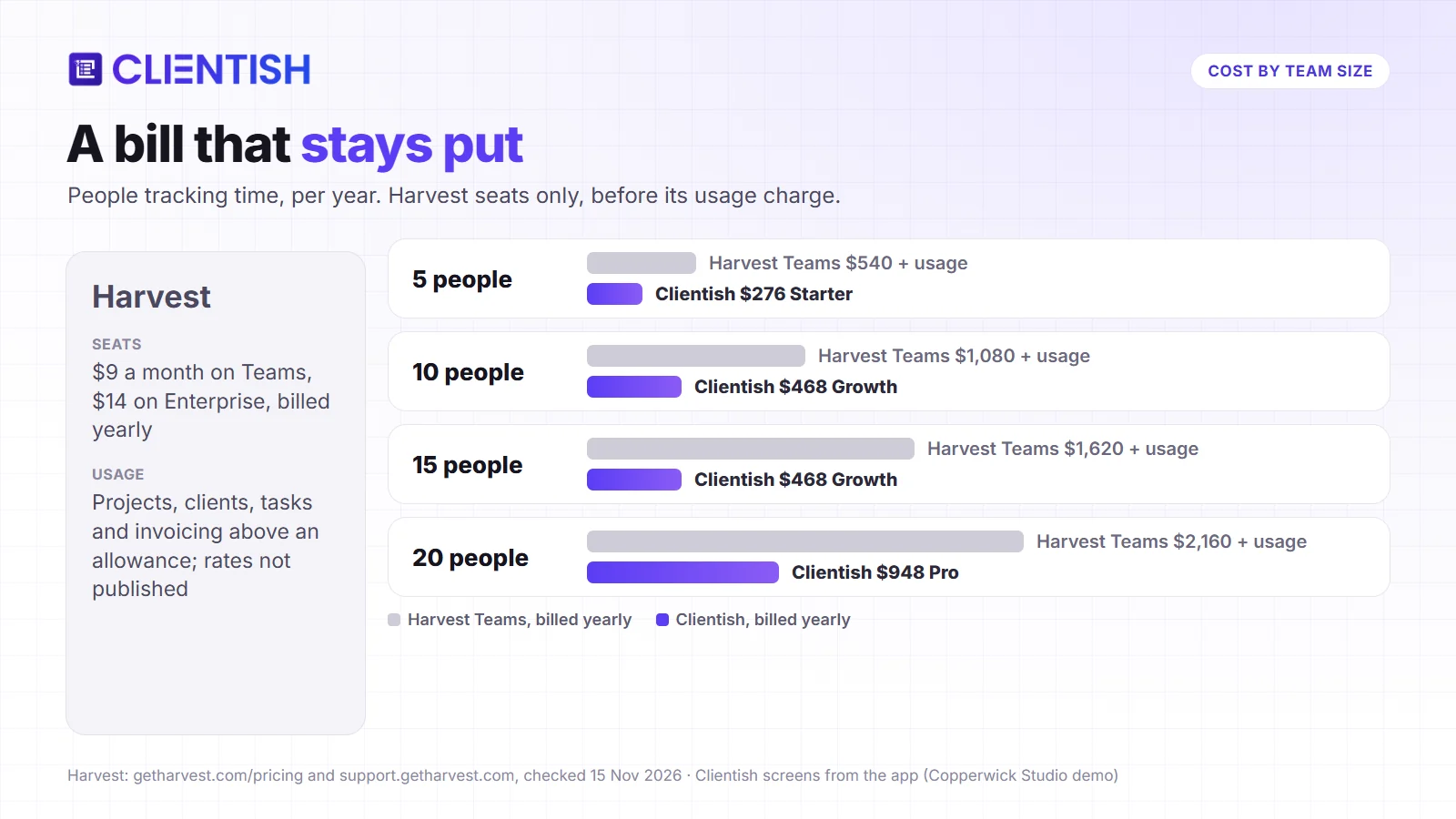
Harvest costs between $9 and $14 per user a month, billed yearly, before any usage charge; Clientish includes a set number of team members in each plan instead. For one person with a handful of projects Harvest can be cheaper, but the gap turns the other way as the team and the number of active projects grow.
The table counts the team members who track time. Clientish includes 5 team members on Starter, 15 on Growth and 30 on Pro, and any of them can track time.
| People tracking time | Harvest Teams, seats only (yearly) | Harvest Enterprise, seats only (yearly) | Clientish (yearly) |
| 5 people | $540 + usage | $840 + usage | $276 (Starter) |
| 10 people | $1,080 + usage | $1,680 + usage | $468 (Growth) |
| 15 people | $1,620 + usage | $2,520 + usage | $468 (Growth) |
| 20 people | $2,160 + usage | $3,360 + usage | $948 (Pro) |
Harvest prices are its yearly per-seat rates ($9 and $14 a month). For Clientish we used yearly billing: Starter works out to $23 a month, Growth to $39 and Pro to $79. Harvest’s usage charge is not included because Harvest does not publish its rates.
What the Clientish plan adds on top of the hours
Starter also includes the client portal, proposals, leads, tickets and client live chat, and Growth adds automations, remote members and your own domain. Getting those next to Harvest would mean paying for separate portal and help desk tools.
Harvest Free vs Clientish Solo for One Person
For a freelancer with one or two projects, Harvest’s free plan costs nothing. Past that, one Harvest Teams seat is $108 a year before usage, while Clientish Solo is $96 a year billed yearly ($9.99 monthly) and includes your own timer, client-approved hours and invoices. A solo consultant who only needs a timer and never shares anything with clients may still be happy on Harvest Free.
Harvest Time Tracking vs Clientish Client-Approved Hours
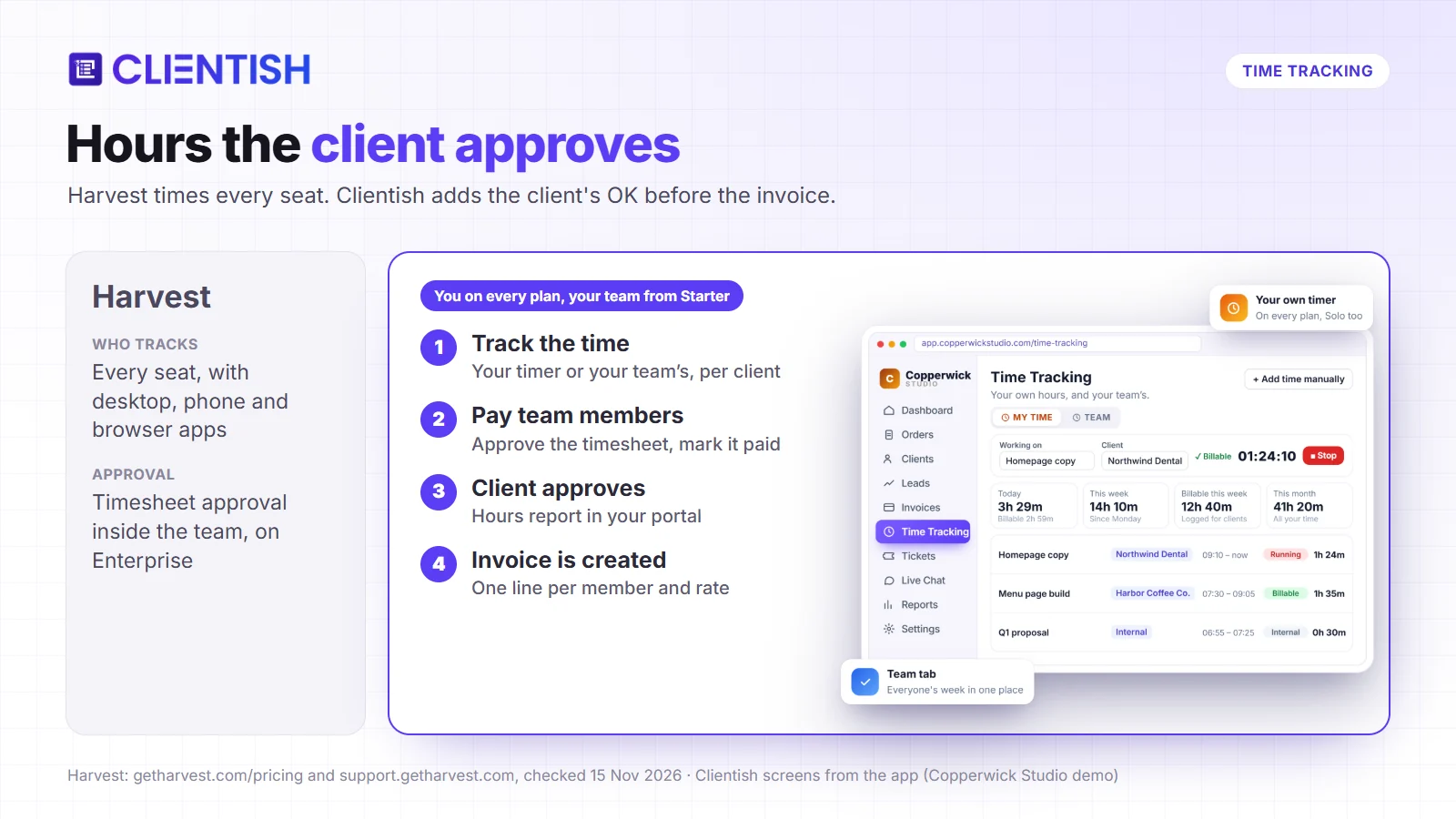
Harvest time tracking gives every person on the account a timer they can start from a browser tab, a desktop app or a phone, and this is where Harvest is strongest. Clientish gives your team a timer in the browser and adds a step Harvest does not have: the client approves the hours before they are billed.
How time tracking works in Harvest
Each seat tracks time against a project and a task, by timer or by typing in hours. Managers see budgets burn down, and on Enterprise they approve timesheets before invoicing. Time flows into invoices by project, and expenses can come with it.
How time tracking works in Clientish
You turn tracking on for a team member and choose which clients they can log time for. They start a timer or add a manual entry, labeled as manual, against a client or as internal work. A timer left running stops itself after 8 hours, so a forgotten timer does not turn into a surprise on the client’s bill.
- Paying the person: members submit a timesheet; you approve it, send it back or mark it paid, so contractor pay is based on hours you have checked.
- Billing the client: you send an hours report from the client’s profile. The client approves it, asks a question or unchecks hours in your portal, and the invoice is created only when they approve. Questions about the bill can be settled before it is issued.
- Seeing the margin: the Time report shows hours, what was billed, what was paid and the margin, by member, client and week, so you can see which clients are worth the hours.
What Clientish does not do
Each Clientish entry belongs to a client or to internal work rather than to a task inside a project, and there are no desktop or phone timer apps and no browser extension. There is no expense tracking either. If your team bills every hour against detailed task budgets, Harvest still covers that better.
Harvest Invoicing vs Clientish Invoicing and Payments
Harvest invoicing turns tracked time into invoices that clients pay through Stripe or PayPal, with a small Harvest fee on plans without Unlimited usage billing. Clientish invoices are paid through any of 11 gateways, and Clientish adds nothing to the fee.
Harvest invoicing and payment options
Harvest builds invoices from tracked time and expenses, handles recurring and retainer invoices and sends payment reminders. To take online payments you connect Stripe or PayPal. For accounts that are not on Premium or Unlimited usage billing, Harvest adds its own fee on card and ACH payments; its help center shows an example of “Stripe 2.9% + $0.30 + Harvest 0.5%”. Harvest now lets you pass that fee on to the client.
Clientish invoicing and payment options
Clientish invoices come from orders, subscriptions, accepted proposals and approved hours, and clients pay them inside your portal. You connect your own gateway: Stripe, PayPal, Paddle, Braintree, Authorize.net, Razorpay, Paystack, Mollie, SSLCommerz, and PayFast in its Pakistan and South Africa versions, plus bank transfer details. For your agency that means:
- Clients pay the way they are used to: a client abroad can use a local gateway instead of a card form they do not trust.
- The fee is the processor’s alone: Clientish takes no cut, so a $5,000 invoice does not lose an extra platform percentage.
- Less chasing: reminders go out before the due date, on it and after it, at the hour you set, so late payers hear from the system instead of from you.
- Clean books: invoices in other currencies, refund in full or in part from the invoice itself, and sync to QuickBooks Online and Xero, so your records match without manual entries.
Harvest Budgets and Forecast vs Clientish Reports and Workload
Harvest keeps a budget on each project and sells capacity planning separately as Forecast; Clientish shows the margin on tracked hours and each person’s workload, but does not keep project budgets. Both help you judge whether a client is still profitable and whether the team can take on more.
How Harvest handles budgets and capacity
Each Harvest project can carry an hour or fee budget, with alerts as it fills up. Custom reports come on every plan (up to 4 below Enterprise), while profitability reports sit on Enterprise. Forecast, the planning add-on for who works on what next week, costs $5 per person a month billed yearly, or $6.25 billed monthly.
How Clientish handles reports and workload
The Clientish Time report puts hours logged, what was billed to clients, what was paid to members and the margin between them side by side, by member, client and week. Other reports show revenue, which services earn the most, your top clients and which orders are stuck in a status. A Workload tab shows how much each team and remote member already has assigned, so you can see who has room before you assign the next order.
Tasks and deliverables
In Harvest, time is tracked against a project and a task. Boards and deliverables are not in its features list, and it connects to tools like Asana, Trello and ClickUp. In Clientish the work itself is an order with its own tasks, checklists, files and messages, shown in Table, Kanban or Cards views, so the client sees progress without a second tool.
Harvest Retainers vs Clientish Deposits and Prepaid Balance
Harvest handles retainers with recurring and retainer invoices. Clientish bills on a schedule too, and adds proposal deposits and a prepaid client balance, so more of the money can arrive before the work starts.
Harvest: recurring invoices and retainer invoices, built from your projects and sent by email for the client to pay through Stripe or PayPal.
Clientish:
- Recurring services and subscriptions: a service can bill every week, month or year, and each paid cycle can open a new order, so monthly work is set up without anyone recreating it.
- Deposits: a proposal can ask for a deposit when the client accepts it, so you can collect part of the fee before your team starts.
- Prepaid balance: clients can top up a balance in your portal and choose to pay invoices from it, which works like a retainer they control.
Harvest Client Portal vs Clientish: What Your Clients See
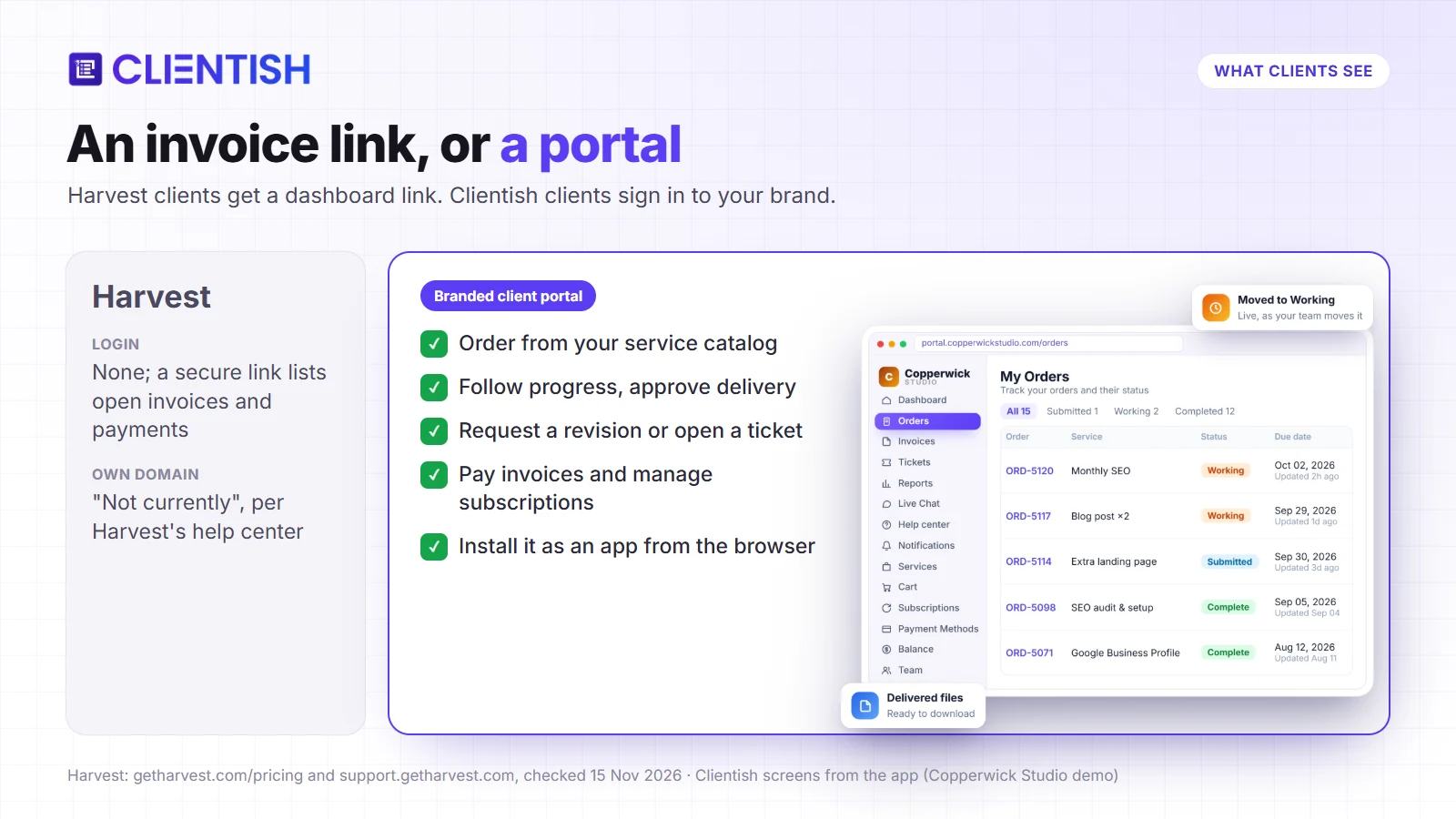
Harvest has no client portal with a login: clients receive emails and a link to a dashboard of open invoices. Clientish gives every client their own login to your branded portal, and that changes how much back-and-forth reaches your inbox.
The client side of Harvest
Harvest’s client contacts are email recipients. The help center says adding a contact sends no email, and the client dashboard “doesn’t require your clients to sign in”: it is a secure link that lists open invoices and recent payments.
The client side of Clientish
In your Clientish portal, the work a client used to ask you for by email is waiting for them:
- New work without a call: they order a service from your catalog and fill in the intake form, so you start with a complete brief.
- Progress without “any update?”: they follow each order, approve the delivery or request a revision in one place.
- Bills they can act on: they pay invoices, manage subscriptions and approve hours reports themselves.
- Help with a record: they open a ticket or chat with your team, and the history stays with the client.
- Your agency on their phone: they can install the portal from the browser, and a new invoice or delivery reaches them as a notification instead of getting lost in email.
Winning the Work: Estimates, Proposals and Leads
Clientish also covers the steps before a project exists, from a new lead to a signed proposal, so the work arrives already set up.
Harvest estimates
Harvest estimates are web documents a client can mark as accepted or declined, and an accepted estimate can be turned into an invoice. Harvest has no proposal designs, e-signature or lead tracking of its own; its integrations page lists third-party tools for contracts and CRM.
Clientish proposals and leads
Proposals in Clientish come in 11 designs, so a quote looks as polished as your work, and can offer packages and ask for a deposit. Signing is a typed name, saved with the signer’s title and IP address, which gives you a record if the scope is questioned later. When the client says yes, Clientish creates their account, the first invoice and the order from the proposal itself.
Leads move through seven stages: New, Contacted, Meeting, Qualified, Proposal, Won and Lost. Follow-up dates show as overdue or due today, so you can see which warm leads are waiting for an answer, and a public booking page lets prospects book a call that lands as a lead.
White Label and Your Own Domain
Harvest’s help center says white label features for invoices are “in the process of being rolled out”: brand color, background, a banner in place of “Powered by Harvest” and a reply-to address. Its pricing page lists white labeling as part of Enterprise Plus, which has custom pricing. Asked whether a Harvest address can be mapped to your own domain, the help center answers “Not currently”.
Clientish shows your logo, colors, favicon and company name on every plan, including sign-in pages and emails. From Growth, you can run the whole workspace on your own domain, such as app.youragency.com, with free SSL, and remove the “Powered by Clientish” line. To the client it looks like your agency’s own system.
Support Tickets, Live Chat and Ongoing Client Work
Retainer clients send a steady stream of questions and small requests. Harvest has no ticket desk or chat for them; Clientish has both.
- Tickets: clients open tickets from the portal, and each priority has a first-reply target, so the urgent issue is not buried under a routine question.
- Live chat: from Starter, portal chat, WhatsApp, SMS and Telegram land in one inbox, so your team answers every channel from one place.
- Recurring work: subscriptions and recurring services bill on schedule without you raising each invoice by hand.
- Automations: from Growth, rules can chase an overdue invoice, welcome a new client or escalate a waiting ticket while you work.
Harvest connects to help desks such as Zendesk for tracking time on tickets, but has no ticket desk or chat of its own.
Harvest Integrations vs Clientish Integrations
Harvest integrations run to 50+ on its pricing page, built up over almost twenty years. Clientish connects fewer tools, picked for client work.
Harvest: 50+ core integrations on its pricing page, including Asana, Jira, Trello, ClickUp, Slack (Enterprise), QuickBooks Online and Xero, plus an API on every plan. Native apps for Mac, Windows, iPhone and Android. Scheduled phone support on paid plans.
Clientish: invoices sync to QuickBooks and Xero, so your bookkeeper is not retyping them. New leads, orders, tickets and payments can post to Slack, Microsoft Teams, Discord or Telegram, so the team sees new work where they already talk. A Zapier app, webhooks and an API connect the rest, and a connector lets Claude or ChatGPT work with your data. The portal installs as an app from the browser. Clientish support answers live chat 24/7 on every plan, with ticket reply targets by plan and dedicated support on Enterprise.
What Harvest and Clientish Have in Common
Both tools turn hours into invoices, and both keep a record of who worked on what for which client. Both offer a free trial without a card, an API and accounting sync with QuickBooks Online and Xero.
Both also run in the browser, so a team can work from any computer without installing anything. The difference is who else is invited in: in Clientish your clients sign in too.
Limitations of Harvest and Clientish
These are the limits that matter most when an agency weighs a move, taken from Harvest’s own help center and from what Clientish does not offer today.
Harvest limitations:
- Usage charges with unpublished allowances and rates make next year’s bill hard to predict.
- No client login, client portal, proposals, leads, tickets or live chat.
- Payments through Stripe or PayPal only, with a Harvest fee on non-Unlimited plans.
- No own domain, and wider white labeling only on Enterprise Plus.
Clientish limitations:
- Time is logged per client, not per project task, and there are no desktop, phone or browser timer apps.
- No expense tracking or project budget alerts.
- A 14-day trial against Harvest’s 30 days.
Pros and Cons
Most of Harvest’s advantages sit in the timer and project budgets, and most of its drawbacks in the new billing and the client side. Clientish’s trade-offs fall in the opposite places.
Harvest
Pros: timers on web, desktop and phone, detailed project budgets, expense tracking, a free plan for one person, a long integration list.
Cons: usage-based charges on Flex billing that are hard to predict, nothing for clients beyond invoices, two payment processors, no own domain.
Clientish
Pros: a fixed plan price with seats included, a branded client portal, client-approved hours, proposals, tickets and live chat in one place, a lead pipeline on every plan, 11 online gateways with no added fee.
Cons: time logged per client rather than per task, no native timer apps, no expenses, a shorter trial.
Choosing Between Harvest and Clientish
Two things decide it: whether your clients take part in the work, and how your team tracks hours. If clients only receive invoices and your team lives in task timesheets, Harvest still fits; if clients order, approve and pay, Clientish replaces the extra tools around Harvest.
Stay with Harvest if
- Your whole team bills by the hour against task budgets and needs desktop and phone timers.
- Your clients only need an invoice by email.
- Your usage stays inside Harvest’s free allowance, or Unlimited billing fits your budget.
Move to Clientish if
- You want to know next year’s bill today, without a usage line that grows with busy months.
- Your clients should order, approve work, approve hours and pay in your branded portal.
- You also need proposals, leads, tickets or live chat, and want them in one tool.
- You want the client to approve the hours before the invoice goes out.
How to Export Data From Harvest and Move to Clientish
You can move from Harvest without juggling CSV files: Clientish’s Harvest import connects to your Harvest account with a personal access token and Account ID, read only, and brings your clients, projects and logged time across. Harvest’s own exports are still worth downloading as a backup of what stays behind.
What the Harvest import brings over
Open Settings > Import in Clientish and choose Harvest. Each part lands where your team will look for it next:
- Clients and contacts: every Harvest client becomes a client; the first contact with an email gets the sign-in to your portal, and other contacts are kept in the client’s notes.
- Projects as orders: each project becomes an order for its client, priced at its fee or money budget, with its start and end dates. Archived projects come over only if you tick that option.
- Logged time, if you want it: entries land in Time Tracking for the right client, on the team member who logged them when that person is in your team, otherwise on you with their name. Hours Harvest already invoiced are marked, so they are not billed a second time, and imported entries are labeled Imported.
What you can export from Harvest as a backup
Under Manage > Clients you can export clients and client contacts to Excel or CSV, and under Projects you can export active and archived projects. Settings > Import/Export exports all time as CSV and all invoices and estimates as a ZIP of PDFs.
What stays behind
Harvest invoices, estimates and expenses stay in Harvest, so keep the PDF export for your records. You set up your services, payment gateway and remote members fresh. Plan the move for the end of a billing cycle, so open invoices are settled in Harvest first. You can start a 14-day free trial and run the import before you cancel.
Frequently Asked Questions
Some of these questions come from Google’s People also ask results and Harvest renewal threads on Reddit; the rest cover client logins and moving your data.
Is there a Harvest alternative with fixed pricing?
Yes. Clientish charges a fixed monthly price per plan with no usage charge for projects, clients or invoices. Your own time tracking is included from Solo at $9.99 a month, and Starter at $29 adds 5 team members who can track time too.
Why did Harvest’s price go up?
Seats are now only part of the bill: Flex adds a charge for usage beyond the free allowance, and Unlimited swaps it for a fixed usage fee. Harvest’s own example shows a bill going from $44 to $404 once usage is added.
Who owns Harvest now?
Bending Spoons acquired Harvest in 2025. The new billing model with usage charges was reported widely in August 2026.
Can clients log in to Harvest?
No. Harvest’s client dashboard is a secure link that shows open invoices and recent payments without a login. In Clientish, every client has an account in your branded portal on every plan.
Does Clientish track time like Harvest?
Partly. You get a timer on every plan, Solo included; team members join from Starter with timesheets, and remote members from Growth. Clients approve hours before they are invoiced. It has no desktop or phone timer apps and logs time per client rather than per task.
Can I import my Harvest data into Clientish?
Yes. Choose Harvest under Settings > Import, paste your Harvest personal access token and Account ID (Clientish only reads from Harvest), and your clients, projects and, if you choose, logged time come across. Harvest invoices, estimates and expenses stay behind.
Can I use Harvest and Clientish together?
Yes. You can keep Harvest for detailed hourly timesheets and run clients, orders and payments in Clientish. The two tools do not sync with each other, so hours and invoices would live in separate places unless you connect them yourself through webhooks or Zapier.
Harvest or Clientish: Which Should Your Agency Choose?
Harvest is still a strong time tracker, and a team that lives in timesheets will miss its apps. But the Harvest price increase has turned a cheap, predictable tool into one whose bill depends on how busy you are. Clientish bills one plan price with nothing metered on top, inside allowances you can see on the pricing page, and it gives your clients a branded place to buy, approve and pay.
If your clients need more than an invoice email, Clientish covers your team’s billable hours and the ordering, approvals, tickets and chat that Harvest leaves to other tools. Start your 14-day free trial and import your Harvest clients on day one, or compare plans on the pricing page.
Sources
Clientish publishes this comparison. Last updated November 15, 2026; Harvest prices and features checked on Harvest’s own pricing page and help center on November 15, 2026. Harvest pricing page; Harvest help center articles “Information about pricing plans”, “Does Harvest charge transaction fees for online payments?”, “Using the client dashboard”, “White labelling your invoices”, “Can I map my Harvest web address to my own domain?” and “Exporting data”; Silicon UK, August 31, 2026, and Subscription Insider, August 22, 2026, reporting the BBC story of August 20, 2026; Bloomberg News, August 13, 2026; TimeCamp, “What Is Harvest?”, October 21, 2026, quoting a G2 review.
Harvest is a trademark of its owner. Clientish is not affiliated with Harvest or Bending Spoons.

