

Plutio tries to be the one app a freelancer or small studio runs on: projects, proposals, contracts, invoices, time, scheduling, chat and a wiki, with phone and desktop apps and 34 languages. Clientish goes narrower and deeper on one job: letting an agency’s clients buy, follow, pay for and get support on repeat work, inside a branded portal.
Quick answer: Plutio is the better pick if you want the broadest toolkit for the money, cheap white-labelling with your own domain, and native apps. Pick Clientish instead if your clients order the same services again and again and need a catalogue, revision allowances and a proper ticket desk, if you want QuickBooks or Xero connected directly, or if you rely on Paddle or SSLCommerz for payments.
What follows compares price at different team sizes, white-labelling, reliability and support, roles, proposals and forms, day-to-day operations, and the client portal, using Plutio’s pricing page and help centre as of October 2026.
Key Takeaways
Plutio renamed and reshaped its plans in 2025, and several review sites still describe old limits. Here’s the current picture in five points.
- Price depends on headcount: Plutio Core ($19) is solo-only with 9 active clients; Pro ($49, about $39 yearly) includes 30 contributors. Clientish Starter ($29, $23 yearly) holds 5 people, Growth ($49, $39 yearly) holds 15. Plutio Core is cheaper for one person; Clientish is cheaper from two to five, level from six to fifteen, and Plutio Pro is cheaper from sixteen to thirty.
- White-label: Plutio sells it as a $9-a-month add-on on Core and Pro, with your own domain and email sender. Clientish brands every plan but stays on a subdomain, and removing its footer line needs Pro.
- Support desk: Plutio has no ticket module; its help centre suggests running support from a task board. Clientish has tickets with a first-reply SLA, ratings and saved replies.
- Selling and delivering: In Clientish, clients shop a catalogue (basket and discount codes included) and each purchase turns into tracked work with its own brief and a cap on revision rounds. Plutio sells through proposals, invoices and paid forms.
- Breadth: Plutio adds Gantt charts, a scheduler, native mobile and desktop apps, 34 languages and multiple workspaces, none of which Clientish offers.
Plutio vs Clientish at a Glance
Twelve rows, using Plutio’s published plans and Clientish’s current ones, covering price, team size, branding, support, payments and apps. The tinted column is Clientish; the summary under the table says who each column suits.
| Dimension | Plutio | Clientish |
| Plans (monthly) | Core $19, Pro $49, Max $199 | Starter $29, Growth $49, Pro $99, Enterprise $149 |
| Team size per plan | Core: you only; Pro: 30; Max: unlimited | 5, 15, 30 or 50 |
| Client limit | 9 active on Core; unlimited on Pro and Max | New clients per month: 10, 50, 100, unlimited |
| Free trial | 7 days | 14 days |
| White-label | $9/mo add-on: own domain, own email, no “Powered by” | Branding on every plan; subdomain only; footer removed on Pro |
| Support tickets | None (task boards as a workaround) | Built in, with first-reply SLA |
| Service catalogue and cart | No; packages inside proposals | Yes, with coupons |
| Payments | Stripe, PayPal, Square, bank transfer | Stripe, PayPal, Paddle, SSLCommerz, bank transfer |
| QuickBooks / Xero | Through Zapier or another automation tool | Direct connections |
| Project planning | Kanban, Gantt, dependencies, recurring tasks | Orders with tasks; Kanban view |
| Apps and languages | iOS, Android, Mac, Windows; 34 languages | Browser only; English |
| Best for | Freelancers and studios wanting one broad app | Agencies selling repeat services to many clients |
In short, Plutio spreads wide and Clientish goes deep on the order-to-support loop. Neither is cheaper at every size.
Who This Comparison Is For
You run, or are about to run, a small agency: a few people, a dozen or more clients, and services you sell more than once. Maybe you’ve used Plutio as a freelancer and your client list now needs more structure, or you’re comparing the two from scratch.
The honest framing is breadth versus depth. Plutio gives one person or a small team almost every business tool in one place. Clientish gives an agency’s clients a self-service way to order, follow and get help with work, and gives the team a queue to deliver it from.
What sends Plutio users looking elsewhere
Plutio rates well on Capterra (4.6) but only 2.9 on Trustpilot, where one review in six gives a single star. The themes that repeat:
- Support access and replies. Only the workspace owner and co-owners can contact support, and no hours or response targets are published.
- Slower development. The public changelog’s latest entry is from September 2025.
- Automation limits. Workflow runs are counted monthly (900 on Core, 5,500 on Pro), with extra runs sold as an add-on.
- No ticket desk or checkout. Support has to be improvised on task boards, and there’s no cart for clients to buy services.
- Core is solo-only. No contributors and a cap of nine active clients.
- No refunds. Plutio’s terms say prepaid fees aren’t refunded for mid-period cancellations.
Meet Plutio: Built for Freelancers and Small Studios Who Want Everything in One App
Plutio markets itself to “17,000+ freelancers” and to small agencies of 2 to 10 people on its Pro plan. Every plan gets the same core features; plans differ by team size, client cap, storage, AI credits, automation runs, and whether white-label and SSO are included.
Key features:
- Projects and tasks: Kanban, list, calendar and Gantt views, dependencies, recurring tasks and templates.
- Proposals and contracts: ten visual themes with optional CSS, a pick-one package plus extras, several ways to sign, contracts for more than one signer, and an auto-invoice switch.
- Billing: invoices, deposits split into up to five invoices, and subscriptions that charge a saved card through Stripe or Square.
- Time and scheduling: timers and invoicing from time entries; booking pages with Google Calendar sync and paid bookings.
- Inbox: direct messages, channels, Gmail sync and a live-chat widget for your website.
- Automations and API: a visual builder up to 20 steps, a full read-write REST API and outgoing webhooks.
- Apps: iOS, Android, Mac and Windows, in 34 interface languages.
| Plan | Monthly | Yearly (per month) | Team and clients |
| Core | $19 | about $15 | You only; 9 active clients |
| Pro | $49 | about $39 | 30 contributors; unlimited clients |
| Max | $199 | about $159 | Unlimited contributors and clients |
Prices from plutio.com/pricing, October 2026. White-label is a $9-a-month add-on on Core and Pro and included on Max; the trial lasts 7 days.
Meet Clientish: Best for Agencies That Outgrow a Single-Operator Tool
Repeat client work is what Clientish is built around. Picture the loop: purchase, assignment, brief, delivery, a capped round of changes, then a support question a week later. Clientish keeps every step of it on the client’s single record.
That focus means fewer tools than Plutio, but the ones it has are joined up for agencies that sell the same services to many clients.
What Clientish adds where Plutio stops:
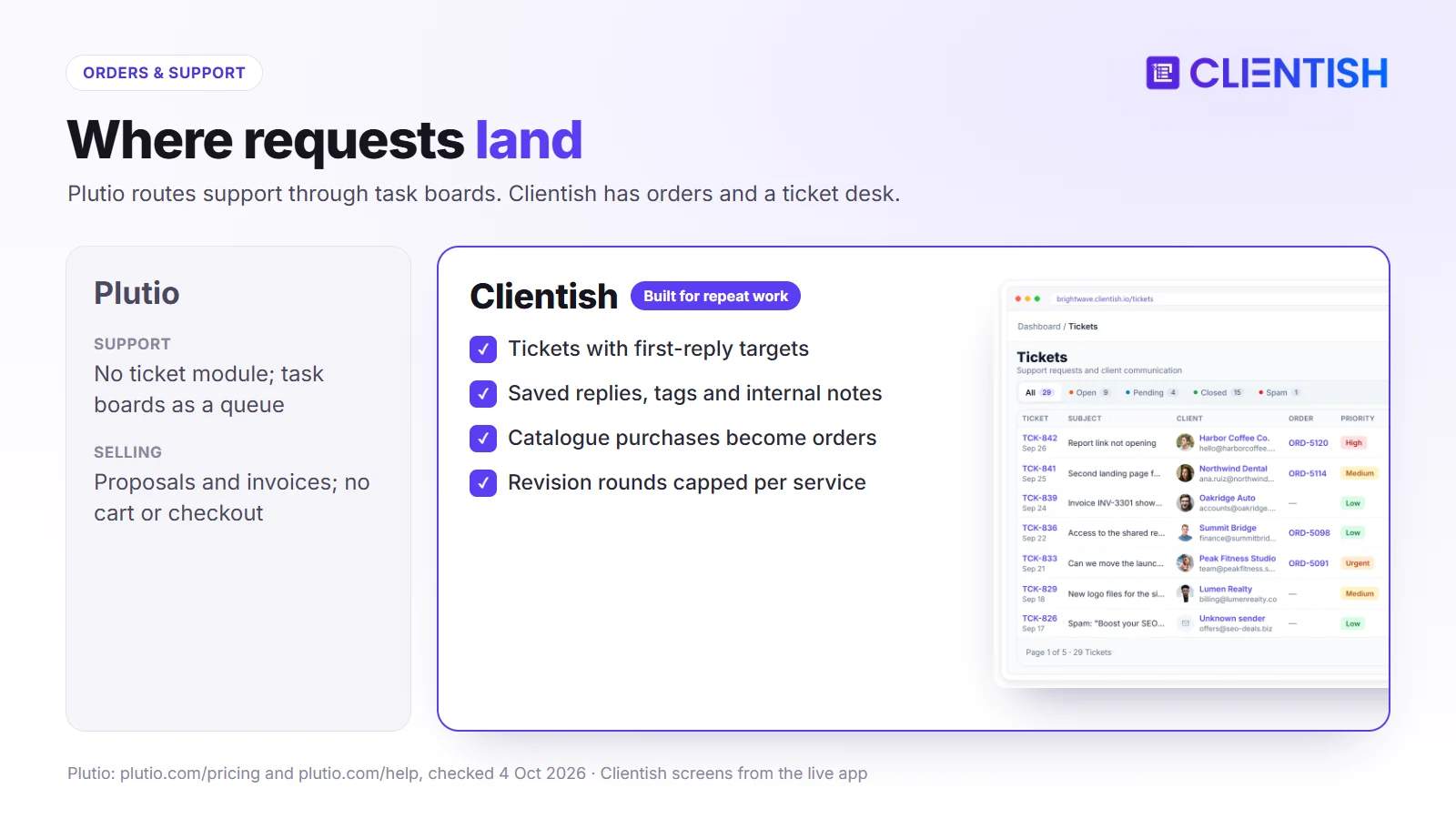
- A real ticket desk: priorities with first-reply targets, saved replies, tags, staff CC, internal notes and client ratings, instead of a task board standing in for support.
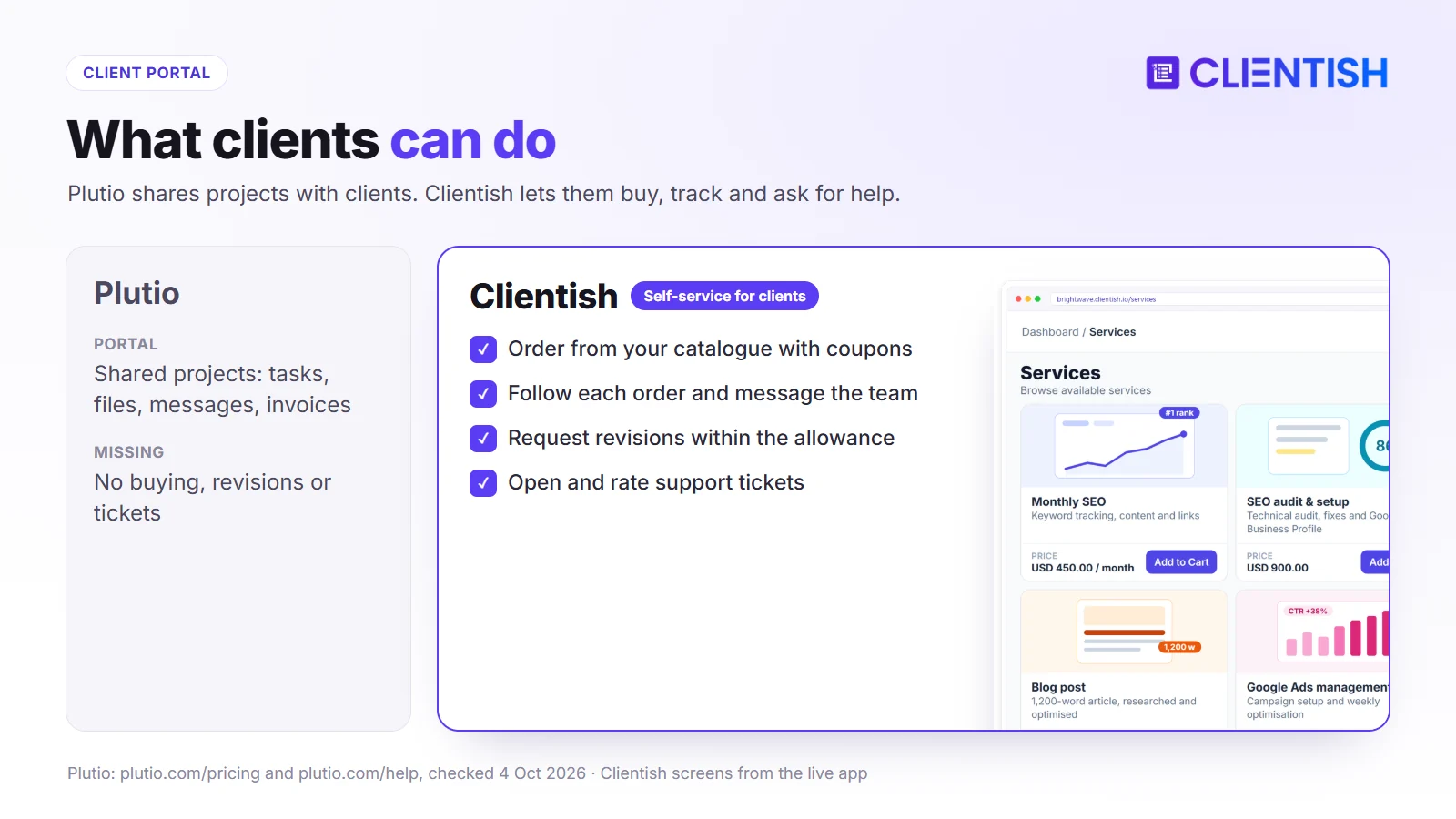
- Catalogue, cart and coupons: clients pick services, add a discount code and pay; Plutio sells through proposals, invoices, paid forms and paid bookings, with no catalogue or cart.
- Orders with revision allowances: a purchase opens a job with conversation, deliverables and an agreed number of change rounds attached.
- QuickBooks and Xero, directly: no Zapier step between your invoices and your books.
- More gateway choice: Paddle and SSLCommerz alongside Stripe, PayPal and bank transfer, with a prepaid client balance.
- A brief tied to each service: built with conditional questions, which Plutio’s form builder doesn’t document.
- Hours the client signs off: remote members on Growth and up record hours, and nothing is invoiced until the client approves the hours report.
- Live chat inside the portal (Growth and up): clients talk to the team where their orders are.
- Proposals that start the work: eleven layouts; acceptance creates the client account, invoice and order together.
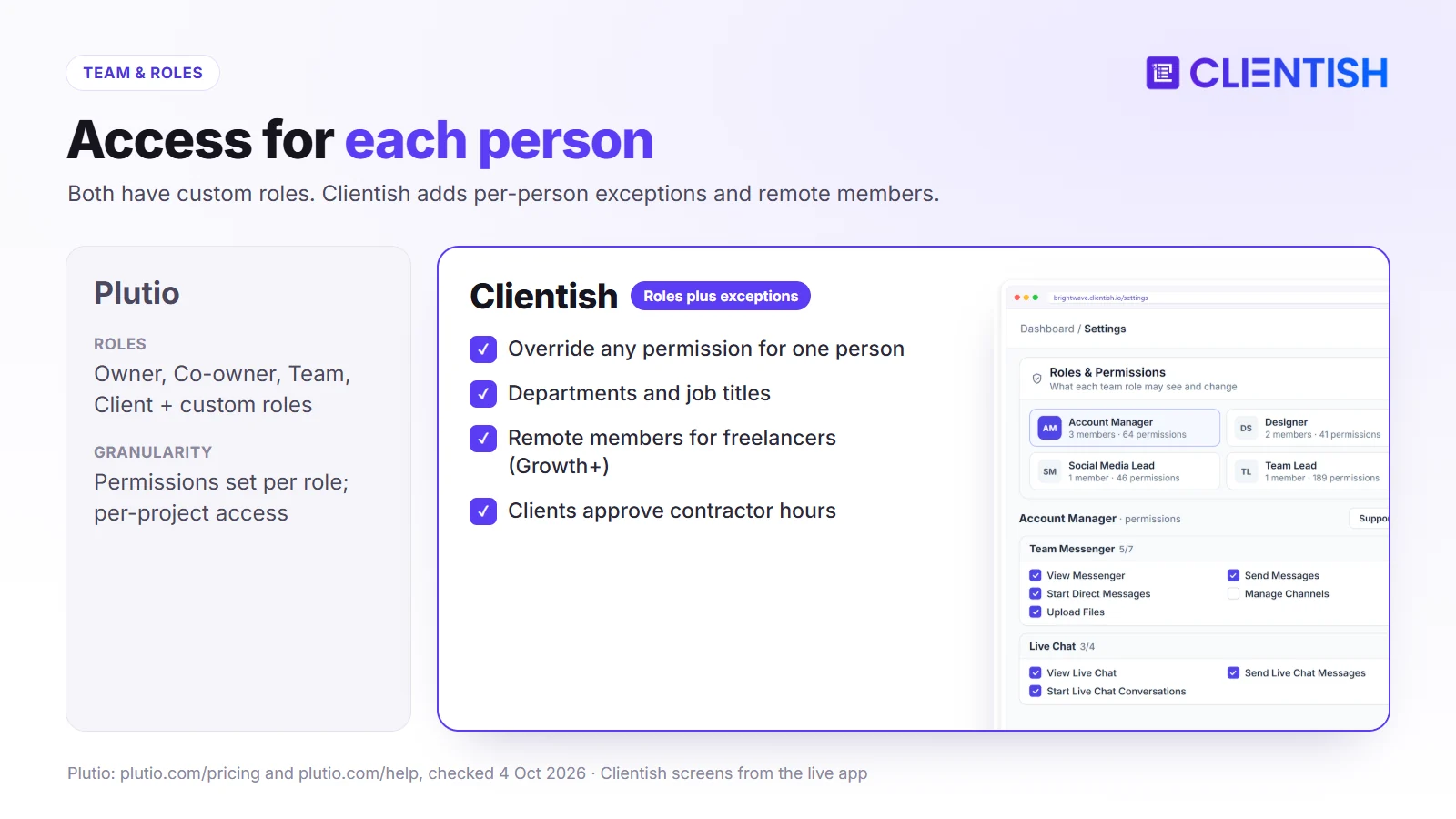
- Roles with per-person exceptions: Plutio sets permissions per role; Clientish also lets you override single permissions for one person.
| Plan | Monthly | Yearly (per month) | Team and allowances |
| Starter | $29 | $23 | 5 people; 10 new clients and 30 orders a month |
| Growth | $49 | $39 | 15 people; 50 and 100; Live Chat, Leads |
| Pro | $99 | $79 | 30 people; 100 and 200; footer removed |
| Enterprise | $149 | $119 | 50 people; unlimited new clients and orders |
Everything else per tier is listed on the Clientish pricing page, and you can test any of it for 14 days without paying.
How We Compared
We looked at the two through an agency owner’s eyes: what the team pays as it grows, what clients see, and what happens to a request, an order or a complaint once it arrives.
- Pricing: monthly and yearly cost for 1, 5, 10 and 20 people
- White-label: domain, email sender and “Powered by” removal
- Reliability and support: who can ask for help and how
- Team and permissions: roles, custom access and per-person control
- Proposals and forms: the selling paperwork
- Operations: orders, tickets and recurring billing
- Client portal: what a client can do after signing in
Plutio facts come from its pricing page and help centre; where Plutio’s own pages disagree (for example on which plans can buy white-label), we say so. Clientish facts come from the product.
Pricing: Team Size Decides Which Costs Less
Winner: Clientish for teams of two to five, Plutio for solo users and teams of sixteen to thirty. Between six and fifteen people the two cost the same, and Plutio’s $9 white-label add-on then becomes the tie-breaker for anyone who needs their own domain. You can price your own team on a free 14-day Clientish trial.
Plutio’s client cap applies only to Core, its solo plan. On Pro and Max, clients are unlimited and the variable is contributors: none on Core, 30 on Pro, unlimited on Max. On the Clientish side, the team allowance steps from 5 to 15, 30 and 50, and the lower tiers ration new clients and orders per month instead.
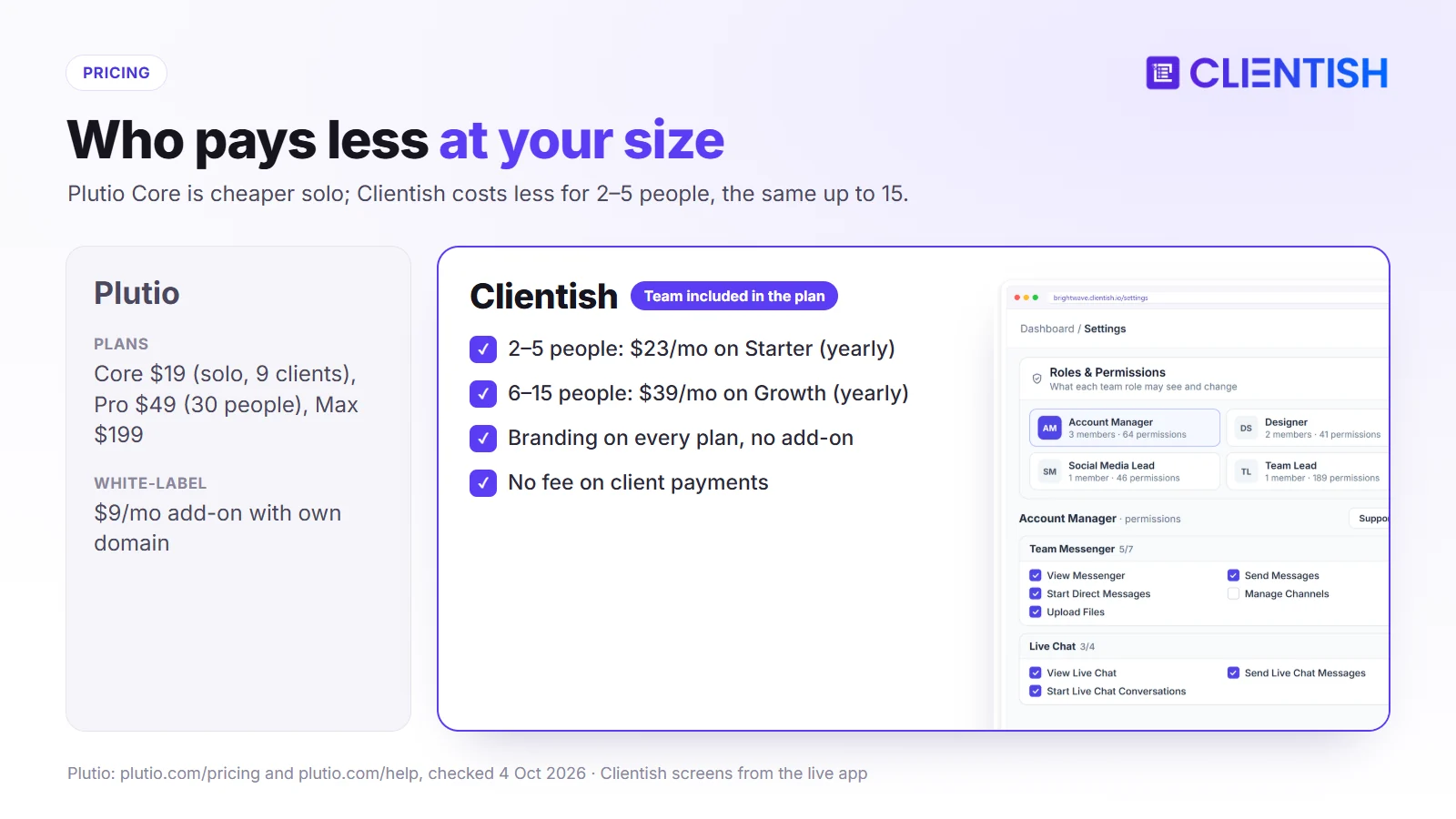
| Team size (yearly billing) | Plutio | Clientish |
| 1 person | Core, about $180/yr | Starter, $276/yr |
| 2–5 people | Pro, about $468/yr | Starter, $276/yr |
| 6–15 people | Pro, about $468/yr | Growth, $468/yr |
| 16–30 people | Pro, about $468/yr | Pro, $948/yr |
| Full white-label added | +$108/yr (own domain and email) | Pro, $948/yr (subdomain) |
Neither tool takes a cut of payments; you pay only your processor. Plutio shows yearly prices as approximate (“~$39”) on its own page, and the cost of contributors beyond 30 on Pro isn’t published.
White-Label and Branding: Included, or a Paid Add-On?
Winner: Plutio. For $9 a month it puts the workspace on your own domain, sends email from your address and removes “Powered by Plutio” everywhere. Clientish’s branding is free on every plan, but it can’t give you a custom domain.
How much of Plutio’s name a client sees depends entirely on that add-on.
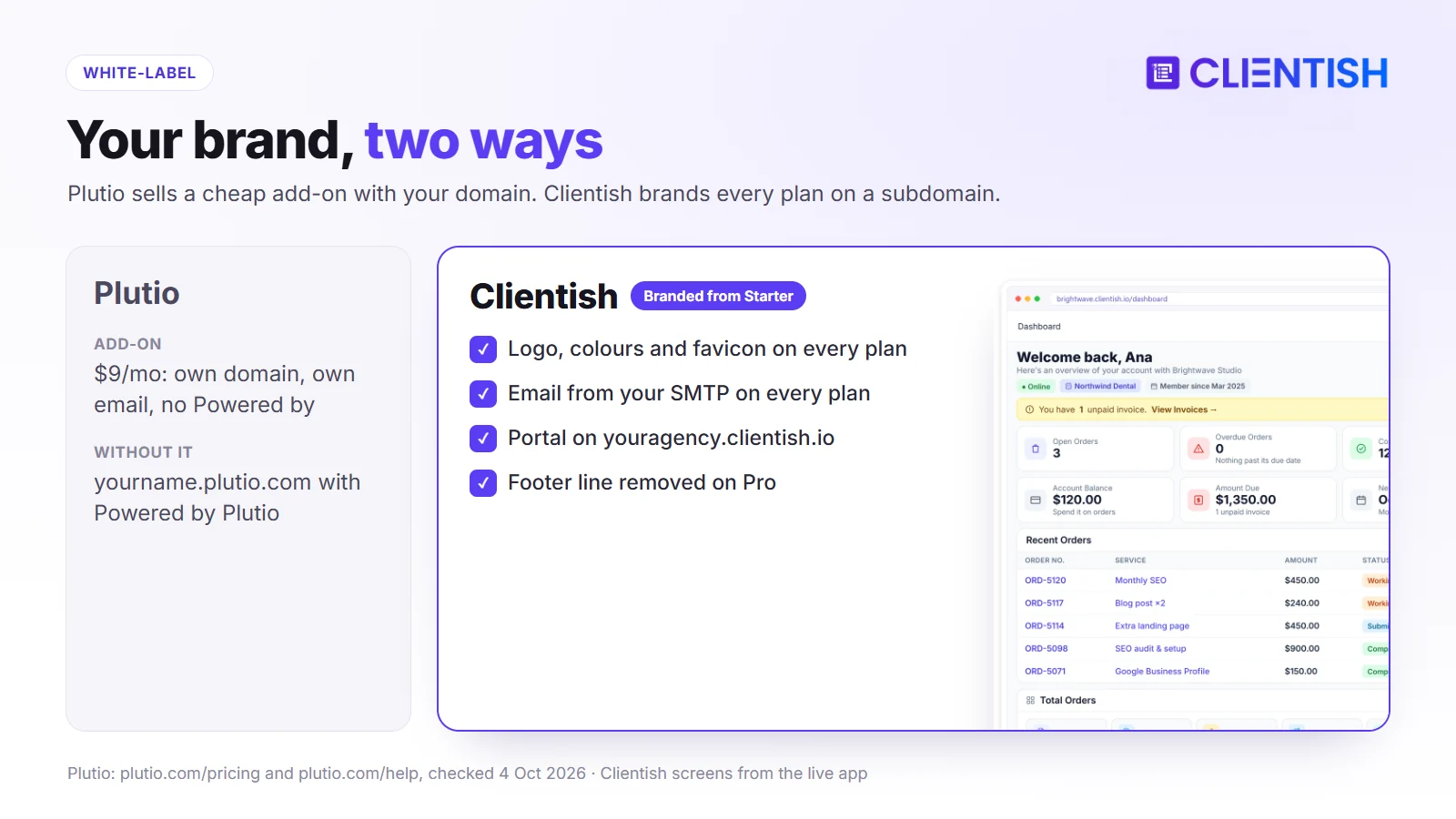
Without it, clients open invoices, proposals and contracts on a yourname.plutio.com address with “Powered by Plutio” on them, and the same line appears on forms, booking pages, the chat widget and the public wiki. With it, everything moves to app.yourbrand.com with SSL, the login page and colours are yours, and email goes out through your SMTP or Gmail. Plutio’s pricing page offers the add-on on Core and Pro; two help articles say it needs Pro, so check before buying on Core.
Clientish takes a different line: even Starter carries your logo, colours and favicon and mails clients through your SMTP server, but the address is always a clientish.io subdomain. A small “Powered by Clientish” line stays until Pro ($79 a month yearly).
| Branding item | Plutio | Clientish |
| Logo and colours | Yes | Yes, plus favicon |
| Own domain | With the $9 add-on | No |
| Email from your address | With the add-on (SMTP or Gmail) | Every plan (SMTP) |
| Platform name removed | With the add-on | Pro and Enterprise |
Reliability and Support: How Stable Is Each Day to Day?
Winner: Clientish on access to help: every plan gets chat and tracked tickets with the Clientish team. Plutio limits support contact to owners and co-owners and publishes no response times.
When a client can’t open an invoice on the morning it’s due, the question is who on your team can get an answer, and how quickly.
Plutio’s Reliability Track Record
Plutio support runs through an in-app messenger and email, and only workspace owners and co-owners can use it. There’s no published support schedule or standard SLA; custom SLAs are mentioned only for Enterprise. Trustpilot reviews average 2.9, with complaints about unanswered tickets and invoice or email bugs reaching clients. Plutio’s public changelog was last updated in September 2025, so it’s hard to see what has been fixed since.
Clientish’s Stability Posture
Every Clientish plan includes chat with its team and support tickets you can follow to a reply; Enterprise adds dedicated support. On the security side, Clientish uses two-factor sign-in, bcrypt password hashing, AES-256 for stored secrets and lockout after repeated failed logins. Clientish’s service level agreement sets uptime targets by plan, from 99.5% on Starter and Growth to 99.95% on Enterprise.
Team and Permissions: Single Operator or a Real Team?
Winner: Clientish by a small margin, for per-person exceptions, departments and remote members with approved hours. Plutio’s custom roles and per-project access are strong for a tool at its price.
Once a few people share clients, access becomes a daily question: who sees invoices, who sees which projects, and what freelancers can touch.
Plutio’s Permission Model
Plutio ships four roles: Owner, Co-owner (owner rights except deleting or transferring the workspace), Team (fully configurable) and Client (fixed). You can add unlimited custom roles, set finance visibility (invoices, subscriptions, transactions) per role, and limit projects, boards and task groups to the people added to them. Permissions are set per role, not per person, except on individual projects.
Clientish’s Role and Permission Structure
Clientish starts from presets such as Support desk, Order ops and Team lead, then lets you change any permission for a single person without editing the role. It adds departments and job titles, co-admins from Growth, and remote members for freelancers (5 on Growth, 15 on Pro, 30 on Enterprise) who see only what their remote role allows and log hours the client approves.
Where Plutio Works Fine
For a studio of three or four where everyone sees most things, Plutio’s role setup is more than enough, and Pro’s 30-person allowance leaves room to grow.
Proposals and Form Building: Where Plutio Is Strong
Winner: Plutio for design control and contract options: ten themes plus custom CSS, drawn or uploaded signatures and multi-signee contracts.
Both tools turn a proposal into money. Plutio gives you more ways to make the document look right; Clientish does more once the client says yes.
What Plutio’s Proposal Builder Does Well
Plutio’s block editor shares one design system across proposals, contracts, invoices, forms and booking pages, with ten themes such as Minimalist, Slate and Aurora and page-level CSS. Proposals can offer one package plus optional add-ons. Signatures can be drawn, typed or uploaded, and each records name, IP address, browser and time before a signed PDF is generated. Contracts can have several signers, and one signature can cover a combined proposal and contract.
After the Signature: Where the Gap Reverses
Plutio can create the invoice when a proposal is accepted, and you then send it. Clientish goes one step further: a yes sets up the client’s login, raises the invoice (deposit optional) and opens the order for the assigned team at once. Clientish has eleven proposal layouts and typed signatures, but no contract module of its own.
Forms: A Similar Story
Plutio’s forms have 16 field types, including file upload, signature and payment collection, and can be embedded anywhere. We found no conditional logic in its help centre. Clientish forms support conditional questions and attach to a service, so each order brings its own brief.
Ongoing Operations: Tickets, Orders, and Recurring Billing
Winner: Clientish for retainer and productized work. Plutio’s automatic card charging on subscriptions is the one area here where it leads.
This is where an agency spends most of its week: the tenth order of the month, a client who wants a change, a broken link that needs fixing today.
Order Workflows
Plutio organises work as projects and tasks, which suits bespoke jobs. There’s no order record that a client creates by buying something. In Clientish, every purchase from the catalogue becomes an order assigned to the service’s team, with the brief, a message thread, delivered files and a revision count; deliveries are approved automatically after the number of days you set (seven by default) if the client doesn’t reply.
Support Tickets with SLA Tracking
Plutio’s own help centre suggests turning a task board into a support queue, with emails creating cards and a “Due by” date standing in for an SLA. Clientish has tickets as a separate tool: clients open and rate them in the portal, priorities carry first-reply targets with an overdue timer, and your team uses saved replies, tags, CC and internal notes.
Recurring Billing and Subscriptions
Plutio subscriptions can charge a saved card automatically through Stripe (card or ACH) or Square, retrying up to ten times; PayPal and bank transfer subscriptions are manual. With Clientish, a due subscription puts an unpaid invoice back in front of the client, who settles it in the portal; that page also shows the renewal date and, if you’ve enabled it, a cancel option. Clientish also supports a prepaid balance clients can top up.
Client Portal: What Each Tool Gives Clients
Winner: Clientish for clients who buy repeat services and need help along the way; Plutio for clients who mainly collaborate with you on shared project tasks.
The portal is only useful if the thing a client wants to do is inside it.
What Plutio’s Client Portal Gives You
Plutio clients sign in at your subdomain, or your own domain with the add-on, and see the projects they’ve been added to: tasks they can view or complete, files they can upload, conversations, and linked invoices, proposals and contracts. Access is per project, and the client role’s rights are fixed. There’s no preview-as-client mode.
What Clientish’s Client Portal Gives You
In Clientish, a client can:
- buy services from your catalogue with a cart and coupon
- follow each order and message the team on it
- complete the brief and ask for revisions within the allowance
- open, follow and rate support tickets
- pay invoices by gateway, bank transfer or prepaid balance
- see subscriptions and their next payment date
- chat live with the team (Growth and up)
Which Portal Suits Which Client
If clients work alongside you on tasks, Plutio’s project-sharing portal fits. If they mainly buy, check and pay for repeat work, and sometimes need help, Clientish’s portal saves your team the back-and-forth.
Where Plutio and Clientish Are Similar
Both are built for service businesses and cover the essentials of being paid for client work, so moving between them won’t lose you the basics:
- proposals that clients accept and sign online
- invoices and recurring billing through Stripe, PayPal or bank transfer
- a branded client login
- role-based team access
- two-factor sign-in
- webhooks for connecting other tools
- no percentage taken from your payments
Where they part ways is in what surrounds those basics: a wide set of business tools on one side, an order and support system on the other.
Where Both Fall Short
A few gaps remain whichever you choose. They’re worth planning around now, because each one means another tool or a workaround once your agency is live on the platform.
- Business intelligence. Clientish’s reports cover revenue, clients and orders but not margin per client or service line; Plutio’s dashboards can track project profitability from time entries and invoices.
- Resource planning. Plutio’s Gantt view helps with timelines, while Clientish offers no Gantt or capacity-planning view.
- Enterprise compliance. Clientish doesn’t hold SOC 2 certification, so check Plutio’s current security documents if you need one.
- Accounting depth. Plutio has none built in; Clientish syncs with QuickBooks and Xero but isn’t a ledger either.
A Real Example: Which Fits a 6-Person Agency?
A six-person SEO agency (founder, two account managers, two specialists and a part-time writer) serves 25 clients, most on monthly retainers with occasional extra audits and landing pages.
The Setup
Both tools cost about the same for this team: Plutio Pro at roughly $39 a month or Clientish Growth at $39, billed yearly. The deciding factors are how extras are sold, how support is handled and whether the agency needs its own domain.
Where Plutio Runs Into Friction
Extra audits are quoted with a new proposal each time. Client problems arrive by email or chat and get tracked on a task board, with no reply targets. Bookkeeping in Xero needs a Zapier connection. And if the account managers need help from Plutio support, only the founder or a co-owner can ask.
Where Clientish Fits This Agency Better
Clients buy audits and landing pages from the catalogue, each becoming an order with its own brief and revision allowance. When something breaks, the client files a ticket that’s timed against your reply target and stays on their history. Invoices sync to Xero directly. The part-time writer joins as a remote member, and clients approve their hours before billing.
The Trade-Off Here
If the founder wanted the portal on the agency’s own domain, a phone app for the team, or scheduling built in, Plutio would give all three for $48 a month with white-label. For this agency, the catalogue, tickets and direct Xero sync matter more.
Pros and Cons
Pulling the earlier sections together, this is where each product is strong and where it will hold an agency back, so you can weigh them against your own priorities.
Plutio
Plutio’s appeal is how much it packs into one subscription; its weak points are support access and agency-specific workflow.
| Pros | Cons |
| Cheap white-label with own domain ($9/mo) | No ticket desk or service checkout |
| 30 contributors on Pro | Only owners can contact support; no published response times |
| Gantt, dependencies, scheduler, inbox | Automation runs are capped per month |
| Native mobile and desktop apps; 34 languages | QuickBooks and Xero only through automation tools |
| Subscriptions charge saved cards automatically | Core is solo-only with 9 active clients |
Clientish
Clientish’s appeal is the order-to-support loop for repeat clients; its limits are breadth and branding depth.
| Pros | Cons |
| Tickets with first-reply SLA, ratings and saved replies | No custom domain |
| Catalogue with cart, coupons and orders | No Gantt view, scheduler or contract module |
| Direct QuickBooks and Xero connections | Browser only; English interface |
| Paddle and SSLCommerz as well as Stripe and PayPal | Subscriptions don’t auto-charge cards |
| Chat and ticket support on every plan | Monthly limits on new clients and orders below Enterprise |
Good For / Avoid If
Check each list against how your agency sells, where your clients are and what your team needs on the go.
Plutio
Good for:
- freelancers who want projects, billing, scheduling and chat in one app
- studios that need their own domain cheaply
- teams working in a language other than English, or on their phones
- project work planned with Gantt charts and dependencies
Avoid if:
- clients need to buy services themselves or raise support tickets
- your accountant wants a direct QuickBooks or Xero sync
- several people on your team need to contact the vendor’s support
- you depend on heavy automation beyond the monthly run limits
Clientish
Good for:
- agencies selling packaged or retainer services to many clients
- teams that handle client support as part of the service
- agencies paid through Paddle, SSLCommerz or a mix of gateways
- firms whose books live in QuickBooks or Xero
Avoid if:
- you want an all-in-one app with scheduling, wiki and Gantt planning
- your portal must be on your own domain
- your team needs native phone apps or a non-English interface
Migrating from Plutio to Clientish
Plutio exports contacts and companies as CSV files (under 5 MB each), and its pricing page promises you can export everything at no charge. A move to Clientish follows four stages.
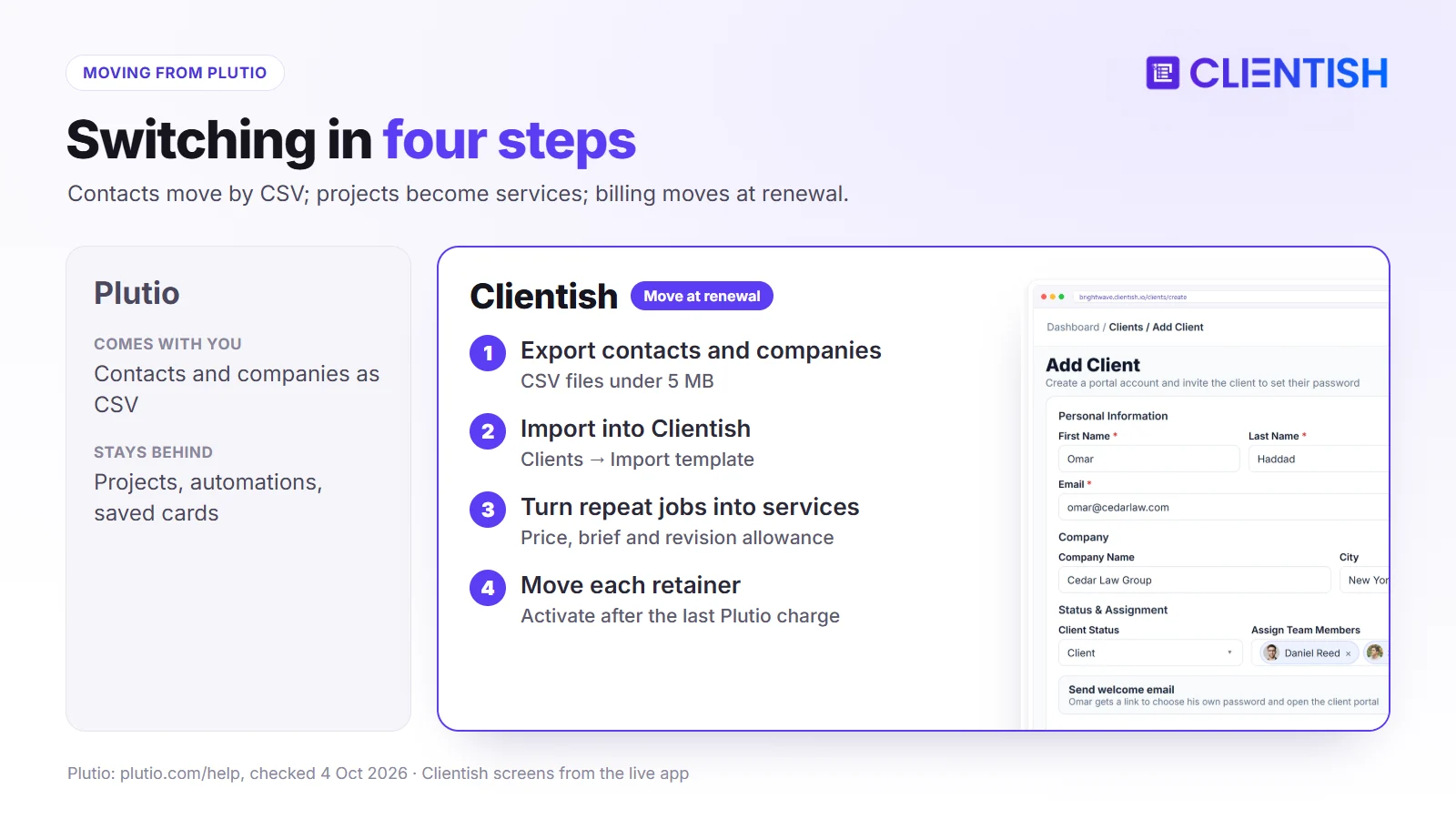
- Export from Plutio: contacts and companies as CSV; save signed proposals, contracts and invoices as PDFs.
- Import into Clientish: paste the Plutio CSV into Clientish’s client template (Clients → Import) and assign each client to a team member.
- Rebuild what Plutio held as projects: turn repeat jobs into services with prices, briefs and revision allowances; recreate proposal templates.
- Move billing: connect your gateway, then set up each retainer as a Clientish subscription and activate it once its last Plutio charge has gone through, and cancel the Plutio subscription so the card isn’t charged twice.
Plutio keeps a cancelled workspace read-only for a period before deleting data, so export before the grace period ends.
Frequently Asked Questions
Direct answers to what agency owners ask when weighing Plutio against Clientish, covering price, client limits, team size, domains, support, accounting, apps and switching.
How much does Plutio cost?
Core is $19 a month, Pro $49 and Max $199, or roughly $15, $39 and $159 a month billed yearly. White-label is $9 a month extra on Core and Pro.
Does Plutio limit the number of clients?
Only on Core, which allows nine active clients; archived clients don’t count. Pro and Max have unlimited clients.
How many team members does Plutio Pro include?
Thirty contributors, with more available for a fee that Plutio doesn’t publish. Core has no contributors; Max is unlimited.
Can Plutio use my own domain?
Yes, with the $9-a-month white-label add-on, which also adds your own email sender and removes “Powered by Plutio”. Clientish runs on a subdomain and can’t use a custom domain.
Is there a ticket system in Plutio?
No. Its help centre recommends using a task board as a support queue. Clientish has a ticket system with first-reply SLAs and client ratings.
Can Plutio sync with QuickBooks or Xero?
Only through an automation platform such as Zapier. Clientish connects to both directly.
Does Plutio have a mobile app?
Yes, for iOS and Android, plus desktop apps for Mac and Windows. Clientish works in the browser only.
Do Plutio subscriptions charge automatically?
Yes, through Stripe or Square; PayPal and bank-transfer subscriptions are manual. Clientish subscriptions reopen the invoice each cycle for the client to pay.
Is there a Plutio fee on client payments?
No. You pay only your processor’s fees. Clientish also takes no fee.
How long is the Plutio trial?
Seven days on the pricing page. Clientish’s trial is 14 days.
Can I move my data from Plutio to Clientish?
Yes for contacts and companies, by CSV. Projects, proposals and automations need rebuilding; keep PDFs of signed documents.
The Verdict: Which Should Your Agency Pick?
Plutio gives a freelancer or small studio more tools per dollar than almost anything else: projects with Gantt charts, a scheduler, inbox, wiki, automations, native apps in 34 languages, and full white-label on your own domain for $9 a month.
Its gaps show when the business turns into an agency with many repeat clients: there’s no ticket desk, no way for clients to buy from a catalogue, no direct accounting sync, and support is reachable only by the owners.
Clientish fills exactly those gaps: catalogue and cart, orders with briefs and revision allowances, tickets with reply targets, direct QuickBooks and Xero connections and a wider choice of gateways, with team seats included in each plan.
- Choose Plutio if you want the broadest all-in-one toolkit, your own domain cheaply, or native apps and languages for your team.
- Choose Clientish if your clients order repeat services, expect proper support, and your books live in QuickBooks or Xero.
Start a 14-day Clientish trial and set up two or three of your services to see how clients would order them.
Sources
Clientish publishes this comparison. Plutio information was verified on October 4, 2026 from Plutio’s pricing page and help-centre articles on plans, white-label, roles, subscriptions, support queues, integrations and support, plus its changelog and Trustpilot reviews.
Plutio is a trademark of its owner. Clientish is not affiliated with Plutio. Found an outdated detail? Write to us and we’ll correct it.

