

Scoring leads without a big CRM is a matter of giving every new enquiry two scores in a simple spreadsheet: fit (can they afford the work, and can you help them?) and intent (are they ready to start soon?). Rule out the hard no’s first, subtract points for red flags, and turn the total into four bands, each with one clear action.
After fifteen years of client work at Giant Marketers, I can tell you the problem is rarely a lack of leads. It is the afternoon spent preparing a proposal for someone with no budget while a perfect client waits two days for a reply. Lead scoring fixes the order you work in. You do not need an enterprise CRM for that; you need six or eight good questions, a points sheet, and the discipline to act on the result.
Key takeaways
- Score fit and intent separately; a lead can be keen and still be wrong for you.
- Ask knockout questions before adding any points, and answer hard no’s kindly and fast.
- Keep it to six to eight signals that every lead can give you without extra research.
- Let your contact form ask the scoring questions, so half the work is done before you read the enquiry.
- Let the band decide how fast and how personally you reply.
- Once a month, compare won and lost leads with their scores and change one weight at a time.
What Does Lead Scoring Mean When You Sell a Service?
Most lead scoring advice was written for software companies, where a “lead” downloads an ebook and opens five emails. An agency enquiry looks nothing like that. For a service business, lead scoring is a simple points system that ranks every new enquiry by how well it fits your work and how ready the person is to start, so you spend your best hours on the best leads.
Lead scoring vs lead qualification
The two get mixed up constantly. Lead scoring gives each lead a number so you know who to call first. Lead qualification is a yes-or-no decision, usually made on the first call, about whether this lead meets your requirements: budget, decision-maker, need and timing. The score decides the order; the conversation decides the deal. A red, amber and green rating is still lead scoring; the numbers just make it easier to stay consistent.
Do you even need to score your leads?
Not always. If one person can give every enquiry a proper reply on the same day, a five-question checklist is enough. Scoring pays off when enquiries pile up, arrive from several places (the website form, lead ads, referrals, booked calls), or when more than one person follows up. That is usually the moment good leads start waiting behind bad ones without anyone noticing.
What “without a big CRM” really needs
Five things, none of them expensive: one list of every enquiry, the same five or six questions answered by every lead, a points sheet, four bands with one action each, and a monthly look-back at what you won and lost. A spreadsheet handles all of it. Prove the model by hand for a month before you automate anything; automating a scoring model you have not tested only produces wrong answers faster.
The Two Scores That Matter: Fit and Intent
Picture two enquiries arriving on the same morning. One is a well-funded company that is “just exploring for next year”. The other wants to start Monday but has no website that could take the traffic. One total would rank them the same; two scores tell you exactly what to do with each.
Fit: budget, need and whether you can help
Fit is about the client, not their mood. For a service business, the useful fit signals are: a budget that covers your fee and any spend the work needs; whether they can use the result (a page that converts, someone who answers the leads you bring); whether you have done this kind of work before; whether you are talking to the person who decides and pays; and whether they are in a market and language you serve. Job titles and company size, the staples of software scoring, matter far less.
Intent: how ready they are to start
Intent is about timing and seriousness. The signals that work for agencies: how they found you (a referral or a booked call says more than a cold message), when they want to start, how specific their goal is, and how quickly they answer your questions. Where a lead came from belongs here. A lead ad form takes seconds to submit, so it starts lower; a filled-in brief took effort, so it starts higher. If you do score activity, like opening a proposal, cap it so one curious visitor does not look like a buyer.
The lead scoring matrix: four boxes, four actions
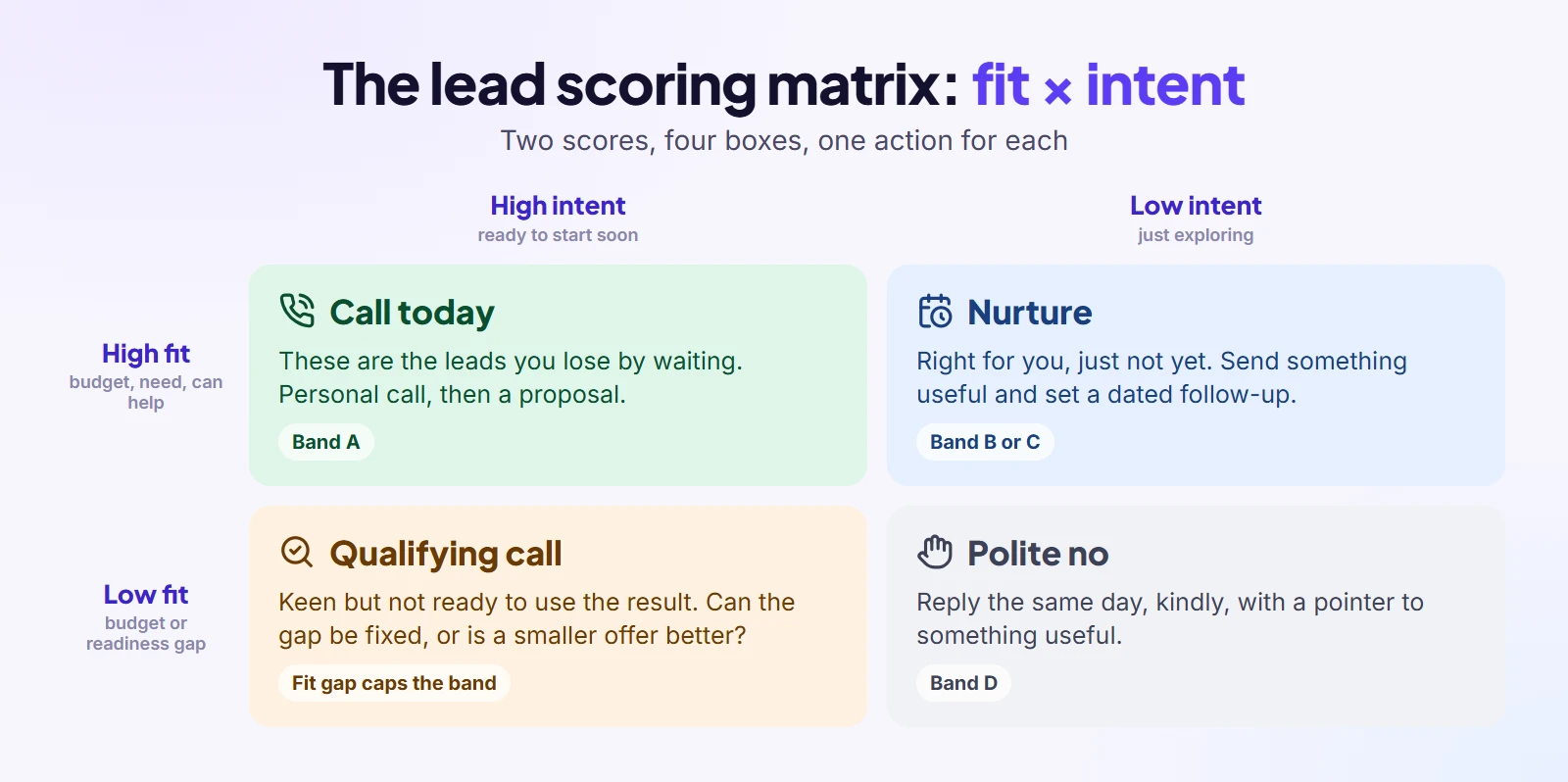
Put fit on one axis and intent on the other, and every lead lands in one of four boxes. Each box has its own action, which is the whole point of scoring.
| Fit / Intent | High intent | Low intent |
| High fit | Call today. These are the leads you lose by waiting. | Nurture with something useful and a dated follow-up; they are right for you, just not yet. |
| Low fit | A short qualifying call: can the gap be fixed, or is a smaller offer better? | A polite no, with a pointer to a resource or someone better suited. |
One rule keeps the matrix trustworthy: a low fit score caps the band, however high the total. A lead that is desperate to start but cannot use the result is a future refund request, not a hot lead.
Disqualifiers and Negative Points
Here is a habit that saves more time than any points table: decide who you will not work with before you score anyone. Some answers end the conversation, and pretending otherwise only delays a “no” that both sides already know is coming.
Knockout questions to ask before you add a single point
A knockout is any answer that rules a lead out, whatever else they say. For most agencies the knockouts are: no budget at all for the work; a job you cannot or will not deliver; a market or language you do not serve; and another agency or freelancer looking for free strategy. When a knockout appears, reply the same day with a kind, clear no and a pointer to something useful. People remember a fast, respectful no far longer than a slow, vague maybe.
Negative points for red flags
Red flags are softer than knockouts; they lower the score without ending the conversation. The ones I watch for: a demand for guaranteed results, a wish to start without an agreement or deposit, a story where every past agency was the problem but no data is shared, and silence the moment price comes up. None of these alone is fatal, but together they predict a difficult client. The point values in this guide are examples, so set your own to match how much each flag has cost you.
Let old leads lose points
A lead that went quiet three months ago is not the same lead that wrote to you in a hurry. Take points off after two unanswered follow-ups, take a few more for every month of silence, and score them fresh if they come back. This keeps your top band full of people who are still in the market, not people who were once.
How to Build a Lead Scoring System in 6 Steps
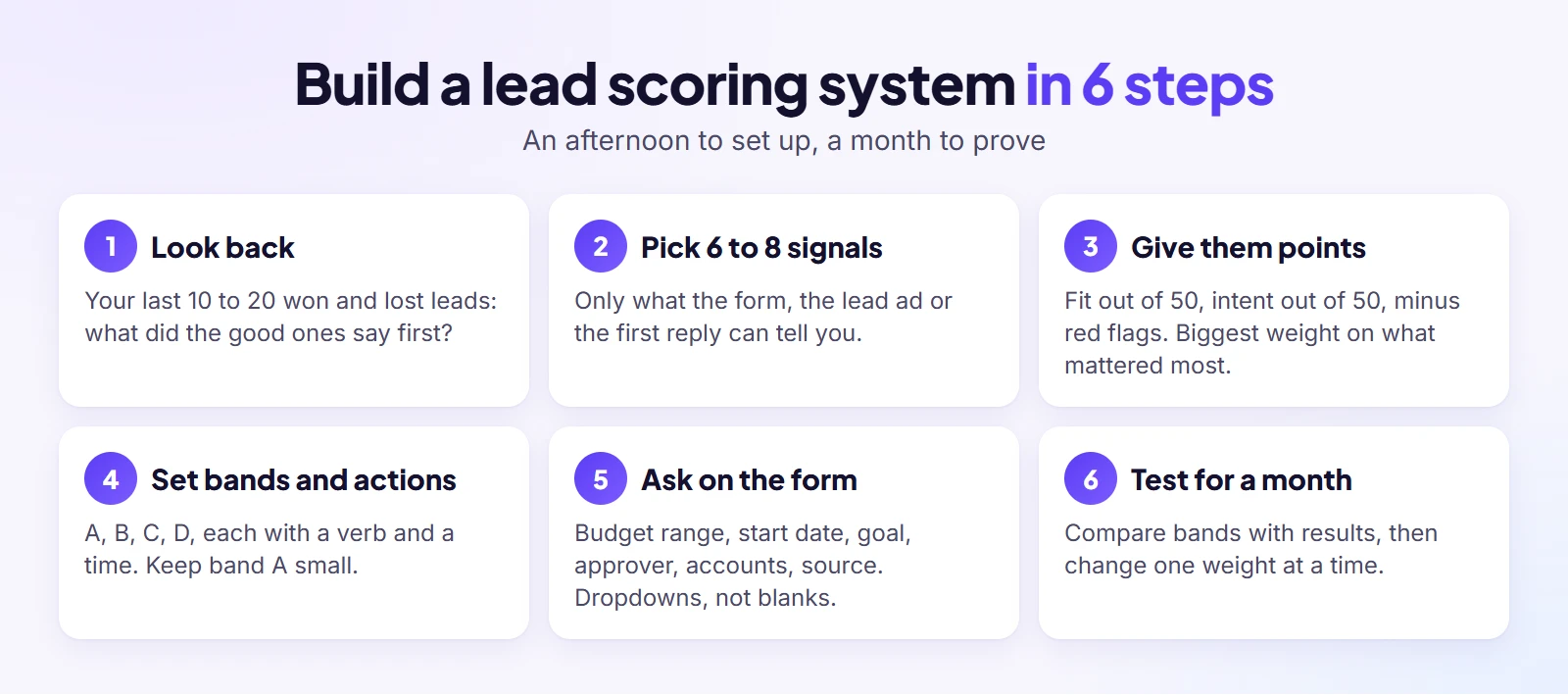
A working lead scoring system takes an afternoon to build, not a consultant. It starts with clients you already know, ends with a month of testing, and has four steps in between.
1. Look back at your last 10 to 20 won and lost leads
Start with what you already know. List the clients who turned out profitable and easy to work with, then the ones who were a struggle, and the leads you lost. Now look at what each of them said in their first enquiry. The patterns jump out quickly: the good ones usually had a clear budget and a specific goal; the bad ones were vague about both. Those patterns are your scoring model in rough form.
2. Pick 6 to 8 signals you can collect
Choose signals you can get from the contact form, the lead ad or the first reply, without paying for data tools or researching every lead by hand. Six to eight is plenty; thirty criteria turns scoring into a part-time job nobody keeps up. If you cannot collect a signal for most leads, drop it, however clever it sounds.
3. Give each signal points
Give the biggest weight to whatever most often separated good clients from bad ones in step one. Keep the arithmetic simple: fit out of 50, intent out of 50, minus any negatives, for a total out of 100. A total you can explain to a new team member in one sentence is worth more than a precise model nobody trusts.
4. Set score bands and one action for each
Turn totals into four bands and attach a verb and a time to each: call within the hour, reply the same day, follow up in two weeks, or close kindly. Make the top band small enough that you can call everyone in it today; if half your leads land there, the bands are too generous. Every lead still gets a reply; the band decides how fast and how personal it is.
5. Put the questions on your contact form and lead ads
The best scoring happens before you read the enquiry. Ask five or six qualifying questions on the form itself, as dropdowns where you can: budget range, when they want to start, what result would make it worth it, who signs off, whether their accounts are in their own name, and how they heard about you. Ranges get truer answers than an open budget box. Most lead ad platforms let you add custom questions too, so the score is half built when the lead arrives.
6. Run it for a month, then adjust one weight at a time
Use the sheet for a month without changing it, then compare the bands with what happened. If a pattern of mismatches repeats, change one weight, only one, and watch the next month. Changing everything at once means you never learn which change helped. Write the scoring rules down as a short procedure, the same way you would for any repeat task; our guide on how to create agency SOPs shows how.
A Lead Scoring Template You Can Copy
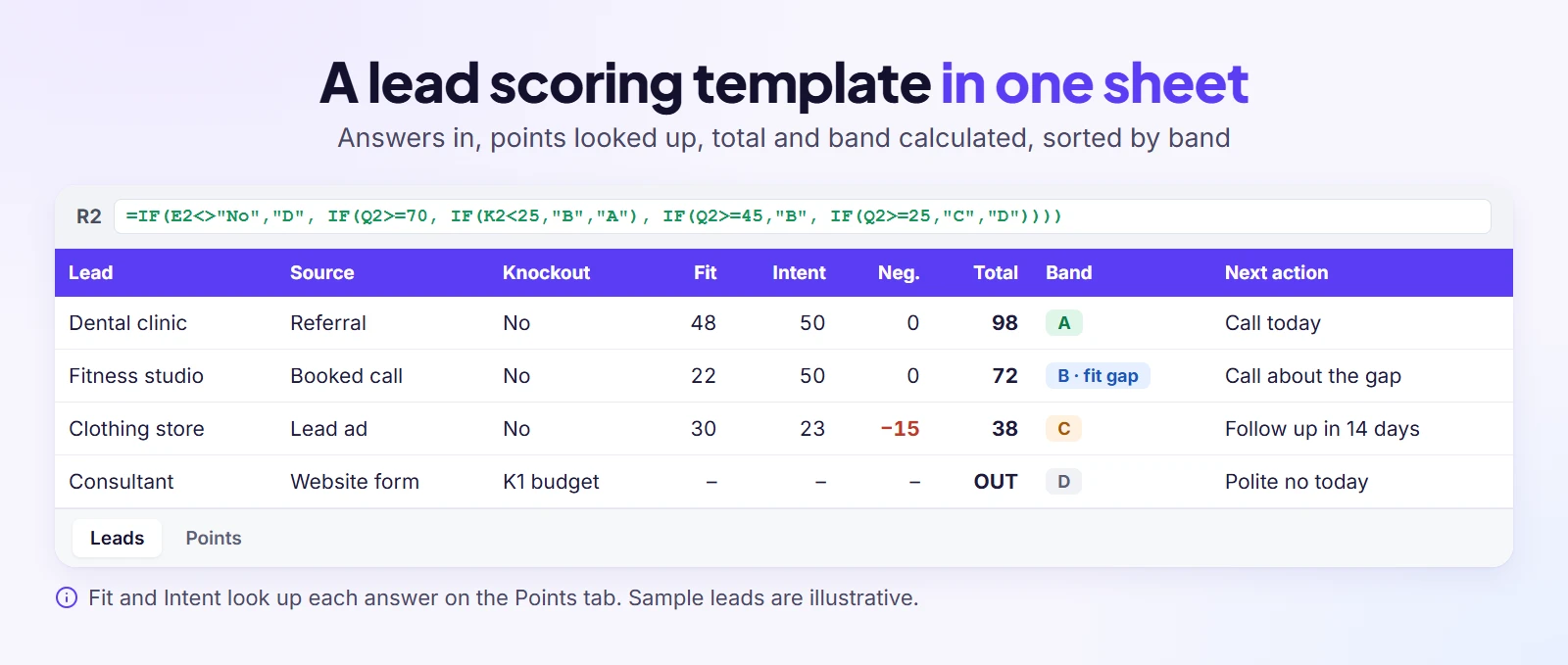
A blank spreadsheet is where good intentions go to die, so here is the layout I would hand any small agency. Build it in Google Sheets or Excel with two tabs: Leads, one row per enquiry, and Points, one small table per question.
The columns on the Leads tab
| Column | What goes in it |
| Date, Name, Company | When the enquiry arrived and who sent it |
| Source | Dropdown: referral, booked call, website form, lead ad, cold message |
| Service | Dropdown: the service they asked about |
| Knockout | Dropdown: No, or which knockout applies |
| Fit answers (4–5 columns) | Budget band, ready to use the result, done this before, accounts in their name, decision-maker |
| Fit | Formula: the sum of the fit points |
| Intent answers (3–4 columns) | Start date, goal clarity, responsiveness (source counts here too) |
| Intent | Formula: the sum of the intent points |
| Negatives | Typed as a minus number |
| Total and Band | Formulas, explained below |
| Expected value | What the work is likely worth; breaks ties inside a band |
| Next action, Last contact, Days silent | Dates, plus today minus the last contact |
| Outcome, Lost reason, Override | Open, won or lost; why you lost; why you ignored the band |
Keep every lost lead in the sheet. You need them for the monthly look-back, and deleting them is how scoring models drift into wishful thinking.
The formulas, in plain words
Fit adds up the points for each fit answer, looked up on the Points tab with XLOOKUP or VLOOKUP. Intent does the same for the intent answers. Total shows “OUT” if the knockout column is anything but “No”; otherwise it is Fit plus Intent plus Negatives. Band turns the total into a letter: 70 or more is A (unless Fit is under 25, which makes it B with a fit gap), 45 to 69 is B, 25 to 44 is C, and under 25 is D. Days silent is today’s date minus the last contact. Sort by Band, then by Expected value from high to low, and the sheet tells you who to call first.
The Points tab and dropdowns
For each question, make a small table of answer and points. Point the dropdowns on the Leads tab at those answers, so nobody types free text the formulas cannot read. Colour each band, turn the Next action cell red when the date has passed, and freeze the header row. That is the whole tool.
A 10-minute weekly routine
On Monday, score the new leads, check the bands and set a next action date for each. On Friday, update the outcomes and lost reasons. Once a month, count won and lost leads per band with COUNTIFS. Those are your numbers, from your own business, and they will tell you more than any industry benchmark.
Example: How We Score Paid Ads Leads at Giant Marketers
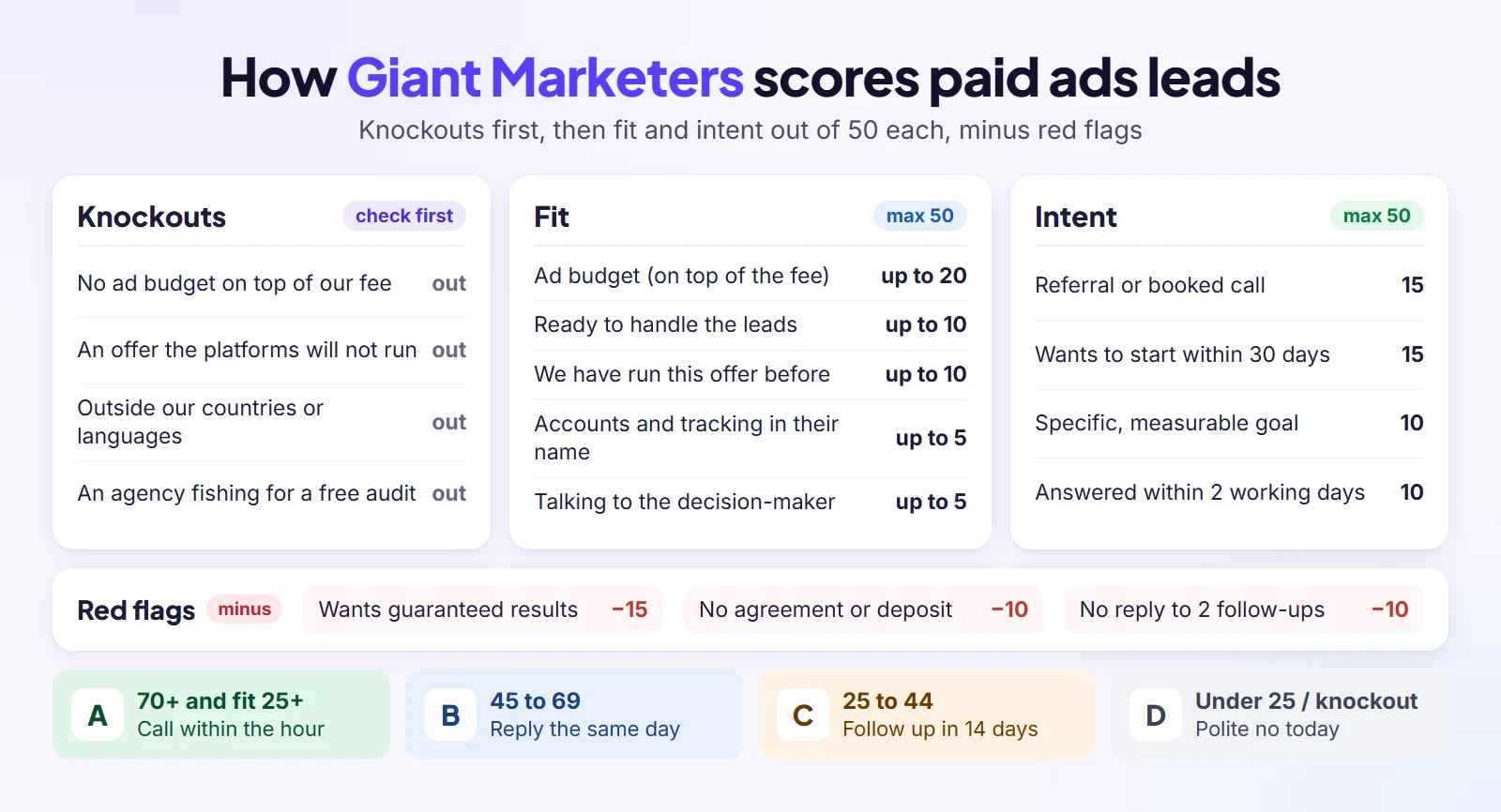
Paid ads enquiries are a good test for any scoring model, because they range from serious budgets to “can you try it for free first?” This is how we think about them at Giant Marketers. Copy the structure, then set the numbers for your own offer; the sample leads below are illustrations, not real clients.
Our knockout questions
Any of these ends the scoring before a single point is added: there is no ad budget on top of our fee, or it sits below our minimum monthly spend; the offer is one the ad platforms will not run, or one we choose not to advertise; the business is outside the countries or languages we serve; or the enquiry is another agency fishing for a free audit. Each gets a polite, same-day no with a pointer to something useful.
The scoring sheet
| Signal | Answer → points |
| Fit (max 50) | |
| Monthly ad budget, separate from our fee | At least twice our minimum → 20 · between our minimum and twice it → 12 |
| Ready to handle the leads | A page that works and someone who answers leads quickly → 10 · one of the two → 5 · neither → 0 |
| We have run ads for this kind of offer | Yes → 10 · something similar → 5 · new to us → 0 |
| Ad accounts and tracking | In their name and working → 5 · own accounts, tracking broken → 3 · held by someone else → 0 |
| Who we are talking to | The person who decides and pays → 5 · someone who recommends → 2 · unclear → 0 |
| Intent (max 50) | |
| How they came | Referral from a client or booked call → 15 · website form with the brief → 10 · lead ad form → 5 · cold message → 3 |
| When they want to start | Within 30 days → 15 · in 1 to 3 months → 8 · just exploring → 0 |
| Goal | Specific and measurable → 10 · general → 5 · vague → 0 |
| Responsiveness | Answered within 2 working days → 10 · slower → 5 · not yet → 0 |
| Negatives | |
| Wants guaranteed leads, sales or return on ad spend | −15 |
| Wants to start without an agreement or deposit | −10 |
| Blames every past agency, shares no results | −5 |
| No reply after two follow-ups | −10, and −10 more for each further month of silence |
Budget carries the biggest weight because, in paid ads, the spend decides whether there is anything to improve at all. “Ready to handle the leads” comes next, because ads that send people to a page nobody answers waste the client’s money and end the relationship, however good the campaigns are.
Four sample leads, scored
| Sample lead | Fit | Intent | Negatives | Total | Band |
| Dental clinic, referred by a client | 48 | 50 | 0 | 98 | A |
| Clothing store, from a lead ad | 30 | 23 | −15 | 38 | C |
| New fitness studio, booked a call | 22 | 50 | 0 | 72 | B (fit gap) |
| Consultant, budget below our minimum | – | – | – | OUT | D |
The fitness studio is the one to study. Its total says “call now”, but its fit says “not yet”: no landing page and nobody to answer the leads. Without the fit cap, we would sell ads that could only disappoint. With it, the first conversation is about getting the page and the follow-up ready, which is a better deal for both sides.
What each band gets from us
Band A gets a personal call within the hour during working hours, after a quick look at their account, and a proposal after the call; our guide to sending proposals clients can sign online covers what happens next. Band B gets a personal reply the same working day with two or three questions and a booking link; for a fit gap, the call is about the gap first. Band C gets a helpful reply, one useful resource and a follow-up in two weeks. Band D gets a kind no and a pointer. The score line goes into the lead’s notes, with the next action date, so anyone on the team can pick it up.
Adjusting the sheet for social media management
The same structure works for social media clients with three swaps. Budget becomes “the monthly retainer fits one of our packages”. Ready to handle the leads becomes “can supply photos and products or book shoots, and one person approves posts within two working days”. Ad accounts becomes “owns the social accounts and can give us access”. Add two red flags: a follower-count guarantee, and daily posting expected on the smallest package. Once a lead says yes, our social media onboarding checklist takes over.
Speed to Lead: What the 5 Minute Rule Means for a Small Team
“Reply within five minutes” is advice that sounds great until you are on a client call when the enquiry arrives. The idea behind it is sound: new leads are still comparing options, and the first useful reply often wins. Harvard Business Review’s 2011 study “The Short Life of Online Sales Leads” found that many companies took far too long to answer web leads. The question for a small team is not how to reply to everyone in five minutes, but who deserves the fast reply.
Let the score decide who gets the fast call
When your form asks the scoring questions, a lead can be scored the moment it arrives. Band A gets the fast, personal call; band D gets a kind no that does not eat your afternoon. Existing clients are a different case: for them, a predictable reply time matters more than a five-minute one. New leads are still deciding, so speed matters most at the top of the list.
An instant acknowledgement is not a reply
An automatic “thanks, we got your message” buys you time, but it is not an answer. The human reply should show you read what they wrote: their goal, their timing, their budget range. The channel matters too; some leads answer a message or a call faster than an email. Use the auto-reply to set expectations, then let the band decide how fast the real one comes.
How to Check Your Lead Scoring Works (Without Hundreds of Leads)
Most guides tell you to compare conversion rates across hundreds of leads. A small agency might see a few dozen enquiries a month, so the check has to work on small numbers. The good news: with small numbers you can read every case instead of averaging them.
Block half an hour once a month for these four checks. The table is the short version to keep beside the sheet; the sections under it explain what each warning sign means and what to change.
| Monthly check | What to open | Warning sign |
| Won and lost leads | Every lead that closed, with its band | A D lead became a client |
| Overrides and lost reasons | The Override and Lost reason columns | The same note keeps coming back |
| Score creep and bad data | Band A size, half-filled forms, repeat enquiries | Band A too big to act on the same day |
| Point changes | Mismatches from earlier months | The same surprise for the third time |
Compare every won and lost lead with its score
Once a month, list every lead that closed either way, with its band. Are the won ones mostly A and B? Did any D turn into a client? That is a lead your model wrongly ruled out, and the most useful row in the sheet. Read each case and ask which point value got it wrong.
Read your lost reasons and your overrides
In a small agency, the sales team is usually the founder, and the founder ignores the band now and then. Record why in the Override column. Those notes are where your next scoring rule comes from. Lost reasons do the same job from the other side: they show whether you are losing on price, timing or fit.
Watch for score creep and bad data
Three things quietly break a scoring sheet: half-filled forms scored as guesses instead of zeros, the same person enquiring twice through a lead ad and the website, and bands that slowly let everyone into A. Score missing answers as zero, merge duplicates before scoring, and tighten a band the moment it stops being small enough to act on.
When to change the points
Look every month, change at most one weight a month, and only when the same mismatch has shown up more than once. A single surprising win is a story; the same surprise three times is a pattern worth a rule.
When Should You Move From a Spreadsheet to Software?
A spreadsheet is the right tool longer than most people think. You have outgrown it when the work around the score, not the score itself, starts slipping.
Signs you have outgrown the sheet
- Leads arrive from three or more places and you copy them into the sheet by hand.
- More than one person follows up, and nobody is sure who replied to whom.
- Follow-up dates slip because nothing reminds you.
- You retype a won lead into your invoicing and your client portal.
- The answers from your lead ads sit in another tool, so scoring means switching tabs.
What to look for in a lead tool
The best tool for lead scoring at small-agency scale is the one that removes the copying. Look for: every source arriving in one list with its answers attached; an owner and a follow-up date on each lead; a deal value per lead; one step from “won” to client, invoice and work; and either a score field or a place to note the score. Be wary of paying for predictive or AI scoring early. Those models need far more history than a small agency has.
Common Lead Scoring Mistakes
None of these mistakes looks foolish on day one. Each one starts for a sensible reason, which is why it pays to name them before they show up in your own sheet.
- Scoring things you cannot see. Email opens and page views are guesswork for most agencies; score what the lead tells you.
- No knockouts. Without them, a high-intent lead with no budget looks like your best prospect.
- Trusting the total over the fit. A keen lead who cannot use the result is still the wrong lead.
- Too many criteria. If scoring a lead takes longer than replying to it, the model will be abandoned.
- The same points for every signal. A referral and a cold message are not equal; weight them differently.
- No negatives and no decay. Red flags and silence should cost points, or old leads clog the top band.
- Researching every lead before scoring. Score first from the answers, then research only the top two bands.
- Ignoring deal size. Two leads in the same band are not equal if one is worth five times more.
- Points nobody can explain. If a new team member cannot follow the logic, it will not be used.
- Never recording why leads were lost. Without lost reasons, the model never learns.
How to Run This Scoring System in Clientish
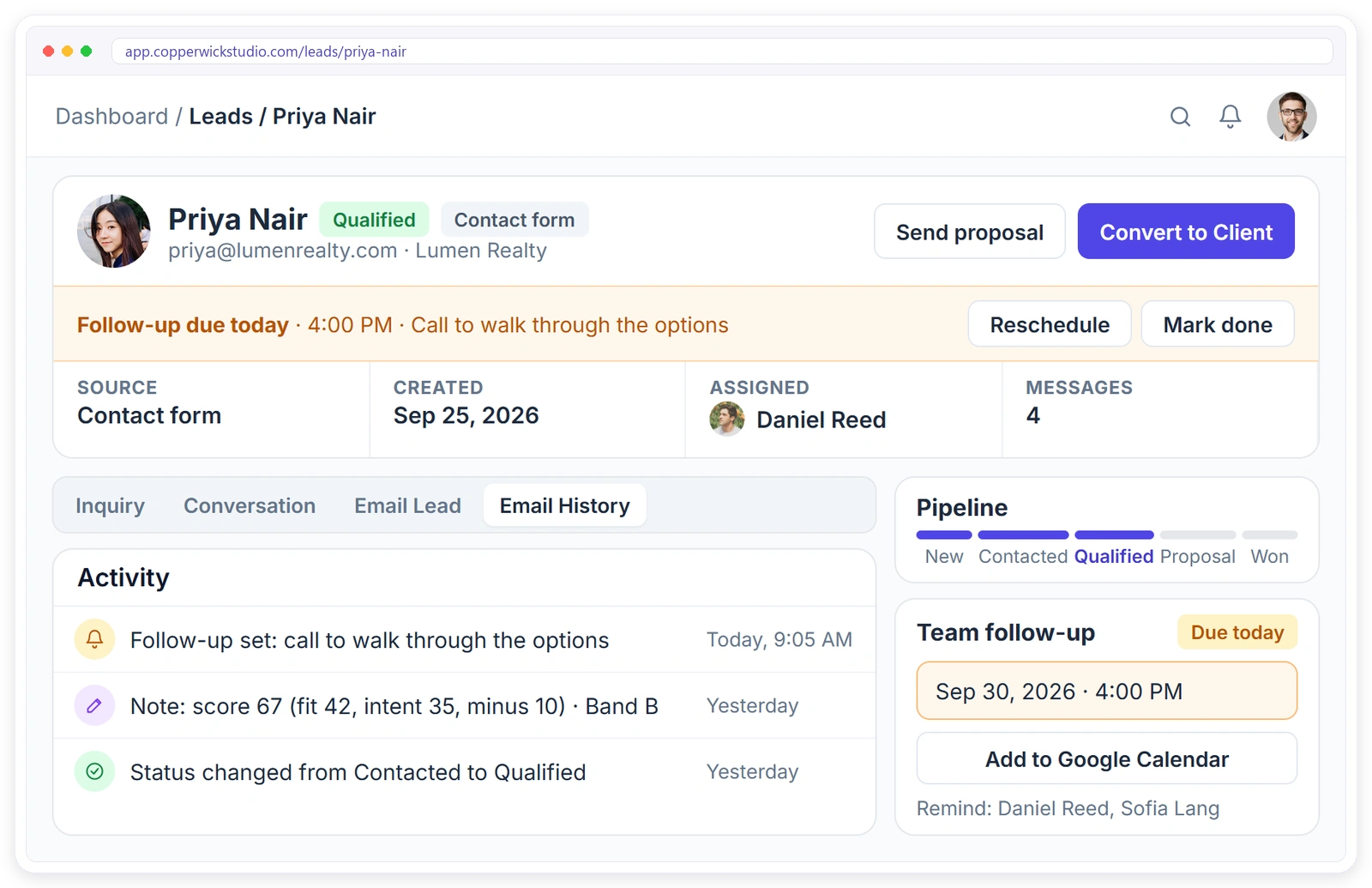
Let me be straight about this: Clientish has no lead scoring feature. There is no score field and no automatic scoring, so the points sheet stays your rule. What Clientish does is carry everything around the score, so you stop copying leads between tools.
Clientish is an all-in-one client management portal for agencies, freelancers, consultants and service-based businesses: leads, proposals, a branded client portal, orders, invoices and subscriptions, support tickets and live chat in one place. Here is how the system in this guide fits into its lead management and sales pipeline:
- The answers arrive with the lead: contact forms create a lead with every answer attached, and forms can use dropdowns for the scoring questions. Facebook and Instagram Lead Ads and Calendly or Cal.com bookings arrive as leads too.
- The score lives on the lead: write the score line in the lead’s internal note, private to your team, and set the expected value on the lead so your pipeline shows what it is worth.
- The band becomes a status and a date: leads move through six fixed statuses (New, Contacted, Qualified, Proposal, Won, Lost), and each lead gets an owner and a follow-up date, with overdue follow-ups flagged in red.
- The yes becomes work: send a proposal from the lead; when the client accepts it with an e-signature, the client record, invoice and order are created.
- The check gets easier: once a won lead’s first invoice is paid, the lead shows its actual value beside the expected value, so you can see whether the score and the estimate were right.
Leads are part of the Starter plan and up, from $29 a month. You can start a 14-day free trial and run your next ten enquiries through it alongside your sheet.
Frequently Asked Questions
The questions agency owners and freelancers ask most about scoring leads on a small budget, answered briefly. Pick the one you came for.
Can you score leads without a CRM?
You can, and a spreadsheet with a few columns does the job: the lead’s answers, a fit score, an intent score, negative points, a total and a band. Ask the scoring questions on the form so the answers arrive with the lead, and sort by band each morning. Move to software when copying leads by hand starts taking real time.
How do you create a lead scoring system?
Review the clients you won and lost, pick six to eight signals you can collect, give the strongest ones the most points, set four score bands with one action each, add the questions to your forms, and test it for a month before changing anything. Then adjust one weight at a time.
Does the 5 minute rule for leads apply to small agencies?
Partly. Fast replies matter because new leads are comparing options, but a small team cannot answer everyone within minutes. Score leads as they arrive and give the fastest, most personal reply to the top band. Everyone else still hears back the same day, just with less urgency.
What are the 7 C’s of CRM?
There is no single standard list; different authors use different sets of seven words. Most versions share a few themes: the customer, communication, convenience and good customer data. For lead scoring, the useful takeaway is the last one: score only from information you collect reliably for every lead.
What is the best software for lead scoring?
For a small agency, the best choice is the tool that gets every lead into one list with its answers, an owner, a follow-up date and a deal value, and turns a won lead into a client without retyping. A spreadsheet plus a simple pipeline is enough until volume makes copying painful.
Lead scoring vs lead qualification: what is the difference?
Scoring ranks leads so you know who to call first; qualification is the yes-or-no check you make on that call. Confirm four things there: the budget is real, you are talking to the person who signs, the need is clear and the timing works. A high score that fails qualification still ends in a polite no.
What is a good lead score?
No single number works for every agency. A good score is one high enough to put the lead in a band you will act on today. In the model in this guide, 70 or more out of 100, with a fit score of at least 25, means a personal call within the hour.
What questions should a lead form ask to qualify leads?
Keep it to five or six multiple-choice questions covering money, timing, the result they want, the person who approves, account ownership and the source of the enquiry. A range feels safer to answer than a blank budget box, so people answer it.
Should Facebook lead ad leads score lower than website enquiries?
Give them a lower starting point on intent, since tapping submit on an ad costs the lead almost nothing. Then let their answers and how quickly they reply move the score. Some of your best clients may come from lead ads; they just have to show it.
Is there a free lead scoring template?
Yes: the layout in this guide works in Google Sheets or Excel. Make a Leads tab with the columns listed above and a Points tab with one small table per question, then add the Total and Band formulas. Start with the paid ads example and change the points to fit your service.
Final Thoughts
Do this tonight: take your last ten enquiries and score them with the sheet. If the order differs from your gut, do not ignore the difference; find the point value that disagrees and decide which of you is right. That one conversation with yourself will improve the model more than any template.
When a scored lead says yes, the next step is getting them started without a week of email threads; my guide on how to onboard clients without email picks up from there. To see leads, proposals and onboarding in one branded place, Signup & Try Demo.
Sources
Clientish publishes this guide. It reflects the author’s 15 years of client work at Giant Marketers and experience building client management software for agencies, plus common practice described in lead scoring guides, forum discussions and AI assistant answers reviewed as of October 2026. The speed-to-lead reference is Oldroyd, McElheran and Elkington, “The Short Life of Online Sales Leads”, Harvard Business Review, March 2011. The scoring model is how we think about paid ads enquiries at Giant Marketers; the sample leads are illustrative, and Copperwick Studio in the product screenshot is a fictional demo agency. The Clientish section describes the product as documented on clientish.co in October 2026. Clientish is not affiliated with any company mentioned.

