

Creating agency SOPs is a matter of documenting one recurring task at a time: name a single owner, define the trigger that starts it, write the steps as one action per line, add what the client must provide, and set a clear “done” standard. Then hand it to a newcomer and watch where they get stuck.
That is the whole method. After fifteen years of client work, I can tell you where it usually breaks, and it is rarely the writing. Agencies write SOPs, file them, and go back to running everything from memory. An SOP only earns its keep when its steps show up at the moment the work starts, assigned to a person, with a due date. That is the standard this guide holds every SOP to.
Key takeaways
- An agency SOP is a short, written set of steps for one repeat task, with a named owner, a trigger and a definition of done.
- Start with the task you explain most often, usually client onboarding, and write three to five SOPs before you write any more.
- Record the real way the work gets done, then turn it into numbered steps; AI can draft the text, but a person has to test it.
- Every agency SOP needs a “client’s part”: what the client must send or approve, where, and when they get a reminder.
- Keep the master copy in one shared library, and put the steps where the work happens: on each new project or order.
- Update an SOP whenever something changes, not only at the quarterly review, and retire the ones nobody uses.
What Is an Agency SOP?
To a lot of agency owners, “SOP” sounds like a binder nobody opens. The meaning of an agency SOP is simpler and far more useful: an SOP (standard operating procedure) is a written set of steps for one task your agency repeats, so it gets done the same way whoever does it. It names the owner, the trigger, what the person needs, the steps and how you know it’s finished.
Most agencies already have SOPs. They just live in the founder’s head, in old Slack threads and in the habits of whoever has been around longest. Writing them down moves that knowledge out of people and into the business, which is the point: when someone is sick, on holiday or gone, the work still runs.
SOP vs process vs checklist vs template
These four words get mixed up all the time, and the confusion is why so many SOP folders turn into a pile of everything. Each one does a different job. Keep them apart and your library stays small and easy to use.
| Term | What it is | Agency example |
| Process | The big-picture flow from start to finish, often across several people | Lead to signed client to delivered website |
| SOP | The detailed steps for one part of that flow, with an owner and a done-check | How we onboard a new client in the first five working days |
| Checklist | A list you tick to confirm the steps were done | Pre-launch QA list for a landing page |
| Template | A blank form the SOP tells you to use | Welcome email, kickoff agenda, monthly report layout |
One process usually holds several SOPs, and one SOP usually points to a checklist and a few templates. When you write an SOP, link to the templates instead of pasting them in, so a change to the welcome email doesn’t mean editing five documents.
The seven parts every SOP needs
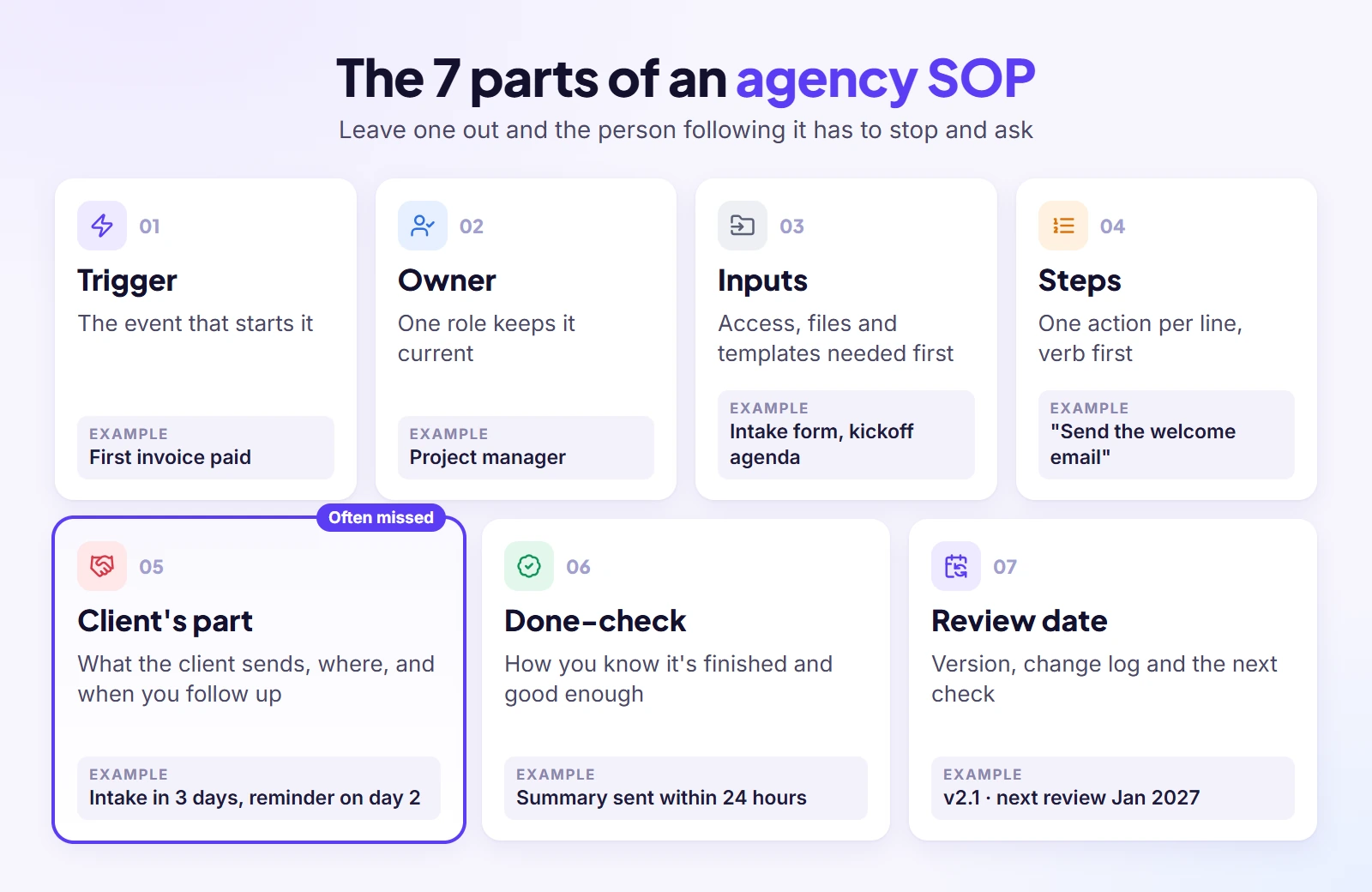
Every SOP I have seen work in fifteen years, short or long, answers the same seven questions. Leave one out and the person following it has to stop and ask someone, which defeats the purpose. I write these as fixed headings so the SOP can be scanned in under a minute:
- Trigger: what starts it. “A new client pays the first invoice” is a trigger; “when needed” is not.
- Owner: one named role responsible for the outcome and for keeping the SOP current.
- Inputs: the access, files, tools and templates the person needs before step one.
- Steps: numbered, one action each, starting with a verb.
- Client’s part: anything the client must provide or sign off, the place they do it, and the day your team follows up.
- Done-check: how you know the task is finished and good enough to hand on.
- Review date: the version, the last change and the next time someone checks it.
The client’s part is the one most guides skip, and in agency work it’s where many delays start. A step that waits on a client without a reminder rule isn’t a step; it’s a gap.
Why Do Agencies Need SOPs?
Look at last month’s work and count what was truly new. The brief changed, the logo changed, but onboarding, approvals, reporting and invoicing ran much the same as the month before. That repetition is why agencies need SOPs, and writing those steps down pays off in five places.
Every client gets the same quality
Without written steps, the quality a client gets depends on who picks up their work that week. One account manager sends a tidy kickoff summary; another forgets. One designer checks mobile layouts; another assumes someone else will. An SOP sets the floor. Your best people can still go above it, but nobody drops below it by accident, and clients stop noticing a difference when their contact changes.
Fewer mistakes and less rework
In my experience, agency mistakes are rarely skill problems. They’re skipped steps: the tracking code nobody added, the access nobody requested, the revision that went out before the internal review. A short SOP with a done-check catches these before the client does. Every mistake caught inside the team is a round of revisions you don’t have to give away for free.
New hires work on their own sooner
When the steps live only in people’s heads, every new hire has to shadow someone for weeks, and that someone stops doing billable work while they teach. With written SOPs, a new designer or account manager can read the steps, watch the recording and do the task with a quick check from a senior instead of a full walkthrough. The same goes for freelancers you bring in for a busy month.
The founder stops being the bottleneck
One agency owner on Reddit put it plainly: twenty clients three months after launch, and still handling almost everything personally. That’s the usual story. When the founder is the only person who knows how things are done, every question routes through them and growth stalls at their calendar. SOPs are how you hand work over without handing over quality, one task at a time.
Remote and freelance members can follow along
A team spread across time zones can’t lean over a desk and ask. Written steps with a recording let a remote designer in another country run the same process at 9am their time without waiting for anyone to wake up. They also make it fair: everyone works from the same instructions, not from whatever they happened to overhear on the last call.
Which SOPs Does an Agency Need?
You don’t need an SOP for everything. You need one for every task that repeats across clients and costs you money or trust when it slips: the client journey from first enquiry to offboarding, plus a few internal jobs like hiring and billing. Start from this map.
The SOP map, from lead to offboarding
This table follows the order a client experiences you. The owner, trigger and frequency columns are my suggestions for a small agency of five to twenty people; change them to match how your team is set up, but keep every row’s owner a single role.
| SOP | Stage | Owner | Trigger | How often |
| Reply to a new lead | Sales | Founder or sales lead | Enquiry form or email arrives | Every lead |
| Send a proposal | Sales | Sales lead | Discovery call done | Every qualified lead |
| Hand off from sales to delivery | Sales to delivery | Account manager | Proposal signed | Every new client |
| Onboard a new client | Onboarding | Account manager | First invoice paid | Every new client |
| Collect access and assets | Onboarding | Account manager | Intake form sent | Every new client |
| Run the kickoff call | Onboarding | Project lead | Intake complete | Every new project |
| Deliver the service (one per service) | Delivery | Service lead | Order or project starts | Every order |
| Internal review before the client sees it | Delivery | Senior on the service | Work marked ready | Every deliverable |
| Client approval and revisions | Delivery | Account manager | Deliverable sent | Every deliverable |
| Handle a scope change | Delivery | Account manager | Request outside the agreed scope | As it happens |
| Weekly client update | Communication | Account manager | Fixed day each week | Weekly |
| Monthly report | Reporting | Service lead | Month end | Monthly |
| Invoice and chase late payment | Billing | Finance or founder | Milestone, renewal or due date passed | Every invoice |
| Answer a support request | Support | Whoever is on support | Ticket or chat opened | Every request |
| Onboard a team member or freelancer | Team | Operations or founder | Contract signed | Every hire |
| Offboard a client and remove access | Offboarding | Account manager | Contract ends | Every leaving client |
| Review the SOPs themselves | Operations | Operations or founder | Quarter end, or a trigger below | Quarterly |
Seventeen rows looks like a lot, and that’s on purpose: it’s the full map, not your to-do list for this month. You’ll write them a few at a time, starting with the rows that hurt most.

SOPs for marketing, creative, SEO, PPC and web agencies
The client journey rows above are the same for every agency. What changes by type is the delivery part in the middle, the “deliver the service” row. Each service you sell deserves its own delivery SOP, and the content differs a lot by specialty:
- Digital marketing agencies: campaign setup and pre-launch QA, the social posting calendar, content approval before anything goes live, ad account access, and the monthly performance report.
- Creative and design agencies: turning a brief into concepts, who writes copy and who designs, internal critique before the client sees work, and how feedback rounds are collected and counted.
- SEO agencies: the order for keyword research, content briefs and production, technical audit checks, link-building outreach rules, and how rankings and traffic are reported.
- PPC and paid media agencies: pre-launch checks for naming, budgets and tracking, daily pacing checks, testing rules, and when creative gets refreshed, so every client account is optimised the same way.
- Web design and development agencies: staging to production, cross-browser and mobile QA, launch-day steps, and the monthly maintenance routine for care-plan clients.
Whatever your specialty, a delivery SOP should name the real tools your team uses and include a client approval step before anything goes live. Generic wording like “post the content” is where mistakes start.
Which ones to write first
Do not open a blank folder called “SOPs” and start at the top of your org chart. That approach usually ends with thirty drafts and no working procedures. Write three to five, put them into daily use for a month, then add more.
Choose with two filters. First, frequency: if a question has been asked twice, it needs an SOP. Second, cost of failure: if the task goes wrong, does it cost you a client, a week of rework or a late payment? Where both filters point to the same task, that is your first SOP. For most agencies I’d go in this order: client onboarding, delivery of your best-selling service, invoicing and collections, then onboarding a new team member. Creative work comes last. The repeatable, technical tasks are faster to document and pay back sooner.
How to Create an SOP in 7 Steps
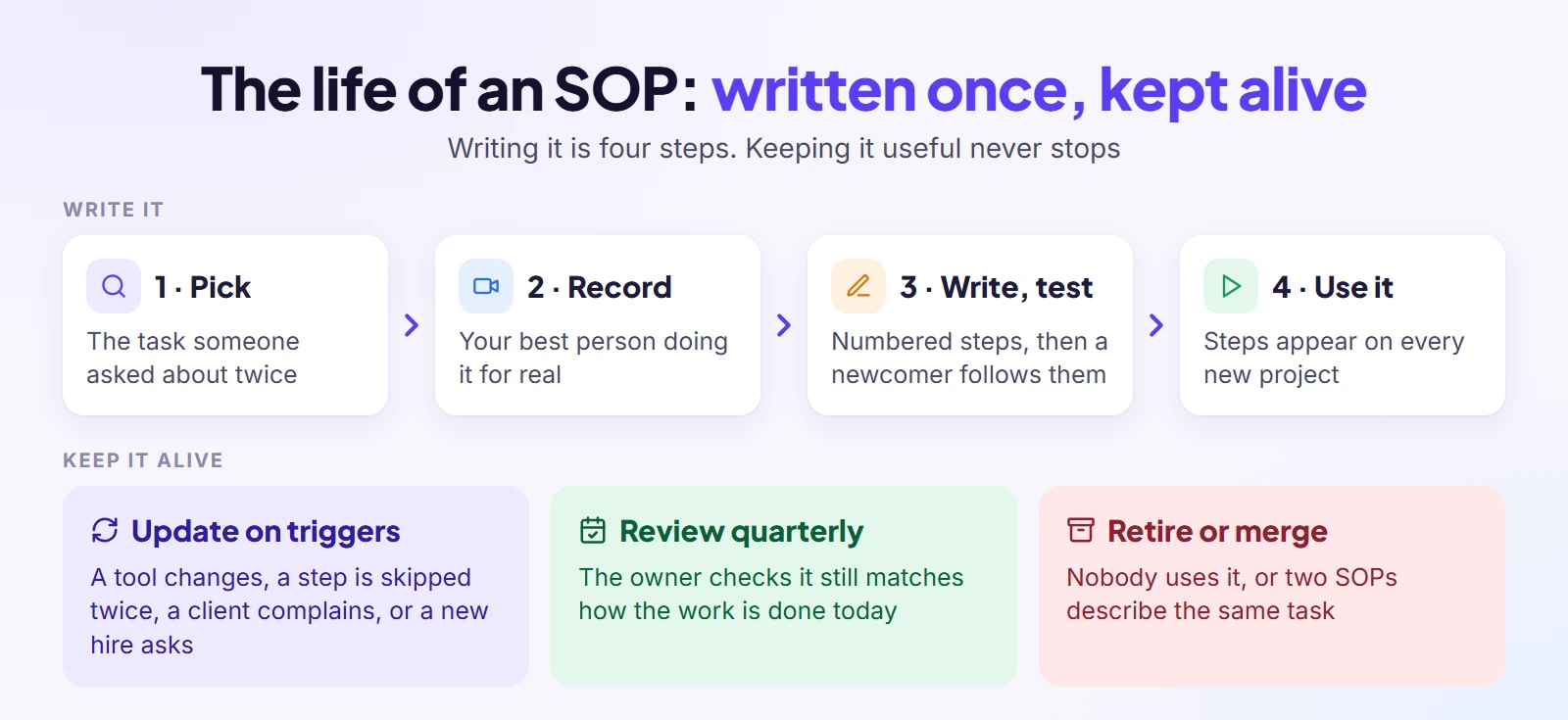
The blank page is the enemy here. Start from how the work is really done and an SOP takes an afternoon, not a week. These seven steps take you from “it’s in my head” to a tested SOP with an owner and a review date.
1. Pick one task you explain again and again
Look at the last two weeks of messages and find the question you answered more than once. “How do we set up a new client?” “Where do the report numbers come from?” “Who sends the invoice?” That repeat question is your first SOP. Choose one task with a clear start and end; “client onboarding” is fine, “running the agency” is not.
2. Record it once while your best person does it
Ask the person who does this task best to do it for real while recording their screen and talking through what they’re doing and why. One task per recording, ideally under ten minutes. You’re capturing how the work goes when it goes well, including the shortcuts and the small checks nobody ever wrote down. Don’t script it, and don’t describe the ideal version you wish happened; the SOP has to match reality or nobody will trust it.
3. Write numbered steps, one action each
Watch the recording and write one line per action, each starting with a verb: “Create,” “Send,” “Check,” “Move.” If a line contains “and,” it is usually two steps; split it. Bold the button or field names so people can find them on screen, and add a screenshot only where a step is easy to get wrong. A new hire should be able to follow it without the recording; the recording is there for the first time, the steps for every time after.
4. Add the client’s part and the “if this happens” lines
Now go back through the steps and mark every place where you wait on the client: a form to fill in, logins to share, a draft to approve, an invoice to pay. For each, write where the client does it and when you remind them. Then add the exceptions: what to do if the client goes quiet, if they reply with feedback from three different people, or if the request turns out to be bigger than the scope. Leave room for judgment, but say when to escalate and to whom.
5. Define done
Write two to five checks that must be true before the task counts as finished. “Kickoff summary sent and saved to the client record” is a done-check; “kickoff went well” is not. Many revision rounds start because the team and the client have different ideas of what finished means. A written done-check settles that inside the team first, so the client sees work that has already passed your own bar.
6. Test it on someone who has never done it
Give the SOP to someone who hasn’t done the task, a new hire or a colleague from another team, and watch them follow it without helping. Every time they pause, ask or guess, you’ve found a gap. Fix those lines and test again. This is the step people skip when they’re busy, and it’s the one that decides whether the SOP gets used or ignored.
7. Give it an owner, a version and a review date
Put one owner’s name or role at the top, a version number, the date of the last change and the date of the next review. The owner is the person who updates it when something changes, not the person who does the task every time. Keep a short change log at the bottom, one line per update with what changed and why, so nobody has to guess whether the version they’re reading is current.
Agency SOP Template (Copy and Use)
Copy this, don’t admire it. It follows the seven parts above, plus a short purpose line and a change log. Paste it into Google Docs, Word or Notion, keep the headings, and replace the bracketed guidance with your own. If your team prefers a PDF, fill it in first, then use File › Download › PDF in Google Docs or Save As › PDF in Word, so the printed copy matches the live one.
SOP title: [Verb + task, for example “Onboard a new client”]
Version: [1.0] · Last updated: [date] · Next review: [date]
Owner: [one role, for example Account Manager]
Purpose: [One sentence: why this task matters and what goes wrong without it.]
Trigger: [The event that starts this SOP.]
Applies to: [Which clients, services or projects. What it does not cover.]
Inputs: [Access, files, tools and templates needed before step 1, with links.]
Steps:
- [Verb + one action. Who does it if not the owner. Time limit if any.]
- [Verb + one action.]
- [Verb + one action.]
Client’s part: [What the client must send, answer or approve; where they do it; when we remind them; what happens if they don’t.]
If this happens: [Exception → what to do → who to escalate to.]
Done when:
- [Check 1]
- [Check 2]
Hand-off: [What moves on, to whom, and where it is recorded.]
Change log: [Date · what changed · why · who]
Starter outlines for four core SOPs
To save you the blank page, here are the steps for four SOPs almost every agency needs. Treat them as outlines: add your own tools, names and timings before you call them finished.
- Client onboarding: confirm the contract and first payment; create the client record; send the welcome email; send the intake form; collect access and brand files; book the kickoff; run the kickoff; send a written summary the same day. Our client onboarding checklist has the full list of items to collect.
- Revision request: log the request in the project the same day; check it against the agreed scope and the revisions left; agree a turnaround; assign it to the original owner; get one named person on the client side to sign off; quote anything outside scope before starting it.
- Monthly client report: pull the numbers on a fixed day; check them against the source; write three lines on what went up, what went down and what you’ll do next; send it; record that it was sent and any reply.
- Client offboarding: confirm the end date in writing; send the final invoice before removing anything; export and hand back everything the client owns; remove their access to your tools and yours to theirs; send a closing summary; ask for a testimonial if the work went well.
For scope changes, a simple change request form turns “can you just…” messages into something you can price and schedule.
A Filled-In Example: How Giant Marketers Onboards a Website Client
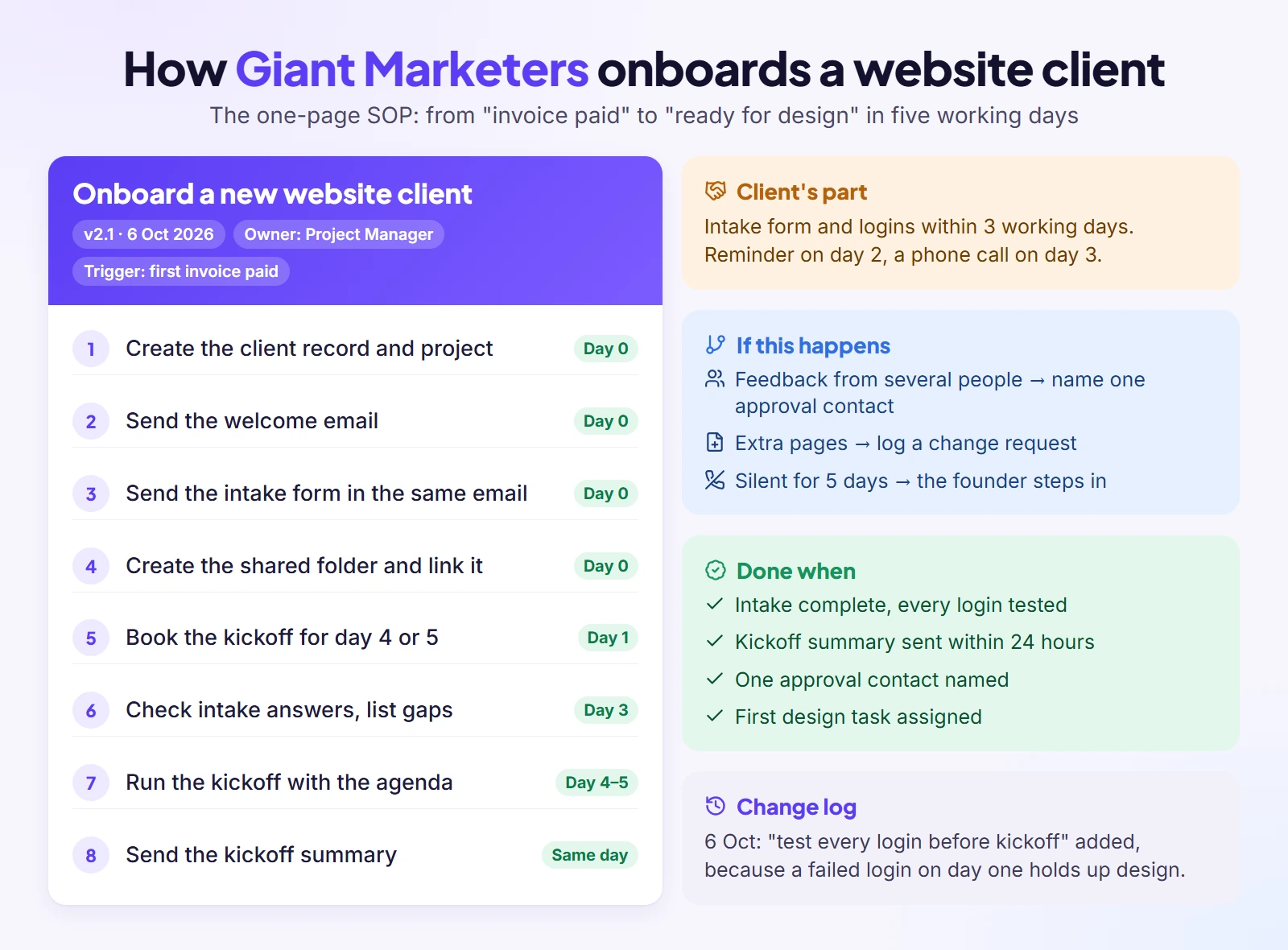
Templates are easy to nod along to and hard to fill in, so here is a complete one from my own agency. At Giant Marketers, website design and development is one of our core services, and this is the SOP we follow to take a new website client from “paid” to “ready for design”.
SOP title: Onboard a new website client
Version: 2.1 · Last updated: 6 October 2026 · Next review: January 2027
Owner: Project Manager
Purpose: Get every new client from “paid” to “kickoff done” within five working days, with all access and files collected, so design can start on day six.
Trigger: The client pays the first invoice for a website project.
Applies to: New website and redesign clients. Not care-plan renewals (separate SOP).
Inputs: Signed proposal, paid invoice, welcome email template, website intake form, kickoff agenda template, shared folder for the client.
Steps:
- Create the client record and project the same working day the payment lands.
- Send the welcome email template, personalised with the client’s name and project, from the project manager’s address.
- Send the website intake form (goals, pages, competitors, brand files, logins) in the same email.
- Create the client’s shared folder and add the link to the project.
- Book the kickoff call for day four or five, with the project lead and designer invited.
- Check the intake answers the day before kickoff and list anything missing.
- Run the kickoff using the agenda template: goals, pages, timeline, approval contact, communication rhythm.
- Send the kickoff summary the same day and save it to the project.
Client’s part: Fill in the intake form and share logins within three working days. If the form isn’t complete by day two, send the reminder template; if it’s still missing on day three, the project manager calls. Kickoff only moves if the client asks.
If this happens: Client sends feedback from several people → ask them to name one approval contact before kickoff. Client asks for extra pages not in the proposal → log a change request, don’t promise anything on the call. Client goes silent for five working days → escalate to the founder.
Done when:
- Intake complete and all logins tested.
- Kickoff held and summary sent within 24 hours.
- Approval contact named in the project.
- First design task assigned with a due date.
Hand-off: The design lead takes over delivery from day six; the project manager stays the client’s contact.
Change log: 6 Oct 2026 · added “test every login before kickoff” to the done-check, because a login that fails on day one holds up design · Project Manager.
Why each line is there
Every line in that example is there to prevent a specific, common problem. The trigger is “first invoice paid,” not “contract signed,” because work that starts before payment is work you may never be paid for. The client’s part has dates and a phone call because a late intake form is one of the usual reasons projects start late. The “one approval contact” rule is there because feedback from three people who disagree can add weeks. The change log shows how an SOP should grow: the moment a problem shows up, a check is added and the reason is written down next to it.
Can You Use AI to Write SOPs?
Yes, and it will save you a lot of typing. ChatGPT, Claude and Copilot can turn a recording’s transcript or rough notes into a clean SOP draft in minutes. What they cannot know is how your agency works day to day, so let AI handle the typing and structure and keep a person in charge of the content.
Record, transcribe, structure: the basic flow
The workflow that saves the most time is simple. Record the task being done (step 2 above), get a transcript from your recording tool, and paste the transcript into an AI tool with a clear instruction about the format you want. The AI removes the “um, so then I usually” and turns the talk into numbered steps. You then compare its draft with the recording, fix what it got wrong and run the test from step 6. It cuts most of the typing, but the testing stays the same.
Three prompts that work
Generic prompts give generic SOPs. These three get better results because they give the AI a job it can do well:
- Structure a transcript: “Turn this transcript into an SOP with these headings: trigger, owner, inputs, numbered steps (one action each, starting with a verb), client’s part, if-this-happens, done-check. Write for someone in their first week. Remove filler, keep every check the speaker mentions.”
- Interview me: “I want to write an SOP for [task]. Ask me questions one at a time until you know the trigger, every step, what the client has to do, what goes wrong and how I know it’s done. Then write the SOP.” This works well when there’s no recording and the knowledge is in your head.
- Find the gaps: “Here is an SOP. Read it as a new hire who has never done this task. List every step where you would get stuck, need access you weren’t given, or have to guess. Then list three things that could go wrong that the SOP doesn’t cover.”
Word, Google Docs and Copilot
You don’t need a special tool to write an SOP; the editor your team already uses is fine. In Word or Google Docs, use real headings for each part so the document gets a clickable outline, use numbered lists for steps, and keep one SOP per document so links stay simple. Google Docs keeps a version history on its own, which helps with the change log. If your company already pays for the AI built into Word or Google Workspace, you can run the prompts above inside the document instead of switching tools.
What AI gets wrong, and what never to paste
AI drafts look finished, which is their danger. They miss the unwritten rules your team follows without thinking (“we never send drafts on Friday afternoon”), they keep steps from an old version of a tool, and they sometimes invent a step that sounds right. That’s why the test with a real person can’t be skipped. And never paste client passwords, private contract terms or personal data into a chatbot to “make the SOP complete.” Write “see the client’s access record” instead, and keep the secret where it belongs.
Where Should Your SOPs Live?
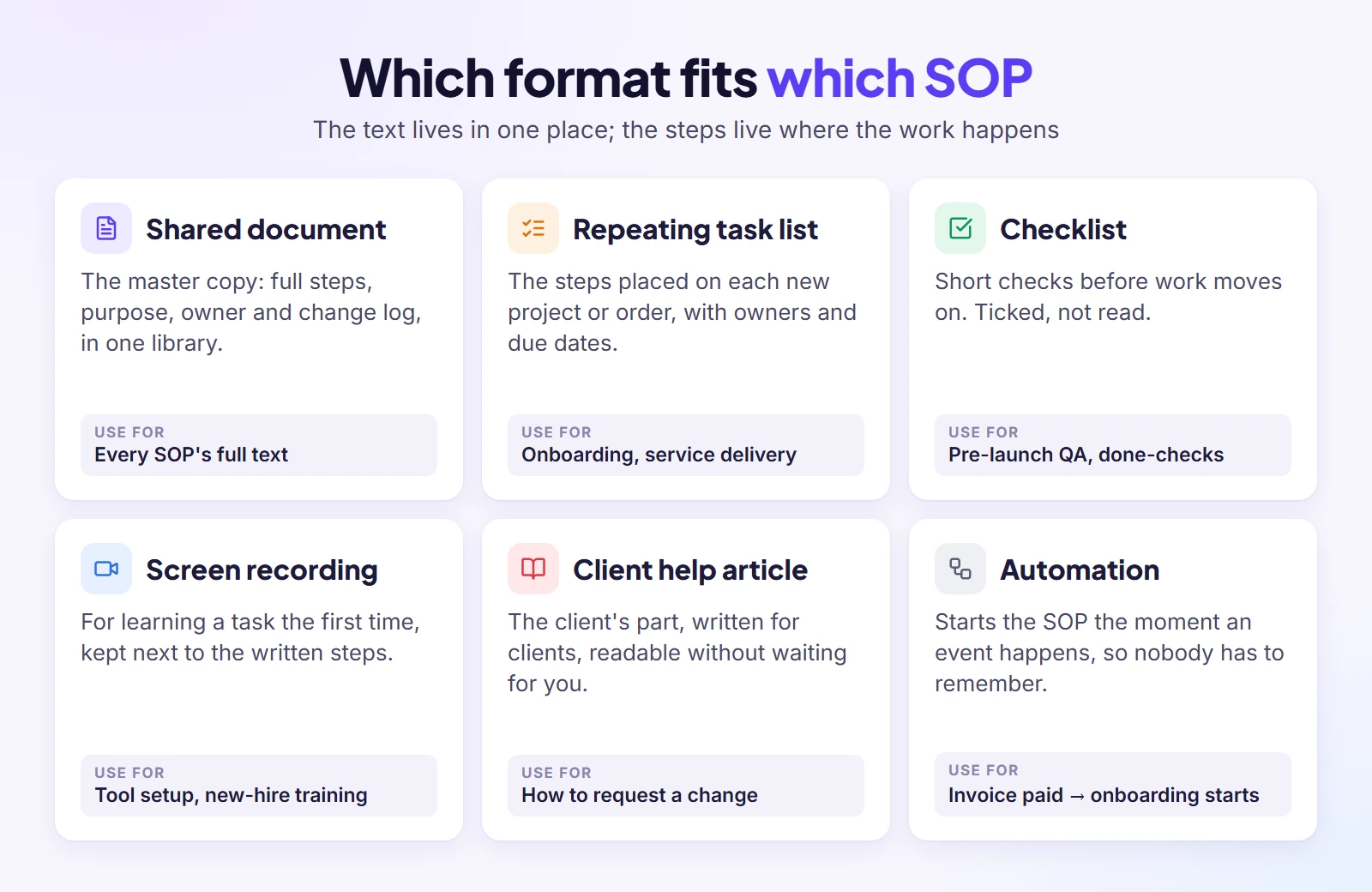
An SOP that lives only in a folder is easy to forget. SOPs need two homes: the full text in one shared library everyone can search, and the steps themselves wherever the work happens, so nobody has to go looking. Many SOP efforts get the first part right and forget the second.
The master copy: one shared library
Keep every SOP’s full text in one place your whole team can open: a shared drive folder, Google Docs, Notion or whatever you already use. Don’t buy a new tool just for SOPs; moving everyone to new software kills momentum before the first SOP is written. A simple index helps: one sheet with a tab per department, a row per SOP, and columns for the owner, the link, the recording and the last review date.
The steps: a repeating task list on each new project
The text of an SOP is for learning and checking. The steps are for doing, and they belong on the project itself. When a new client signs, the onboarding steps should appear as tasks on their project, with owners and due dates, instead of someone opening a document and copying lines by hand. Agency owners on Reddit describe something close to this: a new client comes in, they clone the workflow, and some link the SOP inside the tasks so the instructions are one click away.
The client’s part: help articles and intake forms
The steps a client has to do deserve the same care as your team’s. Put the questions you need answered into an intake form the client fills in once, instead of a long email thread. Turn the things clients ask again and again (“How do I request a change?” “Where do I find my invoices?”) into short help articles they can read without waiting for you. That’s an SOP too, written for the client.
The trigger: automations that start the SOP for you
The weakest point of any SOP is the moment someone has to remember to start it. If the trigger is an event your tools can see, such as a paid invoice, a new form entry or a finished order, let a workflow automation start the SOP: create the tasks, send the welcome email, set the reminder. A document can describe a process, but it can’t run one; the automation runs the first step so the SOP never waits on someone’s memory.
How Do You Keep SOPs Alive?
Writing an SOP is the easy part; keeping it true is the job. You keep SOPs alive by tying them to daily work, updating them the moment something changes, and checking they still do what they were written for. A shelf of documents nobody opens isn’t a process; it’s a record of what someone once intended.
Get the team to follow them
When a team ignores its SOPs, the problem is usually not discipline. “We documented every SOP for two years and the team doesn’t follow them,” one founder wrote on Reddit, and I hear versions of it from agency owners too. The cause is usually the same: the procedures were written for the team rather than with them, and they live somewhere nobody looks during the working day.
Fix both. Have the person who does the task draft or approve its SOP, because people follow what they helped build. Then make the SOP the only answer: when someone asks how to do a documented task, reply with the link, every time, until the asking stops. Finally, attach the steps to the work itself, so the documented path is the easiest one. Compliance follows convenience.
Update on triggers, not just on a calendar
A quarterly review is a good safety net, but SOPs often go out of date between reviews. Update an SOP the same week any of these happens: a tool changes its screens, a step gets skipped twice, a client complains about something the SOP should have caught, a new hire asks a question the SOP should have answered, or you change a service or price. An outdated SOP is worse than none, because people trust it.
How to tell an SOP is working
You don’t need a dashboard; a few plain checks tell you enough. Are people still asking how to do this task? Does the internal review still catch the same mistakes? Are revision rounds per project going down? How long does a new hire take before they can do the task alone? When was the SOP last reviewed? If the answers aren’t improving after a month, the SOP needs a rewrite, a test with a new person, or a better place in the workflow.
SOPs for remote and freelance team members
For people who don’t sit with you, SOPs carry more weight, so add a little more. Keep the recording next to the written steps, because a remote member can’t ask the person at the next desk. Write times in a way that works across time zones (“within one working day” rather than “by 5pm”). And give freelancers access only to the SOPs for the work they do, with the client’s part and hand-off spelled out, so they know exactly where their part ends.
Retire or merge SOPs nobody uses
Every library collects dead SOPs: the process you stopped selling, the tool you replaced, the two documents that describe the same task differently. At each quarterly review, delete what no longer matches reality and merge duplicates into one. A smaller library people trust beats a big one they have to second-guess.
Common Mistakes, and When an SOP Is Overkill
SOP projects tend to fail for a handful of predictable reasons, and some tasks never needed an SOP in the first place. Knowing both saves you from writing documents nobody will open.
Mistakes to avoid
- Writing too much. A twelve-page SOP for a ten-minute task won’t be read. If it takes more than a few minutes to scan, split it.
- Describing the ideal instead of the real. Steps nobody follows teach people to ignore the whole library.
- No owner. An SOP that belongs to “the team” belongs to nobody and quietly goes out of date.
- Documenting everything at once. Thirty drafts and no finished SOPs is a typical result of a big push.
- Burying them in a folder. If the steps aren’t linked where the work happens, people work from memory.
- Skipping the test. The author always understands their own SOP; only a newcomer shows you the gaps.
- No version or change log. People can’t tell whether what they’re reading is current.
- Forgetting the client’s part. The steps run fine inside the team and then stall for a week waiting on a login nobody chased.
Do SOPs kill creativity?
They don’t, when you write them for the right tasks. Nobody needs an SOP for how to come up with a campaign idea. You need one for the work around the idea: how the brief arrives, who reviews the concepts, how feedback is collected and counted. Taking that admin off people’s minds leaves more of the day for the creative work itself. If an SOP starts telling a designer how to design, it has gone too far; cut it back to the steps that protect quality and deadlines.
When not to write one
Skip the SOP when a task happens once a year, when it’s one-off creative work that will never repeat the same way, or when you do it alone, from memory, and won’t hand it over soon. Skip it too for tasks that don’t touch revenue, client experience or the team’s time. For these, a five-line checklist in a shared note is enough. The opposite problem exists as well: a team that won’t do anything without an SOP. Leave room for judgment and say so in the SOP itself.
SOPs for freelancers and two-person teams
If you work alone or with one partner, the same method works at a smaller size. Write SOPs for the three to five tasks you do every week, one page each, for “future you” and for the first person you’ll hire. Onboarding a client is still the best place to start. Writing it before you hire means your first hire works from day one instead of watching you for a month.
Where Clientish Fits
Everything above works with a shared drive and the tools you already have. Start there. The part that’s hard to keep up by hand is the second home for SOPs: getting the steps onto every new client’s work, at the right moment, without anyone copying them over.
That’s the part I built Clientish for. Clientish is an all-in-one client management portal for agencies, freelancers, consultants and service-based businesses: leads, proposals, a branded client portal, orders, invoices and subscriptions, support tickets and live chat in one place. Your SOP text stays in your docs; Clientish is where the steps run for each client:
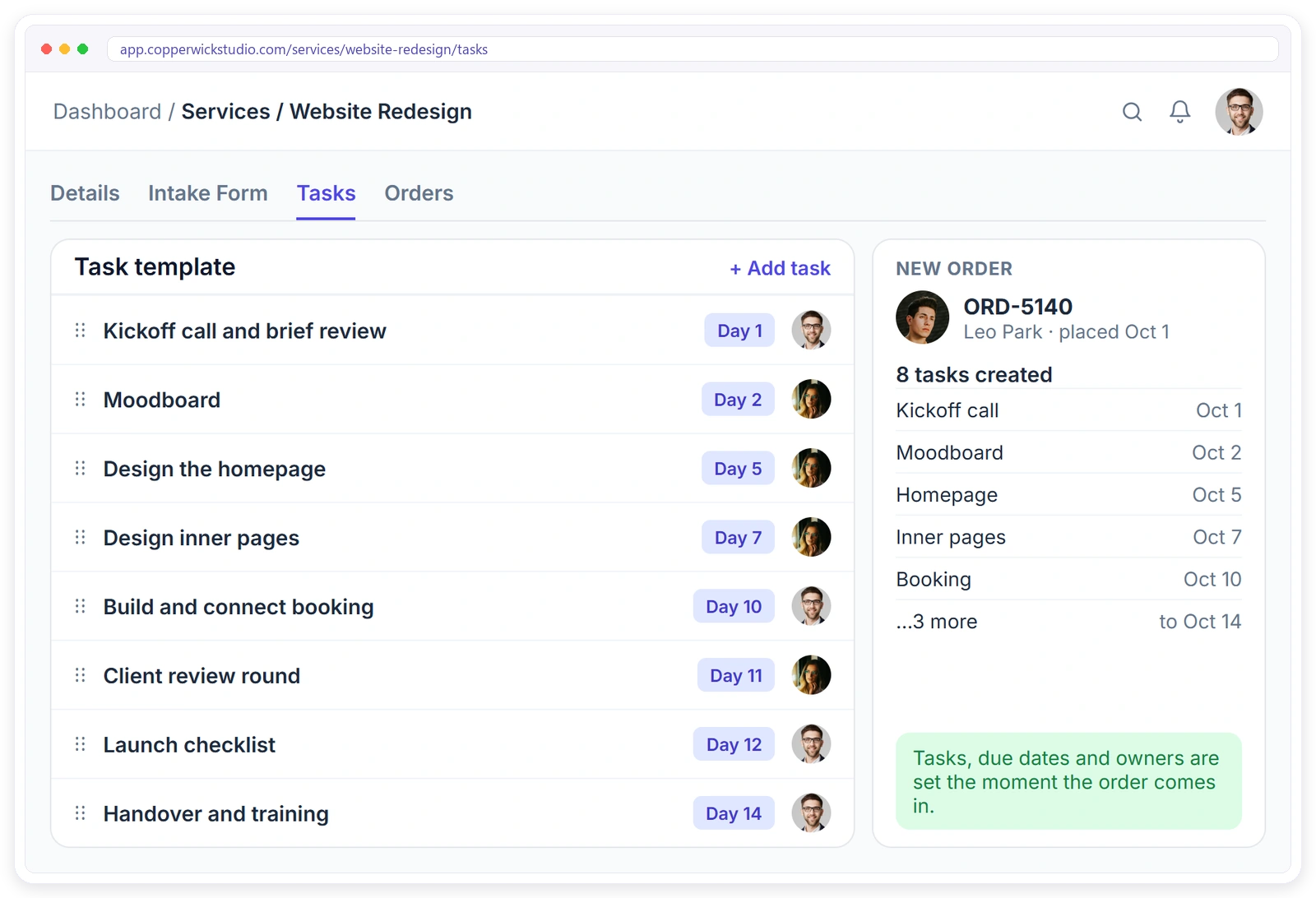
- Delivery steps on every order: each service can carry a task list of up to 30 tasks with descriptions, steps, a due day and who does it, added to every new order automatically, with checklists and comments on each task.
- The client’s part: when a client pays at checkout, the order is assigned to the service team and the client gets an intake form, with reminders sent on the days you choose.
- Triggers: automations with 39 triggers, conditions and up to 8 steps start follow-ups without someone remembering to.
- Repeat work: recurring orders and tasks repeat on a schedule, which suits monthly reports and maintenance SOPs.
- Client-facing SOPs: each agency gets its own help center for clients, starting with 25 ready articles.
- Revisions and support: you set the revision count per service, and support tickets have saved replies and a first-reply target per priority.
Clientish doesn’t replace your SOP library; it has no SOP wiki or version history of its own. What it does is make sure the steps you wrote show up on every order, for the right person, with the client’s part handled. You can start a 14-day free trial and set up one service’s task list from the onboarding SOP you write this week.
Frequently Asked Questions
Quick answers to what agency owners type into Google and ask AI assistants about SOPs. Jump straight to the one you need.
What is an SOP for an agency?
It’s a short written guide for one task your agency repeats, such as onboarding a client or sending a monthly report. It names the owner, what starts the task, the numbered steps, what the client must do and how you know it’s finished, so anyone on the team can do the task the same way.
Can ChatGPT create SOPs?
Yes. Give ChatGPT, Copilot or Claude a transcript of someone doing the task, or let it interview you, and it will produce a clean draft with headings and numbered steps. It can’t know your unwritten rules or which step is out of date, so a person must check it and test it on a newcomer before the team uses it.
How do I create a simple SOP?
Pick one repeat task and write four things on one page: what starts it, the steps in order (one action per line), what the result looks like when it’s done, and who owns it. Add the client’s part if the client is involved. If someone new can follow it without asking you, it’s simple enough.
What is the best program to create SOPs?
The one your team already opens every day. Google Docs, Word or Notion all work for the written SOP, and a shared index sheet keeps them findable. What matters more than the editor is that the steps also appear where the work runs, on each project or order, with the SOP linked from the task.
What SOPs does a digital marketing agency need?
Start with client onboarding, ad account and asset access, campaign setup with a pre-launch check, content approval before anything goes live, the monthly performance report and invoicing. Then add one delivery SOP per service you sell, such as social media management, paid ads or email campaigns, naming the real platforms your team uses.
What should a creative agency SOP cover?
Cover the work around the creative part: how a brief is received and checked, who handles copy and who handles design, the internal critique before the client sees anything, how feedback is collected from one approval contact, how revision rounds are counted, and how final files are delivered and stored. Leave the creative thinking itself free.
How long should an SOP be?
Usually one or two pages, short enough to scan in a few minutes. If it runs longer, it’s probably two tasks pretending to be one, so split it. Put background and reasoning in a short purpose line or a linked document, and keep the steps themselves tight.
How often should agency SOPs be updated?
Check every SOP at least once a quarter, and update it the same week anything changes: a tool’s screens, a price, a service, or a step people keep skipping. Record each change with the date and the reason so the team knows the version in front of them is current.
Can I write an SOP in Word or Google Docs?
Yes, and for most agencies that’s the right choice. Give each of the seven parts its own heading, number the steps, and save every SOP as its own file so links never break. Google Docs keeps version history automatically, and both editors include AI writing help if your plan has it.
Do freelancers need SOPs?
Freelancers benefit from a few, not many. Cover the handful of jobs that come round weekly, starting with client onboarding and invoicing. They keep your service consistent when you’re busy, and they make your first hire or subcontractor useful from day one instead of after weeks of shadowing.
Final Thoughts
You don’t need an SOP library this month. You need one SOP that works. Pick the task you explained most often in the last two weeks, record it tomorrow, write the steps with an owner and a client’s part, and hand it to someone new on Friday. By the end of the week you’ll know more about what makes your SOPs work than any template can tell you.
Then put those steps where the work starts, so they run on every new client instead of waiting in a folder. If you’d like to see how that looks with your own services, Signup & Try Demo and set up your first service with its task list. If you’re juggling several clients while you do this, my guide on how to manage multiple clients in one place covers the weekly routine around it.
Sources
Clientish publishes this guide. It reflects the author’s 15 years of client work at Giant Marketers and experience building client management software for agencies, plus common practice described in agency SOP guides, forum discussions and AI assistant answers reviewed as of October 2026. The onboarding example is how Giant Marketers, the author’s agency, onboards website clients. Copperwick Studio in the product screenshot is a fictional demo agency. The Clientish section describes the product as documented on clientish.co in October 2026. Clientish is not affiliated with any company mentioned.

