

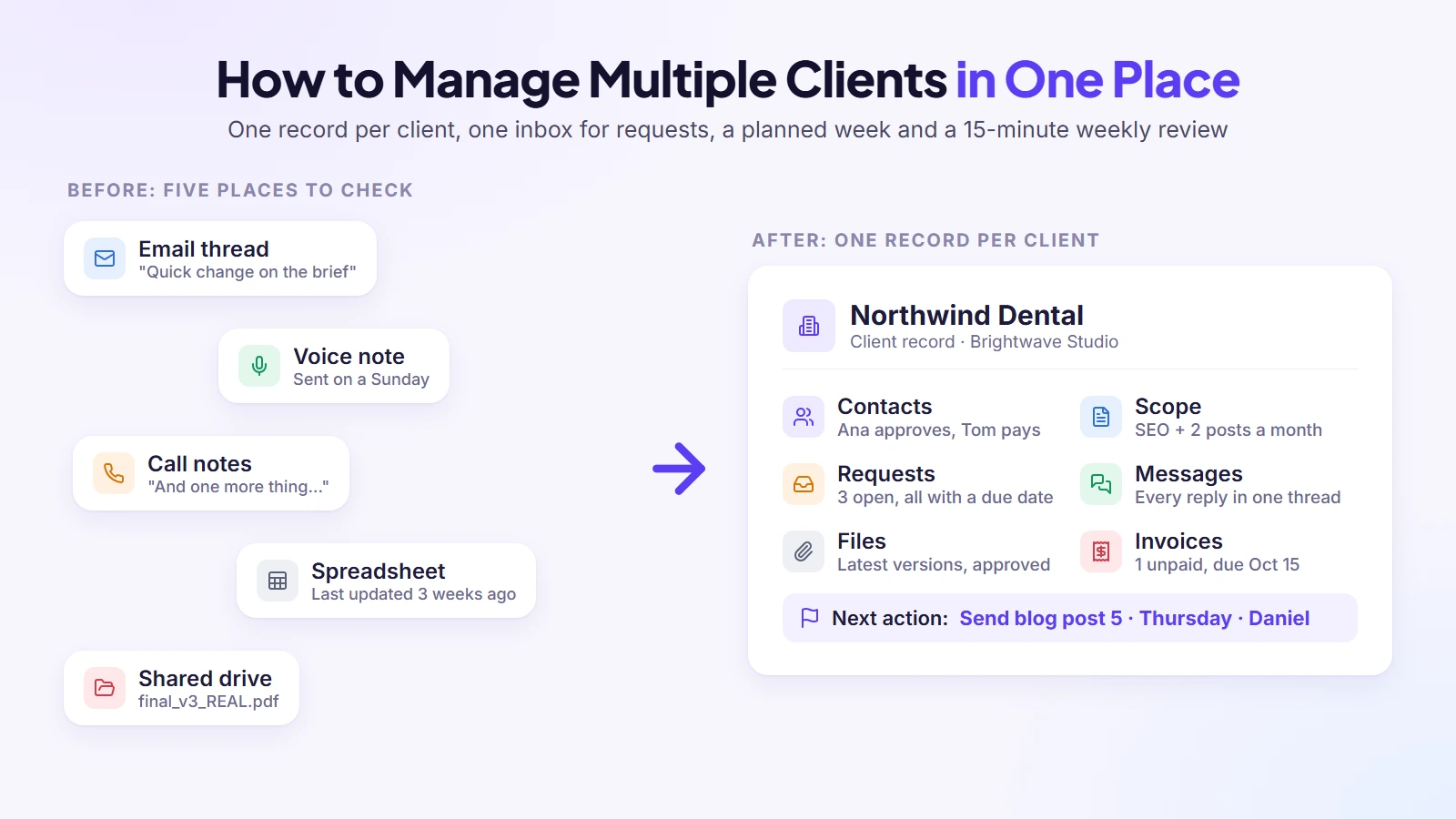
Managing multiple clients in one place is a simple system: give every client a single record that holds their requests, scope, files, messages, tasks and invoices, capture every new request there the moment it arrives, and run a short weekly review per client. One place to look, one rhythm to follow, and nothing lives only in your head.
Most people who search this phrase aren’t short of tools. They’re short of one place to look. I’ve spent years watching freelancers and agency owners juggle five or six clients across email, chat apps, a spreadsheet and a project board, and the work itself was rarely the problem. What broke was the glue: the request mentioned on a call and never written down, the invoice that went out late, the deadline that only one person remembered. This guide is the system I’d set up for anyone in that position, whatever tools they end up using.
Key takeaways
- Decide what “one place” must hold for each client before choosing any tool: contacts, scope, requests, files, messages, tasks and money.
- Send every request, from any channel, into that one place the same day it arrives.
- Agree scope and communication rules in writing at the start; most overload comes from blurry edges.
- Plan the week in client blocks with a buffer, and review each client for fifteen minutes every week.
- Capacity depends on the kind of work, not a magic number; watch the warning signs before quality slips.
Why Juggling Several Clients Goes Wrong
Managing three clients feels easy. Managing six feels like keeping plates spinning, and the difference isn’t effort. When I compared the guides that rank for this question with what freelancers and agency owners say on forums, the same causes came up again and again. Most of them have nothing to do with how good the work is.
| Cause | What it looks like | Fixed later in this guide by |
| Information scattered across tools | Checking four apps before every call | One record per client |
| Requests arriving everywhere | A change from a call that never got written down | One inbox for requests |
| Unclear scope | The job quietly doubles, unpaid | Written scope at the start |
| Prioritising by who shouts loudest | Quiet clients’ work keeps slipping | A fixed priority order |
| Overlapping deadlines nobody can see | Two big deliveries land on the same Friday | The weekly review |
| Constant context switching | A full day of work with nothing finished | Client blocks and batching |
| No boundaries on availability | Answering messages at 11pm | Communication rules |
| Clients left guessing about progress | “Any update?” emails every few days | A fixed update day |
| Saying yes to everything | A week that was full before it started | A buffer and a capacity check |
| Admin and invoicing pushed aside | Invoices going out weeks late | A fixed admin slot |
| Handovers without context | A teammate redoing work already agreed | One owner per client |
Information scattered across too many tools
Most of the guides that rank for this question raise this cause. A task board holds the work, an invoicing app holds the money, a drive holds the files and chat holds the quick questions. Each tool holds a slice of the client and none holds the whole, so you check four places before every call and the client’s history only exists when you stitch it together in your head.
Requests arrive everywhere
One client emails, another sends a voice note on WhatsApp, a third mentions a “small change” at the end of a call. Each request is reasonable on its own. Together they create a mental load that grows with every client, because you’re the only system that knows all of them exist. On forums people describe it as work “overlapping in your head”, and one reply lists what they need to keep track of: deadlines, the last conversation with each client, and what’s waiting on someone else.
Scope that was never written down
When the original agreement lives in an old email and the new requests live in chat, nobody can see that the job has quietly doubled. You end up doing extra work for free, not because the client is unfair, but because nobody had both versions in front of them at the same time. Several ranking guides name unclear scope as a cause of unpaid extra work.
Prioritising by whoever shouts loudest
With several clients, the most demanding one tends to get the most attention, whatever the deadlines say. The quiet client with a bigger deadline waits, and then suddenly becomes urgent too. Without a fixed way of ranking work, every morning starts with a new negotiation in your own head, and the order depends on your inbox instead of on what matters.
Overlapping deadlines nobody can see
Each client’s deadlines make sense on their own. The problem appears when two large deliveries land in the same week and you only notice on the Wednesday. As one reply in a web professionals’ forum put it, a master timeline across all clients “makes overlaps obvious”. Separate lists per client hide that until it’s too late to move anything.
Constant context switching
Jumping from one client’s brief to another’s invoice to a third client’s feedback costs more than the minutes it takes. Each switch means reloading who they are, what they asked for and where things stand. Spread that across a day and the actual work gets squeezed into the gaps between remembering, which is why so many guides recommend working on one client per block of time.
No boundaries on availability
When every client can reach you on every channel at any hour, the day never really ends. You reply to a message at 11pm because it’s quick, the client learns that 11pm works, and the expectation spreads to the next client. Most guides on this question recommend setting working hours and response times, partly to avoid burnout.
Clients left guessing about progress
Clients who don’t know where their work stands start asking, and every “any update?” email interrupts something else. The cause is rarely the client; it’s that updates only happen when there’s news. Communication comes up in almost every answer to this question, and the fix is usually a predictable rhythm rather than more messages.
Saying yes to everything
Most overload is booked in advance. A new client, an extra deliverable, a quick favour: each yes feels small when you say it, and together they fill a week before it begins. With no buffer left, the first late piece of feedback knocks every other client’s work back. Knowing your capacity, and saying “yes, next week” instead of “yes, today”, is one of the habits the better guides keep returning to.
Admin and invoicing pushed aside
Invoices are usually the first thing to slide when you’re busy, because the work feels more urgent. A late invoice turns into a late payment, and a late payment turns into an awkward conversation two months later. Of all the things that go wrong with several clients, this is the one that costs you directly, and several guides suggest templates and reminders to stop it.
Handovers without context
Once there’s a team, clients pass between people: a designer hands to a developer, an account manager goes on holiday. Each handover is a chance to lose what was agreed on a call last week. Without one owner per client and one place where the history lives, the new person asks the client to repeat themselves, and the client starts to wonder whether anyone is keeping track.
Clients’ delays collide with your deadlines
Your schedule depends on clients sending feedback, approvals and files on time, and with several clients someone is always late. One freelancer put it bluntly on a forum: clients “miss their own delivery points” while still holding you to yours, “a recipe for disaster”. A week of waiting on one client’s approval pushes the next client’s work back, and nobody but you sees the chain reaction.
Not knowing what each client really costs in time
Without tracking, every client feels about the same size. In practice the “easy” client who sends a dozen small requests a week can take more hours than the big project, and you only find out when the month is over and the numbers don’t add up. Guides that cover this topic return to time tracking more often than almost anything else.
Clients can’t find what you sent them
Scattered information hurts the client side too. Files go out by email, feedback comes back in chat, and three weeks later the client asks you to resend the final version. Every one of those requests is a small interruption, and they come from the same root as your own chaos: nothing lives in one place both sides can see.
One person spread across too many plans
In a team, the same designer or account manager often sits in five clients’ plans at once, with no backup. Everything works until that person is ill or on holiday, and then several clients stall at the same time. The risk is invisible on any single client’s plan; it only shows when you look across all of them.
The cost you don’t see
The visible cost of all this is the occasional missed deadline. The hidden cost is bigger: the evening spent catching up on messages, the work you never invoiced because it was “only a small change”, the client who quietly leaves because updates felt patchy. None of these show up as a single failure, which is why they’re easy to ignore until the client count goes up by one more.
Decide What “One Place” Must Hold
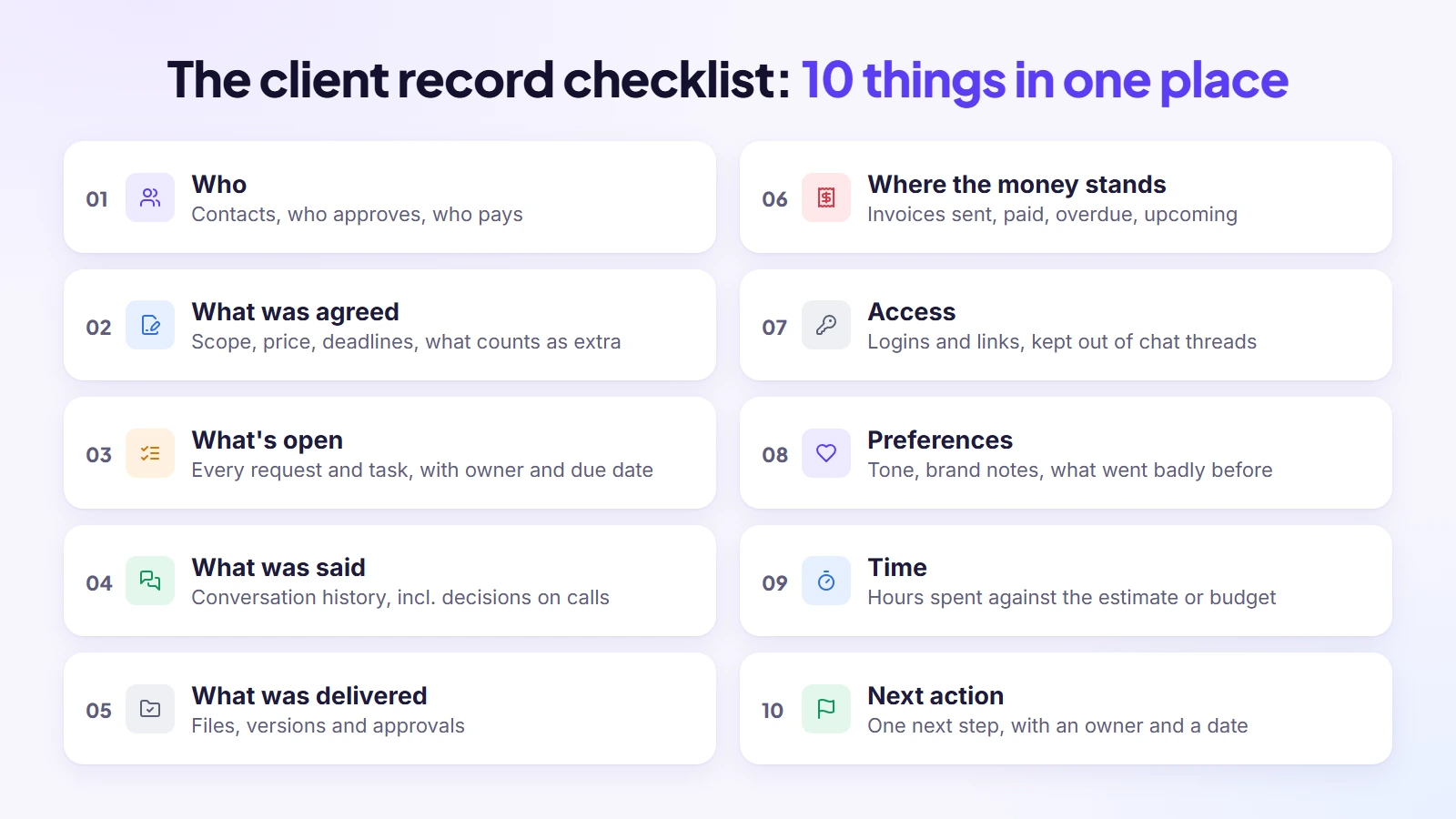
“Keep everything in one place” is advice most guides give, and almost none of them say what everything means. Before you pick a tool, write down what each client’s record has to contain. If a piece of information doesn’t fit in it, that’s where things will get lost.
The client record checklist
For every client, one record should answer these questions without opening anything else:
- Who: the contacts, who approves work, who pays, and how they prefer to be reached.
- What was agreed: the scope, the price, the deadlines and what counts as extra.
- What’s open: every request and task, each with an owner and a due date.
- What was said: the conversation history, including decisions made on calls.
- What was delivered: files, versions and approvals.
- Where the money stands: invoices sent, paid, overdue and coming up.
- Access: logins and links the team needs, kept somewhere safer than a chat thread.
- Preferences: tone, likes and dislikes, brand notes and anything that went badly before.
- Time: hours spent so far against the estimate or monthly budget.
- Next action: the one next step for this client, with an owner and a date.
Why one record per client beats one board for everything
A single task board for all clients shows you the work but hides the relationship. You can see that “homepage copy” is overdue, but not that the same client also has an unpaid invoice and an unanswered question from last week. A record per client puts those three facts side by side, which is usually what you need before you pick up the phone.
Every client always has a next action
One rule from the research is worth adopting on its own: every active client should always have a next action, an owner and a date. Not every task, just the single next thing that moves the relationship forward. A client with no next action is a client nobody is looking after, and that’s usually the one who quietly leaves.
Keep internal notes apart from what the client sees
Some of what you record is for your team only: margins, a difficult stakeholder, a note to be careful with the next revision. Keep that in an internal section, separate from anything the client can see, so you can be candid in your notes without worrying about what gets shared. A record with a private part and a shared part is far safer than one big document.
When a spreadsheet stops being enough
A spreadsheet is a fine starting point for two or three clients. It starts breaking when more than one person needs to update it, when you need reminders rather than columns, and when clients need to see their own part. One guide puts the tipping point at around ten clients; in my experience it comes sooner if you have a team.
Where each piece usually lives today
Before you change anything, it helps to see where the pieces of a client sit right now. For most people with several clients, the picture looks something like this:
| Piece of the client | Where it usually lives | What goes wrong |
| Contacts and who approves | Email signatures, your phone | The new marketing manager never gets the update |
| What was agreed | An old email or a PDF | Nobody checks it when a new request arrives |
| Open requests | Chat apps, call notes, memory | Small requests vanish until the client chases |
| Files and versions | Drive folders, attachments | Someone works on the wrong version |
| Invoices and payments | A separate billing app | You don’t see unpaid invoices while planning work |
Every row where the second column names more than one place is a row where something will eventually slip.
Setting up a client record in twenty minutes
You don’t need a perfect system to start. For each active client, spend twenty minutes creating one record and filling it in this order:
- Contacts, with who approves work and who pays.
- The current scope and price, copied from the proposal or the last agreement.
- Every open request you can find in email, chat and your notes, each with a due date.
- Links to the files and folders the work lives in.
- Every invoice that’s unpaid or due in the next month.
Doing this for five clients takes one afternoon, and it’s usually the first time you see everything you owe everyone in one view. Expect a few surprises.
Capture Every Request in One Inbox
The record only works if requests reach it. The habit that changes most for people with many clients is simple: nothing stays in the channel it arrived in. Whether it came by email, chat or a call, it gets moved into the client’s record the same day.
The intake rule
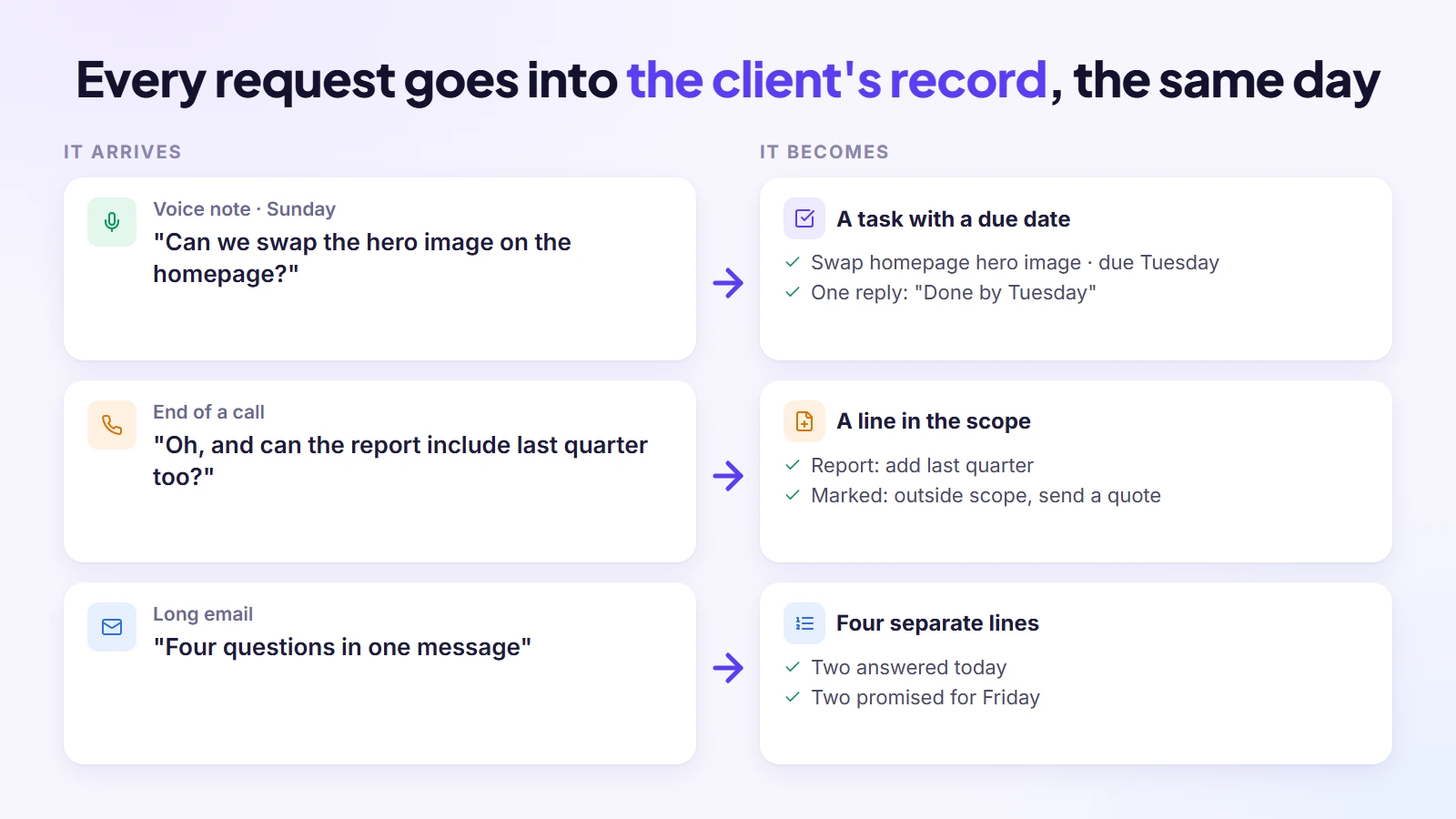
My rule is that a request doesn’t exist until it’s written down in the client’s record with a due date. A voice note becomes a task, a “quick question” in chat becomes a ticket or a note, a change mentioned on a call becomes a line in the scope. It takes thirty seconds each time, and it’s the difference between remembering and knowing.
Give clients one front door
The easiest way to keep requests in one place is to ask clients to send them to one place. That might be a shared request form, a client portal or a single email address. You’ll never get everyone to use it every time, but if the default is clear, most requests arrive where you’ll see them, and the rest you move there yourself.
Turning messages into tasks: three examples
The intake rule sounds abstract until you see it applied. Three situations that come up every week:
- A voice note on a Sunday: “Can we swap the hero image on the homepage?” On Monday it becomes a task in that client’s record, with a due date and a note of which image they meant. You reply once, saying when it’ll be done.
- A change mentioned at the end of a call: “Oh, and can the report include last quarter too?” You add it to the record before you close the call notes, and mark whether it’s inside the agreed scope or needs a quote.
- A long email with four questions: each question becomes its own line, so you can answer two today and say when the other two will follow, instead of the whole email sitting unanswered.
Requests you can’t do yet
Not every request should become work this week. Some need a quote, some depend on the client sending something, and some are good ideas for later. Keep them in the client’s record anyway, marked as waiting or parked, so the client hears “noted, here’s when” instead of silence. A parked list is also where your next proposal for that client comes from.
One official channel per client
Pick one channel where requests count, per client: email, a request form or a portal. Other channels still happen, but anything that arrives elsewhere gets moved into the official one with a short “logged it, here’s when”. One freelancer on a forum keeps it “100% email so I can have all my clients’ communication in one place”. Whatever you choose, the point is that there’s exactly one place to look.
Short request forms by type
If clients send requests through a form, keep separate short forms for the common types: a new brief, a change to existing work, and urgent support. Ask only what affects priority or scope, such as the deadline, what it relates to and whether it’s blocking something. Long forms get skipped; short ones get used.
Send a call summary back
Decisions made on calls are the ones most likely to be remembered differently. After every call, send the client a few lines: what was agreed, who does what, and by when. It takes three minutes, it goes into the client’s record, and it settles any “I thought we said…” before it starts.
Give every request a status
A request is never just “open”. Label each one as committed, proposed, waiting for the client, blocked or out of scope. The labels turn a long list into answers: what you’ve promised, what you’re waiting on, and what needs a quote. The “waiting for the client” label alone saves many awkward conversations about delays.
Define what “urgent” means
Agree response targets by urgency, so a genuine emergency gets through without every message becoming one. A simple version: urgent issues within a few hours, normal requests the same or next working day, ideas and nice-to-haves within a few days. Tell clients how to flag something urgent, and keep that route for real problems.
Reply templates for the questions you answer every week
A large share of client messages are the same few questions: where things stand, whether something is in scope, when the next delivery is. Write short reply templates for these and adjust them each time. They save minutes per message and keep your answers consistent across clients.
Set Scope and Communication Rules at the Start
Most overload with several clients comes from blurry edges: work that was never quite agreed, and messages that expect an instant reply. Both are easiest to fix before the first piece of work starts, when nobody feels criticised by a rule.
New client scope checklist
Before work starts, get these in writing, ideally in a proposal the client signs:
- What’s included, in plain words, and what isn’t.
- How many rounds of revisions come with each deliverable.
- Deadlines, and what happens if the client’s input arrives late.
- How extra work is quoted and approved before you start it.
- Payment terms: deposit, due dates, accepted payment methods and any late-payment fee.
- Who approves work on the client side, by name, and how quickly they’ll give feedback, for example within three working days.
Communication rules template
A short note you send to every new client saves dozens of interruptions later. Mine covers four things:
- Channel: where requests go, and where quick questions go.
- Response time: for example, replies within one working day, and what counts as urgent.
- Update rhythm: the day each week the client hears where things stand, even if nothing changed.
- Working hours: when you’re reachable, so messages at 11pm don’t feel like they need an 11pm answer.
A short scope-change message you can reuse
When a request falls outside the agreement, the hardest part is wording it without sounding difficult. A message like this keeps it friendly and clear:
“Happy to do this. It’s outside what we agreed for this month, so here’s what it would take: about three hours, which would be [price], and I can have it ready by Thursday. Shall I go ahead?”
Sent the same day the request arrives, it rarely causes friction. Sent after the work is done, it almost always does.
Charging isn’t the only answer, either. An out-of-scope request can be swapped for something already planned, moved to a later phase, or politely dropped. Offering those options shows you’re protecting the project, not just billing more.
A weekly update template
The update on your agreed day doesn’t need to be long. Three short headings cover almost everything a client wants to know:
- Done this week: what moved forward, with links.
- Next week: what you’ll work on and anything due.
- Waiting on you: approvals, files or answers you need from the client, with a date.
The third heading does the most work. It turns “why is this late?” into a conversation the client can see coming.
Introducing rules to clients you already have
Rules are easiest with new clients, but existing ones accept them too if you frame them as a service improvement rather than a complaint. Tell them that from next month they’ll get a fixed weekly update and a single place to send requests, so nothing gets lost. Most clients like knowing exactly where to go and when to expect news.
Feedback turnaround and one named approver
Many delays come from the client side: feedback that takes two weeks, or three people giving conflicting comments. Agree two things at the start: one named person who approves work, and a feedback window, such as three working days. Write down what happens if feedback is late, usually that the timeline moves by the same amount. It protects your other clients’ schedules.
Make your hours visible
Working hours only help if clients can see them. Put them in your email signature and your chat status, and use an out-of-hours reply. Some freelancers keep a separate business number they switch off in the evening. The point isn’t to be unavailable, it’s to make availability predictable.
Match the update to the level
Not every update needs to be the same. A short weekly status covers the work, a monthly note covers results and what’s next, and a quarterly conversation covers whether the relationship is still heading where the client wants. Planning these in advance keeps you from improvising a review whenever a client gets anxious.
Prioritise Across Clients
With several clients, everything feels urgent because someone is always waiting. Prioritising means deciding in advance how you rank competing work, so the decision isn’t made by whoever messaged last.
| Situation | Do it | Why |
| Deadline this week and the client is waiting on it | First | A missed deadline costs trust you can’t buy back |
| Something blocking a client or a teammate | Next | One small answer unblocks a lot of other work |
| Retainer work due this month | Scheduled in a client block | Steady, predictable, and easy to let slide if not booked |
| New “small” request outside scope | Quote first, then schedule | Keeps scope creep visible |
| Invoices and admin | One fixed slot each week | Money slips when it only happens “when there’s time” |
When two deadlines genuinely clash, tell both clients early with a new date you can keep. Clients forgive a moved date far more easily than a missed one.
Use the urgent and important matrix, including “delegate” and “drop”
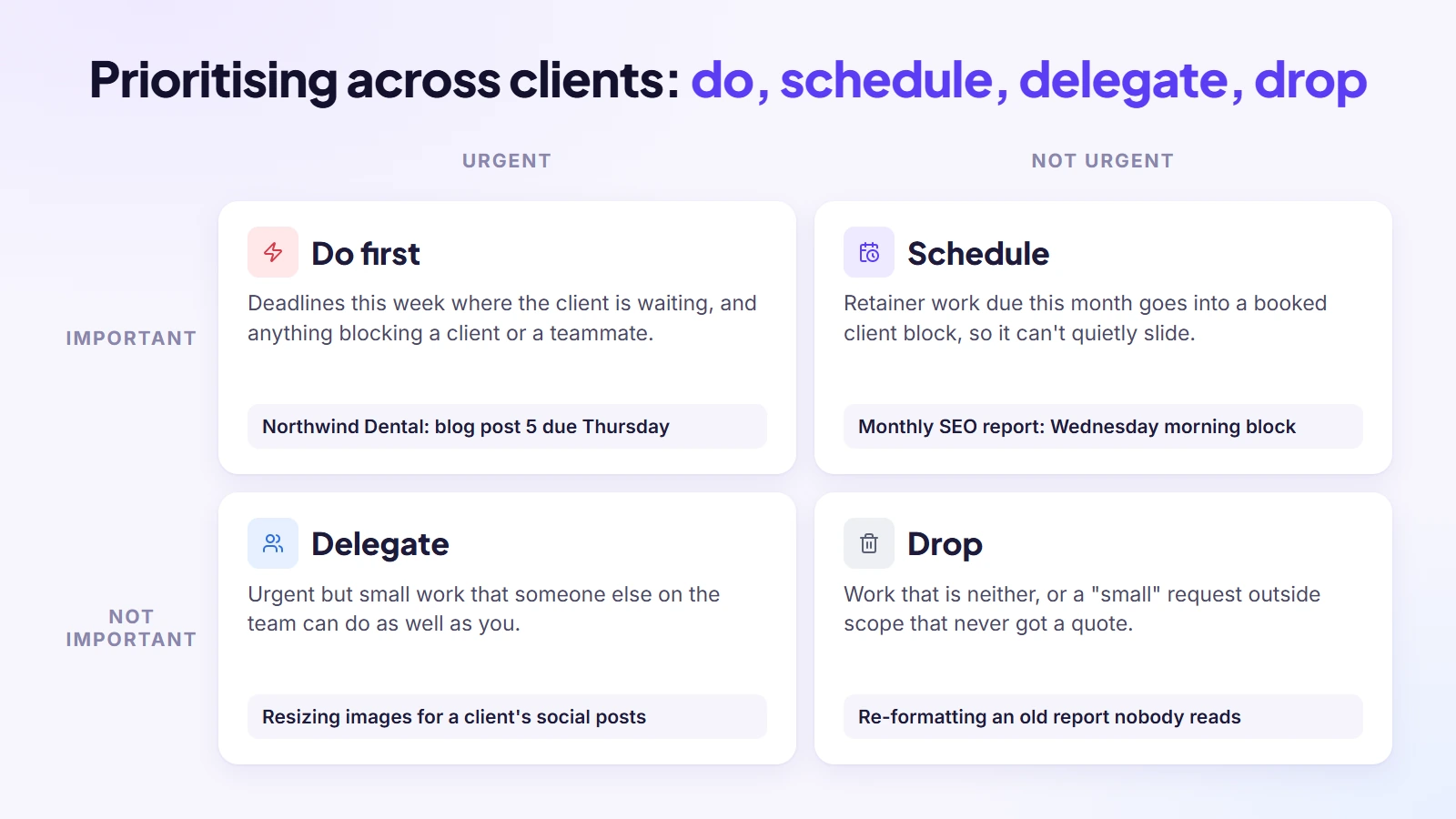
The most common prioritising tool in the guides is the urgent and important matrix: do what’s both, schedule what’s important but not urgent, delegate what’s urgent but not important, and drop what’s neither. The last two boxes matter most with several clients, because they’re the ones people skip. Some work shouldn’t be done by you at all, and some shouldn’t be done.
Weigh value and risk, not only dates
Two tasks due the same day aren’t always equal. Ask which delay would cost more: in revenue, in the relationship, or under the contract. A retainer client with a strict agreement and a small one-off job may share a deadline, but missing one of them hurts far more.
Pick three to five priorities for the week
At the start of each week, choose three to five priorities across all clients, not per client. Everything else fits around them, and when a new request arrives mid-week you can see straight away what it would push out. It forces the real trade-offs into the open on Monday instead of on Thursday afternoon.
Stagger clients so they’re not all in the busy phase
Projects have intense phases, such as launch week or the final round of revisions. If you can, start new clients so that no more than two are in an intense phase at the same time. Splitting big deliverables into phases with their own dates helps too, because a clash on one phase is easier to move than a clash on a whole project.
When two deadlines clash
Sooner or later two clients need something on the same day and you can’t do both well. Ask first for more time from the client whose date is most flexible. Decide quickly, using the table above, then tell the client whose work moves before they notice. Something like “I want to get this right rather than rush it, so I’ll have it to you on Wednesday instead of Monday” lands far better than a late delivery. Offer a smaller piece on the original date if you can.
Saying “not yet” instead of “yes”
Much of the overload with several clients comes from saying yes to everything immediately. “Yes, I can do that next Tuesday” is still a yes, and it protects the work you’ve already promised. Clients rarely mind a clear date; what they mind is a fast yes followed by a slow delivery.
Plan Your Week: Time Blocking, Batching and a Buffer
Once requests are in one place and priorities are clear, the calendar is where it all becomes real. The aim is to work on one client at a time for long enough to get something done, and to keep room for the surprises that always come.
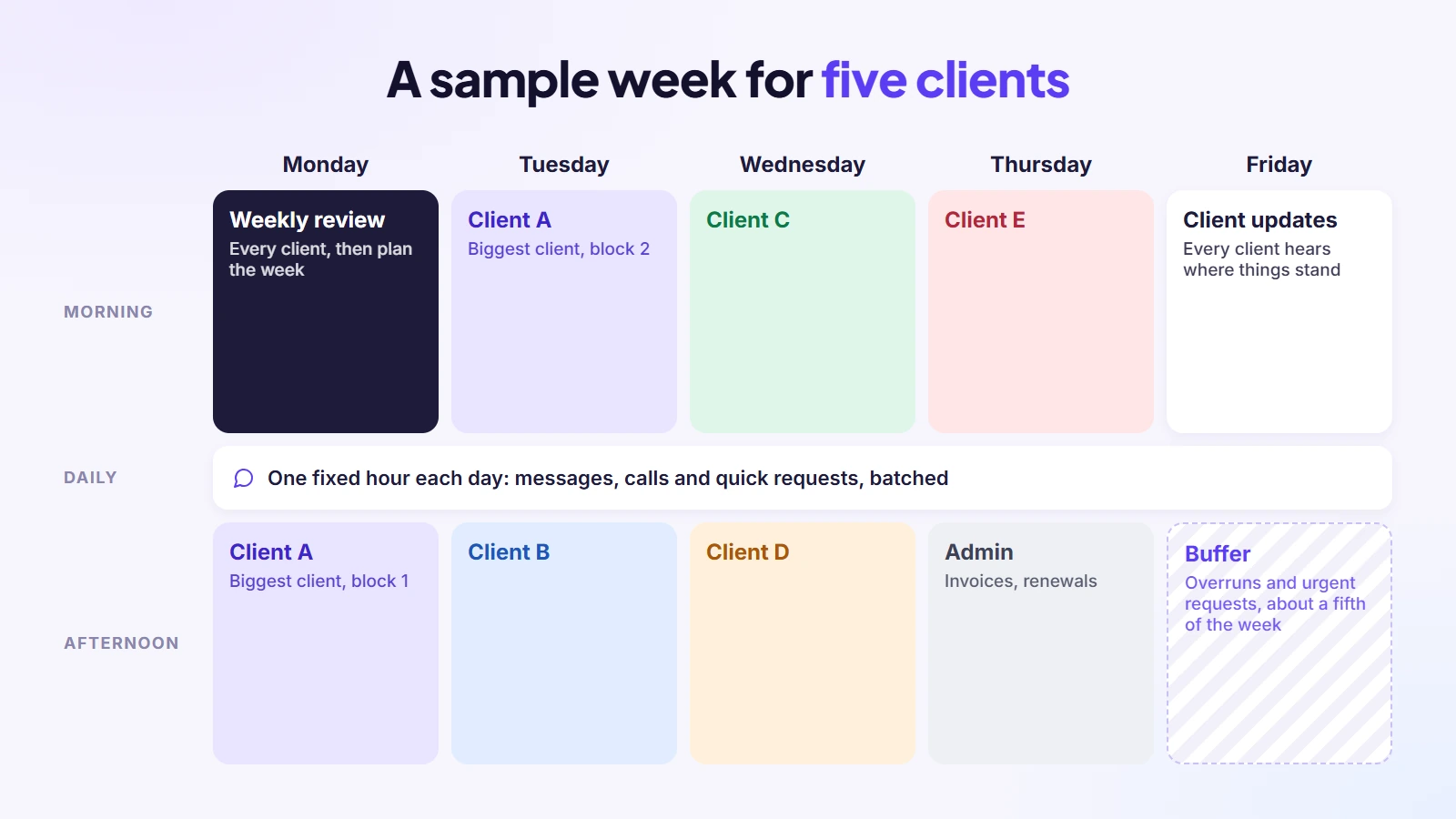
A sample week for five clients
This is the kind of week I’d plan for a freelancer or a small team with five active clients:
- Monday morning: weekly review of every client (more on that below), then plan the week.
- Monday afternoon to Thursday: half-day blocks, one client per block, with the biggest client getting two blocks.
- Each day, one fixed hour: messages, calls and quick requests, batched instead of answered all day.
- Thursday afternoon: invoices, renewals and admin.
- Friday: client updates go out, and the rest stays open as buffer for overruns and urgent requests.
Why the buffer matters
A plan with no empty space breaks the first time a client sends feedback late. Leaving roughly a fifth of the week unbooked sounds wasteful until you notice that it’s always used, by revisions, surprise requests or work that took longer than expected. With the buffer, the rest of the plan survives.
A sample week for a small agency team
With a team, the same idea scales by giving each person their own client blocks and keeping a few shared moments:
- Monday: a thirty-minute team review of every client, then each person plans their week.
- Tuesday to Thursday: each team member works in client blocks, with one owner per client who handles that client’s messages.
- Wednesday: a short check on anything blocked or at risk of missing a deadline.
- Friday: client updates go out, invoices are checked, and the afternoon stays open as buffer.
One owner per client is the part that matters most. When a client knows exactly who to talk to, messages stop scattering across the whole team.
Batching messages without seeming slow
Answering messages in one or two fixed slots a day can feel risky, as if clients will think you’re ignoring them. In practice, a reply within a few hours, inside the response time you agreed, feels attentive. What clients notice is not speed but predictability: knowing they’ll hear back the same day matters more than hearing back in five minutes.
Track hours per client for a few weeks
Tracking time per client is one of the most repeated pieces of advice on this topic, even if you don’t bill by the hour. Do it for two or three weeks and you’ll know how long each client really takes, which client is quietly eating your week, and how big each block should be. Without that number, every plan is a guess.
Put a buffer on estimates, not just on the week
The weekly buffer covers surprises; estimates need their own margin. Add about 15 to 20 percent to each project timeline before you share it, because feedback rounds and small changes almost always take longer than planned. A date you beat is far better than one you miss.
Protect deep work and your energy
Put the hardest client work in the hours when you think best, and keep calls and messages for lower-energy times. During a client block, silence notifications from other clients. Colour-coding clients in the calendar makes it obvious at a glance whose week it is. Shorter blocks of 60 to 90 minutes work too if your days are full of meetings.
Plan breaks and time off
Breaks and evenings off belong in the plan, not in whatever is left over. With several clients there is always something you could do, which is exactly why rest has to be booked. A tired person juggling five clients makes the mistakes this whole guide is trying to prevent.
Run a 15-Minute Weekly Review per Client
A weekly review is the habit that keeps “one place” accurate. Once a week, open each client’s record and spend fifteen minutes making sure it reflects reality. It’s the moment you catch the thing that was about to slip.
The weekly review checklist
- Status: what moved forward this week, and what didn’t.
- Next deadline: the next date the client is expecting something, and whether it’s realistic.
- Waiting on the client: anything stuck because they haven’t replied, approved or sent files.
- Money: unpaid or overdue invoices, and renewals coming up.
- Last contact: when you last spoke, and whether they’re due an update.
- Scope: any new requests that need a quote before you start them.
- Hours: is this client using more of your time than the work is worth?
- Owners: every open item has someone responsible and a next step.
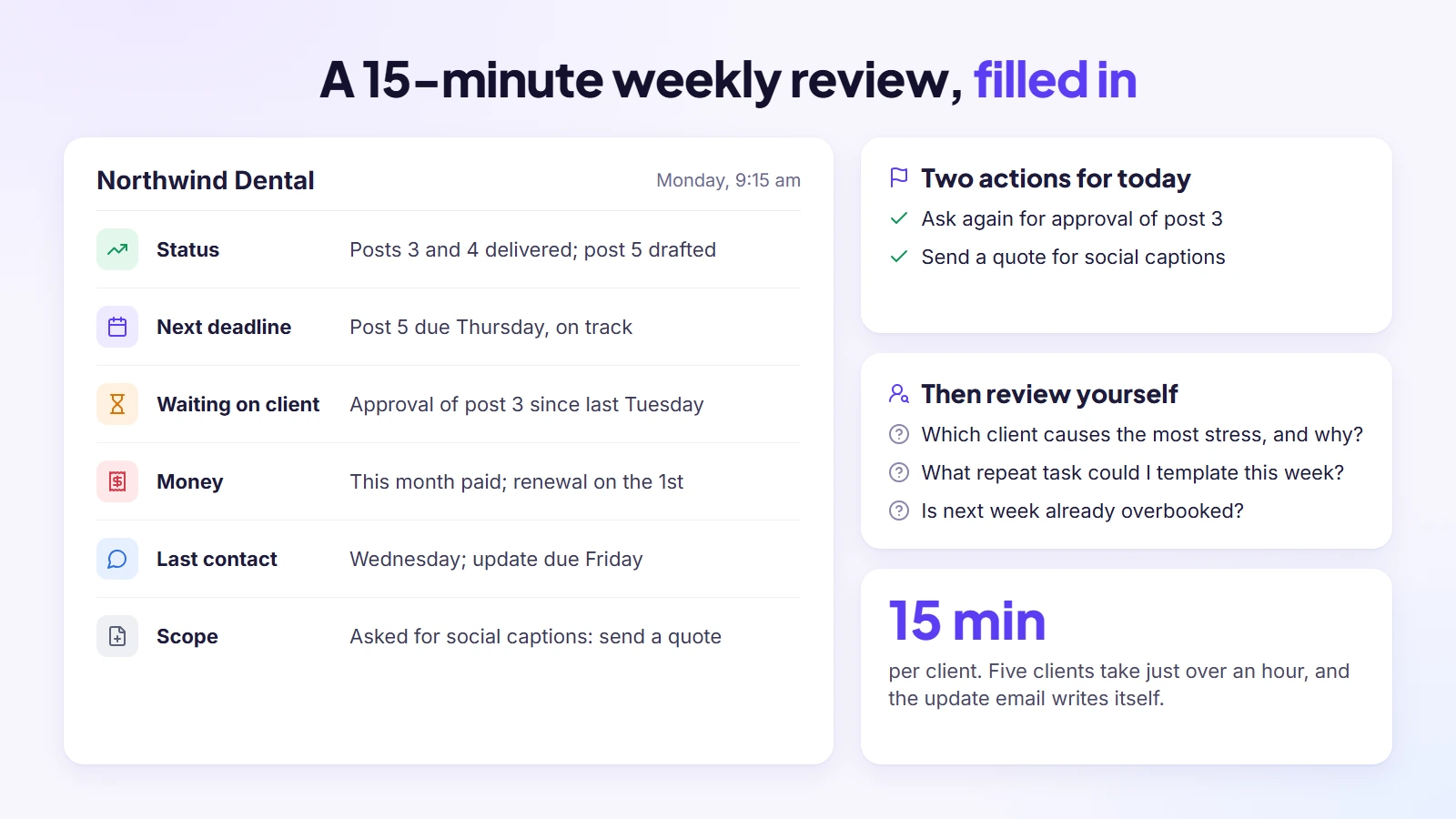
Five clients take just over an hour. The update email you send afterwards writes itself, because you’ve just looked at everything the client would want to know.
A filled-in example
Here is what one client’s review might look like on a Monday morning:
- Status: blog posts 3 and 4 delivered; post 5 drafted.
- Next deadline: post 5 due Thursday, on track.
- Waiting on the client: approval of post 3 since last Tuesday; ask again today.
- Money: this month’s invoice paid; renewal on the 1st.
- Last contact: Wednesday; update due Friday.
- Scope: they asked for social captions, not in the agreement; send a quote.
Six lines, five minutes to write, and two actions for today that would otherwise have waited until the client asked.
Review yourself, not just the clients
Finish the review with three questions about you: which client is causing the most stress and why, what repeat task you could template or automate this week, and whether next week is already overbooked. The answers are where the next improvement to your system comes from.
Share the review with the client
Some people turn the weekly review into a short call or a shared status note with each client: current status, next steps and who owns each one. It takes a little longer, but clients who see the same picture you do rarely chase you for updates.
How Many Clients Can One Person Handle?
There’s no single number, and anyone who gives you one without asking about your work is guessing. Commonly quoted ranges sit around three to five active clients for a freelancer, more for repeatable work, and roughly eight to twelve accounts for an account manager with a mixed workload, fewer for high-touch accounts. The real limit depends on how the work is shaped.
What changes your number
| Factor | Fewer clients | More clients |
| Type of work | Custom, deep projects | Repeatable, well-defined services |
| Client contact | Daily calls and constant feedback | A weekly update is enough |
| Relationship | New clients still learning how you work | Long-term retainers with a settled rhythm |
| Support | You do everything yourself | Teammates or freelancers handle parts of the work |
| Admin | Manual invoicing and scattered tools | Billing, requests and updates in one system |
| Stakeholders | Several people giving feedback | One named approver |
| Approvals | Slow, unpredictable feedback | Agreed feedback turnaround |
Work it out from hours, not a client count
The more reliable method is to count hours. First, track how many hours each client takes per week for two or three weeks. Second, decide how many hours you can give to client work, for example 30 out of a 40-hour week once admin and sales are taken out. Third, keep about 15 percent of that back as buffer. Whatever fits in the remainder is your real capacity.
Aim for a healthy mix
Clients aren’t equal in effort. A balanced load might have one or two high-touch clients, a few medium ones and a couple that need little attention. Taking on a third high-touch client usually breaks a schedule that looked fine on paper.
Warning signs you’re over capacity
- You can’t say from memory what each client is waiting on this week.
- Your weekly review takes much longer than fifteen minutes per client, or you skip it.
- Invoices go out days or weeks after the work.
- You answer messages late at night to keep up.
- Quality complaints or revision rounds are creeping up.
- Clients ask for an update before you’ve sent one.
- You forget details a client told you, or dread opening a particular client’s messages.
What to do when you’re over capacity
Seeing the warning signs is only useful if you act on them. The options, roughly in the order I’d try them:
- Fix the system first: if the overload comes from chasing information, a single record per client and a weekly review often free up hours.
- Raise prices or tighten scope: fewer, better-paid clients beat many stretched ones.
- Bring in help: a freelancer or assistant for the repeatable parts, with clear access to only the clients they work on.
- Use a waiting list or refer: new clients start next month instead of squeezing in now, or you pass them to someone you trust.
- Let go of the worst fit: the client who takes the most time for the least money is often the one to hand on.
Signs you’ve outgrown spreadsheets and task boards
Spreadsheets and boards work well for a while. You’ve outgrown them when the same client appears in four places and none of them agree, when you copy details from email into a sheet every day, when invoices live in a different app from the work they bill for, and when clients keep asking for updates you could have shown them if they had somewhere to look.
Onboarding and Offboarding Clients Without Chaos
Most of the mess with several clients starts at the edges: a new client who joins before their record is set up, or a finished project that never quite closes. A short routine for each edge keeps the middle calm.
Bringing a new client into the system
- Send a welcome message within a few hours of the client signing, using a template.
- Create their record before any work starts, with contacts, scope and price.
- Collect the brief and access details through one intake form rather than a chain of emails.
- Hold a short kickoff call: owners on both sides, the timeline, and what success looks like.
- Share the project timeline, and agree the named approver and feedback turnaround.
- Send your communication rules and the date of their first weekly update.
- Raise the first invoice or deposit, so money is settled before the work.
- Book their first client block in your calendar.
Closing a project properly
- Deliver the final files with a short summary of what was delivered, and ask the client to keep their own copy.
- Get a clear sign-off in writing.
- Send the final invoice and confirm it’s paid.
- Note anything they asked for that you parked; it’s the start of the next proposal.
- Transfer ownership of any accounts to the client first, then remove the access you no longer need.
- Archive the client record and keep contracts and invoices for your records.
- Ask for feedback while the work is fresh, and check in again a few weeks later.
Ten minutes at each edge saves hours of “wait, are we still working on that?” months later.
Ending a client relationship that isn’t working
Sometimes the right move is to let a client go. Do it the same calm way: note the reasons for yourself, agree an end date and a handover plan, finish what’s been paid for, and offer a referral to someone who may be a better fit. A clean ending protects your reputation and frees time for the clients you want to keep.
Common Mistakes When Managing Multiple Clients
Most of what goes wrong with several clients comes back to a handful of habits. If things feel chaotic, check these first:
- Treating every message as urgent: replying instantly to everything means no client gets your focused time.
- Keeping the plan in your head: it works for two clients and fails quietly at five.
- Agreeing changes verbally: if it isn’t written in the client’s record, it will be remembered differently.
- Invoicing when you have time: money should have a fixed slot, like any other client work.
- Skipping the weekly review in busy weeks: the busy weeks are exactly when it catches the most.
- Adding a new tool for every problem: each one splits the client a little further.
- Overpromising: optimistic dates feel good when you say them and bad when you miss them.
- Jumping between clients in the same hour: each switch costs more focus than it seems.
- Not knowing hours per client: you can’t price, plan or say no without that number.
- Doing repetitive admin by hand: welcome emails, reminders and checklists deserve templates.
- Hiding a deadline clash: moving a date once, early, beats moving it three times.
- No backup person: every client should have someone who can step in.
- Keeping a bad-fit client too long: one difficult client can cost more than two good ones bring in.
- Skipping rest: tired people miss things, and with several clients there’s more to miss.
Keeping It All in One Place With a Client Portal
Everything above works with any tool, and you can start today with what you have. The hard part is that most setups split the client across several apps, so the “one place” slowly becomes five again. A client portal fixes that by giving the client record a front door the client can use too.
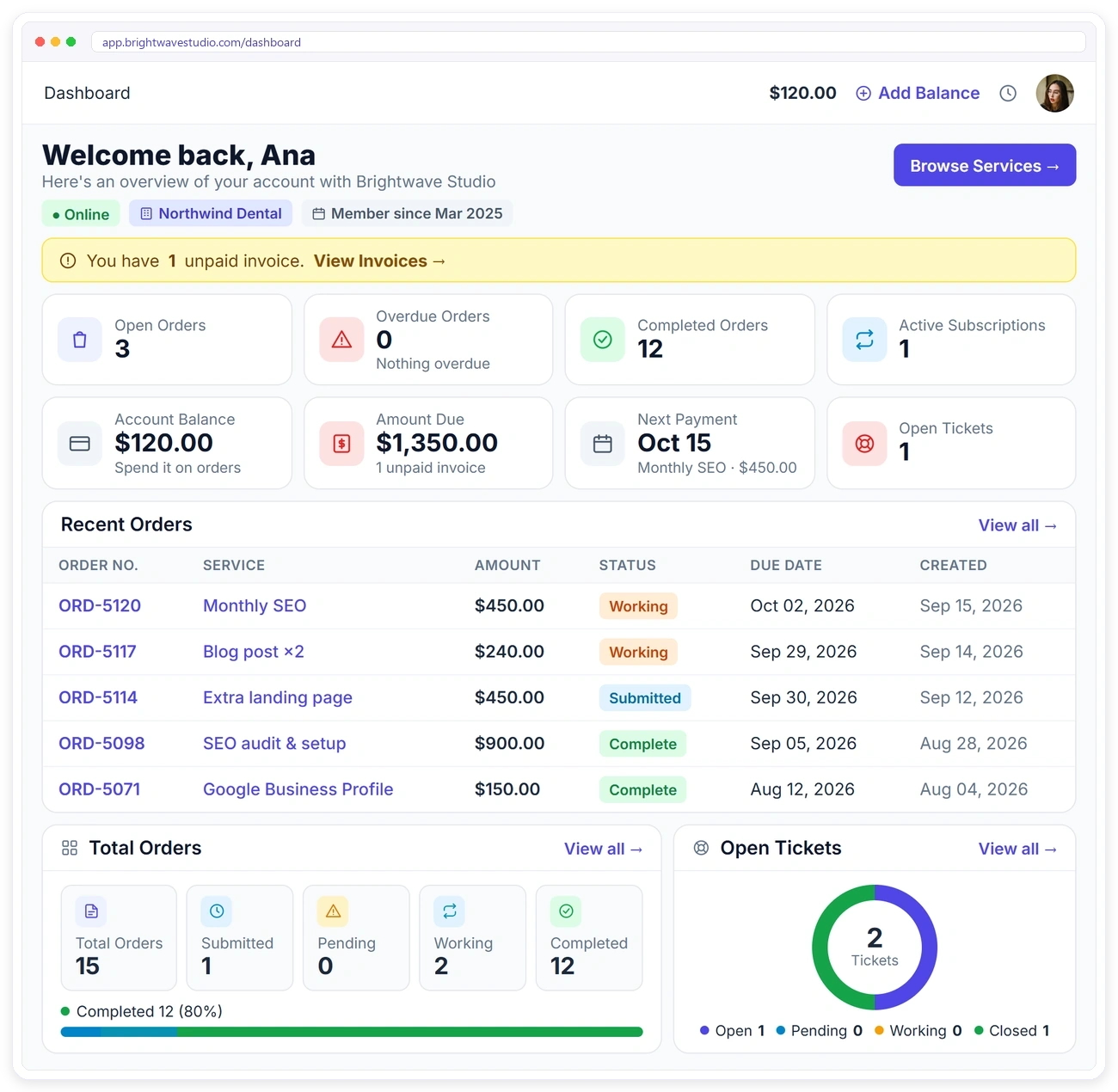
That’s why I built Clientish. It’s an all-in-one client management portal for agencies, freelancers, consultants and service-based businesses: leads, proposals, a branded client portal, orders, invoices and subscriptions, support tickets and live chat in one place. Here is how the steps in this guide map onto it:
- One record per client: each client has a profile with tabs for their orders, invoices, subscriptions, tickets, files and an activity log, as described in what Clientish is and how it works.
- One front door: clients sign in to a portal under your brand to order, follow their work, pay and ask for help, which is what a client portal is for.
- Scope in writing: proposals clients sign, and intake forms that collect the brief after they pay.
- Requests captured: support tickets, live chat (Starter plan and up) and each order’s own message thread keep conversations with the client they belong to.
- Work broken down: each order carries its tasks, and a progress timeline shows the client where it stands.
- Money on time: invoices tied to orders, payment reminders, and subscriptions for retainers.
- Team capacity: roles for staff and freelancers, and a Workload view that shows who is carrying too much.
If you already keep clients in a project tool or spreadsheet, the import can bring them and their work across, so you don’t start from an empty screen. You can start a 14-day free trial with no card and every module open, with small limits, and run your next week of client work through it.
Frequently Asked Questions
These are the questions people ask most when they’re trying to get several clients under control. Each answer stands on its own.
How do you manage multiple clients at once?
Stop relying on memory. Keep a separate record for every client, write each new request into it on the day it comes in, and plan your week in blocks so you work on one client at a time. A fifteen-minute check per client every Monday catches what’s about to slip before the client notices.
What is the best way to keep track of multiple clients?
The best way is the one that keeps each client’s whole picture together: what was agreed, what’s open, what was said and where the money stands. A spreadsheet can do it for two or three clients. Beyond that, a system with a record per client and a place for clients to send requests saves you from copying details by hand.
How many clients can a freelancer handle?
Commonly quoted ranges are three to five active clients for most freelancers, fewer for deep custom projects and more for repeatable work. The better test is hours: track how long each client takes, compare it with the hours you have for client work, and keep a buffer. Late invoices and evening catch-up mean you’re over the limit.
How do you stop scope creep with several clients?
Write the scope down before work starts, including revision rounds and how extra work is quoted. When a new request arrives, compare it with the agreed scope in the client’s record; if it’s outside, send a quick quote before you start. Seeing the original agreement next to the new request is what makes creep visible.
How do you prioritise work for different clients?
Decide your order in advance: deadlines a client is waiting on first, then anything blocking someone else, then scheduled retainer work, with new out-of-scope requests quoted before they’re booked. Put admin and invoicing in a fixed weekly slot so it never depends on spare time.
How do you keep clients updated without constant messages?
Agree an update day at the start, and send a short note that day whether or not much changed. Better still, give clients somewhere to look, such as a portal showing their work and invoices, so they can check progress themselves instead of asking.
Do freelancers and agencies manage multiple clients differently?
The principles are the same, but agencies add a layer: several people touch each client. That makes the shared record even more important, along with clear owners for every task and a view of each person’s workload, so one teammate doesn’t quietly carry twice the load.
What tools help manage multiple clients in one place?
Think in types rather than brand names. A CRM keeps contacts and leads, a project tool tracks tasks, and a client portal gives clients one place to send requests, follow work, pay and find files. Small teams often start with a spreadsheet and a project board; the trouble begins when the client is split across all of them, and one system that covers the client record end to end avoids that.
How many clients can an account manager handle?
Figures quoted across agency guides cluster around eight to twelve accounts for a mixed workload, fewer for high-touch strategic accounts and more for simple, standardised ones. The number of stakeholders, how slow approvals are and how often reports are due change that number a lot.
How often should you update each client?
Weekly is the usual rhythm for active work: a short note on what was done, what’s next and what you’re waiting on. Monthly, add results; quarterly, step back and talk about direction. The exact cadence matters less than keeping it predictable, so the client never has to ask.
How to manage multiple clients as a virtual assistant?
The same system works, with extra care around access and small requests. Keep one record per client with their logins stored safely, agree which tasks are routine and which need a request, and give each client a fixed block in your week. A daily ten-minute sweep of every client’s inbox and calendar catches what came in overnight.
How to manage social media accounts for multiple clients?
Plan content in monthly batches per client, get approvals in one place before anything is scheduled, and keep each client’s brand notes, logins and posting calendar in their record. Reporting goes into the weekly update, and comment or message monitoring gets its own daily slot so it doesn’t fragment the rest of the day.
Final Thoughts
Managing several clients well isn’t about working harder. It’s about taking the job of remembering off your shoulders and giving it to a system: one record per client, one front door for requests, written scope, a planned week and a short review.
Start with the weekly review this Monday, even in a spreadsheet; it will show you quickly where things are slipping. When you’re ready to put the whole picture in one place for you and your clients, Signup & try the demo free for 14 days.
Sources
Clientish publishes this guide, and it reflects first-hand experience plus common practice described by freelancer and agency guides and forum discussions as of October 2026. Client-load ranges are commonly quoted figures, not Clientish data. The Clientish section describes the product as documented on its help pages and pricing page in October 2026. Clientish is not affiliated with the companies whose guides and forums are referred to here.

