

HoneyBook is a booking and payments platform for independent service businesses, with proposals, contracts, invoices, a scheduler and AI help. Clientish was built for agencies with a team: it sells services through a client portal, runs each purchase as an order, handles support tickets and bills through the agency’s own payment accounts.
Quick answer: HoneyBook fits a one-person or very small service business in the US, Canada, the UK or Australia that wants bookings, contracts and card payments in one file. Clientish fits agencies of four people or more that need seats without a $109 plan, a help desk, delivery tracked order by order, and the freedom to connect whichever payment provider serves their market.
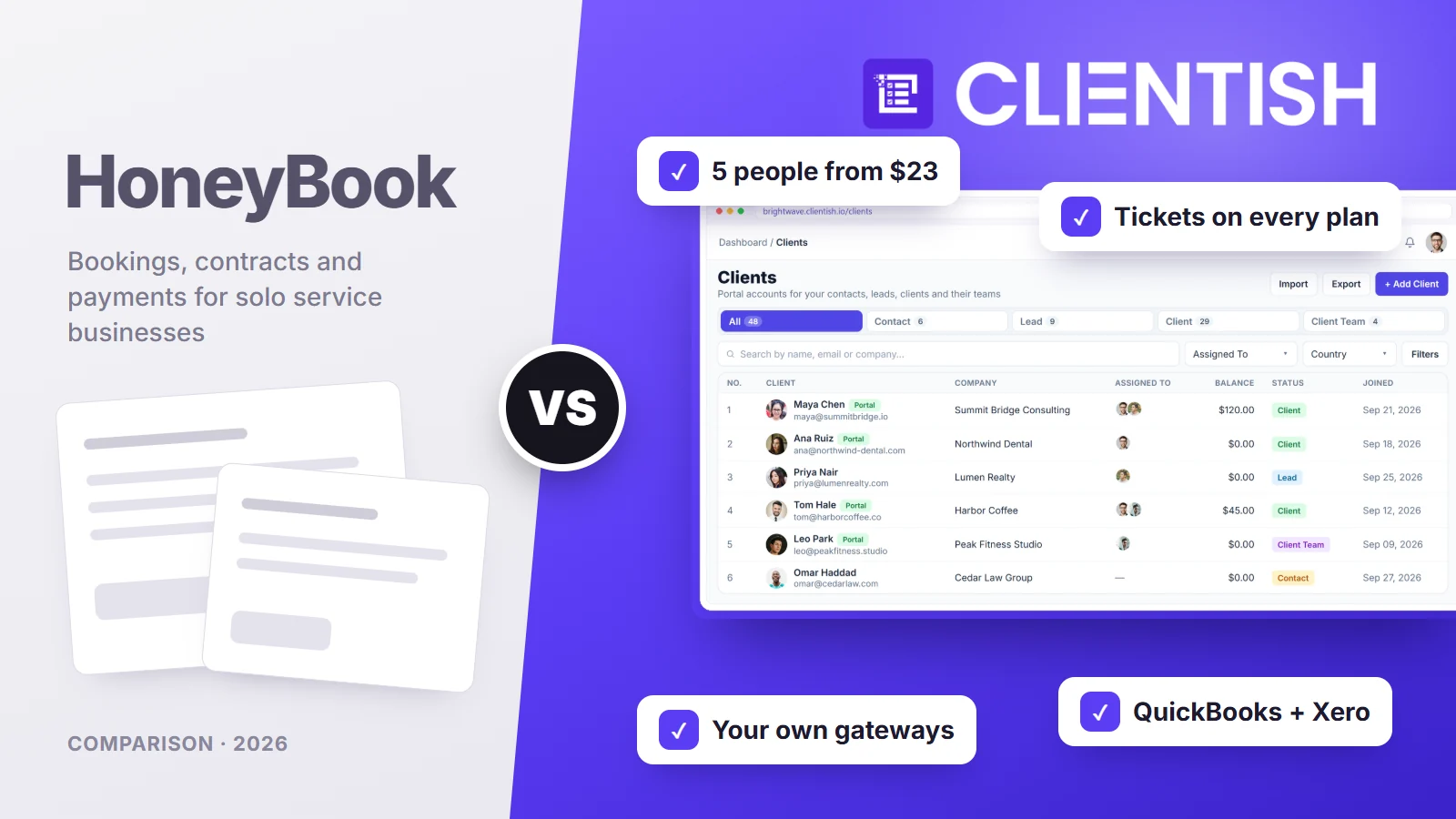
This comparison walks through price by team size, where each tool can take payments, the client portal, proposals and contracts, recurring billing, support, team roles, automations, branding, time and accounting, and security, then prices a real agency and explains a move between the two. Every HoneyBook detail below was read from its own pricing matrix, help articles and update posts on October 5, 2026.
Key Takeaways
HoneyBook changed more in 2026 than most reviews show: it opened in the UK and Australia in May and retired its time tracker in September. These points reflect its own pages today.
- Price by team size: HoneyBook Starter ($36 a month, $29 yearly) has no team members, Essentials ($59 or $49) allows two, and Premium ($129 or $109) is unlimited. Clientish seats five people on its $29 plan ($23 yearly) and fifteen, thirty or fifty on the higher ones.
- Where you can sell: HoneyBook only accepts businesses based in the US, Canada, the UK and Australia, and it is the payment processor itself. Clientish keeps no list of permitted countries; whichever payment provider you link sets the limits on where money can come from.
- Support: HoneyBook clients send messages inside a project; there is no ticket system. Clientish includes a help desk with response deadlines from its first plan.
- Recurring billing: HoneyBook’s recurring invoices charge the client’s card automatically. Clientish reopens each retainer invoice for the client to pay.
- Accounting and time: HoneyBook syncs to QuickBooks and dropped its time tracker on September 7, 2026. Clientish connects QuickBooks and Xero, and clients approve contractor hours before billing.
HoneyBook vs Clientish at a Glance
The grid below lines up the differences agencies ask about most often. Clientish is the shaded column; HoneyBook plan names are given wherever a feature is not on every plan.
| Topic | HoneyBook | Clientish |
| Monthly price | $36 / $59 / $129 | $29 / $49 / $99 / $149 |
| Team members | 0 on Starter, 2 on Essentials, unlimited on Premium | 5, 15, 30 or 50; extra seats available |
| Countries | US, Canada, UK, Australia | No list of its own; set by your gateway |
| Payment processing | HoneyBook only; card from 2.9% + 25¢ online | Your own Stripe, PayPal, Paddle or SSLCommerz, plus manual methods |
| Client support desk | Project messages only | Tickets with first-reply targets and ratings |
| Orders and revisions | Projects; no revision allowance found | Orders with a set number of revision rounds |
| Accounting | QuickBooks Online (Essentials up) | QuickBooks and Xero |
| Own web address | Your subdomain on every plan | A clientish.io subdomain |
| Phone app | iOS and Android | Works in the phone browser |
| Free trial | 30 days, no card | 14 days, no card |
Read across the rows and a pattern appears: HoneyBook is shaped around one owner and their clients, Clientish around a team serving many clients at once.
Who This Comparison Is For
It is written for agency owners who started on HoneyBook as freelancers and are now hiring, and for agencies outside HoneyBook’s four countries who keep seeing it recommended.
If you work alone, book sessions and take deposits from clients in your own country, HoneyBook was made for that pattern. If you manage a team, sell retainers and packages, and spend a lot of the week answering client questions, the sections on seats, support and orders matter most.
Common reasons agencies outgrow HoneyBook
These themes recur in Capterra and Trustpilot reviews:
- The 2025 price rise. Yearly list prices rose by about 50 to 80% between December 2024 and March 2025 ($16, $32 and $66 a month became $29, $49 and $109), and reviewers mention bills going from about $250 to $500 a year.
- Removed features. The time tracker was switched off on September 7, 2026, and some users say they learned of removals after the fact.
- Payout holds. HoneyBook’s terms let it hold funds in a reserve, and a share of low ratings describe payments placed on hold.
- Seats and reporting. Two team members on Essentials, then the Premium plan; reviewers also want stronger reports as the client list grows.
Meet HoneyBook: Best for Solo Service Businesses That Book and Bill
HoneyBook was founded in 2013 and says more than 100,000 businesses use it. Its centre of gravity is the “smart file”: one link that can hold a proposal, contract and invoice, which the client opens, signs and pays without creating an account.
What HoneyBook covers:
- Sales: lead forms, a customizable pipeline, proposals, contracts with e-signature and services and pricing guides.
- Payments: HoneyBook processes cards, bank transfers, Apple Pay and Google Pay, with payment plans, autopay, late fees and tipping.
- Scheduling: a booking calendar with one session type on Starter and unlimited on Essentials.
- Automations: pipeline automations on every plan; workflows with conditions and an AI builder from Essentials.
- AI: email drafts, a meeting notetaker, project recaps and, since August 2026, a link to Claude and ChatGPT.
- Mobile: iOS and Android apps, including tap-to-pay for in-person payments.
HoneyBook pricing: Starter $36, Essentials $59 and Premium $129 a month, or $29, $49 and $109 a month billed yearly. UK and Australian accounts pay in pounds or Australian dollars.
Meet Clientish: Best for Agencies Selling to Many Clients
Clientish starts from a different question: how does a team keep many clients buying, paying and getting answers without everything running through the owner’s inbox? Each client gets a branded portal, and every purchase becomes an order that the right people deliver.
What Clientish adds for agency work:
- Room for the whole team: five people on the $29 Starter plan and fifteen on Growth, each with a role you define.
- A real support desk: every request gets a number, a priority and a clock, staff keep internal notes out of the client’s sight, and the client grades the help when it closes.
- A shop clients can use: your services with prices, a cart and coupon codes inside the portal.
- Orders, briefs and revision rounds: each purchase carries its brief and the number of changes the client may request.
- Your own payment accounts: card and wallet payments go to the Stripe, PayPal, Paddle or SSLCommerz account you already hold, and hand payments by bank, Wise or bKash are logged too.
- Proposals that open the order: eleven designs; a signature sets up the client’s login, the invoice with its deposit and the order together.
- QuickBooks and Xero: both connect without Zapier.
- Approved hours: freelancers record hours against the client they worked for, and nothing is billed until that client signs off.
- Live chat and lead tracking from the Growth plan.
Plan limits and prices are listed on the Clientish pricing page.
How We Compared
We measured both tools against a growing agency’s month rather than a single booking: adding staff, selling and getting paid, delivering work, keeping clients informed and handling their questions. For each area we noted:
- the HoneyBook plan where a feature first appears
- whether it works for an agency outside the US
- how the client experiences it
- what it costs at three, six and fifteen people
HoneyBook’s details come from its pricing matrix, help articles and product update posts; review themes come from Capterra and Trustpilot. Where HoneyBook’s own pages disagree, we use the pricing page and say so.
Pricing: What a Team Pays
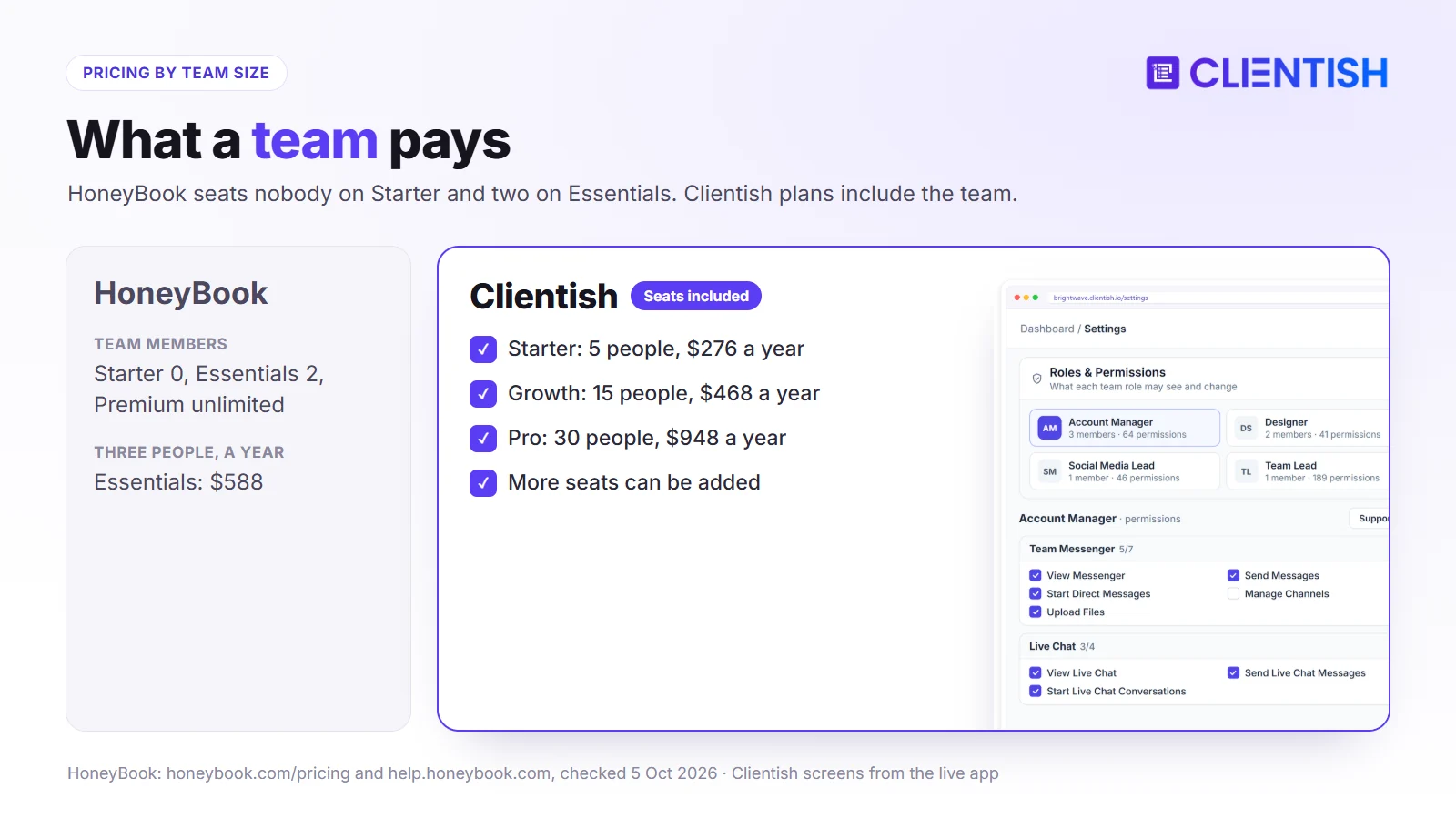
Winner: Clientish for any agency of two to thirty people: Starter seats five for $23 a month billed yearly, while HoneyBook allows two team members on Essentials ($49) and needs the $109 Premium plan beyond that.
The headline prices look close; the gap opens when you count who can log in.
Yearly cost at three team sizes
Prices are each tool’s yearly billing on October 5, 2026. HoneyBook’s Starter plan has no team members, so a team of three needs Essentials and anything larger needs Premium.
| Team | HoneyBook | Clientish |
| 3 people | Essentials: $588/yr | Starter: $276/yr |
| 6–15 people | Premium: $1,308/yr | Growth: $468/yr |
| 16–30 people | Premium: $1,308/yr | Pro: $948/yr |
| 31–50 people | Premium: $1,308/yr | Enterprise: $1,428/yr |
Processing fees add up
Because HoneyBook processes the payments, its fees are part of the real cost: 2.9% + 25¢ for online card payments, 3.4% + 9¢ for a saved card, 1.5% for US bank transfers and 1% more for instant deposit. On $20,000 a month of card payments, that is roughly $580 a month before any plan fee. Clientish takes no share of payments; you pay only your own gateway’s rates.
Why older reviews show lower prices
Until early 2025 HoneyBook’s yearly plans listed at $16, $32 and $66 a month. Pages quoting $19 or $39 describe that era. You can check Clientish against your own numbers with a 14-day trial.
Where You Can Sell and How Money Reaches You
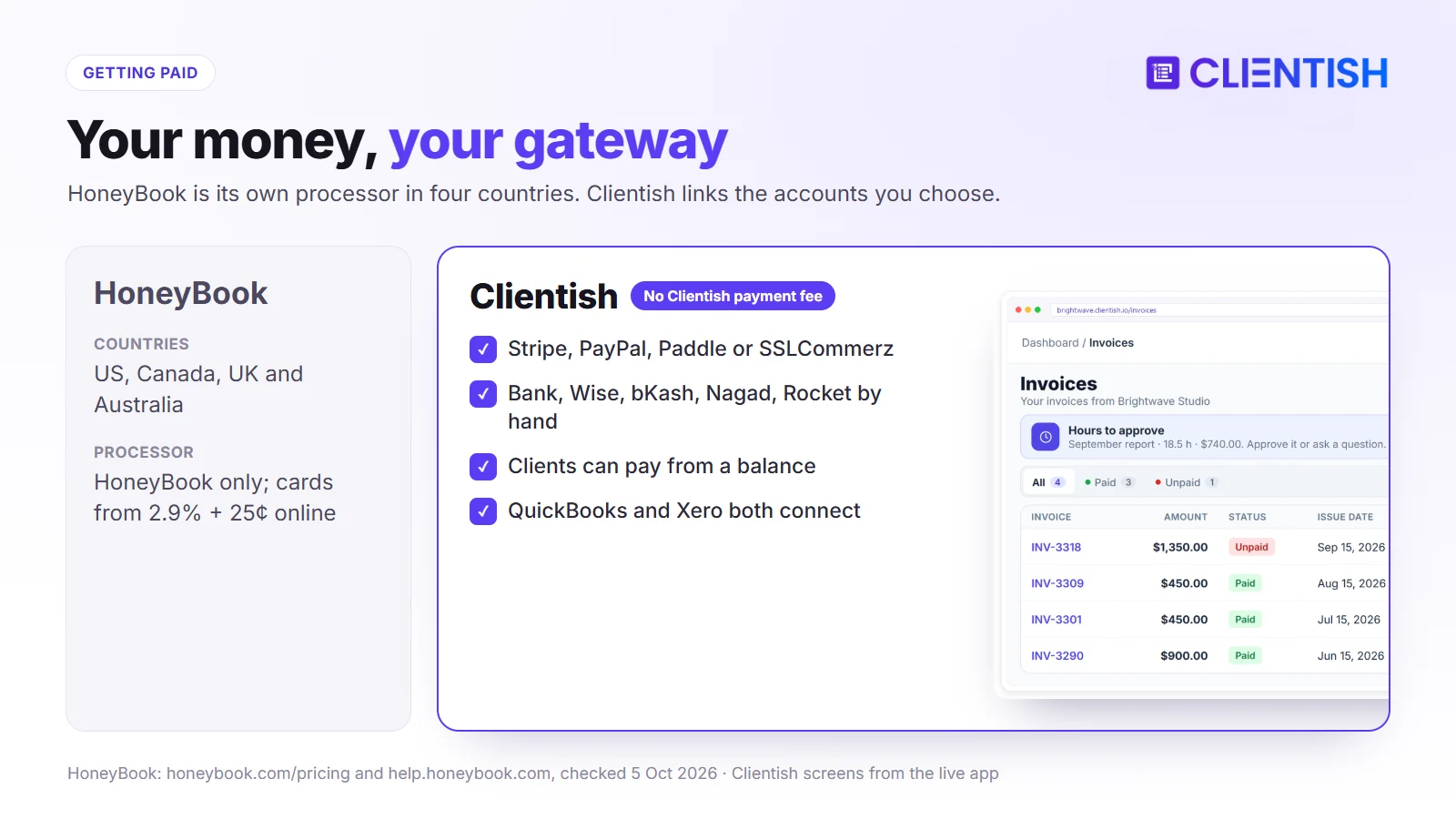
Winner: Clientish for agencies outside HoneyBook’s four countries and for anyone who wants to choose their payment provider, since the money goes to accounts the agency already owns.
HoneyBook’s countries and processor
Since May 21, 2026, HoneyBook accepts businesses in the UK and Australia as well as the US and Canada; elsewhere it doesn’t take businesses at all. It is the payment processor itself, so Stripe and PayPal accounts can’t be connected, and each account invoices in one currency (dollars, Canadian dollars, pounds or Australian dollars). Clients abroad can still pay by card. HoneyBook’s terms allow it to hold part of your funds in a reserve.
Clientish’s gateways
On Clientish the processor is yours: link a Stripe, PayPal, Paddle or SSLCommerz account, and mark transfers paid by bank, Wise, bKash, Nagad or Rocket when they arrive. Your provider’s rules decide which countries and currencies you can take, and Clientish adds no fee of its own. A client can also keep a balance on account and pay invoices from it.
The Client Portal: Files or a Workspace?
Winner: Clientish for clients who buy more than once and need ongoing help, because the portal lets them order, pay, track and ask in one place.
A client portal can be a place to read documents or a place to get things done; the two tools sit on opposite sides of that line.
The HoneyBook client view
A HoneyBook client gets in through an emailed link, a password or a one-time code, and finds each project’s timeline, documents, invoices and shared notes, with room to upload their own files. They can’t create new files, book meetings or start new work from the portal, and they don’t see tasks or other projects.
The Clientish client view
Signing in to Clientish, a client first sees what is open, what is unpaid and when the retainer next renews; open any order and its brief and remaining change requests are there. From the same login they shop your catalogue with coupon codes, settle invoices, approve a delivery or request changes, open support tickets and, on Growth and up, chat with your team.
What that means for repeat clients
For a wedding or a one-off shoot, HoneyBook’s file-based view is enough. For a monthly SEO or design client who orders again, asks questions and pays every cycle, Clientish keeps all of it in one account.
Proposals, Contracts and Getting the Yes
Winner: depends on what you sell. HoneyBook’s single file covers one booking with its contract and deposit; Clientish fits agencies whose proposals should become an order for the team straight away.
Both tools let a client review, sign and pay online; what happens after the signature differs.
HoneyBook’s smart files
A HoneyBook smart file can combine a proposal, a lawyer-vetted contract template and an invoice, so the client chooses services, signs from any device and pays in one sitting without an account. Contracts update when the client changes their selection, and lead forms can sell digital products.
Clientish proposals
Proposals in Clientish can be laid out in eleven styles and sent by anyone on the team whose role grants it. The client types their name and title to sign, the signer’s IP address is stored and a signed PDF goes out by email. Once signed, the deal sets itself up: a portal login for the client, a single invoice asking for the deposit first (half, by default) and an order ready for the team.
Retainers and Recurring Billing
Choose HoneyBook if retainers must charge a saved card with no client step; Clientish fits retainers tied to monthly orders, revision limits and a choice of gateway.
Monthly retainers are the backbone of most agencies, so how renewals work deserves a careful look.
HoneyBook’s recurring invoices run weekly, monthly or on a custom cadence on every plan, and autopay is on by default: the client’s card or bank account is charged on each due date. Clients can’t pause or cancel these schedules themselves. Clientish handles renewals differently: when a retainer period comes round, its existing invoice is marked unpaid again and the client settles it in the portal by card, by hand or from money on account, with no automatic charge. Each retainer service carries its own orders and revision allowance, so the work and the billing stay together.
Support Tickets and Client Communication
Winner: Clientish, because it gives clients a proper way to raise problems and gives your team deadlines for answering them, on every plan from $29.
As a client list grows, questions arrive faster than one inbox can sort them.
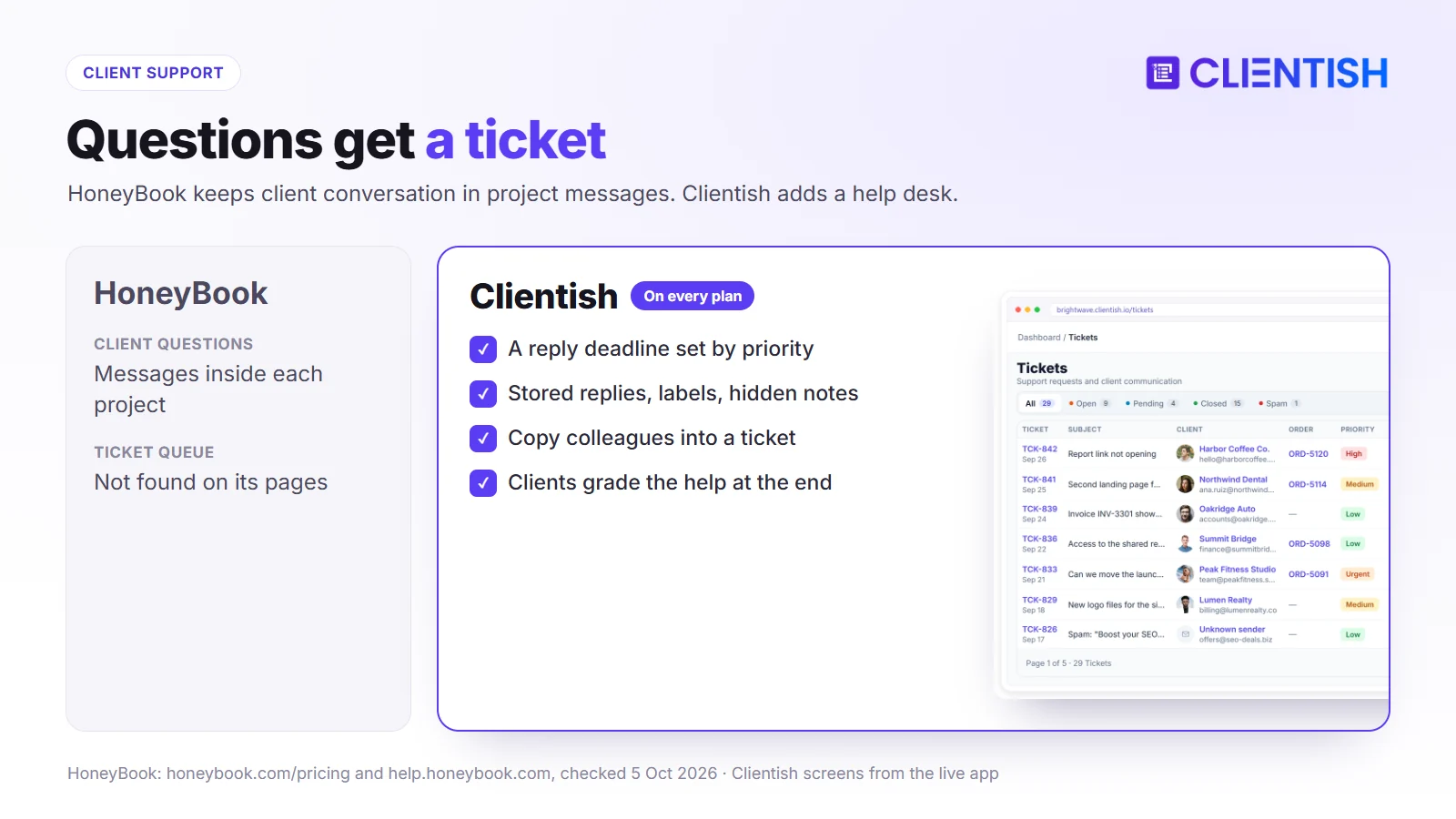
HoneyBook keeps client conversation in each project’s messages and, since August 2026, offers a dedicated business phone number with two-way texting. We found no ticket queue, priorities or client ratings in its pricing, portal or help pages. Clientish turns each question into a ticket: the priority the client chooses starts a clock for your first answer, staff reach for stored replies, labels, colleague copies and hidden notes, and the client marks how well it went at the end.
Team Members, Roles and Permissions
Winner: Clientish for teams of three to thirty, who get seats and detailed roles on the cheaper plans. HoneyBook Premium has no seat cap.
Adding people is the moment most freelancers discover how a tool was designed.
Teams in HoneyBook
HoneyBook’s Starter plan allows no team members, Essentials allows up to two, and Premium removes the limit with priority support and a 90-day onboarding specialist. Members get one of four roles (basic, moderator, admin or owner) and can be limited to specific projects. Team members can’t be added during the trial.
Teams in Clientish
Clientish plans seat five, fifteen, thirty or fifty people, and more seats can be bought. Roles are yours to define, box by box, and a few ready examples (a support desk, a team lead) give you a starting point. From Growth, freelancers join as remote members whose remote role limits what they can open. A member’s account can be Pending, Approved or on Hold, and viewing the workspace as a colleague is something you grant separately.
Automations, Scheduling and Day-to-Day Work
Choose HoneyBook if bookings and branching automations drive the business; Clientish fits order-led agencies that track each job through statuses and revisions.
Here the tools reflect their roots: HoneyBook automates the path from inquiry to booking, Clientish organises the delivery that follows a sale.
HoneyBook’s automations and scheduler
HoneyBook triggers actions on inquiries, bookings, viewed or completed files, signed contracts and payments, with waits and conditions, and its AI can draft a workflow from a description; full automations start on Essentials. Its scheduler offers one session type on Starter and unlimited types with email and text reminders from Essentials. Tasks exist on every plan, and assigning them to others needs Essentials.
Clientish’s order flow
Work in Clientish lives on orders, which you can scan as a list, a board or cards; dragging one to a new column updates its status. The team adds tasks to each order, the client approves a delivery or asks for another round within the service’s allowance, and silent deliveries are approved after a number of days you choose. You won’t find a booking calendar or a drag-and-drop automation designer; behaviour is set through options like the revision cap and approval delay.
White-Label and Branding
Winner: Clientish on what carries your name, since every message clients receive leaves through your own mail server on every plan. HoneyBook can run the portal from your own subdomain.
Branding is more than a logo; it is the address clients see and the sender name on every email.
HoneyBook lets you point your own subdomain at the client portal and smart files on every plan, and removes “Powered by HoneyBook” from emails, forms and portal on Essentials. Emails show your address only when you connect Gmail or Outlook, and automatic messages such as payment reminders arrive from “HoneyBook”. Clientish puts your logo, colour scheme and icon on the portal from Starter up, and routes all client mail, reminders too, through the mail server you configure. Its address is a clientish.io subdomain, and Pro and Enterprise drop the small Clientish credit at the foot of the page.
Time Tracking and Accounting
Winner: Clientish, which still tracks contractor time and connects to both QuickBooks and Xero, while HoneyBook retired its time tracker and reaches Xero only through Zapier.
Billing hourly work and keeping the books tidy are where many service businesses feel a tool’s limits.
HoneyBook switched off its time tracker on September 7, 2026; past entries stay viewable until the end of 2027. It sends paid invoices to QuickBooks Online from Essentials, and Xero is not on its integrations list. In Clientish, remote members record hours for each client, the client signs off the report, and the approved hours become an invoice; QuickBooks and Xero each connect directly.
Security and Reliability
Winner: neither on paper. Neither publishes a SOC 2 report; Clientish offers more ways to secure a login and publishes uptime targets by plan.
Buyers in larger organisations increasingly ask about security before signing up.
HoneyBook’s trust centre lists PCI DSS and CCPA compliance and penetration testing. Its two-step login sends a code by text or call to a phone number in one of its four countries, and turning it off requires contacting support. On Clientish a second sign-in step can come by email or from an authenticator app, several wrong passwords freeze the account, and saved credentials are stored encrypted. Its service-level page commits to between 99.5% and 99.95% availability depending on the plan, with stated response times for its own support.
Where HoneyBook and Clientish Are Similar
Despite their different customers, both tools share a core set of features, so either one can replace a patchwork of email threads, spreadsheets and separate invoicing apps:
- a branded place for clients to sign, pay and see their invoices
- online signing for proposals and agreements
- one-off and recurring invoices
- forms for leads and client onboarding
- roles that limit what team members see
- a free trial that needs no card
Where Both Fall Short
Choosing either tool still leaves a handful of needs uncovered, and it is worth listing them now because each one means adding another app or a manual routine:
- Design proofing: Clientish has no image or video mark-up for clients.
- Languages: Clientish is English only, and we found no language setting on HoneyBook’s pages.
- Compliance reports: neither publishes a SOC 2 report.
- Planning views: Clientish has no Gantt-style timeline.
A Real Example: A Nine-Person Content Agency in London
A content agency in London has nine staff and two freelance writers, about 35 retainer clients paying monthly, and a steady flow of client questions about drafts and invoices.
Running it on HoneyBook
Since May 2026 the agency can open a UK HoneyBook account and invoice in pounds. Nine staff need Premium at £109 a month billed yearly, writers would be added as team members, and retainers would charge clients’ cards automatically. Client questions would arrive as project messages, and time spent per client would need another tool now that the tracker is gone.
Running it on Clientish
Growth at $39 a month billed yearly seats fifteen people, so the nine staff fit and the two writers join as remote members who log their hours for client approval. Retainers are subscriptions whose invoices reopen each month, drafts move through orders with a revision allowance, and questions go to tickets with reply deadlines. Payments run through the agency’s own Stripe or PayPal account.
The call for this agency
Clientish costs about a third of HoneyBook Premium here and adds a ticket desk and approved hours. A two-person studio that takes bookings and wants cards charged automatically is the case HoneyBook Essentials is built for.
Pros and Cons
This summary pulls the main advantages and drawbacks from every section above into two short tables you can hold against your own client mix.
HoneyBook
| Pros | Cons |
| Proposal, contract and invoice in one file | No team members on Starter; two on Essentials |
| Recurring invoices charge cards automatically | Only US, Canada, UK and Australia businesses |
| Scheduler, mobile apps and AI tools | Its own processor only; no ticket desk |
| Own subdomain on every plan | Time tracker removed; Xero only via Zapier |
Clientish
| Pros | Cons |
| 5 to 50 team members included | Subscriptions don’t charge cards automatically |
| Ticket desk with reply targets on every plan | No booking calendar or phone app |
| Your own gateways, wherever they operate | clientish.io subdomain; English only |
| Orders with revisions; QuickBooks and Xero | No automation builder |
Good For / Avoid If
Treat this as a closing checklist before you start a trial. Every line repeats a finding from one of the comparisons earlier in this article, so nothing here is new.
HoneyBook
Good for:
- solo photographers, planners and coaches in its four countries
- businesses that book sessions and take deposits
- owners who want card renewals with no client action
Avoid if:
- your business is based outside the US, Canada, UK or Australia
- you have three or more staff and don’t want the $109 plan
- clients need a support desk or revision rounds
Clientish
Good for:
- agencies with teams of three to fifty
- retainer agencies handling many client questions
- agencies paid through PayPal, Paddle, SSLCommerz or by hand
Avoid if:
- clients book appointments through a calendar
- retainers must charge cards with no client step
- you need a phone app or your own domain
Moving from HoneyBook to Clientish
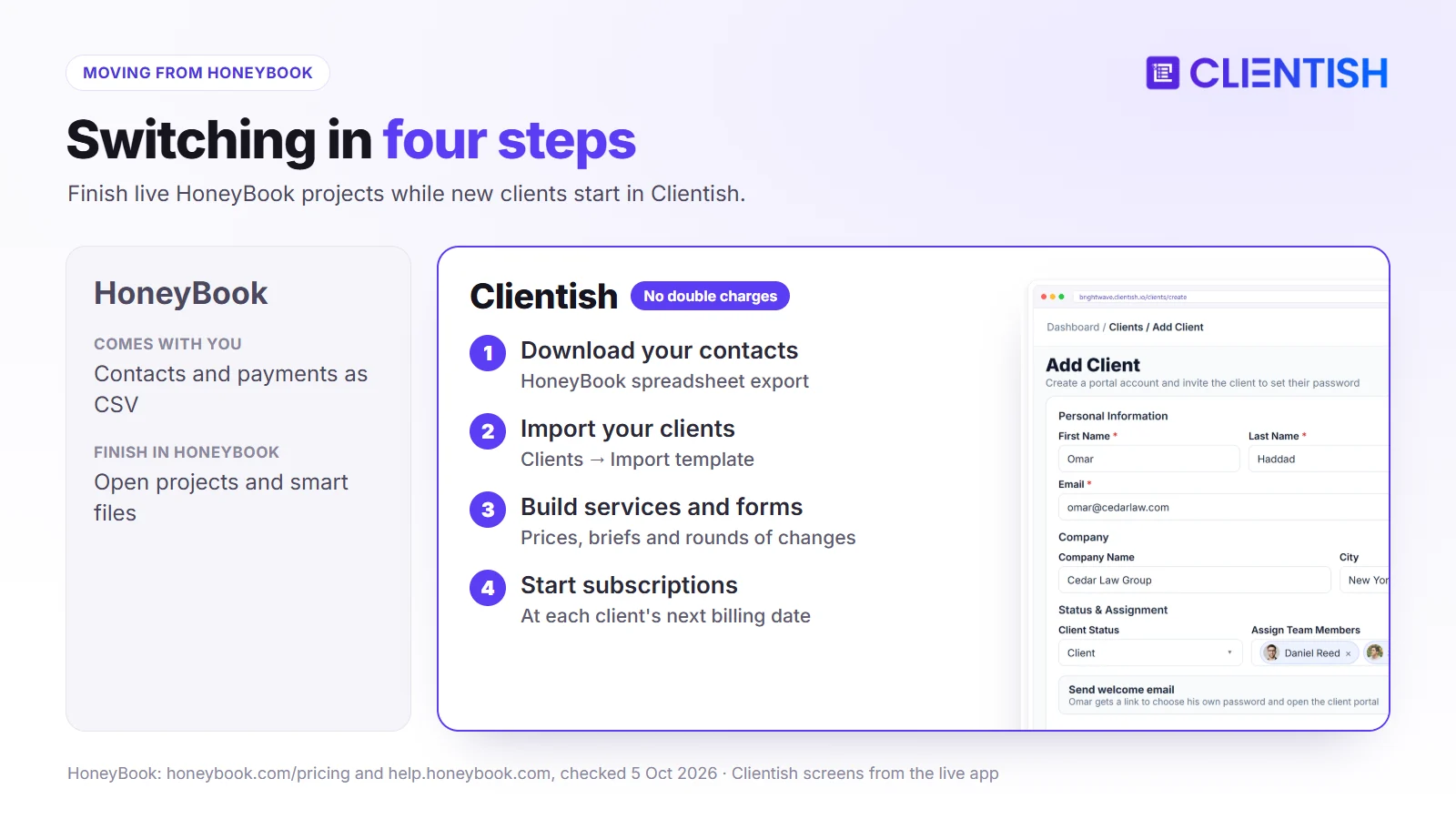
HoneyBook lets you download your contacts as a spreadsheet and export payments to CSV, which covers the records you need to start. After cancelling, existing projects stay readable, but you can’t create new files or projects.
Records to bring
Save HoneyBook’s contact spreadsheet, fill Clientish’s import template (CSV, XLS or XLSX) from it, and upload it under Clients → Import. Keep the payments export for your accountant.
What to set up again
- each package as a Clientish service with its price, brief questions and allowed rounds of changes
- questionnaires as intake forms on each service
- contract wording inside your proposal templates
- recurring invoices as Clientish subscriptions, started at each client’s next billing date
When to switch
Let current HoneyBook projects finish and stop recurring invoices only after the matching Clientish subscription is ready, so no client is charged twice. Start new clients in Clientish from the first day of the move.
Frequently Asked Questions
Quick answers to what agencies ask about HoneyBook’s plans, fees and limits, with the Clientish answer alongside where it helps.
How much does HoneyBook cost?
Plans cost $36, $59 and $129 a month, dropping to $29, $49 and $109 a month when paid for a year.
How many team members does HoneyBook allow?
None on Starter, up to two on Essentials and unlimited on Premium. Clientish includes 5 to 50 depending on the plan.
Can I use HoneyBook outside the US?
Only in Canada, the UK and Australia. Businesses elsewhere can’t sign up. Clientish doesn’t limit countries itself; where you can take payments depends on the gateway you connect.
What are HoneyBook’s payment fees?
Online card payments cost 2.9% + 25¢, saved cards 3.4% + 9¢ and US bank transfers 1.5%, with 1% extra for instant deposit.
Can I use Stripe or PayPal with HoneyBook?
No. HoneyBook processes payments itself. With Clientish, payments flow through whichever of Stripe, PayPal, Paddle or SSLCommerz you link.
Does HoneyBook have support tickets?
No. Clients message inside projects. Clientish has a ticket desk on every plan.
Does HoneyBook still track time?
No. The time tracker was removed on September 7, 2026.
Does HoneyBook work with Xero?
Not directly; it syncs with QuickBooks Online and reaches other tools through Zapier. Clientish connects both QuickBooks and Xero.
Is HoneyBook good for agencies?
It markets itself to agencies, but seat limits, the missing ticket desk and its four-country rule make it a closer fit for solo and very small businesses.
The Verdict: Which Should Your Agency Pick?
HoneyBook serves owner-run businesses in its four countries that book clients, sign contracts and take card payments, with renewals charged automatically and a phone app to run it on the go.
Clientish is built for the agency that comes after that stage: a team that needs seats without the top plan, a support desk, orders with revision limits and payment accounts of its own choosing. It starts at $29 a month, or $23 billed yearly.
- HoneyBook if you work alone or nearly so, in one of its four countries, and value bookings and automatic card renewals.
- Clientish if you lead a team that sells, delivers and supports many clients.
Try Clientish free for 14 days, invite two teammates and one client, and see how orders and tickets compare with your HoneyBook projects.
Sources
Clientish publishes this comparison. HoneyBook details were checked on October 5, 2026 against its pricing page, its UK and Australia launch post, its payments page and fee guide, help articles on payment options, team members, custom domains, the client portal, recurring invoices and email, its integrations, terms and trust centre, its community thread on the time tracker, and reviews on Capterra and Trustpilot.
HoneyBook is a trademark of its owner. Clientish is not affiliated with HoneyBook. See something out of date? Tell us and we’ll correct it.

