

Assembly (called Copilot until September 2025) and Clientish both replace email threads with a branded place for your clients. The biggest difference sits under the surface, in how money moves. Assembly acts as the merchant on every payment and keeps a fee on top of card processing; Clientish plugs into the Stripe, PayPal or other gateway you already own and takes nothing.
Quick answer: Assembly suits firms that need SOC 2 paperwork, their own domain, built-in contracts or custom-built client apps, provided they bank in one of its four payout countries. Choose Clientish if you sell packaged services to many clients and want them to order from a cart, track each order, request revisions and open tickets, while payments go straight to your own gateway and a team of seven costs $39 a month instead of $215.
The comparison below covers payments and fees, the store versus the service catalogue, delivery after the sale, branding, the portal clients see, team pricing, security and support, using Assembly’s own pricing page and documentation.
Key Takeaways
Assembly has changed a lot since 2025: new name, new prices, a store and an AI app builder. Many comparison pages still describe the old Copilot. These are the differences that hold as of October 2026.
- Payment control: Assembly processes every payment itself through its own Stripe Connect setup, so you can’t connect your own processor. It can only pay out to banks in four countries. Clientish connects your own Stripe, PayPal, Paddle or SSLCommerz account, or bank transfer.
- Fees on top of card costs: Assembly keeps an extra slice of each invoice, subscription and store sale (rates in the payments section), and that slice can’t be passed on to clients. Clientish adds none.
- Team cost: Assembly’s Free and Starter plans include one internal user and can’t add more. On Professional, users beyond three cost $29 each a month (yearly). Clientish plans come with room for 5, 15, 30 or 50 people at no extra charge.
- Selling services: Assembly’s Store caps out at a short menu of packages. Clientish has a full catalogue with a cart and coupons, and each purchase becomes an order with intake, revisions and tickets.
- Where Assembly leads: custom domain and email domain from Professional, SOC 2 Type II, built-in contracts with e-signature, task templates, and a free plan.
Assembly vs Clientish at a Glance
Eleven rows that settle most decisions between these two portals. Assembly’s figures are from its pricing page and docs as of October 4, 2026; Clientish is the highlighted column.
| Dimension | Assembly | Clientish |
| Entry price | Free plan; Starter $49/mo ($29 billed yearly), 1 user | Starter $29/mo ($23 billed yearly), 5 team members |
| Payments | Assembly is the merchant; no own processor | Your own Stripe, PayPal, Paddle, SSLCommerz or bank transfer |
| Platform fee on payments | Extra % per invoice, subscription and store sale | None |
| Payout countries | US, UK, Canada, Australia | Wherever your gateway works |
| Selling packages | Store: up to 4 recurring plans, 12 one-time packages | Catalogue with cart, coupons and orders |
| Orders, revisions, tickets | Not built in; can be built with the app builder | Built in, with a first-reply SLA on tickets |
| Custom domain | Professional and up | No; subdomain on clientish.io |
| Remove platform badge | Professional and up | Pro and Enterprise |
| Contracts and e-signature | Yes, PDF contracts with audit trail | Typed signature on proposals |
| Security | SOC 2 Type II; HIPAA on Advanced | 2FA, AES-256 for secrets; no SOC 2 |
| Best for | Firms needing compliance, contracts and custom apps | Agencies selling packaged, repeat services |
For compliance and customisation, Assembly is the stronger platform. Clientish is the stronger one for selling and delivering packaged work, and for keeping payments and fees in your own hands.
Who This Comparison Is For
This page is for agency owners with somewhere between three and twenty people who sell services on repeat: SEO retainers, content packages, design subscriptions, maintenance plans. You’re choosing which client portal to build your operation around, and Assembly keeps showing up in search because it ranks for “client portal” almost everywhere.
The real question is what the portal has to do after a client signs. If it’s mainly a branded room for messages, files, contracts and invoices, Assembly covers that well. If clients also need to buy, track orders, ask for revisions and raise support issues, the comparison shifts.
Reasons agencies look past Assembly
Assembly’s reviews are strong overall. The complaints that keep surfacing, together with what its own docs say, come down to six things:
- No choice of payment processor. Money flows to Assembly first, then to you, and standard Stripe accounts aren’t supported.
- Fees you can’t pass on. The extra billing fee stays with you, even when you pass the card fee to the client.
- Limited payout countries and one currency. Bank accounts outside the US, UK, Canada and Australia can’t receive payouts.
- User and contact limits. Starter covers one internal user and 50 active contacts.
- No orders or tickets out of the box. Delivery tracking and a help desk have to be built as custom apps.
- No mobile app for clients. Clients use the portal through a phone browser.
Assembly Overview: Where It Fits Best
Assembly started in 2020 as Portal, became Copilot in 2021, and renamed itself Assembly on 30 September 2025, partly because “Copilot” was hard to find in search. In August 2026 it repositioned as “the AI app builder for professional service firms”: on top of its built-in apps, firms can describe a new app (a project tracker, a design-approval board, a help desk) and have it built from a template. Assembly says it serves more than 1,000 businesses and a million clients.
Core Assembly features:
- Client experience: a branded portal where clients sign in by magic link, Google or password to see messages, files, forms, contracts, invoices and tasks.
- Messages: one thread per client or company, with attachments, internal notes and email fallback.
- Billing: invoices, subscriptions that charge a saved card or ACH automatically, payment links and a Store.
- Contracts: PDF templates with client and agency fields, e-signature and an emailed audit trail.
- Tasks and automations: boards for internal work with reusable templates, and an automation builder on Professional.
- App builder and AI: 20+ app templates, an AI assistant, and an MCP connection for Claude, ChatGPT and Cursor.
- Embeds and sync: Looker Studio, Power BI, Notion, ClickUp, Calendly and others inside the portal; one-way sync to QuickBooks and Xero.
| Pros | Cons |
| Custom domain and email domain from Professional | Assembly is the merchant; you can’t use your own processor |
| SOC 2 Type II, HIPAA option on Advanced | Extra billing fees that can’t be passed to clients |
| Contracts with e-signature built in | Payouts only to US, UK, Canadian or Australian banks |
| App builder for custom client tools | One user on Free and Starter; extra users from $29/mo |
| Free plan for up to 5 active contacts | No built-in orders, revisions or client tickets |
Assembly pricing as of October 2026: Free; Starter $49 a month or $29 billed yearly; Professional $139 or $99; Advanced $599 or $499; Enterprise on request.
Clientish Overview: Where It Fits Best
Clientish treats every client as a running account rather than a folder of documents. A client buys a service, the order goes to the right people, the brief arrives with it, the work is delivered, revisions are tracked against an allowance, and the next month starts again, all on one record both sides can see.
Where Assembly lets you build almost any client app, Clientish ships the agency-specific pieces ready to use, so the order, the invoice and the ticket already know about each other.
Core Clientish features, measured against Assembly:
- Payments to your own gateway: clients pay the agency’s own account directly, and Clientish adds no percentage; where you can be paid depends on your gateway, not on Clientish.
- Unlimited service catalogue: clients add services to a cart, apply a coupon and pay; Assembly’s Store stops at four recurring plans.
- Orders with revisions: every purchase becomes an order with its own thread, files, delivery and a revision allowance per service.
- Help desk included: client tickets with a first-reply SLA per priority, saved replies, tags, staff CC and internal notes, without building an app.
- Team members in the plan: 5 on Starter, 15 on Growth, 30 on Pro and 50 on Enterprise, with custom roles and per-person overrides.
- Intake per service: each service carries its own questionnaire (with conditional questions) that the client completes after paying.
- Native proposals: eleven designs; acceptance creates the client, invoice and order together.
- Live chat on Growth and up: real-time conversations inside the portal.
- Hours clients approve: remote members log time, and the client signs off the hours report before it’s billed.
- Your branding on every plan: logo, colours, favicon and email through your own SMTP from Starter.
| Pros | Cons |
| Own gateway, no platform fee | No custom domain; portal runs on a clientish.io subdomain |
| Catalogue, cart, coupons and orders built in | No SOC 2 report |
| Tickets with SLA and revision limits | No contract templates or task templates |
| 5 to 50 team members included | Subscriptions don’t charge a saved card automatically |
| Branding from the first plan | No free plan; 14-day trial, then from $29/mo |
Clientish pricing: Starter $29 a month ($23 billed yearly), Growth $49 ($39), Pro $99 ($79), Enterprise $149 ($119). Each tier also limits how many new clients and orders you add per month (10/30 on Starter, 50/100 on Growth, 100/200 on Pro, no limit on Enterprise); details on the pricing page.
How We Compared
We scored both platforms against the jobs an agency hands its portal every month, and against the issues Assembly customers raise most often:
- Payments and billing control: who holds the money, what it costs, and where payouts can go
- Self-serve ordering: whether clients can buy more work without a call or an email
- Work after the sale: orders, briefs, revisions and support
- Branding: domain, email and badge removal, and which plan unlocks them
- Client portal: what clients can do once they’re inside
- Pricing: the yearly cost for a real team, including extra users
- Security and support: certifications, sign-in protection and how you get help
Assembly’s details come from its pricing page and documentation (links in Sources), which changed between July and October 2026; older reviews quoting Copilot prices are out of date. Clientish details come from the product.
Payments and Billing Control: Merchant of Record or Your Own Gateway?
Winner: Clientish. Payments land in your own gateway account, with no platform fee; where you can be paid depends on that gateway, not on Clientish.
For many agencies this is the deciding row. Assembly’s documentation is direct about it: “Assembly acts as the merchant, which means that money first flows to us, and then we immediately send it out to you,” and “you cannot bring your own payment processor.” Behind the scenes it uses Stripe Connect with Express accounts it controls.
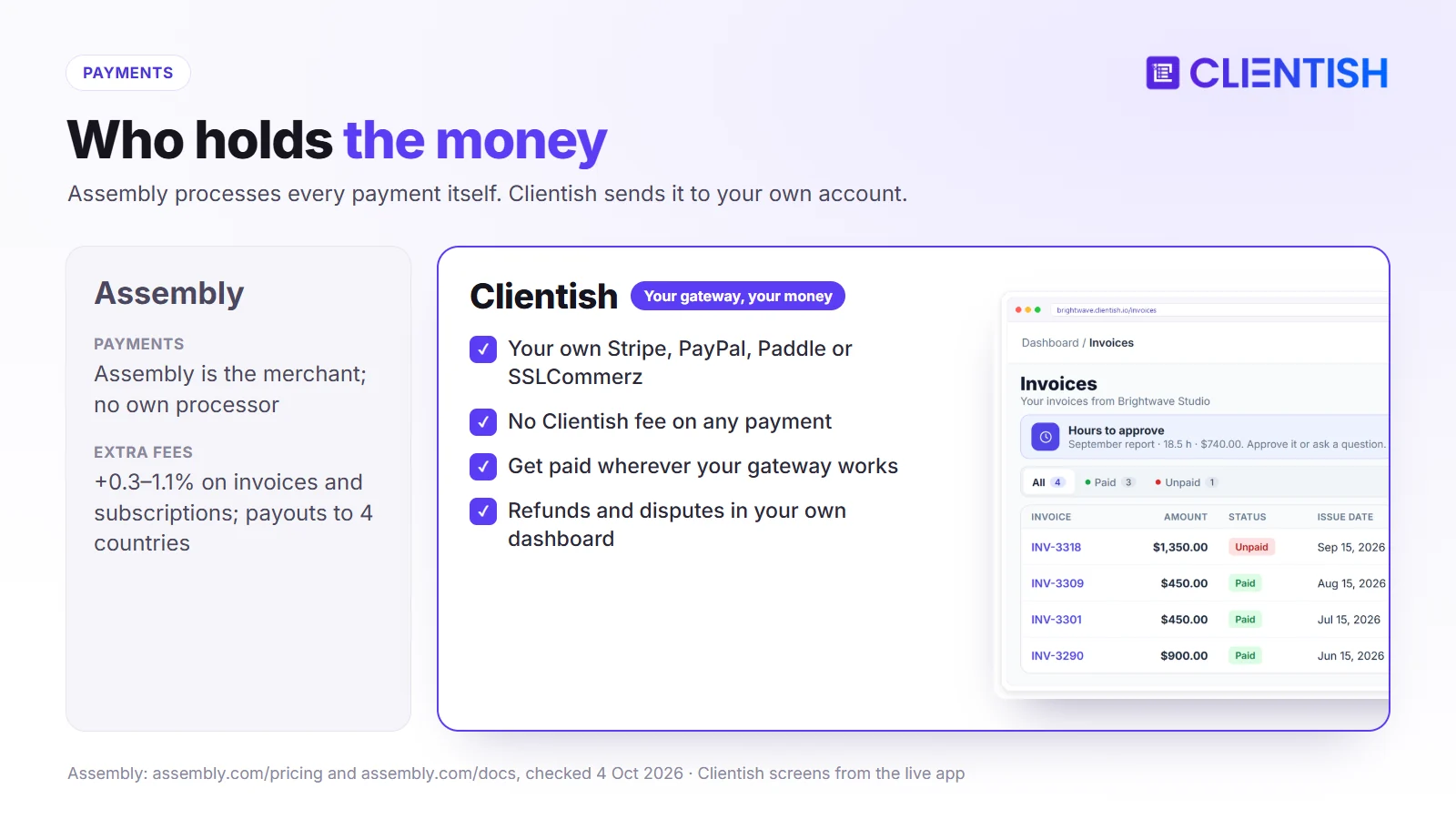
That model has three practical effects:
- Extra fees. On top of 2.9% + $0.30 per card, Assembly charges 0.3% to 0.7% on invoices and 0.5% to 1.1% on subscriptions, falling as you move up plans, plus 0.7% to 2% on Store sales. International cards add 1.5% and currency conversion 1%. You can pass the card fee to clients, but not Assembly’s billing fee.
- Payout limits. Assembly can only send money to a bank in one of four countries, in one currency, and card funds arrive 2 to 5 business days later (ACH: 5 to 9).
- Disputes and refunds through Assembly. A dispute reverses the transfer to you until it’s settled, and refunds from inside Assembly cover only the full amount.
Clientish never touches the money. Clients pay into the account you connected. Full or partial refunds can be made from the invoice in Clientish, while disputes and payout timing stay with your gateway.
| Billing dimension | Assembly | Clientish |
| Who processes payments | Assembly (Stripe Connect, Express accounts) | Your own gateway account |
| Platform fee | 0.3–1.1% on invoices and subscriptions; 0.7–2% on Store | None |
| Payout countries | US, UK, Canada, Australia | Any your gateway supports |
| Client payment methods | Card, ACH, Apple Pay, Google Pay | Depends on gateway; also bank transfer and prepaid balance |
| Subscriptions | Charge a saved card or ACH automatically | Each cycle reopens the invoice for the client to pay |
| Refunds | Full amount only from inside Assembly | Full or partial, from the invoice |
One point in Assembly’s favour: its subscriptions charge a saved card or bank account automatically, while a Clientish subscription reopens the invoice each cycle and the client pays it from the portal, by card, gateway or prepaid balance.
For a US agency billing $15,000 a month in subscriptions on Assembly Professional, the 0.7% subscription fee alone comes to $1,260 a year. Outside Assembly’s four payout countries, the question is simpler: Assembly can’t pay you out at all.
Service Catalog and Self-Serve Ordering: Storefront or Manual Signup?
Winner: Clientish for agencies with more than a handful of packages. Assembly’s Store sells a short menu; Clientish runs a full catalogue that turns each purchase into tracked work.
Selling the next job without a sales call is how productized agencies grow. Both tools now let clients buy, but they go to different depths.
How Assembly Handles New Service Requests
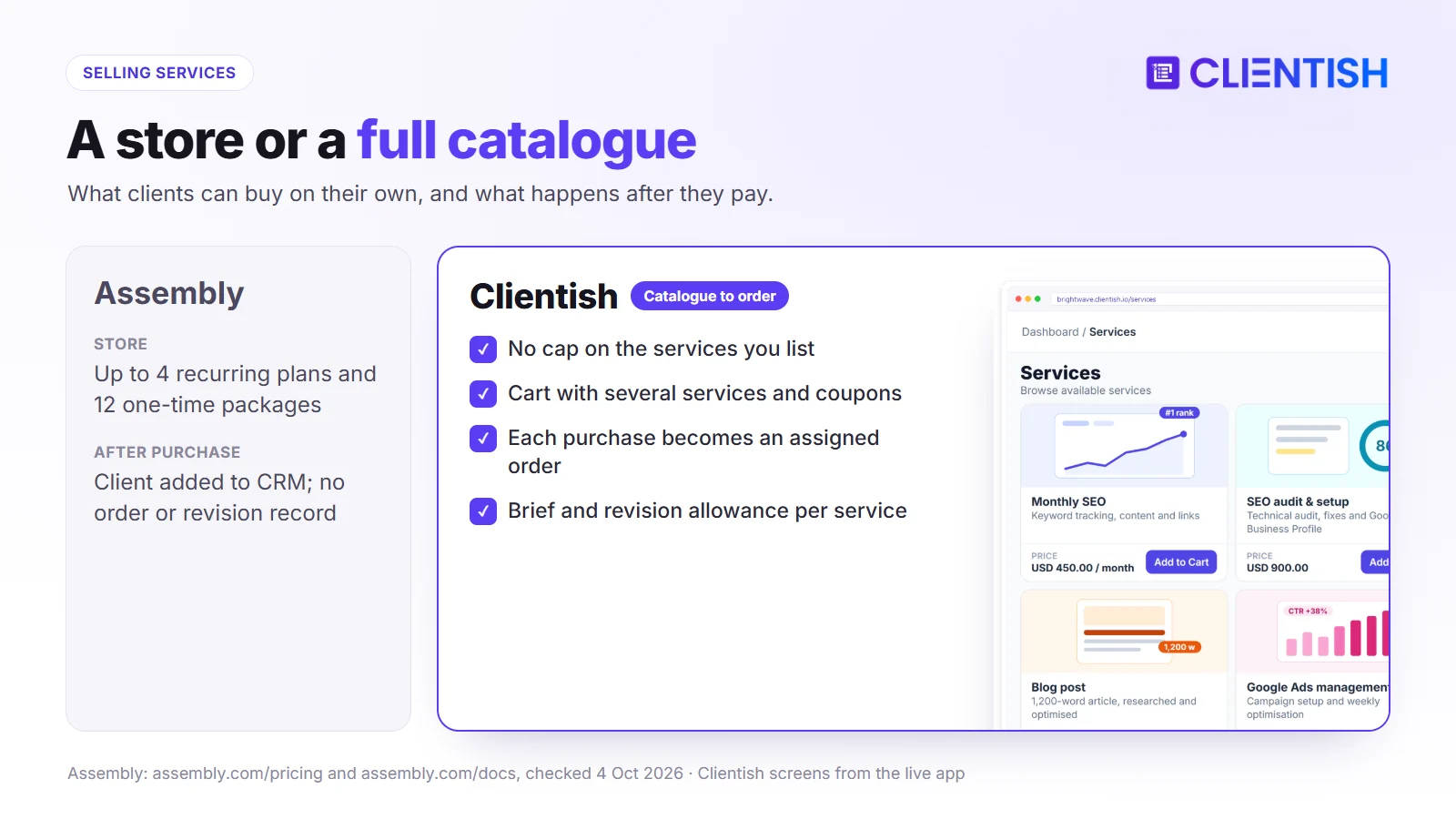
Since June 2025, Assembly has had a Store: a digital storefront, private inside the portal or shared by public link, with up to four recurring plans and twelve one-time packages. A buyer becomes a client in your CRM automatically, and an automation can send an onboarding form after the first purchase. We found no cart for several items, no coupon codes, and no order or revision record created by a purchase.
How Clientish Handles Self-Serve Ordering
A Clientish catalogue has no fixed limit on services. A client can fill a basket with several services at once, enter a discount code and pay through whichever gateway you’ve connected. Once paid:
- the order is created and assigned to the service’s team
- the brief for that service is sent to the client
- the order gets its own message thread, file area and delivery step
- after delivery, the client can request revisions up to the allowance you set
When Self-Service Ordering Matters
If every engagement is a custom quote, a store matters little and Assembly’s proposals-by-app approach is fine. If you sell the same ten packages to forty clients, the difference is daily: Assembly’s Store gets the money in, Clientish also starts and tracks the work.
Managing Work After the Sale
Winner: Clientish for client-facing delivery: orders, revision allowances and a help desk come built in. Assembly is ahead on internal task templates and its automation builder.
Delivery is where most portals stop helping. The client has paid; now the brief has to arrive, someone has to own the work, changes have to be agreed and problems have to land somewhere trackable.
How Assembly Handles the Operational Middle
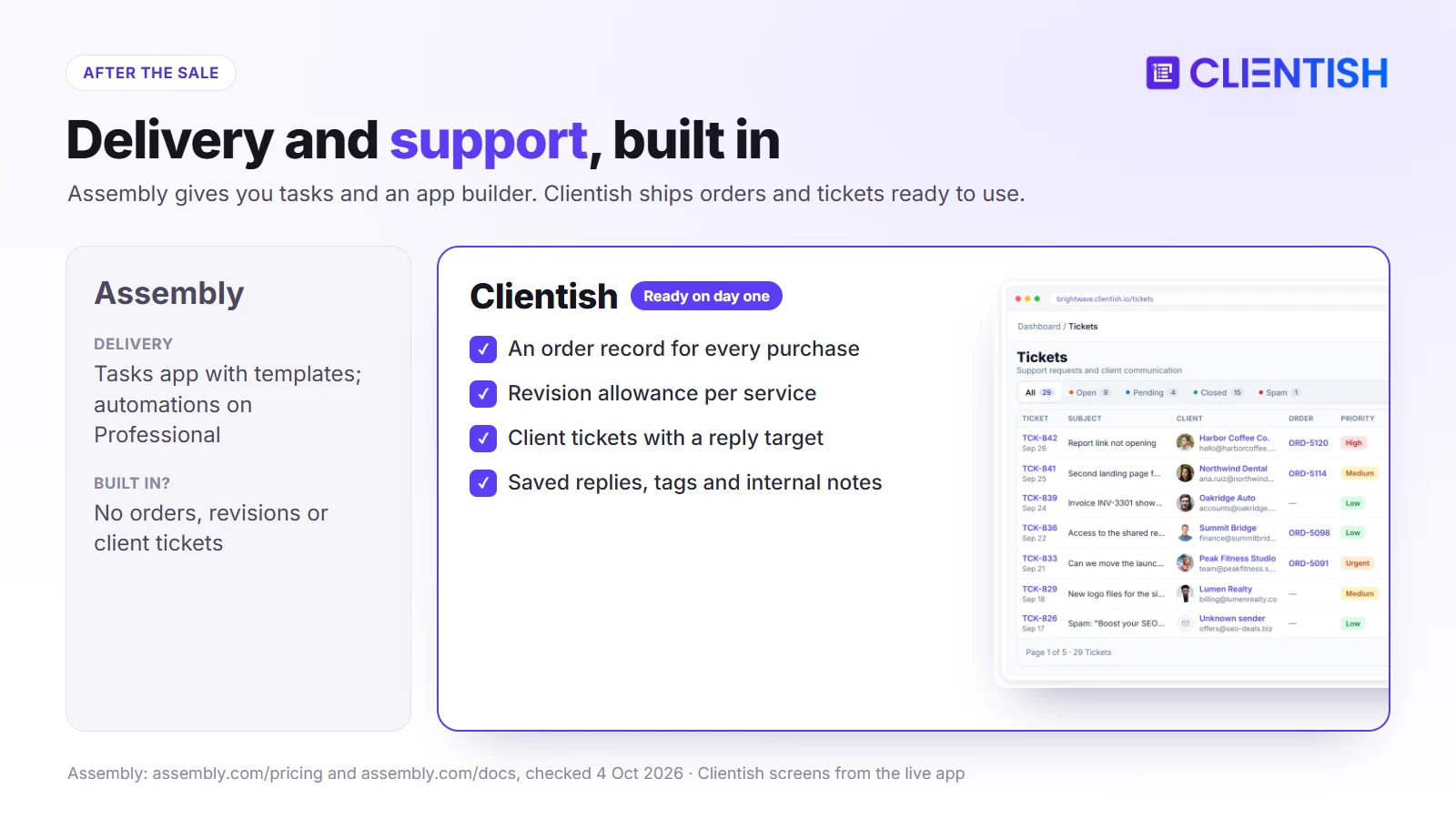
Assembly gives you a Tasks app with kanban and list views, task templates with subtasks and relative due dates, and tasks you can assign to clients. On Professional, automations can create tasks, send forms or messages, or assign contracts when a client signs in, a form is submitted, a contract is signed or an invoice is paid. What it doesn’t ship is an order record, a revision allowance or a client help desk; Assembly offers “Client help desk” and “Design approvals” as templates you build with its app builder.
How Clientish Handles the Operational Middle
In Clientish, the order is the backbone. Each one carries the client’s brief, an internal task list, a thread with the client, delivered files and a revision count. Delivered orders are approved automatically after seven days by default if the client doesn’t respond. Support runs separately as tickets: clients open them in the portal, your team works them with saved replies, tags, internal notes and staff CC, and an overdue timer shows when a ticket passes its first-reply target.
Out-of-the-Box Coverage
Here is what each tool covers out of the box, without building custom apps:
| Capability | Assembly | Clientish |
| Order record per purchase | No | Yes |
| Revision allowance | No (app template available) | Yes, per service |
| Client support tickets | No (app template available) | Yes, with first-reply SLA |
| Task templates | Yes | No |
| Automation builder | Professional and up | Order path automated; webhooks |
| Intake brief tied to the purchase | Via automation after first purchase | Yes, per service |
Branding and White-Label Options
Winner: Assembly on branding depth. Its Professional plan adds a custom domain, a custom email domain and badge removal; Clientish has no custom domain. Clientish’s branding, though, starts on its $23 plan.
Agencies selling under their own name care about three things here: the address in the browser, the sender of notification emails, and whether the platform’s name shows anywhere.
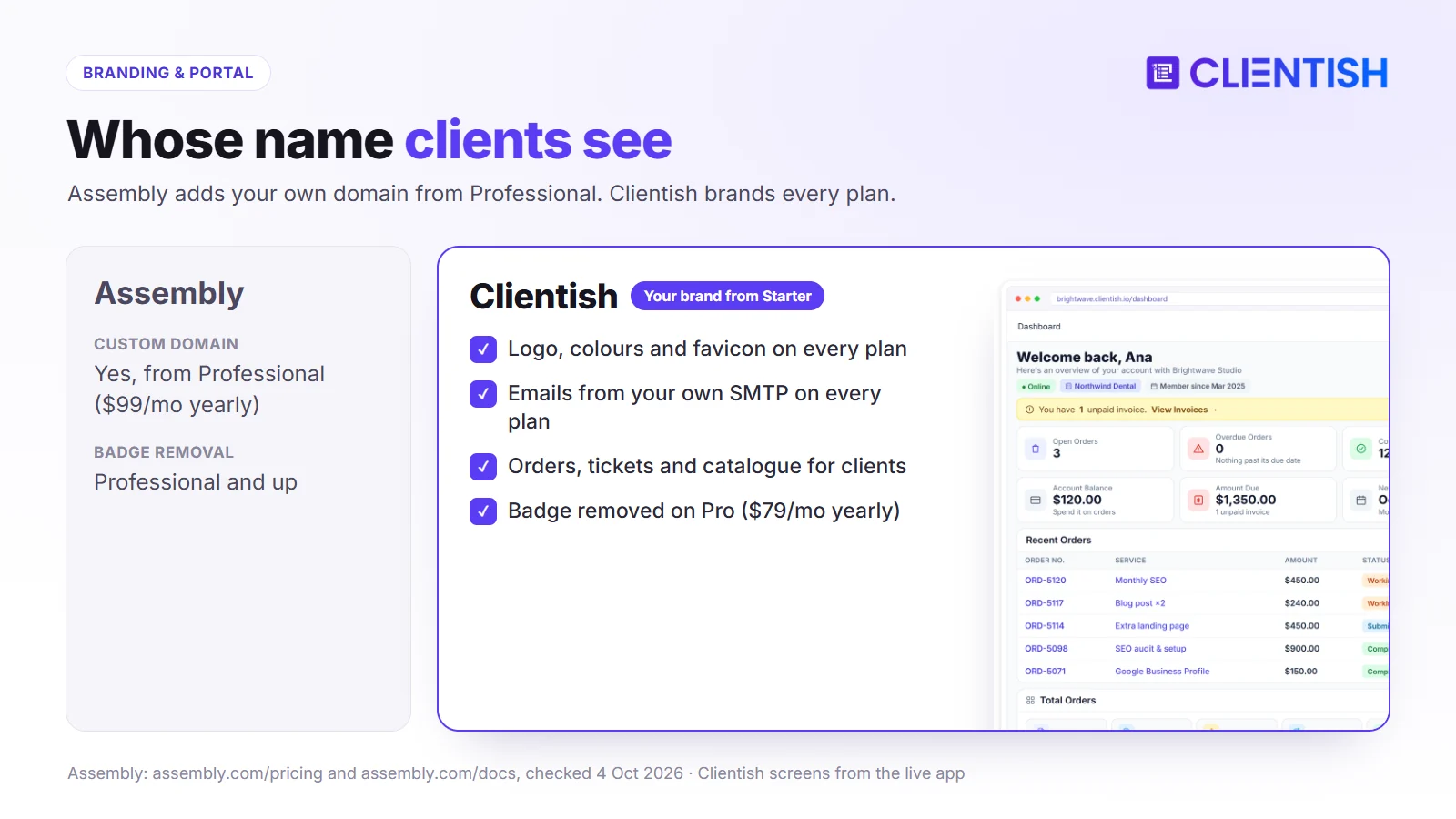
On Assembly, the default address is your-workspace.assembly.com. From Professional ($99 a month yearly) you can point your own domain at it, send notifications from your own email domain and remove the Assembly badge. Logo, colours, font, icon and login image are on every plan.
On Clientish, your logo, colours and favicon apply from Starter, and every email goes through your own SMTP server, so clients receive mail from your address on every plan. The portal sits on a clientish.io subdomain, and the small “Powered by Clientish” line disappears on Pro.
| Branding feature | Assembly | Clientish |
| Logo and colours | Every plan | Every plan, plus favicon |
| Custom domain | Professional and up | Not offered |
| Emails from your domain | Professional and up | Every plan, through your SMTP |
| Remove platform badge | Professional ($99/mo yearly) | Pro ($79/mo yearly) |
If your own domain in the address bar is non-negotiable, Assembly is the one that offers it.
Client Portal Experience
Winner: Clientish for what clients can do on their own once they sign in. Assembly wins on flexibility, because you can add custom apps and embed outside dashboards.
A portal earns its keep when clients use it instead of email. That depends less on how it looks and more on whether the thing they want to do is in there.
What Assembly’s Portal Does Well
Assembly clients sign in with a magic link, Google or a password and find their messages, files, forms, contracts, invoices and tasks in one place. You can embed Looker Studio or Power BI reports, Notion pages or a Calendly booking page, and add any app you build. Files can be organised per client or company with no size limit on those channels, and clients can pay by card, ACH, Apple Pay or Google Pay.
Where Assembly’s Portal Falls Short in Practice
Messaging is a single thread per client, so a question about one project sits in the same stream as everything else. Clients can’t follow an order’s status, claim a revision or open a ticket unless you build those apps first. There’s also no native mobile app; clients use the browser on their phone.
Choosing Based on Client Experience
Clientish clients get a narrower but agency-specific set of actions: order from the catalogue, follow each order and message on it, fill in the brief, request revisions, open and rate tickets, pay invoices or use a prepaid balance, and manage subscriptions. Clientish has no general message thread outside orders, tickets and live chat, and no portal-wide file library; files live with the order they belong to.
| Dimension | Assembly | Clientish |
| Client sign-in | Magic link, Google or password | Account on your subdomain |
| Messaging | One thread per client | Thread per order, tickets, live chat (Growth+) |
| Files | Per-client file channels | Attached to orders and deliveries |
| Ordering and revisions | Store purchases; no revisions | Cart, orders, revision allowance |
| Embedded dashboards | Looker Studio, Power BI, Databox and more | Not offered |
| Custom apps | AI app builder | Not offered |
Pricing and Cost as Your Agency Grows
Winner: Clientish for teams of two or more. Assembly’s Free plan is the cheaper start for a solo consultant with a few clients.
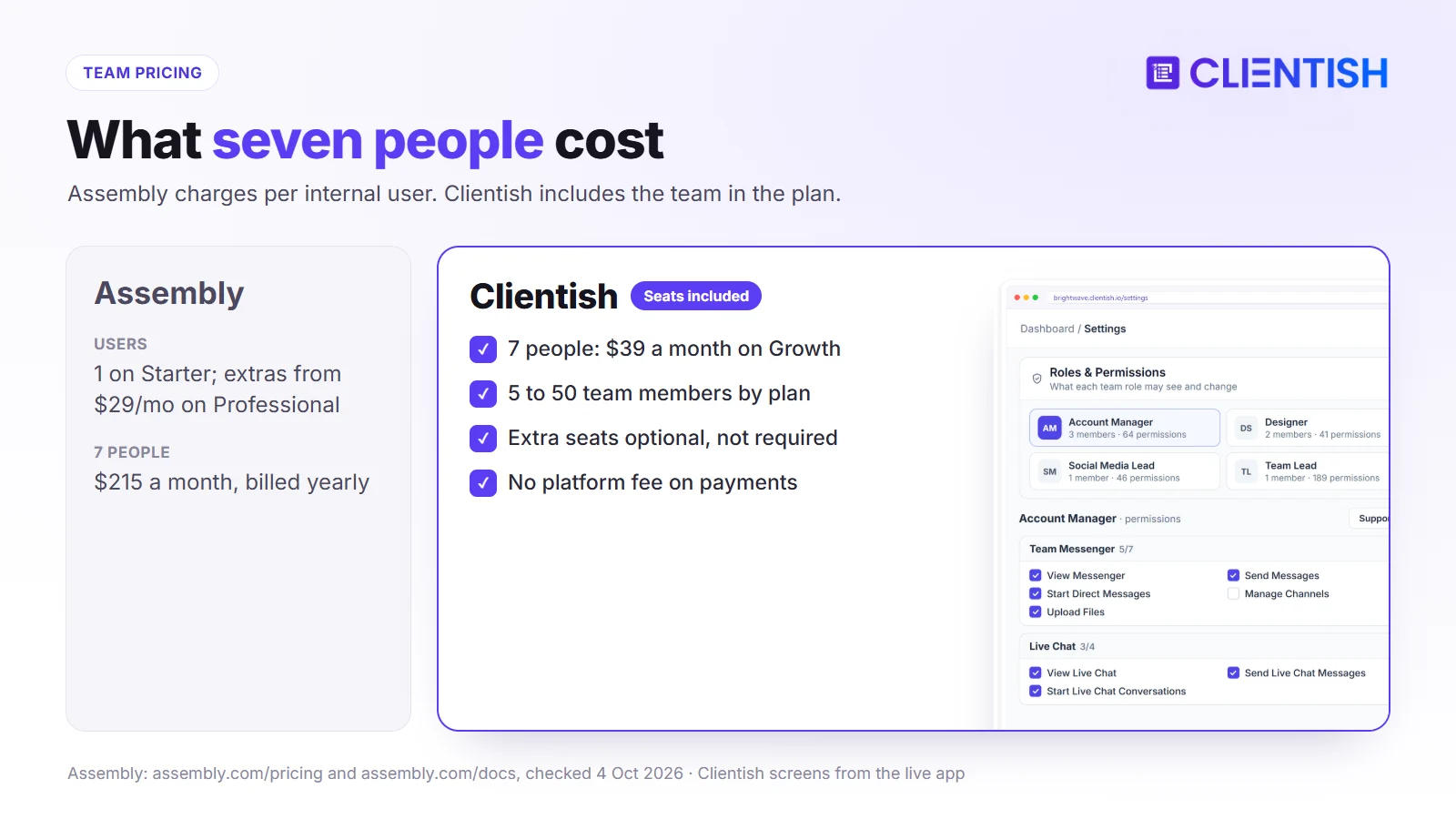
Assembly prices by internal users and active contacts. Free and Starter include one user and can’t add more; Professional includes three, with extra users at $29 a month on yearly billing ($39 monthly); Advanced includes five, with extras at $59. Active contacts are capped at 5, 50 and 500 on Free, Starter and Professional.
| Plan | Assembly (monthly / yearly) | Users included | Clientish equivalent |
| Entry | Starter $49 / $29 | 1 | Starter $29 / $23, 5 members |
| Mid | Professional $139 / $99 | 3 (+$29 each yearly) | Growth $49 / $39, 15 members |
| Upper | Advanced $599 / $499 | 5 (+$59 each yearly) | Pro $99 / $79, 30 members |
| Top | Enterprise, on request | Custom | Enterprise $149 / $119, 50 members |
The 12-month view at a real team size
Take seven people. On Assembly, Starter can’t hold them, so the team needs Professional: $99 a month plus four extra users at $29, or $215 a month, $2,580 a year on annual billing, before any payment fees. On Clientish, seven people fit in Growth at $39 a month, $468 a year. If the agency also wants Assembly’s custom domain, that’s included in the $2,580; Clientish can’t match the domain at any price. You can check the Clientish side with your own numbers on a 14-day free trial.
What the pricing structure signals
Assembly’s model charges for both people and clients, and earns a share of payments on top. Clientish’s model charges for the plan and leaves payments alone. For an agency that grows by adding retainer clients and staff, the second model keeps costs steadier for longer, because team members are included up to the plan’s limit; for a firm that needs compliance documents and a custom domain, the first buys things Clientish doesn’t sell.
Security, Support, and Account Protection
Winner: Assembly on certifications and support tiers. Clientish covers the security basics and includes chat support on every plan, but has no SOC 2 report.
If an enterprise client sends you a security questionnaire, this section matters more than any feature table.
Assembly’s support and security posture
Assembly completes SOC 2 Type II audits, offers HIPAA with a business associate agreement on Advanced, and supports GDPR. Two-factor sign-in is available to staff and clients on every plan, with enforcement and an audit log on Advanced. Support runs by plan: community forum on Free, email from Starter, priority email from Professional, priority calls and onboarding from Advanced, and a shared Slack channel on Enterprise.
Clientish’s support model
Clientish offers two-factor sign-in by email code or authenticator app, locks accounts after repeated failed logins, hashes passwords with bcrypt, encrypts gateway secrets and saved card details with AES-256, and lets each workspace switch on Google reCAPTCHA. It doesn’t hold a SOC 2 report. Help from the Clientish team comes by chat or a tracked ticket on any plan; Enterprise adds dedicated support.
| Dimension | Assembly | Clientish |
| Certification | SOC 2 Type II; HIPAA on Advanced | None |
| Two-factor sign-in | All plans; enforcement on Advanced | Email code or authenticator app |
| Audit log | Advanced and up | Activity logs on invoices, tickets and clients |
| Support on the entry plan | Email (Starter); community only on Free | Chat and tickets |
Where Assembly and Clientish Are Similar
Underneath the differences, both are built to keep client work out of the inbox, and both handle the routine parts of a client relationship in a branded space:
- Branded client login with your logo and colours
- Invoices and subscriptions paid inside the portal
- Intake forms for onboarding
- Two-factor sign-in for staff
- QuickBooks and Xero connections
- Zapier or Make and an API for wider automation
- MCP connections so AI assistants like Claude can read your data
The choice isn’t between a portal and no portal. It’s between a configurable platform that runs your payments, and a ready-made agency system that leaves payments to you.
What Neither Platform Fully Replaces
Some jobs still need another tool, whichever of the two you pick, and it’s worth budgeting for them before you migrate rather than discovering them afterwards:
- Accounting. Both sync to QuickBooks or Xero, but neither is a ledger.
- Complex project planning. Clientish has no Gantt charts or resource planning, so multi-phase planning needs a separate tool.
- Native phone apps for clients. Both rely on the mobile browser; Assembly has a Mac app for staff.
- Deep business reporting. Assembly embeds external dashboards; Clientish reports on revenue, orders, clients, coupons and time. Margin-by-client analysis needs a separate tool.
A Real Example: Which Fits a 7-Person Agency?
A seven-person content agency (founder, two account managers, three writers and a part-time coordinator) runs 18 retainer clients and sells extra blog posts and landing pages on top. Most clients pay monthly; a third are in Europe and pay in euros.
The team’s pain is the middle of the month: extra jobs arrive by email, revisions are argued over, and nobody knows which client is waiting on a reply.
How Assembly fits this team
Assembly would give each client a tidy space for messages, files, contracts and invoices, and subscriptions would charge automatically. But seven users means Professional plus four extra users, about $215 a month on annual billing. Euro payments carry the 1.5% international card fee and 1% conversion on top of Assembly’s subscription fee, and if the founder’s company banks outside Assembly’s four payout countries, payouts aren’t possible. Extra jobs and revisions would need custom apps built first.
How Clientish fits this team
On Clientish Growth ($39 a month yearly), the seven fit with room for eight more. Extra blog posts are bought straight from the catalogue, every purchase opens its own order and brief, revision rounds are tallied per package, and questions come in as tickets with a reply target. Euro payments go through the agency’s own Stripe or Paddle account at that provider’s rates.
The call for this team
Clientish fits this agency better on cost, payments and day-to-day delivery. Assembly would be the better pick if the agency’s clients were banks or healthcare providers asking for SOC 2 and HIPAA, or if a custom domain were a hard requirement.
Good For / Avoid If
Use these lists against your own setup: where your bank is, how many people need access, what clients buy, and whether compliance paperwork is part of selling.
Assembly
| Good for | Avoid if |
| Firms whose clients ask for SOC 2 or HIPAA | You want payments in your own Stripe or PayPal account |
| Teams that want a custom domain and email domain | Your bank is outside the US, UK, Canada or Australia |
| Consultancies that send contracts for e-signature | You’d rather not pay a platform fee on every invoice |
| Firms that want to build their own client apps | You need orders, revisions and a help desk without building them |
| Solo consultants starting on the Free plan | Your team will pass three people soon |
Clientish
| Good for | Avoid if |
| Agencies selling packaged, repeat services | You need a SOC 2 report for procurement |
| Teams of 3 to 50 who want team members included in the plan | Your portal must sit on your own domain |
| Agencies paid in many countries and currencies | You need contract templates with e-signature |
| Retainers with revision allowances and support | You want subscriptions to charge cards automatically |
Migrating from Assembly to Clientish
Moving off Assembly is mostly about payments and setup, because Assembly’s exporter is limited and active subscriptions live in Assembly’s Stripe accounts.
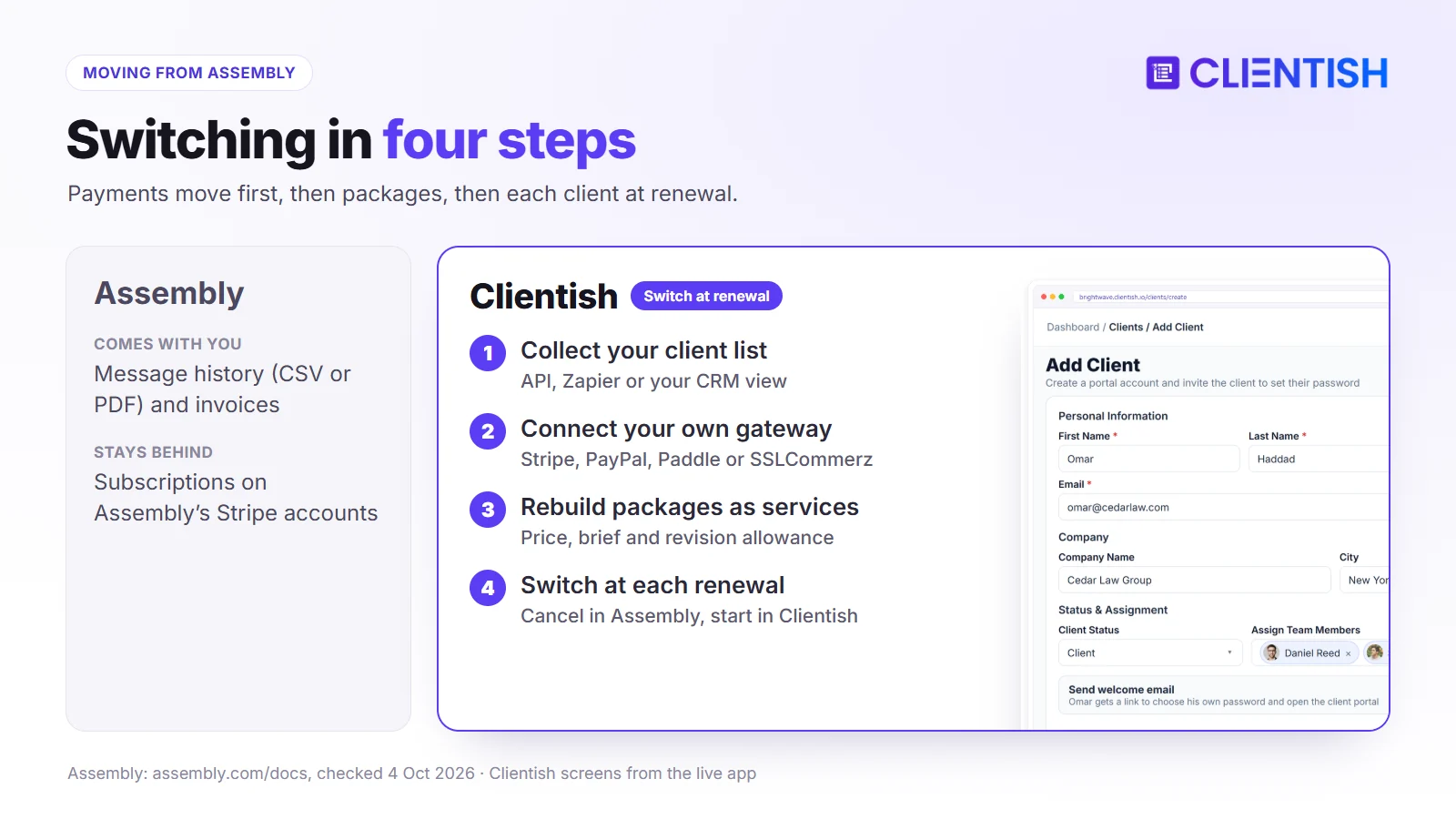
- Collect your client list. Assembly’s exporter app covers message histories (CSV or PDF); for contacts, use its API or Zapier, or copy them from your CRM view. Download invoices you want to keep.
- Import clients into Clientish with the CSV/XLS template under Clients → Import.
- Set up payments in Clientish with your own Stripe or PayPal account, or Paddle, SSLCommerz or bank details. Because Assembly’s subscriptions run on its own Stripe Connect accounts, they can’t be moved; clients will pay their first Clientish invoice fresh.
- Rebuild your Store packages as services, each with a price, intake form and revision allowance, and add coupons if you used discounts.
- Brand the portal and connect your SMTP server.
- Switch clients over at renewal. Cancel each Assembly subscription after its last charge and create the matching Clientish subscription for the next cycle.
Keep Assembly running until the last subscription has moved, so messages and files stay reachable during the handover.
Frequently Asked Questions
Answers to the questions agency owners ask when they compare these two portals, including several that most review pages still answer with Copilot-era facts.
Is Assembly the same as Copilot?
Yes, same company and product: the Copilot name was dropped on 30 September 2025. Existing portals on copilot.app addresses kept working.
Can I use my own Stripe account with Assembly?
No. Assembly processes payments as the merchant through Stripe Connect Express accounts it manages, and says you can’t bring your own processor. In Clientish, the payment account is yours.
How much does Assembly cost in 2026?
Free; Starter $49 a month ($29 billed yearly); Professional $139 ($99); Advanced $599 ($499); Enterprise on request. Extra internal users cost $29 to $79 a month depending on plan and billing.
What fees does Assembly charge on payments?
Card processing is 2.9% + $0.30. On top, Assembly adds 0.3% to 0.7% on invoices, 0.5% to 1.1% on subscriptions and 0.7% to 2% on Store sales, plus 1.5% for international cards and 1% for currency conversion.
Does Assembly have a free plan or trial?
It has a free plan with 5 active contacts, one user and three apps. Clientish has no free plan but offers a 14-day free trial.
Can clients buy services without contacting the agency first?
Both allow it. Assembly’s Store sells a fixed menu of packages. Clientish’s catalogue has a cart and coupons, and each purchase starts a tracked order.
Is Assembly’s white-label available on entry plans?
Logo and colours are on every plan. Custom domain, custom email domain and badge removal start on Professional. Clientish’s branding and SMTP email are on every plan, but it has no custom domain.
Does Assembly have support tickets?
Not as a built-in feature. Assembly offers a “Client help desk” template you can build with its app builder. Clientish includes tickets with a first-reply SLA, saved replies and internal notes.
Is Assembly SOC 2 compliant?
Yes, it completes SOC 2 Type II audits and offers HIPAA with a BAA on Advanced. Clientish does not have a SOC 2 report.
Does either have a mobile app for clients?
No. Both work in a phone browser. Assembly offers a Mac desktop app for internal teams.
Can I move my Assembly subscriptions to Clientish?
Not directly, because they run on Assembly’s Stripe Connect accounts. Recreate each one in Clientish and switch at the client’s next renewal.
The Verdict: Which Should Your Agency Pick?
For a professional-services firm that needs compliance documentation, a custom domain, contracts with e-signature or tailor-made client apps, and banks in one of Assembly’s four payout countries, Assembly is the better choice.
For an agency that sells packaged services, the trade-offs run the other way. Assembly keeps a share of every invoice and subscription, controls when payouts arrive, charges for each extra user, and leaves orders, revisions and support for you to build.
Clientish gives that agency a catalogue clients buy from, orders with briefs and revision allowances, a help desk with reply targets, and team seats in the plan, while every payment goes straight into its own gateway.
- Go with Assembly if compliance, a custom domain or custom-built client apps matter more than payment control.
- Go with Clientish if you sell repeat services, want to own your payments and fees, and have a team that keeps growing.
Try Clientish free for 14 days with your own gateway connected and a few of your packages in the catalogue.
Sources
Clientish wrote and publishes this page. We verified Assembly’s details on October 4, 2026, using Assembly’s pricing and its documentation on payments, fees, the Store, subscriptions, messages, users, custom domains and security, plus the rename announcement.
Assembly and Copilot belong to their respective owner; Clientish is an independent company with no ties to them. If any detail here has changed, let us know and we’ll fix it.

