
Social Media Client Onboarding Checklist Template
When you onboard a social media client, you are being handed something no other agency service touches: the keys to a brand's public voice. From the first post, your team speaks as the client, in front of the client's entire audience, in real time.
Free to download and edit · No watermark · Add your own branding
That raises the stakes of onboarding well beyond collecting logins. Before a single post goes out, you need the brand's voice captured, the content pillars agreed, the approval process locked, and the accounts accessed the right way, or the first week becomes a string of nervous "wait, did you clear that with us?" messages.
This page gives you a free, editable Social Media Client Onboarding Checklist template for agencies, built around the things social work specifically needs: brand-voice capture, content pillars, an approval workflow, and proper account access. It runs on a timeline from signed contract through the first 30 days. Download it, add your branding, assign owners, and run it for every new social client.
What Is Social Media Client Onboarding?
Everything between a signed social contract and the first scheduled post is onboarding, and in social that window carries more than access and paperwork.
It is where the agency learns to sound like the brand: gaining account access the right way, capturing how the brand speaks and looks, settling what the content will be about, pinning down how posts get approved before they publish, and agreeing the cadence and the numbers you will report back.
Two things make it unlike onboarding any other service. The work is public and live, so a mistake in the first week is not a private draft the client never sees; it is a post their audience sees instantly. And the agency produces in the client's own voice, which means onboarding has to extract something intangible, the brand's tone, its personality, the lines it will not cross, before anyone can safely write a caption.
What the checklist covers besides the phases
Those two realities are why social onboarding leans so heavily on voice capture and a structured approval process: the agency cannot publish anything until it can write in the client's voice, and the client needs a clear sign-off step before anything goes live under their name.
Rush this and the pattern is predictable: the agency posts something slightly off-brand in week one, the client panics, and a relationship that should have started with momentum starts with a trust repair. A proper onboarding front-loads the voice work and the approval rules precisely so that first post lands right.
How to Structure Social Onboarding: Three Phases
Social onboarding, like any onboarding, runs best as a timeline. The three phases below put the highest-risk social work, voice and approval, where it belongs: before anything publishes.
Before you start
First 48 hoursInternal handoff, welcome message, workspace setup, and team assignment, so the client never hits silence after signing. This phase must come first because no other work can proceed until the right people have the right access and context internally.
The first week
Account access, the social questionnaire, the content-foundation session (voice, visual identity, pillars, do-not-post list), the competitor social audit, and the approval workflow. This is the heaviest phase in social, because none of it can wait until posting starts. It comes before Phase 3 because every content and reporting decision downstream depends on the brand rules and approval chain established here.
The first 30 days
The content calendar, a first quick win, the first report against a follower-and-engagement baseline, and a 30-day check-in. This phase can only run meaningfully once Phase 2's foundation is in place — the calendar, the baseline, and the quick win are all outputs of the voice and audit work done before them.
The reason the phases matter is that each guards a different failure: skip Phase 1 and the client feels dropped; skip Phase 2's voice-and-approval work and the first post goes out wrong; skip Phase 3's early calendar and quick win and the client sees no proof before the first invoice renews.
Why Your Agency Needs a Social Onboarding Checklist
A repeatable social onboarding checklist is what turns social media management from a reactive, account-by-account scramble into a consistent, scalable service — one that clients can see is professional from day one.
It captures the brand voice before anyone posts in it
Documented tone, personality, and do-not-post rules mean every team member writes with the same guardrails, regardless of who is handling the account that week. Consistency at scale starts here.
It locks the approval process before the first post is due
A written approval rule — who signs off, by when, and that nothing publishes without it — is the operational foundation that lets you manage multiple clients without any single account becoming a liability.
It gets account access the right way
Social access through a business-manager tool rather than raw passwords is a trust signal clients notice. It shows the agency operates professionally, protects both sides, and removes friction at offboarding.
It sets the content direction so month one is not improvised
Agreed pillars and a competitor read give the team a clear brief from the start, which means faster execution, fewer revision rounds, and a client who can see their strategy reflected in the first calendar.
The Risks of Skipping Structured Social Onboarding
Each gap in social onboarding has a public, fast-moving way of going wrong.
With no documented voice, the agency writes a caption that misjudges the brand's tone, and it publishes before anyone senior reviews it. The client's audience sees it, the client is mortified, and week one is spent apologising instead of building. (→ Phase 1, brand-voice capture step; Phase 2, approval-gate step)
Nobody agreed who approves content or by when, so posts either stall waiting for sign-off or go out unreviewed to keep the schedule. Either way, the client loses confidence. (→ Phase 2, approval-workflow step)
The agency set up the client's new TikTok under its own email, or changed the Instagram password and never shared it. At exit, the client fights to recover their own accounts. (→ Phase 1, access and permissions step)
No content pillars were agreed, so the first month's posts are a scattershot of whatever the agency thought of that week, with no theme the client recognises as their brand. (→ Phase 1, content-pillars step)
The agency spends weeks on setup with nothing the client can see, and no early win or baseline. By the first renewal the client has seen no proof, and churns. (→ Phase 2, baseline-reporting step; Phase 3, early-win review step)
The Social Onboarding Checklist, Phase by Phase
The template holds this full checklist as checkboxes with owner and due-date columns, plus the access list, the questionnaire, a content-foundation worksheet, and an approval-workflow table. Here is what each phase covers.
Before You Start
Brief the social team on what was sold, the client's goals, and anything promised, so strategy starts from the real agreement.
Confirm the client is in, name their main contact, and preview the first week. Speed sets the tone.
A single home for access, brand assets, the content calendar, approvals, and reporting.
The day-to-day contact, the content lead, the community manager, and who the client escalates to.
The First Week
Through a business-manager tool where possible, not raw passwords: Meta Business Suite (Instagram, Facebook), TikTok, LinkedIn, X, and the scheduling tool. Confirm each is granted and working.
Goals, target audience, brand voice and personality, competitors, platforms in scope, posting frequency expectations, and what has and has not worked before.
Capture the brand voice and tone, visual identity and asset library, the content pillars (the three to five themes the brand will post around), and the do-not-post list of topics, competitors, and claims to avoid. This is the session that makes the first post safe.
Review two or three competitors' accounts for what performs, what to differentiate from, and content gaps to exploit.
Agree who on the client side approves content, the turnaround (commonly 24 or 48 hours after submission), the channel it runs through, and the rule that nothing publishes without sign-off.
The First 30 Days
Map the pillars to a posting schedule per platform for the first month, and get it approved through the new workflow.
A visible early result, such as a sample post set in the brand's new voice, an optimised profile, or the first week of content ready to go, that proves value before the full calendar runs.
Agree the metrics (reach, engagement, follower growth, top content) and record the starting numbers so progress is measurable.
Review early performance against the baseline, confirm the next 60 days of content direction, surface blockers (usually approvals or asset gaps), and collect feedback while there is time to adjust.
The step most social templates skip
Most social onboarding templates collect brand assets but never run a real content-foundation session, so the pillars and the do-not-post list stay vague and the first month drifts. Pairing a documented content-foundation with a written approval workflow is what actually prevents the off-brand-post disaster, and together they are the difference between a social retainer that builds trust and one that spends month one recovering it. The free template builds both into Phase 2.
Tips and Best Practices for Social Onboarding That Retains Clients
Having the steps in order is half the job. What turns a tidy social onboarding into one a client stays for is knowing how to handle the moments when the process breaks down.
Run the voice session remotely with a structured prompt sheet, not a blank call
Screen-share a live document and work through questions in real time: three brands they admire and why, three words they'd never use, one post they've seen that made them cringe. Record the call with permission and paste the transcript directly into the brand voice document so nothing is lost in translation.
When a client has no brand guidelines at all, build a micro-guide during onboarding rather than waiting
Ask for three to five examples of content they've liked — competitors', not their own — and use those to draft a one-page tone reference: voice adjectives, a do/don't word list, and a content no-go list. Have them sign off before any copy is written.
When a client misses the 48-hour approval window, the schedule slips — full stop
State this in the contract and repeat it in the onboarding welcome message. In practice: send a reminder at the 24-hour mark via the portal, then a second at 40 hours. If no response by hour 48, move the content to the next slot and notify the client in writing. Never publish unreviewed content to fill a gap.
If a client can't complete Business Manager access in the first session, book a screen-share within 48 hours rather than chasing by email
Most access delays are confidence problems, not permission problems. Walking them through it live takes ten minutes and removes the most common week-one blocker.
Agree content pillars before any content is drafted, and get written confirmation
If a client changes a pillar after content is in production, that's a scope change — log it and apply your revision policy. Pillars agreed in writing prevent the "this isn't quite what we meant" conversation at the end of month one.
Deliver the first sample content before the kick-off call ends if possible
Even a single draft post in the agreed voice gives the client something to react to while the relationship is newest and most forgiving. It also surfaces voice mismatches early, when corrections are cheap.
At the 30-day check-in, bring the baseline numbers and a written summary, not just a verbal update
Clients who feel informed are less likely to go quiet before a renewal decision. If results are below expectation, address it directly and bring a revised approach — waiting for the client to raise it is the riskiest move an account manager can make.
How to Use the Free Social Onboarding Checklist Template
Four steps get the checklist working for your next social client.
Copy it first
Download the Word (.docx) file, or upload it to Google Docs, and work on your copy, not the original.
Put names and dates on it
The sheet includes a dedicated Owner column and a Due Date column on every row, so each task — access requests, brand voice sign-off, approval workflow setup — is assigned to a specific person with a deadline before work begins.
Mark progress with the Status column
A fourth column lets you log each task as Not Started, In Progress, or Complete, giving you an instant read on where onboarding stands at any point.
Run it per client
Duplicate the sheet tab for each new social client and work through the phases in order.
Running Social Onboarding Inside a Client Portal
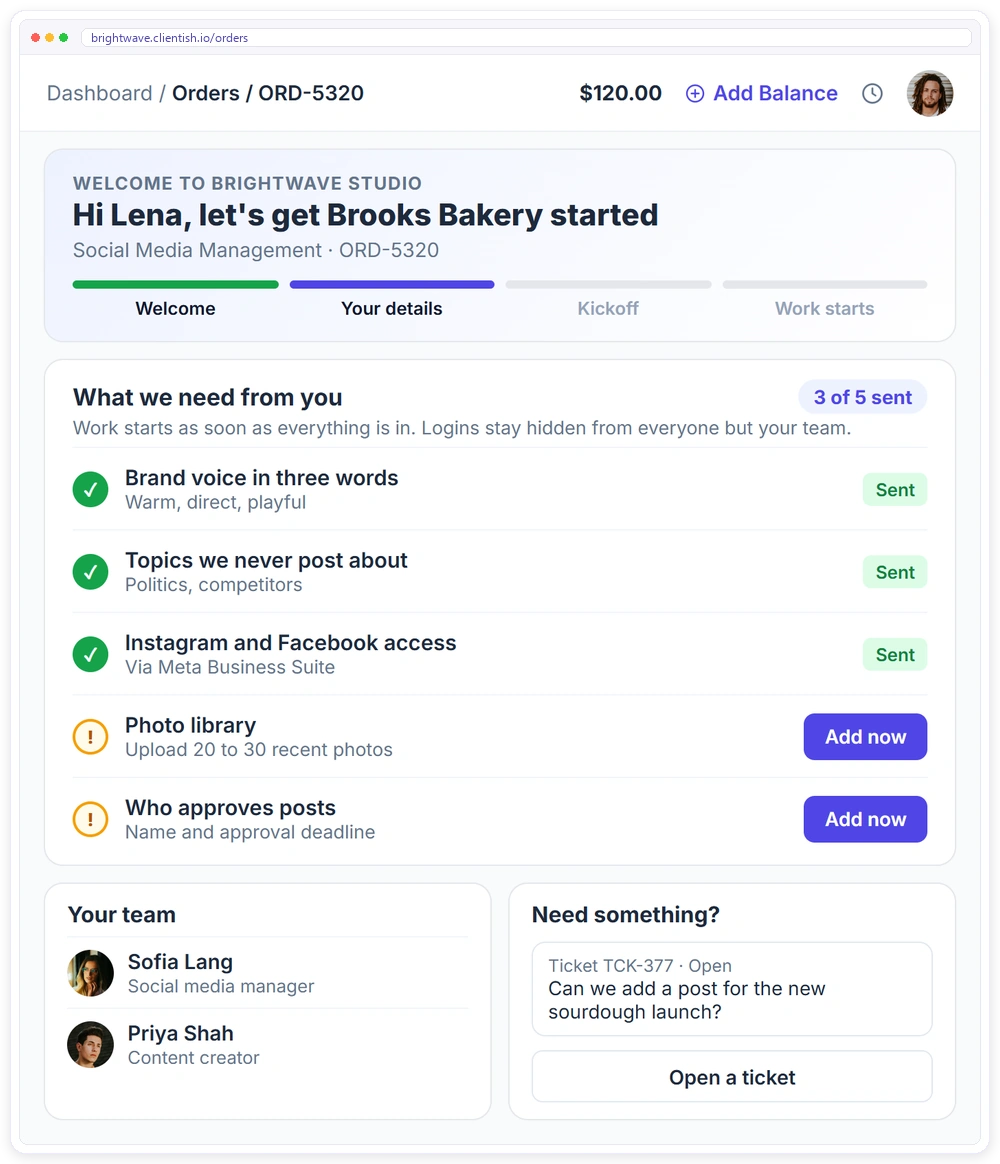
A checklist keeps your team on track. What the client experiences, though, is the welcome, the access requests, the approvals, and the first report, and that experience is what a client portal carries.
- ✓A branded client portal on your own subdomain from day one, with orders, invoices and subscriptions
- ✓An onboarding form attached to the service, so the order waits until the client sends what you need
- ✓Logins collected in hidden fields that only your team sees
- ✓Clients open a support ticket with SLA response times instead of chasing you by email
- ✓A task template creates the onboarding tasks with owners and due dates for every new client
Download the free social media client onboarding checklist template
The editable Word checklist with 21 tasks across three phases, plus access checklist, content foundation worksheet, approval workflow. Add your branding and run it for every new client.
Frequently asked questions
Is this social onboarding checklist template free to use?
Yes, with no watermark and nothing to pay. Download and edit it in Google Docs, Google Sheets, or Word, brand it, and reuse it for every social client you take on.
What account access do I need when onboarding a social client?
Typically Meta Business Suite (for Instagram and Facebook), TikTok, LinkedIn, X, and the scheduling tool, granted through a business-manager tool rather than raw passwords where possible. The template lists these as a single first-week task.
What is a content-foundation session?
It usually runs 45–90 minutes in the first week and should include your account lead and at least one decision-maker from the client side who knows the brand. The output is a short written document covering brand voice and tone, visual identity rules, content pillars, and a do-not-post list — enough for any team member to write or approve a post confidently.
How should content approval work during onboarding?
Agree who on the client side approves content, the turnaround time (commonly 24 or 48 hours), the channel, and the rule that nothing publishes without sign-off. The template sets this up as a dedicated Phase 2 step so the first post never goes out unreviewed.
How long does social onboarding take?
The access, voice session, and approval setup fit in the first week, while the full onboarding, including the first calendar, a quick win, and the 30-day check-in, runs across the first 30 days. The template is organised on that timeline.
Related Templates
If you onboard social clients alongside other services, these free templates pair well with this one: More free, editable templates from the Agency Templates Library.
Client Onboarding Checklist
The 3-phase onboarding checklist for any agency.
CHECKLISTSEO Client Onboarding Checklist
Access, baseline and Search Console set up in week one.
RETAINERSocial Media Retainer
Posts, reels and reporting defined per cycle.
CONTRACTStatement of Work (SOW)
Scope, deliverables, acceptance and milestones per project.
ONBOARDINGProject Intake Questionnaire
The discovery questions to ask before you scope.
CONTRACTNon-Disclosure Agreement (NDA)
Mutual by default, for pitches and discovery.
CHECKLISTPPC Client Onboarding Checklist
Conversion tracking, MCC access and billing ownership.
CHECKLISTWeb Design Onboarding Checklist
Content owners, assets, brief and sitemap.
CHECKLISTCreative Agency Onboarding Checklist
The full brand kit before the first concept.