

Onboarding clients without email is a method, not a tool: move every onboarding step (the agreement, the first payment, the brief, the files, the logins and the kickoff notes) into one shared client portal, and use email only to let the client know the next step is ready. One place to work, one short notice per step.
After fifteen years of client work at Giant Marketers, I can tell you exactly where onboarding by email falls apart. It is rarely the welcome email. It is the first two weeks after it: brand files scattered across several conversations, the hosting login that arrives in a reply to a reply, and the kickoff that slips because nobody can find the access details. This guide is the process I would hand any agency that wants that first week to run on rails.
Key takeaways
- Do the onboarding work in one client portal; keep email for one short notice per step.
- Start onboarding when the first invoice is paid, not when the proposal is opened.
- Collect the brief, the files and the access list through one onboarding form and one shared folder, never as attachments.
- Get user invites to the client’s accounts rather than their passwords, and make sure each one works before the kickoff.
- Write the onboarding once, with message templates and a named owner, and run every new client through the same steps.
What Does Onboarding Clients Without Email Mean?
Picture the client’s side for a moment: a welcome email, then a contract email, then an invoice, then “could you send your logo?”, then “one more thing”. By Friday they have six threads from you and no idea which one matters. Onboarding without email means all of that lives in one shared place, and email shrinks to one narrow job: telling the client the next step is ready.
What client onboarding covers
Client onboarding covers everything from the client’s yes to the day real work can begin: the signed agreement, the first payment, the brief, brand files, logins and access, the project setup, the kickoff call and the hand-over to the people who will do the work. It ends when your team can start delivering without waiting on anything. That is different from customer onboarding in a software product, where the goal is getting a user to adopt features on their own; here a person on your side guides a person on theirs.
What email is still for
Email stays as the doorbell, not the filing cabinet. Each step sends one short notice from a named person: “Your project space is ready”, “Your invoice is waiting”, “Your kickoff summary is posted”. The content itself, the form, the files, the decisions, stays in the portal where the whole team can see it. For clients who don’t read email, the same notice can go by WhatsApp, SMS or a push notification from a portal app on their phone. What matters is that every notice points to one place.
If a client doesn’t have an email address
Some small business owners share one address with their whole family or never check one at all. A portal still needs a sign-in identity, so help them set one up during the welcome step, or agree on a company address that someone on their side owns. Ask who on their team will hold the login, then send the nudges by phone, WhatsApp or SMS instead. Settle this in the first conversation; discovering it on day three costs you the week.
Why Does Email Break Client Onboarding?
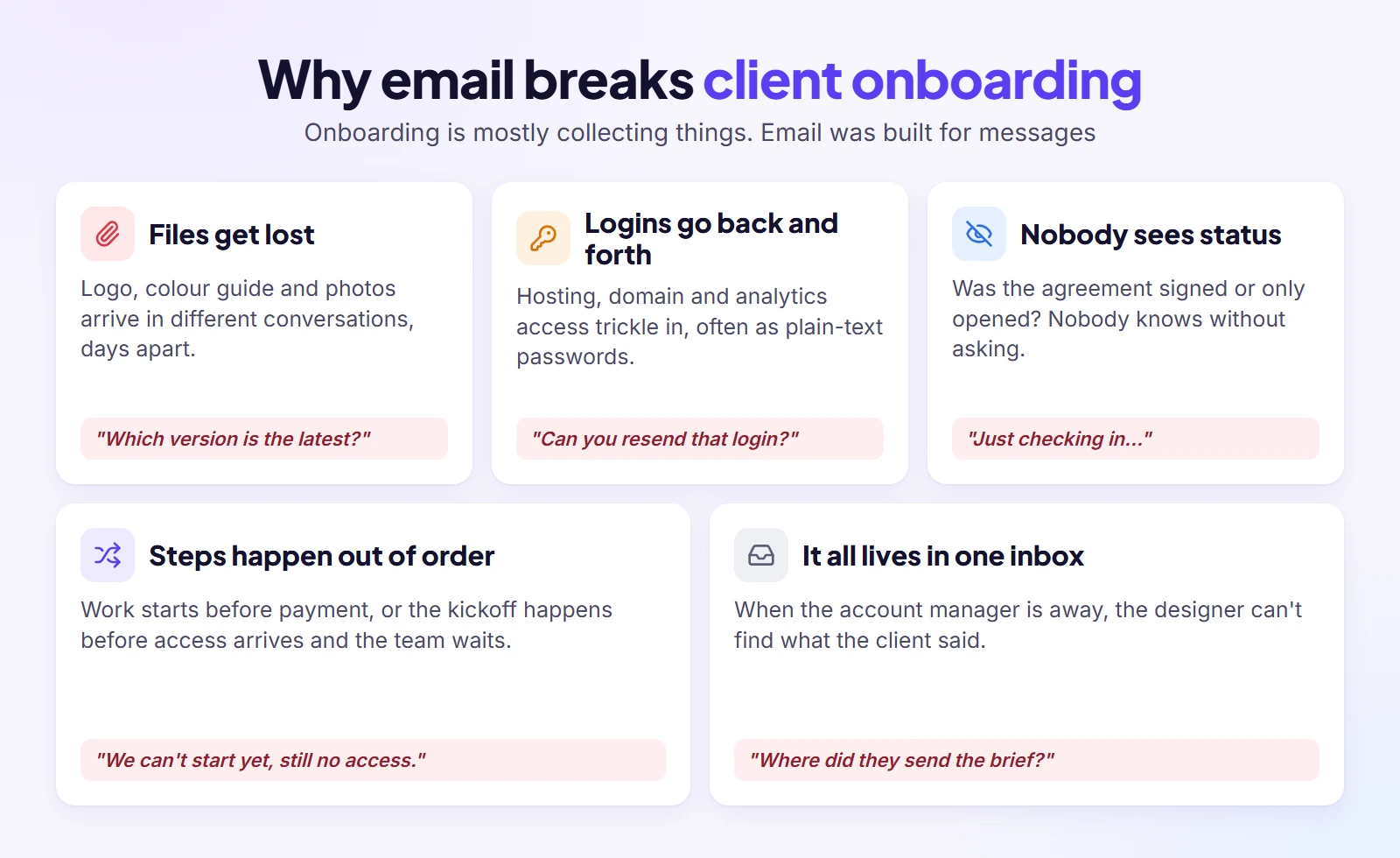
Email is brilliant at one thing: sending a message. Onboarding is a different job. It is collecting files, answers, logins and approvals from a busy person who has just paid you. Ask email to do that and the same five problems tend to turn up.
Files and attachments get lost
The logo turns up on Monday, the colour guide in a separate conversation on Wednesday, and the photos as a link in a reply three days after that. Within a week nobody is sure which version is current. One poster on Reddit wrote that a messy onboarding nearly made them fire a high-ticket client: important files kept getting lost in email attachments, and it made them look disorganised.
Logins and access go back and forth
Access is the slowest part of onboarding and the part email handles worst. You need the hosting, the domain, analytics and the ad accounts, and the client often has no idea how to grant any of them. One agency owner on Reddit put it plainly: the first 14 days turn into chasing brand assets, logins, analytics access and ad accounts. Passwords sent by email also sit in inboxes forever, which is a security problem you have now taken on.
Nobody can see what’s done
Was the agreement signed or only opened? Did the client fill in the brief or just start it? In a thread, nobody knows without asking, so both sides keep sending “just checking in” messages. That gets worse with every new client. A small studio with twenty active clients cannot run status updates out of an inbox for long.
Steps happen in the wrong order
Without a fixed sequence, work starts before the first payment clears, or the kickoff happens before the access arrives and the team sits idle. Momentum also dies in the gap after signing: the client is excited on Monday and has forgotten you by Friday because nothing told them what to do next.
Everything lives in one person’s inbox
When onboarding runs through the account manager’s email, the context goes on holiday with them. The designer cannot see what the client said about colours; the developer cannot find the hosting details. A shared place fixes this without anyone forwarding anything.
Email vs a Client Onboarding Portal, Task by Task
If you have ever spent twenty minutes hunting for a logo a client swears they sent, this table will look familiar. Anything you need to collect works better in a portal; email is still good at ringing the bell. Here is every onboarding task, side by side.
| Onboarding task | By email | In a client portal | What email still does |
| Accepting the proposal | PDF attached, signed copy sent back, saved somewhere | Client reviews and signs online; the record is kept with the client | One notice: proposal ready |
| First payment | Invoice attached, “did it go through?” | Invoice in the client’s account, paid online, status visible | One notice: invoice ready |
| The brief | Questions spread across several replies | One onboarding form, answered once | One notice: form waiting |
| Brand files | Attachments and links in different threads | One shared folder per project with a naming rule | Nothing |
| Logins and access | Passwords in plain text, back and forth | An access list with how-to guides; user invites, not passwords | One notice: access list waiting |
| Kickoff notes | Summary email that gets buried | Summary posted on the project, findable by everyone | One notice: summary posted |
| “Any update?” questions | Every few days, from both sides | Progress visible to the client without asking | Nothing |
| Hand-over to the team | Forwarded threads and a long internal email | Team sees the whole history on the project | Nothing |
When email is still the right tool
Keep email for the first notice before the client has a login, for a quick question before the deal is signed, for the rare client who will not use a portal (more on that below), and for any notice your contract says must be sent by email. Everything else belongs in the portal.
How to Onboard Clients Without Email in 7 Steps
None of these steps is clever. What makes them work is that they run in the same order every time, with one name next to each. Follow them and a new client goes from first payment to first piece of work without a single email thread.
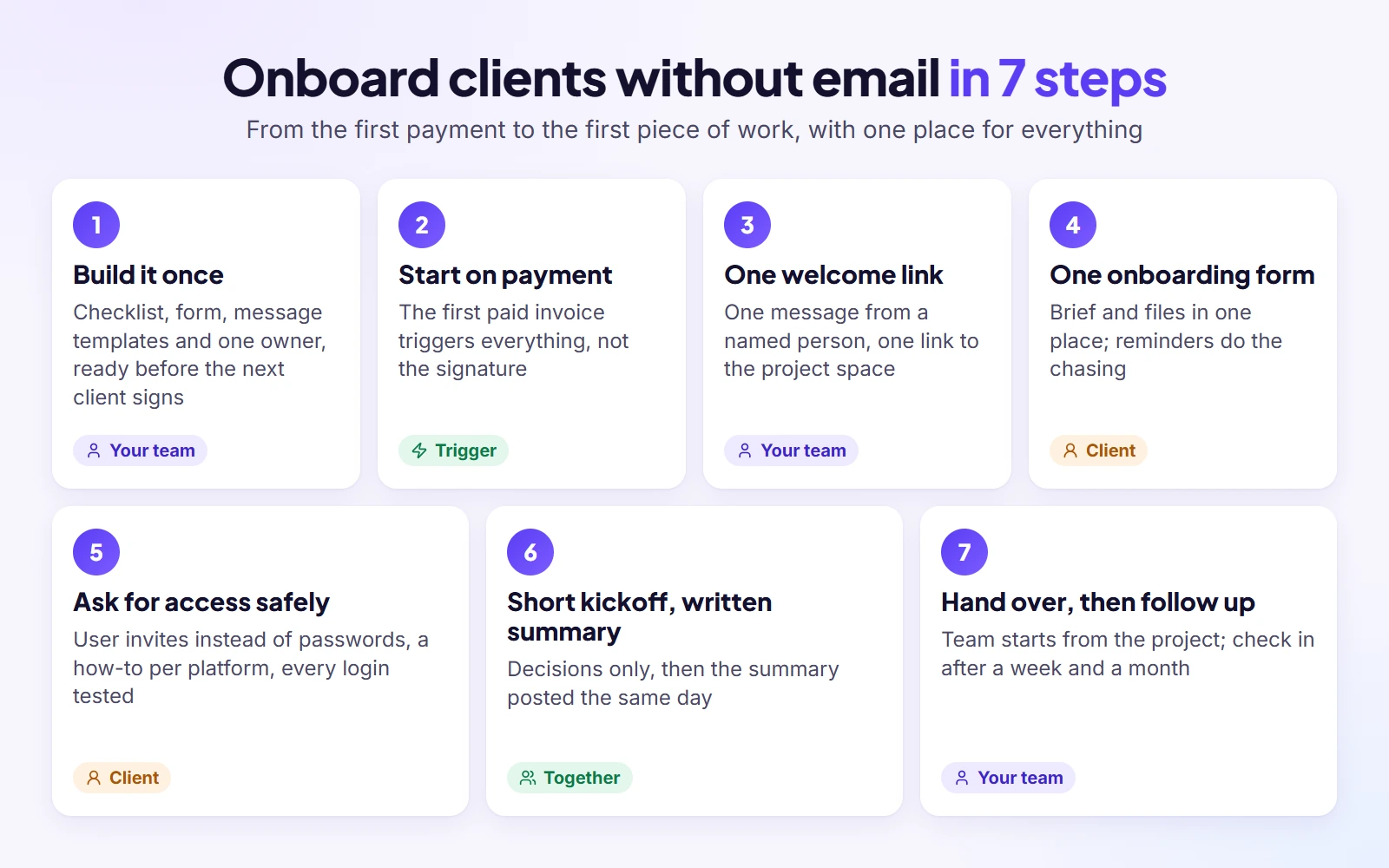
1. Build the onboarding once, before the next client signs
Onboarding by email feels fast because nothing is set up in advance, and that is exactly why it falls apart. Build it once: a checklist of what you need from every client, an onboarding form for each service, the message templates in this guide, short how-to notes for granting access, and one owner who keeps it current. Our client onboarding checklist is a good starting list. Prepare the client’s space before you invite them; nobody enjoys logging into an empty portal.
2. Let the accepted proposal and first payment start it
Agree the scope, timeline and payment terms in one document the client signs once, then make the first paid invoice the trigger for everything that follows. Not the signature, the payment. Effort spent before the money lands is effort you may have to write off, and a clear starting signal keeps onboarding from beginning by accident. Good onboarding begins in the sales call: note the client’s goals and constraints there, so they never have to repeat them.
3. Send one welcome link, not a welcome thread
The moment the payment lands, send one short message from the person who will look after the client, with one link to their project space. On that page they should see who their contact is, what happens next, and a short, finite list of what you need: “five things we need from you this week” beats a wall of text. A short recorded video of you walking through the page helps more than another paragraph. The welcome pack is the portal itself.
4. Collect the brief and files with one onboarding form
Put every question you need answered into one client onboarding form, grouped so it reads like a conversation: contacts and billing contact, goals and what success looks like, audience, examples they like, deadlines and dates to avoid, who will provide the content and when, and the one person who approves the work. Ask only what you need to begin; when a question is sensitive, say why you need it. Small files can go with the form; big folders of photos, videos and brand kits go into one shared folder per project with a simple naming rule. Then let reminders do the chasing: a polite nudge on day two, a phone call on day three. Our project intake questionnaire has a full question list to adapt.
5. Ask for access the safe way
Send the access list early, as one list, with a short how-to for each platform. Wherever a platform allows it, ask to be added as a user rather than asking for the owner’s password; it is safer for them and easier to remove later. For an SEO client the list usually covers Google Analytics, Search Console, Tag Manager, the website’s CMS and the Google Business Profile; a website build adds the domain registrar and hosting. If the client is not technical, offer a ten-minute screen-share instead of a fourth email. Keep a record of who owns each account, and test every login before the kickoff. Nothing stalls a first week faster than a password that turns out to be wrong.
6. Hold a short kickoff and post the summary in the portal
Because the paperwork, files and access are already done, the kickoff can focus on decisions: introductions and owners, goals and how you will measure them, the timeline and first milestone, how and when you will communicate, and open questions. Thirty to forty-five minutes is usually enough. Speak at the client’s level; a business owner who has never worked with an SEO agency needs fewer acronyms, not more. Post the summary on the project the same day, where the client and your team can find it.
7. Hand over to the team, then follow up after a week and a month
Brief the team from the project itself, not from forwarded threads, and make it clear who stays the client’s contact. Aim for a small first result early, a moodboard, a first draft, an audit, so the client feels progress before doubt sets in. Check in after a week and after a month: what was easy, what was confusing, what would they change. Use those answers to improve the onboarding for the next client.
A Real Example: Giant Marketers’ SEO Client Onboarding, Day by Day
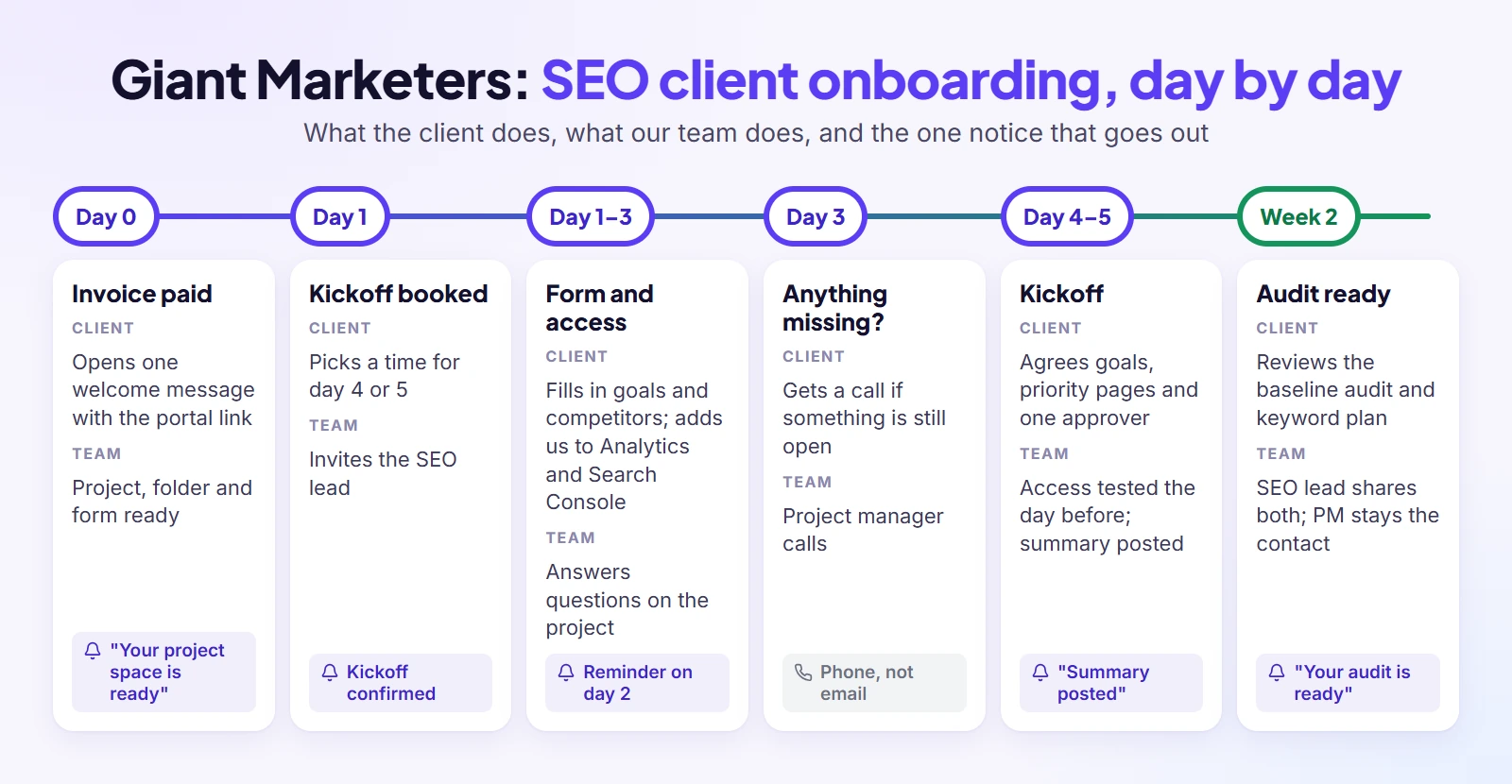
Enough theory. SEO is a large part of the work at Giant Marketers, and I still work as an SEO consultant myself, so here are a new SEO client’s first two weeks as they see them: what they do each day, what our team does, and the single notice that goes out.
| Day | The client | Our team | Where it happens | Notice sent |
| Day 0 | Pays the first invoice | Creates the client record and project; prepares the project space and shared folder | Client portal | Invoice receipt |
| Day 0 | Opens the welcome message | Project manager sends one welcome message with the portal link | Portal page with contact, next steps, form and folder | “Your project space is ready” |
| Day 1 | Picks a kickoff time | Books the kickoff for day 4 or 5 with the SEO lead | Portal | Kickoff confirmation |
| Days 1–3 | Fills in the form (goals, priority services, target locations, competitors) and adds us to Analytics, Search Console, Tag Manager, the CMS and Google Business Profile | Watches progress; answers questions on the project | Onboarding form, access list with how-to guides | Reminder on day 2 if incomplete |
| Day 3 | Gets a call if anything is still missing | Project manager calls | Phone | None |
| Day before kickoff | Nothing | Checks the answers, tests every access and pulls a first look at the data | Internal | None |
| Day 4–5 | Joins the kickoff: goals, priority pages, approval contact, report day | Runs the kickoff; posts the summary the same day | Call, then portal | “Kickoff summary posted” |
| Week 2 | Reviews the baseline audit and keyword plan | SEO lead shares both on the project; project manager stays the contact | Portal | “Your audit is ready” |
Two rules sit behind that table. Before the kickoff the client picks one person who signs off the work, since conflicting opinions from a committee can stretch a timeline for weeks. And if extra keywords, new locations or another website come up on the call, they become a change request instead of a promise. We keep each onboarding as a written SOP; our guide on how to create agency SOPs shows what one looks like inside the team.
What the client sees on day one
One page with five things on it: a short welcome note with the project manager’s name and photo, the list of what we need this week, the onboarding form, the link to their shared folder, and who to contact if they are stuck. No attachments, no “see below”, no thread to scroll. If a client can tell what to do next within ten seconds of opening the page, the page is doing its job.
What changed once we stopped onboarding by email
The biggest change was not speed; it was certainty. “Did you get my file?” messages largely stopped, because the client can see the file in the folder. Missing access stopped being a surprise at the kickoff, because every account is now tested the day before. And when someone on the team is away, nobody has to dig through their inbox to find what the client said.
Message Templates That Replace Your Onboarding Emails
Most onboarding emails are not hard to write. In many agencies they are written from scratch for each new client, a little differently every time. Write these six once, post them in the portal, let each one trigger one short notice, and swap the bracketed parts for your own voice.
Welcome message
Hi [first name], welcome aboard. I’m [your name], and I’ll be your contact from today until launch. Everything for [project name] lives on this page, so you never have to search your inbox. This week we need five things from you, listed below; the form takes about [time]. Once they’re in, we’ll meet on [day] to plan the first milestone.
Keep it short and personal, and make sure the five items are visible right under it. The notice that goes with it only needs one line: “Your project space for [project name] is ready.”
Onboarding form reminder (day 2)
Hi [first name], a quick nudge: the [section name] part of your onboarding form is still open. We need it to keep your kickoff on [date]. If anything in it is unclear, reply here and I’ll help.
Name exactly what is missing and what it blocks. A vague “just following up” gets ignored; a specific missing item with a date attached gets answered.
Access request with how-to links
Hi [first name], to start work we need access to the accounts below. For each one there’s a two-minute guide showing how to add us as a user, so you never have to share a password. Please don’t send passwords by email; if something doesn’t work, book ten minutes with me and we’ll do it together. [list of platforms with guide links]
The guides are the important part. A client who has never added a user to their hosting account will stall without them, and the screen-share offer removes the last excuse.
Kickoff summary
Thanks for today, [first name]. Here’s what we agreed: goals [list], first milestone [what] on [date], approval contact [name], updates every [day] on this page. Open questions: [list, with who answers each]. Anything I’ve missed, add it here and I’ll update the plan.
Post it the same day. A kickoff without a written summary is a kickoff that will be remembered differently by everyone who was on the call.
“Let’s keep this in the portal” reply
Got it, thanks [first name]. I’ve added this to your project page so the whole team can see it. Next time, posting it there directly means it reaches everyone straight away, including when I’m away.
This one is for clients who reply by email anyway. Move the content yourself, thank them, and explain the benefit to them, not the rule. Never make a client feel told off.
Day-30 check-in
Hi [first name], we’re a month in. Three quick questions: what was easy about getting started with us, what was confusing, and what would you change for the next client? Two lines is plenty. Your answers shape how we onboard everyone after you.
The answers to this message are the cheapest improvement you will ever get. Read them, change one thing, and note the change in your onboarding process.
How Do You Get Clients to Use the Portal?
Here is the uncomfortable truth: a portal nobody opens is just a prettier inbox. Clients use one when you introduce it before they sign, when getting in takes two minutes, and when it saves them effort on day one. Getting them there is your job, not theirs.
Introduce the portal before the client signs
Mention it in the proposal and on the sales call: “this is where everything for your project lives, so you always know what’s next”. Framed as a benefit, it becomes part of the service you are selling. A portal on your own address, with your logo, feels like your agency rather than another tool to learn; that is what a white-label client portal is for.
Make the first login take two minutes
Every extra step before the first useful action loses people. Pre-fill what you already know, show a short list of steps with a clear sense of progress (“2 of 5 done”), and let clients sign in the easiest way your portal offers, such as an existing Google account. If a client has to read instructions to log in, the instructions are the problem.
When a client replies by email anyway
Some will, especially in the first week. Move the content into the portal yourself, reply once with the “keep it in the portal” message, and carry on. Do not refuse to read their email; that only creates friction. In my experience, most clients follow where the answers appear within a few weeks. Keep notices few and specific, from a named person, so they do not learn to ignore them the way they ignore newsletters.
Clients who will never log in
A few clients will never open a portal, whatever you do. Don’t fight it. Let their account manager enter their answers into the project for them, send the nudges by phone or WhatsApp, or ask whether an assistant or colleague can hold the login on their behalf. The portal still works as your team’s single source of truth, even if one client only ever sees it through you.
How Long Should Client Onboarding Take?
New clients often ask this on the first call. My answer: aim for about a week from first payment to kickoff. That is my opinion rather than an industry figure, and in practice it depends mostly on how quickly the client sends what you need.
A realistic timeline
Our own SEO onboarding runs from payment to kickoff in four to five working days, and the baseline audit reaches the client in the second week. Smaller jobs can be faster; projects that need contracts reviewed by a client’s legal team or access from several departments take longer. Whatever your number is, write it into the welcome message so the client knows what “on time” looks like, and build in a few spare days between the kickoff and the first deliverable for the delays you cannot control.
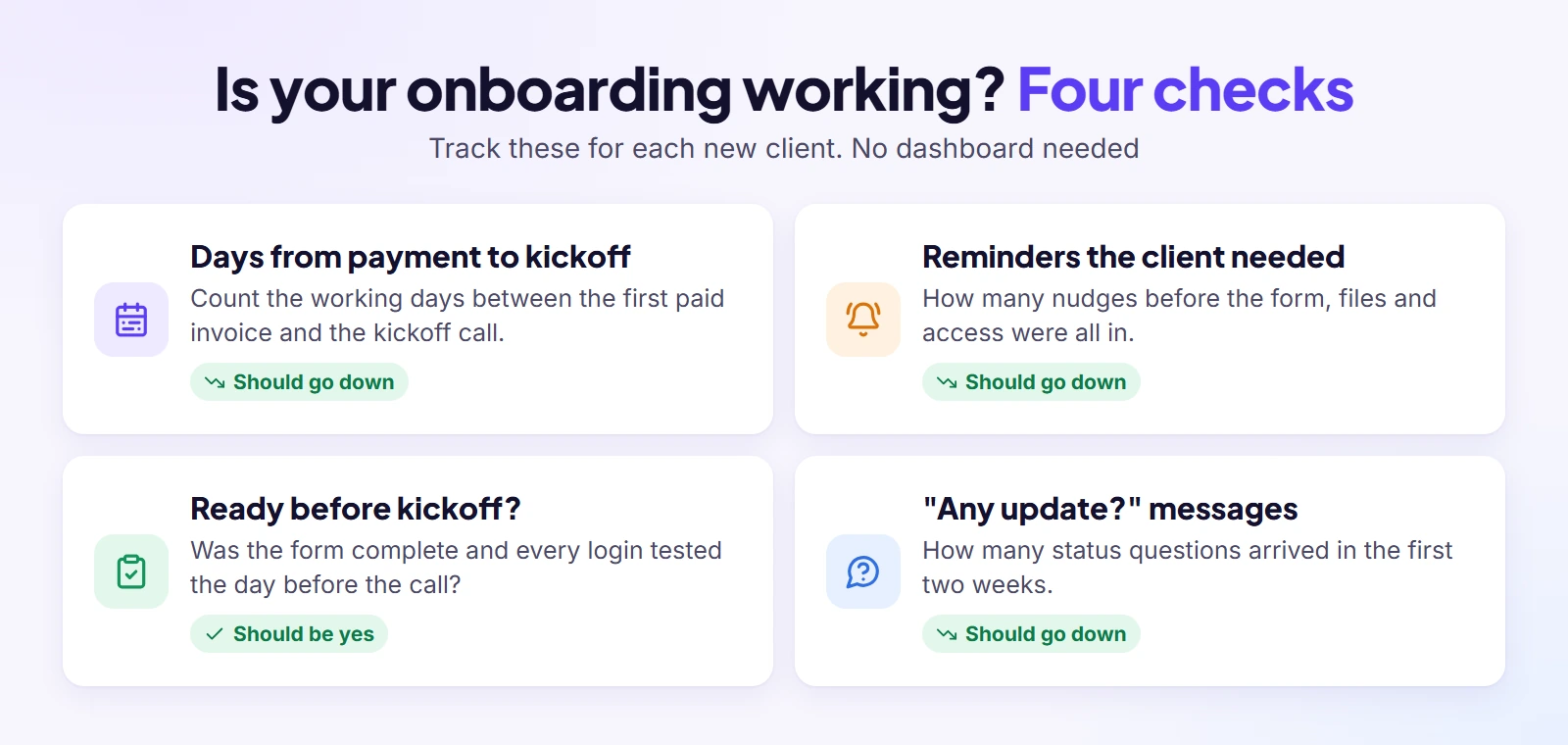
Four checks to track
You do not need a dashboard to know whether onboarding works. Track four things for each new client: the number of days from first payment to kickoff; how many reminders the client needed; whether the form was complete and every login tested before the kickoff; and how many “any update?” messages arrived in the first two weeks. If those numbers improve over a few clients, the process is working. Add the day-30 answers, and you have everything you need to fix the next weak spot.
Common Client Onboarding Mistakes to Avoid
None of these mistakes feels like a mistake when you make it. Most of them feel like a shortcut at the time. Here are the ones I see most often, and what each one quietly costs you later.
- Starting work before the agreement and payment. Goodwill is not a contract, and unpaid work is the hardest kind to stop.
- Asking for information in pieces. Ten small requests over two weeks feel like nagging; one form feels organised.
- Too many places to look. If the client has to check email, a chat app and a drive link, they will miss something.
- Collecting passwords and sensitive files by email. They stay in inboxes long after the project ends.
- Chasing by hand. Every reminder you remember to send is one you will someday forget; schedule them.
- Making the kickoff call mandatory too early. Do the paperwork first, then meet to decide.
- Showing the client your whole internal checklist. Show them five steps; keep the other twenty inside the team.
- Inviting the client into an empty portal. Set up the page, the form and the folder before the welcome message goes out.
- No single approval contact. Feedback from several people who disagree is the fastest way to lose a timeline.
- Going cold. A portal is not an excuse to stop being personal; use names, faces and short videos.
Where Clientish Fits
Everything above works with the tools you already have, as long as the work lives in one shared place. The part that wears people down is the wiring: making the steps run the same way for every client without someone remembering each one.
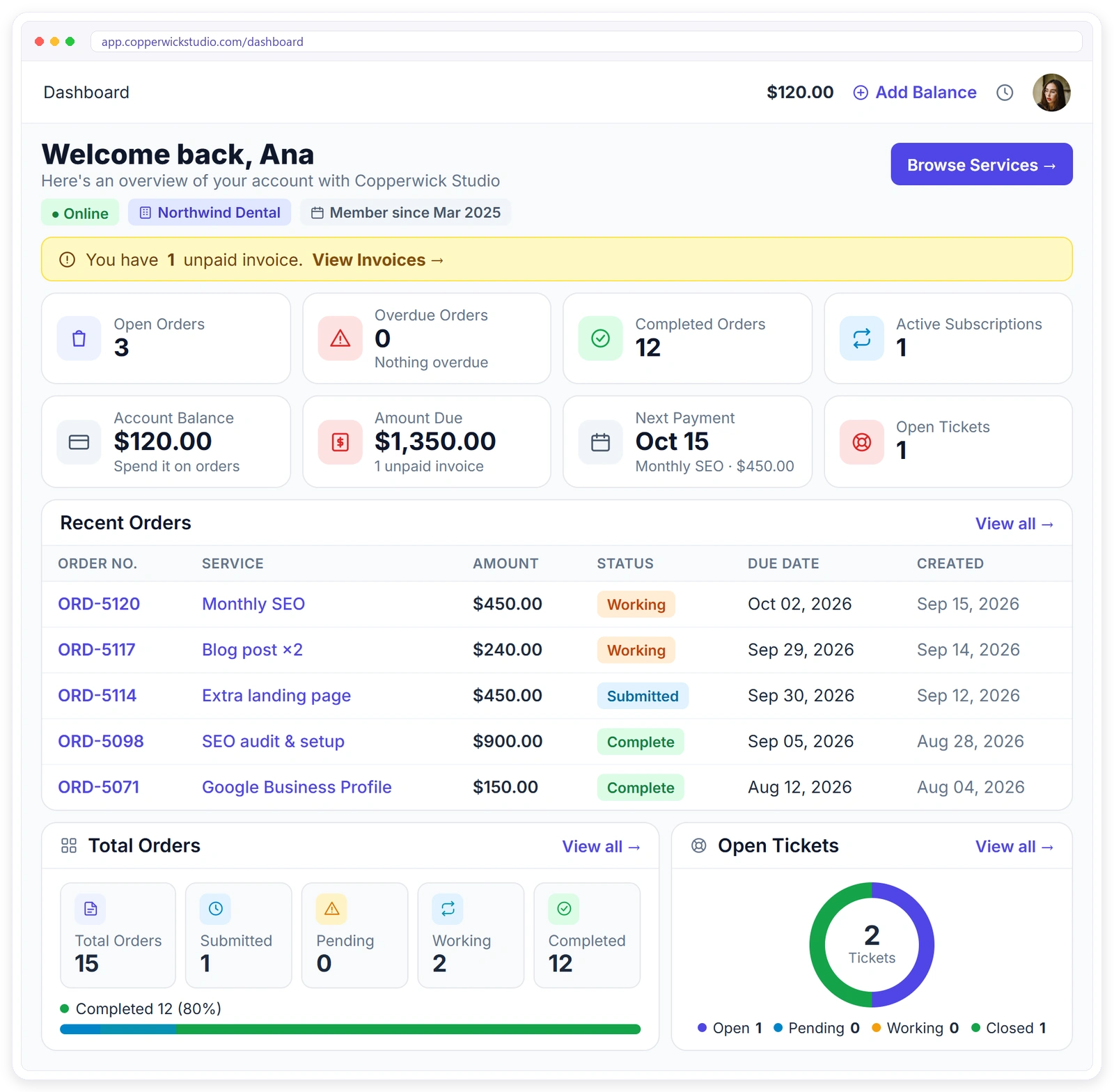
That is what I built Clientish for. Clientish is an all-in-one client management portal for agencies, freelancers, consultants and service-based businesses: leads, proposals, a branded client portal, orders, invoices and subscriptions, support tickets and live chat in one place. Here is how the seven steps map onto it:
- The start: a client accepts your proposal online with an e-signature, and the client record, invoice and order are created at that moment.
- The welcome and the form: each order has an onboarding email template and an intake link, with intake reminders sent on the days you choose and a Google Drive folder for the project’s files.
- The work after kickoff: each service can add its own task list of up to 30 tasks to every new order, and an internal team thread keeps your notes out of the client’s view.
- Client how-tos: your own help center for clients starts with 25 ready articles, a natural home for your “how to grant access” guides.
- Getting clients in: clients can sign in with Google, install your branded portal as an app with push notifications, and invite their own team members.
Clientish is not a password manager, so ask for user invites rather than passwords even in your intake form, and it does not replace the conversation at the kickoff; it makes sure everything around that conversation is in one place. Try it on your next new client with a 14-day free trial.
Frequently Asked Questions
Short answers to the questions agencies and freelancers ask most about onboarding without email. Jump straight to the one you need; none of them depends on the others.
How do I onboard a client without email threads?
Put every onboarding step in one client portal: the signed proposal, the invoice, an onboarding form, a shared file folder, the access list and the kickoff summary. Then use email, or WhatsApp and SMS, only for a short notice that tells the client the next step is waiting. The client works in one place instead of searching threads.
What must you do if a client does not have an email address?
Every portal login needs an address, so either help them open a simple one while you welcome them or use a shared company address that a named person on their side controls. Ask who will hold the login, then send reminders by phone, WhatsApp or SMS. Settle it in the first conversation so it doesn’t delay the first week.
How do you onboard new clients?
Build your onboarding once, start it when the first invoice is paid, send one welcome link, collect the brief and files through one form, request access as user invites, run a brief kickoff with written notes, then hand over to the team and check in after a week and a month.
What is the best client onboarding process for an agency?
The best process is the one you run the same way for every client: one trigger, one owner, one place for everything, and a fixed list of what you need. Payment first, then the welcome link, the form, access, the kickoff and the hand-over. Improve it with the feedback from each client’s day-30 check-in.
What documents are needed for onboarding new clients?
For an agency: the signed proposal or agreement, the paid first invoice, the completed brief, brand files, access to the client’s accounts, and the name of the person who approves work. Regulated businesses such as accountants, law firms and financial advisers also collect identity and compliance documents, which belong in a secure portal, not in email.
What should a client onboarding form include?
Group it into short sections: contacts and billing contact, goals and how success is measured, audience, examples the client likes, deadlines and dates to avoid, who supplies content and when, brand files, the access list, and the single approval contact. Keep every question something you need before work can start.
How long should client onboarding take?
A week from the first payment to the kickoff is a sensible target for most agency work; our SEO clients take four to five working days. The real driver is how fast the client sends files and access, so state your timeline in the welcome message and schedule reminders.
Is a client portal better than email for onboarding?
For the work itself, yes: files, answers, access and decisions stay in one place everyone can see, and progress is visible without asking. Email is still useful for the short notices that bring the client back to the portal. Use each for what it does well.
How do you collect client logins safely?
Ask to be added as a user on each platform instead of requesting passwords, send a short how-to for each one, and offer a quick screen-share for clients who get stuck. Note who owns every account, try each login the day before the kickoff, and take your access away once the project is over.
Can you automate client onboarding?
Much of it, yes: the trigger when an invoice is paid, the welcome message, the form, the reminders and the task list for the team. Keep the human parts human, the kickoff and the check-ins. Our page on automated client onboarding with intake forms shows how that works in Clientish.
Final Thoughts
Try this test on your own onboarding: could your next new client get from “paid” to “ready for work” without a single email thread? If the answer is no, the gap is usually one of three things: no single place, no fixed trigger, or no plan for access.
Fix one of them before your next client signs. Build the onboarding form, write the access guides, or set the trigger to the first payment. To see the whole flow under your own brand, Signup & Try Demo and onboard one real client with it. And if you are juggling several new clients at once, my guide on how to manage multiple clients in one place covers the weekly routine around it.
Sources
Clientish publishes this guide. It reflects the author’s 15 years of client work at Giant Marketers and experience building client management software for agencies, plus common practice described in onboarding guides, forum discussions and AI assistant answers reviewed as of October 2026. The onboarding example is how Giant Marketers onboards SEO clients. Copperwick Studio in the product screenshot is a fictional demo agency. The Clientish section describes the product as documented on clientish.co in October 2026. Clientish is not affiliated with any company mentioned.

