

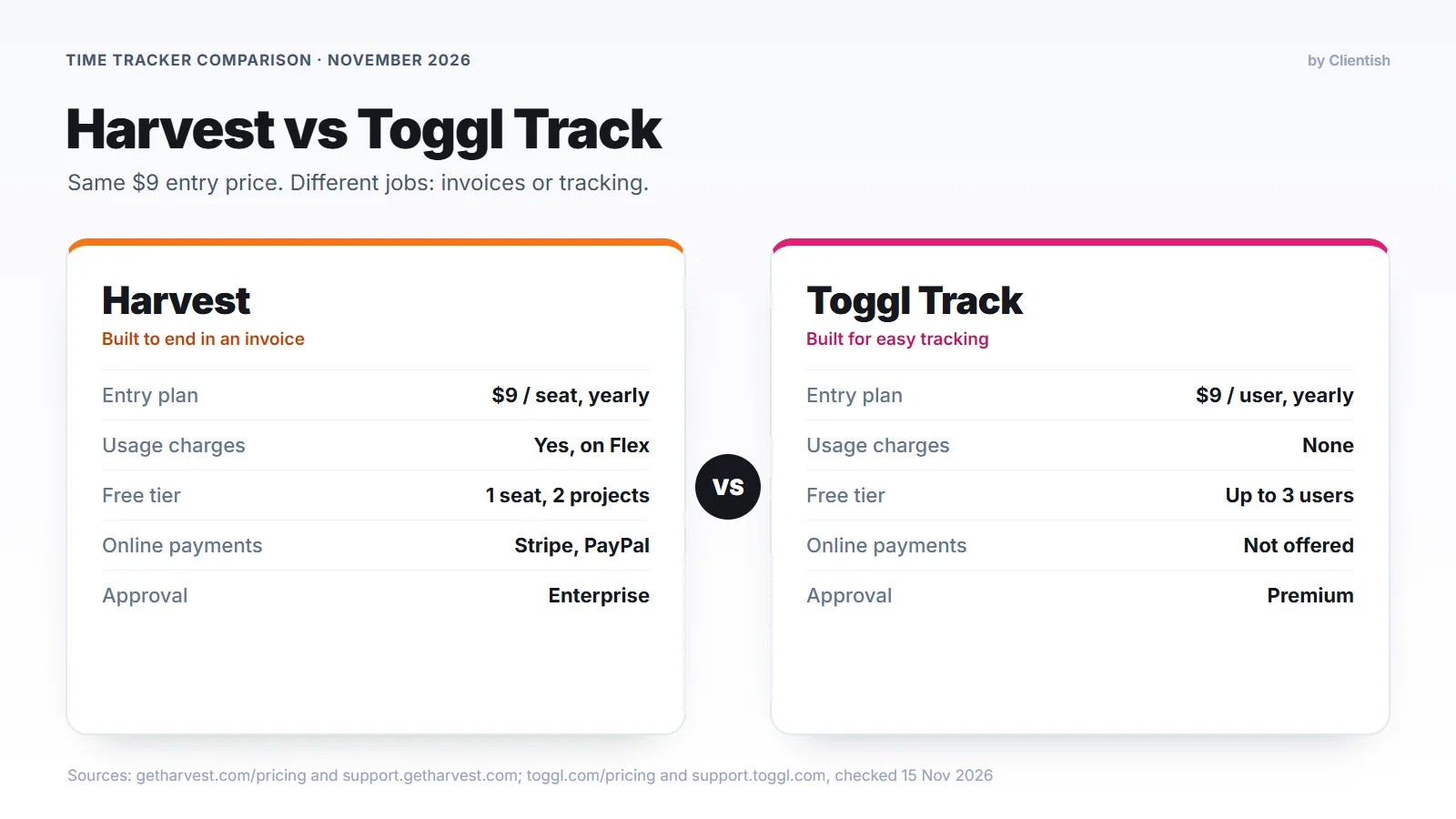
Harvest and Toggl Track are the time trackers agencies, studios and consultants compare most often. Both changed in the last two years. Harvest now belongs to Bending Spoons and charges for usage on top of seats, and Toggl Track has become part of a single product called Toggl. Their entry plans still cost the same, $9 per person a month on yearly billing, but Harvest was built to end in an invoice, while Toggl was built around capturing time and reporting on it.
Quick answer: Harvest fits agencies that bill clients from tracked hours and want invoices, online payment and expenses in one tool. Toggl Track fits teams where getting accurate time from people is the hard part, where the desktop Timeline and shareable reports matter more, and where invoices go out from accounting software. If your clients also need a place to approve hours and pay, neither tool provides one, and we cover that case near the end.
Prices, plans and features below come from Harvest’s and Toggl’s own sites, read on November 15, 2026. Press figures are credited to the outlet that reported them.
Key Takeaways
The biggest difference is how each bill grows: Toggl charges per person only, while Harvest also meters account activity. The other points follow from what each tool was built to do.
- Bill growth: Toggl prices per person. Harvest’s Flex billing adds charges for active projects, clients, tasks and invoicing once a free allowance is used.
- Free start: Toggl is free for up to 3 people; Harvest’s free tier is one seat and two projects.
- Capturing time: both run on web, desktop, phone and browser. Toggl adds a desktop Timeline, idle detection and a Pomodoro timer.
- Getting paid: Harvest sends invoices and takes card payment through Stripe or PayPal. Toggl exports a fixed-layout PDF, or pushes it to QuickBooks Online on paid plans, and collects no payment.
- Approving timesheets: Toggl puts it on Premium, Harvest on Enterprise.
- Client view: neither gives clients a login to hours or invoices. Harvest shares an invoices dashboard; Toggl shares read-only report links.
Harvest vs Toggl Track at a Glance
Harvest leads on invoicing, payments and expenses; Toggl leads on the free plan, automatic capture and shareable reports. The table shows the detail behind that split.
| Feature | Harvest | Toggl Track |
| Entry paid plan | Teams: $9 a seat billed yearly, $11 monthly | Starter: $9 a user billed yearly, $12 monthly |
| Upper published plan | Enterprise: $14 billed yearly, $17.50 monthly | Premium: $16 billed yearly, $24 monthly |
| Charges beyond seats | Flex usage charges, or a fixed fee on Unlimited | None |
| Free tier | 1 seat, 2 projects | Up to 3 users |
| Trial | 30 days, no card | 30 days |
| Desktop Timeline | Not in Harvest’s plan table | Yes |
| Invoicing | Full invoices, recurring and retainer, reminders | PDF from a report, or push to QuickBooks Online |
| Card payments | Stripe and PayPal; Harvest fee unless on Unlimited | Not offered |
| Expenses | Yes, billable onto invoices | Not listed |
| Timesheet approval | Enterprise | Premium |
| Capacity planning | Forecast add-on, $5 a person billed yearly | Capacity add-on, $5 a user billed yearly |
| QuickBooks and Xero | Teams and Enterprise | Legacy integrations for Toggl Track |
| What a client can open | No-login dashboard of open invoices | Read-only public report link; guests can add tasks |
The pattern holds across most rows: money in Harvest’s column, capture and reports in Toggl’s, and little for the client in either.
What Changed at Harvest and Toggl in 2025 and 2026
Harvest moved to seat-plus-usage billing after Bending Spoons bought it in 2025, and Toggl Track became part of a single product called Toggl. Pages that still quote a 5-user Toggl free plan or Harvest’s old Pro and Premium plans were written before both changes.
Harvest: a new owner and usage billing
Harvest’s help center now describes two billing modes for Teams and Enterprise. Flex takes the seat price and adds a meter on projects, clients and tasks that saw activity, plus invoicing, for whatever goes past a free allowance in the prior period. Only items with time tracked in that period count, so archived or untouched projects do not add to the bill. Unlimited replaces the meter with one fixed usage fee.
Harvest keeps the allowance size and unit prices private. Its help center does show one account going “from a seats-only $44 to $404 once usage is added”, and new accounts start paying usage at their second paid renewal. Accounts upgraded from a trial before November 7, 2024 may still be on Legacy plans.
The change reached the news in August 2026. Bloomberg wrote about a web designer facing a renewal of $2,547.60 a year after paying $211.20. Subscription Insider and Silicon UK relayed a BBC report on a UK consultancy whose monthly bill rose from $130 to $2,110; Harvest then offered it $1,309 a month for a year paid upfront.
Toggl: Track becomes part of Toggl
Toggl now markets one product, Toggl, that joins time tracking with planning. Existing Toggl Track customers are not being moved off: the company says Track “remains fully operational, supported, and updated” with “no sunset date”. The billing-related change is easy to miss. Toggl’s integrations page labels QuickBooks Online and Xero as legacy integrations for Toggl Track that the new Toggl does not support.
Who Harvest Suits and Who Toggl Suits
Agencies that invoice hours every month and want the invoice and the payment in one place usually fit Harvest. Teams that care most about complete, low-effort tracking, and send invoices from QuickBooks or Xero, usually fit Toggl.
The vendors’ own descriptions point the same way. Harvest sums itself up as “Turn hours into profit” and shows customers in advertising, design, law, accounting and architecture. Toggl calls itself “The time tracker millions trust” and lists agencies and professional services teams first, followed by software, law and finance teams.
Team size matters less than billing style here. What matters is whether you invoice from tracked hours, not how many people you have.
Meet Harvest: Hours That Turn Into Invoices
Harvest launched in 2006, and its homepage says more than 70,000 companies use it. Its sub-line describes the job as helping teams “track time, bill clients, optimize team time, and measure performance”.
- Timers on every device: desktop apps for Mac and Windows, phone apps for iPhone and Android, and browser extensions for Chrome, Firefox and Edge.
- Project types and budgets: hourly, fixed price and internal projects, with a warning when a project nears its hour or money budget.
- Expense tracking: receipts and reimbursable costs that can be added to a client’s invoice.
- Invoices and estimates: invoices built from logged hours and costs, schedules for repeat billing, reminder emails, and online estimates the client can accept, which you can convert into invoices.
- Reports: time and custom reports for everyone; profitability reports, an activity log and timesheet sign-off on Enterprise.
- Connections: project tools like Asana and Jira on one side, accounting in QuickBooks Online and Xero on the other, and an API on every plan.
Above Enterprise, Enterprise Plus is custom-priced and adds a dedicated customer success manager, assisted data migration, custom onboarding and full white labeling. Harvest’s pricing page shows a G2 rating of 4.3 from 1,500+ reviews and a Capterra rating of 4.6 from 4,200+ reviews.
Meet Toggl Track: Tracking With Less Effort
Toggl says over a million people have used it, and its sub-line promises “the time data they need for better capacity, profitability, and project planning”. Most of its features aim at getting complete hours with as few clicks as possible.
- Timers inside other apps: web, desktop, phone and a browser extension that adds a start button inside apps like Asana, Jira and Gmail.
- Desktop Timeline: the desktop app keeps a record of computer activity, which helps rebuild a day when someone forgot to press start.
- Idle detection and Pomodoro: the apps ask what to do with idle stretches, and the extension includes a Pomodoro timer.
- Privacy stance: Toggl states it “doesn’t monitor employees, take screenshots, or record keystrokes”.
- Billing data: rates by client, project, member or task, project estimates, and budgets in hours or fees with an alert at 80%.
- Sharing: reports can be published as public links that open without a Toggl account.
Toggl is also open about where Harvest is stronger. Its own Harvest comparison page names four areas: invoicing and payments in one place, expenses on the same invoice, accounting sync, and fixed fees on every plan.
Sources and Method Behind This Comparison
For Harvest, we used its pricing page and its help center pages on billing modes, payment fees, the client dashboard, the free plan and exporting data. For Toggl, we used its pricing page, feature list, apps page, its Harvest comparison page and offer terms, and its help pages on invoices, report sharing, guest users and QuickBooks. All were read on November 15, 2026.
Where a vendor page and a third-party article disagreed, the vendor page won. G2, Capterra and the BBC article could not be opened by our tools, so ratings come from Harvest’s own page and the BBC figures are credited to the outlets that carried them.
Harvest Pricing vs Toggl Pricing in 2026
Harvest Teams and Toggl Starter both cost $9 per person a month when paid yearly, so the choice turns on what each plan contains and on what Harvest adds on top.
Plan by plan
| Plan | Per person (yearly / monthly) | What it adds |
| Harvest Free | $0 | 1 seat, 2 projects, invoicing |
| Harvest Teams | $9 / $11 | Team billable and cost rates, team reports, accounting and payment integrations |
| Harvest Enterprise | $14 / $17.50 | Profitability reports, timesheet approval, activity log, SAML SSO, custom exports |
| Toggl Free | $0 | Up to 3 users, free forever |
| Toggl Starter | $9 / $12 | Billable rates, project estimates, QuickBooks (legacy) |
| Toggl Premium | $16 / $24 | Timesheet approval, fixed fee projects, member rates, Jira and Asana |
The usage line that only Harvest adds
With Flex billing, each period’s bill includes seats plus any active projects, clients, tasks and invoicing beyond the allowance. Toggl’s pricing page has no such line, and Toggl’s Harvest comparison describes the two models as “per seat” against “per seat + usage fees”. Before renewing, Harvest customers can open Settings, Billing and use “Simulate usage changes” to see what their own activity would cost, which is more reliable than any estimate in an article.
Free tiers, trials and checkout
Toggl’s free plan takes up to 3 people and is described as “free forever”. Harvest’s free tier fits one active person with two active projects. It also cannot upload a logo, attach files to invoices or import data. Invoices cannot be emailed or exported as PDFs without connecting Stripe, which makes it a trial run more than a way to run client work.
Both paid plans come with a 30-day trial, and Harvest asks for no credit card. When a Harvest trial ends, the checkout screen pre-selects Enterprise on yearly billing, so check the plan before you pay.
Discounts and paying for seats
Harvest’s pricing page offers 20% off for yearly payment, and its help center says there are no other discounts for nonprofits, schools or large groups. Toggl says yearly billing saves “up to 33%”. In Harvest, seats can be added mid-cycle at a prorated price but not removed before the cycle ends. Teams and Enterprise accounts with 10 or more seats on yearly billing can ask to pay by ACH or bank transfer.
Add-ons worth pricing in
Capacity planning costs extra on both. On the Harvest side that means Forecast, priced at $5 a head each month on a yearly plan or $6.25 month to month, and Forecast counts scheduled people as seats even if they never sign in. Toggl’s Capacity add-on is $5 a head monthly on yearly billing or $6 without it, and a separate Time Off add-on runs $2 a head.
Harvest vs Toggl Cost for a Solo, 5, 10 and 20-Person Team
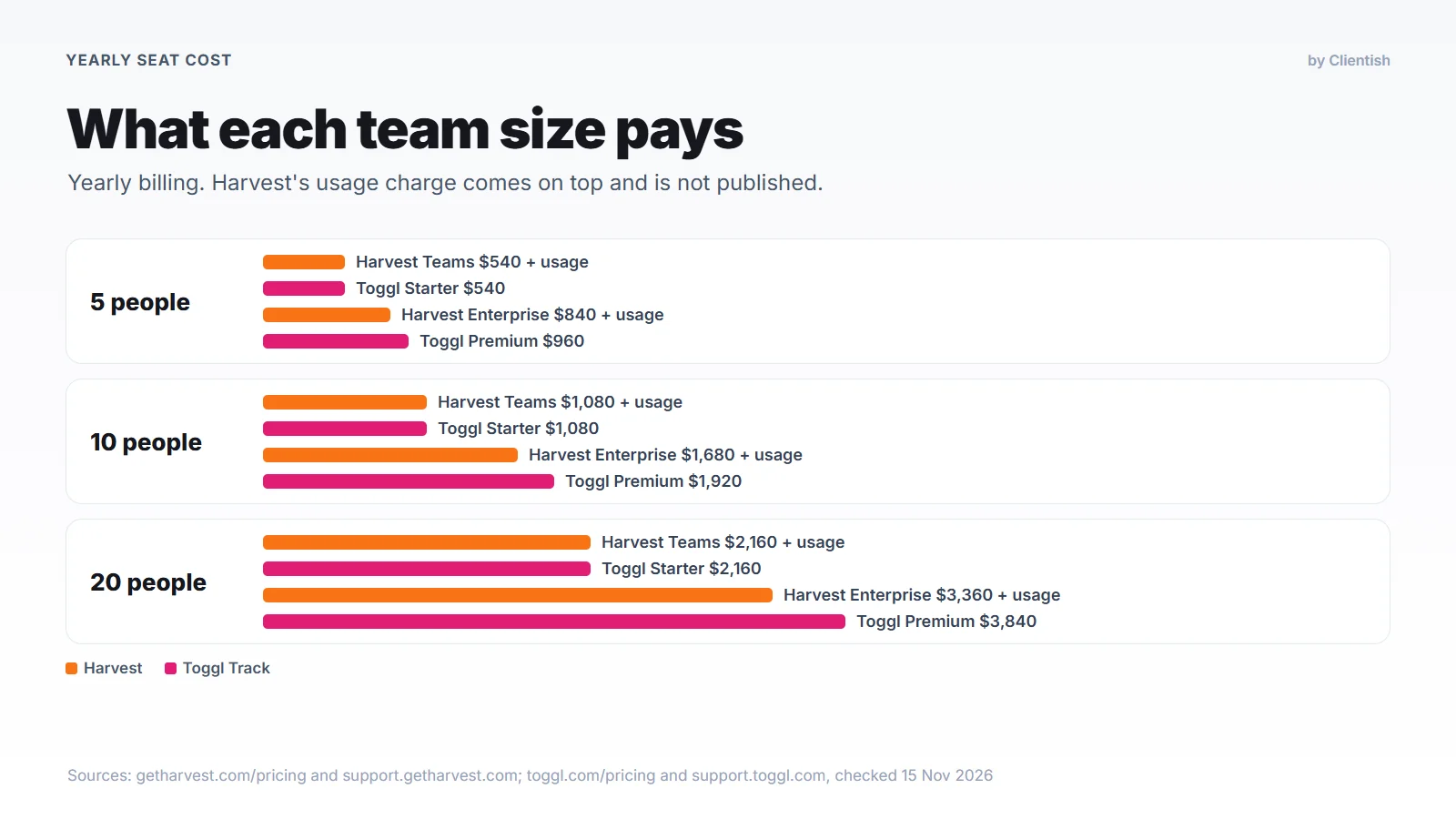
At 5, 10 and 20 people, Harvest Teams and Toggl Starter cost the same in seats, so Harvest’s usage charge is what separates them. The table uses yearly billing; Harvest’s usage cannot be estimated because its rates are not published.
| Team size | Harvest Teams | Harvest Enterprise | Toggl Starter | Toggl Premium |
| 1 person | $108 + usage (or Free, 2 projects) | $168 + usage | $108 (or $0 on Free) | $192 |
| 5 people | $540 + usage | $840 + usage | $540 | $960 |
| 10 people | $1,080 + usage | $1,680 + usage | $1,080 | $1,920 |
| 20 people | $2,160 + usage | $3,360 + usage | $2,160 | $3,840 |
If timesheet approval is a requirement, compare Harvest Enterprise with Toggl Premium. Toggl costs $2 more per person a month there ($24 a year), but adds nothing for usage. Capacity planning adds $600 a year for 10 people on either side, through Forecast or Toggl’s Capacity add-on.
Harvest vs Toggl Time Tracking and Desktop Apps
Both tools have timers on the web, on Mac and Windows, on iPhone and Android and in the browser. Toggl adds automatic capture on the desktop, while Harvest’s plan table lists timers and timesheets.
Timers and timesheets day to day
In Harvest a person picks a project and task, starts the timer or types the hours, and the week’s timesheet builds up from those entries. Toggl works the same way for manual tracking. Its browser extension also puts a timer button inside apps such as Asana, Jira and Gmail, so people can start tracking from the tab where the work is.
Automatic capture and idle time
Toggl’s desktop app keeps a Timeline of what was open on the computer, which lets someone rebuild a day they forgot to track. The desktop app and extension also notice idle stretches and ask whether to keep or discard them.
Does either one monitor the screen?
Toggl states that it takes no screenshots and records no keystrokes. Harvest describes timers and timesheets, and neither tool is sold as employee-monitoring software. Both depend on people logging their own time.
Phones and working on the move
Toggl’s phone apps track time with no connection and sync later, which helps on site visits. Harvest also has iPhone and Android apps; we found no Harvest statement on tracking without a connection.
Harvest Invoicing vs Toggl Invoicing and Payments
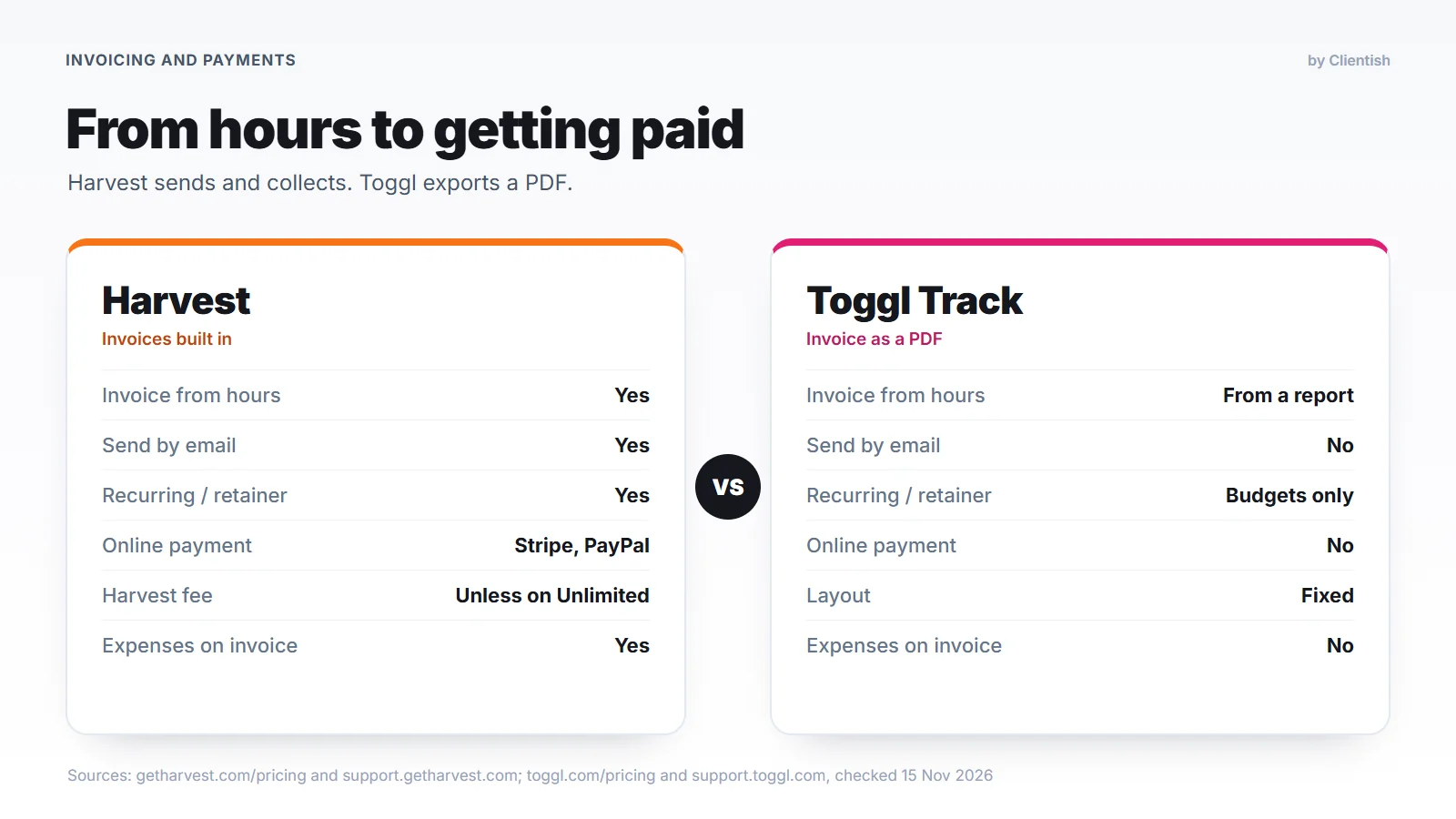
Harvest takes an invoice all the way to payment, while Toggl stops at a PDF or a hand-off to QuickBooks Online. For agencies that bill hourly, this is usually the biggest single difference.
Invoicing in Harvest
Harvest creates invoices from tracked hours and expenses and can repeat them on a schedule for recurring or retainer work. Estimates the client accepts can be converted into invoices, and reminders go out when invoices fall due. Clients pay online through Stripe (cards, and ACH in the US) or PayPal. Standard US rates on Harvest’s help center are 2.9% + $0.30 per card payment and 0.8% for ACH (capped at $5) on Stripe, and 3.49% + $0.49 on PayPal.
Unless you are on Unlimited billing, Harvest also takes its own small cut of each online payment, shown in its help center as “Stripe 2.9% + $0.30 + Harvest 0.5%”. A newer setting lets you pass that cost to the client.
Invoicing in Toggl Track
Toggl builds an invoice from a Summary or Detailed report and gives you a PDF to download. The layout cannot be changed, and on the Free plan the file carries the Toggl logo. Toggl does not email the invoice or take payment. On Starter and Premium you can push it to QuickBooks Online, now labeled a legacy integration.
Toggl’s help article suggests tagging billed entries as “paid” to keep track, and its invoicing page points users to “the invoicing tool you already use”. Several comparison pages say Toggl has no invoicing at all. That is wrong, but the feature is basic.
Which one fits your billing process
If “track, invoice, get paid” should happen in one place, Harvest covers all three. If you already invoice from QuickBooks or Xero and only need clean billable hours to feed it, Toggl’s report-to-PDF step and QuickBooks push may be enough.
Timesheet Approvals, Billable Rates and Budgets
Toggl puts timesheet approval on Premium, and Harvest keeps it for Enterprise. Rates and budgets exist in both, with different details.
Approving hours before billing
Toggl Premium lets people submit timesheets weekly or monthly for a manager to approve. Harvest Enterprise lets managers “review and approve hours before they’re billed”. On the lower plans in both tools, hours go out without a formal sign-off.
Billable rates
Harvest Teams adds billable and cost rates for the team, so you can see both what you charge and what an hour costs you. Toggl sets rates by client, project, member or task from Starter, with project member rates added on Premium.
Budgets and fixed fees
Harvest projects can carry an hour or fee budget with alerts, and fixed fee work is allowed even on the free tier. Toggl budgets work in hours or fees too, including recurring budgets for retainer clients and an alert at 80%, while fixed fee projects come with Premium.
Toggl Reports vs Harvest Reports
Toggl’s reporting is built around sharing and scheduling, while Harvest’s upper-tier reports tie hours to revenue. The plan you are on decides most of what you see.
Reports in Toggl
Toggl’s Summary and Detailed reports show where hours went. Internal report sharing comes with Starter, and Premium adds project dashboards and scheduled report emails. Any report can be published as a public link for someone outside the workspace, and paid plans can drop the Toggl footer from it. The feature list also includes a custom company logo for PDF reports.
Reports in Harvest
Harvest gives every plan its time reports and up to four custom reports, with no cap on Enterprise. Enterprise adds profitability reports that set hours against what was billed, an activity log of time changes, and custom exports. Harvest’s help center lists contractor data among the exports, and its plan table includes utilization reports.
What Clients Can See in Harvest and Toggl
Neither tool gives clients a login to their hours or invoices. Each shares one kind of page, and Toggl also lets outside people join as task-only guests.
Harvest’s client dashboard
Harvest’s help center describes a client dashboard that “doesn’t require your clients to sign in”: a secure link with the client’s open invoices and recent payments. Client contacts are email recipients, and adding one sends no email. Estimates open from a link and can be marked accepted or declined. White labeling for invoices is still being rolled out, full white labeling sits on Enterprise Plus, and there is no custom domain.
Toggl’s shared reports and guests
Toggl lets an admin publish a report as a public link that opens without an account, on every plan; the viewer cannot change filters or export. Guests, such as clients, can be invited to add tasks in assigned projects, and they do not count toward paid seats. Toggl states that guests “can’t track time or access reporting and billing”.
Toggl Integrations vs Harvest Integrations
Harvest’s directory lists about 68 integrations against 31 cards on Toggl’s integrations page, and its accounting links are not legacy. Its pricing page counts 50+ core integrations, and the directory runs Asana, Jira, Trello, Basecamp, ClickUp and Notion to QuickBooks Online, Xero, Gusto and Deel, plus Zapier and Make. Accounting sync comes with Teams, the Slack integration is Enterprise only, and the API is open on every plan.
Toggl’s integrations page shows 31 integration cards, and its homepage names Jira, Asana, Notion and Slack. Jira and Asana come with Premium. QuickBooks and Xero are legacy for Toggl Track, so a team that bills from either should confirm the link will keep working before it switches.
Where Harvest and Toggl Overlap
Logging an hour looks almost the same in both: pick a project and task, then start a timer or type the time. Projects, billable rates, budgets with alerts and per-person pricing work in similar ways.
Both offer a free plan and a 30-day trial, both have desktop, phone and browser apps, and neither offers a custom domain. Neither is sold as screen-monitoring software. Both are built for the team, so the client sees an invoice page or a report at most.
What Neither Tool Does for Client Work
Agencies that bill clients by the hour hit the same five gaps in both tools. Each one keeps part of the client relationship in email.
- No client login to hours or invoices: there is no place where a client sees their work, files and messages together.
- No client approval step: managers can approve hours, but the client has no step to approve them before the invoice.
- Nothing before the project: neither is built for proposals, a lead pipeline or a service catalog; both are time trackers.
- No help desk: neither is built as a support desk, so requests keep arriving by email.
- Thin payments: Toggl takes no payments; Harvest offers two processors and adds its own fee unless you pay for Unlimited billing.
Two Example Agencies: A Solo Consultant and a 6-Person Studio
A solo consultant can start on Toggl Free but will invoice elsewhere, and a six-person studio that needs approvals pays about the same on Harvest Enterprise as on Toggl Premium. Both cases below are made up, using the yearly prices above.
The solo consultant
Maya works alone for four clients and invoices at the end of each month. Toggl Free tracks everything at no cost, but each invoice is a PDF she sends herself, and payment arrives by bank transfer.
Harvest Free would cap her at two projects, and it cannot email invoices until she connects Stripe. A third client moves her to Teams at $108 a year, plus usage if her activity passes the allowance. In return, her invoices go out and get paid from the same place.
The 6-person studio
A design and development studio has six people, fifteen active clients and a rule that timesheets are approved before billing. On Harvest that means Enterprise: $1,008 a year in seats, plus usage. On Toggl it means Premium: $1,152 a year, plus a separate invoicing tool.
With the cost this close, the studio’s choice rests on its routine. If Friday is invoice day, Harvest saves a step; if Monday is the hours review, Toggl’s dashboards and scheduled reports fit better.
Pros and Cons of Harvest and Toggl Track
Harvest’s main advantage is getting paid from tracked hours, and its main drawback is the unpredictable usage bill. Toggl’s advantage is automatic desktop capture and shareable reports, and its drawback is that billing happens elsewhere.
Harvest
Pros: invoices, online payments and expenses in one tool; fixed fee projects on every plan; QuickBooks and Xero sync; a long integration list and an API on every plan.
Cons: usage charges with unpublished rates; a free tier of one seat and two projects that cannot email invoices without Stripe; approval and profitability only on Enterprise; no automatic capture listed.
Toggl Track
Pros: free for up to 3 people; desktop Timeline, idle detection and Pomodoro; public report links on every plan; no usage charges.
Cons: PDF-only invoices with no online payment; no expense tracking listed; approval and fixed fee on Premium; accounting integrations marked legacy.
Good For and Avoid If
Harvest is good for agencies that invoice from hours, and Toggl is good for agencies that bill from somewhere else. The lines below add the situations where each one is a poor fit.
Harvest
Good for: studios and consultants who invoice from hours and want clients to pay online; teams that bill expenses with time; agencies whose books run on QuickBooks or Xero.
Avoid if: you run many small projects at once and cannot predict the usage charge, or you need approvals but cannot justify Enterprise.
Toggl Track
Good for: teams that struggle to get people to track time; agencies that bill from accounting software; groups of up to three who want a free tool.
Avoid if: you want invoicing and payment collection inside your time tracker, or your billing depends on a QuickBooks or Xero link that is now legacy.
Which Fits Your Kind of Business
Firms that bill hourly with expenses lean toward Harvest, and teams working inside Jira or Asana lean toward Toggl. The common cases look like this.
- Design and branding studios billing hourly: Harvest, for invoices and expenses together.
- Development teams in Jira or Asana: Toggl Premium, for the in-tool timer and reports.
- Marketing agencies on retainers: either; Toggl’s recurring budgets watch retainer hours, Harvest’s retainer invoices bill them.
- Law and accounting firms: both vendors list them; Harvest suits firms that bill expenses on the invoice, Toggl suits firms that bill from practice software.
- Consultants working alone: Toggl Free if you invoice elsewhere, Harvest if you want invoices built in.
Switching From Harvest to Toggl
Moving from Harvest to Toggl works through CSV files, and Toggl offers a free period to teams still under a Harvest contract.
Exporting from Harvest
Harvest’s help center explains where each export lives. All company time downloads as CSV from Settings, Import/Export, and all invoices and estimates download as a ZIP of PDFs. Projects, tasks, people and clients with their contacts export to Excel or CSV from their own screens.
Importing into Toggl
In Toggl, open Admin Settings, Data import, Universal CSV Importer. Import the team first so every time entry has someone to attach to, then map clients, projects, tasks and time, and save the mapping as a Harvest profile for later imports. Current project and team rates come across, while invoices, expenses and Forecast schedules stay in Harvest.
Toggl’s switch offer
For teams partway through a Harvest contract, Toggl offers its service free for the rest of that contract, up to 6 months. The terms limit it to yearly Starter and Premium plans arranged through Toggl’s sales team, one per business, and not for teams already using Toggl. On the first billing date, the full first paid year is charged in advance, and seats cannot drop below the covered count during that year.
Harvest or Toggl: How to Decide
Harvest is the better choice when getting paid for hours is the core job and your usage is predictable. Toggl Track is the better choice when complete time data matters most and billing already runs through your accounting software.
If timesheet approval is a must, put Harvest Enterprise at $14 next to Toggl Premium at $16 per person, billed yearly, and add Harvest’s usage to the first figure.
When Neither Harvest nor Toggl Covers the Client Side
Neither Harvest nor Toggl gives the client a login to hours, invoices or progress, so hour disputes, payment chasing and update requests still run through email. Clientish is a client portal and CRM for agencies, freelancers and consultants, with a timer inside the client’s work.
Signs you’ve outgrown both
A client-facing tool starts to make sense once these become regular:
- Clients question hours after the invoice arrives.
- You chase payments by email every month.
- Clients ask “any update?” because they cannot see progress.
- Proposals, orders and support requests sit in other tools or inboxes.
How Harvest, Toggl and Clientish compare
For one person or a team of five, Clientish costs less per year than either tracker’s entry paid plan, and it adds the client side both of them leave out.
| Point | Harvest | Toggl Track | Clientish |
| One person, yearly | $108 + usage (or Free, 2 projects) | $108 (or $0 on Free) | $96 (Solo, your own time and client-approved hours) |
| Team of five, yearly | $540 + usage | $540 | $276 (Starter, 5 team members) |
| Client login to hours and invoices | No | No | Branded client portal on every plan, so clients check progress themselves |
| Client approves hours | No | No | Yes, before the invoice is created |
| Online payments | Stripe, PayPal + Harvest fee | No | 11 gateways to choose from; no Clientish fee |
| Proposals, leads, tickets | No | Not part of a time tracker | Yes, so the deal, the work and the support stay with one client record |
| Desktop timer apps | Yes | Yes | No, browser timer |
What you get in Clientish
These are the parts that cover the signs listed above.
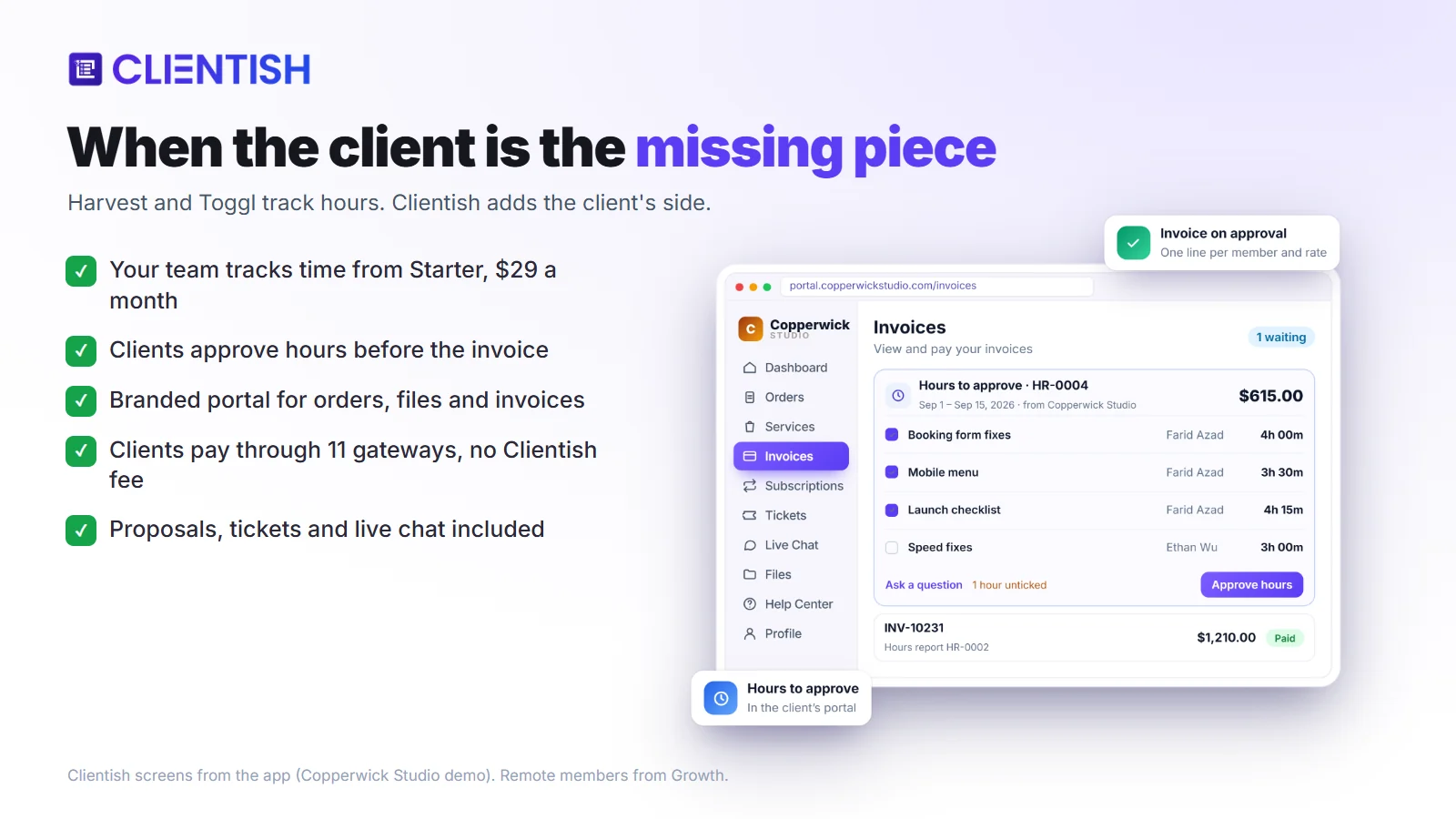
- Time tracking with client approval: you track your own time on every plan, Solo included; your team joins from Starter and remote members from Growth. The client signs off on an hours report in your portal before the invoice exists, so doubts about hours surface while the work is fresh.
- Branded client portal: each client has a login on your brand where open orders, finished files and unpaid invoices sit together, so a client can check progress without writing to you.
- Invoices and payments: clients settle invoices in the portal through a gateway you connect, and timed reminders send the polite nudges for you.
- Proposals with e-signature: when the client signs, Clientish creates their account, the first invoice and the order from the proposal, so you start the work without retyping the deal.
- Support tickets and live chat: client requests come into your workspace instead of scattered email threads, each ticket priority has its own first-reply target, and an overdue timer shows which reply is running late.
Where a dedicated tracker still wins
Stick with a pure tracker if people rely on desktop or phone timer apps, automatic capture or task budgets. Keep in mind too that Clientish entries belong to a client, not to individual tasks, and there is no expense log.
Your own timer comes with every plan from $9.99 a month; Starter at $29 adds five team members. Start your 14-day free trial, no credit card needed.
Frequently Asked Questions
The first five questions appeared in Google’s People also ask results for Harvest and Toggl on November 15, 2026; the rest cover switching, invoicing and client approval.
How much does Toggl Track cost?
Toggl is free for up to 3 users. Starter is $9 per user a month billed yearly or $12 monthly, Premium is $16 billed yearly or $24 monthly, and Enterprise is priced on request.
Is Toggl still free?
Yes, for up to 3 users, and Toggl describes that plan as free forever. Invoices made on it carry the Toggl logo.
How much does Harvest cost per month?
Harvest Teams is $11 per seat a month, or $9 billed yearly, and Enterprise is $17.50, or $14 billed yearly. With Flex billing, usage above a free allowance is added for projects, clients, tasks and invoicing.
Does Harvest track your screen?
Harvest describes timers and timesheets that people fill in, and it is not sold as screen-monitoring software. Toggl, for its part, rules out screenshots and keystroke logging.
Who bought Harvest?
Bending Spoons bought Harvest in 2025. Its usage-based billing drew wide press coverage in August 2026.
Does Harvest have a desktop app?
Yes. Harvest has Mac and Windows apps, iPhone and Android apps, and extensions for Chrome, Firefox and Edge.
Does Toggl Track have invoicing?
Yes, in a basic form. Toggl creates a fixed-layout PDF invoice from a report, and paid plans can push it to QuickBooks Online. It does not email invoices or collect payment.
Is Toggl Track being discontinued?
No. Toggl has said there is no end date for Track and that it keeps receiving updates, even though new customers now sign up for the broader product called Toggl.
Can I move my data from Harvest to Toggl?
Yes, through CSV files. Export team, clients, projects, tasks and time from Harvest, then use Toggl’s Universal CSV Importer. Past invoices, expenses and Forecast plans do not move across.
Is there a tool that tracks time and lets clients approve hours?
Yes. Clientish sends the client an hours report inside your branded portal, and the invoice is only created after they approve it. In Harvest and Toggl, approval is something your own managers do.
Final Thoughts on Harvest vs Toggl
Before you renew Harvest, run “Simulate usage changes” under Settings, Billing to see what your own activity will cost. Before you move to Toggl, check that your QuickBooks or Xero link will keep working, since both are now legacy for Toggl Track. Those two checks answer the biggest open questions on each side. If the real problem is on the client side, you can try Clientish free for 14 days and see whether client-approved hours fit the way you bill.
Sources
Clientish publishes this comparison; it was last updated on November 15, 2026. Press: Bloomberg News (August 13, 2026), and the BBC report of August 20, 2026 as carried by Subscription Insider (August 22) and Silicon UK (August 31).
Harvest and Toggl are trademarks of their owners. Clientish is not affiliated with Harvest, Bending Spoons or Toggl.

