

HoneyBook and 17hats both promise to carry a small service business from first inquiry to paid invoice, and their feature lists overlap so much that the choice is harder than it looks. The differences sit in how each one prices its plans, whether it limits documents, where it puts conditional logic, and how much of the job you can do away from a desk.
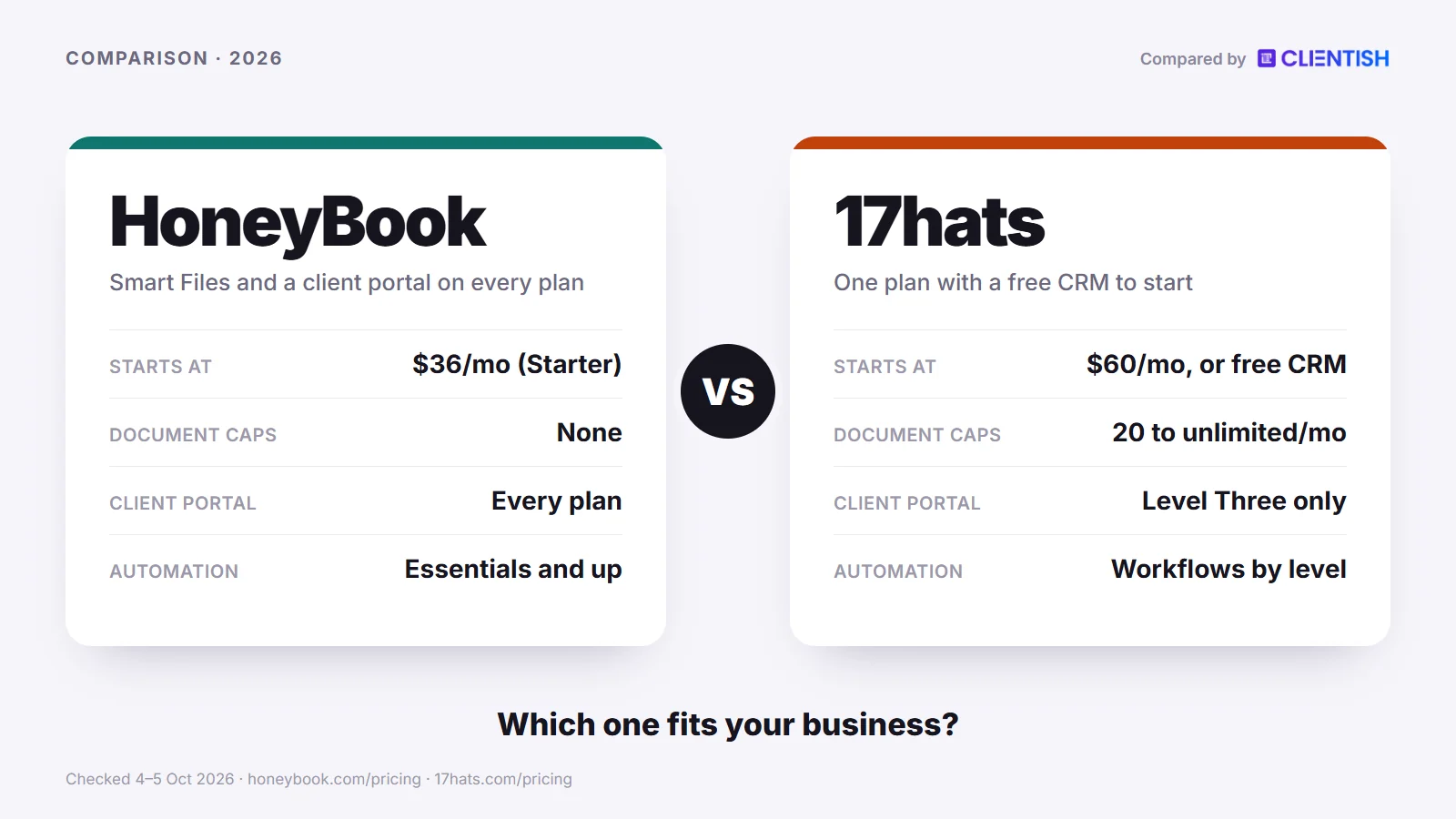
Quick answer: HoneyBook suits a creative business registered in one of the four markets it serves (America, Canada, Britain and Australia) that wants the proposal, contract and payment in one file, phone apps for the owner, no monthly document limit, and automations that branch on what a client does (from the Essentials plan). 17hats suits a solo operator who wants to start on a free CRM tier, log hours and turn them into an invoice, or send intake forms with If/Then questions, as long as its monthly document cap fits the workload. On standard list prices HoneyBook Starter ($29 a month billed yearly) costs less than 17hats ($600 a year), so the budget case for 17hats rests on its free tier, its two-year rate and its promotions.
This guide compares the two on pricing and document caps, client documents, automation, the client portal, mobile use, CRM, scheduling, payments, bookkeeping and time tracking, then looks at where both stop short for agencies. We took each HoneyBook and 17hats detail below straight from the two companies’ websites and help centres, as they stood on 5 October 2026.
Key Takeaways
The two tools overlap more than their reputations suggest, and several older comparisons now carry stale prices and features. These are the points that hold on each vendor’s own pages today.
- The price gap is narrower than its reputation. HoneyBook Starter costs $36 a month or $29 billed yearly after an early-2025 increase. 17hats bills $60 every month, or $600 across a year, or $800 paid up front for two years, with a Free CRM tier under it that sends up to four invoices per quarter; in October 2026 it advertised half off the first year. HoneyBook’s branching automations need Essentials ($59 monthly; $49 per month on a yearly plan).
- HoneyBook leads on the one-file booking and the phone. Smart Files merge the proposal, the contract and the invoice into a single file, the owner has iOS and Android apps that cover the pipeline, files, invoices and tasks, and no plan limits how many documents you send.
- 17hats leads on a free start and hourly billing. It has the free tier, a time tracker whose logs become invoice lines (priced at $5 a month on the grid), and If/Then logic inside questionnaires on its top level. It also offers a 3-in-1 quote, contract and invoice document of its own.
- Document caps are 17hats’ sharpest limit. Its grid allows 20 documents monthly at Level One, 35 at Level Two (25 more for $10), with no limit on Level Three. Every quote, contract, invoice and questionnaire uses up the allowance, although a 3-in-1 bundle uses it once.
- Neither is shaped around a delivery team. HoneyBook Starter allows no team members, Essentials two and Premium an unlimited number. 17hats sells extra users at $5 a month, with three included at Level Three. Both can add people; neither runs ongoing work for many clients as orders with a support queue.
Pick HoneyBook if you want clients to read, sign and pay in one file, need a phone app that handles most of the client workflow, and you operate from one of the four markets HoneyBook serves. Pick 17hats if you want to start free, bill by the hour, or need branching intake forms, and you can work within document caps and a desktop-first tool.
HoneyBook vs 17hats at a Glance
Both tools cover the core solo creative workflow of inquiry, proposal, contract and invoice, but they split on how they charge, how they limit volume and what the client sees. The grid below lines up the main dimensions so the leader on each row is visible before the detailed sections.
| Dimension | HoneyBook | 17hats |
| List price | Starter $36/mo or $29/mo yearly; Essentials $59 or $49; Premium $129 or $109 | $60/mo, $600/yr or $800 per two years; free CRM tier |
| Document caps | No cap on any plan | 20/mo (Level One), 35/mo (Level Two), unlimited (Level Three) |
| Client portal | On every plan | Level Three only |
| Web address and branding | Your own subdomain on every plan; “Powered by HoneyBook” hidden from Essentials | A 17hats subdomain; 17hats logo off documents from Level Two |
| Phone app | iOS and Android for the business owner; clients cannot use it | Free iOS and Android app; 17hats says the desktop version gets the most out of it |
| Automation | Automations with branching conditions on Essentials and Premium | Workflows that send documents, emails and to-dos in steps; we found no branching |
| Conditional logic | Inside automations | Inside questionnaires (If/Then, Level Three) |
| Time tracking | Switched off in early September 2026; a community post says it returned on September 15, unconfirmed by HoneyBook | Timer and manual entry; $5/mo add-on on the pricing grid |
| QuickBooks | QuickBooks Online on Essentials and Premium | QuickBooks Online, one-way; $5/mo on Levels One and Two, included on Level Three |
| Proposal, contract and invoice in one | Smart Files | 3-in-1 document |
| Payments | HoneyBook is the processor; four countries (US, Canada, UK, Australia); online card 2.9% + 25¢, ACH 1.5% | Stripe or Square; card 2.9% + 30¢ through 17hats Payments (powered by Stripe) |
| Free tier and trial | No free tier; 30-day trial and 60-day money-back window | Free CRM (four invoices a quarter); 7-day trial; 30-day money-back |
| Team | None on Starter, 2 on Essentials, unlimited on Premium | Extra users $5/mo each; 3 included on Level Three |
| Best for | Creative solos and small teams who want one-file booking, phone apps and branching follow-up | Solo operators who want a free start, hourly billing or branching intake forms |
All prices come from the two pricing pages as published on 5 October 2026. 17hats does not tie its three feature levels to a payment term, so ask before paying for a Level Three feature.
Two things stand out before the deeper sections. Between December 2024 and March 2025 HoneyBook’s yearly-billed rates jumped: Starter went to $29 from $16, Essentials to $49 from $32 and Premium to $109 from $66. Measured on yearly billing, the rise works out to roughly 81%, 53% and 65% for the three plans, and third-party pricing pages date it to February 2025. It changed the gap between the two tools, but not in the direction most older articles assume, because 17hats’ own list price is $60 a month.
The second point is where conditional logic sits. Both tools have some, in different places: HoneyBook’s branching lives in its automation builder, while 17hats’ lives in its questionnaire forms. That matters depending on whether you want smarter client intake or smarter follow-up sequences.
What Changed at HoneyBook and 17hats in 2025–2026
Plenty of the pages ranking for HoneyBook vs 17hats predate the latest round of changes at both companies, so their prices and feature lists can trail reality by a year or more. The dates below come from each vendor’s own pricing pages, blog posts and help articles.
HoneyBook
- Early 2025, higher prices: Starter, Essentials and Premium cost $16, $32 and $66 a month on yearly billing in a December 2024 capture of the pricing page; by March 2025 the same page read $29, $49 and $109. Paid month to month, the plans now cost $36, $59 and $129.
- 12 March 2026, Tap to Pay: the March product update let owners take a payment in person from a client’s card, phone or watch without leaving the HoneyBook app.
- April 2026, faster payouts in Canada: instant deposits, which move an eligible card payment for a 1% fee, reached Canadian accounts.
- 21 May 2026, two more countries: British and Australian businesses could sign up from this date, paying in GBP or AUD, which took HoneyBook from two countries to four.
- August 2026 release, posted 8 September: an MCP link for Claude and ChatGPT arrived together with a dedicated business line that sends and receives texts, lead creation from a screenshot, and floor plans for venues.
- September 2026, the Time Tracker: users on HoneyBook’s forum quoted support saying the tracker would close after 7 September, leaving past entries readable through 2027. On 15 September a HoneyBook Pro wrote there that it was back; HoneyBook’s own pages do not confirm it.
17hats
- Undated, one headline plan: the top of the pricing page sells just one subscription, billed at $60 monthly, $600 yearly or $800 every two years; a three-level grid with document caps still sits further down.
- 2025–2026, an offer for HoneyBook users: the pricing FAQ promises a sale for HoneyBook members switching “due to the price hike”, and on 5 October 2026 a banner cut the first year by half.
- Texting for North American members: US and Canadian accounts can register for $60 once, then buy texting plans that start at $10 for 100 messages. 17hats says texts inside workflows are planned, not live.
- 10 August 2026, a rebuilt text editor: it keeps the AI writing options and remembers your original wording, so an AI edit can be taken back out.
- Pipelines on the features list: the features pages now describe as many as ten pipelines, five stages apiece, so different services can follow their own lead and client stages.
Who Each Tool Is For
This comparison is written for a service business owner who is deciding between HoneyBook and 17hats right now and wants a straight answer rather than a feature dump. You are probably a photographer, designer, event professional, copywriter or similar creative, working alone or with one or two helpers, and you need one tool for inquiries, proposals, contracts, invoices and follow-up instead of three separate apps.
Each is built around that same core loop. The choice comes down to where your business is now, how many documents you send, and whether you work at a desk or on location.
HoneyBook fits you if:
- You want to run client work from your phone on a shoot day or at a venue, with the pipeline, files, invoices and tasks in the app
- You send proposals, contracts and payment requests often and want them combined into a single Smart File the client signs and pays in one go
- You have one or two people helping you (Essentials allows up to two team members)
- You are happy to pay for a tool that arrives with templates and needs little setup before you send the first file
- You trade from America, Canada, Britain or Australia; HoneyBook does not sign up businesses anywhere else
17hats fits you if:
- You are solo and want to begin without paying: the free CRM tier covers unlimited contacts and projects with four invoices a quarter
- You bill hourly and want time logs that turn into invoice lines inside the same tool as your contracts
- Your intake forms need conditional logic, so follow-up questions change depending on what a client selects (an If/Then feature on Level Three)
- You run two brands and want them separate in one account (two brands are included on Level Three; HoneyBook offers multiple companies on Premium)
- You mainly work at a desk, since 17hats itself says its full potential is easiest to reach in the desktop version
One group will feel the limits of both tools quickly: agency owners running ongoing work for many clients at once, with a team bigger than two or three people, or retainers that need per-client visibility into what is owed and what is being delivered. Neither HoneyBook nor 17hats is designed around that kind of delivery operation. Both help an individual creative book and invoice a client, which is a different problem from running an agency.
Meet HoneyBook: A Client-Flow Platform With Owner Apps
HoneyBook is client-flow software aimed at creatives and small service firms, such as photographers, event planners, designers and consultants, who want each lead to travel from inquiry through signature to payment without stalling. Founded in 2013, it opened to British and Australian businesses in May 2026, adding to its American and Canadian base.
Its main idea is cohesion. Instead of sending a proposal, then a contract, then an invoice, HoneyBook combines them in Smart Files: one scrollable document the client reads, signs and pays in a single sitting. That cuts the back-and-forth that buries projects in email threads.
Key features:
- Smart Files: proposal, contract and invoice merged into one client-facing file, on every plan including Starter; the client reviews, selects services, signs and pays without switching pages
- Automations: triggers on inquiries, sessions, file activity, signed contracts, payments and project milestones, with conditions that branch to different steps; included on Essentials and Premium
- Pipeline: a customisable pipeline that shows each lead and project by stage, so follow-ups do not stall unnoticed
- Phone apps for iOS and Android: respond to inquiries, manage the pipeline, create projects, edit and share smart files including invoices, and work through your task list; a few jobs, such as refunds and company settings, stay on the web
- QuickBooks Online sync: on Essentials and Premium, where a paid invoice creates an invoice and payment record in QuickBooks
- No document caps: send as many proposals, contracts, invoices and questionnaires as the business needs on any plan
- Trial and refund: a 30-day free trial without a card, plus a 60-day money-back window from the start of a paid membership (refunds are on request)
| Pros | Cons |
| Arrives with templates and a ready structure, so little setup comes before the first file | Automations are on Essentials ($59, or $49 yearly) and Premium, not on Starter |
| Owner apps on iOS and Android handle the pipeline, smart files, invoices and tasks | Only businesses based in the US, Canada, UK or Australia can sign up, and HoneyBook is the only payment processor |
| Signing and payment happen in the same file | The Time Tracker was switched off in September 2026, and its return is reported only by a community member |
| No document caps on any plan | The early-2025 rise was steep: the yearly Starter price went from $16 to $29 a month, about 81% |
| Client links can run on your own subdomain on every plan | QuickBooks and Zapier need Essentials, and we found no Xero connection |
| 60-day money-back window after the 30-day trial | Starter allows no team members; more than two needs Premium |
Pricing: Starter is $36 per month, falling to $29 when billed for a year; Essentials is $59 per month or $49 on yearly billing and covers up to two team members; Premium is $129 per month or $109 yearly with no team limit. Cards paid online are charged 2.9% + 25¢ and US bank transfers (ACH) 1.5%, with in-person Tap to Pay at 2.7% + 10¢.
Bottom line: HoneyBook makes sense for a creative or small service firm inside its four markets that wants one-file bookings, phone apps and no document caps, and can absorb the current price. Anyone needing a confirmed time tracker, their own payment processor or a base outside those four countries will find no workaround inside HoneyBook.
Meet 17hats: An All-in-One With a Free CRM Tier
17hats is a small-business management platform aimed at the solo creative: photographers, wedding planners, coaches and similar one-person operations who need one place for inquiries, quotes, contracts, invoices and scheduling. It covers the same core loop as HoneyBook and, unlike HoneyBook, has a free tier.
Around the product it runs a learning layer: the HatsOff Podcast, presented by its CEO Amanda Rae, and 17hats University, with videos, live events and workshops about the software. A solo operator can use them to learn the software while setting it up.
Key features:
- Free CRM tier: no limit on contacts or projects, four invoices every three months, plus email templates and a sales tax report, enough to test the basics without paying
- Time tracking: a timer you can start from any page, manual entries, and an Invoice button that turns logged time into invoice lines; the pricing grid lists it at $5 a month
- If/Then questionnaires: forms that branch on a client’s answer, so a ceremony-only couple can see different follow-up questions from a full-day couple (Level Three)
- Two brands on Level Three: run a second business name from one account, with more brands at $10 a month each
- QuickBooks Online sync: one-way from 17hats to QuickBooks for invoices and payments, at $5 a month on the lower levels and included on Level Three
- Workflows: To-Do Workflows from Level Two, and Advanced Workflows on Level Three that send documents and emails automatically and hand steps to team members
- 17hats University and the HatsOff Podcast: learning resources that help new users get set up and keep up with changes
| Pros | Cons |
| Free CRM tier lowers the cost of trying it | Caps of 20 documents (Level One) and 35 (Level Two) each month push busy users to upgrade |
| Time logs flow onto invoices for hourly work | Review theme: some Capterra reviewers say setup took days, and a Trustpilot reviewer complains about the document editor |
| If/Then questionnaires help intake forms adapt | 17hats says the desktop version is where its full potential is easiest to reach |
| Learning resources for solo operators | No branching documented in workflows; If/Then lives only in questionnaires, on Level Three |
| The 3-in-1 document combines quote, contract and invoice for one-step booking | The client portal and Zapier are Level Three features |
Pricing: A free CRM tier exists (four invoices per quarter). Paying monthly costs $60; paying yearly costs $600; a two-year term costs $800. On the day we checked, a banner cut the first year in half, to $300 on the yearly term or $400 on the two-year term. Its comparison grid splits features into Level One, Two and Three, which its FAQ calls Essentials, Standard and Premier, without saying which payment term buys which level. Add-ons include time tracking, QuickBooks and each additional user, all at $5 monthly, plus a $5 bank connection.
Bottom line: 17hats is a fit for a solo creative who bills hourly, runs several intake form variants, or wants to try a client management tool before spending anything. The document caps on the lower levels are the thing to watch. Sending more than about 20 quotes, contracts, invoices and questionnaires a month means planning for Level Two or Three from the start.
How We Compared
To build this comparison we read each vendor’s own pricing page, feature pages and help centre on October 5, 2026, and checked HoneyBook’s older prices in the Wayback Machine to date its increase. Capterra and Trustpilot supplied only recurring themes, labelled as such.
Where a review or third-party summary conflicted with a vendor page, we followed the vendor, which mattered most for automation, document limits, mobile features and seats, where older articles are now out of date.
These are the criteria we weighed, chosen because they drive the decision for a service business owner picking between the two:
- Pricing: the list price, the yearly cost and the add-ons, including HoneyBook’s early-2025 increase and 17hats’ unclear level mapping
- Client portal: what the client sees and can do
- Automation depth: where each tool’s conditional logic sits and which plan includes it
- Document limits: whether a cap will force an upgrade as volume grows
- Mobile use: what the phone app can and cannot do
- Payments and invoicing: processing fees, which countries are served, and recurring billing
- Branding: how much of the tool’s own identity shows in the client experience
- Time tracking: present, priced as an add-on, or retired
- Support and reliability: what you get when something breaks
Prices change, so check each site before you commit; the Sources paragraph links every vendor page we used.
Pricing, Document Caps and the 2025 Price Hike
Winner: split. At standard list prices HoneyBook Starter costs less than 17hats, and HoneyBook never caps documents. 17hats wins on getting started for nothing, on its two-year rate, and on whatever promotion it is running when you buy.
The two tools price in different ways. HoneyBook charges a fixed fee per plan, with features and team seats rising by tier and no limit on documents. 17hats sells one subscription in three payment terms and caps the number of quotes, contracts, invoices and questionnaires you can send on its lower levels; when you reach the cap, you buy more or move up.
| Plan dimension | HoneyBook | 17hats |
| Entry price, monthly billing | $36/mo (Starter) | $60/mo |
| Entry price, longer billing | $29/mo billed yearly | $600/yr ($50/mo) or $800 per two years (about $33/mo) |
| Free tier | No | Yes (Free CRM, four invoices a quarter) |
| Document cap | None on any plan | 20/mo on Level One, 35 on Level Two, none on Level Three |
| Team members included | None on Starter, 2 on Essentials | Extra users at $5/mo; 3 included on Level Three |
| Unlimited team members | Premium only ($129/mo or $109 yearly) | Not offered; each extra user costs $5/mo |
| Top tier | $129/mo (Premium) | Level Three (unlimited documents); its price term is not stated on the grid |
Treat these figures as a snapshot from October 5, 2026.
The 2025 HoneyBook Price Rise
HoneyBook’s yearly list prices went up between December 2024 and March 2025. Starter moved from $16 to $29 a month (about 81%), Essentials from $32 to $49 (about 53%) and Premium from $66 to $109 (about 65%). Increases of that size make existing users ask whether the tool is still worth it, and 17hats’ own pricing FAQ now advertises a sale for HoneyBook members who switch “due to the price hike”.
A solo photographer or designer who had locked in a lower yearly rate may have seen the renewal as a moment to look around. Price rises are a recurring theme in HoneyBook reviews on Capterra and Trustpilot, with reviewers quoting what they paid before and after.
What matters is what you pay over 12 months. The figures below use standard list prices, with promotions and user fees noted where they apply:
| Scenario | HoneyBook (billed yearly) | 17hats |
| Cheapest paid plan | $348/yr (Starter) | $600/yr on the Yearly term ($300 in the first year with the October 2026 offer) |
| With automations and two helpers | $588/yr (Essentials) | $600/yr; the multi-user page includes two extra users, though the grid prices users at $5/mo below Level Three |
| Larger team or several companies | $1,308/yr (Premium) | $400/yr on the two-year term ($800 up front), plus $5/mo per user beyond three; extra brands need Level Three, which no term is tied to |
| Free option | None (30-day trial) | $0 on the Free CRM tier |
So 17hats is not cheaper at every level. At the entry point HoneyBook Starter costs less per year than 17hats’ Yearly term; at the top, 17hats’ two-year term costs far less than HoneyBook Premium. The free tier, the two-year term and the first-year offer are where 17hats saves money.
Where the Document Cap Changes the Calculation
17hats’ caps are the trade-off to understand before you buy. On Level One the ceiling is 20 documents per month, where a document is any quote, contract, invoice or questionnaire. An active photographer shooting two weddings and six portrait sessions in a month can use that up quickly. Once you reach it, you either move to a higher level or hold new client paperwork until the next month.
Level Two lifts the ceiling to 35, with a further 25 available for $10, which is more workable but still means tracking usage, something HoneyBook users never think about. One detail softens the cap: a quote, contract and invoice nested together as a 3-in-1 attachment counts as one document, not three.
For a freelancer sending three or four proposals a month, the Level One cap is irrelevant. With a busier client roster, the cap pushes the realistic 17hats choice up to Level Two or Three, and because the page does not tie levels to payment terms, check with 17hats which term gets you there.
Automation Gating on HoneyBook
HoneyBook’s automation builder, with conditions that send a project down different steps depending on what the client has done, is included on Essentials and Premium. Starter does not include it. When automation is what draws you to HoneyBook, your starting price is Essentials at $59 a month or $49 billed yearly, not the advertised entry price.
17hats puts its conditional logic in questionnaires instead: forms that branch based on a client’s answers. That feature is also gated, since the If/Then column on the pricing grid is ticked only for Level Three. Its workflows run in steps, and we found nothing on its pages describing branching inside them.
The Real Cost for 1, 3, 5 and 10 People
Sticker prices hide the two things that move this bill most: how many people each plan lets in, and which extras you pay for on top. Below, a year at list price on the lowest HoneyBook plan with QuickBooks Online sits next to a year of 17hats on its annual term, counting time tracking and the QuickBooks link as paid extras.
| People on the account | HoneyBook, billed yearly (plan needed) | 17hats yearly plan + time tracking + QuickBooks |
| 1 | $588 (Essentials) | about $720 |
| 3 | $588 (Essentials: owner + 2) | about $720 |
| 5 | $1,308 (Premium) | about $840 |
| 10 | $1,308 (Premium) | about $1,140 |
How we got these figures:
- HoneyBook: QuickBooks Online and the automation builder start on Essentials, $49 a month billed yearly ($588), and Essentials lets the owner add two team members. Add a fourth person and only Premium will do, at $1,308 a year ($109 monthly on annual billing); with no team cap there, ten people pay the same. A solo owner who can do without QuickBooks and automations pays $348 on Starter. No add-ons are needed on top.
- 17hats: Start from the $600 yearly plan, then add time tracking and QuickBooks, the two $5 monthly add-ons, at $60 a year each: $720 in total. 17hats’ multi-user page allows two users beyond the owner per subscription, so three people fit; from the fourth, each person costs $5 a month, which means $120 more at five ($840) and $420 more at ten ($1,140). We write “about” since 17hats never states which feature level its yearly plan includes, and on Level Three the QuickBooks link would be free, saving $60. The two-year term would cut $200 a year, and the first-year offer we saw would cut $300 from year one.
Put side by side, HoneyBook is $132 a year cheaper for one to three people, and 17hats becomes the cheaper of the two once a fourth person joins: $468 less at five people and $168 less at ten. Card and bank processing fees sit outside both columns.
Smart Files vs the 17hats Document Builder
Winner: HoneyBook, for most solo creatives who send proposals, contracts and invoices as one client flow, because its files carry more kinds of content and never count against a cap. 17hats stays close: its 3-in-1 document also lets a lead select, sign and pay in one file, and its questionnaires branch.
The two tools come at client documents from different directions. HoneyBook built Smart Files around the idea that a client should not open three emails to read a proposal, sign a contract and pay a deposit. 17hats treats quotes, contracts, invoices and questionnaires as separate objects, each with its own section, which you can send alone, chain in a workflow, or wrap together as a 3-in-1.
What HoneyBook’s Smart Files Do
A Smart File is one shareable link your client opens in a browser. Inside it they can read your proposal, choose services, review the contract, sign it and pay the deposit without leaving the page. You build it from blocks such as text, services and pricing, contract terms, payment schedules and a scheduler.
For a photographer or event planner who sends the same proposal-to-deposit sequence dozens of times a year, this removes friction. The contract does not get lost in a separate thread, and the client does not sign and then forget to pay. The booking closes in one sitting.
What Smart Files include:
- Proposal, contract and invoice together in one link, signed and paid in a single client session
- Services and pricing guides where clients select packages or add-ons and the contract updates with what they chose
- E-signature inside the document, usable from any device
- Payment at signing, for a deposit or the full amount
- Templates you build once and reuse, with smart fields filled per client
- No cap on how many you send on any HoneyBook plan
One point to separate: Smart Files themselves are on Starter, but the automations that can send a file when a client does something are on Essentials and Premium. On Starter you send files by hand.
What the 17hats Document Builder Covers
17hats organises documents into four types (Quotes, Contracts, Invoices and Questionnaires). A workflow can send them as a series of steps: a quote, then the contract, then the invoice. Or you can nest a quote with a contract, an invoice or both as a 3-in-1 document, which 17hats describes as letting leads “select, sign, and pay with just one document”, with the client’s choices carried through to the invoice.
The questionnaire builder is where 17hats goes further. Its If/Then logic lets a form branch on an answer: a “do you need a second photographer?” yes opens a new set of questions that everyone else never sees. That logic sits in questionnaires and is a Level Three feature; the workflow layer runs in steps.
The constraint is the cap. On Level One you get 20 documents a month across all four types combined. A moderately busy photographer sending five clients a questionnaire, quote, contract and invoice each uses all 20 if every piece goes separately, which is a reason to use the 3-in-1 bundle. Level Two gives 35 (plus 25 for $10) and Level Three removes the limit.
| Feature | HoneyBook Smart Files | 17hats Document Builder |
| Proposal, contract and invoice | Combined in one file | Separate documents, or nested as a 3-in-1 |
| E-signature | Yes, inside the Smart File | Yes, on contracts, with multiple signers |
| Payment at signing | Yes | Yes in a 3-in-1; otherwise a separate invoice |
| Conditional logic | In automations (Essentials and Premium) | In questionnaires (Level Three) |
| Document caps | None on any plan | 20/mo (Level One), 35 (Level Two), unlimited (Level Three) |
| Editing on a phone | Most blocks editable in the app, except scheduler, questions and services blocks | Not listed among the app’s features |
| Cheapest access | Starter ($36/mo, or $29 yearly) | Any paid level, within that level’s cap |
In short, the choice depends on what you are optimising for. If closing a booking with as little client back-and-forth as possible is the goal, HoneyBook’s combined model without caps is the simpler path. For intake forms that adapt to each client, with a capped document count you can live with, 17hats’ questionnaire logic is a real point in its favour, as long as you are on Level Three.
Automation: Where Each Tool’s Conditional Logic Lives
Both tools offer conditional logic, but they put it in different places, and that matters more than the marketing copy suggests. HoneyBook’s branching lives inside its automations; 17hats’ lives inside its questionnaires. Neither one simply has or lacks conditional logic: each built it into a different part of the product.
Winner: HoneyBook for automation depth, while 17hats is the better match if dynamic intake forms are your main need.
HoneyBook Automations: Branching Inside the Workflow
HoneyBook’s automations, included on Essentials and Premium, react to what a client does. Triggers cover new inquiries, sessions being scheduled or ending, files that are viewed or completed, signed contracts, payments and project milestones. A condition then branches the automation: For example, a condition can send a follow-up email only if a contract is still unsigned after a wait.
In day-to-day terms, one automation can replace a handful of checks you would otherwise run by hand every week.
What HoneyBook automations can do, based on its own pages:
- Send a follow-up only when a contract is still unsigned after a set number of days
- Act on a payment, such as sending the next email or file once money arrives
- Fire on project milestones like start, end or marked complete, not just on time delays
- Move a project along the pipeline when a trigger fires
- Assign tasks to team members automatically
The limit is the plan. Automations are on Essentials ($59 a month, or $49 billed yearly) and Premium, and Starter users do not get the automation builder. That gating matters if you are comparing on entry price.
17hats: Conditional Logic in Intake Forms
17hats’ If/Then logic sits in its questionnaires. When a client fills in an intake form, their answers can open relevant follow-up questions: a wedding photographer can ask about venue type, then show location questions only to clients marrying outdoors. That keeps forms short and relevant rather than sprawling.
Its workflows, by contrast, run as a set of steps. To-Do Workflows (from Level Two) schedule recurring to-dos and emails, and Advanced Workflows (Level Three) apply a series of steps to each project, auto-send documents and emails, and assign steps to team members. A completed lead capture form can start a workflow. We found nothing on 17hats’ pages describing a workflow that branches on whether a client opened an email or paid an invoice. For someone whose main need is smarter intake, that is often enough; for someone who wants the whole sequence to adapt to client behaviour, it is not.
What 17hats’ conditional questionnaires cover:
- Branch questions based on a client’s earlier answer (If/Then inside the form, Level Three)
- Keep forms shorter by showing only relevant follow-up fields
- Use unlimited questionnaire templates with due dates, and send them alone or through a workflow
What we found no sign of in 17hats workflows:
- Branching on whether a client signed a document or paid an invoice
- Routing a project down different paths depending on a client action
- Reacting to a pipeline stage change with a different set of steps
What the Split Means for Your Business
When your automations need to react, with different things happening depending on what the client does, HoneyBook’s automation builder is the stronger tool. You set the logic once and stop chasing each project by hand.
If your bigger problem is intake forms that feel generic or too long, 17hats’ If/Then questionnaires solve it. A photographer running five shoot types can keep one form and show each client only the questions that apply, at the cost of being on Level Three.
They answer different problems. They overlap only at the label “conditional logic”; what each one lets you automate is distinct.
Client Portal and Branding
The two differ in what the client side does, which plans include it, and how much of each tool’s identity shows in the address bar. HoneyBook gives every plan a portal and lets client links run on your own subdomain; 17hats keeps its portal for Level Three and uses a 17hats subdomain.
Winner: HoneyBook, on portal access, address and branding, while 17hats removes its logo from documents at a lower level.
What Clients See in HoneyBook
When a client receives a HoneyBook link, they usually land on a Smart File: the proposal, contract and invoice in one page they read, sign and pay. Paying needs no HoneyBook account. For ongoing access, clients sign in to the portal by magic link, password or a six-digit code.
The portal shows your logo and colours. Every plan can use your company subdomain for client links through a CNAME record, and Essentials and Premium hide the “Powered by HoneyBook” label on emails, forms and the portal. When HoneyBook sends an automatic message such as a payment reminder, the sender appears as “HoneyBook”.
Inside the HoneyBook portal, a client can:
- See project activity, files, invoices and shared notes
- Pay invoices online
- Upload files to the project
- Switch between their projects with you
- Send messages inside the project
- They cannot create new files, book meetings through the portal or see your tasks and pipeline
What Clients See in 17hats
The 17hats client portal is a Level Three feature on its pricing grid. Inside it a client accepts quotes, signs contracts, fills in questionnaires, pays invoices and checks event details, and the business can add a welcome message with text, links and images. It reads more like a document hub than a project workspace.
The branding feature that stands out is brands. Level Three includes two brands, with more at $10 a month each, so a photography studio and a separate video business can each run under its own brand in one account. HoneyBook’s counterpart is “multiple companies”, which is a Premium feature.
On addresses, 17hats lets you set a custom subdomain, the text that appears in your document links, on every level, and removes its own logo from documents on Level Two and Three. 17hats’ pages show no option for running documents or the portal on your own domain.
A 17hats portal lets the client:
- Accept quotes and sign contracts
- Pay invoices online
- Complete questionnaires, including If/Then forms
- View event details and, if you allow it, edit their own contact details
- They cannot upload documents or see your email correspondence
The Branding Gap Both Tools Share
The grid below puts the branding and portal details side by side. It shows that the gap is narrower for HoneyBook than older comparisons claim, while both still keep some of their own identity in the client experience.
| Dimension | HoneyBook | 17hats |
| Your logo on documents | Yes, every plan | Yes, every level |
| Your fonts and colours | Branding on every plan; custom fonts from Essentials | Custom fonts and colours from Level Two |
| Address of client links | Your company subdomain via CNAME, every plan | A 17hats subdomain you name; we found no own-domain option |
| Tool branding removed | “Powered by HoneyBook” hidden from Essentials; automated reminders still show HoneyBook as sender | 17hats logo removed from documents on Level Two and Three |
| More than one brand | Multiple companies on Premium | Two brands on Level Three, $10/mo each after that |
| Client portal | Every plan (activity, files, invoices, messages) | Level Three (documents, invoices, questionnaires, events) |
| Client file uploads | Yes | No |
Neither app is for clients; HoneyBook says so outright, and clients of both open links in a browser.
For most solo creatives, these branding limits matter little day to day. Where a client environment that feels entirely your own matters, HoneyBook gets closer, and the agency-specific gaps are covered later in “Where Both Fall Short”.
Mobile App: Running Things on the Go
Winner: HoneyBook. Each tool offers a free app on iOS and Android, but HoneyBook’s help centre lists far more work you can do in its app, from the pipeline to editing and sharing smart files, while 17hats describes its app mainly as alerts and says its desktop version is where the full potential lies.
This matters more than it looks on paper. A photographer who wraps a shoot and wants to send a contract and invoice from the car park, or a consultant checking a client’s status between meetings, will have different days on these two platforms.
What HoneyBook’s App Does
HoneyBook’s help article on its mobile app (updated September 4, 2026) lists a wide set of jobs. From a phone you can:
- View and manage your project pipeline
- View, share and edit smart files, including text, images, contracts and invoices
- Respond to new inquiries and create new projects
- Email your clients
- Access your full task list and add tasks
- Check the synced calendar, reports and transactions, and charge a card face to face through Tap to Pay
Web-only jobs include changing the scheduler, question or service blocks inside a smart file, editing company settings, bookkeeping, contact and lead forms, and issuing refunds. That still leaves most of the booking-to-payment loop on a phone screen, which suits a creative who spends more of the week on location than at a desk.
What 17hats Offers on Mobile
17hats has a free app for Apple and Android devices, available even on the free tier. Its feature page focuses on push alerts for six events: a finished lead form, a paid invoice, a submitted questionnaire, an accepted quote, a signed contract, and a booking made or cancelled online.
The same page says “the full potential of 17hats is most easily realized in our desktop version”. No 17hats page lists documents or workflows you can build or send from the app, so plan on a desk for document work. A solopreneur with a fixed studio may not mind; for someone away from a desk for hours at a time, it will.
Side by Side on a Phone
The rows below use only what each vendor documents for its app. “Not listed” means we found no mention on the vendor’s pages, not that the feature is confirmed absent.
| Capability on mobile | HoneyBook | 17hats |
| Edit and share proposals, contracts and invoices | Yes (some smart file blocks web-only) | Not listed |
| Take a payment in person | Yes (Tap to Pay) | Not listed |
| Manage the pipeline | Yes | Not listed |
| Alerts for paid invoices and signed contracts | Transaction lists and reports | Yes (push alerts) |
| Edit lead forms or company settings | No | Not listed |
| Clients use the app | No | Not described as a client app |
Neither app is the place to build lead forms or change your setup. HoneyBook, though, draws that line much further into the daily workflow before sending you back to a computer.
If running client work from your phone is the reason you are choosing between these two, HoneyBook is the clearer pick. If you are office-based and the mobile gap does not affect you, this dimension carries less weight.
CRM and Pipeline Management
Winner: close, with different shapes. Both tools track leads by stage and tag contacts. HoneyBook puts a customisable pipeline in front of you on every plan and in its app; 17hats lets you build up to ten pipelines with five stages each and keeps a detailed project record for every contact.
HoneyBook’s pipeline shows each inquiry and project by stage, so you can see which are at inquiry, which have a proposal out and which have signed and paid without opening each record. Pipeline automations come on every plan and the full automation builder from Essentials, and the for-teams page describes round-robin assignment of new leads and meetings across team members.
17hats is organised around contacts and projects. A project stores the documents, communication, events, notes and to-dos for a contact, and related contacts (a client’s friends and family) can sit alongside. Its Pipelines feature lets you create up to ten pipelines, each with five stages, to follow leads and clients through your process. We could not confirm from its pages whether the pipeline view is a drag-and-drop board.
Here is where the two differ in daily use:
- Pipeline visibility: HoneyBook shows a customisable pipeline, in the browser and the app; 17hats offers up to ten pipelines of five stages each
- Lead capture: both embed a lead form on your site; HoneyBook allows 2 live forms on Starter, 10 on Essentials and no limit on Premium, and 17hats 1, 3 or 20 by level, with an auto-responder on every level
- Contact record: 17hats keeps documents, emails, events, notes and to-dos together per project; HoneyBook shows project activity, files and messages
- Tags and filtering: both support tags; 17hats uses contact and project tags for filtering and bulk actions
- Duplicates: we found no documented duplicate-merge feature in either tool
- Team assignment: HoneyBook assigns tasks to team members from Essentials and can rotate new leads; 17hats Advanced Workflows (Level Three) assign workflow steps to team members
Which matters most depends on your volume. With a steady stream of new inquiries, HoneyBook’s pipeline in your pocket shows where everything stands. With several service lines that each need their own stages, 17hats’ multiple pipelines fit better, and its per-project record is a strong history of each client.
Neither tool tracks ongoing retainer delivery as its own object. If you are running monthly work for existing clients alongside new leads, both will feel stretched, because their stages describe a booking journey rather than repeated delivery.
Scheduling, Payments and Bookkeeping
These three look like table stakes until you read the details, and on each one HoneyBook and 17hats make different trade-offs that matter depending on how you run the business.
Scheduling
Winner: HoneyBook, for scheduling inside the booking file; 17hats for paid bookings through its add-on.
HoneyBook’s scheduler is part of its client flow: a scheduler block can sit inside a Smart File, so a lead can book a call in the same document that carries the proposal. Starter allows one session type with email reminders; the two higher plans remove that limit and add text-message reminders alongside email.
17hats has native Online Scheduling too. In the basic version a client picks a service, date and time, you can embed it on your website, and reminders go out a day and an hour before. The Advanced add-on ($10 a month) adds pay-upon-booking and Zoom links, and its calendar connects to Google Calendar and Apple Calendar. The grid is unclear on whether the basic version is included or a $5 module, so check before you rely on it.
For most solo creatives either approach works. If the call, contract and deposit need to feel like one step for the client, HoneyBook’s built-in path is tighter; if clients should pay at the moment they book, 17hats’ Advanced add-on handles that.
Payments: Who Can Take Them, and What It Costs
Winner: split. 17hats wins on choice of processor and keeps no country list of its own; HoneyBook wins on recurring autopay being included on every plan.
Two separate questions sit here: who can take payments at all, and what the client sees when paying.
| Dimension | HoneyBook | 17hats |
| Who processes | HoneyBook itself; no Stripe, PayPal or other processors | Stripe or Square |
| Where your business can be | US, Canada, UK and Australia only | No list on 17hats’ pages; depends on Stripe or Square |
| Card fee | 2.9% + 25¢ online; 3.4% + 9¢ for saved cards; 2.7% + 10¢ Tap to Pay | 2.9% + 30¢ through 17hats Payments; 17hats adds no fee of its own on current plans |
| Bank transfer fee | ACH 1.5% (US) | ACH 0.80% + $1.50, capped at $6.50 (US members) |
| Deposit in the same document | Yes (Smart Files) | Yes, when sent as a 3-in-1 |
| Payment plans | Yes, every plan | Payment schedules from Level Two |
| Recurring invoices with autopay | Every plan; autopay on by default | Recurring Billing module, $10/mo on Level Two, included on Level Three |
HoneyBook signs up businesses from just four markets (America, Canada, Britain and Australia) and processes every payment itself, so you cannot bring an existing Stripe or PayPal account. UK and Australian businesses pay local fees (from 1.4% + 20p and from 1.7% + A$0.25 for cards). 17hats runs payments through Stripe or Square; it does not publish a country list, so where you can be paid follows those processors, and its ACH option is for US members.
On the client side, both can take a deposit in the same document as the signature: HoneyBook in any Smart File, 17hats when you send a 3-in-1. Sent separately, a 17hats invoice is another email and another link for the client to act on, which matters for photographers and planners who need deposits fast.
On cost, online card rates are close: 2.9% plus 25¢ against 2.9% plus 30¢. HoneyBook’s pricing FAQ says card fees start at 2.7% + 10¢, which is its in-person Tap to Pay rate rather than the rate for an online invoice. HoneyBook also charges 1% for instant deposits ($5 minimum).
Time Tracking
Winner: 17hats
17hats has a time tracker with a timer, manual entries and billable or non-billable time, priced on its grid as a $5 monthly add-on. Anyone billing by the hour, or wanting to see time against a project before invoicing, finds it in the same tool as the invoices.
A support reply quoted on HoneyBook’s community forum put the Time Tracker’s last day at September 7, 2026, with old entries viewable through 2027. On September 15 a HoneyBook Pro (a community member, not staff) posted that it was restored; no HoneyBook page or staff post confirms that, and the tracker’s help article no longer opens, so check in the app before relying on it.
This is one of 17hats’ clearest leads in the comparison. A photographer charging flat project rates will not miss it; a consultant or designer billing hourly will.
Bookkeeping and QuickBooks Sync
Both connect to QuickBooks Online, on different terms
Both tools sync with QuickBooks Online, and neither connects to Xero (17hats says so in its help centre; HoneyBook’s integrations list has no Xero entry). The plan rules differ: HoneyBook includes QuickBooks on Essentials and Premium, not Starter, while 17hats bills $5 monthly below Level Three and includes it at the top.
The details worth knowing:
- HoneyBook’s sync creates an invoice and a payment record in QuickBooks when a client pays
- 17hats pushes invoices and payments one way and leaves expenses behind, and only American, Canadian and British accounts can switch the sync on
- Neither replaces accounting software; both hand data to QuickBooks rather than run your books inside the platform
Without QuickBooks, 17hats offers its own bookkeeping from Level Two: categorised transactions, expenses tied to projects, income filled in from paid invoices and a profit and loss report. Bank Connection, which imports bank transactions daily, is a $5 monthly add-on. HoneyBook adds expense tracking, standard reports and bookkeeper access on Essentials, and advanced reports on Premium. For full bookkeeping depth, both expect you to use an external accounting tool.
Time Tracking: Which Tool Tracks Billable Hours?
Winner: 17hats. HoneyBook switched its time tracker off in September 2026, and its return rests on one community post that HoneyBook has not confirmed, so if you bill hourly, 17hats is the one of the two whose tracker is documented on its own pages today.
This is one of the clearest gaps in the comparison. HoneyBook is built around the booking-to-payment flow, and its tracker’s status is unclear: the vendor removed it, a HoneyBook Pro reported it back a week later, and HoneyBook’s own help article on it no longer loads. For photographers or event planners who charge flat project fees, that rarely matters. For anyone billing by the hour, such as a consultant, a retainer copywriter or a web developer, that uncertainty is a risk.
17hats’ help centre (April 2026) describes the tracker below and calls it included on most plans, but the pricing grid shows $5 a month at every level, so confirm the cost:
- Start a timer from a button at the top of any page
- Add time by hand, with the date it was spent, if you forgot to run the timer
- Click “Invoice” in the project’s time log to turn the logged time into invoice lines, with the option to include non-billable time and dates
It is a simple tracker. We found no team-level time reports or budget-versus-actual views in the help article. For a solo operator who needs to answer “how many hours did I spend on this client this month?” before invoicing, it does the job without another app.
An illustrative example of the difference: a retainer copywriter on 17hats runs the timer, stops it at the end of the day, and clicks Invoice, and the hours land on the invoice as line items with the task name and date. The same copywriter on HoneyBook, if the tracker is not available in their account, would track hours in another app, add them up, and type a fixed amount onto a HoneyBook invoice. Two extra steps, every billing cycle, plus a second tool to pay for.
If your business runs entirely on fixed-price packages, this section barely applies, and HoneyBook’s tracker question is unlikely to decide anything. If any of your work is hourly, or retainers with variable hours, 17hats holds the advantage here.
Where HoneyBook and 17hats Are Similar
These two compete in the same niche for a reason: they share a core idea. Both are built on the belief that a service business should manage the whole client journey, from first inquiry to final payment, without stitching together four separate tools.
These are the overlaps that the marketing pages do not make obvious:
- QuickBooks Online sync, with a plan condition. Both connect to QuickBooks Online, HoneyBook from Essentials and 17hats as a $5 add-on below Level Three. Neither reaches QuickBooks on its cheapest option without extra spend.
- Contracts and e-signature built in. Both let you send, sign and store contracts inside the system, so a freelancer does not need a separate e-signature subscription. The comparison is even on that point.
- Scheduling without a third-party add-on. Both include native appointment booking, so neither needs a separate scheduling account just to let clients book a discovery call. 17hats charges for its advanced version.
- One file for quote, contract and payment. HoneyBook’s Smart Files and 17hats’ 3-in-1 document both let a client pick options, sign and pay without a second link, so the old “only HoneyBook does this” line no longer holds.
- Little project management depth. Neither documents task dependencies or Gantt charts. HoneyBook has task lists and 17hats has to-dos and workflows, but if your work means managing deliverables across several people and phases, you will reach the limit on both and pair either one with another tool.
That overlap is why the comparison is close on several points. If your business is small, based where HoneyBook operates, and centred on booking individual clients and collecting payment, both tools cover most of the workflow. The differences that matter show up at the edges: list price and promotions, mobile use, document volume, hourly billing and how much automation you need.
Where Both Fall Short: What Agencies Reach For Instead
HoneyBook and 17hats are both built around one idea: help a solo creative or small service business book a client, send a contract, collect payment and move to the next inquiry. That model works when the business is essentially one person and each engagement has a clear start and end.
Strains appear once you add a team and a backlog of ongoing client work.
Each can add people. HoneyBook Essentials allows two team members with roles and project access, and anything larger needs Premium; 17hats sells users at $5 a month with access limited to sections such as contacts, calendars or bookkeeping. What both lack sits deeper than the seat count: neither is organised around a team delivering repeated work for a roster of clients.
The gaps we found in both:
- Order-to-delivery workflow. Neither one turns a purchase into a tracked job that holds the brief, the files handed over and a fixed number of revision rounds, visible to the client without you writing an update.
- A client balance for retainers. Both can send recurring invoices and charge a card on a schedule (HoneyBook on every plan, 17hats through a module). We found no client-side prepaid balance in either that a client can draw on to settle invoices.
- Delivery status the client can see. Clients see documents, invoices and project activity, but not the status of each piece of active work against what they bought.
- A support ticket queue with response deadlines. We found no client ticket feature in either; after-sale requests land in project messages or email.
- Seats that scale with a delivery team. Past two team members, HoneyBook asks for Premium, billed at $109 monthly on an annual plan, while 17hats bolts on one paid user after another around a single owner. Neither prices a 10 or 20 person delivery team as a normal case.
Owners who outgrow both tools tend to describe the same moment, in an illustrative form like this: five or six active client relationships at once, a pipeline full of projects marked “active” with no delivery layer underneath, and a project management tool open in another tab to patch the gap. The booking system handled the front door; it has no view of what happens after the client walks in.
The Agency-Side Answer to These Gaps
If that sounds like your week, look at agency management software, and judge each candidate on whether it closes the gaps above rather than on feature count. Clientish belongs to that group; below, each gap is paired with what it does:
- Order-to-delivery workflow: a client picks services from your catalogue, adds any coupon you have given them and pays at checkout, where the invoice is generated; the order opens after payment, and the client then completes your intake form.
- Delivery the client can follow: every order carries the brief, the delivered work and however many revision rounds that service allows, all visible in the portal; unanswered deliveries are treated as accepted once seven days pass (the default setting).
- Retainers and a client balance: subscriptions never take money from a card on their own: at renewal the same invoice opens again for payment, and a client holding credit can pay it from that balance.
- Support as tickets: every plan has a help desk where priority sets the deadline for a first reply, agents work with saved replies, labels and private notes, and clients rate the outcome.
- Seats for a delivery team: five seats come with Starter, fifteen with Growth, thirty with Pro and fifty with Enterprise; you can buy more seats, and client accounts never use one.
Clients open the portal on a clientish.io subdomain rather than your own domain, carrying your favicon, logo and colour scheme even on the $29 Starter plan ($23 monthly if paid yearly). Hiding “Powered by Clientish” needs Pro or Enterprise, and Growth is the first plan with lead tracking, live chat and remote members. It is not the right swap if you depend on HoneyBook’s one-file booking with a scheduler and phone app, or on 17hats’ free tier; it addresses the move from booking the next job to delivering ongoing work across a team.
An Illustrative Example: One Photographer, One Five-Person Agency
Two different readers can look at the same HoneyBook vs 17hats comparison and reach opposite conclusions, not because one is wrong but because they are solving different problems. The two invented scenarios below are illustrative, not customer stories, and they make the split clearer than a feature grid.
The Solo Wedding Photographer on 17hats
Picture a one-person photography business handling 30 to 40 weddings a year. Every inquiry starts the same sequence: a questionnaire, then a contract, then a deposit, then a consultation. The work is repetitive, most billing is per package, and the owner bills hourly for second-shooter days on top.
For this photographer, 17hats fits well:
- The free CRM tier lets them try the contact and project setup before paying anything
- The time tracker covers those hourly second-shooter days and turns them into invoice lines without another app
- If/Then questionnaires (on Level Three) let the intake form branch on wedding date, location and package, so clients answer only what applies
- Booked during the October 2026 offer, the first year on the Yearly term cost $300, which a single extra wedding can cover
The catch is the document cap if they are on a lower level. At 20 documents a month on Level One, a busy inquiry season can use up the allowance between quotes, contracts, invoices and questionnaires. A month with 8 to 10 new inquiries plus invoices for booked couples can get close. Bundling quote, contract and invoice as one 3-in-1 stretches the allowance, and Level Two (35, plus 25 for $10) or Level Three (no cap) buys headroom; either way, settle it before peak season.
The Growing Content Agency on HoneyBook
Now picture a five-person content agency with retainer clients. The team delivers monthly work for 15 to 20 active clients, collects payments on a regular cycle and often sends new proposals as scope grows. Team members need access to active projects, and the owner wants to see where each client stands without digging through email.
At this size HoneyBook is a transitional fit. Essentials covers two team members beside the owner, so five people push the agency onto Premium, which costs $1,308 a year on yearly billing or $129 for each month paid monthly, and the gaps in the previous section start to show.
Within those limits, HoneyBook still has advantages over 17hats for this case:
- Smart Files send the proposal, contract and payment request in one document, so the client signs and pays in a single session
- No document cap means a month with 25 new proposals and 20 invoices is not a problem
- The shared pipeline shows the team where each client sits: new inquiry, proposal sent, active, awaiting payment
- Automations can branch: if a proposal is still unsigned after a few days, send a follow-up; once payment arrives, move the project on and send onboarding details
- Recurring invoices with autopay handle the monthly retainer charge, and QuickBooks Online sync keeps the bookkeeper current
The friction is cost after the 2025 rise. Moving from Starter to Essentials for automations, and then to Premium for a five-person team, is a large step for a small agency, and anyone who joined on the old Starter price feels it most. The agency either absorbs that cost or rethinks the stack.
What These Scenarios Show
The solo creative and the growing agency both have legitimate needs, and those needs barely overlap. 17hats rewards the solopreneur who bills time, leans on intake forms and wants to keep costs low through its free tier or longer terms. HoneyBook rewards the small team that needs high document volume, a shared pipeline and follow-up that branches without manual triggers.
Neither scenario covers a 12-person agency running parallel client projects with account managers, a support queue and retainer billing. For that kind of operation, both tools show their limits, and the question becomes whether either one is the right category at all.
Pros and Cons
Both HoneyBook and 17hats have clear strengths and clear weaknesses. The grids below set out the main ones for each tool so you can weigh them side by side without reading between the lines.
HoneyBook
HoneyBook’s case rests on Smart Files, its owner apps, branching automations and the absence of document caps. The early-2025 rise changed the value equation for many users, and some limits get little space in its marketing.
| Pros | Cons |
| One file carries proposal, contract and invoice, finished by the client in one session | On yearly billing, list prices went up by roughly 81% (Starter), 53% (Essentials) and 65% (Premium) between late 2024 and early 2025 |
| iOS and Android apps for the owner cover the pipeline, smart files, invoices, tasks and Tap to Pay | Automations are on Essentials ($59/mo) and Premium; Starter has no automation builder |
| Automations trigger on inquiries, files, contracts, payments and milestones, with conditions that branch | Time tracking was turned off in September 2026, and HoneyBook has not confirmed the reported return |
| A pipeline view shows each lead’s stage in the browser and the app | No team members on Starter, two on Essentials, and unlimited only on Premium ($129/mo) |
| Recurring invoices with autopay on every plan | Only businesses in the US, Canada, UK and Australia can join, and HoneyBook is the only processor |
| No document caps on any plan | QuickBooks and Zapier start on Essentials, and we found no Xero connection |
| Your own subdomain for client links on every plan, plus a 60-day money-back window | Automated reminders still show “HoneyBook” as the sender, even with branding removed |
17hats
17hats makes its case on a free start and practical extras. The free CRM tier is a real on-ramp, the time tracker covers ground HoneyBook has made uncertain, and it runs its own podcast and video university. The trade-offs are document caps that surprise active users and a product that works best at a desk.
| Pros | Cons |
| Free CRM tier: a way in before you commit to a paid plan | Monthly document limits on the two lower levels catch busy freelancers and force an upgrade |
| The two-year term ($800) works out to about $33 a month, and promotions cut the first year further | The standard monthly price of $60 is above HoneyBook Starter and close to Essentials |
| Time tracking that turns logged hours into invoice lines | The pricing page does not say which payment term buys which feature level |
| If/Then questionnaires let forms branch on client answers | If/Then, the client portal, Zapier and Advanced Workflows are all Level Three |
| Two brands on Level Three, so you can run two businesses from one account | Workflows show no documented branching; conditional logic stays in questionnaires |
| 17hats University and the HatsOff Podcast teach the software | Review theme on Capterra: bookkeeping is basic next to accounting software, and some users outgrew it |
| Stripe or Square, with no 17hats fee added on current plans | QuickBooks sync is one-way, skips expenses and is limited to the US, Canada and UK |
Good For / Avoid If
The two tools carve out different niches, and that shows in who gets the most from each and who runs into problems early. Use the lists below as a quick check before committing to either one.
HoneyBook
Good for:
- Solo creatives and small teams (up to three people on Essentials) who want inquiry, proposal, contract and payment in one booking flow
- Photographers, designers and event professionals who work on the move and need to send a smart file or take a card payment from their phone
- Service firms in HoneyBook’s four markets that are content to have HoneyBook handle card and bank payments
- Anyone who wants automation that branches on client actions, on Essentials and up
- Businesses with high document volume, since no HoneyBook plan caps proposals, contracts or invoices
Avoid if:
- You trade from anywhere other than America, Canada, Britain or Australia, where HoneyBook will not onboard you
- You want automation on the entry plan; the automation builder starts on Essentials ($59 a month)
- Your team is bigger than three people and you do not want to move to Premium ($129 a month)
- Time tracking is central to your billing; HoneyBook switched its tracker off in September 2026 and has not confirmed on its own pages that it is back
- You prefer to keep using an existing Stripe or PayPal setup, or your books live in Xero
17hats
Good for:
- Solo operators who want to start free, then pay on a yearly or two-year term or during a promotion
- Service businesses with modest document volume each month (under 20 on Level One, under 35 on Level Two)
- Anyone who bills by the hour, since tracked time goes straight onto an invoice
- Users who want conditional questions in intake forms, useful for onboarding and scoping calls, on Level Three
- Small businesses that value structured learning; 17hats University and the HatsOff Podcast help solo operators build a first client workflow
Avoid if:
- Your volume is growing on a lower level; 25 to 30 documents a month passes the Level One cap and pushes you up
- You need a growing team; users can be added at $5 a month each, but the account is built around one owner
- You do most of your work from a phone, since 17hats itself points to the desktop version
- You want automations that branch on client behaviour; its workflows run in steps and the conditional logic lives in questionnaires
- You need project management with task dependencies or Gantt views for ongoing deliverables
Which Fits Your Business Type
Both vendors court the same handful of professions, but the details above tilt each one toward a different kind of work depending on what you sell, how you bill and where you spend the working day. Here is how five common service businesses line up.
| Business type | Better fit | Why |
| Photographer | HoneyBook in most cases; 17hats for a low-volume start | HoneyBook: an owner app with Tap to Pay at a session, Smart Files that collect the deposit at signing, and no document cap. 17hats: a Free CRM tier and push alerts from a free app while bookings are few. |
| Wedding or event planner | Close; 17hats for directory leads, HoneyBook for on-site work | 17hats gives leads from The Knot and WeddingWire special handling from Level Two and runs two brands on Level Three. HoneyBook added floor plans in its August 2026 release and takes card payments in person. |
| Designer | HoneyBook | Client links on your own subdomain on every plan, custom fonts from Essentials, and a portal where clients can upload files, which the 17hats portal does not allow. |
| Coach or consultant | 17hats for hourly billing; HoneyBook for booked sessions | 17hats: a documented time tracker that fills invoice lines, and If/Then intake forms on Level Three. HoneyBook: a scheduler inside the Smart File and a Zoom link-up from Essentials, with its own time tracker in doubt. |
| Small agency on retainers | Neither; an agency platform such as Clientish | Repeat client work needs orders with a brief and a revision limit plus a ticket queue, and we found neither in HoneyBook or 17hats. Clientish has both, with 5 to 50 team members inside the plan. |
Switching Between HoneyBook and 17hats
A move in either direction carries your contact list across cleanly and very little else. Templates, automations and payments all get rebuilt by hand, so a slow month is a far better time for the switch than the height of wedding season.
What comes out of each tool:
- HoneyBook: choose “Download spreadsheet” from the three-dot menu on the Contacts page to get a CSV holding each contact’s name, email address, phone, postal address, notes and creation date. 17hats’ onboarding guide suggests HoneyBook users bring across a Clients Report from Tools, Reports, saved as a CSV.
- 17hats: the gear icon on the Contacts or Leads page exports contact details as a CSV. Documents, emails, time logs and other project records stay behind and have to be saved one at a time.
What has to be rebuilt: Smart File or 3-in-1 templates, contracts and questionnaires (including any If/Then questions), HoneyBook automations or 17hats workflows, lead forms and the code embedded on your website, scheduler settings, your subdomain and branding, and payments, because HoneyBook processes them itself while 17hats connects Stripe or Square.
Help on the way in: Moving to HoneyBook, its free file setup service rebuilds price lists, contract language and questionnaires as templates inside 72 hours; contacts go in through a CSV or XLSX upload, 500 per batch, every one needing an email. 17hats imports a CSV and can open a project for every contact as it goes, and its pricing FAQ points HoneyBook members to a switching sale.
A sensible order for the move:
- Download signed contracts, paid invoices and any open payment schedules for active clients while the old account still works.
- Clean the exported file: drop leads that went cold, merge duplicates and fill in any missing email addresses.
- Import active clients first, then past clients in a second batch.
- Rebuild your main proposal, contract and invoice templates, then the automation or workflow that sends them, and run the sequence on a test contact of your own.
- Connect payments and QuickBooks, and let projects already under way finish in the old tool before you cancel it.
Leaving both for an agency platform? The file you exported also works in Clientish, which reads CSV, XLS and XLSX lists from its Clients, Import screen; those clients arrive inactive and hear nothing until you invite them.
Which Should You Pick: HoneyBook or 17hats?
These two compete in the same niche, and the right pick depends mostly on where your business is now, how you bill, and where you work from.
For solo creative practices in photography, events or design that want the shortest path from inquiry to signed contract to payment, HoneyBook is the stronger tool. Smart Files save real back-and-forth: one document takes the client from proposal to signature to deposit, with no extra links for you to chase.
The owner app keeps you working when a lead comes in on a Saturday morning, and the automations on Essentials adapt to what each client does instead of running a fixed sequence. The early-2025 increase stings, but if you book enough work to need those features, Essentials at $49 a month billed yearly adds automations, QuickBooks Online and two team members.
17hats fits a different situation. Starting out, billing part-time or running a tight solo operation with low document volume? Its free tier lets you get oriented before spending anything, and its two-year term and promotions bring the paid price down. Time tracking sits next to invoicing, and If/Then questionnaires on Level Three handle intake that changes with each client. The trade-offs are a desktop-first product, document caps on the lower levels, and a standard monthly price that is higher than HoneyBook Starter.
Here is where the choice gets clearer:
- Pick HoneyBook if you work alone or with up to two helpers, want one-file bookings and a phone app, do not need time tracking, and operate inside HoneyBook’s four markets. Essentials is worth it once you send more than a handful of proposals a month.
- Pick 17hats if you want a free start, track billable hours, or are early enough that document caps will not bite yet. 17hats University and the HatsOff Podcast help while you are still building your processes.
- Avoid HoneyBook if your business is based outside its four countries, or you want to keep your own payment processor.
- Avoid 17hats if you are growing fast on a lower level. Reaching the 20-document Level One cap in the middle of busy season means an upgrade at the worst moment.
Neither tool is a bad choice within its intended use. Both are built for the same loop of booking a client, sending a contract and collecting payment, and both handle it. HoneyBook does it with fewer steps, no caps and stronger phone tools, at a higher price once a team passes three people; 17hats does it with a free start, branching questionnaires (we found no equivalent in HoneyBook’s forms), and a time tracker that is documented on its own pages, where HoneyBook’s is in doubt.
Check both sites before committing.
When to Consider an Agency-First Platform Like Clientish
Each tool here is organised around winning the next booking, and both strain once the same clients return every month and several people share the delivery. Those are the gaps “Where Both Fall Short” describes.
Signs You’ve Outgrown HoneyBook or 17hats
The signals usually appear in the inbox before anyone blames the software. Two or three at once mean the business has changed shape.
- A project management app stays open beside the booking tool to track delivery.
- Client requests land in messages or email, and neither tool offers a ticket queue that we could see.
- Each hire forces a plan decision: Premium past two HoneyBook team members, or another $5 user on 17hats.
- Returning clients buy the same service monthly, each time as new documents.
- Clients ask what is left of their retainer, and neither tool shows a prepaid balance.
HoneyBook, 17hats and Clientish Side by Side
The rows follow an agency’s week after the contract is signed. All three can close a booking; delivery, support and team cost are where they part.
| Job | HoneyBook | 17hats | Clientish |
| Turning a purchase into work | Smart File booking; no order record found | 3-in-1 document; no order record found | An order opens on payment, with a brief and a revision limit |
| Client support requests | Project messages; no ticket queue found | No ticket queue found | Tickets with first-reply deadlines set by priority |
| Retainer billing | Recurring invoices with autopay on every plan | $10/mo add-on module from Level Two; included on Level Three | Each renewal reopens the same invoice for the client to pay |
| Client portal | Every plan, on your own subdomain | Level Three only | Every plan, on a clientish.io subdomain |
| Who processes payments | HoneyBook only | Stripe or Square | The agency’s own gateway, with no Clientish fee |
| Team included | Starter none; Essentials 2; Premium unlimited | Two extra users, then $5/mo each | 5 to 50 team members; clients take no seat |
| Yearly cost, 5 people | $1,308 (Premium) | about $840 | $276 (Starter, billed yearly) |
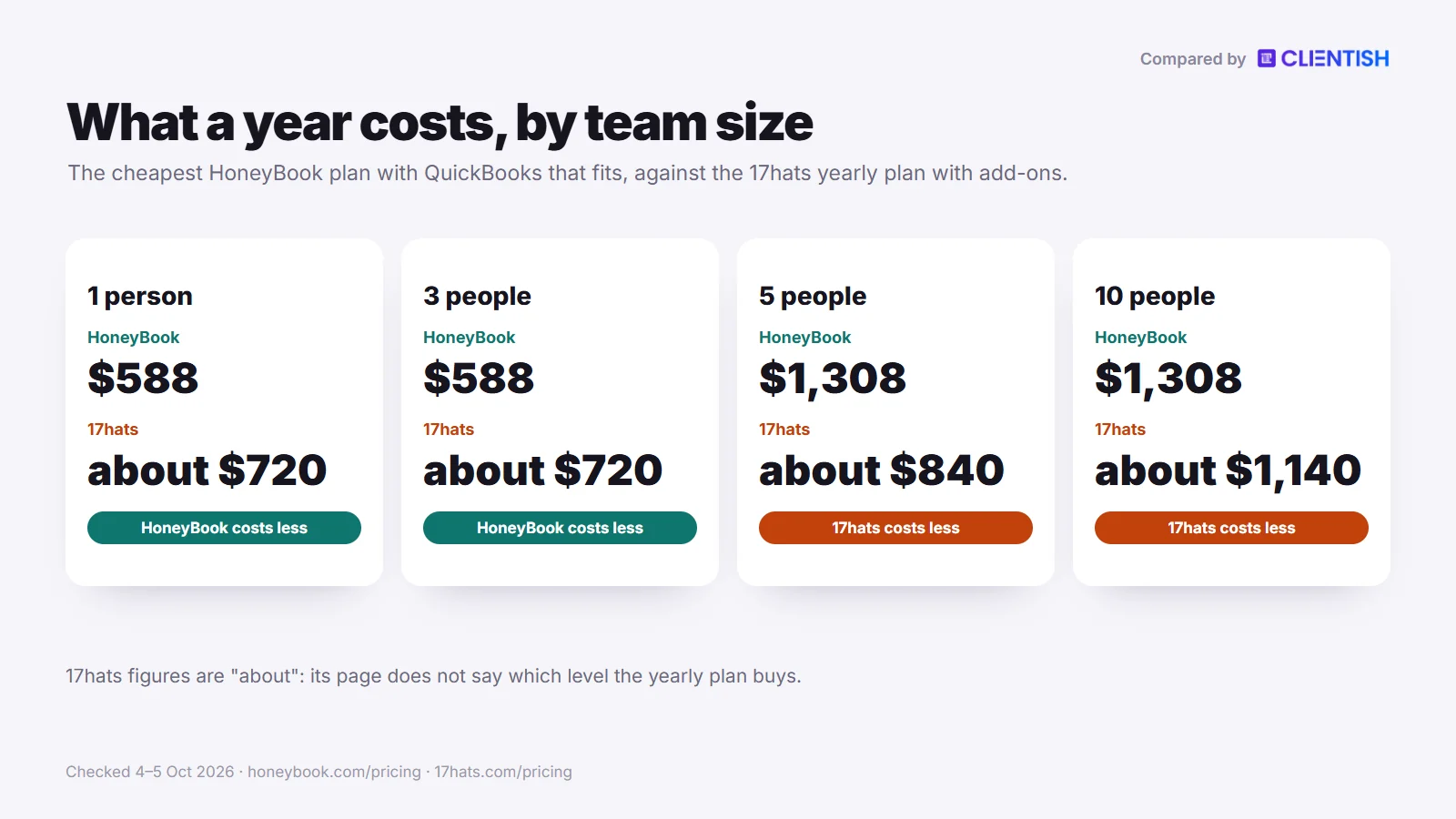
Five people on Clientish Starter cost $276 for twelve months; the same team spends about $840 on 17hats or $1,308 on HoneyBook Premium. Trial it for 14 days with a handful of your real clients; it costs nothing and asks for no card.
What You Get in Clientish
Clientish covers what happens between a paid invoice and finished work, for a team serving returning clients. These are the parts a HoneyBook or 17hats user notices first.
- Services clients can buy: a service catalogue in the portal, with cart, coupons and an invoice raised at checkout.
- Orders that track delivery: each order holds the brief, your deliveries and the revisions left; silence on a delivery means approval after seven days by default.
- A help desk: support tickets on every plan, with priority-based reply deadlines, saved replies, tags, staff-only notes and client ratings.
- Proposals that open the account: 11 proposal layouts, a typed signature with the IP logged and a signed PDF; acceptance creates the client, the order and one invoice, deposit first.
- Your branding: logo, favicon and colours on a client portal hosted under clientish.io, with client mail sent from your SMTP.
- Approved hours: remote members (Growth and up) log time by client, and clients approve it before invoicing.
- Room for the team: 5, then 15, 30 or 50 team members as plans rise, extra seats for sale, and clients never use one.
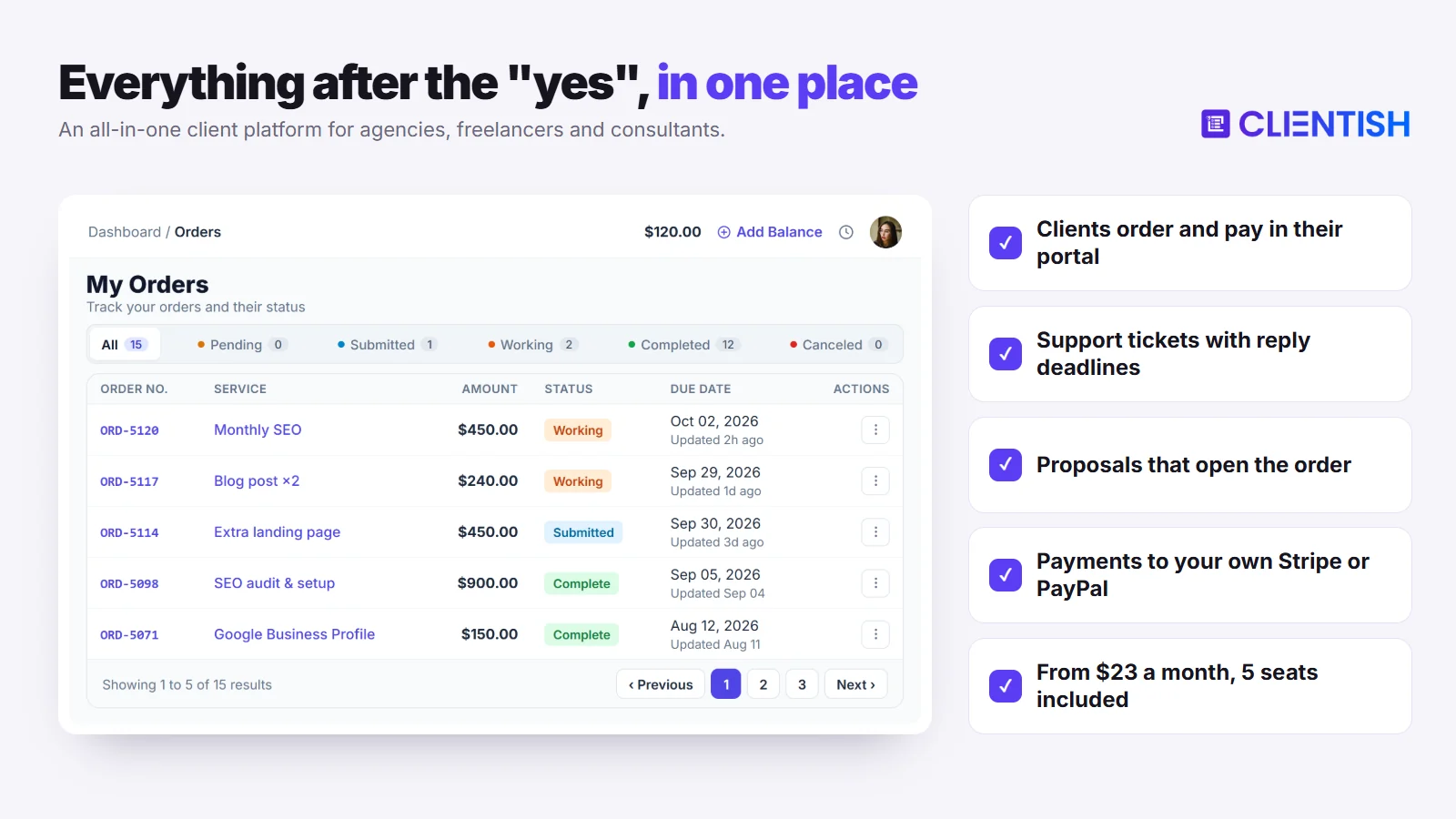
When HoneyBook or 17hats Is Still the Better Pick
Clientish leaves out things these two do well, and for a booking-led solo business they matter more than orders or tickets. Stay put if one of these fits.
- Clients choose session or call times from your calendar: Clientish has no booking scheduler.
- You take cards at a venue with Tap to Pay: there is no app to install for Clientish, though its workspace and client portal are responsive in any phone browser.
- You want 17hats’ free plan, or HoneyBook’s follow-up that branches on client actions.
Two more limits to weigh: Clientish works in English alone, and it holds no SOC 2 report.
Paid monthly, Clientish runs $29/$49/$99/$149 a month; on yearly billing the same four plans are $23/$39/$79/$119. Even Starter carries the full set: client portal, ticketing, proposals and invoicing.
Outgrowing HoneyBook or 17hats? Run your client work in one portal.
Orders, tickets, renewals and payments to your own Stripe or PayPal, for your whole team. Plans start at $23 a month billed yearly, with 5 team members included.
Start your 14-day free trial →No card needed · See all plans
Frequently Asked Questions
Photographers, designers and small agency owners comparing HoneyBook with 17hats tend to ask the questions below. Each answer rests on what the two companies publish on their own pages, read on 5 October 2026, so recheck prices before you pay.
Is HoneyBook or 17hats better for beginners?
HoneyBook, for most new users. It arrives with templates and a 30-day trial, so a first Smart File can go out soon after sign-up. 17hats has a free tier and training, though some Capterra reviewers say setup took days.
Does 17hats have a free plan?
Yes, the Free CRM. It sets no limit on contacts or projects, allows four invoices every three months and includes email templates, which is enough to test the basics before you pay for the full plan.
What are HoneyBook’s document limits?
There are none. No HoneyBook plan, Starter included, limits how many proposals, contracts, invoices or questionnaires go out, whereas 17hats caps documents at 20 or 35 a month below Level Three.
Does 17hats have automation?
Yes, as step-by-step workflows. To-Do Workflows come with Level Two; Level Three adds Advanced Workflows that send documents and emails and hand steps to users. In neither type did we find branching; If/Then sits in questionnaires.
What’s the difference between HoneyBook’s automation and 17hats’s automation?
Where the logic sits. HoneyBook’s automations, from Essentials, branch on conditions such as an unsigned contract or a payment. 17hats’ workflows run in a fixed order, and its If/Then logic lives in Level Three questionnaires.
Does HoneyBook work outside the US?
Only in three more countries: Canada, plus the UK and Australia since May 2026. Businesses based anywhere else cannot sign up, and HoneyBook processes every payment itself, so no other processor can be connected.
Does 17hats have time tracking?
Yes. You can run a timer or enter time by hand, then turn a project’s time log into invoice lines with its Invoice button. The pricing grid lists the tracker as a $5 monthly add-on on every level.
Can I white-label HoneyBook or 17hats?
Partly. Every HoneyBook plan serves client links from your own subdomain, and Essentials removes the “Powered by” label, yet automatic reminders still arrive from HoneyBook. 17hats gives you a named 17hats subdomain and drops its logo from Level Two.
How much did HoneyBook’s prices increase in February 2025?
Between December 2024 and March 2025, yearly-billed prices rose from $16 to $29 a month for Starter, $32 to $49 for Essentials and $66 to $109 for Premium: increases of roughly 81%, 53% and 65%.
Is 17hats good for a team?
Only for a small one. A subscription can add two extra users, more cost $5 a month each, and access can be limited by section. The product stays organised around one owner’s contacts and projects.
Which is cheaper, HoneyBook or 17hats?
At list price for one person, HoneyBook Starter: $348 a year against $600 for 17hats. 17hats wins on its free tier, a promotion, or past three people; its two-year term ($400 a year) undercuts Essentials, not Starter.
What is HoneyBook’s Smart Files feature?
A Smart File is one link holding a proposal, contract and invoice, so the client picks services, signs and pays in a single sitting. It can also carry a scheduler block and never counts against a cap.
Do both tools integrate with QuickBooks?
Yes, with QuickBooks Online only. HoneyBook includes it from Essentials. 17hats bundles it into Level Three and sells it for $5 monthly below that; data flows one way only, and only US, Canadian and UK accounts can connect.
Is HoneyBook or 17hats better for photographers?
HoneyBook for most working photographers: its owner app takes Tap to Pay at a session, and Smart Files collect the deposit at signing with no document cap. 17hats suits a photographer starting out on its free tier.
Is there a way to buy more documents on 17hats?
Yes, on Level Two, where the 35-document monthly allowance can be topped up with 25 more for $10. Level Three has no cap at all, and a quote, contract and invoice nested as a 3-in-1 counts once.
Does HoneyBook have time tracking?
It is unclear right now. Support named 7 September 2026 as the Time Tracker’s last day, and a community member reported it back on 15 September, but no HoneyBook page or staff post confirms that. Check inside the app.
Is HoneyBook priced per user?
Not per seat, but seats are tied to plans. Starter allows no team members, Essentials up to two at $49 a month billed yearly, and Premium any number at $109 a month billed yearly.
Does HoneyBook have a free plan or free trial?
There is no free plan, but there is a free trial. New accounts get 30 days without a card and are not charged when it ends, and paid memberships carry a 60-day money-back window on request.
How much does 17hats cost in 2026?
One plan, three billing terms: $60 billed monthly, $600 billed yearly or $800 every two years. Time tracking, QuickBooks and each extra user cost $5 a month apiece, and a Free CRM tier sits underneath for light use.
Which has better scheduling?
It depends on the booking. HoneyBook can drop a booking block into a Smart File; Starter allows one session type and Essentials removes the limit. 17hats’ Advanced scheduling, a $10 monthly add-on, takes payment at booking and adds Zoom links.
Can I switch from HoneyBook to 17hats, or the other way?
Yes, though only contacts move cleanly, as a CSV in either direction. Templates, forms, automations and old project records are rebuilt by hand, though HoneyBook’s free file setup and 17hats’ switcher discount ease the work.
Does 17hats have a mobile app?
Yes, free on iOS and Android, even on the Free CRM. It alerts you when a lead form, quote, contract, questionnaire, payment or booking comes in, and 17hats points to its desktop version for the full product.
Do HoneyBook or 17hats have an API or work with AI assistants?
Neither vendor documents a public developer API that we could find. HoneyBook connects to Claude and ChatGPT through its MCP link and to Zapier from Essentials; 17hats offers Zapier on Level Three and AI writing in its editor.
Which has better customer support?
They differ. Any HoneyBook plan gets help by email or live chat on all seven days, and Premium moves you up the queue. 17hats runs in-house chat and email, with response targets of one day to one hour by level.
Does either tool include a helpdesk or shared inbox?
Not a helpdesk. Neither has a client ticket queue with reply deadlines that we could find; HoneyBook clients send messages inside a project, and 17hats portal clients can neither see your email nor upload files.
Does HoneyBook have project management?
Only a light version. Every plan has task lists and a customisable pipeline, and Essentials adds assigning tasks to team members. Task dependencies and Gantt charts are missing from what we read, so larger deliveries usually need another tool.
Is 17hats worth it in 2026?
Often yes, if you work alone at modest volume: the free tier, the two-year rate and the documented time tracker all save money. Busy users should price in Level Three, because the lower levels cap documents.
Which integrations do HoneyBook and 17hats offer?
HoneyBook connects email, calendars and Calendly on every plan, plus Zapier, QuickBooks Online, Zoom and Canva from Essentials. 17hats links QuickBooks Online, Google and Apple calendars, Stripe and Square, and adds Zapier on Level Three.
Is Clientish a good alternative to HoneyBook or 17hats for an agency?
Yes, when a team delivers repeat work for returning clients. It brings paid orders that count revisions, a support ticket desk and renewals that reopen an invoice, all in one client portal; neither booking tool is built around those.
How much does Clientish cost compared with HoneyBook and 17hats?
Monthly, Starter is $29; billed annually it comes to $276 for the year and seats five team members. A five-person team would otherwise spend $1,308 on HoneyBook Premium or roughly $840 on 17hats once add-ons are counted.
Can I use Clientish on my phone?
Yes, through the browser. Everything from the agency’s workspace to the portal clients log in to adapts to a phone screen in an ordinary mobile browser. There is no app to install, and no Tap to Pay or booking calendar.
Can I move my clients from HoneyBook or 17hats to Clientish?
Yes. Export contacts from either tool as a CSV, then upload it, or an XLS or XLSX file, under Clients, Import in Clientish. Each record arrives as an inactive client, and no message goes out until you send an invite.
Does Clientish charge a fee on client payments?
No. Whatever a client pays goes to the agency through its own Stripe, PayPal, Paddle or SSLCommerz connection, or by bank transfer, Wise or another manual route. Clientish keeps nothing; the gateway’s own rate is the only cost.
Final Thoughts
HoneyBook and 17hats both carry a small creative business from first enquiry to a paid booking, and on many features they sit closer together than their reputations suggest. What decides it is where you work, how you bill and how many documents leave your desk each month.
- HoneyBook suits an owner in its four countries who wants one-file bookings, a phone app with Tap to Pay and follow-up that branches, and who can pay $588 a year for Essentials once QuickBooks or automations matter.
- 17hats suits a one-person business that wants to start free, bill hours from a documented tracker and use If/Then intake forms, as long as the document caps or the cost of Level Three fit the workload.
- Clientish suits an agency whose clients keep buying, whose staff split the work and whose client questions need a queue; five people spend $276 on a year of Starter.
If that last description fits, judge it on a few live clients rather than a demo account. Start with the free 14-day trial, no card required, line the plans up on the pricing page, and read HoneyBook vs Clientish for a closer look at that one matchup.
Sources
Clientish publishes this comparison. Every HoneyBook and 17hats fact was checked on October 4 and 5, 2026, against each company’s own pricing and help pages; review themes come from Capterra and Trustpilot.
HoneyBook and 17hats are trademarks of their owners. Clientish is not affiliated with either of them. Prices and features change; if you spot something out of date, let us know and we’ll correct it.

