

Choosing between SuiteDash and Dubsado mostly comes down to one question: do you need software that runs the whole agency, with a team, a CRM and project delivery, or do you need clients booked, contracted and paid with as few manual steps as possible?
Quick answer: SuiteDash covers more ground. Even the cheapest plan has unlimited staff and clients, a login on your domain, an installable branded web app, email campaigns and projects; pipelines arrive on Thrive, and tickets, the LMS, dependencies and automations wait for the $99 Pinnacle tier. Dubsado is narrower and centres on the intake sequence: forms, proposals, contracts, invoices and payment plans, chained together by its node-based Flows on the Premier plan. Neither is the right pick for everyone, and which one fits depends on how your business runs day to day.
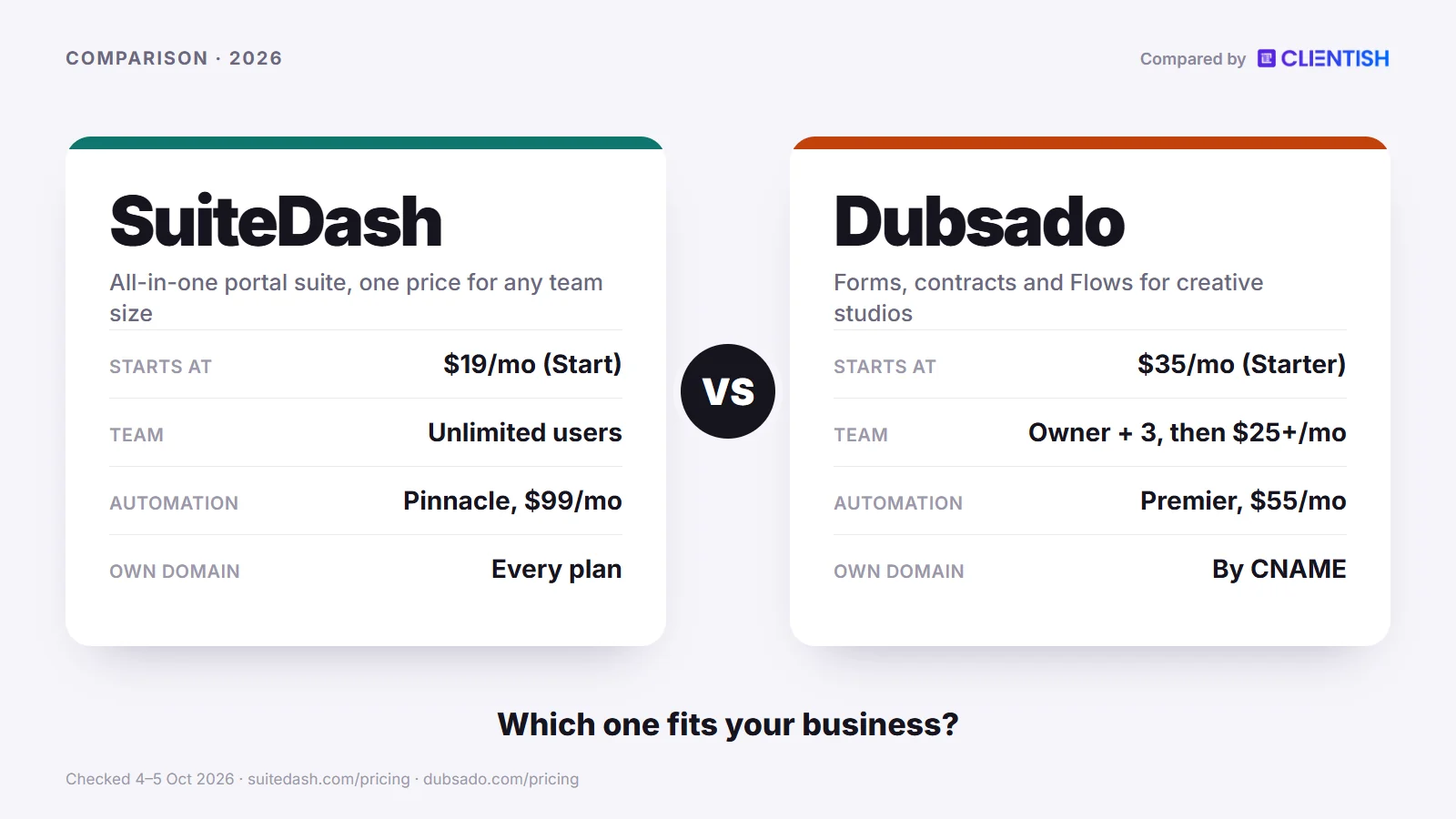
This guide compares the two tools area by area, flags where each one falls short, and ends with a “pick SuiteDash if / pick Dubsado if” verdict. Prices and plan contents were read from each vendor’s own pages on October 5, 2026.
Key Takeaways
SuiteDash and Dubsado are both sold as client management software, yet they are built for different buyers. One is a wide all-in-one suite with unlimited seats and full white-label; the other is a focused intake-and-billing tool aimed at service businesses that sell one engagement at a time.
- The pricing models differ. SuiteDash charges one price per account, with unlimited users on every plan, from $19 up to $99 monthly (yearly billing trims each plan by roughly a fifth). Dubsado’s Starter costs $35 a month and Premier $55 a month ($335 or $525 a year) since its December 2025 price change. The owner plus three extra users are included; past that Dubsado adds one flat monthly fee per bracket of extra users, not a charge per person.
- Dubsado focuses on the booking sequence. Its forms, proposals with package choices, contracts and invoices connect into one client journey, and Premier adds Flows, a node-based builder that sends each step for you. SuiteDash’s “Client/Customer Journeys” feature was still marked “Coming Soon” on its pricing page on October 5, 2026 (its Journey Maps view, added in August 2026, only displays automations), and its current automation toolkit sits on the $99 Pinnacle plan.
- SuiteDash leads on breadth and client-side branding. A custom login domain, a branded login page, an installable white-label web app for clients, CRM pipelines, email marketing, projects and time tracking are all part of the SuiteDash plans, with pipelines on Thrive and up. Dubsado also lets you map your own domain and has had iOS and Android apps since July 2024, but those apps serve the business owner and team, and its portal login screen cannot be customised.
- Both take time to learn. SuiteDash’s steep learning curve is a Capterra theme and it sells $50 “Wizarding Sessions”; Dubsado scores 3.7 for ease of use there and points users to paid Certified Dubsado Specialists.
- Pick SuiteDash if you need a team of any size on one bill, a client portal that carries only your brand (including an app clients can add to their phone), and a wide toolset in one login. Pick Dubsado if you are a solo creative or small studio whose bottleneck is getting from inquiry to signed and paid, and you want that sequence automated without buying the top SuiteDash plan.
SuiteDash vs Dubsado at a Glance
Each has loyal users, but they solve different problems. SuiteDash offers unlimited users, full white-label and modules for CRM, projects, email marketing and time tracking. Dubsado focuses on booking and billing, built around forms, proposals, contracts, invoices and the Flows that link them.
| Dimension | SuiteDash | Dubsado |
| Pricing model | One price per account, unlimited users: Start $19/mo, Thrive $49, Pinnacle $99 | Starter $35/mo, Premier $55/mo; owner + 3 users included, then a tiered fee ($25, $45 or $60/mo) |
| Client portal | Full portal on every plan, white-label, with an installable branded web app | Branded portal with a client login; homepage and login screen are fixed |
| White-label | Custom URL, branded login page, own email sending; “SuiteDash is completely hidden” | Own domain by CNAME, favicon and link previews; no Dubsado branding on forms, invoices or schedulers |
| Intake automation | Automation toolkit and FLOWs on Pinnacle; “Client/Customer Journeys” marked “Coming Soon” | Flows with a node-based builder (Premier); forms accept custom CSS |
| Project management | Projects, tasks, templates and timers on every plan; task dependencies on Pinnacle | Tasks, task boards and a global time tracker; time-tracker invoicing on Premier |
| Email marketing | Email campaigns on every plan; drip autoresponders from Thrive | We found no broadcast or drip email tool |
| Setup difficulty | Steep learning curve (Capterra theme); paid $50 Wizarding Sessions | 3.7/5 ease of use on Capterra; third-party estimates of 15–25 hours |
| Automation cost | $99/mo Pinnacle | $55/mo Premier |
| Best for | Small agencies that want breadth, white-label and any team size on one price | Solo creatives and small studios automating an inquiry-to-invoice sequence |
Prices are the publicly listed rates on October 5, 2026. Check each vendor’s site before you buy, as plans change.
What Changed at SuiteDash and Dubsado in 2025–2026
Many pages that rank for this pair were written before Dubsado rebuilt its product and raised its prices, and before SuiteDash’s busy 2026 release calendar. The dates below come from the two vendors’ own update logs, blog posts and help pages, so you can see which older claims no longer hold.
SuiteDash
- Prices held steady: the $19, $49 and $99 monthly prices for Start, Thrive and Pinnacle ($180, $480 and $960 yearly) match archived copies of the pricing page going back to October 2022. The pay-once Century option appeared by July 2025.
- 26 June 2026: push notifications arrived for the installable web app, along with Messages 2.0, sign-in with Google or Microsoft, and a CRM Target Import that loads companies and contacts from one file.
- 20 July 2026: Work Request Forms let clients describe a job and pay in the same step, and new wallet options went live through Stripe (Apple Pay, buy now pay later) and Braintree (Google Pay, Apple Pay, PayPal, Venmo).
- 14 August 2026: quizzes, a Reporting Toolkit, and Journey Maps, which sketches the automation sequence a kickoff form sets off. It displays that chain; it is separate from “Client/Customer Journeys”, which the pricing page still marks “Coming Soon”.
- 5 and 25 September 2026: named AI Agents with a “Wingman” approval step, a Compose skill, Sales Rooms, profit and loss and uninvoiced-time reports, then meetings and group events, AI Brand Voice and Rewrite, enforced two-factor sign-in and itemised tax on invoices.
Dubsado
- October and November 2025, Dubsado 3.0: Dubsado introduced the rebuild in October and released a beta in November. Workflows became Flows, drawn as connected nodes; projects gained table and Kanban layouts; and the update brought a threaded inbox with scheduled sending plus a time tracker that sits in the top bar.
- 17 November 2025: a timed 21-day trial with full Premier access replaced the older trial, which had no deadline but a three-client limit.
- 1 December 2025: new subscribers pay $35 for Starter and $55 for Premier each month ($335 and $525 on yearly billing), up from $20 and $40. Accounts already paying kept their old rate.
- 2026, AI tools: summaries of email threads, and a Notetaker that records calls on Zoom, Google Meet, Teams, Webex, GoTo or Slack huddles and returns a transcript, a summary and suggested next steps. Recordings are deleted after 90 days.
- Later in 2026: Dubsado’s product information page (updated May 2026) says the older 2.0 version will be switched off sometime this year, with notice given to users first.
Who Each Tool Is For
The two tools show up in the same searches, but they are designed around different operators. Picking the wrong one does not just mean a missing feature; it can mean rebuilding your client process six months after you start.
SuiteDash is built for the small agency owner who wants one platform to run the operation: client portals, project management, CRM, email marketing, invoicing and a team of any size, all under one monthly fee. Because every plan includes unlimited staff, software cost does not climb as you add contractors or employees. The white-label depth (own login URL, own login page, installable web app) matters if a fully agency-branded experience is a must.
The trade-off is configuration time. SuiteDash rewards teams willing to spend hours setting it up. Its learning curve is a repeated theme in Capterra reviews, and SuiteDash sells paid one-to-one “Wizarding Sessions” to help new accounts get configured. Owners who want client-facing work running within a day or two may find it frustrating.
Dubsado is built for the creative studio or solo operator whose biggest friction point is the stretch from inquiry to payment. If your work starts with a lead form, moves through a proposal, gets signed through a contract and ends with an invoice, and you want that sequence to run without you pushing each step, Dubsado is designed for exactly that. Dubsado 3.0 replaced the old workflows with Flows, a node-based builder, and its forms can be styled with custom CSS so they match your brand.
Dubsado does not try to run a multi-person agency. Its tasks, boards and timer cover the basics, but reviewers note no Gantt charts, dependencies or milestones, and we found no email marketing. Team access comes in three fixed roles, and past three free extra users a flat bracket fee applies. Ease of use scores 3.7 out of 5 on Capterra, and Dubsado lists paid Certified Dubsado Specialists for people who want their account built for them.
A quick summary of who each tool fits:
- SuiteDash: small agencies (roughly 2 to 15 people) that need breadth: a team at one price, white-label portals, project delivery, CRM and email marketing in one place, and that are ready for a real configuration effort upfront.
- Dubsado: creative solos and small studios (one to four users) whose priority is an automated intake and booking sequence, and who handle delivery in another tool or informally.
- Check both carefully: agencies that need support tickets, subscription billing and a branded portal live within a week. SuiteDash has all three only on Pinnacle, after a setup reviewers call long, and we found no ticket feature in Dubsado.
For an agency owner weighing these two, the useful question is not “which has more features?” It is whether your bottleneck is intake automation (Dubsado’s lane) or operational breadth for a whole team at one price (SuiteDash’s lane). Answering that usually settles the choice.
Meet SuiteDash: The All-in-One with Unlimited Users and White-Label
SuiteDash is a broad business suite priced per account rather than per person. One monthly price covers your entire team and client list, however large either grows. It bundles CRM, projects, invoicing, email marketing, documents with e-signing and a white-label client portal, and its top plan adds a learning management system and support tickets. For one platform covering nearly every operational layer of a small agency, with no seat charge per hire, it is one of the main contenders.
The pricing structure separates it from most rivals. Whichever of the three tiers you take, staff and clients are unlimited, from Start at $19 monthly to Pinnacle at $99. Pay-once “Century” options exist as well, between $2,240 and $6,840. At five or ten people, that compares well with tools that bill per seat.
Key features:
- Unlimited-user pricing: SuiteDash’s pricing page says plans are “one price per month/year/century … NOT per user”, with unlimited staff and clients on all of them.
- White-label with your own URL: clients log in at your domain, on a branded login page, and SuiteDash says the platform can be set to show “ONLY your brand”. Once the custom URL and login page are set, the portal becomes an installable web app (PWA) clients can add to a phone’s home screen. The app is not listed in the Apple or Google app stores.
- CRM with deal pipelines: contacts and companies are on every plan, and Kanban deal-stage pipelines arrive on Thrive and above.
- Project management and time tracking: projects, tasks, project templates and timers that convert to billable hours are included from Start, with dependencies on Pinnacle.
- Email marketing and drip campaigns: onboarding or nurture emails can run from inside SuiteDash, with drip autoresponders from Thrive.
- LMS and support tickets: a course builder and the Support Tickets Toolkit are both Pinnacle features, useful if you sell training or want a client support queue.
- AI tools: SuiteDash’s 2026 updates added AI agents and writing tools such as Compose, Rewrite and Brand Voice, with SuiteAi credits that include a free tier.
| Pros | Cons |
| Unlimited users and clients on all plans, with no per-seat cost | Parts of the interface called dated or clunky (Capterra theme) |
| Custom URL, branded login page and installable web app on every plan | All automations, FLOWs, tickets and the LMS need the $99 Pinnacle plan |
| Wide feature set at this price: CRM, projects, email marketing, e-signing | Dependent tasks need Pinnacle |
| High Capterra rating: 4.8 out of 5 from 633 reviews | “Client/Customer Journeys” still marked “Coming Soon” |
| HIPAA business associate agreement available, plus encryption at rest | Reviewers report slower pages on large accounts, and setup takes days for many new users |
Pricing: Monthly, Start is $19, Thrive $49 and Pinnacle $99; paying yearly brings those to $180, $480 and $960. Unlimited users and clients on every plan, a 14-day trial on Pinnacle with no card, and paid Power-Ups sold separately. Prices checked October 5, 2026; check SuiteDash’s site for current pricing.
Bottom line: SuiteDash makes the most sense for a small agency that wants CRM, projects, email marketing and a client portal on one bill without thinking about seats. For a growing team that wants a fully branded client experience, every plan includes it. What it costs instead is configuration time; the paid setup help SuiteDash sells is a fair signal of how much.
Meet Dubsado: The Intake-to-Invoice Specialist
Dubsado is built around one specific problem: moving a client from first contact to signed contract to paid invoice with as little back-and-forth as possible. The platform centres on forms (lead captures, questionnaires, proposals and contracts), invoices with payment plans, and, on Premier, Flows: a node-based automation builder that sends each piece at the right moment.
Where SuiteDash tries to cover the entire business, Dubsado draws a tighter circle around intake and billing, and most of its features point at that circle.
Key features:
- Forms you can style: lead captures, questionnaires, proposals and contracts accept custom CSS. Starter allows one active lead capture form, Premier unlimited. We could not confirm built-in show/hide logic in 3.0 forms; third-party add-ons sell it.
- Proposal, contract and invoice in sequence: a client can choose packages on a proposal, sign the contract and pay the invoice, and the signed contract then appears in the client portal. Clients can enter discount codes on proposals.
- Flows (Dubsado 3.0): a node-based canvas with actions such as send form, send contract, send invoice, create task, add project tags, pause and “hold actions until”, plus optional manual approval before a step sends. Flows are a Premier feature.
- Payments: money moves through Stripe-backed Dubsado Payments, Square or PayPal, and the processor’s rate is the only charge.
- Automation on the cheaper paid tier: Flows come with Premier at $55 a month, well below SuiteDash’s $99 Pinnacle, where SuiteDash’s automation toolkit lives.
- Scheduler (Premier only): clients book time from a link in a form or email, with your calendar connected.
- Client portal: clients sign in to a branded area holding their invoices, forms, proposals, contracts, appointments and any public task boards. The look is adjustable, the layout is not.
| Pros | Cons |
| Forms, proposals and contracts styled with custom CSS | No email marketing found; project tools are light (no dependencies or Gantt, per third-party reviews) |
| Node-based Flows builder is live (Premier) | Its phone app serves the owner and team; the full product is on desktop |
| Proposal, contract, invoice and payment plan in one client sequence | Setup takes effort: Capterra ease of use is 3.7 out of 5 |
| Automation at $55 a month (Premier) | Tiered user fee once you pass three extra users |
| Recurring invoices with autopay and payment plans on Starter | Smaller Capterra base: 4.2 out of 5 from 61 reviews |
Pricing: New subscribers since December 1, 2025 pay $35 monthly or $335 yearly for Starter, and $55 monthly or $525 yearly for Premier. The owner plus three additional users are included; larger teams pay the bracket fees described in the pricing section. Extra brands are $10 a month each, and the trial lasts 21 days with full Premier access. Before December 2025 the plans cost $20 and $40 a month, and existing subscribers kept those prices. Prices checked October 5, 2026; always check Dubsado’s site for current pricing.
Bottom line: Dubsado fits a solo creative or small studio that lives by its intake process: photographers, brand designers and consultants who want an automated inquiry-to-invoice sequence and do not need the platform to run a large team’s delivery. Add dependency-based planning, email marketing or a client-facing app to the list, and its limits arrive quickly.
How We Compared
We looked at each tool through the tasks an agency or studio owner meets in the first weeks, and checked every price and plan limit against the vendors’ own pages on October 5, 2026. What we evaluated, and how:
- Pricing (total team cost, not sticker price): we priced each tool at realistic team sizes, seven users and twenty users, to show where per-account and tiered-seat models diverge. SuiteDash pricing came from its pricing page and plan help articles; Dubsado’s user brackets came from dubsado.com/pricing and its plan comparison article.
- Client portal depth: what clients see and can do once logged in, not just whether a portal exists.
- Automation: what is shipped and usable today, and on which plan. SuiteDash’s “Client/Customer Journeys” feature is marked “Coming Soon” on its pricing page, so we do not count it as a live feature.
- White-label and branding: what is included on each plan tier, not only on the top one.
- Setup and learning curve: we listed the tasks a new operator meets first: connecting a payment gateway, building a contract-to-invoice sequence and getting a branded portal live. On SuiteDash that means permissions, the custom URL and the portal layout; on Dubsado, templates for forms, proposals and contracts wired into a Flow. We compared that list with recurring Capterra themes, not single complaints.
- Feature scope: which capabilities are present, which are locked to higher tiers, and which are absent.
- Payments and invoicing: supported gateways, payment methods, recurring billing and how signatures fit into the sequence.
One methodological note: Dubsado has a much smaller review footprint than SuiteDash on Capterra (61 reviews against 633 when we checked), so review themes about Dubsado rest on a smaller sample. Where the same pattern showed up across several reviews, we treated it as a theme. Where data was thin or mixed, we said so instead of drawing a conclusion. G2 blocked our requests, so we use Capterra figures throughout.
We did not score each tool or declare an overall winner. The two products are aimed at different operators, and a single score would hide the distinction that decides the purchase.
Pricing and User Model: Unlimited Seats vs Tiered Users
The two pricing structures differ, and the gap matters more as a team grows. SuiteDash charges one monthly rate whatever the number of staff or clients. Dubsado charges a plan price that covers the owner and three extra users, then adds a tiered monthly fee for larger teams, which changes the maths as you scale.
Winner: SuiteDash for growing teams, though by a smaller margin than per-seat headlines suggest. Adding a fifth, tenth or fortieth person to SuiteDash costs nothing extra. On Dubsado the fifth person (the fourth extra user) moves you into the $25-a-month bracket, the twelfth into the $45 bracket, and more than 30 extra users means contacting Dubsado’s sales team.
Here is how the two models compare for a seven-person agency on the plan of each tool that includes automation (Pinnacle and Premier):
| Dimension | SuiteDash (Pinnacle) | Dubsado (Premier) |
| Monthly list price | $99/mo | $55/mo |
| Users included | Unlimited | 4 (owner + 3 additional) |
| Cost for 7 users, monthly | $99/mo (no change) | $55 + $25 user bracket = $80/mo |
| Yearly total for 7 users | $960 (yearly plan, $80/mo) | About $825 ($525 yearly plan + $300 user fee at $25/mo) |
| Clients included | Unlimited | Unlimited |
Check each tool’s site for current pricing; seat brackets and tier contents can change.
A few points on how each model plays out:
- SuiteDash’s price covers unlimited clients and staff on every plan, including Start at $19 a month. Without automations, Thrive at $480 a year covers the same seven people for less than either figure in the table.
- Dubsado’s free extra users stop at three. After that, Dubsado’s help centre describes one flat monthly fee per bracket, not a charge per person: a team with four to ten extra users adds $25 monthly in total, eleven to twenty adds $45, and twenty-one to thirty adds $60. A ten-person team on Premier therefore pays $55 plus $25 a month, while a twenty-person team pays $55 plus $45, slightly above SuiteDash’s $99 Pinnacle.
- Automation sits at different price points. Dubsado’s Flows come with Premier at $55 a month. SuiteDash keeps its whole automation toolkit, FLOWs onboarding and task dependencies on Pinnacle at $99. When workflow automation is the only Pinnacle feature you need, Dubsado reaches it for less.
What the Sticker Price Misses
The monthly rate is only part of the cost. One-to-one “Wizarding Sessions” cost $50 apiece (five at most; Thrive includes one and Pinnacle a bonus), and for $299 the “Sensei Kickstart” has a partner set up your branding plus one onboarding workflow. Power-Ups sit outside every plan too: VIP support costs $50 monthly, PRIME (home of PDF document signing) and PLUS are $40 each, and every extra 250 GB of storage adds $5. Dubsado’s add-ons are simpler, with $10 a month per extra brand, but its setup is heavy too, and Dubsado points customers to paid Certified Dubsado Specialists. Neither tool is sign-up-and-go, so count setup time or setup fees in the first-year cost.
The takeaway: past four people, SuiteDash’s per-account price wins when Start or Thrive is enough; on the automation plans, Dubsado Premier stays cheaper until the team reaches twelve. A solo operator or studio of two to four pays less on Dubsado Premier and gets the Flows that SuiteDash keeps on Pinnacle.
The Real Cost for 1, 3, 5 and 10 People
A monthly sticker price hides what a team really pays over twelve months, because Dubsado adds a bracket fee once a fifth person joins and SuiteDash never does. Below, each figure is twelve months at list price on annual billing, for four team sizes and the two plans of each tool that most readers weigh.
| People on the account | SuiteDash Thrive | SuiteDash Pinnacle | Dubsado Starter | Dubsado Premier |
| 1 | $480 | $960 | $335 | $525 |
| 3 | $480 | $960 | $335 | $525 |
| 5 | $480 | $960 | $635 | $825 |
| 10 | $480 | $960 | $635 | $825 |
How we got these figures:
- SuiteDash: one yearly price per account whatever the headcount, so Thrive stays at $480 and Pinnacle at $960 from one person to ten. Thrive is shown because it carries pipelines, proposals and drip email; Pinnacle because automations, tickets and task dependencies live there. Start ($180) would also cover any team but has no proposals or pipelines.
- Dubsado: each plan includes the owner and three extra users. Add a fifth person and you have four extra users, which places the account in the 4–10 band: $25 a month for the whole band, or $300 over a year, so five and ten people pay the same. An eleventh extra user (twelve people) would move the team to the $45 bracket.
- Add-ons left out: neither tool needs one for a like-for-like comparison. Optional extras would raise the totals: SuiteDash Power-Ups at $40 to $50 a month each and $5 a month per extra 250 GB of storage; Dubsado charges $10 a month for each extra brand.
Read side by side, Dubsado Premier undercuts SuiteDash Pinnacle at every size here, by $435 a year for up to four people and $135 for five to eleven. SuiteDash comes out cheaper only when Thrive covers what you need: a ten-person team pays $480 there against $825 on Premier.
Which Plan You Really Need
Both vendors keep their best-known features off the entry plan, so the right tier depends on which of those features your process relies on. This grid lists each plan side by side, including the SuiteDash items that only Pinnacle unlocks and the Power-Ups sold outside every plan.
| Feature | SuiteDash Start ($19/mo, $180/yr) | SuiteDash Thrive ($49/mo, $480/yr) | SuiteDash Pinnacle ($99/mo, $960/yr) | Dubsado Starter ($35/mo, $335/yr) | Dubsado Premier ($55/mo, $525/yr) |
| People included | Unlimited staff and clients | Unlimited staff and clients | Unlimited staff and clients | Owner + 3, then bracket fees | Owner + 3, then bracket fees |
| Client portal and custom domain | ✓ portal, custom URL and login page | ✓ | ✓ | ✓ portal; CNAME domain (plan not stated) | ✓ portal; CNAME domain (plan not stated) |
| Proposals | ✗ | ✓ Dynamic Proposals with payment | ✓ | ✓ with packages; no public proposals | ✓ plus public proposals |
| Deal pipelines | ✗ | ✓ | ✓ | Project statuses only | Project statuses, plus source tracking |
| Email marketing | Campaigns | Campaigns + drip autoresponders | Campaigns + drip autoresponders | None found | None found |
| Automation | ✗ | ✗ | ✓ Complete Automation Toolkit and FLOWs | Payment reminders and autopay only | ✓ Flows |
| Task dependencies | ✗ | ✗ | ✓ | None found | None found |
| Support tickets | ✗ | ✗ | ✓ Support Tickets Toolkit | None found | None found |
| Course builder (LMS) | ✗ | ✗ | ✓ | None found | None found |
| Booking | Appointments | Appointments | Appointments | ✗ no scheduler | ✓ scheduler and video conferencing |
| Time to invoice | Timers to billable hours | Timers to billable hours | Timers to billable hours | ✗ | ✓ time tracker invoicing |
| Accounting sync | QuickBooks Online, one way | QuickBooks Online, one way | QuickBooks Online, one way | ✗ | QuickBooks Online and Xero |
| Client-side live chat | ✗ | ✓ | ✓ | None found | None found |
| Storage | 100 GB | 500 GB | 2 TB | Not listed | Not listed |
| Journeys or Flows | ✗ | ✗ | “Coming Soon” | ✗ | Flows canvas |
| Paid extras on any plan | Power-Ups: VIP $50/mo, PRIME $40/mo (funnels, PDF signing, website chat), PLUS $40/mo (card vaulting, Email and Form Cannons, +1 TB), WORLDs $40/mo | Same Power-Ups; 1 free Wizarding Session | Same Power-Ups; 1 bonus Wizarding Session | Extra brands $10/mo each | Extra brands $10/mo each |
In practice, most readers land on one of three plans. A solo creative who wants proposals, a scheduler and automation in one place needs Dubsado Premier. A team that wants a portal, projects, pipelines and drip email without automation fits SuiteDash Thrive. Pinnacle is worth the extra $480 a year only if you need tickets, a course builder, task dependencies or SuiteDash’s automation toolkit.
Automation and Workflows: Breadth vs the Intake Loop
SuiteDash can automate across more of the business; Dubsado automates a narrower slice of it, the intake and billing sequence, and does so on a cheaper plan. Both have visual tools for some of this, but they are aimed at different stages of the client relationship, and that decides which one saves you more time.
Winner (overall): Dubsado for intake-to-payment automation. SuiteDash covers more ground across the full client lifecycle, but Dubsado’s Flows are live on a $55 plan and are built around the booking and onboarding loop.
SuiteDash: Automation Across the Business, Gated to Pinnacle
SuiteDash’s automations can react to CRM events, project and task changes and kickoff forms, and its FLOWs onboarding toolkit walks new clients through a sequence of steps. The scope is wide: lead nurturing, client onboarding and project creation all have building blocks.
The catch is the plan. Per SuiteDash’s own plan articles, Start and Thrive ship “without the added convenience of automations”, leaving the “Complete Automation Toolkit” and FLOWs to Pinnacle. The “Client/Customer Journeys” feature is listed in the Pinnacle column of the pricing page as “Coming Soon”. Today’s automation is a trigger-and-action system. On August 14, 2026 SuiteDash added Journey Maps, a “View Journey Map” button that draws the chain of automations a kickoff form sets in motion; it shows that chain rather than letting you build one visually.
Plan gates to know upfront:
- Task dependencies (one task cannot start until another finishes) are Pinnacle-only, so on Start or Thrive your project sequencing is simpler than it may look in a demo.
- Email campaigns are on every plan, and autoresponder drip sequences start on Thrive. These are timed email series, separate from the trigger-and-action toolkit.
- Deal-stage pipelines start on Thrive, but rules that act when a deal moves stage need the Pinnacle automation toolkit.
The result is automation that is wide but uneven across plans. You are building across CRM, projects, email and portals at the same time, which pays off if you can configure it. Capterra reviewers give SuiteDash 4.8 out of 5 overall, yet the most repeated complaint in those reviews is how long it takes to learn and connect all the moving parts.
Dubsado: Flows and the Intake-to-Invoice Loop
Dubsado’s automation is narrower by design. Dubsado 3.0 swapped the old workflows for Flows, laid out as connected nodes, so the whole client journey sits on a single screen. After an inquiry arrives, the Flow can hand out the proposal, contract, invoice and onboarding questionnaire in turn, without you pressing send.
Its actions send emails, forms, contracts, schedulers and invoices, create tasks, update project status, add tags, pause, hold until a condition is met or start another Flow, and several can wait for your approval. The action list describes no if/else branch, so different client paths are usually separate Flows or proposal packages.
An automated sequence typically looks like this:
- Inquiry form submitted → the Flow sends the matching proposal
- Proposal accepted → the contract follows for signature
- Contract signed → the primary invoice goes out with its payment link
- Payment received → an onboarding sequence (questionnaire, welcome email, scheduler link) starts
That chain runs with little manual work, which is the core appeal. At 15 to 30 engagements a month, removing the follow-up emails at each stage saves real coordination time.
The limitation is where the automation stops. Dubsado’s Flows can create tasks and change project status, but third-party reviewers note there are no task dependencies, milestones or Gantt views, so multi-person delivery usually moves to a separate project tool. Flows also need Premier; Starter users get automatic payment reminders and autopay on payment plans, but no Flows.
Where the Automation Gap Matters Most
The table maps each automation area to what you get, and on which plan. Plan names matter here, because both vendors keep their main automation tools off the entry tier.
| Automation area | SuiteDash | Dubsado |
| Visual flow builder | “Client/Customer Journeys” marked “Coming Soon” (Oct 2026); Journey Maps view since Aug 2026 | Live: node-based Flows (Premier) |
| Trigger-and-action automations | Complete Automation Toolkit (Pinnacle) | Flow actions (Premier) |
| Proposal → contract → invoice chain | Proposals take payment on acceptance (Thrive+); further chaining needs Pinnacle | Automated by Flows, signature included |
| Task and project automation | Yes, Pinnacle (dependencies Pinnacle only) | Create-task and update-status actions; no dependencies |
| Email drip sequences | Thrive and above | Emails sent within Flows; scheduled send on Premier |
| CRM deal-stage triggers | Pinnacle (pipelines from Thrive) | Project status changes; no separate deal pipeline found |
| Automation cost | $99/mo (Pinnacle) | $55/mo (Premier) |
That last row matters for budgeting. Dubsado’s Premier at $55 a month opens Flows; SuiteDash’s automation toolkit, task dependencies and FLOWs sit on Pinnacle at $99. An automated intake and onboarding sequence therefore costs less on Dubsado.
SuiteDash makes more sense when the automation you need goes beyond intake: creating a project after a sale, drip sequences to dormant leads, or steps set off by a kickoff form. That breadth is available, but it asks for patience during configuration and the top plan.
White-Label and Mobile: Branded Portal and the PWA Question
Winner: SuiteDash on white-label depth and on giving clients something to install on their phones. SuiteDash includes a custom URL, a branded login page and an installable branded web app on every plan, starting with the $19 Start tier. Dubsado lets you put its client-facing pages on your own domain too, but its portal login screen is fixed and its mobile app is built for you, not your clients.
This matters more than it might seem: the login page is the first screen paying clients see on every visit, and it either carries your brand or someone else’s.
SuiteDash: White-Label on Every Plan, Including a Branded PWA
White-label is one of SuiteDash’s clearest advantages, and it does not depend on the plan. Here is what the branding stack covers:
- Custom URL: you replace the default app.suitedash.com address with your own (one custom URL per account, set by CNAME, with free SSL).
- Branded login page: your logo, colours and wording, plus custom CSS and a branded loading screen.
- Branded email: notifications go out through your SMTP server or a domain-verified sender, with editable templates.
- Installable web app: once the custom URL and custom login page are in place, clients can add the portal to their home screen as an app with your icon. It supports push notifications, but it is a progressive web app, not an App Store or Google Play listing.
- Every plan: you do not need Pinnacle for any of this; Start at $19 a month includes it.
SuiteDash includes the branded phone icon from its lowest tier.
The trade-off is setup: DNS records, the login page, email sending and the portal layout each need attention, and Capterra reviews describe a multi-day job for many accounts.
Dubsado: Your Domain on Documents, a Fixed Portal Login
Dubsado’s branding works differently from what older comparisons claim. Its help centre says clients do not see Dubsado branding on forms, invoices or schedulers. Dubsado’s name appears only in URLs, browser tabs and link previews, and you can change those too: a CNAME puts forms, invoices, schedulers and portals on an address such as portal.yourdomain.com, and you can set the page title, favicon and link preview. Forms, proposals and contracts accept custom CSS, so they can match your visual identity closely.
What Dubsado does not offer:
- A customisable portal login screen or portal homepage layout (you set the logo, banner, colours and welcome message only)
- Custom code inside the client portal
- A branded app your clients install; Dubsado’s iOS and Android app is a companion for the business owner, with full functions on the desktop web app
Dubsado’s mobile app, launched in July 2024, covers projects, the inbox, invoices, Flow approvals and Tap to Pay, with push notifications. That suits a solo photographer working from a phone between shoots. Agency clients who log in weekly to check status use a browser tab, not an icon on their home screen.
How the Two Positions Compare
Both tools can hide their own name from clients more than many comparisons say. The table shows where the two differ on branding and on access from a phone.
| Dimension | SuiteDash | Dubsado |
| Your own domain | Every plan (one custom URL per account) | Yes, by CNAME (we could not confirm which plans) |
| Branded login page | Every plan | No; the portal login screen cannot be customised |
| Installable app for clients | Branded PWA once custom URL and login page are set | None found |
| Form and document branding | Yes, plus custom CSS | Yes, with custom CSS on forms |
| Persistent client login portal | Yes | Yes, branded, with a client login |
| App for you and your team | The same installable web app | iOS and Android companion app |
The verdict here is clear but narrower than it is often presented. If clients must log in to something that carries only your brand from the first screen, and especially if you want an icon on their phones, SuiteDash is the choice. Dubsado brands its documents, forms and domain well, but its portal is a lighter, fixed layout.
Client Portal: What Your Clients Log Into
Winner: SuiteDash for portal depth and the branded experience. Dubsado has a branded client portal, but it is built around documents and billing (proposals, contracts, invoices and forms) rather than an ongoing workspace your clients use to follow delivery.
SuiteDash gives each client a white-labeled portal with their own login, on your domain if you set one, with dashboards and menus you control per client. Clients can view projects they belong to, download files, pay invoices, message your team, fill in forms and, on Pinnacle, submit support tickets. SuiteDash also offers “Magic Link” passwordless login, with limits on how long and how often a link works.
What clients can do inside each portal
The difference shows up fastest when you map out a client’s week rather than a feature list:
| Action | SuiteDash | Dubsado |
| Log in to a persistent, branded portal | Yes, on your URL, with a branded login page | Yes, branded portal; fixed login screen |
| View active project status | Yes | Projects and shared task boards; tasks and notes stay hidden |
| Pay invoices | Yes | Yes, paid and unpaid invoices shown |
| Sign contracts and proposals | Yes (proposals on Thrive+) | Yes, the core of the product |
| Complete intake and onboarding forms | Yes | Yes |
| Submit support tickets | Pinnacle only | No ticket feature found |
| Access shared files | Yes, with permission-based folders | PDFs and links shared in the portal |
| App icon on the client’s phone | Yes, branded PWA on all plans | No client app; mobile browser |
Where SuiteDash leads
The branded PWA, covered above, is a detail that stands up in a pitch, and it does not wait for a higher tier.
Clients land on a dashboard with several areas: projects they are part of, file folders, invoices due and messaging with your team, with client-side live chat from Thrive. It is a place they return to, not a one-time link for a signature.
Where Dubsado’s client-facing area stands out
Dubsado’s client-facing experience is deliberate within its lane. A client gets a link, sees a proposal styled to your brand, picks a package, signs the contract and pays a deposit, all in one sitting. With custom CSS on forms, a skilled Dubsado user can make those documents look like they came from the studio’s own site.
That first impression counts. In photography, brand design or event work, where the critical moment is the window between proposal and signed contract, Dubsado’s client flow holds up well.
What the portal offers afterward is lighter. Clients can log in to see unpaid and paid invoices, forms, contracts, appointments, emails and any task boards you make public, but there is no support-ticket channel, and the homepage layout is fixed. Questions usually come back to you by email.
The trade-off
For agencies managing a client over months (tracking deliverables, sharing files, handling revision requests, answering questions), SuiteDash’s portal offers more. Your client has a real place to land.
A solo creative whose client lifecycle runs inquiry → proposal → signature → payment → delivery → done will find Dubsado quicker to set up, because it does not try to be a full workspace. The scope matches the work.
Project Management and Time Tracking
Winner: SuiteDash for project delivery. Dubsado now has tasks, task boards and a time tracker, but SuiteDash adds project templates, project generators, client-visible projects and, on Pinnacle, task dependencies, which makes it the stronger fit for multi-person delivery.
SuiteDash includes project management and time tracking from the entry Start plan at $19 a month. You can create projects from templates, break them into phases and tasks, assign team members, run timers against tasks or projects and convert completed timers into billable hours. A persistent timer widget stays on screen, and a 2026 “Uninvoiced Time” report shows hours not yet billed. Delivery then lives in the same platform as the invoices and the portal.
The limitation to know: task dependencies are a Pinnacle feature at $99 a month. Sequenced deliverables, where one task waits for another, therefore need the top plan. For plain task lists without sequencing, the lower plans cope.
What SuiteDash’s project side covers:
- Task creation and assignment, with due dates, statuses and Kanban views by status or assignee
- Timers on tasks and projects, converted into billable hours on invoices
- Client-facing project visibility through the white-label portal, with project files that can be hidden from the client
- Dependencies between tasks (Pinnacle only, $99 a month)
Dubsado’s project side is lighter. Every plan includes tasks and task boards, and Dubsado 3.0 added table and Kanban views for projects plus a global time tracker in the top bar; turning tracked time into invoices is a Premier feature. Third-party reviewers point out what is still missing: task dependencies, milestones and Gantt views. Access is set by three preset roles; the Basic one limits a person to projects and tasks they are assigned, while Accountant and Admin see more. Once a client signs and pays, some users run the delivery itself in a separate project tool; one Capterra reviewer describes doing exactly that.
Solo photographers and brand designers rarely mind. The work happens in Lightroom or Figma rather than a project tool, and Dubsado’s tasks are enough to remember the next step. For an agency running multi-person deliverables (content production, web builds, SEO campaigns), the lack of dependencies and planning views is a real gap, not a minor omission.
Agencies billing by the hour across a team get SuiteDash timers for every internal user on every plan, while Dubsado’s time-to-invoice step requires Premier.
CRM and Email Marketing
Winner: SuiteDash. It includes a CRM with companies and contacts, deal pipelines from Thrive, email campaigns on every plan and drip sequences from Thrive; Dubsado keeps contact and project records and connects your mailbox, but we found nothing resembling a broadcast or drip email tool.
Few areas separate the two as sharply, and the gap weighs more than a checklist implies. Agencies that nurture leads, run follow-up sequences or segment contacts by deal stage will find the parts in SuiteDash. Dubsado does not try to compete here.
What SuiteDash Offers
SuiteDash’s CRM holds companies and contacts on every plan, and Kanban deal pipelines with a forecast arrive on Thrive ($49 a month). On top of that, email campaigns are available on every plan and autoresponder drip marketing on Thrive and above, so a small agency can nurture leads without paying for Mailchimp or ActiveCampaign. Heavier senders can buy a deliverability add-on, $20 monthly for each 10,000 marketing emails.
The feature set covers:
- Deal pipelines with custom stages (Thrive and above)
- Email campaigns sent to lists and segments (every plan)
- Drip sequences for timed follow-up (Thrive and above)
- Contact grouping and filters to segment by client status, deal stage or custom fields, plus import and a full data export
That breadth counts: a small agency that does not want a separate CRM subscription gets deal stages and email sequences in the platform that already runs its portal.
The caveat is the interface, and the CRM area is no exception: finding the right pipeline view, or building a first drip sequence, can take several layers of menus before it makes sense. The capability is there; finding it takes time.
What Dubsado Offers
Dubsado keeps a record for each lead and client. Work is organised by project, sorted into Lead, Job and Archived funnels, with a status you change by hand or from a Flow, and Dubsado 3.0 shows projects as a table or a Kanban board. Premier adds project source tracking and reporting, so you can see where bookings come from. Gmail or Outlook connects to a Messages inbox, and Premier adds scheduled sending for individual emails. Missing, as far as we could find: a forecasting deal pipeline, and any broadcast or drip sending to a list.
Where Dubsado does well in this territory is the intake sequence: once a lead submits a form, a Flow can send the proposal, the contract and the scheduler link in turn. That is not CRM in the traditional sense, but for a solo creative whose “pipeline” is really “did they sign and pay,” it often covers what matters.
Businesses that run on repeat clients and referrals rather than outbound selling will probably find Dubsado’s contact management enough. The moment you want to track each prospect through a sales funnel, or email a re-engagement campaign to a cold list, you will need another tool.
| Capability | SuiteDash | Dubsado |
| Contact and lead records | All plans | All plans |
| Deal pipeline stages | Thrive+ ($49/mo) | Project statuses in a Kanban view; no separate deal pipeline found |
| Email marketing (campaigns) | All plans | None found |
| Drip and nurture sequences | Thrive+ | None found (Flow emails per client only) |
| Intake-to-proposal automation | Pinnacle automations | Premier Flows |
The split is consistent: SuiteDash covers more of the sales and marketing side; Dubsado is built for the moment a lead becomes a client and intake takes over. Agencies doing outbound or tracking many deals at once have only one real option of the two: SuiteDash. A studio that wins most work inbound and moves fast to a signed contract gets more from Dubsado’s intake automation than from a pipeline.
Setup and Learning Curve: Days of Config or Hours?
Both tools need real setup time before your first client logs in, but the kind of effort differs. SuiteDash asks you to configure a wide system with many connected parts; Dubsado asks you to build a precise intake sequence from templates you write yourself.
SuiteDash: A Wide System to Configure
SuiteDash ships with a large feature surface (CRM pipelines, projects, email marketing, client portals, and on Pinnacle tickets and an LMS), and each area needs configuring before it behaves as you expect. One Capterra reviewer calls it “a significant time investment to learn and configure”. Assembly cites a president who put “more than 20 hours” into learning and configuring it. Paid setup calls and a partner-built kickstart exist for exactly this stage.
The interface adds to the load. On Capterra, one director wrote that “the interface and the templates look really dated”, and a 2026 reviewer called some parts “a bit clunky and inconsistent”. Assembly’s review describes nested menus that make features hard to locate. A new user setting up a client-facing project process may touch several settings areas before everything connects.
Specific friction points to know before committing:
- Task dependencies, a basic project-management feature, are locked to Pinnacle at $99 a month. On Start or Thrive you can create tasks but not chain them.
- The “Client/Customer Journeys” feature is still marked “Coming Soon” on the pricing page, so today’s automation is trigger-and-action only, and it needs Pinnacle.
- One Capterra reviewer notes that large accounts or complex automations sometimes slow page loads, and another mentions freezing, which can make configuration itself slower.
None of this makes SuiteDash a poor choice. The platform is capable, but you are committing to a significant setup effort upfront, and possibly a paid session with its team to get there faster.
Dubsado: A Different Kind of Hard
Dubsado’s scope is narrower than SuiteDash’s, but that does not make it quick to set up. The platform is built around a highly customisable intake-to-invoice sequence, and that customisation costs configuration hours.
On Capterra, ease of use scores 3.7. Recent reviews say that working out a good setup and learning the automation “takes quite a bit of time”, and a January 2026 reviewer wrote that it “demands considerable effort”. Dubsado itself lists Certified Dubsado Specialists who set up accounts for a fee, which tells you how much work a full build can be.
What takes the time:
- Form building: lead captures, questionnaires, proposals and contracts each need writing and styling, and custom CSS gives you control at the cost of hours.
- Flows: the node-based builder in Dubsado 3.0 shows every step clearly, but deciding what should happen for each type of client, and when a step needs your approval, takes sustained thinking, not just clicking.
- Templates: proposals, contracts and emails must be written, styled and linked before the sequence runs. Until they are complete, the automation has nothing to send.
- Payments and calendars: every processor and calendar has to be linked and tested on its own, and Dubsado Payments and Square are mutually exclusive.
Outside reviews put the build at roughly 15 to 25 hours before a live client sequence works end to end. The payoff is an intake loop that largely runs itself once it is built, but you pay for that upfront.
Which Tool Gets You Live Faster
Ease of setup has no simple winner. SuiteDash’s breadth and interface density make it harder. Dubsado’s difficulty comes from the precision needed to write and wire the templates correctly.
| Setup dimension | SuiteDash | Dubsado |
| Time to first usable portal | Days to weeks; 20+ hours in one review | 15–25 hours (third-party estimates) |
| What drives the effort | Breadth and interface density | Writing and wiring templates and Flows |
| Self-serve documentation | Large help centre, academy and community | Help centre, webinars and YouTube |
| Paid setup help | Yes: $50 Wizarding Sessions, $299 Sensei Kickstart | Certified Dubsado Specialists (third parties) |
| Visual automation builder | None found live; “Client/Customer Journeys” listed as “Coming Soon” (Oct 2026) | Live (Flows, Premier) |
| Learning curve type | Exploratory, trial and error | Upfront design work |
Given a concentrated block of time and a methodical approach to templates, Dubsado’s setup has a clear end point: once the Flows are built, they run. SuiteDash’s setup is more open-ended, because each new module you switch on brings another layer to configure.
Solo operators willing to put the hours into Dubsado’s intake see a real payoff; agencies that need projects, email marketing and a portal running together face a heavier SuiteDash setup that covers more ground when done.
Invoicing and Payments
Winner: Dubsado for the proposal-to-payment sequence; Winner: SuiteDash for team-scale billing and the range of gateways and payment methods it supports.
Both tools invoice and both handle recurring billing, but they approach it from opposite directions. For Dubsado the invoice closes a journey that opened with a proposal and contract. SuiteDash treats invoicing as one part of a broader billing module with estimates, subscriptions, installments and time-based billing across an unlimited team.
Dubsado: Proposal, Contract and Invoice in One Sequence
Dubsado’s biggest invoicing advantage is structural. One automated Flow can send a proposal, collect the signature on the contract and send the invoice, with no manual step after setup. Payments run through Dubsado Payments (powered by Stripe), Square or PayPal, with cards, ACH, Affirm, Klarna and Tap to Pay; you can connect Dubsado Payments or Square, but not both. Dubsado Payments works for merchants based in the countries on Dubsado’s published list (34 countries are listed), and clients can pay from anywhere. Dubsado adds no fee of its own; Dubsado Payments’ processing rate in the US is 2.9% + $0.30 per card payment.
Invoicing has more depth than older reviews suggest. Payment plans come with automated reminders and autopay on Starter, and recurring invoices can repeat on an interval such as every two weeks, every month or every year, with autopay switched off, optional or required. A card can be swapped from the invoice link, and PayPal payers are able to skip required autopay. Discount codes work on proposals, and QuickBooks Online and Xero sync invoices and payments on Premier.
We found no single billing dashboard in Dubsado’s portal comparable to SuiteDash’s, where a client sees every subscription and changes the stored card in one place; in Dubsado the card is updated from each invoice link. Project-based studios rarely notice; agencies with dozens of retainers will find per-client recurring invoices workable but more manual.
SuiteDash: Subscription Billing and Multi-User Invoicing
SuiteDash handles invoicing on every plan, including subscriptions. Start already includes one-time and subscription invoices, estimates, recurring and accumulating invoice generators, and timers that convert to billable hours; Thrive adds Dynamic Proposals that take card or bank payment on acceptance. SuiteDash’s feature page says a subscription plan can “automatically charge clients on a recurring schedule” from a stored payment method, and clients see their subscriptions, invoices and payment method in a “My Billing Dashboard”. Because users are unlimited, your whole account team can raise and manage invoices without adding seat costs.
The gateway list is wider than many comparisons say: Stripe (including US-only ACH, Apple Pay, Google Pay, Affirm and Afterpay), Braintree (including PayPal and Venmo), Authorize.Net and PayPal. PayPal cannot be used for subscription payments, and SuiteDash says it takes no cut of payments. A separate PLUS Power-Up ($40 a month) adds card vaulting, which stores full card details for staff to retrieve; SuiteDash’s pages do not describe it as a requirement for subscription charges. Accounting sync goes only from SuiteDash into QuickBooks Online; Xero remains a roadmap item.
The friction point is setup: connecting a gateway, building invoice templates and linking billing to projects inside a large platform takes time.
Side-by-Side
The table compares the billing details that usually decide between the two, from the sequence before an invoice to who can pay and how.
| Dimension | SuiteDash | Dubsado |
| Proposal → contract → invoice flow | Proposals take payment on acceptance (Thrive+); chaining needs Pinnacle | One connected sequence through Flows (Premier) |
| Recurring billing | Subscription plans charge a stored payment method (every plan) | Recurring invoices with optional or required autopay (Starter+) |
| Payment installments | Yes | Payment plans with reminders and autopay |
| Gateways and methods | Stripe, Braintree, Authorize.Net, PayPal (PayPal one-time only) | Dubsado Payments or Square, plus PayPal; ACH, Affirm, Klarna, Tap to Pay |
| Branded invoice | Yes, on your URL | Yes, and on your domain with a CNAME |
| Accounting sync | QuickBooks Online, one way; Xero on the roadmap | QuickBooks Online and Xero (Premier) |
| Team size effect | None, unlimited users | Tiered user fee past three extra users |
For project-based studios that live in proposal-to-invoice cycles, Dubsado’s connected sequence is faster to run once built. For agencies billing retainers across a team, SuiteDash’s subscription tools and unlimited users make more financial sense.
Where SuiteDash and Dubsado Are Similar
Despite sitting at opposite ends of the complexity scale, these two tools share more than their marketing suggests. Both are built for service businesses that take a client from first contact to paid invoice, and both cover that journey, even if they split it up differently.
Where they converge:
- Client portal access. Each gives clients a branded place to log in and see their own invoices, documents and work, instead of relying on email chains. Portal depth differs a lot, but the concept is central to each platform.
- Signatures in the billing flow. SuiteDash’s Documents and e-signing toolkit is on every plan, and Dubsado’s contracts sit between the proposal and the invoice. You do not need a third tool to close a job.
- Automation for repeated touchpoints. SuiteDash’s trigger-and-action toolkit (Pinnacle) and Dubsado’s Flows (Premier) can each send welcome emails, chase unpaid invoices or nudge a client to fill in a form, though on each tool this is a paid-tier feature.
- Form-based intake. Each includes forms for collecting client details at the start of an engagement. SuiteDash builds them into onboarding; Dubsado makes them the centre of its intake.
- No cut of client payments. SuiteDash says it takes no cut, and Dubsado says it charges no additional payment fees; you connect a processor and pay that processor’s rates.
- Your domain on client pages. SuiteDash’s custom URL and Dubsado’s CNAME each let client-facing pages run on an address you own.
- Reusable email templates. Each lets you save message templates so client communication stays consistent without rewriting it every time.
Each also aims to cut coordination by email; SuiteDash replaces more of the tool stack, Dubsado stays on the intake-to-payment loop. Anyone running client work across Google Docs, email threads and a separate invoicing tool will consolidate with either one; the question is how much consolidation you need.
Where Both Fall Short for Agencies
SuiteDash and Dubsado solve different problems, but they share a blind spot. Neither gives a service agency a ready-made path from a client ordering a service, through delivery and revisions, to ongoing support, without either a top-tier plan, a lot of configuration or missing pieces.
The gap shows up differently in each tool.
With SuiteDash, most pieces exist: checkout forms and work requests, projects, a ticket desk and subscriptions. But the ticket desk and every automation are Pinnacle features at $99 a month, and getting the parts to work together takes days of setup. Reviewers repeatedly describe a steep learning curve, and the interface layers so many modules that a new client-facing process often touches several settings screens before it behaves as expected.
With Dubsado, the gap is about scope. Its tasks, task boards and time tracker cover a solo operator, but there are no task dependencies, no support-ticket queue we could find, no service catalogue with a cart in the portal, and team access comes in three fixed roles. It handles intake-to-invoice well for a solo operator or small studio, yet once a team needs to coordinate delivery on dependent tasks or run a priority-based support queue, Dubsado has little to offer. Its job mostly ends at the sale.
Covering all of that without compromise is beyond both. SuiteDash has most of the pieces but puts several behind its top plan and a long setup, and Dubsado was not designed to hold them.
Where Agencies Look When Neither Fits
For agencies in that gap (wanting SuiteDash’s portal and team coverage without the Pinnacle bill and long setup, or Dubsado’s tidy intake without its studio-sized ceiling), the category to look at is agency management software built around productized services. The useful test is whether a tool answers the gaps above out of the box rather than after days of configuration. Clientish is one tool in that category, and this is how it maps to each gap:
- From a service to an order → where SuiteDash offers checkout forms and Dubsado public proposals, Clientish gives clients a catalogue, a cart and coupon codes; checkout produces the invoice, payment starts the order, and intake questions come next.
- Delivery the client can follow → we found no revision counter on a SuiteDash project or a Dubsado task board, while a Clientish order keeps the brief, each handover and the revisions left; silence for 7 days approves a delivery by default.
- Retainers → at each renewal the original invoice reopens and waits for the client, since Clientish never charges a saved card; a prepaid balance can cover it too.
- Support as a ticket on the entry plan → Starter already includes the ticket desk. Priority decides the deadline for a first reply, and the team works with stock replies, tags and private notes, then collects a score from the client when the ticket closes.
- A team that is counted separately from clients → seats for staff (5 to 50 by plan, more for sale) are separate from clients, who never take one.
From the $29 Starter plan ($23 monthly on yearly billing), your logo, colours and favicon dress the clientish.io address, and mail to clients goes out over the agency’s SMTP. Branding stops short of SuiteDash’s: Clientish has no custom domain option, and its “Powered by Clientish” line disappears only on Pro and Enterprise. Leads, live chat and remote team members start on Growth, so check the pricing page for the full plan breakdown.
Clientish is no substitute for Dubsado’s Flows and scheduler, or for SuiteDash’s email campaigns and course builder. It covers a different stretch of the work: from the paid order through delivery to the next renewal.
An Illustrative Example: A Creative Solo vs a Growing Agency
Two invented scenarios sit at opposite ends of what these tools handle. They are illustrative, not customer stories, but walking through each one makes the choice clearer than a feature list.
Scenario 1: Solo Brand Designer, Client Base of 8–12
An illustrative example: a solo brand designer with around ten active clients at a time has one core problem, the gap between “interested prospect” and “signed, deposit paid, ready to start.” Today that gap costs her hours: a questionnaire sent by email, a proposal built in Google Slides, a separate invoice link, and a PDF contract that comes back unsigned days later.
Dubsado closes that loop. She builds one inquiry form, one proposal with three packages (rebrand, new brand, brand refresh) and one contract, then wires them into a Flow: the form submission sends the proposal, acceptance sends the contract, signing sends the deposit invoice. After the first touchpoint the sequence runs on its own, and she can require her approval on any step she wants to check.
She works alone, so Dubsado’s user brackets do not affect her. At $55 a month on Premier she gets Flows, the scheduler and public proposals. Setup will take a solid block of time upfront; third-party estimates put a full build at 15 to 25 hours. Once it is configured, she stops spending hours per new client on the booking-to-invoice loop.
What she does not get from Dubsado:
- A branded app her clients can install (Dubsado’s mobile app is for her, not for them)
- Task dependencies or Gantt-style planning for longer projects
- Email marketing campaigns or drip sequences to past clients
- A support-ticket channel for questions after delivery
When the deliverable is a finished brand identity and the friction is intake, those gaps do not matter much. The work happens in Figma or Illustrator, not a project dashboard, and clients do not need an app to receive a brand guide.
Dubsado fits this scenario well. The tool is shaped around exactly this kind of work.
Scenario 2: Growing Content Agency, 9-Person Team, 30+ Clients
An illustrative example: a content agency with a small team (a few writers, an editor, a strategist, an account manager and a founder) runs a different operation. Clients are on monthly retainers, work cycles every month, and the bottleneck is not intake. It is everything after the contract is signed.
Each month the account manager pieces together which clients have briefs due, which writers are on which pieces, where the editor’s feedback lives and whether last month’s invoice went out. Nothing is a crisis on its own, but the combined overhead is large.
SuiteDash fits this scenario better. Here is why, mapped to the pain points:
| Pain point | How SuiteDash addresses it |
| Multiple writers on the same account | Unlimited team members on every plan, with no per-seat cost |
| Clients need a place to log in and review | White-label client portal on the agency’s own URL, with a branded login page |
| Monthly deliverable tracking | Projects, project templates and task assignments on every plan |
| Client communication scattered in email | Project messaging with clients and internal team threads in one place |
| Retainer billing | Subscription plans that charge a stored payment method each cycle |
| Agency brand credibility | A branded web app on the client’s phone |
On Thrive at $49 a month, whatever the team size, a nine-person agency pays the same as a solo operator, and it adds deal pipelines, proposals, drip email and client-side live chat. On Dubsado, the same nine people would mean Premier at $55 plus the $25 user bracket, $80 a month, without the portal depth.
The trade-off is setup and plan gates. Reviewers describe SuiteDash’s interface as dated in places and its learning curve as steep, and getting it configured for a multi-client operation takes days, not hours. Thrive also has no automations, so recurring tasks and reminders that should fire on their own need Pinnacle at $99. Once it is running, the breadth is there; getting it running is the hard part.
What this team will not get from SuiteDash on Thrive:
- A Dubsado-style automated proposal-contract-invoice sequence (automations need Pinnacle)
- Dependencies between deliverables without upgrading to the $99 Pinnacle plan
- “Client/Customer Journeys” (still marked “Coming Soon” on SuiteDash’s pricing page)
Those gaps are workable for a nine-person content agency with recurring clients. The intake problem is smaller than the delivery and billing problem, and SuiteDash covers delivery and billing at a team size where Dubsado’s per-bracket pricing and light project tools start to pinch.
SuiteDash fits this scenario better. SuiteDash is not the simpler tool, but the shape of the work matches what it is built to handle.
Pros and Cons
Each has clear strengths and real limitations to understand before you commit. The tables below set out what each does well and where it lets you down, based on the vendors’ own pages and recurring themes in Capterra reviews.
SuiteDash
SuiteDash packs a great deal into one monthly fee, and that breadth works in its favour for certain teams. The same breadth makes it a platform that takes real effort to set up.
| Pros | Cons |
| Unlimited users and clients on every plan, with no per-seat cost as the team grows | Interface described as dated or clunky in places on Capterra |
| White-label on all plans: custom URL, branded login page and branded email sending | Task dependencies locked to the $99 Pinnacle tier |
| Wide feature set: CRM pipelines, email campaigns, drip sequences, projects, time tracking, e-signing | Automations, FLOWs, support tickets and the LMS are all Pinnacle-only |
| Installable branded web app gives clients an icon on their phone | “Client/Customer Journeys” not yet shipped |
| AI agents and writing tools, with SuiteAi credits that include a free tier | Some reviewers report slower pages on large accounts or complex automations |
| HIPAA business associate agreement available, AES-256 encryption at rest | Setup takes days for many new users; SuiteDash sells $50 Wizarding Sessions to help |
| Rated 4.8 out of 5 on Capterra from 633 reviews | Paid Power-Ups (VIP, PRIME, PLUS) sit outside every plan |
The core tension with SuiteDash: it gives a lot per seat, and the white-label web app is a real differentiator. You pay for that in setup time, interface friction and, for automations or tickets, the top plan. Budget that setup before the first client logs in.
Dubsado
Dubsado’s strength is focus. It covers intake-to-invoice for one-person and small creative studios, and its Flows and styled forms are built for that use. The gaps appear when a team tries to run multi-person delivery through it.
| Pros | Cons |
| Forms, proposals and contracts that accept custom CSS | No email marketing found; no task dependencies, milestones or Gantt views (third-party reviews) |
| Node-based Flows (Dubsado 3.0) to map the client journey without code | Mobile app is an owner’s companion; no app for clients |
| Proposal through payment plan chained together | Demanding setup (Capterra ease-of-use score 3.7) |
| Flows on Premier at $55 a month, below SuiteDash’s $99 Pinnacle | Tiered user fee past three extra users ($25, $45 or $60 a month) |
| Buy-now-pay-later and Tap to Pay options; no added platform fee | Smaller review base: 4.2 out of 5 from 61 Capterra reviews |
| Own domain by CNAME, with Dubsado’s name kept off client documents | Portal login screen and homepage cannot be customised |
The core tension with Dubsado: it handles the intake-to-invoice arc closely and at a lower automation price than SuiteDash. The moment a team needs dependent tasks, client support or ongoing multi-person delivery, you reach for a second tool, and that is a design limit rather than a setting you can change.
Good For / Avoid If
These two are often compared as if they serve the same buyer, but they do not. One is built around a creative professional’s booking-to-invoice loop; the other is a broad operating platform for small teams. Getting this wrong can mean paying for the wrong tool for a year before you switch.
SuiteDash
Use this table to check SuiteDash against your own situation; one strong “avoid if” can outweigh several “good for” rows.
| Good for | Avoid if |
| Small agencies with 5+ team members who would otherwise pay per seat | Your priority is an automated proposal-contract-invoice sequence on a mid-priced plan |
| Teams that want CRM pipelines, email drip campaigns and project tracking under one login | Your clients already complain about clunky portals; interface friction will reflect on you |
| Agencies that need a fully branded portal, including a home-screen app for clients | You are solo and only need intake and invoicing; the unlimited-user price matters less at that size |
| Healthcare-adjacent service businesses that need encryption and a HIPAA BAA | You want task dependencies or support tickets without paying for the $99 Pinnacle plan |
| Anyone who wants software cost to stay the same as headcount grows | You need automation on day one; it is Pinnacle-only, and “Client/Customer Journeys” is still “Coming Soon” |
SuiteDash makes the most sense when headcount is the reason a per-seat tool gets expensive. With five, eight or ten people on a per-seat tool elsewhere, Thrive at $49 a month covers all of them at one price. The white-label web app is a real differentiator too: clients can pin your branded portal to their phone’s home screen with no SuiteDash branding visible, on every plan.
The trade-off is setup and polish: budget time to tidy the portal before inviting clients if first impressions matter.
Dubsado
The same exercise for Dubsado: the rows on the right are where studios most often outgrow it.
| Good for | Avoid if |
| Solo creatives and small studios whose work centres on intake, proposals and contracts | You manage a team well past four people; the user brackets add up and the roles are fixed |
| Businesses that want intake forms and proposals styled with custom CSS | You need dependent tasks, Gantt planning or email marketing in the same platform |
| Photographers, brand designers, wedding professionals or consultants booking individual engagements | Your clients expect an app of their own; Dubsado’s app is for the business owner |
| Businesses where the bottleneck is the proposal-contract-invoice handoff, not delivery or support | You want automation without a sizeable upfront configuration effort |
| Owners willing to invest setup time in repeatable intake sequences | You run ongoing service delivery with recurring orders, support tickets and team task management |
Dubsado’s sweet spot is narrow but well defined. Moving a lead through proposal, contract and deposit with little back-and-forth is handled on Dubsado’s $55 plan; SuiteDash asks $99 for automation of that kind. Dubsado’s node-based Flows are shipped and usable now, while SuiteDash’s “Client/Customer Journeys” is still listed as coming.
But once a client project needs dependent tasks, team hand-offs or a support ticket, Dubsado has little to offer, and you will route that work through a separate tool.
Which Fits Your Business Type
What you sell, and whether clients book once or stay for months, decides this pairing more than any feature count does. The table matches five kinds of service business to the tool whose plans suit them, drawing on the plan details earlier in this guide.
| Business type | Better fit | Why |
| Photographer | Dubsado | Package proposals, a contract and a deposit invoice chained by Flows on Premier, a scheduler for sessions, and the owner’s phone app with Tap to Pay for sales at a shoot. SuiteDash’s breadth goes mostly unused by one person. |
| Wedding or event planner | Dubsado, unless the team is large | Payment plans with reminders and autopay come on Starter, and public proposals let a couple pick a package on Premier. A planning firm with many coordinators may prefer SuiteDash’s unlimited staff and client file folders. |
| Designer | Dubsado solo; SuiteDash for a studio | A freelancer gets CSS-styled forms and proposals with packages on Dubsado. A studio sharing projects, timers and a client portal on its own URL gets more from SuiteDash Thrive at one price. |
| Coach or consultant | Depends on the format | One-to-one sessions suit Dubsado: the scheduler and video conferencing on Premier, plus the Notetaker for calls. Courses and cohorts suit SuiteDash: an LMS on Pinnacle, quizzes since August 2026, and group events since September 2026. |
| Small agency on retainers | SuiteDash, or an agency platform such as Clientish | SuiteDash gives unlimited staff, subscription billing and, on Pinnacle, tickets. Clientish puts orders with a revision limit and a ticket desk on its entry plan, with 5 to 50 team seats included. |
Switching Between SuiteDash and Dubsado
There is no one-click migration we could find between the two, so a move means carrying your contact list across by spreadsheet and then setting up the working parts again by hand. Plan the switch for a quiet month, because the rebuild is where the hours go.
What comes out as a file:
- SuiteDash: open CRM, then Contacts or Companies, and press Export. You choose the fields, and the CSV arrives as a download link by email or on the Export/Import Logs page.
- Dubsado: a contact CSV with the fields you tick, or an export of projects with their clients filtered by project status.
What you set up again: SuiteDash automations, FLOWs and Circles permissions, or Dubsado Flows; proposal, contract and form templates (including any custom CSS); invoice templates and subscription or recurring-invoice schedules; your portal branding, custom URL or CNAME records; payment gateway and QuickBooks connections; and the embed codes for any forms on your website. We found no documented way to carry clients’ saved cards from one tool’s processor to the other.
A sequence that keeps clients undisturbed:
- Download signed contracts, paid invoices and project files for every active client while the old account is still open.
- Export contacts, then merge duplicates and drop dead leads in the spreadsheet before importing.
- Bring the list in. SuiteDash wants a UTF-8 CSV of up to 20 MB and asks you to map each column; Dubsado takes its CSV under Utilities, then Address Book, and can open a project per client if you tick the leads option, which it advises against when most clients have no live work.
- Rebuild one complete client journey first and run a test client through it before copying it for every service.
- Move retainer clients at their next billing date, and keep both subscriptions running until the last open project closes.
Heading for an agency platform? Upload the exported list to Clientish under Clients, Import (CSV, XLS and XLSX all work); each new client stays inactive, with no email sent, until you activate them.
Which Should You Pick: SuiteDash or Dubsado?
SuiteDash and Dubsado do not compete for the same buyer as neatly as a side-by-side table implies. One is a broad operating platform built for teams; the other is a focused intake-and-billing tool built for solo creatives and small studios.
If you run a growing agency with several team members, need white-label client portals and want projects and CRM in one place, SuiteDash is the stronger fit. Its unlimited-user pricing makes a clear difference once your team grows, and the branded web app gives clients a home-screen icon on every plan. Budget for setup time, and for Pinnacle if you need tickets or automations.
If your priority is intake automation (styled forms, a proposal-to-contract-to-invoice sequence and a node-based builder to run it), Dubsado does that arc better than SuiteDash on a cheaper plan. Premier brings Flows at $55 a month, against SuiteDash’s $99 Pinnacle for its automation toolkit. That difference is meaningful to a solo photographer, wedding planner or small creative studio.
Pick SuiteDash if:
- You have three or more team members and want software cost to stay the same as you hire
- You want clients signing in at your own address, on your login page, with your icon on their phone
- You want projects, time tracking and a CRM in the same workspace
- Email campaigns or drip sequences are part of how you communicate with clients and leads
Pick Dubsado if:
- Your work revolves around inquiry forms, proposals and contracts, and you want them styled to your brand
- You are a solo operator or a very small studio, so user brackets do not apply
- Automated Flows for the client journey are central to how you work, and you want them below $99 a month
- You need a scheduler and a phone app for yourself more than team project features
Neither tool is the clear overall winner. SuiteDash wins on breadth, white-label and team economics; Dubsado wins on the intake sequence and the price of automating it. The choice comes down to what your working week looks like.
When to Consider an Agency-First Platform Like Clientish
If the verdict left you without a winner, your week may simply look like neither tool’s design. A service agency spends most of its time after the sale, delivering ordered work, answering questions and renewing retainers, which is the stretch both tools leave thin.
Signs You’ve Outgrown SuiteDash or Dubsado
The strain shows up as admin work before anyone names a missing feature. Three or more of these in a month is a strong hint.
- You pay for Pinnacle mainly for tickets, or questions still land in a shared inbox.
- Nobody can say which revision round a client is on without digging through email.
- Delivery lives in another project tool because Dubsado stops at the paid invoice.
- Months in, parts of your SuiteDash setup are still half-built.
- Repeat purchases of one service get rebuilt each month as new paperwork.
SuiteDash, Dubsado and Clientish Side by Side
Each row is a job an agency repeats weekly, using the plan facts set out earlier in this guide.
| Job | SuiteDash | Dubsado | Clientish |
| Ordering a service | Checkout and Work Request forms | Package picks on proposals; public proposals on Premier | Paid checkout opens an order with brief and revision limit |
| Client questions | Support Tickets Toolkit on Pinnacle only | No ticket queue found | Tickets on every plan, priority-based reply deadlines |
| Retainers | Subscription plans charge a stored payment method | Recurring invoices with optional or required autopay | Each renewal reopens the same invoice |
| Web address clients see | Custom domain on every plan | Custom domain by CNAME | A clientish.io subdomain only; no custom domain |
| Taking payment | Stripe, Braintree, Authorize.Net or PayPal | Dubsado Payments or Square, plus PayPal | Your own gateway; no Clientish fee |
| Team included | Unlimited staff | Owner + 3, then $25 to $60 monthly brackets | 5 to 50 seats by plan; clients take none |
| Yearly cost, 5 people | $960 (Pinnacle) or $480 (Thrive) | $825 (Premier) | $276 (Starter) |
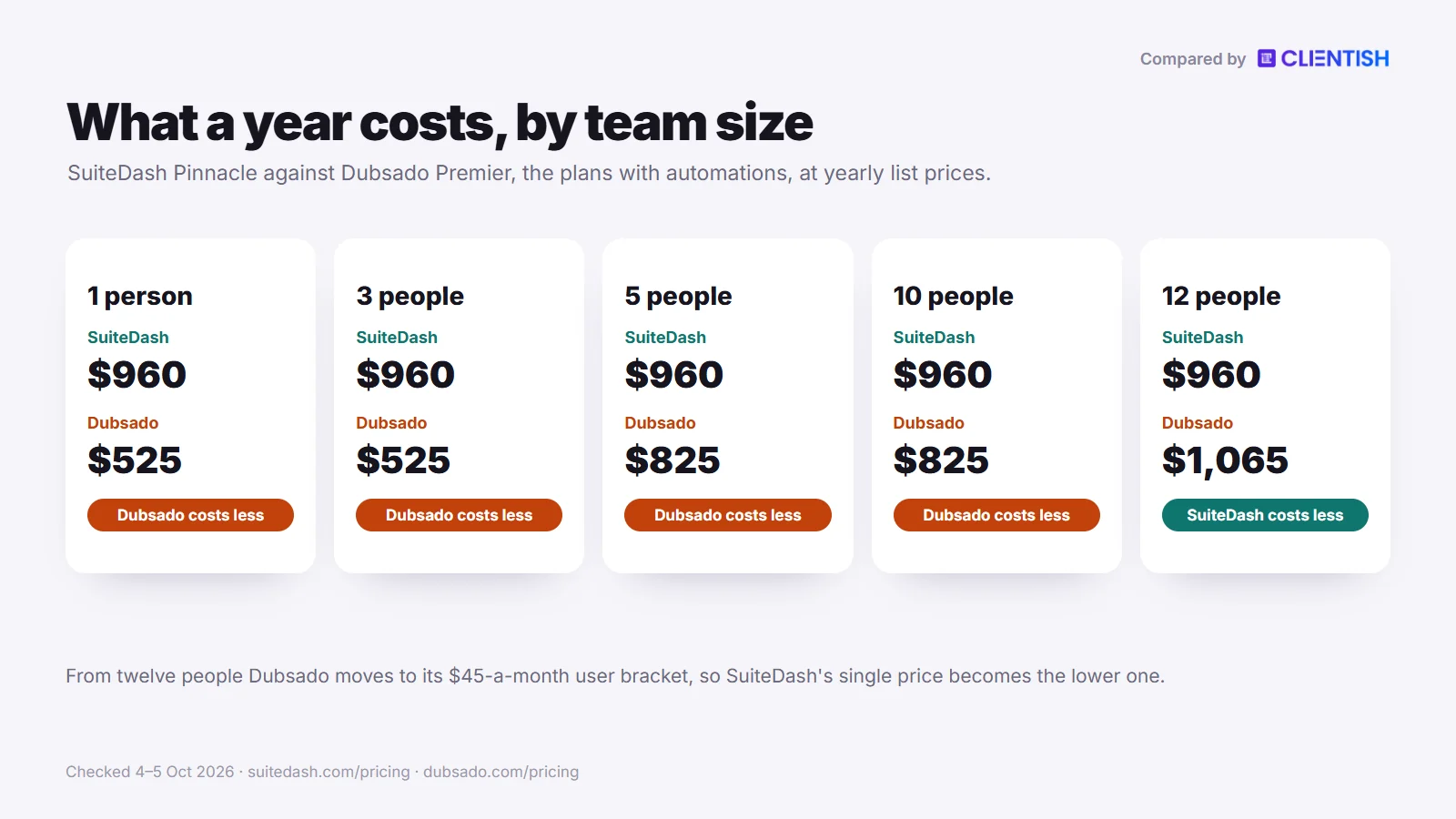
Clientish Starter covers those five people for $276 a year, roughly a third of Dubsado Premier’s $825 and well under SuiteDash Pinnacle’s $960. Run two weeks of real client orders through it at no cost, with no card on file.
What You Get in Clientish
The order, rather than the project board or the proposal, is the centre of Clientish. These parts answer the signs above.
- Services clients can buy: a service catalogue, cart and coupons in the portal.
- Orders that hold the work: the order opens on payment and keeps the brief, deliveries and revisions left.
- Tickets on Starter: support tickets with first-reply deadlines tied to priority and staff-only notes.
- Proposals that open the account: a typed signature on a proposal gives the prospect a login and an order, billed on a single invoice with the deposit up front.
- Your brand on the portal: a client portal on a clientish.io subdomain, carrying your logo, colours and favicon.
- Seats for staff, not clients: between 5 and 50 team members come with the plan, and more seats can be bought.
- Hours the client signs off: on Growth and above, remote members log time per client for the client to approve before invoicing.
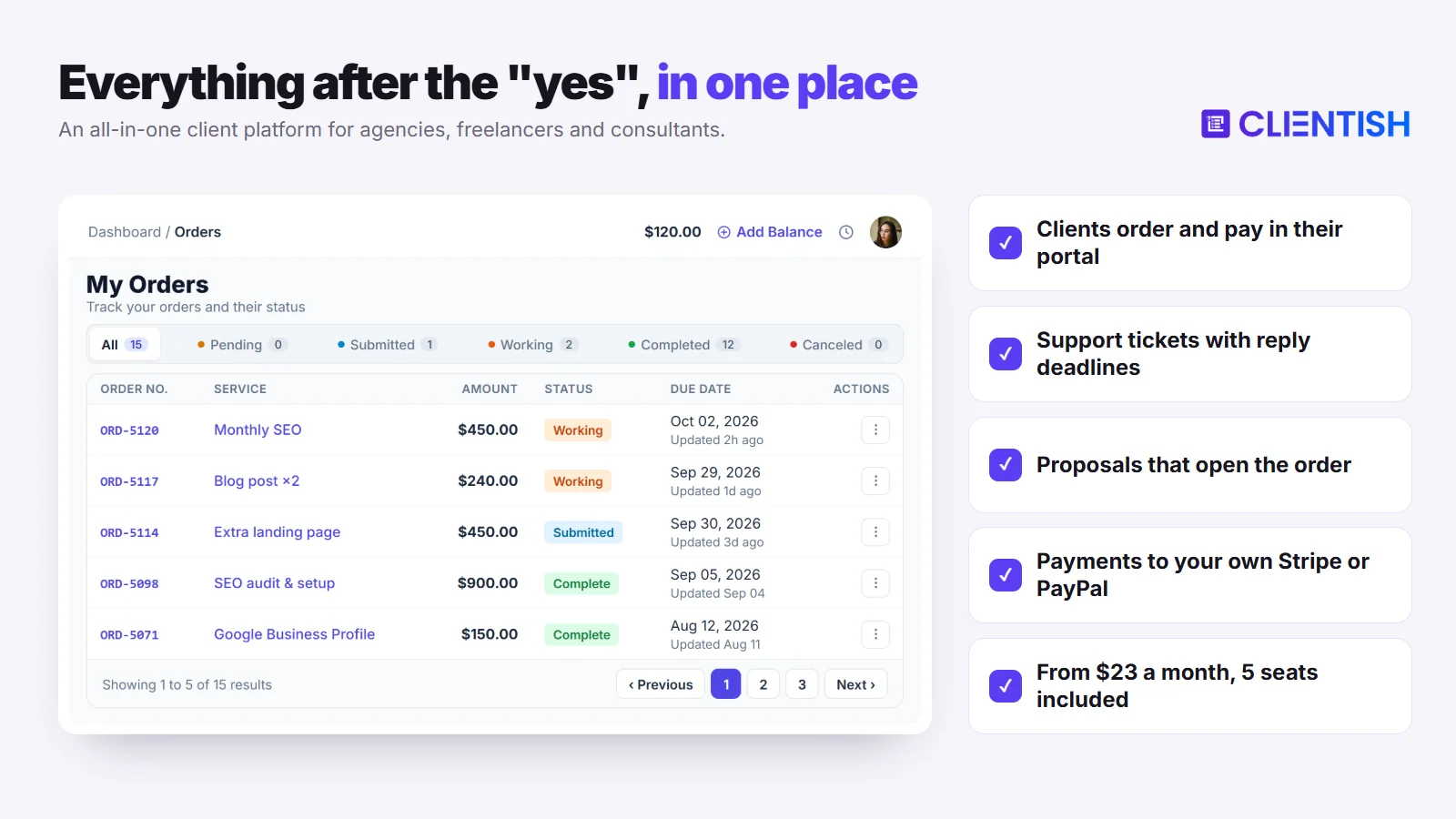
When SuiteDash or Dubsado Is Still the Better Pick
Clientish leaves out some things these two do well. If one of them is central to your work, stay put.
- You sell booked sessions: clients can pick times through Dubsado Premier’s scheduler, which Clientish does not offer.
- Tap to Pay or an app icon on clients’ phones matters to you: Clientish runs in a phone browser on both the agency and the client side, with no app to install.
- You rely on email campaigns or a course builder, or need clients logging in at a web address you own. SuiteDash covers those three, and Clientish portals sit on clientish.io subdomains.
Two more limits for Clientish: the interface is English only, and there is no SOC 2 report.
Clientish lists Starter, Growth, Pro and Enterprise at $29/$49/$99/$149 a month, or $23/$39/$79/$119 on a yearly bill. The portal, tickets, proposals and invoicing are part of all four plans.
Outgrowing SuiteDash or Dubsado? Run your client work in one portal.
Orders, tickets, renewals and payments to your own Stripe or PayPal, for your whole team. Plans start at $23 a month billed yearly, with 5 team members included.
Start your 14-day free trial →No card needed · See all plans
Frequently Asked Questions
Agency owners and studio owners raise these questions most often when they weigh SuiteDash against Dubsado. Each answer was checked against the two vendors’ own pages on October 5, 2026, so confirm prices again before you pay.
Is SuiteDash really unlimited users on every plan?
Yes. Start, Thrive and Pinnacle, priced $19 to $99 a month, all include unlimited staff and clients. Power-Ups, extra storage, the email deliverability and AI credit subscriptions, and paid setup sessions cost extra.
Does Dubsado have a mobile app?
Yes. Since July 2024 owners and staff have had an iOS and Android app for projects, email, invoices, Flow approvals and Tap to Pay. Clients get no app, and the full product stays on desktop.
Can Dubsado handle project management and team collaboration?
Partly. Tasks, task boards, Kanban project views and a global time tracker come with Dubsado 3.0, and teams get Basic, Accountant or Admin roles. We found no task dependencies, milestones or Gantt views.
How long does it take to set up Dubsado?
Plan on 15 to 25 hours for a complete intake sequence, according to third-party reviews. Owners who would rather skip the build can hire one of the paid Certified Dubsado Specialists that Dubsado lists.
Is SuiteDash’s white-label truly free of SuiteDash branding?
Yes, once configured, and on every plan. Your own URL, a login page in your branding, email sent from your domain and an installable web app hide SuiteDash from clients; the app is a PWA rather than a store download.
What is SuiteDash’s visual automation builder?
On SuiteDash we found no live visual builder. The pricing page lists “Client/Customer Journeys” for Pinnacle as “Coming Soon” on October 5, 2026; today’s toolkit works by trigger and action, and August 2026’s Journey Maps only display those chains.
Does Dubsado work for teams or agencies with multiple users?
For small teams, yes. Each plan covers the owner plus three extra users. With four to ten extra users Dubsado adds $25 a month in total, and eleven to twenty extra users add $45. Roles come as three presets.
Which tool is better for client intake forms?
Dubsado, for the intake sequence itself. Every intake document can be restyled with CSS, and on Premier a Flow sends each one after the last is done. SuiteDash has forms and checkout forms, but automating them requires Pinnacle.
Can I use SuiteDash for healthcare clients?
Possibly. SuiteDash’s security page offers a HIPAA business associate agreement, AES-256 encryption at rest and AWS hosting, but we found no SOC 2 claim. Ask SuiteDash for current documents before storing patient data.
Is SuiteDash better than Dubsado?
It depends on the job. SuiteDash covers more ground for a team, with CRM, email marketing and white-label at one price; Dubsado runs the inquiry-to-payment sequence more directly and automates it on a cheaper plan.
Is SuiteDash cheaper than Dubsado?
Only on its lower plans. Thrive costs $480 a year for any headcount, below Dubsado Premier’s $525 to $825. On the automation plans, Pinnacle’s $960 is higher for up to eleven people; from twelve, Premier’s bracket fee makes it $1,065.
Did Dubsado raise its prices?
Yes. Anyone subscribing on or after December 1, 2025 is charged $35 or $55 monthly instead of the earlier $20 or $40. Accounts that were already paying kept their earlier rate, and yearly billing now costs $335 or $525.
How much does Dubsado cost per month?
Starter is $35 a month and Premier $55, or $335 and $525 billed yearly. The owner and three extra users are included; bigger teams add a bracket fee of $25, $45 or $60 monthly.
Does SuiteDash have a mobile app?
Yes, as an installable web app rather than a store download. Once your custom URL and login page are set, staff and clients can add it to a phone, and push notifications arrived in June 2026.
Does SuiteDash or Dubsado have time tracking?
Yes, both. SuiteDash timers on every plan turn into billable hours, with an uninvoiced-time report since September 2026. Dubsado’s global tracker arrived with version 3.0, but billing from it requires Premier.
Which has better automation, SuiteDash or Dubsado?
Dubsado, for most small businesses today. Its node-based Flows are live on the $55 Premier plan. SuiteDash’s toolkit reaches further across CRM, projects and billing, but needs the $99 Pinnacle plan and has no visual builder we could find.
Can I migrate from Dubsado to SuiteDash?
Yes, but only contacts move cleanly. Dubsado exports contacts as a CSV, and SuiteDash’s CRM imports that file once you map the columns. Flows, templates, forms and payment links must be set up again from scratch.
Can clients use my own domain in Dubsado?
Yes. A CNAME record puts forms, invoices, schedulers and the portal on an address such as portal.yourdomain.com. Dubsado’s pages do not state which plans include it, and the portal login screen stays fixed.
Do SuiteDash or Dubsado have AI features?
Yes, both added AI in 2026. Dubsado summarises email threads and offers a Notetaker for client calls. SuiteDash has AI Agents with an approval step, plus Compose, Rewrite and Brand Voice, metered by credits with a free tier.
Does either platform do email marketing?
Only SuiteDash. SuiteDash includes campaigns on every plan and drip autoresponders from Thrive, with a deliverability add-on for heavy senders. Dubsado’s pages describe no broadcast or drip email feature.
Does SuiteDash have an LMS?
Yes, on Pinnacle at $99 a month. The course builder sits alongside the support tickets and automation toolkit, and 2026 releases added quizzes and group events that run inside the portal.
Does Dubsado have scheduling?
Yes, on Premier only. The scheduler comes with calendar sync and video conferencing, and a Flow can send the booking link. Starter, at $35 a month, has no scheduler at all.
Can SuiteDash or Dubsado handle subscription billing?
Yes. SuiteDash subscription plans charge a stored payment method on every plan, though not through PayPal. Dubsado’s recurring invoices repeat on a set interval, with autopay that can be off, optional or required.
Which is better for agencies, and which for freelancers?
SuiteDash suits agencies, because unlimited staff, projects and a white-label portal come at one price. Dubsado suits freelancers and small studios whose main work is getting from inquiry to a signed, paid booking.
Can SuiteDash replace Dubsado?
For most features, yes, though not on the same budget. SuiteDash covers proposals, e-signing, invoicing and forms, but automating them needs Pinnacle at $99, and it has no store-listed app with Tap to Pay.
Which SuiteDash or Dubsado plan do I need?
Match the plan to your must-have feature. Dubsado’s scheduler and Flows need Premier. SuiteDash proposals and pipelines need Thrive, while its tickets, LMS, task dependencies and automations need Pinnacle.
Is there a lifetime deal for either tool?
SuiteDash sells one. Its Century option is a single payment of $2,240, $3,940 or $6,840 depending on the plan. Dubsado’s $1,197 Forever Plan is not on sale and appears only in giveaways.
Neither tool quite fits my agency. What else should I look at?
An agency-first platform built around orders. Clientish puts a catalogue, cart and checkout in the client portal, tracks each order’s brief and revisions, and includes tickets on every plan from $29 a month.
Is Clientish a good alternative to SuiteDash or Dubsado for an agency?
Yes, when clients buy defined services and a team delivers them. Clientish ties paid orders, revision limits, tickets and renewals to one portal, though it has no custom domain, booking calendar or app to install.
How much does Clientish cost compared with SuiteDash and Dubsado?
Monthly plans cost $29 to $149, and a year of Starter, which seats five, comes to $276. A five-person team would pay $825 a year on Dubsado Premier, or $960 on SuiteDash Pinnacle.
Can I use Clientish on my phone?
Yes, through any phone browser. Every screen, from the agency workspace to the client portal, adjusts to a small display, so staff and clients can handle orders from a phone without any app to install.
Can I move my clients from SuiteDash or Dubsado to Clientish?
Yes. Export contacts as a CSV from either tool, then upload the file under Clients, Import in Clientish, which also accepts XLS and XLSX. Everyone you load starts inactive and gets no message until you reach out.
Does Clientish charge a fee on client payments?
No. Clientish takes no slice of what clients pay. Card and wallet payments settle in the agency’s linked Stripe, PayPal, Paddle or SSLCommerz account at that processor’s normal rate, and bank or Wise transfers are logged by hand.
Final Thoughts
Each tool moves a client from enquiry to settled invoice, yet the owner each one has in mind is very different. The deciding questions are how many people need a login, how much of the booking sequence you want automated, and whether clients stay after the first job.
- SuiteDash suits a team that would rather run its pipeline, projects, mailing lists and a portal at its own web address from one account price: $480 a year on Thrive, or $960 on Pinnacle with automation.
- Dubsado suits a solo creative or small studio that wants proposals, contracts, a scheduler and Flows chained together, at $525 a year on Premier for up to four people.
- Clientish is for an agency selling packaged services that clients buy again each month, tracked as orders with revisions, tickets and renewals; Starter costs a five-person team $276 a year.
If that last description fits, test it on a handful of real clients first. Start the 14-day trial, which asks for no card, read the plan-by-plan detail on the pricing page, or go deeper with our SuiteDash vs Clientish comparison.
Sources
Clientish publishes this comparison. Every SuiteDash and Dubsado fact was checked on October 4 and 5, 2026, against each company’s own pricing and help pages; review themes come from Capterra, and setup estimates and notes on Dubsado’s project tools come from third-party reviews.
SuiteDash and Dubsado are trademarks of their owners. Clientish is not affiliated with either of them. Prices and features change; if you spot something out of date, let us know and we’ll correct it.

