

Choosing between Dubsado and 17hats gets much easier once you know what each one is built to do. Most comparison pages hide that answer under long feature grids and star ratings, and many still quote prices from before both tools changed their plans.
Quick answer: Dubsado is the pick for a creative business that wants to map out its own automated client journey, can live with a setup phase, and is ready to pay for Premier for Flows, the scheduler and accounting sync. 17hats suits a solo operator who wants a free CRM to start, a guided setup and a phone app, and who sends few enough quotes, contracts and invoices to stay under its monthly document caps. Neither one wins outright; the right pick depends on how you work.
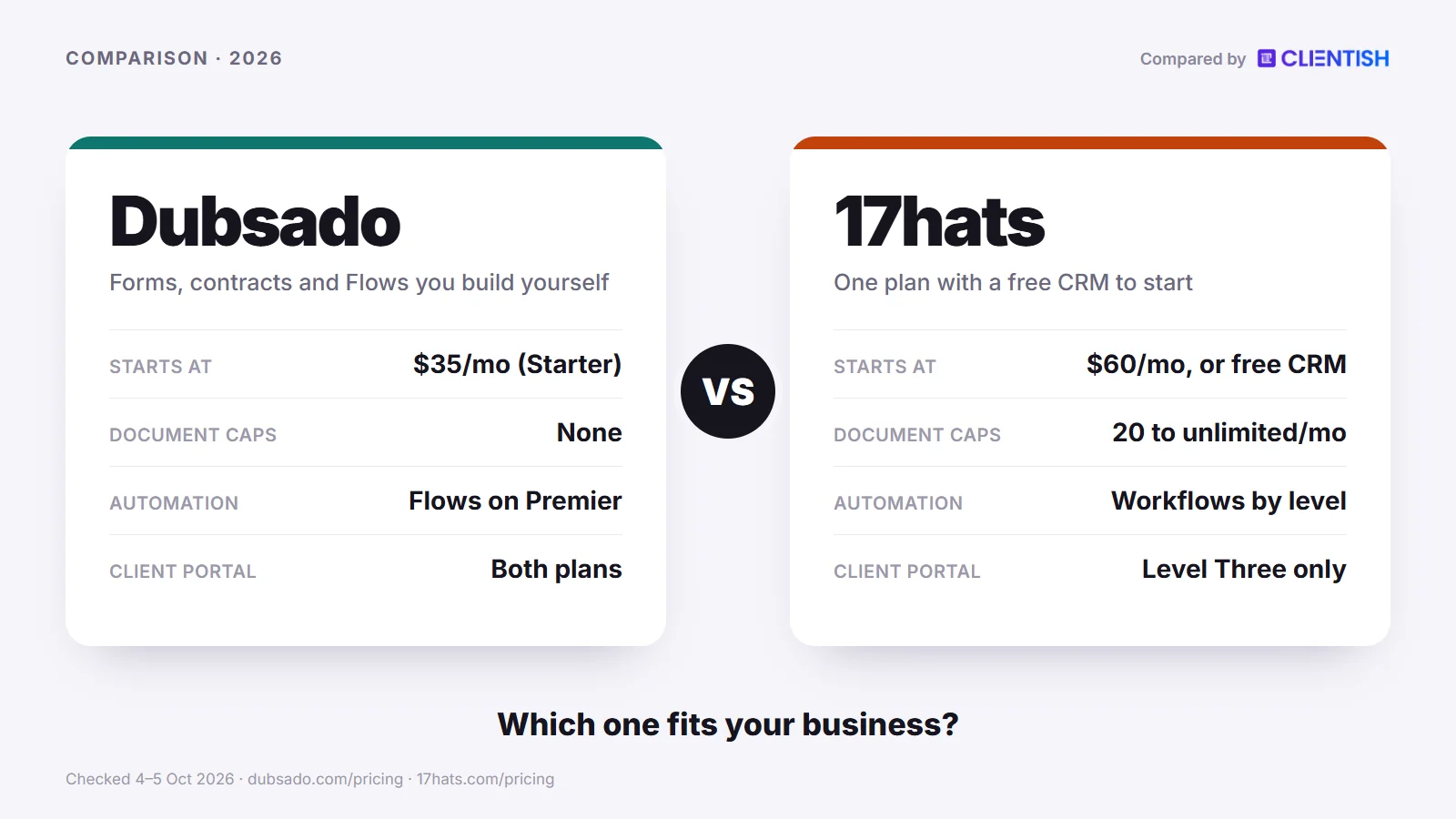
This guide compares the two on price, document limits, automation, setup, the client portal and branding, invoicing, scheduling, time tracking and the phone apps, then says plainly which kind of business each one fits.
Key Takeaways
The split between these two tools is simpler than their feature lists suggest. Dubsado is built for creative businesses that want to design automated sequences around what a client does and don’t mind a setup phase. The other tool, 17hats, targets solo operators who want to start sending documents quickly, with help from templates and a walkthrough, and who are happy with lighter automation.
- Price depends on the year you look at. At list price, Dubsado Starter ($335 a year) costs less than 17hats ($600 a year, or $60 a month). 17hats was selling its first year at half price when we checked ($300), and it has a free CRM plan, so it can be cheaper to start. Dubsado’s most useful features sit on Premier, and 17hats caps documents on its lower levels.
- Automation depth goes to Dubsado. Its Flows react to client actions (a signed contract, a paid invoice) and can hold the next steps until that action happens. 17hats workflows auto-send documents and emails on its top level, but their pauses wait for you to tick them off. Neither tool documents true if/else branching.
- Onboarding help leans to 17hats, and mobile is close. Both vendors ship apps for iPhone and Android; 17hats’s is free even on its free CRM, and Dubsado’s comes with either paid plan. 17hats adds a free one-to-one walkthrough, a training hub and a marketplace of ready-made templates, which shortens the path to your first booking.
- Pick Dubsado if you run repeatable client journeys and want the software to move them forward on its own: Flows, optional CSS on forms, a client portal on both plans and no document allowance to watch.
- Pick 17hats if you work alone or in a small studio and value a no-cost first plan, a $5 QuickBooks Online link at the bottom level, a phone app that works before you pay anything, and little to build before day one.
Dubsado vs 17hats at a Glance
Both tools cover the same ground on the surface: contracts, invoices, questionnaires and client email for small creative businesses. They deliver it differently. Dubsado puts its weight on automation and branding control; 17hats puts it on a quick start, a free tier and a single paid plan whose features open up level by level.
| Dimension | Dubsado | 17hats |
| Entry price | $35/mo or $335/yr (Starter) | One plan: $60/mo, $600/yr or $800 for two years; first year at 50% off when we checked |
| Free option | 21-day trial with Premier features, no card | Free CRM plan, plus a 7-day trial you can restart |
| Document caps | None found on either plan | 20 a month (Level One), 35 (Level Two), unlimited (Level Three) |
| Client portal | Both plans | Level Three only |
| Automation | Flows with time and client-action triggers (Premier) | To-Do workflows (Level Two); Advanced Workflow that auto-sends (Level Three) |
| Branding | Logo, colours, optional CSS on forms, own domain by CNAME | Logo and a 17hats subdomain; fonts, colours and branding removal from Level Two |
| Phone app | iOS and Android, with Tap to Pay | iOS and Android, free even on the free CRM |
| QuickBooks Online | Premier (Xero too) | $5/mo add-on on Levels One and Two, included on Level Three; no Xero |
| Time tracking | Time tracker invoicing on Premier | $5/mo add-on on every level |
| Setup | You build forms and Flows first; reviewers say it takes time | Guided start with a free walkthrough; reviewers still mention days of setup |
| Best for | Creatives who want automated client journeys | Solo operators who want a free start and a fast first booking |
All figures are US dollars, from the vendors’ own pricing pages and Dubsado’s product information page, checked October 4–5, 2026.
A few things stand out side by side. The document cap on 17hats’s lower levels is a real limit on busy months: five weddings booked, each with its quote, contract and invoice, add up to 15 of Level One’s 20 monthly documents before any questionnaire is sent. Dubsado’s plans list no such allowance. On the other hand, the old line that Dubsado has no phone app is out of date; both tools now ship one, and both say the full product lives on the desktop.
The client portal gap matters too. Dubsado includes a portal on both plans, while 17hats keeps it on Level Three. That one difference can move a 17hats user to the top level before they reach the automation they came for.
What Changed at Dubsado and 17hats in 2025–2026
Both products shifted a great deal over the last two years, and plenty of pages ranking for this comparison still describe the older versions. Here is what moved, dated from the vendors’ own announcements and help pages, so you can tell which advice still holds.
Dubsado
- 8 July 2024, phone app: Dubsado released its iOS and Android app, which ended the long-running “desktop only” complaint. The app now also handles Tap to Pay for card payments in person.
- 17 November 2025, version 3.0: the rebuild (announced on 15 October) renamed workflows to Flows on a node-based canvas and added table and Kanban views, a threaded inbox with scheduled send, a global time tracker and a rebuilt calendar.
- 17 November 2025, new trial: the old trial with no time limit and up to three clients was replaced by 21 days of full Premier access with unlimited clients and no card. Accounts opened before that date stay on a legacy trial of up to three clients.
- 1 December 2025, price rise: anyone subscribing after that date pays $35 (Starter) or $55 (Premier) a month, or $335 and $525 a year. Existing subscribers kept what they were paying.
- May to September 2026, smaller releases: a redesigned invoice builder (27 May), AI form creation from a description or a PDF (2 June), a public checkout page in Dubsado Labs for taking a payment without an invoice (4 June), Notetaker, which records video calls and returns a transcript and summary (11 June), a sidebar navigation (4 August) and dark mode (2 September).
17hats
- One headline plan: the pricing page now offers one plan, paid by the month ($60), the year ($600) or two years ($800), and halves the first year for buyers who skip the trial. 17hats doesn’t date the switch, and the old three-level grid with its 20, 35 and unlimited document caps still appears lower on the page.
- Pipelines, documented by July 2025: the help article (updated 10 July 2025) says Pipelines combine workflows, project tags and automation into one view of where each lead and client stands.
- SMS texting, 2025–2026: members in the US and Canada can text clients for a one-time setup fee plus $10 a month, which buys a number and 100 messages; texting can also run as a workflow step. The getting-started article was updated on 24 August 2026.
- 10 August 2026, text editor: 17hats released an updated editor that keeps its AI writing options and lets you undo an AI change; we found nothing like Dubsado’s AI form builder or Notetaker.
Who Each Tool Is For
Dubsado and 17hats both target small creative businesses (photographers, designers, copywriters, coaches, planners) that want contracts, invoices and forms in one system instead of scattered files. Neither is an agency platform, and knowing who each one fits best saves you from building out the wrong tool.
Dubsado is for the solo or small-team creative who wants to automate in detail. If you enjoy mapping a twelve-step onboarding sequence on a Sunday afternoon, with steps that wait until the client signs or pays before moving on, Dubsado gives you the parts to build it. The price of that is setup work, and the automation itself (Flows) needs the Premier plan.
17hats is for the creative professional who wants an all-in-one system without a heavy configuration phase. Its offer includes a no-cost CRM tier, an expert walkthrough at no charge, the 17hats University training hub and a marketplace that sells finished templates and workflows. Its QuickBooks Online sync is available from the lowest level as a paid add-on.
Here’s a sharper breakdown of who fits where:
- Automation-first solo operators who want sequences that react to client actions and don’t mind a longer setup: Dubsado Premier
- Creatives who manage work from a phone (photographers, event pros, on-location workers): either tool. Dubsado’s app can take card payments in person; the 17hats app costs nothing and pushes alerts when a form, quote, contract or booking comes in.
- QuickBooks users who want a direct sync without the top plan: 17hats, where it’s a $5-a-month extra below the top level. Dubsado syncs with QuickBooks Online and Xero, but only on Premier.
- High-volume creatives sending quotes, contracts and invoices all month who can’t risk a cap: Dubsado, where we found no document limit on either plan
- Lower-budget starters: 17hats’s free CRM or discounted first year, knowing the caps bite once you book regularly; Dubsado’s Starter is the cheaper paid plan at full price.
- Creatives who want forms to match their brand closely: Dubsado, which accepts optional CSS on forms and can run client pages on your own domain
One audience neither tool fits well is a multi-person service agency running ongoing client work. Retainers, recurring deliverables, team handoffs and support queues are a different job. Each tool is built around booking a client and managing that engagement, which is a different category of work.
Meet Dubsado: Forms, Contracts and Flows You Build Yourself
Officially, Dubsado is for “service-based small business owners”; third-party reviews describe it as built for solopreneurs and small studios that want every client to get a tailored experience. It handles contracts, proposals, questionnaires, scheduling, invoicing and multi-step automations in one workspace, and it lets you add your own CSS to forms for detailed styling.
The automation is the reason most people pick it. Version 3.0 arrived in late 2025: workflows became Flows, built on a node-based canvas. On Premier, a Flow can send forms, contracts, invoices and scheduler links, create tasks, change a project’s status and start another Flow, each on a trigger such as a number of days after the previous step or after the client signs or pays. A “Hold Actions Until” step pauses everything after it until a set condition is met.
Key features:
- Flows (Premier plan): multi-step automations driven by time and by client actions. For example, once a client signs the contract the invoice goes out; if a questionnaire is waiting, the Flow holds until it comes back.
- No document allowance: both plans list unlimited projects and clients, and we found no cap on quotes, contracts, invoices or forms
- Branding control: your logo and colours on client pages, optional CSS on forms, and a custom domain through a CNAME so clients don’t see Dubsado in the address bar
- Client portal on both plans: even Starter clients get a login showing their contracts, forms, invoices, booked appointments and any task board you make public
- Four people included: the owner plus three additional users at no extra charge on either plan, with Basic, Accountant and Admin roles
- Proposals and contracts: packages and discount codes on proposals, contracts signed online, and Premier public proposals where a lead picks a package and books
| Pros | Cons |
| Flows react to client actions and timing | Flows, the scheduler, public proposals, Zapier and the QuickBooks/Xero sync are all Premier-only, so Starter is mostly manual |
| No document allowance on either plan, so a busy month never hits a ceiling | The phone app is a companion; Dubsado says the full product runs in the desktop web app |
| Optional form CSS and a custom domain give design-minded studios close brand control | Setup takes time; Capterra reviewers say working out the best setup and learning the automations takes a while, and Dubsado lists paid Certified Specialists for it |
| Client portal included from the entry plan | One Capterra reviewer calls some features, such as scheduling and form design, clunky |
Pricing: paying monthly, Starter costs $35 and Premier $55 (the rates since 1 December 2025); paying yearly, they cost $335 and $525, about $28 and $44 a month. Either plan covers you and three teammates. Go past those three and users 4–10 add $25 a month, users 11–20 add $45 and users 21–30 add $60; each extra brand is $10 a month. New accounts get 21 trial days on Premier features without entering a card, and nothing is billed when those days run out.
Bottom line: Dubsado is the right call for creative solopreneurs and studios who want a customised, automation-heavy client experience and will put in the setup time to build it. Unlimited documents come with both plans, while the Flows that define the tool live on Premier.
Meet 17hats: One Plan, Three Feature Levels and Monthly Document Caps
17hats is an all-in-one business tool for independent creative professionals: photographers, event planners, wedding vendors and similar solo operators who need contracts, invoices, questionnaires and scheduling in one place. Where Dubsado leans on automation depth, 17hats leans on a gentle start: a free CRM, a 7-day trial you can restart, a free walkthrough with an expert and templates you can buy ready-made.
Read its pricing page carefully. The top sells one plan, “All Features, 3 Ways to Pay” (monthly $60, yearly $600, two years $800), while a grid lower down splits features across Level One, Two and Three, and the FAQ still says Essentials, Standard and Premier. The page never says which levels those are, so we compare features by level and quote only the prices it states.
The main catch is the document cap. Level One stops at 20 documents a month, and 17hats counts every quote, contract, invoice and questionnaire toward that number. Four weddings at three documents apiece already account for 12 of the 20, with questionnaires and balance invoices still to come. Active users reach the limit sooner than the headline “All Features” suggests.
Key features:
- Free phone apps for iOS and Android: available even on the free CRM, with push alerts when a lead form, questionnaire, quote, contract, payment or booking comes in. 17hats says the full product is easiest to use on the desktop.
- Templates and a marketplace: unlimited document templates of your own, plus a marketplace where vetted business owners sell finished templates and workflows for niches such as wedding photography
- QuickBooks Online sync: a one-way push of invoices and payments for US, Canadian and UK accounts, sold at $5 monthly below Level Three and bundled into Level Three
- Workflows by level: To-Do workflows (reminders and emails) from Level Two; the Advanced Workflow, which auto-sends documents and emails and assigns steps to team members, on Level Three
- Time tracking: a $5-a-month add-on on every level
- Learning resources: 17hats University (videos, live events and workshops), the HatsOff podcast and a free one-to-one walkthrough
- Recurring billing and advanced scheduling: paid modules on Level Two ($10 a month each) and included on Level Three
| Pros | Cons |
| Free iOS and Android apps, even on the free plan | Document caps of 20 (Level One) and 35 (Level Two) a month limit busy users |
| Quick start with a walkthrough, training and a template marketplace | The client portal and the Advanced Workflow are Level Three only |
| QuickBooks Online sync from the lowest level as a $5 add-on | Pauses in a workflow wait on you, not on the client |
| A free CRM plan to start with | Recurring billing and advanced scheduling are $10 monthly modules on Level Two |
Pricing: 17hats sells one paid plan with three ways to pay: $60 each month, $600 each year, or $800 for every two years. On 5 October a banner offered half off the first year ($300 yearly, $400 bi-yearly), which we treat as a promotion that may end. The no-cost CRM tier keeps unlimited contacts and projects and lets you send four invoices each quarter. There’s a 7-day free trial and a 30-day money-back guarantee. Check 17hats.com before you buy, as the figures move.
Bottom line: 17hats fits a solo creative who wants a quick, guided setup and already keeps books in QuickBooks Online. Booking only a handful of clients a month, you may never feel the document caps. Grow past that, or want a client portal and automation that sends for you, and you’ll need Level Three.
How We Compared
To build this comparison we read what each tool includes at each level, using the vendors’ own pricing pages and help centres rather than their headline feature lists, which tend to hide the gating. We picked the criteria a working creative business owner faces: what the entry price buys, where the limits start, and what a year costs for a solo user and for a small team.
Two editorial decisions worth flagging:
- Tier used for the 12-month cost comparison: annual figures assume a solo owner unless a row says otherwise, since that’s where most readers choosing between these two tools start. Team costs differ by tool: Dubsado includes three extra users on both plans and charges by band after that, while 17hats charges $5 a month per user on Level Two and lists three users included on Level Three. We show both where it matters.
- What the help pages and grids added: 17hats’s document cap is a monthly limit, and it appears only in the comparison grid lower down its pricing page, under a headline that says “All Features”. Several third-party comparisons still quote both tools’ old prices, so we used only the vendors’ pages for numbers.
Prices move, so confirm current figures at dubsado.com and 17hats.com before buying.
Pricing and Document Caps: What Each Tier Includes
At first glance the pricing looks close, but the feature gating creates bigger differences than the monthly rate. The main structural one: 17hats caps documents on its lower levels, while Dubsado lists unlimited projects and clients on both plans and we found no document cap at all.
Each rewards paying for a year up front and keeps its most useful features for the higher tier. Here’s what each level includes:
| Dimension | Dubsado Starter ($35/mo or $335/yr) | Dubsado Premier ($55/mo or $525/yr) | 17hats Level One | 17hats Level Two | 17hats Level Three |
| Document cap | None found | None found | 20/month | 35/month (+25 for $10) | Unlimited |
| Automated workflows | ✗ | ✓ Flows | ✗ | To-Do workflows only | ✓ Advanced Workflow |
| Client portal | ✓ | ✓ | ✗ | ✗ | ✓ |
| QuickBooks Online | ✗ | ✓ (and Xero) | $5/mo | $5/mo | ✓ |
| Scheduling | ✗ | ✓ | Basic online scheduling | Basic; Advanced $10/mo | Advanced included |
| Time tracking | No time tracker invoicing | ✓ Time tracker invoicing | $5/mo | $5/mo | $5/mo |
| Zapier | ✗ | ✓ | ✗ | ✗ | ✓ |
| Lead capture forms | 1 | Unlimited | 1 | 3 | 20 |
| Recurring invoices | ✓ with autopay | ✓ with autopay | ✗ | $10/mo module | ✓ |
| Users | Owner + 3 included | Owner + 3 included | None listed | $5/mo per user | 3 included, then $5/mo each |
The 17hats grid lists basic online scheduling both as included (one service) and as a $5 module, so check that at sign-up. Its levels carry no price because the page doesn’t give one.
The document cap problem on 17hats
The 17hats document cap is the detail most often missed during a trial. In 17hats a “document” is a quote, contract, invoice or questionnaire, not a generic file, so a single booking can use three or four before the project starts.
At 20 a month on Level One, six weddings in a busy month at three documents each come to 18, leaving two for everything else. Level Two allows 35, and a $10 pack adds 25 more, yet a studio with steady bookings still runs short. Level Three removes the cap, which means paying for the top level to get the unlimited documents Dubsado includes on its $335-a-year Starter plan.
How Dubsado’s gating works differently
Dubsado limits capability, not volume. Starter has no document cap and includes the client portal, but it leaves out most of what people choose Dubsado for. Flows, the scheduler, public proposals, Zapier, the QuickBooks and Xero sync, video conferencing and time tracker invoicing are all Premier-only, and Starter allows just one active lead capture form.
So a Starter user can send as many contracts and invoices as they like, but sends each one by hand. The automation, which is the main reason to choose Dubsado, needs Premier. Starter does keep a few time-savers on the billing side: repeating invoices that can charge a saved card, and instalment plans that chase the client for you.
The real 12-month cost at a realistic team size
For a solo creative, and for a small studio, the year looks like this at list price:
| Scenario | Tool | Plan needed | Annual cost |
| Solo, only a few invoices | 17hats | Free CRM | $0 (four invoices a quarter) |
| Solo, happy to send by hand | Dubsado | Starter, yearly | $335/yr |
| Solo, paid 17hats | 17hats | Yearly plan | $600/yr ($300 for the first year under the offer we saw) |
| Solo, paid 17hats, two years | 17hats | Bi-yearly plan | $800 per two years ($400 a year) |
| Solo, wants automation | Dubsado | Premier, yearly | $525/yr |
| Studio of four, wants automation | Dubsado | Premier (owner + 3 included) | $525/yr |
| Studio of four, wants automation | 17hats | Yearly plan (17hats doesn’t say which level it buys) | $600/yr, plus $5/mo for each user beyond three |
| Studio that needs more than three extra users | Dubsado | Premier + 4–10 user band | $825/yr ($525 + $300) |
17hats’s first-year discount can tip year one in its favour for a solo user. From year two, at full rates, Dubsado Premier ($525) costs less than a year of 17hats ($600), and it includes four people. Add-ons widen the gap: on 17hats, time tracking is $5 a month on any level, and QuickBooks is another $5 below Level Three. Check each tool’s current annual price before you run these numbers yourself, as promotions change.
Where each tool wins on pricing
Winner: 17hats for low-volume solo users who don’t need automation. The free CRM costs nothing, and the discounted first year (when offered) is the cheapest paid start here.
Winner: Dubsado for anyone who needs automation, has more than one person, or sends a steady stream of documents every month. Premier at $525 a year with four people included costs less than a full-price year of 17hats.
The trap to avoid: buying a lower 17hats level because the sticker price looks low, then hitting the document cap two weeks into a busy month and either paying for more documents or waiting for the next month to send.
The Real Cost for 1, 3, 5 and 10 People
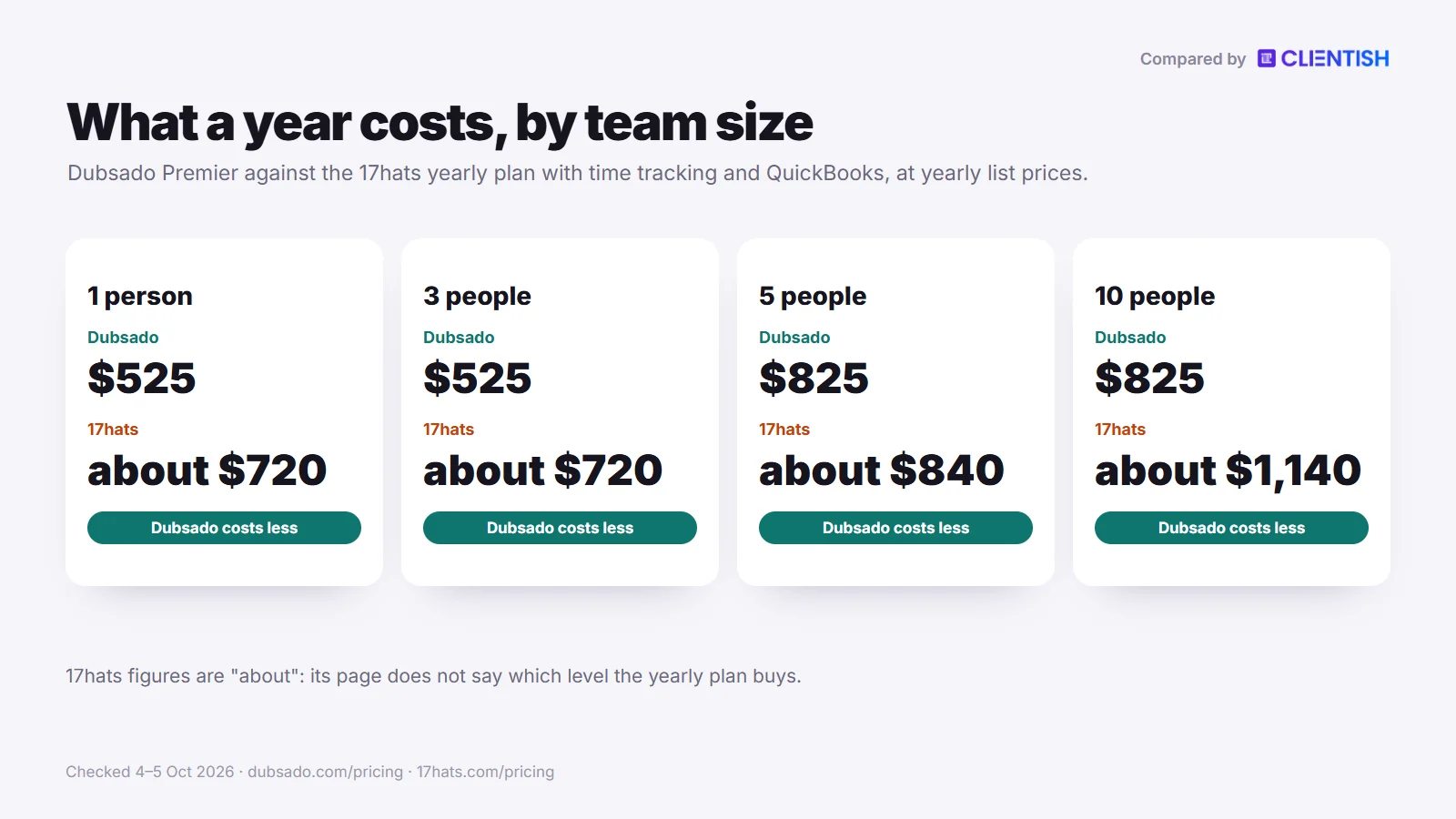
List prices leave out the extras that decide the bill: fees for additional users, paid modules and the plan you need for the features you want. This table prices one full year at list price for teams of one, three, five and ten for Dubsado Premier and for the 17hats yearly plan with its two common add-ons, time tracking and QuickBooks.
| People on the account | Dubsado Premier, yearly | 17hats yearly plan + time tracking + QuickBooks |
| 1 | $525 | about $720 |
| 3 | $525 | about $720 |
| 5 | $825 | about $840 |
| 10 | $825 | about $1,140 |
How we got these figures:
- Dubsado: Premier costs $525 a year and covers the owner plus three extra users, so one to four people pay $525. A fifth person moves you into the 4–10 user band at $25 a month ($300 a year), giving $825 for both five and ten people. Starter would save $190 a year ($335 instead of $525) but drops Flows, the scheduler and the QuickBooks sync.
- 17hats: $600 for the yearly plan, plus $60 a year each for time tracking and QuickBooks Online ($5 a month each), which makes $720. 17hats’s multi-user page allows two extra users per subscription, which fits three people; each person beyond that is $5 a month. Five people add $120 ($840 in total) and ten people add $420 ($1,140). We say “about” because the page doesn’t say which feature level the yearly plan buys, and QuickBooks is included on Level Three, which would take $60 off. The half-price first-year offer cuts year one by $300.
At list price, Dubsado costs less than 17hats at every size here: $195 less for one to three people, $15 less for five and $315 less for ten. In a 17hats first year bought at half price ($300 plus $120 of add-ons, so $420), 17hats is cheaper than Dubsado Premier for one to three people.
Workflow Automation: Flows vs To-Do and Advanced Workflows
Winner: Dubsado for automation depth. Dubsado’s Flows can wait for the client to sign, pay or submit a form and then carry on by themselves. 17hats covers the basics, and its top level sends documents automatically, but its pauses depend on you.
Dubsado’s Flow builder runs sequences where the next action depends on what happened before. A client signs the contract, and the first invoice goes out. A questionnaire hasn’t come back, and the Flow holds the next steps until it does. Triggers can count hours, days or weeks after the Flow starts or after earlier steps finish. One caveat worth stating: Flows are Premier-only, so on Starter you’re doing this by hand. We also found no if/else branching in Dubsado’s help pages; a Flow waits and continues, but it doesn’t split into two paths.
17hats takes a different approach. A workflow is a list of steps attached to a project. To-Do items remind you what to do next; action items can send an email, questionnaire, quote, invoice or contract, either automatically or after you approve it; and a Pause item stops the workflow until you tick it off. Each step can be due a number of days after the previous one is complete. That structure suits photographers and planners who do the same job in the same order every time.
Here’s how the two compare on the automation features that matter most:
| Dimension | Dubsado | 17hats |
| Waits for a client action | Yes: “Hold Actions Until” and client-progress triggers | Pause items you tick off by hand |
| If/else branching | None documented | None documented in workflows; If/Then logic in questionnaires on Level Three |
| Time delays | Hours, days, weeks or years after a trigger | Days after the previous step is complete |
| Automated sends | Emails, forms, contracts, invoices, scheduler links | Emails, questionnaires, quotes, invoices, contracts |
| Plan required | Premier | To-Do workflows from Level Two; Advanced Workflow on Level Three |
| Starts from | A client action or a manual start | A lead capture form (Level Two and up) or a manual start |
A few points to keep in mind about each:
- Dubsado’s Flows come with setup work. Dubsado lists Certified Dubsado Specialists you can pay to build them.
- 17hats’s step lists suit a consistent, repeatable process. When the process never changes and you want reminders more than rules, they do the job.
- Scheduling in Dubsado is also Premier-only, as is Zapier, so Starter has few ways to connect to anything else.
- 17hats’s automatic sending sits on Level Three, the same level as its client portal, so at entry level both tools leave most of the work to you.
The difference shows up in volume and variety. A photographer doing ten weddings a year in a predictable order will get enough from 17hats’s workflows. A studio running thirty or more projects across several service types, contract terms and timelines will find that hand-ticked pauses need constant attention. That’s where Dubsado’s client-triggered Flows pay off.
Setup and Learning Curve: How Long Until You’re Live?
17hats gets most people sending documents sooner. Its walkthrough, training hub and template marketplace mean a solo creative can have contracts and invoices out within days of signing up. Dubsado asks for more: the same Flows that make its automation deep also mean there’s more to configure before a client sees anything.
17hats: Built for a Quick Start
The 17hats onboarding is set up to get you live quickly. New users can book a free one-to-one walkthrough with an expert, copy templates from the marketplace or build your own, and adapt the basics (contracts, questionnaires, invoice defaults) instead of starting from a blank page.
A few things that help here:
- The free iOS and Android apps keep you in touch while you set up, with alerts as soon as a lead form or quote comes back
- Ready-made workflows sold in the marketplace save time staring at an empty workflow screen
- 17hats University (videos, live events and workshops) and the HatsOff podcast answer a lot of questions without a support ticket
- QuickBooks Online sync is built in as an add-on, so if you already use it for accounting, the link needs no middleware
For a solo photographer or event planner who books a steady number of clients each month, 17hats can go from new account to a working client process in days. Capterra reviewers still mention a few days of setup. The ceiling is lower than Dubsado’s, but the floor is easier to reach.
Dubsado: The Setup Is a Project of Its Own
Dubsado’s Flows don’t configure themselves. You’re building sequences where each step depends on an earlier one or on the client, which removes manual steps once it runs but means mapping your whole client process before you start clicking.
Setup takes longer than most new users expect. Paid Certified Dubsado Specialists, listed by Dubsado, can do the build for you. Capterra reviews keep returning to the hours it takes to find the right setup and learn the automations, and one reviewer calls features such as scheduling and form design clunky, which adds friction early on.
A few setup realities worth knowing:
- With only one live lead form on Starter, there’s little room to test different enquiry paths before committing to Premier
- The 21-day trial gives you full Premier access, so you can test Flows and the scheduler; a one-time 7-day extension is available if you need longer
- Form CSS is optional and means writing or borrowing the code
- The phone app helps with day-to-day tasks, but building forms and Flows happens in the desktop web app
Winner: 17hats for speed to live. For a working client system without a long configuration phase, 17hats is the faster path, especially for solo operators who can’t treat software setup as a side project. Dubsado pays back the time once its Flows are running, but the upfront work is real.
Client Portal and Branding: Who Sees What, and on Which Plan
Winner: Dubsado, by a clear margin on the entry plan and on branding, though the gap narrows if you’re comparing against 17hats Level Three.
Both tools give clients a place to log in, sign documents and pay invoices. The difference is how much control you have over that experience, and whether you get it on the entry plan or only after upgrading.
What Dubsado’s Client Portal Gives You
Dubsado includes the client portal on both plans, Starter included. Clients can log in to view proposals, sign contracts, pay invoices, fill in forms and see appointments, and you can share a public task board so they can follow progress. Clients don’t see your internal tasks or notes.
The branding is where Dubsado stands out. You can set a portal logo, banner, colours and welcome message, and add optional CSS to forms for custom fonts, colours and layout. According to its help centre, the forms, invoices and schedulers your clients open show none of Dubsado’s own logos.
A CNAME record also lets you put these pages on your own domain (for example portal.yourstudio.com), which removes Dubsado from the address bar, browser tabs and link previews. There are limits: the portal’s home page and login screen can’t be customised, custom code isn’t allowed inside the portal itself, and the settings apply to the whole workspace. Dubsado’s pages don’t say whether the custom domain is on both plans, so confirm that during the trial.
What 17hats’s Client Portal Gives You
The 17hats client portal covers the main transactional moments: a client inside it can accept a quote, sign a contract, fill in a questionnaire, settle an invoice and check event details. You can add a welcome note with text, links and images.
The catch is that the portal is a Level Three feature. On Levels One and Two there’s no portal for clients to return to; they work through a link for each document. Even on Level Three, clients can’t upload files or see your email correspondence.
17hats also has no CSS control. Every level gets your logo and a custom 17hats subdomain for document links; from Level Two you can remove the 17hats logo from documents and set your own fonts, colours and button text. We found no documented way to use a domain of your own. For photographers and event planners who care more about speed than pixel-level styling, this is usually enough.
How the Two Compare Side by Side
The table below sums up the portal and branding differences by plan, so you can see what a client meets on the plan you’d buy.
| Dimension | Dubsado | 17hats |
| Client portal availability | Both plans (Starter included) | Level Three only |
| What clients can do | Proposals, contracts, invoices, forms, appointments, public task boards | Quotes, contracts, questionnaires, invoices, event details; per-document links below Level Three |
| Branding depth | Logo, banner, colours, optional CSS on forms | Logo on every level; fonts, colours and logo removal from Level Two; no CSS |
| Web address | Own domain through a CNAME | A 17hats subdomain; no own domain documented |
| Phone access for you | Companion app for iOS and Android | Free app for iOS and Android |
What This Means Day to Day
Book four clients a month on Dubsado Starter, all four get a branded portal from the first day. On 17hats Level Two, those same four clients click through separate document links; there’s no login to return to and no single place to see their invoice history or open items.
That’s a structural difference, not just a branding detail. Clients who can log back in and check the status of something stop emailing you to ask. Clients working from one-off links don’t have that option.
On branding, Dubsado’s form CSS and custom domain help creatives whose client-facing pages should look like part of their own website. 17hats’s options are lighter, but they cover what most photographers and event vendors need.
The old claim that neither tool can use your own address no longer holds. Dubsado documents a custom domain through a CNAME; 17hats documents only its own subdomain, so if a domain of your own matters, that points to Dubsado.
Invoicing, Payments and Bookkeeping
Winner: 17hats for a low-cost QuickBooks link; Dubsado for invoicing with no volume limit and for recurring billing on its entry plan.
The invoicing basics are covered on each side: proposals, contracts and invoices can be combined, payments are recorded, and clients pay online by card. They differ on bookkeeping, on recurring billing and on what each tier includes.
| Dimension | Dubsado | 17hats |
| Invoice creation | Both plans, no cap found | Every level; document caps on Levels One and Two |
| Payment processors | Dubsado Payments (powered by Stripe) or Square, plus PayPal | Stripe and Square, including 17hats Payments (powered by Stripe) |
| Card fees (own processor) | Dubsado Payments: 2.9% + $0.30 on US cards, 0.8% on ACH (capped at $5); Dubsado adds no fee of its own | 17hats Payments: from 2.9% to 5% per card, plus $0.30, depending on level (details in the next section) |
| Accounting sync | QuickBooks Online and Xero, Premier only | QuickBooks Online, $5/mo below Level Three; no Xero |
| Recurring invoices | Both plans, autopay off, optional or required | $10/mo module on Level Two; included on Level Three |
| Time tracking | Invoicing tracked time on Premier only | $5/mo add-on; invoicing from it not documented |
| Payment schedules | Both plans, with automatic reminders | Level Two and up |
QuickBooks and Bookkeeping Sync
If your books already live in QuickBooks Online, 17hats is the cheaper route to a sync. Any level can connect for $5 a month (free on Level Three). Data travels only from 17hats to QuickBooks: invoices and payments go across, expenses stay behind, and accounts outside the US, Canada and the UK can’t connect. Dubsado also syncs invoices and payments with QuickBooks Online, and adds Xero, but only on Premier. On Starter you’re exporting by hand.
17hats also has its own light bookkeeping from Level Two: you can categorise transactions, record expenses (or import them daily with a $5 Bank Connection add-on) and run a profit and loss report. A solo creative who reconciles every Friday saves a step each week.
Document Caps and Invoicing Volume
This is where Dubsado wins for busy businesses. A Level One account on 17hats gets 20 documents per month, shared across quotes, contracts, invoices and questionnaires. A photographer with four weddings in a busy month can use most of that on contracts and invoices before sending a single questionnaire.
Dubsado lists no document allowance on either plan. Even a busy Starter account won’t hit a wall mid-month and face an upgrade decision under pressure.
Recurring Billing and Payment Schedules
Each can split an invoice into instalments and bill retainer clients on a schedule; what differs is the price. On 17hats, recurring invoices and automatic card charges come in the Recurring Billing module, $10 a month on Level Two and included on Level Three; Level One has neither. Dubsado puts both on Starter at no extra cost: invoices that repeat with optional or required autopay, and instalment plans that remind the client.
If retainer billing is central to your business, add that module to your 17hats sums: it’s $120 a year on top of the plan on Level Two.
Time Tracking to Invoice
Invoicing tracked time needs Premier; Starter users bill hours by hand. 17hats sells time tracking as a $5-a-month add-on on every level.
For service businesses billing hourly, 17hats sells a $5-a-month time tracker on every level; the pages we read don’t say whether tracked hours flow onto an invoice. On Dubsado, invoicing tracked time means paying for Premier.
Payments and Processing Fees
Each tool sells its own card service built on Stripe, and what you pay per transaction depends on the tool and, on 17hats, on your feature level. The figures below come from each vendor’s fee pages, checked October 4–5, 2026.
| Dimension | Dubsado | 17hats |
| Built-in card service | Dubsado Payments (powered by Stripe) | 17hats Payments (powered by Stripe) |
| Card fee | 2.9% + $0.30 on US cards; 4.4% + $0.30 on international cards | 5% + $0.30 on the free CRM; 4% + $0.30 on Level One; 2.9% + $0.30 on Levels Two and Three |
| ACH bank payment | 0.8%, capped at $5 | 0.80% + $1.50, capped at $6.50 (US members only) |
| Other processors | Square instead of Dubsado Payments (not both), plus PayPal | Stripe or Square |
| Other ways for clients to pay | Affirm and Klarna; Tap to Pay in the app | Apple Pay, Google Pay and Link |
| Dispute fee | $15 | Not listed on the pages we read |
| Fee added by the platform | None | None on current paid plans; grandfathered plans may differ |
On a $2,000 invoice paid by a US card, Dubsado Payments takes $58.30, the same as 17hats Payments on Levels Two and Three; 17hats Level One takes $80.30 and the free CRM $100.30. Paid by ACH, the same invoice costs $5 on Dubsado and $6.50 on 17hats, because both hit their caps. Two location limits apply: Dubsado Payments only serves businesses based in its listed countries, and 17hats offers ACH to US members alone.
Set against these, Clientish routes client payments to the agency’s own PayPal, Stripe, Paddle or SSLCommerz account and charges nothing per transaction; the gateway’s published rate is the whole cost.
Scheduling and Lead Capture
Winner: 17hats for lead capture on the lower plans; Winner: Dubsado for tying scheduling into an automated sequence. Both features sit at the top of the funnel, and the tools approach them differently: 17hats puts more lead forms on its middle level, while Dubsado builds the booking step into Flows once you’re on Premier.
Lead Capture
17hats includes a lead capture form you can embed on your website, with an automatic reply on every level. The number of active forms grows by level: one on Level One, three on Level Two and twenty on Level Three. From Level Two a form can start a workflow by itself, and new leads appear in 17hats’s pipeline, which tracks leads and clients through your stages.
Dubsado’s Starter plan allows a single active lead capture form, which is a real limit if you run several service lines or want separate forms for different project types. Premier removes the limit and adds public proposals, where a lead can pick a package and book. Optional CSS lets the form match your brand closely, at the cost of more setup.
What each tool gives you on lead capture:
| Dimension | 17hats | Dubsado |
| Active lead capture forms | 1 / 3 / 20 by level | 1 on Starter; unlimited on Premier |
| Form styling | Fonts and colours from Level Two | Optional CSS |
| Lead lands in your pipeline | Yes | Yes |
| Starts an automation | Workflow trigger from Level Two | Flow (Premier only) |
| Ready-made templates | Your own, plus paid marketplace templates | Form and email templates on both plans |
Scheduling
Dubsado’s scheduler offers scheduling templates with custom availability windows, recurring availability and two-way calendar sync, and a Flow can send the scheduler link at the right moment, for example straight after the contract is signed or the deposit is paid. The catch: the scheduler is Premier-only, so Starter users don’t have it at all.
17hats’s online scheduling lets clients pick a service, date and time, can be embedded on your website, and sends reminders a day and an hour before. The Advanced version adds payment at booking and Zoom links; it’s a $10 monthly add-on on Level Two and included on Level Three. It syncs with a Google calendar and can be linked to Apple’s.
Tying bookings into longer automated sequences is more Dubsado’s territory. For a solo creative who needs a booking link and a calendar sync, 17hats handles it without a move to the top plan.
Time Tracking: Billable Hours Built In?
Each tool lets you log time, but what happens next depends on the plan and on how your work is structured. The gap is narrower than it looks, though they charge for it in different ways.
Winner: 17hats for access, because time tracking is a small add-on at every level rather than a reason to change plans.
Since version 3.0 Dubsado has a global time tracker, but billing from it is Premier-only, so a Starter user copies hours onto invoices or uses another tool. That’s a gap for solo owners who chose Starter expecting an all-in-one setup.
Move up to Premier and the hours you log can be pulled straight onto an invoice. It’s built for the solo-or-small-team creative who bills by the hour on project work.
17hats charges $5 a month for time tracking on every level, Level One included. You don’t need to change level to get it, which matters when you’re comparing entry costs and trying not to spread work across several tools.
Neither tool’s pricing or help pages that we read describe:
- Invoices built automatically from logged hours on a schedule
- Team-level time reports across many staff
- Client approval of hours before they reach an invoice
- Per-client rate sheets with several billing rates
If billable hours are a core part of your revenue, especially across a team, both tools will leave you reaching for a workaround. Their trackers suit a solo operator logging occasional hourly work, not a shop billing dozens of hours a week across several clients.
For simple use, such as a photographer tracking editing time or a consultant logging a retainer’s hours, 17hats gives you the tracker for $5 a month on any level. Dubsado asks for Premier pricing before tracked time reaches an invoice. At scale, or across a multi-person team, neither is where you’d want to live.
Mobile App: Running Your Business on the Go
Older comparisons get this wrong. Dubsado’s app arrived on 8 July 2024, 17hats offers one too, and each vendor presents its app as a companion to the desktop product. The question is what you want to do from your phone.
Dubsado’s app lets you build invoices, manage email, send forms and scheduler links, look up leads and projects, work through task lists and manage appointments, with push notifications. It also supports Tap to Pay, so you can take a card payment in person by tapping it on your phone. Dubsado says full platform functionality is in the desktop web app, so building Flows and forms still happens at a desk.
On 17hats, the app is available even to free CRM members. Your phone buzzes when a lead form, questionnaire, quote acceptance, contract signature, payment or booking (or cancellation) comes in. 17hats says the full potential of the product is easiest to reach on the desktop version.
Winner: tie, with Dubsado ahead for taking payments in person and 17hats ahead for cost, since its app works on the free plan.
Here’s how the two compare on phone access:
| Capability | Dubsado | 17hats |
| iOS app | Yes (iOS 15 or later) | Yes |
| Android app | Yes (Android 10 or later) | Yes |
| Available on | Both paid plans | Every level, including the free CRM |
| Take card payments in person | Tap to Pay | Not documented |
| Push alerts | Yes | Forms, payments, quotes, contracts, bookings |
| Build automations on the phone | No; desktop web app | No; desktop recommended |
The old “laptop only” complaint about Dubsado is out of date: you can answer a client, send an invoice or take a payment at a venue, and in Dubsado’s app you can build and send an invoice from the car park, and 17hats’s app alerts you when an invoice is paid.
This also shows the tools’ different philosophies. Dubsado is built to be configured once in depth and then run in the background, with the app as a remote control. 17hats makes its app free to everyone, including free CRM members.
Where Dubsado and 17hats Are Similar
Although they land in different places on most comparisons, Dubsado and 17hats share a broad common base. Both are built for independent creative professionals, and if you laid their core features side by side without the logos, the overlap would be large.
Knowing the shared ground tells you which questions won’t decide anything.
- Lead-to-contract flow: both let you capture a lead, send a proposal or quote, collect a signed contract and issue an invoice without leaving the platform. That end-to-end booking path is the core of both products.
- Online payments: both take cards through a Stripe-powered processor of their own (Dubsado Payments, 17hats Payments) or through Square, so clients pay online instead of by bank transfer.
- Questionnaires and intake forms: both let you build forms that collect project details after booking. How far you can customise them differs, but the feature is on every paid plan.
- Client logins: on Dubsado’s plans and on 17hats Level Three, clients get a login where they can review documents, pay invoices and sign contracts, without downloading anything.
- Pipelines and lead tracking: both show where each potential client sits in your process, with 17hats’s pipeline and Dubsado’s board and table views.
- Email templates: both store reusable emails you can send by hand or from an automation, which cuts down on copy-and-paste for routine messages.
- Repeatable workflows: although Dubsado’s go further, both let you set up a sequence that starts after booking, so onboarding a new client doesn’t begin from scratch each time.
These overlaps mean the choice is rarely about “has it or hasn’t it”. It’s about depth, access and which tier includes what. A solo photographer moving from scattered documents and ad hoc invoices to either tool will find both a clear step up.
Where Both Fall Short, and What Agencies Reach For Instead
For solo creatives and small studios, these two tools solve real problems. Where they hit the same wall is when the work shifts from booking clients to running ongoing client relationships across a team.
Both are organised around a single engagement: lead, proposal, contract, invoice, done. That shape works for a wedding photographer or a one-person brand designer. It strains when you’re managing eight or ten clients at once, each with recurring work, each expecting to know what’s happening on their account this week.
Reading both tools’ own help pages with an agency in mind, a few gaps stand out:
- No order-to-delivery path. A client can pick and pay through a Dubsado public proposal or a 17hats 3-in-1 document, yet the purchase stays a set of documents: there’s no order tracking the brief, what was delivered and how many revisions are left. Both handle the invoice; neither tracks the delivery that follows it.
- Limited progress view for clients. Dubsado can show a public task board in its portal, and 17hats’s portal shows event details, but in both the client sees documents and invoices more than the state of the work, and 17hats clients can’t upload files or see your emails.
- Retainers stop at the invoice. Both can bill on a schedule with autopay (17hats through a $10 module on Level Two, included on Level Three; Level One has none). Neither help centre describes a prepaid balance a client can draw on, or a renewals page beyond the invoice list.
- Support runs through email. We found no client support-ticket queue with response targets in either tool’s help pages. Client questions arrive by email or a contact form, without a ticket history on the client record.
- Teams are an add-on, not the starting point. Dubsado includes the owner plus three users and charges by band after that; 17hats adds $5 a month for each user on Level Two. Both have roles or limited permissions, but neither is designed around several people delivering different parts of the same client’s work.
On top of that, 17hats adds a constraint on its lower levels: the document caps mean a moderately busy small agency can use a month’s allowance in the first couple of weeks.
What to Reach For When Both Fall Short
An agency that has outgrown booking one job at a time should shop in a different aisle, agency client-management software, and judge each candidate by whether it closes the five gaps above. Clientish is one candidate; here’s how it answers each:
- Order-to-delivery path: clients shop a service catalogue in the portal, fill a cart and apply coupons. No order exists until the checkout invoice is paid; then the order opens and asks the client for the intake form. An order keeps the client’s brief, each delivery you upload and a running count against the revisions that service permits.
- Client progress view: clients log in to a branded portal on a clientish.io subdomain to see their orders and deliveries. A delivery the client leaves unanswered approves itself after a week unless you change that default, so a busy client can’t freeze the order.
- Retainers past the invoice: subscriptions don’t charge a card on their own. When a period renews, the client’s existing invoice opens again and waits for payment, which they can make from credit already on their account.
- Support as tickets: tickets on every plan, with a first-reply deadline that follows priority, canned answers, tags, notes hidden from the client and a rating once it closes.
- Team first: seats come inside the plan (team members: 5 on Starter, rising to 50 on Enterprise), more can be added for a fee, and clients log in without using one.
Plans start at $29 a month, or $23 a month billed yearly. Branding (logo, colours, favicon) and sending client mail through the agency’s SMTP are on every plan; from Pro up, the “Powered by Clientish” credit goes. Leads, live chat and remote members need Growth or higher. It isn’t a replacement for Dubsado’s Flows or for 17hats’s phone app and free CRM, which remain the better fit for a solo creative. It answers a different shift: from booking clients to delivering for them every month.
An Illustrative Example: A Solo Creative vs a Growing Agency
The choice between Dubsado and 17hats often comes down to one question: are you running a solo, booking-based practice, or managing ongoing work across several clients at once? The two look alike from the outside but pull in different directions once setup is done. The two businesses below are invented to illustrate the point; they aren’t real customers.
The Solo Creative: Wedding Photographer, Six to Twelve Bookings a Year
An illustrative example: a wedding photographer books couples three to six months ahead, sends a proposal, takes a deposit, gets a contract signed and then mostly emails until the wedding. After delivery she invoices the balance, and the relationship is essentially finished.
17hats fits this closely. The free app alerts her to a new enquiry between shoots. The QuickBooks Online sync, at $5 a month, keeps her accountant happy without CSV exports. Marketplace templates get her contracts and questionnaires live quickly, and her volume stays far under the cap: six to twelve weddings a year produce only a few documents in a typical month, well below Level One’s twenty.
What she’d give up from Dubsado (Flows that wait for the client, form CSS, unlimited documents) matters little at this volume. She wants a quick start, alerts on her phone and a link to her existing accounts. That’s 17hats.
The Growing Studio: A Four-Person Design Agency, Fifteen Active Clients
Now picture, again as an illustration, a four-person design agency with fifteen active clients at any time, each with monthly deliverables, rounds of revisions and a retainer invoice every month. Here the comparison flips.
Here’s what starts to break with 17hats at this size:
- Document caps become a working constraint. Fifteen monthly invoices use fifteen documents on their own; add a questionnaire per client for the month’s brief and a few new quotes and contracts, and the studio passes Level Two’s 35 well before the month ends.
- The client portal is Level Three only, so unless the studio pays for the top level, clients have no login and every update goes by email.
- The Advanced Workflow is also Level Three only, so the automatic sending that would cut down on chasing renewals isn’t available until the top level.
Dubsado handles this better. There’s no document cap on either plan. Flows can carry a proposal through contract and invoice without someone pushing each step. The client portal is on both plans, so clients review documents and pay without being chased.
The cost is setup time. A four-person studio can absorb a week or two of configuration, and for fifteen ongoing clients billing every month, the automation repays it.
One caveat: Premier is required for Flows, the QuickBooks and Xero sync and the scheduler that make this work. At $525 a year with the owner and three users included, that’s a reasonable cost for a four-person studio, but check current pricing on Dubsado’s site before committing.
The verdict for these two examples:
| Scenario | Better fit | Why |
| Solo creative, low booking volume | 17hats | Free app, quick start, QuickBooks add-on, document caps aren’t an issue |
| Growing studio, 10+ active clients | Dubsado | No document caps, client-triggered Flows, client portal on both plans |
Neither example involves a team that needs a support-ticket queue, orders with set revision limits or a prepaid client balance. That’s where both tools reach their limits and agencies tend to look elsewhere.
Pros and Cons
Every tool has trade-offs, and both of these pair clear strengths with real limits. The tables below list them by what each tier includes, not by either vendor’s marketing.
Dubsado
Dubsado’s depth is real, and so is the setup cost. Put in the time (or hire a Certified Specialist) and you get a client automation builder you configure in detail. Skip that, and Starter is a limited, mostly manual plan.
| Pros | Cons |
| Flows on Premier carry multi-step sequences forward on time and client actions | Most of what makes it worth buying is Premier-only: Flows, the scheduler, public proposals, the QuickBooks/Xero sync and Zapier |
| No document cap on either plan, so you can send as many contracts, invoices and forms as your work needs | The phone app is a companion; designing forms and Flows needs the desktop web app |
| Form CSS plus a domain of your own control what clients see | Setup is real work, and reviewers on Capterra say learning the automations takes time; Dubsado lists paid Certified Specialists who can build it for you |
| Client portal included on both plans, Starter included | One Capterra reviewer calls some features clunky, such as scheduling and form design |
| Owner plus three users at no extra cost, with Basic, Accountant and Admin roles | Prices for new customers rose on 1 December 2025, to $35 and $55 a month, and teams beyond four people pay a user band on top |
One point in Dubsado’s favour: Premier is where the tool shows what it can do. Where the budget stretches that far, the automation pays off. Starter, at $335 a year, leaves the sending to you.
17hats
17hats offers the gentler way in, particularly if you want to start free and learn as you go. Its limits appear once booking volume rises or you need more than basic automation.
| Pros | Cons |
| Free iOS and Android apps on every level, including the free CRM | Document caps of 20 a month (Level One) and 35 (Level Two) can be used up by a few active bookings |
| QuickBooks Online sync without middleware, from the lowest level for $5 a month | Portal access for clients and automatic sending both need Level Three, so lower levels feel much simpler |
| A free walkthrough, a template marketplace and training resources shorten the start | We found no conditional branching in its workflows |
| A free CRM plan lets you try the system before paying | Recurring billing and advanced scheduling cost $10 a month each on Level Two |
| 17hats University and the HatsOff podcast help new users find their feet | Each extra user costs $5 a month on Level Two, and team delivery isn’t the design goal |
The document cap is the limit active 17hats users run into first, so test your own monthly volume against it before choosing a lower level. Book more than a handful of clients a month and you’ll probably end up on Level Three anyway, which changes the cost comparison.
Good For / Avoid If
Each tool fits some businesses and is a clear mismatch for others. The tables below cut through the overlap and lay out who each tool fits and who should look elsewhere.
Dubsado
Dubsado suits people who want to design the client journey themselves and who can wait a little before it runs.
| Good for | Avoid if |
| Creatives who want multi-step automations that react to what a client does | You need to be fully running within a day or two |
| Solo operators or studios of up to four people who don’t want to pay per seat | Your team is growing past four people; user bands of $25 to $60 a month add up |
| Designers, photographers and copywriters who want close control over how forms look | You want a phone app on a free plan; Dubsado has no free plan, only a 21-day trial |
| Businesses sending a high volume of quotes, contracts and forms every month | You’re on Starter and expect automation; Flows, scheduling and Zapier are Premier-only |
| Owners willing to spend setup time for a system that mostly runs on its own afterwards | Your clients are ongoing retainers rather than one-off projects; continuous delivery isn’t what Dubsado is built for |
Dubsado rewards patience. If you’re a photography studio or a one-person brand agency that wants each new client to move through an automated sequence (proposal sent, contract signed, invoice paid, welcome email out) without you touching it, Dubsado can run that sequence on Premier. The ceiling on automation is high once you’re on Premier.
The friction comes early if you need it running before you’ve had time to configure it. And if most of your work happens away from a desk, remember that the app helps you run the business but not build it.
17hats
17hats suits people who want to start fast, possibly for free, and grow into the paid levels.
| Good for | Avoid if |
| Solo service providers who want to get going quickly with a walkthrough and ready-made templates | You send more than 20 to 35 documents a month; the Level One and Two caps will force an upgrade |
| Photographers, event planners and other booking-based creatives who want a free phone app | You want automations that wait for the client to act; 17hats’s pauses wait for you |
| Owners already on QuickBooks Online (US, Canada or UK) who want a direct sync | You need the client portal or automatic sending without paying for Level Three |
| People who learn by watching; 17hats University and the podcast make the start easier | Several people share client work; users cost $5 a month each on Level Two and the product isn’t built team-first |
| Lower-volume operators who can start on the free CRM and don’t need unlimited documents | You need detailed form styling or your own domain; 17hats documents neither CSS nor a custom domain |
17hats fits cleanly when the priority is a quick, low-friction start for a solo creative with a booking-based practice. The free app and the free plan make it an easy first step, for example for a wedding photographer who wants alerts at a venue when a couple signs.
Where it struggles is volume. A solo operator who books four or five new clients in a week can use most of Level One’s document allowance before the month is a third over. At that point the low entry price stops being the story.
Which Fits Your Business Type
The right tool depends heavily on what you sell and how often you book, so here is how the two line up for five common kinds of service business, with the reasons drawn from the plan details above.
| Business type | Better fit | Why |
| Photographer | 17hats at low volume; Dubsado once bookings are steady | 17hats: free app, quick start, marketplace templates. Dubsado: no document cap, Flows that wait for the signed contract, Tap to Pay for print or session sales in person. |
| Wedding or event planner | 17hats, unless volume is high | The Knot and WeddingWire lead handling from Level Two, event details in the portal, texting for US and Canadian members. Dubsado if you need unlimited documents and payment plans on the entry plan. |
| Designer | Dubsado | Optional form CSS, a CNAME so client pages sit at a web address you own, and a client portal on Starter and Premier alike. |
| Coach or consultant | Dubsado Premier | A scheduler with availability windows and two-way calendar sync, video conferencing, and recurring invoices with autopay even on Starter. On 17hats, Zoom links come with advanced scheduling, a $10 monthly add-on on Level Two, included on Level Three. |
| Small agency on retainers | Neither; look at an agency platform such as Clientish | Retainer work needs orders with briefs and revision limits and a client ticket queue, which Clientish provides and we found in neither tool, plus 5 to 50 team seats inside the plan. |
Switching Between Dubsado and 17hats
Moving from one tool to the other is mostly a contact transfer followed by a rebuild. Client details travel by spreadsheet, but your automations, templates, forms and branding have to be set up again by hand in the new tool.
What you can export:
- From Dubsado: clients and projects as a CSV from the Projects tab, choosing the project status and the fields you want; contacts can also be exported from the Address Book. Exports don’t work from the phone app.
- From 17hats: contact details as a CSV from the Leads or Contacts page (gear icon, then Export Contacts). 17hats says project information such as documents, emails and time logs has to be saved one item at a time.
What you rebuild: Dubsado Flows or 17hats workflows, contract, quote, invoice and questionnaire templates, email templates, lead capture forms (and the embed codes on your website), scheduling, payment processor connections, QuickBooks, and your branding or domain settings.
Steps that keep the move tidy:
- Save copies of signed contracts and paid invoices for active clients before you leave the old tool.
- Export your contacts to CSV and clean up duplicates and old leads in a spreadsheet.
- Import them. 17hats’s CSV import can create a project for each contact at the same time; Dubsado imports from Utilities, Address Book, Import, and its “Import as leads” option creates a project per client.
- Rebuild your templates and automations, then run one test client through the whole journey.
- Reconnect payments and QuickBooks, and keep both subscriptions for a month while open projects finish.
Heading to an agency platform instead? Clientish takes a CSV, XLS or XLSX client list under Clients, Import, and the imported clients stay inactive and get no email until you decide to reach out.
Which Should You Pick: Dubsado or 17hats?
The two tools compete closely in several areas, which is exactly what makes this decision hard. Both handle proposals, contracts, invoicing and client email, but they rest on different assumptions about how you work.
If your business runs on project bookings, you want automation that reacts to clients between touchpoints, and you’re comfortable spending time on setup, Dubsado Premier is the stronger choice. Its Flows go further than 17hats’s workflows, its form CSS and custom domain give more brand control, and no document cap will catch you out mid-month.
17hats is the better pick if you’re newer to client management software, want to start for free and get going quickly, or want a QuickBooks Online sync without paying for the top plan. Its free app, walkthrough and template marketplace make it a lower-risk first move, and the discounted first year (when offered) lowers the cost of trying the paid plan.
Use these questions to settle it. Answer for where your business is today, not where you hope it will be next year:
1. Do you send more than 20 documents (quotes, contracts, invoices and questionnaires combined) in a busy month?
2. Would you like automated sequences that wait for what a client does before moving on?
3. Are you willing to spend real time building forms and Flows, or pay a Certified Dubsado Specialist, before you go live?
4. Does detailed control over how forms look, or your own domain on client pages, matter to you?
5. Do you want to start on a free plan, with a phone app included, before paying anything?
6. Do you want QuickBooks Online connected without paying for the top plan?
If you answered yes to questions 1–4, choose Dubsado Premier. The automation and the absence of document caps will serve you for years, and the setup work is a one-time cost, not a recurring one.
If you answered yes to questions 5–6, or no to most of questions 1–4, choose 17hats. You’ll be up and running in days rather than weeks, your books can stay in step for $5 a month, and you won’t pay for automation you’re unlikely to set up.
One caveat either way: both tools are more limited at their entry tiers than their marketing suggests. Judge each at the plan you’d buy and recheck prices before paying.
When to Consider an Agency-First Platform Like Clientish
Dubsado and 17hats stop fitting once clients stay for months, several people share the work and a retainer invoice goes out every month. That is an agency’s week, and it explains the gaps in “Where Both Fall Short” above.
Signs You’ve Outgrown Dubsado or 17hats
Most studios notice the change in their inbox before they notice it in their software. If three or more of these sound like your last month, the tool you started with is now holding the business back.
- Clients email to ask where their work is.
- Questions get lost in email; we found no ticket queue in either tool.
- A client buys the same service again and again, each time as fresh documents.
- Each new hire raises the bill past the included users.
- Retainers run as repeating invoices, and we found no prepaid client balance in either tool.
Dubsado, 17hats and Clientish Side by Side
The table puts the jobs an agency repeats every week next to how each tool handles them. Both tools handle signing a new client; the gaps show up in the work that follows.
| Job | Dubsado | 17hats | Clientish |
| Client requests and orders | Package picks on Premier proposals; no order record found | 3-in-1 quote, contract, invoice; no order record found | Paid checkout opens an order with brief and revision limit |
| Support questions | No ticket queue found | No ticket queue found | Tickets with priority-based reply deadlines |
| Retainers | Recurring invoices with autopay | $10/mo module (Level Two); included (Level Three) | Each renewal reopens the same invoice |
| Client portal | Both plans | Level Three only | Every plan, clientish.io subdomain |
| Payments | Dubsado Payments, Square or PayPal | 17hats Payments or Square | Your own gateway; no Clientish fee |
| Team included | Owner + 3 | 3 on Level Three; $5/user on Level Two | 5 to 50 seats; clients use none |
| Yearly cost, 5 people | $825 (Premier) | about $840 | $276 (Starter) |
Five people pay $276 a year on Clientish Starter against about $825 to $840 for the other two. Try it on your own clients for 14 days, free and without a card.
What You Get in Clientish
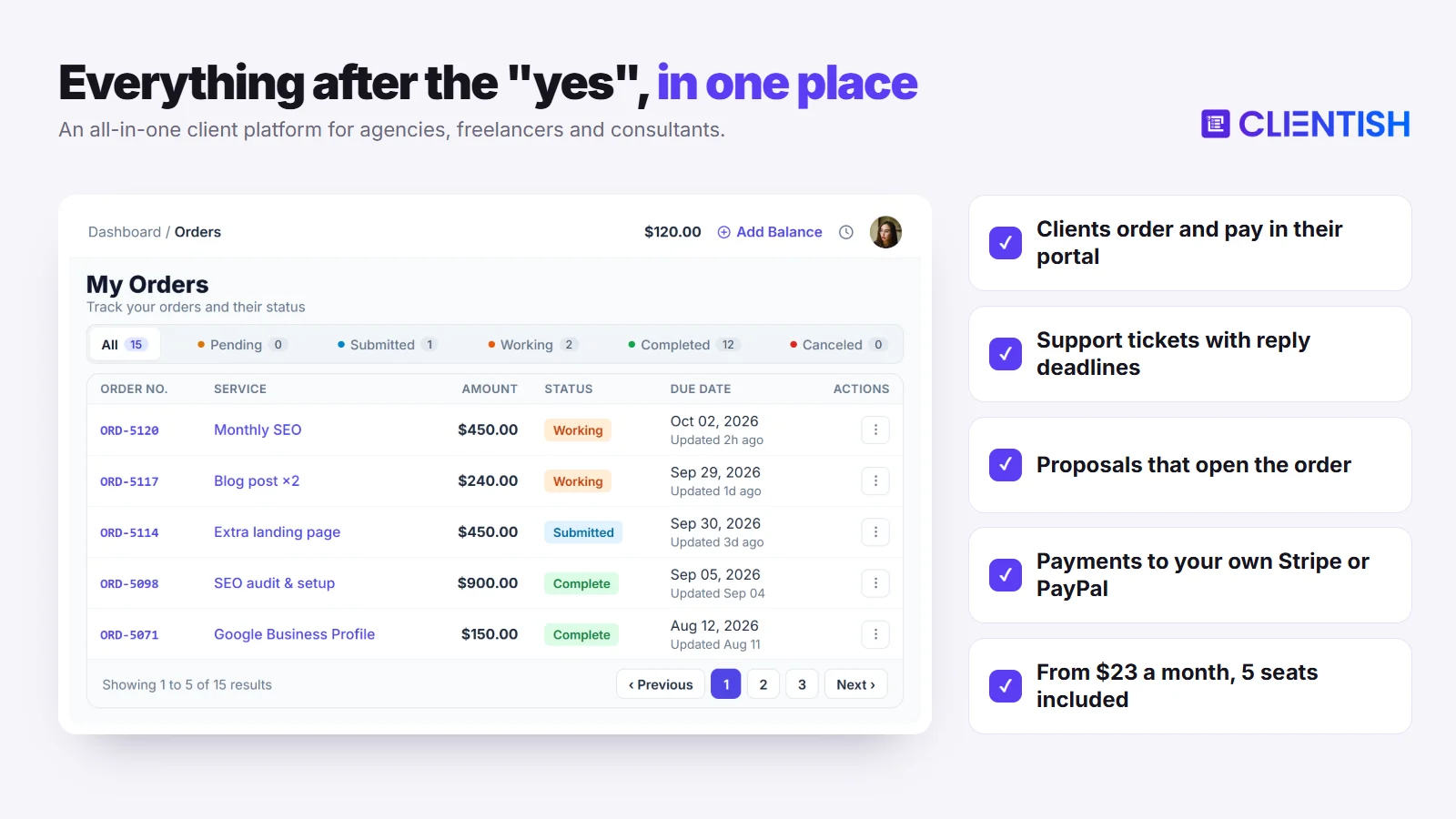
Clientish is built around the part of client work that comes after the contract: orders, delivery, support and renewals, all in one portal your clients log in to. Here is what replaces the email threads and spreadsheets.
- Paid orders: a service catalogue and cart; the order opens on payment, with a revision limit.
- Your branded portal: your logo on a client portal hosted on a clientish.io subdomain.
- Ticket desk: support tickets whose priority sets the first-reply deadline.
- Renewals in one place: subscriptions reopen the same invoice each period.
- Proposals that set everything up: signing a proposal creates the client, an invoice with the deposit due first, and the order.
- Money to your account: clients pay in the portal through your Stripe, PayPal, Paddle or SSLCommerz, with no Clientish fee.
- Accounting: QuickBooks and Xero both connect.
When Dubsado or 17hats Is Still the Better Pick
Clientish is not the right switch for every business in this comparison. Stay with Dubsado or 17hats if any of these describe how you work, because Clientish does not cover them.
- Clients book appointment times: Clientish has no scheduler.
- You want a native phone app with Tap to Pay: Clientish has no app to install, though the whole workspace and client portal are responsive and work in any phone browser.
- You want custom multi-step automation like Dubsado’s Flows.
Clientish also runs in English only and holds no SOC 2 report.
A month of Clientish is $29/$49/$99/$149 across its four plans, or $23/$39/$79/$119 when you pay for the year. Every plan includes the client portal, tickets, proposals and invoicing, so you can test the whole workflow during the trial.
Outgrowing Dubsado or 17hats? Run your client work in one portal.
Orders, tickets, renewals and payments to your own Stripe or PayPal, for your whole team. Plans start at $23 a month billed yearly, with 5 team members included.
Start your 14-day free trial →No card needed · See all plans
Frequently Asked Questions
These are the questions owners ask most when weighing Dubsado against 17hats. Every answer below comes from Dubsado’s and 17hats’s own pages, checked October 4–5, 2026; plans move, so confirm before paying.
Is Dubsado or 17hats better for beginners?
17hats. Its free CRM plan, free one-to-one walkthrough, 17hats University and template marketplace get you sending documents sooner, while Dubsado’s Flows and form styling take noticeably longer to set up well.
Does Dubsado have a free trial?
Yes. Since 17 November 2025, new accounts try Premier features for 21 days with no card and no client limit, and can extend once by 7 days. Older accounts keep the three-client legacy trial.
Does 17hats have a free plan?
Yes. The free CRM keeps unlimited contacts and projects, four invoices a quarter, email templates and the phone app; the paid plan, which has a 7-day free trial, adds the rest.
Which tool is better for mobile use?
It’s close. Dubsado and 17hats each ship iOS and Android apps: 17hats’s works even on the free CRM, and Dubsado’s adds Tap to Pay for card payments in person. Both vendors say the full product runs on desktop.
Does 17hats cap how many invoices or contracts I can send?
Yes, below the top level. Level One allows 20 documents a month and Level Two 35, counting quotes, contracts, invoices and questionnaires; Level Three has no cap, and neither Dubsado plan lists one.
Are Dubsado’s workflows available on the Starter plan?
No. Flows, Zapier, the scheduler, public proposals and the QuickBooks and Xero sync need Premier. Starter keeps repeating invoices with autopay and instalment plans that send reminders.
Does 17hats include QuickBooks integration natively?
Yes, for QuickBooks Online: a one-way sync of invoices and payments, $5 a month on Levels One and Two and included on Level Three. There’s no Xero; Dubsado offers both, on Premier only.
Which tool handles team members better?
Dubsado. Both its plans include the owner plus three users with roles, then $25 to $60 monthly user bands. 17hats adds $5 a month for each Level Two user and includes three on Level Three.
Can I white-label either tool for my clients?
Dubsado comes closer. A CNAME puts its client pages on a domain you own, and its forms and invoices show no Dubsado logos. 17hats offers its own subdomain and removes its logo from Level Two.
How long does Dubsado take to set up?
Longer than 17hats, depending on how much you automate. Capterra reviewers say finding the right setup and learning the automations takes time, and Dubsado lists paid Certified Specialists who can do the build.
Which is cheaper, Dubsado or 17hats?
Dubsado, at list price: Starter is $335 a year and Premier $525, against $600 for 17hats. 17hats is cheaper to start on its free CRM or a half-price first year ($300).
Do either of these tools work well for ongoing agency retainers?
Only partly. Both can bill retainers on a schedule with autopay (17hats from Level Two, through a $10 module), but we found no orders with revision limits, support tickets or prepaid client balance in either, which is where agency software comes in.
Does Dubsado have a mobile app?
Yes, for iOS and Android since 8 July 2024. You can build invoices, answer email, send forms and take card payments in person with Tap to Pay; Flows and forms are still built on desktop.
What changed in Dubsado 3.0?
Version 3.0 launched on 17 November 2025, turning workflows into Flows on a node-based builder and adding Kanban and table views, a threaded inbox, a global time tracker and a new calendar.
How much does 17hats cost now, and is it worth $600 a year?
$600 a year, $60 a month or $800 for two years, with the first year halved when we checked. With time tracking and QuickBooks a solo year is about $720, more than Dubsado Premier’s $525.
Is Dubsado or 17hats better for photographers?
17hats, for a handful of shoots a month: it starts free and the app alerts you to enquiries. With steady bookings, Dubsado avoids the document caps and its Flows wait for the signed contract.
Can I switch from Dubsado to 17hats, or back, without losing data?
Only your contacts move, by CSV in either direction. Automations, templates, forms and project history must be rebuilt, so save signed contracts and invoices before you leave the old tool.
What payment processing fees do Dubsado and 17hats charge?
On US cards, Dubsado Payments charges 2.9% plus 30 cents. 17hats Payments ranges from 5% plus 30 cents on the free plan to 2.9% plus 30 cents on Levels Two and Three.
Which is cheaper for a team of two to four people?
Dubsado. Either plan covers four people, so Premier costs $525 a year. 17hats’s multi-user page lets a subscription add two extra users, and more cost $5 a month each, so four people with time tracking and QuickBooks come to about $780.
Is 17hats still being updated?
Yes. 17hats documented Pipelines in July 2025 and added SMS texting for US and Canadian members, and its August 2026 editor keeps AI writing options.
Is Clientish a good alternative to Dubsado or 17hats for an agency?
Yes, if clients stay for months and a team shares the work. Clientish adds paid orders with revision limits, support tickets and renewals in one client portal, which neither Dubsado nor 17hats is organised around.
How much does Clientish cost compared with Dubsado and 17hats?
Clientish starts at $29 a month, or $276 a year on Starter with five team members. For five people that compares with $825 for Dubsado Premier and about $840 for 17hats with its add-ons.
Can I use Clientish on my phone?
Yes, in the browser. The agency workspace and the client portal are fully responsive, so you and your clients can work from any phone; there is just no app to install and no booking calendar.
Can I move my clients from Dubsado or 17hats to Clientish?
Yes. Both tools export contacts to a spreadsheet, and Clientish reads that list from a CSV, XLS or XLSX upload under Clients → Import. The new records arrive inactive, so nobody is emailed before you are ready.
Does Clientish charge a fee on client payments?
No. When a client settles a Clientish invoice, the money goes straight to whichever Stripe, PayPal, Paddle or SSLCommerz account the agency has linked, with nothing taken by Clientish. The gateway’s normal processing fee is the only charge.
Final Thoughts
Each of these tools gets a small creative business from enquiry to signed, paid client, yet they are made for different owners. What settles it is how much you want to automate, how many quotes and invoices go out each month, and whether a client stays for one job or keeps coming back.
- Dubsado suits an owner ready to put setup time into Flows, branded forms and a scheduler, and its $525 Premier year covers four people.
- 17hats suits a solo owner who wants guided setup, a free phone app and a free CRM to begin with, as long as the monthly document caps are enough.
- Clientish suits an agency whose clients return month after month, whose team splits the delivery, and whose support questions and retainer renewals need a home; a five-person team pays $276 for a year of Starter.
If the third line sounds like your business, put two or three real clients through it before you decide. The 14-day trial is free and asks for no card, each plan is broken down on the pricing page, and our Dubsado vs Clientish comparison goes deeper on that pair.
Sources
Clientish publishes this comparison. Every Dubsado and 17hats fact was checked on October 4 and 5, 2026, against each company’s own pricing and help pages; review themes come from Capterra.
Dubsado and 17hats are trademarks of their owners. Clientish is not affiliated with either of them. Prices and features change; if you spot something out of date, let us know and we’ll correct it.

