

Dubsado gives a service business forms, proposals, contracts, invoices and a scheduler, and lets the owner connect them with a node-based automation builder. That builder is also the catch. Getting Dubsado right takes real setup time, the price went up for new customers on December 1, 2025, and every person past the third extra user moves the account into a paid user tier. Freelancers who are turning into a small agency usually feel all three at once.
Quick answer: Our pick for agencies leaving Dubsado is Clientish. Its $29 entry plan seats five staff, clients log in to buy services, pay, approve deliveries and open tickets, and payments settle in the gateway account you link, be it Stripe, PayPal, Paddle or SSLCommerz. HoneyBook, Bonsai and 17hats are the nearest swaps for a solo owner who still sells by booking; SuiteDash and Agiled fit teams that want a big all-in-one; Wayfront, ManyRequests and Zendo fit productized shops; Clinked, Moxo, Accelo and FuseBase cover narrower needs.
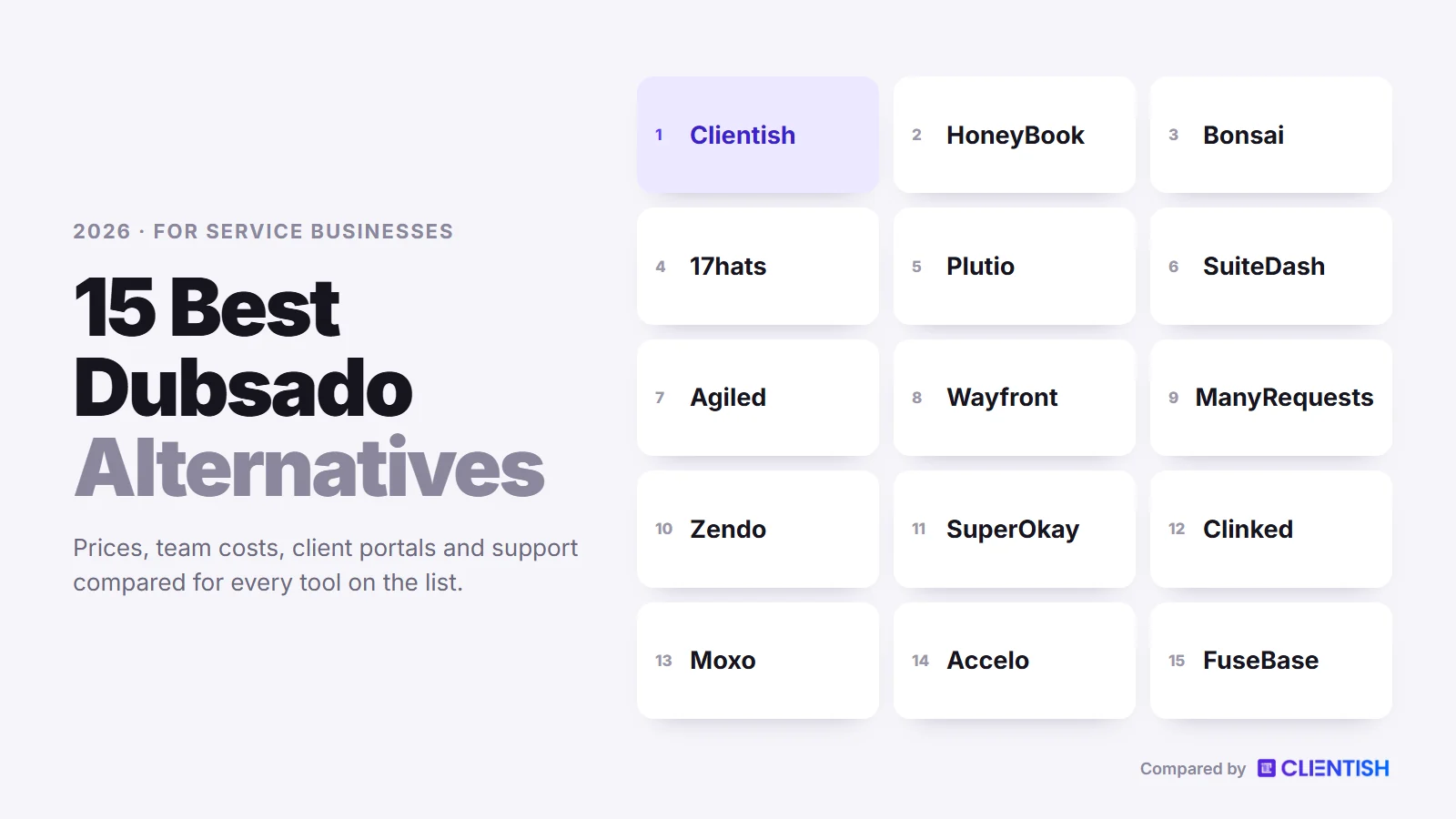
This guide explains where Dubsado starts to pinch once a business hires, how we picked 15 replacements, what each costs as of early October 2026, how each one differs from Dubsado, and how to move across without breaking live client work.
Key Takeaways
Many Dubsado pricing pages that still rank quote the old $20 and $40 plans, so they describe a product that changed in late 2025. These five points reflect Dubsado as it stands in October 2026.
- New customers pay more since December 2025. Starter now lists at $35 monthly ($335 for a year up front) and Premier at $55 monthly ($525 for the year). Accounts that were already paying keep their earlier price.
- The team bill starts at user five. Three extra users are free, then Dubsado adds $25 a month for 4–10 users, $45 for 11–20 and $60 for 21–30. A Clientish plan seats 5, 15, 30 or 50 staff before you buy any extra seat.
- Setup is the most common complaint. Dubsado scores 3.7 of 5 for ease of use on Capterra, and its help centre points owners to paid Certified Dubsado Specialists. Third-party guides put a full setup at 15 to 25 hours.
- The automation lives on the dearer plan. Flows, the scheduler, public proposals, Zapier, QuickBooks and Xero all need Premier.
- Client support has no queue. We found no ticket feature in Dubsado’s help centre. Every Clientish plan has tickets with a first-reply deadline, and clients buy repeat services from a catalogue instead of a new proposal each time.
Why Agencies Outgrow Dubsado
Dubsado’s own summary pitches it at service-based small business owners, and it suits one person who likes to hand-build each stage of the client journey. The strain begins when the business adds employees, monthly retainers and a constant trickle of client questions. Here are the reasons we see most, each tied to one of Dubsado’s own pages or marked as a review theme.
The December 2025 Price Rise
On December 1, 2025, Dubsado raised prices for new subscriptions. A third-party pricing teardown, which agrees with Dubsado’s own note about the rise, gives the old monthly prices as $20 for Starter and $40 for Premier, against $35 and $55 now. A freelancer who signs up today pays $525 a year for Premier, the plan that carries most of the automation, and anyone who was already paying keeps the earlier price.
A Bill That Grows With Every Hire
The owner can add up to three team members at no cost. The fourth extra user moves the account into the 4–10 tier at $25 a month, and bigger teams pay $45 or $60 a month more, with more than 30 users handled by sales. Roles are fixed at Basic, Accountant and Admin, each brand connects a single email account, and the scheduler books against the owner’s calendar only. For a freelancer about to hire a designer, a developer and an account manager, the costs and the limits arrive together.
Automation Has a Setup Tax
Dubsado 3.0 renamed Workflows to Flows and moved them into a node-based builder. Flows can react to forms, signed contracts and paid invoices, which is why people choose Dubsado in the first place. Each path has to be built and tested by hand, though, and the builder sits on Premier. Capterra reviewers write that learning the setup and automations “takes quite a bit of time”, HoneyBook’s comparison page says a full Dubsado setup can take “a week or longer”, and Dubsado points owners who want help toward paid Certified Dubsado Specialists.
The Portal Is a Document Shelf
Dubsado’s client portal shows invoices, forms, proposals, contracts, appointments, emails and public task boards. Clients can pay and sign there. What we found no sign of is a way to browse services and reorder, or to open a support ticket. Dubsado also says neither the portal’s home page nor its sign-in screen can be changed and custom code isn’t allowed; one reviewer on Capterra ended up running projects in another app because the portal felt underdeveloped.
Branding Reaches the Domain, Not the Login Page
Dubsado lets you map a CNAME so invoices, forms, schedulers and portals run on your own address, and it says clients see no Dubsado logos on forms, invoices or schedulers. The gaps that remain are smaller: the login screen and portal homepage are fixed, settings apply to the whole workspace, and every extra brand costs $10 a month.
No Help Desk for Ongoing Clients
Client conversation in Dubsado runs through an email-based inbox. Its help centre shows no ticket queue, no priorities, no reply deadlines and no client rating after a question is closed. At an agency with twenty retainers, that leaves the “where is my report?” messages sitting in the same inbox as new leads.
Selling Retainers Means Rebuilding Each Sale
Recurring invoices with autopay come with Starter, and public proposals on Premier let clients pick a package and pay. Discount codes work on proposals, yet there is still no cart-style catalogue inside the portal. Agencies that sell the same SEO package or design retainer every month end up recreating the sale in proposals.
How We Chose These Alternatives
We started with the names that appear next to Dubsado in search results and reviews, then judged each tool on the month of a small agency with staff and repeat clients rather than a single wedding or shoot. To qualify, a tool needed proposals, contracts or invoicing plus some kind of client access. Between October 4 and 5, 2026 we read each vendor’s price list and help articles and put five questions to every tool:
- Setup effort: can a busy team get one service live in an afternoon, or does it need a consultant first?
- People cost: how many staff come with the plan, and what each extra person adds.
- Client self-service: whether clients can reorder, settle invoices, sign off deliveries and raise questions on their own.
- Payments: which processors you can connect, and in which countries.
- Retainers: how repeat work is billed and delivered.
Clientish publishes this guide, and it sits at number one because it is built for exactly the agency case discussed here. The other fourteen tools are described from their own documentation, including the gaps that matter to a growing team.
Dubsado Alternatives at a Glance
The table below sets each tool’s cheapest paid plan beside the points that separate them for a team. All figures were copied from vendor sites over October 4 and 5, 2026; yearly figures are per month unless a full-year total is shown.
| Tool | From (monthly / yearly) | Team included | Own payment processor | Client tickets | Trial |
| Clientish | $29 / $23 | 5, 15, 30 or 50 staff | Stripe, PayPal, Paddle, SSLCommerz, manual methods | On every plan | 14 days, no card |
| Dubsado | $35 / $335 a year | Owner + 3 free users | Dubsado Payments or Square, plus PayPal | None found | 21 days |
| HoneyBook | $36 / $29 | None, 2 or unlimited by plan | No, HoneyBook processes | No | 30 days |
| Bonsai | $15 / $9 per user | Each person is a seat | Bonsai Payments, Stripe, PayPal | None found | 7 days |
| 17hats | $60 / $600 a year | Unclear; extra users $5 | Stripe or Square | None found | 7 days |
| Plutio | $19 / about $15 | Solo on Core, 30 on Pro | Stripe, PayPal, Square | Task boards only | 7 days |
| SuiteDash | $19 / $180 a year | Unlimited | Stripe, Braintree, PayPal, Authorize.Net | Pinnacle only | 14 days |
| Agiled | $29 / $24 | 1, 3, 7 or 15 seats | Stripe Connect, PayPal, Mollie | Pro and up | 14 days |
| Wayfront | $129 / $99 | 5 seats, then $20 each | Stripe, PayPal, manual | Helpdesk included | 14 days |
| ManyRequests | $59 / $39 | 1 seat, then $20 each | Stripe, manual | Requests double as tickets | 14 days |
| Zendo | Free; then $29 / $25 | 1 user, then $8 and up | Stripe, bank transfer | Through request types | 14 days |
| SuperOkay | Free; then $12 or $9 | None, 3 or unlimited | No billing (pay link) | No | Free plan only |
| Clinked | $11 per user | Per user, or 100+ members | No billing | No | 14 days |
| Moxo | $5,000 a year | Unlimited seats | Payment step inside flows | Flow-based requests | By request |
| Accelo | By quote | By quote | Stripe, Authorize.net, PayPal | Yes | Demo only |
| FuseBase | Free; then $39 or $32 | 1, 5 or 50 members | No billing | None found | 14 days |
Bonsai bills each person separately, and invoices, contracts and its portal only appear from the Essentials tier, which costs $25 per person monthly or $19 per person on annual terms. SuperOkay and FuseBase do not label which of their two figures is the yearly one; the lower number appears to be the yearly rate.
What a Five- or Ten-Person Agency Pays
Headline prices say little once salaries are on the books, because most of these tools charge by the person somewhere. Below is the annual bill for the lowest plan that fits every person on the team and still gives clients a portal, plus invoicing wherever the vendor sells it. List prices date from our October 4 and 5, 2026 check.
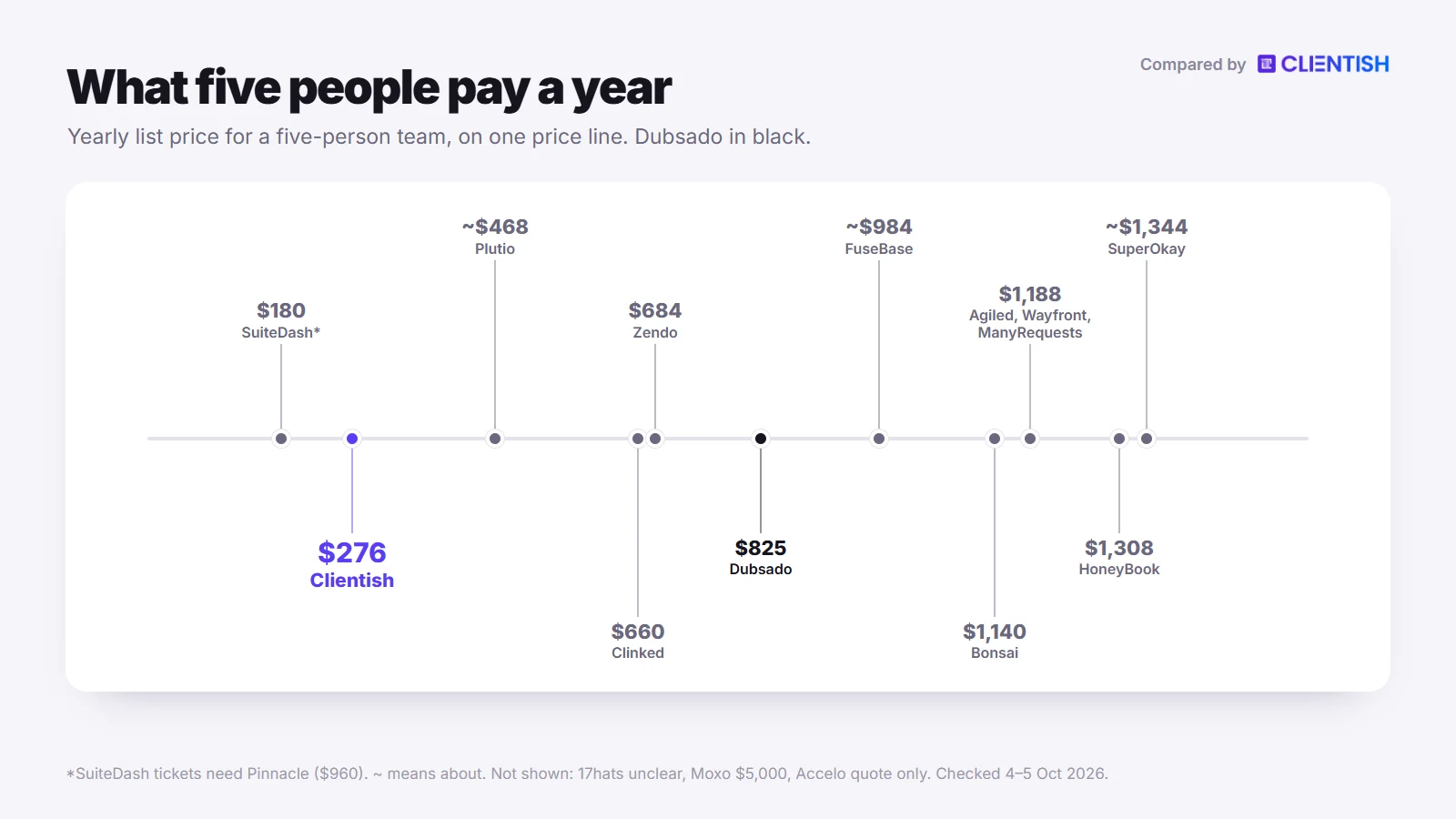
| Tool | 5 people, per year | 10 people, per year |
| Clientish | Starter: $276 | Growth: $468 |
| Dubsado | Premier + user tier: $825 | Premier + user tier: $825 |
| HoneyBook | Premium: $1,308 | Premium: $1,308 |
| Bonsai | Essentials for 5: $1,140 | Essentials for 10: $2,280 |
| 17hats | $600 a year plus $5 a month for each extra user; 17hats’ pages disagree on how many users are included and which option carries the portal | |
| Plutio | Pro: about $468 | Pro: about $468 |
| SuiteDash | Start: $180 (tickets need Pinnacle at $960) | Start: $180, or $960 on Pinnacle for tickets |
| Agiled | Business: $1,188 | Business + 3 seats: $1,908 |
| Wayfront | Base: $1,188 | Base + 5 seats: $2,268 |
| ManyRequests | Core + 4 seats: $1,188 | Core + 9 seats: $2,088 |
| Zendo | Core + 4 users: $684 | Core + 9 users: $1,164 |
| SuperOkay | Business: about $1,344 | Business: about $1,344 |
| Clinked | Start Up for 5: $660 | Start Up for 10: $1,320 |
| Moxo | Team: $5,000 | Team: $5,000 |
| Accelo | By quote | By quote |
| FuseBase | Essentials: about $984 | Advanced: about $3,192 |
How we got these numbers: Dubsado’s Starter tops out at three extra users, so five people need Premier ($525) plus the 4–10 user tier ($25 × 12 = $300), and that same tier still covers ten. HoneyBook’s Essentials plan stops at the owner and two team members, so five people need Premium. Agiled’s Business plan includes seven seats, so ten people add three seats at $20 a month. For Wayfront, ManyRequests and Zendo we used annual plan rates and added seats at $18, $15 and $8 monthly respectively. Clinked’s Start Up is $11 per user on monthly billing. The SuperOkay and FuseBase rows use the lower price on each page, which looks like the yearly rate but is not labelled.
The 15 Best Dubsado Alternatives for Agencies
The list falls into loose groups. Tool 1 is the agency pick. Numbers 2 to 4 are the booking-style apps people most often compare with Dubsado, 5 to 7 are broad business suites, 8 to 10 sell productized or request-based work, and the last five handle portals, workflows and professional services for narrower jobs. Each block starts by setting the tool against Dubsado, then lists its features, its weak spots for a team and its price.
1. Clientish: Built for Agencies Selling Repeat Services
Clientish takes the opposite approach to Dubsado’s blank canvas. Instead of asking you to design forms, Flows and portal pages from scratch, it ships the agency process ready to fill in: a service catalogue, an order for every purchase, a ticket desk and a branded portal. The fit is strongest for SEO, content, web, design and marketing shops in which several people look after the same accounts month after month.
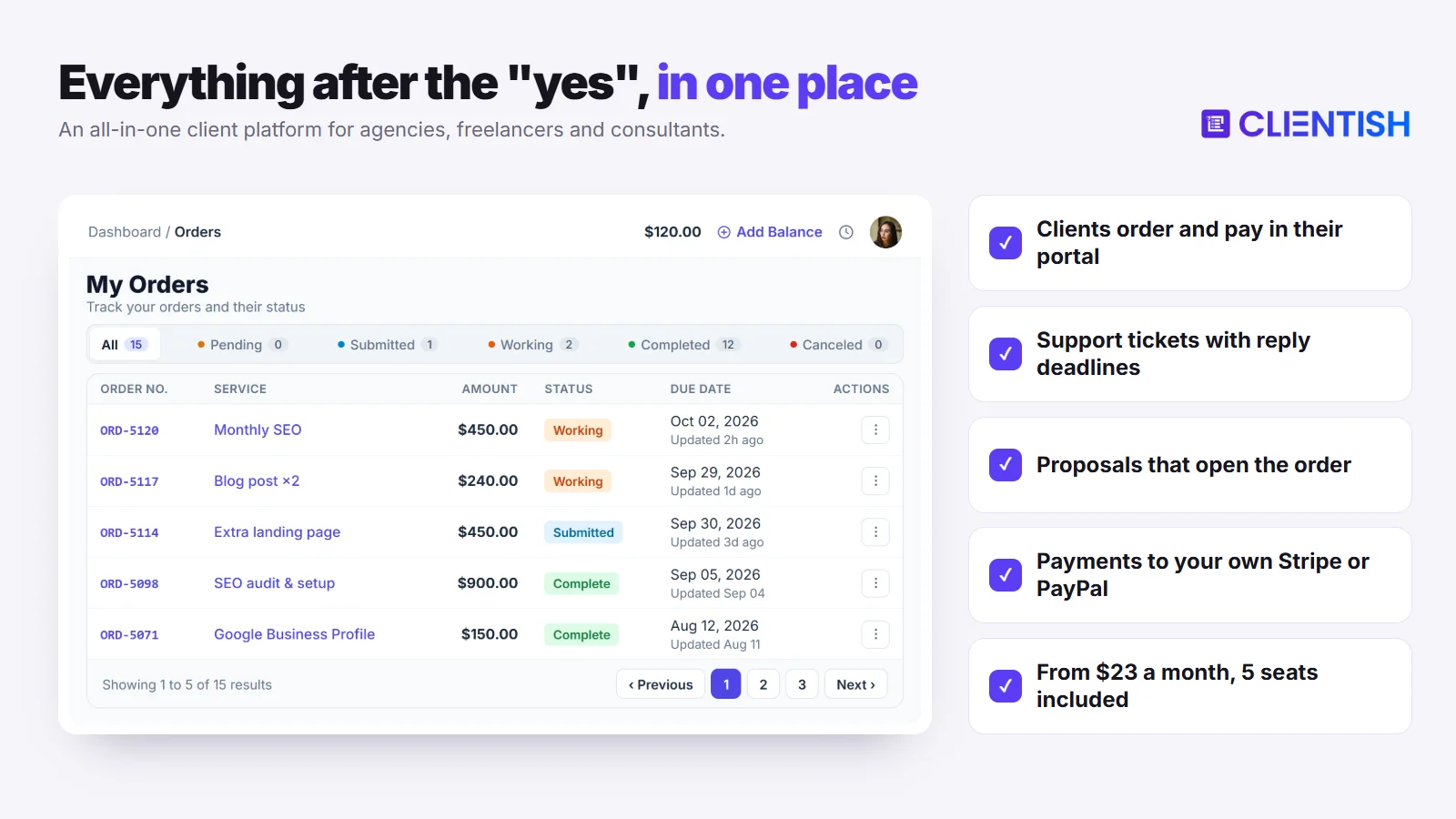
Compared with Dubsado: five people cost $276 a year instead of $825, the structure for selling and delivering is already in place, and client questions land in a ticket queue rather than an inbox.
Key features (where it goes further than Dubsado):
- Staff seats in every plan: Starter includes 5 people, Growth 15, Pro 30 and Enterprise 50, and you can buy more. Clients never use a seat, and you shape each role yourself instead of choosing from three fixed ones.
- A portal with jobs to do in it: clients sign in to see open work, unpaid invoices and upcoming renewals, and from there they reorder, approve a delivery, change a subscription or ask a question.
- Catalogue, cart and coupons: each service has its price and intake form. Checkout raises the invoice, payment opens the order, and the client completes the brief afterwards.
- Orders that track revisions: every order holds its brief, the files delivered and the edit rounds left for that service. Delivered work counts as approved after seven days by default, and you can change that delay.
- A ticket desk from the first plan: each ticket gets a priority that sets its first-reply deadline, and staff work with saved replies, tags and private notes; clients score the help once it closes.
- Gateways you already own: card payments go straight to the gateway you link (Stripe, PayPal, Paddle or SSLCommerz), while your team can record manual bank, Wise, bKash, Nagad and Rocket payments. Clientish adds no fee, clients can pay from a stored balance, and where you can sell depends on your gateway.
- Proposals that open the account: choose one of eleven designs; when the client types a signature, Clientish logs their IP, emails a signed PDF, creates their client account, issues a single invoice where the deposit (half by default) falls due before the rest, and then starts the order.
- Time the client signs off: on Growth and higher plans, remote members record time against a client, and no hours reach an invoice before that client approves them.
- QuickBooks, Xero, webhooks and an API: both accounting tools connect, and Make or Zapier can be linked through webhooks.
- Brand on every plan: logo, colours and favicon in the portal, and client emails sent through your own SMTP server. Pro and Enterprise also hide “Powered by Clientish”.
- Leads and live chat start on the Growth plan, and account sign-in supports 2FA by email code or an authenticator app.
Limits for agencies: Renewals do not charge a card on their own. When a subscription comes round, the same invoice reopens and the client pays it by card, transfer or balance, so Dubsado’s autopay has no direct equivalent. There is no booking calendar and no phone app, the interface is in English only, and the portal lives on a clientish.io subdomain.
| Pros | Cons |
| Five staff on the $29 plan | Client settles each renewal; no autopay |
| Catalogue, orders and tickets built in | No scheduler or mobile app |
| Tickets with reply deadlines on all plans | Interface in English only |
| Your own gateways, from Stripe to SSLCommerz | Portal address on clientish.io |
Price: Starter $29, Growth $49, Pro $99 and Enterprise $149 a month, or $23, $39, $79 and $119 a month when paid for the year. Portal, invoicing, tickets and proposals come with every plan; leads, live chat and remote members begin on Growth. Try Clientish free for 14 days without a card.
2. HoneyBook: The Booking App Most People Weigh Against Dubsado
HoneyBook is the name that sits beside Dubsado in nearly every search, and the two share a target: the owner who turns an inquiry into a signed contract and a paid deposit. HoneyBook packs the proposal, contract and invoice into one “smart file” and offers free file setup on every plan.
Compared with Dubsado: HoneyBook offers free file setup and a 30-day trial instead of 21 days, but it acts as the only payment processor and admits businesses from four countries.
Key features: Contracts with e-signing, proposals, invoices, a client portal and basic reports come with Starter, along with pipeline automations, recurring invoices with autopay and a mobile app. Essentials adds the full automation builder, unlimited scheduler sessions with SMS reminders, QuickBooks Online, expense tracking and standard reports; Premium adds advanced reports and an onboarding specialist. Every plan can show the portal and smart files on a subdomain you own.
Limits for agencies: No team members can be added on Starter; Essentials stretches to three people, and a fourth pushes you to Premium at $109 a month on annual billing. HoneyBook handles every payment itself and only accepts businesses based in the United States, Canada, Britain or Australia. The Time Tracker was switched off after September 7, 2026, Xero is not among its integrations, and we found no ticket feature.
| Pros | Cons |
| Proposal, contract and invoice in one file | A fourth person needs the $109 plan |
| 30-day trial, no card | HoneyBook is the only processor |
| Mobile app and autopay on Starter | Four countries only; no Xero |
Price: Starter is $36 monthly or $29 a month paid yearly, Essentials $59 or $49, and Premium $129 or $109. The trial lasts 30 days.
3. Bonsai: Freelance Contracts and Project Tracking, Now Owned by Zoom
Bonsai sells contracts, invoices and project tools to freelancers and, it says, to over 5,000 agencies and consultancies. Since Zoom completed its purchase in December 2025, Bonsai has stayed a standalone brand. Next to Dubsado, it leans harder on delivery, with Gantt timelines, team workload views and built-in timers.
Compared with Dubsado: Bonsai adds Gantt timelines and workload views, but it charges for every person from the first, where Dubsado gives the owner three free users.
Key features: From the Essentials tier you get proposals, contracts, invoicing, forms and booking, plus a portal that clients reach through a secure link sent by email instead of an account. Subscription invoices charge a saved card, and Premium adds automations, client messaging, branding removal and integrations with QuickBooks and Zapier. Bonsai Payments covers the US, the UK, Canada and Australia, and Stripe covers most other countries.
Limits for agencies: Seat pricing adds up quickly; five people on Premium cost $1,740 a year. Using Stripe or PayPal where Bonsai Payments is offered adds a 1% platform fee, and new accounts wait 7 to 10 business days for payouts. Custom domains are marked as expected in 2026, and we found no ticket queue.
| Pros | Cons |
| Gantt, workload and timers built in | Paid seat for each team member |
| Subscription invoices charge cards | 1% extra fee on other processors in its four countries |
| Stripe usable in most countries | No custom domain yet |
Price: each person costs $15 on Basic, $25 on Essentials, $39 on Premium or $59 on Elite per month, falling to $9, $19, $29 or $49 with annual billing; Elite needs at least three users. The trial is 7 days.
4. 17hats: Bookkeeping Beside the Booking Flow
17hats sits in the same corner as Dubsado (quotes, contracts, questionnaires, invoices and a booking page) and adds a bookkeeping module with a bank feed. It sells “all features” with three ways to pay: monthly, yearly or every two years.
Compared with Dubsado: 17hats brings bookkeeping and a P&L report into the app, while Dubsado connects to Xero on Premier and 17hats has no Xero link at all.
Key features: A three-in-one quote, contract and invoice document, e-signatures with several signers, questionnaires with If/Then logic on the top level, workflows that send documents and assign team members, and online scheduling. Inside the 17hats portal a client can accept a quote, sign, complete a questionnaire and pay, though uploading files is not possible. Card payments run on Stripe or Square, and data flows one way into QuickBooks Online.
Limits for agencies: 17hats’ pages disagree on team size. The multi-user page allows two extra users, the pricing grid shows three included on its top level, and extra users cost $5 a month each. Links run on a 17hats subdomain with no documented custom domain, and we found nothing like a ticket desk.
| Pros | Cons |
| Bookkeeping, plus a bank feed for $5 a month | Team size unclear across its own pages |
| Free iOS and Android apps | Clients cannot upload files to the portal |
| Low-cost $5 extra users | One-way QuickBooks sync, no Xero |
Price: pay $60 monthly, $600 for a year, or $800 to cover two years. A half-price first year was being advertised on October 5, 2026, which looks like a limited sale. A free CRM tier allows four invoices per quarter, and the trial runs 7 days.
5. Plutio: One Feature Set, 34 Languages
Plutio gives every plan the same modules (projects, proposals, contracts, billing, scheduling and a client portal) and limits only people, active clients and usage. For a freelancer who wants Dubsado’s all-in-one idea plus Gantt charts and task dependencies, Plutio keeps every module on every plan.
Compared with Dubsado: you get Gantt charts, task dependencies and 34 interface languages with no plan gates, but the cheapest plan is strictly one person, where Dubsado’s Starter already adds three users.
Key features: Each client signs in with their own account to see the projects, files, conversations and invoices you share. Stripe, PayPal and Square are supported, with automatic card billing on Stripe and Square. Every plan includes a website chat widget, webhooks and a REST API, while white-labelling (your domain plus SMTP sending) is a $9 monthly extra on Core and Pro.
Limits for agencies: Core allows one person and nine active clients, and Pro includes 30 contributors. With no ticket module, Plutio suggests running support on a task board, and Xero or QuickBooks need a third-party automation tool in between. On Trustpilot, slow support is a recurring theme in one-star reviews.
| Pros | Cons |
| No feature gating between plans | Core is one person, nine clients |
| 34 languages, phone and desktop apps | No dedicated ticket module |
| Own domain for a $9 add-on | Accounting only via an automation tool |
Price: Core is $19 a month (roughly $15 on yearly billing), Pro $49 (roughly $39) and Max $199 (roughly $159). The trial is 7 days.
6. SuiteDash: Unlimited Staff, Similar Setup Effort
A SuiteDash plan is priced per account, never per person, and every plan allows unlimited staff and clients, so the user tiers Dubsado adds do not exist here. Its scope is broader than Dubsado’s, stretching to email marketing, courses and AI agents alongside CRM, projects, invoicing and portals, and like Dubsado it leaves most configuration to you.
Compared with Dubsado: SuiteDash solves the seat cost but not the setup time; reviewers describe a similar learning curve, and SuiteDash sells guided sessions much as Dubsado points to paid specialists.
Key features: Each client gets a dashboard reached by password or magic link; subscription plans charge on schedule; estimates, invoices and checkout forms are built in; and Stripe, Braintree, PayPal and Authorize.Net are all supported. Your own domain and full white-label branding are on Start, the lowest plan. The ticket toolkit, full automations and onboarding FLOWs are reserved for Pinnacle.
Limits for agencies: SuiteDash sells $50 Wizarding Sessions and a $299 Sensei Kickstart for setup help. Data goes to QuickBooks Online in one direction only, Xero has not shipped yet, subscriptions cannot run through PayPal, and its tickets showed us no response timer or client score.
| Pros | Cons |
| One price for unlimited staff and clients | Long setup; paid help sessions sold |
| Custom domain and white-label from Start | Tickets and full automation need Pinnacle |
| Wide choice of gateways | Xero not live; QuickBooks one-way |
Price: Start costs $19 a month or $180 a year, Thrive $49 or $480, and Pinnacle $99 or $960. The 14-day trial runs on Pinnacle without a card.
7. Agiled: CRM, HR and Client Work in One Place
Agiled rebuilt its small-business suite on fresh software during 2026. It covers sales pipelines, client portals, finance and staff records, so a freelancer who is hiring can run leave requests and invoices from the same login.
Compared with Dubsado: Agiled adds HR records and a client ticket module from Pro, both missing in Dubsado, yet each plan comes with a set number of seats and further seats are billed at $20 monthly.
Key features: Clients pay invoices, open tickets, chat and book time in the portal. Recurring invoices can be generated by Agiled or billed as a gateway subscription, contracts support several signers, and there are phone and desktop apps. Gateways include Stripe Connect, PayPal and Mollie; cheques, wires and other offline payments are logged manually.
Limits for agencies: Plans hold one, three, seven or fifteen seats. A branded portal with your own domain and SMTP needs Business or a $19 monthly add-on, and QuickBooks or Xero sync starts on Business. Older Agiled users moving to the new platform must rebuild proposals, forms and workflows, because the one-time import skips them.
| Pros | Cons |
| HR, CRM and finance together | $20 a month per extra seat |
| Client tickets from Pro | Branding and accounting sync on Business |
| Phone and desktop apps | 2026 relaunch import skips proposals and forms |
Price: Starter runs $29 monthly or $24 on annual billing, Pro $69 or $59, Business $129 or $99, and Scale $249 or $199. The 14-day trial includes Business features and needs no card.
8. Wayfront: A Storefront for Productized Packages
Until February 2026 Wayfront went by Service Provider Pro, and its focus is the productized agency selling set packages and retainers from a branded portal. Where Dubsado sells through proposals, Wayfront sells through a cart.
Compared with Dubsado: purchases happen through a cart and Stripe renews subscriptions on its own, yet we saw no proposal or contract module, the document Dubsado treats as the start of every project.
Key features: Wayfront sells services with variants, add-ons and coupon codes, takes Stripe or PayPal at checkout, sends intake forms once paid, and tracks each order by status with a checklist. A helpdesk with tags, internal notes and ratings sits alongside request caps, credits and client balances. Failed renewals trigger dunning emails, and the portal can run on your own domain in any of seven languages.
Limits for agencies: Base, the cheapest plan, costs $99 monthly when paid annually and seats five; more seats are $20 each per month, or $18 on annual terms. Client coworkers, the template editor and Make sit on Pro, and the API is a paid add-on there. Time tracking arrived in May 2026, but we found no client approval of hours.
| Pros | Cons |
| Cart, coupons and auto-charging subscriptions | Starts at $99 a month on yearly billing |
| Helpdesk with ratings | No proposals or contracts |
| Seven portal languages | Client teams and API on Pro |
Price: Base is $129 monthly or $99 a month on yearly billing, Pro $299 or $249, and Plus is quoted on a call. The 14-day trial needs no card.
9. ManyRequests: Requests and Proofing for Creative Subscriptions
ManyRequests is built around a queue of client requests, the model behind unlimited design and video retainers. It suits the freelancer who outgrew Dubsado because clients now send a steady stream of small jobs rather than one booked project.
Compared with Dubsado: it adds a request queue and image and video proofing, but includes one seat, so a five-person studio pays for four more.
Key features: A catalogue and custom order forms, request forms with conditional rules, requests sent by email, annotation on images, PDFs and video, chat, and client ratings when work is marked done. Billing goes through Stripe with subscriptions that charge automatically, plus manual payments you mark as paid. A custom domain and unlimited clients come with every plan, and time-entry approvals shipped on October 1, 2026.
Limits for agencies: Extra seats are $20 a month on Core and $30 on Pro, or $15 and $25 billed yearly. Requests stand in for tickets, and we found no first-reply target. Removing “Powered by”, webhooks and the API all need Pro, and there is no QuickBooks or Xero integration.
| Pros | Cons |
| Proofing for images, PDFs and video | One seat included |
| Requests by form or email | No reply-time targets found |
| Custom domain on Core | No accounting integration |
Price: Core is $59 monthly, or $39 a month annually; Pro is $99, or $79 annually. The 14-day trial needs no card.
10. Zendo: A Free Way to Test Productized Selling
Zendo sells productized services through a portal and keeps a free tier, so testing a storefront and checkout here costs nothing. It handles one-off, subscription and custom services from the same catalogue.
Compared with Dubsado: Zendo starts at $0 and sells from a public storefront, while Dubsado starts at $35 a month, or $335 for a year; Zendo includes one internal user per plan against Dubsado’s four people.
Key features: A catalogue visitors can browse, multi-step checkout, quotes and invoices, subscriptions with trials and pauses, real-time chat and shared files. Stripe handles card payments and bank transfer works as a manual method. Support questions and onboarding are modelled with Request Types (2 on Essential, 5 on Core, no cap higher up), and clients can use the portal in 12 languages.
Limits for agencies: Adding a user costs $8 on Core, $12.50 on Pro and $17 on Agency each month. A custom domain needs Pro, and removing the “Powered by Zendo” badge needs Agency. We saw no QuickBooks or Xero connection, and Zendo still lists its public API as coming soon.
| Pros | Cons |
| Free plan for three clients | One internal user per plan |
| Storefront with subscriptions | Own domain from Pro |
| Twelve portal languages | No accounting integrations listed |
Price: Essential is free. Core costs $29 a month or $25 on annual billing, Pro $59 or $49, and Agency $99 or $79. A 14-day Pro trial needs no card.
11. SuperOkay: A Quick-to-Build Branded Portal Without Billing
SuperOkay is a client portal for files, interactive documents, tasks and approvals, set up per project with the client’s own logo and colours. It answers Dubsado’s setup complaint with a portal it says takes five minutes, but it leaves out invoicing completely.
Compared with Dubsado: it focuses on files, documents and approvals, and SuperOkay has no invoices, payments or recurring billing, so you would keep a separate billing tool.
Key features: Client login by magic link, password or both; interactive documents with approval buttons, ratings and file uploads; Kanban or list tasks; chat; embedded apps such as Figma, Miro and Airtable; and Packaged Services pages whose buy button points to a payment page you host elsewhere.
Limits for agencies: The free and Solo plans have no team members, Solo+ allows three, and only Business is unlimited. A custom domain and full white-label start at Solo+. We found no tickets, accounting integrations or mobile apps.
| Pros | Cons |
| Fast to set up | No invoicing or payments |
| Approvals inside documents | Unlimited team only on Business |
| Free plan for one project | No ticket desk |
Price: Free; Solo about $9 or $12 a month, Solo+ about $29 or $38, and Business about $112 or $146. The page does not label which figure is yearly, and the lower one appears to be. There is no timed trial.
12. Clinked: Secure File Sharing for Compliance-Minded Firms
Clinked gives clients a secure place for documents, to-dos and discussion, and sells mainly to firms that face security reviews. It covers ground Dubsado doesn’t, such as version control, audit trails and ISO 27001, and drops what Dubsado is built on, because it has no invoicing.
Compared with Dubsado: Clinked swaps billing and automations for document security and approvals; you would pair it with another invoicing tool.
Key features: Secure client logins with 2FA, files up to 5 GB each, file requests from non-members, approvals, annotations, an online editor, chat, tasks and calendars, plus phone apps for iOS and Android whatever the plan. Your own domain arrives on Standard and white-label email notifications on Premium. Single sign-on is an Enterprise feature.
Limits for agencies: There are no invoices, catalogue or tickets. Start Up is billed per person at $11 monthly and stops at 25 users; above that the jump is to Standard at $239 a month for 100 members.
| Pros | Cons |
| ISO 27001 and audit trails | No invoicing or payments |
| File approvals and version history | SSO only on Enterprise |
| Mobile apps on all plans | Large price step after Start Up |
Price: pay $11 per person on Start Up, a flat $239 on Standard or $599 on Premium each month ($479 with yearly billing), or ask for an Enterprise quote. Clinked’s own blog mentions a 14-day trial.
13. Moxo: Structured Workflows for Larger Firms
Moxo runs guided processes in which clients and employees each complete their own steps, such as forms, approvals, signatures, uploads and payments, while AI agents prepare the groundwork. Like Dubsado’s Flows, it is about designing a process; unlike Dubsado, it is priced for larger firms.
Compared with Dubsado: Moxo assigns each step of a flow to a client, a colleague or an AI agent, at $5,000 a year rather than $525.
Key features: A workflow builder with role assignment, milestones and an AI copilot on Team; clients join by magic link with no account. Branching, loops, portals with your own domain, webhooks, the REST API and the audit log are Scale features. Moxo states SOC 2 Type II certification.
Limits for agencies: Team covers 100 flows a year, and the trial is arranged by Moxo rather than self-serve. Payments happen as a step within a flow rather than in a billing module, nothing for recurring charges turned up, and Moxo’s blog itself warns of overhead on simple engagements and of having to define every process first.
| Pros | Cons |
| Unlimited seats | $5,000 a year to start |
| SOC 2 Type II | Branching and audit log need Scale |
| Approvals, signing and uploads in one flow | No subscription billing found |
Price: Team costs $5,000 per year, and Moxo quotes Scale and Enterprise individually. A trial can be requested from Moxo.
14. Accelo: PSA for Established Firms on Retainers
Accelo is a professional services automation (PSA) platform, made for firms that watch budgets and hours closely across projects, retainers and support work. It now markets itself as AI-powered and has merged with Forecast. Where Dubsado suits a single owner, Accelo suits a firm with departments.
Compared with Dubsado: it goes much deeper on retainers, tickets and time, but publishes no price and offers no self-serve trial, where Dubsado gives 21 days free.
Key features: Approved quotes turn into projects, retainers renew period by period, tickets and timers live in the same system, and invoices draw on project activity. Those invoices carry payment links via Stripe, PayPal or Authorize.net, and clients use a portal for requests, sign-offs and billing history. QuickBooks, Xero and a long list of business tools connect.
Limits for agencies: Prices come only by quote, Accelo expects most teams to be live within weeks, and clients cannot browse or buy services themselves. Reviewers often mention a steep learning curve.
| Pros | Cons |
| Retainers, tickets and time together | No public price or trial |
| Billing from project activity | Implementation measured in weeks |
| QuickBooks, Xero and many more | No service catalogue |
Price: custom quote based on team size; a demo is available on request.
15. FuseBase: Client Portals With a Shared Knowledge Workspace
FuseBase, the product once called Nimbus, pairs client portals with an internal workspace for docs, to-dos and AI agents. Measured against Dubsado, its focus is shared knowledge and collaboration, and it does not invoice or collect money.
Compared with Dubsado: FuseBase adds a team wiki and AI agents but drops invoices and payments, which Dubsado handles natively.
Key features: Clients enter through a secure magic link to find shared files, task lists, mutual action plans, chat, forms, surveys and e-signatures, alongside meeting notes and recordings; AI requests and automation runs are allotted per plan. Removing FuseBase branding and using your own domain and sender address requires Advanced.
Limits for agencies: Invoicing, payments, a service catalogue and a ticket desk are all absent from its pages. On Essentials the ceiling is five members and 100 clients; additional members are quoted on request, and each further portal adds $20 a month.
| Pros | Cons |
| Portals plus a document workspace | No billing of any kind |
| Native e-signatures and forms | White-label starts on Advanced |
| Free plan and 14-day trial | Extra members by quote |
Price: Free; Solo about $32 or $39 a month, Essentials about $82 or $99, Advanced about $266 or $399, and Unlimited by quote. The lower figures appear to be yearly billing, though the page does not say so. The trial is 14 days.
Cheapest Dubsado Alternatives
If the December price rise is what sent you looking, compare the cost of the team you employ today, not the cheapest card on each pricing page. These are the lowest-cost picks by situation, using yearly billing wherever a tool offers it.
| Situation | Lowest-cost option | Cost |
| Trying a client portal alone, for free | Zendo Essential or SuperOkay Free | $0, with tight limits |
| Solo freelancer who needs invoices and a portal | SuiteDash Start or Plutio Core | About $180 a year |
| Freelancer hiring the first four people, with tickets | Clientish Starter | $276 a year |
| Ten-person agency with tickets and a portal | Clientish Growth | $468 a year |
| Unlimited staff, no ticket desk needed | SuiteDash Start | $180 a year |
| Staying on Dubsado with four people | Dubsado Starter | $335 a year |
The free plans help you test a process, yet none of them runs a working team: Zendo’s free tier holds one user and three clients, and SuperOkay’s free plan allows one project with no team members.
What Your Clients See in Each Tool
What a client can do alone decides how many emails land in your team’s inbox every week. The grid lists each tool’s sign-in method and the actions open to a client after logging in.
| Tool | How clients get in | Pay invoices | Buy services | Raise tickets |
| Clientish | Own login to your branded portal | Yes, or from a balance | Catalogue and cart | Yes, with reply deadlines |
| Dubsado | Client portal | Yes | Public proposals (Premier) | None found |
| HoneyBook | Magic link, password or code | Yes | Smart files | No |
| Bonsai | Secure email link | Yes | Proposals | None found |
| 17hats | Client portal | Yes | Quotes | None found |
| Plutio | Own login | Yes | Proposals with packages | No module |
| SuiteDash | Login or magic link | Yes | Checkout forms | On Pinnacle |
| Agiled | Client portal | Yes | Checkout link (Business) | From Pro |
| Wayfront | Passwordless or Google login | Yes | Cart | Yes |
| ManyRequests | Client portal | Yes | Catalogue or order form | As requests |
| Zendo | Password or social login | Yes | Storefront | As request types |
| SuperOkay | Magic link or password | Link to your pay page | Packaged service pages | No |
| Clinked | Secure login with 2FA | No | No | No |
| Moxo | Magic link or portal | Payment steps | Flow catalogue (Scale) | Through flows |
| Accelo | Email login link | Yes, if enabled | No | Yes |
| FuseBase | Magic link | No | No | None found |
Why Agencies Choose Clientish Over Dubsado
Several tools above suit a particular niche well. For a freelancer who has become an agency, with staff, recurring clients and a steady queue of questions, this side-by-side sums up what changes when you move from Dubsado to Clientish.
| Dubsado | Clientish | |
| Five-person team, per year | Premier with user tier: $825 | Starter: $276 |
| Entry price, monthly billing | $35 (raised in December 2025) | $29 |
| Getting started | Build forms, Flows and templates yourself | Catalogue, orders and tickets ready to fill in |
| Staff roles | Basic, Accountant or Admin | Roles you define |
| Client questions | Email-based inbox | Tickets with priorities, deadlines and ratings |
| Repeat sales | New proposal or recurring invoice | Reorder from the catalogue with coupons |
| Delivery | Projects and task boards | Orders with revision rounds and auto-approval |
| Payment processors | Dubsado Payments or Square, plus PayPal | Your Stripe, PayPal, Paddle or SSLCommerz, plus manual methods |
| Card renewals | Autopay on recurring invoices | Client pays each renewal |
| Booking calendar and mobile app | Scheduler on Premier; companion app | Neither |
| Portal address | Your own domain via CNAME | clientish.io subdomain |
Dubsado keeps the advantage on autopay, scheduling, its phone app, its own-domain portal and a node-based Flows builder for automations you design yourself (Premier). Clientish wins where a growing agency spends its time: people cost, a ready-made sales and delivery process, a support queue and your choice of payment provider. Open a free Clientish trial and run your next new client through it before you touch the existing ones.
Is Dubsado Still Worth It in 2026?
For the right business, yes. Dubsado still makes sense for a solo owner or a duo who sells bookable sessions or one-off projects, enjoys building automations, wants clients to be charged automatically on recurring invoices, and either joined before the price change or is happy at $335 to $525 a year.
It fits less well once two or more of these are true: you plan to hire a fifth person, clients come back every month for the same services, you need a support queue with response times, or nobody on the team has the hours to keep Flows, forms and templates up to date. In that case you pay more each year for a system you also have to keep building, and an agency-shaped tool costs less for the team you already employ.
Which Dubsado Alternative Fits Your Agency?
The best pick depends less on feature counts than on how your business sells and how much setup time you can spare. Find the row that matches your model below.
| If your business… | Look at | Why |
| is a freelancer turning into an agency of 3–50 people selling retainers or packages | Clientish | Staff included, catalogue, orders with revisions, tickets, own gateways |
| is a solo owner who books sessions and wants setup help included | HoneyBook | Smart files, 30-day trial, in its four countries |
| runs projects and bills time as a consultant | Bonsai | Gantt, workload and timers, priced per person |
| wants bookkeeping inside the client app | 17hats | Bank feed and P&L next to quotes and contracts |
| works in a language other than English | Plutio | 34 interface languages, same features on every plan |
| wants unlimited staff and has time to configure | SuiteDash | One price for any team size, white-label from Start |
| also manages staff leave and attendance | Agiled | HR module from Pro, CRM and tickets |
| sells fixed packages through a storefront | Wayfront, Zendo | Cart or storefront with subscriptions |
| runs an unlimited design or video subscription | ManyRequests | Request queue and proofing |
| mainly shares files and gathers approvals | SuperOkay, Clinked | Branded file hubs; Clinked adds compliance |
| runs regulated processes with many parties | Moxo | Guided flows, SOC 2 Type II, audit log on Scale |
| is an established firm billing time and retainers | Accelo | PSA with tickets, time and invoicing |
| needs portals plus an internal knowledge base | FuseBase | Portals, documents, e-signatures and AI agents |
Moving From Dubsado Without Disrupting Active Clients
A switch goes smoothly when live projects finish where they started and fresh work begins in the new system. Dubsado’s help centre describes two exports: a contacts CSV where you pick the fields, and a project-and-client export filtered by project status. We found no export for Flows, forms or templates, so plan to rebuild that logic rather than move it.
- Write down your Flows first. List each trigger and action in plain words (form submitted, contract signed, invoice paid) so you are copying a plan, not reverse-engineering Dubsado later.
- Export before you cancel. Download the contacts CSV and the project export, and save copies of any signed contracts and paid invoices you want to keep on file.
- Import clients. Open Clients → Import in Clientish, download the template, and fill it with your contacts as CSV, XLS or XLSX. Everyone imported starts inactive and receives no email until you choose to invite them.
- Rebuild packages as services. Give each one a price, an intake form and its revision allowance, and move your contract wording into proposal templates.
- Switch recurring invoices with care. Clientish does not charge cards automatically, so tell each retainer client that renewals will arrive as an invoice to pay. Set the first Clientish renewal for the client’s next due date, and only then switch off the recurring invoice in Dubsado, so no one is charged twice.
- Send portal invitations as each client moves. A short note with the new login address avoids confusion while both systems run side by side.
Frequently Asked Questions
These are the questions that come up most often next to “Dubsado alternatives”, answered for agencies and growing freelancers, with prices current as of our October 4 and 5, 2026 check.
Which Dubsado alternative works best for an agency?
Clientish, if your team sells repeat services: it seats five to fifty staff, gives clients a portal with orders and tickets, and uses your own payment processor. For a solo business that mostly books sessions, HoneyBook is the closest swap.
Is Dubsado good for agencies, or is it mainly for freelancers?
It works for small teams, since three extra users are free and the Basic role limits a person to assigned projects. Past that, users cost $25 to $60 a month by tier, roles are fixed at three, each brand connects one email account, and we found no ticket desk in its help centre. Freelancers and very small studios fit it best.
What is cheaper than Dubsado?
A solo user pays $19 a month on SuiteDash Start or Plutio Core, against $35 for Dubsado Starter. With five people, Clientish Starter still costs $29 a month, whereas Dubsado requires Premier and its $25 monthly user tier.
Is Dubsado better than HoneyBook?
Dubsado offers a choice of Dubsado Payments, Square or PayPal, three free extra users and the Flows builder. HoneyBook offers free file setup, a 30-day trial and its own phone line with texting, but processes every payment itself and only accepts businesses in four countries. We found a ticket desk in neither.
Did Dubsado raise its prices?
Yes. From December 1, 2025, new subscriptions cost $35 or $55 a month, up from $20 and $40. Existing paid accounts keep their old price.
How long is the Dubsado free trial?
Twenty-one days with full Premier access and no card, and a one-time seven-day extension is available. Clientish’s trial is 14 days, also without a card.
Why are people leaving Dubsado?
The common reasons are the setup time and learning curve, the December 2025 price rise, user tiers that start at the fourth extra person, automation and scheduling locked to Premier, and the lack of a support queue for ongoing clients.
Can I use Dubsado outside the US?
Yes, with a condition: Dubsado Payments needs your business to be registered in a country on its supported list, while your clients may pay from anywhere. Square and PayPal are the other options. With Clientish you plug in Stripe, PayPal, Paddle or SSLCommerz, or record manual payments, and the gateway you pick sets the countries you can sell in.
Is there a free Dubsado alternative?
Four tools here offer a free tier: Zendo (three clients, one user), SuperOkay (one project), FuseBase (one client portal) and 17hats (four invoices a quarter). None of them runs a working agency team, so treat them as a way to test.
How is a client portal different from a CRM?
A CRM tracks leads, contacts and the sales pipeline before a deal closes. A portal is the space clients use after the sale to place orders, pay, sign off work and get support. Clientish, SuiteDash and Agiled cover both; Clinked, SuperOkay and FuseBase are mostly portals.
Which Dubsado alternative is best for a productized agency selling fixed-price packages?
Clientish, Wayfront, Zendo and ManyRequests all sell from a catalogue with checkout. On top of that, Clientish caps revisions per service and gives every plan a ticket desk with reply deadlines, while Wayfront and ManyRequests can bill saved cards on renewal.
Do any of these tools offer a white-label client portal?
Most do in some form. You can run the portal on your domain with Moxo (Scale), FuseBase (Advanced), Clinked (Standard), SuperOkay (Solo+), Zendo (Pro), ManyRequests, Wayfront, Agiled (Business or a paid add-on), SuiteDash, Plutio (a $9 add-on), HoneyBook (a subdomain) and Dubsado (via CNAME). Clientish stays on a clientish.io subdomain but carries your logo, favicon and colours, and client mail goes out from your SMTP server, whatever the plan.
Can I migrate my Dubsado clients and workflows to a new tool without losing everything?
Dubsado exports client contacts and a project list as CSV files; Clientish imports the contacts through its template, and live projects are set up again as orders. Flows, forms and templates have no export that we found, so you rebuild them in the new tool.
Does Clientish have a free plan?
No. You get 14 days free without entering a card; after that the cheapest plan is $29 monthly or $23 a month on an annual plan.
Which tool is best if I only have a few clients right now but expect to grow?
If headcount is what will grow, SuiteDash never charges per person and Clientish includes 5 to 50 staff. Clientish does cap new clients per month on plans below Enterprise, so check the limit for your expected intake.
Do I need a separate project management tool alongside these platforms?
It depends on the tool. Clientish (orders with tasks), Accelo, Bonsai, Plutio and Wayfront handle delivery inside the app. SuperOkay and Clinked offer basic tasks, and an agency with complex projects may still keep a dedicated PM tool next to them.
What should I look for in a Dubsado alternative if client communication is my biggest pain point?
Look for messages tied to the order or request, plus a ticket queue with priorities and reply targets. Clientish has both, along with live chat from Growth. Wayfront’s helpdesk and Agiled’s portal tickets are the other options with a real queue.
Is Dubsado still worth it in 2026?
Yes, if you work alone, book clients and enjoy building automations. Once a growing agency has staff, repeat clients and support questions, the user tiers, setup time and missing help desk make an agency portal the better fit.
Final Thoughts
Dubsado still serves the owner who enjoys shaping a booking journey by hand. Freelancers move on once they employ a team, sell identical packages to returning clients and field questions every week.
Clientish is built for that stage: five or more staff from the entry plan, a portal where clients buy and settle invoices, orders that limit revision rounds, tickets that track reply deadlines, and the payment accounts you already run. Start your 14-day free trial with two colleagues and one real client, then compare it with a normal week in Dubsado. Plan limits are listed on our pricing page, and a deeper two-tool breakdown lives in the Dubsado vs Clientish comparison.
Sources
Clientish publishes this guide. Every Dubsado and alternative-tool fact was checked on October 4 and 5, 2026, against each company’s own pricing and help pages, except Dubsado’s earlier $20 and $40 prices, which come from Raoura’s pricing teardown; review themes come from Capterra and Trustpilot.
Dubsado, HoneyBook, Bonsai, 17hats, Plutio, SuiteDash, Agiled, Wayfront, ManyRequests, Zendo, SuperOkay, Clinked, Moxo, Accelo and FuseBase are trademarks of their owners. Clientish is not affiliated with any of them. See something out of date? Tell us and we’ll correct it.


