

Assembly, which went by Copilot until September 2025, now puts an AI app builder up front, supported by a free plan, a client portal, contracts, tasks, and billing able to bill a saved card on each cycle. Agencies usually leave for reasons beneath the interface: Assembly is the merchant on every payment, adds its own percentage to each one, pays out to banks in only four countries, and prices each extra staff login.
Quick answer: Clientish is the Assembly replacement we would pick for an agency. Five staff fit on the $29 Starter plan, clients fill a cart from your catalogue and use coupons, every purchase opens an order capped at a set number of revisions, support questions become tickets, and card payments settle in a gateway account you hold, whether Stripe, PayPal, Paddle or SSLCommerz, with nothing skimmed by Clientish. SuiteDash, Moxo, Clinked and FuseBase are the portal tools most often weighed against Assembly; Plutio and Agiled are broad business suites; Wayfront, ManyRequests and Zendo fit productized teams; HoneyBook, Dubsado, Bonsai and 17hats fit solo booking businesses; SuperOkay and Accelo cover file hubs and professional services automation.
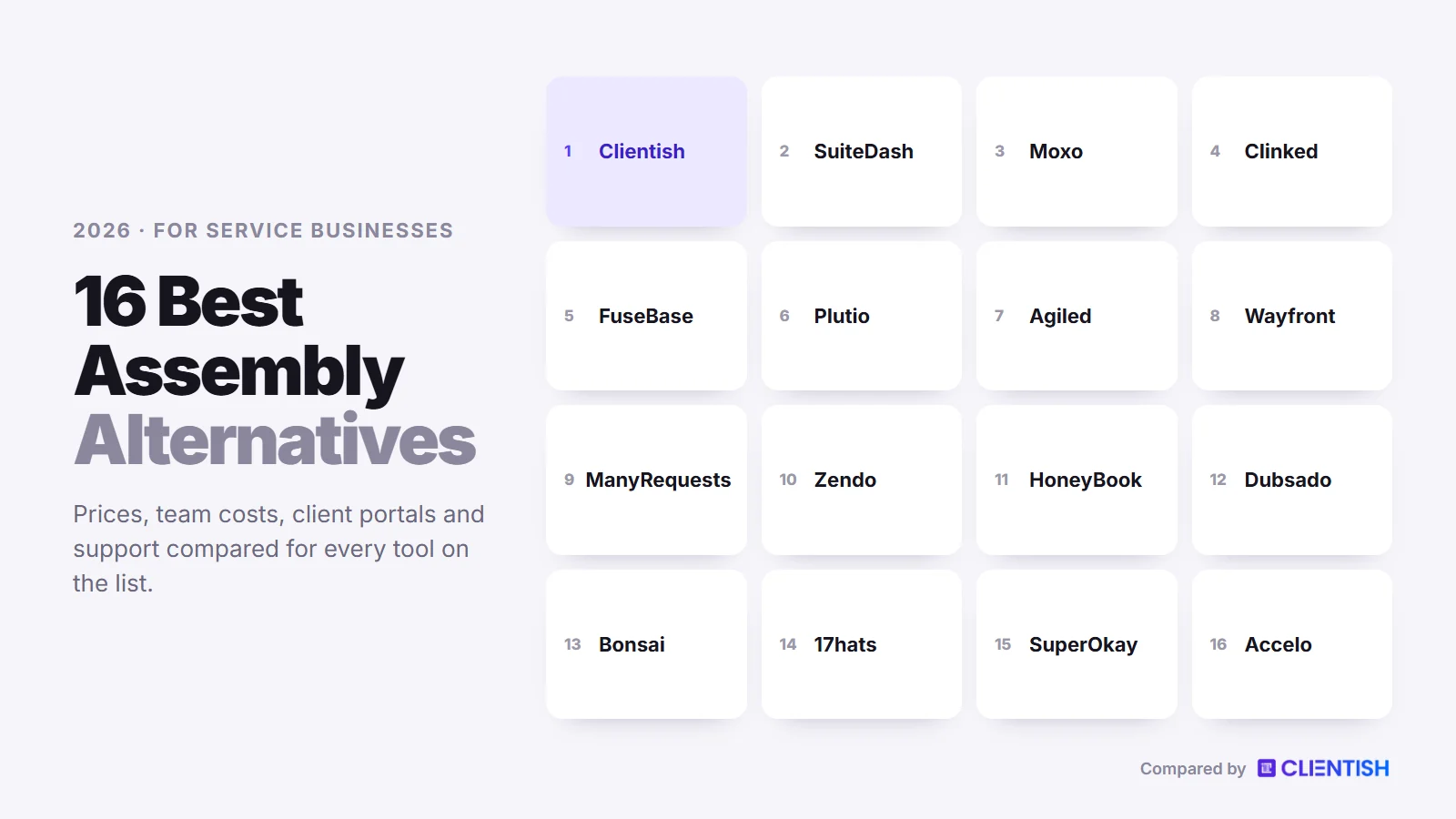
This guide explains where Assembly’s model pinches an agency, how the 16 replacements were chosen, the October 2026 price of each, how they stack up against Assembly on payments, seats and selling, and how to bring clients over without missing a billing date.
Key Takeaways
Most pages ranking for this search still quote Assembly’s old $39, $149 and $399 plans, written before the summer 2026 price change. These five points reflect its current plans and documentation.
- Assembly is the merchant of record. Payments run through Stripe Connect Express accounts on Assembly’s platform, your own Stripe or PayPal cannot be plugged in, and payouts can only go to American, British, Canadian or Australian banks.
- Its own fee sits on top of card fees. Invoices carry an extra 0.3% to 0.7%, subscriptions 0.5% to 1.1% and store sales 0.7% to 2.0%, depending on the plan, and Assembly’s docs say these billing-method fees cannot be passed on to clients.
- Staff logins are metered. Free and Starter allow one internal user. Professional includes three, then charges $29 a month per extra person on yearly billing, so ten staff cost $3,624 a year against $468 for Clientish Growth.
- The Store is not a full catalogue. Its ceiling is four subscription offers plus a dozen one-off packages, and Assembly’s documentation shows no multi-item cart, coupon codes, per-purchase order record or revision cap.
- Assembly keeps some real advantages. A custom portal domain and custom email domain come with Professional, it holds a SOC 2 Type II report, it has a contracts app with e-signature, and its tasks support templates with dynamic dates. Clientish has no custom portal domain, SOC 2 report, contracts module or templates for tasks, though it sends client mail from your own SMTP server on every plan.
Why Agencies Look Past Assembly
Assembly fits a small firm with a short client list. Strain shows once an agency adds staff, sells the same packages to dozens of clients, or bills from outside the four payout countries. Each reason below comes from Assembly’s own pricing page and documentation, or is labelled as a review theme.
Assembly Is the Merchant on Every Payment
Assembly’s payment docs say it acts as the merchant in every transaction, so client money reaches Assembly first and is then sent on to you. Standard Stripe accounts lost support on November 16, 2023, and you cannot bring your own processor. If a client disputes a charge, your payout is reversed, and a lost dispute means the money is gone.
A Percentage on Top of Card Fees
Card payments carry 2.9% and 30 cents, ACH payments 1%, and on top of those Assembly applies its own billing-method charge. Invoices pick up between 0.3% and 0.7% extra, recurring subscriptions between 0.5% and 1.1%, and Store checkouts between 0.7% and 2.0%, with the rate shrinking on pricier plans. Cards issued abroad cost a further 1.5%, and converting currency costs another 1%. You may surcharge clients for the card fee, but never for the billing-method fee, so that part always comes out of your margin.
Payouts Reach Four Countries
A payout account must sit in the US, the UK, Canada or Australia, the Payments app takes that bank account’s currency, and ACH works in US dollars only. An agency banking in Germany, India or Bangladesh cannot receive money through Assembly’s billing at all.
Staff Logins Are Priced One by One
Free and Starter each allow a single internal user, and neither can add more. Professional ($99 a month billed yearly) includes three, Advanced ($499) includes five, and each extra person costs $29 or $59 a month on yearly billing. Assembly offers just two roles, Admin and Staff; hiding some clients from a staff member is an Advanced feature, and below Advanced the count of active contacts stops at 5, 50 or 500.
The Store Stops Short of a Catalogue
Launched in June 2025, the Store lists no more than four plans that renew and twelve packages bought once, inside the portal or on a public link, and each buyer becomes a client who can be sent an onboarding form automatically. Missing from the docs: a cart holding several items, discount codes, a record per purchase and any cap on revisions. Each sale also carries the 0.7% to 2.0% fee.
No Native Ticket Desk or Order Record
To be fair to Assembly, work tracking exists: its Tasks app offers kanban and list layouts, reusable templates with dynamic dates, subtasks and client-assigned items, and an automation can create a task when an invoice is paid. There is no built-in support ticket app, though; a “Client help desk” exists only as a template for its AI app builder. Each client also gets one message thread, so a refund query, a revision note and a bug report share the same chat.
Branding Needs the Professional Plan
Logo, colours, font and icon are on every Assembly plan, including Free. Removing the “Powered by Assembly” badge, using your own portal domain and sending notifications from your own email domain all need Professional at $99 a month yearly or $139 monthly. Until mid-2026 the badge needed the $399 Advanced plan, which is why older articles call white-labelling a top-tier feature.
Review Theme: Layout Control and Mobile
A Capterra reviewer in July 2025 called the interface “clean but a bit rigid”, and per-app theming is still on Assembly’s roadmap. In its community forum, one customer said clients ask about a mobile app almost daily; Assembly has no native client app and no timeline for one. Clientish has no mobile app either, so this does not separate the two.
How We Chose These Alternatives
We began with every tool listed alongside Assembly when you search for “Assembly alternatives” and “Copilot alternatives”, then added the client tools agencies most often compare. Each one gives clients portal access and covers selling, billing, delivery or support. We then went through each vendor’s pricing page and help centre on October 4 and 5, 2026, scoring the tool on the five places where Assembly falls short for agencies:
- Who holds the money: your own processor or the platform, and any percentage added to each payment.
- Staff cost: how many internal users each plan includes and what another login costs.
- How clients buy: a full catalogue with cart and coupons, a short store, proposals or nothing.
- Support after delivery: a real ticket queue, a request inbox or a message thread.
- Brand control: custom domain, removal of the vendor badge and the email sender.
Clientish publishes this guide, and we list it first because it was built for agencies selling repeat services, which is the reader this article is for. The other fifteen are summarised from what their makers publish, gaps included, and where Assembly does something better we say so.
Assembly Alternatives at a Glance
Below, every tool sits beside Assembly on the five points that matter most to an agency moving off it. Each price is the lowest paid tier, first on month-to-month billing and then on an annual contract, read from the vendors’ own pages on the 4th and 5th of October 2026.
| Tool | From (monthly / yearly) | Team included | Own payment processor | Client tickets | Trial |
| Clientish | $29 / $23 | 5, 15, 30 or 50 people | Stripe, PayPal, Paddle, SSLCommerz, manual | Every plan | 14 days, no card |
| Assembly | Free; then $49 / $29 | 1, 1, 3 or 5 users | No; Assembly is the merchant | No built-in desk | Free plan |
| SuiteDash | $19 / $180 a year | Unlimited staff | Stripe, Braintree, PayPal, Authorize.Net | Pinnacle only | 14 days |
| Moxo | $5,000 a year | Unlimited seats | Payment step inside flows | No queue found | On request |
| Clinked | $11 per user | Per user, then 100+ members | No billing | No | 14 days |
| FuseBase | Free; then about $39 / $32 | 1, 5 or 50 members | No billing | Not found | 14 days |
| Plutio | $19 / about $15 | 1 on Core; 30 on Pro | Stripe, PayPal, Square | Task boards only | 7 days |
| Agiled | $29 / $24 | 1, 3, 7 or 15 seats | Stripe Connect, PayPal, Mollie | Pro and up | 14 days |
| Wayfront | $129 / $99 | 5 seats | Stripe, PayPal, manual | Yes | 14 days |
| ManyRequests | $59 / $39 | 1 seat | Stripe, manual | Requests serve as tickets | 14 days |
| Zendo | Free; then $29 / $25 | 1 user | Stripe, bank transfer | Request types | 14 days |
| HoneyBook | $36 / $29 | Owner alone, owner + 2, or unlimited | No; HoneyBook processes | No | 30 days |
| Dubsado | $35 / $335 a year | Owner + 3 free users | Dubsado Payments, Square, PayPal | Not found | 21 days |
| Bonsai | $15 / $9 per user | Every user is paid | Bonsai Payments, Stripe, PayPal | Not found | 7 days |
| 17hats | $60 / $600 a year | Unclear; extras $5 each | Stripe, Square | Not found | 7 days |
| SuperOkay | Free; then $12 / about $9 | 0, 3 or unlimited | None (link to your gateway) | No | Free plan |
| Accelo | Quote only | By quote | Stripe, Authorize.net, PayPal | Yes | Demo |
Assembly’s Starter price is $49 a month, or $29 a month billed yearly, after its free plan for five contacts. SuperOkay and FuseBase each show two unlabelled prices per plan; we read the smaller as the annual rate and marked those cells “about”.
What a Five- or Ten-Person Agency Pays
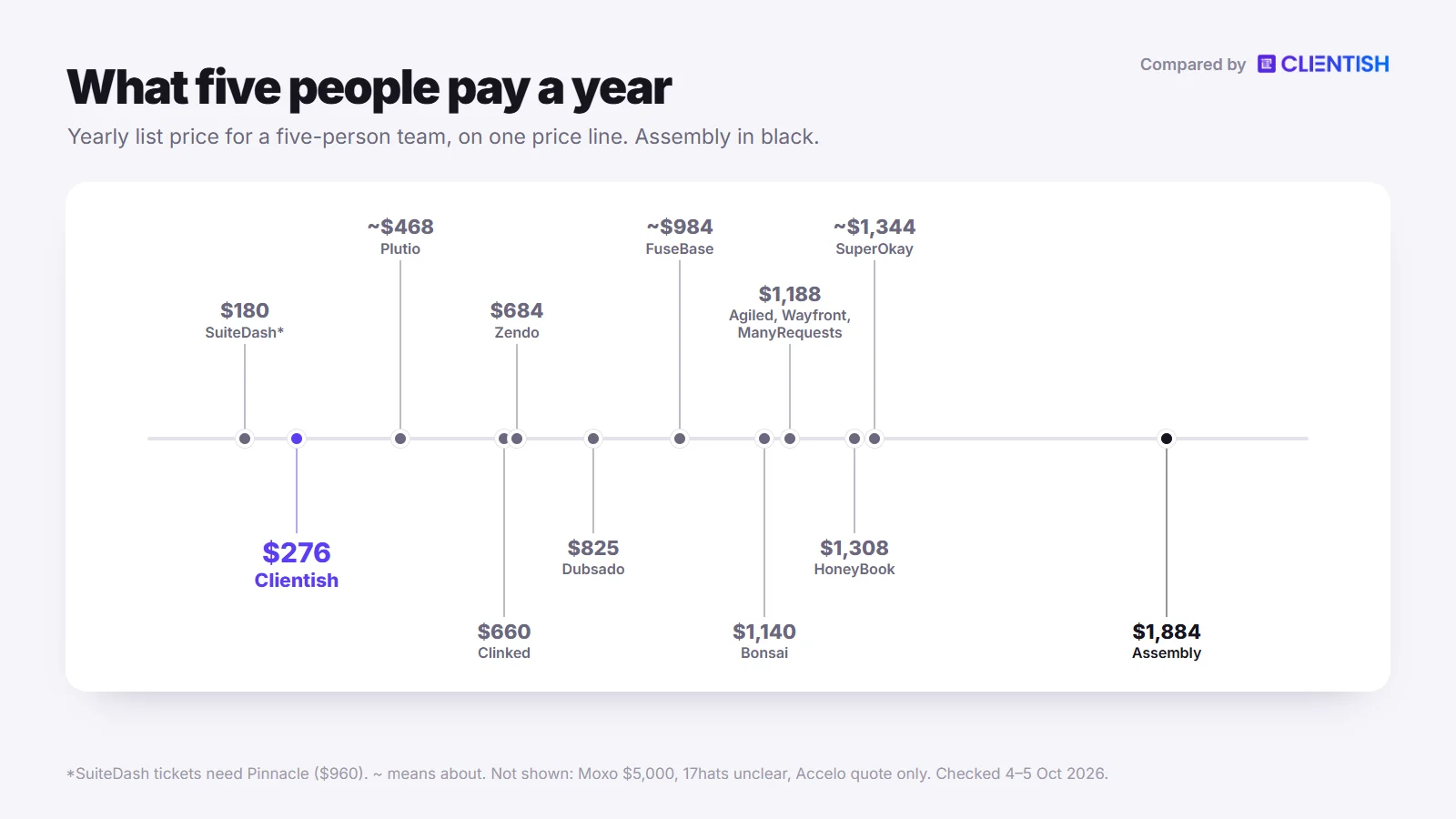
Assembly’s entry price looks close to everyone else’s, but most agencies pay for people, and Assembly prices each login above the plan’s allowance. The table prices twelve months on the lowest-cost plan giving every team member access to the client portal, using list prices checked on the 4th and 5th of October 2026 and leaving out payment fees.
| Tool | 5 people, per year | 10 people, per year |
| Clientish | Starter: $276 | Growth: $468 |
| Assembly | Professional + 2 users: $1,884 | Professional + 7 users: $3,624 |
| SuiteDash | Start: $180 (Pinnacle with tickets: $960) | Start: $180 (Pinnacle with tickets: $960) |
| Moxo | Team: $5,000 | Team: $5,000 |
| Clinked | Start Up for 5 users: $660 | Start Up for 10 users: $1,320 |
| FuseBase | Essentials: about $984 | Advanced: about $3,192 |
| Plutio | Pro: about $468 | Pro: about $468 |
| Agiled | Business: $1,188 | Business + 3 seats: $1,908 |
| Wayfront | Base: $1,188 | Base + 5 seats: $2,268 |
| ManyRequests | Core + 4 seats: $1,188 | Core + 9 seats: $2,088 |
| Zendo | Core + 4 users: $684 | Core + 9 users: $1,164 |
| HoneyBook | Premium: $1,308 | Premium: $1,308 |
| Dubsado | Premier with 4–10 user tier: $825 | Premier with 4–10 user tier: $825 |
| Bonsai | Essentials for 5 users: $1,140 | Essentials for 10 users: $2,280 |
| 17hats | $600 a year plus $5 a month per extra user; how many users are included, and which option holds the portal, is unclear on 17hats’ own pages | |
| SuperOkay | Business: about $1,344 | Business: about $1,344 |
| Accelo | Quote only | Quote only |
How we reached the Assembly numbers: annual Professional is $99 a month for three users, two more at $29 each make $157, and seven more make $302, before Assembly’s percentage on each payment. On HoneyBook, Essentials stops at the owner and two colleagues, which pushes a team of five to Premium. Dubsado’s three free users cover four people, hence the $25-a-month user tier. Extra seats use $18 for Wayfront, $15 for ManyRequests and $8 for Zendo; Clinked uses its $11 monthly per-user rate because its yearly Start Up figure is not readable; FuseBase and SuperOkay use their lower listed price.
The 16 Best Assembly Alternatives for Agencies
Numbers 2 to 5 are the portal-first products people put next to Assembly most often. Plutio and Agiled follow as all-round business suites, then Wayfront, ManyRequests and Zendo for productized selling, then four booking and contract tools built around solo owners, and finally a file hub and a PSA system. Every entry opens by setting the tool against Assembly.
1. Clientish: Built for Agencies That Sell Repeat Services
Where Assembly offers one message thread and a short Store, Clientish gives each purchase its own order and each question its own ticket. Its target is agencies doing design, marketing, SEO, content or web work whose clients come back to reorder, pay inside the portal and ask for help once work is delivered.
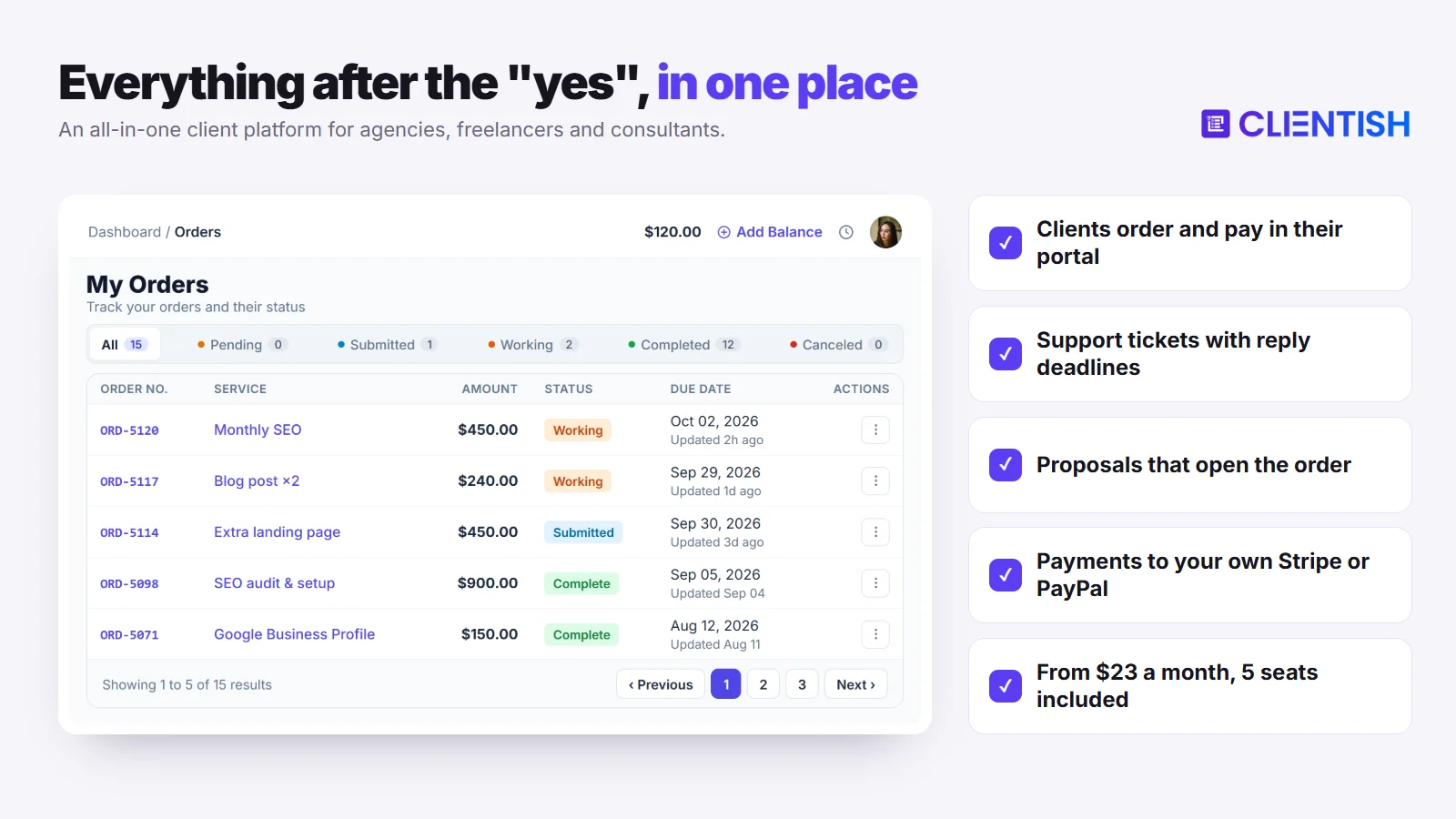
Compared with Assembly: you own the gateway and no percentage is taken, five staff cost $276 a year against Assembly’s $1,884, clients shop a full catalogue rather than a four-plan store, and every support question becomes a separate ticket instead of another line in one long chat.
Key features (where it goes further than Assembly):
- Staff included from the first plan: Starter, Growth, Pro and Enterprise come with 5, 15, 30 and 50 staff seats in turn, extra seats can be bought, and clients never take up a seat. Assembly’s Starter has room for one person.
- One login for the client’s whole relationship: clients sign in to order, pay invoices, review deliveries, manage subscriptions and open tickets.
- A catalogue with cart and coupons: the invoice is raised at checkout, the order opens once payment clears, and the client then completes the intake form for that service.
- An order record for each sale: brief, deliveries and a revision limit set per service, with tasks your team adds to the order. If the client does not review a delivery, it is approved automatically once seven days pass, and that delay is adjustable.
- Tickets on every plan: priority decides each ticket’s first-reply deadline, staff draw on canned answers, tags and private notes, while each closed ticket can be scored by the client.
- Gateways you own: online payments through Stripe, PayPal, Paddle or SSLCommerz, and offline ones recorded by your team for bank transfer, Wise, bKash, Nagad or Rocket. No Clientish percentage is added, a client may settle invoices from prepaid credit, and your gateway, not a list of four payout countries, decides where you can be paid.
- Proposals that open the account: pick from eleven designs; the client signs by typing a name, their IP is stored, and an emailed PDF of the signed proposal follows. Once the client signs, Clientish opens their account, issues a single invoice whose deposit (half by default) falls due first, and starts the order.
- Client-approved hours: from Growth up, time logged by remote members is tied to one client, who must approve it before it can be billed.
- QuickBooks and Xero: these two link directly, and an API plus webhooks are available, with Make and Zapier hooking in through the webhooks.
- Your branding in the portal and in client email: Starter already covers your logo, colours and favicon plus client email sent through your own SMTP server, while Pro and Enterprise also remove the “Powered by Clientish” credit.
- Leads and live chat from Growth, and every account can add 2FA, by code sent to email or by authenticator app.
Limits for agencies: Where Assembly charges a stored card at renewal, Clientish reopens that subscription’s invoice and waits for the client to settle it. Clientish lacks a booking calendar and a phone app, its interface is English only, and since custom domains are not offered, portals sit on a clientish.io subdomain. There is no SOC 2 report, ticket attachments come from staff only, and every plan under Enterprise limits how many new clients can join per month.
| Pros | Cons |
| Payments to your own gateway, no added percentage | Renewals wait for the client to pay |
| Five staff on the $29 plan | clientish.io subdomain, no own domain |
| Catalogue, cart, coupons and orders with revision caps | No SOC 2 report |
| Ticket desk with reply deadlines on every plan | English only, no phone app or booking calendar |
Price: billed monthly, the tiers run $29 (Starter), $49 (Growth), $99 (Pro) and $149 (Enterprise); an annual commitment brings them to $23, $39, $79 and $119, which is $276, $468, $948 or $1,428 per year. The portal, invoicing, proposals and the ticket desk are on all four tiers, whereas lead tracking, client chat and remote contractors need Growth or higher. Test Clientish for 14 days at no cost; it asks for no card.
2. SuiteDash: One Price for Every Staff Login
On seats, SuiteDash takes the reverse approach to Assembly: one account price covers you no matter how many staff and clients join. The suite is wide and needs configuring (CRM, projects, invoices, portals, email campaigns, courses, AI agents), and it puts a custom domain on its $19 tier.
Compared with Assembly: payments run through a Stripe, Braintree, PayPal or Authorize.Net account you link, with no SuiteDash cut, and no login is billed per head; Assembly answers with a SOC 2 Type II report and a Xero sync that is already live.
Key features: Per-client dashboards, magic links, estimates, invoices, stored-card subscriptions, timers that become billable hours, and checkout forms where a client totals up items, add-ons or bundles. Start already includes your own root URL, a branded login and SMTP sending, community translation sets exist, and QuickBooks Online syncs one way.
Limits for agencies: A ticket desk, the complete automation set and onboarding FLOWs all require the $99 Pinnacle tier. Reviewers describe setup as a significant time investment, and SuiteDash sells $50 guided Zoom sessions and a $299 partner kickstart. Recurring payments cannot use PayPal, Xero remains a roadmap item, and we found no first-reply timer and no client ratings on its tickets.
| Pros | Cons |
| Unlimited staff and clients at one price | Tickets and automations need Pinnacle |
| Own domain and SMTP from the $19 plan | Paid setup sessions sold |
| Four gateways, no SuiteDash cut | Xero not live yet |
Price: $19 monthly for Start ($180 if paid annually), $49 for Thrive ($480) and $99 for Pinnacle ($960). Trial accounts get two weeks of Pinnacle with no card.
3. Moxo: Guided Flows for Multi-Step Client Work
Moxo is an operations platform for people and AI agents working through defined processes. Where Assembly hands each client a portal of apps, Moxo builds each engagement as a flow of steps with owners and due dates.
Compared with Assembly: every plan has unlimited seats, though the cheapest one is $5,000 a year against Assembly’s free plan, and we could not find an invoicing or subscription module of the kind Assembly’s billing app provides; payments and invoices appear only as steps inside flows.
Key features: Steps for approvals, questionnaires, uploads, signatures, payments and bookings, assigned by role with reminders; AI helpers that extract, summarise and translate; and participants who just open a link, no password. Branching, loops, the audit log, SAML SSO, the API and own-domain portals belong to Scale. Moxo’s security page lists a SOC 2 Type II audit alongside a SOC 3 report.
Limits for agencies: The Team allowance is 100 flows and $100 of AI usage per year, the two larger plans are priced by quote, and trials are set up by Moxo’s staff without a stated length. Its documentation shows no priced catalogue, no subscription billing and no client ticket queue, and an agency guide from Moxo itself cautions that very simple engagements may carry too much overhead.
| Pros | Cons |
| Unlimited seats | $5,000 a year to start |
| SOC 2 Type II, audit log on Scale | No invoicing or subscription module found |
| No client passwords to manage | Branching and own domain need a quote |
Price: $5,000 per year on Team; both higher tiers need a quote, and a trial must be requested.
4. Clinked: A Secure File Portal Without Billing
Clinked is a white-label portal covering files, tasks and chat, aimed at firms where document security matters most. Next to Assembly, it centres on file versioning, sign-off and a list of compliance certifications, and drops billing completely.
Compared with Assembly: both offer your own portal domain from a middle plan, but Clinked has no invoices, subscriptions or store, so payments would live in a separate tool.
Key features: Client logins with 2FA, uploads up to 5 GB, sign-off and markup on files, file requests to outsiders, version history, a browser document editor, chat, tasks, a group calendar and phone apps on every tier. Standard brings your own URL and an audit trail; Premium adds branded notification emails and enforced 2FA. For compliance it lists GDPR, ISO 27001, Cyber Essentials and G-Cloud.
Limits for agencies: Clinked’s pricing and feature pages mention nothing for invoices, payment collection, selling services or support tickets. Per-user pricing stops at 25 people, and the next step up is a fixed $239 a month. Single sign-on waits until Enterprise, and QuickBooks is listed on one Clinked page yet missing from its integrations page.
| Pros | Cons |
| File approvals, versions and 5 GB uploads | No billing of any kind |
| Mobile apps on every plan | Large jump from Start Up to Standard |
| ISO 27001 and other certifications | SSO only on Enterprise |
Price: $11 a month for each Start Up user, then $239 a month for Standard and $599 for Premium ($479 on an annual contract); Enterprise is quoted. Clinked’s blog describes a 14-day trial.
5. FuseBase: Portals, Documents and AI Agents
Formerly known as Nimbus, FuseBase attaches client portals to a shared team area where pages, to-dos and AI agents live. Like Assembly it leans into AI, but it centres on shared pages and leaves money out.
Compared with Assembly: FuseBase includes e-signatures, forms and AI agents too, but clients cannot pay invoices or buy from a store, so it covers Assembly’s portal half and not its billing half.
Key features: Portal access through secure magic links; inside, clients work through mutual action plans and task lists, exchange files, answer forms and surveys, chat, review meeting notes and recordings, and e-sign documents without a third-party tool. Plans differ in AI requests and automation runs, and Zapier is supported. Hiding FuseBase’s name and running the portal on your own domain and email domain takes Advanced or Unlimited.
Limits for agencies: Nothing on FuseBase’s pages covers invoices, payment collection, a service catalogue or tickets. The Essentials tier stops at five members and 100 clients, extra members are priced only on request, and an additional portal adds $20 a month. Its mobile guide describes the notes app, with no mention of client portals.
| Pros | Cons |
| Workspace pages next to portals | No invoicing or payments |
| E-signatures and forms built in | White label from Advanced only |
| Free plan plus a 14-day trial | Extra members priced on request |
Price: a free tier, then Solo at $32 or $39 monthly, Essentials at $82 or $99, Advanced at $266 or $399, and Unlimited on request. The lower number looks like the annual rate, though FuseBase does not label it. Paid tiers come with two weeks free.
6. Plutio: A Freelancer Suite With Your Own Processor
Plutio’s tiers all share one feature set, from projects, proposals and contracts to invoices, booking pages and a client portal, and vary only by people, clients and usage. Leaving Assembly for it means choosing your own processor and paying no platform percentage.
Compared with Assembly: invoices are paid into your Stripe, PayPal or Square account without a platform percentage, and the custom domain and own-mail sending that Assembly keeps for Professional cost $9 a month here.
Key features: Clients log in to the projects they are added to, where they handle tasks, files, chat and linked invoices. Via Stripe or Square, renewals can bill a saved card, proposal signatures capture IP and time, boards switch between Kanban, list, calendar and Gantt, apps run on phone and desktop, the interface comes in 34 languages, and every tier includes the API and webhooks.
Limits for agencies: Core suits a lone freelancer with up to nine active clients, while Pro, with 30 contributors, is the tier Plutio aims at agencies of two to ten. Support requests have to be handled on task boards dressed up as queues, and Xero or QuickBooks only receive data through a third-party automation service.
| Pros | Cons |
| Your processor, no Plutio cut | Core limited to one user and nine clients |
| $9 add-on for domain and SMTP | No ticket module |
| Phone and desktop apps | No native QuickBooks or Xero |
Price: Core is $19 monthly, roughly $15 on annual billing; Pro is $49 or roughly $39; Max is $199 or roughly $159. One week free, no card asked.
7. Agiled: CRM and HR Next to Client Work
Rebuilt on fresh software during 2026, Agiled bundles a client portal with staff records, deal pipelines and expense tracking under one login.
Compared with Assembly: Pro adds client tickets, payments go to your own Stripe Connect, PayPal or Mollie account, and contracts can take several signers, something Assembly’s contracts app cannot do.
Key features: A portal with invoice payment, project views, tickets, chat and booking; recurring invoices or gateway subscriptions; ordered or parallel multi-party signing; HR records from Pro; QuickBooks and Xero from Business; mobile and desktop apps.
Limits for agencies: Starter holds a single seat and Scale fifteen, with three on Pro and seven on Business; every extra seat costs $20 a month. Branding, a custom domain and your SMTP come on Business or through a $19 add-on, subscriptions and selling tools also begin on Business, and the docs say public catalogue checkout is not available yet. Accounts imported from the classic Agiled leave proposals, forms and workflows behind.
| Pros | Cons |
| Tickets from Pro | $20 a month per extra seat |
| HR, CRM and expenses together | Branding and accounting sync on Business |
| Multi-party contract signing | Public catalogue checkout not live |
Price: monthly rates of $29, $69, $129 and $249 for Starter, Pro, Business and Scale drop to $24, $59, $99 and $199 on annual billing. A two-week trial opens Business features without a card.
8. Wayfront: A Cart for Productized Packages
Until February 2026 Wayfront was called Service Provider Pro. It serves agencies selling set packages and retainers through a branded portal, and its shop goes beyond Assembly’s Store by letting clients combine variants, add-ons and a coupon in one cart.
Compared with Assembly: Wayfront has a cart, coupons, orders and a helpdesk, none of which Assembly offers natively, and it connects your own Stripe or PayPal; Assembly keeps a contracts app, which we did not find at Wayfront.
Key features: Stripe or PayPal checkout followed by a brief form, orders with statuses and task templates, and a helpdesk where staff tag tickets and keep private notes. It supports request limits, credits and balances, renews Stripe retainers by itself with dunning emails, and serves the portal from your own domain in seven languages.
Limits for agencies: The cheapest tier already costs $99 a month on an annual plan and covers five people; each added person is $20 monthly or $18 annually. Letting a client’s colleagues in, editing portal templates and buying API access all need Pro. Its help index has no articles on proposals or contracts.
| Pros | Cons |
| Cart, coupons and orders | $99 a month entry on yearly billing |
| Helpdesk with tags and notes | No proposals or contracts found |
| Own domain, seven portal languages | API is an add-on |
Price: Base costs $129 a month, or $99 on yearly terms; Pro is $299, or $249; Plus gets a price once you have spoken to sales. You can test it for two weeks without a card.
9. ManyRequests: Request Queues for Productized Agencies
ManyRequests targets productized agencies, with dedicated pages for design and video studios. Clients file requests, designers clear the queue, and feedback is pinned onto the proof, a loop Assembly’s single chat and Tasks app do not offer.
Compared with Assembly: payments go through your own Stripe account with no platform percentage, and every plan includes a custom domain, but each person after the first costs extra, much as Assembly’s users do.
Key features: Ordering runs through the catalogue and bespoke order forms, requests come in by conditional form or email, and clients mark up video, PDFs and images; there is team chat, and each completed request gets a score. Stripe renews retainers automatically, offline payments can be marked received, and Pro hides the “Powered by” line.
Limits for agencies: The price covers a single seat, and colleagues are added at $20 or $30 a month depending on the plan ($15 or $25 on annual billing). Support questions go through the same request queue without response-time targets, and API access with webhooks waits for Pro.
| Pros | Cons |
| Proofing on images, PDFs and video | Only one seat included |
| Own Stripe, no platform percentage | No ticket reply targets found |
| Custom domain on every plan | API and webhooks on Pro |
Price: Core costs $59 monthly, cut to $39 on annual terms; Pro costs $99, cut to $79. Two weeks free with no card.
10. Zendo: A Free Storefront to Start With
From $0, Zendo lets you sell productized, custom and subscription services via a public storefront with a multi-step checkout. Unlike Assembly’s free plan, its free tier takes payments with no added fee.
Compared with Assembly: its storefront takes Stripe or bank transfer with no Zendo fee on any plan, while Assembly charges up to 2% on each Store sale; both start with one internal user.
Key features: Visitors without an account can browse, pick add-ons and quantities, and pay. Subscriptions allow trials and pauses, quotes and invoices are built in, chat is live, request types model support or onboarding, clients can use 2FA, and the portal speaks twelve languages.
Limits for agencies: Only the owner is included, so colleagues cost extra each month: Core charges $8 per head, Pro $12.50 and Agency $17. Your own domain arrives with Pro, the Zendo badge goes only on Agency, no accounting connection appears on the pricing page, and its public API is still promised for later.
| Pros | Cons |
| Free tier for three clients | One internal user per plan |
| No Zendo transaction fee | Badge removal on Agency only |
| Twelve portal languages | No accounting integrations listed |
Price: Essential costs nothing; Core is $29 monthly or $25 annually, Pro $59 or $49, Agency $99 or $79. New accounts get fourteen days of Pro without a card.
11. HoneyBook: Another Processor-Owned Option
In HoneyBook, one document holds the proposal, contract and invoice, and clients book, sign and pay from it. It shares Assembly’s payment model and the same four-country footprint.
Compared with Assembly: it also acts as your processor, with its own card fees (2.9% plus 25 cents on a typical card payment), and it takes only businesses based in one of four countries (the US, Canada, Australia or the UK), so switching to it keeps each of Assembly’s payment constraints.
Key features: Proposals, contracts with e-signing and invoices from Starter, with autopay, payment plans and late fees; a one-session scheduler from Starter, then unlimited sessions, automations and QuickBooks Online on Essentials; expense tracking and standard reports on Essentials, with advanced reports on Premium. Your own subdomain can front the portal on every plan, and Essentials hides the HoneyBook label.
Limits for agencies: Nobody but the owner fits on Starter, Essentials adds room for two colleagues, and a fourth person forces the $109-a-month annual Premium plan. There is no ticket desk for client questions, Xero is absent, and HoneyBook switched its time tracker off after September 7, 2026.
| Pros | Cons |
| Proposal, contract and invoice in one file | HoneyBook is the processor |
| No seat cap on Premium | Businesses in four countries only |
| 30-day trial | No tickets, no Xero |
Price: $36, $59 or $129 a month for Starter, Essentials or Premium, falling to $29, $49 or $109 on annual billing. Thirty days free, no card.
12. Dubsado: Automated Booking Flows for Solo Studios
Dubsado gives solo creatives a booking workflow, linking questionnaires, proposals, contracts, invoicing and appointment scheduling through an automation builder called Flows. Its portal gathers each client’s forms, proposals, contracts, invoices and appointments.
Compared with Assembly: you pick Dubsado Payments, Square or PayPal and Dubsado adds no fee of its own, and three extra users are free where Assembly’s Starter has none to add.
Key features: Node-based automation in Flows, Kanban and table views, one timer across projects, a portal gathering invoices, forms, proposals, contracts and appointments, autopay on recurring invoices, and a custom URL that removes Dubsado’s name. Booking, Flows, QuickBooks and Xero require Premier.
Limits for agencies: Going beyond three extra users means the $25-a-month tier for 4 to 10 users. Searching its help centre turned up no ticket desk and no way to track revisions, and anyone who signed up from December 1, 2025 pays higher prices.
| Pros | Cons |
| Three free extra users | Key features locked to Premier |
| Choice of three processors, no Dubsado fee | No tickets found |
| QuickBooks and Xero on Premier | Prices rose in December 2025 |
Price: Starter runs $35 monthly or $335 annually and Premier $55 or $525, with a 21-day trial that unlocks Premier.
13. Bonsai: Per-User Pricing With Time Tracking
Freelancers, consultancies and small agencies use Bonsai for contracts, invoicing, projects and timers; Zoom acquired it in December 2025 but kept the brand running. Like Assembly, it can take a platform fee on payments.
Compared with Assembly: you can connect Stripe or PayPal, yet in the four countries where Bonsai Payments operates, using another processor adds a 1% platform fee, and a 2.5% FX fee applies to international payments.
Key features: Proposals, contracts, invoicing, forms, a scheduler and the portal begin on Essentials, alongside Gantt charts and timers, with workload views added on Premium, and subscription invoices charge a saved card on their own. Premium adds client messaging, automations, a Bonsai-free look and integrations including QuickBooks and Zapier, with Xero also listed.
Limits for agencies: Adding a colleague adds another full plan fee, and Elite has a three-user minimum. Clients reach the portal by emailed link instead of an account, the address stays on Bonsai’s domain while custom domains are described as coming in 2026, and the help centre shows no ticket queue.
| Pros | Cons |
| Gantt, workload and timers | Every user is a paid seat |
| Stripe in most Stripe countries | 1% fee in some processor setups |
| QuickBooks and Zapier on Premium | No client accounts or own domain |
Price: per person, Basic runs $15 monthly or $9 yearly; Essentials, Premium and Elite seats are $25, $39 and $59, or $19, $29 and $49 on yearly terms. Seven-day trial.
14. 17hats: Bookkeeping Beside Quotes and Contracts
17hats ties quotes, contracts, questionnaires and invoices to an online booking page and a small bookkeeping module, sold as one plan paid per month, year or two years.
Compared with Assembly: you choose Stripe or Square rather than a platform merchant account, and 17hats has bookkeeping, with a bank feed as a $5 monthly add-on, but its QuickBooks sync runs one way and Xero is not supported, while Assembly offers one-way sync to both.
Key features: A client portal where clients accept quotes, sign contracts, complete questionnaires, pay invoices and view event details; contracts with several signers; recurring invoices and autopay through Stripe or Square; online scheduling; profit and loss reports; free iOS and Android apps.
Limits for agencies: The portal gives clients no way to upload files. Its pricing and multi-user pages differ on how many users are included, each extra costs $5 a month, and links use a 17hats subdomain with no custom domain documented.
| Pros | Cons |
| Bookkeeping, with a $5 bank-feed add-on | User count unclear on its own pages |
| Stripe or Square, your account | No file uploads for clients |
| Mobile apps, including on the free CRM | One-way QuickBooks, no Xero |
Price: the one plan costs $60 monthly, $600 annually or $800 for a two-year term, and a discount on the first year was showing on October 5, 2026. The free CRM tier caps you at four invoices per quarter, and the paid plan has a week-long trial.
15. SuperOkay: Branded Project Hubs With No Invoicing
SuperOkay builds a branded portal per project for files, interactive documents, tasks, approvals and embedded apps. Only Assembly’s delivery side is covered, and SuperOkay’s FAQ states plainly that invoicing is not offered.
Compared with Assembly: a portal can wear your client’s branding, project by project, yet money is handled only by a button that sends people to your own payment page; invoices, renewals and a store are all absent.
Key features: Login by magic link, password or either; documents that collect answers, uploads and ratings and end with an approval click; tasks on boards or lists; chat; embeds such as Figma, Miro, Airtable or Google Data Studio; and a Packaged Services page per offer, whose buy button opens your own checkout.
Limits for agencies: Colleagues can join only from Solo+, which holds three, and Business is the first tier with no cap. Solo+ is also the first tier for a custom domain and a portal with no SuperOkay branding. SuperOkay’s pages mention no invoicing, recurring payments, tickets, phone app or accounting link.
| Pros | Cons |
| Free plan for one project | No invoices or payments |
| Approvals inside documents | Staff only from Solo+ |
| Branding per client project | No tickets |
Price: a single project costs nothing; paid tiers show two monthly prices each: $9/$12 for Solo, $29/$38 for Solo+ and $112/$146 for Business. SuperOkay leaves the two figures unlabelled; the smaller probably reflects annual billing.
16. Accelo: PSA for Retainer-Heavy Firms
Accelo, now merged with Forecast, sells PSA (professional services automation) software that runs quotes, projects, retainers, tickets, time and billing; to buy it you sit through a demo and receive a tailored quote.
Compared with Assembly: Accelo has tickets, retainers and time tracking that Assembly lacks natively, and you pick Stripe, Authorize.net or PayPal for card payments, but there is no public price, no free plan and no self-serve trial.
Key features: Projects launched from approved quotes, retainer management with automatic period renewal, ticket and issue tracking, time tracking, invoices generated from project activity, a client portal for requests, sign-offs, tickets and invoices, QuickBooks and Xero integrations, and staff apps for iOS and Android.
Limits for agencies: Cost is set by quote according to headcount, Accelo itself puts typical onboarding at a few weeks, and clients have no catalogue or checkout to buy from.
| Pros | Cons |
| Retainers, tickets and time in one system | No published pricing |
| Invoices built from project activity | Setup measured in weeks |
| QuickBooks and Xero listed | No catalogue or checkout |
Price: custom quote based on team size; demo on request.
Cheapest Assembly Alternatives
Assembly’s free plan costs nothing for one person with up to five contacts, so the savings show up once you add staff, clients and payment volume. These are the lowest-cost choices by situation on yearly billing, before any processor fees.
| Situation | Lowest-cost option | Cost |
| One person trying a portal with payments | Zendo Essential | $0, three clients |
| One person with invoicing, their own processor and more than three clients | SuiteDash Start or Plutio Core | About $180 a year |
| Own portal domain on a small budget | SuiteDash Start | $180 a year |
| Five staff with tickets and own gateways | Clientish Starter | $276 a year |
| Ten staff with tickets and own gateways | Clientish Growth | $468 a year |
| Many staff, no ticket desk needed | SuiteDash Start | $180 a year |
Fees matter too: on $100,000 of invoices a year, Assembly Professional’s 0.4% billing-method fee adds about $400 beyond card costs, more on subscriptions or Store sales. Most tools that use your own processor say they add no fee of their own; Bonsai adds 1% in some setups plus 2.5% on international payments.
What Your Clients See in Each Tool
Clients have to accept whatever portal replaces Assembly, so it helps to know how each tool lets them in and what they can do there. The table compares sign-in, payment, buying and support from the client’s side.
| Tool | How clients get in | Pay invoices | Buy services | Raise tickets |
| Clientish | Own login, agency-branded portal | Yes, or from balance | Catalogue, cart, coupons | Yes, with reply deadlines |
| Assembly | Magic link, Google or password | Card, ACH, Apple Pay, Google Pay | Store: 4 plans, 12 packages | No; one message thread |
| SuiteDash | Login or magic link | Yes | Checkout forms | Pinnacle |
| Moxo | Magic link or branded portal sign-in | Payment steps | Flow catalogue (Scale) | No queue found |
| Clinked | Secure login with 2FA | No | No | No |
| FuseBase | Magic link | No | No | Not found |
| Plutio | Own login | Yes | Proposals | No module |
| Agiled | Client portal | Yes | Checkout link (Business) | Pro and up |
| Wayfront | Passwordless login | Yes | Cart | Yes |
| ManyRequests | Client portal | Yes | Catalogue | Through requests |
| Zendo | Password, Google or Facebook | Yes | Storefront | Request types |
| HoneyBook | Link, no client account needed | Yes | Smart files | No |
| Dubsado | Client portal | Yes | Proposals | Not found |
| Bonsai | Secure email link | Yes | Proposals | Not found |
| 17hats | Client portal | Yes | Quotes | Not found |
| SuperOkay | Magic link or password | Link to your gateway | Packaged service pages | No |
| Accelo | Email link | Yes | No | Yes |
Why Agencies Choose Clientish Over Assembly
Several tools above fix one of Assembly’s limits at a time. For an agency that wants its own payment accounts, five or more staff, repeat selling and a support queue in one product, this side-by-side sums up the move.
| Assembly | Clientish | |
| Who processes payments | Assembly, as merchant | Your Stripe, PayPal, Paddle or SSLCommerz, plus manual methods |
| Platform fee per payment | 0.3% to 2.0% by billing method | None from Clientish |
| Where payouts can go | US, UK, Canada, Australia banks | Decided by your gateway |
| Five staff, per year | $1,884 | $276 |
| Ten staff, per year | $3,624 | $468 |
| Selling | Store, 4 plans and 12 packages | Catalogue with cart and coupons |
| After the sale | Tasks app; no order record | Order with brief, deliveries and revision limit |
| Client support | One message thread per client | Tickets with reply deadlines and ratings |
| Renewals | Card or ACH charged automatically | Invoice reopens for the client to pay |
| Own portal domain | From Professional | No; clientish.io subdomain |
| SOC 2 | Type II | No |
Assembly holds the edge on automatic renewals, its own-domain option, a SOC 2 Type II report, a contracts app and task templates with dynamic dates. Clientish leads where an agency’s costs and workload grow: staff, payment fees, payout reach, repeat selling and after-delivery support. Start a free Clientish trial and run one paying client through it for a month.
Is Assembly Still Worth It in 2026?
Yes, for a particular kind of firm. Assembly makes sense for a team of one to three whose bank sits in a payout country Assembly supports, and that wants contracts, file sharing and an AI app builder in one portal, needs a SOC 2 Type II vendor, wants renewals charged automatically and can live with a platform fee on each payment.
It is a weaker match once you pass three staff, bill from another country, sell packages through repeat orders, or field questions that need a queue. Then the per-user charge, the billing-method fee and the missing ticket desk cost more each year than a tool built around orders and tickets.
Which Assembly Alternative Fits Your Agency?
The right replacement depends on which part of Assembly is causing the trouble and how your agency sells. Find the row that matches your situation, then read that tool’s entry above.
| If your agency… | Look at | Why |
| sells repeat services or retainers to many clients with 3 to 50 staff | Clientish | Seats included, catalogue, orders with revision caps, tickets, own gateways |
| wants unlimited staff and its own domain on a low budget | SuiteDash | One account price, custom URL on Start |
| runs fixed, multi-step client processes | Moxo | Flows, magic links, SOC 2 Type II |
| mainly exchanges sensitive files | Clinked | Versioning, approvals, ISO 27001 |
| delivers documents and knowledge as much as work | FuseBase | Workspace pages, portals, AI agents |
| is a freelancer or very small team wanting apps and many languages | Plutio | 34 languages, native apps, $9 white label |
| also needs HR and a sales pipeline | Agiled | HRM from Pro, tickets from Pro |
| sells productized packages with add-ons | Wayfront | Cart, coupons, helpdesk, own domain |
| runs design or video work as request-based subscriptions | ManyRequests | Request queue and proofing |
| wants to test a storefront for free | Zendo | Free tier, no transaction fee |
| is a solo creative taking bookings in the US, Canada, UK or Australia | HoneyBook | Proposal, contract and invoice in one file |
| wants automated booking flows with a few helpers | Dubsado | Flows, three free extra users |
| bills by time with detailed project views | Bonsai | Gantt, workload and timers |
| wants simple bookkeeping inside the client tool | 17hats | Bank feed, P&L, Stripe or Square |
| needs a branded project hub, not billing | SuperOkay | Interactive documents and approvals |
| is an established firm managing retainers, tickets and time | Accelo | PSA with tickets, time and invoicing |
Moving From Assembly Without Breaking Billing
Billing is the hard part of leaving Assembly, because saved cards sit inside its Stripe Connect platform and cannot move. The Exporter app covers message histories only (CSV or PDF), invoices export as CSV from the Invoices page, and Stripe Express gives a payout CSV. We found no documented client-list export, so rebuild it from your records or ask Assembly support.
- Save what you can first. Export message histories and the invoice CSV, download the payout report, and save the files each client needs from their channel before your plan renews.
- Bring clients into Clientish. Download the import template, paste in your client list, and upload the file (CSV, XLS or XLSX all work) from Clients → Import. Every imported client arrives inactive and is sent nothing, so you decide when each one hears about the new portal.
- Turn Store plans into services. Give each package a price, an intake form and a revision limit, and recreate any discounts as coupons.
- Restart retainers at their next due date. Clients will need to pay through your new gateway, because Assembly’s stored cards cannot be moved. Cancel the matching Assembly subscription only once the Clientish one is live, so no client pays twice.
- Switch clients on one at a time. When a client’s open work has moved, activate their account and email them where to sign in from now on.
Frequently Asked Questions
These are the questions agencies ask most when comparing Assembly with other client portals, answered with prices and plan details published on October 4 and 5, 2026.
Which tool should an agency choose instead of Assembly?
Clientish, if you have staff and repeat clients: 5 to 50 team members, catalogue orders with revision limits, tickets on every plan and your own gateway. SuiteDash suits a team that mainly wants a custom domain and unlimited users.
Is Assembly the same as Copilot?
Yes. The company launched as Portal in 2020, renamed itself Copilot in 2021 and switched to Assembly on September 30, 2025, saying the old name was hard to find in search. Client portals still hosted on copilot.app kept their address, and the product is unrelated to Microsoft’s or GitHub’s Copilot.
What’s the main reason agencies leave Assembly?
Money handling: Assembly is the merchant, adds a fee you cannot pass on, and pays out to banks in four countries only. Per-user pricing and the missing ticket desk come next.
What is cheaper than Assembly?
For one person, Assembly’s free plan costs nothing, though it stops at five contacts. For a team, Clientish Starter at $23 a month yearly covers five staff, while Assembly needs Professional plus two users at $157 a month. SuiteDash Start includes unlimited staff for $180 a year without a ticket desk.
Can I use my own Stripe or PayPal account with Assembly?
No. Assembly requires its own Stripe Connect Express setup and has not supported standard Stripe accounts since November 2023. Clientish, SuiteDash, Plutio, Agiled, Wayfront, ManyRequests and Zendo all let you connect your own processor.
Is SuiteDash better than Assembly?
On staff cost and branding, SuiteDash comes out ahead: unlimited users, your own domain on the $19 plan and no cut of payments. Assembly leads on SOC 2 Type II and a live Xero sync, and SuiteDash sells paid onboarding sessions.
Can I use Assembly outside the US?
The limit we found is on payouts: money can only go to a bank in America, Britain, Canada or Australia, and invoices use that account’s currency. With Clientish, where you can sell depends on the gateway you connect.
Can I migrate client data out of Assembly without losing history?
Partly. Messages export as CSV or PDF and invoices as CSV, but a contact export is not documented and stored cards cannot move, so billing restarts in the new tool.
Which Assembly alternative is best for productized agencies?
Look at Clientish, Wayfront, ManyRequests and Zendo, which each let clients buy packages at checkout and pay into an account you own. Of the four, Clientish caps revisions per service and includes tickets, Wayfront renews retainers by charging cards, and Zendo has a $0 tier.
Which tool is best if I want full white-label on a lower budget?
SuiteDash includes a root domain of your own, a branded login page and SMTP sending for $180 a year, and Plutio offers similar control through its $9 monthly add-on. On Assembly the same trio needs Professional at $99 a month annually. Clientish applies your logo, colours and mail server from Starter and drops its own credit on Pro, though portals stay on a clientish.io subdomain.
Does Clientish let clients place their own orders and pay invoices?
Yes. Clients choose services from the catalogue, apply coupons, pay at checkout and then fill in the intake form, and they can pay other invoices, renewals included, from the portal or from their balance.
Which of these tools offer a free plan?
Assembly itself has one (five contacts, one user), and so do Zendo (three clients), SuperOkay (one project), FuseBase (one portal) and 17hats (a CRM with four invoices a quarter). Clientish has no free plan; its trial lasts 14 days and needs no card.
Is Clientish suitable if I bill hourly as well as project-based?
Partly. On Growth and above, contractors set up as remote members keep timesheets per client, and those hours are billed only after the client agrees to them. Clientish is not a PSA, so a firm that wants retainers, tickets and time for every employee in one PSA is better served by Accelo.
Can I run multiple currencies across different clients?
Assembly ties payments to the payout bank’s currency and charges 1% for conversion. Agiled lists multi-currency invoicing and Plutio over 120 currencies. In Clientish, payments run through the gateway you connect, so check its currency support first.
What if my clients are in regulated industries and need strict data security?
Assembly holds a SOC 2 Type II report and offers HIPAA terms on Advanced. Moxo cites the same audit type plus a SOC 3 report, while Clinked points to ISO 27001, G-Cloud and Cyber Essentials. Clientish has no SOC 2 report; it supports two-factor sign-in with authenticator apps or codes sent by email and publishes uptime targets of 99.5%, 99.9% and 99.95% by plan.
How long does switching from Assembly take?
Billing sets the pace. Plan for one full billing cycle, moving each retainer at its next due date, and keep Assembly open until the last subscription is recreated.
Is Assembly still worth it in 2026?
For a small firm in its four payout countries that values contracts, SOC 2 and automatic renewals, yes. Growing agencies with clients abroad or steady support requests will usually pay less elsewhere.
Final Thoughts
Assembly suits small professional firms in its four payout countries, and its 2026 price change made branding cheaper than older articles suggest. For agencies the pressure points are structural: Assembly holds the money, takes a percentage, limits where payouts go and prices each login.
Clientish was built for the agency that has moved past that stage, with staff included from the first plan, a catalogue that turns into orders, revision limits, a ticket desk and payments that land in your own accounts. Start your 14-day Clientish trial with one live client, compare the plans on the pricing page, and read our Assembly vs Clientish comparison, which puts the two side by side in more detail.
Sources
Clientish publishes this guide. Every Assembly and alternative-tool fact was checked on October 4 and 5, 2026, against each company’s own pricing and help pages; review themes come from Capterra.
Assembly, SuiteDash, Moxo, Clinked, FuseBase, Plutio, Agiled, Wayfront, ManyRequests, Zendo, HoneyBook, Dubsado, Bonsai, 17hats, SuperOkay and Accelo are trademarks of their owners. Clientish is not affiliated with any of them. See something out of date? Tell us and we’ll correct it.

