

Picking between HoneyBook and Bonsai usually turns on one question: is your bottleneck getting inquiries booked and paid, or keeping track of hours, expenses, contracts and project plans once the work starts?
Quick answer: Bonsai suits solo consultants and small teams who bill by the hour and want timesheets, expenses, project plans and a large contract library in one app, or who are based outside the four countries HoneyBook serves. HoneyBook suits service businesses in America, Canada, Britain or Australia that want lead pipelines, event-triggered automations and a client portal on every plan, with up to three people for one account price. Neither wins across the board.
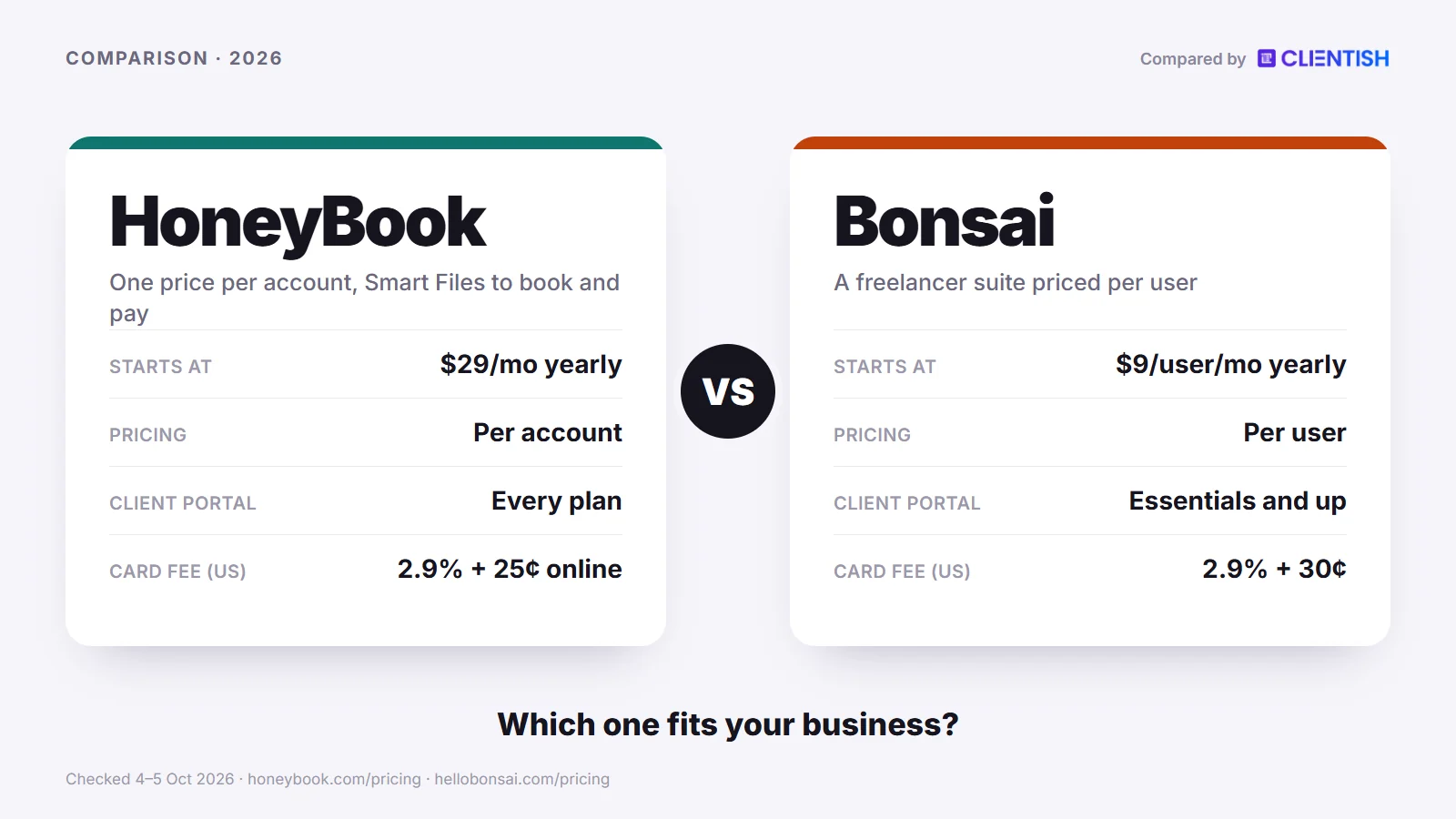
Below, HoneyBook and Bonsai go head to head on cost at different headcounts, contracts, fees, bookkeeping, automation, pipelines, portals, hours and projects, phone apps and integrations, with figures from the vendors’ own sites.
Key Takeaways
The two tools each cover proposal, contract and invoice, but they were designed around different priorities, and the gap shows once you look past the first sale. These points decide most purchases.
- HoneyBook leads on the sales side. Its customizable pipeline, pipeline automations and client portal come with every plan, full event-triggered automations start on Essentials, and its iOS and Android apps let you send files, take Tap to Pay card payments and manage the pipeline from a phone.
- Bonsai leads on the operations and money side. Time tracking with timesheets on every plan, income and expense tracking from Essentials, task dependencies, a Gantt view on Premium and a Bonsai Tax add-on for quarterly estimates go further than HoneyBook’s equivalents. HoneyBook’s lighter tracker went offline in September 2026 and came back roughly a week later, according to its community forum.
- The cheaper tool depends on headcount. Bonsai Essentials is $25 a user a month ($19 yearly), so three people pay $75. On HoneyBook, Essentials costs $59 a month, or $49 on a yearly plan, and covers its owner with as many as two colleagues. From six people, HoneyBook Premium ($129, or $109 yearly, unlimited team members) costs less.
- HoneyBook only takes on businesses in four countries. Britain and Australia joined America and Canada on 21 May 2026, with GBP and AUD billing. Bonsai reaches further, plugging into Stripe wherever Stripe operates apart from India, or into PayPal.
- Pick Bonsai if you are a solo professional or small team that needs contracts, hours, expenses and project plans under one login, and a sales pipeline matters less to you.
- Pick HoneyBook if inquiries arrive every week, your company is in one of HoneyBook’s four markets, and you want automation, a pipeline and a portal to carry each lead to a paid deposit.
HoneyBook vs Bonsai at a Glance
The table lines up the dimensions a service-business owner usually weighs when choosing between these two tools. Prices and plan limits come from each vendor’s pricing page, checked in October 2026, so confirm them on the vendor sites before you buy.
| Dimension | HoneyBook | Bonsai |
| Pricing model | Per account: $36 / $59 / $129 a month, or $29 / $49 / $109 billed yearly | Per user: $15 / $25 / $39 / $59 a month, or $9 / $19 / $29 / $49 billed yearly |
| Entry plan with invoicing | Starter ($29 a month, yearly) | Essentials ($19 a user a month, yearly); Basic has no invoices, proposals or contracts |
| Client portal | Every plan, with a client login | Essentials and up; clients open it from a secure email link |
| Contracts and e-sign | Lawyer-approved templates, editable or built from scratch | More than 100 templates across many industries, with co-signers |
| Time tracking | Basic Time Tracker; switched off in Sep 2026 and reported restored a week later | On every plan; time entries attach to invoices from Essentials |
| Tax and bookkeeping | Expenses from Essentials; a tax hub for filing reports and forms | Income and expense tracking from Essentials; quarterly tax estimates through the paid Bonsai Tax add-on (US) |
| Automation | Pipeline automations on every plan; full automations with conditions on Essentials and up | Six triggers and four actions; Zapier for anything wider |
| CRM and pipeline | Customizable pipeline, custom fields and tags on every plan | CRM on every plan; deals pipeline and custom fields on Premium |
| Branding | Your company subdomain on every plan; “Powered by HoneyBook” removed on Essentials | Bonsai branding removed on Premium; portal address stays on Bonsai’s domain |
| Where you can be paid | Businesses in the US, Canada, UK and Australia; HoneyBook is the only processor | Bonsai Payments in those four markets; Stripe elsewhere (not India) and PayPal |
| Card fees (US) | From 2.7% + 10¢ (in-person Tap to Pay); 2.9% + 25¢ online | 2.9% + 30¢ through Bonsai Payments; ACH from 1% |
| Mobile apps | iOS and Android, including Tap to Pay | iOS and Android for time, invoices and expenses, plus a Mac time tracker |
| Team seats | Starter: none; Essentials: up to 2 team members; Premium: unlimited | Every team member is a paid seat; Elite needs at least 3 users |
| Support | Email and live chat 7 days a week; priority support on Premium | In-app messages and email; no phone line or published response times |
| Best for | Service businesses that book clients through a repeatable inquiry-to-payment flow | Freelancers and small teams who want hours, expenses, plans and contracts in one place |
The main lesson is that the vendors price on different assumptions: per person at Bonsai, per account with a people limit at HoneyBook. Which is cheaper changes more than once as a team grows, as the pricing section shows.
What Changed at HoneyBook and Bonsai in 2025–2026
Many reviews that still rank for this search were written before either company’s latest round of changes, so their prices, countries and owners are out of date. These are the moves that matter, dated from each vendor’s own posts, help pages and archived pricing.
HoneyBook
- Between December 2024 and March 2025, new prices: the Wayback Machine holds a December 2024 copy with annual-plan prices of $16, $32 and $66; by 21 March 2025 those had become $29, $49 and $109, where the page still sits.
- 26 February 2026, Kanban view: projects can now be laid out as a board, and a single step inside an automation can be skipped.
- March and April 2026, Tap to Pay: card-present payments arrived in the phone app through Tap to Pay, iPhone first and Android next, while Canadian accounts gained instant deposits.
- 21 May 2026, two new countries: businesses in Britain and Australia can now sign up, billed in GBP or AUD, alongside the US and Canada.
- August 2026, AI connector: a new HoneyBook MCP connector lets Claude and ChatGPT work with pipeline, invoice and contract data; that month also added a dedicated business line with texting in both directions.
- September 2026, Time Tracker off and on: the tracker was retired on 7 September, then reinstated around the 15th after members objected on the community forum.
Bonsai
- 5 November 2025, Zoom deal announced: Zoom agreed to buy Bonsai and says the purchase closed in December 2025; Bonsai stays a standalone product under its own name.
- 25 June 2026, MCP server: AI assistants such as Claude can read and update Bonsai records within the user’s permissions.
- 2026, Zoom meeting sync: on Premium and up, Zoom recordings, transcripts and summaries can be pulled into the CRM.
- By July 2026, tax tools sold separately: the help article, updated that month, describes Bonsai Tax as an optional extra for US self-employed users, priced apart from the plans.
- 27 August 2026, “Clients” became “Companies”: a label change only, but older guides now name screens that no longer exist.
- Current plan line-up: Bonsai’s cheapest tier, Basic, cannot send an invoice, proposal or contract, and Elite is sold to a minimum of three users, so the entry price on its own says little.
Who Each Tool Is For
This comparison is written for one reader: the owner of a service business deciding whether HoneyBook or Bonsai should hold their client work. Both cover the route from proposal to payment, yet they were shaped around different kinds of business, and choosing the wrong one creates friction early.
Bonsai fits solo professionals and small independent teams. Consultants, copywriters, designers and developers who write their own contracts, log their own hours and keep their own books will find Bonsai’s mix of time tracking, invoicing, expenses and project plans maps closely to their week. Bonsai now also pitches to agencies and consultancies, yet paying per user still favours very small teams.
HoneyBook fits small service businesses that move clients through a structured booking process. Photographers, event planners, coaches, brand designers and similar providers get the most from its proposal, contract and payment files and from automations that send the next step when a client finishes the last one.
The clearest signals for which tool fits you:
- If your biggest daily headache is logging billable hours, recording expenses and preparing for tax time, Bonsai fits better.
- If your bottleneck is turning inquiries into signed, paying clients with less back-and-forth, HoneyBook’s pipeline and automations target exactly that.
- A business registered anywhere outside those four markets cannot open a HoneyBook account; Bonsai still works there through Stripe or PayPal.
- If your team is growing past five people, HoneyBook Premium’s unlimited team members start to cost less than Bonsai’s per-user model, which rises with every hire.
- Need a wide choice of contract templates for different industries? Bonsai’s library of more than 100 gives you more starting points.
Neither tool was designed for an agency running a high volume of ongoing client engagements across a full team. Their focus is the opening of a relationship, winning the job, the signature and the first payment, rather than months of repeat orders and support.
Meet Bonsai: The Freelancer All-in-One with Built-in Bookkeeping
Bonsai was founded in 2015 and has grown from contracts and invoices for freelancers into an all-in-one app for solo professionals and small teams. Since December 2025 it has belonged to Zoom, which announced the purchase that November and says Bonsai will keep its own brand. One dashboard covers proposals, contracts, time tracking, invoicing, projects and basic bookkeeping.
Its clearest focus is the financial side: income and expense tracking and bank sync from Essentials, billable time and expenses on invoices, and a Bonsai Tax add-on for US self-employed people who want quarterly estimates and write-offs.
Key features:
- Contract templates and e-signature: more than 100 templates covering everyday agreements and industry-specific versions. Clients sign without creating an account, and you can add co-signers.
- Invoicing with recurring and subscription options: build invoices from tracked time or fixed fees, attach expenses (with markup on Elite), schedule recurring invoices, or set up subscription invoices that charge a saved card.
- Time tracking on every plan: a timer tied to clients and projects, so billable hours move onto invoices without a spreadsheet export.
- Bookkeeping and tax: income and expense tracking, a financial overview and bank sync from Essentials, plus the separately priced Bonsai Tax add-on for quarterly estimates in the US.
- File storage by plan: 10 GB on Basic, 100 GB on Essentials and 500 GB on Premium and Elite.
- Proposals and scheduling: proposals that take a deposit and create the invoice when accepted, plus booking pages from Essentials (one event type, more on Premium).
- Project management: projects, tasks, recurring tasks, Kanban boards and task dependencies, with a Gantt view, workload management and profitability reports on Premium.
| Pros | Cons |
| Income and expense tracking built in from Essentials, so small businesses can skip a separate bookkeeping app | Deals pipeline and custom fields need Premium ($29 a user a month, yearly) |
| Per-user pricing keeps the cost low for one person | Every added person is another seat at your plan’s rate, and Elite needs at least three users |
| A timer on every plan, with entries flowing to invoices | Automations cover six triggers and four actions; anything wider goes through Zapier |
| Large contract library with e-signature included | Quarterly tax estimates cost extra through the Bonsai Tax add-on; no phone support line |
Pricing: Bonsai charges per user. Basic is $15 a user a month ($9 billed yearly) but covers time, tasks, projects and the CRM only, with no invoices, proposals, contracts or client portal. Essentials is $25 ($19 yearly), Premium $39 ($29 yearly) and Elite $59 ($49 yearly, three users minimum). Four people on Essentials pay $76 a month on yearly billing, so model it against your real headcount before committing. The free trial lasts 7 days.
Bottom line: Bonsai is the right call for solo practitioners and small independent teams who want contracts, invoices, hours, expenses and project plans in one place without stitching several subscriptions together. If staying on top of quarterly taxes is a real pain point and you are in the US, its tax add-on addresses it more directly than anything HoneyBook offers.
Meet HoneyBook: The Client-Flow Platform Built on Automation
HoneyBook has been around since 2013 and serves small service businesses with a client-flow platform that handles inquiries, proposals, contracts, scheduling, invoicing and automated follow-up from one workspace. Where Bonsai centres on the business side, HoneyBook centres on the client’s path from inquiry to paid invoice.
What sets it apart is how those steps connect. Each client action, from submitting a form to signing or paying a deposit, can set off the next message or file on its own.
Key features:
- Workflow automation: triggers on inquiries, scheduling, files viewed or completed, contracts signed, payments made and project milestones, with waits and conditions. Pipeline automations are on every plan; the full automation builder starts on Essentials.
- Client portal: included from Starter; each client gets a login and a view of their own projects.
- CRM and lead pipeline: a customizable pipeline with stages, custom fields and tags, plus files that combine proposal, contract and invoice into one client-facing document.
- Integrations: email, calendar and Calendly on every plan; QuickBooks Online, Zapier, Zoom, Canva, Flodesk and others from Essentials. The integrations page also lists Gmail, Outlook, Slack, Asana and ClickUp.
- Scheduling: a single bookable session type on Starter; Essentials lifts the limit and adds text reminders.
- Mobile app: iOS and Android apps for editing and sharing files, managing the pipeline, emailing clients and taking in-person card payments with Tap to Pay. Lead forms and company settings stay on desktop.
- Support: chat and email every day of the week on all plans; Premium buys priority handling and an onboarding specialist for 90 days, with no phone line.
| Pros | Cons |
| Automations that fire on client actions save time across a high inquiry volume | Sign-up open only to firms based in those four countries |
| Pipeline plus combined proposal, contract and invoice files | Online card payments cost 2.9% + 25¢ on top of the subscription, and you cannot bring Stripe or PayPal |
| Phone apps that cover files, pipeline and in-person payments | Starter has no team members, Essentials allows up to two, and anyone beyond that means Premium ($129 a month) |
| Wide integration list, including QuickBooks Online, Zapier and Calendly | A basic hours tracker, briefly withdrawn in September 2026; list prices rose sharply in early 2025 |
Pricing: Starter is $36 a month ($29 billed yearly), Essentials $59 ($49 yearly; up to 2 team members) and Premium $129 ($109 yearly; unlimited team members). Card fees in the US start at 2.9% + 25¢ for online payments, and ACH bank payments cost 1.5%. The free trial runs 30 days without a card.
Bottom line: HoneyBook is the right call for a service business in one of its four markets whose main job is winning and onboarding clients, where automating the route from inquiry to payment will cut admin time. Once your team passes three people, the jump to Premium is the cost to plan for.
How We Compared
We read each vendor’s pricing page, plan table and relevant help articles on 4 and 5 October 2026; plans change, so check before committing. Where a feature depends on the plan, we name it. Review sentiment is labelled as a theme, with the review page in Sources, and where we could not find a feature we say so rather than claim it does not exist.
Pricing: Per-Seat vs Per-Account, and Which Costs Less as You Grow
Winner: Bonsai for one or two people and for teams of four or five; HoneyBook for a team of three or anyone with six or more. The two pricing models cross over several times as headcount grows, so the sticker price on either site tells you very little on its own.
Bonsai charges per user, every month. HoneyBook charges per account, one fee however many people work inside it, up to each plan’s team-member limit. That single structural difference decides which tool costs less for your situation.
HoneyBook’s own prices jumped in early 2025. An archived copy from 4 December 2024 shows annual-plan rates of $16 (Starter), $32 (Essentials) and $66 (Premium) per month; by the 21 March 2025 copy they read $29, $49 and $109, the figures still on the page now. Long-time customers who remember the old figures will find the current page far more expensive.
What Each Tier Costs
Here is how the plans line up on yearly billing, based on each vendor’s pricing page in October 2026. Monthly billing costs more on both: Bonsai $15 / $25 / $39 / $59 a user, HoneyBook $36 / $59 / $129 an account.
| Plan level | Bonsai (per user a month, billed yearly) | HoneyBook (per account a month, billed yearly) |
| Entry | $9 (Basic: time, tasks and CRM, no invoicing) | $29 (Starter: no team members) |
| Mid | $19 (Essentials: invoices, contracts, portal) | $49 (Essentials: up to 2 team members) |
| Upper-mid | $29 (Premium: branding removal, automations, integrations) | No equivalent tier |
| Top | $49 (Elite: custom permissions, minimum 3 users) | $109 (Premium: unlimited team members) |
One person needing invoices and contracts pays $19 on Bonsai Essentials against $29 on HoneyBook Starter; Basic at $9 has no invoicing. Two people pay $38 against $49. At three people the order flips: $57 on Bonsai against $49 on HoneyBook Essentials, whose limit is exactly three. A fourth person pushes HoneyBook to Premium at $109, so four Bonsai seats ($76) and five ($95) cost less again. From six people ($114 on Bonsai Essentials), HoneyBook Premium is the cheaper option, and on Bonsai Premium ($29 a seat) that crossover arrives at four people.
The 12-Month Cost at a Real Team Size
Say you run a five-person creative studio. This is what each tool costs over a year on yearly billing, with Bonsai priced on its Essentials and Premium plans and HoneyBook on Premium, the only HoneyBook plan that holds five people.
| Scenario | Bonsai cost (5 users × plan price × 12) | HoneyBook cost ($109 × 12) |
| 5-person team, Bonsai Essentials | $1,140 a year | $1,308 a year |
| 5-person team, Bonsai Premium | $1,740 a year | $1,308 a year |
At five people on Bonsai Essentials, Bonsai costs $168 a year less than HoneyBook Premium. If the studio needs Bonsai Premium for its deals pipeline, automations or branding removal, HoneyBook comes out $432 a year cheaper. The Bonsai plan you need matters as much as headcount.
HoneyBook’s 2025 increase is a reminder that prices in this category move, so stress-test your projected headcount before committing to a yearly plan on either tool.
The Hidden Cost: Transaction Fees
Both tools take a cut of every card payment on top of the subscription, and at volume that cut outgrows the plan price. An agency billing $15,000 a month by card online pays about $435 a month in percentage fees on either tool, before the small fixed charge per payment, which is several times what HoneyBook Premium or a handful of Bonsai seats cost.
The headline card rates sit within a few cents of each other; the differences hide in the edge cases, such as cards kept on file, Amex, routing through Stripe or PayPal, foreign clients and payout speed. The full fee table is in the “Payments and Processing Fees” part of the money section below.
One More Pricing Note Worth Flagging
HoneyBook signs up businesses from four markets only, and Britain and Australia were added as recently as May 2026. Registered somewhere else? Then no HoneyBook account is possible and the price comparison is moot, even though your overseas clients could have paid a HoneyBook business by card.
The short version on pricing: one or two people pay less on Bonsai Essentials, three pay less on HoneyBook Essentials, four or five pay less on Bonsai unless they need Premium features, and six or more pay less on HoneyBook Premium. Card fees are close; run the maths against your own headcount and billing.
The Real Cost for 1, 3, 5 and 10 People
A monthly sticker price hides two things that set the yearly bill on these tools: how many people the plan holds, and which plan you need before the features you want switch on. Below, each figure is twelve months on annual billing for four headcounts, with Bonsai shown twice, on Essentials and on Premium.
| People using it | HoneyBook, cheapest plan that fits | Bonsai Essentials | Bonsai Premium |
| 1 | $348 (Starter) | $228 | $348 |
| 3 | $588 (Essentials) | $684 | $1,044 |
| 5 | $1,308 (Premium) | $1,140 | $1,740 |
| 10 | $1,308 (Premium) | $2,280 | $3,480 |
How we got these figures:
- HoneyBook: the account is priced once. Starter holds the owner alone, $348 a year at $29 a month; two colleagues can join on Essentials, $588 a year; and Premium, $1,308 a year, takes any headcount, so five and ten people cost the same.
- Bonsai: every person is a seat at the plan rate, $19 a month on Essentials ($228 a year) and $29 on Premium ($348 a year). Basic at $9 is left out because it cannot send invoices, proposals or contracts. Elite ($49 a seat, three seats minimum) would cost $1,764 for three people.
- Add-ons and fees: apart from Bonsai Tax, neither tool needs a paid add-on for the features in this comparison. Bonsai publishes no price for Bonsai Tax, so it is not in the table. Card processing fees come on top on both and depend on your volume.
Bonsai Essentials is the cheapest choice for one person and for five, HoneyBook for three and for ten. Once a team needs Bonsai’s pipeline, automations or branding removal, which sit on Premium, HoneyBook costs less at every size from three up.
Which Plan You Really Need
Both vendors gate their most-wanted features by plan, and the gates fall in different places, so the plan you need can be one or two tiers above the one you first priced. The table names the lowest plan on each tool that includes each feature, taken from the two pricing pages.
| Feature | HoneyBook (Starter / Essentials / Premium) | Bonsai (Basic / Essentials / Premium / Elite) |
| Invoices and online payments | Starter | Essentials |
| Proposals and contracts with e-signature | Starter | Essentials |
| Client portal | Starter | Essentials |
| Scheduler | Starter (1 session type); unlimited on Essentials | Essentials (1 event type) |
| Pipeline and custom fields | Starter | Premium |
| Automations | Pipeline automations on Starter; full builder on Essentials | Premium |
| Lead forms | 2 on Starter, 10 on Essentials, unlimited on Premium | Forms and questionnaires from Essentials |
| Expense tracking | Essentials | Essentials |
| Time tracking | Basic Time Tracker | Basic; time on invoices from Essentials |
| Gantt view and workload | Not found | Premium |
| Vendor branding removed | Essentials | Premium |
| QuickBooks Online and Zapier | Essentials | Premium |
| Team | None on Starter; up to 2 on Essentials; unlimited on Premium | A paid seat per person; custom permissions on Elite |
| Timesheet locking and expense markup | Not found | Elite |
| Priority support | Premium, with an onboarding specialist for 90 days | No tiered support found |
The pattern is easy to read once laid out. HoneyBook puts selling tools on its entry plan and keeps team size, automation depth and QuickBooks for the upper two. Bonsai keeps all client-facing paperwork off Basic and saves its pipeline, automations, integrations and white-label options for Premium, which makes Premium the real starting point for a small team that sells as well as delivers.
Contracts and Proposals: Templates, E-Signature and Flexibility
Winner: Bonsai, on the range of templates. Bonsai lists more than 100 contract templates, from service agreements, independent contractor agreements, NDAs, master service agreements and statements of work to industry versions for photography, design, marketing, accounting, architecture and coaching. HoneyBook’s templates are lawyer-approved, and either tool lets you rewrite the text, so the gap is about starting points rather than control.
A HoneyBook file can hold the offer, the agreement and the deposit request back to back, letting a client go from reading to signing to paying without leaving the page. It can also send a contract alone, and its editor lets you change any clause or start from scratch, with smart fields for names and dates.
Bonsai keeps proposals and contracts as separate documents, sent in sequence. A proposal can take a deposit and create the invoice automatically when the client accepts, and the contract can carry extra co-signers. Bonsai’s own footer reminds readers that it is not a law firm.
What each tool gives you
The table below sets the contract and proposal tools side by side, based on each vendor’s product pages and help articles. E-signature comes with contracts on every HoneyBook plan and on Bonsai Essentials and up.
| Dimension | Bonsai | HoneyBook |
| Template library | More than 100, across many industries and contract types | Lawyer-approved set, aimed at creative and service businesses |
| Document editor | Customizable templates or a blank contract | Drag-and-drop editor; edit any clause or start from scratch |
| E-signature | Built in; clients sign without an account; co-signers supported | Built in; clients sign from any device |
| Proposal and contract combined | Separate documents, sent in sequence | Can be combined in one file or sent separately |
| After the client accepts | Invoice can be created automatically; deposits supported | Client books, signs and pays from the same file |
| Plan needed | Essentials ($19 a user a month, yearly) and up | Every plan, from Starter ($29 a month, yearly) |
Where the difference shows up in practice
When contracts vary a lot from client to client, with different deliverables, payment schedules and liability terms, Bonsai’s library gives a nearby starting point for most of them.
HoneyBook’s combined file helps most when the process matters more than the document. A photographer sending fifty similar proposals a season gets one page that runs from offer to deposit, with fewer places for prospects to stall.
- Bonsai’s library spans: general service contracts, contractor and confidentiality agreements, umbrella agreements with separate scopes of work, and sector-specific versions.
- HoneyBook files can include: a proposal with services and pricing, the contract, a payment schedule and a questionnaire, either together in one document or sent one at a time.
- Both tools provide e-signatures built into their contracts.
- Neither tool replaces a lawyer for complex or high-value contracts; Bonsai’s own footer says it is not a law firm.
One more point on order of steps: when you use HoneyBook’s combined file, the client sees the price and the contract together. Some agency owners prefer a signature on scope before presenting detailed costs, and both tools let you do that, Bonsai by default and HoneyBook by sending the contract file first.
Invoicing, Payments and Taxes: Who Handles the Money Better?
Winner: Bonsai on bookkeeping and hourly billing, HoneyBook on the checkout itself. The split depends on where you are based, how you bill and how much of your accounting you want inside the same tool.
Both send invoices, take cards and bank payments, and can charge a saved payment method on a schedule. Bonsai wraps invoicing in time entries, expense tracking and an optional tax add-on; HoneyBook treats the invoice as the last step of a client flow.
Invoicing
Each tool sends invoices from the workspace where you manage clients. HoneyBook ties the invoice to the front of the flow: proposal, contract and payment request can travel together in one file, so the client signs and pays without changing screens. That reduces friction for project-based creative work.
Bonsai invoices stand on their own more cleanly. An invoice can carry tracked hours and expenses, repeat on a weekly to yearly cycle, or take the form of a subscription invoice billed to a stored card. A solo operator billing five or six ongoing clients needs little more.
Key invoicing differences at a glance:
| Feature | HoneyBook | Bonsai |
| Proposal, contract and invoice in one file | Yes | Separate documents; invoice can be created on acceptance |
| Recurring invoices | Weekly, monthly or custom cadence on every plan, with autopay on by default | Weekly, biweekly, monthly or yearly, plus subscription invoices that charge a saved card |
| Time entries on an invoice | Not confirmed | Yes, from Essentials |
| Expenses on an invoice | We found no such option | Yes, with markup on Elite |
| Payment plans and late fees | Yes, on every plan | Deposits and recurring schedules |
Payments and Processing Fees
Winner: HoneyBook on the payment experience itself, for businesses in its four countries; Bonsai on choice of processor.
The two price card payments almost identically at the headline rate, so the gap shows in the less common cases. The figures below are for American accounts, from HoneyBook’s pricing, payments and fee pages and Bonsai’s payments page and help center.
| Fee or rule | HoneyBook | Bonsai |
| Who processes the payment | HoneyBook only; no Stripe, PayPal or Venmo | Bonsai Payments, Stripe (not India) or PayPal |
| Card typed in online | 2.9% + 25¢ | 2.9% + 30¢ |
| Card kept on file | 3.4% + 9¢ | 2.9% + 30¢ (no separate card-on-file rate found) |
| Card in person | 2.7% + 10¢ with Tap to Pay | None found |
| American Express | No premium card-brand fee | 3.25% + 30¢ |
| ACH bank payment | 1.5% | 1%, $1 minimum |
| Using a different processor | Not possible | Extra 1% for Stripe or PayPal where Bonsai Payments is offered |
| International payments | No international fee; client pays in your account currency | 2.5% currency-conversion fee |
| Faster payout | Instant deposit for 1% ($5 minimum), card payments up to $5,000 | Instant Payouts for an extra 1.5% (US) |
| Standard payout time | Card 2–3 business days; ACH 7–8 | 7–10 business days for new accounts, then 2–4 |
On a $2,000 invoice paid online by an American card, HoneyBook keeps $58.25 and Bonsai Payments $58.30. Charge the same amount to a card on file and HoneyBook’s share rises to $68.09. Send it through Stripe on a Bonsai account in America instead and the extra 1% takes Bonsai’s cut to $78.30. Paid by ACH, the invoice costs $30 on HoneyBook and $20 on Bonsai.
HoneyBook’s checkout sits inside the file the client already signed. Clients can pay by card, ACH bank transfer (US), Apple Pay or Google Pay, in instalments, with an optional tip, and through Affirm’s buy-now-pay-later. The guided flow cuts the back-and-forth that happens when a separate invoice link arrives after a contract signed somewhere else.
The limits are geography and lock-in. HoneyBook processes every payment itself, which rules out Stripe, PayPal and Venmo, and it accepts businesses from its four markets only. Overseas clients pay by card in your home currency. An American business paying 2.9% + 25¢ per online card payment and billing $8,000 a month by card hands over about $232 before the per-payment charge.
Bonsai takes cards at 2.9% + 30¢ and American ACH from 1%. There is no combined checkout file, but there is a choice of processor: its own Bonsai Payments, Stripe (not in India) or PayPal. Bonsai’s help center lists extra fees for some of those routes and for international payments, so read it before choosing. Subscription invoices take cards only, through Bonsai Payments or Stripe.
Taxes and Accounting: Where Bonsai Pulls Ahead
This is Bonsai’s main point of difference, and it helps to know exactly what it includes rather than treating it as a checkbox.
From the Essentials plan, Bonsai tracks income and expenses in one place, syncs bank transactions, and shows a financial overview. The Bonsai Tax add-on, priced separately and built for US self-employed people, estimates quarterly taxes and identifies write-offs from those expenses. That can replace a spreadsheet or a second app.
HoneyBook has moved into this area too. Its pricing page now lists HoneyBook Finance, with a business checking account and debit card, expense tracking (Essentials and up), automatic tax categories for debit-card spending, a tax hub with reports and tax forms, a cashflow planner and profits by project. We found no quarterly tax estimate in it. Payments sync to QuickBooks Online from Essentials; there is no Xero connection.
Financial features comparison:
| Capability | HoneyBook | Bonsai |
| Expense tracking | Yes, Essentials and up | Yes, Essentials and up |
| Quarterly tax estimates | We found none | Bonsai Tax add-on (US, extra cost) |
| Tax documents | Tax hub with reports and tax forms | Write-offs and estimates through Bonsai Tax |
| Profit view | Profits by project; standard and advanced reports on higher plans | Financial overview; profitability reports on Premium |
| Accounting sync | QuickBooks Online (Essentials and up) | QuickBooks Online (Premium and up) and Xero |
| Online card fees (US) | 2.9% + 25¢ | 2.9% + 30¢, plus extra fees noted above |
Time Tracking and Billing
Winner: Bonsai. HoneyBook does have a Time Tracker, but it is a lighter tool, and HoneyBook switched it off in September 2026 before restoring it after complaints.
Hourly billers get a timer in Bonsai that logs hours against a project and attaches them to an invoice as line items, with no third-party app. That closes a gap that otherwise means exporting from Toggl or Harvest and retyping figures.
HoneyBook is built around fixed-fee and milestone billing. Its Time Tracker is reported to offer manual entry on desktop and a stopwatch in the mobile app. A 49-reply thread on HoneyBook’s community forum objected to the planned switch-off, the tracker went offline on 7 September 2026, and a HoneyBook staff post around 15 September announced that “Time Tracking is back and it’s staying”. If hourly billing is central to how you work, that episode is worth weighing.
The Summary on Money
In HoneyBook’s four countries, its checkout is shorter at the point of sale, because the client signs and pays inside one file. Bonsai covers more of what happens around and after that moment: hours on invoices, expenses, a choice of processor and tax estimates through its add-on.
Fixed-price creative projects that need the shortest path from proposal to deposit suit HoneyBook. Tracking expenses, billing hours, wanting tax estimates or running your business from a country HoneyBook does not serve all point to Bonsai, which covers them without a separate accounting subscription. Check each vendor’s current pricing, because fees and plan contents change.
Workflow Automation: Guided Client Flows vs Basic Triggers
Winner: HoneyBook. Its automation reacts to more client events and supports waits and conditions, while Bonsai’s built-in automation has a short list of triggers and actions, so many Bonsai users reach for Zapier sooner.
That gap matters more than it sounds. When you send proposals, chase unsigned contracts and remind clients about invoices, automation decides whether those steps happen on time or pile up in your to-do list.
What HoneyBook’s Automation Does
HoneyBook’s automation builder works from event triggers. A new inquiry arrives and a sequence starts: an acknowledgement goes out, a proposal follows, a reminder fires if the contract has not been signed after a set wait, and a payment reminder goes out before the due date. You build it once and it runs whether or not you remember to check in. HoneyBook’s AI can also draft a workflow from a plain description on Essentials and up.
The combined file, a single document holding proposal, contract and payment request in sequence, is the most visible part of this. Clients move through it step by step, and HoneyBook records each step, so you can see where someone stopped. That view shows who still needs a follow-up.
Main automation capabilities in HoneyBook:
- Event triggers: new inquiries, opened or finished files, signatures, payments and project milestones can each send an email or file or add a task.
- Combined files: one guided document that chains proposal, contract and payment.
- Waits and conditions: time-based follow-ups and branches, for example a reminder only if the file is still unsigned.
- Task automation: internal to-dos created and assigned when a project stage changes.
- Scheduling triggers: a meeting booked through HoneyBook’s own scheduler can start a sequence.
- Pipeline automation: leads move between stages automatically on every plan, including Starter.
Where Bonsai’s Automation Lands
Bonsai’s automations, listed from the Premium plan on its comparison table, start from six triggers: a contract signed, a proposal accepted, either of those, the first invoice of a project paid, a form filled in, or a project marked complete. Each can do one of four things: send an email, send a form, or send a scheduling link through Bonsai’s scheduler or Calendly. For a simple monthly client, that is often enough.
What it does not do is branch or wait on client inaction. If you want a follow-up when a proposal sits unopened for three days, or a task created for you when a client signs, you will need Zapier, where Bonsai offers triggers such as contract signed, invoice paid and proposal accepted and actions that create a client, project or task.
Bonsai’s automation in practice:
- Automated payment reminders: scheduled reminders around invoice due dates.
- Recurring and subscription invoices: billing cycles set once and sent or charged on schedule.
- Workflow automations: the six triggers and four actions above.
- Zapier for the rest: conditional logic, multi-step sequences and cross-app actions run through a Zapier connection.
What It Means Day to Day
With a predictable, simple client flow and one or two people, Bonsai’s automation is sufficient. Building HoneyBook sequences only pays off when you handle enough volume, or enough follow-up steps, that doing them by hand becomes a bottleneck.
For anyone with five or more active client engagements, HoneyBook’s automation means fewer things slip by default. The sequences run, the reminders go out, and you stop being the system that remembers.
CRM and Lead Management: How Deep Does the Pipeline Go?
Winner: HoneyBook. HoneyBook’s pipeline, custom fields, tags and pipeline automations come on every plan, including Starter, while Bonsai keeps its deals pipeline and custom fields for Premium and up and has fewer automations around them.
HoneyBook gives you a pipeline where inquiries move through stages from first contact to booked project. You see every lead’s stage at a glance, add notes, and trigger follow-ups from where a lead sits. When a photographer or consultant gets 30 inquiries a month, that structure keeps leads from being forgotten after a proposal goes out.
What HoneyBook does on the CRM side:
- A customizable pipeline showing leads by stage, such as inquiry, proposal sent, contract sent and booked.
- Automations that send a follow-up after a wait if a file has not been completed.
- Lead forms (2 live on Starter, 10 on Essentials, unlimited on Premium) that feed new inquiries straight into the pipeline.
- A contact record that ties messages, files, invoices and project history together.
- A phone app that lets you answer a new inquiry and send a file before you are back at your desk.
Bonsai includes a CRM on every plan, with client records and a service library, and adds a deals pipeline and custom fields on Premium. Automation around those stages is limited to the six triggers above, so stage-based emails need Zapier, which adds friction once leads arrive steadily.
| Dimension | HoneyBook | Bonsai |
| Visual pipeline | Yes, customizable, every plan | Deals pipeline on Premium and up |
| Lead automation | Pipeline automations on every plan; full automations from Essentials | Six built-in triggers; Zapier for stage-based actions |
| Contact record | Messages, files, invoices and project history | Companies with projects, invoices and custom fields (Premium) |
| Mobile CRM access | View and manage the pipeline in the app | App focused on time, invoices and expenses |
| Lead capture | Lead forms: 2, 10 or unlimited by plan | Forms and questionnaires from Essentials |
Bonsai’s pitch has long been the work after you have won the client: contracts, hours, invoices and books. The CRM rounds out the package rather than leading it. When clients arrive through referrals and most of them convert, Bonsai’s lighter CRM will not slow you down.
If lead management is where you lose time, tracking who replied, who went quiet and who needs a nudge, HoneyBook is the clear choice for this part of the comparison.
Client Portal: What Your Clients See
Winner: close, and it depends on your plan. HoneyBook gives every plan a portal with its own login, while Bonsai’s portal starts on Essentials but shows clients a progress view of each project and, on Premium, message threads and shared tasks. HoneyBook’s portal is more of a guided booking space; Bonsai’s is more of a project window.
The difference is less about the number of features than about intent. HoneyBook designed its portal around the client’s experience of being onboarded, with each step from proposal to contract to payment presented in order. Bonsai built its client side outward from the freelancer’s project, so clients see progress, files and invoices against the work.
What HoneyBook’s Portal Gives Clients
HoneyBook’s portal comes with every plan. Login options include a one-click email, a password, or a short code sent once a file is completed; inside, each project shows its activity feed, files, invoices and notes you chose to share. The proposal, contract and payment steps appear in sequence, so a client does not have to look for the next step.
What clients can do inside HoneyBook’s portal:
- View and sign proposals and contracts in a combined file.
- Pay invoices, including payment-plan instalments.
- Upload files and read shared notes.
- Follow project activity and switch between their projects.
- Message you inside the project.
There are limits. Clients cannot see your tasks, automations or pipeline, cannot create files, and cannot book meetings through the portal. From Starter, a company subdomain can front the portal and files, and Essentials takes the HoneyBook label off.
What Bonsai’s Portal Gives Clients
Bonsai’s portal starts on Essentials. Clients reach it from a secure email link rather than an account login, and see their invoices and billing status, upload files to projects and follow project activity. Progress can show as budget used, percentage of tasks done or a timeline, and you choose which of tasks, progress, billing and team members each client sees.
What the portal covers:
- View and e-sign proposals and contracts, without creating an account.
- Pay invoices, one-off or recurring, and update a saved card.
- Upload files to projects (storage is 100 GB on Essentials, 500 GB on Premium).
- See project progress and, on Premium, message you and work on shared tasks.
Branding comes in stages. Your logo, colours and banner images apply from Essentials; removing Bonsai’s name from the portal, emails and documents needs Premium, and the portal address stays on Bonsai’s own domain because a custom domain is still listed as a future feature.
Where the Portals Part Ways
For one-off bookings either portal works; the difference shows over months. A HoneyBook client has a login and a project feed on any plan; a Bonsai client gets a progress view per project, and two-way messaging once you are on Premium.
The country rule applies here too. Clients overseas can view, sign and pay by card, but only in the business’s home currency, so the guided flow suits them only if that currency is fine.
| Portal capability | HoneyBook | Bonsai |
| Plan needed | Every plan | Essentials and up |
| How clients get in | Magic link, password or 6-digit code | Secure email link, no account |
| Guided proposal, contract and payment flow | Yes | Separate steps |
| Project status for the client | Activity feed per project | Progress by budget, task percentage or timeline |
| Messaging | Inside each project | One thread per project, Premium and up |
| File sharing | Yes, clients can upload; unlimited storage | Yes, clients can upload; 100 to 500 GB by plan |
| Removing the vendor’s branding | Essentials and up | Premium and up |
| Payments from clients abroad | By card, in your account currency | Invoices in 100+ currencies; check Bonsai’s fees for international payments |
Where onboarding helps you win repeat work and you are in one of the four countries, HoneyBook’s portal fits better. Where clients want progress on long projects, or you work across currencies, Bonsai’s portal handles it from Essentials, with messaging on Premium.
Time Tracking and Project Tools
Winner: Bonsai. It includes time tracking with timesheets on every plan and a fuller set of project planning tools, while HoneyBook’s tracker is lighter and its project features stay centred on the client file.
This is one of the clearest functional splits between the two. Anyone who bills by the hour, or wants to see where time goes across clients, gets more from Bonsai. HoneyBook is built around fixed-fee flows of proposals, contracts and payments, with time logging as a side feature.
Bonsai’s Time Tracking
Bonsai’s timer runs inside the app and is tied to a client or project. You start it, stop it, and the hours are ready to attach to an invoice from Essentials, so there is no spreadsheet step at billing time. Phone apps and a Mac menu-bar tracker time work away from the browser, and Elite adds timesheet locking.
Bonsai also covers project planning. Projects hold tasks (including repeating ones), boards and dependencies, and Premium adds a Gantt view, workload management and profit and utilization reports. A small team with overlapping deadlines can plan inside Bonsai rather than in a separate tool.
Here is a quick look at what each tool covers across time and project tooling:
| Feature | Bonsai | HoneyBook |
| Built-in time tracker | Yes, every plan | Yes, basic; briefly switched off in Sep 2026 |
| Timesheets | Yes; locking on Elite | Not confirmed |
| Time on invoices | Yes, from Essentials | Not confirmed |
| Task lists | Yes, with recurring tasks | Yes; assigning tasks to team members or clients from Essentials |
| Kanban and Gantt | Kanban boards; Gantt view on Premium | Kanban board for projects (added Feb 2026); no Gantt view found |
| Task dependencies | Yes | None found |
| Mobile time tracking | iOS, Android and Mac | Stopwatch in the app, as reported |
HoneyBook’s Project Tools
HoneyBook organises work around the client relationship rather than individual tasks. Its files walk a client from inquiry through proposal, contract and payment in one document. Once the contract is signed and the deposit collected, its project tools are lighter than Bonsai’s.
Teams attach files, message the client in the project, create tasks with due-date reminders, save project views and, from Essentials, assign tasks to team members or clients with roles controlling what each team member sees. What you cannot do is plan work on a dependency chart or a Gantt view, and time logging is basic. For fixed-fee deliverables such as a photo shoot or a website build, that may not matter.
An hourly biller who wants full timesheets may add a separate timer such as Toggl or Harvest to HoneyBook; Bonsai keeps timesheets and invoices together.
Mobile App: Running Things on the Go
Winner: HoneyBook for client and sales work from a phone; Bonsai for timing work and logging expenses on the move. Each offers iOS and Android apps, aimed at different jobs.
HoneyBook’s help center says its app can edit files (text, images, contracts, invoices), share them by link or email, run the pipeline, email clients and approve automation steps. Tap to Pay turns the phone into a card reader for in-person payments at 2.7% + 10¢. Some tasks stay on desktop: lead forms, bookkeeping, company settings, issuing refunds and editing scheduler or services blocks in files.
Bonsai describes its iPhone and Android apps as covering time tracking, invoicing and expenses, with a separate Mac menu-bar time tracker and a Chrome app. That is enough to capture hours or send a quick invoice after a meeting. Its app description does not mention the CRM, automations or project planning.
Here is a breakdown of what each app handles, based on the vendors’ own descriptions:
| Capability | HoneyBook | Bonsai |
| Edit and send proposals or files | Yes, with some blocks desktop-only | Not listed in Bonsai’s app description |
| Contracts | Add and edit inside files | Not listed |
| Invoices | Yes | Yes |
| Lead pipeline | View and manage | Not listed |
| Time tracking | Stopwatch, as reported; briefly switched off in Sep 2026 | Yes, plus a Mac tracker |
| Expenses | Not listed | Yes |
| In-person card payments | Tap to Pay | None found |
| Desktop-only areas | Lead forms, bookkeeping, settings, refunds | Not stated |
The one area where Bonsai’s app clearly pulls ahead is time tracking: you can start and stop a timer in seconds, which matters if you bill hourly and move between client sites. If time is central to how you bill, Bonsai is the safer choice.
For most service businesses the mobile app will not decide the purchase. Owners who manage clients mostly from a phone get more of the sales side in HoneyBook’s app.
Integrations: What Connects to What
Winner: HoneyBook for the length of its native list; Bonsai for accounting choice and developer access, since it connects Xero and offers an API.
HoneyBook’s integrations page is longer than Bonsai’s. That matters most if your workflow already spans several tools, such as scheduling, email marketing, project management and accounting, because every manual handoff between apps is a place where things get lost.
HoneyBook’s pricing table lists email, calendar and Calendly on every plan, and QuickBooks Online, Zapier, Zoom, Canva, Flodesk, Pic-Time and Prismm from Essentials. Beyond that table, the integrations directory names Mailchimp, Slack, Gmail, Asana, Outlook and ClickUp among others, and since August 2026 Claude and ChatGPT can connect over MCP.
Bonsai’s native list is shorter but covers the accounting basics: QuickBooks Online, which syncs invoices and payments, and Xero, plus Zapier, Calendly, Google, Slack, HiBob and Zoom. Most of these need Premium. Bonsai also has a public API and an MCP server for AI assistants. Anything else runs through Zapier.
A few details worth knowing:
- HoneyBook and Gmail or Outlook: connecting your mailbox sends client emails from your own business address; HoneyBook’s automatic payment reminders still show “HoneyBook” as the sender.
- HoneyBook and QuickBooks Online: when a client pays, HoneyBook creates the invoice and payment record in QuickBooks, which shortens month-end reconciliation.
- Bonsai and Zapier: triggers include contract signed or viewed, invoice paid or viewed, proposal accepted or viewed, form submitted and event scheduled, so a post-signature action such as a welcome email or a new project in Asana can run from a trigger.
- Bonsai and Xero: Bonsai connects Xero natively; HoneyBook has no Xero integration, only Zapier recipes.
One limit is HoneyBook’s alone: it is your only payment processor, so Stripe or Square on its list are data syncs, not ways to take payments. Zapier comes with HoneyBook Essentials and Bonsai Premium, and matters more on Bonsai because its native list is shorter.
Where Bonsai and HoneyBook Are Similar
These two compete for the same buyers and share more groundwork than their marketing suggests, so it helps to know where they converge before treating a non-difference as decisive. Either one takes an inquiry, sends a proposal, gets a contract signed and collects payment without anything bolted on.
A few deeper similarities are worth flagging before you decide:
- Removing the vendor’s name costs a plan upgrade on both. HoneyBook’s label leaves your emails, forms and portal at Essentials ($49 a month, yearly); Bonsai’s name comes off at Premium, $29 per person a month on annual billing. HoneyBook goes further on the address, letting you use your own company subdomain on every plan, while Bonsai’s portal address stays on its own domain for now.
- Both stop short of a client-facing order and support system. Bonsai plans projects in more depth (dependencies, plus Gantt charts from Premium) and HoneyBook has task lists, assignments and a project board, but in neither did we find a way for an existing client to order a new piece of work from a catalogue, track it as its own order with a revision count, or raise a support ticket.
- Both add friction for clients who pay in another currency. HoneyBook invoices in your account currency (USD, CAD, GBP or AUD) only. Bonsai supports invoices in more than 100 currencies from Essentials, its help center lists a fee on international payments, and one Capterra reviewer found its reporting confusing for non-USD users.
The upshot: if your main need is to look professional, get contracts signed and collect payment, both tools clear that bar. The differences that matter appear once you push into hourly billing, team size, pipeline depth, payment country or the work that continues after the deposit.
Where Both Fall Short, and Where Agencies Go Next
These two products are designed around the same moment: winning a client, getting the contract signed and collecting payment. Both cover that moment. The trouble starts when the client becomes an ongoing account, with repeat purchases, several people delivering, a monthly bill and a client who wants answers without sending you an email.
That phase of the relationship is not what either tool was shaped around.
The Gap Neither Tool Fills
The shared blind spot is not one missing feature but a missing structure. Most of the effort in each goes into the sale and the start of a project, with less once delivery becomes a repeating cycle.
Reading both vendors’ plan tables and help centers, five gaps stand out:
- No catalogue an existing client can order from. HoneyBook lets clients pick services inside a proposal and Bonsai keeps a service library, but in neither did we find a logged-in shop where a returning client adds a service to a cart, pays and starts a new order with its own brief.
- No per-order delivery and sign-off. Bonsai shows project progress and HoneyBook shows project activity, but neither tracks a delivery against a set number of revisions and closes it when the client approves.
- No prepaid client balance. Both can collect a retainer on schedule, HoneyBook through recurring invoices with autopay and Bonsai through subscription invoices on a saved card, but neither keeps a balance a client tops up and pays future invoices from.
- No support-ticket queue. We found no ticket system in either product. Client questions arrive as project messages or emails, without a priority, a reply deadline or a rating.
- Team cost rises steeply at the point an agency grows. HoneyBook jumps to Premium at the fourth person; Bonsai bills a full seat for each member, collaborators who only log hours included.
So the pattern repeats: the pair cover the opening of a client relationship, then strain once an agency juggles a dozen live accounts with separate deliverables and billing dates.
What to Look For Once Both Run Out
An agency past the “sign and invoice” stage should judge any replacement against those five gaps. Clientish, which publishes this comparison, is one such product; here is how it lines up with HoneyBook and Bonsai on each, trade-offs included:
- Catalogue an existing client can order from: inside the portal there is a service catalogue with cart and coupons, which HoneyBook’s in-file service picker and Bonsai’s internal service library lack. Paying the checkout invoice is what opens the order, and the client’s intake answers follow.
- Per-order delivery and sign-off: a Clientish order keeps the brief, every delivery and a per-service cap on revisions together; if the client says nothing for 7 days after a delivery, it counts as approved (the default).
- Prepaid client balance: a Clientish client can hold funds and settle an invoice from them. Collecting is more hands-on, though. When a Clientish subscription renews, nothing is charged; its single invoice goes back to unpaid until the client acts, whereas HoneyBook and Bonsai can bill a card they hold.
- Support-ticket queue: every plan has tickets, where priority sets the deadline for the first answer and staff work with canned replies, tags and internal notes before the client rates the outcome.
- Team cost: where HoneyBook caps Essentials at three people and Bonsai charges every head, Clientish tiers include 5, 15, 30 and 50 staff, sell extra seats, and give clients no seat.
None of this faults either tool for its own job; it shows the work has moved from booking clients to serving them month after month. You can start a 14-day Clientish trial without a card and test it on one real client.
An Illustrative Example: A Solo Freelancer vs a Growing Agency
Two invented scenarios, built from typical setups rather than real customers, make the choice clearer. The first is a solo copywriter or photographer handling a few clients at once. The second is a seven-person content or design agency running 20 or more active client accounts every month. Each pulls you toward a different tool.
The Solo Freelancer
Picture a freelance brand strategist working with four to eight clients at a time. They bill by project, track hours loosely, and every tax season they scramble to work out what they earned after expenses. Bonsai fits this person.
The contract templates mean they can send a professional agreement in minutes instead of drafting from scratch, and the time tracker feeds invoices, so a client who asks how long something took gets a clear answer. Expense tracking, and the Bonsai Tax add-on if they are in the US, mean less guesswork at tax time.
HoneyBook could work for them too, but it solves a slightly different problem. Its guided proposal-to-payment flow reduces client friction, which matters if you book weddings, brand shoots or events where first impressions count, and its automations help if you send the same follow-up sequence to every new inquiry.
The trade-off: a higher entry price, card fees on every payment, a lighter time tracker and no quarterly tax estimate. Registered outside HoneyBook’s four markets, the freelancer cannot use it at all.
At a solo level, the cost difference also shows up:
| Scenario | Bonsai Essentials (billed yearly) | HoneyBook (billed yearly) |
| 1 user | $19 a month | $29 a month (Starter, no team members) |
| 2 users | $38 a month | $49 a month (Essentials, up to 2 team members) |
Adding a second person to HoneyBook means leaving Starter for Essentials. Alone, the freelancer saves $10 a month with Bonsai Essentials; Bonsai Basic at $9 cannot send invoices, proposals or contracts, so it does not count here.
The Growing Agency
Now picture a seven-person content agency. The owner handles sales, two project managers coordinate delivery, two writers do the work, and a part-time designer and an account manager complete the team. They have 25 active retainer clients, a steady pipeline of new inquiries, and clients who email to ask where this month’s content stands several times a week.
On the client-acquisition side, HoneyBook makes more sense here. The pipeline shows the owner where each lead stands, automated follow-ups carry inquiries to a signed contract without anyone sending emails by hand, and the portal gives clients a place to check project activity.
Bonsai, at this team size, runs into two problems:
- Per-seat cost adds up. Seven users on Essentials cost $175 a month on monthly billing, or $133 a month billed yearly, before card fees. On HoneyBook, the whole team fits in Premium for $109 a month, paid yearly.
- Pipeline depth starts to matter with 25 client relationships and a new-business pipeline to track, and Bonsai’s deals pipeline and custom fields would push the team to Premium at $29 a seat ($203 a month for seven, billed yearly).
Neither tool solves this agency’s whole problem. HoneyBook wins and onboards clients and its recurring invoices collect the retainer, but we found no order per deliverable with revisions and no support queue in it. Bonsai adds planning and timesheets but leaves the same client-side gaps.
A seven-person agency at that volume is where both tools show their ceiling. The front of the funnel is covered. The month-to-month relationship of orders, deliveries, revision requests and questions is where both ask you to fill the gap with spreadsheets, email or a separate project tool.
Pros and Cons
Every comparison ends with a simple question: what do you gain, and what do you live with? The tables below set out the trade-offs for each tool, based on each vendor’s pricing and help pages, review scores on Capterra, and how each one is priced and built.
Bonsai
Bonsai’s appeal for solo operators and small teams is its financial and project stack. Contracts, time, invoices and expenses connect in one place, which saves time at the end of every quarter, and the built-in timer means no separate tool just to bill accurately. On Capterra it scores 4.6 out of 5 from 95 reviews, with customer service its lowest sub-score at 4.3.
| Pros | Cons |
| Timer and timesheets on every plan, tied to invoices | No phone line; support is in-app messages and email, and slow replies are a recurring theme in 1-star Trustpilot reviews |
| Income and expense tracking from Essentials, with quarterly tax estimates available through the Bonsai Tax add-on | Tax estimates cost extra on top of the plan, and only suit US self-employed users |
| More than 100 contract templates with e-signature | Automations limited to six triggers and four actions; anything wider needs Zapier |
| Kanban, task dependencies, and a Gantt view on Premium | Deals pipeline, branding removal and integrations wait for Premium |
| Choice of Bonsai Payments, Stripe or PayPal, and multi-currency invoices | Per-user pricing, extra fees on some payment routes, and 7 to 10 day payouts for new accounts |
Bottom line: Bonsai fits best when your priority is keeping the business side in order, with contracts, hours, expenses and project plans tracked together. Solo or with one other person, the per-user cost stays manageable. Once you are hiring, or need a busier sales pipeline, you will start to reach its edges.
HoneyBook
HoneyBook’s strengths show most in the client-facing experience. The proposal, contract and payment flow is guided, automation reacts to client events rather than only sending reminders, and the phone app covers files, pipeline and in-person payments for professionals who work on the move. On Capterra it scores 4.7 out of 5 from 691 reviews.
| Pros | Cons |
| Client portal with its own login on every plan | Sign-up limited to businesses in America, Canada, Britain and Australia |
| Event-triggered automation for proposal follow-ups, onboarding sequences and scheduling | Card fees of 2.9% + 25¢ online in the US, and no option to bring your own Stripe or PayPal |
| Native integrations including QuickBooks Online, Zapier, Zoom, Calendly, Slack, Asana and ClickUp | No Xero integration; automatic payment reminders show “HoneyBook” as the sender |
| Customizable pipeline from first contact to booked project on every plan | Starter has no team members and Essentials allows up to two, so a bigger team means Premium ($129 a month) |
| Phone apps with Tap to Pay for in-person card payments | Lighter hour logging that HoneyBook pulled and then reinstated in September 2026; prices up sharply between December 2024 and March 2025 |
| Own company subdomain on every plan; “Powered by” removed on Essentials | Fewer contract templates than Bonsai, and lighter project planning once a job is underway |
Bottom line: HoneyBook suits creative small businesses and small teams in its four countries that want a guided booking experience with automation behind it. Its per-account pricing pays off at three people and again from six, but the country rule rules it out for anyone based elsewhere.
Good For / Avoid If
The lists below turn everything covered so far into quick decisions. Each has a real audience; the point is to match a tool’s design to your situation, not to pick the longer feature list.
Bonsai
Good for:
- Solo freelancers and two-person teams who need contracts, invoicing, hours and expenses in one place without paying for unused seats.
- US-based independents who dread tax season, who can add Bonsai Tax for quarterly estimates and write-offs on top of the built-in expense tracking.
- Professionals who bill by the hour and need time tracked against clients and projects before an invoice goes out.
- Anyone who wants a wide choice of contract templates across industries, with e-signature included.
- Businesses outside HoneyBook’s four countries that can take payments through Stripe or PayPal.
Avoid if:
- You will soon have six or more people: each one costs the plan rate, and HoneyBook Premium becomes cheaper.
- You need a busy sales pipeline on a lower plan: Bonsai’s deals pipeline and custom fields start on Premium.
- You rely on branching, event-driven automation to move clients through your process: Bonsai’s built-in list is short, and the rest goes through Zapier.
- You bill many foreign clients or route payments through Stripe or PayPal: check the extra fees Bonsai’s help center lists for those cases.
HoneyBook
Good for:
- Photographers, event planners, brand designers and similar studios in HoneyBook’s four markets who book clients through a proposal, contract and payment flow.
- Teams of up to three on Essentials who want automation to handle follow-ups, reminders and onboarding emails.
- Operators who work from their phones, who can send files, manage the pipeline and take card payments in person from the app.
- Anyone who wants a lead pipeline next to their booking tools on every plan, without a separate CRM.
- Small teams moving fast who want a guided, templated setup running quickly rather than a workflow built from scratch.
Avoid if:
- Your company is registered outside HoneyBook’s four markets: no account is available.
- Your Stripe or PayPal account has to stay, or 2.9% + 25¢ on each online card payment is too much at your volume.
- You have four or five people and do not want the top tier: a fourth person already means Premium at $129 a month.
- You bill hourly and need timesheets: HoneyBook’s tracker is basic, and it was switched off for about a week in September 2026.
- Your work is ongoing delivery across many active clients rather than a series of separate bookings: HoneyBook’s tools are thickest at the front of the relationship.
Which Fits Your Business Type
What you sell, and whether you bill by the job or by the hour, usually settles this choice faster than any feature list. Here is how five common kinds of service business line up, using the plan details covered above.
| Business type | Better fit | Why |
| Photographer | HoneyBook, if based in its four countries | One file books, signs and takes the deposit; Tap to Pay for sales at a shoot; Pic-Time connects from Essentials. Bonsai if the business is registered elsewhere. |
| Wedding or event planner | HoneyBook | Lead forms feed a pipeline on every plan, and payment plans, late fees and autopay come with Starter, which suits deposits spread over months. |
| Designer | HoneyBook for fixed-fee projects; Bonsai for hourly or multi-project work | HoneyBook’s combined proposal and contract file fits a set-price brand package. Bonsai adds design contract templates, time on invoices and, on Premium, a Gantt view. |
| Coach or consultant | Bonsai for hourly consultants; HoneyBook for package coaches | Bonsai’s timer, expenses and US tax add-on suit billable hours. HoneyBook’s scheduler and recurring invoices with autopay suit monthly coaching packages. |
| Small agency on retainers | Neither fully; an agency platform such as Clientish | Our check found no repeat orders with revision limits or client ticket queue in either, and team cost climbs fast. Clientish covers those, with 5 to 50 staff seats in the plan. |
Switching Between HoneyBook and Bonsai
Moving between these two is a contact transfer plus a rebuild. Client details travel by spreadsheet in both directions, but automations, templates, forms, the portal setup and payment connections have to be recreated by hand on the other side.
What you can export:
- From HoneyBook: a contacts spreadsheet in CSV form, holding each person’s email, name, phone number, postal address, notes and creation date, with payments downloadable on their own. The help article on contacts mentions no export for project files or message history.
- From Bonsai: companies and their addresses, projects, tasks, invoices, expenses and tracked hours, each downloaded as its own CSV. After cancelling, a free Limited plan keeps old documents readable and exportable.
What starts again from zero: every automation sequence, your contract, proposal and invoice templates, lead forms plus the snippets embedded on your website, scheduler settings, the payment account, the QuickBooks or Xero link, and the look of the portal.
Steps that keep the move clean:
- While the old account is still paid for, save a PDF of each live client’s signed contract and settled invoices.
- Pull the contact list out, then strip duplicates and dead leads in a spreadsheet, making sure each row keeps an email address.
- Import them. HoneyBook’s importer caps each upload at 500 rows and 2 MB, in CSV or XLSX, with Google Contacts as a second route. Bonsai imports companies, paid invoices, time entries and expenses from CSV templates under Company Settings, Data.
- Moving to HoneyBook, upload your old contracts, invoices, price lists and questionnaires to its free migration service, which turns them into templates within three business days.
- Reconnect payments and accounting, send one test client through the whole flow, and keep both subscriptions until open projects close.
Thinking of an agency platform instead? Clientish will take that very spreadsheet (CSV, XLS or XLSX) through Clients, Import; the records arrive switched off, and no message goes out before you choose to invite anyone.
Which Should You Pick: HoneyBook or Bonsai?
These two tools solve different problems even though they compete for the same buyers. Bonsai is built around the business side of independent work: contracts, tracked hours, expenses, project plans and tax help in one place. HoneyBook is built around the client’s path from inquiry to deposit, with a guided booking flow, automated follow-ups and a pipeline that shows where each lead stands.
Used as a general agency platform, either one meets its limits fairly quickly.
Choose Bonsai if:
- You work alone or with one other person and want hours logged, expenses recorded and invoices matched to contracts, with quarterly tax estimates available as an add-on in the US.
- You operate from a country HoneyBook does not cover, or you want to keep Stripe or PayPal.
- You want a wide contract library and project tools such as Kanban, task dependencies and, on Premium, Gantt charts.
- Your team is small and per-seat pricing stays below HoneyBook’s at your headcount.
Choose HoneyBook if:
- You run a creative studio in one of HoneyBook’s markets, and the inquiry-to-booking experience helps you win clients.
- Follow-up is your bottleneck, and you want event-triggered workflows sending proposals, reminders and payment requests without your involvement.
- You have three people, or six and more, and want one account price, plus a phone app for working on location.
- You want a pipeline that shows every lead from first inquiry to signed contract on every plan.
Neither is the wrong choice for its intended audience. The real risk is buying either for a job it was not designed for: a growing agency running many clients through repeat orders, monthly billing and support will find both running short sooner than expected.
When to Consider an Agency-First Platform Like Clientish
Inquiries are HoneyBook’s centre of gravity and the job itself is Bonsai’s; neither was built for clients who buy every month while several staff split the work. Clientish was built for that repeat-client stage.
Signs You’ve Outgrown HoneyBook or Bonsai
The warning usually comes from clients first. If several of these sound like last month, the tool is now adding work.
- Each “same as last time” request means a new proposal or project.
- “Any news?” emails pile up, because neither product offers a ticket queue that we could find.
- A fourth hire forces HoneyBook Premium, or adds a $19 to $29 Bonsai seat.
- Retainers get charged, but nothing ties them to that month’s deliveries.
- Clients ask how many revisions remain, and we found no revision count in either tool.
HoneyBook, Bonsai and Clientish Side by Side
Each row is a weekly agency job. All three sign new clients; the gaps open after the deposit.
| Job | HoneyBook | Bonsai | Clientish |
| Repeat purchases | Services picked inside a proposal; no reorder catalogue found | Internal service library; no client catalogue found | Catalogue and cart in the portal; a paid checkout opens the order |
| Delivery and sign-off | Activity feed per project | Progress by budget, tasks or timeline | Deliveries per order with a revision limit; approved after 7 days by default |
| Client support | No ticket queue found | No ticket queue found | Tickets with a first-reply deadline set by priority |
| Retainers | Recurring invoices with autopay | Subscription invoices charged to a saved card | Each renewal reopens the same invoice for the client to pay |
| Payment processor | HoneyBook only | Bonsai Payments, Stripe or PayPal | The agency’s own Stripe, PayPal, Paddle or SSLCommerz; no Clientish fee |
| Team included | 3 people on Essentials; unlimited on Premium | A paid seat for every person | 5, 15, 30 or 50 by plan; clients take no seat |
| Yearly cost, 5 people | $1,308 (Premium) | $1,140 (Essentials) or $1,740 (Premium) | $276 (Starter) |
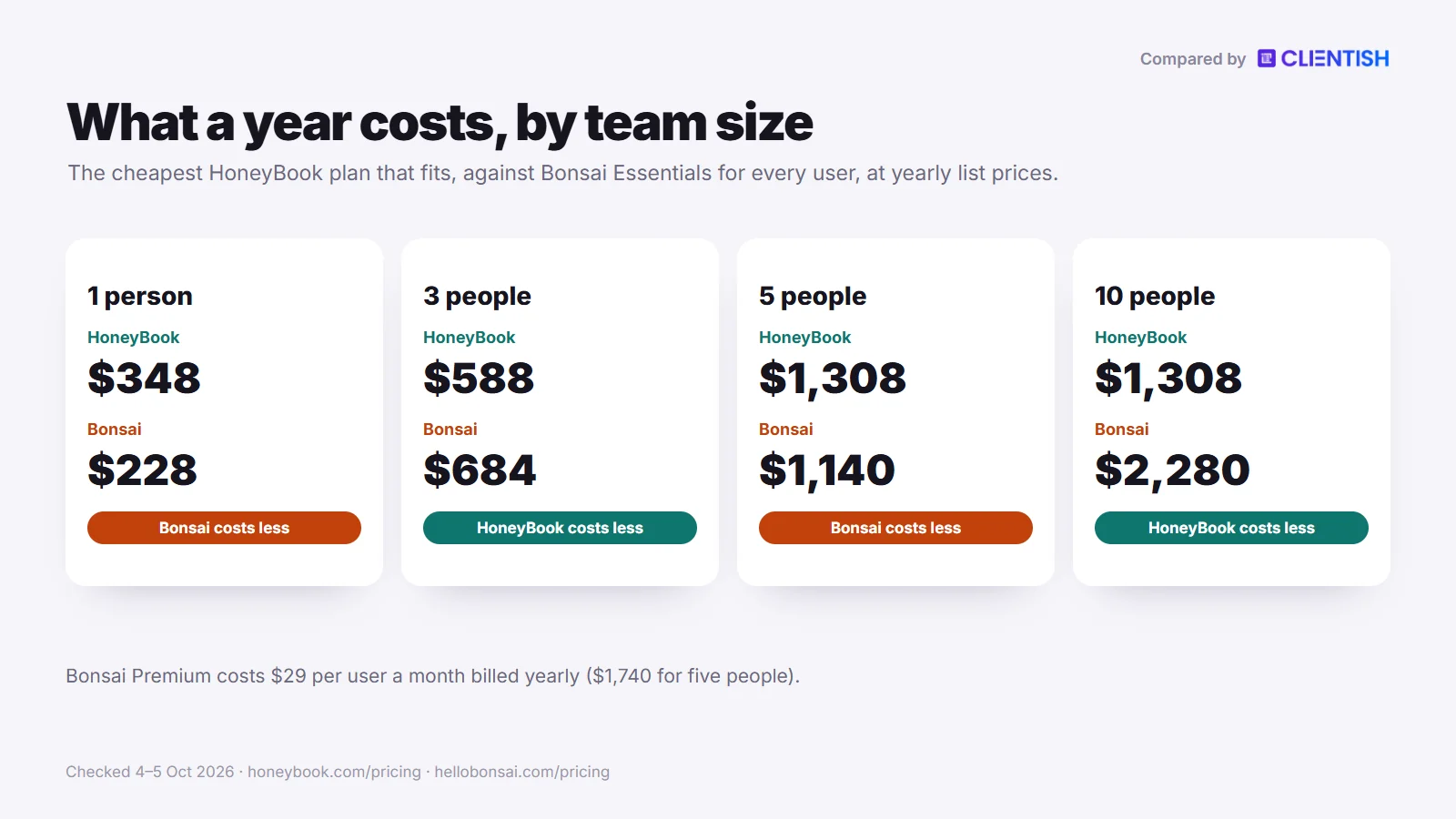
For five people, a year of Clientish Starter is $276; the same team spends $1,308 on HoneyBook Premium and between $1,140 and $1,740 on Bonsai. Put a few of your real clients through it over a 14-day trial, with no card.
What You Get in Clientish
Clientish covers the stretch after the contract that both tools leave thin. Everything below is on every plan unless noted.
- Reorders without paperwork: clients pick from a service catalogue and cart, with coupons; the order begins once the checkout invoice is paid.
- Orders that track delivery: an order keeps the brief and each delivery, counting revisions against a per-service limit.
- A branded client login: the client portal sits at your-name.clientish.io with your favicon, logo and colours.
- Support with deadlines: tickets take a first-answer deadline from their priority, plus canned responses, tags, private notes and a client score.
- Proposals that start the work: prospects accept a proposal by typing their name, and that step alone sets up their login, the order and one invoice with the deposit falling due first.
- Seats for the whole team: team members by tier (Starter 5, Growth 15, Pro 30, Enterprise 50), extra seats for sale, and no seat used by a client login.
- Hours the client approves: on Growth and up, remote staff enter time by client, and invoicing waits for the client’s approval of those hours.
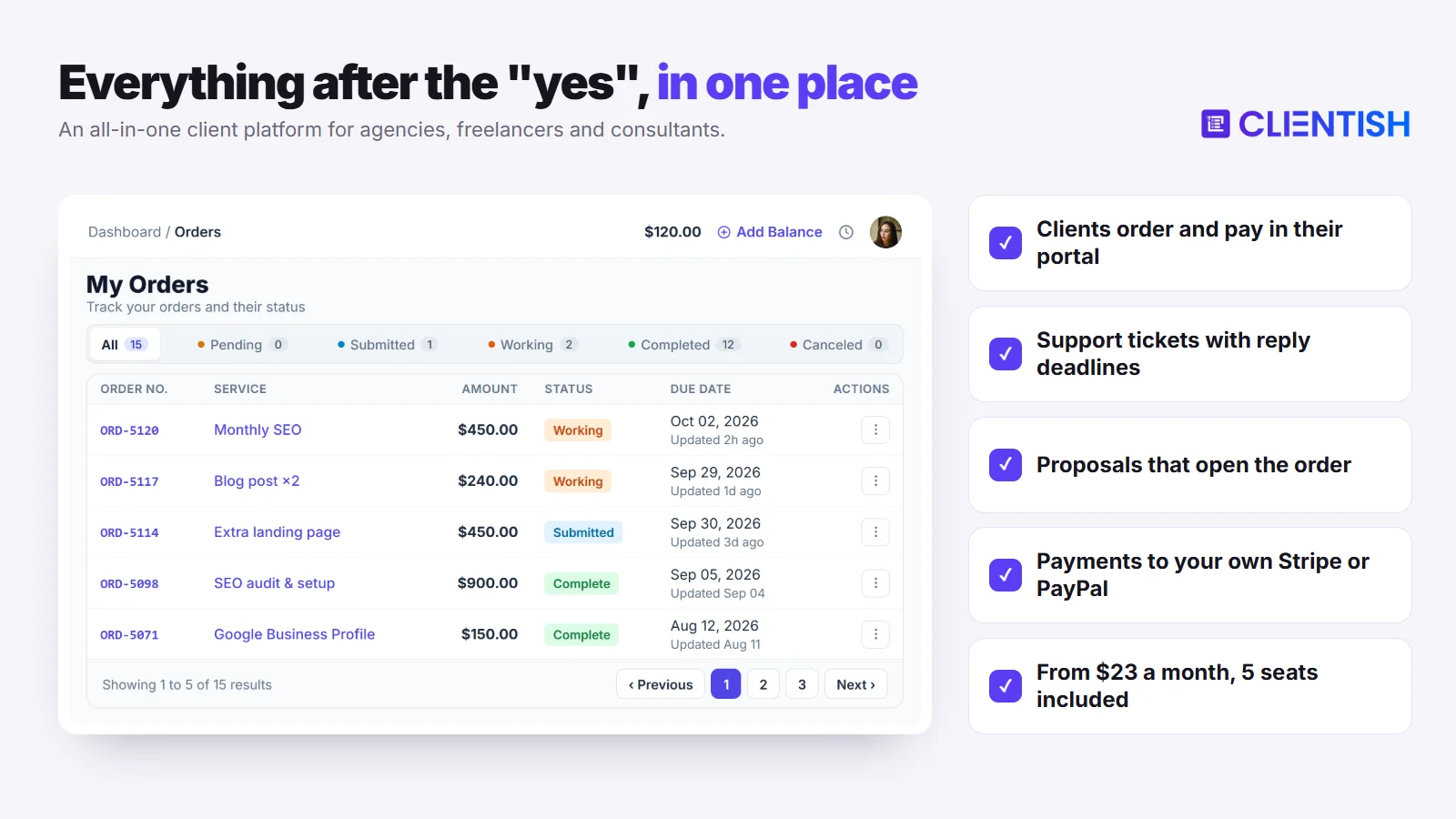
When HoneyBook or Bonsai Is Still the Better Pick
Clientish is not the right move for everyone. Stay put if one of these is central to your work.
- Clients reserve sessions on your calendar: Clientish has no booking calendar or scheduler.
- You take cards at shoots with Tap to Pay: Clientish runs in a phone’s browser, with no app to install.
- You want a personal timer, expense records and US tax estimates in one app, as Bonsai offers.
Two more limits: Clientish has no SOC 2 report, and its screens are available in English only.
Starter, Growth, Pro and Enterprise run $29/$49/$99/$149 monthly, or $23/$39/$79/$119 a month paid yearly. Each tier comes with tickets, proposals, invoicing and the client portal.
Outgrowing HoneyBook or Bonsai? Give repeat clients one place to order, ask and pay.
Orders, tickets, renewals and payments to your own Stripe or PayPal, for your whole team. Plans start at $23 a month billed yearly, with 5 team members included.
Start your 14-day free trial →No card needed · See all plans
Frequently Asked Questions
These are the questions freelancers and agency owners ask most when weighing HoneyBook against Bonsai, answered from each vendor’s own pages as of October 2026.
Is HoneyBook or Bonsai better for a solo freelancer?
It depends on how you bill. Bonsai suits a freelancer who wants contracts, a timer and expense records together, from $19 a month billed yearly. HoneyBook Starter, $29 a month yearly, suits a solo creative booking clients through automated follow-ups.
Can I use HoneyBook or Bonsai outside the US?
Bonsai works much further afield. HoneyBook only accepts businesses in the US, Canada, Britain and Australia. Bonsai can also take payments via Stripe in every Stripe market but India, or via PayPal, though foreign-currency payments carry a 2.5% fee.
Which tool is cheaper for a team of four?
Bonsai Essentials, at $76 a month billed yearly for four seats. HoneyBook needs Premium for a fourth person, which is $109 a month yearly. If the team needs Bonsai Premium, four seats cost $116 and HoneyBook comes out cheaper.
Does HoneyBook charge transaction fees?
Yes. In the US a card typed in online costs 2.9% + 25¢, a card on file 3.4% + 9¢, Tap to Pay 2.7% + 10¢ and an ACH payment 1.5%. HoneyBook processes every payment itself, so these rates apply.
Does Bonsai have a client portal?
Yes, from Essentials. Clients open it from a secure email link, see invoices and project progress, and upload files. Premium adds messaging and shared tasks and removes Bonsai’s branding, though the address stays on Bonsai’s domain.
Which tool has better contract templates?
Bonsai has the larger library, with more than 100 templates across contract types and industries, plus co-signers. HoneyBook’s set is lawyer-approved and editable, and a contract can go out alone or inside a combined booking file.
Can HoneyBook handle recurring payments?
Yes, on every plan. Recurring invoices repeat weekly, monthly or on a custom schedule, autopay is on by default, and clients cannot stop the series themselves. Bonsai’s subscription invoices likewise charge a card the client has saved.
Is either tool good for a growing agency with multiple team members?
Only up to a point. HoneyBook needs Premium beyond three people, and Bonsai charges a seat per person. We found no client ticket queue or reorder catalogue in either, and agencies with many repeat clients usually need both.
What’s the difference between HoneyBook and Bonsai for taxes and accounting?
Bonsai goes further on tax. Both track expenses from their middle plans, but Bonsai adds income tracking, bank sync and a paid US tax add-on for quarterly estimates. HoneyBook syncs QuickBooks Online, though not Xero.
Which has a better mobile app?
It depends on the job. HoneyBook’s app edits files, runs the pipeline, emails clients and takes Tap to Pay card payments. Bonsai’s apps centre on time tracking, invoices and expenses, with a separate time tracker for the Mac.
Does HoneyBook work in the UK or Australia?
Yes, since 21 May 2026. British and Australian businesses can now sign up, with subscriptions and client billing in GBP or AUD. Local card fees start at 1.4% + £0.20 in Britain and 1.7% + A$0.25 in Australia.
Does HoneyBook have time tracking?
Yes, a basic Time Tracker; users describe typed-in entries on the web and a timer in the phone app. HoneyBook retired it on 7 September 2026, then restored it about a week later after complaints on its forum.
Does Bonsai include invoicing and contracts on every plan?
No. Basic, at $9 a user a month billed yearly, covers time tracking, tasks, projects and the CRM only. Invoices, payments, proposals, contracts and the client portal all start on Essentials, at $19 a user.
Is Bonsai Tax included, or does it cost extra?
It costs extra. Bonsai’s help center describes Bonsai Tax as an optional add-on for US self-employed users, covering quarterly estimates and write-offs. The pricing page lists no price for it, so check inside the app.
What happened to Bonsai after Zoom bought it?
Not much has changed for users so far. Zoom announced the deal on 5 November 2025 and closed it that December, and it says Bonsai keeps running separately under its existing brand, with Zoom meeting sync added on Premium.
Is there a free plan or free trial for HoneyBook or Bonsai?
Both offer trials rather than a working free plan. HoneyBook gives 30 days without a card and does not charge when it ends. Bonsai gives seven days of full access, and its free Limited plan after cancelling is view-only.
Is it possible to remove HoneyBook or Bonsai branding?
Yes, with an upgrade. HoneyBook hides its “Powered by” label from Essentials and lets every plan use your company subdomain. Bonsai removes its name on Premium, but the portal address stays on Bonsai’s own domain.
How do I migrate from Bonsai to HoneyBook, or back?
Export to CSV from either tool and rebuild the rest; mainly contacts and records move. HoneyBook takes 500 contacts per upload and rebuilds your templates for free; Bonsai’s importer accepts CSVs of companies, time, expenses and paid invoices.
Which is better for photographers?
HoneyBook, for a studio in its four countries. A single HoneyBook file handles the booking, signature and deposit, Tap to Pay covers sales at a shoot, and Pic-Time connects from Essentials. A photographer based anywhere else would need Bonsai.
Which has better customer support?
HoneyBook offers more ways in. Email and live chat are open all week on any plan, with Premium customers moved up the queue. Bonsai offers in-app messages and email, with no published hours, phone line or response times.
Is Clientish a good alternative to HoneyBook or Bonsai for an agency?
For an agency with repeat clients and a team, often yes. Clientish adds reorders from a catalogue, orders with revision limits and a ticket queue. A solo creative who needs a scheduler and Tap to Pay should stay with HoneyBook.
How much does Clientish cost compared with HoneyBook and Bonsai?
Clientish runs $23 to $119 a month billed yearly, with 5 to 50 team members included. A five-person team would spend $276 a year on Starter; HoneyBook Premium charges $1,308 for the same team and Bonsai Essentials $1,140.
Can I use Clientish on my phone?
Yes, in the browser. Every screen, from the agency’s workspace to the client’s portal, resizes to fit a phone. There is no app to install, so phone-only extras such as Tap to Pay are not part of it.
Can I move my clients from HoneyBook or Bonsai to Clientish?
Yes. Export contacts from HoneyBook, or companies from Bonsai, as a CSV and upload it under Clients, Import, which also takes XLS and XLSX. The imported records start inactive, and nobody hears from Clientish until you send the invitations.
Does Clientish charge a fee on client payments?
No. Payments land in the agency’s linked account at Stripe, PayPal, Paddle or SSLCommerz, and manual routes such as Wise, bKash, Nagad, Rocket or a bank transfer carry no Clientish charge either. The gateway’s normal rate is all you pay.
Final Thoughts
Each of the pair carries a service business from proposal to paid invoice, but they were drawn for different owners. The deciding questions are where your business is registered, whether you charge per project or per hour, and how many people share the work.
- HoneyBook suits a studio in the US, Canada, Britain or Australia that books clients through a guided file and automated follow-ups, with up to three people on Essentials or any number on Premium for $1,308 a year.
- Bonsai suits a solo consultant or small team that bills hours, records expenses and plans projects, at $228 a seat a year on Essentials.
- Clientish fits an agency with retainer clients who keep ordering, staff who divide each job, and client questions that deserve a tracked queue; five staff on Starter come to $276 a year.
If the last line reads like your agency, test it with a few live accounts before you commit. Signing up for the 14-day trial takes no card, the pricing page lists what each tier includes, and the HoneyBook vs Clientish write-up sets that pair against each other in detail.
Sources
Clientish publishes this comparison. Every HoneyBook and Bonsai fact was checked on October 4 and 5, 2026, against each company’s own pricing and help pages; review themes come from Capterra and Trustpilot.
HoneyBook and Bonsai are trademarks of their owners. Clientish is not affiliated with either of them. Prices and features change; if you spot something out of date, let us know and we’ll correct it.

