

Moxo (formerly Moxtra) has moved a long way from the “client collaboration app” most reviews still describe. Since its tenth release in December 2025 it sells itself as a process orchestration platform where people and AI agents run multi-step workflows, priced by the number of flows a business runs each year. Clientish is a client portal and back office for agencies: it sells services, takes payment, tracks orders and handles support, priced by plan.
Quick answer: Moxo is the better fit for firms that run long, rule-heavy processes with many outside parties (onboarding with document checks, approvals across several signers, regulated work) and can spend $5,000 a year or more. Clientish fits agencies that need to sell and bill services, deliver orders and answer client questions, starting at $9.99 a month.
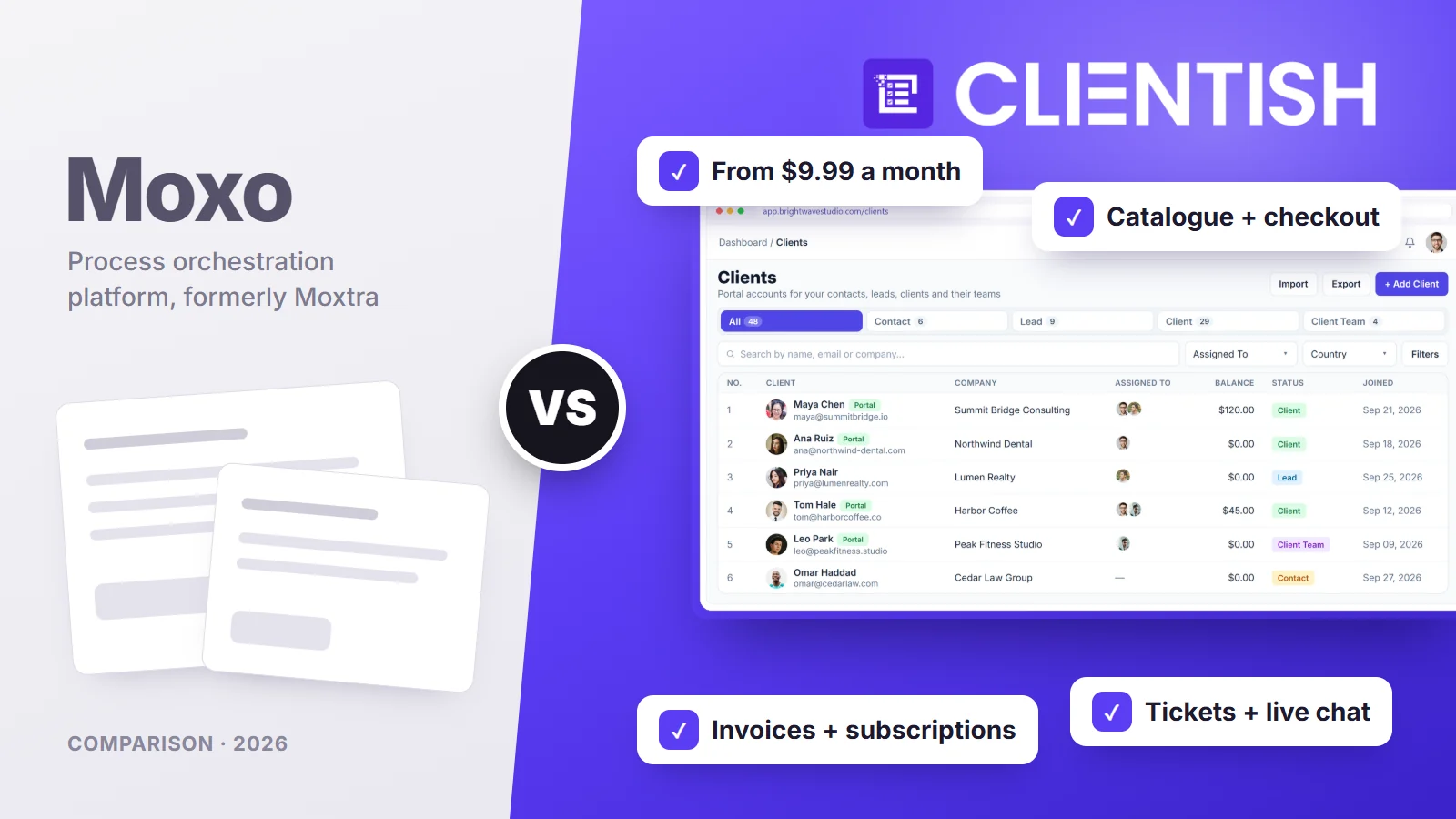
This comparison covers what each one costs and how it meters usage, how clients get in, selling and billing, delivery and revisions, support, branding, security, and what a move between them involves. Everything said about Moxo here was taken from moxo.com in October 2026, mainly its price list and its legal description of services.
Key Takeaways
Moxo’s prices and plan names changed four times between mid-2025 and September 2026, so figures on review sites rarely match its own page. These points reflect what Moxo publishes now.
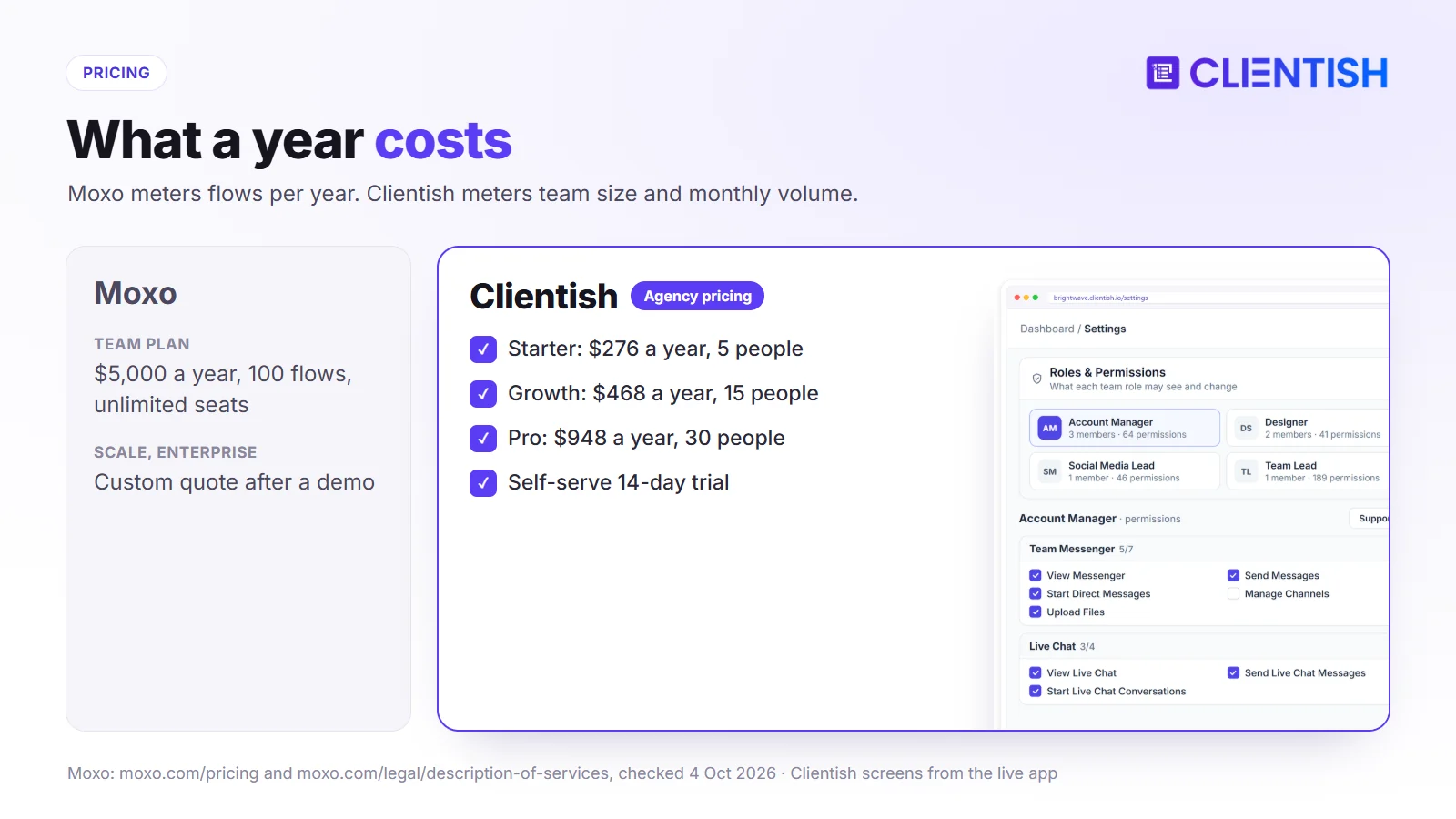
- Entry price: Moxo’s Team plan is $5,000 a year for 100 flows, with unlimited seats; Scale and Enterprise are quoted. Clientish starts at $96 a year (Solo, one person), or $276 a year for Starter with five team members.
- What you pay for: Moxo meters processes (flows per year plus an AI allowance). Clientish meters team size and monthly volume of new clients and orders.
- Client access: Moxo clients open a secure link with no account. Clientish clients have a portal login where they buy, pay, follow orders and open tickets.
- Money: Moxo has a Payments step inside a flow; we found no invoicing or subscription module. Clientish issues invoices, runs subscriptions and connects to QuickBooks and Xero.
- Branding: Moxo’s own domain and full portal module sit on Scale (custom quote). Clientish puts your branding on even the cheapest plan, and a custom domain with a free SSL certificate comes from Growth ($49 a month).
Moxo vs Clientish: Feature Comparison Summary
The table lines up the points readers ask about most, from price and seats to client access, billing and compliance. Clientish is the shaded column; where Moxo gates a feature to a quoted plan, the plan is named.
| Dimension | Moxo | Clientish |
| Published price | Team $5,000/yr; Scale and Enterprise quoted | $9.99–$149 a month, or $8–$119 on yearly billing |
| Usage meter | 100 flows a year on Team, plus $100 of AI | New clients and orders per month by plan |
| Team seats | Unlimited on every plan | 5, 15, 30 or 50 included |
| Client access | Magic link, no account; portal dashboard on Scale | Branded portal login |
| Service catalog and checkout | Flow catalog for starting requests (Scale); no prices or cart found | Catalog, cart and coupons |
| Invoices and subscriptions | Payments step in a flow; no invoicing module found | Invoices, subscriptions, prepaid balance |
| E-signature | Native, sequential or parallel, plus DocuSign | Typed signature on proposals |
| Own domain | Scale | Growth and up, free SSL |
| Compliance | SOC 2 Type II, SOC 3, GDPR | Two-factor sign-in, encryption; no SOC 2 |
| Trial | Request a trial built by Moxo | 14 days, self-serve |
The pattern is clear: Moxo goes deep on governed processes, while Clientish covers the commercial side of running an agency.
Who Will Benefit Most From This Comparison?
You run an agency or a service firm and you’ve seen Moxo on a list of client portals, perhaps next to tools built for agencies. You want to know whether its workflow engine is worth the price for your kind of client work, or whether a portal built around selling and delivering services serves you better.
If your work is mostly fixed steps with documents and sign-offs (onboarding, compliance checks, loan or insurance files), Moxo was designed for it. If your work is selling packages, billing monthly and handling a stream of orders and questions, read on with that in mind.
What makes agencies look beyond Moxo
Moxo has a 4.0 rating on Capterra from 24 reviews, and most are positive. The complaints that come up more than once:
- Price and how hard it was to pin down. Older reviews call pricing “hidden”; today the entry point is $5,000 a year.
- Setup effort. Reviewers mention a learning curve and flows that take time to build, and Moxo itself lists “process definition required up front” as a limitation for agencies.
- Billing lives elsewhere. Agencies still need a separate invoicing tool.
- A poor fit for loose, creative work. Moxo describes itself as “not a creative production tool”.
- Chat history limits on older plans, which may not apply to the 2026 plans.
Moxo: Human-AI workflow Automation Platform
Moxo was founded in 2012 as Moxtra in Cupertino, California, and counts banks such as Citibank, BNP Paribas and Scotiabank among its customers. Its pitch today is “human + AI process orchestration”: you model a process as a flow, and people, outside parties and AI agents each complete their steps.
Key Things Moxo Covers:
- Flow builder: more than 30 step types, branching, loops, sub-flows, due dates and escalation, and an AI builder that drafts a flow from a plain-language description.
- Human actions: approvals, forms, e-signatures, file requests, decisions, checklists, payments and time booking.
- AI agents (Scale): preparer, reviewer, advisor and automation agents that work alongside people.
- External access: clients and partners act through magic links with no account, or through branded portals on Scale.
- Integrations: flows can start from HubSpot, Salesforce, Zoho Desk or Dynamics 365; Slack, Teams, Zoom and DocuSign connect too. REST API, webhooks and MCP are on Scale.
- Apps: iOS and Android apps, and a site in seven languages.
Moxo pricing: Team $5,000 a year (100 flows, $100 of AI, unlimited seats). Scale (500 flows a year in the plans shown earlier in 2026) and Enterprise are quoted after a demo.
Clientish: All-in-One Client Management Software
Clientish starts from the agency’s commercial loop instead of a process diagram. A client buys or accepts a proposal, pays, the order reaches the team that delivers it, and the client follows progress, requests changes and asks for help in one portal.
What Clientish Offers That Moxo Doesn’t:
- Service catalog and checkout: priced packages, a cart and coupons in the client portal.
- Invoices and subscriptions: one-time and recurring billing through eleven gateways, Stripe, PayPal and Mollie among them, or bank transfer, with no Clientish fee on payments.
- Proposals: eleven layouts to choose from, and a signed acceptance sets up the client’s account, the invoice (with a deposit if you ask for one) and the order together.
- Orders with revision limits: each order holds the brief, the delivery and a set number of revision rounds; silent deliveries are approved after seven days.
- Support tickets: a first-reply target per priority, saved replies, internal notes and client ratings.
- Leads on every plan, and live chat from Starter up.
- QuickBooks and Xero for the books, plus a Zapier app and webhooks for Make.
All four Clientish tiers are on the pricing page.
How Moxo and Clientish Were Compared
We judged both tools against an agency’s normal month rather than a single process: winning work, getting paid, delivering it, keeping clients informed and answering their questions. For each part we looked at:
- Cost and what drives it up
- The client’s experience, from first link to repeat purchase
- Selling and billing
- Delivery, approvals and revisions
- Support and communication
- Branding, security and setup effort
Moxo’s details come from moxo.com and its legal description of services (links under Sources). Its help center couldn’t be read directly, so where we couldn’t confirm a feature we say “not found” instead of “not offered”.
Moxo vs Clientish Pricing: Flows a Year or a Monthly Plan?
Winner: Clientish on cost for almost any agency. Moxo’s lowest published plan costs more per year than Clientish’s top plan, though it includes unlimited seats.
The two price different things. Moxo charges for the processes you run; Clientish charges for the size of your team and how many new clients and orders you take on each month.
Annual Cost Comparison
Moxo’s Team plan is sold per year. Clientish figures use yearly billing; extra team members can be bought on top of each plan’s allowance.
| Plan | Moxo | Clientish |
| Entry | Team: $5,000/yr | Starter: $276/yr (5 people) |
| Growing agency | Team or Scale (quoted) | Growth: $468/yr (15 people) |
| Larger team | Scale (quoted) | Pro: $948/yr (30 people) |
| Top tier | Enterprise (quoted) | Enterprise: $1,428/yr (50 people) |
How Moxo Flow Limits Affect Agency Usage
A flow is one run of a process: one client onboarding, one approval cycle, one renewal. Team’s 100 flows a year works out to about eight a month, so an agency onboarding ten clients a month and running a sign-off flow for each deliverable would outgrow it quickly. Clientish’s limits are monthly instead: 5 new clients and 15 orders on Solo, 25 and 50 on Starter, 50 and 100 on Growth, 100 and 200 on Pro, unlimited on Enterprise.
Why Moxo prices look different elsewhere
Between June 2025 and September 2026 Moxo moved from quote-only Business plans, to Free, $99 and $499 monthly plans, to Team at $500 a month, and finally to Team at $5,000 a year. Review sites quoting $90, $200, $450 or $1,000 a month are describing older plans. You can test Clientish’s pricing against your own volume on a 14-day Clientish trial.
Client Access in Moxo and Clientish: Magic Links vs Portal Login
Winner: depends on the client. Moxo is easier for a one-time participant who should never create an account; Clientish suits clients who come back to buy, pay and follow ongoing work.
How clients get in shapes everything after it, from how often they return to whether they can serve themselves.
How Clients Access Moxo
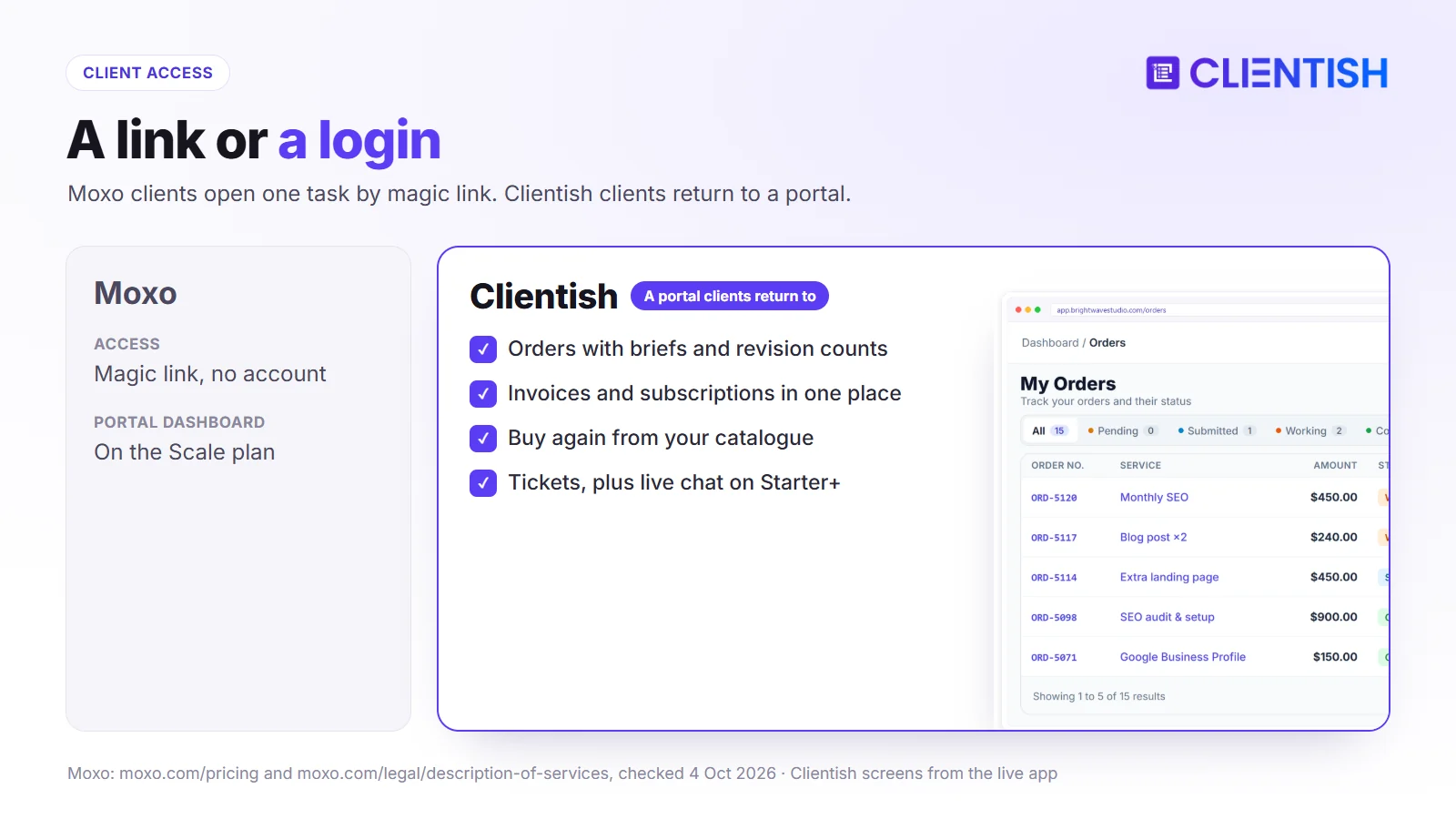
A Moxo client receives a magic link, opens their step (sign this, upload that, approve this) and is done, with no password to remember. On Scale, recurring participants get a portal dashboard with a one-time passcode, a list of open tasks, a catalog of processes they can start, messages and an AI chat assistant.
How Clients Access Clientish
A Clientish client signs in to your branded portal and sees their orders with briefs and revision counts, invoices, subscriptions with the next payment date, support tickets and your service catalog. From Starter, they can also start a live chat with your team.
Which suits agency clients
Clients who buy once and sign a few documents are well served by links. Retainer clients who order every month, pay invoices and need help between deliveries get more from a login where everything sits together.
Selling Services, Invoicing, and Recurring Billing
Winner: Clientish. It sells, invoices and renews retainers inside the client portal, while an agency on Moxo keeps a separate billing tool running next to its flows.
For an agency, the step after “the client agrees” is getting paid, and then getting paid again next month.
Moxo Payments and Billing Capabilities
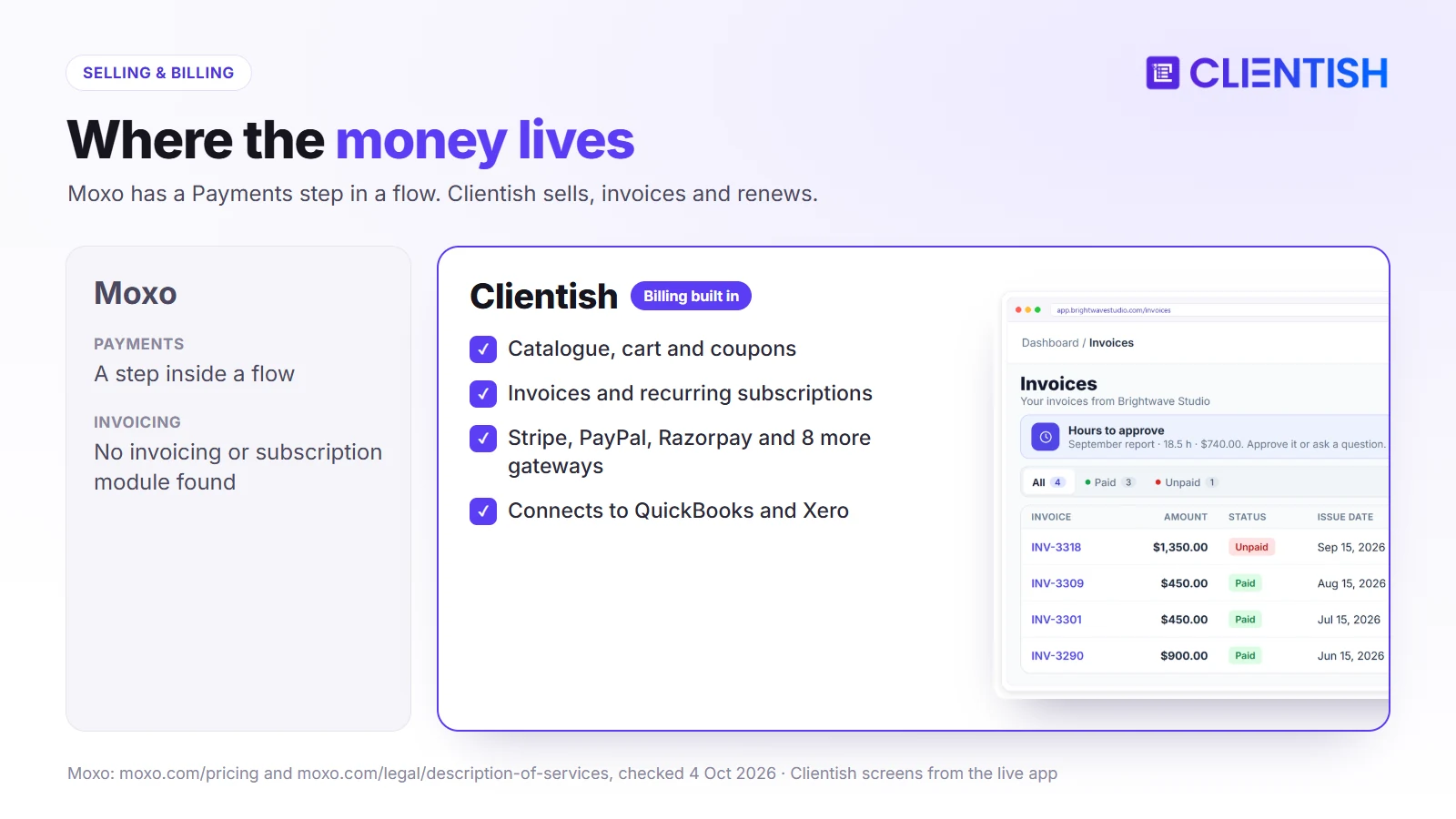
Moxo’s Team plan includes a Payments step that can sit inside a flow, and its portal page mentions invoices and payments under “Transact”. We found no invoicing module, no subscription billing and no priced catalog or cart in its description of services, and third-party reviewers say billing is handled in another tool.
Clientish Checkout, Invoices, and Subscriptions
In Clientish, a buyer fills a cart from your catalog, adds a discount code if they have one and settles the invoice; only then does the order open, land with the team that delivers that service, and ask the buyer for their brief. Each retainer reopens its invoice every cycle for the client to settle, money held on account can pay it, and Clientish connects to QuickBooks and Xero for your books.
Moxo vs Clientish: Delivery, Approvals, and Revisions
Winner: Moxo for multi-step approvals that involve several parties and strict order; Clientish for order-based delivery where each service comes with a set number of revisions.
Delivery is where the two philosophies differ most: Moxo enforces a designed path, Clientish tracks orders as they move through statuses.
Moxo flows can run steps in sequence or in parallel, require “any one, all or a majority” of a group to approve, loop back for another revision and escalate overdue steps; its reports track SLA compliance and bottlenecks. Clientish orders move through statuses on a table, Kanban or card view; each service sets how many revision rounds a client gets, and deliveries the client doesn’t answer are approved automatically after seven days. A service can also carry a ready-made task list, checklists included, which is copied into each order placed for it.
Client Support and Communication in Moxo and Clientish
Winner: Clientish for client support. It has a ticket desk with reply targets; Moxo handles questions through chat inside flows and, on Scale, portal messages.
Agencies field questions that don’t belong to any process: a login problem, a billing question, a quick change request.
In Moxo, conversation happens in the chat attached to each flow, with escalation for unresolved threads; the portal Messages module and AI chat assistant are on Scale. We found no ticket queue with priorities or client ratings. A Clientish client opens a ticket; its priority sets how soon the first reply is due, your staff answer with saved replies, tags, copies to colleagues and private notes, and the client scores the help once it’s resolved. From the Starter plan, clients can also chat with you live from inside the portal.
Branding, Portal Customization and Security in Moxo and Clientish
Winner: Moxo on security credentials; Clientish on branding that costs nothing extra, a custom domain from Growth upward, and the short time it takes to get a new workspace in front of clients.
These three decide how the tool looks to clients, whether procurement will sign off, and how soon you can use it.
Branding
Moxo applies your logo, colors and cover image, can send email through your own provider, and serves portals from your own domain on Scale. On Clientish the logo, color scheme and favicon are yours from the first plan, mail leaves through your own SMTP server, and from Growth upward the portal can run on your own domain with free SSL and the “Powered by Clientish” note disappears.
Security and compliance
Moxo holds SOC 2 Type II and SOC 3 reports, follows GDPR, keeps an audit trail of seven years or more and offers private-cloud or on-premises deployment; SSO and the organization audit log are on Scale. On the Clientish side, staff sign-in can require an emailed code or an authenticator app, clients an emailed code, stored secrets are encrypted and repeated failed logins lock the account, but there is no SOC 2 report.
Setup and Onboarding Experience
Moxo’s trial is requested and built around your processes with its team, and every plan button leads to a demo booking. Clientish is self-serve: you sign up, brand the portal, add services and invite clients the same day.
What Are the Similarities Between Moxo and Clientish?
Despite the different starting points, a few basics overlap, so either tool can replace scattered email threads and shared folders:
- a branded space where clients act on what you need from them
- file exchange tied to the work it belongs to
- email notifications and reminders
- roles that limit what each team member can do
- webhooks for connecting other tools
- reporting on work in progress
Limitations of Moxo and Clientish
Neither covers everything an agency does, and it helps to know the gaps before you choose, because each one needs another tool or a workaround:
- Visual proofing: In Clientish a client marks up an image with pinned comments and signs off file by file; Moxo offers nothing similar.
- Gantt-style planning: we found no timeline planner in either.
- Contacts export: Moxo documents flow archives and audit exports; Clientish exports clients, invoices and reports, but moving everything still takes manual work.
A Real Example: A 12-Person Marketing Agency
A 12-person agency sells monthly social media and SEO packages to about 60 clients, onboards four or five new clients a month, and bills everyone on the first of the month.
Running it on Moxo
Moxo would give each onboarding a step-by-step flow with document requests and e-signatures, and all twelve people would fit on Team. Monthly delivery approvals for 60 clients would use far more than 100 flows a year, which points to Scale at a quoted price, and invoicing would still need a separate tool.
Running it on Clientish
On Growth at $39 a month (yearly), the twelve people fit within the 15-person allowance. Packages sit in the catalog, each subscription reopens its invoice every month, approvals happen on each order with a set number of revisions, and questions go to tickets or live chat.
Which Platform Fits This Agency Better?
For repeat packages and monthly billing, Clientish fits at a fraction of Moxo’s entry price. If the same agency served banks that required SOC 2 evidence and multi-signer approvals, Moxo’s depth would justify its cost.
Advantages and Limitations of Moxo and Clientish
The trade-offs from each section, collected in one place so you can weigh them against what your agency does most often.
Moxo Advantages and Limitations
| Pros | Cons |
| Branching flows, AI agents, escalation | $5,000 a year minimum; higher tiers quoted |
| Unlimited seats; account-free client links | Billing needs a separate tool |
| Native e-signature and long audit trail | Portals, own domain, API and SSO on Scale |
| SOC 2 Type II; mobile apps; seven site languages | Learning curve; flows designed up front |
Clientish Advantages and Limitations
| Pros | Cons |
| $96 a year to start (Solo); self-serve trial | Simpler automations; no multi-party flows |
| Catalog, invoices, subscriptions, proposals | English only; one workspace |
| Tickets with reply targets; live chat | No SOC 2 or SSO |
| QuickBooks and Xero; eleven gateways | Monthly limits on new clients and orders |
Who Should Use Each Tool?
Match these against your clients and your processes; the right answer usually comes down to whether your work is governed steps or repeat services.
Moxo
Good for:
- firms running onboarding, compliance or approval processes with many outside parties
- regulated clients that ask for SOC 2 evidence and long audit trails
- teams that want AI agents to prepare and review steps
Avoid if:
- your budget is under $5,000 a year
- you need invoices, subscriptions and a service catalog in one place
- your work changes shape from client to client
Clientish
Good for:
- agencies selling packages and retainers
- teams that want billing, delivery and support in one portal
- agencies paid through PayPal, Razorpay, Mollie or SSLCommerz
Avoid if:
- procurement requires SOC 2 or SSO
- you need multi-signer, multi-party workflows
- the portal has to appear in a language other than English for your clients
How to Migrate from Moxo to Clientish
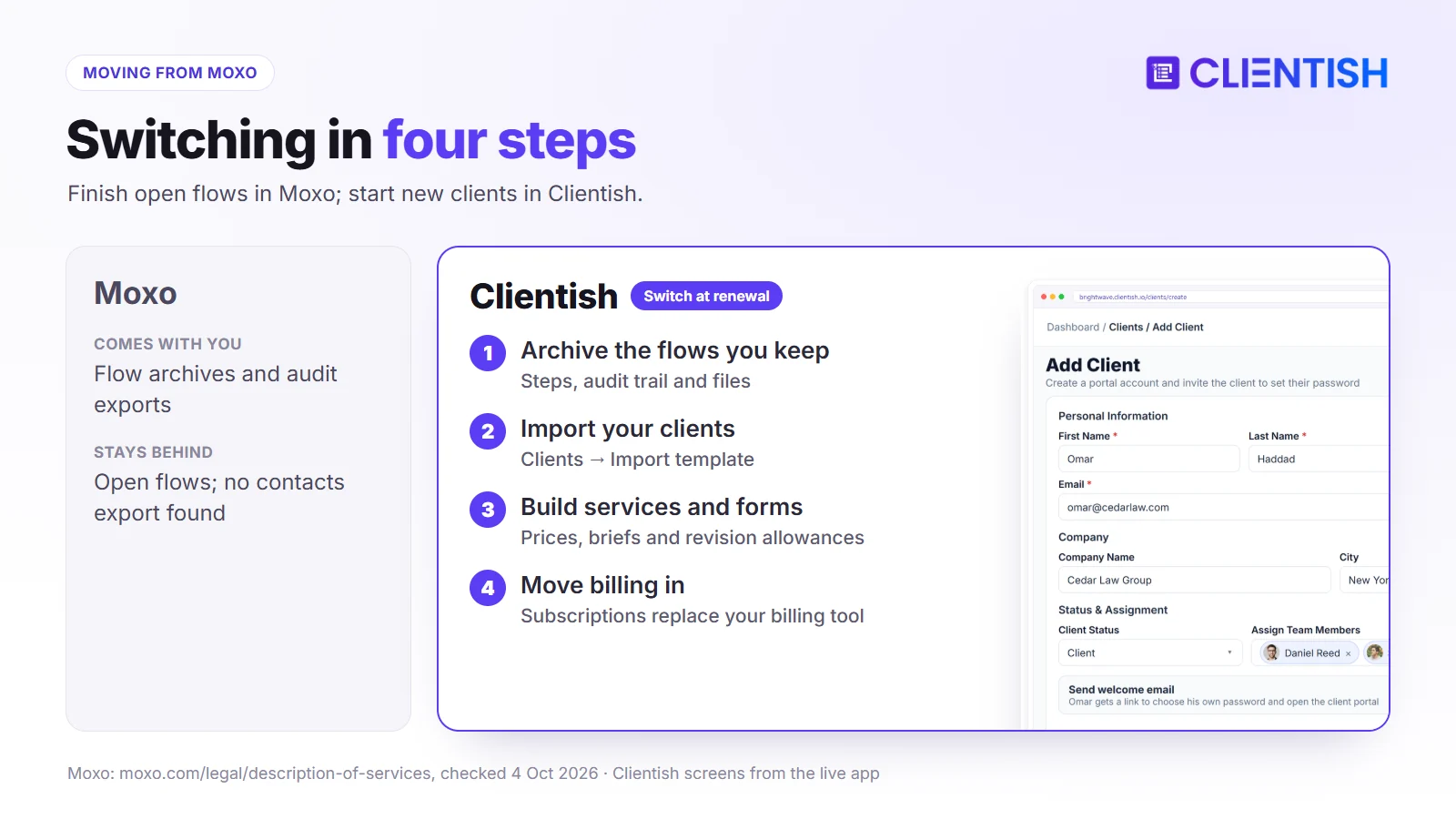
Moxo lets you download each flow as an archive with its steps, audit trail and attachments, and export audit records as CSV, JSON or PDF. We found no documented export of contacts, so plan to rebuild your client list from your own records.
What to Export or Preserve from Moxo
Archive the flows you need to keep, then add clients in Clientish under Clients → Import from a spreadsheet you already hold (a CRM export works). Invite them to the portal once services are ready.
What to Recreate in Clientish
- repeat work as services with prices, briefs and revision allowances
- onboarding questions as intake forms
- billing, moved from your separate invoicing tool into Clientish subscriptions
- multi-signer approvals, which become proposal acceptance or order approval
When to Switch from Moxo to Clientish
Finish open flows in Moxo rather than moving them midway, start new clients in Clientish, and time the change to your Moxo renewal so you aren’t paying for both.
Frequently Asked Questions
Short answers to what people search for about Moxo’s price, plans and features, and how it compares with Clientish for agency work.
How much does Moxo cost?
The Team plan is $5,000 a year with 100 flows, $100 of AI usage and unlimited seats. Scale and Enterprise are quoted after a demo.
Is Moxo priced per user?
No. Every plan has unlimited seats; Moxo meters flows per year and AI usage instead.
Does Moxo have a free trial?
You can request one; Moxo builds it around your processes and doesn’t publish a length. Clientish has a self-serve 14-day trial.
Is Moxo the same as Moxtra?
Yes. Moxtra renamed itself Moxo, and its App Store developer name is still Moxtra.
Does Moxo include invoicing?
It has a Payments step inside flows, but we found no invoicing or subscription module. Clientish includes both.
Can Moxo run on my own domain?
Yes, on the Scale plan. Clientish lets you use your own domain from Growth ($49 a month).
Does Moxo have a mobile app?
Yes, for iOS and Android. Clientish isn’t listed in the app stores; instead, clients add your branded portal app to their phone right from the browser.
Is Moxo SOC 2 compliant?
Moxo reports SOC 2 Type II and SOC 3. Clientish doesn’t hold SOC 2.
Is Moxo good for marketing agencies?
Moxo markets to agencies and publishes an agency case study, but it lists “process definition required up front” and “not a creative production tool” as limitations. Agencies selling repeat packages usually need billing and orders more than flows.
The Verdict: Which Should Your Agency Pick?
Moxo is a process platform: if your clients’ work runs through defined steps with several signers, documents and compliance checks, and $5,000 a year or a quoted plan fits, its flows, AI agents and audit trail do that job well.
Most agencies spend their week on something else: selling packages, invoicing, delivering orders with a set number of revisions and answering questions. Clientish puts all of that in one branded portal from $9.99 a month.
- Moxo if governed, multi-party processes and compliance evidence come first.
- Clientish if you want to sell, bill, deliver and support clients in one place at an agency price.
Open a free 14-day Clientish workspace, add one package and invite a client to see the portal from their side.
Sources
Clientish publishes this comparison. Moxo facts were confirmed on October 4, 2026 using its pricing page, its description of services, its pages on the client portal, security and portals, its trial page, and Capterra reviews.
Moxo and Moxtra are trademarks of their owner. Clientish is not affiliated with Moxo. See something out of date? Tell us and we’ll correct it.

