

Bonsai was long known as a freelancer’s contract-and-invoice app and now pitches itself to agencies and consultancies, with Gantt charts, time tracking and a client portal on its paid tiers; Zoom bought it in December 2025. Agencies seldom quit Bonsai over one missing screen. They quit over the money mechanics: every colleague is billed as a seat, rival processors pay a surcharge in Bonsai’s home markets, and clients open the portal from an emailed link because they have no account.
Quick answer: Clientish is the Bonsai alternative we recommend for agencies. For $29 a month, Starter covers five staff; each client gets a branded login to order, pay and raise tickets; and card money lands in whichever gateway you connect, with nothing skimmed by Clientish. HoneyBook, Dubsado, Plutio and 17hats are the closest swaps for freelancers who like Bonsai’s proposal-then-invoice rhythm; SuiteDash and Agiled bundle more modules; Wayfront, ManyRequests, Zendo and Assembly sell packaged services; SuperOkay, Clinked, Moxo, Accelo and FuseBase cover narrower jobs.
This guide walks through why studios leave Bonsai, how the 16 tools were shortlisted, the October 2026 bill for a real team on each, the headline gain or loss against Bonsai in every case, and a retainer switch that charges nobody twice.
Key Takeaways
Many pages about Bonsai alternatives still attack the old freelancer version and skip both the Zoom purchase and today’s four-tier price list. These five points are what an agency owner should weigh in 2026.
- Headcount drives the bill. Each team member, collaborators too, pays the full per-user rate, and Elite demands three users minimum. Five people on Bonsai Essentials cost $1,140 a year; Clientish Starter seats the same five for $276.
- Payments run on Bonsai’s terms. Its in-house processor serves only American, British, Canadian and Australian businesses, and inside those markets a Stripe or PayPal connection costs 1% more. For a newly opened account, payouts take 7 to 10 business days.
- Clients come in through an email link. Nobody gets a login, stripping Bonsai’s name needs Premium, and the custom domain is still billed as a 2026 release.
- The owner changed. Zoom closed the deal in December 2025, keeps the Bonsai brand for now, and plans to fold its features into Zoom gradually.
- Match the tool to your sales model. Freelancers happy with Bonsai’s flow but not its pricing should test HoneyBook, Dubsado or Plutio; agencies with many repeat clients belong on Clientish.
Why Agencies Outgrow Bonsai
Today’s Bonsai does far more than the app many listicles describe, so the argument for leaving is narrower and more specific. It usually surfaces once a studio hires, sells the same packages monthly and takes money from abroad. Each point comes from Bonsai’s own pricing or help pages unless labelled a review theme.
Each Colleague Adds a Full Seat
According to Bonsai’s help centre, every invited team member adds one more seat to the subscription, charged at your current plan’s rate. We found no cheaper collaborator tier, so even a one-project contractor costs full price, and eight people on Essentials pay $1,824 a year. Discounts start only at 30 users.
Custom Roles Wait for Elite
Bonsai ships four permission profiles: Owner, Partner, Project Manager (blind to financial data) and Collaborator (assigned projects only). Building your own roles is an Elite perk, and Elite starts at three users at $49 each on annual billing, a floor of $1,764 a year.
Branding Costs Premium, and the Address Stays Bonsai’s
Essentials allows a logo, styling and a banner, but hiding Bonsai from emails, documents and the portal is a Premium feature. The help centre says changing the portal URL “is not currently available”, and the plan grid flags custom domains as expected in 2026.
Clients Get a Link, Not an Account
Bonsai’s portal opens from a secure link in an email. Inside, a client can check invoices, upload project files, follow activity and, on Premium, message you, but never gets a password login, so each return visit starts with finding that email.
No Orders, Catalogue or Ticket Queue
Project tooling is strong, with Kanban, Gantt and dependencies from Essentials. The gaps sit on the client side: Bonsai’s help centre shows no catalogue with cart checkout, no client ticket queue and no revision-request tool, and chat runs one thread per project.
A 1% Surcharge on Other Processors
Bonsai Payments is reserved for businesses in America, Britain, Canada and Australia. Elsewhere, Stripe works in every Stripe country apart from India, and PayPal is accepted too. Inside the four Bonsai Payments markets, picking Stripe or PayPal triggers a 1% platform fee (1.35% for Amex via Stripe). A 2.5% FX charge applies to international payments, and subscription invoices auto-charge cards only through Bonsai Payments or Stripe.
New Accounts Wait for Payouts
New Bonsai accounts begin on what the payout article calls “Limited Payouts: 7 to 10 business days”. Standard timing of 2 to 4 days applies in the US and Australia; Canadian and British accounts stay on 7 to 10 days. Held money recurs in one-star reviews, including a Capterra user locked out of funds “for over two weeks”, though Trustpilot still rates Bonsai 4.3 across 639 reviews, 9% of them one-star.
Zoom Owns the Roadmap Now
Zoom announced its purchase on November 5, 2025 and completed it that December. Its blog says Bonsai will keep running under its own name while Zoom absorbs its capabilities over time, and Zoom sign-in already exists. How deep that merger goes is unknown, which matters for software meant to run an agency for years.
Support Comes Up in One-Star Reviews
Paying customers contact Bonsai by in-app message or email, with no published phone line, opening hours or response promise. Slow answers recur in Trustpilot and Capterra one-star reviews, and customer service is Bonsai’s weakest Capterra score at 4.3.
How We Chose These Alternatives
The shortlist began with the products that keep appearing next to Bonsai on search pages and review sites, and each was scored on an agency’s month of work, not a freelancer’s single deal. Entry required proposals, contracts or invoicing together with a client-facing space. We spent October 4 and 5, 2026 reading the pricing page and help centre of every vendor, with five questions to answer:
- Seat cost: staff included per plan and the price of person number six.
- Payment route: your own processor or theirs, any vendor surcharge, and country limits.
- Client access: a real login or an emailed link.
- Work after the sale: orders, tickets, revision rounds, renewals.
- Branding: logo, domain and the address client emails come from.
Clientish publishes this guide. We rank it first because it was designed for exactly the agency scenario discussed here, and every rival is described from its own documentation, gaps included.
Bonsai Alternatives at a Glance
Skim this grid to narrow the field, then read the entries that survive. Each figure is the cheapest paid tier, monthly first and then on annual billing, as vendors listed it on October 4 and 5, 2026; Bonsai appears at Essentials because Basic leaves out invoicing.
| Tool | From (monthly / yearly) | Team included | Own payment processor | Client tickets | Trial |
| Clientish | $29 / $23 | 5, 15, 30 or 50 people | Stripe, PayPal, Paddle, SSLCommerz, manual | Every plan | 14 days |
| Bonsai | $25 / $19 per user | Every user is a seat | Bonsai Payments; Stripe or PayPal (+1% in its four countries) | Not found | 7 days |
| HoneyBook | $36 / $29 | None, owner + 2, or unlimited | No, HoneyBook only | No | 30 days |
| Dubsado | $35 / $335 a year | Owner + 3 free users | Dubsado Payments, Square, PayPal | Not found | 21 days |
| Plutio | $19 / ~$15 | Solo on Core; 30 on Pro | Stripe, PayPal, Square | No ticket module | 7 days |
| 17hats | $60 / $600 a year | A few users; extra $5 each | Stripe or Square | Not found | 7 days |
| SuiteDash | $19 / $180 a year | Unlimited | Stripe, Braintree, PayPal, Authorize.Net | Pinnacle only | 14 days |
| Agiled | $29 / $24 | 1, 3, 7 or 15 seats | Stripe Connect, PayPal, Mollie | Pro and up | 14 days |
| Wayfront | $129 / $99 | 5 seats; extra $20 | Stripe, PayPal, manual | Yes | 14 days |
| ManyRequests | $59 / $39 | 1 seat; extra $20 | Stripe, manual | Requests used as tickets | 14 days |
| Zendo | Free; then $29 / $25 | 1 user; extra $8+ | Stripe, bank transfer | Request types | 14 days |
| Assembly | Free; then $49 / $29 | 1, 1, 3 or 5 users | No, Assembly is the merchant | App template only | Free plan |
| SuperOkay | Free; then $12 or $9 | 0, 3 or unlimited | None built in (pay link) | No | Free plan |
| Clinked | $11 per user | Per user, or 100+ members | None listed | No | 14 days |
| Moxo | $5,000 a year | Unlimited seats | Payment step in flows | Workflow requests | On request |
| Accelo | Quote only | By quote | Stripe, Authorize.net, PayPal | Yes | Demo |
| FuseBase | Free; then $39 or $32 | 1, 5 or 50 members | None built in | Not found | 14 days |
Bonsai Basic is cheaper at $15 per user monthly or $9 annually, yet it stops at time tracking, tasks and CRM; invoicing, proposals, contracts and the portal begin one tier up.
What a Five- or Ten-Person Agency Pays
A per-user sticker looks small until you multiply it, and Bonsai is where that multiplication bites hardest. Every number assumes annual billing on the cheapest tier that seats the whole team and opens a client portal (and invoices, if the product does that), at the prices vendors showed in early October 2026.
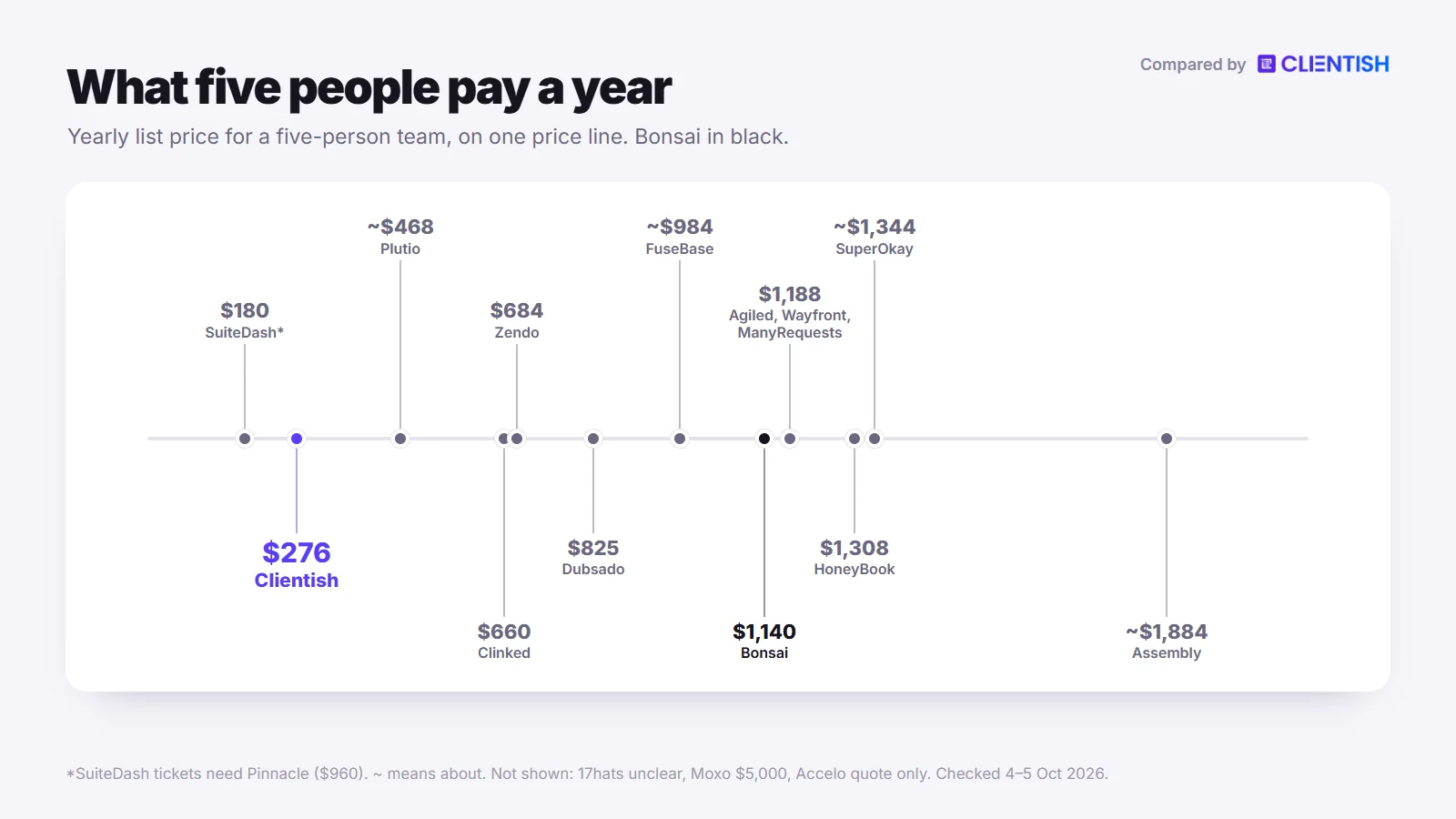
| Tool | 5 people, per year | 10 people, per year |
| Clientish | Starter: $276 | Growth: $468 |
| Bonsai | Essentials × 5: $1,140 (Premium: $1,740) | Essentials × 10: $2,280 (Premium: $3,480) |
| HoneyBook | Premium: $1,308 | Premium: $1,308 |
| Dubsado | Premier + 4–10 user tier: $825 | Premier + 4–10 user tier: $825 |
| Plutio | Pro: about $468 | Pro: about $468 |
| 17hats | $600 a year plus $5 a month per extra user; 17hats’ pages do not make clear which billing option includes the portal | |
| SuiteDash | Start: $180 (tickets need Pinnacle, $960) | Start: $180 (tickets need Pinnacle, $960) |
| Agiled | Business: $1,188 | Business + 3 seats: $1,908 |
| Wayfront | Base: $1,188 | Base + 5 seats: $2,268 |
| ManyRequests | Core + 4 seats: $1,188 | Core + 9 seats: $2,088 |
| Zendo | Core + 4 users: $684 | Core + 9 users: $1,164 |
| Assembly | Professional + 2 users: about $1,884 | Professional + 7 users: about $3,624 |
| SuperOkay | Business: about $1,344 | Business: about $1,344 |
| Clinked | Start Up × 5: $660 | Start Up × 10: $1,320 |
| Moxo | Team: $5,000 | Team: $5,000 |
| Accelo | Quote only | Quote only |
| FuseBase | Essentials: about $984 | Advanced: about $3,192 |
The arithmetic: Bonsai’s annual rate of $19 (Essentials) or $29 (Premium, the tier that hides its branding) per head, times twelve, times headcount. Five people overflow HoneyBook Essentials (owner plus two), so they land on Premium. Dubsado’s Starter covers the owner plus three, so person five means Premier with the $25 monthly 4–10 user tier. Agiled Business holds seven seats, and three more at $20 each lift ten people to $1,908. Added seats cost $18 on Wayfront, $15 on ManyRequests Core and $8 on Zendo Core, and each user beyond Assembly Professional’s three is $29, all monthly on annual billing. Clinked bills Start Up at $11 a head monthly. SuperOkay and FuseBase print two unlabelled prices per tier; we took the smaller, which looks like the annual rate.
The 16 Best Bonsai Alternatives for Agencies
Think of the list in three bands. Numbers 2 to 7 are broad client-management suites that Bonsai shoppers most often weigh; 8 to 11 sell packaged services or bill inside a portal; the specialist portal, workflow and PSA products fill 12 to 16. Every entry starts with the headline difference from Bonsai, then features, agency limits and price.
1. Clientish: The Agency Pick for Repeat Work and Client Logins
Clientish replaces Bonsai’s emailed portal link and per-head pricing with a proper client login under your brand and staff seats bundled into every tier. We built it for service agencies, from marketing and design to SEO, web and content shops, whose clients come back to buy, settle monthly bills and raise questions long after kickoff.
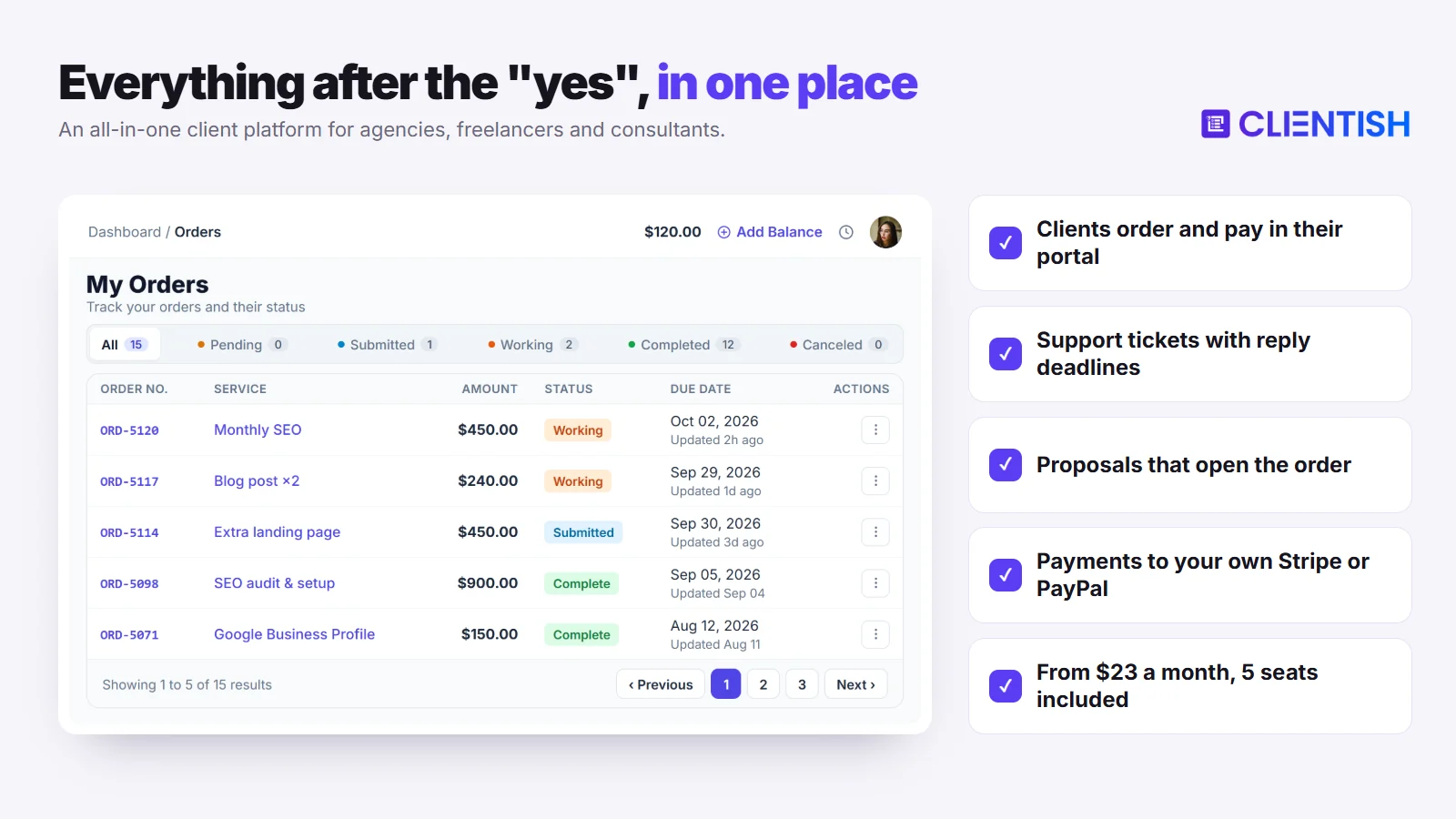
Compared with Bonsai: for five staff the bill is $276 a year, not the $1,140 Bonsai Essentials charges, clients sign in rather than dig out an emailed link, support arrives as tickets with reply deadlines, and the gateway you connect carries no platform surcharge.
Key features (where it goes further than Bonsai):
- Staff seats inside the price: Starter seats 5 people and Enterprise 50, with 15 on Growth and 30 on Pro; extra seats are for sale, and you can build your own roles or start from the presets. A client never occupies a seat, whereas Bonsai bills you for every person you invite.
- A login clients keep using: the dashboard lists live orders, open invoices and what renews next, so reordering, approving a delivery or asking for help happens in one place.
- Services clients can buy themselves: list each offer with a price, coupons and an intake form. Checkout raises the invoice, and work opens only after the money arrives.
- Orders that cap revisions: each sale turns into an order holding the brief, the delivered files and that service’s revision allowance, and your team hangs tasks off it. Silence counts as approval seven days after a delivery, a window you can adjust.
- Help desk included from Starter: ticket priority decides the first-response deadline; your team works with canned replies, tags and hidden notes; the client scores the outcome at closing.
- Payments into accounts you control: card payments land in the Stripe, Paddle, PayPal or SSLCommerz account you connect, and staff mark offline transfers (bank, Wise, bKash, Nagad, Rocket) as paid. Clients can also spend a prepaid balance. Clientish takes no cut, and your gateway decides which countries you can charge.
- Proposals that open the account: eleven layouts are available. A typed signature records the signer’s IP and sends a signed PDF, then Clientish sets up the client login, raises one invoice that puts a default 50% deposit first, and opens the order.
- Hours approved by the client: from Growth upward, remote contractors log hours per client, and nothing is invoiced until that client approves the timesheet.
- QuickBooks, Xero and webhooks: both accounting tools link natively, and an API plus webhooks feed Make or Zapier.
- Your brand on day one: your logo, favicon and brand colours appear in the portal on every tier, and outgoing client mail uses your SMTP server. The “Powered by Clientish” credit disappears on Pro and Enterprise.
- Lead pipeline and live chat start on Growth.
Limits for agencies: Renewals are never charged to a stored card: each one reopens the original invoice, which the client pays by card, bank transfer or stored balance, whereas Bonsai’s subscription invoices take the card automatically. Booking calendars and phone apps are missing, English is the only interface option, and portals live at clientish.io subdomains instead of an address you own.
| Pros | Cons |
| Five staff seats on the $29 plan | Renewals wait for the client to pay |
| Client accounts, not emailed links | No booking calendar or phone app |
| Tickets with reply deadlines on every plan | English interface only |
| Your own gateways with no added fee | clientish.io subdomain, no custom domain |
Price: monthly billing puts Starter at $29 and Enterprise at $149, with Growth at $49 and Pro at $99; on yearly billing the same plans cost $23, $39, $79 and $119 for each month. Portal, invoicing, tickets and proposals ship on all four, with leads, live chat and remote members from Growth. Run a 14-day Clientish trial; no card is requested.
2. HoneyBook: The Booking-Led Rival With Seats in Bundles
HoneyBook is built on smart files through which a client books, signs and pays in a single step. Its pricing is the opposite of Bonsai’s: per account, with team members capped by tier.
Compared with Bonsai: like Bonsai Payments, HoneyBook processes payments itself in the same four markets, yet it offers no Stripe or PayPal escape hatch. Essentials fits the owner plus two colleagues for $49 a month annually, cheaper than three Bonsai Essentials seats at $57.
Key features: Smart files merge the proposal, an e-signed contract and the invoice, and autopay is on by default for recurring invoices. Starter includes a scheduler for one session type; Essentials makes it unlimited and adds conditional automations, QuickBooks Online and expense tracking, and reports step up from basic to advanced across tiers. Clients enter by magic link, password or code, and any tier can serve the portal from a subdomain you own. There are iOS and Android apps.
Limits for agencies: Only US, Canadian, UK and Australian businesses can sign up, and the terms of service allow HoneyBook to hold a reserve against your balance. Four or more people need Premium at $109 a month annually. We saw no ticket queue, the Time Tracker went dark after September 7, 2026, and Xero is missing from the integrations.
| Pros | Cons |
| Owner plus two team members on Essentials | HoneyBook is the only processor |
| Autopay on recurring invoices by default | Four countries only |
| 30-day trial with no card | No ticket queue; Time Tracker retired |
Price: Starter at $36 ($29 if annual), Essentials at $59 ($49), Premium at $129 ($109). The 30-day trial is card-free.
3. Dubsado: More Free Users and No Processor Surcharge
Dubsado covers the same pre-project paperwork Bonsai sells (proposals, contracts, invoices, forms, scheduling) and adds Flows, a node-based automation canvas. It parts ways with Bonsai on money: staff are bundled, and Dubsado adds nothing to your processor’s fees.
Compared with Bonsai: the owner plus three users cost nothing extra, where Bonsai would bill four seats, and Dubsado levies no payment fee of its own, unlike Bonsai’s 1% on Stripe or PayPal inside its markets.
Key features: Version 3.0 added Flows, an account-wide time tracker, and Kanban plus table views. Clients see their contracts, proposals, invoices, forms and appointments in a portal in your branding, and a CNAME setting moves Dubsado’s links onto your domain. Money moves through Dubsado Payments (Stripe-based, for businesses in a list of over 30 countries), Square or PayPal, and autopay on recurring invoices can be made compulsory.
Limits for agencies: A fifth person triggers the $25 monthly user tier, and Flows, the scheduler, Zapier and accounting sync are Premier-only. Its help centre showed us no ticket feature or revision allowance, and new-customer prices rose on December 1, 2025. Capterra scores ease of use at 3.7.
| Pros | Cons |
| Three extra users included | Automation and accounting sync on Premier |
| No added payment fee from Dubsado | Price rise for new customers in late 2025 |
| Custom domain mapping for links and portal | No ticket desk found |
Price: Starter costs $35 monthly or $335 per year; Premier costs $55 monthly or $525 per year. The 21-day trial unlocks Premier.
4. Plutio: One Feature Set, With a Custom Domain Today
Plutio gives every tier the same core features and meters mainly people and active clients, along with storage, AI credits and automation runs, making it the nearest like-for-like option for Bonsai’s freelance users, with client logins and a working custom domain on top.
Compared with Bonsai: clients have their own sign-in to shared projects instead of an email link, a $9 white-label add-on maps the workspace to your domain today while Bonsai’s version is pending, and Plutio keeps no slice of payments.
Key features: Stripe, PayPal and Square plug in, and auto billing hits a saved card via Stripe or Square. A signed proposal captures the signer’s name, IP and timestamp and can spawn an invoice. Projects offer Gantt with dependencies, logged time becomes invoice lines, every tier gets the REST API and webhooks, the interface speaks 34 languages, and native apps cover phone and desktop.
Limits for agencies: Core is single-user with nine active clients, and Plutio aims Pro at two-to-ten-person agencies. Support queues are improvised from task boards because no ticket module exists, and accounting tools need an automation platform in between. Only owners and co-owners may message Plutio support.
| Pros | Cons |
| Client logins and a custom domain add-on | Core is solo and capped at nine clients |
| Pro covers 30 contributors | No ticket module |
| 34 languages and native apps | Support limited to owners and co-owners |
Price: Core $19, Pro $49 and Max $199 per month, or roughly $15, $39 and $159 annually. Seven trial days, no card.
5. 17hats: Account Pricing With Bookkeeping Inside
17hats packs bookkeeping, a booking page, quotes, contracts, questionnaires and invoices into one subscription, priced per account rather than per head.
Compared with Bonsai: $600 a year covers the account and each added user is $5 a month rather than a full per-head rate, and on current plans 17hats puts no fee of its own on Stripe or Square payments.
Key features: A combined quote, contract and invoice document, e-signatures for several signers, an autopay add-on for recurring cards, online booking, and a profit and loss view. In the portal, clients sign, pay, fill in questionnaires, accept quotes and check event details. Invoices and payments flow one way into QuickBooks Online, and phone apps cost nothing.
Limits for agencies: 17hats contradicts itself: the headline sells one all-features plan while its grid places the portal in one of three columns, and pages give different included-user counts. Clients cannot upload files to the portal, and we found no Xero link, no domain beyond a 17hats subdomain and no ticket desk.
| Pros | Cons |
| Extra users at $5 a month | Plan contents unclear on its own page |
| Bookkeeping in the same app | No client file uploads in the portal |
| Free mobile apps | QuickBooks one-way, no Xero |
Price: a single plan billed $60 monthly, $600 yearly or $800 per two-year term; first-year pricing was discounted on October 5, 2026. 17hats also runs a seven-day trial and a free tier limited to four invoices each quarter.
6. SuiteDash: Unlimited Staff for One Account Fee
On pricing, SuiteDash is Bonsai turned inside out: one account fee, unlimited staff and clients on every tier, and white-label branding on your own domain from the entry plan, inside a large toolbox you configure yourself.
Compared with Bonsai: ten staff pay the same $180 a year as one, where Bonsai would invoice ten seats, and the portal already serves from your own URL with a branded login page, something Bonsai has not released.
Key features: Start covers unlimited portals, custom URL and login, SMTP sending, an installable white-label web app, one-off and subscription invoices, timers converted into billable hours and digitally signed documents, with password or magic-link client logins. Proposals and client-side chat need Thrive, while tickets, the complete automation kit and onboarding flows need Pinnacle. Stripe, Braintree, PayPal and Authorize.Net connect with no SuiteDash cut.
Limits for agencies: Reviewers describe a long setup, and SuiteDash sells $50 coaching sessions and a $299 kickstart package. PayPal cannot handle subscriptions, Xero is a roadmap item, there is no app-store app, and enforcing 2FA requires the $40-a-month PLUS power-up.
| Pros | Cons |
| Unlimited staff and clients | Long setup; paid onboarding sessions |
| Own URL and login page from Start | Tickets only on Pinnacle |
| Several card gateways, no SuiteDash cut | Xero not live yet |
Price: Start $19 monthly or $180 annually, Thrive $49 or $480, Pinnacle $99 or $960. The 14-day Pinnacle trial needs no card.
7. Agiled: Seat Bundles Plus HR and a Help Desk
Agiled bundles CRM, invoicing, projects and HR records, and it relaunched on fresh infrastructure during 2026. Against Bonsai, it swaps per-head billing for seat packs and adds a ticket module.
Compared with Bonsai: a seven-person team on Business pays $1,188 a year, where seven Bonsai Essentials seats cost $1,596, and from Pro upward clients can lodge support tickets in the portal, which Bonsai has no equivalent for.
Key features: Its portal handles invoice payment, tickets, chat and booking. For recurring work it can send scheduled invoices or set up a gateway subscription via Stripe or PayPal (Business and up). Contracts support ordered or parallel signers, HR records start on Pro, QuickBooks or Xero connect on Business, and apps exist for iOS, Android and desktop.
Limits for agencies: Each seat beyond the bundle adds $20 monthly, and logo-and-domain branding plus SMTP sending require Business or a $19 add-on. The 2026 migration tool leaves proposals, forms, wikis and workflows behind, and its documentation did not show us any 2FA for workspace sign-in.
| Pros | Cons |
| Client tickets from Pro | $20 a month per extra seat |
| HR, CRM and invoicing together | Branding on Business or as an add-on |
| QuickBooks and Xero on Business | 2026 import skips proposals and forms |
Price: Starter at $29 ($24 if annual), Pro at $69 ($59), Business at $129 ($99), Scale at $249 ($199). Two trial weeks with Business features, card not required.
8. Wayfront: A Cart-First Portal for Productized Agencies
Wayfront (named Service Provider Pro, or SPP, before February 2026) sells fixed packages and subscriptions from a branded portal: where Bonsai closes deals with proposals, Wayfront clients fill a basket and check out.
Compared with Bonsai: Base bundles five seats, your own domain works today, and revenue lands in your Stripe account free of Wayfront fees. On the other side, its help index showed us no proposals or contracts, the very documents Bonsai is built around.
Key features: Each service can carry variants and add-ons; the cart applies coupons and tax; checkout accepts Stripe, PayPal, manual payment or account credit. Stripe subscriptions renew on their own and email the client when a card fails. Completed orders can lock so that more work needs a revision request, the helpdesk supports tags, internal notes and ratings, and seven portal languages are available.
Limits for agencies: Nothing costs less than $99 a month on annual terms, and each extra seat is $18 to $20. Client coworkers, Make and the template editor are reserved for Pro, and API access is billed separately at $240–$300 monthly. One help page still describes a small “Powered by Wayfront” sidebar link, contradicting the no-logo promise on the pricing page.
| Pros | Cons |
| Cart, coupons and self-renewing subscriptions | $99 a month entry point |
| Own domain on the base plan | No proposals or contracts found |
| Helpdesk with client ratings | API sold separately |
Price: Base at $129 ($99 if annual), Pro at $299 ($249), Plus quoted on a call. The two-week trial skips the card.
9. ManyRequests: Request Queues and Proofing for Creative Teams
ManyRequests targets request-driven creative services such as design or video subscriptions, organising work as a queue of client requests with proofing built in rather than as Bonsai-style projects.
Compared with Bonsai: a custom domain comes on every tier, which Bonsai still lacks, and payouts go to your own Stripe account with no ManyRequests fee. With one seat included, though, it charges for each extra colleague much as Bonsai does.
Key features: Clients purchase from a catalogue or bespoke order forms, file requests via conditional forms or plain email, and annotate images, PDFs and video. Billing supports subscriptions, retainers, credits, top-ups, balances and discount codes on Stripe. Time tracking is standard, time-entry approval arrived on October 1, 2026, and clients can rate finished requests.
Limits for agencies: Added seats run $15 to $30 a month by tier and billing cycle. Requests stand in for tickets, with no first-response targets that we could find. “Powered by” removal, webhooks and the API are Pro features, and neither QuickBooks nor Xero appears in its integration list.
| Pros | Cons |
| Custom domain on every plan | One seat included |
| Image, PDF and video proofing | No reply-time targets on requests |
| Credits, top-ups and balances | No accounting integration found |
Price: Core at $59 ($39 if annual), Pro at $99 ($79), Enterprise from $1,000 monthly. Fourteen trial days, no card.
10. Zendo: Free to Start, With a Storefront
Zendo is a productized-service portal with a no-cost tier, which Bonsai lacks (a cancelled Bonsai account only drops to read-only), so a studio can try storefront selling before spending anything.
Compared with Bonsai: three clients can run on the free tier, visitors can buy off a storefront instead of waiting for a proposal, and Zendo adds no transaction fee to Stripe payments.
Key features: One-off, subscription and custom service types sold through a public catalogue with multi-step checkout, plus subscription trials and pauses, quotes, invoices and live chat. Stripe takes card payments, with bank transfer as the manual fallback. Request Types can model tickets or onboarding, the portal speaks 12 languages, and clients can add two-factor codes by email or authenticator.
Limits for agencies: One internal user comes with each tier; more cost $8 (Core), $12.50 (Pro) or $17 (Agency) monthly. Your own domain needs Pro and dropping the Zendo badge needs Agency. PayPal and the public API are both marked “coming soon”, and we saw no QuickBooks or Xero.
| Pros | Cons |
| Free plan for three clients | One internal user per plan |
| Storefront and subscription services | Custom domain from Pro |
| Portal in 12 languages | Stripe is the only gateway today |
Price: Essential is free; Core at $29 ($25 if annual), Pro at $59 ($49), Agency at $99 ($79). Zendo’s trial gives two weeks of Pro without a card.
11. Assembly: A Portal-First Suite With Bonsai’s Country Limit
Assembly, called Copilot until September 2025, is a branded portal with billing, contracts, files and tasks that now calls itself an AI app builder for professional-services firms. Its payment model looks more like Bonsai Payments than any other tool here.
Compared with Bonsai: Assembly is the merchant of record, so bringing your own processor is impossible, and payouts reach only American, British, Canadian or Australian bank accounts, the same four markets Bonsai Payments covers. Bonsai at least falls back to Stripe beyond them. What Assembly adds is a genuine client login by magic link, Google or password.
Key features: A Store that lists as many as four subscription plans and a dozen one-time packages, with buyers added as clients automatically; subscriptions that bill card or ACH each period; e-signed contracts, forms, files and templated tasks; one-way QuickBooks Online and Xero sync; and SOC 2 Type II audits.
Limits for agencies: Assembly’s own fees sit on top of card costs: invoices carry 0.3–0.7%, subscriptions 0.5–1.1% and Store sales 0.7–2%, with 1.5% more for foreign cards and 1% for conversion. The badge and a custom domain begin at Professional, staff come in just two roles, and help desk functionality exists only as an app template.
| Pros | Cons |
| Clients sign in by link, Google or password | No own processor; platform fees on top |
| Store for packages and plans | Payouts to four countries only |
| Subscriptions charge card or ACH | Badge and domain need Professional |
Price: after the free tier, Starter costs $49 monthly or $29 a month annually; Professional is $139 ($99 on annual terms) and Advanced $599 ($499); Enterprise is by quote. The pricing page offers that free tier in place of a timed trial.
12. SuperOkay: A Branded Hub for Files and Approvals
SuperOkay is a portal for documents, files, tasks and sign-offs, styled per project in the client’s own branding; with no invoices, it can take over Bonsai’s portal job but not its billing.
Compared with Bonsai: you decide whether clients use a magic link, a password or both, and your own domain is available on Solo+ now, but there are no invoices or payments, only a buy button pointing at your existing payment page.
Key features: Documents can hold text, multiple-choice, upload and rating fields plus an approve button; tasks show as Kanban or a list; clients can chat; apps like Figma or Miro embed in pages; and a Packaged Services page sets out each offer with its price breakdown.
Limits for agencies: Teammates start on Solo+ (three people) and become unlimited only on Business. Its pages list no invoicing, recurring billing, tickets or accounting links, and the pricing page never says which of its two figures is annual.
| Pros | Cons |
| Free plan for one project | No billing of any kind |
| Approvals inside interactive documents | No team members below Solo+ |
| Custom domain on Solo+ | No support tickets |
Price: Free tier; Solo $12 or $9, Solo+ $38 or $29, Business $146 or $112 per month. The smaller number is probably annual, though SuperOkay does not label it.
13. Clinked: Secure File Collaboration for Regulated Clients
Clinked is a security-minded portal for files, tasks and discussion, and lists accounting, finance and legal firms among its industries, and it skips billing entirely.
Compared with Bonsai: clients receive secure logins with 2FA and can use Clinked’s free mobile apps, and the Standard tier serves the portal from your domain, but Clinked offers no invoicing or payment collection, which Bonsai includes from Essentials.
Key features: Files up to 5 GB each can be requested, versioned, annotated and approved, alongside an online editor, chat, tasks, calendars and DocuSign or Adobe Acrobat Sign signing. Its listed standards are GDPR, Cyber Essentials, ISO 27001 and G-Cloud, and single sign-on is held back for Enterprise.
Limits for agencies: We saw no invoicing, catalogue or ticket feature. Start Up’s per-user pricing stops at 25 people; above that, Standard charges $239 a month and covers 100 members; white-label notification emails arrive only with Premium.
| Pros | Cons |
| Security certifications and audit trail | No invoicing or payments |
| Client mobile apps on every plan | SSO only on Enterprise |
| File approvals and versions | Large price step after Start Up |
Price: Each Start Up user costs $11 a month; above it sit Standard at $239 a month, Premium at $599 ($479 if billed yearly) and Enterprise by quote. A Clinked blog post mentions a 14-day trial.
14. Moxo: Guided Flows for Multi-Step Client Processes
In Moxo, a client engagement becomes a guided sequence of steps (forms, uploads, sign-offs, signatures, payments) that clients and staff tick off while AI agents prepare some of the work, at a far higher price than Bonsai.
Compared with Bonsai: seats are unlimited instead of charged per head, and clients likewise open their steps from a link with no account, but entry costs $5,000 a year and we found nothing that would replace Bonsai’s recurring subscription invoices.
Key features: The Team tier carries the flow builder, approvals, forms, questionnaires, e-signatures, file requests, payment steps, magic links and AI utilities. Branching, loops, branded portals with a custom domain, SSO, the API, webhooks and the audit log belong to Scale. Moxo says it holds SOC 2 Type II as well as SOC 3.
Limits for agencies: The Team tier is metered at 100 flows per year, you request a trial instead of starting one, and Moxo’s price list has changed shape repeatedly since mid-2025. Its own agency article admits to “overhead for very simple engagements”.
| Pros | Cons |
| Unlimited seats on every plan | $5,000 a year to start |
| Approvals, signatures and uploads in one flow | Branching and audit log only on Scale |
| SOC 2 Type II | No subscription billing found |
Price: $5,000 per year for Team, with Scale and Enterprise on quotation. Trials by request.
15. Accelo: PSA for Established Firms With Retainers and Tickets
Accelo is PSA software for firms juggling projects, retainers and support tickets with detailed budgets and timesheets, sold through demos rather than a public rate card, and now merged with Forecast.
Compared with Bonsai: both cover projects, time and invoicing, and Accelo goes further with client tickets, self-renewing retainer periods and direct QuickBooks and Xero connections. Bonsai, for its part, posts prices openly and gives you seven days to try it.
Key features: Quotes that spin up projects once approved, retainers with automatic period renewal, tickets, timesheets, invoices drawn from project activity, and pay links via Stripe, Authorize.net or PayPal. An emailed link opens the portal, where clients submit requests, approve sign-offs and settle invoices.
Limits for agencies: There is no published price and no self-serve trial, and Accelo says teams typically go live within weeks. Clients get no catalogue or checkout that we could find, and the documentation never says whether the portal can run on your domain.
| Pros | Cons |
| Tickets, retainers and time together | Price only by quote |
| QuickBooks and Xero listed | Weeks to implement |
| Clients approve sign-offs in the portal | No catalogue or checkout |
Price: quoted according to team size after a demo.
16. FuseBase: Client Portals Inside a Shared Workspace
FuseBase, previously Nimbus, combines client portals with a workspace for documents, tasks and AI agents, and like SuperOkay and Clinked it would sit beside an invoicing app rather than replace Bonsai.
Compared with Bonsai: clients arrive by magic link much as they do in Bonsai, and Advanced lets you rebrand fully onto your own domain and mail sender, which Bonsai cannot do yet; invoices and payments, however, are missing.
Key features: Live chat, surveys and forms, native e-signatures, shared files, mutual action plans and task lists, meeting notes and recordings, and a monthly quota of AI requests and automation runs per tier. Through Zapier you can create workspaces, folders and pages.
Limits for agencies: Invoicing, a catalogue and a ticket desk were all absent. The Essentials limit is five members with 100 clients; extra members need a quote, and each added portal costs $20 a month.
| Pros | Cons |
| Portals plus a document workspace | No billing built in |
| E-signatures and forms included | White-label only from Advanced |
| Free plan and 14-day trial | Extra members by quote |
Price: Free; Solo $39 or $32, Essentials $99 or $82, Advanced $399 or $266 a month, where the lower figure seems to be the annual rate; Unlimited is quoted. There is a 14-day trial.
Cheapest Bonsai Alternatives
Price is the reason most agencies give for leaving Bonsai, so cost the switch against your actual headcount, not one user’s sticker. The cheapest answer changes with the situation, as below, using annual billing wherever it exists.
| Situation | Lowest-cost option | Cost |
| Trying a portal alone, for nothing | Zendo Essential, SuperOkay Free or Assembly Free | $0 (tight limits) |
| One person with invoices and a portal, past free-tier limits | SuiteDash Start or Plutio Core (Bonsai Essentials: $228) | $180 a year |
| Four people who want card renewals charged automatically | Dubsado Starter (SuiteDash Start is $180 if its card charging works without the $40-a-month PLUS power-up) | $335 a year |
| Five people with tickets and client logins | Clientish Starter | $276 a year |
| Ten people with tickets and client logins | Clientish Growth | $468 a year |
| Unlimited staff, no tickets needed | SuiteDash Start | $180 a year |
Free tiers are fine for a test drive, yet none will carry a working studio: Zendo caps you at three clients and a single user, SuperOkay at one project, and Assembly at five active contacts.
What Your Clients See in Each Tool
The way clients get into a portal decides whether they return to it, and Bonsai’s email-link entry is often the first thing an agency wants to replace. Here is each tool’s front door and what a client can do once through it.
| Tool | How clients get in | Pay invoices | Buy services | Raise tickets |
| Clientish | Own login to a branded portal | Yes | Catalogue and cart | Yes, with reply deadlines |
| Bonsai | Secure email link, no account | Yes | Proposals with packages | Not found |
| HoneyBook | Magic link, password or code | Yes | Smart files | No |
| Dubsado | Client portal | Yes | Proposals | Not found |
| Plutio | Own login | Yes | Proposals | No ticket module |
| 17hats | Client portal | Yes | Quotes | Not found |
| SuiteDash | Login or magic link | Yes | Checkout forms | Pinnacle only |
| Agiled | Client portal | Yes | Checkout link (Business) | Pro and up |
| Wayfront | Passwordless login | Yes | Cart | Yes |
| ManyRequests | Client portal | Yes | Catalogue | Requests |
| Zendo | Password or social login | Yes | Storefront | Request types |
| Assembly | Magic link, Google or password | Yes | Store | App template only |
| SuperOkay | Magic link or password | Pay link only | Packaged service pages | No |
| Clinked | Secure login with 2FA | No | No | No |
| Moxo | Magic link or portal | Payment steps | Flow catalogue (Scale) | Flow requests |
| Accelo | Email link | Yes | No | Yes |
| FuseBase | Magic link | No | No | Not found |
Why Agencies Choose Clientish Over Bonsai
Plenty of tools above beat Bonsai on a single point. When the reasons for leaving are seat bills, processor rules and clients who need a login and a help desk, this comparison sets out what moves when you switch to Clientish.
| Bonsai | Clientish | |
| Five-person team, per year | Essentials $1,140; Premium $1,740 | Starter $276 |
| Who uses a paid seat | Every member, collaborators included | Staff only, 5 to 50 included by plan |
| Client access | Secure email link | Own login to a branded portal |
| Removing the vendor’s branding | Premium and up | Logo and colours on every plan; credit line removed on Pro |
| Payment processor | Bonsai Payments; +1% on Stripe or PayPal in its four countries | Your Stripe, PayPal, Paddle or SSLCommerz, no Clientish fee |
| First payouts | 7 to 10 business days for new accounts | On your own gateway’s schedule |
| Client support | One message thread per project (Premium) | Tickets with reply deadlines and ratings |
| Selling repeat services | Proposals and recurring invoices | Catalogue, cart and coupons |
| Delivery | Projects with Gantt (workload view on Premium) | Orders with revision limits and auto-approval |
| Automatic card renewals | Yes, subscription invoices | No; the client pays each renewal |
| Phone apps | iOS and Android | None |
Bonsai still wins on self-charging renewals, phone apps and planning views such as Gantt and, on Premium, workload. Clientish wins where growth costs an agency money or clients: seats, client access, support and freedom over the payment provider. Start a free Clientish trial and move one retainer across before deciding.
Is Bonsai Still Worth It in 2026?
Sometimes, yes. A solo consultant or two-person studio based in one of Bonsai’s four processor markets, who likes Gantt charts, workload planning (Premium), phone apps and renewals that charge the card unprompted, will be well served, and the per-user price is modest at that size.
The picture shifts once your headcount passes three or four, clients ought to have logins rather than links, tickets or a service catalogue become necessary, or Stripe and PayPal payments inside those four markets start attracting the extra 1%. Ownership adds another variable, because anyone signing up today is betting on how long Zoom keeps Bonsai separate.
Which Bonsai Alternative Fits Your Agency?
How your agency wins and keeps clients should guide the choice more than any feature count. Find the row describing how you sell, and start your trials there.
| If your business… | Look at | Why |
| sells retainers or packages to many clients with 3 to 50 staff | Clientish | Seats included, client logins, orders with revision caps, tickets, own gateways |
| books sessions and takes deposits in the US, Canada, UK or Australia | HoneyBook | Smart files and autopay, owner plus two on Essentials |
| is a small creative business wanting heavy automation | Dubsado | Flows builder, three free extra users |
| needs many languages, phone apps and a custom domain on a budget | Plutio | 34 languages, $9 white-label add-on |
| is a small business that wants bookkeeping built in | 17hats | Account price, profit and loss report |
| wants unlimited staff and is ready to configure a big suite | SuiteDash | One account fee, own URL on every plan |
| also manages staff records and leave | Agiled | HR from Pro, tickets from Pro |
| sells fixed packages through a cart | Wayfront | Cart, coupons, self-renewing subscriptions |
| runs design or video work as client requests | ManyRequests | Request queue and proofing |
| wants to test a storefront without paying | Zendo | Free plan, storefront, 12 languages |
| is US, UK, Canadian or Australian and happy for the vendor to be the merchant | Assembly | Store, client sign-in, SOC 2 Type II |
| mainly shares files and collects approvals | SuperOkay, Clinked | Branded file hubs; Clinked adds compliance |
| runs regulated, multi-step client processes | Moxo | Guided flows, unlimited seats, SOC 2 Type II |
| is an established firm billing time against retainers | Accelo | PSA with tickets, retainers and timesheets |
| wants portals inside a shared document workspace | FuseBase | Portals, documents, e-signatures and AI agents |
Moving From Bonsai Without Double-Charging a Client
A switch away from Bonsai stays calm if every live project ends in Bonsai and each new engagement opens in Clientish. Exports are simple; the card-charging subscription invoices are what need timing, so nobody pays twice in one cycle.
- Export before cancelling. Bonsai produces separate CSV files for invoices, projects, tasks, expenses, companies, company addresses and tracked time; clients now sit under “Companies”, a label adopted in August 2026. Forms, proposals and contracts are missing from that export list, so save any signed copies you need.
- Know what cancelling leaves you. A cancelled account falls to a free, read-only Limited plan where past documents stay visible and exports still run. If you want a quiet overlap, Bonsai also allows a pause of one to three months.
- Bring clients into Clientish. Drop the Companies data into Clientish’s import template, which accepts CSV, XLS or XLSX, at Clients → Import. Imported records start as inactive, and nobody is emailed until you send invites.
- Rebuild packages as services. Give each one a price, its intake questions and a revision allowance, and carry your contract text into proposal templates.
- Switch retainers between cycles. A Bonsai subscription invoice charges the saved card every cycle until you archive its project. Archive straight after the final Bonsai charge, move the client’s service to Clientish when the next payment falls due, and warn the client first, because Clientish reopens that invoice for them to pay rather than charging a card.
Frequently Asked Questions
Here are the searches that sit beside “Bonsai alternatives”, plus every question from this guide’s first edition, answered with prices and plan rules that we checked during early October 2026.
Which Bonsai alternative suits an agency best?
Clientish, for a studio with staff and repeat clients: 5 to 50 team seats, client logins for buying, paying and tickets, and your own processor. Freelancers wanting Bonsai’s flow at another price should try Dubsado or Plutio.
Is Bonsai suited to agencies, or mainly to freelancers?
Bonsai now markets to service firms, but Zoom described its buyers as solopreneurs and small business owners. Per-seat billing and link-only client access suit a small team far better than a twenty-person studio.
What’s the main thing Bonsai is missing for an agency?
Not project tools. Agencies miss a catalogue clients buy from, a ticket queue, real client logins and team pricing that does not climb with every hire.
What costs less than Bonsai for a team?
Bonsai Essentials costs $1,140 a year for a five-person team. Clientish seats five for $276 on Starter and fifteen for $468 on Growth; SuiteDash Start is $180 for any headcount, but its tickets need the $960 Pinnacle tier.
What’s the cheapest option on this list?
Zendo, SuperOkay and Assembly have free tiers with tight caps. Among paid plans, SuiteDash Start and Plutio Core cost roughly $180 a year for one person, and Clientish’s lowest price is $23 monthly when paid for a year.
Bonsai vs HoneyBook: which is better?
HoneyBook bundles the owner and two team members on Essentials, enables autopay by default and offers 30 trial days, but only its own processor. Bonsai bills per head yet accepts Stripe or PayPal, which reach countries HoneyBook does not serve.
Why are people leaving Bonsai?
Per-seat cost as teams grow, long first payouts, the 1% charge on other processors, slow support in one-star reviews and doubt about its future under Zoom.
Is Bonsai owned by Zoom?
Yes. Zoom announced the deal on November 5, 2025 and closed it that December; Bonsai remains a separate brand while Zoom gradually builds its features into Zoom.
Can I use Bonsai outside the US?
Yes, via Stripe (any Stripe country but India) or PayPal, though Bonsai Payments covers only four markets and cross-border payments carry a 2.5% FX fee. With Clientish, your connected gateway decides where you can bill.
Does Bonsai charge payment fees?
Cards cost 2.9% plus 30 cents through Bonsai Payments or Stripe. Inside Bonsai Payments’ markets, Stripe or PayPal add 1%, and US instant payouts cost 1.5% more.
Does Bonsai support a custom domain?
Not yet: the portal URL cannot be changed, and custom domains are expected in 2026. Premium does remove Bonsai’s branding from emails, documents and the portal.
Does Bonsai have a mobile app?
Yes, for iOS and Android, plus a Mac time tracker. Clientish has no phone app, so that point goes to Bonsai.
Is there a free Bonsai alternative?
Zendo, SuperOkay, Assembly, FuseBase and 17hats have free tiers, none big enough for an agency team. Clientish has no free plan, only a card-free 14-day trial.
Can I move my data out of Bonsai into a new tool?
Yes: each data type (invoices, projects, tasks, expenses, companies, time) exports as its own CSV, and read-only access survives cancellation.
Which Bonsai alternative has the best white-label client portal?
SuiteDash and ManyRequests put your own domain on every tier and Wayfront on Base; Plutio, Agiled, Zendo, Assembly, SuperOkay, FuseBase and Moxo reserve it for higher tiers or add-ons. On every tier, Clientish puts your brand on the portal and mails through your SMTP server, with the portal kept on a clientish.io subdomain.
Does Clientish replace Bonsai completely, or do I still need other tools?
It covers leads (from Growth), proposals, orders, invoicing, subscriptions, tickets and messaging, and syncs with QuickBooks or Xero. Keep a scheduler if you rely on one: there is no booking calendar, Gantt view or phone app.
Which alternative is best if I just need proposals and contracts, not a full portal?
HoneyBook and Dubsado run proposal, contract and invoice for one owner, and Plutio records signer details on every tier. None of the three offers a ticket desk or a portal catalogue with cart checkout.
Should I choose by feature list or by how my agency works?
By how you work: fixed packages need a catalogue and checkout, hourly consulting needs time and retainers, and solo booking work needs a scheduler. The fit table above maps each model to tools.
Does Clientish offer a free trial?
Yes, 14 days with no card. Once it ends, plans begin at $29 per month, falling to $23 with annual billing.
Are any of these tools available outside the US?
Most are. HoneyBook sign-ups, Assembly payouts and Bonsai Payments are all confined to four markets (America, Britain, Canada, Australia), and Dubsado Payments to its own country list. For Clientish and the rest we found no such list; the payment provider sets the limits.
Is Bonsai still worth it in 2026?
Yes for a one- or two-person business in its four processor markets that wants Gantt views, phone apps and self-charging renewals. A growing studio with many repeat clients is better served by an agency portal, given per-seat billing and the missing ticket queue.
Final Thoughts
Bonsai, once known as a freelancer’s contract tool, is now a project and billing suite, and for a small team inside its four processor markets it still does the job. Agencies move when each hire raises the invoice, when processor rules and payout holds start costing money, and when clients need somewhere to log in, reorder and ask for help.
That stage is what Clientish was designed for: seats bundled into each tier, a client login that becomes the habit for ordering and paying, orders with capped revisions, tickets with reply deadlines and gateways you already control. Begin the 14-day trial with two colleagues and one live client, then weigh that month against your Bonsai routine. For every tier’s limits see the pricing page; for a feature-by-feature look at the two products, read our Bonsai vs Clientish comparison.
Sources
Clientish publishes this guide. Every Bonsai and alternative-tool fact was checked on October 4 and 5, 2026, against each company’s own pricing and help pages and Zoom’s announcement of the Bonsai purchase; review themes come from Capterra and Trustpilot.
Bonsai, Zoom, HoneyBook, Dubsado, Plutio, 17hats, SuiteDash, Agiled, Wayfront, ManyRequests, Zendo, Assembly, SuperOkay, Clinked, Moxo, Accelo and FuseBase are trademarks of their owners. Clientish is not affiliated with any of them. See something out of date? Tell us and we’ll correct it.

