

Moxo now describes itself as a process orchestration platform. Its flows chain approvals, e-signatures, forms, payment steps and file requests for clients, staff and AI agents alike, and Citibank, BNP Paribas and Scotiabank appear among the customers Moxo names. Agency clients behave differently: they buy the same services every month, pay invoices and send questions that fit no flow, and Moxo’s yearly entry price and the absence of any billing module we could find make that pattern costly to support.
Quick answer: Our pick for most agencies replacing Moxo is Clientish. Its $29 plan covers five staff, clients sign in to order from a catalogue, pay invoices, approve deliveries and open tickets, and card payments reach whichever gateway you connect, whether Paddle, Stripe, PayPal or SSLCommerz. If you want a tool close to Moxo’s portal-and-approval model, compare Assembly, SuiteDash, Clinked and FuseBase. Agiled, Wayfront, ManyRequests, Zendo and Plutio fit agencies that sell packaged work, HoneyBook, Dubsado, Bonsai and 17hats are freelancer suites, and SuperOkay and Accelo cover file sharing and PSA.
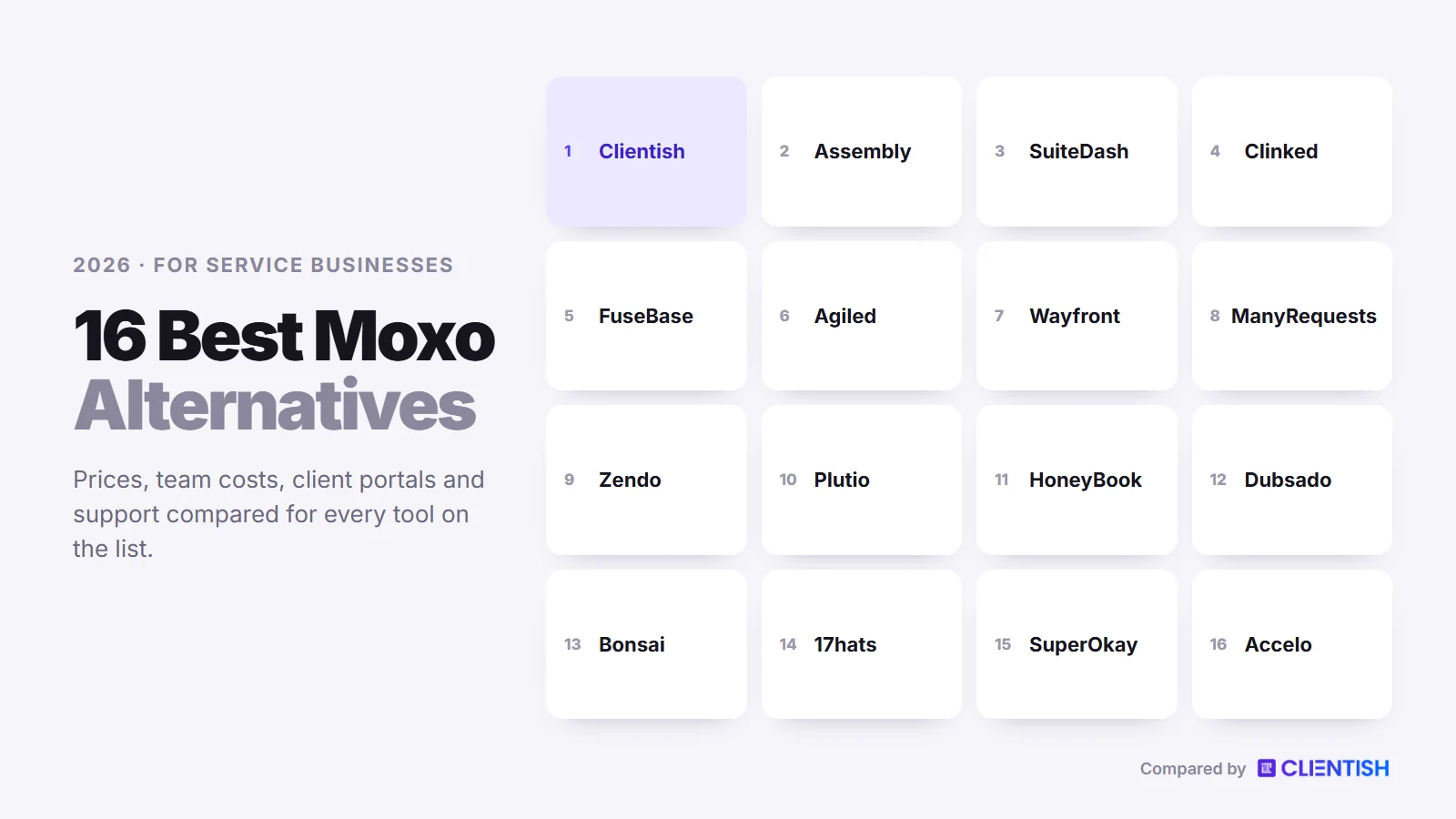
This guide explains what changed in Moxo’s pricing during 2026, how we picked 16 replacements, what each one costs a five- or ten-person team, where each beats or trails Moxo for agency work, and how to leave Moxo with your records intact.
Key Takeaways
Moxo’s pricing page has cycled through four plan line-ups since mid-2025, which is why third-party pages still disagree on what it costs. These five points reflect what Moxo’s own pages showed on October 4 and 5, 2026.
- The entry plan is $5,000 a year. Team bundles unlimited seats with 100 flows and a $100 AI allowance per year, and Scale and Enterprise are quoted.
- Several features agencies ask about live on Scale. Branching, loops, the audit log and portals on a custom domain are listed under Scale, not Team.
- We found no billing engine. Payments exist as a step inside a flow, but Moxo’s description of services shows no invoicing or recurring-billing module. Most alternatives here invoice clients directly (SuperOkay, Clinked and FuseBase are the exceptions, with no billing at all).
- You cannot try it on your own. Moxo arranges the trial around your processes; we found no self-serve sign-up and no published trial length.
- Its strengths are specific. Moxo holds SOC 2 Type II, gives every plan unlimited seats and includes native e-signatures on Team. Its own agency guide still names “overhead for very simple engagements” among its limitations.
Why Agencies Look Past Moxo
Moxo is designed for long, multi-party processes where every step needs a named owner and a record. Agency work is usually shorter and more repetitive: a client buys, the team delivers, an invoice goes out, and the cycle repeats next month. Each reason below rests on Moxo’s own pages unless marked as a review theme.
Pricing Starts at $5,000 a Year
Since late September 2026, moxo.com/pricing has listed one plan with a public price: Team, which costs $5,000 annually and comes with unlimited seats, 100 flows and an AI budget of $100. That allowance works out to roughly eight flows a month. Earlier in 2026 the same page listed a free plan plus $99 and $499 monthly tiers, and on September 10 it offered Team at $500 a month as well. That churn explains why third-party pages quote anything from $90 to $1,000 a month.
No Priced Service Catalogue
On Scale, Moxo portals can include a “Flow catalog” where clients start a request, an application or a renewal on their own. That catalogue launches processes; we found no prices, cart, coupons or checkout attached to it. An agency that sells fixed packages still needs another place for clients to buy them.
Billing Lives Outside the Platform
Team lists “Payments” among its human actions, and the client portal page mentions invoices and payments. Moxo’s own feature specification, however, describes no invoice builder, subscription plans or recurring charges. Third-party pages say Stripe connects as a flow action and that billing runs in a separate tool, which means reconciling paid work in two systems.
Your Own Domain Waits for Scale
Logo, colours, palette and per-portal branding come as standard. Scale, which has no public price, is where the full Portals module and the custom-domain option are listed. In the 2025 plans, a custom domain and email server were sold as add-ons on the upper tiers.
No Ticket Queue for Client Questions
Every Moxo plan has chat inside each flow, and Scale adds portal Messages and an AI chat assistant. Moxo also tracks SLAs on steps. What we did not find is a ticket queue with priorities, assignment and a client rating at the close, which is how most agencies handle “quick question” emails from retainer clients.
The Trial Is Arranged Through Sales
Each pricing button reads “Book a demo”, and the trial page says Moxo will “build your trial around the processes you run”. No trial length is published and no self-serve sign-up was found.
Branching, Loops and the Audit Log Sit on Scale
Team includes the workflow builder, human actions such as approvals and file requests, and magic links. Subflows, branching, loops, triggers, scheduled flows, SAML SSO, webhooks, the REST API and the organisation audit log are all Scale features. The governance that Moxo is known for is therefore not what the $5,000 plan buys.
Overhead for Simple Engagements
Moxo’s guide to portals for marketing agencies closes its own entry with three limitations. The first is “overhead for very simple engagements”; the other two are that every process has to be defined before work starts and that Moxo is not built for creative production. Setup effort is also a recurring review theme on Capterra, where a founder wrote in December 2025 that “Setup and onboarding can feel heavy”.
How We Chose These Alternatives
We started from the tools that show up next to Moxo in search results, alternatives lists and buyer reviews, then judged each one against a typical agency month instead of one onboarding project. To qualify, a tool needed a client portal plus either billing or structured approvals. Over October 4 and 5, 2026, we went through each vendor’s plan and documentation pages and recorded:
- Cost of entry: the lowest paid plan, and how many staff it covers.
- Billing: invoices, recurring charges, and whether your own processor can be connected.
- Client experience: the route clients take into the portal and the actions open to them there.
- Process tools: approvals, e-signatures and onboarding steps, because these are what Moxo users rely on.
- Branding: logo, sending address and domain, with the plan each one needs.
- Access: whether you can start a trial or free plan without a sales call.
We wrote this list at Clientish and placed our own product in the top slot, because we shaped it for agencies whose monthly rhythm is selling recurring services, delivering them and then fielding whatever the client asks next. The remaining fifteen are judged on what their vendors document, and anything we could not confirm is marked as such.
Moxo Alternatives at a Glance
The table lists each tool’s lowest paid plan, first at the monthly rate and then the yearly one, along with the details that divide them for a working team. Figures were taken directly from each vendor on October 4 and 5, 2026, and “Not found” means the feature did not appear in that vendor’s documentation.
| Tool | From (monthly / yearly) | Team included | Own payment processor | Client tickets | Trial |
| Clientish | $29 / $23 | 5, 15, 30 or 50 people | Stripe, PayPal, Paddle, SSLCommerz, manual | Every plan | 14 days, no card |
| Moxo | $5,000 a year (Team) | Unlimited seats | Payment step; no invoicing module found | No queue; in-flow chat | Arranged with Moxo |
| Assembly | Free; then $49 / $29 | 1, 1, 3 or 5 users | No, Assembly is the merchant | App template only | Free plan |
| SuiteDash | $19 / $180 a year | Unlimited | Stripe, Braintree, Authorize.Net, PayPal | Pinnacle only | 14 days |
| Clinked | $11 per user | Per user, then 100+ members | No billing | No | 14 days |
| FuseBase | Free; then $39 / about $32 | 1, 5 or 50 members | No billing | Not found | 14 days |
| Agiled | $29 / $24 | 1, 3, 7 or 15 seats | Stripe Connect, PayPal, Mollie | Pro and up | 14 days |
| Wayfront | $129 / $99 | 5 seats; extra $20 | Stripe, PayPal, manual | Yes | 14 days |
| ManyRequests | $59 / $39 | 1 seat; extra $20 | Stripe, manual | Requests used as tickets | 14 days |
| Zendo | Free; then $29 / $25 | 1 user; extra $8+ | Stripe, bank transfer | Request types | 14 days |
| Plutio | $19 / ~$15 | Solo on Core; 30 on Pro | Stripe, PayPal, Square | No ticket module | 7 days |
| HoneyBook | $36 / $29 | 0, owner + 2, or unlimited | No, HoneyBook only | No | 30 days |
| Dubsado | $35 / $335 a year | Owner + 3 free users | Dubsado Payments, Square, PayPal | Not found | 21 days |
| Bonsai | $15 / $9 per user | Billed per user | Bonsai Payments, Stripe, PayPal | Not found | 7 days |
| 17hats | $60 / $600 a year | A few users; extra $5 each | Stripe or Square | Not found | 7 days |
| SuperOkay | Free; then $12 / about $9 | 0, 3 or unlimited | No billing (pay-button link) | No | Free plan |
| Accelo | Quote only | By quote | Stripe, Authorize.net, PayPal | Yes | Demo |
Moxo shows only a yearly price for Team today. FuseBase and SuperOkay print two prices per plan without labelling which is yearly, so their lower figures are our reading of the page and carry “about”.
What a Five- or Ten-Person Agency Pays
A headline price says little until you know whom it covers. Moxo never charges per seat while most alternatives count heads, so each row below shows a year on the cheapest plan that puts the whole team in front of a client portal, with invoicing included wherever the tool offers it, at the list prices published in early October 2026.
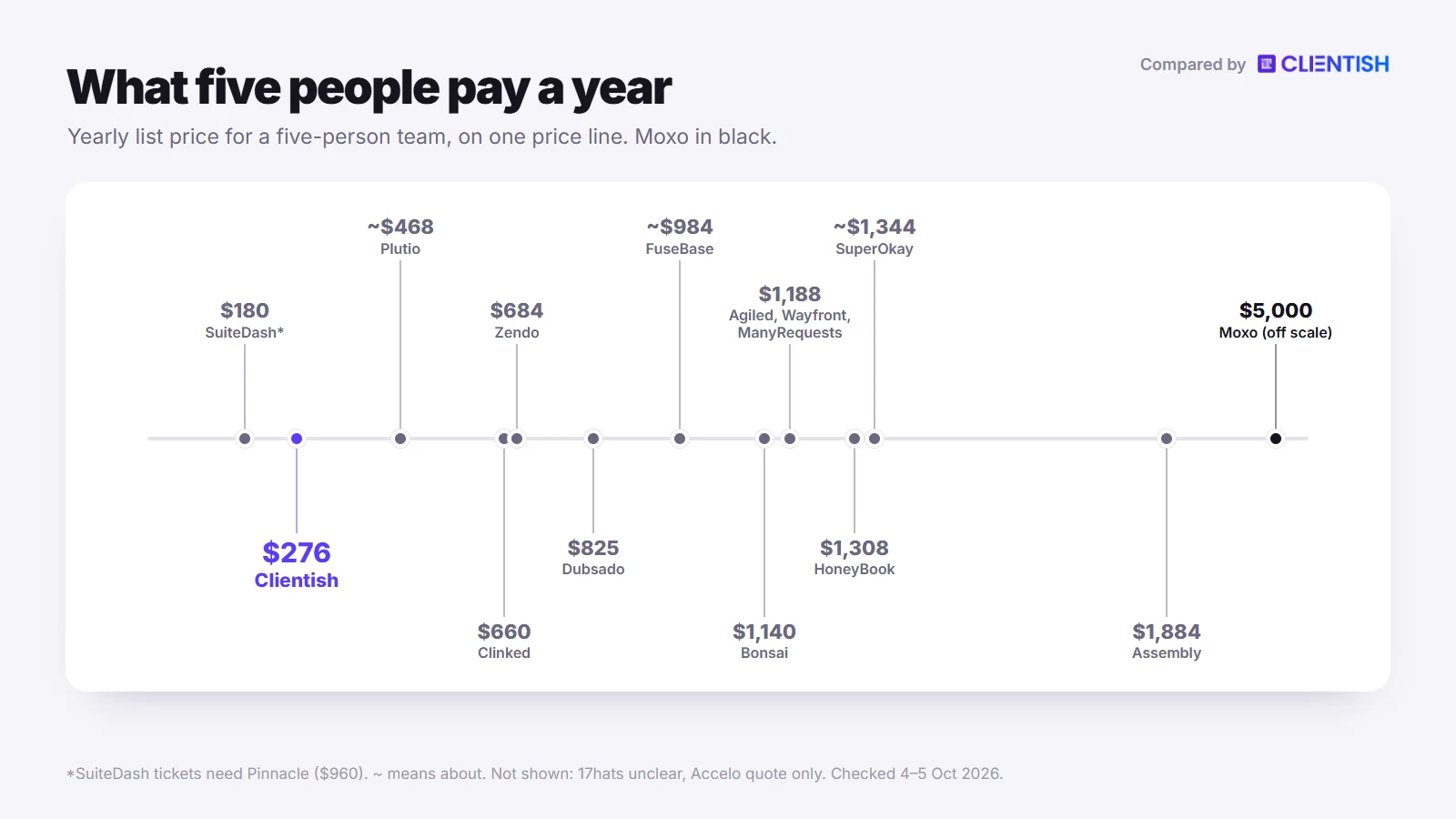
| Tool | 5 people, per year | 10 people, per year |
| Clientish | Starter: $276 | Growth: $468 |
| Moxo | Team: $5,000 | Team: $5,000 |
| Assembly | Professional + 2 users: $1,884 | Professional + 7 users: $3,624 |
| SuiteDash | Start: $180 (tickets need Pinnacle, $960) | Start: $180 (tickets need Pinnacle, $960) |
| Clinked | Start Up × 5: $660 | Start Up × 10: $1,320 |
| FuseBase | Essentials: about $984 | Advanced: about $3,192 |
| Agiled | Business: $1,188 | Business + 3 seats: $1,908 |
| Wayfront | Base: $1,188 | Base + 5 seats: $2,268 |
| ManyRequests | Core + 4 seats: $1,188 | Core + 9 seats: $2,088 |
| Zendo | Core + 4 users: $684 | Core + 9 users: $1,164 |
| Plutio | Pro: about $468 | Pro: about $468 |
| HoneyBook | Premium: $1,308 | Premium: $1,308 |
| Dubsado | Premier + 4–10 user tier: $825 | Premier + 4–10 user tier: $825 |
| Bonsai | Essentials × 5: $1,140 | Essentials × 10: $2,280 |
| 17hats | $600 a year plus $5 a month for each extra user; its pages disagree on how many users are included | |
| SuperOkay | Business: about $1,344 | Business: about $1,344 |
| Accelo | Quote only | Quote only |
How the figures were built: Moxo’s $5,000 is the Team plan and also caps you at 100 flows a year. Assembly Professional is $99 a month billed yearly for three users, plus $29 a month for each added user. Seven people fit inside Agiled Business; an eighth or later teammate adds $20 monthly apiece. For Zendo, ManyRequests and Wayfront we used yearly rates and added seats at $8, $15 and $18 a month respectively. Clinked charges $11 a user each month on Start Up, paid monthly. HoneyBook’s Essentials plan covers the owner and two team members (three people), so five people need Premium; Dubsado needs Premier plus its $25-a-month user tier. FuseBase and SuperOkay use the lower price on their pages, which appears to be the yearly rate.
The 16 Best Moxo Alternatives for Agencies
The list runs from the closest replacements to the most specialised. Number 1 is built for agencies; numbers 2 to 5 are portal and approval tools that compete with Moxo head-on; 6 to 10 are agency suites and productized-service portals; 11 to 14 are client-management suites for freelancers and small studios; and 15 and 16 are a file-and-approval hub and a PSA platform.
1. Clientish: The Agency Portal That Sells, Bills and Supports
Clientish replaces Moxo’s flow-by-flow model with an order for every purchase and a portal where clients come back each month. It is used by agencies in marketing, design, SEO, web and content, where delivery is spread across the team and clients return each month to purchase, pay and request help.
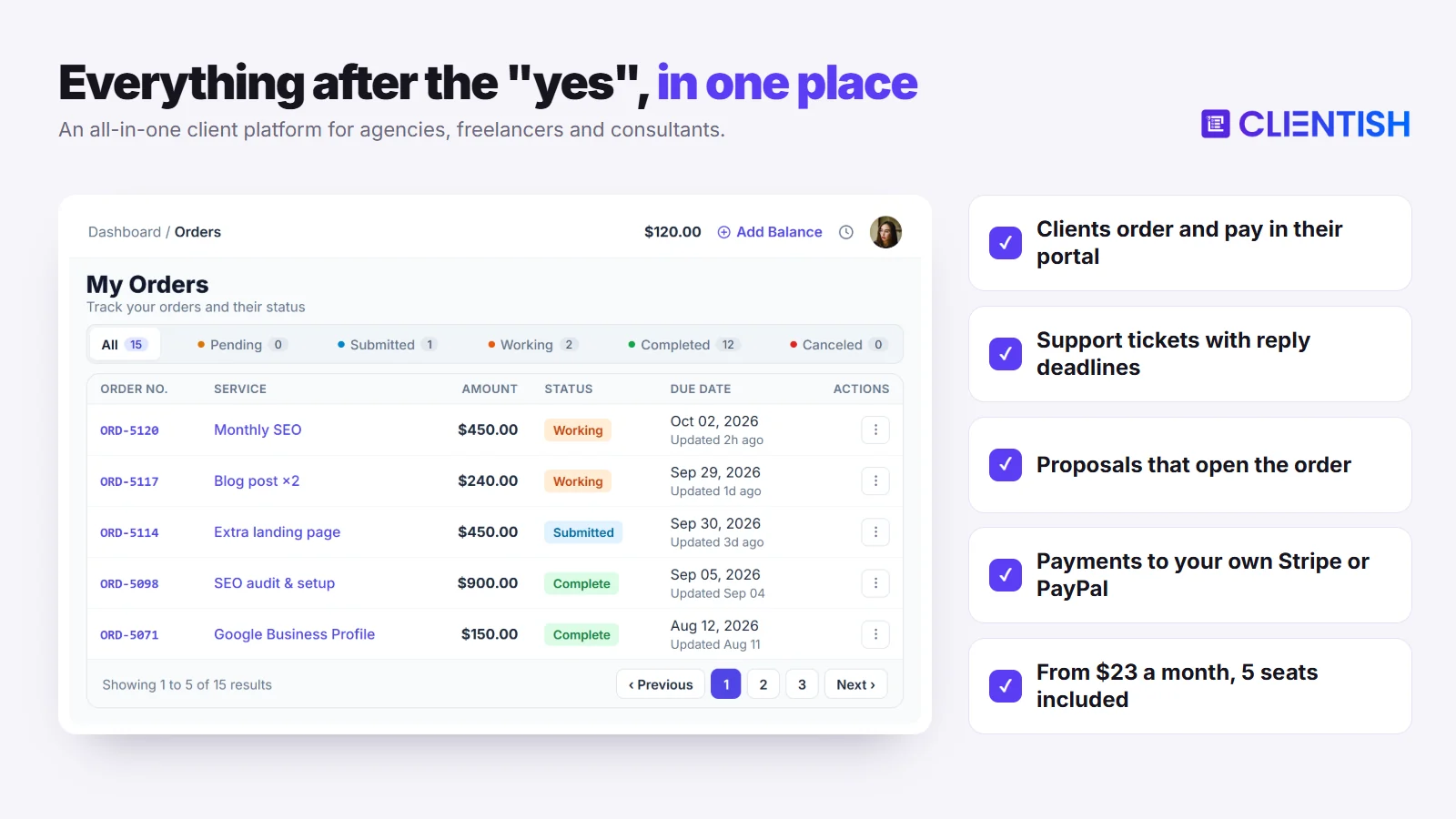
Compared with Moxo: five people pay $276 a year instead of $5,000, you can start a trial today without a demo, and invoicing, subscriptions, a priced catalogue and a help desk are part of the product rather than assembled from flow steps.
Key features (where it goes further than Moxo):
- Staff on the first plan: Starter includes five team members and Enterprise fifty, each with a role you define, and you can buy more seats.
- A client login with history: after signing in, clients find current work, unpaid invoices and their next renewal on one screen, and from there they can buy again, sign off a delivery, adjust a subscription or raise a question.
- A catalogue with cart and coupons: every service has its own price and intake questions, letting clients purchase without booking a call. Moxo’s Flow catalog starts processes; we found no prices or checkout on it.
- Orders after payment: checkout creates the invoice, payment turns it into an order, and only then does the client fill in the intake form. Inside every order sit the brief, each delivery and the number of revisions that service allows, and a delivery the client leaves untouched for seven days counts as approved, though you can lengthen or shorten that window.
- Tickets on every plan: priority sets the first-reply deadline, the team works with canned answers, tags and internal notes, and clients rate each closed ticket.
- Invoices through your gateways: connect Paddle, SSLCommerz, Stripe or PayPal, and log Rocket, Nagad, bKash, Wise or bank transfers manually. There is no Clientish commission, a client may settle from credit held on account, and where you can sell is decided by the gateway.
- Proposals that open the work: pick one of 11 designs. A typed signature from the client records their IP address, triggers an email with the signed PDF, creates their account, raises one invoice with the deposit due ahead of the balance (by default, 50%) and opens the order.
- Client-approved hours: on Growth and higher plans, hours that remote members record for a client wait for that client’s approval before they can be invoiced.
- Accounting and automation: QuickBooks and Xero connect directly, Make or Zapier can listen for events through webhooks, and an API is also available.
- Branding on every plan: the portal shows your logo, favicon and colour palette, and every client email leaves through your SMTP server. Pro and Enterprise also remove “Powered by Clientish”.
- Leads and live chat: both arrive on the Growth plan, alongside remote members.
Limits for agencies: Renewals never pull from a saved card: Clientish reopens that subscription’s invoice and the client settles it. You also get no booking calendar, no phone app and no language other than English, and portals live on clientish.io subdomains. Clientish has no SOC 2 report, no multi-step flow builder and no e-signature outside proposals, so a firm whose clients demand those three should weigh Moxo’s strengths there.
| Pros | Cons |
| Five staff from $23 a month billed yearly | Clients pay each renewal themselves |
| Invoices, subscriptions and a catalogue built in | No booking calendar or phone app |
| Ticket desk with reply targets on every plan | English interface only |
| Self-serve trial with no card | clientish.io subdomain and no SOC 2 |
Price: on annual billing Starter costs $276, Growth $468, Pro $948 and Enterprise $1,428, equal to monthly rates of $23, $39, $79 and $119; paid monthly, they cost $29, $49, $99 and $149. Plans below Enterprise cap the number of new clients per month. Sign up for the 14-day Clientish trial; no card is asked for.
2. Assembly: A Published Portal Price With Billing Included
Assembly (formerly Copilot) offers a branded client portal covering messaging, files, forms, contracts, tasks and billing, and since August 2026 it has positioned itself as an AI app builder aimed at professional service firms. It answers two gaps agencies hit in Moxo: the entry price and the missing invoicing module.
Compared with Moxo: there is a free plan and a $29 Starter tier instead of a $5,000 entry, invoices are built in, and subscriptions can take a stored card or ACH payment each period, which we did not find in Moxo. In exchange, Assembly counts internal users where Moxo gives unlimited seats.
Key features: Invoices with templates and taxes, subscriptions that auto-charge cards or ACH, payment links and a Store that holds up to four recurring plans and 12 one-time packages. Contracts carry e-signatures, and tasks can be assigned to clients. Professional unlocks the automation builder, removes the Assembly badge and lets you use your own domain for both the portal and notification emails. On security, Assembly cites SOC 2 Type II audits and signs a BAA for HIPAA on Advanced, and its QuickBooks Online and Xero connections push data in one direction only.
Limits for agencies: Assembly is the merchant: payments run through its Stripe Connect Express setup, you cannot bring your own processor, and payout accounts must sit in one of four countries: Australia, Canada, the UK or the US. Platform fees of 0.3–0.7% on invoices and 0.5–1.1% on subscriptions sit on top of card fees. Messages are one thread per client, there are only two staff roles, multi-party contract signing is not supported, and a help desk exists only as an AI-built app template. The audit log needs Advanced ($499 a month billed yearly).
| Pros | Cons |
| Free plan and public prices | No own processor; four payout countries |
| Subscriptions that charge cards and ACH | Platform fees on invoices and subscriptions |
| Custom domain from Professional | Paid per internal user; one user on Starter |
| SOC 2 Type II audits | No native ticket desk |
Price: above the free plan, Starter, Professional and Advanced cost $29, $99 and $499 monthly when billed yearly, or $49, $139 and $599 month to month, and Enterprise is quoted. Additional users cost between $29 and $79 a month, by plan and billing cycle. The current pricing page offers the free plan rather than a timed trial.
3. SuiteDash: Unlimited Staff for a Fraction of Moxo’s Fee
SuiteDash bundles a CRM, project tools, invoicing, client portals, email campaigns, online courses and onboarding automation into one configurable suite.
Compared with Moxo: unlimited staff and clients cost $180 a year on Start rather than $5,000, and your own domain is included on that entry plan, while Moxo keeps it for Scale. Its onboarding FLOWs, the nearest thing to Moxo’s flows, sit on Pinnacle.
Key features: Every plan includes a white-label portal on your own domain with its own login page, a dashboard and magic-link sign-in for each client, estimates and invoices, and recurring billing against saved cards via Stripe, Braintree or Authorize.Net, while PayPal covers single payments. QuickBooks Online syncs one way, from SuiteDash to QuickBooks, and the portal can be translated and installed as a branded web app.
Limits for agencies: Breadth comes with setup time: SuiteDash offers paid onboarding at $50 per guided session or $299 for a kickstart build-out, and the hours spent on setup are the complaint reviewers repeat most. Tickets and automations need Pinnacle at $99 a month. Xero is still a roadmap item, and its tickets showed no first-reply targets or client ratings in our check.
| Pros | Cons |
| Unlimited users and clients from $19 | Long setup; paid onboarding help is sold |
| Own domain on every plan | Tickets and automations need Pinnacle |
| Auto-charging subscriptions via three gateways | Xero not live yet |
Price: Pinnacle is $960 a year or $99 monthly, Thrive $480 or $49, and Start $180 or $19. A 14-day trial of Pinnacle needs no card.
4. Clinked: Security-First File Portal
Clinked offers a white-label portal for files, tasks, discussions and approvals, used by accounting, legal, finance and agency teams that care about data handling.
Compared with Moxo: Clinked lists ISO 27001, GDPR, G-Cloud and Cyber Essentials and starts at $11 per user a month, but it has no billing of any kind, where Moxo at least offers a payment step. Clinked restricts SSO to Enterprise, while Moxo lists SAML SSO on Scale.
Key features: Clients sign in securely with 2FA, upload files as large as 5 GB, approve or sign off documents, compare versions and leave comments or annotations; non-members can be sent file requests, and there is an online editor, chat, tasks and shared calendars. E-signatures run through DocuSign or Adobe Acrobat Sign. Standard adds your own domain and an audit trail, Premium adds white-label email notifications and enforced 2FA, and every plan includes iOS and Android apps.
Limits for agencies: No invoices, payments, service catalogue or ticket desk appear on its pricing or features pages. Start Up caps out at 25 users; beyond that, Standard, at $239 a month, covers 100 members. Enterprise is the only tier with SSO and Active Directory; a branded mobile app requires Enterprise or a paid add-on, and the SOC 2 Type II listing belongs to the separate data-room product rather than the portal.
| Pros | Cons |
| ISO 27001 and a long compliance list | No invoicing or payments |
| File approvals, versions and annotations | SSO on Enterprise only |
| Mobile apps on all plans | Steep step from Start Up to Standard |
Price: Premium is $599 a month or $479 on yearly billing; Standard is $239 a month, Start Up $11 for each user, and Enterprise is quoted. Clinked’s blog describes a 14-day free trial.
5. FuseBase: Magic-Link Portals and AI Agents for Less
FuseBase, which used to be called Nimbus, puts a client portal next to a shared document and task workspace, with AI agents on top. It overlaps with Moxo more than most tools here: magic-link access and AI automation runs appear on its pricing page, and built-in e-signatures on its client portal page.
Compared with Moxo: FuseBase publishes a free plan and paid tiers from about $32 a month, and neither tool has an invoicing module. Moxo still offers a payment step inside flows; FuseBase has none.
Key features: FuseBase portals open from a secure magic link, and inside them a client can exchange files, tick through mutual action plans and checklists of tasks, message the team, complete forms or surveys and e-sign; recordings and meeting notes are kept in the portal too, while AI requests and automation runs are rationed per plan. Advanced and Unlimited add white-label branding on your domain with your own sending address, and Zapier covers basic actions.
Limits for agencies: It has no billing, no priced catalogue and no ticket desk that we could find. Essentials covers five members and 100 clients; adding members means contacting sales, and each extra portal is $20 a month.
| Pros | Cons |
| Free plan and a 14-day trial | No billing of any kind |
| E-signatures and forms built in | White-label only from Advanced |
| Portals plus a document workspace | Extra members priced on request |
Price: apart from a free tier, Advanced shows about $266 or $399 a month, Solo about $32 or $39 and Essentials about $82 or $99, with the lower number apparently the yearly rate; Unlimited is quoted. Paid plans can be trialled for 14 days.
6. Agiled: Onboarding Flows Plus Invoicing and HR
Agiled moved to a new platform in 2026 and offers small companies CRM, projects, invoicing, a client portal, HR records and expenses.
Compared with Moxo: recurring invoices that generate and send themselves, plus a subscriptions module on Business, fill Moxo’s billing gap. Seats are counted, though, with 1, 3, 7 or 15 depending on plan, where Moxo has no seat limit.
Key features: Client portal with invoice payment, tickets (from Pro), chat, booking, files and onboarding questionnaires. Clients pay through Mollie, PayPal or Stripe Connect, or offline. Multi-party e-signing, time tracking for every seat, iOS, Android and desktop apps, and 44 built-in apps including QuickBooks Online and Xero on Business.
Limits for agencies: Extra seats are $20 a month each on Pro and above. A branded portal, custom domain and custom SMTP require Business or a $19 add-on ($15 on yearly billing), and tickets have no first-reply target or client rating that we could find. The one-time import from classic Agiled skips docs, proposals, wikis, forms and workflows.
| Pros | Cons |
| Billing, HR and CRM in one place | Seat-based pricing with $20 extras |
| Multi-party e-signing | Branding and accounting sync on Business |
| Phone and desktop apps | Legacy import leaves forms and workflows behind |
Price: paid annually, the monthly rates are $24 for Starter, $59 for Pro, $99 for Business and $199 for Scale; monthly billing lifts them to $29, $69, $129 and $249. A card-free trial runs for 14 days with Business features switched on.
7. Wayfront: Packages, Cart and Subscriptions
Wayfront, renamed from Service Provider Pro in February 2026, runs a white-label portal aimed at agencies that earn from fixed packages and retainers. Where Moxo’s catalogue starts a process, Wayfront’s cart takes payment for one.
Compared with Moxo: clients buy priced packages, subscriptions renew through Stripe, and your own domain comes on the $99 Base plan instead of a custom-quote tier. We found no proposals or contracts, only a signature field on order and intake forms, whereas Moxo includes native e-signatures.
Key features: Packages can have variants and add-ons and accept coupons; an intake form follows payment, and each order moves through statuses. There is also a helpdesk with tags and private notes, plus request limits, credits and an account balance. Base also includes time tracking on orders, a CRM with sales pipelines, Zapier, webhooks and stage automations. Wayfront promotes complete white-labelling from Base, with your domain, your sending address and seven languages, though one help article still refers to a small ‘Powered by Wayfront’ link.
Limits for agencies: Base includes five seats, then $20 a month each ($18 yearly). Its help centre shows no proposals or contracts; the API costs an extra $300 a month and only on Pro, the same tier that client coworkers and Make require, and we found no native live chat.
| Pros | Cons |
| Cart, coupons and recurring Stripe charges | $99 a month entry, billed yearly |
| Your domain on the Base plan | No proposals or contracts found |
| Helpdesk and request limits | API is a paid add-on on Pro |
Price: billed yearly, Base is $99 and Pro $249 a month ($129 and $299 month to month); Plus is priced on a call. 14-day trial with no card.
8. ManyRequests: Proofing Moxo Doesn’t Offer
ManyRequests runs request queues for creative teams, typically agencies selling design or video on subscription. Moxo’s own guide admits it is no creative production tool, and annotation on images, PDFs and video is ManyRequests’ core feature.
Compared with Moxo: clients annotate files and send requests through forms or email, billed by Stripe subscriptions, but seats beyond the first one cost extra.
Key features: Clients can order from a catalogue or a custom form, file requests through forms with conditional rules, review proofs with version history and message the team, and they rate each finished request; staff have canned replies. Billing includes coupons and auto-charging Stripe subscriptions; PayPal, Wise and bank transfer are recorded as paid by hand. Time tracking with approvals is on Core, and every plan has a custom domain and nine portal languages.
Limits for agencies: Only one seat comes with each plan; more cost $15 (Core) or $25 (Pro) a month billed yearly, or $20 and $30 monthly. Tickets are simply requests without first-reply targets, we found no proposal or contract feature, and both webhooks and the API require the Pro plan.
| Pros | Cons |
| Image, PDF and video proofing | One seat per plan, extras paid |
| Custom domain and nine languages | No reply targets on requests |
| Free migration help (on Pro per its plan table) | Stripe is the only automated gateway |
Price: Core is $59 monthly or $39 on an annual plan; Pro is $99, or $79 annually. 14-day trial, no card required.
9. Zendo: Start Free, Sell From a Storefront
Zendo sells productized services through a portal with a no-cost tier, a public storefront, and request types that can be shaped into onboarding, inquiries or support.
Compared with Moxo: Zendo is free to start and lists no transaction fees, while Moxo’s trial is built for you by its staff. Its request types model simple intake, inquiry and support processes rather than multi-step flows.
Key features: A Service Catalog for visitors, multi-step checkout with add-ons, one-off, subscription and custom services, subscriptions with trials and pauses, quotes and invoices with tax, Stripe and bank-transfer payments, real-time chat and file sharing. The portal comes in 12 languages, and client organisations can share requests from Pro.
Limits for agencies: One internal user comes with every plan, and extra users run from $8 (Core) through $12.50 (Pro) to $17 (Agency) a month. Custom domains start on Pro and the Zendo badge disappears only on Agency. Neither QuickBooks nor Xero appears among its integrations, and the public API still says coming soon.
| Pros | Cons |
| Free plan for three clients | One internal user per plan |
| Storefront with multi-step checkout | Own domain from Pro |
| 12 portal languages | No accounting integrations listed |
Price: beyond the free Essential plan, Core, Pro and Agency cost $25, $49 and $79 a month billed yearly, or $29, $59 and $99 monthly. Pro can be trialled for 14 days without a card.
10. Plutio: Automation Metered by Actions, Not Flows
Plutio packs projects, proposals, contracts, invoices, scheduling and a client portal into one app with the same features on every plan. Like Moxo it meters automation, though by workflow actions per month rather than flows per year.
Compared with Moxo: your own domain costs a $9 add-on instead of a custom-quote plan, billing is built in, and the interface runs in 34 languages.
Key features: Clients get a login to shared projects, tasks, files, chat and invoices. Square, Stripe and PayPal are the payment options, and a subscription may take money from the card on file at every renewal. The white-label add-on brings your domain, SMTP and a branded login page, and there are native iOS, Android, Mac and Windows apps plus an API and webhooks.
Limits for agencies: Core is a solo plan capped at nine active clients, so a team starts on Pro with its 30 contributors. Automations are capped at 900, 5,500 or 50,000 actions a month, there is no ticket module or service catalogue, and accounting tools connect only through an automation platform.
| Pros | Cons |
| Custom domain for $9 a month | Core is a one-person plan |
| 34 languages and native apps | No tickets or catalogue |
| Subscriptions charge saved cards | Automation actions are capped |
Price: Max runs roughly $159 monthly on annual terms ($199 if paid month to month); Pro sits near $39 ($49) and Core near $15 ($19). 7-day trial with no card.
11. HoneyBook: E-Signatures and Autopay for Small Studios
HoneyBook ties inquiries, proposals, contracts, invoices and scheduling into “smart files” that clients book, sign and pay in one go. It shares native e-signing with Moxo and adds the recurring billing Moxo lacks, but it is shaped for a solo owner or a very small team.
Compared with Moxo: invoices, payment plans and autopay come on every plan, at $36 a month rather than $5,000 a year. On the other hand, HoneyBook acts as the payment processor itself, and only businesses in Australia, Canada, the UK and the US can sign up.
Key features: Contracts with e-signatures, proposals, recurring invoices with autopay, a client portal and a custom URL on every plan, pipeline automations, a scheduler and a mobile app. Essentials brings conditional automations, QuickBooks Online, Zapier, expense tracking, standard reports and removal of the ‘Powered by HoneyBook’ label; Premium layers on advanced reports and removes the team-member cap.
Limits for agencies: Starter has no room for team members and Essentials adds two beside the owner, so four or more people means Premium, $109 a month on yearly billing. You cannot connect your own Stripe or PayPal. We found no client ticket queue, and the built-in hours tracker stopped working for HoneyBook users once September 7, 2026 passed.
| Pros | Cons |
| E-signatures, invoices and autopay together | HoneyBook is the only processor |
| 30-day trial | Four countries only |
| Mobile app and scheduler | Teams beyond three people need Premium |
Price: Starter is $36 a month or $29 on yearly billing; Essentials $59 or $49; Premium $129 or $109. 30-day free trial; team members cannot be added during it.
12. Dubsado: A Flow Builder at a Freelancer’s Price
Dubsado combines proposals, contracts, invoices, forms and scheduling with a portal for the client. Its node-based Flows automation, introduced with Dubsado 3.0, is the closest thing to Moxo’s workflow builder among the freelancer tools on this list.
Compared with Moxo: Flows cost $525 a year on Premier instead of $5,000, and invoices with autopay are included. What you give up is Moxo’s SOC 2 report and unlimited seats.
Key features: You get Flows, Kanban and table layouts, one global timer, recurring invoices with an option to make autopay mandatory, and a client portal carrying your logo and colours where appointments, contracts, proposals, forms and invoices appear. For payments you can choose PayPal, Square or Dubsado’s Stripe-based processor, and a custom URL keeps Dubsado’s name out of view.
Limits for agencies: Three users join the owner at no charge, and a fourth through tenth user adds $25 a month. The scheduler, Flows, QuickBooks and Xero require Premier. Its help centre shows no ticket desk or revision allowance, and new customers have paid higher prices since December 1, 2025.
| Pros | Cons |
| Visual Flows automation | Flows and scheduler on Premier only |
| Three extra users at no cost | No ticket desk found |
| Three payment options | Prices rose in December 2025 |
Price: Premier costs $55 monthly or $525 a year, and Starter $35 monthly or $335 a year. The 21-day trial includes Premier features with no card.
13. Bonsai: Per-User Pricing With Projects and Time
Bonsai sells proposals, contracts, invoicing, project tools and time tracking, and Zoom bought it in December 2025 while keeping the brand. It reverses Moxo’s pricing logic: Moxo ignores headcount, and Bonsai bills every person.
Compared with Moxo: Bonsai invoices clients, charges stored cards for subscriptions and draws Gantt and workload views, yet its portal opens from an emailed link with no client account, and every team member costs a seat.
Key features: Essentials brings proposals, contracts, invoicing, forms, scheduling and the portal, in which clients can check invoices and send files. Bonsai Payments covers four countries and Stripe or PayPal can be connected elsewhere. Branding removal, automations, QuickBooks, Zapier and client messaging wait for Premium.
Limits for agencies: Per-user billing means five people on Premium pay $1,740 a year. Bonsai lists custom domains as a 2026 release, and we saw nothing in its help pages about client tickets or revision requests.
| Pros | Cons |
| Gantt, workload and time tracking | Every team member is billed |
| Saved-card subscription invoices | Clients use email links, not accounts |
| Stripe and PayPal available | Custom domain not released |
Price: Bonsai bills by the head: with a yearly commitment a seat on Basic is $9, Essentials $19, Premium $29 and Elite $49 a month, and without one the same tiers cost $15, $25, $39 and $59; Elite will not sell fewer than three seats. 7-day trial.
14. 17hats: Questionnaires, Contracts and Bookkeeping
17hats ties a booking page and bookkeeping to its quotes, contracts, questionnaires and invoices.
Compared with Moxo: 17hats sells one plan at $600 a year with quotes, contracts, questionnaires, invoices and bookkeeping, though its pricing grid shows the client portal on only one of three unnamed levels. The workflow tools are to-do lists and project steps rather than multi-party flows.
Key features: One document can carry a quote, a contract and an invoice; contracts accept more than one signer, top-level questionnaires support If/Then logic, and recurring invoices with autopay run through Stripe or Square, next to a P&L report and an optional bank feed. Data goes one way to QuickBooks Online, and the iOS and Android apps cost nothing.
Limits for agencies: How many users are included differs between the pricing grid and the feature page, and each additional user costs $5 a month. Clients cannot upload files in the portal, there is no Xero connection, links use a 17hats subdomain, and we found no ticket desk.
| Pros | Cons |
| Bookkeeping built in | User count unclear on its own pages |
| Contracts with multiple signers | No file upload for clients |
| Free mobile apps | One-way QuickBooks sync, no Xero |
Price: one plan, paid $600 yearly, $800 every two years or $60 monthly, with a first-year discount live on October 5, 2026. A free plan allows four invoices a quarter, and the 7-day trial can be restarted.
15. SuperOkay: Approvals and Documents Without the Process Engine
SuperOkay gives each project its own branded portal, where files, interactive documents, tasks and approvals sit together. It covers the “collect and approve” side of Moxo in a lighter form and leaves out money entirely.
Compared with Moxo: clients log in with a magic link or a password and approve documents with one button, much as Moxo collects approvals and files, but SuperOkay has no payment step: its own FAQ says it has no invoicing feature.
Key features: Interactive documents with text, choice, file-upload and rating fields, an approval button, tasks in Kanban or list view, chat, plus embeds from tools like Airtable, Miro and Figma. Packaged Services pages present your offers, and their Buy or Pay button sends clients out to the payment service you already use. Per project, you can apply the client’s own logo, fonts and colours.
Limits for agencies: Solo+ is the first plan with staff seats, three of them, and Business removes the cap. Your own domain and complete white-labelling also begin at Solo+. Invoices, recurring billing, tickets, accounting integrations and mobile apps were not found.
| Pros | Cons |
| Free plan for one project | No invoices or payments |
| Interactive documents with approvals | Staff seats only from Solo+ |
| Embeds for most web apps | No tickets or mobile app |
Price: besides the free plan, Business is about $112 or $146 a month, Solo about $9 or $12, and Solo+ about $29 or $38. Because SuperOkay leaves its two price columns unlabelled, we treat the lower as the yearly rate; no timed trial is offered.
16. Accelo: PSA for Firms Billing Retainers and Time
Accelo, now merged with Forecast, is professional services automation software for firms that run quotes, projects, retainers, tickets and time in one system.
Compared with Moxo: both sell through sales calls, but Accelo includes the invoicing, retainers and ticketing that Moxo does not, generating invoices from project activity.
Key features: Quotes that launch projects, retainers with automatic period renewal, tickets and issue tracking, time tracking, with invoice payment links via PayPal, Authorize.net or Stripe. Through the portal, clients submit requests, give sign-off approvals, track tickets and settle invoices. QuickBooks, Xero, HubSpot, Salesforce and Jira are on its integration list, and staff get iOS and Android apps.
Limits for agencies: No prices are published, there is no trial, and Accelo expects most teams to be up and running “in a matter of weeks”. We found no client-facing catalogue or checkout, and no confirmed custom domain for the portal.
| Pros | Cons |
| Retainers, tickets and time together | No public price or trial |
| Invoices built from project work | Rollout measured in weeks |
| QuickBooks and Xero listed | No catalogue or checkout |
Price: custom quote based on team size and goals. Demo on request.
Cheapest Moxo Alternatives
Almost every tool here costs less than Moxo’s Team plan, so the useful question is which one is cheapest for your situation. These are the lowest-cost options for common cases, on yearly billing where offered.
| Situation | Lowest-cost option | Cost |
| Trying a portal before paying anything | Assembly Free, Zendo Essential, FuseBase Free or SuperOkay Free | $0 (tight limits) |
| Unlimited seats, as Moxo offers, without tickets | SuiteDash Start | $180 a year |
| Five people with invoices, tickets and a portal | Clientish Starter | $276 a year |
| Ten people with invoices, tickets and a portal | Clientish Growth | $468 a year |
| A visual automation builder for a small studio | Dubsado Premier | $525 a year |
| Compliance-minded file sharing for five | Clinked Start Up | $660 a year |
Free plans are fine for a test, but none supports a working agency: Zendo’s free tier allows three clients and a single user, SuperOkay’s one project, and Assembly’s five active contacts.
What Your Clients See in Each Tool
Moxo’s clients usually skip accounts altogether and open a magic link for each step. Whether that suits you depends on how often clients return, so this table compares the way clients enter each tool and the actions available to them.
| Tool | How clients get in | Pay invoices | Buy services | Raise tickets |
| Clientish | Own login to a branded portal | Yes | Catalogue and cart | Yes, with reply targets |
| Moxo | Magic link, or portal with one-time passcode | Payment steps | Flow catalog (Scale), no prices | No queue; chat and requests |
| Assembly | Magic link, Google or password | Yes | Store | App template |
| SuiteDash | Login or magic link | Yes | Checkout forms | Pinnacle |
| Clinked | Secure login with 2FA | No | No | No |
| FuseBase | Magic link | No | No | Not found |
| Agiled | Client portal | Yes | Checkout link (Business) | Pro and up |
| Wayfront | Passwordless login | Yes | Cart | Yes |
| ManyRequests | Client portal | Yes | Catalogue | Requests |
| Zendo | Password or social login | Yes | Storefront | Request types |
| Plutio | Own login | Yes | Proposals | No ticket module |
| HoneyBook | Magic link, password or code | Yes | Smart files | No |
| Dubsado | Client portal | Yes | Proposals | Not found |
| Bonsai | Email link, no account | Yes | Proposals | Not found |
| 17hats | Client portal | Yes | Quotes | Not found |
| SuperOkay | Magic link or password | Pay-button link only | Packaged service pages | No |
| Accelo | Email link | Yes | No | Yes |
Why Agencies Choose Clientish Over Moxo
Moxo is built to govern processes, and Clientish is built to run the commercial cycle of an agency: sell, deliver, bill and support. For a team that came to Moxo for a client portal and found a process platform, this side-by-side shows the switch.
| Moxo | Clientish | |
| Entry price | $5,000 a year (Team) | $276 a year (Starter) |
| What the plan counts | 100 flows a year and $100 of AI | 5 to 50 staff, plus monthly new-client caps below Enterprise |
| Getting started | Trial arranged with Moxo | 14-day self-serve trial, no card |
| Client access | Magic link or passcode portal | Own login to a branded portal |
| Selling services | Flow catalog on Scale, no prices or cart | Catalogue, cart and coupons |
| Invoices and recurring billing | Payment step; no module found | Invoices and subscriptions in your own gateways |
| Client support | In-flow chat; Messages on Scale | Tickets with reply targets and ratings |
| Delivery and revisions | Revision loops in flows (branching on Scale) | Orders with revision limits and auto-approval |
| Own domain | Scale (custom quote) | No; clientish.io subdomain with your branding |
| Security and signing | SOC 2 Type II, native e-signatures | No SOC 2; 2FA by email or authenticator; typed proposal signatures |
| Accounting | Not listed by name | QuickBooks and Xero |
Moxo keeps the edge on certified security, unlimited seats, native e-signatures, multi-step flows and, on Scale, a portal on your own domain. Clientish is stronger where agencies spend their week: selling services, billing them, delivering them with a revision limit and answering client questions, at a fraction of the price. Put one live retainer through a 14-day Clientish trial while Moxo keeps running.
Is Moxo Still Worth It in 2026?
For a certain kind of firm, yes. Moxo makes sense when clients expect a SOC 2 Type II supplier, processes involve several parties who sign and approve in a fixed order, the team is large enough that unlimited seats matter, and a $5,000 yearly commitment (or a Scale quote for branching and the audit log) fits the budget.
It is a weaker fit for an agency whose engagements are short and repeatable, which is the case Moxo itself flags as carrying overhead. If you need invoices and recurring billing in the same place as the work, or want to test a tool before a sales call, a purpose-built agency portal costs less and covers more of the cycle.
Which Moxo Alternative Fits Your Agency?
Match tools to how your agency sells and delivers rather than to feature counts: locate the line describing a business like yours, then put the tools listed on it onto your shortlist.
| If your business… | Look at | Why |
| sells retainers or packages to many clients with a team of 3–50 | Clientish | Staff included, catalogue, orders with revisions, tickets, your own gateways |
| wants a branded portal with billing and a free plan to start | Assembly | Store, invoices and charging subscriptions; Assembly holds the payments |
| wants unlimited users like Moxo, at a small-business price | SuiteDash | Unlimited staff and own domain on every plan |
| shares sensitive files and needs approvals with a compliance list | Clinked | ISO 27001, file approvals, audit trail from Standard |
| wants magic-link portals, e-signatures and AI agents without billing | FuseBase | Portals plus a shared workspace and built-in signing |
| also needs HR, expenses and onboarding flows | Agiled | HRM, multi-party e-signing and recurring invoices |
| sells productized packages or design subscriptions | Wayfront, ManyRequests, Zendo | Cart or storefront, requests and charging subscriptions |
| needs many interface languages or native apps | Plutio | 34 languages and apps for phone and desktop |
| is a solo studio taking bookings, contracts and deposits | HoneyBook, Dubsado, 17hats | Booking-led flows with e-signed contracts |
| is a consultancy tracking projects and time per person | Bonsai | Gantt, workload and time tracking |
| mainly collects documents and approvals per project | SuperOkay | Interactive documents and an approval button |
| is an established firm billing retainers and time | Accelo | PSA with tickets, retainers and invoicing |
| runs regulated, multi-party processes and needs SOC 2 | Stay on Moxo | Flows, audit log (Scale) and SOC 2 Type II |
Moving From Moxo Without Losing Client Records
Moxo’s exports are organised around flows rather than clients, and we found no published policy on how long data stays available after cancellation, so finish exporting before your yearly renewal date arrives.
- Download each flow record. Moxo lets you save a complete flow (summary, per-step detail, audit trail and attachments) as an archive.
- Export audit records if you are on Scale. Audit and activity records export to CSV, JSON or PDF. The organisation audit log is a Scale feature, so Team customers rely on the flow archives.
- Write down your flow templates. Templates can be exported only to another Moxo organisation, so record the steps of each one you plan to rebuild elsewhere.
- Rebuild the contact list. Moxo documents a CSV import of contacts but we found no contact export, so compile names and emails from your flows or ask Moxo support for a file.
- Import clients into Clientish. Open Clients → Import, grab the template, complete it and upload the finished CSV, XLS or XLSX. Nobody imported gets an email, and each record stays inactive until you send the invite yourself.
- Turn recurring work into services. Turn every package you sell into a service that carries its own price, intake questionnaire and revision cap; contract terms then move into a proposal template.
- Invite clients in stages. Move clients as their current flows finish, and send each one the new portal address with a short note.
Frequently Asked Questions
Searches for Moxo alternatives tend to raise the questions below, and each answer is written for agencies using the prices and features we verified in early October 2026.
Which Moxo alternative suits agencies best?
Clientish, for agencies that sell repeat services to many clients: it includes five to fifty staff, a portal with a catalogue, orders and tickets, and invoices paid into your own gateway, from $29 a month. Firms that want Moxo-style approvals without billing should look at Clinked, which lists ISO 27001, or FuseBase.
Is Moxo good for small agencies?
Usually not on cost. Entry costs $5,000 annually and covers 100 flows, the trial goes through Moxo’s team, and Moxo’s own agency guide warns of overhead on simple engagements.
What is the closest direct alternative to Moxo for a service agency?
For portal-and-approval work, Assembly is the nearest match, with SOC 2 Type II audits, contracts with e-signatures and a published free plan. For the agency cycle of selling, billing and supporting clients, Clientish fits better, and Wayfront suits agencies built around fixed packages.
What is cheaper than Moxo?
Every tool with a public price on this list. SuiteDash Start is $180 a year with unlimited users, Clientish Starter $276 for five people, while Zendo, Assembly, FuseBase and SuperOkay offer limited free tiers.
Moxo vs Assembly: which suits an agency better?
Assembly costs far less to start, has invoices, a Store and subscriptions that charge cards or ACH, and puts your domain on Professional. On the other hand, Assembly is the merchant of record, sends payouts to banks in just four countries, layers on platform fees and bills for every internal user. Moxo has unlimited seats, deeper multi-step flows and native e-signing, but no billing module was found.
Why are agencies leaving Moxo?
The main reasons are the $5,000 entry price, the move of branching, loops, the audit log and custom domains to Scale, the absence of invoicing and recurring billing, a trial you cannot start alone, and setup effort, which Moxo acknowledges for simple engagements.
Do any Moxo alternatives offer a free plan?
Yes. Assembly, Zendo, FuseBase and SuperOkay offer free plans, and the free CRM from 17hats is limited to four invoices a quarter. Clientish, SuiteDash, Wayfront, ManyRequests, Agiled and Clinked offer free trials instead.
Which alternative is best for a white-label client portal?
For a custom domain on the entry plan, SuiteDash and Wayfront include one, ManyRequests offers it on all plans, and Plutio charges $9 a month for it. Clientish applies your logo, colour scheme and favicon on every plan, routes client email through your SMTP server and hides its own badge from Pro upward, while the web address remains on clientish.io.
Which tool works best for productized services?
Clientish, Wayfront, ManyRequests and Zendo all sell packaged services through a catalogue or cart. On top of that, Clientish limits revisions per service and includes a response-timed help desk in all four plans.
Can I manage support tickets through any of these platforms?
Yes. Clientish includes tickets on all four plans, where priority drives the first-reply deadline and clients rate the outcome; Wayfront has a helpdesk; Agiled has tickets from Pro; SuiteDash puts them on Pinnacle; Accelo includes them in its PSA. ManyRequests and Zendo use requests as tickets, and Clinked, FuseBase and SuperOkay have none.
Which alternative handles recurring billing and retainers best?
Accelo bills retainers with automatic period renewal and can attribute ticket time to them. Assembly, SuiteDash, Wayfront, ManyRequests and Plutio charge saved cards automatically. Clientish runs subscriptions through your own gateways with no Clientish fee, and each renewal reopens the invoice so the client pays it, instead of charging a card.
Is there an alternative that works for agencies outside the US?
Most do, but check payments. Both HoneyBook (who may sign up) and Assembly (where payouts can go) are limited to Australia, Canada, the UK and the US. Clientish leaves it to your gateway and supports SSLCommerz, bKash, Nagad, Rocket and Wise.
How difficult is it to migrate from Moxo?
The work is mostly manual. Download each flow archive, export audit records if you are on Scale, and document templates by hand, since they export only to other Moxo organisations. Clientish then imports a client list from its CSV, XLS or XLSX template without emailing anyone.
Which tool has the best client-facing experience?
If clients mainly view files and approve, Clinked, SuperOkay and FuseBase keep things simple; if they need to buy, pay, follow an order and ask for help, Clientish puts all four behind one login.
Does Moxo include invoicing?
Not as a module we could find. Payments are a step type on Team, but Moxo’s description of services shows no invoice builder or recurring billing.
Does Moxo have a free trial?
Yes, on request. Moxo tailors each trial to the processes you describe, and it publishes neither a trial length nor a way to sign up without its team.
Is Moxo still worth it in 2026?
For regulated firms running multi-party processes that need SOC 2 Type II and unlimited seats, it can be; for agencies with short, repeatable engagements that also need billing, a dedicated agency portal is the better buy.
Does Clientish have a free plan?
No. There is a 14-day trial that needs no card; after it, the cheapest plan is $23 a month on yearly billing or $29 monthly.
Final Thoughts
Moxo suits firms that need governed, multi-party workflows and can commit $5,000 a year before branching or a custom domain. Agencies leave because their work is commercial rather than procedural: clients buy, pay, wait for delivery and send questions, and none of that needs a flow designer.
Clientish is built for that cycle, with staff seats from the first plan, a catalogue and checkout, orders with capped revisions, a ticket desk with reply targets and invoices in the gateways you already use. Invite two colleagues and one real client to a free 14-day trial, and set a week in it against a week in Moxo. See the pricing page for plan limits, and read the Moxo vs Clientish comparison for a closer look at the two.
Sources
Clientish publishes this guide. Every Moxo and alternative-tool fact was checked on October 4 and 5, 2026, against each company’s own pricing and help pages; review themes come from Capterra.
Moxo, Assembly, SuiteDash, Clinked, FuseBase, Agiled, Wayfront, ManyRequests, Zendo, Plutio, HoneyBook, Dubsado, Bonsai, 17hats, SuperOkay and Accelo are trademarks of their owners. Clientish is not affiliated with any of them. See something out of date? Tell us and we’ll correct it.


