

Wayfront is the new name, since February 2026, of SPP (Service Provider Pro), one of the longest-running portals for productized agencies. Clientish covers much of the same ground (a branded portal, a service catalogue, orders, invoices, subscriptions and a help desk) at a far lower starting price, and adds proposals, native live chat and accounting connections that Wayfront doesn’t have.
Quick answer: Wayfront suits an established productized agency that wants its own domain, a seven-language portal, task checklists per service and automatic card billing, and can budget $99 a month or more. Clientish fits agencies that want the same portal-and-checkout model for much less (three people pay $23 a month instead of $99) plus proposals, built-in live chat, PayPal, Paddle and SSLCommerz gateways, and QuickBooks or Xero.
The sections below weigh cost for teams of three, eight and fifteen, plan gates, the client’s view, package versus custom work, sales and staff tools, automation and support, using Wayfront’s pricing page, help centre and changelog as of October 2026.
Key Takeaways
Wayfront has moved fast in 2026: time tracking, sales pipelines, AI tools and a redesigned portal all arrived this year, so older SPP reviews undersell it. These are the differences that hold today.
- Entry price: Wayfront Base is $129 a month or $99 yearly, with five seats. Clientish Starter is $29 or $23 yearly, also with five people.
- Growing teams: Wayfront charges $20 a month ($18 yearly) for each seat beyond five on Base or ten on Pro. Clientish Growth covers fifteen people for $39 a month yearly.
- Branding: Wayfront includes your own domain and your own sending address from Base, and advertises no Wayfront logo. Clientish brands every plan on a subdomain and removes the “Powered by Clientish” line on Pro.
- Selling: both offer a catalogue, cart and coupons. We found no proposal feature in Wayfront, and its live chat runs through Intercom; Clientish has both built in.
- Payments: Wayfront runs Stripe and PayPal (PayPal without subscription management) plus manual payments. Clientish adds Paddle and SSLCommerz, and connects to QuickBooks and Xero.
Wayfront vs Clientish at a Glance
For a quick read, the table compares the two on the points that decide most productized-agency choices, from cost and seats to branding, selling tools and payments. Clientish is the shaded column.
| Dimension | Wayfront | Clientish |
| Plans (monthly / yearly) | Base $129 / $99; Pro $299 / $249; Plus on request | Starter $29 / $23; Growth $49 / $39; Pro $99 / $79; Enterprise $149 / $119 |
| Seats included | 5 (Base), 10 (Pro); extras $18–$20 each | 5, 15, 30 or 50 |
| Clients | Unlimited | New clients per month: 10, 50, 100, unlimited |
| Own domain and email | Every plan | Subdomain; email via your SMTP on every plan |
| Portal languages | 7 | English |
| Proposals | None found | 11 designs; acceptance creates client, invoice and order |
| Live chat | Through Intercom | Built in (Growth and up) |
| Gateways | Stripe, PayPal, manual | Stripe, PayPal, Paddle, SSLCommerz, bank transfer |
| Subscriptions | Charge cards automatically, with dunning | Invoice reopens each cycle for the client to pay |
| QuickBooks / Xero | None found in its help centre | Yes |
| Free trial | 14 days, onboarding call included | 14 days |
Wayfront has more portal customisation; Clientish costs less and adds proposals, live chat and more gateways.
Who This Comparison Is For
You run a productized agency, or you’re turning services into packages: monthly SEO, content subscriptions, design retainers, link building. You want clients to buy from a catalogue, fill in a brief and follow their orders, and you’ve seen Wayfront (or SPP) recommended in agency communities.
The question is whether you need everything Wayfront offers at its price, or whether Clientish’s version of the same model covers your agency at a fraction of the cost.
What makes agencies look beyond Wayfront
Wayfront’s ratings are high (4.9 on Capterra from 16 reviews, 4.3 on Trustpilot). The complaints that do recur are mostly about cost and control:
- No small plan. The cheapest option is $99 a month on yearly billing; SPP’s old Starter plan was discontinued in 2022.
- Per-seat charges past the included team, and features such as the template editor, client coworkers, Make and Slack held back for Pro.
- Design changes need code. Several reviewers mention needing CSS or HTML to customise forms and the portal.
- Messages tied to orders. Conversations live inside individual orders.
- Sign-up blocked over VPNs, per a Trustpilot review.
Meet Wayfront: Best for Established Productized Agencies
Wayfront began in 2014 as Service Provider Pro (SPP) and rebranded on 16 February 2026, keeping the same product, prices and workspaces. It’s built in Riga, Latvia, describes itself as bootstrapped and profitable, and says agencies have sold over $500 million in services through it.
Key features:
- Checkout: services in folders with variants, add-ons, trials and coupons; a cart; public order forms; credits and account balance.
- Orders and tasks: custom statuses, due dates, a client priority queue, and task checklists per service that hand off between assignees.
- Helpdesk: tickets from the portal, email and forms, with tags, notes, merging, snoozing, ratings and AI spam detection.
- CRM: sales pipelines on a Kanban board with stage automations, company records and scheduled activities.
- Billing: Stripe subscriptions that charge automatically, failed-payment emails, partial upfront payments and tax handling.
- Platform: time tracking, webhooks, Zapier, an MCP server, a command-line tool and an installable phone app with push notifications.
Wayfront pricing: Base $129 a month ($99 yearly) with 5 seats; Pro $299 ($249 yearly) with 10 seats; Plus by consultation. Extra seats are $20 a month or $18 yearly; API access is a paid add-on on Pro.
Meet Clientish: Best for Agencies That Want the Productized Portal at a Lower Entry Price
Clientish runs the same core loop as Wayfront: packages are bought at checkout, each purchase lands with the team that delivers it, the brief arrives with it, drafts go back and forth, and any problem becomes a ticket. It does so from $23 a month on yearly billing, with sales tools Wayfront leaves out.
Where Clientish adds to the productized model:
- Proposals: eleven designs; when a client accepts, their account, invoice and order are created together, with a deposit if you want one.
- Built-in live chat (Growth and up): no Intercom seat to pay for.
- Wider gateway choice: Paddle and SSLCommerz as well as Stripe, PayPal and bank transfer.
- QuickBooks and Xero: invoices land in your accounts without a workaround.
- Hours clients approve: remote members log time per client, and the client approves the hours report before it’s invoiced.
- Reply targets on tickets: a first-reply SLA for each priority with an overdue timer.
- Bigger teams per plan: 15 people on Growth, 30 on Pro, 50 on Enterprise.
- Leads on Growth and up; the catalogue, cart, coupons and revision allowances come with every plan.
Clientish’s tiers are listed on the pricing page; lower plans cap new clients and orders per month, which Wayfront doesn’t.
How We Compared
Our yardstick was a productized agency’s month: selling packages, onboarding new buyers, delivering orders, billing renewals and answering questions. Within that, we compared:
- Price to start and at 3, 8 and 15 people
- What each plan includes and what it holds back
- Branding and the client’s view
- Fit for productized and custom work
- CRM, time tracking and team tools
- Automation
- Support and reliability
Wayfront details are from its own pages (links in Sources). A few points differ between its pages, such as whether a small “Powered by Wayfront” link still appears; we note those where they matter.
Pricing: Which Costs Less to Start and to Scale?
Winner: Clientish at every team size. Wayfront’s smallest bill is $99 a month on yearly billing; Clientish starts at $23 for the same five people.
Price is the most common reason agencies weigh Wayfront against cheaper portals. Its plans are simple, but the floor is high, and each seat past the included number adds to the bill.
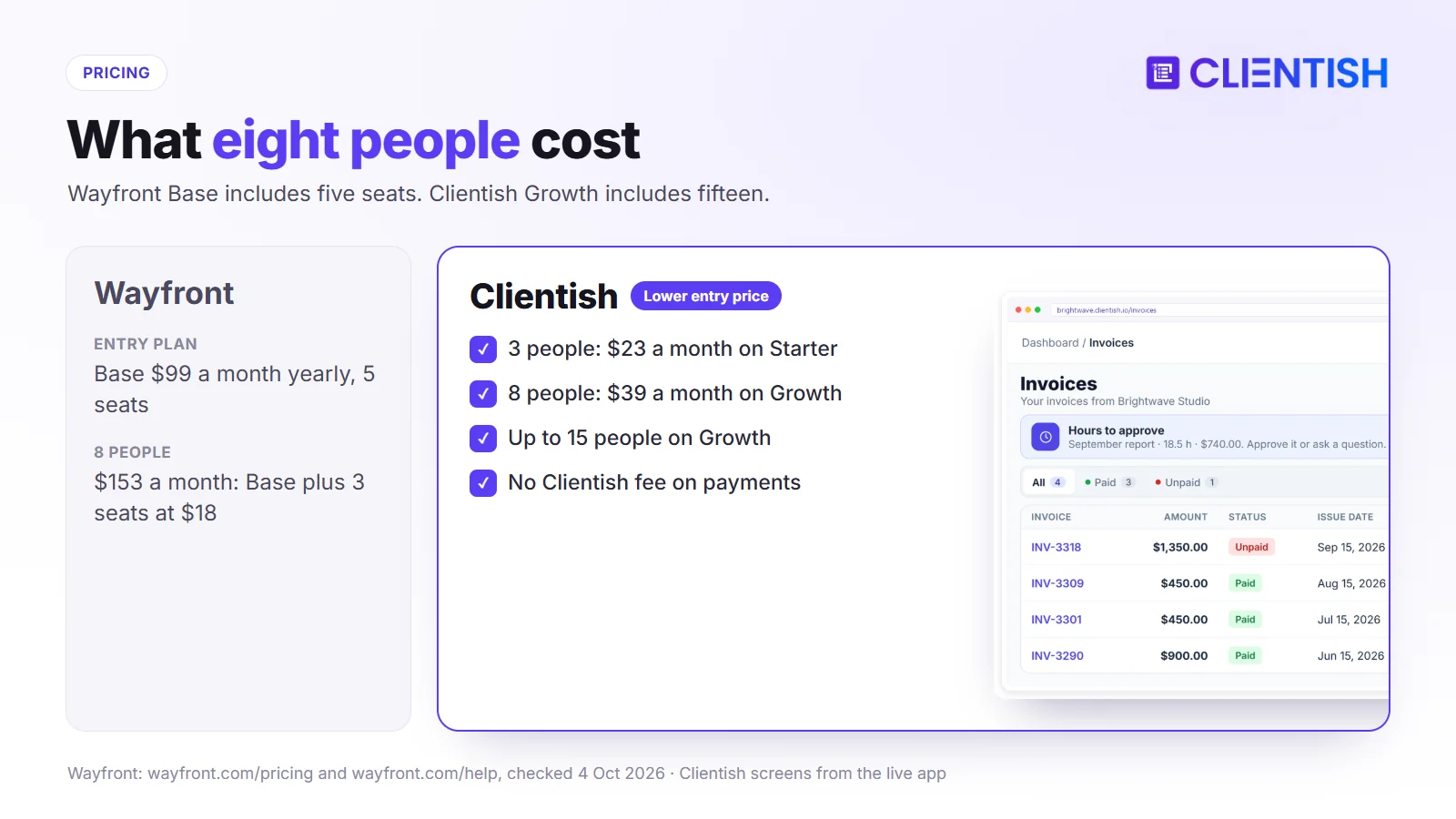
What you pay across 12 months
Yearly billing for both. Wayfront Base includes five seats and Pro ten, with extra seats at $18 a month. Clientish Starter covers five people, Growth fifteen.
| Team | Wayfront | Clientish | Yearly difference |
| 3 people | $99/mo (Base) | $23/mo (Starter) | $912 |
| 8 people | $153/mo (Base + 3 seats) | $39/mo (Growth) | $1,368 |
| 15 people | $339/mo (Pro + 5 seats) | $39/mo (Growth) | $3,600 |
The 15-person row uses Pro, because Base would need ten extra seats ($279 a month) and still lack Pro features.
What each tier unlocks
Wayfront Base already includes most of the platform: white-label, custom domain and email, unlimited clients, pipelines, task checklists, helpdesk, time tracking, Zapier and webhooks. Pro adds the HTML/CSS template editor, client coworkers, Make, Slack alerts, SEO reporting and reseller mode, and makes the API available as a $240–$300 monthly add-on. Clientish’s tiers mostly scale headcount and monthly volume; chat, lead tracking and freelancer accounts arrive with Growth, and the “Powered by Clientish” line goes away on Pro.
Where the gap narrows
Wayfront has no limit on clients, while Clientish’s lower plans cap new clients per month (10 on Starter, 50 on Growth). And if you need your own domain, Wayfront Base is the cheaper of the two simply because Clientish doesn’t offer one. You can price your own setup on a 14-day Clientish trial.
What’s Included vs Gated: Where Does Each Draw the Line?
Winner: Wayfront on what the entry plan includes, which is generous once you’ve paid its higher price. Clientish holds back less in absolute terms, but live chat, leads and remote members wait for Growth.
Plan gates matter because they decide whether you’ll need the next tier six months in.
| Feature | Wayfront | Clientish |
| Custom domain | Base | Not offered |
| Platform credit removed | Base (one help page still mentions a small link) | Pro |
| Live chat | Intercom integration | Growth |
| Client team members | Pro (client coworkers) | Client Team records in the CRM |
| Portal HTML/CSS editing | Pro | Not offered |
| API | Paid add-on on Pro | Read-only API |
Client Portal and White-Label: How Close Are They?
Winner: Wayfront on white-label depth: own domain, own sending domain and seven languages from Base. Clientish’s portal gives clients more ways to act (proposals, live chat, revision limits) but always on a clientish.io subdomain.
Both portals let clients buy, follow orders, pay invoices and raise tickets. The differences are in the address bar, the language and how far you can restyle.
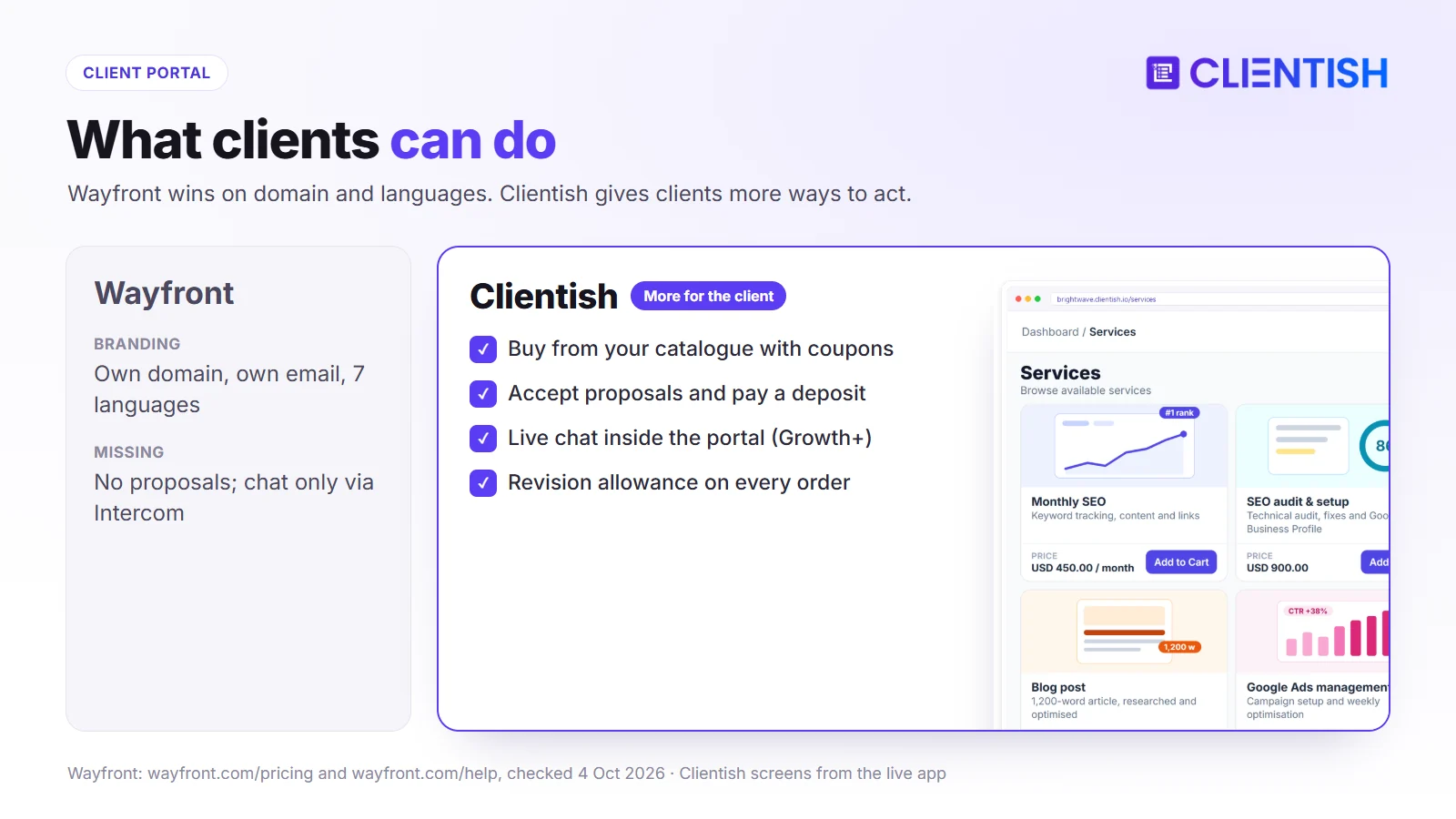
What the client sees
A Wayfront client lands on your domain (clients.youragency.com, set up with a CNAME and free SSL), signs in by magic link, password or Google, and finds a dashboard of orders, files, tickets, invoices, subscriptions, services and referrals. A Clientish client signs in on youragency.clientish.io and sees orders with their briefs and revision counts, tickets, invoices, subscriptions, a prepaid balance, the catalogue and, from Growth, live chat.
Where the white-label line sits
Wayfront’s pricing page promises “No Wayfront logo, ever” on Base, though one help article says a small “Powered by Wayfront” link appears in the sidebar and on order forms. Every Clientish plan carries your logo, palette and favicon and sends mail from your own SMTP server; the small “Powered by” credit disappears from Pro upward.
Portal depth and customisation
Wayfront lets you edit the sidebar and interface text on every plan and, on Pro, rewrite page templates in HTML and CSS. Clientish has no HTML/CSS editor for portal pages; the layout is fixed, with your branding applied.
Productized-Only vs Mixed Work: Which Bends to Your Model?
Winner: tie. Both handle packages, recurring services and one-off work; Wayfront adds credits and request limits, Clientish adds proposals for custom jobs.
Few agencies are purely productized. Most sell packages alongside the odd custom project.
Where Wayfront’s productized focus works for you
Wayfront services can be one-time or recurring, with trials, add-ons and variants. Recurring services can reopen the same order or create a new one each month, request-based services can cap active or monthly requests, and a credits module sells blocks of hours, words or points.
Where Clientish handles mixed work
Clientish sells packages from the catalogue and handles custom work through proposals: the client accepts, and the order, invoice and account are created in one step. Each service has a revision allowance, and a prepaid balance covers clients who pay ahead.
Choosing between the two models
If you sell credits or capped request plans, Wayfront’s modules fit directly. If you quote custom projects regularly, Clientish’s proposals save you a separate tool.
CRM, Time Tracking and Team Tools: Where the Gaps Are
Winner: Wayfront on CRM depth, Clientish on time approval and remote members. Both now cover the basics of tracking prospects, logging hours and limiting what each staff member can see.
Wayfront added much of this in 2026, so older comparisons that say it has no CRM or time tracking are out of date. The differences now sit in how far each tool goes: automated sales stages on one side, client sign-off on hours and freelancer accounts on the other.
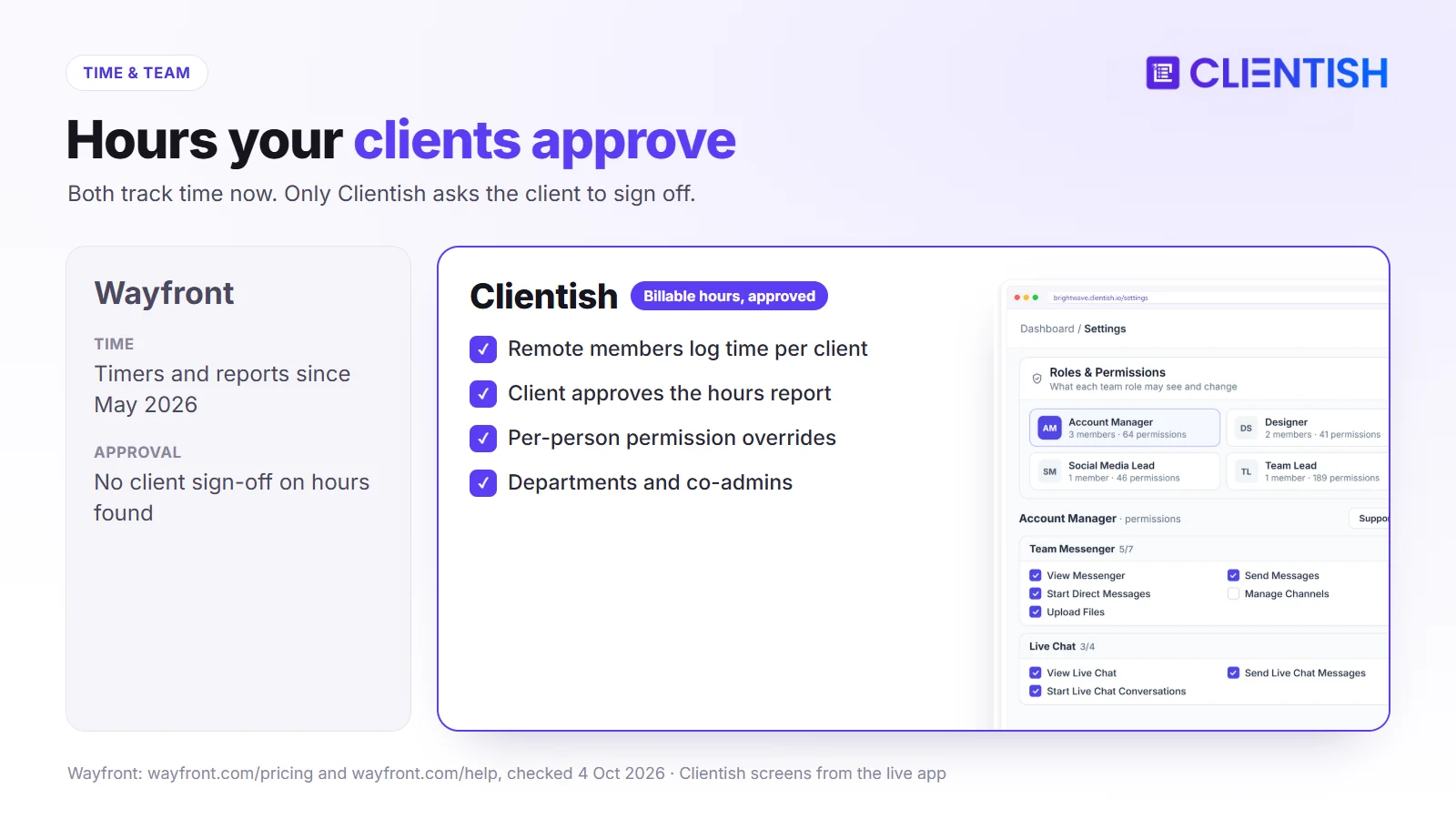
CRM: both have pipelines, with different aims
Wayfront’s sales pipelines run on a Kanban board with custom stages and automations that can send emails, add notes or tags, or draft AI follow-ups, plus company records and scheduled activities. Clientish’s Leads (Growth and up) keep prospects separate from paying clients, and when a new contact accepts a proposal, their client account, invoice and order are created together.
Time tracking: both track, only one gets client sign-off
Wayfront added time tracking in May 2026, with timers, manual entries and a report by team member and order; we found no step for clients to approve hours. On Clientish, freelancers working as remote members record hours per client, and nothing reaches an invoice until the client has signed off those hours.
Team management: closer than you’d expect
Wayfront lets you create any number of roles (Admin, Manager and Contractor by default), limit roles to assigned orders and auto-assign by service. Clientish adds per-person permission overrides, departments, co-admins and a separate remote-member type for freelancers.
Automation and Workflow: What You Get at Each Tier
Winner: Wayfront. Pipeline stage automations, task hand-offs, Zapier and webhooks are all on Base, with Make and Slack added on Pro, so more of the routine work runs without anyone touching it.
Automation saves the most time on repetitive steps such as assigning work, chasing briefs and moving orders along. Wayfront automates more of the delivery work; Clientish automates the order path and client emails such as payment reminders, and leaves the rest to Zapier or Make.
Wayfront automates task hand-offs to the next assignee, sends intake reminders after 24 hours, reopens or locks completed orders on client replies, and runs stage automations in pipelines; it also offers an MCP server and a command-line tool. Clientish automates the order path (assigning each order to the service’s team, collecting the brief through the intake form, auto-approving deliveries after seven days) and sends webhooks on ten events for Zapier or Make, but has no task templates.
Support and Reliability
Winner: Wayfront for onboarding: every trial includes a call, and it publishes a status page. Clientish includes chat and ticket support on every plan and publishes uptime targets by plan.
Both are browser-based and hosted, so reliability comes down to the vendor’s track record and how quickly you reach a person.
Wayfront runs on AWS in the US with redundancy and failover, publishes uptime on a status page, and offers priority Slack support and custom SLAs on Plus. Reviewers praise its support (4.9 on Capterra). Clientish offers chat and support tickets on every plan with dedicated support on Enterprise, plus two-factor sign-in and encrypted secrets, and its service level agreement sets uptime targets from 99.5% (Starter and Growth) to 99.95% (Enterprise).
Where Wayfront and Clientish Are Similar
At the core, the two are close cousins built for the same kind of agency, so either covers the basics a productized shop needs:
- a branded portal with a service catalogue, cart and coupons
- orders with briefs, statuses and revision handling
- a help desk with tags, notes and client ratings
- one-off and recurring billing with no transaction fee
- prepaid client balances
- roles that limit staff to assigned work
- webhooks, Zapier and AI assistant connections
Where Both Fall Short
Some gaps remain on both sides, and they’re worth planning for before you commit to either, because each one means another tool or a manual step in your week:
- Native app-store apps: Wayfront offers an installable web app; Clientish works in the phone browser.
- Gantt-style planning: neither schedules complex multi-phase projects.
- Contracts: for signed agreements, Wayfront relies on a signature field inside a form and Clientish on the typed name, title and IP recorded when a proposal is accepted; neither runs a full contract workflow.
- Profitability reporting: both report revenue and activity, not margin per client.
A Real Example: Which Fits an 8-Person Productized Agency?
An eight-person SEO agency sells three monthly packages and occasional one-off audits to 40 clients, about a quarter of them in South Asia and the Middle East, and keeps its books in Xero.
The case for Wayfront
Wayfront would give the agency its own domain, seven-language portal, task checklists for each package and automatic Stripe billing with failed-payment follow-up. Its pipelines could manage incoming leads. The cost would be about $153 a month on yearly billing, before any Intercom subscription for live chat.
The case for Clientish
On Clientish Growth at $39 a month, all eight fit with room to grow. Audits can be sold through proposals, clients in Bangladesh can pay through SSLCommerz, invoices sync to Xero, and live chat is included. The agency gives up its own domain, task checklists and automatic card billing.
The call for this team
For an agency where cost, regional payments and accounting sync matter most, Clientish fits better and saves about $1,368 a year. If branding on its own domain and deep automation were the priority, Wayfront would justify the extra.
Pros and Cons
The strengths and weaknesses from each section, side by side, so you can check them against your agency’s priorities in one glance.
Wayfront
| Pros | Cons |
| Own domain and email on Base | $99 a month minimum (yearly) |
| Task checklists, pipelines, automations | Extra seats $18–$20 each |
| Seven languages; installable app | No proposal feature found; no native live chat |
| Automatic billing with dunning; credits | Deeper design changes need Pro and code |
Clientish
| Pros | Cons |
| From $23 a month; 15 people for $39 | No custom domain or portal languages |
| Proposals, leads and live chat | No task templates per service |
| Paddle, SSLCommerz, QuickBooks, Xero | Subscriptions aren’t charged automatically |
| Client-approved hours; ticket SLAs | Monthly new-client caps on lower plans |
Good For / Avoid If
Use your budget, team size, client locations and branding needs as the filter; most agencies will recognise themselves in one of these lists.
Wayfront
Good for:
- established productized agencies with budget for $99+ a month
- agencies that need their own domain and a multi-language portal
- teams that run work from task checklists per service
- credit- or request-limited subscription models
Avoid if:
- you’re a small team watching costs
- you send proposals for custom work
- you want live chat without paying for Intercom
- buyers abroad need Paddle or SSLCommerz at checkout, or your accountant works in QuickBooks or Xero
Clientish
Good for:
- small and growing agencies moving to a productized model
- agencies that mix packages with proposal-based projects
- clients paying through regional gateways
- teams using freelancers whose hours clients approve
Avoid if:
- clients expect a portal at your own web address, or in a language other than English
- you depend on automatic card billing with dunning
- you need task checklists per service
Migrating from Wayfront to Clientish
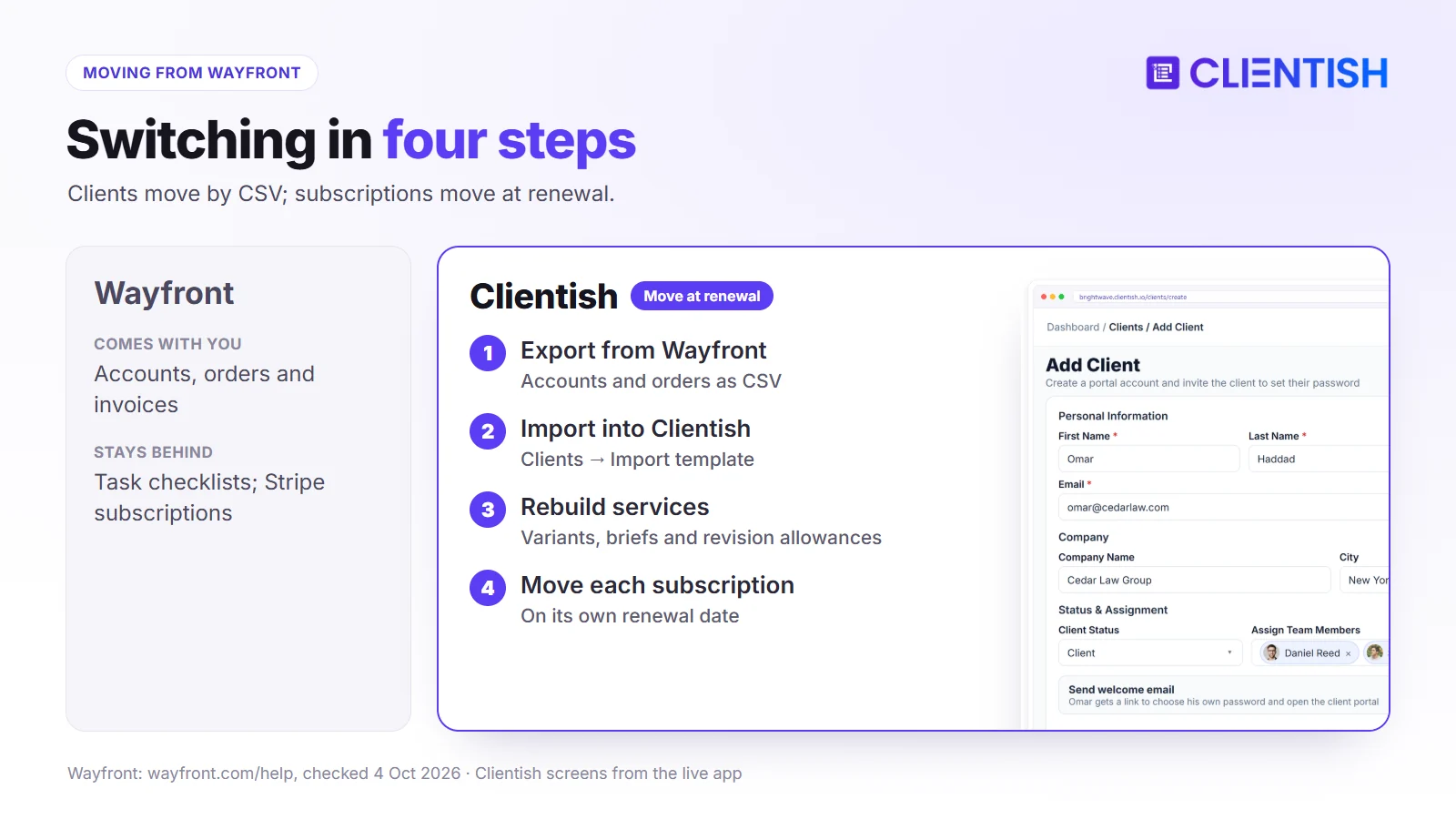
Wayfront exports accounts, orders and transactions as CSV from its Reports section and lets you download invoices in bulk as a ZIP of PDFs, so your history is easy to take with you.
What moves over easily
Download the accounts report from Wayfront, copy its columns into the import template under Clients → Import and upload it. Keep the orders export and invoice ZIP as your records.
What you’ll need to rebuild
- services, variants and add-ons as Clientish services with briefs and revision allowances
- coupons
- task checklists, which have no direct equivalent; note the steps in each service description or order tasks
- subscriptions: Wayfront’s run in your Stripe account and stay active there, so cancel each one at renewal and start its Clientish replacement
How long the handover takes
A small agency can set up services and branding in an afternoon. Moving subscriptions takes one billing cycle, since each one should switch on its own renewal date so no client pays twice.
Frequently Asked Questions
Short answers to the questions productized agencies ask most about Wayfront and Clientish: the rebrand, cost, branding, payments, live chat and switching.
Is Wayfront the same as SPP?
Yes. Service Provider Pro (SPP.co) became Wayfront on 16 February 2026; the product, prices and workspaces stayed the same.
How much does Wayfront cost?
The entry plan with five seats costs $99 a month on yearly billing ($129 monthly), and the ten-seat Pro plan $249 ($299 monthly). Extra seats cost $20 a month or $18 yearly. Plus is priced by consultation.
Is Clientish cheaper than Wayfront?
Yes, at every team size. Three people pay $23 a month on Clientish Starter versus $99 on Wayfront Base, both billed yearly.
Can I use my own domain with Wayfront?
Yes, on every plan, along with sending email from your own domain. Clientish uses a subdomain.
Does Wayfront have proposals?
We found no proposal feature. Clientish has proposals with eleven designs.
Is live chat included in Wayfront?
Through an Intercom integration. Clientish includes live chat on Growth and above.
Which payment gateways does Wayfront support?
Stripe, PayPal (without subscription management) and manual payments. Clientish lists those two plus Paddle, SSLCommerz and bank transfer.
Does Wayfront have time tracking?
Yes, since May 2026. Clientish lets clients approve logged hours before billing.
Can Wayfront sync invoices to QuickBooks or Xero?
We found no QuickBooks or Xero integration in Wayfront’s help centre. Clientish connects to both.
Can I move from Wayfront to Clientish?
Yes. Export clients and orders as CSV, import clients into Clientish, rebuild services, and switch subscriptions at each renewal.
The Verdict: Which Should Your Agency Pick?
Wayfront is built for productized agencies and added several features in 2026. If you need your own domain, a multilingual portal, task checklists, pipeline automation and automatic card billing, and $99 to $339 a month fits your budget, it covers those needs.
Most of what a productized agency does every day (catalogue, cart, orders, briefs, revisions, invoices, subscriptions and a help desk) Clientish also does, from $23 a month. It adds proposals, built-in live chat, regional gateways, QuickBooks and Xero, and client-approved hours.
- Wayfront if branding on your own domain, languages and automation depth matter more than cost.
- Clientish if you want the productized model at a lower price, with proposals, live chat and more ways to get paid.
Try Clientish free for 14 days and set up your packages, checkout and team before you decide.
Sources
Clientish publishes this comparison. We checked Wayfront’s details on October 4, 2026 on its pricing page, its help centre on domain setup, the client portal, checkout, subscriptions, PayPal and exports, and its changelog.
Wayfront and SPP are trademarks of their owner. Clientish is not affiliated with Wayfront. See something out of date? Let us know and we’ll update the page.

