
Clientish Documents
Step-by-step guides for every module, from your first workspace to proposals, billing, support and automation.
Clientish Bookings: Calendly and Cal.com Calls as Leads
How booked, moved, canceled and missed calls show up on your leads, what the brief says, and which automations they start.
Connect Calendly or Cal.com to Clientish and every call someone books turns into a lead in your pipeline, assigned to the team member who takes it. That person gets a brief before the call, and afterward one click records whether it happened.
Who can do it: connecting and settings: the owner and co-admins, and team members whose role has the General Integrations permission; recording how a call went: anyone whose role can edit leads
What Happens in Clientish When Someone Books a Call?
A booked call creates a new lead, or joins the open lead that already has the same email address.
- A new lead gets the source Calendly or Cal.com, the name and email from the booking, and the answers to the booking questions. Answers about company and phone fill those fields; the others are kept with the lead.
- If the lead is at the New or Contacted stage, it moves to Meeting.
- The lead is assigned to the team member whose calendar was booked. If nobody matches, it goes to the workspace owner.
- That person gets a “Meeting booked” bell notification. A new lead also sends your usual new-lead email, and a “New lead” post to your team chat if you connected one.
- When an existing client books, no lead is created: the call appears on the client’s page instead.
- A rescheduled call moves the meeting that is already there to the new time. It doesn’t create a second lead.
Which Calendly and Cal.com Calls Become Leads?
Every event type, unless you uncheck some on the card under Which calls become leads. A support check-in with existing clients, for example, can stay out of the pipeline.
An event type you create after your last Refresh is taken anyway, because missing a lead is worse than one extra. Click Refresh on the card to list it and decide.
What Is the Brief Before Each Calendly or Cal.com Call?
A short note to whoever takes the call, sent as early as you choose on the card: anywhere from a quarter of an hour to a full day ahead. It reads like “Call in 1 hour: Tomas Reyes (Reyes Home Goods)” and lists:
- when the call is and with whom;
- what they want, from the lead’s inquiry or their last booking answer;
- where the lead came from and when;
- how many chat messages and emails you’ve exchanged, and whether they are already a client;
- the meeting link, when there is one.
It goes to the Notifications bell, to your team chat in Slack, Microsoft Teams, Discord or Telegram, or both. A call booked closer than the time you chose gets its brief right away, and a moved call gets a new one.
How to Record Whether a Lead Showed Up
Open the lead: its Meeting card shows the call, who takes it and the booking answers. Once the call has ended, the card asks How did it go?.
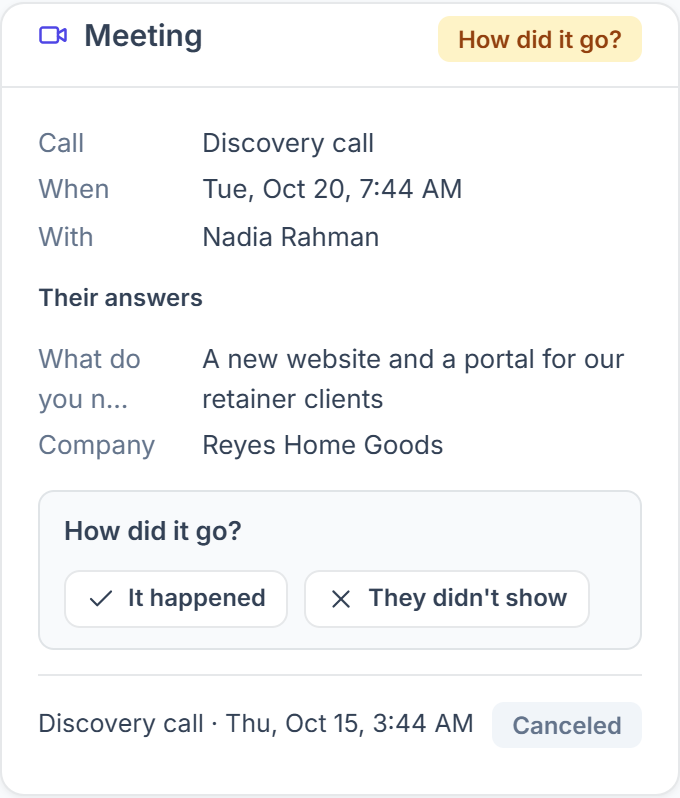
- It happened marks the call as held and offers the next step: Send proposal or Mark qualified. You can also Write notes on the call, by hand or with AI from the transcript; see meeting notes.
- They didn’t show marks a no-show. Leave Email them a link to book again checked to send a “Sorry we missed you” email with a link to pick a new time.
- A no-show marked in Calendly or Cal.com, and a cancellation made there, show up on the card automatically.
Which Automations Can a Booked Call Start?
Three lead triggers in Clientish Automations follow the calls, so you can, for example, move the lead to another stage or notify a team member.
Where Else Does Your Booking Link Appear?
The booking link you save on the Calendly or Cal.com card is used in five more places, so prospects can book from wherever they are:
- under the thank-you message of a contact, intake or onboarding form (see How to Show Your Booking Calendar After a Form);
- on your proposals;
- on a lead’s private chat page;
- in emails, through the [booking-link] shortcode;
- as a Book a call button in your client portal, if you turn it on for existing clients.